

WordPress AI (Core AI plugin)
AI · by WordPress.org
- active installs
- 60K+
- 10 ratings
- 4.2
- since last update
- 11d
- releases in 12 months
- —
- support threads resolved
- 67%
- avg daily downloads
- 2,533
- on WordPress.org
- 11 months
WordPress AI (Core AI plugin) at a glance
WordPress AI (Core AI plugin) is a free WordPress AI agent & MCP plugin by WordPress.org with 60K+ active installs and a 4.2/5 rating from 10 reviews. It was last updated on Oct 30, 2026, is tested up to WordPress 7.1.4 and needs PHP 7.4+. It has no published security vulnerabilities in the Wordfence database. Our quality score is 89/100.
What is WordPress AI (Core AI plugin)?
AI is a plugin from the WordPress Core AI team that adds optional AI tools to the admin screens and the block editor. Nothing is active after you install it. You open Settings, then AI, and switch on only the items you want. It is aimed at site owners and editors who want to try AI inside WordPress, and at developers who want a reference for building their own features.
The plugin does not ship with any AI provider access. You add a separate connector plugin for a provider such as Anthropic, Google or OpenAI, enter your API key in Settings, then Connectors, and the provider bills you for usage. Items come in two kinds. A Feature is stable and supported. An Experiment is early work that can change or disappear in any release.
Today there is one stable Feature, image generation and editing. Everything else is an Experiment, covering writing helpers, SEO suggestions, comment handling, accessibility text, audio versions of posts and MCP access for AI agents. It only works in the block editor, so sites that rely on the Classic Editor will not benefit. Review each item before turning it on, because several run on their own and some change content without showing a preview first.
Best for
- Editors who want AI writing help inside the block editor
- Site owners who want per-feature control and opt-in behavior
- Developers who want a reference for AI features in WordPress
- Teams willing to test early features on a staging site
Our take
The official 'AI' feature plugin from the WordPress core team: experimental building blocks bringing AI into WordPress itself. One to watch as a signal of where core is heading, more than a finished tool.
WordPress AI (Core AI plugin) features
Image generation and editing
Create and edit images from post content in the editor and in the Media Library. This is the only item listed as a stable Feature.
Title, excerpt and slug suggestions
Generate title ideas, excerpt drafts and permalink slugs from the editor. You pick a suggestion and insert it.
Content resizing and summaries
Shorten, expand or rephrase selected blocks, and produce short summaries of long posts.
Content translation
Translate paragraph and heading blocks, and optionally the post title, into a language you choose from the post editor.
Editorial notes
Reviews a post block by block and leaves notes about accessibility, readability, grammar and SEO. A separate Experiment can apply those notes and save the post.
Alt text and meta descriptions
Generate alt text for images and meta description suggestions, which work with several SEO plugins.
Comment moderation
Checks each new comment for toxicity and sentiment and can hold comments for review. It runs on its own and includes comments from visitors.
MCP access and abilities
Controls which abilities AI agents can use over the Model Context Protocol. Turning it on installs and activates the MCP Adapter plugin.
Request logging and key encryption
Log AI requests with short previews of prompts and replies for debugging, and encrypt provider API keys stored in the database.
Text to speech and Markdown feeds
Create an audio version of a post for visitors, and publish Markdown versions of public posts and pages for machine readers.
WordPress AI (Core AI plugin) free vs pro
Free WordPress.org version
- The whole plugin, with every Feature and Experiment listed on WordPress.org
- Per-item switches in Settings, then AI, with all items off by default
- Support for provider connector plugins such as Anthropic, Google and OpenAI
The plugin is free on WordPress.org, and no paid tier is described in the listing. AI use needs an account with a provider and your own API key through a connector plugin, and the provider bills you for each request. Local or free providers such as Ollama can be used as well.
How to use WordPress AI (Core AI plugin)
- Install on a staging site
Go to Plugins, then Add New in wp-admin, install and activate AI. The listing recommends trying it on staging first.
- Add a connector plugin
Install and activate at least one AI connector plugin for your provider, such as Anthropic, Google or OpenAI.
- Enter your API key
Open Settings, then Connectors, and add the API key from your provider account.
- Enable what you need
Open Settings, then AI, and switch on the Features or Experiments you want. Use the info icon beside each name to see when it runs and what it sends.
- Use it in the editor
For title suggestions, edit a post, click into the title field and press Generate. Choose a suggestion and click Select to insert it.
WordPress AI (Core AI plugin) screenshots (12)
-
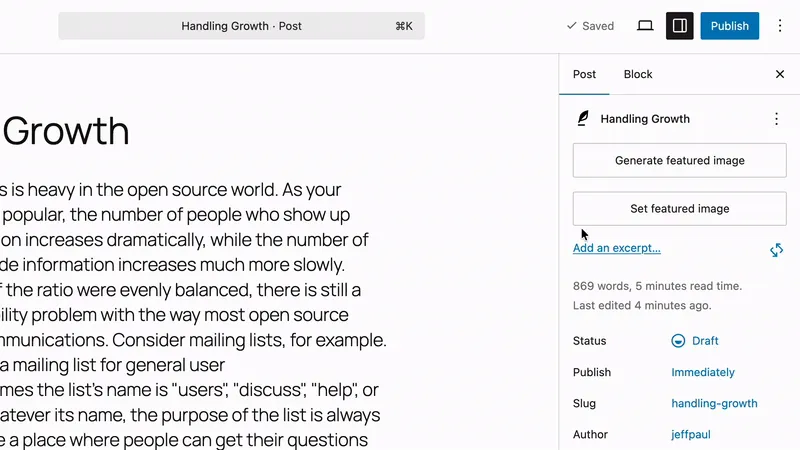
Feature: Image Generation and Editing. Post editor sidebar showing Generate featured image button and the generated featured image preview with Alt Text, Title, and Description. -
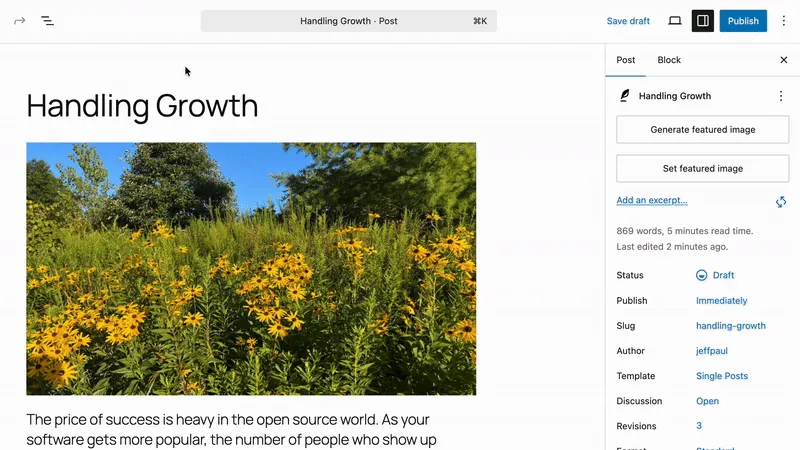
Editor Experiment: Alt Text Generation. Image block settings showing Generate Alt Text button and the generated alt text. -
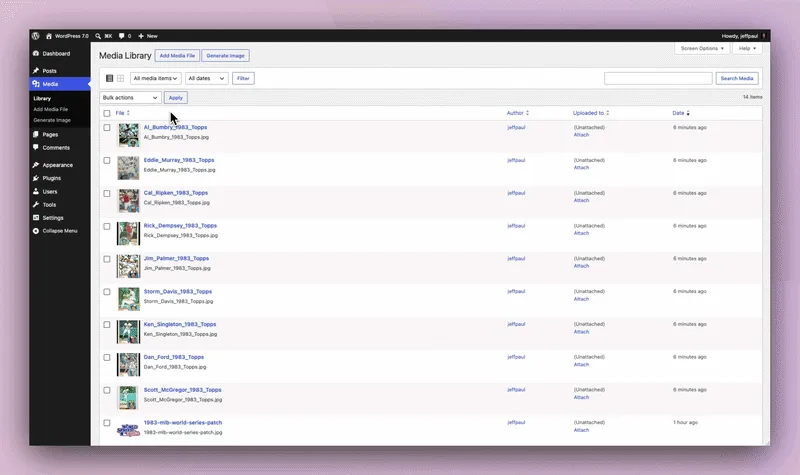
Editor Experiment: Alt Text Generation. Bulk alt text generation from within the Media Library. -
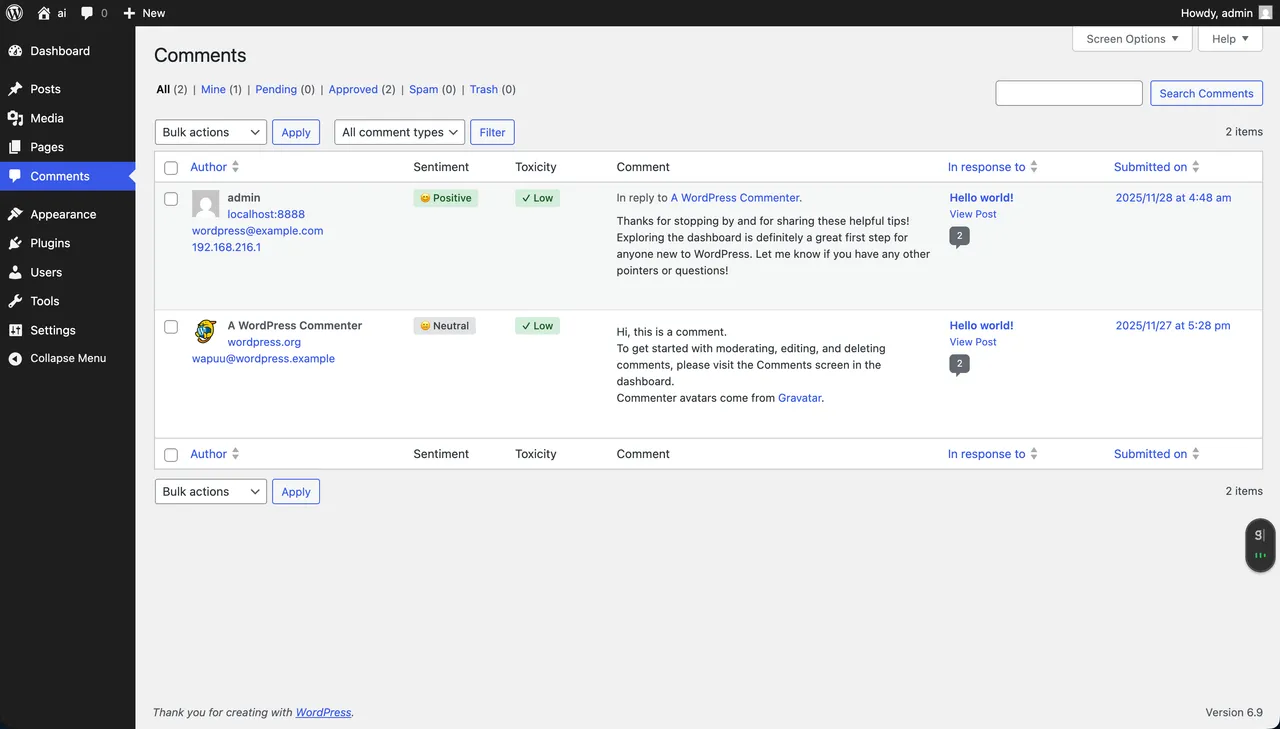
Editor Experiment: Comment Moderation. Comments admin screen showing AI-powered comment moderation features, including color-coded badges for toxicity scoring and comment sentiment. -
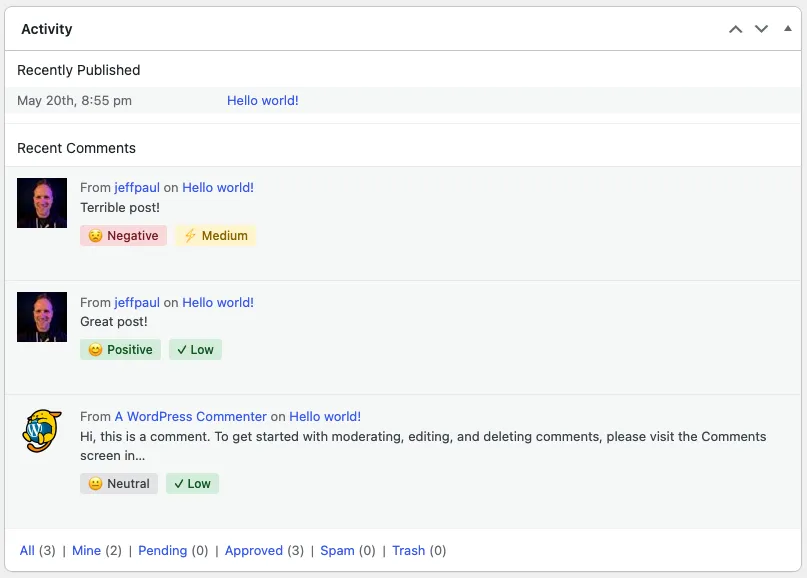
Editor Experiment: Comment Moderation. Recent Comments section of the Activity widget showing Sentiment and Toxicity scores. -

Editor Experiment: Content Classification. AI-powered suggestions for post tags and categories based on content analysis. -
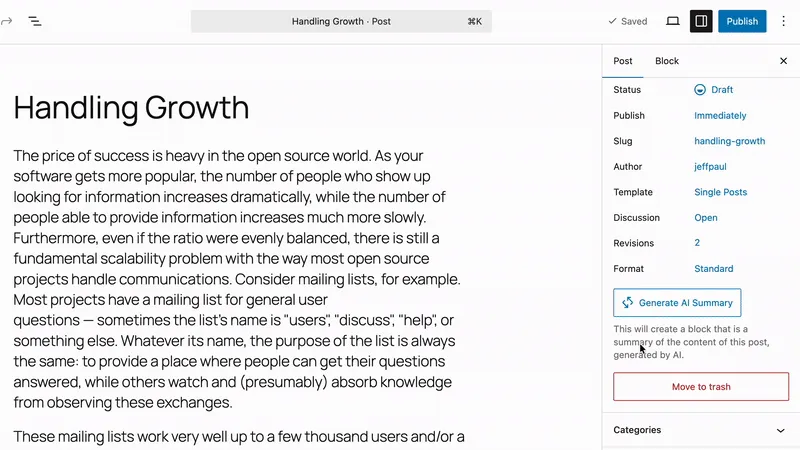
Editor Experiment: Content Summarization. Post editor sidebar showing Generate AI Summary button and the generated content summary within a Content Summary block. -
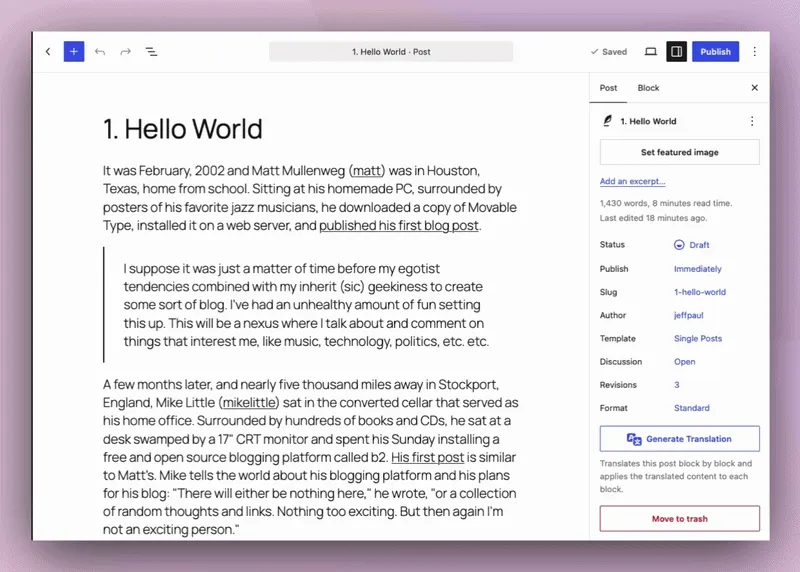
Editor Experiment: Content Translation. Translates paragraph and heading blocks, and optionally the post title, into a selected language from the post editor. -
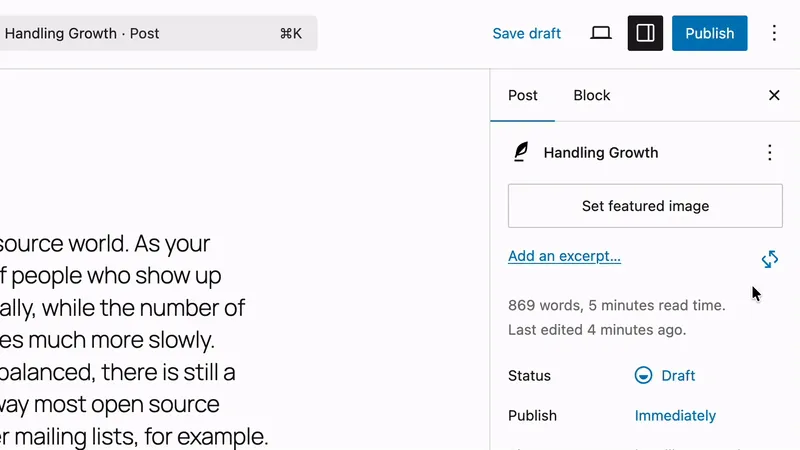
Editor Experiment: Excerpt Generation. Post editor sidebar showing Generate Excerpt button and generated excerpt. -

Editor Experiment: Meta Description Generation. Generates meta description suggestions and integrates those with various SEO plugins. -
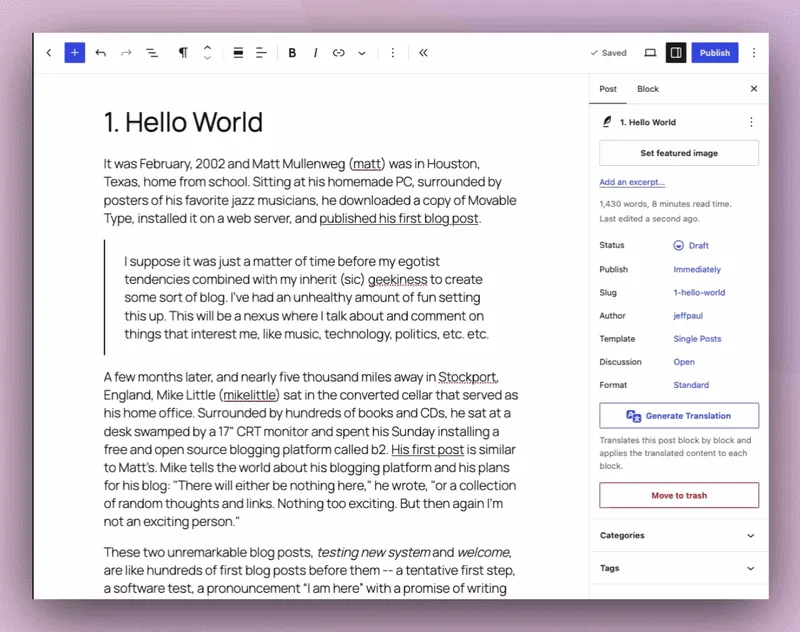
Slug Generation: Suggests SEO-friendly permalink slugs from post title or content, in the permalink popover and the pre-publish panel. -
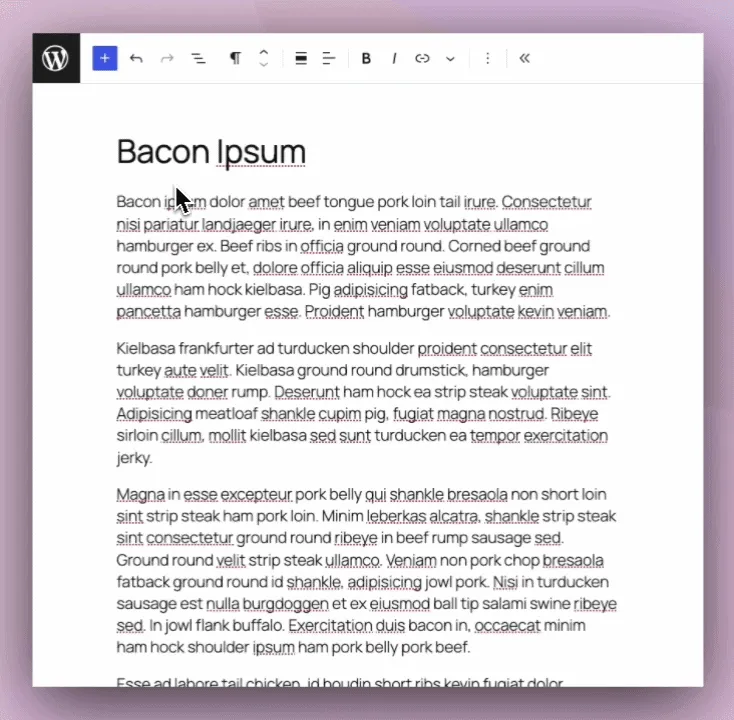
Editor Experiment: Title Generation. Post editor showing Generate button above the post title field and title recommendations in a modal.
Important information
- You need a separate connector plugin and a provider account. The provider charges for usage, and automatic Experiments can use requests without anyone clicking a button.
- Comment Moderation sends every new comment, including visitor comments and spam your filter missed, to your AI provider. Check your provider dashboard after enabling it, and use request logging to see what is sent.
- Experiments can change or be removed in any release. Some, such as Editorial Updates and Content Translation, change content without a preview. Revisions let you review or undo saved changes.
- The Block Editor is required. The Classic Editor is not supported and the listing says there are no plans to add it.
- The listing gives WordPress 7.0.3 and PHP 7.4 as minimums, and it is tested up to 7.1.4. No known vulnerabilities are recorded.
From the WordPress AI (Core AI plugin) readme
Straight from the developer's WordPress.org listing.
Full description
The AI plugin adds opt-in AI tools to the WordPress admin and Block Editor. It’s built by the WordPress Core AI team for site owners, content creators, and developers who want to try AI in WordPress early and help shape what comes next.
Features and Experiments
Nothing is turned on when you activate the plugin. You choose what to enable in Settings -> AI, and each item there is one of two kinds:
• Feature – Stable and supported. Changes avoid breaking existing behavior. Image Generation and Editing is currently the only Feature.
• Experiment – Early-stage and actively being developed. Experiments may change significantly or be removed in any release, so we recommend trying them on a staging site before using them on a live site.
Once enabled, most Experiments only send a request to your AI provider when you click a button, but some run on their own. Comment Moderation, for example, checks every new comment, including comments from site visitors. In Settings -> AI, Experiments that run on their own are marked “Runs automatically”, and the info icon next to each item’s name shows when it runs, what it sends to your AI provider, and how many requests it makes.
Read the Feature and Experiment Lifecycle to learn how Experiments are evaluated and how they can become Features.
Before You Start
• This plugin is not part of WordPress core. It does nothing until you install and activate it, and each Feature or Experiment stays off until you enable it.
• You need an AI Connector plugin and an account with an AI provider. The AI plugin doesn’t include provider credentials. Install a connector plugin such as Anthropic, Google, or OpenAI (more connectors), then add your API key in Settings -> Connectors.
• Your AI provider bills you for usage. The plugin is free; each AI request is billed by your provider under your account.
• The Block Editor is required. The Classic Editor and other editing experiences are not supported.
New to WordPress AI? Take the AI-Powered WordPress course to learn how to configure the plugin, use its features, and understand the building blocks behind them. The Getting Started guide covers setup and troubleshooting.
Feature
• Image Generation and Editing – Create and edit images from post content in the editor, and from the Media Library.
Experiments
Experiments marked “runs automatically” do their work without you clicking anything once they’re enabled. Most of them send requests to your AI provider when they run.
• Abilities Explorer – Browse and test registered AI abilities from a dedicated admin screen.
• AI Request Logging – Logs AI requests, including short previews of prompts and responses, for observability and debugging.
• Alt Text Generation – Generate descriptive alt text for images to improve accessibility.
• Block Container Label Generation – Generates short List View labels for Group, Columns, and other container blocks.
• Comment Moderation (runs automatically) – Checks each new comment for toxicity and sentiment, gives it a value score, and can hold comments for moderation. Includes comments from site visitors by default.
• Connector Approval – Require administrator approval before other plugins or themes can use the AI connectors configured on this site.
• Content Classification – Suggests relevant tags and categories to organize content.
• Content Resizing – Shorten, expand, or rephrase selected block content.
• Content Summarization – Summarizes long-form content into digestible overviews.
• Content Translation – Translates paragraph and heading blocks, and optionally the post title, into a selected language from the post editor.
• Content Verification (runs automatically) – Detects C2PA Content Credentials in uploaded images and stores them alongside the attachment.
• Custom Abilities – Makes the plugin’s general-purpose WordPress Abilities available through the Abilities API and MCP.
• Editorial Notes – Reviews post content block-by-block and adds Notes with suggestions for Accessibility, Readability, Grammar, and SEO.
• Editorial Updates – Applies pending editorial Notes to your content and saves the post, without a preview.
• Excerpt Generation – Generates excerpt suggestions for your posts.
• Key Encryption – Encrypts AI provider API keys stored in your database. Disabling the experiment or deactivating the plugin restores plaintext keys.
• Markdown Feeds – Publishes a Markdown feed and Markdown versions of your public posts and pages for AI agents and other machine readers.
• MCP Access – Controls which abilities AI agents can use over the Model Context Protocol (MCP). Installs and activates the MCP Adapter plugin when enabled.
• Meta Description Generation – Generates meta description suggestions and integrates them with several SEO plugins.
• Revision Change Summary – Summarizes what changed between two revisions of a post in plain language, on the visual and classic revisions screens.
• Slug Generation – Suggests SEO-friendly permalink slugs from the permalink popover or the pre-publish panel.
• Suggest Reply – Adds a “Suggest Reply” action to the Comments screen and Activity widget to draft replies to comments.
• Text to Speech – Generates an audio version of a post that visitors can listen to instead of reading.
• Title Generation – Generates title suggestions for your posts.
• Type-ahead Text (runs automatically) – Suggests text as you type in the Block Editor.
• WebMCP – Lets an agent browser work in the Block Editor through WebMCP, with every change visible on the page as it happens.
Coming Soon
We’re actively developing new features to enhance your WordPress workflow:
• AI Playground – Experiment with different AI models and providers.
• Content Assistant – AI-powered writing and editing in Gutenberg.
• Site Agent – Natural language WordPress administration.
• Workflow Automation – AI-driven task automation.
Roadmap
You can view the active plugin roadmap in a filtered view in the WordPress AI GitHub Project Board.
For Developers
The AI plugin is designed to be studied, extended, and built upon. Whether you’re a plugin developer, agency, or hosting provider, here’s what you can do:
Under the Hood:
These building blocks power the Features and Experiments above. They aren’t settings you turn on or off.
• AI Building Blocks – Combines the PHP AI Client and Abilities API into one plugin, as a reference implementation for developers.
• Dashboard Widgets – AI Status and AI Capabilities widgets, plus a framework for registering new ones.
• Experiment Framework – The opt-in system that registers each Feature and Experiment and its toggle.
• Guidelines – Lets abilities respect site-wide editorial standards.
• Multi-Provider Support – Works with AI Connector plugins for providers such as OpenAI, Google, and Anthropic.
Extend the Plugin:
• Build Custom Experiments – Use the Abstract_Feature base class to create your own AI-powered features.
• Pre-configure Providers – Hosts and agencies can set up AI Connector plugins so users don’t need their own API keys.
• Register Custom Abilities – Hook into the Abilities API to add new AI capabilities.
• Override Default Behavior – Use filters to customize prompts, responses, and UI elements.
• Comprehensive Hooks – Filters and actions throughout the codebase for customization.
Developer Tools Coming Soon:
• AI Playground – Experiment with different AI models and prompts.
• MCP (Model Context Protocol) – Integrate and test Model Context Protocol capabilities in WordPress workflows.
• Extended Providers – Support for experimenting with additional or alternate AI providers.
Get Started:
• Read the Contributing Guide for development setup
• Join the conversation in #core-ai on WordPress Slack
• Browse the GitHub repository to see how experiments are built
• Participate in discussions on how best the plugin should iterate.
We welcome contributions! Whether you want to build new experiments, improve existing features, or help with documentation, check out our GitHub repository to get involved.
Installation
• Install the plugin through the Plugins -> Add Plugin screen, or upload the plugin files to the /wp-content/plugins/ai directory. We recommend trying the plugin on a staging site first.
• Activate the plugin through the Plugins screen in WordPress.
• Install and activate at least one AI Connector plugin, then go to Settings -> Connectors and add your API key.
• Go to Settings -> AI and enable the Features or Experiments you want to use. Select the info icon next to each Experiment’s name to see when it runs and what it sends to your AI provider.
• Try it out. For Title Generation, edit a post and click into the title field. Click the Generate button above the field, then choose a suggestion and click Select to insert it.
Developer FAQ (11)
- What is this plugin for?
- This plugin brings opt-in AI tools for writing, editing, media, and site administration into WordPress. It’s where the WordPress Core AI team builds and tests AI features with the community, and it’s a reference implementation for developers who want to build their own AI features.
- Is this plugin part of WordPress core?
- No. The AI plugin is a separate plugin that you choose to install and activate. WordPress core includes the underlying AI Client and the Settings -> Connectors screen, but it doesn’t send anything to an AI provider on its own. AI Connector plugins (for Anthropic, Google, OpenAI, and others) are also separate plugins, and you can deactivate and delete them at any time.
- What’s the difference between a Feature and an Experiment?
- Features are stable and supported, and changes to them avoid breaking existing behavior. Experiments are early-stage: they may change significantly or be removed in any release. Both are off by default. See the Feature and Experiment Lifecycle for details.
- Is this safe to use on a production site?
- Image Generation and Editing is a stable Feature that only runs when you ask for it in the editor or Media Library. Experiments may change or be removed in any release, so we recommend trying them on a staging site before enabling them on a live site. Once enabled, most Experiments only run when you click a button. A few run automatically: • Comment Moderation sends every new comment, including comments from site visitors, to your AI provider and can hold comments for moderation. • Type-ahead Text requests suggestions while you type in the Block Editor. • Content Verification checks each new image upload for Content Credentials. It doesn’t send anything to your AI provider. Some Experiments change your content without a preview after you click their button. For example, Editorial Updates rewrites blocks and saves the post, and Content Translation replaces block text in the editor. You can review or undo saved changes with revisions. In Settings -> AI, the info icon next to each Experiment’s name shows when it runs and what it sends to your AI provider.
- Which AI providers are supported?
- The plugin can work with provider connector plugins from Anthropic (Claude), Google (Gemini), OpenAI, and others. Install and activate the relevant connector plugin, then configure it in Settings -> Connectors. The AI plugin also lists a few reviewed connector plugins there, such as Mistral and Vercel AI Gateway, so they can be installed from that screen.
- Do I need an API key to use the features?
- Yes, currently you need to provide your own API key for the configured AI Connector plugin, such as OpenAI, Google AI, or Anthropic.
- How much does it cost?
- The plugin itself is free, but you’ll need to pay for API usage from your chosen AI provider. Costs vary by provider and usage. Most providers offer free trial credits to get started. There are some local, open source, and free providers (like Ollama) that can be used as well. Experiments that run automatically can use requests without anyone clicking a button. Comment Moderation, for example, makes one request for each new comment, including comments from site visitors and spam that your spam filter hasn’t already caught. Check your provider’s usage dashboard after enabling an Experiment, and turn on AI Request Logging to see each request the plugin makes.
- Can I use this without coding knowledge?
- Yes. The plugin is designed for content creators and site administrators. Once your AI Connectors are configured, you can enable Features and Experiments in Settings -> AI and use them directly from the post editor. As with any Experiment, we recommend trying them on a staging site first.
- Does this plugin support the Classic Editor?
- No. The AI plugin currently supports only the Block Editor (aka Gutenberg). The plugin is designed around modern editor APIs, block-based content workflows, and the evolving editing capabilities being developed within WordPress core (including Gutenberg). The Block Editor has been the default WordPress editing experience since WordPress 5.0 in 2018 and remains the primary focus of active editor development. Concentrating development efforts on the Block Editor enables the project to ship new features, experiments, and integrations more quickly while avoiding the complexity of maintaining parallel implementations across multiple editing experiences. Although the Classic Editor plugin continues to have a large installed base, the Core AI team has chosen to prioritize innovation and experimentation within the Block Editor ecosystem. At this time there are no plans to add official Classic Editor support.
- Something went wrong. How do I turn the plugin off?
- Go to Plugins and deactivate AI. If you can’t reach the admin, deactivate it with WP-CLI (wp plugin deactivate ai) or rename the wp-content/plugins/ai folder using FTP or your host’s file manager. To turn off a single Experiment instead, disable it in Settings -> AI. The Getting Started guide has more troubleshooting steps.
- Where can I get help or report issues?
- • Questions and help: Post in the plugin’s support forum, or ask in the #core-ai channel on WordPress Slack. • Bugs and feature requests: Open an issue in the AI plugin’s GitHub repository. • Problems connecting to a provider or with an API key: Contact the support forum or GitHub repository for that AI Connector plugin, such as Anthropic, Google, or OpenAI.
Downloads, last 30 days
Trend vs previous period: +53.4%
Average daily downloads: 2,484 over the last 7 days , 2,533 over 30 days.
Security history
No known CVEs · 0 published vulnerabilities (Wordfence)
WordPress AI (Core AI plugin) FAQ
What is this plugin meant for?
It adds optional AI tools for writing, editing, media and site administration to WordPress. It is where the Core AI team builds and tests features with the community. Developers can also use it as a reference when building their own AI features.
Is it built into WordPress core?
No, it is a separate plugin you choose to install. Core provides the underlying AI client and the Connectors settings screen, but it sends nothing to a provider by itself. Connector plugins are separate too, and you can remove them at any time.
How is a Feature different from an Experiment?
A Feature is stable and supported, and changes are meant to avoid breaking current behavior. An Experiment is early-stage and may change a lot or be dropped in any release. Both are switched off until you enable them.
Which AI providers can I use?
Connector plugins exist for providers such as Anthropic (Claude), Google (Gemini) and OpenAI, among others. Install the connector for your provider, then configure it under Settings, then Connectors. Problems with a connection should go to that connector's support channel.
What will it cost me?
The plugin is free, but the provider bills each request to your account. Some providers give trial credits, and local or open source options like Ollama are possible. Automatic Experiments, such as comment moderation, make one request per comment.
Is it safe to run on a live site?
Image generation only runs when you ask for it. Experiments may change or vanish, so test them on staging first. A few run by themselves, including comment moderation and type-ahead text, and some change content without a preview.
Does it work with the Classic Editor?
No. It supports only the Block Editor, because it is built around block-based editing APIs. The listing states there are no plans for Classic Editor support.
How do I switch it off if something goes wrong?
Deactivate AI on the Plugins screen. If you cannot reach the admin, use WP-CLI or rename the plugin folder over FTP or your host's file manager. To stop one Experiment only, disable it in Settings, then AI.
WordPress AI (Core AI plugin) alternatives
Build faster in Elementor with 90+ Elementor widgets and addons, 600+ ready-made Elementor templates, without writing code. Premium Addons powers 600,000+ websites with the Elementor carousel, mega menu, blog posts…

Your WordPress site just became MCP-ready. WPVibe is the Model Context Protocol server for WordPress, connecting your self-hosted site to any AI assistant or AI agent that speaks MCP: Claude, ChatGPT, Cursor,…

Your WordPress site, now in the conversation Jetpack connects your WordPress site to ChatGPT, Claude, and the other AI agents you already use. Ask in plain language to draft a post, see which pages got the most…

This plugin provides Google AI (Gemini) integration for the PHP AI Client SDK. It enables WordPress sites to use Google’s Gemini models for text generation, image generation, text to speech, and other AI…

Secure WordPress MCP server for Claude, ChatGPT and AI agents. Easy MCP AI is a free plugin that turns your own site into a Model Context Protocol (MCP) server. Connect Claude to WordPress , connect ChatGPT to…

miniOrange Secure MCP Server is a complete WordPress MCP server plugin that turns your WordPress site into a fully working Model Context Protocol (MCP) server. Once installed, you can connect Claude to WordPress,…
Listing data from WordPress.org and the Wordfence vulnerability feed, refreshed Nov 9, 2026; listing details fetched Nov 14, 2026. Screenshots are from the plugin's WordPress.org listing. Not affiliated with WordPress.org.