
Jetpack
Jetpack - AI Agents & MCP, Security, Backup & Analytics · by Automattic
- active installs
- 3M+
- 2,409 ratings
- 3.7
- since last update
- 6d
- releases in 12 months
- —
- support threads resolved
- 85%
- avg daily downloads
- 136,875
- on WordPress.org
- 15.8 years
Jetpack at a glance
Jetpack is a freemium WordPress AI agent & MCP plugin by Automattic with 3M+ active installs and a 3.7/5 rating from 2,409 reviews. It was last updated on Nov 3, 2026, is tested up to WordPress 7.1.4 and needs PHP 7.4+. It works with OpenAI, Claude. All 33 of its published vulnerabilities have patched versions. Our quality score is 86/100.
What is Jetpack?
Jetpack is a large WordPress plugin that bundles security, backups, analytics, performance, marketing and writing tools, all tied to a WordPress.com account. Most of the work runs on WordPress.com servers rather than on your own host. The recent addition is an AI connection: you can link ChatGPT, Claude or another MCP-compatible agent to your site and manage it by typing requests in plain language.
The agent connection goes through your WordPress.com account, so you do not install or host an MCP server. You choose which tools the agent may read from and which it may change, and you can switch individual tools off at any time. The agent can draft posts, build pages, tidy the Media Library, and also look at stats, backups, security scans and newsletter settings.
Jetpack suits owners who want one plugin to cover many jobs, and who are comfortable linking the site to WordPress.com. It is also a lot of plugin. If you only need one thing, such as backups or stats, the listing says several parts are available as separate plugins, so you can install just that piece. Read the plan details carefully, because the free and paid parts are spread across many modules and products.
Best for
- Owners who want security, backups and stats in one plugin
- Sites that want to manage content through ChatGPT or Claude
- Stores that need off-site backups and spam filtering
- Publishers who run newsletters and social sharing
Jetpack features
Connect AI agents via MCP
Link ChatGPT, Claude, Cursor, VS Code and other MCP clients to your site. Ask for stats, drafts, scans or settings changes in everyday language.
Per-tool agent permissions
MCP access is off until you enable it. You decide which tools can read your site and which can make changes, and you can turn any of them off later.
Jetpack AI in the editor
Write a first draft from a prompt inside the block editor. It can also change tone, fix grammar, shorten or lengthen text, and translate content.
Real-time backups and restore
VaultPress Backup stores copies off-site and restores to a chosen point in one click. It can also migrate, clone or create a test copy of the site.
Malware scan and firewall
Automated scans look for malware and vulnerabilities and offer one-click fixes. A web application firewall blocks malicious traffic.
Login protection and monitoring
Brute force protection, optional two-factor login through WordPress.com and email alerts for downtime are included, along with an activity log of every change.
Site stats
See visitors, top posts, referrers, countries, link clicks and downloads, and review trends with weekly highlights and a yearly summary.
Newsletter and social sharing
Turn posts into email newsletters, offer paid subscriptions, and auto-share new posts to networks such as Facebook, LinkedIn, Bluesky and Mastodon.
Image CDN, search and video
Serve images and static files from a global network, add a site search with WooCommerce filters, and host video without ads.
Forms, SEO and spam filtering
Build contact forms without code, set SEO titles and descriptions with an automatic sitemap, and filter spam with Akismet.
Jetpack free vs pro
Free WordPress.org version
- Site stats, image CDN and related posts
- Downtime monitoring and brute force protection
- Automatic sharing to social networks
- SEO tools and an XML sitemap
- Connection of AI agents through Jetpack AI and MCP access
- Contact forms and many content blocks
Pro Paid version
- Real-time backups, malware scanning and one-click fixes
- Spam filtering, video hosting, search and priority support
- Jetpack Pro and Jetpack Complete plans that combine these services
- Separate products: VaultPress Backup, Scan, Akismet Anti-spam, Jetpack AI, Search and VideoPress
The core plugin is free for non-commercial sites, and paid plans and single products add the heavier services. The listing does not give prices or the AI usage limits. The AI agent connection runs through your WordPress.com account, not through a provider key you supply.
How to use Jetpack
- Install the plugin
In wp-admin, go to Plugins, then Add New, search for Jetpack, then install and activate it.
- Connect WordPress.com
Follow the setup prompts to link a WordPress.com account. A free account is enough, and you can create one during the connection.
- Turn on the features you need
Open the Jetpack dashboard and enable the services you want, such as stats, login protection, downtime monitoring or SEO tools.
- Connect your AI agent
Open Jetpack AI in the Jetpack menu, enable MCP access and pick your agent, for example ChatGPT or Claude.
- Set tool permissions
Choose which tools the agent can read from and which it can change. Start with read-only tools until you trust the results.
- Consider a paid plan
If you run a store or earn money from the site, look at backups and scanning. Real-time backups also give you a way to undo a change an agent made.
Jetpack screenshots (7)
-
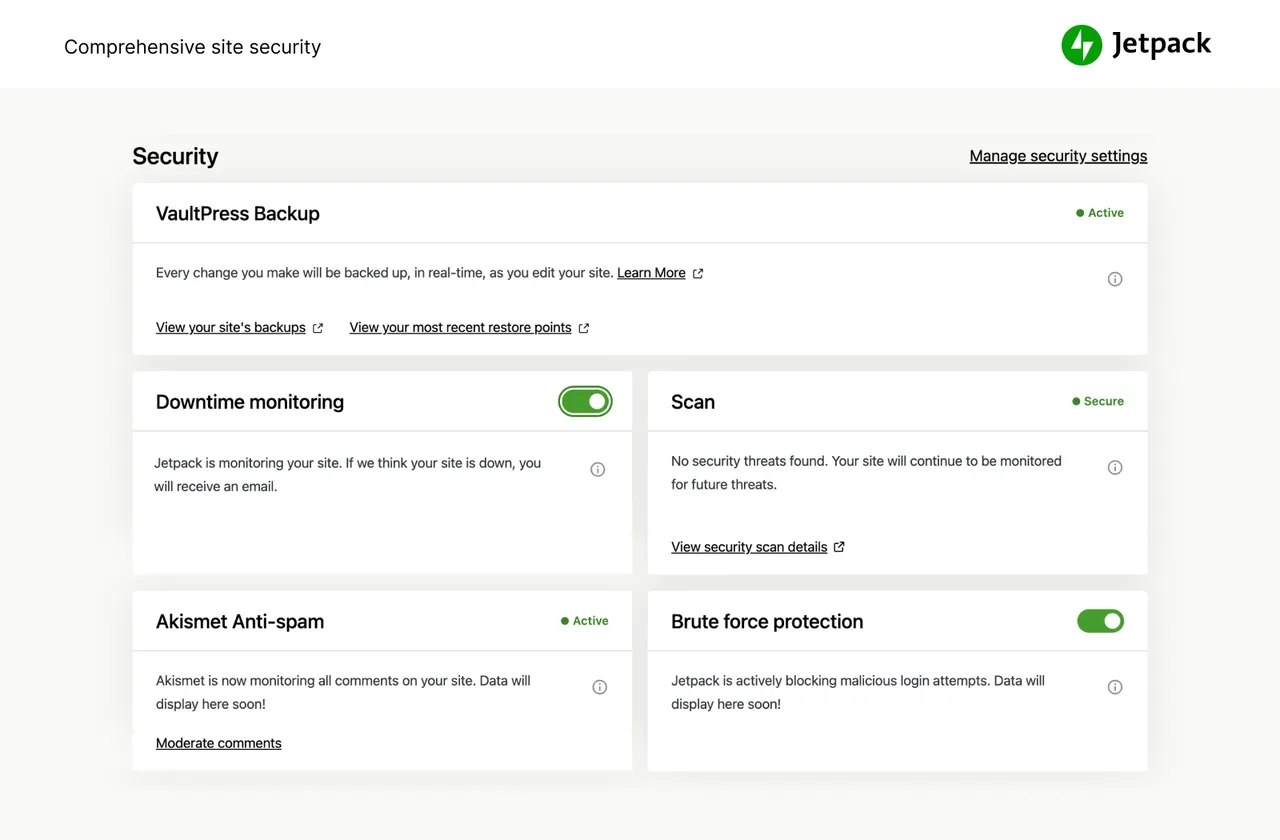
Jetpack Pro and Complete provide easy-to-use, comprehensive WordPress site security including backups, malware scanning, and spam protection. -
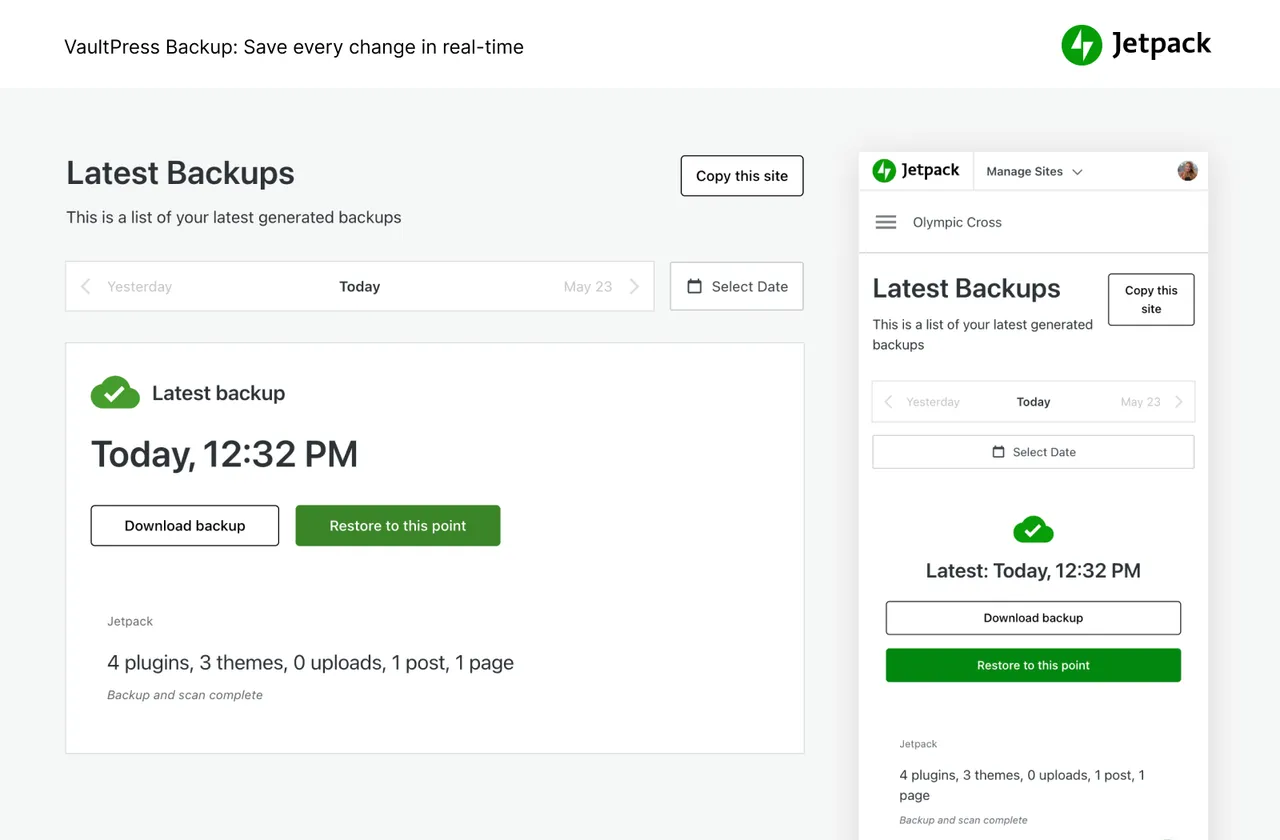
Save every change with real-time backups and get back online quickly with one-click restores. -
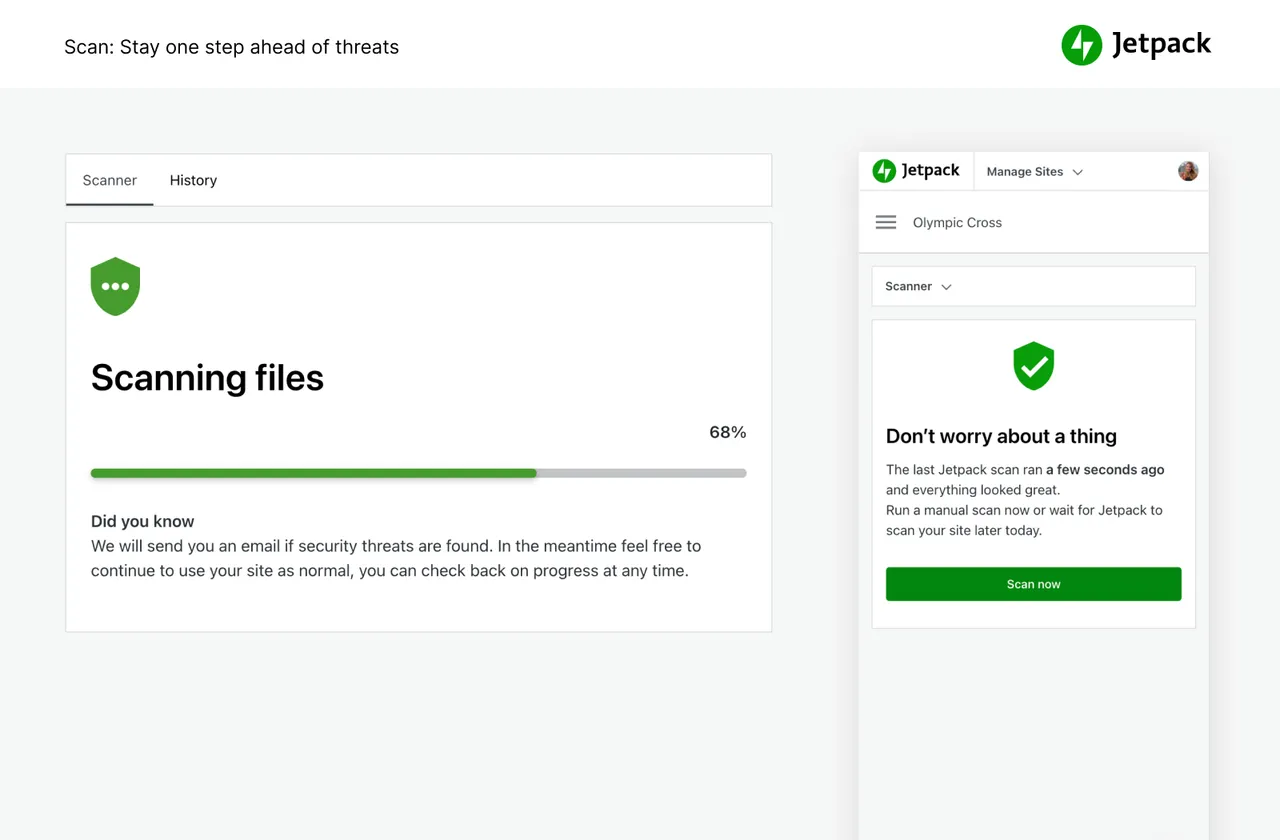
Automated malware scanning and one-click fixes keep your site one step ahead of security threats. -
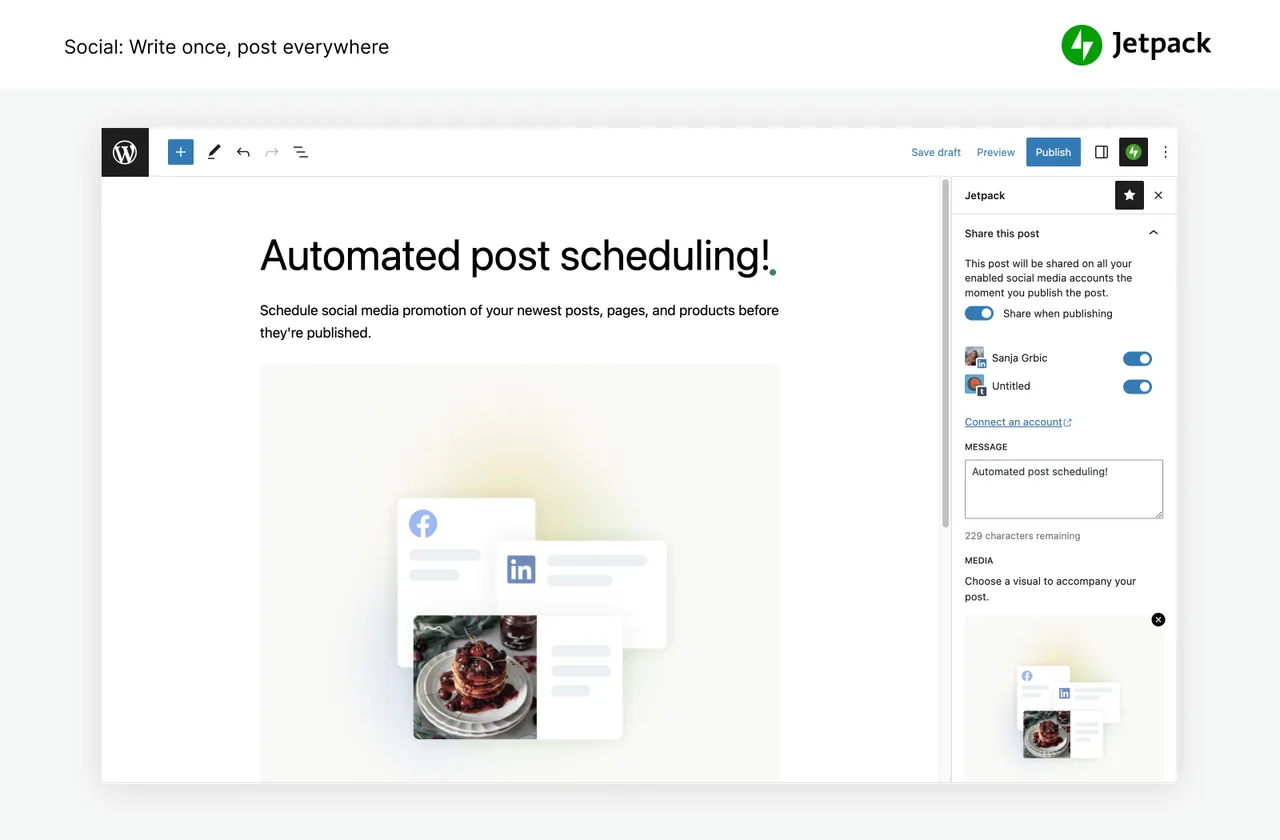
Promote your newest posts, pages, and products across your social media channels. -
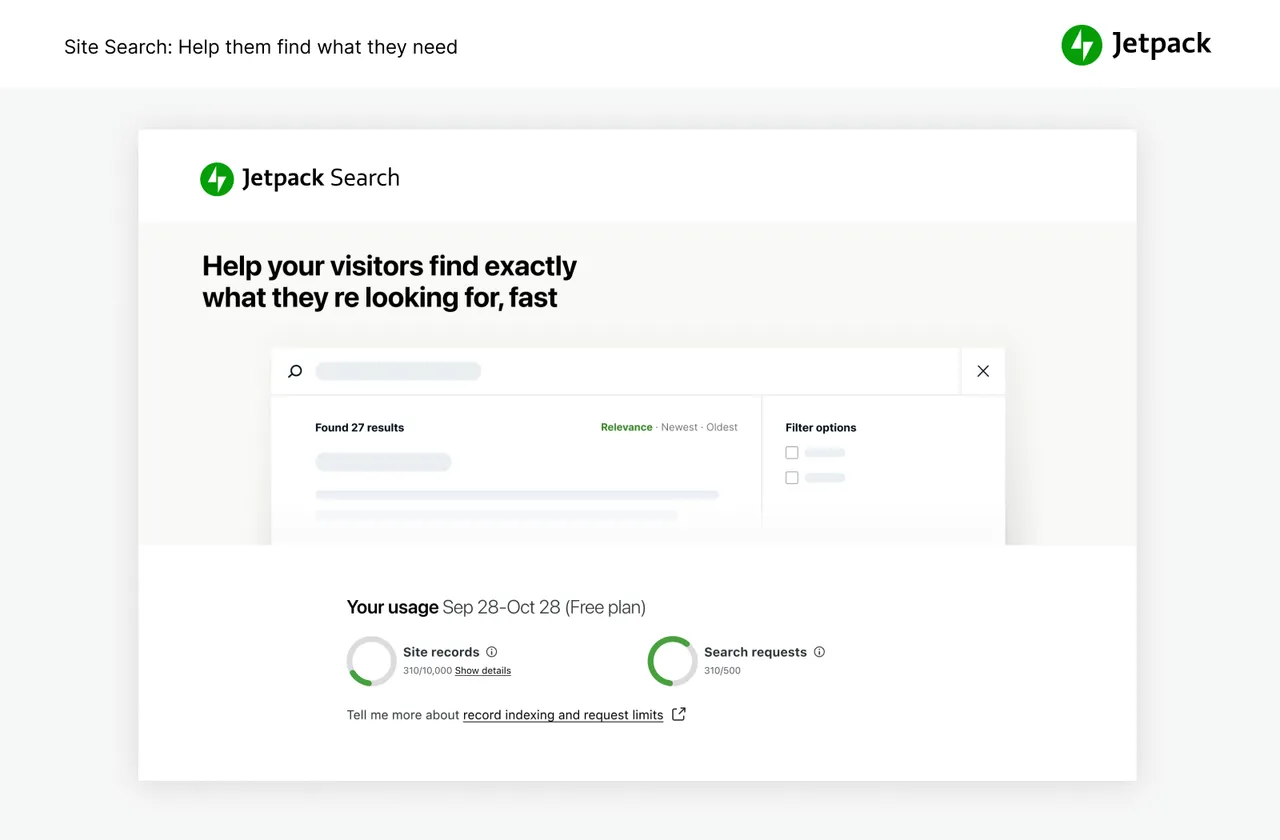
Incredibly powerful and customizable, help your visitors instantly find the right content – right when they need it. -
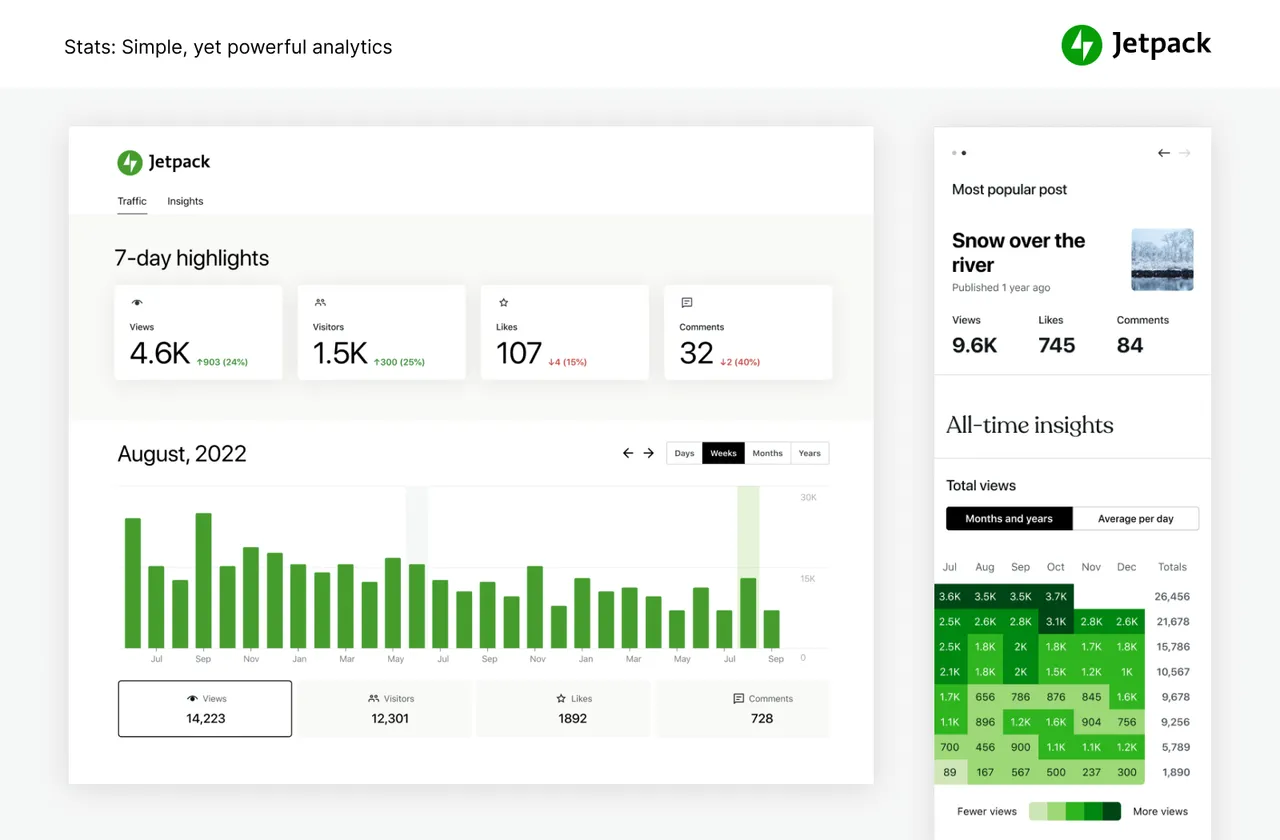
See what’s working with content performance metrics. Simple, yet powerful stats to grow your site. -
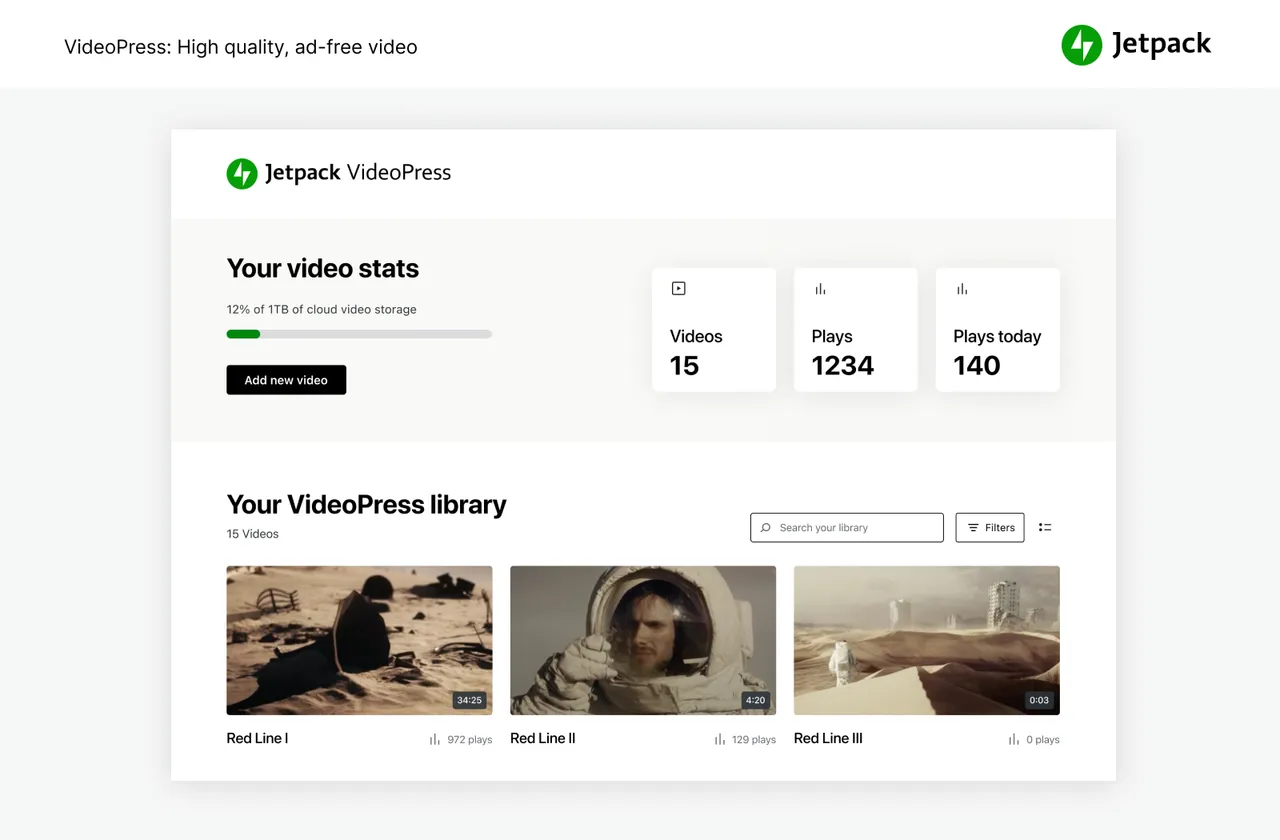
Stunning‑quality video with none of the hassle. Drag and drop videos through the WordPress editor and keep the focus on your content, not the ads.
Important information
- A WordPress.com account is required, because the backups, stats, CDN, spam filtering and agent connection all run on WordPress.com servers. Your site data is processed there.
- The listing says the plugin requires WordPress 7.0 and PHP 7.4, and it is tested up to WordPress 7.1.4.
- Giving an AI agent write access can change live content. Review which tools you enable, and keep a backup you can restore.
- Jetpack has a long history of published vulnerabilities (33 recorded), but the current security status is patched. Keep it updated.
- The main plugin contains many modules. If you only need one service, the listing says several are offered as standalone plugins that may be lighter.
From the Jetpack readme
Straight from the developer's WordPress.org listing.
Full description
Your WordPress site, now in the conversation
Jetpack connects your WordPress site to ChatGPT, Claude, and the other AI agents you already use. Ask in plain language to draft a post, see which pages got the most views, check your backups, or run a security scan, and your agent takes care of it on your site. There’s no MCP server to set up or host.
That works because Jetpack plugs your site into WordPress.com’s cloud, the same infrastructure that runs millions of sites. The heavy lifting happens there instead of on your host: backups stored off-site with one-click restores and full site migration, malware scanning, brute force protection, downtime monitoring, site analytics with Jetpack Stats, spam filtering, an image CDN, and ad-free video hosting. Plus a firewall, SEO tools, newsletters, social sharing, and forms.
“All these years later, Jetpack is the iCloud for my WordPress.” Matt Mullenweg, co-founder of WordPress (review)
How to get started with Jetpack
Installation is free, quick, and easy. From your WordPress dashboard, add a new plugin, search for Jetpack, and install it. Activate it and connect your WordPress.com account, then open Jetpack AI in your Jetpack menu to connect your AI agent. Unlock real-time backups, one-click malware fixes, and advanced stats by upgrading to a paid plan.
Need expert support?
We have a global team of Happiness Engineers ready to provide incredible support. Ask your questions in the support forum or contact support.
Why use Jetpack on your site
Connect ChatGPT, Claude, and other AI agents
Manage your site from the AI tools you already use. Connect ChatGPT or Claude in a few clicks, then ask for what you need in plain language. Your agent can work with more than your posts and pages: Jetpack also gives it your stats, backups, security scans, and newsletter, so one conversation covers your whole site.
• Use the AI tools you prefer. Jetpack works with ChatGPT, Codex, Claude, Claude Code, Cursor, VS Code, Continue, and any other MCP client.
• Ask which posts got the most views, check your backups and activity log, run a security scan, change newsletter settings, or turn on downtime monitoring.
• Draft posts, build a page from a single prompt, organize your Media Library, and optimize your site.
• Choose what your agent can read and what it can change, and turn individual tools on or off whenever you like.
• Your agent acts on your behalf through your WordPress.com account connection, so there’s nothing extra to host.
Security, backup, and migration
Jetpack Protect watches your site around the clock, and VaultPress Backup keeps a copy of everything off-site so you can undo any mistake. Login protection and basic downtime monitoring are free.
• Back up your site automatically in real time and restore to any point with one click. Storage starts at 10GB, with more available if you need it. Great for WooCommerce and other ecommerce stores, where every order counts.
• Migrate your site to a new host, clone it, or set up a test site from any backup.
• Scan for malware and vulnerabilities automatically, with one-click fixes.
• Block malicious traffic with a web application firewall (WAF), especially while attackers exploit unpatched plugins.
• Stop brute force attacks on your login page, and add two-factor authentication (2FA) with secure WordPress.com login.
• Monitor your site’s uptime and get an email alert the moment it goes down.
• See every change and who made it in the activity log.
• Block spam comments and form responses with Akismet Anti-spam.
• Auto-update individual plugins.
Get every security feature in Jetpack Pro or Complete, or buy VaultPress Backup, Scan, and Akismet Anti-spam on their own.
Site analytics with Jetpack Stats
Get clear site statistics without being a data scientist.
• Watch visitors, views, likes, and comments in real time.
• Find your top posts and pages, and the referrers and countries that send you traffic.
• Measure link clicks, video plays, and file downloads.
• See which authors on your team write the most popular content, and where your posts get shared.
• Spot trends with 7-day highlights and Year in Review.
Grow your audience
• Turn your posts into a newsletter, and offer paid subscriptions.
• Auto-share posts to Facebook, Instagram, LinkedIn, Threads, Bluesky, Tumblr, Mastodon, and Nextdoor.
• Grow traffic with SEO tools for Google, Bing, Facebook, and WordPress.com, plus an automatic XML sitemap.
• Collect payments and donations, or sell products, services, and memberships, with Stripe and PayPal.
• Build contact forms with no code and get an email for every response.
• Promote your posts across millions of sites in the WordPress.com and Tumblr ad network with Blaze, for a few dollars.
• Earn money by showing high-quality ads on your site.
• Keep visitors reading with related posts, and add image galleries and slideshows.
• Manage your site on the go with the Jetpack mobile app for iOS and Android.
Write with Jetpack AI
Jetpack AI works right in the WordPress editor. Give it a prompt and it drafts posts, pages, lists, and tables, then helps you edit and translate them.
• Write a first draft from a prompt without leaving the editor.
• Change the tone, fix spelling and grammar, or make text shorter or longer.
• Translate your content into many languages.
Speed and performance
• Serve images and static files like CSS and JavaScript from our global CDN instead of your server, which saves bandwidth and speeds up your site on mobile.
• Host video with no ads and no recommendations that lead visitors off your site.
• Help visitors find what they need with fast, customizable site search, including product filters for WooCommerce stores.
• Pair Jetpack with Jetpack Boost for page caching and better Core Web Vitals.
Integrations
Jetpack is updated monthly to work with the plugins and services you already use.
• WooCommerce: Jetpack and WooCommerce are both made by Automattic, so Backup, Scan, Stats, and Anti-spam work with your store out of the box.
• Social networks: Facebook, Instagram, LinkedIn, Threads, Bluesky, Tumblr, Mastodon, and Nextdoor.
• Payments: Stripe and PayPal.
• Email marketing: Mailchimp.
• Anti-spam (powered by Akismet) for Jetpack Forms, Contact Form 7, Ninja Forms, Gravity Forms, Formidable Forms, and more.
• Caching: works with WP Super Cache and Cloudflare.
• Blocks for Calendly, Pinterest, WhatsApp, Eventbrite, OpenTable, podcasts, maps, and GIFs.
Plans and products
• Jetpack Complete – Everything Jetpack offers: real-time security, top performance, and growth tools in one plan.
• Jetpack Pro – Security, performance, and growth tools in one plan, including real-time backups, malware scanning, and spam protection.
• VaultPress Backup – Save every change and get back online quickly with one-click restores.
• Jetpack Scan – Automated malware scanning and a web application firewall, with one-click fixes.
• Jetpack AI – Write, edit, and translate in the editor.
• Jetpack Stats – Track visits, popular posts, newsletter subscribers, and more.
• Jetpack Social – Share your posts to every major social network from one place.
• Jetpack Newsletter – Turn posts into newsletters and earn from paid subscriptions.
• Jetpack Search – Instant, relevant results for your visitors, with no ads and no tracking.
• Jetpack VideoPress – Ad-free video, uploaded right from the editor.
• Jetpack Boost – Make your site faster, no developer required.
• Jetpack CRM – Manage customers, leads, and invoices in WordPress.
• Akismet Anti-spam – Clear spam from comments and forms automatically.
• Blaze – Promote your posts across millions of sites.
• Jetpack Manage – Monitor security, performance, and traffic across all your sites from one dashboard.
Install only what you need
Each of these is also available as its own plugin:
• Jetpack VaultPress Backup
• Jetpack Protect
• Jetpack Boost
• Jetpack Stats
• Jetpack Social
• Jetpack Search
• Jetpack VideoPress
• Jetpack CRM
• Akismet Anti-spam
Installation
Automated installation
Installation is free, quick, and easy. From your WordPress dashboard, add a new plugin, search for Jetpack, then install and activate it. Jetpack walks you through connecting your WordPress.com account.
Manual alternatives
Alternatively, upload the files manually to your server and follow the on-screen instructions. If you need additional help, read our detailed instructions.
Developer FAQ (17)
- Is Jetpack free?
- Yes. Jetpack’s core features are free for non-commercial sites, including site stats, an image CDN, related posts, downtime monitoring, brute force protection, automatic sharing to social networks, SEO tools, and more.
- Can I connect ChatGPT, Claude, or another AI agent to my site?
- Yes, and there’s nothing extra to install or host. Once you’ve connected your WordPress.com account, go to Jetpack AI in your Jetpack menu, enable MCP access, and choose your agent. Jetpack works with ChatGPT, Claude, Cursor, VS Code, and other MCP clients, and most of them connect in a few clicks. Your agent can then work with your content and with Jetpack features like Stats, Backup, Scan, and Newsletter. You choose which tools it can use to read or change your site. You can also start from ChatGPT or Claude by adding the WordPress app there.
- What is MCP?
- MCP (Model Context Protocol) is the open standard that AI apps like ChatGPT and Claude use to connect to other tools. Jetpack provides the MCP connection for your WordPress site through WordPress.com, so you don’t have to install or run an MCP server yourself.
- Is it safe to let an AI agent work on my site?
- You stay in control. MCP access is off until you turn it on, and you choose which tools your agent can use to read your site and which it can use to make changes. You can turn individual tools off, or turn off MCP access entirely, at any time. With VaultPress Backup, you can also restore your site to an earlier point if a change doesn’t work out.
- Should I purchase a paid plan?
- It depends on your site and what kind of protection, performance, and design you need. If you make money from your site, the answer is “yes.” Jetpack’s paid services include real-time backups, security scanning, spam filtering, video hosting, site monetization, search, priority support, and more. To learn more about the essential security and WordPress services we provide and see how we can improve your site, visit our plans page.
- Why do I need a WordPress.com account?
- Jetpack’s services run on WordPress.com’s cloud: backups, stats, the image CDN, spam filtering, and the connection to your AI agent. A free WordPress.com account links your site to them.
- I already have a WordPress account, but Jetpack isn’t working. What’s going on?
- A WordPress.com account is different from the account you use to log into your self-hosted WordPress. If you can log into WordPress.com, then you already have a WordPress.com account. If you can’t, you can create one for free when you connect Jetpack.
- Can Jetpack move my site to a new host?
- Yes. VaultPress Backup can migrate your full site to a new host, including your theme, plugins, and database. You can also clone your site, set up a test copy, or repair a broken site by restoring an earlier backup.
- Does Jetpack help with SEO?
- Yes. Jetpack’s SEO tools let you set custom titles and meta descriptions, generate an XML sitemap automatically, verify your site with Google, Bing, and Pinterest, and preview how your posts will look in search results and on social media. Jetpack AI can also suggest SEO titles and meta descriptions, and Jetpack Boost helps improve your Core Web Vitals.
- How do I view my stats?
- Once you’ve installed Jetpack, your stats will be available on your Jetpack dashboard and through the official WordPress mobile app.
- What else does Jetpack include?
- Jetpack works with both the block editor and the classic editor. It also includes: • Activity log: See every change made to your site, and who made it. • Ads: Earn income by showing high-quality ads on your site. • Account protection: Extra protection for your users’ accounts, including strong password checks. • Beautiful Math: Write equations and formulas with LaTeX. • Carousel: A full-screen photo browsing experience with comments and EXIF data. • CDN: Serve your images and static files, like CSS and JavaScript, from our global network. • Comments and Comment Likes: An improved comment form with social login, and likes on individual comments. • Contact forms: Let readers get in touch without sharing your email address. • Copy Post: Duplicate any post or page in one click. • Custom content types: Add portfolios and testimonials to your site. • Downtime monitoring: Get an email if your site goes down. • Firewall: A web application firewall (WAF) that blocks malicious traffic. • Google Fonts: Use Google Fonts in your site’s typography. • Gravatar Hovercards: Show commenters’ Gravatar profiles. • Infinite Scroll: Load the next posts as readers reach the bottom of the page. • JSON API: Let apps and services connect securely to your site. • Likes: Let readers like your posts with one click. • Login protection: Block brute force attacks on your login page. • Malware scanning: Automatic scans with one-click fixes. • Markdown: Write posts and comments in Markdown. • Notifications: Get alerts for new comments and likes in your admin bar and on your phone. • Plugin auto-updates: Choose which plugins update automatically. • Post by Email: Publish posts from any email client. • Related Posts: Show readers what to read next. • Search: A powerful replacement for WordPress search, powered by Elasticsearch in the WordPress.com cloud. • SEO tools, sitemaps, and site verification for Google, Bing, and Pinterest. • Sharing buttons and automatic social sharing with Jetpack Social. • Shortcode embeds: Embed videos and media from YouTube and across the web. • Site backup: Real-time backups with VaultPress Backup, plus migration, cloning, and one-click restores. • Site stats: Visits, top posts and pages, referrers, and more. • Spam filtering: Block spam comments, product reviews, and form submissions with Akismet. • Subscriptions: Let visitors subscribe to your posts by email. • Tiled galleries: Mosaic, square, and circular image galleries. • Video hosting: Fast, ad-free video with VideoPress. • Widget visibility and extra widgets. • WordPress.com login: Secure sign-in with optional two-factor authentication. • WP.me shortlinks: Short links to your content.
- What blocks does Jetpack include?
- Jetpack adds these blocks to the block editor: • Writing and AI: AI Assistant, Writing Prompt, Markdown, Blog Stats, Top Posts & Pages, Related Posts, Goodreads • Media: Image Compare, Slideshow, Tiled Gallery, Story, VideoPress, GIF, Latest Instagram Posts, Pinterest, Podcast Player • Forms: Form, Salesforce Lead Form, Contact Info, Mailchimp, Cookie Consent • Payments and earning: Payments, Payment Buttons, Pay with PayPal, Donations, Paywall, Paid Content, Ad • Subscribers and social: Subscribe, Subscriber Login, Like, Sharing Buttons, Blogroll, Nextdoor, WhatsApp Button • Business and bookings: Business Hours, Calendly, Eventbrite, Google Calendar, Map, OpenTable, Tock • Personalization and reviews: Repeat Visitor, Star Rating Jetpack also adds Social Previews to the editor, so you can see how a post will look on search engines and social media before you publish.
- Do I need an SSL certificate?
- You don’t need an SSL Certificate to run Jetpack on your WordPress website. However, it’s recommended to integrate them both into your overall WordPress security strategy. An SSL certificate (Secure Sockets Layer certificate) creates a secure connection between your website and your site visitors’ browsers. It encrypts any data shared on your site — like addresses, emails, phone numbers, and credit card information — and protects that data from hackers. If you don’t have an SSL certificate, your site will show a “not secure” warning on users’ browsers, which can reduce your legitimacy in their eyes. SSL certificates also have a positive impact on search engine rankings. The process of setting up an SSL certificate will depend on your hosting provider. Some hosts include free certificates, while others charge annually.
- How does Jetpack work with WP Super Cache?
- WP Super Cache works by caching your WordPress pages as static HTML pages so that page requests, for an already cached page, do not need to be processed by the WordPress PHP scripts. Typically, most visitors of your site will view cached versions of the WordPress pages, so your server will have more processing power to serve an increased number of users. Jetpack has an image CDN that works by caching and serving your WordPress images globally from its own servers. These plugins are both maintained by Automattic and work together to give you ultimate site speed. Automattic actively develops Jetpack Boost to help you increase your website speed in ways beyond WP Super Cache. We recommend using Jetpack Boost instead of WP Super Cache.
- What version of PHP do I need?
- Sites must be built on PHP 7.4 or greater, but Jetpack always supports the latest version of PHP.
- Can Jetpack help my site comply with GDPR?
- Our Cookie and Consent Banner can help you comply with GDPR. The European Union’s ePrivacy Directive (often referred to as the ‘cookie law’) and General Data Protection Regulation (GDPR) place requirements on website owners and operators to provide information about, and gain consent for their use of cookies.
- How do I contribute to Jetpack?
- There are opportunities for developers at all levels to contribute. Learn more about contributing to Jetpack or consider joining our beta program.
Downloads, last 30 days
Trend vs previous period: +4%
Average daily downloads: 241,880 over the last 7 days , 136,875 over 30 days.
Security history
Past CVEs, patched · 33 published vulnerabilities (Wordfence) · most recent Oct 7, 2026
- Patched 6.1 Medium Jetpack - WP Security, Backup, Speed, & Growth <= 3.9.1 - Cross-Site Scripting via LaTeX markup within HTML elements Feb 25, 2016 · affects *-3.9.1 · fixed in 3.9.2
- Patched 6.4 Medium Jetpack - WP Security, Backup, Speed, & Growth <= 13.3.1 - Authenticated (Contributor+) Stored Cross-Site Scripting via wpvideo Shortcode CVE-2024-4392 · May 14, 2024 · affects *-13.3.1 · fixed in 13.4
- Patched 5.3 Medium JetPack <= 9.7 - Information Disclosure CVE-2021-24374 · Jun 1, 2021 · affects [2.0, 2.0.8), [2.1, 2.1.6), [2.2, 2.2.9), [2.3, 2.3.9), [2.4, 2.4.6), [2.5, 2.5.4), [2.6, 2.6.5), [2.7, 2.7.4), [2.8, 2.8.4), [2.9, 2.9.5), [3.0, 3.0.5), [3.1, 3.1.4), [3.2, 3.2.4), [3.3, 3.3.5), [3.4, 3.4.5), [3.5, 3.5.5), [3.6, 3.6.3), [3.7, 3.7.4), [3.8, 3.8.4), [3.9, 3.9.8), [4.0, 4.0.5), [4.1, 4.1.2), [4.2, 4.2.3), [4.3, 4.3.3), [4.4, 4.4.3), [4.5, 4.5.1), [4.6, 4.6.1), [4.7, 4.7.2), [4.8, 4.8.3), [4.9, 4.9.1), [5.0, 5.0.1), [5.1, 5.1.2), [5.2, 5.2.3), [5.3, 5.3.2), [5.4, 5.4.2), [5.5, 5.5.3), [5.6, 5.6.3), [5.7, 5.7.3), [5.8, 5.8.2), [5.9, 5.9.2), [6.0, 6.0.2), [6.1, 6.1.3), [6.2, 6.2.3), [6.3, 6.3.5), [6.4, 6.4.4), [6.5, 6.5.2), [6.6, 6.6.3), [6.7, 6.7.2), [6.8, 6.8.3), [6.9, 6.9.2), [7.0, 7.0.3), [7.1, 7.1.3), [7.2, 7.2.3), [7.3, 7.3.3), [7.4, 7.4.3), [7.5, 7.5.5), [7.6, 7.6.2), [7.7, 7.7.4), [7.8, 7.8.2), [7.9, 7.9.2), [8.0, 8.0.1), [8.1, 8.1.2), [8.2, 8.2.4), [8.3, 8.3.1), [8.4, 8.4.3), [8.5, 8.5.1), [8.6, 8.6.2), [8.7, 8.7.2), [8.8, 8.8.3), [8.9, 8.9.2), [9.0, 9.0.3), [9.1, 9.1.1), [9.2, 9.2.2), [9.3, 9.3.3), [9.4, 9.4.2), [9.5, 9.5.3), [9.6, 9.6.2), [9.7, 9.7.1) · fixed in 2.0.8, 2.1.6, 2.2.9, 2.3.9, 2.4.6, 2.5.4, 2.6.5, 2.7.4, 2.8.4, 2.9.5, 3.0.5, 3.1.4, 3.2.4, 3.3.5, 3.4.5, 3.5.5, 3.6.3, 3.7.4, 3.8.4, 3.9.8, 4.0.5, 4.1.2, 4.2.3, 4.3.3, 4.4.3, 4.5.1, 4.6.1, 4.7.2, 4.8.3, 4.9.1, 5.0.1, 5.1.2, 5.2.3, 5.3.2, 5.4.2, 5.5.3, 5.6.3, 5.7.3, 5.8.2, 5.9.2, 6.0.2, 6.1.3, 6.2.3, 6.3.5, 6.4.4, 6.5.2, 6.6.3, 6.7.2, 6.8.3, 6.9.2, 7.0.3, 7.1.3, 7.2.3, 7.3.3, 7.4.3, 7.5.5, 7.6.2, 7.7.4, 7.8.2, 7.9.2, 8.0.1, 8.1.2, 8.2.4, 8.3.1, 8.4.3, 8.5.1, 8.6.2, 8.7.2, 8.8.3, 8.9.2, 9.0.3, 9.1.1, 9.2.2, 9.3.3, 9.4.2, 9.5.3, 9.6.2, 9.7.1
- Patched 6.1 Medium Jetpack <= 4.0.2 - Cross-Site Scripting CVE-2016-10706 · Apr 26, 2017 · affects [*, 4.0.3) · fixed in 4.0.3
- Patched 7.2 High Jetpack - WP Security, Backup, Speed, & Growth 16.1 - 16.1.2 - Unauthenticated Stored Cross-Site Scripting Sep 8, 2026 · affects 16.1-16.1.2 · fixed in 16.1.3
- Patched 6.1 Medium Jetpack - WP Security, Backup, Speed, & Growth < 4.2 - Reflected Cross-Site Scripting Apr 26, 2017 · affects [*, 4.2) · fixed in 4.2
- Patched 4.3 Medium Jetpack < 13.9.1 - Missing Authorization to Authenticated (Subscriber+) Sensitive Information Disclosure CVE-2024-9926 · Oct 14, 2024 · affects 10.0-10.0.1, 10.1-10.1.1, 10.2-10.2.2, 10.3-10.3.1, 10.4-10.4.1, 10.5-10.5.2, 10.6-10.6.1, 10.7-10.7.1, 10.8-10.8.1, 10.9-10.9.2, 11.0-11.0.1, 11.1-11.1.3, 11.2-11.2.1, 11.3-11.3.3, 11.4-11.4.1, 11.5-11.5.2, 11.6-11.6.1, 11.7-11.7.2, 11.8-11.8.5, 11.9-11.9.2, 12.0-12.0.1, 12.1-12.1.1, 12.2-12.2.1, 12.3, 12.4, 12.5, 12.6-12.6.2, 12.7-12.7.1, 12.8-12.8.1, 12.9-12.9.3, 13.0, 13.1-13.1.3, 13.2-13.2.2, 13.3-13.3.1, 13.4-13.4.3, 13.5, 13.6, 13.7, 13.8-13.8.1, 13.9, 3.9-3.9.9, 4.0-4.0.6, 4.1-4.1.3, 4.2-4.2.4, 4.3-4.3.4, 4.4-4.4.4, 4.5-4.5.2, 4.6-4.6.2, 4.7-4.7.3, 4.8-4.8.4, 4.9-4.9.2, 5.0-5.0.2, 5.1-5.1.3, 5.2-5.2.4, 5.3-5.3.3, 5.4-5.4.3, 5.5-5.5.4, 5.6-5.6.4, 5.7-5.7.4, 5.8-5.8.3, 5.9-5.9.3, 6.0-6.0.3, 6.1-6.1.4, 6.2-6.2.4, 6.3-6.3.6, 6.4-6.4.5, 6.5-6.5.3, 6.6-6.6.4, 6.7-6.7.3, 6.8-6.8.4, 6.9-6.9.3, 7.0-7.0.4, 7.1-7.1.4, 7.2-7.2.4, 7.3-7.3.4, 7.4-7.4.4, 7.5-7.5.6, 7.6-7.6.3, 7.7-7.7.5, 7.8-7.8.3, 7.9-7.9.3, 8.0-8.0.2, 8.1-8.1.3, 8.2-8.2.5, 8.3-8.3.2, 8.4-8.4.4, 8.5-8.5.2, 8.6-8.6.3, 8.7-8.7.3, 8.8-8.8.4, 8.9-8.9.3, 9.0-9.0.4, 9.1-9.1.2, 9.2-9.2.3, 9.3-9.3.4, 9.4-9.4.3, 9.5-9.5.4, 9.6-9.6.3, 9.7-9.7.2, 9.8-9.8.2, 9.9-9.9.2 · fixed in 10.0.2, 10.1.2, 10.2.3, 10.3.2, 10.4.2, 10.5.3, 10.6.2, 10.7.2, 10.8.2, 10.9.3, 11.0.2, 11.1.4, 11.2.2, 11.3.4, 11.4.2, 11.5.3, 11.6.2, 11.7.3, 11.8.6, 11.9.3, 12.0.2, 12.1.2, 12.2.2, 12.3.1, 12.4.1, 12.5.1, 12.6.3, 12.7.2, 12.8.2, 12.9.4, 13.0.1, 13.1.4, 13.2.3, 13.3.2, 13.4.4, 13.5.1, 13.6.1, 13.7.1, 13.8.2, 13.9.1, 3.9.10, 4.0.7, 4.1.4, 4.2.5, 4.3.5, 4.4.5, 4.5.3, 4.6.3, 4.7.4, 4.8.5, 4.9.3, 5.0.3, 5.1.4, 5.2.5, 5.3.4, 5.4.4, 5.5.5, 5.6.5, 5.7.5, 5.8.4, 5.9.4, 6.0.4, 6.1.5, 6.2.5, 6.3.7, 6.4.6, 6.5.4, 6.6.5, 6.7.4, 6.8.5, 6.9.4, 7.0.5, 7.1.5, 7.2.5, 7.3.5, 7.4.5, 7.5.7, 7.6.4, 7.7.6, 7.8.4, 7.9.4, 8.0.3, 8.1.4, 8.2.6, 8.3.3, 8.4.5, 8.5.3, 8.6.4, 8.7.4, 8.8.5, 8.9.4, 9.0.5, 9.1.3, 9.2.4, 9.3.5, 9.4.4, 9.5.5, 9.6.4, 9.7.3, 9.8.3, 9.9.3
- Patched 6.1 Medium Jetpack < 7.0.1 - Cross-Site Scripting Feb 14, 2019 · affects *-7.0 · fixed in 7.0.1
Show all 33 vulnerabilities
- Patched 6.4 Medium Jetpack <= 7.9 - Stored Cross-Site Scripting Oct 19, 2019 · affects [*, 5.1), [5.1, 5.1.1), [5.2, 5.2.2), [5.3, 5.3.1), [5.4, 5.4.1), [5.5, 5.5.2), [5.6, 5.6.2), [5.7, 5.7.2), [5.8, 5.8.1), [5.9, 5.9.1), [6.0, 6.0.1), [6.1, 6.1.2), [6.2, 6.2.2), [6.3, 6.3.4), [6.4, 6.4.3), [6.5, 6.5.1), [6.6, 6.6.2), [6.7, 6.7.1), [6.8, 6.8.2), [6.9, 6.9.1), [7.0, 7.0.2), [7.1, 7.1.2), [7.2, 7.2.2), [7.3, 7.3.2), [7.4, 7.4.2), [7.5, 7.5.4), [7.6, 7.6.1), [7.7, 7.7.3), [7.8, 7.8.1), [7.9, 7.9.1) · fixed in 5.1.1, 5.2.2, 5.3.1, 5.4.1, 5.5.2, 5.6.2, 5.7.2, 5.8.1, 5.9.1, 6.0.1, 6.1.2, 6.2.2, 6.3.4, 6.4.3, 6.5.1, 6.6.2, 6.7.1, 6.8.2, 6.9.1, 7.0.2, 7.1.2, 7.2.2, 7.3.2, 7.4.2, 7.5.4, 7.6.1, 7.7.3, 7.8.1, 7.9.1
- Patched 5.3 Medium Jetpack - WP Security, Backup, Speed, & Growth <= 16.2 - Missing Authorization CVE-2026-106601 · Oct 7, 2026 · affects *-16.2 · fixed in 16.3
- Patched 5.3 Medium Jetpack <= 3.7.1 - Information disclosure Oct 1, 2015 · affects *-3.7.1 · fixed in 3.7.2
- Patched 7.2 High Jetpack 12.0 - 16.1.2 - Authenticated (Administrator+) PHP Object Injection Sep 3, 2026 · affects 12.0-12.0.2, 12.1-12.1.2, 12.2-12.2.2, 12.3-12.3.1, 12.4-12.4.1, 12.5-12.5.1, 12.6-12.6.3, 12.7-12.7.2, 12.8-12.8.2, 12.9-12.9.4, 13.0-13.0.1, 13.1-13.1.4, 13.2-13.2.3, 13.3-13.3.2, 13.4-13.4.4, 13.5-13.5.1, 13.6-13.6.1, 13.7-13.7.1, 13.8-13.8.2, 13.9-13.9.1, 14.0, 14.1, 14.2-14.2.1, 14.3, 14.4-14.4.1, 14.5, 14.6, 14.7, 14.8, 14.9-14.9.1, 15.0-15.0.2, 15.1-15.1.1, 15.2, 15.3-15.3.1, 15.4, 15.5, 15.6, 15.7-15.7.1, 15.8, 15.9-15.9.1, 16.0-16.0.1, 16.1-16.1.2 · fixed in 12.0.3, 12.1.3, 12.2.3, 12.3.2, 12.4.2, 12.5.2, 12.6.4, 12.7.3, 12.8.3, 12.9.5, 13.0.2, 13.1.5, 13.2.4, 13.3.3, 13.4.5, 13.5.2, 13.6.2, 13.7.2, 13.8.3, 13.9.2, 14.0.1, 14.1.1, 14.2.2, 14.3.1, 14.4.2, 14.5.1, 14.6.1, 14.7.1, 14.8.1, 14.9.2, 15.0.3, 15.1.2, 15.2.1, 15.3.2, 15.4.1, 15.5.1, 15.6.1, 15.7.2, 15.8.1, 15.9.2, 16.0.2, 16.1.3
- Patched 6.5 Medium Jetpack <= 13.7 - Unauthenticated Arbitrary Block & Shortcode Execution CVE-2024-10075 · Oct 17, 2024 · affects *-13.7 · fixed in 13.8
- Patched 6.4 Medium Jetpack <= 12.8-a.1 - Authenticated (Contributor+) Stored Cross-Site Scripting via block attribute CVE-2023-45050 · Nov 16, 2023 · affects * - 12.8-a.1 · fixed in 12.8-a.3
- Patched 5.3 Medium Jetpack - WP Security, Backup, Speed, & Growth <= 16.2 - Missing Authorization CVE-2026-106602 · Oct 7, 2026 · affects *-16.2 · fixed in 16.3
- Patched 6.4 Medium Jetpack <= 13.7 & Jetpack Boost <= 3.4.7 - Authenticated (Contributor+) Stored Cross-Site Scripting CVE-2024-10076 · Oct 17, 2024 · affects *-13.7 · fixed in 13.8
- Patched 6.1 Medium Jetpack <= 3.4.2 - Reflected Cross-Site Scripting CVE-2015-9359 · Apr 20, 2015 · affects [*, 3.4.3) · fixed in 3.4.3
- Patched 6.1 Medium Jetpack <= 4.0.3 - Cross-Site Scripting CVE-2016-10705 · Jun 20, 2016 · affects [*, 4.0.4) · fixed in 4.0.4
- Patched 5 Medium Jetpack < 12.7 - Authenticated(Contributor+) Clickjacking via Iframe Injection CVE-2023-47774 · Nov 16, 2023 · affects [*, 12.7) · fixed in 12.7
- Patched 4.9 Medium Jetpack - WP Security, Backup, Speed, & Growth <= 3.9.1 - Sensitive Information Disclosure Feb 25, 2016 · affects *-3.9.1 · fixed in 3.9.2
- Patched 6.5 Medium Jetpack <= 12.1 - Authenticated (Author+) Arbitrary File Manipulation CVE-2023-2996 · May 30, 2023 · affects 10.0, 10.1, 10.2-10.2.1, 10.3, 10.4, 10.5-10.5.1, 10.6-10.6.1, 10.7, 10.8, 10.9-10.9.1, 11.0, 11.1-11.1.2, 11.2, 11.3-11.3.2, 11.4, 11.5-11.5.1, 11.6, 11.7-11.7.1, 11.8-11.8.4, 11.9-11.9.1, 12.0, 12.1, 2.0-2.0.8, 2.1-2.1.6, 2.2-2.2.9, 2.3-2.3.9, 2.4-2.4.6, 2.5-2.5.4, 2.6-2.6.5, 2.7-2.7.4, 2.8-2.8.4, 2.9-2.9.5, 3.0-3.0.5, 3.1-3.1.4, 3.2-3.2.4, 3.3-3.3.5, 3.4-3.4.5, 3.5-3.5.5, 3.6-3.6.3, 3.7-3.7.4, 3.8-3.8.4, 3.9-3.9.8, 4.0-4.0.5, 4.1-4.1.2, 4.2-4.2.3, 4.3-4.3.3, 4.4-4.4.3, 4.5-4.5.1, 4.6-4.6.1, 4.7-4.7.2, 4.8-4.8.3, 4.9-4.9.1, 5.0-5.0.1, 5.1-5.1.2, 5.2-5.2.3, 5.3-5.3.2, 5.4-5.4.2, 5.5-5.5.3, 5.6-5.6.3, 5.7-5.7.3, 5.8-5.8.2, 5.9-5.9.2, 6.0-6.0.2, 6.1-6.1.3, 6.2-6.2.3, 6.3-6.3.5, 6.4-6.4.4, 6.5-6.5.2, 6.6-6.6.3, 6.7-6.7.2, 6.8-6.8.3, 6.9-6.9.2, 7.0-7.0.3, 7.1-7.1.3, 7.2-7.2.3, 7.3-7.3.3, 7.4-7.4.3, 7.5-7.5.5, 7.6-7.6.2, 7.7-7.7.4, 7.8-7.8.2, 7.9-7.9.2, 8.0-8.0.1, 8.1-8.1.2, 8.2-8.2.4, 8.3-8.3.1, 8.4-8.4.3, 8.5-8.5.1, 8.6-8.6.2, 8.7-8.7.2, 8.8-8.8.3, 8.9-8.9.2, 9.0-9.0.3, 9.1-9.1.1, 9.2-9.2.2, 9.3-9.3.3, 9.4-9.4.2, 9.5-9.5.3, 9.6-9.6.2, 9.7-9.7.1, 9.8-9.8.1, 9.9-9.9.1 · fixed in 10.0.1, 10.1.1, 10.2.2, 10.3.1, 10.4.1, 10.5.2, 10.6.2, 10.7.1, 10.8.1, 10.9.2, 11.0.1, 11.1.3, 11.2.1, 11.3.3, 11.4.1, 11.5.2, 11.6.1, 11.7.2, 11.8.5, 11.9.2, 12.0.1, 12.1.1, 2.0.9, 2.1.7, 2.2.10, 2.3.10, 2.4.7, 2.5.5, 2.6.6, 2.7.5, 2.8.5, 2.9.6, 3.0.6, 3.1.5, 3.2.5, 3.3.6, 3.4.6, 3.5.6, 3.6.4, 3.7.5, 3.8.5, 3.9.9, 4.0.6, 4.1.3, 4.2.4, 4.3.4, 4.4.4, 4.5.2, 4.6.2, 4.7.3, 4.8.4, 4.9.2, 5.0.2, 5.1.3, 5.2.4, 5.3.3, 5.4.3, 5.5.4, 5.6.4, 5.7.4, 5.8.3, 5.9.3, 6.0.3, 6.1.4, 6.2.4, 6.3.6, 6.4.5, 6.5.3, 6.6.4, 6.7.3, 6.8.4, 6.9.3, 7.0.4, 7.1.4, 7.2.4, 7.3.4, 7.4.4, 7.5.6, 7.6.3, 7.7.5, 7.8.3, 7.9.3, 8.0.2, 8.1.3, 8.2.5, 8.3.2, 8.4.4, 8.5.2, 8.6.3, 8.7.3, 8.8.4, 8.9.3, 9.0.4, 9.1.2, 9.2.3, 9.3.4, 9.4.3, 9.5.4, 9.6.3, 9.7.2, 9.8.2, 9.9.2
- Patched 6.6 Medium Jetpack - WP Security, Backup, Speed, & Growth 16.1 - 16.1.2 - Authenticated (Administrator+) PHP Object Injection Sep 5, 2026 · affects 16.1-16.1.2 · fixed in 16.1.3
- Patched 7.2 High Jetpack <= 3.7.1 - Stored Cross-Site Scripting Oct 1, 2015 · affects *-3.7.1 · fixed in 3.7.2
- Patched 6.1 Medium Jetpack 13.0 - 14.0 - Reflected DOM-based Cross-Site Scripting CVE-2024-10858 · Dec 4, 2024 · affects 13.0-14.0 · fixed in 14.1
- Patched 6.6 Medium Jetpack - WP Security, Backup, Speed, & Growth 16.1 - 16.1.2 - Authenticated (Administrator+) PHP Object Injection Sep 5, 2026 · affects 16.1-16.1.2 · fixed in 16.1.3
- Patched 5.4 Medium Jetpack <= 6.4.2 - Cross-Site Scripting via post_meta Dec 11, 2018 · affects *-6.4.2 · fixed in 6.5
- Patched 7.2 High Jetpack <= 3.5.2 - Cross-Site Scripting May 6, 2015 · affects *-3.5.2 · fixed in 3.5.3
- Patched 4.3 Medium Jetpack <= 12.6.2 - Improper Authorization via WPCom External Media REST endpoints CVE-2023-47788 · Nov 16, 2023 · affects [*, 12.7) · fixed in 12.7
- Patched 6.1 Medium Jetpack 14.5 - 16.1.2 - Reflected to Stored Cross-Site Scripting via Reader Repost Parameters Sep 3, 2026 · affects 14.5, 14.6, 14.7, 14.8, 14.9-14.9.1, 15.0-15.0.2, 15.1-15.1.1, 15.2, 15.3-15.3.1, 15.4, 15.5, 15.6, 15.7-15.7.1, 15.8, 15.9-15.9.1, 16.0-16.0.1, 16.1-16.1.2 · fixed in 14.5.1, 14.6.1, 14.7.1, 14.8.1, 14.9.2, 15.0.3, 15.1.2, 15.2.1, 15.3.2, 15.4.1, 15.5.1, 15.6.1, 15.7.2, 15.8.1, 15.9.2, 16.0.2, 16.1.3
- Patched 9.6 Critical Jetpack - WP Security, Backup, Speed, & Growth < 4.2 - CSV Injection Apr 26, 2017 · affects [*, 4.2) · fixed in 4.2
- Patched 4.3 Medium Jetpack 3.2 - 16.1.2 - Missing Authorization on WPCOM Media API Attachment Parent Sep 3, 2026 · affects 3.2-16.1.2 · fixed in 16.1.3
- Patched 5.3 Medium Jetpack < 2.9.3 - Security Bypass CVE-2014-0173 · Aug 26, 2014 · affects *-1.8, 1.9-1.9.3, 2.0-2.0.8, 2.1-2.1.3, 2.2-2.2.6, 2.3-2.3.6, 2.4-2.4.3, 2.5-2.5.1, 2.6-2.6.2, 2.7-2.7.1, 2.8-2.8.1, 2.9-2.9.2 · fixed in 1.9.4, 2.0.9, 2.1.4, 2.2.7, 2.3.7, 2.4.4, 2.5.2, 2.6.3, 2.7.2, 2.8.2, 2.9.3
- Patched 9.8 Critical Jetpack - WP Security, Backup, Speed, & Growth < 4.2 - Timing Attack Apr 26, 2017 · affects [*, 4.2) · fixed in 4.2
Jetpack FAQ
Does Jetpack cost anything?
The core features are free for non-commercial sites. These include stats, the image CDN, downtime monitoring, login protection, social sharing and SEO tools. Real-time backups, scanning, spam filtering, video hosting and priority support need a paid plan or product.
How do I link ChatGPT or Claude to my site?
Connect your WordPress.com account first. Then open Jetpack AI in the Jetpack menu, enable MCP access and choose your agent. You do not have to host any server yourself. You can also begin from ChatGPT or Claude by adding the WordPress app there.
What does MCP mean here?
MCP, or Model Context Protocol, is an open standard that AI apps use to talk to other tools. Jetpack supplies this connection for your site through WordPress.com. That means you skip installing or running your own MCP server.
Can an agent break my site?
Access is off by default, and you pick which tools can only read and which can change things. You can disable single tools or the whole connection whenever you like. With VaultPress Backup you can also roll the site back to an earlier point.
Why is a WordPress.com account needed?
The paid and free services run in the WordPress.com cloud, including backups, stats, the CDN, spam filtering and the AI agent link. A free account connects your site to them. It is separate from the login you use for your own WordPress admin.
Can Jetpack move my site to another host?
Yes, through VaultPress Backup. It can migrate the whole site, including theme, plugins and database. It can also clone the site, make a test copy or repair a broken site from an older backup.
Does Jetpack help with SEO?
Yes. You can set titles and meta descriptions, get an automatic XML sitemap, verify the site with Google, Bing and Pinterest, and preview how posts look in search and social feeds. Jetpack AI can suggest titles and descriptions too.
Can I install only part of Jetpack?
Yes. The listing says VaultPress Backup, Protect, Boost, Stats, Social, Search, VideoPress, CRM and Akismet are each available as their own plugin. That helps if you want one service without the full bundle.
Jetpack alternatives

Build faster in Elementor with 90+ Elementor widgets and addons, 600+ ready-made Elementor templates, without writing code. Premium Addons powers 600,000+ websites with the Elementor carousel, mega menu, blog posts…

Your WordPress site just became MCP-ready. WPVibe is the Model Context Protocol server for WordPress, connecting your self-hosted site to any AI assistant or AI agent that speaks MCP: Claude, ChatGPT, Cursor,…

This plugin provides Google AI (Gemini) integration for the PHP AI Client SDK. It enables WordPress sites to use Google’s Gemini models for text generation, image generation, text to speech, and other AI…

Secure WordPress MCP server for Claude, ChatGPT and AI agents. Easy MCP AI is a free plugin that turns your own site into a Model Context Protocol (MCP) server. Connect Claude to WordPress , connect ChatGPT to…

miniOrange Secure MCP Server is a complete WordPress MCP server plugin that turns your WordPress site into a fully working Model Context Protocol (MCP) server. Once installed, you can connect Claude to WordPress,…

WDesignKit is an AI website builder for WordPress. Connect your AI assistant to your site through the WordPress MCP (Model Context Protocol), then describe what you need in plain language: a full website from an AI…
Listing data from WordPress.org and the Wordfence vulnerability feed, refreshed Nov 9, 2026; listing details fetched Nov 14, 2026. Screenshots are from the plugin's WordPress.org listing. Not affiliated with Automattic.