
- active installs
- 100K+
- 20 ratings
- 3.3
- since last update
- 34d
- releases in 12 months
- —
- support threads resolved
- 0%
- avg daily downloads
- 3,263
- on WordPress.org
- 14 months
Angie at a glance
Angie is a freemium WordPress AI agent & MCP plugin by Elementor with 100K+ active installs and a 3.3/5 rating from 20 reviews. It was last updated on Oct 6, 2026, is tested up to WordPress 7.1.4 and needs PHP 7.4+. It has no published security vulnerabilities in the Wordfence database. Our quality score is 74/100.
What is Angie?
Angie is an AI agent that runs inside WordPress admin. You describe what you want in plain language and it builds it: Elementor pages, custom Elementor widgets, code snippets, admin tweaks and front-end effects. It reads your site's setup, including installed plugins and Elementor configuration, so its output fits the site it is working on.
It is made by the Elementor team and is aimed at site owners and agencies who want custom functionality without writing PHP, CSS or JavaScript. You can also give it a screenshot or a URL as a reference for a design.
What sets it apart from a plain text generator is control. New code runs in a test environment first, and nothing reaches the live site until you approve it. An optional Super Admin Mode goes further and gives it read-write access to files and the database for bulk jobs. The listing asks you to back up the site before use.
Best for
- Elementor users who need custom widgets without coding
- Agencies reusing snippets across client sites
- Site owners running bulk edits or SEO cleanups
- Developers who want to plug in their own MCP tools
Our take
An agentic AI (still beta) that builds and manages your site through conversation. Genuinely ambitious, but the beta label and low rating mean it's for tinkerers, not production yet.
Angie features
Full Elementor page generation
Describe a page and Angie produces it as native Elementor structure. You then edit it like any other Elementor page.
Custom widgets and extensions
Create new Elementor widgets or add controls to existing ones. Styling can be adjusted with Elementor's own controls.
Code snippets and admin changes
Generate PHP, CSS and JavaScript for custom post types, hooks, WooCommerce changes and front-end effects.
Test Mode preview
AI-written code runs in an isolated environment first. You review it and publish to production by hand.
Screenshot and URL input
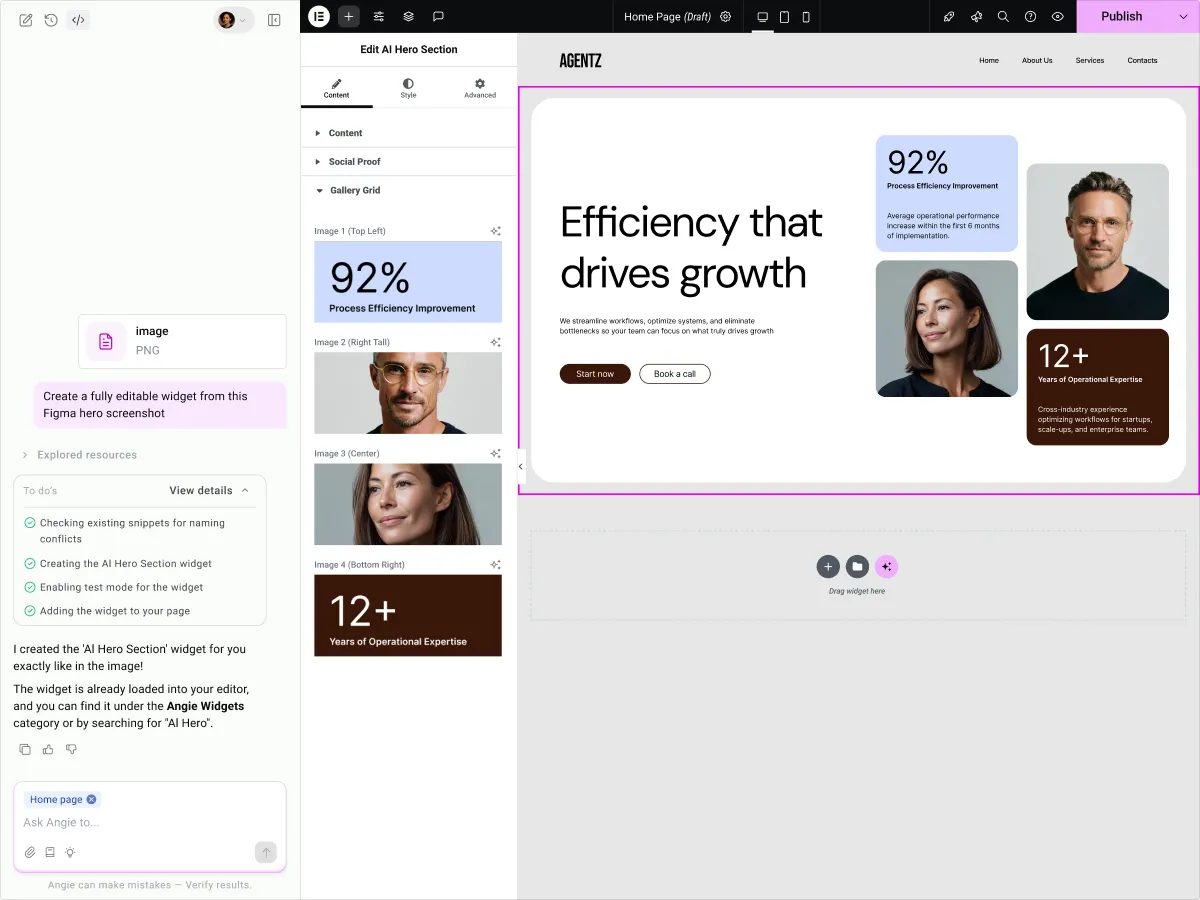
Upload an image or paste a link and Angie analyzes the design to build something similar.
Plan mode
For bigger tasks, Angie asks questions about scope and intent first. Nothing runs until you confirm.
Cloud Library
Save snippets and widgets to a personal cloud library and import them to other connected sites. Importing uses no credits.
Super Admin Mode
An opt-in setting for bulk data updates, error debugging and site-wide SEO fixes. Angie shows a plan before it acts.
MCP and ability plugins
Angie can discover abilities that other plugins register, and developers can connect their own MCP server through an SDK.
Angie free vs pro
Free WordPress.org version
- A free tier with daily renewing credits
- Page, widget and snippet generation within those credits
- Cloud Library, Test Mode, Plan mode and revisions for snippets
The listing describes a free tier with daily credits, so a paid plan with more credits is likely but the listing does not state plan names or prices. The data classes it as freemium. The listing does not mention bringing your own API key.
How to use Angie
- Back up your site
The listing asks for a backup before use. Take one before you let an AI agent change code.
- Install and activate
In wp-admin go to Plugins, then Add New, search for Angie and activate it. WordPress 6.9 or newer is required.
- Describe what you need
Type your request in the chat, or attach a screenshot or URL as a reference. For larger jobs, start in Plan mode.
- Review in Test Mode
Preview the result, switch widgets on and off, and compare staging against production.
- Publish and refine
Approve the change to push it live. Widgets and snippets can be revised through chat, and page output is edited manually.
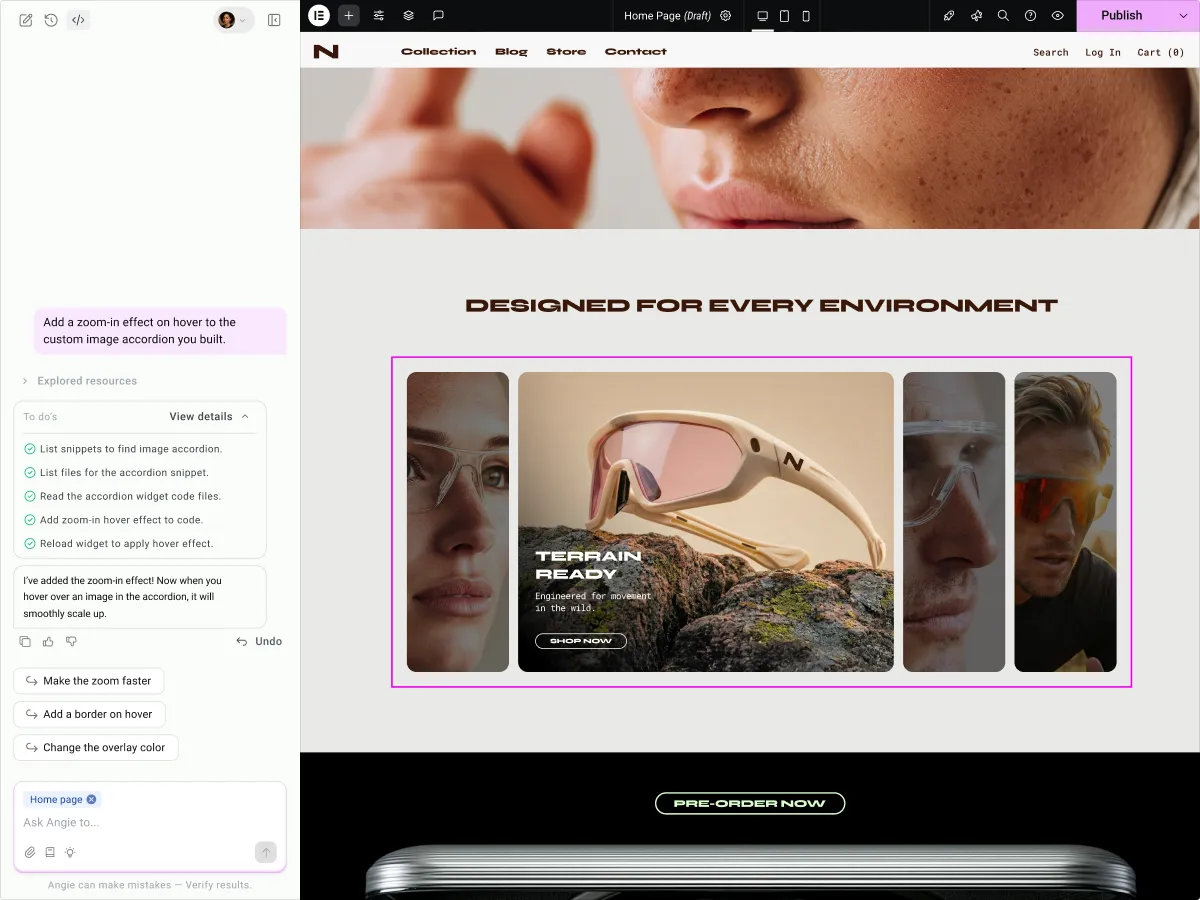
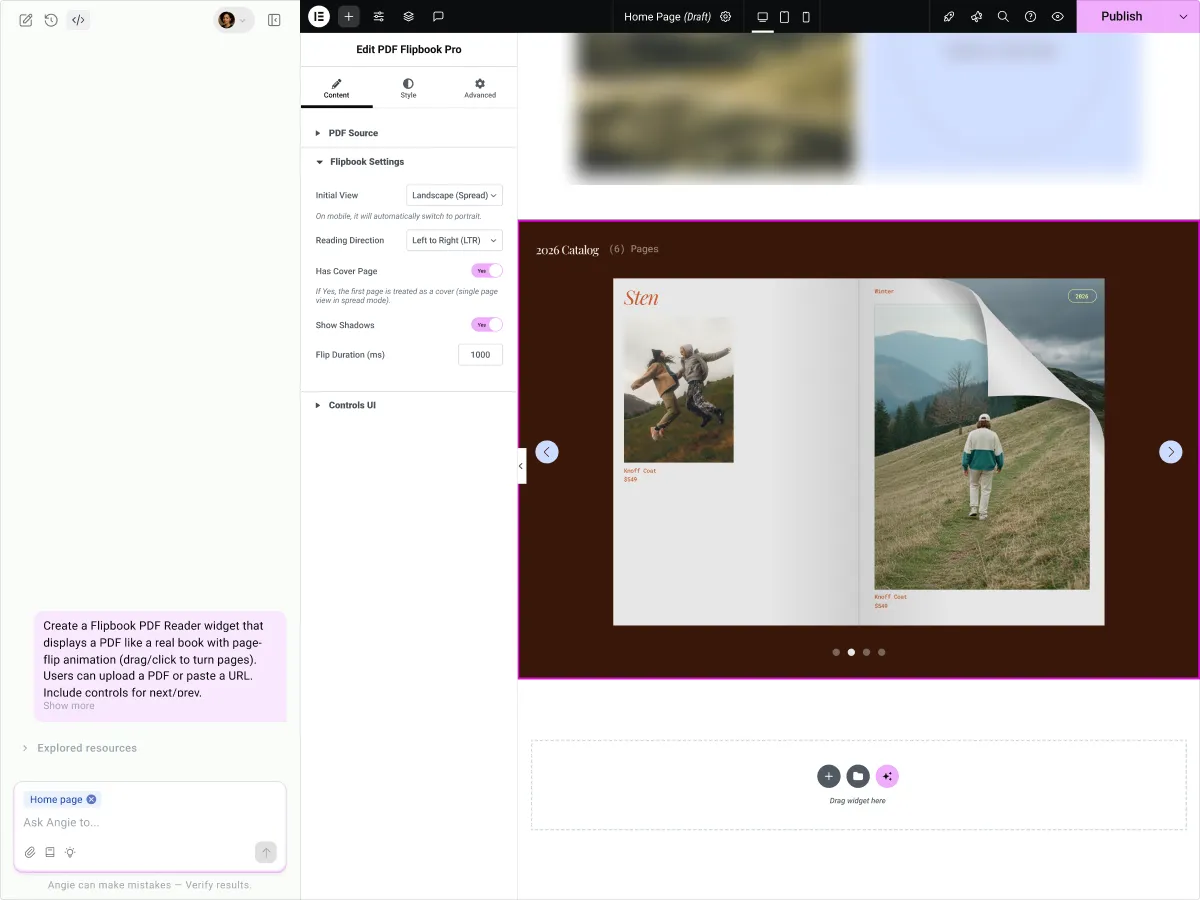
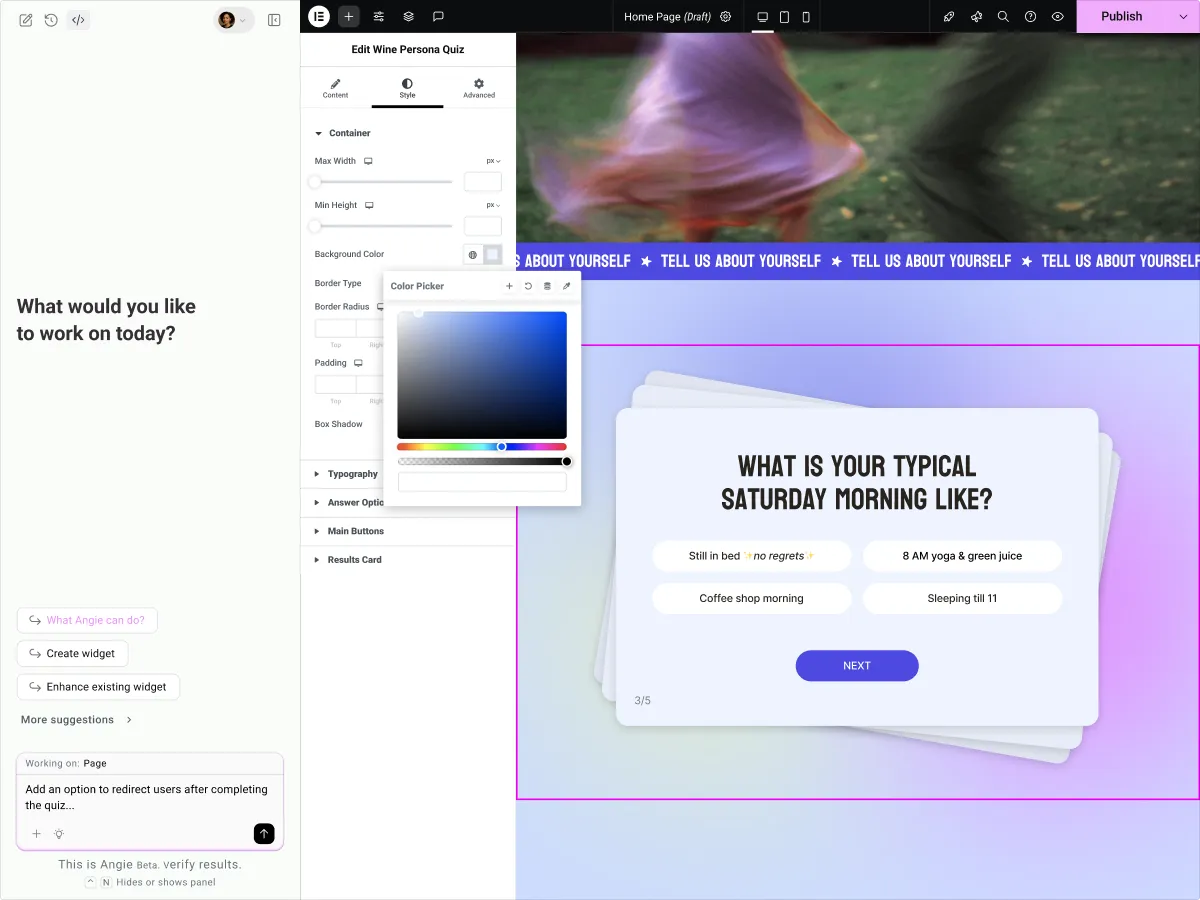
Angie screenshots (5)
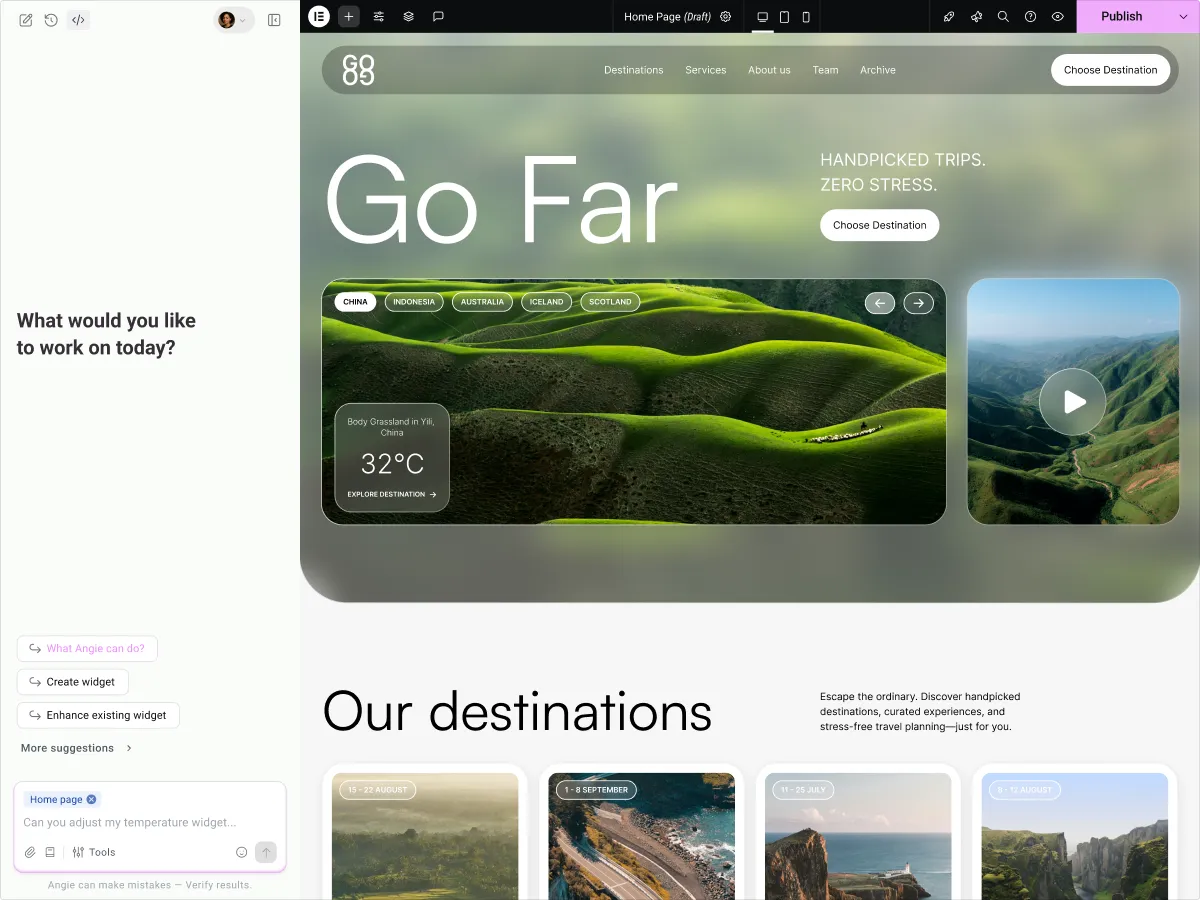
Important information
- Requires WordPress 6.9 and PHP 7.4. Tested up to WordPress 7.1.4.
- Usage runs on credits. The free tier renews daily, but heavy use may hit the limit.
- Super Admin Mode gives read-write access to your file system, database and PHP layer. Only enable it if you accept that, and keep backups.
- The listing says some third-party integrations are still evolving.
- Page creation is edited manually afterwards, not through conversation with Angie.
- No published vulnerabilities are recorded in the data.
From the Angie readme
Straight from the developer's WordPress.org listing.
Full description
Angie: Agentic AI
Generate full Elementor pages, widgets and code snippets for WordPress, save your work to the cloud, and run your full WordPress stack through conversation. No code or setup required.
Disclaimer: While functionality within WordPress Core and the Elementor Editor is stable, some integrations with third-party tools are still evolving. We’re continuously refining and expanding Angie’s capabilities.
Please ensure to back up your site before use.
Angie is an AI agent built natively into WordPress. It understands your site’s architecture, installed plugins, Elementor setup, and data, and takes real action on your behalf. From writing production-ready code to managing content and executing site-wide workflows, Angie works inside the environment you already use.
Describe what you need, and watch Angie build production-ready assets in seconds. Zero coding required and you’re never locked in – everything Angie creates is yours to own, edit, and evolve.
No new platform to learn. No migration required. Your existing theme, plugins, Elementor setup, and Gutenberg editor stay exactly as they are.
Explore the prompt library for more examples.
What Angie can do
• Generate full Elementor pages – Describe the page you want and Angie generates it as native Elementor structure, from a single prompt.
• Create a design system – Turn a prompt or reference into a base design system you can apply across your site.
• Build sections and compositions – Generate complex one-off layouts like Loops and Forms from a single prompt.
• Craft custom Elementor widgets – Create custom widgets from scratch and refine their style using native Elementor Editor controls.
• Extend existing Elementor widgets – Inject custom controls and advanced capabilities into existing widgets to expand their functional range.
• Customize WordPress admin & backend – Tailor your dashboard, add custom post types, extend WooCommerce, and implement custom hooks and filters.
• Architect front-end enhancements – Integrate CSS and JavaScript for sophisticated animations, cursor effects, and immersive interactive behaviors.
• Construct visual apps – Build fully functional front-end applications like custom calculators and quizzes.
• Generate complete landing pages – Produce entire pages with layout, content, and styling for Elementor and Gutenberg.
Extending with Ability Plugins – Angie discovers abilities at runtime from any plugin that registers them via wp_register_ability(). The more abilities installed, the more capable Angie becomes.
Multi-modal input and collaborative building
• Conversational building – Describe the functionality you need in plain language; Angie handles the engineering.
• Visual references – Upload a screenshot of a design you love, or provide a URL, and your AI developer will build it for you.
• Collaborative refinement – Not exactly what you wanted? Just tell Angie what to change. She understands your feedback and refines the result in real-time.
Safe by design – experiment freely, deploy confidently
Everything Angie Code creates is built and tested in a dedicated preview environment. See it on your page, tweak it, and iterate as many times as you want – nothing is added to your live site until you personally approve it. This is your safety net: the freedom to try anything without the risk of breaking anything.
Restore previous versions of snippets created precisely with Revisions.
Cloud Library
Snippets and widgets you create with Angie can be saved to your personal Cloud Library and pulled into any connected site in a few clicks, arriving as a fully editable asset.
For agencies managing multiple sites, this compounds fast. A library of battle-tested snippets becomes a set of ready starting points for every new project.
No rebuilding from scratch. No credits consumed on import.
Plan mode
Get a better first outcome by planning with Angie before creating a widget or snippet. Angie will ask questions regarding intent, scope, and requirements, clarifying the brief before any action is taken. Nothing runs until you confirm.
Super Admin Mode
Super Admin Mode is an opt-in capability that gives Angie read-write access to your file system, database, and PHP layer. Below are a few actions you can offload to Angie:
• Run bulk operations at scale – Update product prices, user roles, and custom metadata across hundreds of records from a single prompt. Angie reads your actual data model first, so operations work against your real post types, registered fields, and active plugins.
• Debug site errors – Trace SMTP failures, PHP conflicts, and API connectivity issues directly in the Angie chat. Angie reads your debug log, identifies recurring patterns, and can deactivate conflicting plugins or modify the relevant hook to resolve the issue.
• Fix SEO gaps site-wide – Populate missing meta descriptions, create redirect rules after category restructures, and standardize URL slugs across your full site in a single session.
Run the full WordPress stack through the same Angie chat.
Contributors & Developers
“Angie: Agentic AI” is open source software. The following people have contributed to this plugin.
Contributors: Elementor
Developer FAQ (14)
- 1. What is Angie?
- Angie is an AI layer for WordPress. Unlike standalone AI tools, Angie is purpose-built for the WordPress ecosystem with deep contextual understanding of your specific website, its architecture, installed plugins, and data. Angie acts as an AI-powered expert WordPress developer and agent designed to help you build and manage websites without writing any code. It functions like a senior engineer that turns plain-language descriptions into production-ready code instantly. Here’s what you can create: • Full Elementor pages – Describe the page you want and Angie generates it as native Elementor structure, from a single prompt. • Design systems – Turn a prompt or reference into a base design system you can apply across your site. • Sections and compositions – Generate complex one-off layouts like Loops and Forms from a single prompt. • Elementor widgets – Create custom widgets from scratch and refine their style using native Elementor Editor controls. • Extend Elementor widgets – Inject custom controls and advanced capabilities into existing widgets to expand their functional range. • Customize WordPress admin & backend – Tailor your dashboard, add custom post types, extend WooCommerce, and implement custom hooks and filters. • Architect front-end enhancements – Integrate CSS and JavaScript for sophisticated animations, cursor effects, and immersive interactive behaviors. • Construct visual apps – Build fully functional front-end applications like custom calculators, and quizzes. • Generate complete landing pages – Produce entire pages with layout, content, and styling for Elementor and Gutenberg.
- 2. What is Super Admin Mode?
- Super Admin Mode is an opt-in feature that gives Angie read-write access to your file system, database, and PHP layer. It’s designed for advanced operations: bulk data updates, site-wide SEO fixes, and error debugging. You opt in explicitly, and Angie presents a plan before acting.
- 3. What is Plan mode?
- Get a better first outcome by starting a significant task with Angie plan mode. Angie will ask clarifying questions to create a robust brief that gets you closer to your intended result.
- 4. Is Angie Code compatible with Elementor?
- Yes! Angie is deeply integrated with the Elementor Editor. You can generate custom widgets specifically for Elementor, allowing you to create unique layouts and functionalities that aren’t available in standard widget packs. The widgets Angie creates work seamlessly with Elementor’s visual controls, giving you the best of both worlds: AI-powered creation and manual refinement.
- 5. Is it free to use?
- Yes. Angie has a free tier with daily renewing credits, allowing you to explore its creation capabilities every day at no cost. This lets you experiment, learn, and build real projects without any financial commitment.
- 6. What is the Cloud Library?
- The Cloud Library is your personal library for Angie creations. Snippets and widgets you build with Angie can be saved to the cloud and imported into any connected site in a few clicks as fully editable assets. No credits are consumed on import.
- 7. How does “Test Mode” protect my site?
- Test Mode is a secure staging environment where AI-generated code runs in isolation. You can preview, test, and interact with your creation without affecting your live site. Only when you’re completely satisfied do you manually publish it to production. This ensures safety and control over every AI-generated element. You can: • See exactly what code will be added • Turn widgets on and off to test behavior • Review what’s in production versus staging • Make iterative changes in a safe space • Publish to live with confidence No artifacts are published or affect your website until you’ve explicitly approved it.
- 8. Can I use screenshots or URLs to build widgets?
- Absolutely. Angie Code supports multiple input types: • Text prompts – Describe what you want in natural language • Screenshots – Upload an image of a design you want to recreate • URLs – Provide a website link and Angie analyzes the design Angie analyzes the layout, functionality, and design patterns to create a similar, fully editable artifacts for your site. This makes reverse-engineering inspiring designs incredibly fast.
- 9. Do I need to be a developer to use Angie Code?
- Not at all. Angie is designed to break the technical ceiling through conversation. Describe what you want, then refine it through follow-up prompts, just like working with a developer. “Make it more colorful,” “Add animation,” “Match my brand colors,” Angie iterates with you until it’s perfect. You don’t need to nail the prompt on the first try. The power is in the conversation, not the single perfect instruction. The code remains open and fully editable for those who want to customize it manually. You’re never locked in.
- 10. Can I edit what Angie generates?
- Yes. This is core to the Angie philosophy. Every widget and snippet Angie creates is fully editable, both through continued conversation with Angie and through manual code editing. Page creation is currently only editable manually, not through a conversation with Angie. You can: • Ask Angie to make changes conversationally (not for page creation) • Switch to Elementor’s visual editor for pixel-perfect adjustments • Edit the underlying PHP, CSS, and JavaScript directly • Mix AI creation with manual refinement Your creations are never locked or proprietary. They’re code that works with your entire ecosystem.
- 11. Is it compatible with my theme and plugins?
- Yes. Angie works across your entire WordPress environment. While it has deep integration with Elementor, Angie Code generates PHP, CSS, and JavaScript. Angie also understands your site’s existing architecture and adapts automatically. Instead of replacing your tools, Angie is also an MCP that connects your ecosystem to help you get more from it.
- 12. How does Angie handle site security?
- Angie follows WordPress security best practices. It does not perform destructive actions (like deleting content or overriding core settings) without your explicit confirmation. Because Angie is context-aware, it understands your site’s boundaries and works within WordPress’s security model. Additionally: • All code runs in Test Mode before going live • You manually approve every change to production • Code is generated using WordPress coding standards
- 13. Can I connect my own MCP server?
- Yes. Angie is fully extensible. Developers can use Angie’s official SDK on GitHub to integrate custom capabilities through the Model Context Protocol (MCP), allowing Angie to interact with your specific tools and workflows in real-time. Resources: • GitHub SDK • NPM package • Demo plugin
- 14. Do I need to speak English to use Angie?
- Not at all. Angie is built for creators worldwide. You can prompt Angie in your native language whether you speak Spanish, French, Japanese, or any other major language. Angie understands your intent and generates the correct content accordingly. Language should never be a barrier to bringing your WordPress ideas to life.
Downloads, last 30 days
Trend vs previous period: -3.1%
Average daily downloads: 2,745 over the last 7 days , 3,263 over 30 days.
Security history
No known CVEs · 0 published vulnerabilities (Wordfence)
Angie FAQ
What does Angie do?
It is an AI agent inside WordPress that turns plain-language requests into Elementor pages, widgets, snippets and site changes. It knows your installed plugins and site structure.
What is Super Admin Mode?
An opt-in mode that lets Angie read and write files, the database and PHP. It is meant for bulk updates, SEO fixes and debugging, and it presents a plan before acting.
What does Plan mode do?
It makes Angie ask clarifying questions about intent, scope and requirements before starting a task. This tends to give a better first result.
Does it work with Elementor?
Yes. It is built for the Elementor editor and can generate custom widgets that use Elementor's visual controls.
Is it free?
There is a free tier with credits that renew each day. The listing does not give details of paid plans.
How does Test Mode protect my site?
Generated code runs in an isolated staging space. You can inspect what will be added and publish only when satisfied.
Can I edit what it creates?
Yes. Widgets and snippets can be changed through chat or by editing the PHP, CSS and JavaScript. Pages are edited by hand.
Can I prompt in a language other than English?
The listing says you can write in your own language, for example Spanish, French or Japanese.
Angie alternatives
Build faster in Elementor with 90+ Elementor widgets and addons, 600+ ready-made Elementor templates, without writing code. Premium Addons powers 600,000+ websites with the Elementor carousel, mega menu, blog posts…

Your WordPress site just became MCP-ready. WPVibe is the Model Context Protocol server for WordPress, connecting your self-hosted site to any AI assistant or AI agent that speaks MCP: Claude, ChatGPT, Cursor,…

Your WordPress site, now in the conversation Jetpack connects your WordPress site to ChatGPT, Claude, and the other AI agents you already use. Ask in plain language to draft a post, see which pages got the most…

This plugin provides Google AI (Gemini) integration for the PHP AI Client SDK. It enables WordPress sites to use Google’s Gemini models for text generation, image generation, text to speech, and other AI…

Secure WordPress MCP server for Claude, ChatGPT and AI agents. Easy MCP AI is a free plugin that turns your own site into a Model Context Protocol (MCP) server. Connect Claude to WordPress , connect ChatGPT to…

miniOrange Secure MCP Server is a complete WordPress MCP server plugin that turns your WordPress site into a fully working Model Context Protocol (MCP) server. Once installed, you can connect Claude to WordPress,…
Listing data from WordPress.org and the Wordfence vulnerability feed, refreshed Nov 9, 2026; listing details fetched Nov 14, 2026. Screenshots are from the plugin's WordPress.org listing. Not affiliated with Elementor.