
AutomatorWP
AutomatorWP - No-Code Workflow Automation, Integration & Webhooks Plugin, now with AI · by Ruben Garcia
- active installs
- 6K+
- 202 ratings
- 4.8
- since last update
- 0d
- releases in 12 months
- —
- support threads resolved
- 100%
- avg daily downloads
- 474
- on WordPress.org
- 6.6 years
AutomatorWP at a glance
AutomatorWP is a free WordPress AI agent & MCP plugin by Ruben Garcia with 6K+ active installs and a 4.8/5 rating from 202 reviews. It was last updated on Nov 9, 2026, is tested up to WordPress 7.1.4 and needs PHP 7.0+. All 17 of its published vulnerabilities have patched versions. Our quality score is 94/100.
What is AutomatorWP?
AutomatorWP is a workflow automation plugin that runs entirely inside WordPress. You build automations from triggers, which say when something happens, and actions, which say what to do next. For example, a WooCommerce purchase can add a tag in another plugin.
It ships with more than 600 triggers, actions and filters across more than 300 plugins and platforms. You can chain several triggers and actions, schedule or loop automations, filter on conditions, and pass data between steps with tags. A built-in AI Assistant can draft and edit automations from a plain-language request.
It suits site owners running memberships, courses, stores or communities who want plugins to work together without a hosted automation service. The AI Assistant needs a configured WordPress AI Connector, and some add-ons, such as Webhooks, are premium.
Best for
- Membership and course sites linking several plugins
- Stores that tag or enroll buyers automatically
- Owners avoiding paid external automation services
- Developers extending automations with hooks
AutomatorWP features
Triggers and actions
Set up as many triggers and actions as you need in one automation. There is no cap on either.
Runs on your own site
Automations run inside WordPress, not on a credit-based service. The listing says there are no artificial usage limits.
AI Assistant
Describe an automation in plain language and the assistant builds it for review. It can also update existing ones and run actions directly.
Wide plugin coverage
More than 600 triggers, actions and filters from over 300 plugins, covering stores, courses, forms and memberships.
Scheduled and loop automations
Run actions on a date, on a repeat, or loop through posts or users to process them.
Filters and limits
Add conditions to any step, require repeat counts, enforce trigger order and limit completions per user or overall.
Tags for dynamic data
Pass values from triggers into actions, including user and post meta.
Guest and logged-in support
Automations can respond to both logged-in users and anonymous visitors.
Developer hooks
Many hooks allow custom triggers, actions and extensions.
AutomatorWP free vs pro
Free WordPress.org version
- Core automation builder with unlimited triggers and actions
- More than 600 triggers, actions and filters from 300+ plugins
- Scheduled, recurring and loop automations
- AI Assistant, when an AI Connector is set up
Pro Paid version
- Webhooks add-on to send and receive data from services such as Zapier or Make
- Schedule Actions add-on for time delays
- Calculator and Formatter add-ons for working with tags
The core plugin is free, and the listing describes premium add-ons made by the same team. It gives no prices. The AI Assistant uses WordPress AI Connectors, so a configured provider is required, and that provider bills for usage.
How to use AutomatorWP
- Install and activate
In wp-admin go to Plugins, then Add New and search for AutomatorWP. You can also upload the zip, then activate it.
- Create an automation
Open the AutomatorWP menu and add a new automation.
- Add a trigger
Pick the event that starts it, such as a purchase or a group join, and set any conditions.
- Add actions
Choose what should happen, such as adding a tag, enrolling in a course or sending an email.
- Test and activate
Turn the automation on and run a test event. Use the logs to confirm it worked.
AutomatorWP screenshots (6)
-
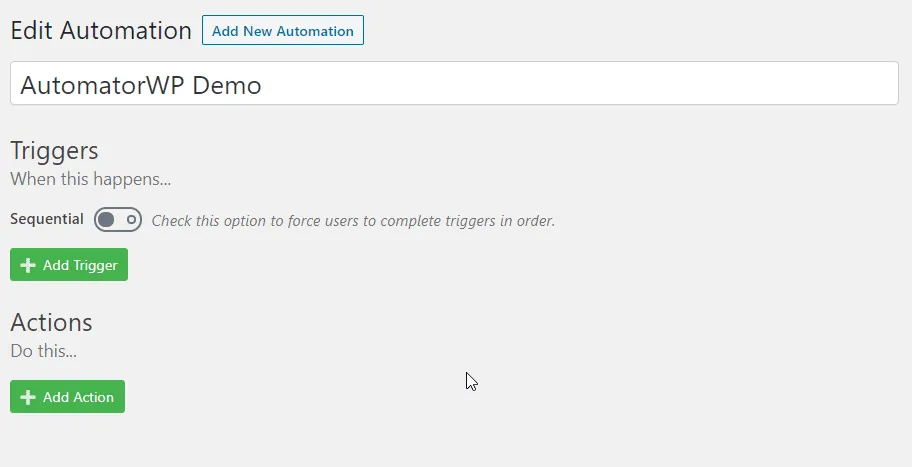
Powerful editor that anyone can learn to use in no time. -
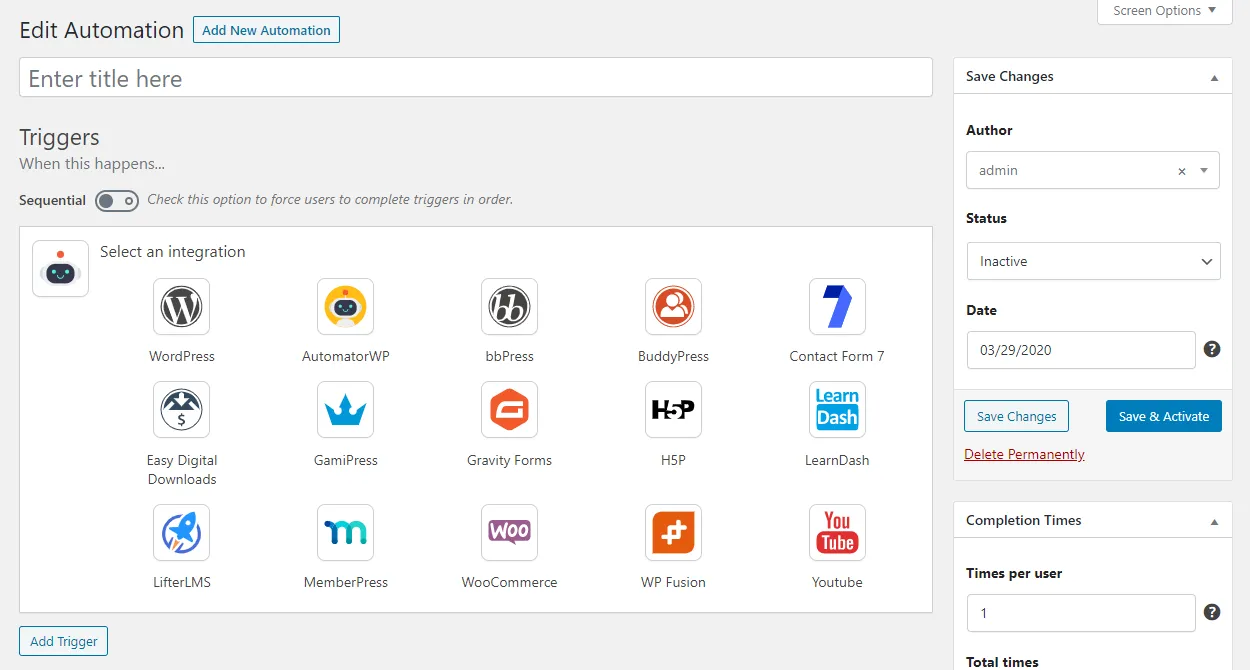
Triggers and actions to connect your favorite WordPress plugins. -
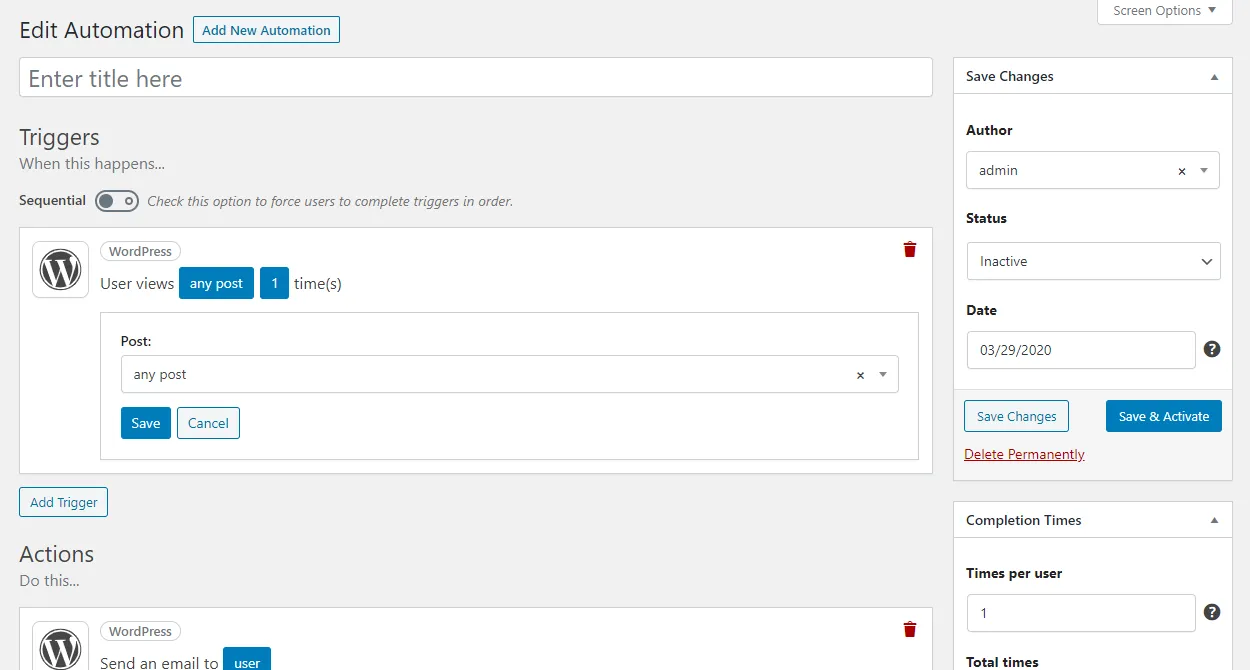
Every trigger and action option is completely configurable. -

Built-in AI assistant ready to help you design, create and manage your automations and able to execute any action available! -
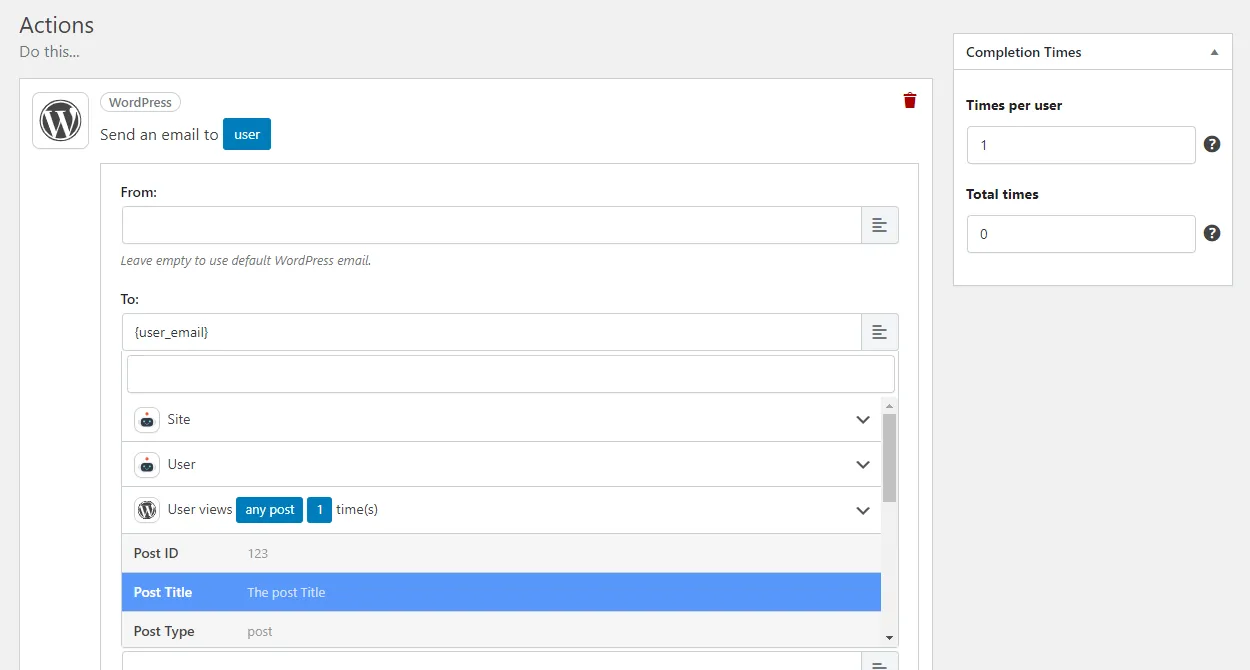
Tags lets you pass trigger information to actions. -
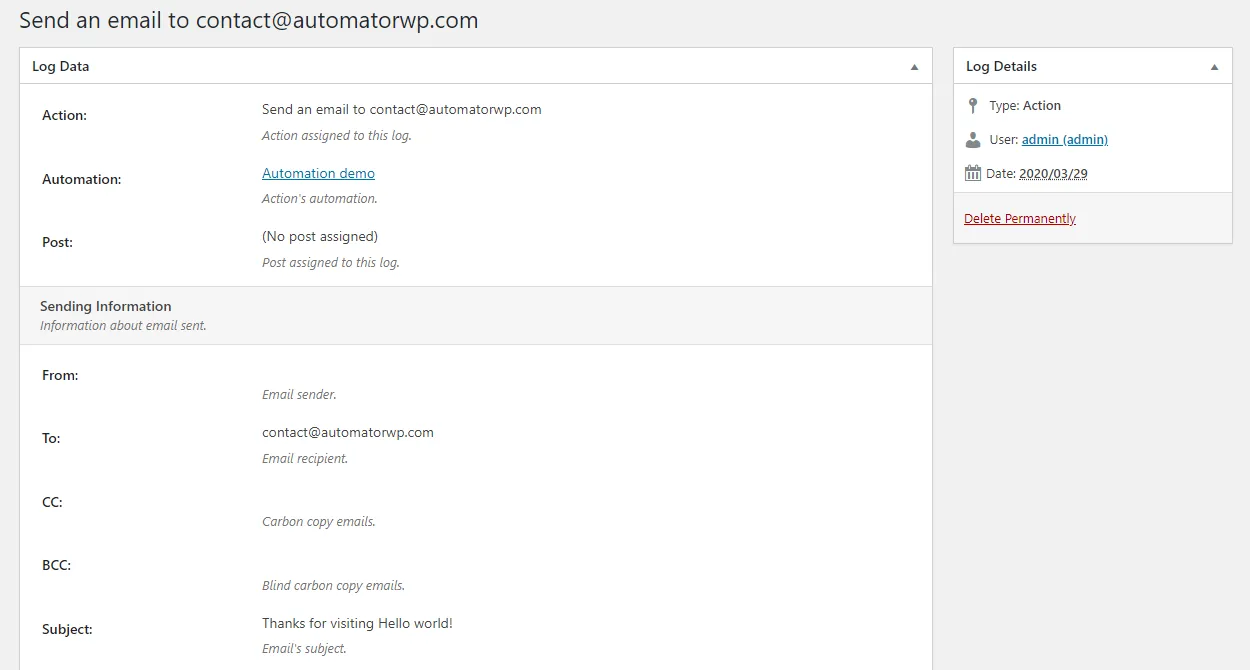
Flexible log system that will keep you informed about who is completing automations.
Important information
- The AI Assistant does nothing without a configured WordPress AI Connector. Prompts go to the provider you set up.
- If you deactivate a plugin that provides triggers and actions, remove those steps first. Automations that rely on them can no longer complete.
- Requires WordPress 4.4 or newer and PHP 7.0 or newer. Tested up to WordPress 7.1.4.
- Webhooks and some other tools are premium add-ons, not part of the free plugin.
- The plugin has a long list of past published vulnerabilities, all marked patched in the data. Keep it updated.
From the AutomatorWP readme
Straight from the developer's WordPress.org listing.
Full description
AutomatorWP is a flexible, open-source automator plugin that connects your WordPress plugins, sites and apps together to build powerful workflows with ease.
You can create “automations” linked to your WordPress activities and when any of them happen, you can make other things happen accordingly.
Automate sales, marketing, administrative tasks, learning experiences and countless other processes to save time, eliminate repetitive work, and focus on what matters most.
⚡ Use automations to connect your plugins
Here are some automations samples to give you a quick idea of what you can build:
When user purchases a WooCommerce product > Add a WP Fusion tag to the user
When user joins a BuddyPress group > Enroll user in a LearnDash course
Also, you can combine multiple triggers and actions to build advanced automations like this:
When user creates a bbPress topic and completes a H5P content > Enroll user in a LifterLMS course, add to MemberPress membership and email user with the access instructions.
The number of combinations and possibilities are unlimited!
🛜 Webhooks to keep your site connected
With Webhooks you can send and receive data from anywhere, connecting all your WordPress plugins with platforms like Zapier or Make.
Even you can connect your plugins from different sites! Example:
User purchases a product on Site A > Enroll user in a course on Site B
Anything with support to webhooks or a Rest API can be connected with the Webhooks add-on and, in consequence, with your WordPress plugins!
View Webhooks automations samples
🔥 Features
• Own your data: AutomatorWP works entirely inside your WordPress, not as a SaaS or a credits-based platform with no artificial usage limits.
• Unlimited triggers and actions: Configure as many triggers and actions per automation as you want.
• Logged-in and anonymous automations: AutomatorWP can work for both, logged-in users and guest visitors.
• Scheduled and recurring automations: Automations to run actions on all or on a filtered group of users manually, on a specific date or on a recurring basis.
• Loop automations: Automations that can loop all or a group of posts or users to process actions on them like remove inactive users or email administrators about pending posts.
• Filters: Filter any trigger or action with the conditions of your choice.
• Required number of times: Set the number of times required to complete a trigger like comment on a post 3 times.
• Sequential triggers: Force users to complete triggers in order to complete the automation.
• Completion limits: Limit automation’s maximum completion times per user and globally.
• Tags: To pass dynamic information from triggers to actions (with support to user and post metas).
• AI Assistant included: Ready to help you design, create and manage your automations, with the addition to execute any action available in AutomatorWP!
• Developer-friendly: Extremely flexible with plenty of hooks to add custom functionalities.
✨ AI Assistant included!
Built-in AI Assistant designed to design, create, and manage automations using natural language. Its features include:
📜 Build automations in seconds: Describe what you want to automate and the Assistant creates the entire automation ready for you to review and activate!
Example Prompt:
When a user purchases "Product A", add the tag "Customer", award "Badge A" and send a welcome email
Note: Yes, for a “welcome email” instruction, the Assistant composes the entire email for you!
🚀 Run actions directly: The Assistant can run any action available in AutomatorWP, giving you thousands of possibilities!
In addition, it will log every execution, allowing you see what has been executed, the parameters passed and the action(s) result(s).
Example Prompts:
Enroll John Doe on "Course A" and award "Badge A"
✏️ Update existing automations: Made to help you save time, the Assistant can update existing automations effortlessly.
Example Prompt:
Add the actions award 10 points and send welcome email to "Automation A"
Note: This assistant uses the WP AI Connectors. Without a configured connector, it won’t be able to perform any tasks.
⚙️ Integrated with +300 WordPress plugins
AutomatorWP includes +600 triggers, actions and filters from +300 plugins & platforms for free, including:
• ActiveMember360
• Advanced Ads
• Advanced Custom Fields (ACF)
• AffiliatePress
• AffiliateWP
• Amelia
• AnsPress
• ARForms
• ARMember
• Asgaros Forum
• Autonami
• Awesome Support
• BBForms
• bbPress
• Better Messages
• Blockli
• BookingPress
• Brizy
• BuddyBoss
• BuddyPress
• Caldera Forms
• Code Snippets
• Contact Form 7
• Charitable
• DigiMember
• Divi
• Download Manager
• Easy Affiliate
• Easy Digital Downloads
• Elementor
• Eventin
• Everest Forms
• Favorites
• FluentBooking
• FluentCart
• FluentCRM
• Fluent Support
• Fluent Forms
• Formidable Forms
• Forminator
• GamiPress
• GeoDirectory
• Gravity Forms
• Gravity Kit
• Groundhogg
• H5P
• HappyForms
• iMember360
• Invite Anyone
• Jetpack CRM
• JetEngine
• JetFormBuilder
• Kadence Blocks
• Kali Forms
• LearnDash
• LearnPress
• LifterLMS
• Mail Mint
• MailPoet
• MailerPress
• Masteriyo LMS
• MasterStudy LMS
• MemberPress
• Meta Box
• MetForm
• Modern Events Calendar
• MyCred
• Newsletter
• Ninja Forms
• Paid Memberships Pro
• PeepSo
• Popup Maker
• Presto Player
• PrettyLinks
• PublishPress Cart
• Quiz and Survey Master
• Restrict Content Pro
• Sensei LMS
• ShortLinks Pro
• Simple Feature Requests
• SliceWP
• Studiocart
• SureCart
• SureMembers
• The Events Calendar
• Thrive Apprentice
• Thrive Cart
• Thrive Leads
• Thrive Ovation
• Thrive Quiz Builder
• Tutor LMS
• Ultimate Member
• Upsell Plugin
• WhishList Member
• weForms
• WooCommerce
• WooCommerce Shipstation
• WP All Import
• WP Booking Calendar
• WP Fusion
• WP Job Manager
• WP Polls
• WP PostRatings
• WP Simple Pay
• WP Ulike
• WP User Manager
• WPAdverts
• WPCode
• wpDiscuz
• WPForms
• WPLMS
• WS Form
Integrated with AI Agents
AutomatorWP connects with AI agents to create smarter workflows. We’re continuously working on adding more AI integrations.
• Anthropic (Claude)
• Google Gemini
• Mistral AI
• Open AI (ChatGPT)
Integrated with external platforms
AutomatorWP can work with external platforms, furthermore WordPress plugins, like:
• ActiveCampaign
• Airtable
• AWeber
• Bluesky
• Campaign Monitor
• ClickUp
• ConvertKit
• HubSpot
• Google Calendar
• Google Drive
• Google Sheets
• IFTTT
• Integrately
• Integromat
• KonnectzIT
• Mailchimp
• MailerLite
• Make
• Notion
• Twilio
• Typeform
• Zapier
• Zoom
⭐ Add-ons to extend AutomatorWP
If you’re looking for something endorsed and maintained by the developers who built AutomatorWP, there are a plethora of premium add-ons, the most popular of which include:
• Webhooks: Send and receive data from webhooks to connect all your plugins with web services like Zapier or Integromat or even to connect different WordPress sites.
• Schedule Actions: Schedule any action to run after a time delay of your choice.
• Calculator: Perform mathematical calculations on tags like sums, subtractions, multiplications, divisions and even apply functions such as abs, sin, cos among others.
• Formatter: Apply different formats to tags like convert, replace or extract anything from strings, numbers or dates even remove the HTML from a content.
• Generator: Generate content like random strings, random numbers, emails even hashes and WordPress nonces.
• QR Code: Create QR codes from links or texts with different styles, formats and colors.
• Multimedia Content: New triggers based on multimedia content creation and interaction.
• Block Users: Block users and roles for being able to complete any automation of your choice.
• Button & Link: Launch any automation through buttons and links clicks.
• Restrict Content: Manage access to any post or page.
• Custom User Fields: Create new custom fields for WordPress users.
• CSV: Manage content from CSV files or Google Sheets spreadsheets.
• User Lists: Create, organize, and manage user lists .
View all add-ons
♥️ More plugins from the AutomatorWP team
🕹️ GamiPress – Gamification plugin to boost engagement by rewarding users with points, achievements, badges & ranks.
🔗 ShortLinks Pro – Link management plugin for shortened URLs & branded affiliate links.
📋 BBForms – Code form plugin designed to help you build multipurpose forms in seconds!
Installation
From WordPress backend
• Navigate to Plugins -> Add new.
• Click the button “Upload Plugin” next to “Add plugins” title.
• Upload the downloaded zip file and activate it.
Direct upload
• Upload the downloaded zip file into your wp-content/plugins/ folder.
• Unzip the uploaded zip file.
• Navigate to Plugins menu on your WordPress admin area.
• Activate this plugin.
Developer FAQ (11)
- What makes AutomatorWP unique?
- Unlike other automation plugins, AutomatorWP runs entirely on your own site. Your data stays under your control, with no mandatory external accounts, no remote server connections, and no artificial token-based limitations. Plus, all external connections are made directly between your site and the platform. For example, when connecting to Google Sheets, AutomatorWP communicates directly with your own Google project. There’s no intermediary server handling your data. Everything goes straight from your site to the platform.
- What does automation, trigger and action means?
- Automations are the basic building block of AutomatorWP, they have 2 main parts: triggers and actions. Triggers are the part that determines when an automation will run and perform its actions. Triggers are known as “When this happens”. Actions are the part that determines what an automation will perform after all it’s triggers gets completed. Actions are known as “Do this”. You can set up an automation like this: Trigger: When user visits a post. Action: Send email to the user.
- Where can I find all available triggers, actions and filters?
- Check this page where you can find all available triggers, actions and filters from all our add-ons.
- Where can I find documentation about AutomatorWP?
- Check the official documentation where you can start getting familiarized with AutomatorWP.
- Can AutomatorWP connect plugins with external services like Zapier?
- Yes, is completely possible thanks to the Webhooks add-on that lets you connect all your plugins with external applications, web services or even others WordPress sites.
- Can AutomatorWP connect plugins from different sites?
- Yes, with the Webhooks add-on you connect your plugins from a site to the plugins from another site. You can create brand new automations between different sites like: When user purchases a WooCommerce product on Site A, Enroll in a LearnDash course on Site B. When user publishes a post of a specific category on Site A, Clone this post on Site B.
- What if I deactivate or remove a plugin that includes new triggers and actions?
- The most recommended is remove first all triggers and actions from this plugin in order to ensure the correct workflow of AutomatorWP, because automations with triggers from this plugin can no longer be completed.
- Will AutomatorWP slow down my website?
- No, AutomatorWP is well optimized and maintained by a professional team with years of experience in the WordPress ecosystem. We tested AutomatorWP performance in different environments with different amount of resources and we have tuned it so that even servers with fewer resources can use AutomatorWP without noticing any slowdowns. AutomatorWP includes a built-in caching and performance oriented workflows that will perform any automation execution in no time.
- Is AutomatorWP compatible with any theme?
- Yes, AutomatorWP doesn’t includes any frontend feature, everything is configure at the WordPress backend, so AutomatorWP doesn’t requires compatibility with any theme.
- Can AutomatorWP be easily translated?
- Yes, AutomatorWP is stored in the official WordPress plugins repository where you (and anyone) are able to submit your own translations.
- Do you offer custom development services?
- No, We’re unable to provide custom development services, as our focus is developing the core AutomatorWP plugin, and the official AutomatorWP add-ons.
Downloads, last 30 days
Trend vs previous period: +13.2%
Average daily downloads: 840 over the last 7 days , 474 over 30 days.
Security history
Past CVEs, patched · 17 published vulnerabilities (Wordfence) · most recent Nov 7, 2026
- Patched 4.9 Medium AutomatorWP <= 5.2.4 - Authenticated (Administrator+) SQL Injection CVE-2025-68561 · Jun 19, 2025 · affects *-5.2.4 · fixed in 5.2.5
- Patched 7.2 High AutomatorWP <= 5.2.5 - Authenticated (Administrator+) SQL Injection via field_conditions CVE-2025-5487 · Jun 14, 2025 · affects *-5.2.5 · fixed in 5.2.6
- Patched 4.3 Medium AutomatorWP <= 2.5.8 - Cross Site Request Forgery via bulk_delete Feb 14, 2023 · affects *-2.5.8 · fixed in 2.5.9
- Patched 7.5 High AutomatorWP <= 6.0.4 - Unauthenticated Privilege Escalation to Insufficient Role Validation in Anonymous Automation 'Role' Option CVE-2026-104768 · Nov 7, 2026 · affects *-6.0.4 · fixed in 6.0.5
- Patched 5.4 Medium AutomatorWP <= 5.3.7 - Authenticated (Subscriber+) Missing Authorization to Multiple Functions CVE-2025-9542 · Sep 9, 2025 · affects *-5.3.7 · fixed in 5.3.8
- Patched 4.9 Medium AutomatorWP <= 5.2.1.3 - Authenticated (Administrator+) SQL Injection CVE-2025-48280 · May 19, 2025 · affects *-5.2.1.3 · fixed in 5.2.2
- Patched 8.8 High AutomatorWP <= 1.7.5 - Privilege Escalation CVE-2021-24717 · Sep 28, 2021 · affects [*, 1.7.6) · fixed in 1.7.6
- Patched 8 High AutomatorWP - Automator plugin for no-code automations, webhooks & custom integrations in WordPress <= 5.3.6 - Missing Authorization To Authenticated (Subscriber+) Remote Code Execution via Automation Creation CVE-2025-9539 · Sep 9, 2025 · affects *-5.3.6 · fixed in 5.3.7
Show all 17 vulnerabilities
- Patched 4.3 Medium AutomatorWP <= 5.8.4 - Missing Authorization to Authenticated (Subscriber+) Sensitive Information Disclosure via wp_ajax_automatorwp_fluentform_get_forms AJAX Action CVE-2026-104728 · Oct 10, 2026 · affects *-5.8.4 · fixed in 5.8.5
- Patched 7.2 High AutomatorWP - Automator plugin for no-code automations, webhooks & custom integrations in WordPress <= 5.6.7 - Unauthenticated Stored Cross-Site Scripting CVE-2026-42650 · Apr 29, 2026 · affects *-5.6.7 · fixed in 5.6.8
- Patched 4.3 Medium AutomatorWP <= 5.8.4 - Missing Authorization to Authenticated (Subscriber+) Sensitive Information Disclosure via automatorwp_convertkit_get_forms AJAX Action CVE-2026-76057 · Aug 21, 2026 · affects *-5.8.4 · fixed in 5.8.5
- Patched 4.3 Medium AutomatorWP <= 2.5.0 - Cross Site Request Forgery CVE-2023-23992 · Jan 20, 2023 · affects *-2.5.0 · fixed in 2.5.1
- Patched 9.6 Critical AutomatorWP <= 5.0.9 - Reflected Cross-Site Scripting via a-0-o-search_field_value CVE-2024-12626 · Dec 18, 2024 · affects *-5.0.9 · fixed in 5.1.0
- Patched 4.3 Medium AutomatorWP <= 5.8.4 - Missing Authorization to Authenticated (Subscriber+) Sensitive Information Disclosure via automatorwp_campaign_monitor_get_lists AJAX Action CVE-2026-76074 · Aug 21, 2026 · affects *-5.8.4 · fixed in 5.8.5
- Patched 7.2 High AutomatorWP - Automator plugin for no-code automations, webhooks & custom integrations in WordPress <= 5.7.2 - Unauthenticated Stored Cross-Site Scripting CVE-2026-42775 · Jun 3, 2026 · affects *-5.7.2 · fixed in 5.7.3
- Patched 4.3 Medium AutomatorWP - No-Code Workflow Automation, Integration & Webhooks Plugin, now with AI <= 5.8.3 - Missing Authorization CVE-2026-78266 · Aug 24, 2026 · affects *-5.8.3 · fixed in 5.8.4
- Patched 4.3 Medium AutomatorWP - Automator plugin for no-code automations, webhooks & custom integrations in WordPress <= 5.6.7 - Missing Authorization CVE-2026-40785 · Apr 23, 2026 · affects *-5.6.7 · fixed in 5.6.8
Recent releases
- v6.0.9
**Improvements** * WP Fusion: Fixed selector to handle ID tags correctly.
- v6.0.8
**Improvements** * Security improvements in Zoom & Aweber authorization process.
- v6.0.7
**Improvements** * Security improvements in Zoom & Aweber authorization process.
- v6.0.6
**New Features** * New integration: WhatAvatar. * WhatAvatar: New action: Unlock avatar part. * **Improvements** * Updated the CMB2 library to the latest version.
- v6.0.5
**Improvements** * Security improvements to role assignment across all actions that can modify user roles.
Show 5 older releases
- v6.0.4
**Improvements** * Security improvement by ensuring redirect to the actual logged-in user. * Security improvement by preventing create administrator users from dynamic role input (tags, for...
- v6.0.3
**New Features** * New integration: MailerPress. * MailerPress: New trigger: User added to contacts. * MailerPress: New trigger: A tag is added to user. * MailerPress: New action: Add user to...
- v6.0.2
**Improvements** * Updated the CMB2 library to the latest version.
- v6.0.1
**New Features** * New integration: MetForm. * MetForm: New trigger: User submits a form. * MetForm: New trigger: Guest submits a form.
- v6.0.0
**New Features** * Added the AI Assistant!!! * AI Assistant: New Ability: Create and update automations. * AI Assistant: New Ability: Run an action (yes, run any action(s) directly). * AI...
AutomatorWP FAQ
What makes AutomatorWP different?
It runs entirely on your own site. There are no mandatory external accounts, remote server connections or token-based limits.
What are triggers and actions?
A trigger is the event that starts an automation. An action is what happens as a result.
Can it connect to Zapier or other sites?
Yes, through the Webhooks add-on. It lets you link plugins to outside services and to plugins on other WordPress sites.
What if I remove a plugin that adds triggers?
Remove its triggers and actions from your automations first, because automations using them can no longer be completed.
Will it slow my site?
The vendor says it is optimized and tested in several environments. Results still depend on your hosting and setup.
Does it work with any theme?
Yes. It has no frontend features and is configured in the admin, so theme compatibility is not an issue.
Can it be translated?
Yes. It is in the official plugin repository, where anyone can submit translations.
Does the vendor offer custom development?
No. The team focuses on the core plugin and its official add-ons.
AutomatorWP alternatives

Build faster in Elementor with 90+ Elementor widgets and addons, 600+ ready-made Elementor templates, without writing code. Premium Addons powers 600,000+ websites with the Elementor carousel, mega menu, blog posts…

Your WordPress site just became MCP-ready. WPVibe is the Model Context Protocol server for WordPress, connecting your self-hosted site to any AI assistant or AI agent that speaks MCP: Claude, ChatGPT, Cursor,…

Your WordPress site, now in the conversation Jetpack connects your WordPress site to ChatGPT, Claude, and the other AI agents you already use. Ask in plain language to draft a post, see which pages got the most…

This plugin provides Google AI (Gemini) integration for the PHP AI Client SDK. It enables WordPress sites to use Google’s Gemini models for text generation, image generation, text to speech, and other AI…

Secure WordPress MCP server for Claude, ChatGPT and AI agents. Easy MCP AI is a free plugin that turns your own site into a Model Context Protocol (MCP) server. Connect Claude to WordPress , connect ChatGPT to…

miniOrange Secure MCP Server is a complete WordPress MCP server plugin that turns your WordPress site into a fully working Model Context Protocol (MCP) server. Once installed, you can connect Claude to WordPress,…
Listing data from WordPress.org and the Wordfence vulnerability feed, refreshed Nov 9, 2026; listing details fetched Nov 14, 2026. Screenshots are from the plugin's WordPress.org listing. Not affiliated with Ruben Garcia.