
Bit Flows
Bit Flows: AI Agent Automation & Integrations for Forms, CRM, eCommerce, Google Sheets, and More · by Bit Apps
- active installs
- 1K+
- 64 ratings
- 4.9
- since last update
- 7d
- releases in 12 months
- —
- support threads resolved
- 0%
- avg daily downloads
- 177
- on WordPress.org
- 22 months
Bit Flows at a glance
Bit Flows is a freemium WordPress AI agent & MCP plugin by Bit Apps with 1K+ active installs and a 4.9/5 rating from 64 reviews. It was last updated on Nov 2, 2026, is tested up to WordPress 7.1.4 and needs PHP 8.0+. It works with OpenAI, Google Gemini. All 1 of its published vulnerabilities have patched versions. Our quality score is 79/100.
What is Bit Flows?
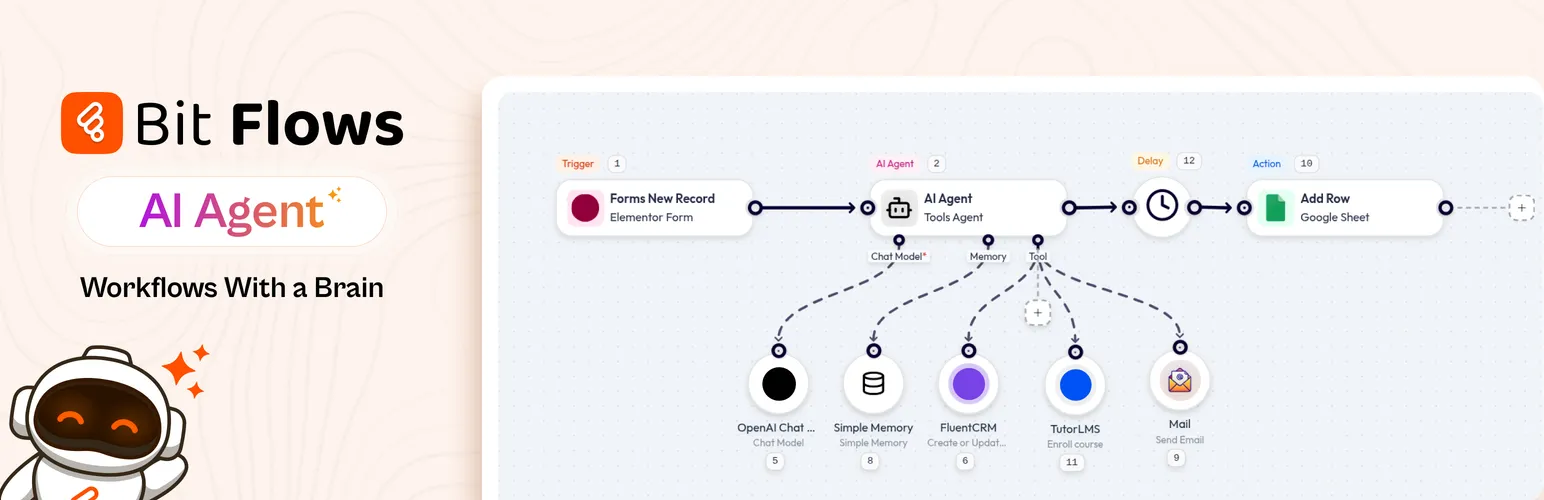
Bit Flows is a workflow automation plugin that runs inside WordPress. You build flows in a drag and drop editor: a trigger such as a form submission or a WooCommerce order starts it, and actions send data to other apps, call an AI model, send mail or change content. The listing compares it to Zapier and n8n, but running on your own server with no per-task fees.
Its AI Agent step can analyze incoming data, decide what to do next and run multi-step flows. You can also connect ChatGPT, Gemini, Claude, DeepSeek, Perplexity, OpenRouter and Groq as actions, for jobs like drafting content or replies. Other tools include conditions, routers, loops, parsers, delays, webhooks and a custom API connector. Free and paid actions are split, so check the lists in the plugin before you plan a flow that depends on a particular app.
It suits site owners and agencies that want to route form and order data to CRMs, sheets and chat apps, with some AI in the middle. Human approval steps and the MCP client are Pro features. The plugin needs PHP 8.0 or newer, which some older hosts lack. Each flow runs on your own server, so you keep control of the data, though heavy automation will use hosting resources.
Best for
- Sites routing form leads to CRMs and spreadsheets
- WooCommerce stores automating order follow-ups
- Agencies replacing per-task automation fees
- Teams that want AI decision steps with human approval
Our take
Bit Flows is an automation builder connecting forms, CRM and ecommerce with AI agent steps. Highly rated by a small, technical audience.
Bit Flows features
Visual workflow builder
Drag steps onto a canvas and link them, with multi-step flows, conditions and branches.
AI Agent step
Lets an AI model analyze data and choose the next step inside a flow.
AI model actions
Call ChatGPT, Gemini, Claude, DeepSeek, Perplexity, OpenRouter or Groq to write text or analyze content.
WordPress and WooCommerce triggers
Start flows from Contact Form 7, WPForms, Elementor forms, Bit Form, WooCommerce, webhooks and WordPress events.
320+ app connections
Send data to services such as Google Sheets, WhatsApp, Telegram, CRMs and email tools. Some are free and some need Pro.
Webhooks and custom apps
Use incoming and outgoing webhooks, or connect any API endpoint as a custom app.
Logic and data tools
Condition, router, iterator, loop, CSV, XML and JSON parsers, delay, schedule and date tools.
Logs and retries
Detailed logs for every step, failure notifications and task re-execution.
Cloud cron
Run scheduled flows without relying only on WP-Cron.
Human in the loop and MCP client
Pause a flow for approval, or let the agent call tools on an MCP server. Both are marked Pro.
Bit Flows free vs pro
Free WordPress.org version
- Unlimited workflows and tasks
- AI Agent, condition, router, loop, parsers and delay tools
- Free triggers such as Contact Form 7, WPForms, WooCommerce and webhooks
- Free actions including OpenAI, Claude, Gemini, DeepSeek, Google Sheets, WhatsApp and SMTP mail
- Logs, failure notifications and task re-execution
Pro Paid version
- Human in the loop approvals
- MCP client for AI Agent workflows
- Further integrations and features beyond the free list
A Pro version exists, but the listing gives no prices. AI actions connect to providers such as OpenAI or Google, which bill you through your own account. The listing does not say exactly how credentials are entered, so check the AI action settings.
How to use Bit Flows
- Install the plugin
In wp-admin, go to Plugins, then Add New, search for Bit Flows, then install and activate it.
- Create a flow
Open the Bit Flows screen and add a trigger, such as a form submission or a new WooCommerce order.
- Add actions
Drag in steps and link them. Examples are sending the data to Google Sheets, sending an email or calling an AI model.
- Add logic if needed
Use conditions, routers, loops or delays to control what runs and when. Add an AI Agent step for decisions.
- Test and enable
Run a quick test, check the logs for errors, then turn the flow on.
Bit Flows screenshots (7)
-
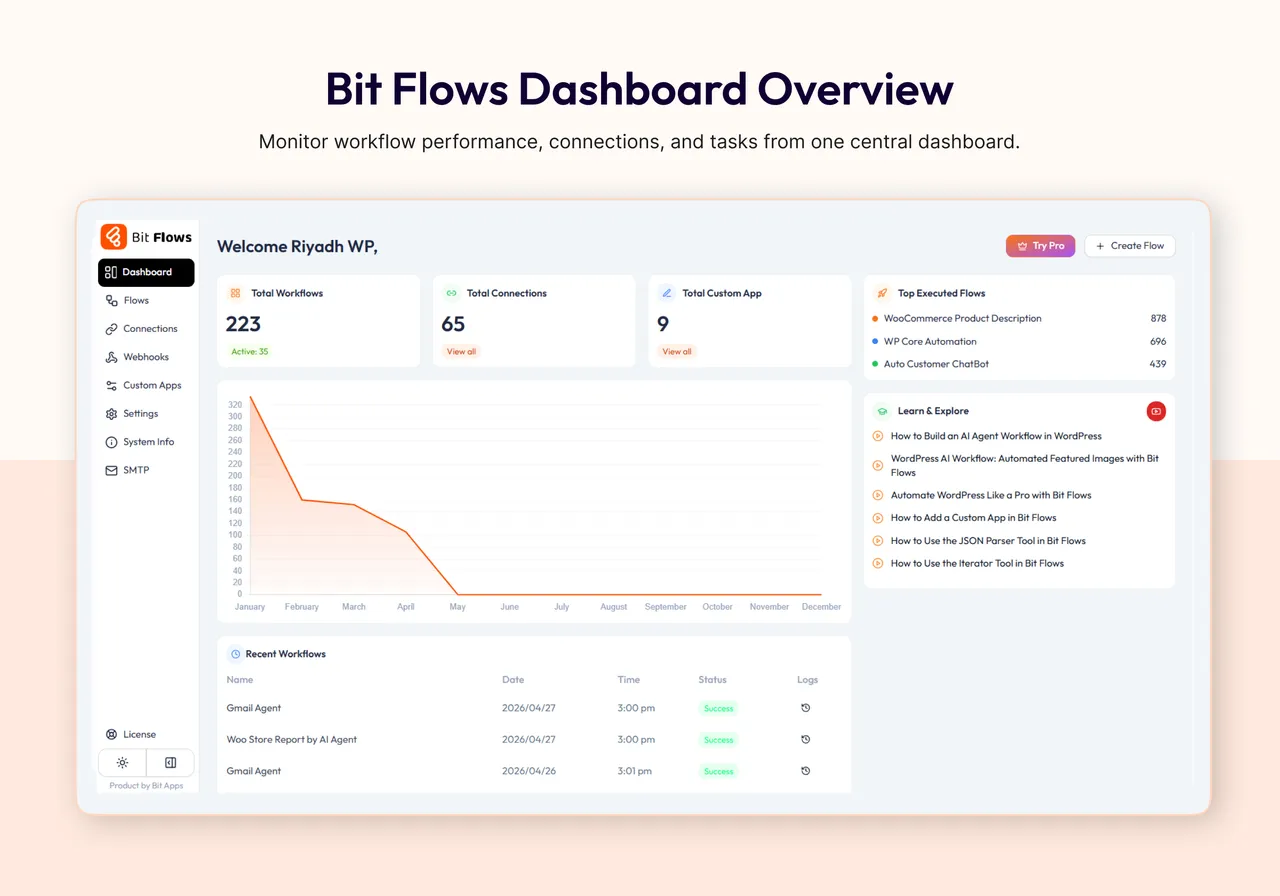
Bit Flows Dashboard Overview -
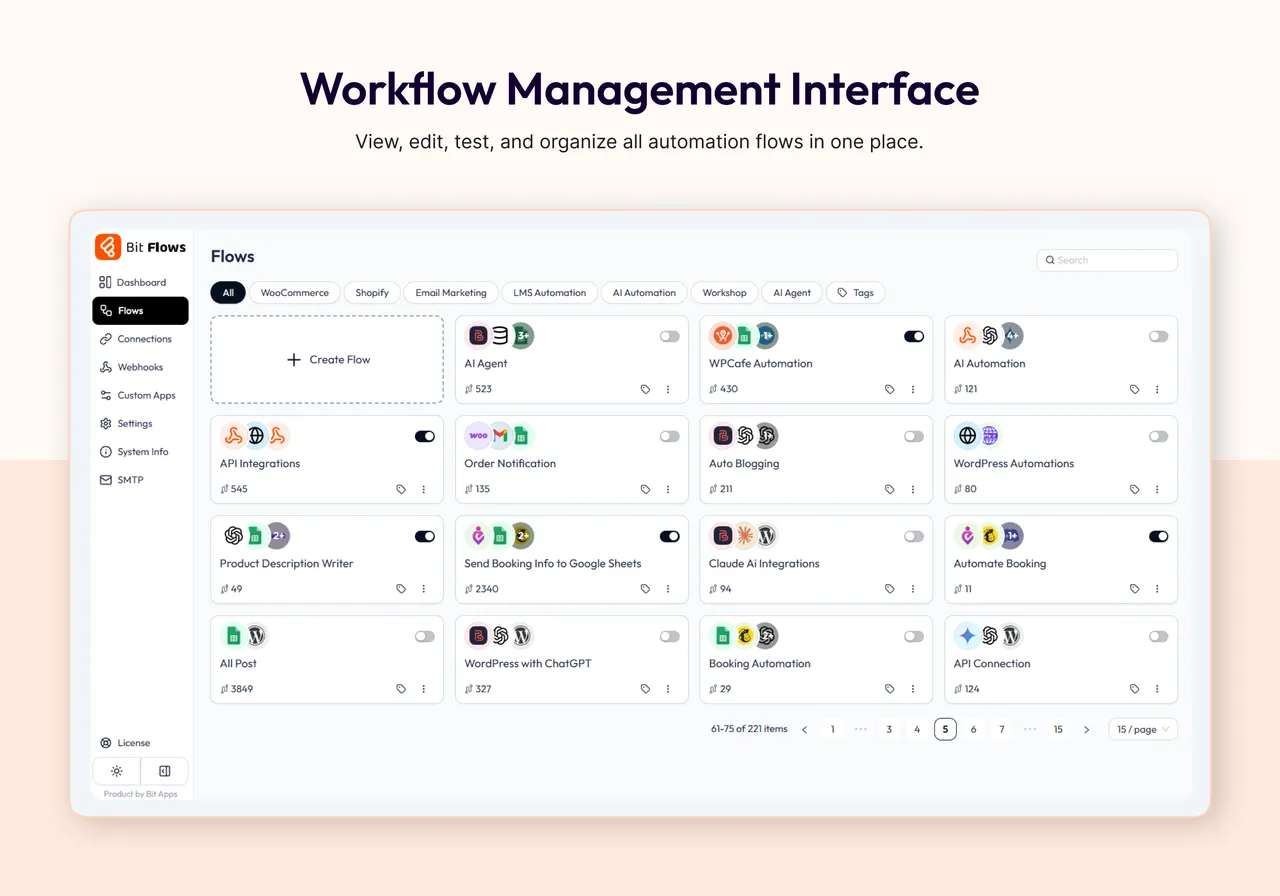
Workflow Management Interface -
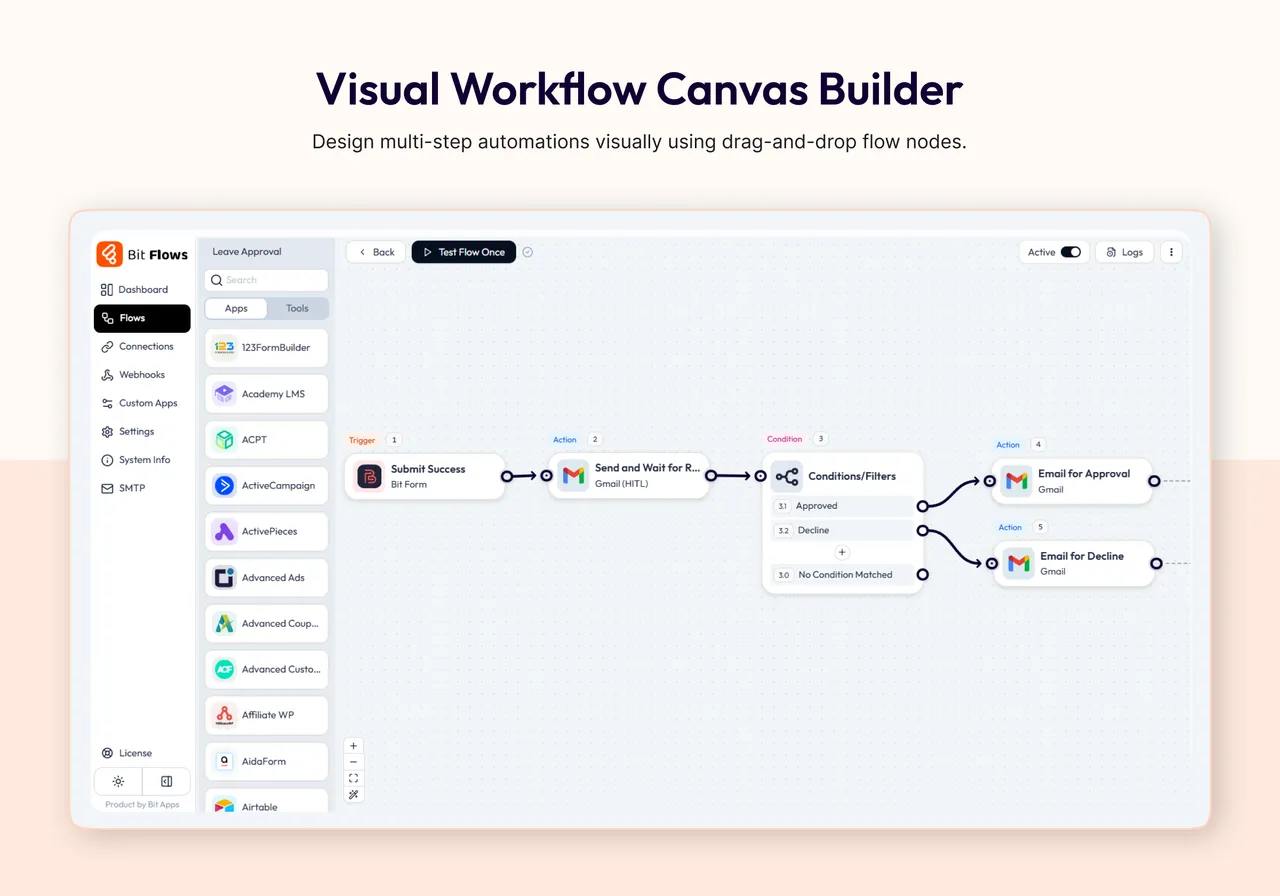
Visual Workflow Canvas Builder -
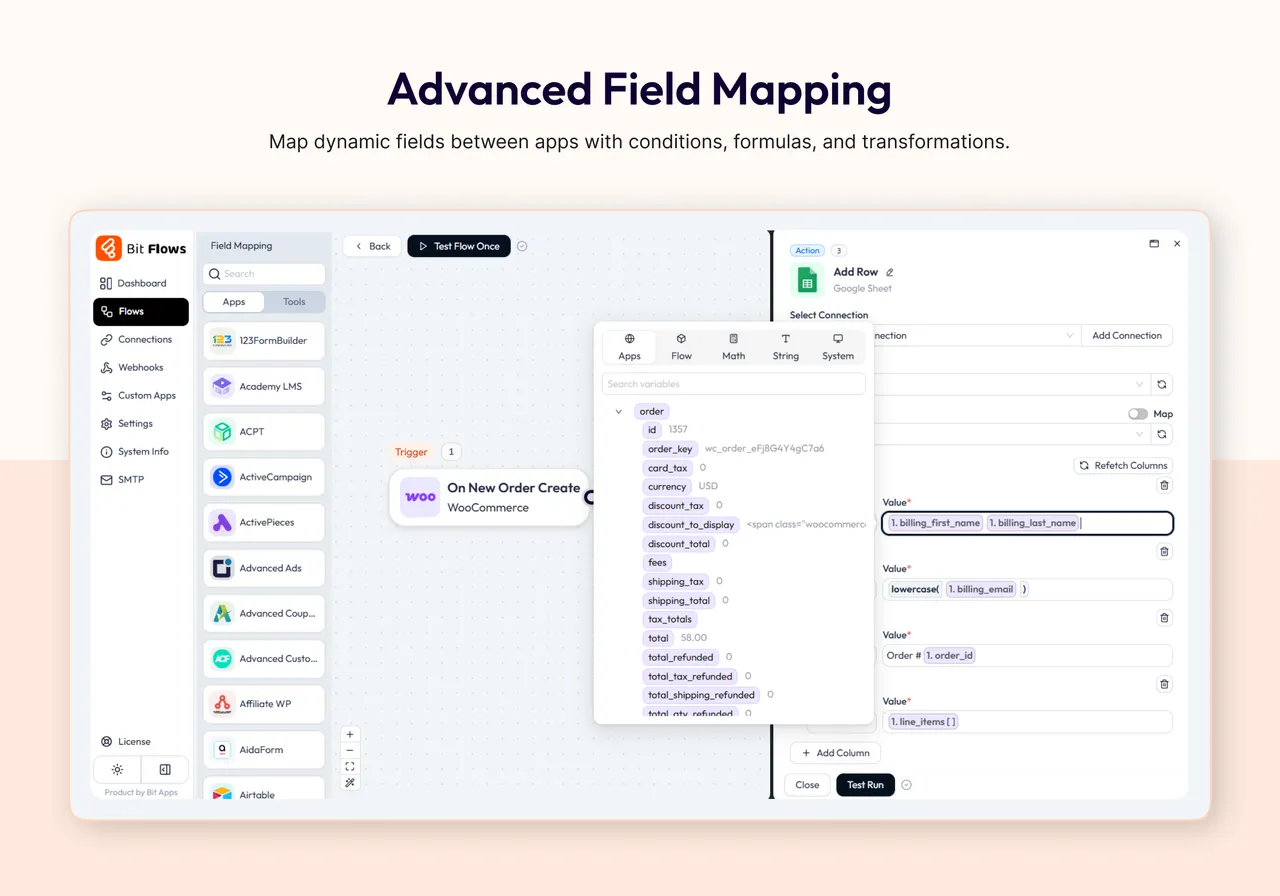
Advanced Field Mapping -
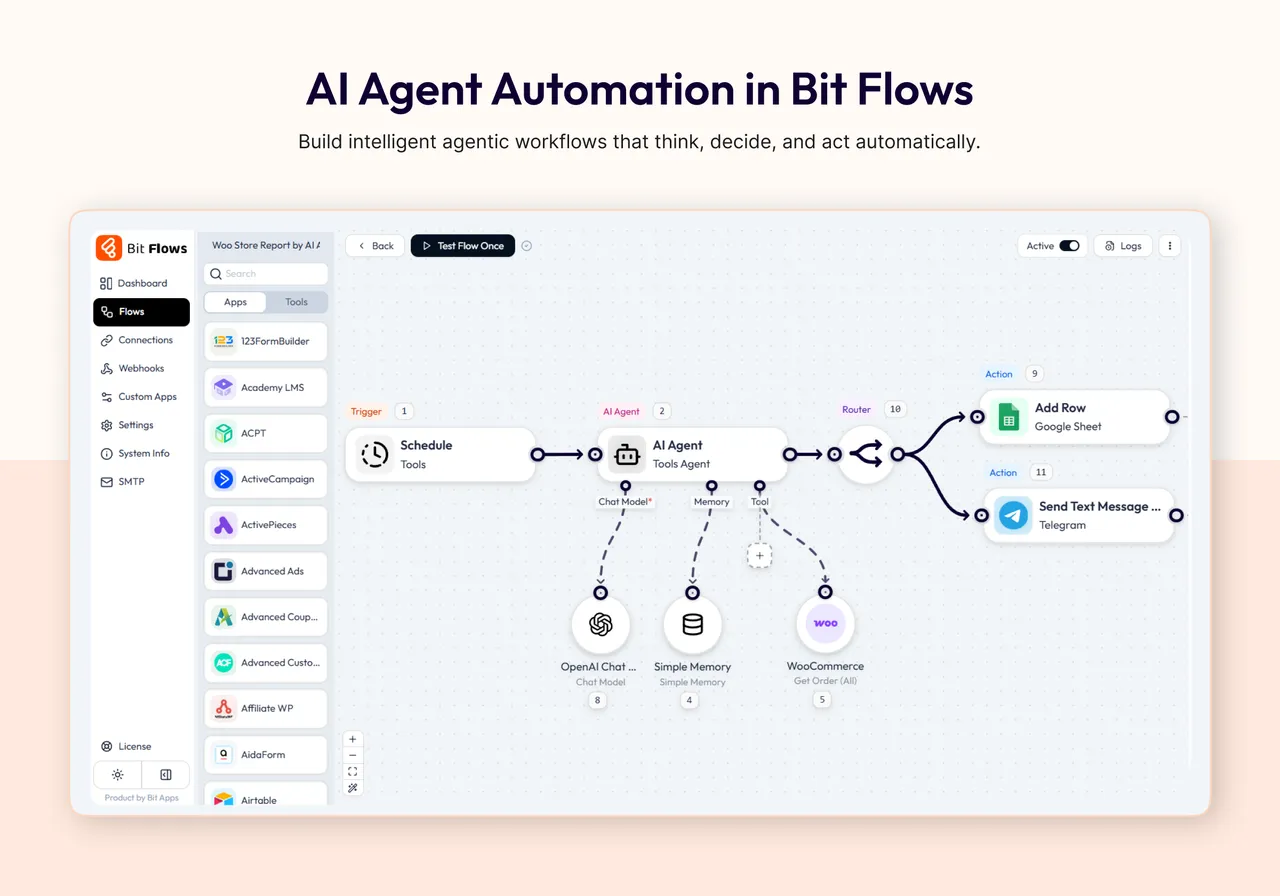
AI Agent Automation in Bit Flows -
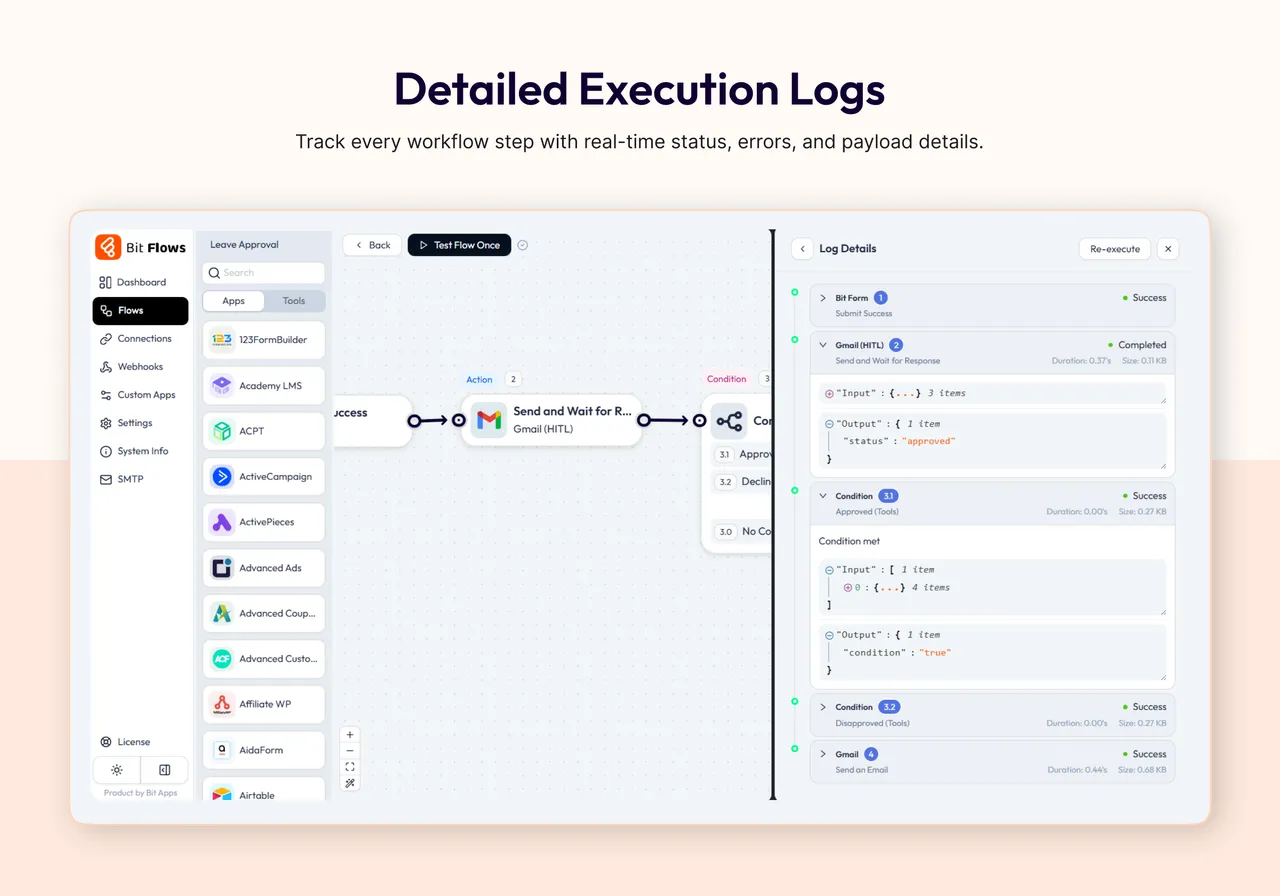
Detailed Execution Logs -
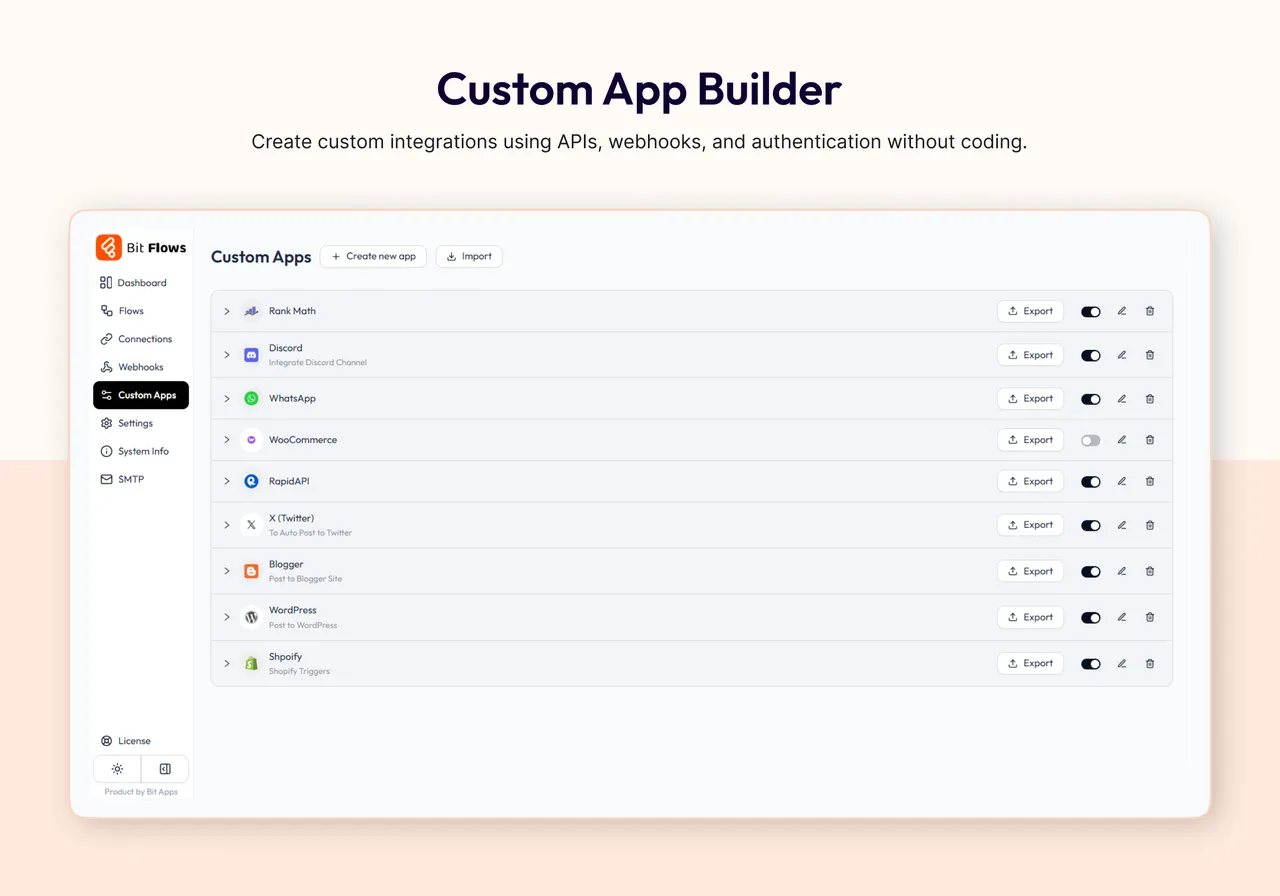
Custom App Builder
Important information
- Data from your flows is sent to the apps and AI providers you connect. Check each service's privacy terms, especially for form data and customer details.
- AI action usage is billed by the provider whose account you connect.
- It requires PHP 8.0 and WordPress 5.8, and is tested up to WordPress 7.1.4.
- Flows run on your own server, so heavy automation uses your hosting resources. The listing mentions cloud cron for reliable scheduling.
- One vulnerability has been published. The current status is patched.
From the Bit Flows readme
Straight from the developer's WordPress.org listing.
Full description
AI Agent inside Bit Flows makes WordPress think, decide, and automate. Experience true AI automation in WordPress.
Bit Flows works like a visual workflow automation builder inside WordPress, with native WordPress plugin integrations and external app connections.
Bit Flows can automate tasks across platforms like ChatGPT for content creation, Google Sheets for data, or updates on multiple platforms.
It routes form or order submissions automatically to CRMs, Slack, WhatsApp, Gmail, and more, letting its AI Agent decide the best flow.
With Bit Flows, your WordPress automations can run in the background after setup.
For example, after a form submission or based on any event, the data can be processed and sent to over 320+ platforms.
What You Can Build with Bit Flows
• Run Zapier / n8n-like workflows directly inside WordPress
• Build powerful AI Agents without writing a single line of code
• Connect 320+ apps and services in just minutes
• Automate WordPress, WooCommerce, and SaaS apps from a single platform
• Build AI-driven customer support & HR workflows
• Add Human in the Loop approval steps for manual review
• Connect MCP-compatible servers inside AI Agent workflows
• Format, parse, and calculate dates with the Date Time tool
• Automate content, emails, CRM, and lead management.
• Add AI decision-making to your real business workflows
🔥 Features & Tools
• AI Agent: A built-in AI assistant that analyzes data, makes decisions, and runs multi-step workflows for you.
• Human in the Loop: Pause a workflow and wait for manual approval or decline before the next step runs.
• MCP Client: Connect MCP-compatible servers inside AI Agent workflows and let your agent call external tools from a configured MCP server.
• Unlimited Workflows and Tasks: Create as many multi-step automations as you want, without limits. Automate every process on your site.
• Drag & Drop Builder: Intuitive visual workflow editor, no coding needed. Just drag steps and link them to automate tasks with ease.
• Multi-step Automation: Build complex automation flows with multiple actions, conditions, and branches.
• Conditional Logic: Automate decision-making in your workflows with powerful if/else logic.
• Schedule, Delay, and Date Time tools: Start workflows at the right time, pause steps when needed, and format or calculate dates inside your automation.
• Repeater / Loop and Iterator: Repeat actions or iterate lists for bulk automated operations effortlessly.
• JSON/XML Parser: Automatically parse and extract data from API responses or webhook payloads.
• Incoming & Outgoing Webhooks: Use standard webhooks with any service. Trigger automation flows from external events.
• Custom App / API Connector: Create custom integrations by integrating any API endpoint and automating data exchange.
• Fail Task Notifications & Logging: Keep detailed logs of each step and get notified on failures or retries.
• Cloud Cron: Run scheduled workflows reliably without depending only on WP cron.
• Deep WordPress and WooCommerce Integration: Works with Elementor, WPForms, Contact Form 7, Fluent Forms, Fluent CRM, WooCommerce, FluentCart, Tutor LMS, LearnDash, and more for AI automation.
• Dark Mode & Quick Testing: Modern interface with a dark theme and instant flow testing.
🔗 Useful Links
🚀Try Full Version Demo | 🚀Docs | 🚀Video Tutorials | 🚀Support | 🚀Facebook Group | 🚀Upgrade to Pro | 🚀Bit Flows Repository
WooCommerce Automation
Bit Flows helps e-commerce businesses optimize operations by automating order and customer workflows.
When an order is placed or a customer registers, Bit Flows can send that data to Google Sheets or your CRM.
You can also automate inventory updates, coupon generation, or email notifications. For example, you can automate follow-ups, inventory checks, and coupon creation instantly.
WordPress Automation
Automating WordPress tasks is now smarter with Bit Flows.
Connect plugins like Elementor, Fluent Forms, Tutor LMS, or Contact Form 7 to your workflows.
For example, when a form is submitted, Bit Flows can create a post, send emails, and update CRM records (e.g. FluentCRM) automatically.
AI Agent for Agentic Workflow Automation
The AI Agent acts as a brain inside your WordPress dashboard. It understands context and goals, making workflows truly agentic. You can use it to analyze form input or support queries and automatically decide the next steps. This turns your site into a smart assistant that can think and act, not just execute fixed rules.
Human in the Loop Approval Workflows
Human in the Loop lets a workflow pause and wait for a real person to approve or decline a request before the flow continues. You can send a review email, then continue the workflow based on the reviewer response.
MCP Client for AI Agent Workflows
The MCP Client lets Bit Flows connect with MCP-compatible servers inside AI Agent workflows. Add the MCP Server URL, choose the connection method, and let the AI Agent access available tools from that server during the workflow.
Content Generation with AI
Bit Flows connects ChatGPT, Gemini, Claude, Deepseek, and Perplexity to generate content automatically. Generate blog posts, marketing copy, or FAQs on demand. For example, feed headlines or keywords into a Bit Flows workflow and let the AI create full articles or social media captions.
Autoblogging with ChatGPT, Gemini, and Claude
Set up an autoblogging workflow using ChatGPT, Gemini, or Claude. When you add a new topic or keyword, Bit Flows can call the AI model to write a draft post and publish it. Integrate images or formatting and go live without manual writing.
Google Sheets Integrations
Track and log data automatically with Google Sheets integrations.
Any form submission, e-commerce order, or user registration can be sent to a spreadsheet for reporting.
CRM Integrations
Bit Flows integrates with popular CRMs like HubSpot, Salesforce, and FluentCRM.
New leads from forms or stores can be added instantly.
Workflow automation and AI help update contacts, track interactions, and keep your CRM in sync across platforms.
Email Marketing Automation
Automate your email campaigns using Bit Flows. Connect form submissions and order leads to email tools like Mailchimp or SendGrid. When someone signs up on your site, Bit Flows can add them to a campaign, send welcome emails, or schedule newsletters.
Webhook Integrations
Use webhooks to integrate any SaaS or custom app. Incoming webhooks trigger flows from external events, and outgoing webhooks send data to any endpoint. This flexibility means you can integrate with services like n8n or any API-driven platform.
Image Generation with Nano Banana and DALL·E
Enhance your content with AI-generated images. Bit Flows’ Image Helper integrates Nano Banana (a lightweight image AI) and DALL·E. You can automatically create visuals for posts or products. For example, generate a featured image based on your blog topic or a custom product graphic using AI, all within your workflow.
WhatsApp, Telegram, Discord, Slack Integrations
Communicate and notify through messaging apps. Bit Flows supports WhatsApp, Telegram, Discord, Slack. Send automated alerts or messages when events occur. For example, get a Slack notification of new orders or send order updates to customers on WhatsApp.
SaaS Integration (Shopify, Mailchimp, JotForm)
Link popular SaaS tools easily. Use Shopify triggers for new orders or sync data with Mailchimp for email marketing. You can also push form entries from JotForm. For example, automatically sync Shopify orders or trigger automation when JotForm entries arrive.
LMS Integrations
Automate your online learning platform with Bit Flows. When a user enrolls or completes a course, automatically update records, send certificates, or email reminders. Bit Flows works with Tutor LMS, LearnDash, and other course plugins.
Form Automation
Turn form submissions into automated processes. When a user submits a form (WPForms, Contact Form 7, Fluent Forms, etc.), Bit Flows can route the data anywhere: email, CRM, Google Sheets, or even trigger the AI Agent to draft a response.
AI Integrations (ChatGPT, Gemini, Deepseek, Perplexity, Claude)
Connect the latest AI models in your workflows. Bit Flows supports ChatGPT, Gemini, Claude, Deepseek, and Perplexity via OpenAI actions. Create workflows that call these AI services for content, analysis, translation, or image generation.
Free Triggers
• Bit Form
• Bit Assist
• Contact Form 7
• WPForms
• Webhook
• WordPress
• WooCommerce
• Elementor Form
Free Actions
• ChatGPT (OpenAI)
• Perplexity
• Claude
• DeepSeek
• Gemini
• Google Sheet
• API Request
• HTTP
• SMTP Mail
• Webhook
• WordPress
• Telegram
• OpenRouter
• Groq
Tools
• AI Agent
• Human in the loop (Pro)
• MCP Client (Pro)
• Condition
• Router
• Iterator
• Repeater/Loop
• Parsers (CSV, XML, JSON)
• Delay, Schedule and Date Time
• Image Helper
Free Features
• Unlimited workflows
• Unlimited tasks
• Multi-step workflows
• Details logs
• Notification of Failed Tasks
• Tasks re-execution
• Custom app with API, Webhook, or WP Action Hook
Available Popular Integrated Platforms
• ACPT
• ActivePieces
• Airtable
• Albato
• Asana
• Automatisch
• AutomatorWP
• Benchmark
• Brevo (Sendinblue)
• ClickUp
• Demio
• Discord
• Drip
• Dropbox
• Elastic Email
• EmailOctopus
• Emailit
• Encharge
• FlowMattic
• Flowlu
• GetGist
• GetResponse
• Gmail
• GoHighLevel
• Google Calendar
• Google Drive
• Google Meet
• Google Tasks
• HubSpot
• Integrately
• JetEngine
• KonnectzIT
• Lemlist
• Line
• MailBluster
• MailerCloud
• MailerPress
• Make
• Microsoft Excel
• n8n
• Newsletter
• Notion
• Rapidmail
• Selzy
• SendFox
• Sperseio
• SyncSpider
• System.io
• Thrive Automator
• Twilio
• Uncanny Automator
• Woodpecker
• WP Fusion
• Zapier
• Zoho Flow
• Zoho Project
• bbPress
• EasyCommerce
• FluentAffiliate
• FormGent
• Nex Forms
• Paymattic
• Profile Builder
• Quill Forms
• SureFeedback
• SureMail
• UserFeedback
• WP Travel Engine
• WP User Frontend
• Academy LMS
• Affiliate WP
• AidaForm
• Amelia Booking
• ARForms
• ARMember
• Asgaros Forum
• Avada Forms
• Beaver Builder
• Bit Social
• Booking Calendar Contact Form
• Breakdance
• Bricks Builder
• BricksForge
• brizy
• CartFlows
• CoBlocks
• Cognito Forms
• Contact Form Email
• Divi Form Builder
• Dokan Multivendor
• eForm
• Easy Digital Downloads
• Essential Addons for Elementor
• Essential Blocks
• Eventin
• The Events Calendar
• Everest Forms
• Fillout
• Fluent Booking
• FluentCart
• Fluent Forms
• FluentSMTP
• Fluent Support
• 123FormBuilder
• FormCraft 3
• Formaloo
• Formester
• Formidable Forms
• Forminator
• forms.app
• Forms.io by 500apps
• Formstack Forms
• GamiPress
• GeoDirectory
• GiveWP
• GoZen Forms
• Google Forms
• Google Sheet
• Gravity Forms
• Groundhogg
• Gutena Forms
• Happyforms
• Hustle
• Involve.me
• JetForm Builder
• Kadence Blocks Form
• Kali Forms
• Klaviyo
• LearnDash
• LifterLMS
• Line
• Mailchimp Forms
• MailerLite Forms
• Mailster
• MakeForms
• MasterStudy LMS
• MemberPress
• MetForm
• MetaBox
• Microsoft Forms
• MightyForms
• Moosend Forms
• New User Approve
• Ninja Forms
• OptinMonster Forms
• Paperform
• Pie Forms
• Piotnet Addon Form
• Piotnet Forms
• Poptics
• Popup Maker
• RafflePress
• Restrict Content
• Shopify
• SiteOrigin Widgets
• SliceWP
• Solid Affiliate
• Spectra
• Squarespace Forms
• StoreEngine
• SureCart
• SureForms
• Survey Monkey
• SurveyNinja
• SurveySparrow
• Tally Forms
• Telegram
• Tidio
• Tripetto
• Tutor LMS
• Typeform
• Ultimate Member
• Unbounce Forms
• Voxel
• WPSubscription
• WooCommerce Bookings
• weForms
• Webflow Forms
• Wispform
• WooCommerce Memberships
• WooCommerce Subscriptions
• Woorise
• wpForo Forum
• WPFunnels
• WP Job Manager
• WS Form
• Wufoo
• Zoho Forms
Some Real-World Use Cases with Bit Flows
• Lead Qualification and Routing with AI Agent
When a WPForms or Elementor form submission comes in, Bit Flows uses an AI Agent to analyze the message and route the lead to the appropriate CRM or Google Sheets. The workflow can automatically send a personalized response via Gmail and qualify the lead without manual effort.
• Autoblogging
Automatically generate blog posts with ChatGPT, Gemini, or Claude. Use Bit Flows to publish AI-generated content directly to WordPress on a schedule.
• AI-Powered Product Descriptions
When a new WooCommerce product is added, use Bit Flows to call ChatGPT or Gemini and craft a product description. The AI Agent can update the product automatically.
• E-commerce Automation
When a new WooCommerce order or Shopify sale occurs, Bit Flows can add the customer to your CRM, update Google Sheets, and send a confirmation email. You can also trigger an AI workflow to generate personalized discounts or related product suggestions automatically.
• Customer Support Automation
When a customer submits a support question, Bit Flows can send it to Claude or ChatGPT for a draft reply. The answer can be emailed to the customer and logged in a Google Sheet. Your team is notified on Slack for a final review, automating your support workflow.
• Custom App Integration
Use Bit Flows to integrate an external API. For example, integrate a shipping system: Bit Flows can send shipment data to an API and parse the response to update your WooCommerce order status, all automatically.
⭐ User Reviews
bubdev – ⭐⭐⭐⭐⭐
The Missing Piece in WordPress Automation
John N – ⭐⭐⭐⭐⭐
Powerful Automation with Bit Flows Plugin for WordPress
downtownboogie – ⭐⭐⭐⭐⭐
Great solution for automations on my client sites
🎉 Overview of other products we are offering :
Bit Form: A powerful WordPress form builder that lets you create multi-step and conversational forms with a smart drag-and-drop builder.
Bit Integrations: A no-code WordPress automation plugin that lets you connect 300+ apps and services to automate your workflows in minutes. With its 3 easy automation methods, you can automate tasks, sync data, and maximize productivity.
Bit Assist: Connect all your customer support channels with a single button. Integrate Floating Chat Widget, WhatsApp, Email, SMS, Telegram, Messenger, and more with Bit Assist.
Bit Social: A social media automation tool that lets you auto-post, schedule, and share instantly across 12+ platforms like Facebook, Instagram, LinkedIn, X, Pinterest, and more with a smart calendar view.
Bit SMTP: Bit SMTP makes sending emails from your WordPress site easy and secure, ensuring they reach the right inbox every time.
Bit File Manager: Bit File Manager is a WordPress plugin for easy file management. Upload, organize, and control from your WordPress dashboard.
Webhook.is: Test your incoming webhook response & send outgoing webhook requests for free.
📢 Join our Bit Apps community & get updates on our plugins.
External Services
Bit Flows only connects to third-party services when explicitly configured by the site administrator. No data is sent without deliberate user action.
For full details on what data is sent, when it is sent, and each service’s Terms of Use and Privacy Policy:
Complete External Services Documentation
Installation
Automated Installation
Installation is free, quick, and easy. Simply search for Bit Flows in your WordPress dashboard under Plugins → Add New, then install and activate it.
Manual Alternatives
Alternatively, you can download the plugin zip file from bit-flows.com, upload it via the Plugins → Add New → Upload Plugin option, and follow the on-screen instructions.
Need help? Check out our installation guide.
Developer FAQ (9)
- What is Bit Flows?
- Bit Flows is a WordPress plugin that automates tasks and integrates your site with hundreds of platforms. It lets you create no-code multi-step agentic workflows for forms, e-commerce, and more.
- How do I automate tasks with Bit Flows?
- Use the visual drag-and-drop workflow builder to set up triggers (like form submission or order placed) and actions (such as sending email, updating CRM, or calling AI). Bit Flows runs these automations on your site automatically.
- What is the AI Agent in Bit Flows?
- The AI Agent is a smart assistant. It uses AI models like ChatGPT, Gemini, or Claude to analyze data and make decisions within a workflow, enabling agentic automation rather than fixed rules.
- Is Bit Flows beginner-friendly?
- Yes. Bit Flows offers a visual drag-and-drop workflow builder, ready triggers, and simple field mapping. Beginners can start fast, while advanced users can build powerful AI automations.
- Can I build complex workflows?
- Absolutely. Create multi-step workflows with conditions, routers, delays, repeaters, APIs, and AI Agents. Build advanced automation flows without writing code.
- How is Bit Flows different from Zapier or n8n?
- Bit Flows runs inside your WordPress site, so your data stays on your server. Like Zapier or n8n, it offers multi-step workflows, but it adds native WordPress and WooCommerce integrations, plus an AI Agent. There are no per-task fees, since it uses your server’s resources.
- Can Bit Flows generate content automatically?
- Yes. With AI integrations (ChatGPT, Gemini, Claude, etc.), Bit Flows can write blog posts, product descriptions, emails, or any text based on prompts. You can automate content generation for faster publishing.
- Does Bit Flows support form plugins?
- Yes. It works with WPForms, Contact Form 7, Fluent Forms, and more. You can trigger workflows when forms are submitted to send data to CRMs, email, Google Sheets, or AI services.
- Where can I learn more about Bit Flows?
- There are Documentations, a support forum, Live Chat Support, and a Facebook Community group. We also provide Video Tutorials and Ticket Based support.
Downloads, last 30 days
Trend vs previous period: +41.9%
Average daily downloads: 218 over the last 7 days , 177 over 30 days.
Security history
Past CVEs, patched · 1 published vulnerability (Wordfence) · most recent Oct 28, 2026
- Patched 5.9 Medium Bit Flows: AI Agent Automation & Integrations for Forms, CRM, eCommerce, Google Sheets, and More <= 1.31.0 - Unauthenticated Local File Inclusion via 'webhook' and 'body' Parameters CVE-2026-110185 · Oct 28, 2026 · affects *-1.31.0 · fixed in 1.32.0
Bit Flows FAQ
What does Bit Flows do?
It automates tasks and links your site to many outside platforms. You build multi-step workflows without code, for forms, ecommerce and more.
How do I set up an automation?
Use the visual builder to pick a trigger, such as a form submission or an order, then add actions such as emailing, updating a CRM or calling an AI model.
What is the AI Agent?
A step that uses an AI model such as ChatGPT, Gemini or Claude to analyze data and decide what a flow does next, rather than following only fixed rules.
Is it beginner-friendly?
The listing says yes, with drag and drop building, ready triggers and simple field mapping. Complex flows with routers and APIs need more care.
How is it different from Zapier or n8n?
It runs inside your WordPress site, so data stays on your server and there are no per-task fees. It adds native WordPress and WooCommerce triggers and an AI Agent.
Can it write content automatically?
Yes. Connected AI models can draft posts, product text or emails from prompts. The listing also describes autoblogging flows.
Which form plugins work?
Contact Form 7, WPForms, Fluent Forms, Elementor forms and Bit Form, among others.
Bit Flows alternatives

Build faster in Elementor with 90+ Elementor widgets and addons, 600+ ready-made Elementor templates, without writing code. Premium Addons powers 600,000+ websites with the Elementor carousel, mega menu, blog posts…

Your WordPress site just became MCP-ready. WPVibe is the Model Context Protocol server for WordPress, connecting your self-hosted site to any AI assistant or AI agent that speaks MCP: Claude, ChatGPT, Cursor,…

Your WordPress site, now in the conversation Jetpack connects your WordPress site to ChatGPT, Claude, and the other AI agents you already use. Ask in plain language to draft a post, see which pages got the most…

This plugin provides Google AI (Gemini) integration for the PHP AI Client SDK. It enables WordPress sites to use Google’s Gemini models for text generation, image generation, text to speech, and other AI…

Secure WordPress MCP server for Claude, ChatGPT and AI agents. Easy MCP AI is a free plugin that turns your own site into a Model Context Protocol (MCP) server. Connect Claude to WordPress , connect ChatGPT to…

miniOrange Secure MCP Server is a complete WordPress MCP server plugin that turns your WordPress site into a fully working Model Context Protocol (MCP) server. Once installed, you can connect Claude to WordPress,…
Listing data from WordPress.org and the Wordfence vulnerability feed, refreshed Nov 9, 2026; listing details fetched Nov 14, 2026. Screenshots are from the plugin's WordPress.org listing. Not affiliated with Bit Apps.