
- active installs
- 2K+
- 8 ratings
- 4.4
- since last update
- 8d
- releases in 12 months
- —
- support threads resolved
- 100%
- avg daily downloads
- 94
- on WordPress.org
- 2.7 years
Block AI Crawlers at a glance
Block AI Crawlers is a free WordPress AI search visibility plugin by lastsplash (a11n) with 2K+ active installs and a 4.4/5 rating from 8 reviews. It was last updated on Nov 1, 2026, is tested up to WordPress 7.1.4 and needs PHP 8.2+. It works with OpenAI, Claude, Google Gemini, Perplexity. It has no published security vulnerabilities in the Wordfence database. Our quality score is 95/100.
What is Block AI Crawlers?
Block AI Crawlers adds rules to your site's robots.txt that ask AI companies not to crawl your content for their products. It covers crawlers tied to OpenAI, Google's Gemini products, Meta, Anthropic, Perplexity, Apple and Amazon, plus more than 150 others taken from the ai.robots.txt list.
It suits publishers, bloggers and businesses that do not want their pages used to train AI models. It needs no setup. After activation it updates robots.txt and adds meta tags, and you can switch individual crawlers on or off in the settings page.
It does not use AI itself and it is not a hard barrier. Robots.txt is a request, and the listing says some bots ignore it. The plugin also does not remove your content from datasets already collected. It only states your preference for future crawling.
Best for
- Publishers protecting written content
- Photographers and artists opting out of image training
- Site owners wanting a quick opt-out without editing files
- Anyone who wants per-vendor control
Our take
The opposite stance: tells AI companies not to scrape your site. A clean, single-purpose tool for publishers who'd rather opt out of AI training than be cited.
Block AI Crawlers features
Robots.txt rules for AI bots
Adds disallow rules for dozens of named AI crawlers to your WordPress robots.txt.
Per-crawler toggles
Turn blocking on or off for each crawler in the settings page.
Large crawler list
Includes major vendors plus 150+ more, generated from the open ai.robots.txt list.
Experimental noai meta tags
Adds the noai and noimageai directives to your page headers. You can switch them off.
Custom robots.txt entries
Add your own lines to robots.txt from the plugin settings.
Zero-config start
Works as soon as it is activated, with no required configuration.
Block AI Crawlers free vs pro
Free WordPress.org version
- All blocking rules, per-crawler toggles and meta tags
- Custom robots.txt entries
The plugin is free on WordPress.org and no paid tier is described in the listing. It does not use any AI provider, so no API key is needed.
How to use Block AI Crawlers
- Install the plugin
In wp-admin go to Plugins, then Add New, search for Block AI Crawlers, then install and activate it.
- Open the settings
Go to Settings, then Block AI Crawlers to see the full list of blocked crawlers.
- Adjust toggles
Turn off any crawler you want to allow, and decide whether to keep the noai meta tags.
- Add custom rules
If you have your own robots.txt lines, enter them in the custom rules box.
- Check your robots.txt
Open your site's robots.txt in a browser to confirm the new rules show up.
Block AI Crawlers screenshots (1)
-
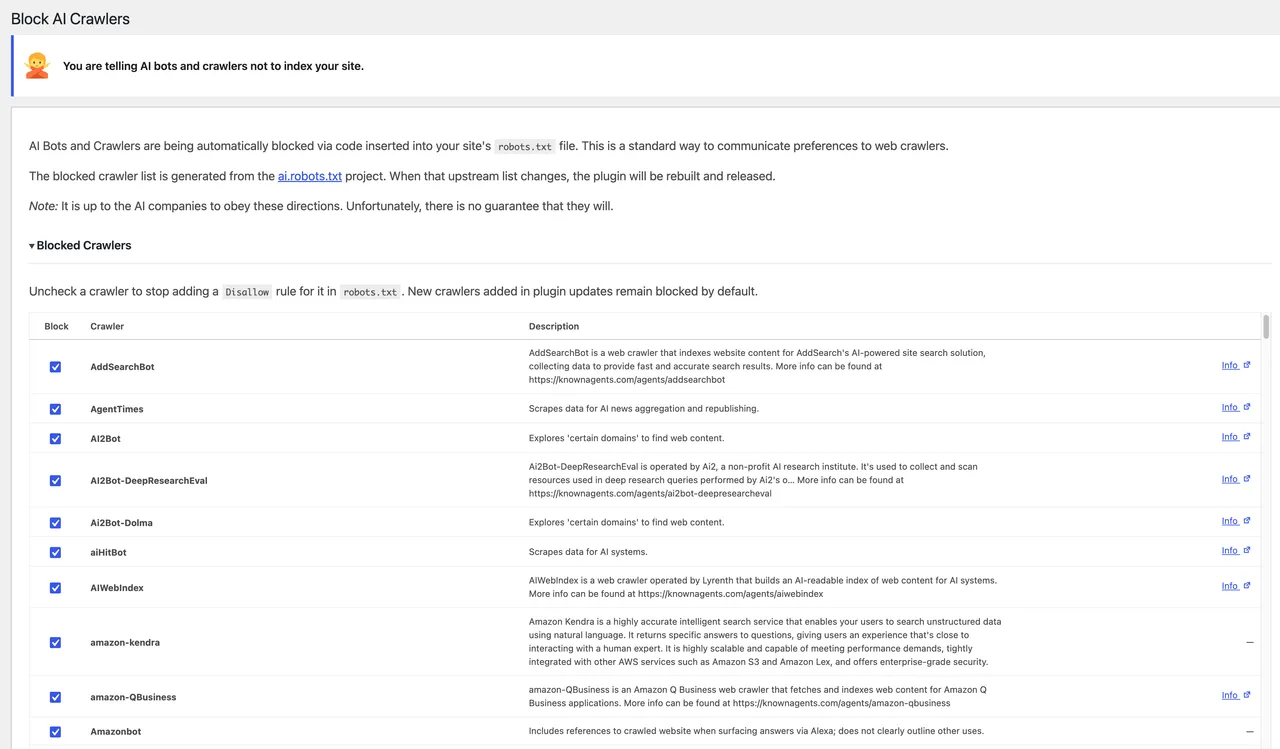
Plugin page showing which crawlers are blocked
Important information
- Requires WordPress 7.0 and PHP 8.2. Tested up to WordPress 7.1.4.
- It works only with WordPress's virtual robots.txt. If a physical robots.txt file exists on your server, the plugin cannot be activated.
- It cannot guarantee protection. Bots that ignore robots.txt will still crawl your site.
- It does not remove your content from existing datasets. It only signals that you do not want future use.
- If robots.txt looks unchanged after a toggle, a server, plugin or CDN cache such as Cloudflare may be serving the old file.
- Search engines follow different rules, so normal indexing is not affected.
From the Block AI Crawlers readme
Straight from the developer's WordPress.org listing.
Full description
Protect Your Content from AI Scraping
This plugin tells AI companies not to crawl your site for their products via standard robots.txt rules.
Features
Blocks AI Bots and Crawlers
The plugin blocks dozens of AI bots via your site’s robots.txt file. You can toggle the blocks for each individual crawler.
Blocked crawlers include:
• OpenAI – Blocks crawlers used for ChatGPT
• Google – Blocks crawlers used by Google’s Gemini AI products
• Meta – Blocks FacebookBot and Meta training crawlers
• Anthropic – Blocks crawlers used by Claude
• Perplexity – Blocks crawlers used by Perplexity
• Apple – Blocks Applebot-Extended
• Amazon – Blocks Amazonbot
• …and 150+ more via ai.robots.txt
The blocked crawler list is generated at build time from ai.robots.txt (robots.json, MIT). See the plugin’s README.md for license attribution.
Experimental Meta Tags
The plugin adds the experimental “noai, noimageai” directive to your site’s meta tags. You can toggle this on and off as needed.
Custom robots.txt Rules
Have custom entries for your robots.txt file? You can now add them directly through the plugin!
Usage
After activation, the plugin will automatically update your robots.txt and add the necessary meta tags. No further configuration is required, but you can check the settings page for a full list of blocked crawlers.
Limitations
While this plugin aims to block specified crawlers, it cannot guarantee complete protection against all forms of scraping, as some bots may disregard robots.txt directives.
Support
For questions or support, please post on the forums.
Installation
• Download the plugin zip file.
• Go to your WordPress admin panel.
• Navigate to Plugins > Add New > Upload Plugin.
• Choose the zip file and click “Install Now.”
• Activate the plugin.1. Activate the plugin through the ‘Plugins’ menu in WordPress
• Once installed the plugin is automatically activated. There are no user configured settings
• You can view more about what crawlers are being blocked at “Settings > Block AI Crawlers”. You can also toggle blocking of individual crawlers.
Developer FAQ (7)
- Will this remove my site from existing data sets?
- No. It tells bots and crawlers that your site shouldn’t be used for future training and new datasets. However, it is up to the AI companies to resepect this.
- How does this work?
- The plugin adds directives to the robots.txt file to tell AI crawlers that they shouldn’t index your site. It also adds the noai meta tag to your site’s header to do the same.
- How often is this updated?
- The block list is generated from the ai.robots.txt project. When that upstream list changes, a GitHub Action opens an issue so the plugin can be rebuilt and released.
- What if I already have a `robots.txt` file on my web server?
- If you have a physical robots.txt file on your web server, you won’t be able to activate this plugin. The plugin only works when using WordPress’ built-in virtual robots.txt.
- Will this work with other plugins that modify the virtual `robots.txt`?
- It should in theory. It just appends the directives to the robots.txt file.
- Will this prevent my site from being indexed by search engines?
- No. Search engines follow different robots.txt rules.
- My `robots.txt` isn’t updated after toggling blocks!
- The robots.txt file can be cached via your web server, a plugin, or CDN (for example, Cloudflare). Once the cache period expires, the updated robots.txt will be served. You can test by running the following on the command line: curl -sSL 'https://example.com/robots.txt' && echo
Downloads, last 30 days
Trend vs previous period: -8.6%
Average daily downloads: 252 over the last 7 days , 94 over 30 days.
Security history
No known CVEs · 0 published vulnerabilities (Wordfence)
Recent releases
- v1.6.2
Tested up to WordPress 7.1. = 1.6.1 - 08/01/2026 = - Add: Sync blocked crawler list from ai.robots.txt (remove IbouBot) - Update: Replace screenshot = 1.6.0 - 07/24/2026 = - New: Per-crawler...
- v1.5.4
- Bump version number - New: Block Brightbot - New: Block DeepSeekBot - New: Block TerraCotta - Fix: Plugin check errors
- v1.5.2
- New: Block Yak - New: Block Bigsur.ai - New: Block AddSearchBot - New: Block Google Agents - New: Block Thinkbot - New: Block Posideon Research Center
- v1.5.1
- New: Block aiHitBot - New: Block Cotoyogi - New: Block Factset - New: Block Firecrawl - New: Block TikTokSpider - New: Block Perplexity‑User
- v1.5.0
- Enhancement: Adds ability for custom robots.txt rules
Show 10 older releases
- v1.4.3
- New: Block SemrushBot - New: Block Crawlspace
- v1.4.2
- New: Block PanguBot
- v1.4.1
- New: Block Turnitinbot - New: Block Ai2Bot-Dolma - Enhancement: WordPress 6.7 compatibility
- v1.4.0
- New: Block Kangaroo Bot - New: Block sentibot - New: Block FriendlyCrawler - New: Block Scrapy - Fix: Broken link to settings page from Plugins page - Enhancement: Improve `readme.md` and...
- v1.3.9
- New: Block PetalBot - New: Block AI2Bot - New: Block Webz.io - New: Block OpenAI Search Bot (SearchGPT) - Enhancement: Alphabetize list of blocked crawlers - Enhancement: Indicate compatibility...
- v1.3.8
- Maintenance: Auto-deply from Github fixed / bumped version number
- v1.3.7
- New: Meta AI - New: Block You.com Crawler - New: Block AmazonBot - New: Block Timpibot
- v1.3.6
- New: Block Perplexity - New: Block Apple AI - Update: FAQ based on submitted question
- v1.3.5
- New: Block additional Omgili bot - New: Block Imagesift - Fix: Fix settings page - Add: `blueprint.json` for plugin preview
- v1.3.3
- Fix: Issue with fatal errors on activation
Block AI Crawlers FAQ
How does it work?
It adds directives to the virtual robots.txt telling AI crawlers not to crawl your site, and adds a noai meta tag to your header.
Will it remove my site from existing training data?
No. It only asks crawlers not to use your site for future training. AI companies decide whether to respect that.
What if I already have a robots.txt file on my server?
Then the plugin cannot be activated. It only works with WordPress's built-in virtual robots.txt.
Does it work with other robots.txt plugins?
It should, since it only appends its directives to the file.
Will it hurt my search engine rankings?
No. Search engines follow separate rules and are not blocked by these directives.
How is the crawler list kept current?
It is built from the ai.robots.txt project. When that list changes, the plugin is rebuilt and released.
Why hasn't robots.txt changed after I toggled a crawler?
A cache on your server, a plugin or a CDN may still be serving the old file. It updates when that cache expires.
Block AI Crawlers alternatives

VigIA (Spanish for “lookout” or “watchman”, incorporating “IA” - Spanish for “AI”) is a complete AI visibility toolkit for WordPress. Monitor 60+ AI crawlers, control access to your content, and optimize how AI…

LovedByAI is a GEO plugin for WordPress: generative engine optimization built for small businesses. It automates the on-page work that helps ChatGPT, Perplexity, Gemini, Claude and Google AI Overviews understand,…

Better Robots.txt replaces the default WordPress robots.txt workflow with a smarter, structured version you can configure and preview before publishing. Instead of a blank textarea, you get a guided wizard with…

Share Buttons & AI-powered Summaries turns every post into an AI-aware destination. It generates an inline AI summary readers can expand next to the share buttons, and offers one-click sharing to every major social…

Track crawlers, scrapers, LLM assistants, and AI agents on your website. Generate a robots.txt that blocks AI bots. Formerly Dark Visitors. Track, control, and optimize your website for AI agents and bots You have…

Is ChatGPT, Claude, Perplexity, or Gemini crawling your website? This plugin automatically tracks every AI bot visit to give you the data you need! 🤖 LLM Bot Tracker is the most comprehensive AI crawler analytics…
Listing data from WordPress.org and the Wordfence vulnerability feed, refreshed Nov 9, 2026; listing details fetched Nov 14, 2026. Screenshots are from the plugin's WordPress.org listing. Not affiliated with lastsplash (a11n).