

LLM Bot Tracker
LLM Bot Tracker - AI Crawler Detection & Analytics · by Hueston
- active installs
- 1K+
- 2 ratings
- 3.0
- since last update
- 411d
- releases in 12 months
- 0
- support threads resolved
- 0%
- avg daily downloads
- 36
- on WordPress.org
- 14 months
LLM Bot Tracker at a glance
LLM Bot Tracker is a free WordPress AI search visibility plugin by Hueston with 1K+ active installs and a 3.0/5 rating from 2 reviews. It was last updated on Sep 24, 2025, is tested up to WordPress 6.8.12 and needs PHP 7.4+. It works with OpenAI, Claude, Google Gemini, Perplexity. It has no published security vulnerabilities in the Wordfence database. Our quality score is 44/100.
What is LLM Bot Tracker?
LLM Bot Tracker records visits from AI crawlers to your WordPress site. It detects 59 known AI bots, including those from OpenAI, Anthropic, Google, Perplexity, Amazon, Meta and Common Crawl, and logs when each one visited, which page it requested and the response code.
It suits publishers, SEO teams and site owners who want to know whether ChatGPT, Claude, Perplexity or Gemini are reading their content. There is nothing to configure. Once activated it starts logging, and you read the data under Tools, then LLM Crawler Logs.
The plugin only watches. It does not block anything, but the data can help you decide which bots to disallow in robots.txt. Data stays in your own database, the plugin makes no external calls, and it does not track human visitors.
Best for
- Publishers checking who scrapes their content
- SEO teams studying AI crawler behavior
- Owners deciding which AI bots to block
- Anyone who wants AI crawl data inside WordPress
LLM Bot Tracker features
Automatic AI bot detection
Identifies 59 AI and LLM bots from user agent strings, with IP checks where possible.
Detailed visit log
Stores time, bot name, page, IP address, response code and user agent.
Filtering and trends
Filter by bot, date range, URL path or IP. See 30-day trends and a leaderboard of the most frequent bots.
Path analysis
Shows which pages AI crawlers request most often.
CSV export
Export filtered or complete logs for offline analysis.
Geographic IP data
Shows where bot traffic comes from.
Display shortcodes
Optional shortcodes show stats tables, bar charts and recent activity on a public page.
Log rotation
Old data is pruned automatically. The vendor says storage stays under about 10MB even with millions of hits.
Cache plugin compatibility
Detection runs at the WordPress level before caching, so it works with common caching plugins.
LLM Bot Tracker free vs pro
Free WordPress.org version
- All tracking, filtering, export and shortcode features
The plugin is free on WordPress.org and no paid tier is described in the listing. It uses no AI provider, so no API key is needed.
How to use LLM Bot Tracker
- Install the plugin
In wp-admin go to Plugins, then Add New, search for LLM Bot Tracker, then install and activate.
- Let it collect data
Tracking starts straight away with no setup. Give it some days to gather visits.
- Open the logs
Go to Tools, then LLM Crawler Logs to see activity, trends and top bots.
- Filter and export
Narrow by bot, date or path, and export a CSV if you want deeper analysis.
- Act on what you find
To block a bot, add a disallow rule for it to robots.txt. Optionally show stats publicly with a shortcode.
LLM Bot Tracker screenshots (2)
-
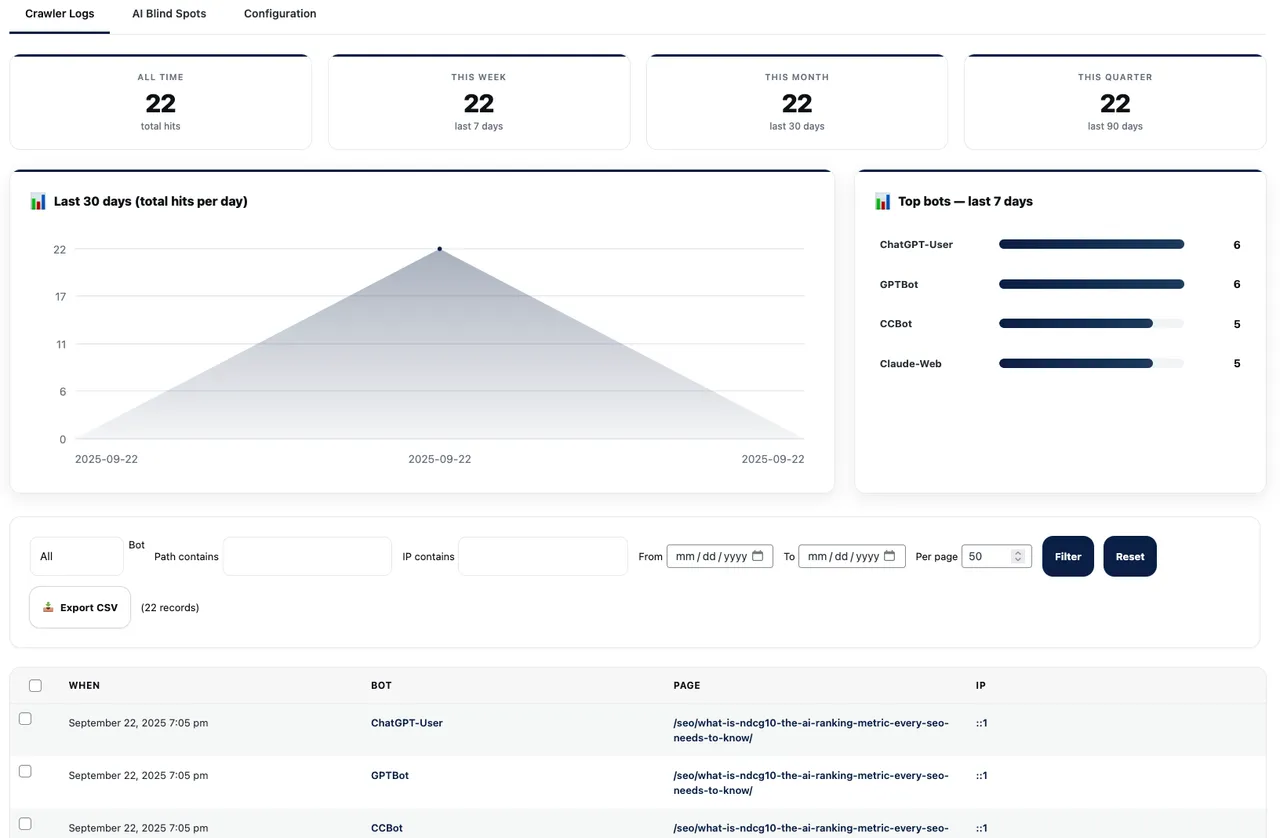
Admin Dashboard Overview - Complete AI bot activity logs with filtering -
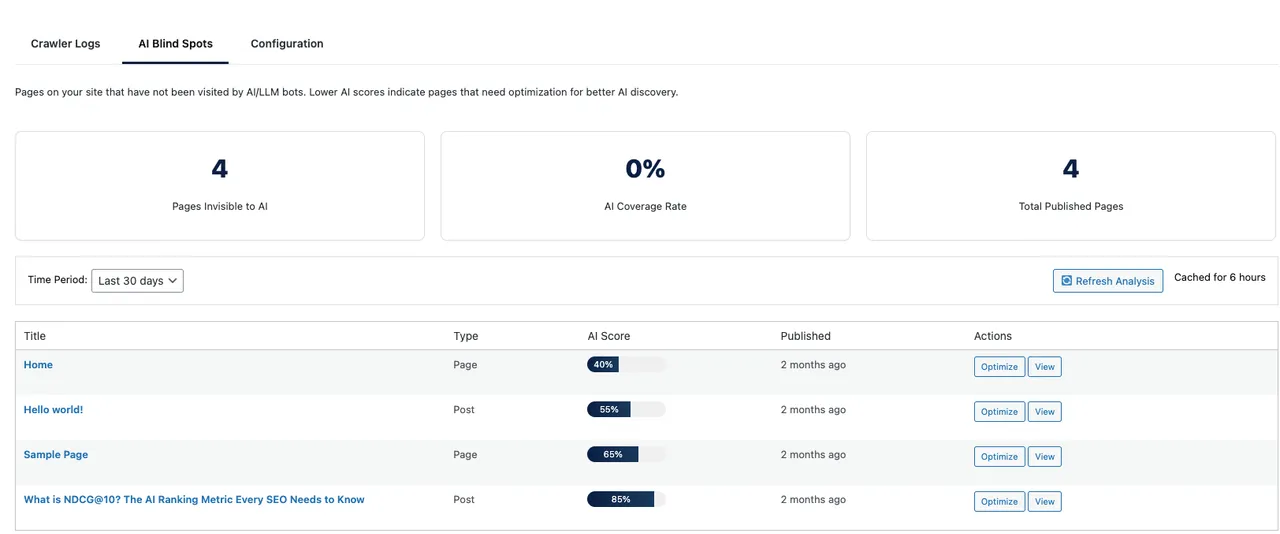
30-Day Trend Analysis - Visual charts showing AI crawler patterns over time
Important information
- Requires WordPress 6.5 and PHP 7.4. Tested up to WordPress 6.8.12, which is behind newer releases.
- It records IP addresses of bots. The vendor says it does not track human visitors and makes no external calls.
- It only logs. Blocking needs separate robots.txt rules, and bots that ignore robots.txt will still visit.
- Bots are recognized from published user agent strings, so spoofed or new bots may be missed. The vendor says new bots are usually added within about two weeks.
- Make sure the log respects your privacy policy, since IP addresses can be personal data in some regions.
- No published vulnerabilities are recorded in the data.
From the LLM Bot Tracker readme
Straight from the developer's WordPress.org listing.
Full description
Is ChatGPT, Claude, Perplexity, or Gemini crawling your website? This plugin automatically tracks every AI bot visit to give you the data you need! 🤖
LLM Bot Tracker is the most comprehensive AI crawler analytics plugin for WordPress, providing automatic 24/7 monitoring of artificial intelligence bots, search crawlers, and web scrapers accessing your content.
🎯 How It Works
Install → Activate → Done!
That’s it. The plugin immediately starts tracking all AI bot activity in the background. No configuration needed. View your data anytime in the admin dashboard at Tools > LLM Crawler Logs.
🚀 Why Track AI Bots & Crawlers?
The web is changing. AI-powered search engines like Perplexity, You.com, and SearchGPT are revolutionizing how people find information. Traditional SEO isn’t enough anymore – you need LLMO (Large Language Model Optimization).
This plugin automatically captures:
* Every AI bot visit – Timestamp, bot name, pages accessed, IP address
* AI crawler patterns – Which content AI systems value most
* Training data usage – When GPT, Claude, or Gemini scrape your content
* Crawl frequency – How often each AI system visits
* Geographic origins – Where AI bot traffic originates
* Response codes – Success rates and errors for AI crawlers
Without this data, you’re flying blind in the AI era of search.
✨ Core Features
🤖 Automatic Detection of 59 AI Bots Including:
• OpenAI Family: GPTBot, ChatGPT-User, OAI-SearchBot (SearchGPT)
• Anthropic Family: ClaudeBot, Claude-Web, Claude-SearchBot
• Perplexity: PerplexityBot, Perplexity-User
• Google AI: Google-Extended, GoogleOther, Google-CloudVertexBot, GoogleAgent-Mariner, Gemini-Deep-Research
• Amazon AI: Amazonbot, NovaAct (Nova AI Agent)
• Meta AI: FacebookBot, Meta-ExternalAgent, Meta-ExternalFetcher
• Microsoft: Bingbot (AI-enhanced), MSN Bot
• AI Assistants: Devin (Software Engineering AI), LinerBot (Academic Research), QualifiedBot
• Common Crawl: CCBot (feeds multiple AI systems)
• ByteDance: Bytespider (TikTok AI)
• AI Search & Research: You.com (YouBot), Timpi (Timpibot), Allen Institute (AI2Bot), Cohere (Cohere-AI)
• Data Extraction: Diffbot (structured data extraction for ML)
• Others: MistralAI, Neeva bot, SemrushBot with AI
📊 Powerful Analytics Dashboard (Tools > LLM Crawler Logs)
* Complete log of all AI bot activity
* Advanced filtering by bot type, date range, URL path, IP address
* Configuration Tab – Smart cache detection with setup guides and bot patterns
* NEW: CSV export – download your data for offline analysis
* 30-day trend analysis – spot patterns and changes
* Top bots leaderboard – see your most frequent AI visitors
* Path analysis – discover your most AI-visited content
* Geographic IP tracking with location data
* Bot verification via IP lookup
* Response code tracking (200, 404, etc.)
* Bulk actions for log management
* Export filtered or complete datasets
⚡ Performance & Privacy
* Runs silently in background – zero configuration
* Lightweight – adds <0.01s to page load
* Smart data storage – automatic log rotation
* GDPR compliant – no human tracking
* No external API calls
* 100% local data storage
🎨 Optional Display Shortcodes
Want to display AI bot stats on your site? Use these optional shortcodes:
* [wpcs_llm_stats] – Statistics table
* [wpcs_llm_bar] – Animated bar chart
* [wpcs_llm_last100] – Recent activity feed
* [wpcs_llm_ip_list] – Compact IP list
* [wpcs_crawler_stats] – Combined view
📈 Who Needs This Plugin?
• Content Creators – Know which AI systems value your content
• SEO Professionals – Master LLMO and AI SEO with real data
• News Publishers – Track AI interest in your stories
• E-commerce Sites – Detect AI shopping assistant crawlers
• Tech Companies – Monitor competitive AI intelligence gathering
• Documentation Sites – See which docs AI systems reference
• Educational Platforms – Understand AI training on your content
• Any WordPress Site – Future-proof your content strategy
💡 Real User Success Stories
“Discovered ChatGPT was hitting our API docs 2,000+ times daily. We optimized those pages and saw a 40% increase in AI-driven traffic!” – Tech Startup
“The background tracking revealed Perplexity visits our site every 6 hours. This data completely changed our content strategy.” – Digital Publisher
“Found ByteDance scraping our entire product catalog at 3 AM daily. Now we can make informed decisions about blocking.” – E-commerce Owner
🔍 Actionable Insights You’ll Get
Automatic tracking reveals:
* Which AI companies are most interested in your content
* Your most valuable pages according to AI systems
* Optimal posting times for AI crawler discovery
* Suspicious scraping patterns to investigate
* Content gaps AI systems are looking for
* Competitive intelligence on AI training data
Make informed decisions about:
* Which bots to allow or block in robots.txt
* Content optimization for AI-powered search
* Publishing schedules for maximum AI visibility
* Technical SEO for AI crawlers
* LLMO strategy development
🛠️ Advanced Administration
The plugin works automatically, but power users can:
* Filter logs by any parameter
* Analyze patterns across time periods
* Identify bot behavior anomalies
* Track crawler response codes
* Monitor crawl budget usage
* Set up custom tracking rules
* Export data for external analysis
📚 Resources & Documentation
• What is LLMO? Complete Guide
• GitHub Repository
• Support Forum
🏆 Why Choose LLM Bot Tracker?
✅ Automatic & Effortless – Install and forget, it just works
✅ Most Comprehensive – Tracks more AI bots than any other plugin
✅ Lightweight – Won’t slow your site like analytics plugins
✅ Privacy-First – No cookies, no human tracking, GDPR ready
✅ Actively Maintained – New bot detection added monthly
✅ 100% Free Forever – No premium upsells or feature gates
✅ Professional Support – Built by Hueston, trusted WordPress experts since 2019
Join thousands of sites gaining AI visibility insights. Install LLM Bot Tracker today and understand your AI traffic immediately!
Additional Information
System Requirements
• WordPress 6.5 or higher
• PHP 7.4 or higher
• MySQL 5.6 or higher
• 10MB free disk space
Privacy Policy
This plugin only tracks AI bots and crawlers, never human visitors. All data is stored locally in your WordPress database. No external API calls are made. No personal data is collected, transmitted, or sold.
Credits
• Built with ❤️ by the Hueston LLMO Team
• Special thanks to the WordPress community for feedback and testing.
Legal Notice
This plugin is not affiliated with OpenAI, Anthropic, Perplexity, Google, Meta, or any AI company mentioned. All bot names and trademarks are property of their respective owners. This plugin simply detects and reports on publicly identifiable user agents.
Installation
Automatic Installation (Recommended)
• Go to Plugins > Add New in your WordPress admin
• Search for “LLM Bot Tracker” or “AI crawler detector”
• Click Install Now then Activate
• That’s it! Tracking starts automatically
• View data at Tools > LLM Crawler Logs
Manual Installation
• Download the plugin ZIP file
• Go to Plugins > Add New > Upload Plugin
• Choose the ZIP file and click Install Now
• Activate the plugin
• Tracking begins immediately
After Activation
• The plugin is already working – no setup required
• Check Tools > LLM Crawler Logs to see collected data
• Optionally add display shortcodes to pages if desired
• Review our documentation for advanced features
Developer FAQ (16)
- Does it require any configuration?
- No! The plugin starts tracking immediately upon activation. It’s completely automatic. Just install, activate, and check your data whenever you want at Tools > LLM Crawler Logs.
- Will this slow down my website?
- No! LLM Bot Tracker runs efficiently in the background with zero impact on visitor experience. It typically adds less than 0.01 seconds to page processing – completely unnoticeable.
- Does this track human visitors?
- No. The plugin exclusively tracks identified AI/LLM crawlers and bots. It does not track, store, or process any human visitor data, making it 100% GDPR compliant.
- Which AI bots and crawlers can it detect?
- The plugin tracks exactly 59 AI/LLM bots: OpenAI: GPTBot, ChatGPT-User, ChatGPT-Browser, OAI-SearchBot Anthropic: ClaudeBot, Claude-Web, Claude-SearchBot, Claude-User, Anthropic-AI Google AI: Google-Extended, Google-CloudVertexBot, GoogleAgent-Mariner, Gemini-Deep-Research, Gemini-AI, Bard-AI, APIs-Google Perplexity: PerplexityBot, Perplexity-User Meta: Meta-ExternalAgent, Meta-ExternalFetcher, FacebookExternalHit, FacebookBot, LinkedInBot Major AI Companies: xAI-Bot, DeepSeekBot, HuggingFace-Bot, Character-AI, Groq-Bot, MistralAI-User, Mistral-Le-Chat Search Engines: DuckAssistBot, Andibot, YouBot, Timpibot Enterprise AI: Cohere-AI, Cohere-Command, Together-Bot, Replicate-Bot International: PanguBot, PetalBot, Bytespider Data & Infrastructure: Diffbot, AI2Bot, BrightBot, Webzio-Extended, ImagesiftBot, BigSur-AI, FirecrawlAgent, RunPod-Bot Others: Amazonbot, Applebot-Extended, NovaAct, Devin, LinerBot, QualifiedBot, CCBot, Omgilibot, Omgili, ProRataInc We continuously update detection patterns as new AI agents are released.
- How do I view the tracking data?
- Go to Tools > LLM Crawler Logs in your WordPress admin. You’ll see all AI bot activity, with powerful filtering and analysis tools. No external service or account needed.
- Can I block unwanted AI bots?
- The plugin provides the data you need to make informed blocking decisions. View bot activity in the admin dashboard, identify unwanted bots, then add them to your robots.txt file. Example: ` User-agent: GPTBot Disallow: / User-agent: CCBot Disallow: / `
- How accurate is the bot detection?
- Very accurate. We use official user agent strings published by AI companies and verify against known IP ranges when possible. The plugin updates its detection patterns automatically.
- Where is my data stored?
- All data is stored locally in your WordPress database. No external services, no API calls, no third-party dependencies. You have complete control and privacy.
- Can I export the tracking data?
- Yes! Click the “📥 Export CSV” button in the admin dashboard to download your AI bot logs as a CSV file. The export respects your current filters, so you can export specific date ranges, bot types, or all data. The CSV includes date/time, bot name, URL path, IP address, response code, and user agent information.
- Does it work with caching plugins?
- Yes! Bot detection happens at the WordPress core level before any caching. Works perfectly with WP Rocket, W3 Total Cache, WP Super Cache, and all major caching plugins.
- How much data does it store?
- The plugin intelligently manages data storage with automatic log rotation. Typically uses less than 10MB even with millions of bot hits. Old data is automatically pruned to maintain performance.
- How often do you add new bot detection?
- We monitor the AI industry constantly and typically add new bot detection within 2 weeks of public announcements. Updates happen automatically – you don’t need to do anything.
- Do the display shortcodes slow down my pages?
- No. The optional display shortcodes use smart caching and only load CSS when used. They’re completely optional – the core tracking works without them.
- Is this better than server log analysis?
- Yes! This plugin provides WordPress-specific context that server logs miss: page titles, post types, taxonomies, and more. Plus it’s accessible directly in your WordPress admin without technical knowledge.
- What’s the difference between this and Google Analytics?
- Google Analytics focuses on human visitors and conversions. LLM Bot Tracker specifically tracks AI bots and crawlers that Google Analytics ignores. They complement each other perfectly.
- Do I need technical knowledge to use this?
- No! The plugin is designed to be completely automatic. Install it and forget it. The data is presented in an easy-to-understand format in your WordPress admin.
Downloads, last 30 days
Trend vs previous period: +2.8%
Average daily downloads: 31 over the last 7 days , 36 over 30 days.
Security history
No known CVEs · 0 published vulnerabilities (Wordfence)
Recent releases
Release cadence: every ~14 days.
- v1.6.0
*Massive AI Bot Coverage Expansion - Now Tracking 59 AI Bots!** **New AI Bots Added (27 new):** * **Major AI Companies:** xAI-Bot (Grok), DeepSeekBot, HuggingFace-Bot, Character-AI, Groq-Bot *...
- v1.5.2
Major update with expanded bot coverage and new Configuration tab! **New Configuration Tab with UX Improvements:** * **Visual Feedback** - Beautiful success toast notification when copying...
- v1.5.1 Dec 10, 2024
Bug Fix: CSV export now correctly exports data when no filters are applied * Fix: Resolved issue with empty CSV exports containing only headers * Enhancement: Improved database query handling for...
- v1.5.0 Dec 10, 2024
New Feature: CSV export functionality for AI bot logs * Enhancement: Export filtered data or complete datasets * Enhancement: Shows record count before export * Added: Excel-compatible UTF-8 BOM...
- v1.4.4 Dec 9, 2024
Fix: Completely removed non-AI bot detection from core * Enhancement: Plugin now ONLY detects and logs AI/LLM traffic * Performance: Faster processing with fewer bots to check * Cleanup: Removed...
Show 9 older releases
- v1.4.3 Dec 9, 2024
Refined: Focused exclusively on AI/LLM bots - removed non-AI crawlers * Enhancement: Improved bot classification for cleaner analytics * Documentation: Added complete list of all 27 tracked AI...
- v1.4.2 Dec 9, 2024
New: Added support for 6 new AI agents and assistants * New: GoogleAgent-Mariner - Google's autonomous AI agent for multi-step tasks * New: Gemini-Deep-Research - Google Gemini's research...
- v1.4.1 Dec 9, 2024
Performance: Dramatically improved AI Blind Spots tab loading speed (3-5x faster) * Performance: Added intelligent caching for AI discovery scores (7-day cache) * Performance: Implemented...
- v1.4.0 Dec 9, 2024
New Feature: AI Blind Spots analysis - identify pages not visited by AI bots * New: AI Discovery Score - rates each page's discoverability by AI systems * New: Tabbed interface in admin dashboard...
- v1.3.1 Dec 15, 2024
Security: Enhanced input sanitization and data escaping per WordPress.org standards * Security: Added nonce verification to all admin actions * Code Quality: Full WordPress coding standards...
- v1.3.0 Dec 1, 2024
Major Feature: Complete plugin redesign focused on AI/LLM bot tracking * New: Professional admin dashboard at Tools > LLM Crawler Logs * New: Advanced filtering and analysis tools * New: 30-day...
- v1.2.0 Oct 15, 2024
Added: ClaudeBot (Anthropic) detection support * Added: PerplexityBot tracking * Added: You.com bot detection * Improved: Background tracking efficiency * Fixed: UTC timezone handling in logs
- v1.1.0 Sep 1, 2024
Added: Google-Extended bot detection for Bard/Gemini * Added: Meta AI crawler support (Meta-ExternalAgent) * Added: Bytespider (TikTok) detection * Fixed: UTF-8 handling in URLs with special...
- v1.0.0 Jul 15, 2024
Initial release * Automatic crawler tracking * Basic admin dashboard * GPTBot and CCBot detection
LLM Bot Tracker FAQ
Does it need configuration?
No. Tracking begins when you activate it, and you read the data under Tools, then LLM Crawler Logs.
Will it slow my site?
The vendor says it adds less than 0.01 seconds to page processing.
Does it track human visitors?
No. It logs only identified AI and LLM crawlers.
Can it block bots?
No. It gives you the data, and you add disallow rules to robots.txt yourself.
Where is the data stored?
In your own WordPress database. No external service or account is involved.
Can I export the logs?
Yes, as a CSV that respects your current filters.
Does it work with caching plugins?
Yes. Detection happens before caching, so it works with WP Rocket, W3 Total Cache, WP Super Cache and others.
How does it differ from Google Analytics?
Analytics focuses on human visitors, while this plugin tracks AI crawlers that analytics tools usually ignore.
LLM Bot Tracker alternatives

VigIA (Spanish for “lookout” or “watchman”, incorporating “IA” - Spanish for “AI”) is a complete AI visibility toolkit for WordPress. Monitor 60+ AI crawlers, control access to your content, and optimize how AI…

Protect Your Content from AI Scraping This plugin tells AI companies not to crawl your site for their products via standard robots.txt rules. Features Blocks AI Bots and Crawlers The plugin blocks dozens of AI bots…

LovedByAI is a GEO plugin for WordPress: generative engine optimization built for small businesses. It automates the on-page work that helps ChatGPT, Perplexity, Gemini, Claude and Google AI Overviews understand,…

Better Robots.txt replaces the default WordPress robots.txt workflow with a smarter, structured version you can configure and preview before publishing. Instead of a blank textarea, you get a guided wizard with…

Share Buttons & AI-powered Summaries turns every post into an AI-aware destination. It generates an inline AI summary readers can expand next to the share buttons, and offers one-click sharing to every major social…

Track crawlers, scrapers, LLM assistants, and AI agents on your website. Generate a robots.txt that blocks AI bots. Formerly Dark Visitors. Track, control, and optimize your website for AI agents and bots You have…
Listing data from WordPress.org and the Wordfence vulnerability feed, refreshed Nov 9, 2026; listing details fetched Nov 14, 2026. Screenshots are from the plugin's WordPress.org listing. Not affiliated with Hueston.