

OptiMonk
AI Popup Builder & Popup Maker by OptiMonk · by OptiMonk Popup Creators
- active installs
- 3K+
- 98 ratings
- 4.7
- since last update
- 32d
- releases in 12 months
- —
- support threads resolved
- —
- avg daily downloads
- 49
- on WordPress.org
- 11.6 years
OptiMonk at a glance
OptiMonk is a free WordPress AI agent & MCP plugin by OptiMonk Popup Creators with 3K+ active installs and a 4.7/5 rating from 98 reviews. It was last updated on Oct 8, 2026, is tested up to WordPress 6.9.11. All 1 of its published vulnerabilities have patched versions. Our quality score is 80/100.
What is OptiMonk?
This plugin connects your WordPress site to OptiMonk, a popup and onsite campaign service. You describe the popup you want in a chat with an AI agent, and the agent builds it using your brand colors, fonts, style and products. The popups run on OptiMonk's platform, and the plugin links your site to it.
The agent can make email and SMS popups, cart abandonment offers, lucky wheels, scratch cards and surveys. It also sets targeting, writes copy in the language you ask for, suggests A/B tests and proposes new campaigns from your results. You decide what goes live.
It suits store owners, especially WooCommerce stores, who want popups without a designer. The plugin shares WooCommerce data with OptiMonk, such as cart contents and orders, so campaigns can react to shopper behavior. The listing offers a free plan, with limits on monthly pageviews.
Best for
- WooCommerce stores recovering abandoned carts
- Owners growing an email or SMS list
- Teams without a designer for popups
- Marketers running A/B tests on offers
OptiMonk features
Chat-based popup builder
Enter your domain and describe the popup. The agent designs, writes and targets it, and you refine it by chatting.
Brand-matched design
The agent picks up your site's colors, fonts, style and products so the popup fits your design.
Many campaign types
Build email and SMS signups, cart abandonment offers, lucky wheels, scratch cards, surveys and multi-step flows.
A/B testing on request
Ask for headline, design or offer variants and the agent sets them up.
Revenue analytics
Reports show revenue per campaign, not just clicks and signups.
WooCommerce data sync
The plugin shares cart value, products, categories and orders so campaigns can respond to shopper actions.
Email tool integrations
New subscribers can flow to Klaviyo, Mailchimp, HubSpot, ActiveCampaign, Attentive and other tools, or be downloaded as CSV.
MCP connection
Create campaigns and check data from Claude, ChatGPT or another assistant through MCP.
Any language
The agent writes popups in whichever language you request.
OptiMonk free vs pro
Free WordPress.org version
- Free plan with 10,000 pageviews per month
- All features and unlimited users, per the listing
- The WordPress plugin that links your site to the service
The listing describes a free plan of 10,000 pageviews a month with all features. It does not describe paid tiers or prices, so check the vendor for what happens beyond that limit. An OptiMonk account is part of the setup, and the listing does not mention a separate AI API key.
How to use OptiMonk
- Install and activate
In wp-admin go to Plugins, then Add New. Search for OptiMonk, install it and activate it.
- Connect to OptiMonk
Follow the plugin prompts to link your site with an OptiMonk account.
- Describe your popup
Enter your domain in the agent chat and say what you want, for example a discount popup for email signup.
- Refine and target
Ask the agent for copy, color or layout changes, and set who should see the popup and when.
- Launch and review
Launch the campaign, then check the analytics and consider the tests the agent suggests.
OptiMonk screenshots (4)
-
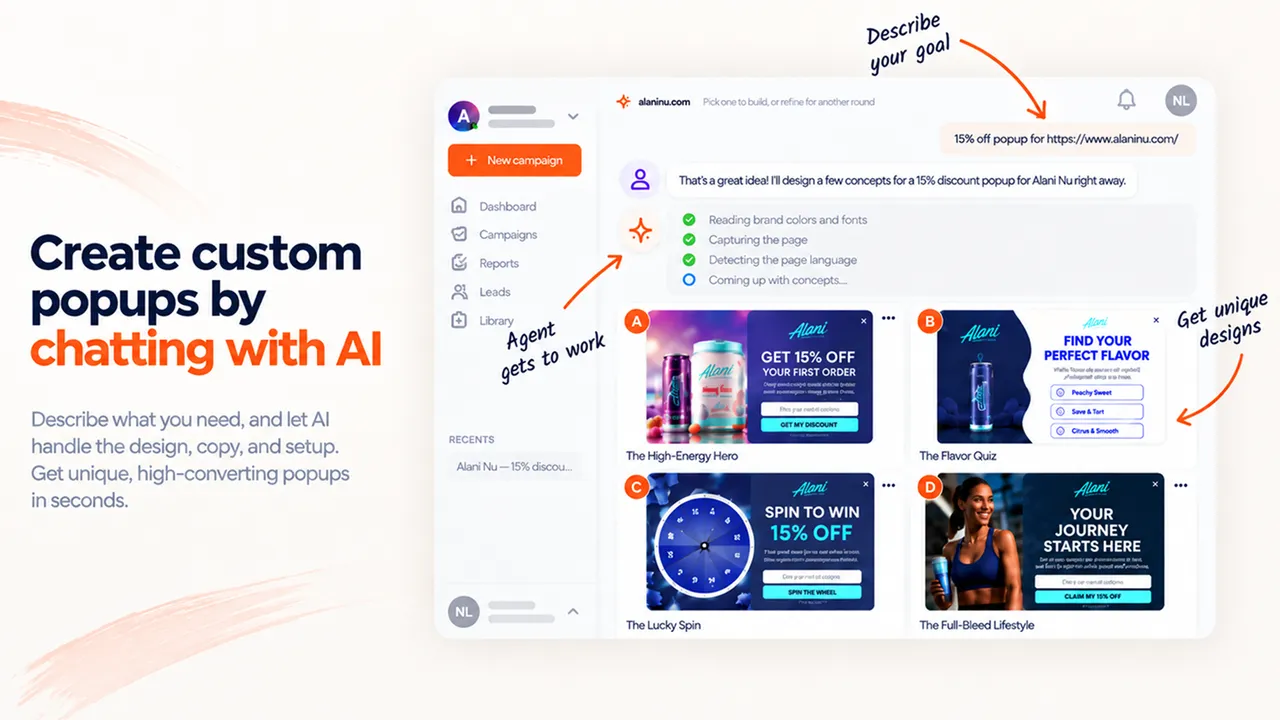
Create custom popups by chatting with AI. The agent handles the design, the copy and the setup. -
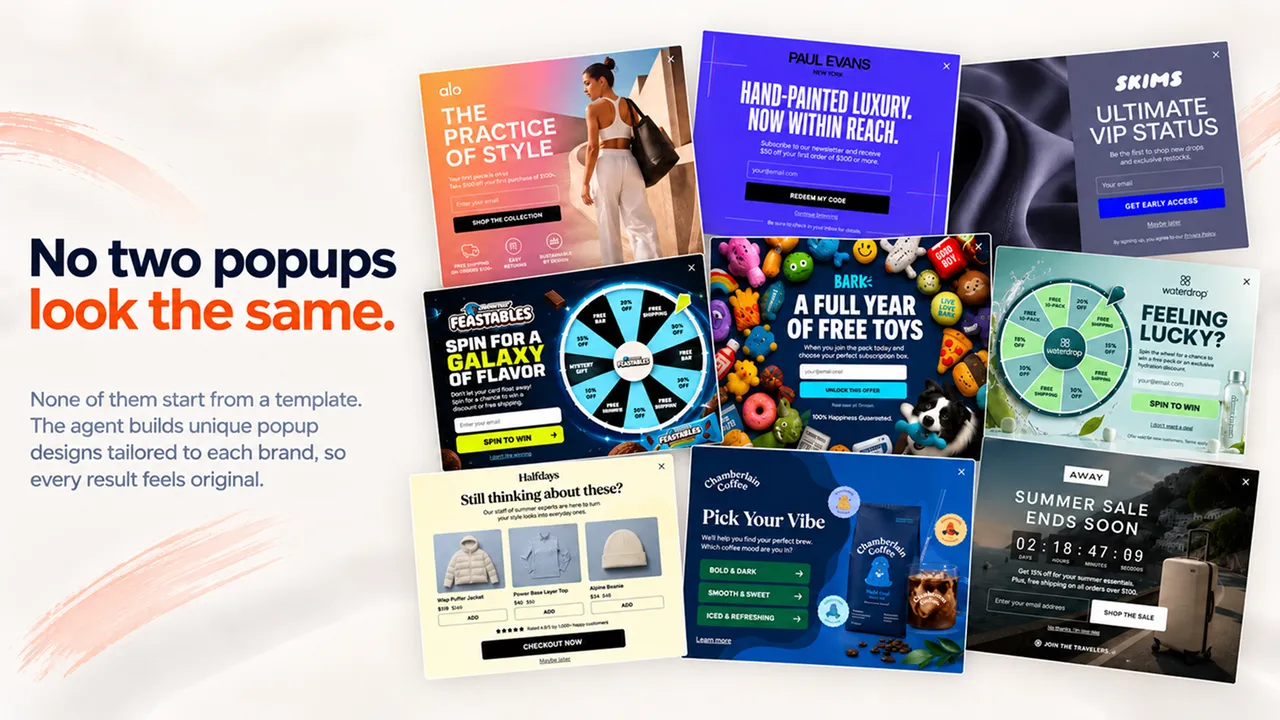
No two popups look the same. Every design is built from scratch for your brand, not from a template. -
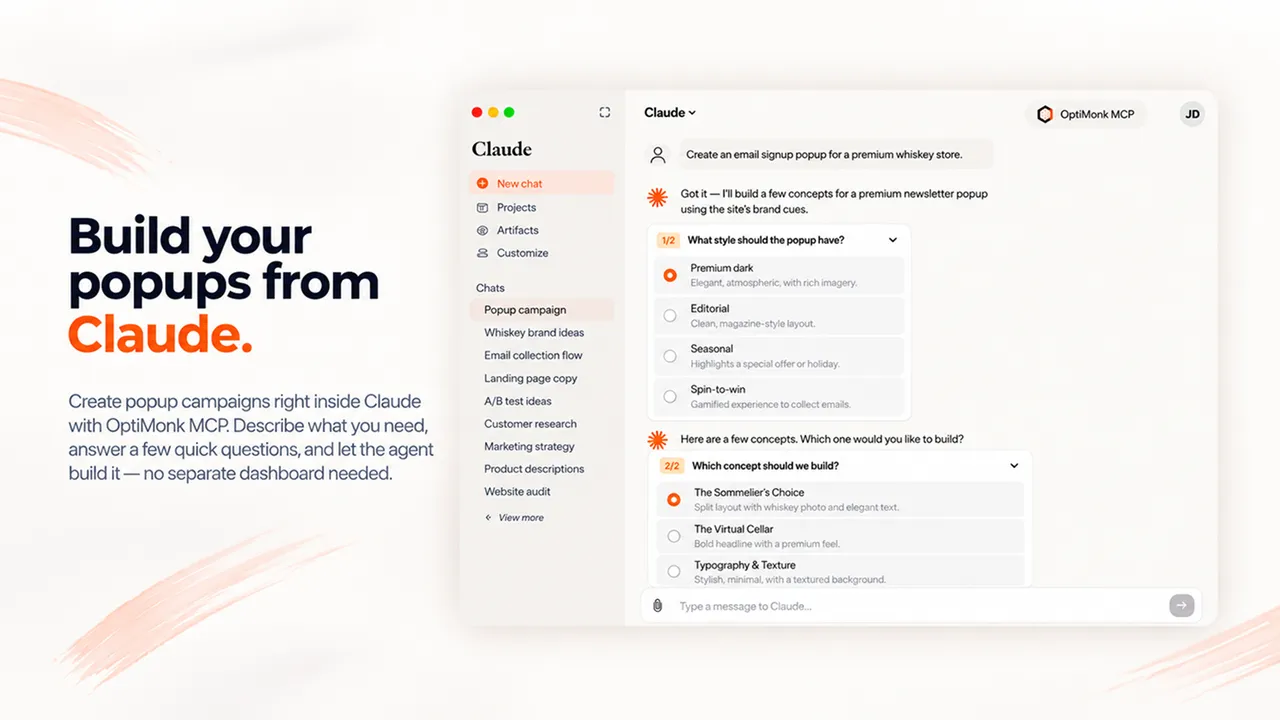
Build your popups from Claude, or any AI assistant, with the OptiMonk MCP integration. -
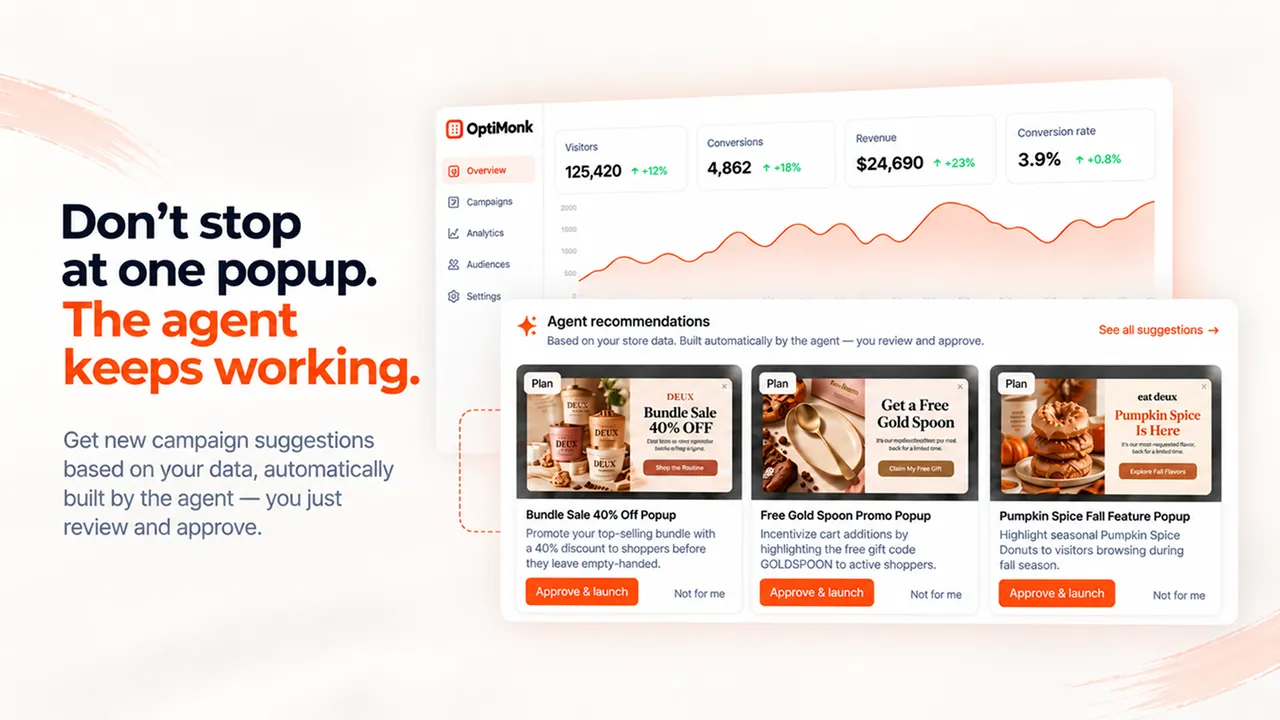
The agent keeps working: it suggests new campaigns based on your store data, and you review and approve them.
Important information
- The popups and AI agent run on OptiMonk's service, and you need an OptiMonk account. The plugin is the connector.
- The plugin shares WooCommerce data with OptiMonk, including cart contents, products, categories and orders. Review this against your privacy policy.
- The free plan is limited to 10,000 pageviews a month according to the listing.
- Requires WordPress 2.8.0 or newer, tested up to 6.9.11. The data lists no PHP requirement.
- The agent suggests campaigns and tests, but you choose which to launch.
From the OptiMonk readme
Straight from the developer's WordPress.org listing.
Full description
Chat with an AI agent to build fully custom, on-brand popups. No templates. No designers.
Start for free | Try the AI agent | Popup library | Connect your AI assistant (MCP) | Support
Most popup tools hand you a template and let you change the colors and the headline. OptiMonk gives you an AI agent instead. Enter your domain, describe the popup you want in plain words, and the agent builds it from scratch, using your brand’s colors, fonts, style and products.
It asks follow-up questions when something is unclear, writes in any language you need, and helps you set who should see the popup and when in a few clicks. After launch, it keeps an eye on your results, suggests A/B tests and new campaigns, and builds them when you say yes.
No templates, no designers, no developers, built on the platform more than 30,000 brands already trust to grow their sales and subscribers.
WHAT YOUR AI POPUP AGENT DOES FOR YOU
• Builds popups via chat: describe your goal, and the AI agent designs, writes and targets the popup for you.
• Adds motion: animated backgrounds that make visitors stop scrolling.
• Works inside Claude and ChatGPT: build and edit popups from your AI assistant through MCP integration.
• Finds your next win: it reads your store data, spots what to improve, and suggests ready-made campaigns.
• Runs A/B tests on request: ask for headline, design or offer variants, and it sets them up.
Start chatting with your popup agent →
BUILD, TEST, LEARN, REPEAT: HOW THE AGENT GROWS YOUR SALES
• Build: email and SMS popups, cart abandonment offers, lucky wheels, and scratch cards, each one made for your store in minutes.
• Test: create as many variants as you like. Test headlines, designs and CTAs, or pit whole campaign types against each other, like a lucky wheel against an email signup popup.
• Learn: analytics shows the revenue each campaign brings in, not just clicks and signups, and points out where you are losing sales.
• Repeat: the agent turns what it learns into new campaign ideas, each with a ready-made design. Launch the ones you like in one click.
Start for free, with every feature
The free plan includes 10,000 pageviews per month, all features, and unlimited users.
CONVERSION BOOSTERS YOUR AGENT CAN ADD TO ANY CAMPAIGN
• Animated popups that catch the eye with one click
• Survey popups that collect first-party data
• Lucky wheels and scratch cards that make signing up fun
• Countdown timers that add urgency to limited-time offers
• Multi-step campaigns that guide shoppers from first visit to checkout
CONNECTED TO YOUR MARKETING STACK AND YOUR WOOCOMMERCE STORE
New subscribers flow straight into the tools you already use:
• Mailchimp popup
• ActiveCampaign popup
• Attentive popup
• Klaviyo popup
• Hubspot popup
The plugin also shares your WooCommerce data with OptiMonk: cart value and content, products, categories and orders. That lets the agent build campaigns that react to what each shopper does. Just ask for:
• WooCommerce discount popups
• WooCommerce lucky wheel popups
• WooCommerce exit popups
• WooCommerce upsells
• WooCommerce countdown timers
• WooCommerce cart abandonment popups
• WooCommerce product recommendations (Most popular, Recently viewed)
Browse all integrations →
TRUSTED BY MORE THAN 30,000 BRANDS
Ryan Pamplin | CEO, BlendJet | +39.2% extra revenue
“When comparing OptiMonk vs other leading popup solutions, no one else has the valuable integrations we need, robust testing capabilities, and amazing team to support our ever-evolving needs.”
See case study →
Eric Nguyen | CEO, Indestructible Shoes | +13.2% e-commerce conversion rate
“I had high expectations when I started using OptiMonk, but still I was surprised by the results. In just a short period of time, we could reach higher conversion rates than with any other tools. Highly recommended!”
See case study →
BUILD POPUPS BY CHATTING, NOT DRAGGING
You don’t need a designer, a copywriter or a developer. Tell the agent what you want, and it handles the design, the copy and the setup.
From one sentence to a finished popup
Enter your domain and type what you need, for example: “10% discount for email signup, on exit intent”. The agent scans your site in seconds, picks up your colors, fonts, style and products, and builds a popup that looks like it was made by your own team. Classic popups, fullscreens, gamified popups, surveys or multi-step flows: just say which.
Give it a starting point
Have an idea of the look you want? Share one of your earlier popups, an example from the popup library, or any image you upload. The agent turns it into a campaign that fits your site.
Create your first popup for free →
Change anything by asking
Want different copy, a new color or a bigger button? Ask in the chat. Need a variant for an A/B test? Ask for that too.
Build from Claude, ChatGPT or any AI assistant
Connect OptiMonk to your AI assistant through MCP, then create campaigns and check your results without opening the OptiMonk dashboard. See how to connect your AI assistant
Details that lift conversions
• Animated popups: subtle background motion, added with one click, draws attention to your message.
• Delay Closing X: show the close button a few seconds later, so visitors read your offer first.
• Countdown timer: use the urgency of limited-time offers.
• Any language: the agent writes your popup in the language your visitors speak.
• Dynamic product recommendations: show each visitor the products they are most likely to buy, such as best sellers or items they viewed recently.
Targeting and triggers in a few clicks
Deciding who sees your popup, when and how often is part of the same simple flow. The agent helps you set it all up at once, so you only need to pick the options you want with a few clicks. Target visitors by pages visited, the current page, time on site, cart content, country, or whether they are already subscribers.
Choosing the right moment is just as quick: show the popup on exit intent, after a set time, on scroll, on click, or after a custom JavaScript event.
Analytics that tell you what to do next
The analytics tracks the revenue each campaign brings in, not only signups and clicks. The agent reads these results, shows you where your store is losing sales, and collects its suggestions under Ideas to try. You’ll find new campaign ideas there, each with a ready-made design. Launch any of them in one click.
Set Conversion Goals that match your business:
• Product sales
• Orders above a set cart value
• Products added to cart
Start creating your free popup now →
MORE POPUPS, NEVER TOO MANY: USER EXPERIENCE PROTECTOR
Worried about showing visitors too many popups? User Experience Protector caps how many campaigns a visitor can see within a set timeframe. Further campaigns wait until the timeframe is over, so you get the conversions without annoying anyone.
BUILT FOR MOBILE FROM THE START
The agent doesn’t just shrink your desktop popup. It creates a separate mobile design for every campaign, so your popups look great on any screen without extra work on your side.
Developer FAQ (8)
- How does the OptiMonk AI agent work?
- Enter your domain and describe the popup you want in the chat. The agent maps your brand’s colors, fonts, style and products, asks questions if needed, and builds a custom popup. Refine it in the chat, set the targeting, and launch it in one click.
- Do I stay in control of what goes live?
- Yes. The agent suggests campaigns, tests and improvements, and you decide which ones to apply and launch.
- Can the agent create popups in other languages?
- Yes. It writes the popup in whichever language you ask for.
- Does this plugin slow down my site?
- No. OptiMonk loads asynchronously and is optimized for page speed.
- Can I customize the look and feel of the campaigns?
- Yes, you have full control. Ask the agent for changes in the chat.
- Do I need coding skills to use OptiMonk?
- No. The agent handles the design, the copy and the setup. If you get stuck, our support team helps you for free.
- Can I use OptiMonk from Claude, ChatGPT or other AI assistants?
- Yes. With the MCP integration, you can create campaigns and check your data from Claude, ChatGPT or another AI assistant. See the setup guide.
- Which email and marketing tools does OptiMonk integrate with?
- Klaviyo, Mailchimp, Hubspot, ActiveCampaign, Attentive, Infusionsoft, Aweber, GetResponse, Constant Contact, Campaign Monitor and more. New subscribers are sent to these tools automatically, or you can download them as a CSV file. You can set up integrations in each campaign’s settings.
Downloads, last 30 days
Trend vs previous period: -31.7%
Average daily downloads: 48 over the last 7 days , 49 over 30 days.
Security history
Past CVEs, patched · 1 published vulnerability (Wordfence) · most recent Jul 11, 2023
- Patched 4.3 Medium Exit Popups & Onsite Retargeting by OptiMonk <= 2.0.4 - Cross-Site Request Forgery CVE-2023-37891 · Jul 11, 2023 · affects *-2.0.4 · fixed in 2.0.5
Recent releases
- v2.1.7
Improvement: Product data for campaign targeting is read from the inline shop data instead of extra server requests on every page load * Fix: Product data is filled in reliably on product pages...
- v2.1.6
Plugin renamed to "AI Popup Builder & Popup Maker by OptiMonk", new banner
- v2.1.5
Updated plugin description and screenshots
- v2.1.4
Test up to 6.9
- v2.1.3
Feature: Add WooCommerce category data (name, slug, ID) to WooDataForOM for better campaign targeting * Feature: Add WooCommerce cart URL to shop data for easier cart navigation in campaigns
Show 10 older releases
- v2.1.2
Improvement: Wider cart integration support
- v2.1.1
New: Platform detection in WooDataForOM.shop.platform (wordpress/woocommerce) * Fix: Cart integration when the WooCommerce plugin responds slowly
- v2.1.0
New: WooDataForOM shop data (shop ID, product, order) for Product Recommender and order tracking in WooCommerce stores * New: AJAX add-to-cart hooks for product cards * Improvement: Cart update...
- v2.0.9
New: Support for the visitorCartV3 cart rule * New: Plugin activation and uninstall tracking
- v2.0.8
Test up to 6.6.1
- v2.0.7
Feature: Support new visitor cart rule
- v2.0.6
Solve PHP warnings
- v2.0.5
Fix CSRF vulnerability
- v2.0.4
Update description * Test up to 6.2.0
- v2.0.3
Prioritize inserting script to head
OptiMonk FAQ
How does the AI agent work?
You enter your domain and describe the popup. The agent maps your brand, asks questions if needed and builds it. You refine it in chat, set targeting and launch.
Do I control what goes live?
Yes. The agent suggests campaigns, tests and changes, and you decide which to apply.
Can it make popups in other languages?
Yes. It writes the popup in whichever language you ask for.
Will it slow my site?
The listing says OptiMonk loads asynchronously and is optimized for page speed.
Do I need coding skills?
No. The agent handles design, copy and setup, and the vendor says support helps for free.
Can I use it from Claude or ChatGPT?
Yes. The MCP integration lets you create campaigns and view data from an AI assistant.
Which tools does it connect to?
Klaviyo, Mailchimp, HubSpot, ActiveCampaign, Attentive, AWeber, GetResponse, Constant Contact and Campaign Monitor are among those listed.
Is it free?
The listing describes a free plan with 10,000 monthly pageviews and all features. It does not list paid plans.
OptiMonk alternatives

Build faster in Elementor with 90+ Elementor widgets and addons, 600+ ready-made Elementor templates, without writing code. Premium Addons powers 600,000+ websites with the Elementor carousel, mega menu, blog posts…

Your WordPress site just became MCP-ready. WPVibe is the Model Context Protocol server for WordPress, connecting your self-hosted site to any AI assistant or AI agent that speaks MCP: Claude, ChatGPT, Cursor,…

Your WordPress site, now in the conversation Jetpack connects your WordPress site to ChatGPT, Claude, and the other AI agents you already use. Ask in plain language to draft a post, see which pages got the most…

This plugin provides Google AI (Gemini) integration for the PHP AI Client SDK. It enables WordPress sites to use Google’s Gemini models for text generation, image generation, text to speech, and other AI…

Secure WordPress MCP server for Claude, ChatGPT and AI agents. Easy MCP AI is a free plugin that turns your own site into a Model Context Protocol (MCP) server. Connect Claude to WordPress , connect ChatGPT to…

miniOrange Secure MCP Server is a complete WordPress MCP server plugin that turns your WordPress site into a fully working Model Context Protocol (MCP) server. Once installed, you can connect Claude to WordPress,…
Listing data from WordPress.org and the Wordfence vulnerability feed, refreshed Nov 9, 2026; listing details fetched Nov 14, 2026. Screenshots are from the plugin's WordPress.org listing. Not affiliated with OptiMonk Popup Creators.