

Royal MCP
Royal MCP - Secure AI Connector for Claude, ChatGPT & any LLM via MCP · by Royal Plugins
- active installs
- 10K+
- 7 ratings
- 5.0
- since last update
- 0d
- releases in 12 months
- —
- support threads resolved
- 100%
- avg daily downloads
- 1,714
- on WordPress.org
- 10 months
Royal MCP at a glance
Royal MCP is a freemium WordPress AI agent & MCP plugin by Royal Plugins with 10K+ active installs and a 5.0/5 rating from 7 reviews. It was last updated on Nov 9, 2026, is tested up to WordPress 7.1.4 and needs PHP 7.4+. It works with OpenAI, Claude, Google Gemini, Mistral AI, DeepSeek, Perplexity. All 6 of its published vulnerabilities have patched versions. Our quality score is 91/100.
What is Royal MCP?
Royal MCP turns a WordPress site into an MCP server so AI apps like Claude and ChatGPT can work on it. Once connected, an assistant can write and edit posts, update products, fill SEO fields and edit Elementor or Divi pages when you ask. The listing says the plugin is self-hosted, with no relay server, account or telemetry.
It is for site owners and developers who want AI to take real actions on a site but keep limits in place. Each connected app gets Full, Read-only or Drafts only access, and new apps can wait for approval. A change log shows values before and after each AI edit, and tracked changes can be undone for 72 hours.
The listing counts 300+ tools: 118 for WordPress itself and 187 across 30 plugins, including WooCommerce, Elementor, Divi, Advanced Custom Fields and Yoast SEO. It works with Claude, ChatGPT, editors such as Cursor and VS Code, and local models through MCP clients. Your AI app and its usage costs are separate from the plugin.
Best for
- Site owners who want Claude or ChatGPT to manage content
- WooCommerce stores doing AI-assisted catalog edits
- Developers connecting editors and agents to WordPress
- Teams that want logs and undo around AI changes
Our take
A security-first MCP server that lets Claude, ChatGPT and Gemini manage your WordPress site. MCP connectors are the newest frontier here - exciting and inherently risky, so the 'security-first' framing matters.
Royal MCP features
MCP server for your site
Exposes the site to MCP-compatible AI apps. Claude and ChatGPT connect by pasting the server URL and signing in.
Drafts-only starting mode
By default the AI can write and edit drafts, while publishing, live pages and settings are refused until you allow them.
Per-app access levels
Apps sign in with OAuth 2.1 and get Full, Read-only or Drafts only access. New apps can be held until you approve them.
Change history and undo
Recent Changes lists each AI edit with before and after values. Tracked changes can be reversed for 72 hours.
Activity log
Records every tool call with the client, tool name and status. Sensitive values are redacted in parameters.
WordPress core tools
118 tools cover posts, pages, media, users, taxonomies, custom fields, menus and options. Shared SEO tools also work with Rank Math, AIOSEO and SEOPress.
Plugin-specific tools
Dedicated tools exist for 30 plugins, including WooCommerce with 29 tools, Elementor, Divi, ACF and Yoast SEO.
Dry-run for risky writes
Writes to site options, permalinks, redirects and search settings accept a dry-run flag to preview the change first.
Flexible clients
Works with Claude, ChatGPT, Cursor, VS Code, Codex, Gemini CLI, LM Studio and any MCP client, using OAuth or an API key.
Royal MCP free vs pro
Free WordPress.org version
- MCP server with 300+ tools across WordPress and 30 plugins
- OAuth 2.1 sign-in, per-app access levels and approval for new apps
- Drafts-only mode, activity log and recent changes view
- 72-hour undo for tracked changes
- A free Royal AI Firewall companion plugin is mentioned for viewing AI agent traffic
The listing describes the plugin as free and self-hosted and states no paid plan. You still need your own AI app, such as Claude or ChatGPT, and any subscription or usage fees come from that provider.
How to use Royal MCP
- Install and activate
In wp-admin go to Plugins → Add New, search for Royal MCP and click Install Now. Then activate it.
- Turn on the integration
Open Royal MCP → Settings and enable the integration. Copy the MCP Server URL shown there.
- Connect your AI app
In Claude add a custom connector, or in ChatGPT add a custom app in Developer Mode, and paste the URL. Sign in to your site and approve.
- Set access
Choose Drafts only, Read-only or Full for each connected app. Keep the safe default until you trust the setup.
- Review and undo
Check Recent Changes and the Activity Log after AI work. Undo a tracked change within 72 hours if needed.
Royal MCP screenshots (10)
-
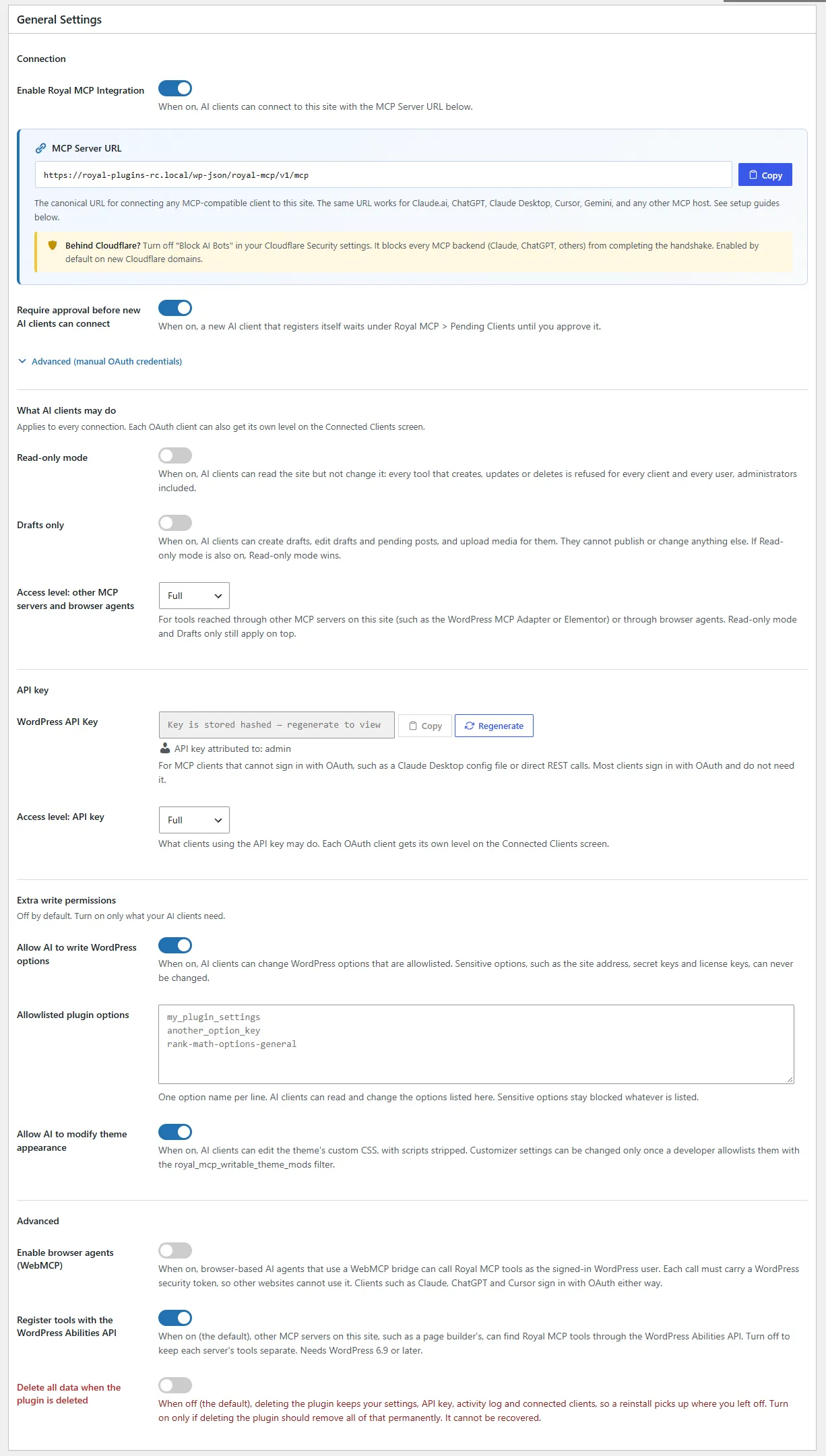
Main settings page with API key and platform overview -
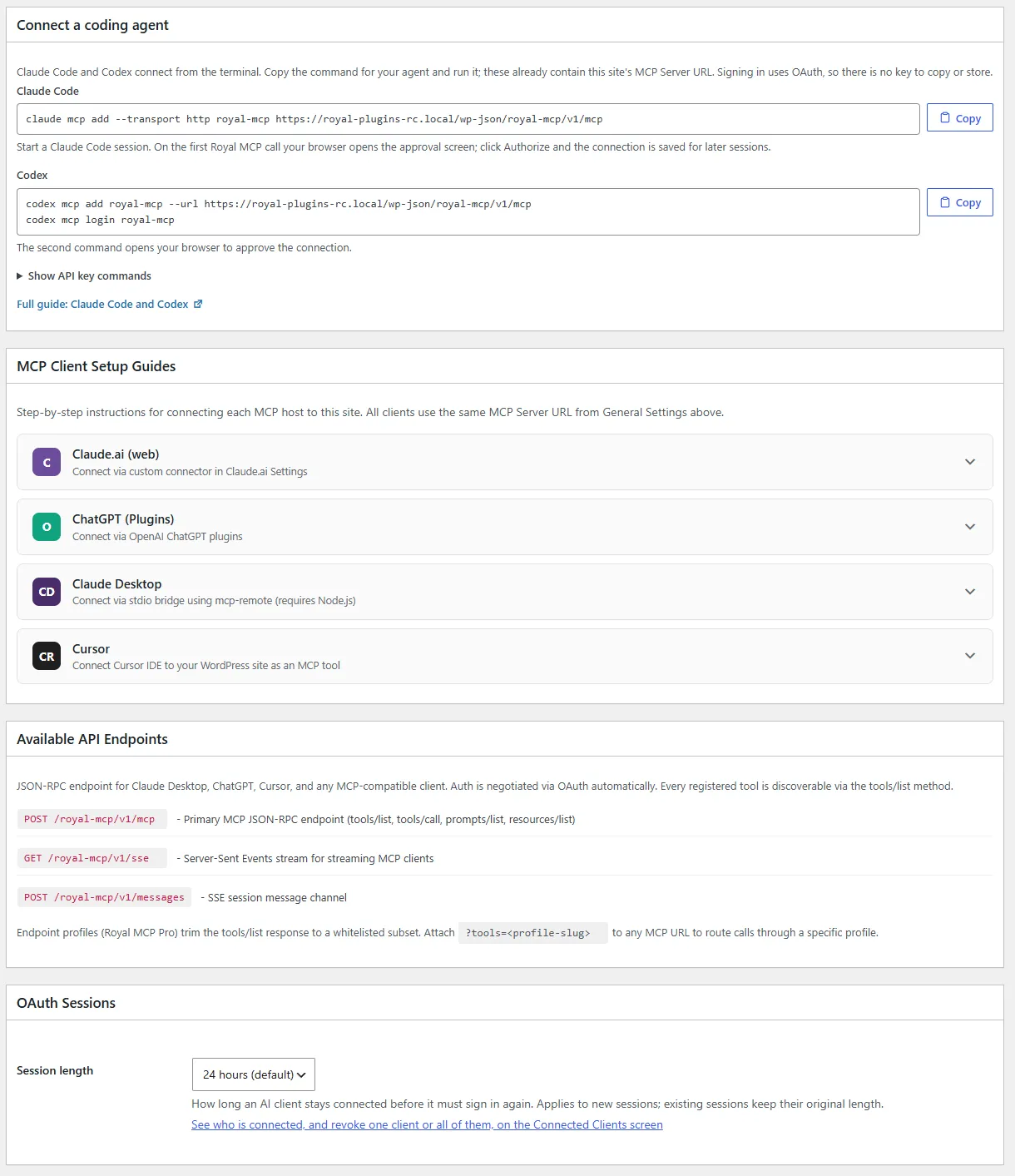
Settings: Claude Code and Codex connect commands, client setup guides, API endpoints and session length -
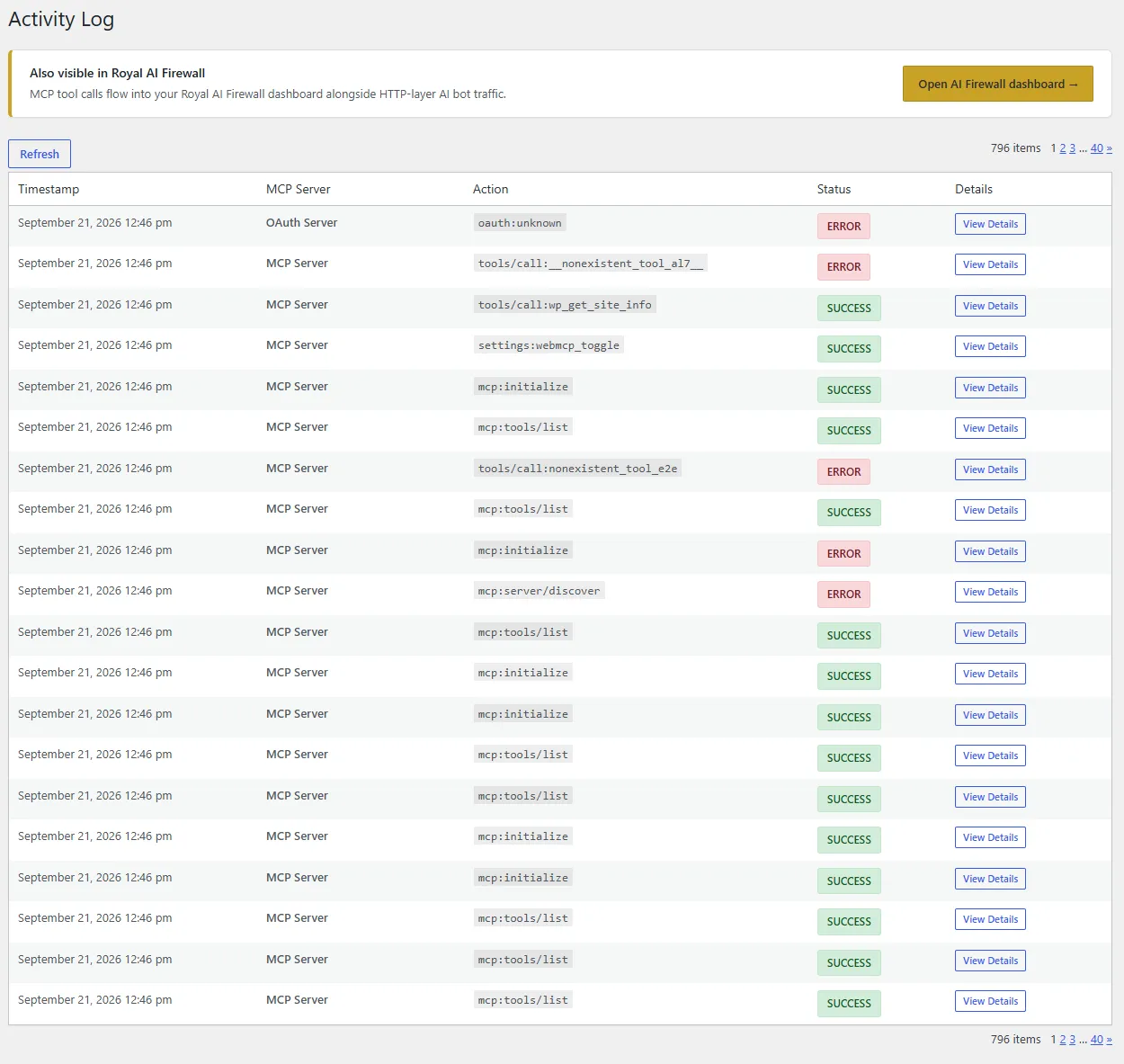
Activity log showing authenticated MCP requests -
Claude Desktop MCP connector setup -
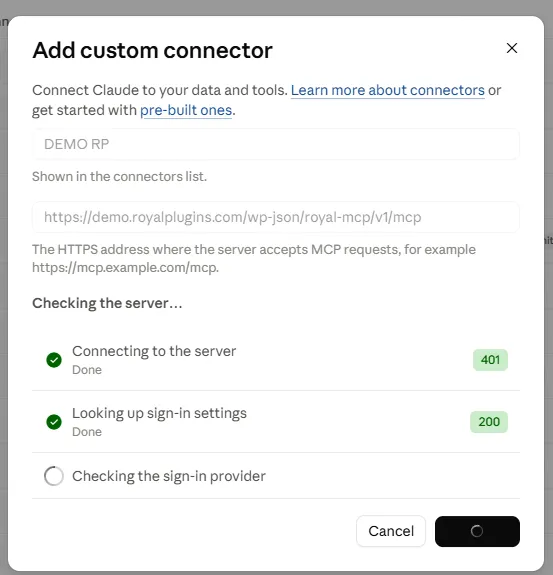
Adding a custom Royal MCP connector in Claude Desktop -
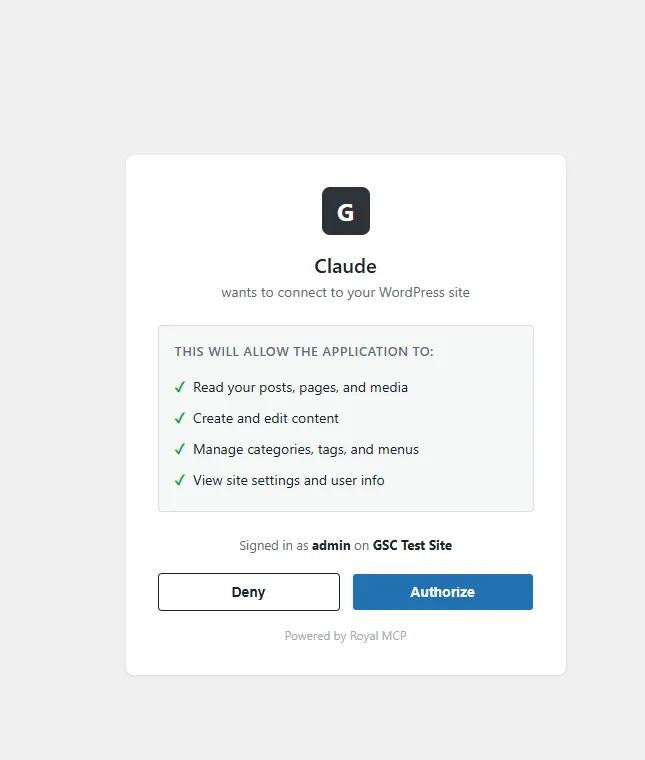
Claude authorization screen -
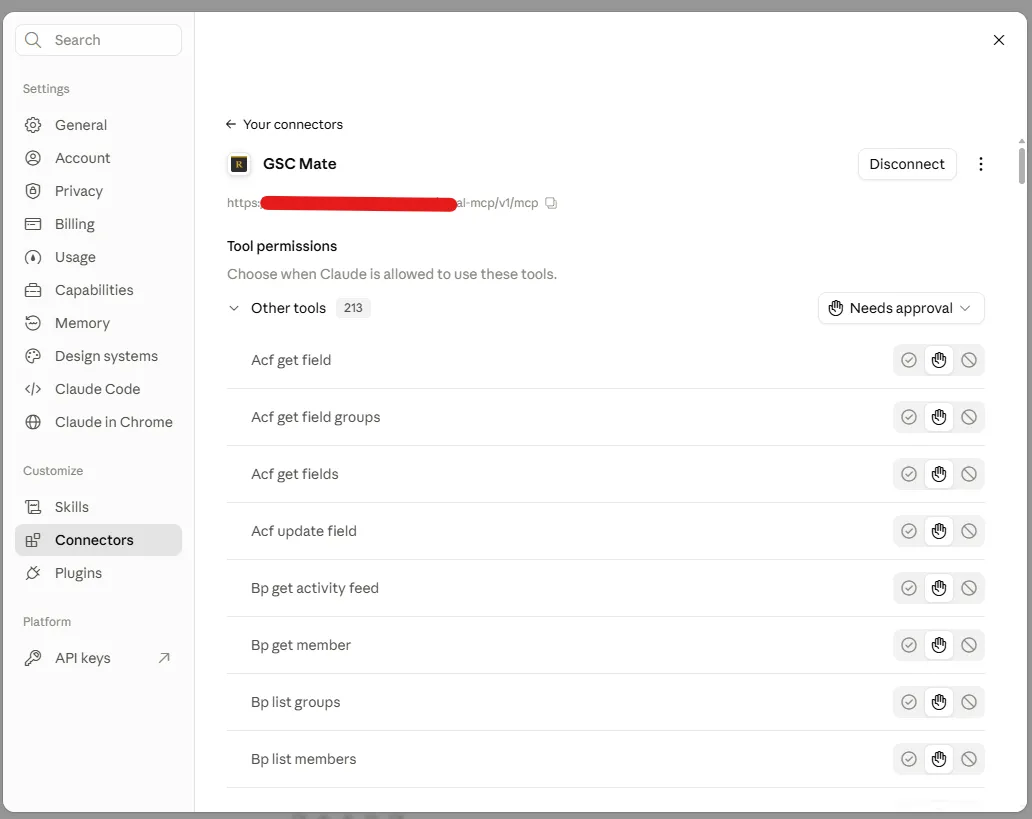
Royal MCP tool list in Claude after connection -
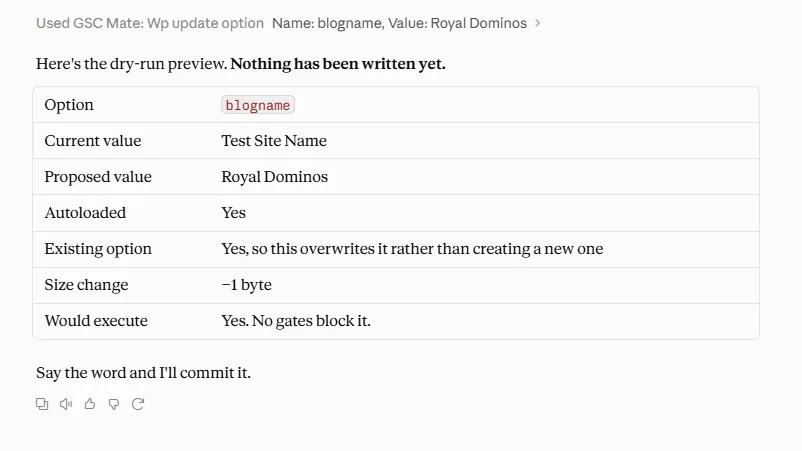
Dry-run preview of a WordPress option write before commit -
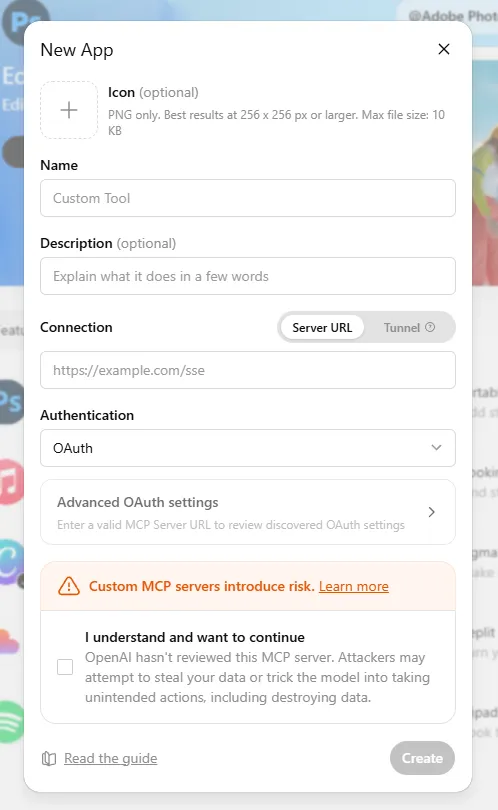
Adding Royal MCP in ChatGPT's connector settings -
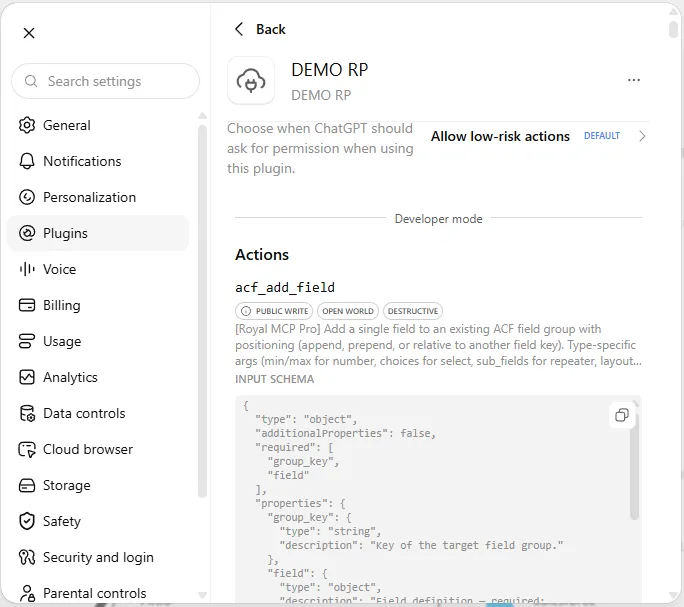
Royal MCP tool list in ChatGPT after connection
Important information
- Requires WordPress 5.8 or newer and PHP 7.4 or newer. Tested up to WordPress 7.1.4.
- Letting an AI edit your site is risky. Start in Drafts only mode, keep backups, and review changes before publishing.
- Undo covers tracked changes for 72 hours. It will not overwrite edits made after the AI change unless you tell it to.
- Some plugin tools, such as WPForms submission access, need the paid version of that other plugin.
- The plugin has 6 published vulnerabilities in its history. The data shows them as patched, but keep it updated.
From the Royal MCP readme
Straight from the developer's WordPress.org listing.
Full description
Let Claude, ChatGPT or any AI Agent work on your WordPress site, while you decide what it may touch. Free and 100% self-hosted. 300+ MCP tools.
Royal MCP is a free WordPress MCP plugin. It turns your site into an MCP server, so the AI app you already use can write and edit posts, update products, fill in SEO fields and edit Elementor or Divi pages when you ask it to. You choose how far each app can go, you can see what it changed, and tracked changes can be undone for 72 hours.
You stay in control
• Start in Drafts only – the AI can write and edit drafts, while publishing, live pages and site settings are refused until you allow them.
• Set access for each app – apps sign in with OAuth 2.1. Give each one Full, Read-only or Drafts only access, and make new apps wait for your approval before they can connect.
• See what changed – Recent Changes lists each AI edit with the value before and after, and the Activity Log records every tool call.
• Undo it – tracked changes to content, settings, menus, WooCommerce, Elementor and Divi can be reversed for 72 hours, and undo will not write over edits made after the AI’s change unless you tell it to.
• Nothing leaves your site – no relay server, no account, no telemetry and no license check. Your AI app talks to your site directly.
What you can ask for
• “Turn these notes into a blog post and save it as a draft for me to review.”
• “Which of my products have no description? Write one for each.”
• “Put every product in the Hoodies category on sale at 20% off and list the old prices.”
• “Find the posts that are missing a meta description and fill them in.”
• “Change the phone number on every Elementor page that shows the old one.”
• “Why did the site throw a PHP error this morning?”
• “Show me what you changed today, then undo the last one.”
Royal MCP has 300+ MCP tools: 118 for WordPress itself and 187 across 30 plugins, including WooCommerce, Elementor, Divi, Advanced Custom Fields and Yoast SEO. The full list is further down this page.
Connect Claude to WordPress
• Install Royal MCP and turn it on under Royal MCP → Settings.
• Copy the MCP Server URL from that screen.
• In Claude, add a custom connector, paste the URL and click Connect.
• Sign in to your site when asked and approve the connection.
Works with Claude on the web, Claude Desktop and Claude Code. Setup takes a few minutes.
Edit Elementor with Claude
Step-by-step guide: Connect Claude to WordPress
Connect ChatGPT to WordPress
• Install Royal MCP and turn it on under Royal MCP → Settings.
• Copy the MCP Server URL from that screen.
• In ChatGPT, add Royal MCP as a custom app (Developer Mode) and paste the URL.
• Sign in to your site when asked and approve the connection.
ChatGPT can then read your posts, write drafts, update product prices, moderate comments and check SEO across your site, in an ordinary conversation.
Step-by-step guide: Connect ChatGPT to WordPress
Plugins with dedicated MCP tools
30 plugins have their own tools. Each one is listed below with what your AI can do in it.
Not seeing yours? MCP still works. WordPress core operations (posts, pages, media, users, taxonomies, custom fields, menus, options) cover most day-to-day AI workflows for any plugin — read/write ACF via wp_get_post_meta even without ACF-specific tools, edit posts on any custom post type, moderate any plugin’s comments. Shared SEO meta tools automatically work with Rank Math, AIOSEO, SEOPress, and SEObolt. A dedicated integration layers specialized tools on top when that plugin exposes its own data model, request features/plugins support here on the wp.org support forum.
Use it from any AI app
Connect once, then work on your site from whichever AI app you prefer, and switch apps without redoing the connection:
• Chat apps – Claude (web, desktop and Claude Code) and ChatGPT, signing in with OAuth.
• Code editors and terminals – Cursor, VS Code, Codex, Gemini CLI and other MCP-capable editors, with OAuth or an API key.
• Local models – LM Studio and other local MCP clients, so prompts and site data can stay on your own machine.
• Scripts and agent frameworks – any MCP-compatible framework, or plain HTTP with Authorization: Bearer <key>.
Built to work alongside other MCP tools
Royal MCP is designed to run next to the MCP tools other plugins ship, so your AI can reach for the best tool for each part of a job. When Elementor’s own MCP is switched on, Royal MCP detects it and tells your AI that Elementor’s builder is there for designing new layouts, while Royal MCP’s Elementor tools keep handling edits to the pages you already have: text and image swaps, widgets, cloning and templates. WooCommerce’s own MCP abilities keep working too, and Royal MCP adds the rest of the store: coupons, variations, attributes, customers and store stats. Royal MCP answers on its own endpoint and never switches off another plugin’s tools, so together they cover more of your site than any one of them alone.
See what AI agents do to your site
The free Royal AI Firewall companion shows every AI agent hitting your site at the HTTP layer (training crawlers, retrieval bots, AI search engines), not just the ones connected through Royal MCP. Install both for a unified view across MCP tool calls and HTTP-layer bot hits.
118 Core Tools + 187 Integration Tools
WordPress Core (118 tools):
• Posts – create, read, update, delete, search, count, clone as a draft, sort by publish or last-modified date and find posts edited since a given date (any registered public post type, featured images supported)
• Pages – full CRUD with parent page support
• Blocks – read a post’s block tree; insert, replace, move and delete blocks by path; replace text inside blocks; change attributes of server-rendered blocks; check markup before writing. Works with core blocks and plugin blocks such as GenerateBlocks, Stackable, Spectra and GreenShift, keeps them valid in the editor, and every write has a revision and an undo token
• Patterns and Site Editor – list, read, create and update synced patterns; read global styles and block templates
• Post Types – discover all registered public post types on the site
• Post Revisions – list revision history and roll a post back to any prior version
• Media – browse; upload images, PDFs and any other file type the site allows from a URL, base64 or a file handed over by ChatGPT; convert, resize and compress images on upload; find files already in the library by source URL or SHA-256 and reuse them instead of uploading twice; update alt text/caption/title/description, set as featured image, delete
• Comments – create, read, delete; full moderation suite (list pending, approve, mark spam, trash)
• Users – display names and roles (emails and usernames are not exposed)
• Categories, Tags & Custom Taxonomies – full CRUD, read a single term, assign, count, discover registered taxonomies
• Term Meta – read/update/delete (most useful for term-level SEO fields on categories and tags)
• Menus – create menus, list, read a single menu item, and full CRUD + reorder on menu items
• Publish and Promote – publish a draft and insert into a menu in one call
• Preview Links – generate a shareable draft-preview URL without a WP login
• Post Meta – read/update/delete custom fields (works with ACF, MetaBox, JetEngine, Pods, CPT UI)
• SEO Meta – read/write Yoast, Rank Math, AIOSEO, or SEObolt title/description/focus keyword/robots/OG (auto-detects active plugin)
• SEO Audit – fetch a post’s rendered HTML and report title, meta description, canonical, viewport, OG, Twitter Card
• Widgets – list, list sidebars, read a single widget, update content (writes gated by theme-appearance admin toggle)
• Find and Replace – literal replace with dry-run preview, expected-count safety, read-after-write verification
• Undo and Recent Changes – reverse a tracked change within 72 hours via mcp_undo_last_operation; list recent changes and see each one’s value before, the value written and the value now, in the tools and in WP Admin
• Site Info + Site Status – name, WP/PHP versions, active theme + plugins, cron activity — for AI-driven pre-write validation
• Error Log + Cron Schedule – read recent PHP errors, a record of PHP fatal errors kept by Royal MCP (credentials hidden), and scheduled WP cron events
• Connection Health – MCP session diagnostic (route, auth method, session ID, plugin version)
• Plugins & Themes – list installed with active status
• Theme Appearance – get theme, read one or all theme mods, write theme mods (gated), read/write Custom CSS
• Search + Permalink Structure – full-text content search; read/write permalinks (gated)
• Options – read allowlisted core options, read plugin settings (sensitive keys redacted), write to allowlisted options when enabled
Third-Party Plugin Integrations (auto-detected)
If the plugin is active on your WordPress site, its tools register automatically, with nothing more to set up.
• WooCommerce (29 tools) — full store CRUD: products (simple + variable), variations, global attributes (pa_*), coupons with bulk-trash purge, orders + notes, customers, and store statistics
• Elementor (14 tools, free + Pro) — clone a page with fresh element IDs, bulk text/image replacement across 12+ widget types, add widgets, compact page outlines, widget-level settings reads, widget schema and dynamic-tag discovery, template library import/insert, post_content restoration on damaged pages (72-hour undo per write)
• Divi (9 tools, Divi 4 + Divi 5) — format detection, page outlines, layout validation, library reads, dry-run find-and-replace with active-editor-session detection, page cloning (D5 clientIds regenerated), image swaps, library-to-page apply in merge or replace mode (72-hour undo per write)
• Advanced Custom Fields (4 tools, free + Pro) — type-aware field reads (each field’s Return Format respected: hydrated post objects, parsed repeater rows, image arrays), bulk-read all fields on a post, type-aware writes, field-group enumeration
• Yoast SEO (5 tools) — read/write Yoast meta (raw + resolved), capture the JSON-LD schema graph, list indexed internal links, list Yoast Premium redirects
• UpdraftPlus (4 tools) — list backups, read status, trigger async backups with per-entity filtering (DB, plugins, themes, uploads), read the backup schedule
• WPForms (4 tools, free + Pro) — list forms, read a form’s field schema; submission access (list + read) requires WPForms Pro
• Solid Security (4 tools) — read the security dashboard, list currently locked-out IPs, read the security event log, add an IP to the ban list (also detects iThemes Security and Kadence Security Basic)
• Wordfence (8 tools) — read the security status, firewall mode and scan findings, list blocked IPs, block or unblock an IP, read failed logins and blocked requests, start a scan
• Contact Form 7 (3 tools) — list forms, read a single form’s parsed field schema; submission access requires the Flamingo companion plugin, with personal details hidden by default
• MonsterInsights (4 tools) — read the analytics overview, top pages, traffic sources, and top Search Console queries
• W3 Total Cache (3 tools) — read cache config across every module, purge (all / by URL / by post), read cache usage stats
• LiteSpeed Cache (4 tools) — read cache status and the settings that shape caching, purge everything, purge specific pages by URL or post
• Duplicator (3 tools) — list migration packages, read per-package status, get the installer URL for any completed package
• BuddyPress (4 tools) — list community members, read a single member profile, list groups, read the activity feed
• Redirection (4 tools) — list/create/update 301/302/307 redirects (with regex + group + status), list redirect groups
• TablePress (6 tools) — list and read tables, create a table from rows, change cells (dry run + undo), copy a table, export as CSV, JSON or HTML
• Code Snippets (5 tools) — list and read snippets (credential values hidden in returned code), see recently deactivated snippets, deactivate a snippet that breaks the site, change a snippet’s name, description or tags; never creates, edits, activates or runs code
• Complianz (7 tools) — consent setup status, cookies, services, cookie banner texts and legal documents; change banner texts and cookie descriptions, with undo
• WPCode (3 tools, Lite + Pro) — list snippets, read one snippet’s settings and code (credential values hidden), read its status and last recorded error; read only
• MailPoet (12 tools) — lists, subscribers, newsletter drafts, test sends and stats; schedule a send confirmed with the exact recipient count
• Relevanssi (7 tools) — ranked search, index status, search totals, reindex a post, synonyms and stopwords with undo
• Ninja Forms (5 tools) and Fluent Forms (5 tools) — forms and entries, personal details hidden by default
Royal Plugins Integrations (auto-detected)
Every Royal Plugin auto-exposes MCP tools alongside Royal MCP:
• Royal AI Firewall (7 tools) — review AI bot traffic, dashboard stats, and set allow/block/challenge policies per bot signature, one bot or many at once with a preview and one undo
• GuardPress (7 tools) — review your security score, run vulnerability scans, inspect failed logins and blocked IPs
• SiteVault (6 tools) — list backups, trigger new ones, check progress, review schedules
• ForgeCache (4 tools) — purge and inspect your page cache, and read real-user Core Web Vitals
• Royal Ledger (4 tools) — review recurring software costs and masked license entries
• Royal Links (3 tools) — manage branded short links and click stats
MCP Spec Compliance
Royal MCP implements the MCP Streamable HTTP transport across every published spec revision — 2024-11-05, 2025-06-18, 2025-11-25, and 2026-07-28 — negotiated on the initialize handshake so every client gets the wire behavior it expects:
• Single /mcp endpoint for all JSON-RPC communication
• POST for client messages, GET for server-sent events, DELETE for session termination
• Stateless per-request transport — sessions still supported for backwards compatibility but not required
• Cryptographically secure session IDs with transient-based storage when clients do use them
• Origin header validation to prevent DNS rebinding attacks
• Proper CORS handling for browser-based MCP clients
• W3C WebMCP browser-agent standard supported on the server side
• Machine-readable Agent Readiness signals published at the standard well-known paths
• RFC 8288 Link headers on every MCP response pointing agent runtimes at the discovery documents
External Services
Royal MCP makes no outbound calls of its own — no telemetry, no license check, no update ping. The MCP protocol is inbound: your AI client authenticates and calls your site, and any data the AI sees is sent under whatever terms you’ve agreed to with that AI provider.
Installation
• In WordPress, go to Plugins → Add New, search for Royal MCP and click Install Now (or upload the royal-mcp folder to /wp-content/plugins/)
• Activate the plugin through the ‘Plugins’ menu in WordPress
• Go to Royal MCP → Settings and turn on Enable Royal MCP Integration
• Copy the MCP Server URL from the same page
• Add that URL in your AI client. Claude and ChatGPT sign in with OAuth, so there is no key to copy; Claude Code and Codex have copy-ready commands on the settings page; clients without OAuth use the WordPress API Key shown there
• New to MCP? Follow the step-by-step connection walkthrough (with videos) at royalplugins.com/support/royal-mcp/connecting-to-claude/
Full setup guides for each AI client are available at royalplugins.com/support/royal-mcp/.
Developer FAQ (24)
- What is MCP and why does my WordPress site need it?
- Model Context Protocol (MCP) is an open standard created by Anthropic that lets AI assistants interact with external data sources. Without MCP, AI tools like Claude or ChatGPT can only work with content you copy and paste into them. With Royal MCP installed, these AI platforms can directly read your WordPress posts, create new content, manage your WooCommerce products, check your security status, and trigger backups — all through a structured, authenticated protocol.
- How is Royal MCP different from other WordPress MCP plugins?
- Security. Most MCP plugins (and 41% of all public MCP servers) have no authentication at all. Royal MCP requires sign-in (OAuth, an API key or an Application Password) for every session, rate-limits requests to prevent abuse, logs every interaction for audit purposes, and filters sensitive data (emails, PHP version, admin credentials) from responses. We built this plugin with the same security standards we apply to GuardPress, our WordPress security plugin used on thousands of sites.
- Does Royal MCP duplicate what WordPress core now does?
- No. WordPress 6.9 added the Abilities API (a primitive for registering AI-callable functions), and the wordpress/mcp-adapter package bridges abilities to the MCP protocol. Royal MCP is a full MCP server with the security layer, connector flows, and plugin integrations the bare primitive does not include: enforced API key auth, OAuth 2.1 for Claude Desktop, per-IP rate limiting, audit logging, sensitive-data redaction, 118 ready-to-use WordPress core tools, and 187 integration tools for WooCommerce, GuardPress, Royal AI Firewall, SiteVault, ForgeCache, Royal Ledger, Royal Links, Elementor, Divi, ACF, Yoast SEO, UpdraftPlus, WPForms, Ninja Forms, Fluent Forms, Redirection, Solid Security, Wordfence, Contact Form 7, MailPoet, Relevanssi, MonsterInsights, W3 Total Cache, LiteSpeed Cache, Duplicator, BuddyPress, TablePress, Code Snippets, WPCode, and Complianz.
- Does Royal MCP work with WooCommerce?
- Yes. When WooCommerce is active, Royal MCP automatically adds 29 MCP tools spanning product management (simple and variable, including variation CRUD and global attribute management), full coupon management (list/get/create/update/delete + bulk trash purge), order management (view, create, update, add notes, update status), customer data, and store statistics. No additional configuration is needed — the tools appear automatically in the MCP tools list.
- Can AI assistants configure my plugins for me?
- Yes, with safety controls. Royal MCP exposes two tools for plugin configuration: • wp_get_plugin_settings lets AI read any plugin’s stored settings by slug. Sensitive values (API keys, secrets, tokens, passwords, license keys, OAuth credentials) are automatically replaced with [REDACTED] before they leave your server, including values stored as JSON or encoded text, so AI assistants can understand a plugin’s configuration without ever seeing stored credentials. • wp_update_option lets AI write to WordPress options, but only after passing three security gates: • The site admin must enable the “Allow AI to write WordPress options” toggle on the Royal MCP settings page (off by default) • The option name must be in a runtime allowlist. The default allowlist is intentionally tiny — blogname, blogdescription, posts_per_page, date_format, time_format, show_on_front, page_on_front. Plugin authors opt their own settings in via the royal_mcp_writable_options filter. • A hard denylist permanently blocks writes to sensitive option names (siteurl, home, license keys, secrets, salts, etc.) regardless of the allowlist or the toggle. Plugin authors can opt in their settings with one line: add_filter('royal_mcp_writable_options', fn($opts) => array_merge($opts, ['my_plugin_settings']));
- How do I connect Claude Desktop to WordPress?
- Install Royal MCP, go to Royal MCP → Settings, and copy your API key and MCP server URL. In Claude Desktop, add a new MCP server configuration with the URL and send your API key as Authorization: Bearer <key> (the settings page shows the exact config). Full step-by-step guide at royalplugins.com/support/royal-mcp/. If the connection fails, see the next FAQ.
- The connector won’t connect — where do I start?
- About 90% of “can’t connect” / “OAuth failed” / “tools missing” issues resolve in a basic 4-step pass before any host-specific fix is needed. In order: (1) update Royal MCP to the latest version (every recent release fixes meaningful OAuth edge cases), (2) run a conflict test — deactivate all other plugins, switch to a default theme like Twenty Twenty-Five, and purge every cache layer (any cache plugin, your host’s server-level cache, Cloudflare/CDN, and browser cache), (3) wipe stale OAuth state — use the Reset OAuth State button in Royal MCP → Settings if you’re on 1.4.17 or newer, or run the four DELETE SQL queries documented in our support article, (4) check Royal MCP → Activity Logs for the most recent oauth: row, which records exactly which validation rule fired. Full walk-through with copy-pasteable commands at royalplugins.com/support/royal-mcp/troubleshooting-start-here.html. Only proceed to host-specific fixes (Cloudflare AI Bots toggle, SiteGround /.well-known/ static files, edge-cache exclusions) after the four basics are ruled out — most “advanced infrastructure” tickets we receive actually resolve in those four steps.
- I restored my WordPress database from backup and Claude can’t reconnect. How do I fix this?
- When you restore from backup, the OAuth client credentials Claude was holding no longer match anything on the WordPress side, so Claude’s connector ends up with a stale token that no Royal MCP installation will accept. The fix in Royal MCP 1.4.17+ is one click: go to Royal MCP → Settings and click the Reset OAuth State button. This wipes all stale OAuth clients, issued access/refresh tokens, and pending authorization codes. Then in Claude, delete the existing connector entirely, wait 30 seconds, and re-add it from scratch — the full OAuth flow runs fresh against the cleaned-up state and the connection works. On 1.4.16 or older the same effect can be achieved by running four DELETE SQL queries documented at royalplugins.com/support/royal-mcp/troubleshooting-start-here.html. The plugin’s settings, API key, and Activity Log are not affected by Reset OAuth State — only the OAuth handshake state.
- Claude says “Couldn’t register with sign-in service” or “Session not found” — what’s wrong?
- Both messages (plus “no tools available” in Claude.ai after connecting) usually mean one of Royal MCP’s OAuth or sessions database tables is physically missing. The fix is to update Royal MCP to 1.4.29 or newer — the new runtime healer detects missing tables and recreates them automatically on the next pageload, with no deactivate/reactivate required. After updating, delete the existing Royal MCP connector in Claude, wait 30 seconds, then re-add it fresh. If you can’t update yet and need to recover immediately, the manual workaround is wp option delete royal_mcp_db_version followed by loading any wp-admin page. Full symptom diagnostic (phpMyAdmin / WP-CLI), the auto-heal explanation, and the manual recovery walkthrough are at royalplugins.com/support/royal-mcp/oauth-tables-missing.html.
- Where are Royal MCP’s OAuth endpoints?
- AI clients sign in at Royal MCP’s own address: the token, registration and revocation endpoints are REST routes under /wp-json/royal-mcp/v1/oauth/, and the sign-in page is /authorize/royal-mcp. The discovery documents (/.well-known/oauth-protected-resource, /.well-known/oauth-authorization-server and /.well-known/openid-configuration) are served at the site root and under the Royal MCP path, as the OAuth and MCP discovery specifications (RFC 8414 and RFC 9728) expect. The site-root endpoints (/authorize, /token, /register, /revoke) still answer, so clients connected earlier keep working; you can list them with wp rewrite list | grep royal_mcp_oauth. The /wp-json/royal-mcp/v1/ namespace holds only the MCP endpoint (/mcp), discovery, OAuth and diagnostic routes; site content is reached through MCP tools, not separate REST routes.
- Is my content safe?
- Royal MCP is designed with defense in depth. Sign-in (OAuth, an API key or an Application Password) is required for all MCP sessions, and Application Password sign-ins can be blocked or deleted from Connected Clients. Rate limiting prevents abuse (60 requests per minute per IP without credentials, 300 with; 300 per minute per user through the Abilities API and other MCP servers). Activity logging records every tool call. Sensitive data is filtered — user emails, usernames, admin email, PHP version, and credentials stored by any plugin (API keys, licence keys, tokens, passwords, webhook addresses) are hidden in every tool response, including values stored as JSON or encoded text. Comment creation respects your WordPress moderation settings. Post meta values are sanitized before storage. Option writes are disabled by default and gated by three independent checks (admin toggle, allowlist, hard denylist) when enabled. The plugin itself starts disabled by default — nothing is accessible until you explicitly enable it.
- Can I undo what the AI does?
- Yes. Claude and ChatGPT ask you to approve or deny each destructive tool call by default, until you change that setting in the connector. Royal MCP also captures a reverse-state snapshot before every destructive write and hands back a 72-hour undo token. One mcp_undo_last_operation call reverses the change, whether Claude deleted a post, replaced text on an Elementor page, updated a WooCommerce product, or reordered menu items. New posts and pages start as drafts, so nothing the AI writes appears on your live site until you approve publishing. Every tool call also lands in an activity log you can review from wp-admin.
- Is there a preview/dry-run before writes?
- Yes. High-blast writes like site options, your permalink structure, redirects and search settings accept a dry-run flag, so the AI can preview the exact change (current value, proposed value, affected URLs) before committing. Pair that with the 72-hour undo token on tracked writes and you get preview, approve, commit, undo: a full safety loop for agents working on a live site.
- How does Royal MCP handle authorization?
- Royal MCP speaks full OAuth 2.1 with PKCE and Dynamic Client Registration (RFC 7591) for Claude Desktop, Claude Code, ChatGPT web, and every modern MCP client. Sessions expire, refresh automatically, and can be revoked globally with one button in wp-admin. Clients that don’t speak OAuth get timing-safe API-key or Application Password auth, rate limits (300 requests per minute for signed-in clients, 60 per IP without credentials), and the same activity log for every tool call. Every credential (API key, OAuth token, session, audit-log entry) stays inside your own WordPress database with no hosted middleman, no license check, and no telemetry; local models work too, through any MCP-capable client such as LM Studio, if you want fully-local AI inference.
- Can AI agent scanners find my site (Agent Readiness)?
- Royal MCP publishes machine-readable MCP Server Card, Skills Index, and OAuth Protected Resource metadata at the standard well-known locations. Cloudflare’s Agent Readiness scanner, Vercel’s is-agentic, and Chrome Lighthouse’s Agentic Browsing audit all recognize your site as agent-ready with zero configuration.
- Can I use local AI models instead of cloud services?
- Yes. A local model can use Royal MCP through any client on your machine that speaks MCP, such as LM Studio, or an Ollama model running inside an MCP-capable app. The model runs on your own hardware and the client calls your site’s MCP Server URL, so nothing goes through a cloud AI provider.
- What happens if I uninstall Royal MCP?
- Deleting Royal MCP removes its scheduled events, temporary data and undo snapshots. Your settings, activity log and connected clients stay, so you can reinstall without losing them, unless you turn on “Delete all data when the plugin is deleted” in Settings first.
- Does Royal MCP work with Claude Code, VS Code, Cursor, Windsurf, or other AI IDEs?
- Yes. Any MCP-compliant client can connect to Royal MCP. Configure your IDE or client with the MCP server URL (https://yoursite.com/wp-json/royal-mcp/v1/mcp) and the API key, sent as Authorization: Bearer <key>. Claude Desktop additionally supports the native “Add Connector” OAuth 2.1 flow, which Royal MCP handles via Dynamic Client Registration (RFC 7591) — no manual API key management required on that path. The same OAuth flow works in any client that follows the MCP 2025-11-25 spec.
- Does Royal MCP work with custom fields, ACF, MetaBox, JetEngine, Pods, or CPT UI?
- Yes. Royal MCP exposes WordPress’s standard wp_get_post_meta, wp_update_post_meta, and wp_delete_post_meta tools, which read and write any custom field — including Advanced Custom Fields (ACF), MetaBox, JetEngine, Pods, CPT UI, and Custom Field Suite. AI agents can populate ACF fields, set repeater rows, update flexible content blocks, and read computed fields just like a human editor working in the WordPress admin.
- Will Royal MCP slow down my WordPress site?
- No. The MCP endpoint is a REST route that runs only when an authenticated AI client makes a request — it does not run on visitor-facing pages, frontend templates, or admin screens (except its own settings page). The activity log uses a single indexed database table and writes asynchronously after the response is sent. Rate limiting (300 requests per minute for signed-in clients, 60 per IP without credentials) prevents accidental overload.
- Does Royal MCP work on WordPress multisite networks?
- Yes, on a per-site basis. Each site in a multisite network has its own API key, its own activity log, and its own settings. AI clients connect to a specific site’s MCP endpoint — Royal MCP does not bridge requests between sites in the network.
- Can I limit which posts, pages, or post types AI can access?
- Yes. The wp_get_posts and wp_create_post tools accept a post_type parameter and validate it against registered public post types, so private or internal post types are not exposed. Developers can remove specific tools entirely with the royal_mcp_tools filter, or scope the option-write allowlist with royal_mcp_writable_options, and Settings > Advanced lets you switch off any tool that changes the site for browser-agent connections. WordPress’s standard capability checks also apply to every tool call.
- Does Royal MCP work with WPML, Polylang, or TranslatePress for multilingual content?
- Yes. Translated posts appear as separate WordPress posts (each with its own ID and language meta) and are readable or writable via the standard wp_get_posts, wp_create_post, and wp_update_post tools. AI agents can list posts in a specific language by filtering on the language meta key, or translate a post and write the corresponding translation by ID.
- How do I monitor what AI is doing on my site?
- Every authenticated MCP request is logged to the Royal MCP activity log with timestamp, tool name, the user and AI client that made it, parameters (sensitive values redacted), and response status. Open any row for the full request and response, and for tracked changes see the value before, the value written and the value now, with undo.
Downloads, last 30 days
Trend vs previous period: +79.4%
Average daily downloads: 1,798 over the last 7 days , 1,714 over 30 days.
Security history
Past CVEs, patched · 6 published vulnerabilities (Wordfence) · most recent Oct 28, 2026
- Patched 4.3 Medium Royal MCP - Secure AI Connector for Claude, ChatGPT & any LLM via MCP < 1.5.10 - Missing Authorization CVE-2026-111961 · Oct 28, 2026 · affects [*, 1.5.10) · fixed in 1.5.10
- Patched 5.3 Medium Royal MCP - Secure AI Connector for Claude, ChatGPT & Gemini <= 1.4.2 - Missing Authorization CVE-2026-40775 · Apr 21, 2026 · affects *-1.4.2 · fixed in 1.4.3
- Patched 4.3 Medium Royal MCP - Secure AI Connector for Claude, ChatGPT & any LLM via MCP 1.4.38 - 1.5.9 - Missing Authorization CVE-2026-111960 · Oct 28, 2026 · affects 1.4.38-1.5.9 · fixed in 1.5.10
- Patched 4.3 Medium Royal MCP - Secure AI Connector for Claude, ChatGPT & Gemini <= 1.4.25 - Missing Authorization CVE-2026-54842 · Jun 18, 2026 · affects *-1.4.25 · fixed in 1.4.26
- Patched 7.5 High Royal MCP - Secure AI Connector for Claude, ChatGPT & any LLM via MCP < 1.5.7 - Authentication Bypass CVE-2026-111958 · Oct 20, 2026 · affects [*, 1.5.7) · fixed in 1.5.7
- Patched 5.3 Medium Royal MCP <= 1.4.25 - Missing Authorization to Unauthenticated MCP Tool Use CVE-2026-10750 · Jun 10, 2026 · affects *-1.4.25 · fixed in 1.4.26
Recent releases
- v1.5.16
Security: Protected meta keys are enforced more strictly; admins can now allow specific keys under Settings, and page tools accept a template.
- v1.5.15
New: MailPoet tools manage lists, subscribers and newsletter drafts, send tests, read stats, and schedule a send confirmed with the exact recipient count. * New: Relevanssi tools search with its...
- v1.5.14
New: Royal MCP recognises other MCP plugins on the site, including ones with their own sign-in, and keeps answering at its own addresses beside them. * New: the API key can be turned off on the...
- v1.5.13
New: site owners can keep chosen plugin options out of plugin settings replies. * Enhancement: UpdraftPlus backups are identified by backup_id instead of the backup nonce. * Enhancement:...
- v1.5.12
New: AI clients sign in at Royal MCP's own address, so Claude and ChatGPT connect even when another plugin answers the site's usual sign-in addresses. * New: a sign-in self-check names any plugin...
Show 10 older releases
- v1.5.11
New: Complianz integration with seven tools for the consent setup, cookies, banner texts and legal documents, with undo for text edits. * New: plugin developers can add their own tools to Royal...
- v1.5.10
New: TablePress integration with six tools to list, read, create, copy and export tables and change cells, with undo. * New: Code Snippets integration with five tools to list, read, deactivate and...
- v1.5.9
New: Drafts only setting lets AI clients create and edit drafts while refusing publishing, live pages and site settings. * New: each connected AI client and the API key can be given its own access...
- v1.5.8
New: ChatGPT can hand a file from the conversation straight to the media upload tool. * New: the media upload tools can convert, resize and compress an image as it uploads, for example to a JPEG...
- v1.5.7
New: a tool to read the terms assigned to a post, and post and page reads now include their assigned terms. * New: admin notice when another plugin is answering OAuth sign-in for the site. * New:...
- v1.5.6
Fix: OAuth connector compatibility across MCP clients.
- v1.5.5
New: dry-run preview mode on high-blast option-write tools, a `wp_verify_rendered_page` tool for post-write confirmation, and a compact tool-discovery profile for context-limited AI clients.
- v1.5.4
Fix: `tools/list`, `prompts/list`, and `resources/list` responses now conform to the modern-era MCP schema for connectors that require the newer wire shape.
- v1.5.3
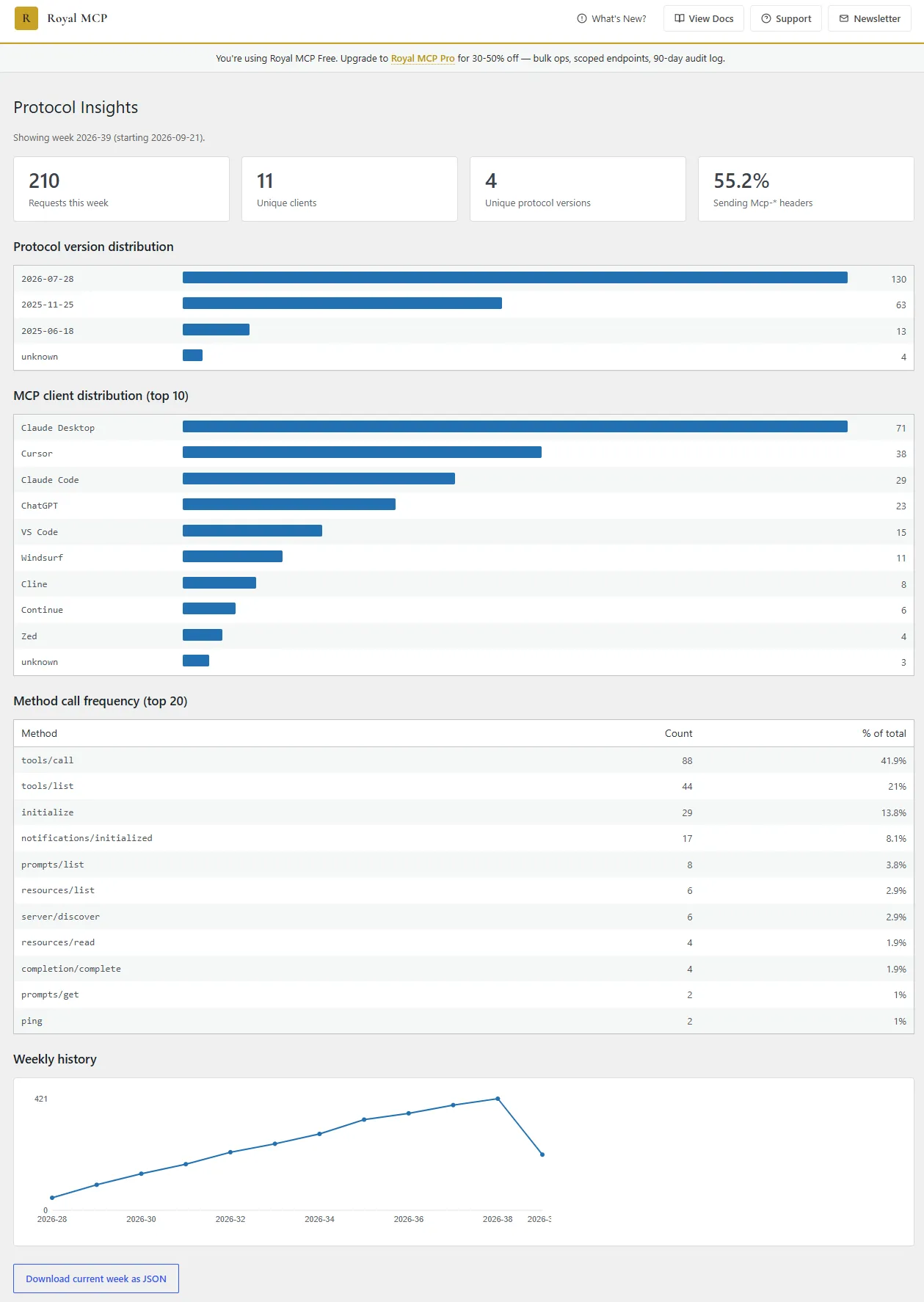
New: Local Protocol Insights admin page shows per-protocol-version request volume + top MCP clients + method-call frequency. * New: OAuth authorization responses include the `iss` parameter per...
- v1.5.2
New: Optional "Require approval before new AI clients can connect" setting with a Pending Clients admin page for reviewing dynamically-registered OAuth clients. * New: OAuth discovery advertises...
Royal MCP FAQ
What is MCP and why would a site use it?
MCP is an open standard for connecting AI assistants to outside tools and data. Without it, an assistant only sees what you paste in. With Royal MCP it can read and edit your site directly.
How is it different from other WordPress MCP plugins?
The listing stresses security. Every session needs sign-in through OAuth, an API key or an Application Password, requests are rate-limited and calls are logged.
Does it overlap with WordPress core abilities?
The listing says no. Core adds an Abilities API and an adapter, while Royal MCP supplies a full server with access controls, connector flows and plugin tools.
Does it work with WooCommerce?
Yes. When WooCommerce is active it adds 29 tools for products, coupons and related store data.
Can I undo what the AI did?
Yes. A snapshot is taken before destructive writes, and tracked changes can be reversed for 72 hours.
Can I preview a risky change?
Yes. Writes to options, permalinks, redirects and search settings accept a dry-run flag that shows the current and proposed values.
Can I use local models?
Yes, through a local MCP client such as LM Studio. The model runs on your own hardware and calls your site's server.
What happens if I uninstall it?
Scheduled events, temporary data and undo snapshots are removed. Settings, logs and connected clients stay unless you enable the delete-all option.
Royal MCP alternatives

Build faster in Elementor with 90+ Elementor widgets and addons, 600+ ready-made Elementor templates, without writing code. Premium Addons powers 600,000+ websites with the Elementor carousel, mega menu, blog posts…

Your WordPress site just became MCP-ready. WPVibe is the Model Context Protocol server for WordPress, connecting your self-hosted site to any AI assistant or AI agent that speaks MCP: Claude, ChatGPT, Cursor,…

Your WordPress site, now in the conversation Jetpack connects your WordPress site to ChatGPT, Claude, and the other AI agents you already use. Ask in plain language to draft a post, see which pages got the most…

This plugin provides Google AI (Gemini) integration for the PHP AI Client SDK. It enables WordPress sites to use Google’s Gemini models for text generation, image generation, text to speech, and other AI…

Secure WordPress MCP server for Claude, ChatGPT and AI agents. Easy MCP AI is a free plugin that turns your own site into a Model Context Protocol (MCP) server. Connect Claude to WordPress , connect ChatGPT to…

miniOrange Secure MCP Server is a complete WordPress MCP server plugin that turns your WordPress site into a fully working Model Context Protocol (MCP) server. Once installed, you can connect Claude to WordPress,…
Listing data from WordPress.org and the Wordfence vulnerability feed, refreshed Nov 9, 2026; listing details fetched Nov 14, 2026. Screenshots are from the plugin's WordPress.org listing. Not affiliated with Royal Plugins.