
AI Agent by SiteGround
AI Agent by SiteGround · by SiteGround
- active installs
- 1M+
- 98 ratings
- 1.7
- since last update
- 7d
- releases in 12 months
- —
- support threads resolved
- 0%
- avg daily downloads
- 50,589
- on WordPress.org
- 7 months
AI Agent by SiteGround at a glance
AI Agent by SiteGround is a free WordPress AI agent & MCP plugin by SiteGround with 1M+ active installs and a 1.7/5 rating from 98 reviews. It was last updated on Nov 2, 2026, is tested up to WordPress 7.1.4 and needs PHP 7.4+. All 1 of its published vulnerabilities have patched versions. Our quality score is 64/100.
What is AI Agent by SiteGround?
AI Agent by SiteGround is a chat assistant that carries out WordPress and WooCommerce tasks for you. You type what you want in plain language, and the agent creates pages, edits settings, updates plugins or manages products. Changes such as new pages are saved as drafts so you can review them first.
The agent runs on SiteGround AI Studio, a hosted service, and the plugin links your site to it. You can chat from inside wp-admin, where the agent works on that one site, or from AI Studio, where you can pick a single site or all connected sites. Sites do not have to be hosted with SiteGround, though an active SiteGround service is needed to use AI Studio.
It suits site owners and agencies who want to skip repetitive admin work. Typical jobs include writing missing alt text and SEO titles, bulk plugin updates, user changes across client sites and catalog edits in a store. A confirmation layer called Power Mode pauses risky actions until you approve them.
Best for
- Agencies updating many client sites at once
- SiteGround customers who want AI without managing API keys
- Store owners editing products and orders in bulk
- Site owners fixing missing alt text and SEO fields
Our take
SiteGround's AI Agent manages content and plugins via chat, bundled with hosting - which explains the huge install count. The low rating is the data story here: distribution doesn't equal satisfaction.
AI Agent by SiteGround features
Chat-based site management
Describe a task in everyday language and the agent performs it on your site. No need to find the right wp-admin screen.
Content and page creation
Create, edit, publish and delete posts and pages with AI-written text and images. It also handles menus, categories, tags, comments, the media library and translation.
SEO audit and fixes
It checks for missing SEO titles, meta descriptions, alt text and captions, then writes them. This saves time on sites with large media libraries.
Plugin and theme control
Install, update or remove plugins and themes, or list everything installed with versions and update status.
WooCommerce tasks
Update products, prices, stock and descriptions, manage orders, and pull sales reports, top products and coupon usage for a date range.
Multi-site management
Connect several WordPress sites from any host and run one prompt across all of them, such as updating a plugin everywhere.
Power Mode confirmations
Deleting content, changing users or changing site settings pauses the agent until you click Enable in the chat.
Activity log and access control
Page and post changes made by the agent are logged by category. Only administrators can use it by default, with an optional toggle for editors.
Read-only troubleshooting
The agent can audit a site or trace an error by reading code and showing where it fails.
AI Agent by SiteGround free vs pro
Free WordPress.org version
- The plugin and all its features are free to use
- Chat inside wp-admin and in AI Studio
- 20,000 AI Tokens each month for every SiteGround customer
Pro Paid version
- More AI Tokens can be added as a monthly increase or a one-time batch, starting at 100,000 tokens
The plugin itself costs nothing, but the agent's work uses AI Tokens from SiteGround AI Studio. Each customer gets a monthly free allowance and can buy more. No separate AI provider API key is needed.
How to use AI Agent by SiteGround
- Open AI Studio
Log in to SiteGround AI Studio. It comes with any active SiteGround service, such as hosting or a domain.
- Install the plugin
In wp-admin go to Plugins, then Add New, search for AI Agent by SiteGround, then install and activate it.
- Connect your site
On SiteGround hosting, connect in one click. Otherwise, in AI Studio go to Profile, Connectors, WordPress, Connect, choose Add External Website, enter your domain and copy the key. Paste it into the plugin settings and click Connect.
- Start a chat
Use the chat pop-up in wp-admin for that site, or open AI Studio and choose one site or all sites before writing your prompt.
- Review and approve
Check drafts before publishing. When Power Mode shows a warning for a major change, click Enable only if you want it to go ahead.
AI Agent by SiteGround screenshots (3)
-
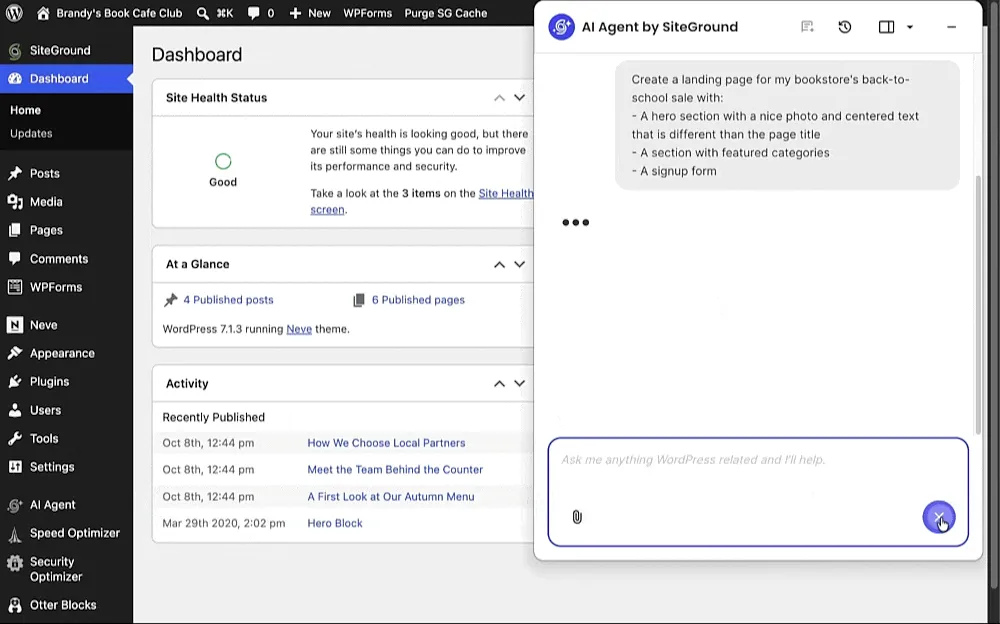
Ask the agent to build a landing page. It creates the page from native blocks and saves it as a draft for your review. -
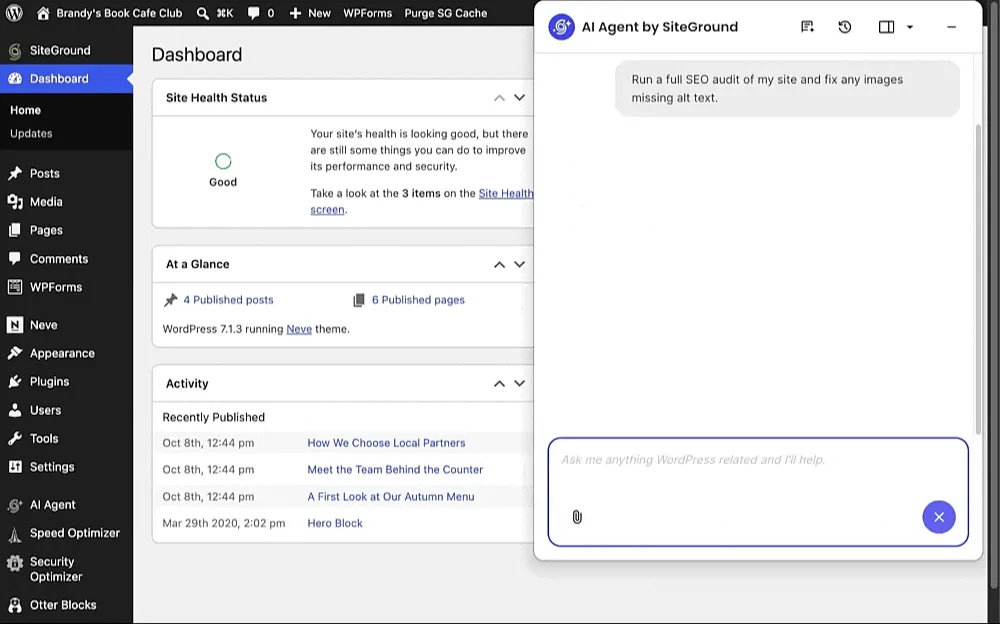
Run a full SEO audit and let the agent write missing alt text across the media library in one pass. -
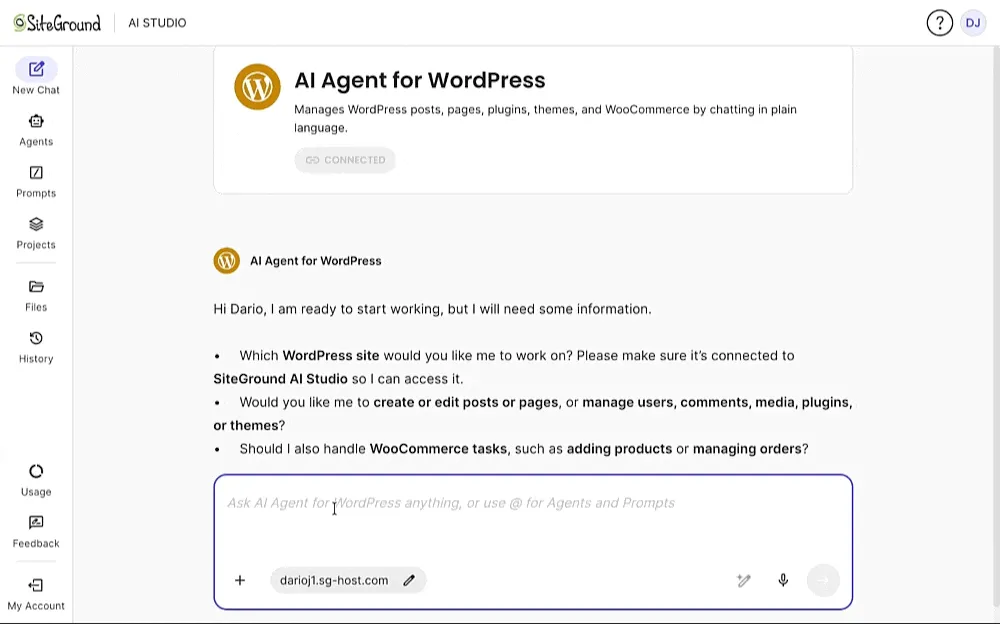
Update all plugins on every connected site from one chat in AI Studio.
Important information
- Your prompts, the content being edited and site context such as WordPress version, active plugins and theme are sent to the SiteGround AI Studio service. Site URL, credentials and plugin version are sent when connecting.
- An active SSL certificate is required on every connected site.
- It needs WordPress 5.0 or later and PHP 7.4 or later. It does not work on WordPress Multisite yet.
- Usage is limited by your AI Token balance. Large bulk jobs use many more tokens than short requests.
- One vulnerability has been published for this plugin and is marked as patched. Keep the plugin updated.
- SiteGround added this plugin to some of its hosted sites on launch. It takes no action unless an administrator gives it an instruction.
From the AI Agent by SiteGround readme
Straight from the developer's WordPress.org listing.
Full description
AI Agent by SiteGround lets you manage one or multiple WordPress and WooCommerce sites from a single chat, powered by the latest AI models. Describe the task in plain language by chatting with the AI agent and it does the work on your site: it writes and publishes pages, fixes SEO gaps, updates plugins, manages products and orders, and handles users and settings. Connect several sites and it works across all of them at once, regardless of where each one is hosted.
Let’s say your bookstore’s back-to-school sale starts Monday. Ask: “Create a landing page for my bookstore’s back-to-school sale, with a hero section, featured categories and a signup form.” The agent builds the page from native blocks and saves it as a draft for your review.
What you can ask it to do
The agent handles a wide range of WordPress and WooCommerce tasks:
• Content and pages: create, edit, publish, unpublish and delete posts and pages, with AI-written text and images. Build navigation menus, restructure categories and tags, moderate comments, manage the media library, and translate content into other languages.
• SEO: audit the site for missing SEO titles, meta descriptions, alt text and captions, then write them. On one B2B site, the agent wrote alt text for 80+ images and SEO titles for 14 core pages in about 35 minutes, against an estimated 7.5 hours by hand.
• Plugins and themes: install, update and remove them, or list everything installed with version numbers and update status.
• WooCommerce: create and update products, prices, descriptions and stock. View, update, cancel or delete orders. Pull sales reports, top products and coupon usage for any date range, and translate the full catalog with HTML formatting intact.
• Settings and users: change the site title, tagline, language, timezone and permalinks. Add users, reset passwords and change roles.
• Troubleshooting: run a read-only site audit or trace an error. The agent reads the code and shows you where it breaks.
Ask: “Run a full SEO audit of my site and fix any images missing alt text.” The agent checks every page, lists what is missing, and writes the alt text across the media library in one pass.
Manage multiple sites from one chat
Connect any number of WordPress sites, wherever they are hosted, and work on all of them from one chat. To act on several sites at once, open AI Studio, select which site or all sites and write your prompt. The chat inside each WordPress admin works on that site only. Here are some examples of what you can do across all of your sites at once:
• Update a plugin on every site at once.
• Add a new editor to every client site, or remove someone’s access across the portfolio.
• Apply the same timezone, language or permalink structure everywhere.
• Change text or URLs across dozens of pages on several sites at once.
Ask: “Update all plugins on every site.” Every connected site updates from one chat, and the agent reports back on each one.
Power Mode and your controls
Power Mode is an extra layer of protection, which asks for explicit confirmation whenever the Agent is prompted to change anything major. When a prompt calls for deleting posts, pages, media, plugins, themes, products or orders, creating or changing users, or updating site settings, the agent pauses and shows a warning with an Enable button in the chat. Nothing changes until you click it.
• Only administrators can see and use the agent by default. An administrator can give editors access with a toggle in the plugin settings.
• Hide the chat bubble in the plugin settings. The agent stays available from the AI Agent menu.
• The Activity Log records the page and post changes the agent makes, filtered by category.
• Deactivate and delete the plugin from your Plugins screen at any time.
SiteGround AI connector
WordPress 7.0 added a Connectors screen, where you link an AI provider, and plugins use that connection for features such as generating text and images or writing alt text. Each provider normally needs its own account, subscription and API keys. The SiteGround AI Agent plugin spares you all of these steps. Once you install and connect the plugin, it sets up SiteGround as your AI provider, with no need for API keys or extra configuration. The AI Agent works with all the latest AI models underneath (Gemini, GPT, Claude, Nano Banana, GPT Image). Learn more.
Use of third-party services: what data the plugin sends and when
This plugin connects to SiteGround AI Studio, a service operated by SiteGround, at api.studio.siteground.ai. It sends data in three situations:
• When you use the chat or AI features: your prompts, the content being edited, and site context (WordPress version, active plugins, theme). Endpoints: /api/v1/* (chat and generation).
• When you connect, reconnect or disconnect the site, and when keys refresh automatically: site URL, authentication credentials and plugin version. Endpoints: /[service]/v1/sign/token, /dynamic-keys/v1/key-refresh, /api/v1/wp/wp-disconnect.
• When you open the plugin dashboard or the plugin checks feature access: usage statistics requests and user and site identification. Endpoint: /api/v1/usage.
Service provider: SiteGround. Terms of Service · AI Tools Terms · Privacy Policy · Plugins Privacy Notice
Installation
• Log in to SiteGround AI Studio. It comes with any active SiteGround service.
• Install and activate the AI Agent by SiteGround plugin on your WordPress site.
• In AI Studio, go to Profile > Connectors > WordPress > Connect, choose Add External Website, enter your domain and copy the connection key. Paste the key into the plugin settings and click Connect.
If your site is hosted with SiteGround, connect it in one click with no key. Every site needs an active SSL certificate.
Once connected, chat with the agent from AI Studio or from the chat pop-up inside your WordPress admin.
Developer FAQ (7)
- Why get this plugin?
- • Work via chat: Describe what you want in plain language; no expertise needed. • WordPress Management quick and easy: The agent can create new content, edit settings, install or update plugins and more. • Edit multiple sites at once: Connect sites from any host to AI Studio and edit them all with one prompt. • Safe by default: Power Mode warns you about making critical changes and asks for extra permission. • 20,000 free AI Tokens a month for every SiteGround customer.
- Do I have to host with SiteGround?
- No. Your site can be hosted anywhere. The agent runs on SiteGround AI Studio, which comes with any active SiteGround service: hosting, a domain or any other product. From one SiteGround account you can connect WordPress sites hosted with any provider. The site needs an active SSL certificate. The Installation tab has the steps.
- How much does it cost?
- The plugin and all of its features are free to use. The agent’s work runs on AI Tokens: every SiteGround customer gets 20,000 free AI Tokens each month, and you can add more as a monthly increase or a one-time batch, starting at 100,000 tokens. Tokens measure how much the AI processes, so a short request uses far fewer than a bulk job across a whole catalog.
- Which user roles can use the agent?
- Administrators, by default. An administrator can give editors access with a toggle in the plugin settings. Authors, contributors and other roles do not see the agent and cannot use it.
- The chat bubble is in my way. Can I hide it?
- Yes. Switch it off in the plugin settings.
- Does it work with WordPress Multisite?
- Not yet. The agent works on standalone WordPress installations. You can still connect any number of separate WordPress sites to AI Studio and manage them together.
- I didn’t install this plugin. Why is it on my site?
- If your site is hosted with SiteGround, we added this plugin to existing sites when it launched. We should have told you first. The agent takes no action on its own. It acts only when an administrator gives it an instruction, and deletions, bulk edits and user changes wait behind Power Mode. If you don’t want it, deactivate and delete it from your Plugins screen like any other plugin.
Downloads, last 30 days
Trend vs previous period: -12.1%
Average daily downloads: 210,416 over the last 7 days , 50,589 over 30 days.
Security history
Past CVEs, patched · 1 published vulnerability (Wordfence) · most recent Aug 20, 2026
- Patched 5.3 Medium AI Agent by SiteGround <= 1.2.7 - Missing Authorization to Authenticated (Contributor+) Arbitrary Media Upload via /generate-content REST Endpoint CVE-2026-17153 · Aug 20, 2026 · affects *-1.2.7 · fixed in 1.2.8
Recent releases
- v1.3.2
Release Date Nov 2nd, 2026 New: Editor (role) access to the AI Agent AI Agent acts as the chatting user New: Markdown (.md) file support in AI Agent chat Activity Log shows which user made each...
- v1.3.1
Release Date Sep 30th, 2026 * New: Attachment-only messages in AI Agent chat * New: Batch theme updates * New: Global template parts editing (header and footer) on block themes * Chat drafts and...
- v1.3.0
Release Date Sept 3rd, 2026 * New: Site context awareness * New: Block-scoped page and post editing * New: WooCommerce variable and grouped product support * New: Taxonomy terms support * New:...
- v1.2.9
Release Date August 20th, 2026 * AI Tokens Manage button link fix
- v1.2.8
Release Date August 19th, 2026 * New: Redesigned plugin page with Dashboard, Settings, and Activity & Usage * New: AI Tokens usage and balance * New: Activity Log filtering by category * New:...
Show 10 older releases
- v1.2.7
Release Date July 28th, 2026 * New: Page context awareness for WP Agent * New: Post and page revision support * Quick Actions updates * Chat input alignment fix * Avada Live Builder compatibility fix
- v1.2.6
Release Date July 8th, 2026 * New: Progressive chat display modes * New: Real-time AI Agent tool activity view * New: AI Agent chat on the logged-in front-end * New: Show or hide AI Agent chat...
- v1.2.5
Release Date June 23th, 2026 * Gutenberg Editor improvements * REST request hardening
- v1.2.4
Release Date June 16th, 2026 * Chat bubble resizing fixes * Chat input box alignment fixes
- v1.2.3
Release Date June 10th, 2026 * Add prefixing for additionally loaded libraries
- v1.2.2
Release Date June 5th, 2026 * php-jwt dependency version update * Changes to signing/verification keys validation process
- v1.2.1
Release Date June 4th, 2026 * REST responses optimizations * Chat bubble improvements * Contributor access improvements through plugin REST endpoints * Implementing toggle for Gutenberg support
- v1.2.0
Release Date May 28th, 2026 * Chat bubble improvements * Menus support
- v1.1.9
Release Date May 20th, 2026 * Add AI Image Refinement support * Add introductory banner to chat * Translation improvements
- v1.1.8
Release Date May 18th, 2026 * Add WP core AI functionalities support * Improvements to initial connection flows
AI Agent by SiteGround FAQ
Do I need SiteGround hosting to use it?
No. Your site can be hosted anywhere. You do need an active SiteGround service of some kind, since AI Studio comes with it. One SiteGround account can connect sites from any host, provided each has SSL.
What does it cost?
The plugin is free. Work done by the agent uses AI Tokens, and every SiteGround customer gets 20,000 free tokens a month. You can add more, starting at 100,000 tokens, monthly or as a one-time batch.
Who can use the agent on my site?
Administrators only by default. An administrator can switch on access for editors in the plugin settings. Other roles cannot see or use it.
Can I hide the chat bubble?
Yes. Turn it off in the plugin settings. The agent stays available from the AI Agent menu in wp-admin.
Does it work on Multisite?
Not currently. It works on standalone installs. You can still connect separate sites to AI Studio and manage them together.
Why is this plugin on my site when I did not install it?
SiteGround added it to existing hosted sites when it launched. It does nothing unless an administrator gives it an instruction, and risky actions wait behind Power Mode. You can deactivate and delete it like any other plugin.
Which AI models does it use?
The listing says it works with current models from Gemini, GPT and Claude, plus image models, all through SiteGround as the provider. You do not set up each provider separately.
AI Agent by SiteGround alternatives
Build faster in Elementor with 90+ Elementor widgets and addons, 600+ ready-made Elementor templates, without writing code. Premium Addons powers 600,000+ websites with the Elementor carousel, mega menu, blog posts…

Your WordPress site just became MCP-ready. WPVibe is the Model Context Protocol server for WordPress, connecting your self-hosted site to any AI assistant or AI agent that speaks MCP: Claude, ChatGPT, Cursor,…

Your WordPress site, now in the conversation Jetpack connects your WordPress site to ChatGPT, Claude, and the other AI agents you already use. Ask in plain language to draft a post, see which pages got the most…

This plugin provides Google AI (Gemini) integration for the PHP AI Client SDK. It enables WordPress sites to use Google’s Gemini models for text generation, image generation, text to speech, and other AI…

Secure WordPress MCP server for Claude, ChatGPT and AI agents. Easy MCP AI is a free plugin that turns your own site into a Model Context Protocol (MCP) server. Connect Claude to WordPress , connect ChatGPT to…

miniOrange Secure MCP Server is a complete WordPress MCP server plugin that turns your WordPress site into a fully working Model Context Protocol (MCP) server. Once installed, you can connect Claude to WordPress,…
Listing data from WordPress.org and the Wordfence vulnerability feed, refreshed Nov 9, 2026; listing details fetched Nov 14, 2026. Screenshots are from the plugin's WordPress.org listing. Not affiliated with SiteGround.