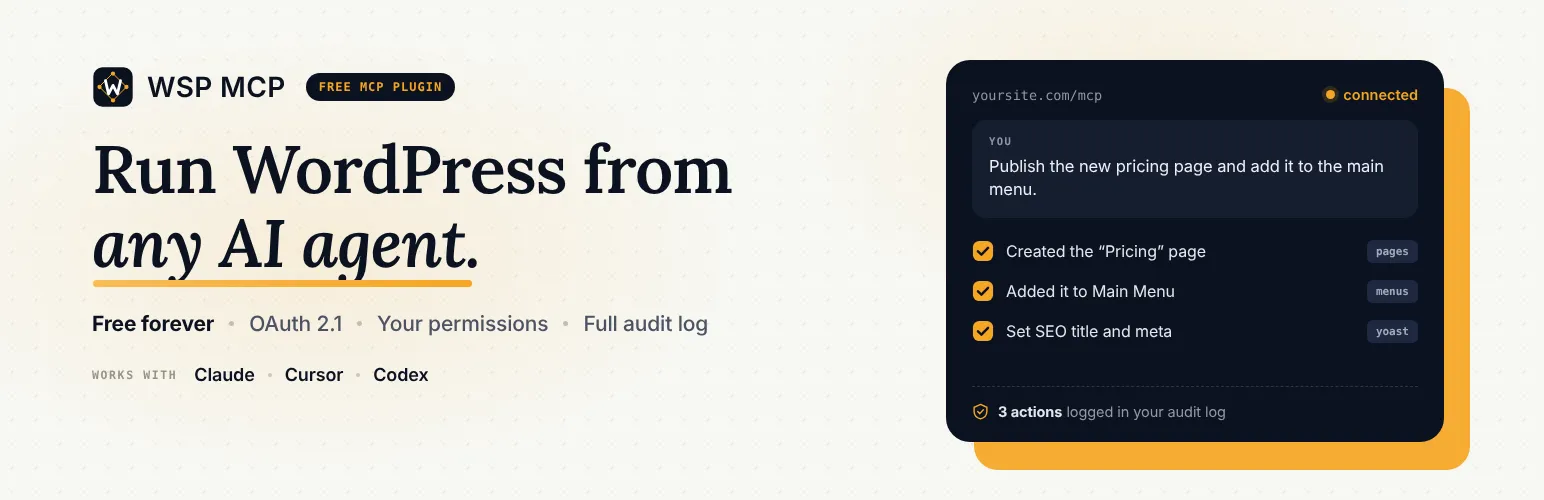

WSP MCP
WSP MCP - Free MCP Plugin for WordPress: Connect Claude, ChatGPT & AI Agents · by Bilal Naseer
- active installs
- 3K+
- 7 ratings
- 5.0
- since last update
- 11d
- releases in 12 months
- —
- support threads resolved
- 67%
- avg daily downloads
- 223
- on WordPress.org
- 4 months
WSP MCP at a glance
WSP MCP is a free WordPress AI agent & MCP plugin by Bilal Naseer with 3K+ active installs and a 5.0/5 rating from 7 reviews. It was last updated on Oct 29, 2026, is tested up to WordPress 7.1.4 and needs PHP 7.4+. It works with OpenAI, Claude. All 2 of its published vulnerabilities have patched versions. Our quality score is 86/100.
What is WSP MCP?
WSP MCP is a free plugin that lets AI assistants work on your WordPress site. It adds an MCP server so apps like Claude, ChatGPT, Cursor, Codex and Antigravity can read and change posts, pages, media, menus, comments, users and settings when you ask in plain English.
It is for site owners who want an assistant to do routine site tasks without a second plugin, an account or code. More than 200 tools are built in, and extra tools appear for WooCommerce, Yoast SEO, Rank Math, Elementor, ACF and form plugins when those are installed.
Safety is the main design point. Only read-only tools are on after install, and each tool has its own switch. The assistant can do only what its WordPress user is allowed to do, and an Audit Log records every action. The AI cannot add raw HTML, JavaScript or CSS to pages.
Best for
- Owners who want Claude or ChatGPT to run routine site tasks
- Stores managing orders and products by chat
- Editors fixing missing meta descriptions in bulk
- Cautious users who want read-only defaults
WSP MCP features
200+ built-in tools
Covers posts, pages, categories, comments, media, menus, users, settings, plugins, themes and custom post types.
Per-tool on/off switches
Anything that changes the site is off until you enable it.
Plugin integrations
Tools appear for WooCommerce, Yoast SEO, Rank Math, Elementor, Advanced Custom Fields, Gravity Forms, Contact Form 7 and WPForms.
Connection page
Ready-made setup for Claude, Cursor, Codex, Antigravity, OpenClaw and OpenCode, with copy and download buttons. Cursor connects in one click.
Audit Log
Records what was done, when and by whom.
Usage dashboard
Shows how often the AI is used, which tools are popular and how fast they respond.
AGENTS.md and CHANGELOG.md
Write notes about your site once and connected assistants read them first instead of exploring the whole site.
Key or application password login
Connect with a private key from the Connection page, or use a WordPress Application Password.
WSP MCP free vs pro
Free WordPress.org version
- Every tool, the Audit Log and the dashboard
- No account, subscription or outside service needed
The plugin is free and the listing says there is no paid version. Costs come from the AI app you connect, such as your Claude or ChatGPT plan, not from the plugin.
How to use WSP MCP
- Install the plugin
In wp-admin go to Plugins, then Add New, search for WSP MCP, then install and activate.
- Choose your tools
Open MCP, then Settings, and switch on the tools you want the AI to use.
- Copy the connection details
Open MCP, then Connection, pick your AI app and copy or download the setup it shows.
- Paste into your AI app
Add the details to the app and restart it fully, not just a new chat.
- Ask and review
Give it a task about your site, then check results in the Audit Log.
Important information
- Requires WordPress 6.9 and PHP 7.4. Tested up to WordPress 7.1.4.
- You need an AI app that supports MCP. Its usage and cost are separate from the plugin.
- Newly enabled tools only appear after you fully quit and reopen the AI app.
- Sensitive store tools such as refunds and customer data need a shop manager or administrator account.
- The AI can do what its WordPress user is allowed to do, so give it a user with limited capabilities.
- The data shows 2 published vulnerabilities in the plugin's history, both marked patched. Keep it updated.
From the WSP MCP readme
Straight from the developer's WordPress.org listing.
Full description
WSP MCP is a free MCP plugin for WordPress. It lets AI assistants like Claude, ChatGPT, Cursor, Codex and Antigravity work directly with your website. Ask in plain English and the AI does the work:
• “Write a blog post about our summer sale and save it as a draft.”
• “Find every page missing a meta description and suggest one.”
• “Show me this week’s WooCommerce orders and mark the shipped ones as completed.”
• “Add a Contact link to the main menu.”
Everything is built in. You don’t need another plugin, an account, or any coding. Install it, copy your connection details, paste them into your AI app, and start chatting.
You stay in control: every tool has its own on/off switch, anything that changes your site is off until you turn it on, and the AI can only do what its WordPress user is allowed to do.
Built and maintained by WebSensePro. Guides and help: wspmcp.com.
More free tools from WebSensePro
• Free Local SEO Audit: check how your business shows up in local search, completely free.
• SEO Schema Markup Generator: create structured data (schema markup) for your pages, completely free.
Watch: set it up in a few minutes
What is MCP?
MCP (Model Context Protocol) is the standard way AI assistants connect to other apps. Think of it as a plug: once your WordPress site has an MCP plugin, any AI app that supports MCP can read and update your site, with your permission.
Why WSP MCP?
• 100% free. Every feature and every tool, no paid version.
• Easy to connect. A Connection page with ready-made setup for Claude, Cursor, Codex, Antigravity, OpenClaw and OpenCode, with copy and download buttons. Cursor users can connect in one click.
• Safe by default. Only read-only tools are on when you install. You pick what else the AI can do.
• Teach the AI your site. Write an AGENTS.md and CHANGELOG.md once; connected AIs read them first instead of exploring your whole site.
• See everything the AI did. The Audit Log records every action: what, when, and by whom.
• Usage dashboard. See how often the AI is used, which tools are most popular, and how fast they respond.
• Your data stays on your site. Logs and stats are stored in your own database, never sent anywhere.
What your AI can do (200+ tools)
WordPress basics
• Posts and pages: read, write, edit, delete
• Categories and tags
• Comments: read, approve, delete
• Media library: browse, upload images, edit titles and alt text
• Menus: create menus, add or reorder links, assign menu locations
• Users: list, create, edit
• Site settings: title, tagline, permalinks
• Plugins and themes: list, activate, switch
• Custom post types
• Site-wide search
Works with your favorite plugins (tools appear automatically when the plugin is installed)
• WooCommerce: products, variations, orders, refunds, coupons, customers, sales reports, low-stock alerts, reviews
• Yoast SEO and Rank Math: SEO titles, meta descriptions, focus keyphrases
• Elementor: read and edit page layouts, widgets, global colors and page settings
• Ultimate Addons for Elementor: widgets, header/footer templates, layouts
• Advanced Custom Fields: field groups, fields, values, post types, options pages
• Gravity Forms, Contact Form 7 and WPForms: forms, entries, notifications
For safety, the AI can’t add raw code (HTML, JavaScript or CSS) to your pages, and sensitive store tools like refunds and customer data need a shop manager or administrator account.
Installation
• In WordPress, go to Plugins > Add New, search for “WSP MCP”, then install and activate it.
• Open MCP > Settings and switch on the tools you want your AI to use.
• Open MCP > Connection, pick your AI app, and copy (or download) the setup it shows.
• Paste it into your AI app, then restart the app. Done. Ask it something about your site.
Developer FAQ (9)
- Is this really a free MCP plugin for WordPress?
- Yes. WSP MCP is completely free and open source (GPL). Every tool, the Audit Log and the dashboard are included. No account, subscription or outside service is needed.
- Which AI apps work with it?
- Claude (desktop, web and mobile), ChatGPT, Cursor, Codex, Google Antigravity, OpenClaw, OpenCode, and any other app that supports MCP.
- Do I need any other plugin, like the WordPress MCP Adapter?
- No. Everything is built in.
- Is it safe?
- Tools that change your site are off until you turn them on, and the AI can only do what its WordPress user is allowed to do. You can see every action in MCP > Audit Log, and you can create a new connection key at any time to cut off old ones.
- How does the AI log in to my site?
- The Connection page gives you a private key to paste into your AI app. Advanced users can use a WordPress Application Password instead.
- I turned on new tools but my AI doesn’t see them.
- AI apps load the tool list when they connect. Fully quit and reopen your AI app (not just a new chat) and the new tools will appear.
- How do I connect WordPress with OpenClaw?
- Watch the step-by-step video tutorial:
- How do I connect WordPress with Google Antigravity 2.0?
- Watch the step-by-step video tutorial:
- How do I connect WordPress with Codex?
- Watch the step-by-step video tutorial:
Downloads, last 30 days
Trend vs previous period: +6.2%
Average daily downloads: 156 over the last 7 days , 223 over 30 days.
Security history
Past CVEs, patched · 2 published vulnerabilities (Wordfence) · most recent Oct 16, 2026
- Patched 4.3 Medium WSP MCP - WordPress MCP - Connect Claude, codex, antigravity or any other AI Agent <= 2.7.0 - Missing Authorization to Authenticated (Contributor+) Unauthorized Post and Media Modification CVE-2026-93529 · Sep 23, 2026 · affects *-2.7.0 · fixed in 2.7.1
- Patched 6.5 Medium WSP MCP <= 2.9.5 - Authenticated (Subscriber+) Sensitive Information Disclosure via Broken Access Control to 'wsp_get_posts' MCP Tool CVE-2026-109382 · Oct 16, 2026 · affects *-2.9.5 · fixed in 2.9.6
Recent releases
- v2.9.7
New: ChatGPT tab on MCP > Connection with step-by-step instructions and a walkthrough GIF. The Claude Connectors tab also gets a walkthrough GIF. * Fixed: connecting ChatGPT and other OAuth...
- v2.9.6
Security: hardened authorization checks on post listing, Elementor, Ultimate Addons for Elementor and media upload tools. Update recommended.
- v2.9.5
New: Site Context - a new MCP > Context page where you write AGENTS.md (how your site is built and the rules to follow) and CHANGELOG.md (what changed and why). Turn on "Enable Site Context" (off...
- v2.9.4
New: Site Editor ability group for block (Full Site Editing) themes - six tools. Read Global Styles (`wsp_get_global_styles`) returns the site's theme.json customizations or the merged effective...
- v2.9.3
New: 5 Custom Post Type tools - list your custom post types, and list, create, update and trash their items (works with any public custom post type, e.g. books, events, portfolio). Off by default....
Show 10 older releases
- v2.9.2
Minor updates.
- v2.9.1
New: Create User and Update User tools. Create User auto-generates a password if none is supplied and defaults the role to subscriber; Update User edits email, display name, role, or password....
- v2.9.0
New: Navigation Menus ability group - nine tools to list menus and their items, create and delete menus, add/update/remove menu items (custom links, posts, pages, categories), list theme menu...
- v2.8.0
New: One-click Claude Connector sign-in. The plugin now runs its own OAuth 2.1 authorization server, so you can connect Claude by pasting only the server URL into Customize > Connectors > Add...
- v2.7.1
Security: Fixed a broken access control issue reported by Patchstack (Ananda Dhakal) as "Authenticated (Contributor+) Broken Access Control", affecting WSP MCP <= 2.7.0, where the Update Post,...
- v2.7.0
New: Full Audit Log. Every MCP `tools/call` request is now recorded in a dedicated, self-hosted database table (`wp_wsp_mcp_audit_log`) - tool name, timestamp, acting user, request IP, and outcome...
- v2.6.8
Fixed: "Session not found or expired. Re-initialize." on the very first request after `initialize`. Clients that send `tools/list` immediately (Claude Desktop via mcp-remote, and any fast script)...
- v2.6.7
Fixed: The "Copy" buttons on the MCP > Connection page did nothing on sites served over plain HTTP (such as local development hosts). The browser Clipboard API is only available in a secure...
- v2.6.6
New: Direct file upload for media. `wsp_upload_media` (Upload Media) now accepts base64 file content via a new `data` parameter - an MCP client can upload a file attached to the chat straight into...
- v2.6.5
New: Elementor Advanced Design Tools - 11 tools for high-fidelity design workflows: get/update active kit, regenerate CSS, get widget schema, duplicate/move element, convert CSS to Elementor...
WSP MCP FAQ
Is it really free?
Yes. It is free and open source, with every tool, the Audit Log and the dashboard included and no account needed.
Which AI apps work with it?
Claude, ChatGPT, Cursor, Codex, Google Antigravity, OpenClaw, OpenCode and any other app that supports MCP.
Do I need the WordPress MCP Adapter?
No. Everything is built into the plugin.
Is it safe?
Change tools are off until you enable them, and the AI is limited to its WordPress user's permissions. Every action is logged, and you can create a new connection key to cut off old ones.
How does the AI sign in?
Through a private key from the Connection page. Advanced users can use a WordPress Application Password.
Why can't my AI see newly enabled tools?
AI apps load the tool list when they connect. Fully quit and reopen the app.
Can it add custom code to pages?
No. For safety the AI cannot add raw HTML, JavaScript or CSS to your pages.
Is my data sent anywhere?
Logs and stats stay in your own database, per the listing.
WSP MCP alternatives
Build faster in Elementor with 90+ Elementor widgets and addons, 600+ ready-made Elementor templates, without writing code. Premium Addons powers 600,000+ websites with the Elementor carousel, mega menu, blog posts…
Your WordPress site just became MCP-ready. WPVibe is the Model Context Protocol server for WordPress, connecting your self-hosted site to any AI assistant or AI agent that speaks MCP: Claude, ChatGPT, Cursor,…

Your WordPress site, now in the conversation Jetpack connects your WordPress site to ChatGPT, Claude, and the other AI agents you already use. Ask in plain language to draft a post, see which pages got the most…

This plugin provides Google AI (Gemini) integration for the PHP AI Client SDK. It enables WordPress sites to use Google’s Gemini models for text generation, image generation, text to speech, and other AI…

Secure WordPress MCP server for Claude, ChatGPT and AI agents. Easy MCP AI is a free plugin that turns your own site into a Model Context Protocol (MCP) server. Connect Claude to WordPress , connect ChatGPT to…

miniOrange Secure MCP Server is a complete WordPress MCP server plugin that turns your WordPress site into a fully working Model Context Protocol (MCP) server. Once installed, you can connect Claude to WordPress,…
Listing data from WordPress.org and the Wordfence vulnerability feed, refreshed Nov 9, 2026; listing details fetched Nov 14, 2026. Screenshots are from the plugin's WordPress.org listing. Not affiliated with Bilal Naseer.