

AI Engine
AI Engine - MCP Server & AI Chatbot for WordPress, with Claude, ChatGPT & Gemini · by Jordy Meow
- active installs
- 90K+
- 876 ratings
- 4.9
- since last update
- 3d
- releases in 12 months
- 11
- support threads resolved
- 100%
- avg daily downloads
- 10,042
- on WordPress.org
- 3.9 years
AI Engine at a glance
AI Engine is a freemium WordPress AI chatbot plugin by Jordy Meow with 90K+ active installs and a 4.9/5 rating from 876 reviews. It was last updated on Nov 6, 2026, is tested up to WordPress 7.1.4 and needs PHP 8.1+. It works with OpenAI, Claude, Google Gemini, Mistral AI. All 45 of its published vulnerabilities have patched versions. Our quality score is 95/100.
What is AI Engine?
AI Engine is a WordPress plugin that connects your site to AI in two directions. It adds AI features to the site, such as chatbots, writing and image tools, forms and search. It also lets AI assistants like Claude and ChatGPT read and edit the site through an MCP server.
The chatbot can answer from your own content and comes in several themes, with voice, file uploads and conversation memory. The MCP server exposes more than 140 tools covering posts, media, comments, menus, SEO fields and more. Changes are logged so you can undo them, and deletions can wait for your approval.
It suits site owners and developers who want one plugin for chatbots, content tools and agent access. Many advanced features, such as embeddings, function calling and extra MCP tools, are in the Pro version. Chatbot and content features need an API key from your AI provider.
Best for
- Sites that want a chatbot trained on their content
- Owners who want Claude or ChatGPT to manage the site
- Developers building custom AI features
- Teams that want to use many AI providers
Our take
The most mature general-purpose AI plugin on WordPress.org - one install gives you chatbots, content generation, AI forms, and stable connectors for OpenAI, Anthropic, Google and more. A near-perfect rating across 800+ reviews and weekly updates back up the popularity.
AI Engine features
Site-aware AI chatbot
Add a chatbot that answers from your content. It has several themes, popup or inline display, and file uploads.
Built-in MCP server
AI agents connect to your site and manage posts, media, comments and more. The free server has no account and no usage cap.
One-click undo
Each change made by an assistant is recorded with what it replaced. You can undo it from the MCP tab, and history is kept for 30 days.
Approval before deletions
New sites ask you to approve deletions. You can also restrict assistants to drafts only.
Workspace chat
A full-screen AI chat in wp-admin that can use any model you configured, with free mobile apps. It is off by default.
Content and image studios
Write posts from a brief and generate images. The editor Copilot can fix, shorten, lengthen and translate text.
Many AI providers
Connectors cover OpenAI, Anthropic, Google, xAI, Mistral, Perplexity, OpenRouter, Replicate and Azure. A custom connector supports self-hosted servers.
SEO plugin fields
Agents can write titles and descriptions in Yoast SEO, Rank Math, All in One SEO and other supported SEO plugins.
Developer APIs
A PHP API, REST API, function calling support and many hooks allow custom AI features.
AI Engine free vs pro
Free WordPress.org version
- AI chatbots with themes, file uploads and memory
- MCP server with more than 140 tools
- Undo history and deletion approval
- Workspace chat and mobile apps
- Content Studio, Image Studio, Playground and editor Copilot
- Connectors for the listed AI providers
Pro Paid version
- AI Forms that generate answers, images or files
- Embeddings and vector databases
- Function calling and content-aware responses
- Cross-site chatbots
- Editor Assistant sidebar
- Statistics, usage limits and extra MCP tools such as WooCommerce and Elementor
- Priority support
AI Engine is freemium, with a paid Pro version that adds the features above. The listing gives no prices. Claude and ChatGPT can reach the MCP server with no API key, but the chatbot and content tools use your own provider key, and that provider bills you directly.
How to use AI Engine
- Install and activate
In wp-admin go to Plugins, then Add New. Search for AI Engine, install it and activate it.
- Add a provider key
Get an API key from OpenAI or another provider you prefer. Enter it under Meow Apps, then AI Engine, in Settings.
- Turn on the modules you need
Enable the chatbot, Workspace or MCP in the settings. Workspace is off by default.
- Set up a chatbot
Create a chatbot, pick a theme and display mode, and point it at your content or knowledge base.
- Connect an AI assistant
In the MCP tab, enable the endpoint and choose which tool sets to expose. Then follow the guide for Claude or ChatGPT.
AI Engine screenshots (9)
-
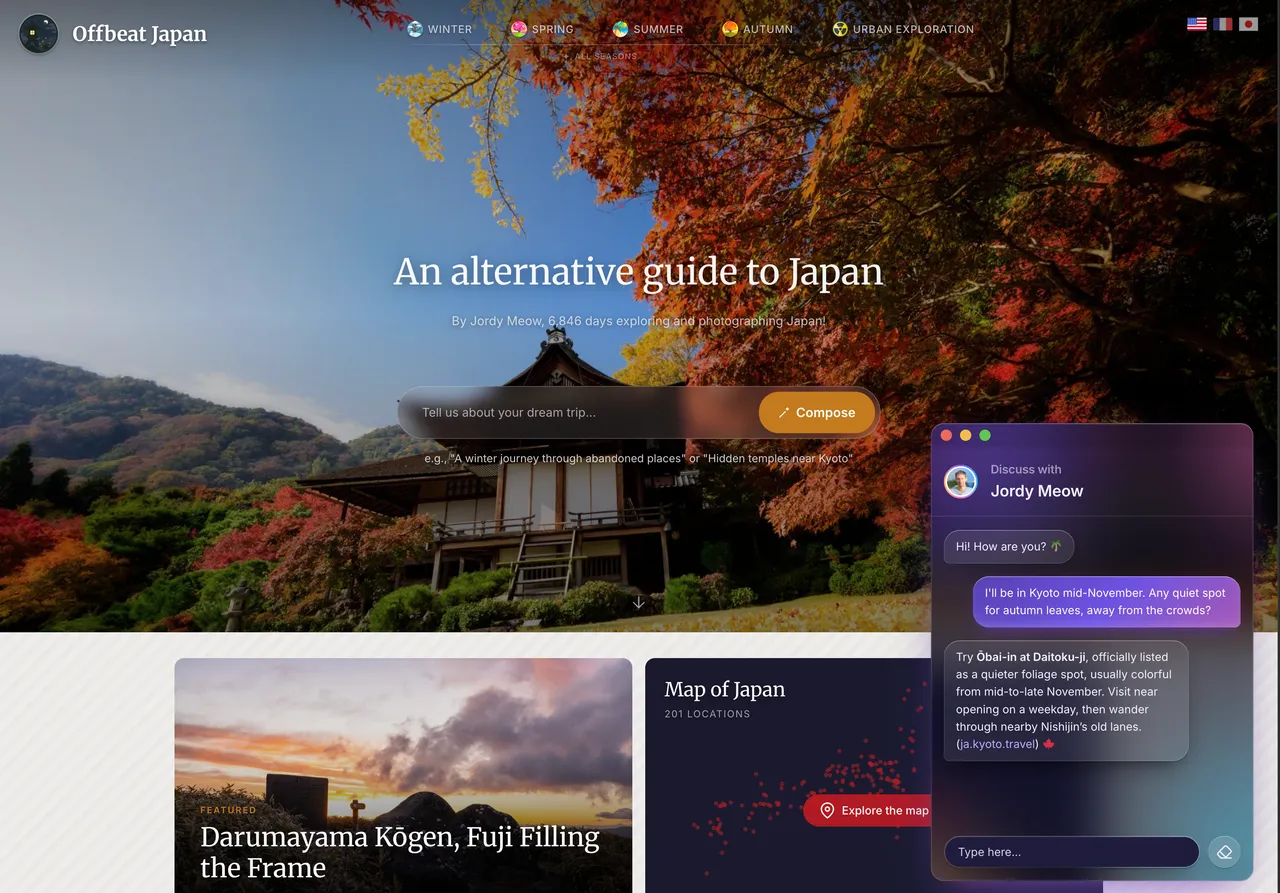
A chatbot on your own site, here on Offbeat Japan. It answers from your content, with any model you like, and you give it a name, a face and a style. -
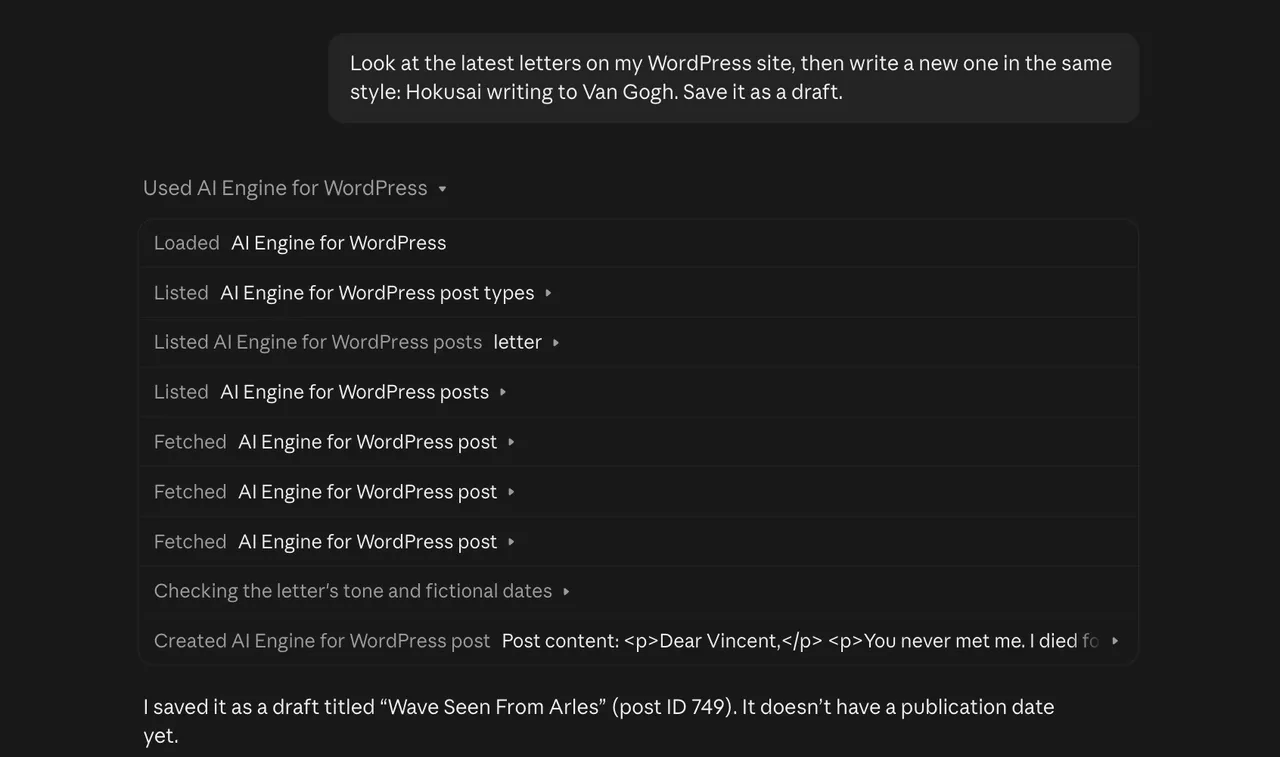
Claude working on a WordPress site through AI Engine: it reads the latest posts, then saves a new draft. AI Engine is a free MCP server for Claude, ChatGPT and any AI app, with no daily cap and no account. -
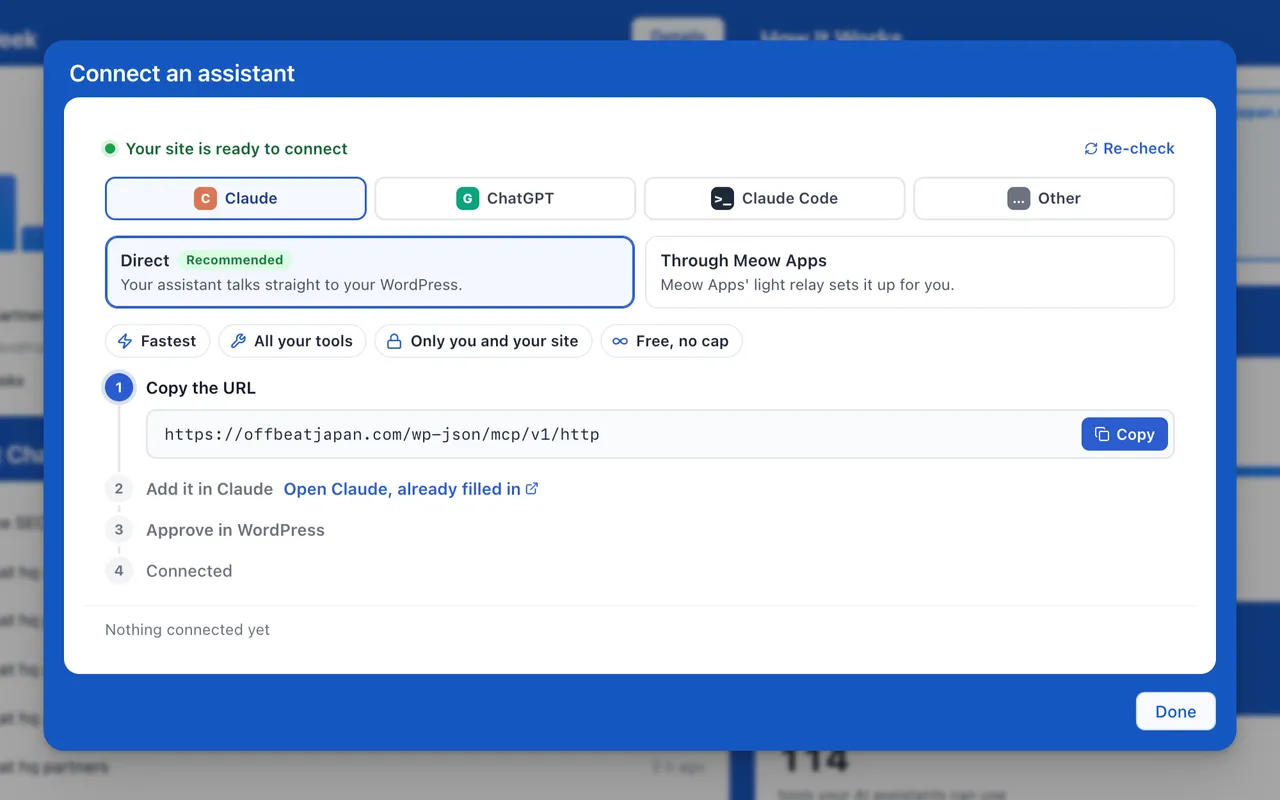
Connect Claude, ChatGPT, Claude Code or any other AI app in a minute. AI Engine checks your host first, and the connection goes straight to your site. -
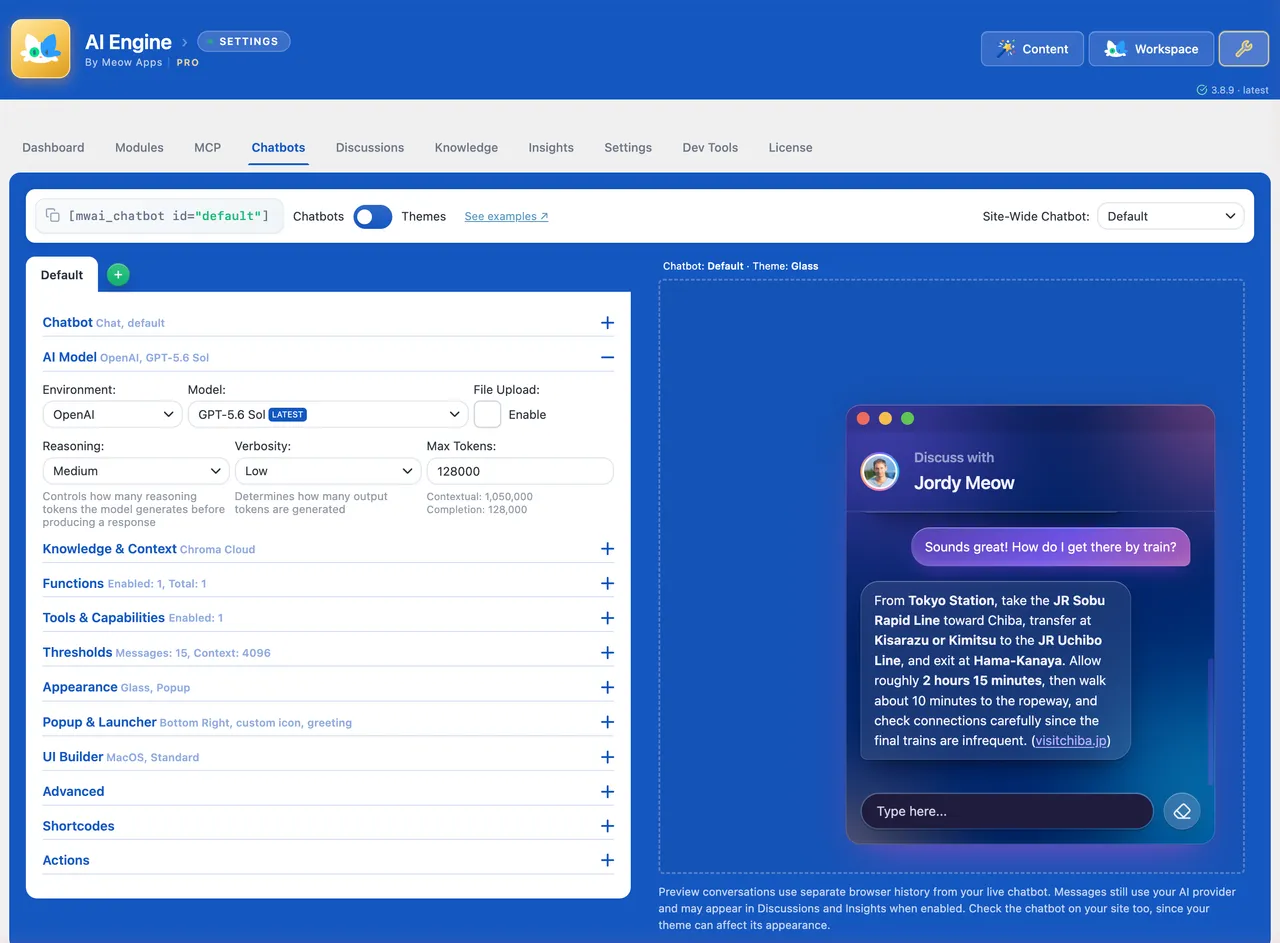
Build a chatbot: pick the model, give it your content and tools, and try it right there in the live preview. -
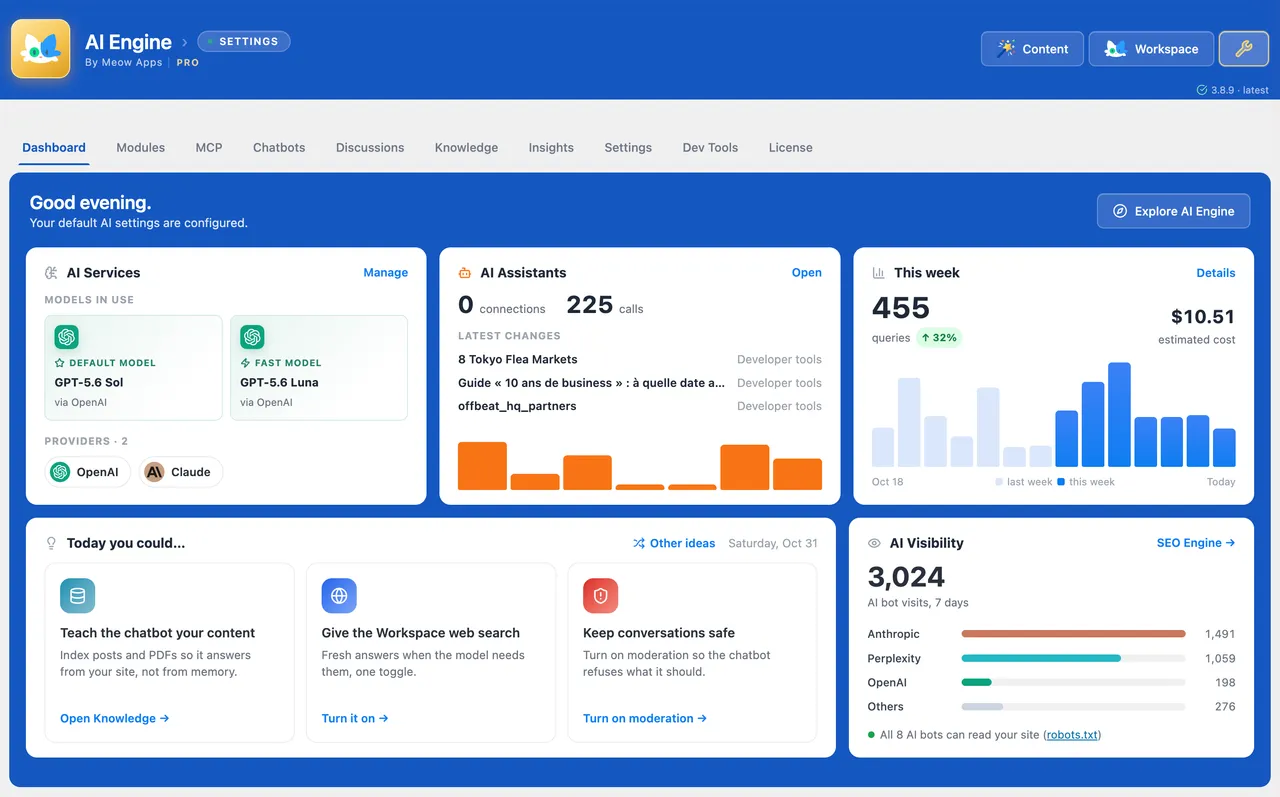
The dashboard: your models, what your AI assistants changed, this week's queries and what they cost, and which AI bots visit your site. -
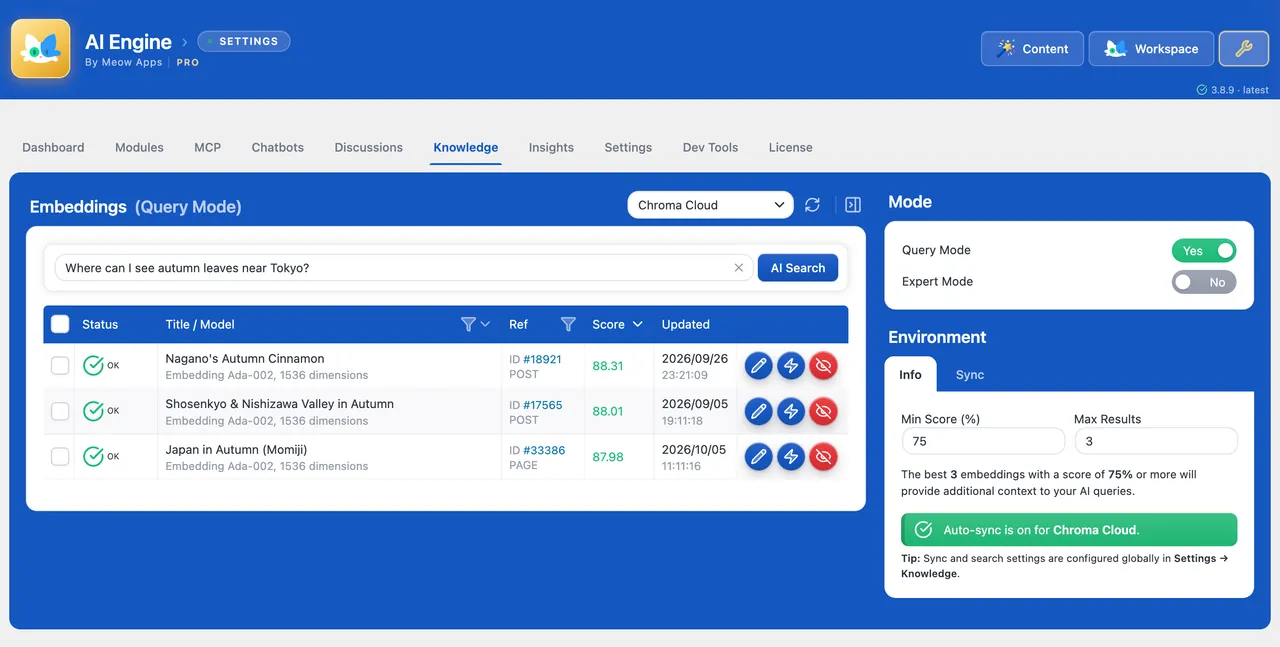
Knowledge: your posts become what the chatbot knows, kept in sync as you write. Ask a question and see which content it would use. -
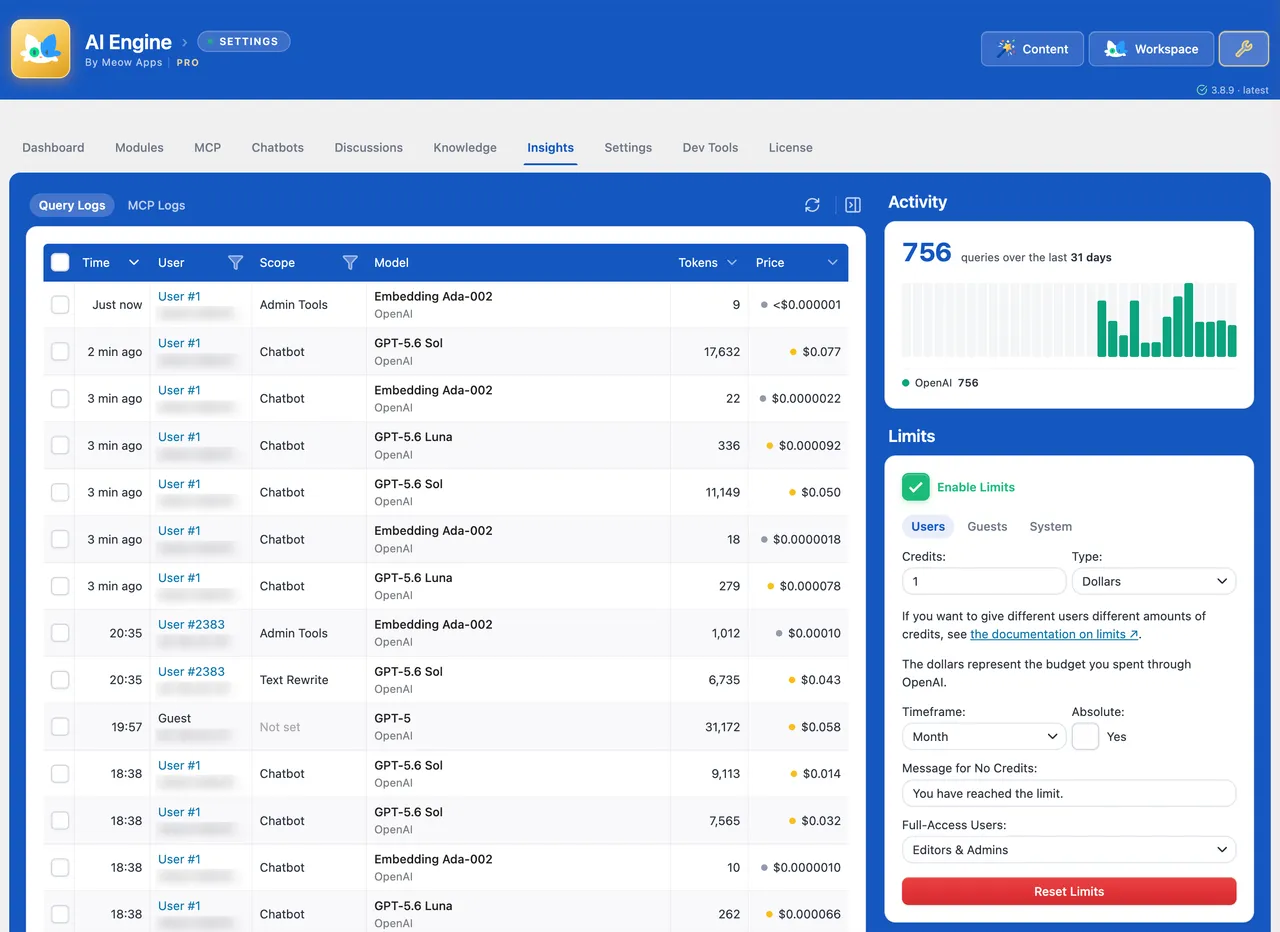
Insights: every AI call with its real cost, and spending limits for users, guests and the whole site. -
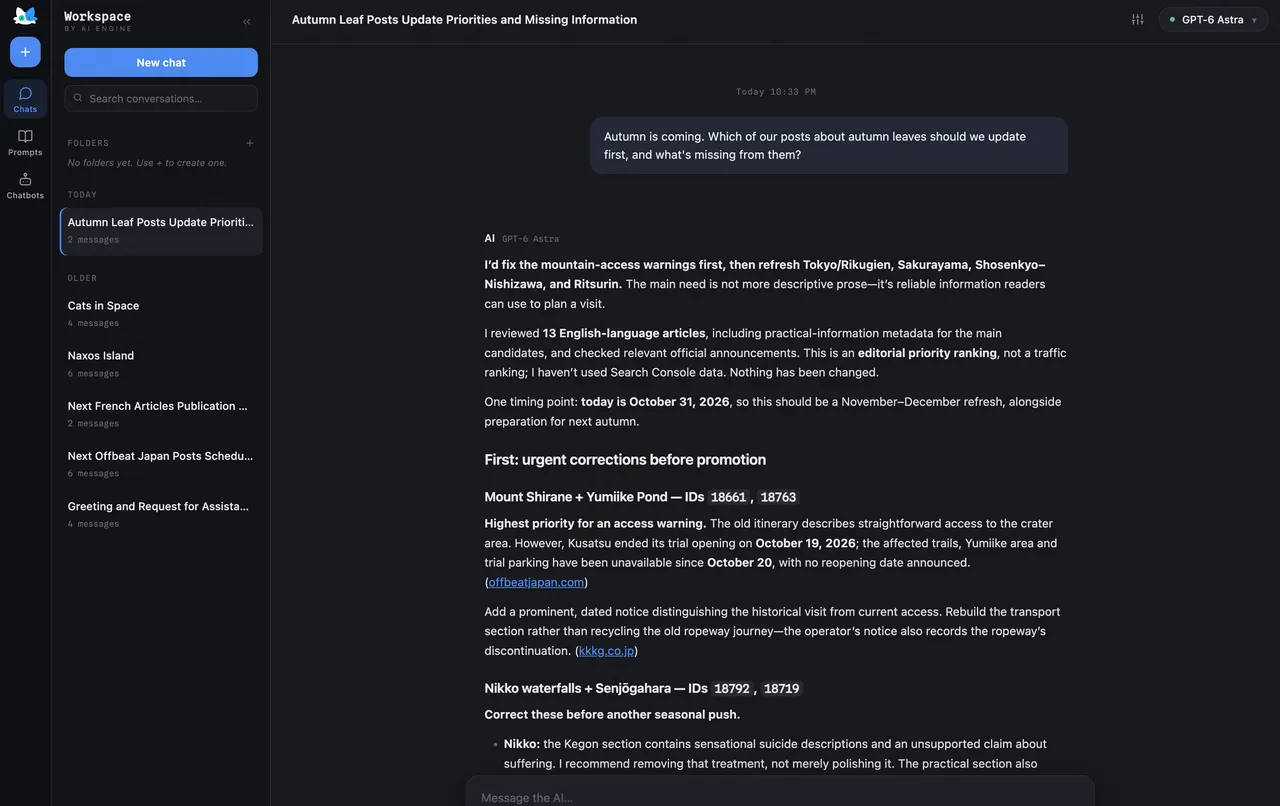
The Workspace: a full-screen AI chat inside wp-admin that reads your site and helps you run it, with every model you set up. -
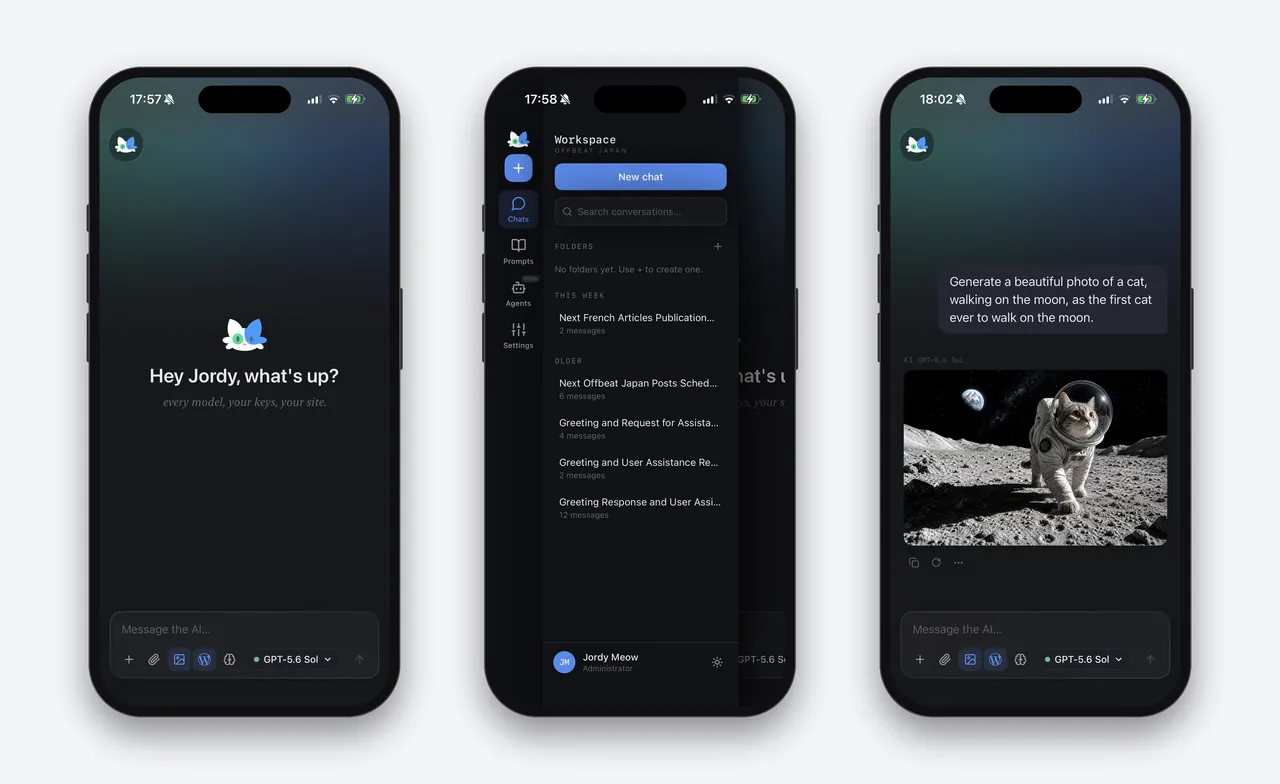
Workspace on your phone: your site's AI on iPhone or Android. Every model, your keys, your site, with conversations kept on your own WordPress and image generation included.
Important information
- Chatbot and content features send prompts to the AI provider you choose, and that provider charges for usage. Set billing limits in your provider account.
- MCP tools act on your live site. Review which tool sets are on, and consider drafts-only mode and deletion approval.
- Requires WordPress 6.0 or newer and PHP 8.1 or newer. Tested up to WordPress 7.1.4.
- The listing does not recommend running the separate WordPress AI plugin alongside it, though the two are designed to coexist.
- Past published vulnerabilities exist in the data and are marked patched. Keep the plugin updated.
From the AI Engine readme
Straight from the developer's WordPress.org listing.
Full description
The free MCP server and AI chatbot for WordPress. Claude and ChatGPT connect to your site with no account, no API key and no usage limits.
AI Engine connects WordPress and AI, both ways. AI comes into your site: chatbots that know your content, writing, images, forms and search, with OpenAI, Anthropic, Google, Mistral and more. And your site goes into AI: Claude, ChatGPT and other agents can read and edit it through MCP, safely and with your approval.
🤖 A chatbot that knows your site. Add it in a few clicks, with five themes, voice, file uploads, conversation memory and your own knowledge base. Here is how to add an AI chatbot to WordPress.
🔌 Your site, inside Claude and ChatGPT. More than 140 tools to write posts block by block, edit page builders, fill in SEO fields, manage WooCommerce and much more. Every change can be undone in one click, and deletions wait for your approval. Connect ChatGPT or Claude in a minute.
🖥️ Workspace, in your admin and on your phone. A full-screen AI chat with every model you set up, which can also work on your site, with free apps for iPhone and Android.
New here? Start with the AI Engine tutorial, or visit the AI Engine website. Please also read the disclaimer.
🤖 Chatbots
Chatbots for your visitors that answer from your own content, in your colors and your language. Add one in a few minutes.
Features:
• Five built-in themes: Timeless, Messages, ChatGPT, Foundation, and Glass, a frosted glass theme with a dark and a light mode
• A Themes editor for colors, fonts, and custom CSS
• Popup, inline, or fullscreen, with an optional macOS-style window
• Realtime audio conversations
• File and image uploads, several at once, or simply pasted
• Discussions list and conversation memory
• Every text translatable, and message actions reachable with the keyboard
• Cross-site embedding
• IP banning, word filters and content moderation
• GDPR compliance tools
MCP (Model Context Protocol)
AI Engine turns your WordPress site into an intelligent MCP server. AI agents like ChatGPT, Claude, Claude Code, and OpenClaw can connect directly, browse content, edit posts, manage media, and handle complex tasks through natural conversation.
More than 140 tools, over 200 with the Meow Apps family. Posts and pages (edited block by block), media, comments, users, taxonomies, menus, CSS and site styles, SEO fields in the SEO plugin you already use, Advanced Custom Fields, block patterns, editor notes, image generation and vision come free. Pro adds plugins, themes, database, Elementor, Beaver Builder, WooCommerce, Polylang and WPML. SEO Engine, Code Engine and Social Engine plug in their own, and any WordPress Ability can join. You choose which sets are on, so each AI only carries what it needs.
Direct and private. AI apps connect straight to your site. There is no relay service in between, your credentials never leave WordPress, and the MCP server is free, with no monthly fee and no usage cap.
Undo anything it did. Every change an assistant makes is recorded with what it replaced: posts, blocks, fields, categories, menus, styles, settings, Elementor pages, plugins and products. Undo it with one click in the MCP tab, or just ask: “undo what you just did”. If someone edited the same thing since, the undo stops instead of erasing their work. The full history is kept 30 days.
It asks before deleting. New sites ask you before an assistant deletes anything (or, if you prefer, before any site change too): you approve it in one click in the MCP tab. Or keep assistants on drafts only, and publish yourself.
Rather have it set up for you? Connect WP by Meow Apps adds your site to ChatGPT or Claude in a few clicks: it signs you in on your own site, passes each request along, and stores nothing.
Your agent can also add Today WP, a read-only MCP server by Meow Apps with current WordPress knowledge (versions, security releases, plugin facts and docs). AI Engine acts on your site, Today WP brings the knowledge.
What AI Agents Can Do:
• Create and edit posts, one block at a time
• Edit pages built with Divi, Avada, WPBakery or SiteOrigin (Elementor and Beaver Builder with Pro)
• Manage menus, CSS, site styles, and block theme headers, footers and templates
• Write SEO titles and descriptions in Yoast SEO, Rank Math, All in One SEO, SEOPress, The SEO Framework or Slim SEO
• Fill in Advanced Custom Fields (ACF)
• Check pages as visitors see them, read the error log, and restore earlier versions
• Undo any change, by asking or with one click
• Moderate comments, share draft previews, manage redirects, and read form entries
• Manage media files
• Install and manage plugins
• Customize themes
• Run SQL queries
• Create images for your posts, in the shape you need
• Manage WooCommerce products, variations, coupons, orders, inventory, customers and subscriptions
• Handle Polylang and WPML translations
Step-by-step guides: ChatGPT, Claude and Claude Code, OpenClaw, and the WordPress MCP FAQ. Developers will find every tool in the MCP documentation.
AI Engine can also connect to external MCP servers, extending your chatbots with tools and services beyond WordPress.
A note on safety and “full access”:
AI Engine’s MCP tools are curated and permission-aware on purpose. They do not run arbitrary code, so your site stays safe even while an AI agent works on it.
Each person connects with their own WordPress account, so every action shows up under their name. Administrators get full access. Editors can connect too once you turn on Editor Access, limited to the content they can already edit in WordPress: settings, users, plugins, themes and deleting stay with administrators.
Arbitrary PHP execution, as some tools offer, will never be part of AI Engine: it turns your site into remote code execution. For a development site only, the companion AI Engine YOLO adds it, switches itself off on production, and lives on GitHub only.
🖥️ Workspace (and its mobile apps)
A full-screen AI chat in your WordPress admin. Every model you configured is in the same conversation: start on Claude, continue on ChatGPT or Gemini, generate an image, search the web, and let it work on your site through the MCP tools, with an approval before anything changes. History, folders, a prompt library and file attachments are included. The free Workspace for WordPress app brings it to your phone and tablet (App Store, iOS 17 or newer, and Google Play, Android 8 or newer): you pair it once with a QR code, and your conversations and API keys stay on your site. There is no markup: you pay your AI providers directly. Workspace is off by default: turn it on in AI Engine → Settings → Modules. More about Workspace.
🎨 Content & Media
Write posts in the Content Studio, from a brief to a full draft, with templates you can reuse. Create images in the Image Studio, keep every version, and edit them with a brush. Compare models side by side in the Playground. In the editor, Copilot corrects, enhances, shortens, lengthens and translates text, writes alt text and analyzes images. The Advisor suggests how to set up and improve your site.
📝 AI Forms
AI-powered forms and small apps that take text, images, audio or files, with conditional logic, multiple steps and result templates.
🧠 Knowledge & Embeddings
Turn your posts and PDFs into a knowledge base for your chatbots, with semantic search through Pinecone, Chroma, Qdrant or OpenAI Vector Store. Posts stay in sync automatically, PDFs are split into chunks for you, and your site search can use it too.
🔧 Developer Tools
A PHP API, a REST API, function calling to connect AI to WordPress functions, WooCommerce or any API, the MCP server, and many hooks and filters. Build AI features, automate workflows, or create SaaS applications on WordPress. AI Engine also works with SEO Engine, Social Engine, Code Engine and Media File Renamer. See the code examples.
Pro Features
• AI Forms: Create dynamic forms that generate answers, images, or files using AI.
• Embeddings & Vector Databases: Build knowledge bases from your content and PDFs for semantic search.
• Content-Aware: Let AI use your post and page content as context for smarter responses.
• Function Calling: Connect AI to WordPress functions, WooCommerce, or any custom API.
• Cross-Site Chatbots: Embed your chatbots on external websites.
• Editor Assistant: An AI sidebar in the post editor that can read, rewrite, insert, and rearrange your content blocks through chained function calls.
• Realtime Audio: Voice-based conversations on OpenAI’s GA Realtime API, with the latest voice reasoning capabilities.
• Statistics & Usage Control: Track usage, set limits per role, and monitor costs.
• Extra MCP Tools: Adds plugin, theme, database, WooCommerce (with Subscriptions), Elementor, Beaver Builder, Polylang and WPML management to the MCP server.
• Models API: Let coding agents and OpenAI-compatible apps use your site’s AI models with one key, with usage tracked in Insights.
• Priority Support: Get faster help from the Meow Apps team.
Why AI Engine?
Native to WordPress
Built specifically for WordPress with seamless integration. No clunky interfaces, just native WordPress experience.
Flexible & Powerful
Built-in connectors for OpenAI, Anthropic, Google, xAI (Grok), Mistral, Perplexity, OpenRouter, Replicate, Azure (OpenAI), plus a Custom (OpenAI-compatible) connector for Ollama, LM Studio, vLLM, llama.cpp, LocalAI, or any self-hosted server. Use the models that work best for you.
Developer Friendly
Clean APIs, extensive hooks, and MCP support. Build custom AI features or entire SaaS applications on WordPress.
Real MCP, for Real WordPress
Generic MCP adapters wrap the REST API. AI Engine’s tools are crafted for AI agents, with rich context, smart defaults and practical actions, on any WordPress host. The REST API can be exposed as tools too, if you want it.
Privacy First
IP hashing, GDPR tools, secure file handling, and session-based tracking. You control your data. The free version sends nothing to us; the Pro version’s update check also says whether MCP was used in the last 30 days (a simple yes or no, nothing about what it did) and how many phones are paired with Workspace (a number only).
Constantly Evolving
Weekly updates based on real user feedback. We listen, we improve.
The Original
You’ll probably spot bits of AI Engine in plenty of other AI plugins, code and UI alike. Flattering, really… or fishy? 🤣 But only AI Engine keeps pushing forward with real care for its community, a drive toward perfection, and the patience to get the details right.
My Dream for AI
I am excited about AI, but I believe we need to use it with intention and clarity. Social media showed us how powerful tools can reshape our lives in ways we never expected, sometimes for the better, sometimes not. I want to avoid repeating those mistakes. AI should help us remove the meaningless, tedious work or enhance the work we enjoy. Modern tools should give us more time for what truly matters: spending beautiful moments with the people we love! 💕
Disclaimer
AI Engine is a plugin that helps you to connect your websites to AI services. You need your own API keys and must follow the rules set by the AI service you choose. For OpenAI, check their Terms of Service and Privacy Policy. It is also important to check your usage on the OpenAI website for accurate information. Please do so with other services as well.
The developer of AI Engine and related parties are not responsible for any issues or losses caused by using the plugin or AI-generated content. You should talk to a legal expert and follow the laws and regulations of your country. AI Engine does only store data on your own server, and it is your responsibility to keep it safe. AI Engine’s full disclaimer is here.
External services
AI Engine connects to the AI services you configure (OpenAI, Anthropic, Google and others) with your own API keys, only to run the features you use. See the Disclaimer above for their terms.
Compatibility
Please be aware that there may be conflicts with certain caching or performance plugins, such as SiteGround Optimizer and Ninja Firewall. To prevent any issues, ensure that AI Engine is excluded from these plugins.
Installation
• Upload ai-engine to /wp-content/plugins/
• Activate through the ‘Plugins’ menu
• Get an API key from OpenAI (or your preferred AI provider)
• Add your API key in Settings (Meow Apps > AI Engine)
• Start creating! 🚀
Developer FAQ (11)
- Why am I getting “Error 429: You exceeded your current quota”?
- This error comes from OpenAI’s API, not AI Engine. Set up billing limits in your OpenAI account. Caching plugins can sometimes store error responses, so clear your caches too.
- Who is AI Engine for, and how do I manage usage limits?
- AI Engine can be used by site owners, administrators, and visitors via chat widgets. To set query limits and prevent unlimited model runs, follow the Managing Limits guide.
- Does the chatbot support my language?
- AI models support many languages, but quality varies. There’s no definitive list since models are constantly updated. Test your language in the AI Playground.
- How does MCP work, and what can I do with it?
- MCP (Model Context Protocol) exposes WordPress tools to AI agents. Learn how to enable the MCP endpoint, choose which tools to expose, and secure them. You can manage posts, comments, users, media, and more. Administrators get full access, and you can also let Editors connect with their own account for content only.
- Is the MCP server free? Do I need an API key or my own server?
- Yes. The MCP server is part of this free plugin, with no account and no daily cap. There is no extra server to host: Claude and ChatGPT connect to your WordPress site with OAuth and use the plan you already have, so no API key is needed. The facts, side by side with another MCP plugin.
- Does AI Engine work with WordPress AI (the AI plugin, Connectors and providers)?
- Yes, but you don’t need it. AI Engine already does everything WordPress AI offers, and more: it connects to every major provider, and adds chatbots, AI Forms, embeddings, a dedicated MCP server with more than 140 tools, and usage insights. That’s why we don’t recommend installing the WordPress AI plugin alongside it. If you already use it, that’s fine: we make sure both play nicely together. On the Connectors page, choose to let AI Engine manage your providers: the API keys you already saved there are reused, both screens stay in sync, and the AI features of WordPress run through AI Engine, so their usage shows up in its Insights.
- Do I need the MCP Adapter plugin?
- No. AI Engine has its own MCP server, with more than 140 tools (over 200 with SEO Engine, Code Engine and Social Engine), OAuth for Claude and ChatGPT, and per-user access, so there is nothing else to install. The MCP Adapter is the official WordPress bridge that turns the abilities other plugins register into MCP tools. Think of it as a power socket, and AI Engine as the appliance. If you already run it, both live side by side on different endpoints, and the Abilities option in the MCP tab lets AI Engine’s own server expose those abilities too.
- Can I restrict the chatbot to answer only from my site content?
- You can’t completely block the model’s built-in knowledge, but you can use smart prompts and embeddings to steer conversations toward your content.
- The chatbot doesn’t appear or looks odd on my site
- Check the Common Issues guide for solutions to REST API problems, caching conflicts, nonce errors, and layout glitches.
- Where can I learn the basics and troubleshoot problems?
- Start with the Basics guide for installation and key concepts. For specific issues, check Common Issues.
- How do I report security issues?
- Report security vulnerabilities through the Patchstack Vulnerability Disclosure Program.
Downloads, last 30 days
Trend vs previous period: +52.3%
Average daily downloads: 13,548 over the last 7 days , 10,042 over 30 days.
Security history
Past CVEs, patched · 45 published vulnerabilities (Wordfence) · most recent Oct 30, 2026
- Patched 8.8 High AI Engine 3.4.9 - Authenticated (Subscriber+) Privilege Escalation via Missing Authorization in MCP OAuth Bearer Token CVE-2026-8719 · May 16, 2026 · affects 3.4.9 · fixed in 3.5.0
- Patched 9.8 Critical AI Engine <= 3.1.3 - Unauthenticated Sensitive Information Exposure to Privilege Escalation CVE-2025-11749 · Nov 5, 2025 · affects *-3.1.3 · fixed in 3.1.4
- Patched 6.6 Medium AI Engine <= 2.1.4 - Authenticated(Editor+) Arbitrary File Upload via add_image_from_url CVE-2024-0699 · Jan 18, 2024 · affects *-2.1.4 · fixed in 2.1.5
- Patched 8.8 High AI Engine 2.8.0 - 2.8.3 - Authenticated (Subscriber+) Insufficient Authorization to Privilege Escalation via MCP CVE-2025-5071 · Jun 18, 2025 · affects 2.8.0-2.8.3 · fixed in 2.8.4
- Patched 4.3 Medium AI Engine - MCP Server & AI Chatbot for WordPress, with Claude, ChatGPT & Gemini <= 3.8.6 - Missing Authorization CVE-2026-112828 · Oct 26, 2026 · affects *-3.8.6 · fixed in 3.8.7
- Patched 4.3 Medium AI Engine - MCP Server & AI Chatbot for WordPress, with Claude, ChatGPT & Gemini <= 3.8.3 - Missing Authorization CVE-2026-110888 · Oct 16, 2026 · affects *-3.8.3 · fixed in 3.8.4
- Patched 8.8 High AI Engine 2.9.3 - 2.9.4 - Authenticated (Subscriber+) Arbitrary File Upload CVE-2025-7847 · Jul 30, 2025 · affects 2.9.3-2.9.4 · fixed in 2.9.5
- Patched 8 High AI Engine 2.8.4 - Insecure OAuth Implementation CVE-2025-6238 · Jul 3, 2025 · affects 2.8.4 · fixed in 2.8.5
Show all 45 vulnerabilities
- Patched 6.4 Medium AI Engine <= 2.1.4 - Authenticated (Editor+) Server-Side Request Forgery CVE-2024-29090 · Mar 26, 2024 · affects *-2.1.4 · fixed in 2.1.5
- Patched 2.7 Low AI Engine <= 3.7.8 - Missing Authorization CVE-2026-110976 · Oct 16, 2026 · affects *-3.7.8 · fixed in 3.7.9
- Patched 4.3 Medium AI Engine <= 3.5.4 - Authenticated (Subscriber+) Insecure Direct Object Reference to Chatbot Discussion Disclosure CVE-2026-12510 · Jun 25, 2026 · affects *-3.5.4 · fixed in 3.5.5
- Patched 6.5 Medium AI Engine <= 3.7.7 - Insecure Direct Object Reference to Authenticated (Subscriber+) Sensitive Attachment Disclosure via 'mediaId' Parameter CVE-2026-89141 · Sep 15, 2026 · affects *-3.7.7 · fixed in 3.7.8
- Patched 6.8 Medium AI Engine <= 3.1.8 - Authenticated (Editor+) Server-Side Request Forgery CVE-2025-8084 · Nov 18, 2025 · affects *-3.1.8 · fixed in 3.1.9
- Patched 8.8 High AI Engine <= 3.6.5 - Cross-Site Request Forgery to Privilege Escalation via REQUEST_URI Substring Match CVE-2026-15988 · Aug 1, 2026 · affects *-3.6.5 · fixed in 3.6.6
- Patched 6.5 Medium AI Engine <= 2.9.4 - Missing URL Scheme Validation to Authenticated (Subscriber+) Arbitrary File Read via simpleTranscribeAudio and get_audio Functions CVE-2025-7780 · Jul 24, 2025 · affects *-2.9.4 · fixed in 2.9.5
- Patched 6.5 Medium AI Engine <= 2.2.0 - Unauthenticated Stored Cross-Site Scripting CVE-2024-0378 · Mar 1, 2024 · affects *-2.2.0 · fixed in 2.2.1
- Patched 2.7 Low AI Engine <= 3.7.8 - Missing Authorization CVE-2026-111041 · Oct 16, 2026 · affects *-3.7.8 · fixed in 3.7.9
- Patched 2.7 Low AI Engine <= 3.6.3 - Authenticated (Editor+) Information Exposure CVE-2026-16954 · Jul 30, 2026 · affects *-3.6.3 · fixed in 3.6.4
- Patched 7.2 High AI Engine - The Chatbot, AI Framework & MCP for WordPress <= 3.3.2 - Authenticated (Editor+) Arbitrary File Upload CVE-2026-23802 · Feb 25, 2026 · affects *-3.3.2 · fixed in 3.3.3
- Patched 5.3 Medium AI Engine - The Chatbot, AI Framework & MCP for WordPress <= 3.7.8 - Unauthenticated Insecure Direct Object Reference CVE-2026-93623 · Sep 23, 2026 · affects *-3.7.8 · fixed in 3.7.9
- Patched 7.2 High AI Engine - The Chatbot, AI Framework & MCP for WordPress <= 3.6.8 - Unauthenticated Stored Cross-Site Scripting CVE-2026-65545 · Jul 28, 2026 · affects *-3.6.8 · fixed in 3.6.9
- Patched 4.4 Medium AI Engine: ChatGPT Chatbot, Content Generator, GPT 3 & 4, Ultra-Customizable <= 1.6.82 - Authenticated (Admin+) Stored Cross-Site Scripting CVE-2023-2580 · May 19, 2023 · affects [*, 1.6.83) · fixed in 1.6.83
- Patched 4.3 Medium AI Engine - MCP Server & AI Chatbot for WordPress, with Claude, ChatGPT & Gemini <= 3.8.8 - Cross-Site Request Forgery CVE-2026-65566 · Oct 30, 2026 · affects *-3.8.8 · fixed in 3.8.9
- Patched 7.2 High AI Engine <= 3.8.0 - Unauthenticated Stored Cross-Site Scripting via 'model_' Parameter → PHP Error-Log Injection → Advisor Indirect Prompt Injection CVE-2026-96561 · Sep 30, 2026 · affects *-3.8.0 · fixed in 3.8.1
- Patched 9.1 Critical AI Engine: ChatGPT Chatbot <= 2.2.63 - Authenticated (Editor+) Arbitrary File Upload CVE-2024-34440 · May 7, 2024 · affects *-2.2.63 · fixed in 2.2.70
- Patched 6.5 Medium AI Engine - The Chatbot, AI Framework & MCP for WordPress 3.3.3 - 3.7.1 - Authenticated (Subscriber+) Arbitrary File Read CVE-2026-75797 · Aug 27, 2026 · affects 3.3.3-3.7.1 · fixed in 3.7.2
- Patched 5.4 Medium AI Engine <= 2.8.4 - Authenticated (Subscriber+) Stored Cross-Site Scripting via `mwai_chatbot` Shortcode `id` Parameter CVE-2025-5570 · Jul 7, 2025 · affects *-2.8.4 · fixed in 2.8.5
- Patched 9.8 Critical AI Engine: ChatGPT Chatbot <= 1.9.98 - Unauthenticated Arbitrary File Upload via rest_upload CVE-2023-51409 · Jan 9, 2024 · affects *-1.9.98 · fixed in 1.9.99
- Patched 2.7 Low AI Engine <= 3.8.5 - Missing Authorization CVE-2026-110982 · Oct 19, 2026 · affects *-3.8.5 · fixed in 3.8.6
- Patched 7.2 High AI Engine - The Chatbot, AI Framework & MCP for WordPress <= 3.4.9 - Authenticated (Editor+) Privilege Escalation CVE-2026-27407 · May 28, 2026 · affects *-3.4.9 · fixed in 3.5.0
- Patched 6.5 Medium Ai Engine <= 2.9.5 - Missing Authorization to Unauthenticated Uploaded Files Disclosure And Deletion CVE-2025-8268 · Sep 3, 2025 · affects *-2.9.5 · fixed in 2.9.6
- Patched 7.1 High AI Engine <= 3.1.8 - Authenticated (Subscriber+) PHP Object Injection via PHAR Deserialization CVE-2025-12844 · Nov 12, 2025 · affects *-3.1.8 · fixed in 3.1.9
- Patched 4.9 Medium AI Engine <= 2.4.7 - Authenticated (Admin+) SQL Injection CVE-2024-6723 · Aug 22, 2024 · affects *-2.4.7 · fixed in 2.4.8
- Patched 6.4 Medium AI Engine <= 3.3.2 - Authenticated (Subscriber+) Server-Side Request Forgery CVE-2026-0746 · Jan 27, 2026 · affects *-3.3.2 · fixed in 3.3.3
- Patched 4.9 Medium AI Engine <= 2.6.3 - Authenticated (Admin+) SQL Injection CVE-2024-10499 · Nov 21, 2024 · affects *-2.6.3 · fixed in 2.6.5
- Patched 4.2 Medium AI Engine <= 3.8.4 - Authenticated (Subscriber+) Limited Media File Deletion via 'metadata' Parameter CVE-2026-107745 · Oct 27, 2026 · affects *-3.8.4 · fixed in 3.8.5
- Patched 7.2 High AI Engine <= 3.3.2 - Authenticated (Editor+) Arbitrary File Upload via 'filename' Parameter in update_media_metadata Endpoint CVE-2026-1400 · Jan 28, 2026 · affects *-3.3.2 · fixed in 3.3.3
- Patched 4.7 Medium AI Engine - The Chatbot, AI Framework & MCP for WordPress <= 3.6.0 - Authenticated (Administrator+) Privilege Escalation CVE-2026-75796 · Aug 24, 2026 · affects *-3.6.0 · fixed in 3.6.1
- Patched 7.2 High AI Engine <= 2.5.0 - Authenticated (Admin+) Remote Code Execution CVE-2024-6451 · Jul 29, 2024 · affects *-2.5.0 · fixed in 2.5.1
- Patched 6.4 Medium AI Engine <= 2.4.7 - Authenticated (Subscriber+) Server-Side Request Forgery CVE-2024-38791 · Jul 22, 2024 · affects *-2.4.7 · fixed in 2.4.8
- Patched 7.2 High AI Engine <= 3.5.4 - Authenticated (Editor+) Arbitrary File Write CVE-2026-12511 · Jun 23, 2026 · affects *-3.5.4 · fixed in 3.5.5
- Patched 7.5 High AI Engine - The Chatbot, AI Framework & MCP for WordPress <= 3.8.6 - Missing Authorization to Administrator Account Takeover via Unauthenticated MCP OAuth Client Registration CVE-2026-110732 · Oct 30, 2026 · affects *-3.8.6 · fixed in 3.8.7
- Patched 5.3 Medium AI Engine <= 3.6.3 - Insecure Direct Object Reference to Unauthenticated Cross-Session Chatbot File Deletion CVE-2026-16953 · Aug 3, 2026 · affects *-3.6.3 · fixed in 3.6.4
- Patched 5.3 Medium AI Engine - The Chatbot, AI Framework & MCP for WordPress 3.4.0 - 3.7.1 - Missing Authorization to Unauthenticated Arbitrary AI Query Execution CVE-2026-75798 · Aug 28, 2026 · affects 3.4.0-3.7.1 · fixed in 3.7.2
- Patched 6.5 Medium AI Engine <= 3.6.5 - Authenticated (Subscriber+) Arbitrary File Read CVE-2026-16955 · Aug 3, 2026 · affects *-3.6.5 · fixed in 3.6.6
Recent releases
Release cadence: every ~4 days.
- v3.9.2 Nov 6, 2026
Fix: Security: Uploads are now validated against their actual content and not only their filename, so HTML disguised as audio or another media type is refused in chat uploads, form uploads, the...
- v3.9.1 Nov 5, 2026
Fix: Chatbots with image generation work again when a reasoning level is set. * Fix: Knowledge sync marks a post as failed when the model returns no vector, instead of crashing and leaving...
- v3.9.0 Nov 2, 2026
Fix: Security: Image Studio now encodes the media ID in its requests, as extra hardening. * Add: MCP Undo: every change an assistant makes can be undone in one click from the MCP tab, or just by...
- v3.8.9 Oct 30, 2026
Add: GPT-6.1 Terra model. * Add: Restore link in Recent Changes, which opens the version from before an AI edit. * Update: Connect card now offers a choice between a direct connection...
- v3.8.8 Oct 27, 2026
Fix: Security: Shop Managers can no longer edit administrator accounts through MCP, and the plugin and theme file tools now follow DISALLOW_FILE_EDIT. * Fix: Security: Forms and the Public API can...
Show 6 older releases
- v3.8.7 Oct 23, 2026
Fix: Security: Voice chatbots now only run functions attached to their own chatbot. * Fix: Security: Editors on MCP can no longer publish other content types or file references through a decoy...
- v3.8.6 Oct 17, 2026
Fix: Security: Editors can no longer change the title or excerpt of posts they are not allowed to edit (coupons, menus, templates) through the AI helpers, and the other helpers taking a post ID...
- v3.8.5 Oct 14, 2026
Fix: Security: MCP no longer returns API keys or tokens when reading WordPress options. * Fix: Security: Pro MCP tools now refuse accounts that cannot manage the site instead of running as the...
- v3.8.4 Oct 8, 2026
Fix: Security: A chatbot shortcode in a post can now only change the prompt, model or API key when its author can edit others' posts. * Fix: Security: The search endpoint used by the Search...
- v3.8.3 Oct 1, 2026
Add: Abilities to MCP, so tools registered by plugins through the WordPress Abilities API work over MCP and in Workspace, appear in MCP Logs, and are labelled Ability or Native in the renamed MCP...
- v3.8.2 Sep 25, 2026
Add: Connect an AI assistant card in the MCP settings, which checks the host, guides you through Claude, ChatGPT or Claude Code step by step, and confirms the connection works. * Add: The license...
AI Engine FAQ
Why do I see a quota error from OpenAI?
That error comes from OpenAI, not the plugin. Check billing and limits in your OpenAI account. Caching plugins can also store error responses, so clear caches.
How do I limit usage?
Follow the plugin's limits guide to cap queries. Pro adds usage statistics and per-role limits.
Does the chatbot work in my language?
Models support many languages but quality varies. Test yours in the AI Playground.
What is MCP and what can it do here?
MCP lets AI agents use tools on your site. Administrators get full access, and Editors can connect with their own account for content only.
Is the MCP server free, and do I need an API key?
The server is part of the free plugin with no account or cap. Claude and ChatGPT connect with OAuth, so no API key is needed for that connection.
Do I need the MCP Adapter plugin?
No. AI Engine has its own server. If you already run the Adapter, both can coexist on separate endpoints.
Can I make the chatbot answer only from my content?
Not completely. You can steer it with prompts and embeddings, but the model's own knowledge cannot be fully blocked.
What if the chatbot looks wrong or does not appear?
Check for REST API problems, caching conflicts, nonce errors and layout clashes. The plugin's common issues guide covers these.
AI Engine alternatives

Chatway is a WordPress live chat, AI chatbot, and helpdesk plugin for customer support. Chat with website visitors in real time, automate replies with an AI chatbot, or connect your own AI agents including ChatGPT,…

🟦 Tidio - Live Chat for WordPress with AI Chatbots, Customer Support & Sales Tools Tidio Live Chat is an all-in-one customer support plugin for WordPress that lets you talk to your website visitors in real time.…

THE SIMPLE, SECURE AND FEATURE-RICH SUPPORT TICKETING SYSTEM PLUGIN FOR YOUR WORDPRESS SITE. Click here to visit our official website. SupportCandy is a self-hosted WordPress helpdesk and support ticket system.…
AI ChatBot for WordPress - WPBot. Support, Sale, Convert, Automate WPBot is a feature rich AI ChatBot for WordPress websites. Provide 24/7 Automated Live Chat Support , Generate Leads and Convert , Collect…
MxChat is the most powerful free AI chatbot and content generation plugin for WordPress - connecting your website to ChatGPT, Claude, Gemini, Grok, DeepSeek, and 100+ AI models through a single, easy-to-use…
Buttonizer is a powerful platform with Live Chat, AI Chatbots, and Real-Time Visitor Monitoring! In addition to chat features, you can create Call, Email, SMS, & Contact buttons to increase conversions. Supports…
Listing data from WordPress.org and the Wordfence vulnerability feed, refreshed Nov 9, 2026; listing details fetched Nov 14, 2026. Screenshots are from the plugin's WordPress.org listing. Not affiliated with Jordy Meow.