

SupportCandy
SupportCandy - Helpdesk, Support Ticket System & AI Chatbot · by PSM Plugins
- active installs
- 10K+
- 289 ratings
- 4.9
- since last update
- 6d
- releases in 12 months
- —
- support threads resolved
- 100%
- avg daily downloads
- 335
- on WordPress.org
- 8.2 years
SupportCandy at a glance
SupportCandy is a free WordPress AI chatbot plugin by PSM Plugins with 10K+ active installs and a 4.9/5 rating from 289 reviews. It was last updated on Nov 3, 2026, is tested up to WordPress 7.1.4 and needs PHP 7.4+. All 24 of its published vulnerabilities have patched versions. Our quality score is 95/100.
What is SupportCandy?
SupportCandy is a helpdesk and support ticket system that runs inside WordPress. Customers submit tickets from your site, and agents answer them from the dashboard. The listing says tickets, agents, customers, tags, categories and statuses are all unlimited, with no per-agent fees, and that all data stays on your own server. The plugin can be placed on pages with blocks, widgets or shortcodes, so the ticket form fits into an existing site design.
The free version includes AI features. A chatbot answers visitor questions from your own content, can check an existing ticket's status, filters spam and opens a ticket when it cannot answer. For agents there are ticket summaries, drafted replies and a button that polishes wording. These use your own OpenAI or Google Gemini API key. Admins can add custom prompt instructions so the AI follows a house style when it drafts or polishes replies.
It suits small and mid-sized teams that want a ticket desk without a monthly SaaS plan. Extra capabilities such as email piping, WooCommerce, workflows, SLA and reports come from paid add-ons, of which the listing says there are 25. Because tickets and customer data stay in your own database, you control retention. GDPR tools for data retention and deletion are included.
Best for
- Small teams that want a self-hosted ticket desk
- Sites that want an AI chatbot trained on their own content
- Support teams that need unlimited agents without per-seat fees
- Owners who want data kept on their own server
SupportCandy features
Unlimited tickets and agents
No caps on tickets, agents, customers, tags, categories or custom statuses in the free plugin.
AI chatbot agent
Answers visitors around the clock using your content, checks ticket status, filters spam and creates a ticket when it cannot resolve the question.
AI training sources
Train the chatbot on posts and pages of any type, on URLs and on uploaded files, so answers come from your own material.
Agent AI assistant
Summarize long tickets, draft a reply from the thread and polish an agent's wording. Admins can add custom prompt instructions for brand tone.
Ticket management tools
Custom filters and search, saved filters, bulk actions, ticket archive, private notes, agent collision warning and agent-created tickets.
Custom fields and forms
15 field types, agent-only fields, customer fields, CC recipients and a terms checkbox on the ticket form.
Guest tickets
Guests can open tickets and view their list through a one-time password login.
Working hours and notifications
Set working hours, holidays and agent leaves, and send email notifications with template preview and test send.
Spam and privacy controls
Google reCAPTCHA or Cloudflare Turnstile, plus GDPR options for data retention and deletion.
Page builder and multilingual support
Gutenberg blocks, Elementor widgets and shortcodes, with 20+ translations and WPML and Polylang compatibility.
SupportCandy free vs pro
Free WordPress.org version
- Unlimited tickets, agents, customers, tags, categories and statuses
- AI chatbot and AI assistant, with your own API key
- Agent dashboard, filters, bulk actions, private notes and activity logs
- Guest tickets, custom fields, GDPR tools and spam protection
- Gutenberg blocks, Elementor widgets and shortcodes
Pro Paid version
- 25 paid add-ons, including Email Piping, WooCommerce, Workflows, SLA and Reports
- WooCommerce, Easy Digital Downloads and LMS integrations
- Technical support is prioritized for paid users
The plugin is free on WordPress.org, and paid add-ons exist but the listing does not give prices. AI features use your own OpenAI or Google Gemini API key, and the provider bills you directly for usage.
How to use SupportCandy
- Install the plugin
In wp-admin, go to Plugins, then Add New, search for SupportCandy, then install and activate it.
- Run the setup wizard
After activation, use the quick setup wizard to create your ticket pages and basic settings.
- Add agents and fields
Create agents with roles and permissions, and set up categories, statuses and any custom fields you need.
- Place the ticket screens
Add the ticket form and ticket list to pages with the Gutenberg blocks, Elementor widgets or shortcodes.
- Set up AI if wanted
In the AI settings choose OpenAI or Google Gemini and add your API key. Then train the chatbot on your posts, pages, URLs or files.
SupportCandy screenshots (12)
-
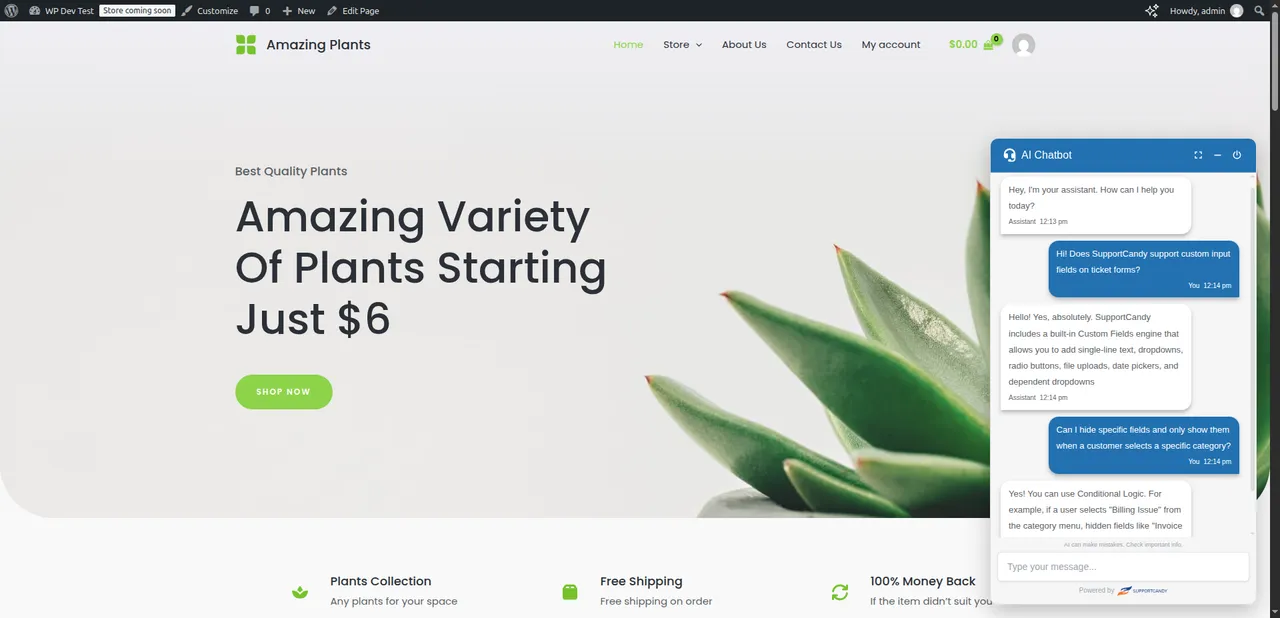
AI Chatbot Agent answering customer questions from your knowledge base -
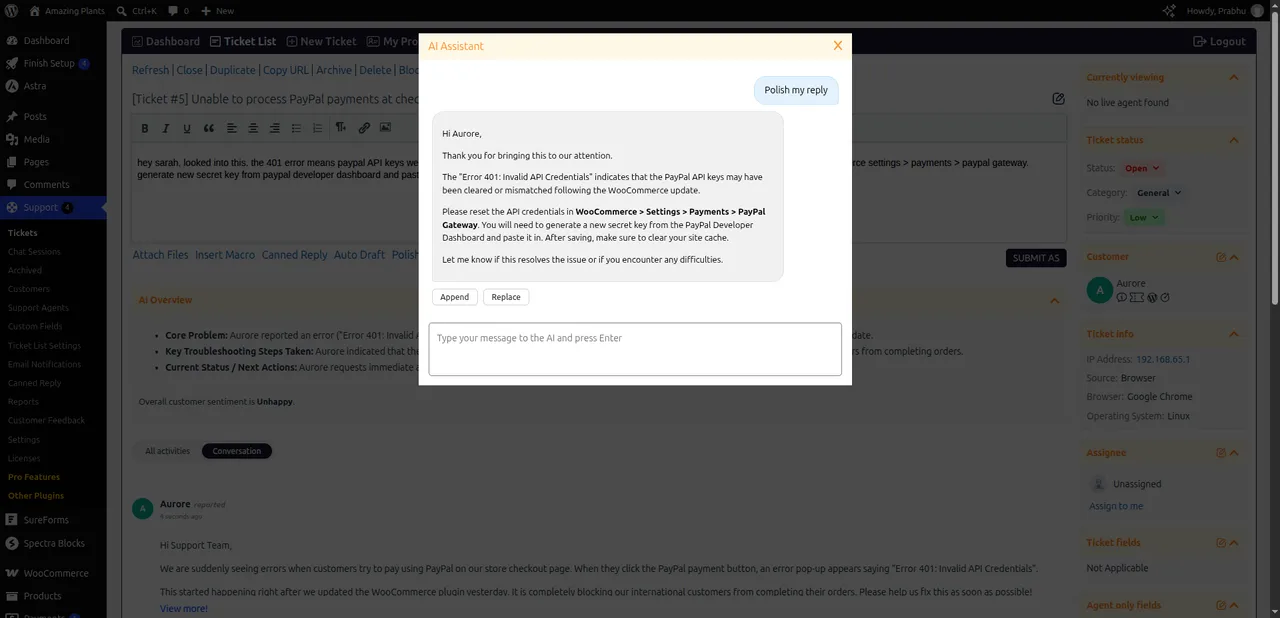
AI Assistant – ticket summary and polish reply -
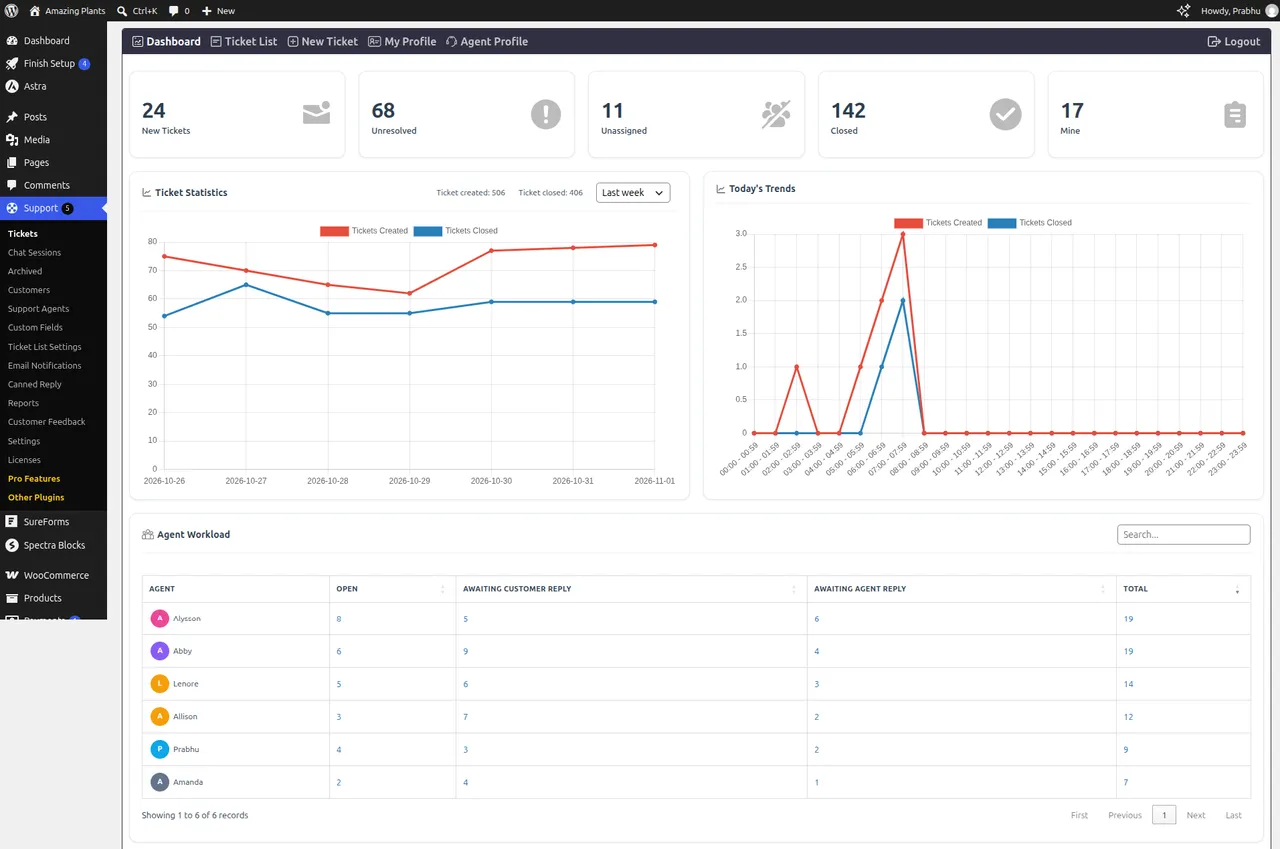
Dashboard -
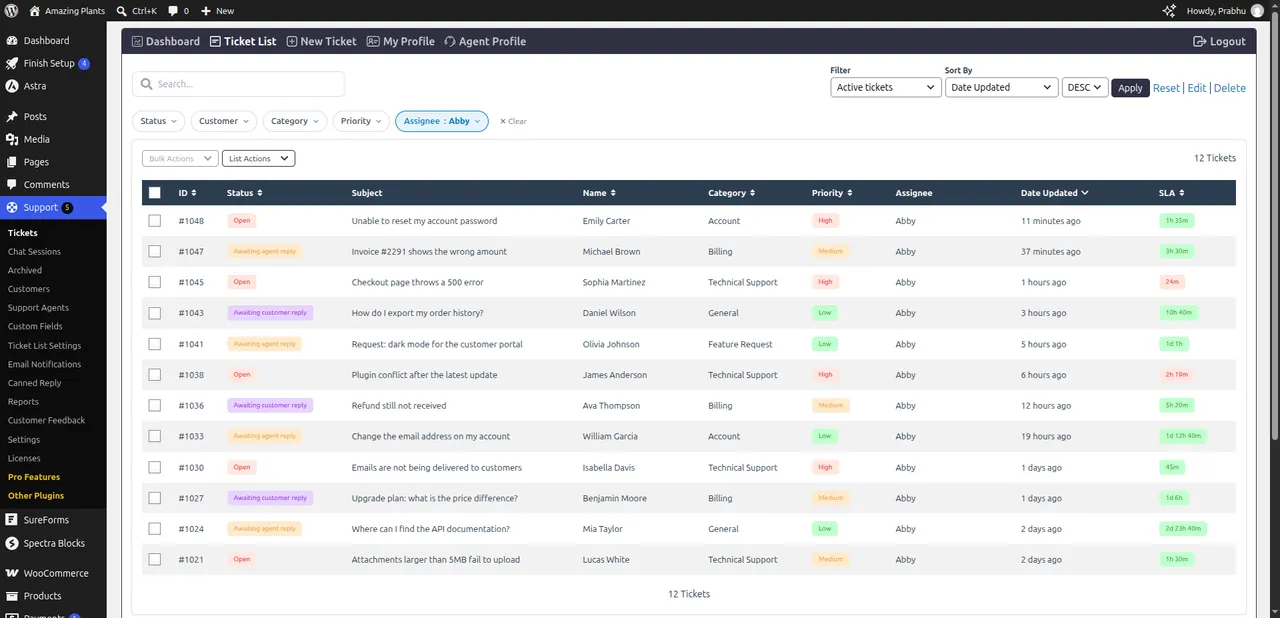
Ticket list with agent quick filter and saved filters -
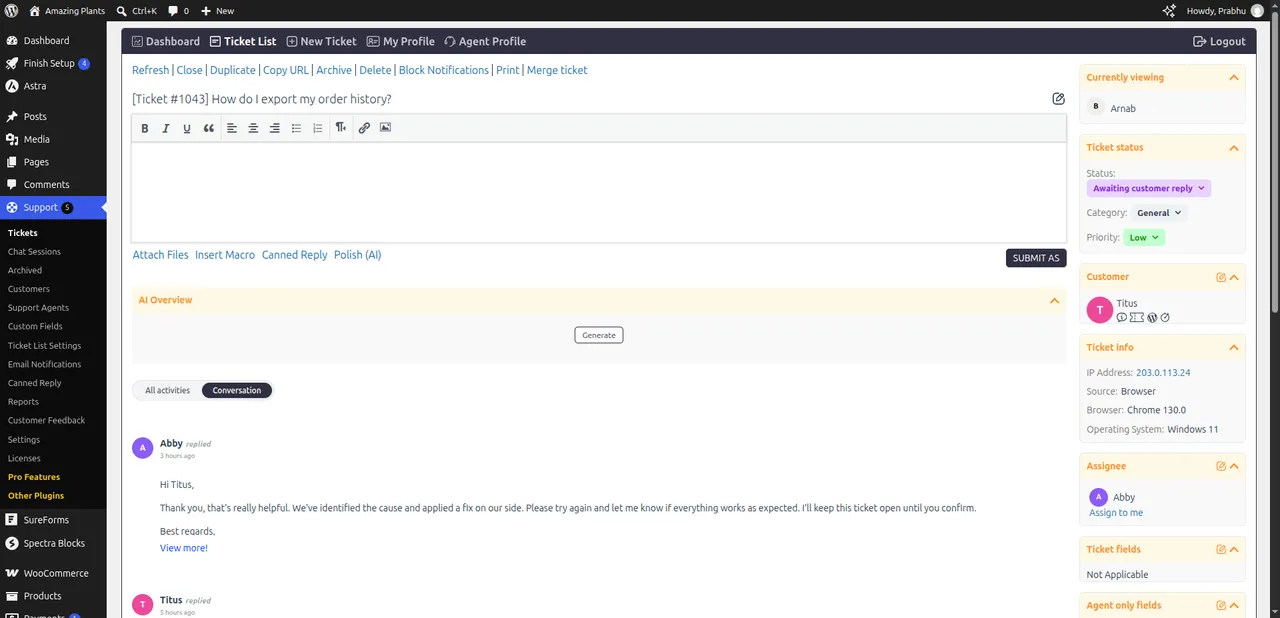
Individual ticket -
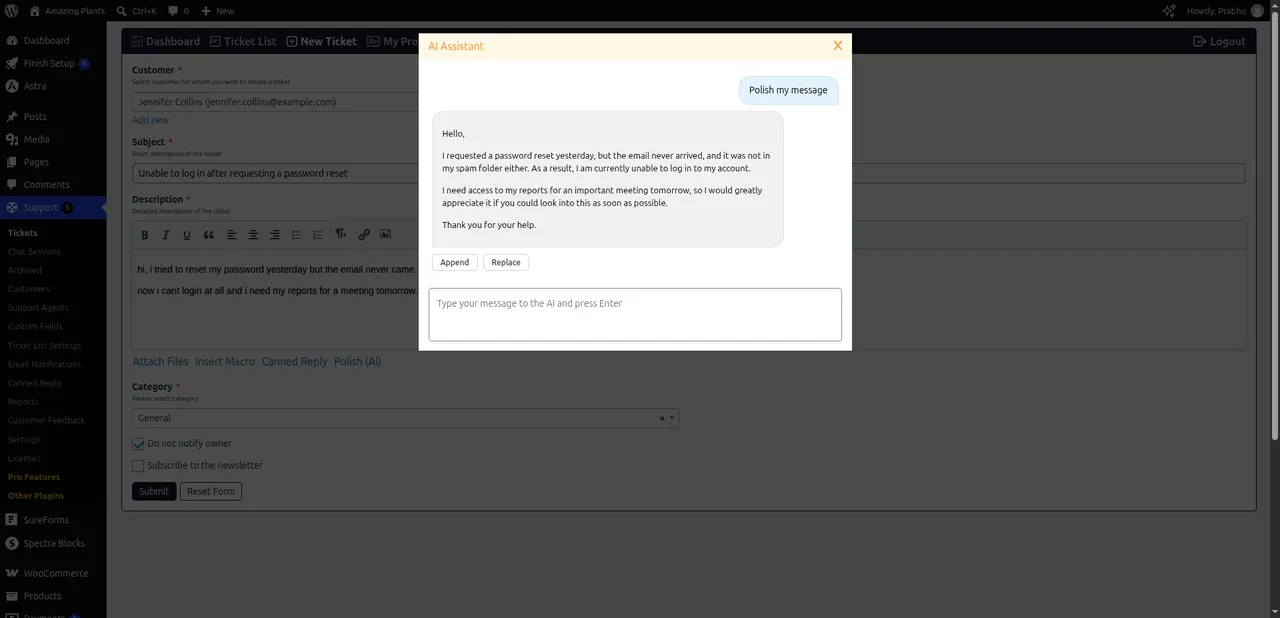
Create ticket form with AI polish -
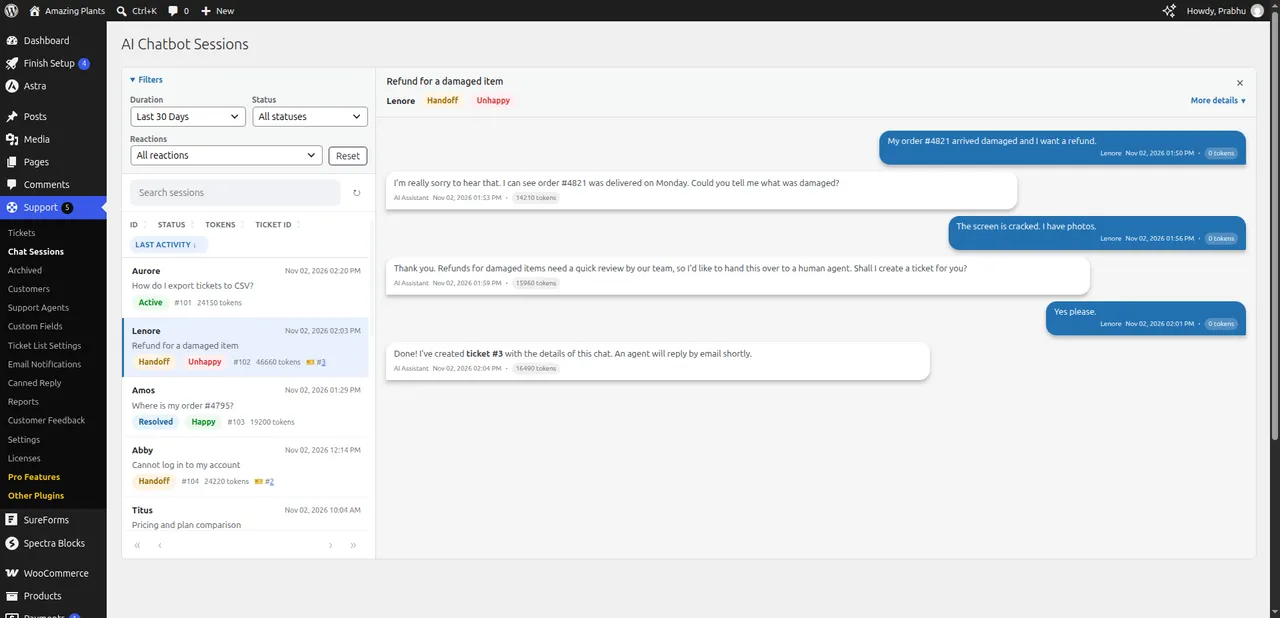
AI chatbot sessions -
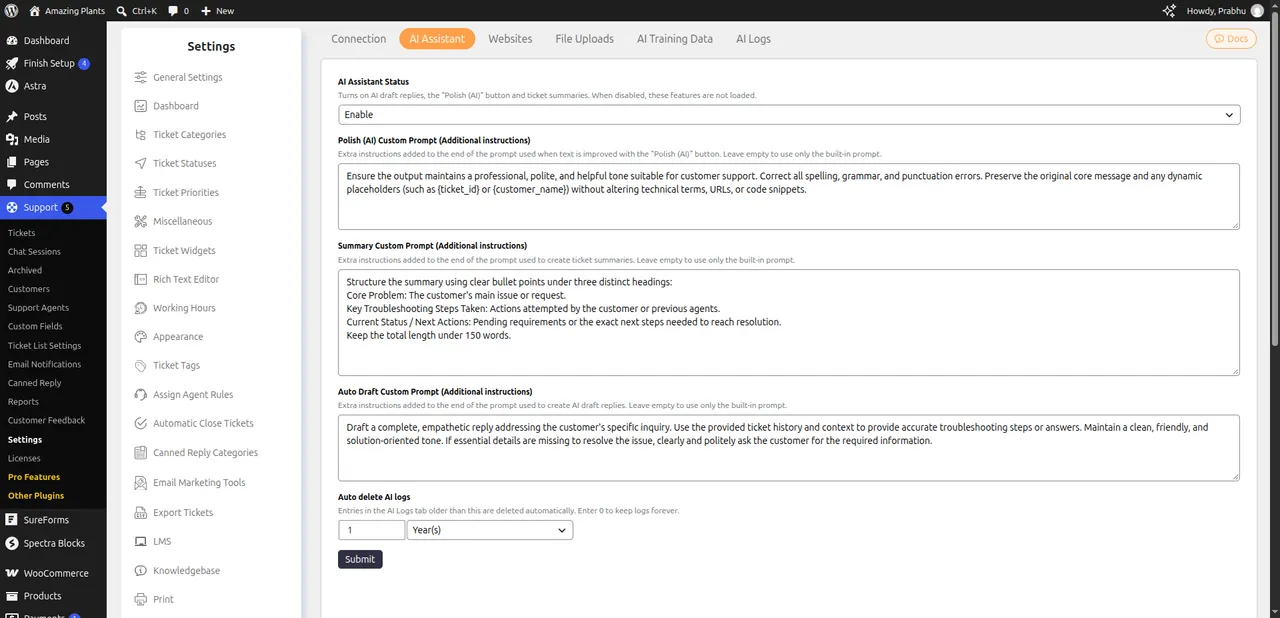
AI settings – custom prompts and AI training -
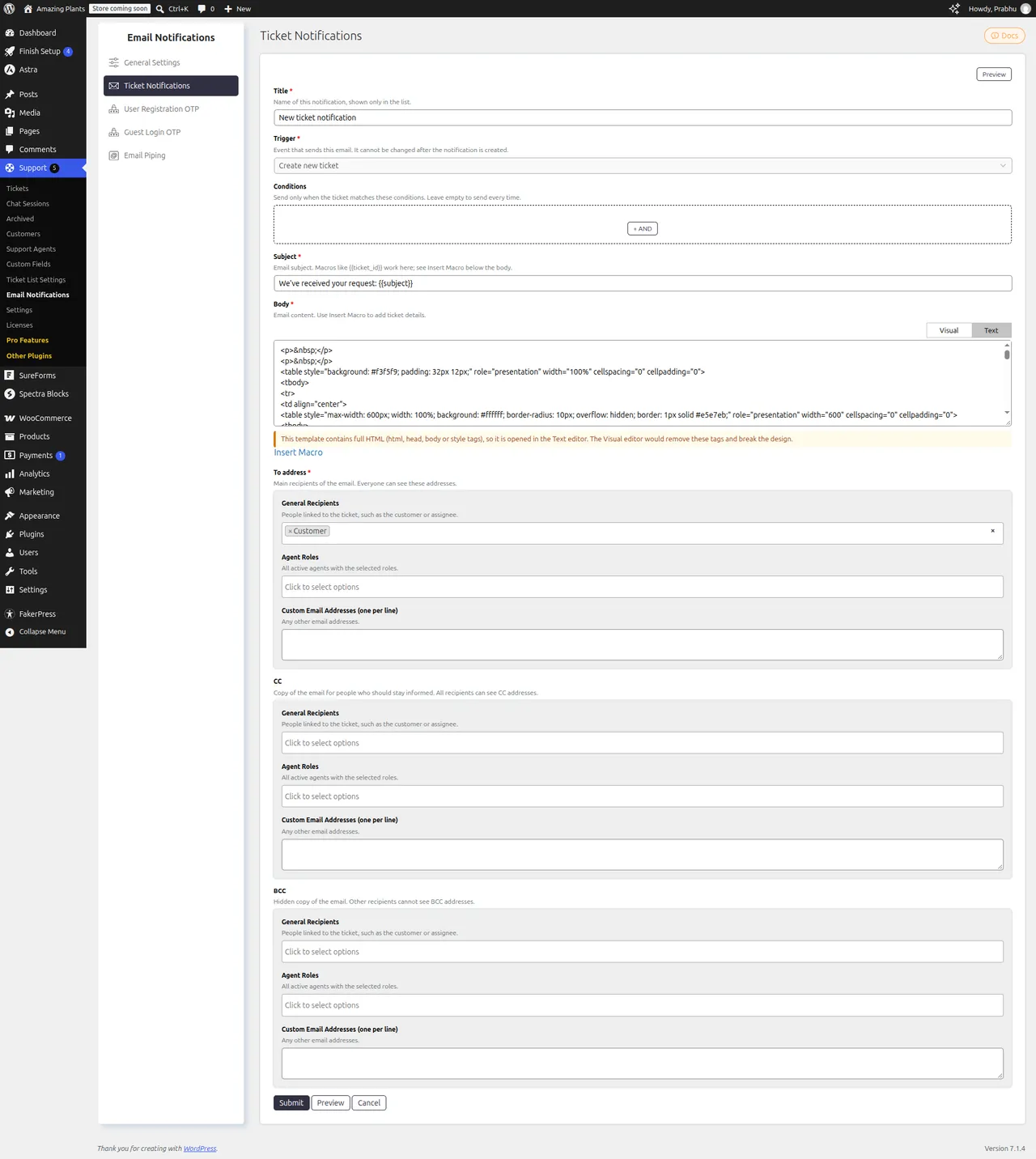
Email notification templates with preview and test send -
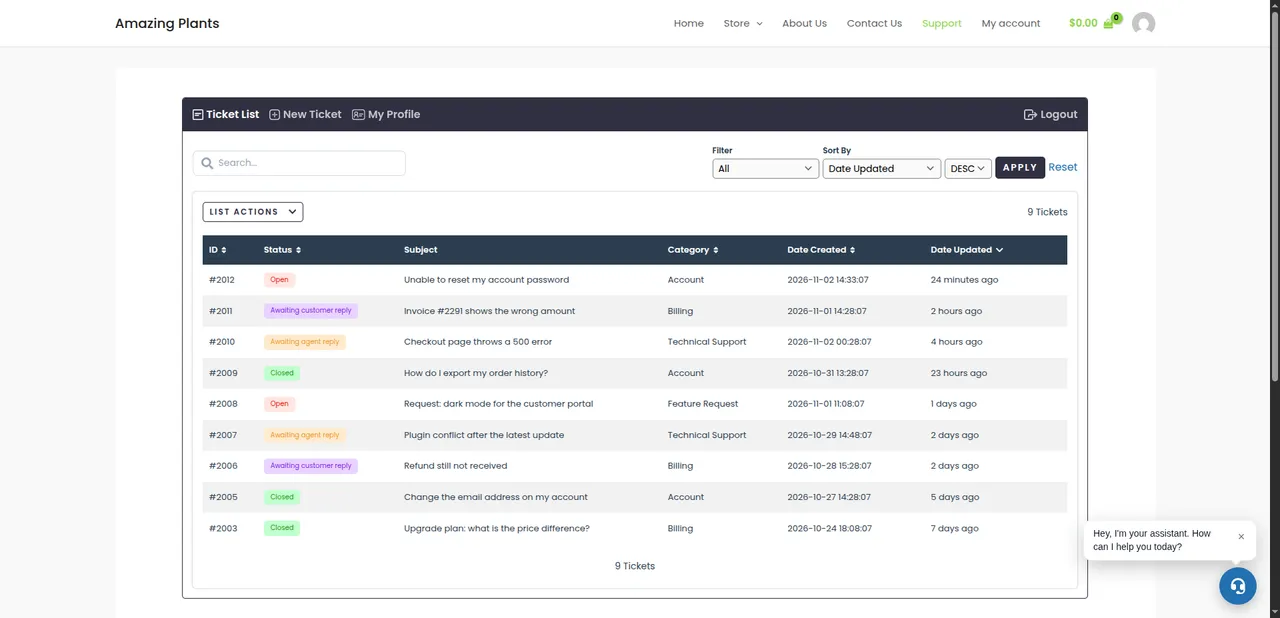
Customer portal -
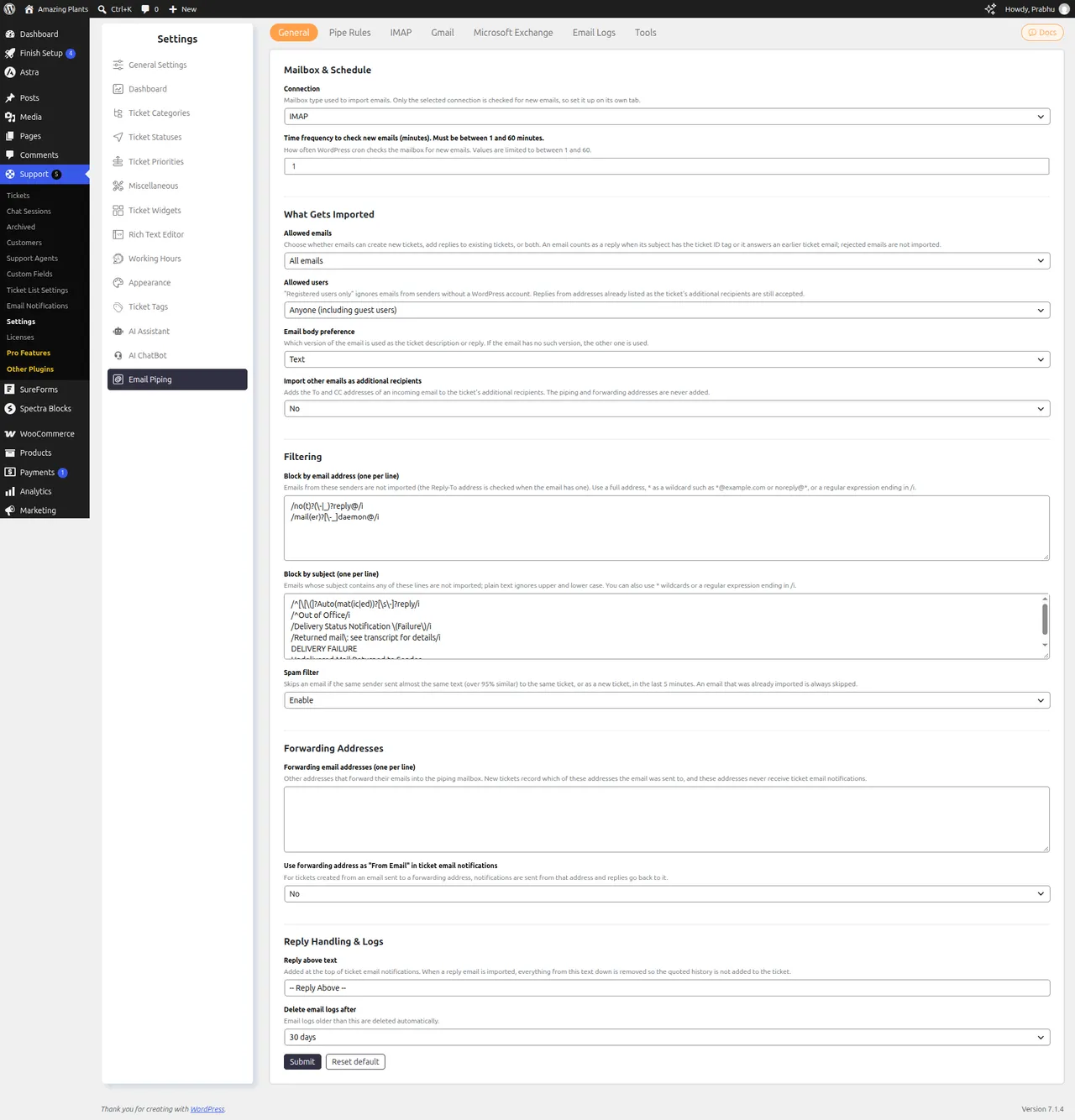
Email Piping – create and reply to tickets by email (Premium) -
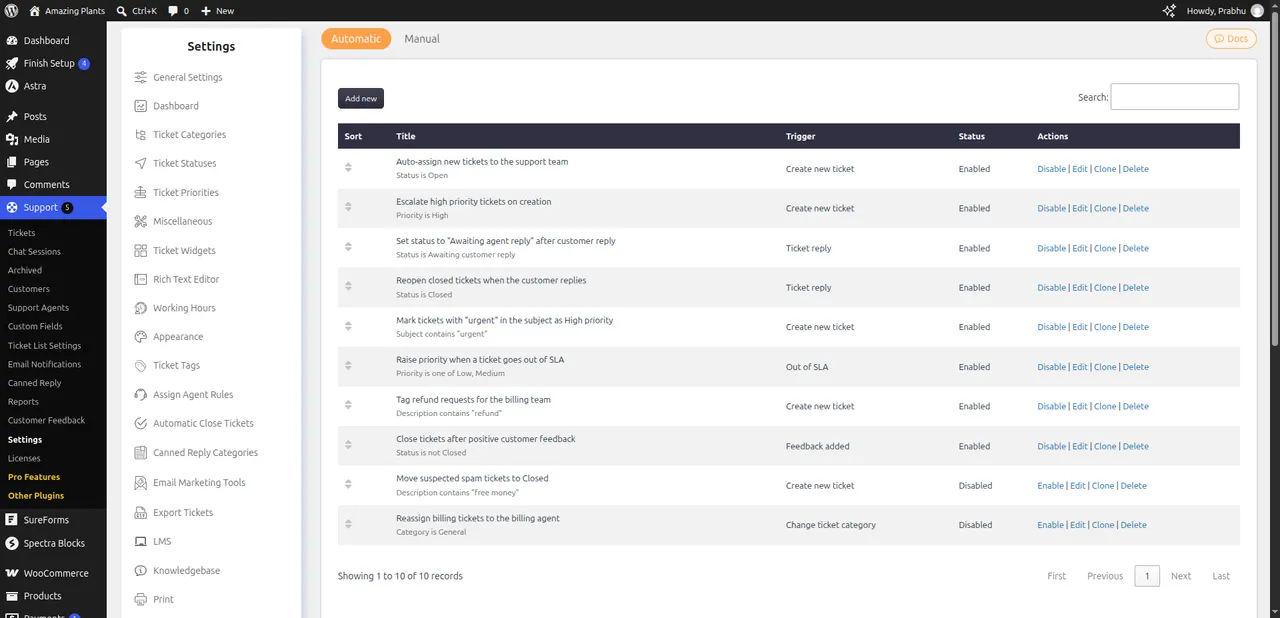
Workflows – automate assignment, status and more (Premium)
Important information
- AI features need your own OpenAI or Google Gemini API key. You pay the provider for usage.
- Chatbot and assistant requests send ticket or visitor text to the provider you pick, so check that against your privacy policy.
- The listing gives WordPress 5.6 and PHP 7.4 as minimums and says it is tested up to WordPress 7.1.4.
- The plugin has had 24 published vulnerabilities. Its current status is patched, so keep it updated.
- Email piping, WooCommerce and other integrations come from paid add-ons, not from the free plugin.
From the SupportCandy readme
Straight from the developer's WordPress.org listing.
Full description
THE SIMPLE, SECURE AND FEATURE-RICH SUPPORT TICKETING SYSTEM PLUGIN FOR YOUR WORDPRESS SITE.
Click here to visit our official website.
SupportCandy is a self-hosted WordPress helpdesk and support ticket system. Manage customer support, tickets and agents from your WordPress dashboard, with unlimited tickets, agents and customers, and no per-agent fees.
Never miss a customer question. Our 24/7 AI Chatbot Agent answers inquiries from your own content and seamlessly escalates unknown issues to support tickets.
Empower your agents to resolve issues faster and deliver consistent, on-brand support with AI-driven summaries, draft generation, and response polishing.
SupportCandy is a versatile, feature-packed help desk and ticket management plugin, with features comparable to SaaS solutions such as Zendesk, Help Scout or Freshdesk, but running entirely on your own WordPress site.
Follow this getting started guide, or use the quick setup wizard, and be ready to support your customers within a few minutes!
Why SupportCandy?
• Free and unlimited – unlimited tickets, agents, customers, tags, categories and statuses.
• Self-hosted – you own your system and your data. No external ticketing service is required.
• AI built in – AI chatbot and AI assistant included in the free version (bring your own OpenAI or Google Gemini API key).
• Works with your site – Gutenberg blocks, Elementor widgets, shortcodes, and a customizable appearance that matches your theme.
• Multilingual – 20+ bundled translations and compatible with WPML and Polylang.
• Fast – scripts load only on pages that use SupportCandy.
• Extensible – REST API v2 and 25 Pro add-ons such as Email Piping, WooCommerce, Workflows, SLA and Reports.
SELF-HOSTED CUSTOMER SUPPORT BACKED BY UNPARALLELED TECHNICAL SUPPORT
While we prioritize technical support for our paid users, we are committed to assisting each and every customer promptly. Moreover, we offer best-in-class customer support and maximum features in our free version, setting us apart from others in the industry.
In addition to ticket management, you can assign multiple specific permission levels to agents and customers. Gain access to detailed reports concerning your customers, agents, and the overall productivity of your customer support desk. By navigating through the ticket view, you can gain a comprehensive 360-degree perspective of your customers, including their past tickets, purchase history, membership levels, and more. Armed with this wealth of customer data alongside their queries, you can accomplish much more.
AI Assistant & Chatbot :
A 24/7 AI Chatbot Agent that answers questions directly from your content (AI Training) and automatically creates support tickets for everything else.
Empower your agents to resolve issues faster and deliver consistent, on-brand support with AI-driven summaries, draft generation, and response polishing.
AI features use your own OpenAI or Google Gemini API key. You choose the provider in the AI settings, and you pay the provider directly for usage.
Key capabilities include:
* AI Training – Train the AI on your WordPress posts and pages (any post type), URLs and uploaded files so answers come from your own knowledge base.
* Chatbot Agent – Answers visitor questions 24/7, checks the status of an existing ticket, filters out spam, and creates a support ticket when it cannot resolve a question. Includes an auto-popup, a greeting bubble and an overlay message that you can configure.
* Chatbot Sessions – Review every chatbot conversation in a split view and search by conversation text and visitor details.
* Ticket Summary – Instantly generate a concise summary of long or complex tickets, helping agents quickly understand the issue without reading the entire conversation.
* Auto Draft – Let the AI draft a reply based on the ticket thread, so agents start from a ready answer.
* Polish Agent Replies – Draft quickly and let the Polish (AI) button refine your grammar, tone, and clarity. The AI automatically analyzes the entire ticket thread for context, ensuring every response is pinpoint accurate. You can continue to provide follow-up prompts to tweak the suggestion until you’re satisfied, then simply click Replace or Append to the editor.
* Polish on the Ticket Form – Polish the ticket description on the create ticket form before submitting.
* Custom AI Prompts – Administrators can define custom prompt instructions from the settings panel. The AI will follow these instructions while polishing replies, allowing you to align responses with your brand voice and support guidelines.
Key features :
• AI Chatbot Agent trained on your own content
• AI Assistant: ticket summary, auto draft and polish
• OpenAI and Google Gemini support (bring your own API key)
• Unlimited number of tickets
• Unlimited number of agents and agent roles
• Unlimited number of customers
• Unlimited tags, categories, and custom statuses
• Dashboard for agents with cards and widgets
• Activity logs for administrators
• Advanced custom filter and search functionality
• Saved filters for customers and agents, and agent quick filter on the ticket list
• Bulk actions: change status, assign agents, add tags, archive and delete tickets
• Ticket archive
• Gutenberg blocks and Elementor widgets for SupportCandy shortcodes
• Shortcodes for Agent Portal/Customer Portal: [supportcandy], [wpsc_create_ticket], [wpsc_open_ticket], [wpsc_my_profile], [wpsc_agent_profile] and [wpsc_unresolved_ticket_count]
• Private notes for internal communication of agents
• Agents can create a ticket on the customer’s behalf
• Agent Collision to avoid repetitive messages and confusion
• 15 Custom field types
• User Registration
• Ticket fields for additional information about ticket
• Agent-only fields to keep internal data of the ticket
• Customer fields to store information about the customer across the tickets
• Additional recipients (CC) on tickets
• Ticket source, browser, OS and IP address captured automatically
• Guest tickets
• Guest can also see their ticket list using OTP Login (One Time Password)
• Rich-text editor (customizable)
• Email notifications with template preview and test send
• Working hours, exceptions, holidays and agent leaves
• Spam protection with Google reCAPTCHA or Cloudflare Turnstile
• GDPR Compatibility with data retention and deletion feature
• Terms & Conditions checkbox in the ticket form
• Macros or placeholders for ticket fields
• Unlimited File Attachment to ticket and reply. Manage allowed file types.
• REST API v2 for tickets, customers, agents, categories, priorities, statuses and attachments
• Customizable Appearance to match up with your theme
• Compatible with WPML and Polylang, 20+ bundled translations
• Loads scripts only on pages that use SupportCandy for faster page speed
• Quick setup wizard
• Auto delete closed tickets
Pro Features :
• Email Piping – Create and reply to tickets directly from your email inbox using Basic IMAP, Gmail or Microsoft Exchange.
• WooCommerce Integration – Let customers select orders and products in the ticket form, show order history and total spent to agents, and add a support tab and help button to the My Account page.
• Canned Reply – Save and reuse frequently used responses with macros. Administrators can create public canned replies for all agents.
• Assign Agent Rules – Automatically assign agents or agent groups to new tickets based on conditions you define.
• SLA (Service Level Agreement) – Calculate ticket due dates from SLA policies and show the remaining time in the ticket list and on each ticket.
• Satisfaction Survey – Collect customer ratings and feedback after a ticket is closed, with customizable survey emails.
• Automatic Close Tickets – Close inactive tickets after a set period, with warning emails sent to customers first.
• Usergroup – Allow a group of users to access each other’s tickets.
• Agentgroup – Create agent groups or teams, assign tickets to them, and let supervisors manage assignments within the group.
• Schedule Tickets – Automatically create recurring tickets for routine tasks on a schedule you define.
• Knowledgebase Integrations – Insert knowledge base articles into replies. Works with BetterDocs, Knowledgebase by UnboundStudio and more.
• FAQ Integrations – Integrate popular FAQ plugins like Ultimate FAQ and Arconix FAQ.
• Export Tickets – Export tickets to CSV for reporting and other purposes.
• Reports – Auto-generated reports for ticket statistics, response delays, ticket closing delays and more, with filters for custom fields and survey ratings.
• Timer – Let agents log time on tickets, with optional auto-start and a widget that shows time spent to customers.
• Print Ticket – Print tickets or save them as PDF, with customizable header, footer and body templates.
• EDD Integration – Let customers select Easy Digital Downloads orders and products in the ticket form and let agents view them in the ticket.
• Gravity Forms Integration – Create multiple ticket forms with Gravity Forms and map their fields to SupportCandy automatically.
• Private Credentials – Let customers share sensitive information securely in tickets, with encrypted storage and optional automatic deletion after the ticket is closed.
• Slack Integration – Get instant notifications in your Slack channel and reply directly from a Slack thread.
• Workflows – Automate ticket assignments, status updates and more with triggers, conditions and actions, either automatically or manually.
• Productivity Suite – Boost ticket management productivity with a set of add-on tools for your support team.
• LMS Integrations – Let customers choose their course when creating a ticket and let agents see course details. Supports LifterLMS, Tutor LMS and LearnPress.
• Email Marketing Tools Integration – Connect SupportCandy with MailChimp, GetResponse and Brevo to subscribe users during registration or ticket creation.
• Webhooks – Send real-time notifications to other systems on events such as ticket creation, closure and agent assignment.
Who is it for?
• Helpdesk and customer support teams
• Technical support and trouble tickets
• SaaS and software companies, including software release lifecycle management
• WooCommerce and Easy Digital Downloads stores
• Online course and membership sites (LMS)
• Agencies and freelancers supporting multiple clients
• Service request management and customer relations
• Hotel, real estate and company service desks
• To-do list management
Support & Documentation
• Getting started guide
• Official website
• Support forum
Our Other Plugins
• PSM Multi Currency Switcher & Currency Converter for WooCommerce – Offer your customers a seamless multi-currency shopping experience. This plugin automatically updates exchange rates, detects your customer’s currency by their location, and provides robust switching options so you can sell around the world with ease.
• PSM Request a Quote for WooCommerce – Allow customers to request a quote for WooCommerce products with ease.
Installation
Using The WordPress Dashboard
• Navigate to the ‘Add New’ in the plugins dashboard
• Search for SupportCandy
• Click ‘Install Now’
• Activate the plugin on the plugin dashboard
Uploading in WordPress Dashboard
• Download supportcandy.zip from this page
• Navigate to the ‘Add New’ in the plugins dashboard
• Navigate to the ‘Upload’ area
• Select supportcandy.zip from your computer
• Click ‘Install Now’
• Activate the plugin in the Plugin dashboard
Using FTP
• Download supportcandy.zip from this page
• Extract the supportcandy directory to your computer
• Upload the supportcandy directory to the /wp-content/plugins/ directory
• Activate the plugin in the Plugin dashboard
This plugin is almost plug and play! Use the quick setup wizard after activation, or follow this getting started guide for basic installation instructions.
Developer FAQ (19)
- Is there a free WordPress helpdesk plugin?
- Yes. SupportCandy is a free, self-hosted helpdesk and support ticket system with unlimited tickets, agents and customers. Pro add-ons are optional.
- What does the AI Chatbot Agent do?
- The AI Chatbot Agent is a 24/7 AI-powered agent that answers customer questions directly from your own content (AI Training). If it cannot resolve a query, it automatically creates a support ticket so a human agent can follow up, ensuring no customer request goes unanswered. It can also check the status of an existing ticket and filters out spam.
- How does the AI Assistant help support agents?
- The AI Assistant helps agents work faster and more consistently by generating instant ticket summaries, drafting replies, and polishing agent responses for grammar, tone, and clarity. Administrators can also define custom AI prompt instructions to align AI-generated replies with their brand voice and support guidelines.
- Which AI providers are supported, and do I need an API key?
- SupportCandy supports OpenAI and Google Gemini. You need your own API key from the provider you choose, and AI usage is billed by that provider directly. The AI chatbot and AI assistant features themselves are included in the free plugin.
- What can I train the AI chatbot on?
- You can train it on your WordPress posts and pages (any post type), on URLs and on uploaded files, so answers come from your own knowledge base.
- Does SupportCandy work with Elementor and Gutenberg?
- Yes. SupportCandy provides Gutenberg blocks and Elementor widgets for its shortcodes, so you can place the ticket form, ticket list and other screens with your page builder. Shortcodes are also available for any other editor.
- Does SupportCandy work with WPML, Polylang or other multilingual plugins?
- SupportCandy is compatible with WPML and Polylang, and ships with more than 20 translations. You can also translate it from the WordPress translation system.
- Can I use SupportCandy without WooCommerce?
- Yes. SupportCandy works as a standalone helpdesk. The WooCommerce, Easy Digital Downloads and LMS integrations are optional Pro add-ons.
- Is it necessary to purchase the pro version of SupportCandy?
- No, it is not necessary. The free version of SupportCandy provides essential features such as email notifications, unlimited agents, customers, and tickets. It includes custom categories, statuses, and priorities. The Pro version, while not mandatory, offers additional benefits like automation to streamline processes, automated assignment of agents, and advanced reporting. It is available at a competitive price within the market segment, providing added functionality for those seeking more advanced features.
- Can customers create tickets by email?
- Yes, with the Email Piping Pro add-on, customers can create and reply to tickets by email using Basic IMAP, Gmail or Microsoft Exchange. The free version creates tickets from the ticket form, the AI chatbot and agents.
- What makes SupportCandy Helpdesk stand out among WordPress support plugins?
- SupportCandy Helpdesk stands out for its longevity, versatility, and feature-rich design. It offers a complete helpdesk and customer support ticket system, providing a self-hosted solution with no constraints on tickets, agents, or data.
- Can I customize the appearance of the helpdesk to match my WordPress theme?
- Absolutely! SupportCandy Helpdesk offers customizable appearance options, allowing you to seamlessly integrate the helpdesk with your WordPress theme for a cohesive and professional look.
- How does the plugin handle ticket assignments and agent permissions?
- You have full control over ticket assignments and agent permissions. Assign multiple agents and tags to tickets, set specific permission levels based on agent roles, and utilize advanced search functionality for efficient management. Bulk actions let agents change status and assign agents or tags on many tickets at once.
- Does the free version include essential features for online businesses?
- Yes, the free version offers unlimited tickets, support agents, customers, and various essential features like custom filters, advanced search, private notes, and GDPR compatibility, making it a comprehensive solution for online businesses.
- What premium add-ons are available to enhance productivity?
- Premium add-ons include Email Piping, WooCommerce Integration, Workflows, SLA management, Canned Reply, Satisfaction Survey, and more. These additions streamline processes, automate tasks, and boost overall productivity.
- How does the plugin handle GDPR compliance and data retention?
- The plugin is fully GDPR compatible, featuring data retention and deletion options.
- Is there a way to automate ticket closure and reminders for inactive tickets?
- Yes, the Automatic Close Tickets premium add-on allows you to set a timeframe for ticket closure after a period of inactivity. It also sends warning/reminder emails before closing the ticket.
- Can I generate detailed reports on ticket statistics and customer interactions?
- Yes, the Reports add-on provides a graphical overview of your tickets and useful statistics. Generate reports for default and custom fields, offering valuable insights into your support desk’s performance.
- How does the plugin handle file attachments and secure information within tickets?
- SupportCandy Helpdesk allows unlimited file attachments to tickets and replies, with customizable file type permissions. The Private Credentials add-on further enables users to provide sensitive information within a ticket, ensuring secure and encrypted storage.
Downloads, last 30 days
Trend vs previous period: -12.8%
Average daily downloads: 728 over the last 7 days , 335 over 30 days.
Security history
Past CVEs, patched · 24 published vulnerabilities (Wordfence) · most recent Oct 2, 2026
- Patched 6.5 Medium SupportCandy <= 3.1.3 - Sensitive Data Exposure Mar 28, 2023 · affects *-3.1.3 · fixed in 3.1.4
- Patched 4.3 Medium SupportCandy - Helpdesk & Customer Support Ticket System <= 3.3.0 - Insecure Direct Object Reference CVE-2024-13552 · Mar 7, 2025 · affects *-3.3.0 · fixed in 3.3.1
- Patched 6.1 Medium SupportCandy - Helpdesk & Support Ticket System <= 2.2.6 - Cross-Site Request Forgery to Stored Cross-Site Scripting CVE-2021-24879 · Jan 5, 2022 · affects [*, 2.2.7) · fixed in 2.2.7
- Patched 6.4 Medium SupportCandy - AI Customer Support Ticket System & Live Chatbot Agent <= 3.4.8 - Authenticated (Customer+) Stored Cross-Site Scripting CVE-2026-57711 · Jul 10, 2026 · affects *-3.4.8 · fixed in 3.4.9
- Patched 5.3 Medium SupportCandy - AI Customer Support Ticket System & Live Chatbot Agent <= 3.5.1 - Missing Authorization CVE-2026-73350 · Aug 18, 2026 · affects *-3.5.1 · fixed in 3.5.2
- Patched 6.5 Medium SupportCandy - Helpdesk & Customer Support Ticket System <= 3.3.7 - Authentication Bypass to Support Session Takeover CVE-2025-10658 · Sep 19, 2025 · affects *-3.3.7 · fixed in 3.3.8
- Patched 6.1 Medium SupportCandy <= 2.2.6 - Reflected Cross-Site Scripting CVE-2021-24878 · Jan 5, 2022 · affects *-2.2.6 · fixed in 2.2.7
- Patched 9.8 Critical SupportCandy <= 3.1.4 - Unauthenticated SQL Injection via parse_user_filters CVE-2023-1730 · Apr 10, 2023 · affects *-3.1.4 · fixed in 3.1.5
Show all 24 vulnerabilities
- Patched 7.5 High SupportCandy <= 2.2.4 - Unauthenticated Arbitrary Ticket Deletion CVE-2021-24839 · Jan 5, 2022 · affects *-2.2.4 · fixed in 2.2.5
- Patched 6.4 Medium SupportCandy <= 3.2.3 - Authenticated (Subscriber+) Stored Cross-Site Scripting CVE-2024-27991 · Mar 15, 2024 · affects *-3.2.3 · fixed in 3.2.4
- Patched 7.2 High SupportCandy <= 3.1.6 - Authenticated (Admin+) SQL Injection CVE-2023-2805 · May 22, 2023 · affects *-3.1.6 · fixed in 3.1.7
- Patched 5.4 Medium SupportCandy - Helpdesk & Customer Support Ticket System <= 3.4.4 - Authenticated (Subscriber+) Insecure Direct Object Reference CVE-2026-1251 · Jan 23, 2026 · affects *-3.4.4 · fixed in 3.4.5
- Patched 6.4 Medium SupportCandy <= 3.5.3 - Authenticated (Subscriber+) Stored Cross-Site Scripting via 'name' Parameter CVE-2026-94378 · Oct 2, 2026 · affects *-3.5.3 · fixed in 3.5.4
- Patched 6.5 Medium SupportCandy <= 3.5.3 - Authenticated (Custom+) SQL Injection via 'sort_by' Parameter CVE-2026-94539 · Oct 2, 2026 · affects *-3.5.3 · fixed in 3.5.4
- Patched 6.5 Medium SupportCandy <= 2.2.6 - Cross-Site Request Forgery to Arbitrary Ticket Deletion CVE-2021-24843 · Jan 4, 2022 · affects [*, 2.2.7) · fixed in 2.2.7
- Patched 6.4 Medium SupportCandy <= 2.2.6 - Stored Cross-Site Scripting via Shortcode CVE-2021-24880 · Jan 4, 2022 · affects [*, 2.2.7) · fixed in 2.2.7
- Patched 6.5 Medium SupportCandy - Helpdesk & Customer Support Ticket System <= 3.4.4 - Authenticated (Subscriber+) SQL Injection via Number Field Filter CVE-2026-0683 · Jan 30, 2026 · affects *-3.4.4 · fixed in 3.4.5
- Patched 5.3 Medium SupportCandy - AI Customer Support Ticket System & Live Chatbot Agent 3.3.6 - 3.5.2 - Unauthenticated Information Exposure CVE-2026-81022 · Sep 9, 2026 · affects 3.3.6-3.5.2 · fixed in 3.5.3
- Patched 8.8 High SupportCandy <= 3.1.6 - Authenticated (Subscriber+) SQL Injection CVE-2023-2719 · May 22, 2023 · affects *-3.1.6 · fixed in 3.1.7
- Patched 5.3 Medium SupportCandy - AI Customer Support Ticket System & Live Chatbot Agent 3.2.9 - 3.5.2 - Unauthenticated Ticket Attachment Read CVE-2026-81021 · Sep 7, 2026 · affects 3.2.9-3.5.2 · fixed in 3.5.3
- Patched 4.3 Medium SupportCandy <= 3.4.1 - Cross-Site Request Forgery CVE-2025-67598 · Nov 21, 2025 · affects *-3.4.1 · fixed in 3.4.2
- Patched 4.3 Medium SupportCandy - Helpdesk & Customer Support Ticket System <= 3.4.6 - Authenticated (Subscriber+) Insecure Direct Object Reference CVE-2026-54826 · Jun 17, 2026 · affects *-3.4.6 · fixed in 3.4.7
- Patched 5.3 Medium SupportCandy - Helpdesk & Customer Support Ticket System <= 3.4.4 - Missing Authorization CVE-2026-25321 · Jan 29, 2026 · affects *-3.4.4 · fixed in 3.4.5
- Patched 9.8 Critical SupportCandy - Helpdesk & Support Ticket System <= 2.0.0 - Arbitrary File Upload CVE-2019-11223 · Apr 17, 2019 · affects [*, 2.0.1) · fixed in 2.0.1
SupportCandy FAQ
Is there a free helpdesk in this plugin?
Yes. SupportCandy is a self-hosted helpdesk with unlimited tickets, agents and customers. Paid add-ons are optional.
What does the chatbot do?
It answers customer questions around the clock from your own content. If it cannot resolve a question, it opens a support ticket. It can also look up an existing ticket's status and filter out spam.
How does the assistant help agents?
It summarizes tickets, drafts replies from the thread and polishes the grammar, tone and clarity of agent answers. Admins can add prompt instructions that match their brand voice.
Which AI providers work, and do I need a key?
OpenAI and Google Gemini are supported. You bring your own API key and the provider bills you. The AI features themselves are part of the free plugin.
What can I train the chatbot on?
WordPress posts and pages of any post type, plus URLs and uploaded files.
Does it work without WooCommerce?
Yes. It is a standalone helpdesk. The WooCommerce, Easy Digital Downloads and LMS integrations are paid add-ons.
Does it work with Elementor and Gutenberg?
Yes. It provides blocks for Gutenberg, widgets for Elementor and shortcodes for other editors.
Do I need the paid version?
No. The free version covers unlimited tickets, agents, email notifications, custom fields, filters, private notes and GDPR tools. Add-ons extend it when needed.
SupportCandy alternatives

The free MCP server and AI chatbot for WordPress. Claude and ChatGPT connect to your site with no account, no API key and no usage limits. AI Engine connects WordPress and AI, both ways. AI comes into your site:…

Chatway is a WordPress live chat, AI chatbot, and helpdesk plugin for customer support. Chat with website visitors in real time, automate replies with an AI chatbot, or connect your own AI agents including ChatGPT,…

🟦 Tidio - Live Chat for WordPress with AI Chatbots, Customer Support & Sales Tools Tidio Live Chat is an all-in-one customer support plugin for WordPress that lets you talk to your website visitors in real time.…

AI ChatBot for WordPress - WPBot. Support, Sale, Convert, Automate WPBot is a feature rich AI ChatBot for WordPress websites. Provide 24/7 Automated Live Chat Support , Generate Leads and Convert , Collect…

MxChat is the most powerful free AI chatbot and content generation plugin for WordPress - connecting your website to ChatGPT, Claude, Gemini, Grok, DeepSeek, and 100+ AI models through a single, easy-to-use…

Buttonizer is a powerful platform with Live Chat, AI Chatbots, and Real-Time Visitor Monitoring! In addition to chat features, you can create Call, Email, SMS, & Contact buttons to increase conversions. Supports…
Listing data from WordPress.org and the Wordfence vulnerability feed, refreshed Nov 9, 2026; listing details fetched Nov 14, 2026. Screenshots are from the plugin's WordPress.org listing. Not affiliated with PSM Plugins.