
BlockSpare
BlockSpare - Gutenberg Blocks, AI Content Generator & Site Builder for news, magazine, blog and business sites · by BlockSpare
- active installs
- 10K+
- 34 ratings
- 4.8
- since last update
- 3d
- releases in 12 months
- —
- support threads resolved
- 0%
- avg daily downloads
- 1,696
- on WordPress.org
- 6.6 years
BlockSpare at a glance
BlockSpare is a free WordPress AI website builder plugin by BlockSpare with 10K+ active installs and a 4.8/5 rating from 34 reviews. It was last updated on Nov 6, 2026, is tested up to WordPress 7.1.4 and needs PHP 7.4+. All 10 of its published vulnerabilities have patched versions. Our quality score is 78/100.
What is BlockSpare?
BlockSpare is a collection of Gutenberg blocks, patterns and starter templates for building sites with the native WordPress block editor. It is designed with publishers in mind, so it includes news, magazine and blog layouts, but it also has blocks for business pages and landing pages.
The free version lists 60+ blocks, 137+ starter templates and 270+ ready-made sections. Blocks cover post grids, sliders, tickers, pricing tables, testimonials, tabs and galleries. You insert blocks or import a template from the design library, then adjust them. There are no shortcodes to manage.
Its AI tools sit in the Pro version. They generate content, summarize posts and create key questions and answers, using AI providers you connect. Pro also adds a site builder for templates and a header and footer builder. The free version has no AI features per the listing.
Best for
- News, magazine and blog publishers using Gutenberg
- Site owners who want layouts without a page builder
- Agencies reusing templates and sections across sites
- Pro users who want AI summaries and drafts inside the editor
BlockSpare features
60+ Gutenberg blocks
Includes containers, post grids, sliders, carousels, pricing tables, testimonials, counters, tabs and accordions.
Starter templates
137+ starter templates and 270+ sections can be imported from the patterns library and edited.
Publishing blocks
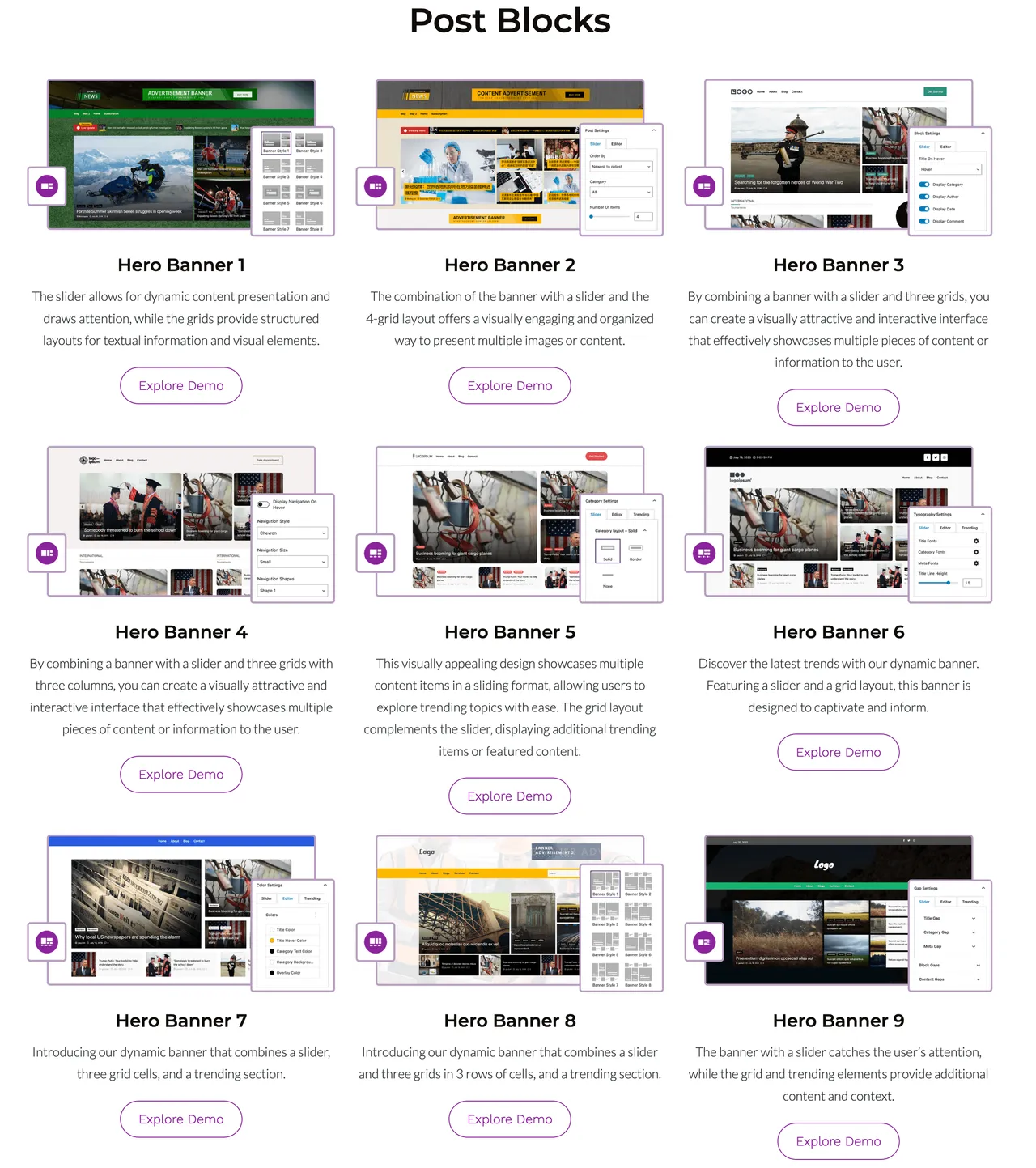
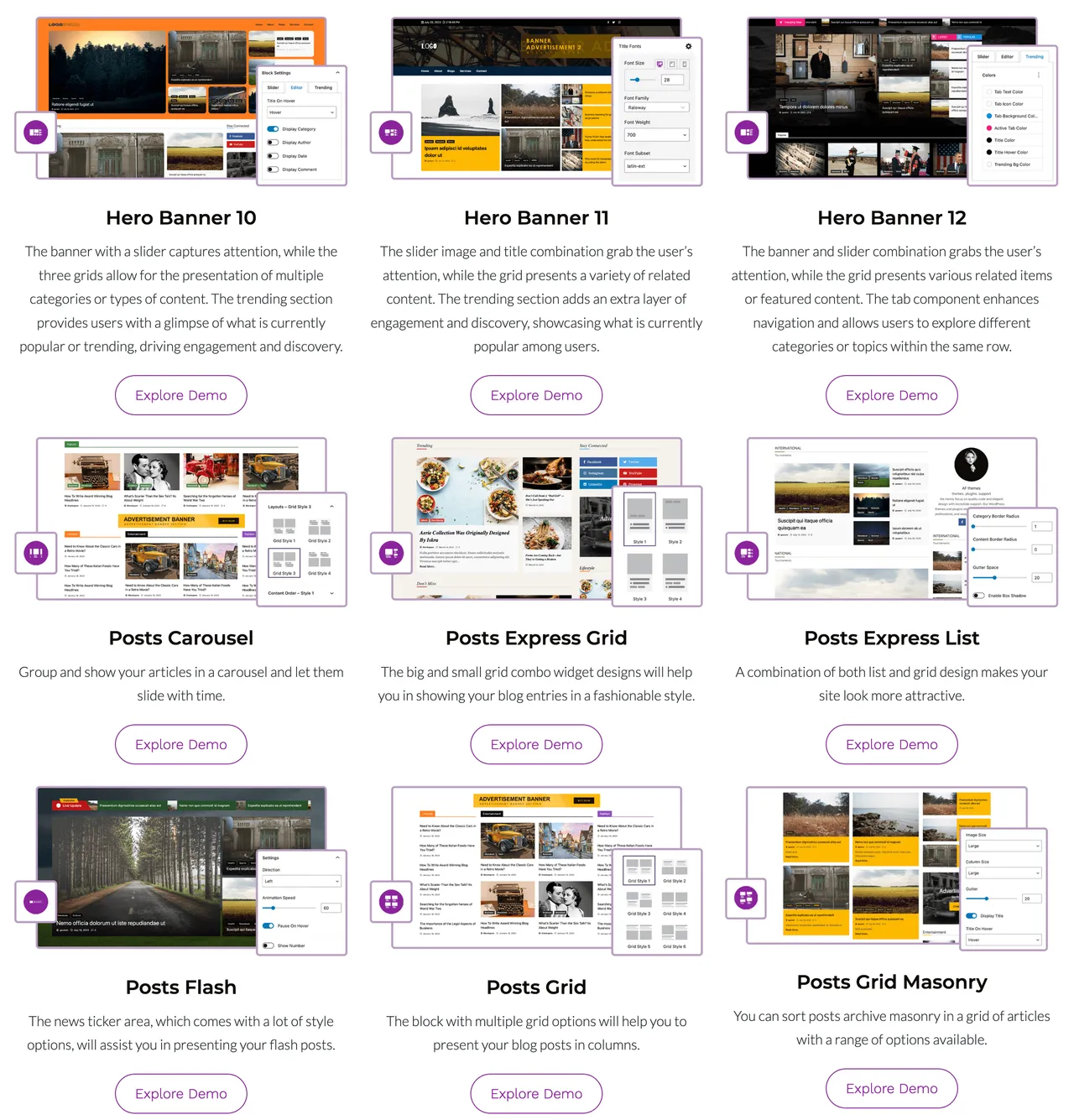
Hero banners, trending posts, post lists, masonry and timeline layouts and featured categories suit news and magazine sites.
Image and media blocks
Image sliders, carousels, masonry galleries and logo showcases stay responsive across devices.
Design controls
Typography, color and layout options let you adjust each block without custom code.
AI content tools (Pro)
Generate content, summarize posts and produce key questions and answers, with custom prompts and a default language.
AI model selection (Pro)
Pick an available model from your connected AI provider for the AI features.
Site Builder (Pro)
Manage header, footer, front page, archive, search, 404 and other templates in the Site Editor.
Advanced publishing tools (Pro)
Adds advanced post queries, AJAX filters, Load More, breaking news tickers, advertisement blocks and visibility controls.
BlockSpare free vs pro
Free WordPress.org version
- 60+ Gutenberg blocks
- 137+ starter templates and 270+ sections
- Publishing, business, image and media blocks
- Typography, color and layout controls
Pro Paid version
- AI content generation, summarization and Key Q&A
- AI model selection and AI connector support
- Site Builder and Header and Footer Builder
- Premium starter sites
- Advanced post queries, dynamic content and smart visibility controls
- AJAX post filters and Load More
- Breaking news tickers and advertisement blocks
A free version covers the blocks and templates, and a paid Pro version adds the AI tools and builders. The listing does not state prices. Pro AI features use the AI providers you connect, which may bill you separately.
How to use BlockSpare
- Install the plugin
In wp-admin go to Plugins, then Add New, search for BlockSpare, then install and activate it.
- Open the editor
Edit any page or post in the block editor.
- Add blocks or patterns
Find BlockSpare blocks in the inserter, or open the patterns or design library from the plugin panel.
- Import a template
Import a starter template or section if you want a ready layout to begin with.
- Customize
Edit text, images, colors and typography with each block's controls, then publish.
BlockSpare screenshots (12)
-
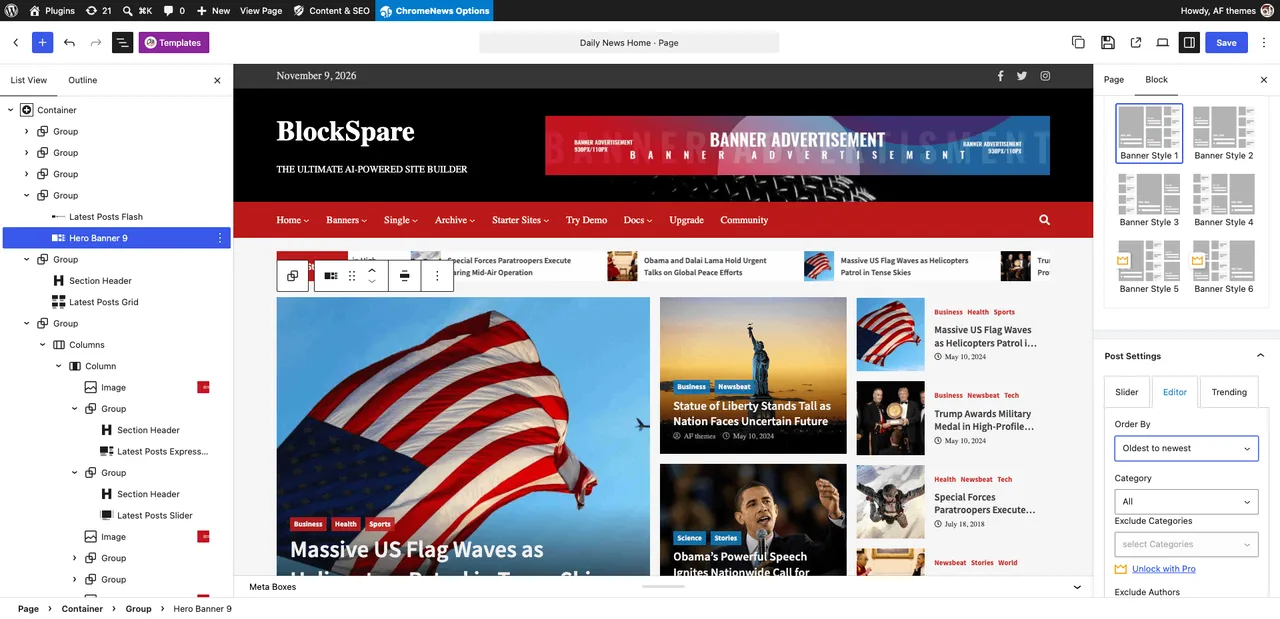
Build Professional Websites in Minutes: Access an all-in-one Gutenberg-powered toolkit to create visually stunning news, magazine, and business sites instantly. -
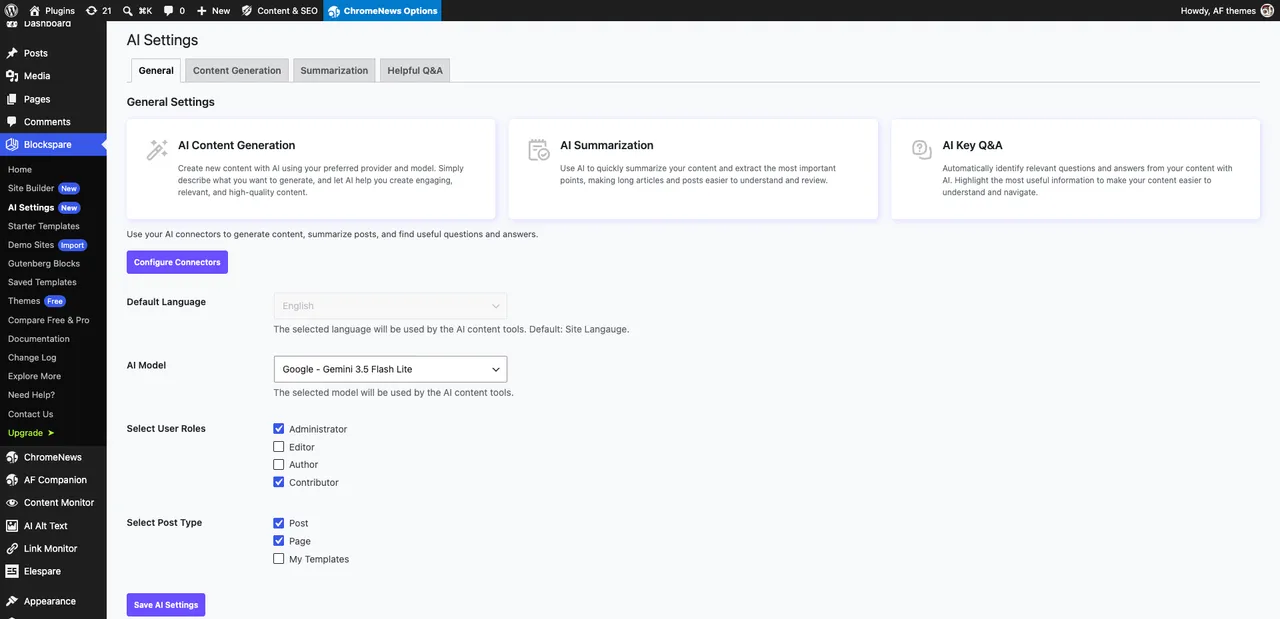
AI Content Creation Setting Dashboard: Configure global AI providers, select preferred models like Google Gemini, and customize generation roles effortlessly. -
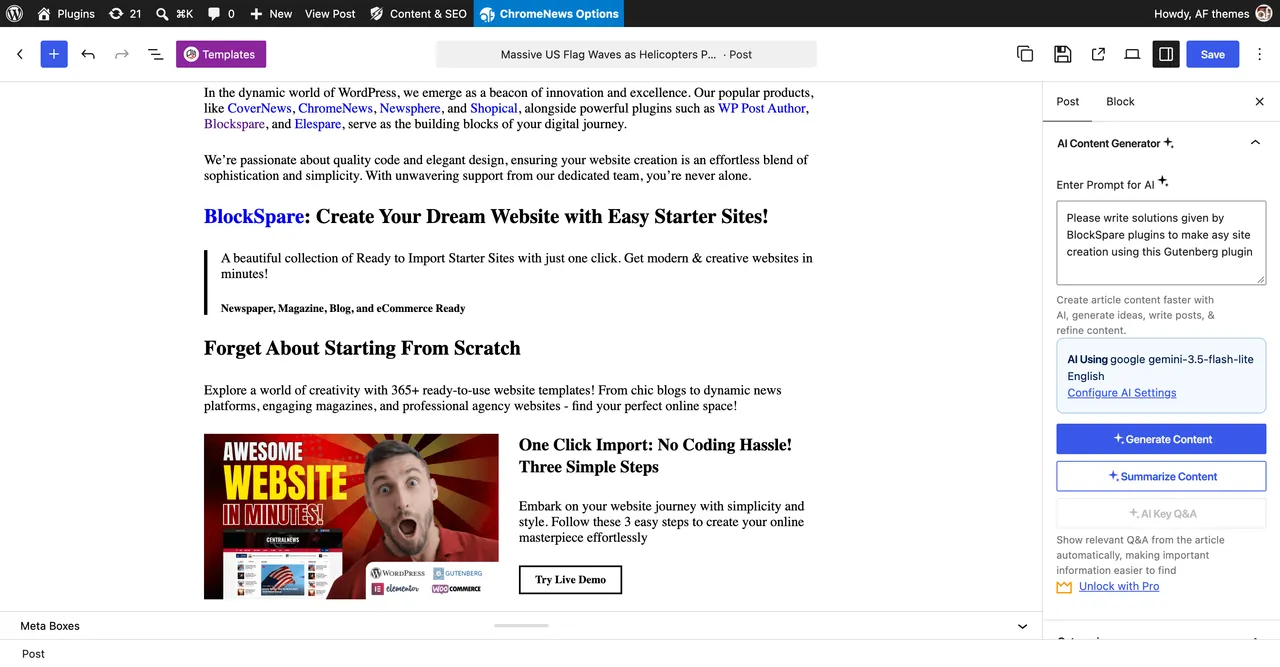
AI-Powered Content Creation: Generate, summarize, and optimize your entire content workflow inside Gutenberg using advanced AI models. -
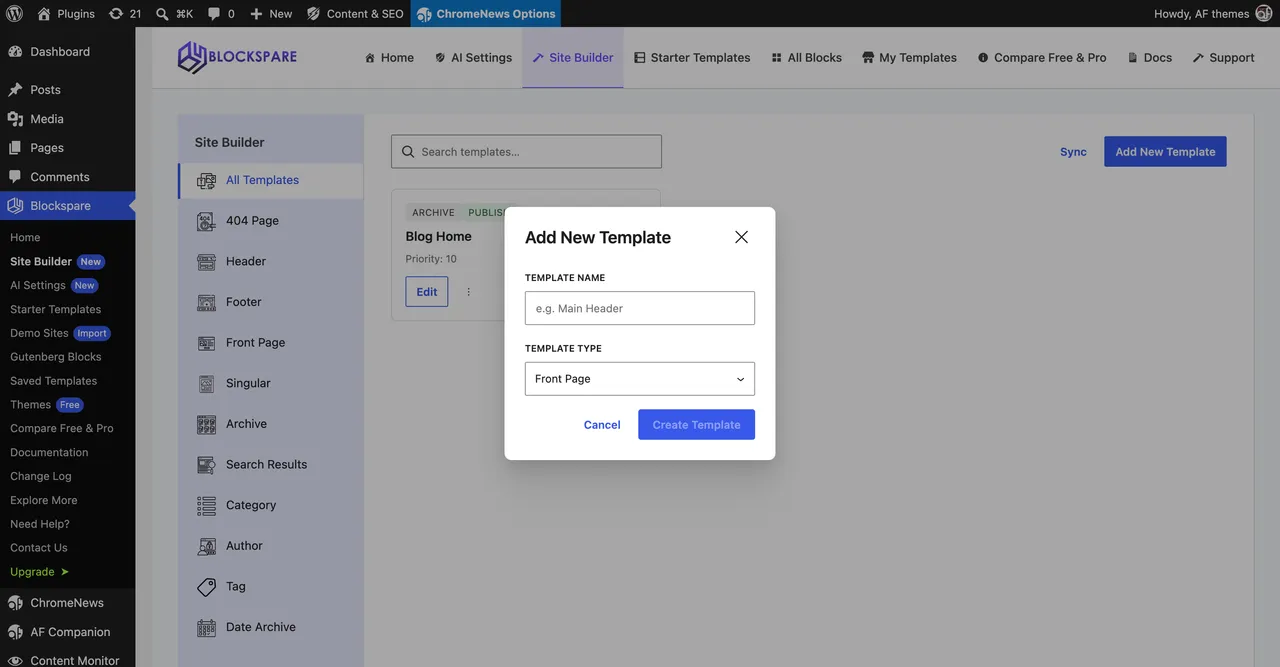
Advanced Site Builder: Design headers, footers, archives, and single templates for every part of your dynamic website without code. -
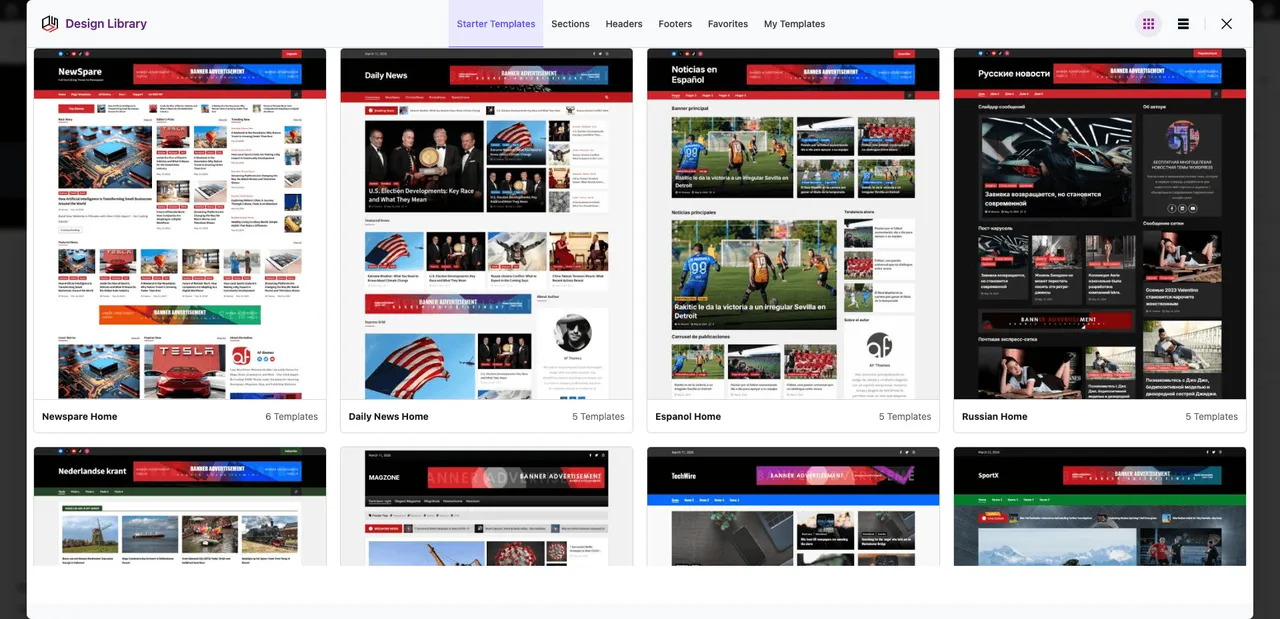
137+ Ready-to-Import Templates: Kickstart your project with a library of complete professional websites and customizable sections. -
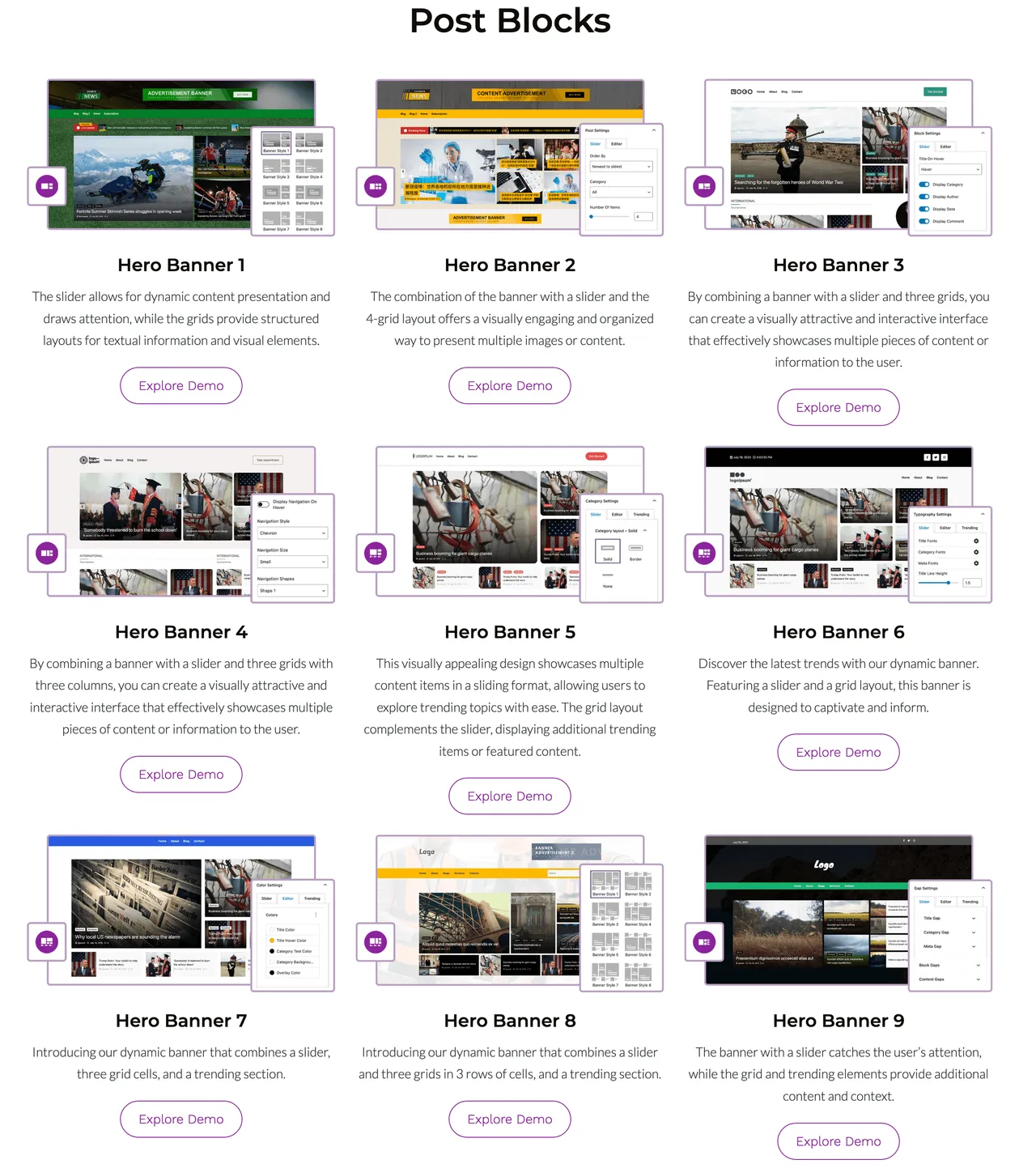
Specialized Publishing Blocks: Engage readers with dedicated News Tickers, Post Grids, Hero Banners, and Editorial layouts. -
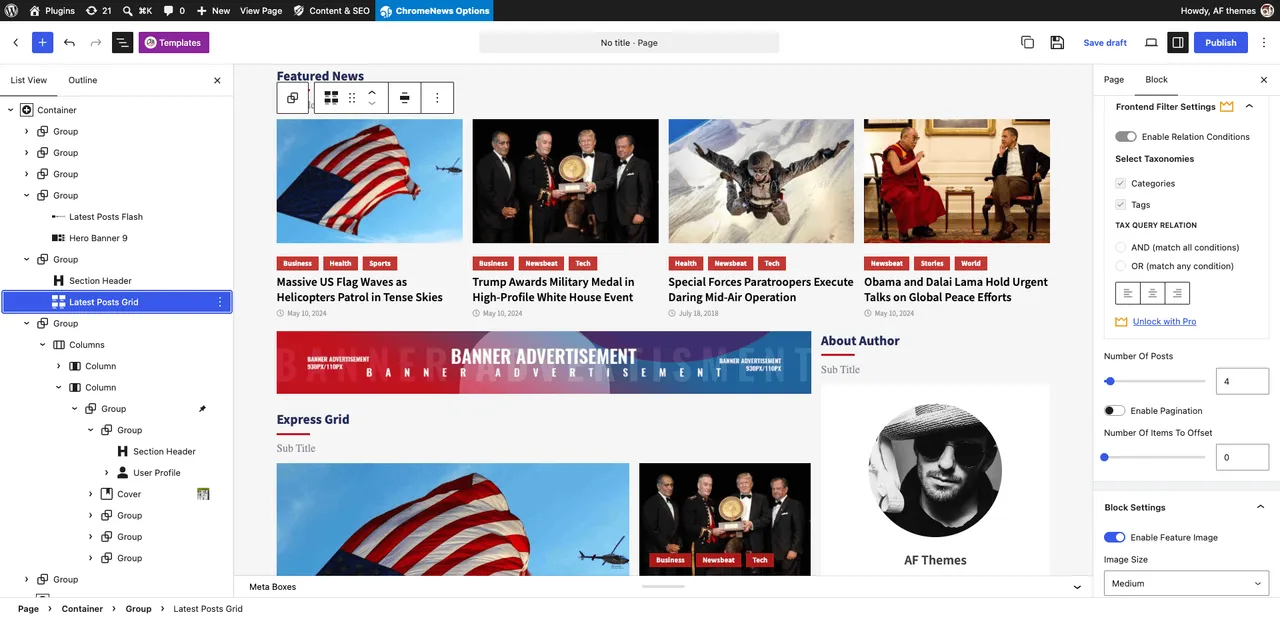
Dynamic Post Query & AJAX: Master your content display with advanced filtering, conditional logic, and seamless AJAX pagination. -
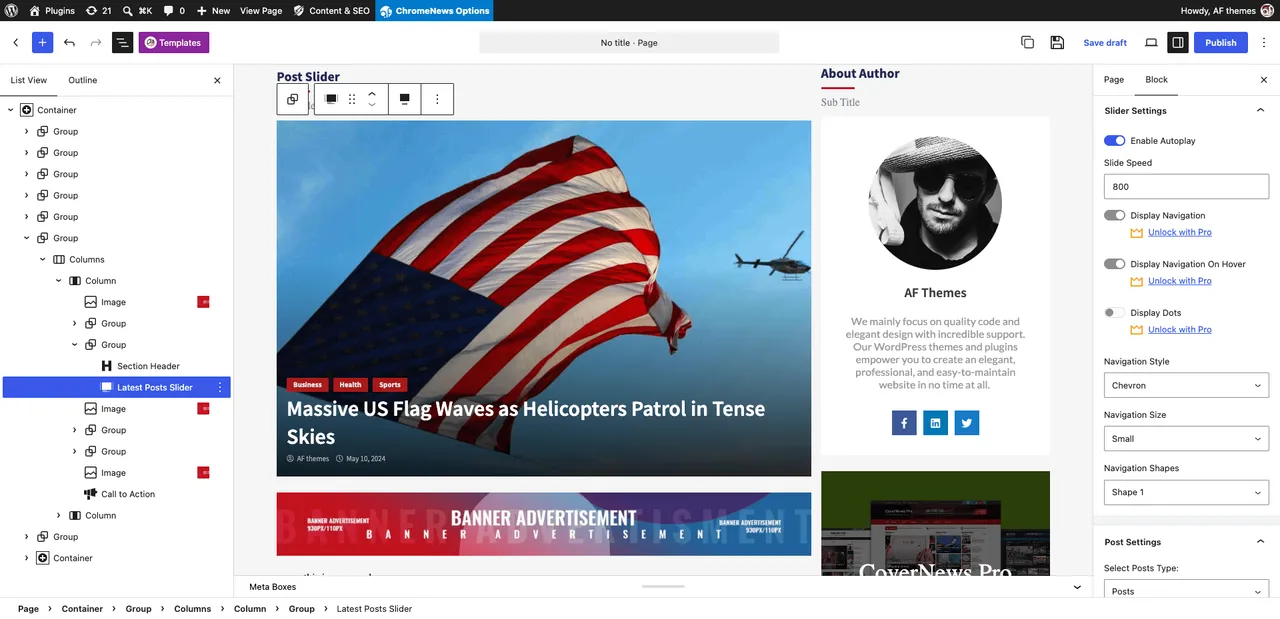
Endless Variation with Post Layouts: Transform post displays with 9+ Hero Banners, sliders, masonry grids, and carousel styles. -
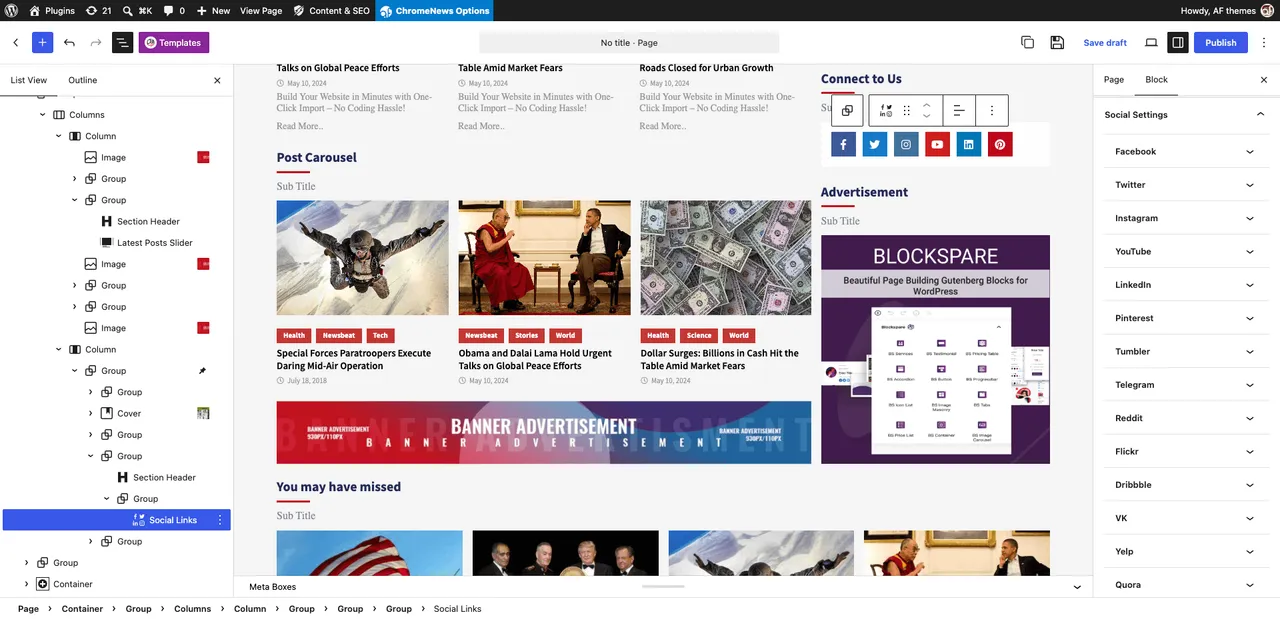
Design Controls - Social Media Links Options: Easily configure and style social media channel integrations across your pages with flexible layout choices. -

-
-
Important information
- AI features are part of BlockSpare Pro, not the free plugin, and rely on AI providers you connect.
- Requires WordPress 5.0 or later and PHP 7.4 or later.
- Ten vulnerabilities have been published for this plugin and are marked patched. Keep it updated.
- It works with the native block editor, so classic-editor sites will not use the blocks.
- Generated AI content should be reviewed before publishing.
From the BlockSpare readme
Straight from the developer's WordPress.org listing.
Full description
BlockSpare is a powerful Gutenberg blocks plugin built for publishers, bloggers, businesses, agencies, and content creators who want to build beautiful WordPress websites using the native Block Editor.
Whether you’re creating an online newspaper, digital magazine, personal blog, business website, corporate site, portfolio, landing page, or editorial publication, BlockSpare provides the blocks, templates, layouts, and publishing tools you need to build professional websites without relying on heavy page builders or writing custom code.
Trusted by 17,000+ WordPress users, BlockSpare includes 60+ Gutenberg blocks, 137+ starter templates, 270+ ready-made sections, and powerful tools for building content-rich websites—all designed to work naturally with the WordPress Block Editor.
With BlockSpare Pro, you can unlock AI-powered content generation, AI summarization, AI Key Q&A, AI model selection, an advanced Site Builder, Header & Footer Builder, premium starter sites, advanced post queries, dynamic content, smart visibility controls, AJAX post filters and Load More, breaking news tickers, advertisement blocks, and more.
Why Choose BlockSpare?
Unlike general-purpose block plugins, BlockSpare is designed specifically for content-rich websites, professional publishing, and flexible WordPress site building.
✅ Purpose-built for news, magazine, blog and editorial websites
✅ 60+ specialized Gutenberg blocks
✅ 100+ professionally designed starter templates
✅ 300+ ready-made sections
✅ Powerful post query and content filtering tools
✅ AI-powered content generation with multiple AI models
✅ AI summarization and Key Q&A tools
✅ AI connectors with configurable language and model settings
✅ Advanced Site Builder for managing website templates
✅ Header & Footer Builder
✅ Dynamic content and smart visibility controls
✅ AJAX post filters and Load More
✅ Breaking News Ticker and Advertisement Blocks
✅ Native Gutenberg experience
✅ No shortcode lock-in
✅ Works with modern WordPress themes
✅ Built by the creators of popular AF Themes
Build Almost Any Type of Website
BlockSpare makes it easy to create professional layouts for:
👉 Online Newspapers
👉 Digital Magazines
👉 Personal Blogs
👉 Editorial Websites
👉 Technology Blogs
👉 Sports Websites
👉 Fashion & Lifestyle
👉 Travel Blogs
👉 Food & Recipe Websites
👉 Business Websites
👉 Corporate Websites
👉 Agencies
👉 Landing Pages
👉 Portfolios
👉 Educational Websites
👉 Non-profit Organizations
👉 Local Businesses
👉 WooCommerce Stores
Everything You Need to Build Faster
BlockSpare brings together powerful Gutenberg blocks, AI-powered content tools, a flexible Site Builder, professionally designed starter sites, and reusable sections to help you build and publish WordPress websites faster.
AI-Powered Content Tools
Create, improve, and understand your content with AI directly inside WordPress.
✓ AI Content Generation
✓ AI Content Summarization
✓ AI Key Questions & Answers
✓ Multiple AI Model Support
✓ Custom AI Generation Prompts
✓ Multiple Language Support
Use your connected AI providers and preferred models to generate content, summarize posts, and discover useful questions and answers.
Advanced Site Builder
Build and customize your website using the native WordPress Site Editor with flexible template controls.
✓ All Templates
✓ Header Templates
✓ Footer Templates
✓ Front Page Templates
✓ Singular Templates
✓ Archive Templates
✓ Search Results Templates
✓ Category Templates
✓ Author Templates
✓ Tag Templates
✓ Date Archive Templates
✓ 404 Page Templates
Create and manage templates for different parts of your website without relying on heavy page builders or custom code.
Professional Publishing Blocks
Create engaging news, magazine, blog, and editorial layouts using:
✓ Hero Banners
✓ Breaking News Tickers
✓ Trending Posts
✓ Post Grids
✓ Post Sliders
✓ Post Carousels
✓ Post Lists
✓ Express Lists
✓ Masonry Layouts
✓ Timeline Layouts
✓ Featured Categories
✓ Large Featured Sections
Perfect for online newspapers, digital magazines, blogs, editorial websites, and other content-rich publications.
Business & Utility Blocks
Build professional business pages and content sections with:
✓ Containers
✓ Section Headers
✓ Content Boxes
✓ Pricing Tables
✓ Price Lists
✓ Call to Action
✓ Testimonials
✓ Services
✓ Buttons
✓ Icon Lists
✓ Counters
✓ Progress Bars
✓ Accordions
✓ Tabs
✓ Notice Bars
✓ Author Profiles
Create everything from business pages and landing pages to service sections, pricing pages, and calls to action.
Image & Media Blocks
Showcase images and visual content with:
✓ Image Slider
✓ Image Carousel
✓ Masonry Gallery
✓ Logo Showcase
✓ Responsive Media Layouts
Create attractive visual sections while keeping your layouts responsive across devices.
Flexible Design Controls
Customize your blocks and layouts with powerful design options including:
👉 Typography & Fonts
👉 Colors & Backgrounds
👉 Animations & Transitions
👉 Spacing & Layout
👉 Borders & Shadows
👉 Responsive Visibility
👉 Hover Effects
👉 Device Controls
Professional Starter Sites
Start faster with over 137 professionally designed starter templates and 270+ reusable sections.
Import complete websites or individual layouts in just a few clicks.
Build websites faster using:
👉 Homepages
👉 Landing Pages
👉 About Pages
👉 Contact Pages
👉 Business Websites
👉 Magazine Layouts
👉 Blog Pages
👉 Editorial Sections
👉 Header & Footer Designs
👉 Reusable Content Sections
Simply import, customize, and publish.
Powerful Post Query Builder
Create flexible content layouts using the powerful post query builder.
Display and organize posts by:
👉 Categories
👉 Tags
👉 Authors
👉 Date
👉 Modified Date
👉 Popular Posts
👉 Featured Posts
👉 Custom Ordering
👉 Random Posts
👉 Include & Exclude Posts
Choose from multiple layouts and control which content appears on your pages.
Dynamic Content & Visibility
Create flexible content experiences with dynamic blocks and display controls.
Use dynamic content to:
👉 Display custom content and fields
👉 Create dynamic buttons and labels
👉 Build dynamic section headings
👉 Customize content based on your data
Control block visibility based on:
👉 User Role
👉 Device
👉 Date Range
👉 Display Conditions
Create more flexible layouts that show the right content to the right visitors.
Built for Performance
BlockSpare is designed to work naturally with the WordPress Block Editor without unnecessary complexity.
Features include:
✓ Native Gutenberg blocks
✓ Lightweight frontend output
✓ Responsive layouts
✓ Clean HTML markup
✓ Optimized CSS
✓ Lazy loading compatible
✓ SEO-friendly structure
✓ Accessibility improvements
✓ Translation ready
✓ RTL support
✓ Developer friendly
✓ Compatible with caching plugins
Why Publishers Love BlockSpare
Whether you’re launching your first blog, building a business website, or managing a large online publication, BlockSpare gives you the tools to build and publish faster with Gutenberg.
Create content with AI, build complete websites with the Site Builder, start from professionally designed templates, and create engaging news, magazine, blog, and business layouts with flexible Gutenberg blocks.
From breaking news homepages and featured stories to business websites and landing pages, BlockSpare is designed to work seamlessly with the WordPress Block Editor.
Why Publishers Love BlockSpare
Whether you’re launching your first blog or managing a large online publication, BlockSpare helps you build faster with professional layouts that are optimized for readability, engagement, and performance.
From breaking news homepages and featured stories to business websites and landing pages, everything is designed to work seamlessly with the WordPress Block Editor.
Unlock More with BlockSpare Pro
Upgrade to BlockSpare Pro to unlock AI-powered content tools, advanced Site Builder features, premium starter sites, powerful publishing tools, dynamic content controls, and advanced design options for professional WordPress websites.
AI-Powered Content Tools
Create, improve, and understand your content directly inside WordPress with integrated AI tools.
✅ AI Content Generation
✅ AI Content Generation Blocks
✅ AI Summarization
✅ AI Key Q&A
✅ Multiple AI Model Selection
✅ AI Connector Support
✅ Configurable Default Language
Use your preferred AI provider and model to generate content, summarize posts, and identify useful questions and answers from your content.
Advanced Site Builder
Build and manage templates for different parts of your website with the BlockSpare Site Builder.
✅ All Templates
✅ 404 Page
✅ Header
✅ Footer
✅ Front Page
✅ Singular
✅ Archive
✅ Search Results
✅ Category
✅ Author
✅ Tag
✅ Date Archive
Create and customize website templates using Gutenberg without relying on heavy page builders or custom code.
Premium Starter Sites
Start your website with professionally designed complete websites and ready-made layouts.
✅ 137+ Starter Templates
✅ Complete Website Designs
✅ News & Magazine Websites
✅ Blog Websites
✅ Business Websites
✅ Corporate Websites
✅ Agency Websites
✅ Landing Pages
✅ Portfolio Websites
✅ Reusable Sections
Import a complete starter site or individual sections, then customize everything with Gutenberg.
Advanced Publishing Tools
Build powerful news, magazine, blog, and editorial layouts with advanced content tools.
✅ Premium News & Magazine Blocks
✅ Advanced Post Queries
✅ AJAX Post Filters
✅ AJAX Load More
✅ Advanced Ordering
✅ Author Queries
✅ Taxonomy Queries
✅ Include & Exclude Posts
✅ Breaking News Ticker
✅ Advertisement Blocks
Create flexible content layouts and control exactly which posts and content appear on your pages.
Dynamic Content & Visibility
Create more flexible and personalized layouts using dynamic content and display controls.
✅ Dynamic Content Blocks
✅ Custom Fields
✅ ACF Integration
✅ Dynamic Buttons & Labels
✅ Dynamic Section Content
✅ User Role Visibility
✅ Device Visibility
✅ Scheduled Visibility
✅ Conditional Display
Show the right content in the right place based on your content, visitors, devices, and display conditions.
Advanced Design Controls
Get more control over the appearance and behavior of your Gutenberg layouts.
✅ Premium Block Controls
✅ Advanced Typography
✅ Advanced Container Settings
✅ Responsive Controls
✅ Block Animations
✅ Block Hover Effects
✅ Image Hover Effects
✅ Additional Layout Options
Create polished, responsive layouts with flexible controls directly in the WordPress Block Editor.
Premium Experience
Get more from BlockSpare with ongoing product improvements and dedicated support.
✅ Priority Support
✅ Regular Feature Updates
How BlockSpare Pro Works
Build your website your way with Gutenberg.
• Start with AI, a starter site, template, or block and choose the tools you need.
• Build and customize your website using the Site Builder, Gutenberg blocks, dynamic content, and advanced design controls.
• Create, refine, and publish content using AI-powered tools and advanced publishing features.
Recommended Themes
BlockSpare works with all modern WordPress themes and has been tested with:
✓ NewSpare
✓ CoverNews
✓ ChromeNews
✓ MoreNews
✓ ReviewNews
✓ Newsphere
✓ Twenty Twenty-Five
✓ Astra
✓ Ocean WP
✓ Blocksy
✓ Kadence
✓ Generatepress
✓ Neve
✓ And all themes from AF Themes
Other Plugins by AF themes
If you find BlockSpare useful, you may also like:
TemplateSpare: 1000+ starter templates and full site import/export solution.
EleSpare: News, magazine, and blog addons for Elementor.
WP Post Author: Author box, co-authors, and guest author management.
AF Companion: Starter Sites, Speed Booster & Growth Suite for Professional Publishing.
AF Translate: AI Translation Editor, PO Editor & POT Generator for WordPress.
Installation
• Install the plugin via the WordPress plugin installer or upload the blockspare folder to /wp-content/plugins/.
• Activate BlockSpare from the Plugins menu.
• Open the Gutenberg editor on any page/post.
• Use the BlockSpare blocks (in the block inserter) or open the Patterns Library/design library from the plugin panel.
• Import a starter template or insert blocks, then customize.
Developer FAQ (31)
- What is BlockSpare?
- BlockSpare is a Gutenberg blocks plugin for WordPress that helps you build professional news, magazine, blog, editorial, business, portfolio, landing page, and content-rich websites using the native Block Editor. It includes 60+ blocks, 137+ starter templates, 270+ ready-made sections, and powerful publishing and design tools.
- Who is BlockSpare designed for?
- BlockSpare is designed for bloggers, publishers, online magazines, news websites, businesses, agencies, freelancers, educators, nonprofits, and anyone who wants to build professional WordPress websites with Gutenberg without relying on heavy page builders or custom code.
- Can I create news and magazine websites with BlockSpare?
- Yes. BlockSpare is purpose-built for news, magazine, editorial, and blog websites. It includes Hero Banners, Breaking News Tickers, Trending Posts, Post Grids, Post Lists, Sliders, Carousels, Masonry layouts, Timeline layouts, Featured Sections, and other publishing-focused blocks.
- Can I build business websites and landing pages?
- Yes. BlockSpare includes business-focused blocks such as Containers, Content Boxes, Pricing Tables, Testimonials, Services, Call-to-Action sections, Counters, Progress Bars, Tabs, Accordions, Buttons, and other flexible content blocks for creating professional business websites and landing pages.
- What is BlockSpare Pro?
- BlockSpare Pro adds advanced website-building and publishing features, including AI-powered content tools, AI model selection, the Site Builder, Header & Footer Builder, premium starter sites, advanced post queries, AJAX filters and Load More, dynamic content, smart visibility controls, advertisement blocks, and additional design controls.
- What AI features does BlockSpare Pro include?
- BlockSpare Pro includes AI-powered tools for creating and working with WordPress content. AI features include: • AI Content Generation • AI Summarization • AI Key Q&A • AI Content Generation Blocks • AI Model Selection • AI Connector Support • Configurable Default Language You can use connected AI providers and your preferred AI model to generate content, summarize posts, and identify useful questions and answers from your content.
- Can I choose which AI model BlockSpare uses?
- Yes. BlockSpare Pro provides AI model selection, allowing you to choose an available model from your connected AI provider for AI-powered content tools.
- Can I generate content in different languages?
- Yes. BlockSpare Pro includes a configurable Default Language setting for its AI content tools. The selected language is used when generating and working with content through the AI features.
- What is the BlockSpare Site Builder?
- The BlockSpare Site Builder helps you create and manage templates for different parts of your WordPress website using Gutenberg. The Site Builder supports: • All Templates • 404 Page • Header • Footer • Front Page • Singular • Archive • Search Results • Category • Author • Tag • Date Archive You can create and customize templates for different parts of your website without relying on heavy page builders or writing custom code.
- Can I build custom headers and footers with BlockSpare Pro?
- Yes. BlockSpare Pro includes Header & Footer Builder functionality through the Site Builder, allowing you to create and customize header and footer templates using Gutenberg.
- What are Starter Templates?
- Starter Templates are professionally designed website layouts that help you launch a website quickly. BlockSpare includes 137+ starter templates and 270+ ready-made sections. You can import complete website designs or individual layouts and customize them using Gutenberg.
- Do I need coding knowledge?
- No. BlockSpare is designed for visual editing with Gutenberg. You can build and customize websites without writing HTML, CSS, JavaScript, or PHP.
- Does BlockSpare work with Full Site Editing (FSE)?
- Yes. BlockSpare works with modern block themes and Full Site Editing (FSE), while also providing Gutenberg blocks that can be used with compatible classic themes.
- Does BlockSpare work with any WordPress theme?
- BlockSpare is designed to work with modern Gutenberg-compatible WordPress themes. It integrates especially well with AF Themes while remaining usable with other compatible WordPress themes.
- Is BlockSpare compatible with WooCommerce?
- Yes. BlockSpare can be used alongside WooCommerce to create shop layouts, promotional sections, product landing pages, and other content sections.
- Can I create post grids, sliders, carousels, and news tickers?
- Yes. BlockSpare includes multiple publishing blocks for Post Grids, Lists, Tiles, Sliders, Carousels, Breaking News Tickers, Trending Posts, Masonry layouts, Timeline layouts, and Featured Sections.
- Does BlockSpare include a post query builder?
- Yes. BlockSpare provides post query options for displaying content by categories, tags, authors, dates, popularity, featured posts, random order, custom ordering, and other criteria. BlockSpare Pro adds advanced query controls, AJAX filtering, AJAX Load More, and additional content controls.
- Can I filter posts with AJAX?
- Yes. BlockSpare Pro includes AJAX post filters and AJAX Load More functionality, allowing visitors to browse and load additional content without a full page reload.
- Can I use custom fields or ACF with BlockSpare?
- Yes. BlockSpare Pro includes dynamic content features and support for Advanced Custom Fields (ACF), allowing you to use custom field data in supported dynamic content features.
- What are Dynamic Content and Smart Visibility?
- BlockSpare Pro includes dynamic content and visibility controls that allow you to create more flexible layouts and control when and where content is displayed. Depending on the feature, you can use dynamic content with custom fields and control visibility based on user role, device, date range, and other display conditions.
- Can I customize colors, typography, and layouts?
- Yes. BlockSpare provides flexible design controls for typography, colors, spacing, backgrounds, borders, layouts, responsive settings, hover effects, animations, and other block-specific options.
- Is BlockSpare mobile responsive?
- Yes. BlockSpare blocks and starter templates are designed to create responsive layouts that work across desktop, tablet, and mobile devices.
- Will BlockSpare slow down my website?
- BlockSpare is built with performance in mind and uses native Gutenberg blocks with optimized frontend assets. Actual website performance also depends on your hosting, theme, images, caching configuration, and other plugins.
- Is BlockSpare SEO friendly?
- BlockSpare is designed to work with WordPress best practices and popular SEO plugins. Its Gutenberg-based blocks generate structured HTML markup, while overall SEO performance also depends on your content, theme, site configuration, and SEO setup.
- Is BlockSpare translation ready?
- Yes. BlockSpare is translation ready and supports RTL (Right-to-Left) languages.
- Is BlockSpare free?
- Yes. BlockSpare includes a powerful free version with Gutenberg blocks, starter templates, ready-made sections, and design controls. BlockSpare Pro adds advanced AI tools, Site Builder features, premium starter sites, advanced publishing tools, dynamic content, and additional design options.
- What is the difference between BlockSpare Free and Pro?
- The free version provides a collection of Gutenberg blocks, starter templates, sections, and essential design controls. BlockSpare Pro adds advanced features such as AI-powered content tools, AI model selection, Site Builder, Header & Footer Builder, premium starter sites, advanced post queries, AJAX filters and Load More, dynamic content, smart visibility, and additional premium controls.
- Can I use BlockSpare on client websites?
- Yes. BlockSpare can be used for personal websites, business websites, and client projects according to the applicable BlockSpare Pro license terms.
- Where can I see BlockSpare starter templates and demos?
- You can explore BlockSpare starter templates, website demos, and available designs through the BlockSpare website.
- Where can I find BlockSpare documentation?
- BlockSpare documentation includes information about installation, configuration, blocks, templates, Site Builder, AI features, and other available features.
- Where can I get support or request a feature?
- You can get support through the AF Themes support form or the official documentation. Feature requests and feedback are welcome and help guide future BlockSpare improvements.
Downloads, last 30 days
Trend vs previous period: +11.5%
Average daily downloads: 2,469 over the last 7 days , 1,696 over 30 days.
Security history
Past CVEs, patched · 10 published vulnerabilities (Wordfence) · most recent Sep 19, 2026
- Patched 6.4 Medium BlockSpare: Gutenberg Blocks & Patterns for Blogs, Magazines, Business Sites <= 3.2.13.1 - Authenticated (Contributor+) Stored Cross-Site Scripting via Image Carousel and Image Slider Widgets CVE-2025-4684 · Aug 1, 2025 · affects *-3.2.13.1 · fixed in 3.2.13.2
- Patched 4.3 Medium Blockspare <= 3.2.13.2 - Authenticated (Contributor+) Sensitive Information Exposure CVE-2025-62026 · Oct 16, 2025 · affects *-3.2.13.2 · fixed in 3.2.14
- Patched 6.4 Medium Blockspare <= 3.2.0 - Authenticated (Contributor+) Stored Cross-Site Scripting CVE-2024-43164 · Aug 7, 2024 · affects *-3.2.0 · fixed in 3.2.1
- Patched 4.3 Medium BlockSpare - Gutenberg Site Builder Blocks & Starter Sites <= 4.2.6 - Incorrect Authorization to Authenticated (Subscriber+) Arbitrary Post Creation CVE-2026-1242 · Sep 19, 2026 · affects *-4.2.6 · fixed in 5.0.0
- Patched 6.3 Medium Freemius SDK <= 2.4.2 - Missing Authorization Checks CVE-2022-4974 · Mar 4, 2022 · affects [*, 2.0.1) · fixed in 2.0.1
- Patched 6.1 Medium Freemius SDK <= 2.5.9 - Reflected Cross-Site Scripting via fs_request_get CVE-2023-33999 · Jul 18, 2023 · affects *-2.6.4 · fixed in 2.6.5
- Patched 6.4 Medium Blockspare <= 3.2.4 - Authenticated (Contributor+) Stored Cross-Site Scripting CVE-2024-47363 · Sep 30, 2024 · affects *-3.2.4 · fixed in 3.2.5
- Patched 6.4 Medium Gutenberg Page Builder Blocks & Ready-Made Patterns Library <= 3.2.4 - Authenticated (Contributor+) Stored Cross-Site Scripting CVE-2024-8325 · Sep 3, 2024 · affects *-3.2.4 · fixed in 3.2.5
Show all 10 vulnerabilities
- Patched 6.1 Medium Freemius <= 2.10.1 - Reflected DOM-Based Cross-Site Scripting via url Parameter CVE-2024-13362 · May 1, 2026 · affects *-3.2.6 · fixed in 3.2.8
- Patched 6.4 Medium Blockspare <= 3.2.9 - Authenticated (Contributor+) Stored Cross-Site Scripting CVE-2025-47495 · May 7, 2025 · affects *-3.2.9 · fixed in 3.2.10
Recent releases
- v5.2.0
Fixed an information disclosure vulnerability in post blocks by checking whether post types are viewable. * Improved security when querying non-public post types through server-rendered blocks. *...
- v5.1.2
Fixed a security vulnerability related to stored cross-site scripting (XSS) in the author icon block attribute. * Improved REST API permission checks for saving templates. * Strengthened input...
- v5.1.0
Added AI model selection interface and improved AI generator controls. * Improved AI content generation with enhanced prompts and system instructions. * Added support for selecting post types in...
- v5.0.0
Added AI-powered content generation. * Added AI model selection support. * Added a dedicated AI settings panel. * Added AI content generation blocks and controls. * Added Header and Footer...
- v4.2.0
Improved query builder with enhanced taxonomy and author filtering. * Improved typography controls and cross-device editor experience. * Improved banner typography with compact layouts. * Improved...
Show 10 older releases
- v4.0.0
Added new default designs for Post Grid, Post List, Express List, Post Carousel, and Trending Carousel blocks. * Added new default styles for Flash News, Latest Post, Post Full, and Post Slider...
- v3.3.0
Update: Multiple accessibility improvements across blocks (pricing table, price list, icon list, progress bar, content box, CTA, accordion, buttons, date & time, social share, slider buttons). *...
- v3.2.14
Update: Readme improvement
- v3.2.13
Update: Security improvement * Update: New patterns on library
- v3.2.10
Update: Security improvement * Update: New patterns on library
- v3.2.8
Update: Security improvement * Update: New patterns on library
- v3.2.5
Update: Security improvement * Update: New patterns on library
- v3.2.4
Update: Security improvement * Update: New patterns on library
- v3.2.3
Update: Security improvement * Update: New patterns on library
- v3.2.2
Update: Canvas resposive improvement * Update: Design library improvement
BlockSpare FAQ
What is BlockSpare?
It is a Gutenberg blocks plugin with templates and sections for building news, magazine, blog and business sites in the native block editor.
Who is it for?
Bloggers, publishers, businesses, agencies and anyone who prefers building with the block editor over a heavy page builder or custom code.
Can I build a news or magazine site?
Yes. It includes hero banners, trending posts, post grids and lists, sliders, carousels, masonry and timeline layouts, and the Pro version adds breaking news tickers.
Does it suit business sites and landing pages?
Yes. Blocks such as pricing tables, testimonials, services, calls to action, counters, tabs and accordions cover typical business pages.
What does Pro add?
AI tools, a Site Builder, a Header and Footer Builder, premium starter sites, advanced queries, AJAX filters, dynamic content, visibility controls and advertisement blocks.
What AI features exist?
In Pro: content generation, summarization, key questions and answers, AI generation blocks, model selection and a configurable default language.
Can I pick the AI model?
Yes, in Pro you can choose an available model from your connected AI provider.
BlockSpare alternatives

Website Templates, Page Templates and Block Patterns for WordPress Starter Templates is a growing library of 300+ ready-to-use website templates for WordPress. Import a complete website design, a single page…

🚀 Explore Powerful 15+ FAQ & Accordion Blocks 📚 Start with 200+ Ready FAQ & Accordion Patterns 🌐 Visit the Official Website Easy Accordion ❤️ 176+ ⭐⭐⭐⭐⭐ Reviews & 4.9/5 Happiness Rating on Trustpilot Create…

Spectra Blocks is a complete rebuild of Spectra on WordPress’s modern core-block APIs - an AI website builder built directly into the Block Editor. Describe the page you want. Zip AI, our AI companion plugin,…

Build Anywhere. Own It In WordPress. Start from a prompt, a client brief, a Figma design, or an AI build. UiChemy turns it into native, editable WordPress you own, in the builder you already use. Building For…

Listdom is a directory system builder for WordPress, built for real directory projects rather than just listing cards. Create business directories, real estate portals, service directories, local guides, and…

CREATE A COMPELLING DARK MODE VERSION OF YOUR WEBSITE ✨ Create a dark mode version of your website without any complicated setup. Activate the plugin and your site visitors will experience a dark mode or light mode…
Listing data from WordPress.org and the Wordfence vulnerability feed, refreshed Nov 9, 2026; listing details fetched Nov 14, 2026. Screenshots are from the plugin's WordPress.org listing. Not affiliated with BlockSpare.