
ConveyThis
ConveyThis AI Multilingual Translation · by ConveyThis
- active installs
- 1K+
- 145 ratings
- 4.4
- since last update
- 4d
- releases in 12 months
- —
- support threads resolved
- —
- avg daily downloads
- 122
- on WordPress.org
- 8.7 years
ConveyThis at a glance
ConveyThis is a free WordPress AI translation plugin by ConveyThis with 1K+ active installs and a 4.4/5 rating from 145 reviews. It was last updated on Nov 5, 2026, is tested up to WordPress 7.1.4 and needs PHP 7.4+. It works with Google Gemini. All 5 of its published vulnerabilities have patched versions. Our quality score is 88/100.
What is ConveyThis?
ConveyThis is a translation plugin that makes a WordPress site multilingual. It reads your pages, sends the text to a translation service, and shows visitors a translated version at its own address for each language. The listing says it supports more than 200 languages.
Translation comes from ConveyThis AI together with machine engines such as Google Translate. You can edit results in a dashboard or visual editor, keep a glossary of fixed terms, build a custom language model from your edits, or order human translation. It covers posts, pages, menus, widgets, forms and WooCommerce content.
It suits blogs and stores that want a hosted translation workflow. Translations are stored on ConveyThis servers, not in your database. You need an account and an API key. A free plan covers 10,000 words and one language, and more needs a paid plan.
Best for
- Stores selling to several countries
- Blogs that want quick multilingual pages
- Teams that want human review of translations
- Sites moving from WPML or Polylang
ConveyThis features
AI and machine translation
Pages are translated by ConveyThis AI alongside engines such as Google Translate, then shown to visitors automatically.
WooCommerce support
Products, categories, checkout and emails can be translated for a multilingual store.
Automatic updates
New posts and products are picked up and translated as they appear.
Custom AI language model
Use your glossary, past edits and style preferences to keep wording consistent.
Visual editor and dashboard
Edit translations on the page or row by row from your account.
Language URLs and hreflang
Each language gets its own address, as subdirectories or subdomains, and hreflang tags are added.
Translated SEO data
Metadata, alt text and URLs can be translated, and it works with Yoast SEO and other SEO plugins.
Language detection
Visitors can be redirected based on their browser language.
Customizable switcher
Choose flags, dropdowns and placement for the language switcher.
Team roles
Multiple users with roles and permissions can work on translations together.
ConveyThis free vs pro
Free WordPress.org version
- Free plan with 10,000 words and one language
- Plugin features within that plan
- No card required to start
Pro Paid version
- More words and languages on paid plans
- Unlimited pages and languages on premium plans
- Professional human translation ordered from the dashboard
The plugin is free to install and the listing offers a free plan with 10,000 words and one language. Paid plans add capacity and languages, and the listing gives no prices. It mentions a 7-day refund on new paid plans. You use the vendor's service, not your own AI key.
How to use ConveyThis
- Install and activate
In wp-admin go to Plugins, then Add New. Search for ConveyThis, install it and activate it.
- Create an account
Register at the ConveyThis app and confirm your email.
- Copy your API key
Find the key in your account dashboard and paste it into the plugin settings in wp-admin.
- Choose languages
Select your source language and the languages you want to add.
- Set up the switcher and test
Adjust the language switcher, save, then switch languages on your site to check the result.
ConveyThis screenshots (5)
-
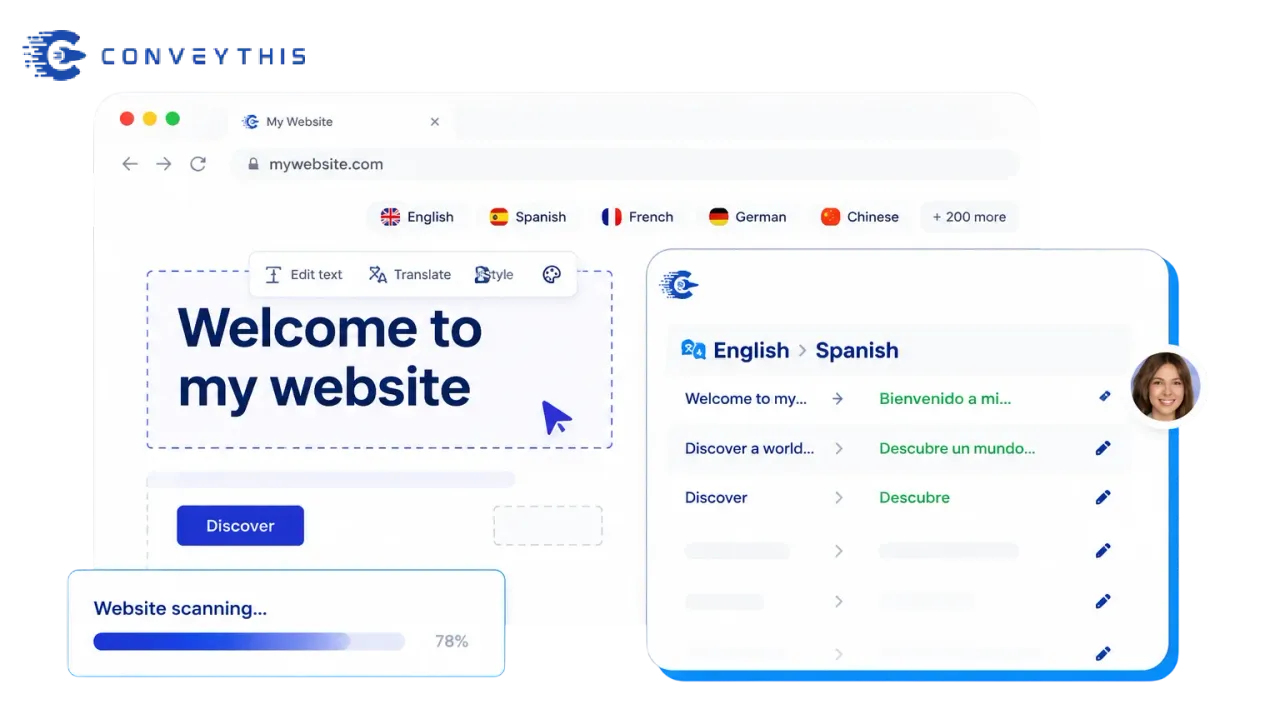
Automatic website translation – The plugin automatically scans your website and prepares it for translation. -
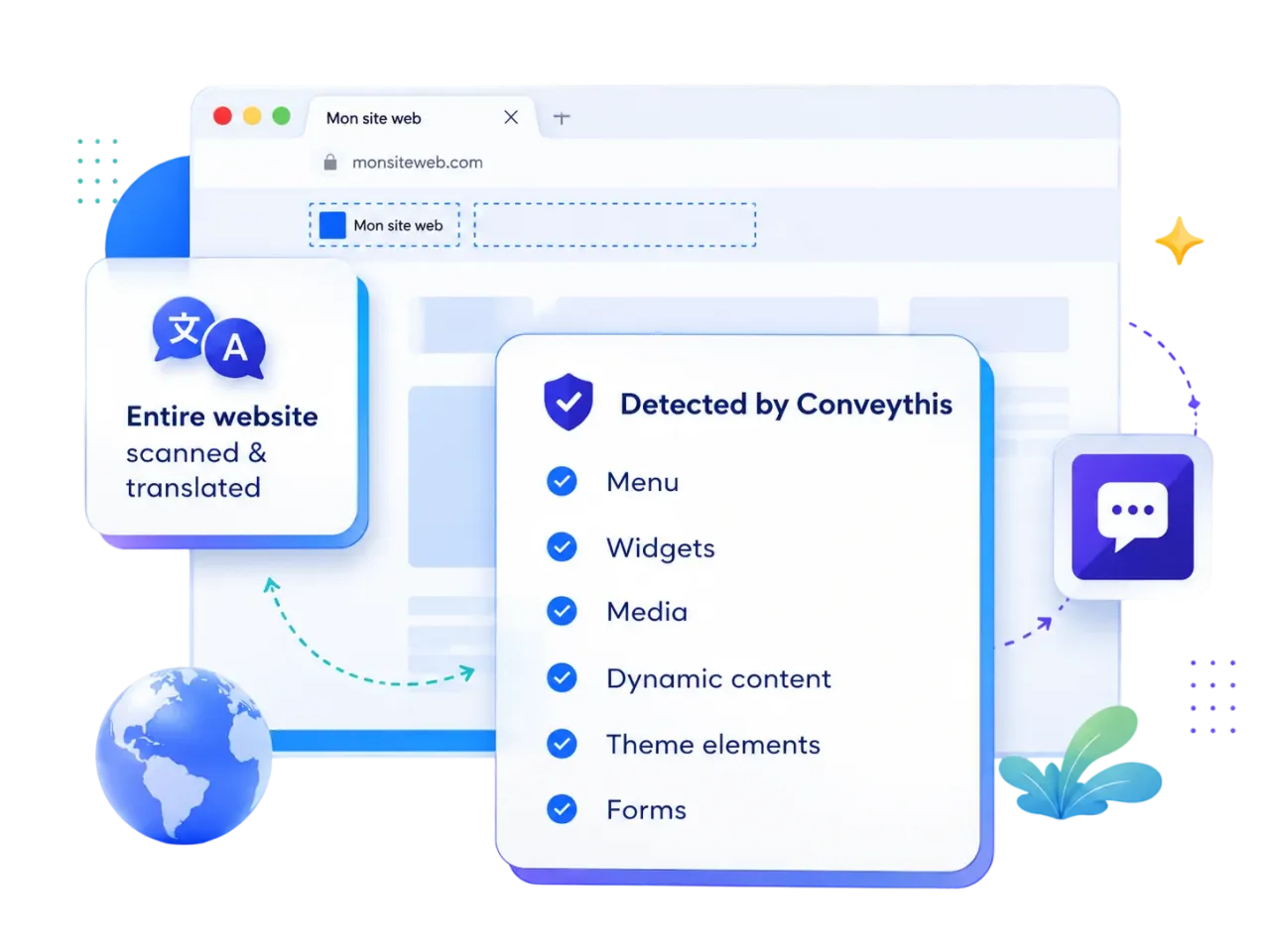
Everything on the page is detected – Menus, widgets, media, dynamic content, theme elements and forms are picked up and translated, not just post content. -
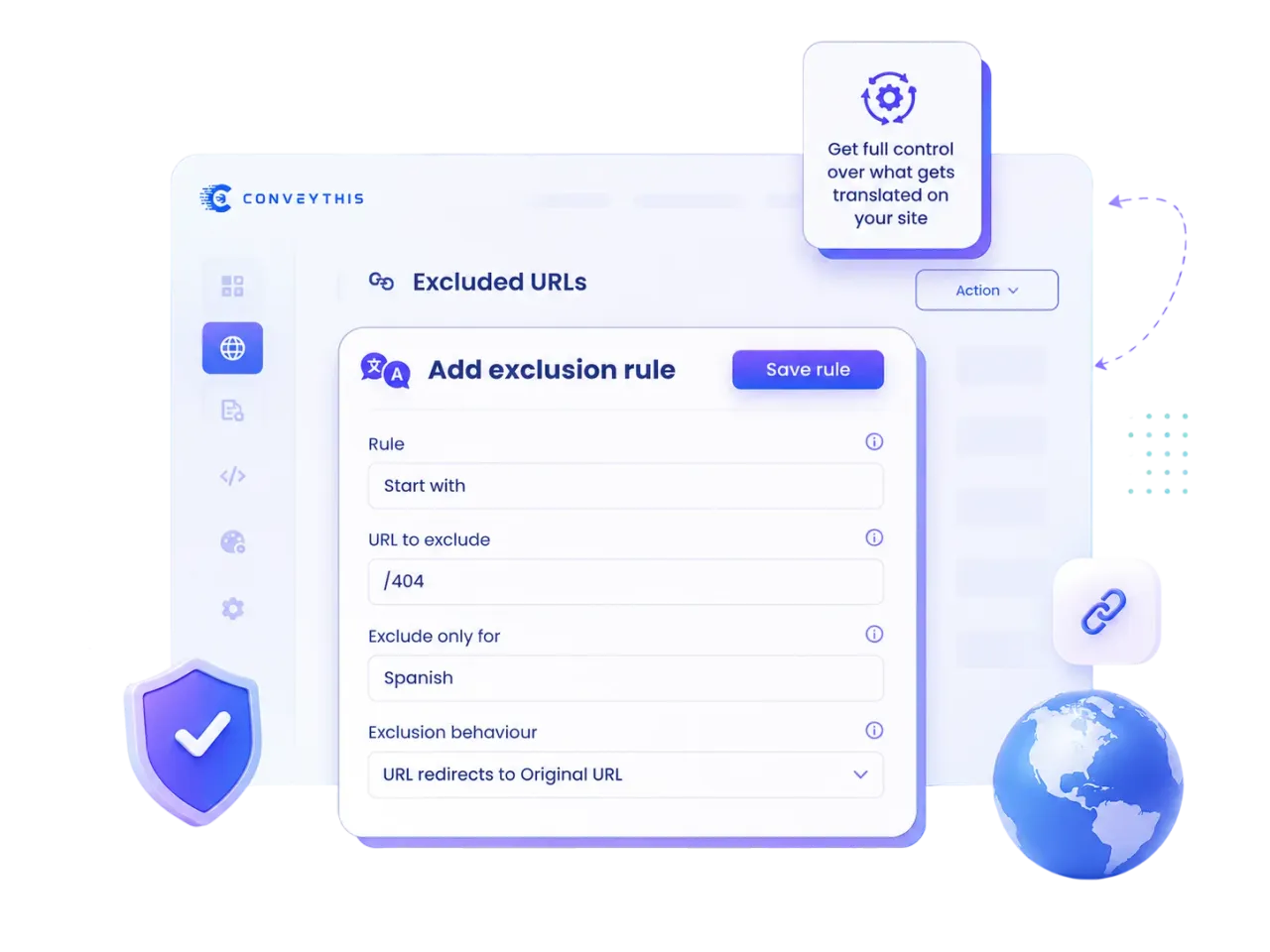
Excluded URLs – Keep chosen pages out of translation using start, end, contains or exact rules, for one language or for all of them. -
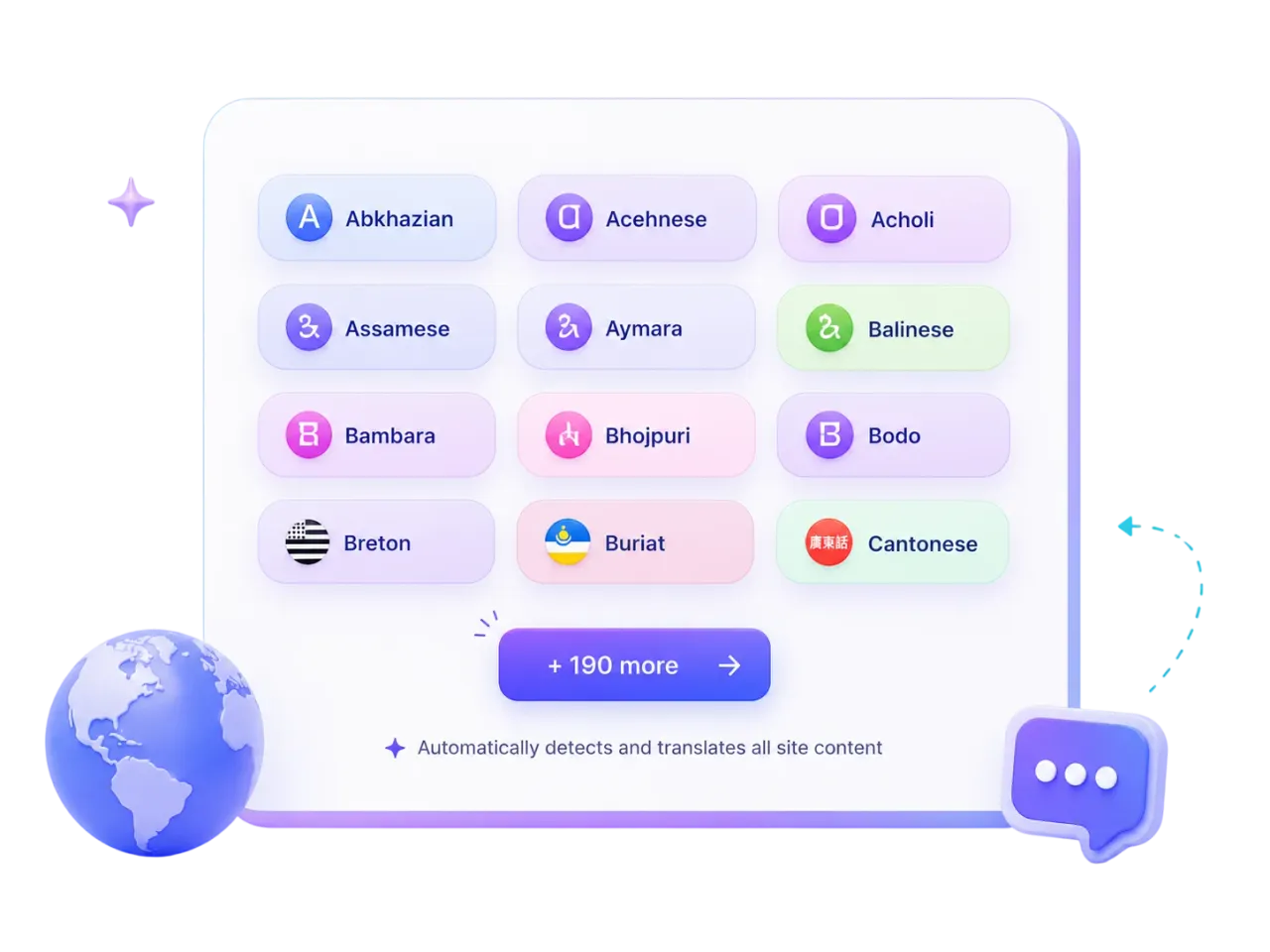
200+ languages – Pick any target language, from the major world languages to regional ones, and your content is detected and translated automatically. -
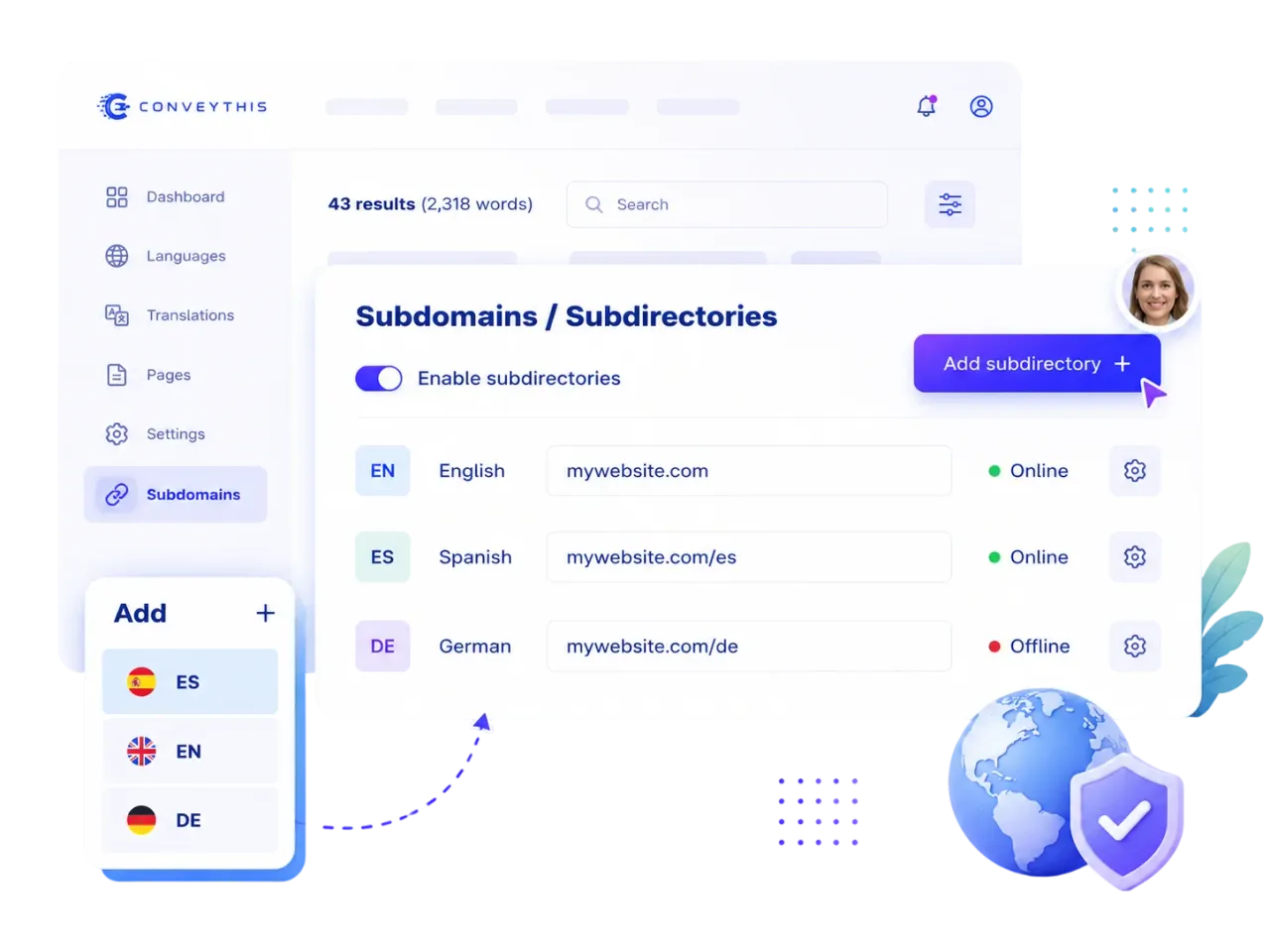
Subdomains & Subdirectories – Organize translated versions of your website by subdomains or subdirectories.
Important information
- A ConveyThis account and API key are required. Your page text is sent to the service for translation.
- Translations are stored on ConveyThis servers, so they depend on that service and your plan.
- Requires WordPress 5.3 or newer and PHP 7.4 or newer. Tested up to WordPress 7.1.4.
- Language availability depends on your plan. The listing says the largest listed plan allows 100 languages and Enterprise has no limit.
- Servers must reach the vendor's API. A connection refused error usually means a firewall or host blocks it.
From the ConveyThis readme
Straight from the developer's WordPress.org listing.
Full description
ConveyThis is a WordPress translation plugin that helps you translate WordPress into 200+ languages. Build a fast, multilingual site with automatic translation and AI translation backed by ConveyThis AI and leading machine translation engines including Google Translate — ideal for multilingual WooCommerce stores, blogs, and business sites that need hreflang-ready URLs and SEO-friendly translated pages.
⚡ Fast, Accurate AI Translations – Powered by ConveyThis’ own AI engine, together with leading machine translation engines including Google Translate, your website gets high-quality translations instantly. Need perfect wording? Refine them manually or order professional translations directly from your dashboard.
🎯 Maintain Your Brand Voice – Build your own AI Language Model with ConveyThis. Customize translations using your glossary, past edits, and style preferences to ensure consistent messaging across all languages.
💡 Flexible Plans for Every Website – Start with the free plan — 10,000 words and one language, no card required — or pick a plan that fits your needs. Learn more at ConveyThis Pricing.
What you can do with this WordPress translation plugin
• Translate WordPress site – Turn any public site multilingual in minutes; visitors get the right language without manual copy-pasting.
• Translate WooCommerce – Product pages, cart, checkout, and emails stay consistent across languages for a multilingual storefront.
• Automatic translation – New posts and products are picked up and translated on the fly so your multilingual content stays current.
• AI translation – Machine translation plus glossary, edits, and optional pros so quality matches your brand on every multilingual page.
Key Features
Multilingual Support
• Translate posts, pages, custom post types, menus, widgets, forms, and media captions.
• WooCommerce fully supported – products, checkout, emails, categories
• Automatic updates – new content is translated immediately
AI-Powered Translation & Quality Control
• Machine translation from leading engines including Google Translate, plus ConveyThis AI
• Custom AI Language Model ensures translations match your brand tone and terminology
• Manual edits, glossary, and translation memory maintain a consistent high quality
• Professional translators available directly in your dashboard
SEO Optimization
• Dedicated URLs for each language – choose subdirectories or subdomains
• Hreflang tags automatically added
• Translated metadata, alt texts, and SEO-friendly URLs
• Compatible with Yoast SEO and other SEO plugins
Visitor Experience & Engagement
• Automatic language detection and redirection based on browser settings
• Reduce bounce rate and increase visitor engagement
• Media localization – translate or replace images and videos per language
Customization & Design
• Fully customizable language switcher – flags, dropdowns, placement options
• Glossary management to lock key terms and automate translations
• Visual editor allows direct on-page edits for context-aware translations
Collaboration & Workflow
• Multi-user support with roles and permissions
• Collaborate with your team in real time
Scalability
• Supports small blogs to large e-commerce stores
• Unlimited pages and languages with premium plans
How this WordPress translation plugin works
Watch this quick video to see how easy it is to install and configure ConveyThis Translate on your WordPress site. Then follow the steps below to get your website multilingual in just a few minutes.
• Install the Plugin
Download ConveyThis Translate here or install it directly from your WordPress plugins panel.
• Sign Up & Create Your Account
Register for a free account at ConveyThis App. Confirm your email to activate your account.
• Get Your API Key
Go to your Dashboard and copy your unique API key (it looks like pub_xxxxxxxxxx).
• Configure the Plugin
In your WordPress admin, open the plugin’s configuration page and paste your API key into the designated field.
• Choose Languages
Select your source language and target language(s).
• Customize Your Language Switcher
Adjust the language switcher design and placement to match your website. Use the preview mode to see it live.
• Save & Go Live
Click Save Changes. The language switcher button will appear on your website, allowing visitors to translate pages instantly.
• Edit or Refine Translations
Go to My Translation in your account to edit, approve, or enhance translations. Use your glossary or order professional translators if needed.
💡 Quick Start Tip: If you want to set up full customization later, just paste your API key and save. The language switcher will appear immediately, and you can translate your first page right away.
Technical Details
• Full Compatibility: Works with all WordPress themes and plugins, including WooCommerce, Elementor, Divi, and Yoast SEO, so your website stays fully functional in every language.
• Fast & Reliable: Translations and media are served via ConveyThis CDN, ensuring pages load quickly worldwide.
• Secure & GDPR Compliant: All translations are processed safely on ConveyThis servers, respecting privacy and data regulations.
• Easy Integration: No coding required — just install, add your API key, and your multilingual site is ready.
Translate WordPress into any language
ConveyThis Translate supports 200+ languages 🌍, including major global languages and regional variations:
Popular languages: English, Spanish, French, German, Chinese, Japanese, Korean, Arabic, Portuguese, Russian, Italian, Dutch, Ukrainian
Additional languages: Abkhaz, Acehnese, Acholi, Afrikaans, Albanian, Alur, Amharic, Armenian, Assamese, Awadhi, Aymara, Azerbaijani, Balinese, Bambara, Bashkir, Basque, Batak Karo, Batak Simalungun, Batak Toba, Belarusian, Bemba, Bengali, Betawi, Bhojpuri, Bikol, Bodo, Bosnian, Breton, Bulgarian, Burmese, Buryat, Cantonese, Catalan, Cebuano, Chhattisgarhi, Chichewa, Chinese (Simplified), Chinese (Traditional), Chuvash, Corsican, Crimean Tatar, Croatian, Czech, Danish, Dari, Dinka, Divehi, Dogri, Dombe, Dutch, Dzongkha, English, English (UK), English (Australia), Esperanto, Estonian, Ewe, Faroese, Fijian, Finnish, French, French (Canada), Frisian, Fulfulde, Ga, Galician, Ganda, Georgian, German, Greek, Guarani, Gujarati, Haitian Creole, Hakha Chin, Hausa, Hawaiian, Hebrew, Hiligaynon, Hindi, Hmong, Hungarian, Hunsrik, Icelandic, Igbo, Iloko, Indonesian, Inuinnaqtun, Inuktitut, Irish, Italian, Japanese, Javanese, Kannada, Kapampangan, Kashmiri, Kazakh, Khmer, Kiga, Kinyarwanda, Kituba, Konkani, Korean, Krio, Kurdish, Kurdish (Central), Kyrgyz, Laotian, Latgalian, Latin, Latvian, Ligurian, Limburgan, Lingala, Lithuanian, Lombard, Lower Sorbian, Luo, Luxembourgish, Macedonian, Maithili, Makassar, Malagasy, Malay, Malayalam, Maltese, Manipuri, Maori, Marathi, Meadow Mari, Minang, Mizo, Mongolian, Ndebele (South), Nepalbhasa, Nepali, Northern Sotho, Norwegian, Nuer, Occitan, Odia, Oromo, Pangasinan, Papiamento, Pashto, Persian, Polish, Portuguese, Portuguese (Brazil), Portuguese (Portugal), Punjabi, Quechua, Queretaro Otomi, Romani, Romanian, Rundi, Samoan, Sango, Sanskrit, Scottish Gaelic, Serbian, Sesotho, Seychellois Creole, Shan, Shona, Sicilian, Silesian, Sindhi, Sinhala, Slovak, Slovenian, Somali, Spanish, Spanish (Mexico), Spanish (United States), Sundanese, Swahili, Swati, Swedish, Tagalog, Tahitian, Tajik, Tamil, Tatar, Telugu, Tetum, Thai, Tibetan, Tigrinya, Tongan, Tsonga, Tswana, Turkish, Turkmen, Twi, Ukrainian, Upper Sorbian, Urdu, Uyghur, Uzbek, Vietnamese, Welsh, Xhosa, Yiddish, Yoruba, Yucatec Maya, Zulu
Custom languages & dialects: Choose from regional variants including English (UK, Australia), French (Canada), Spanish (US, Mexico), Portuguese (Brazil, Portugal), and Arabic (Egypt, UAE)
Pricing
Every plan starts free. Yearly billing is two months free on every paid plan.
Free Plan – $0
• Translate up to 10,000 words into 1 language, 1 website
• No card, no time limit
Starter Plan – $10/month billed yearly ($120/year), or $12 monthly
• Translate up to 60,000 words into 1 language
Business Plan – $20/month billed yearly ($240/year), or $24 monthly
• Translate up to 200,000 words into 3 languages
Pro Plan – $53.33/month billed yearly ($640/year), or $64 monthly
• Translate up to 800,000 words into 5 languages, 3 websites
Larger plans – from Pro+ (1,400,000 words, 9 languages) up to Extreme (20,000,000 words, 100 languages, 50 websites)
Enterprise Plan – custom pricing
• Unlimited words, languages and websites
• Dedicated server and an account manager & engineer
✅ All plans include:
• Visual editor for context-aware translation
• Automatic updates for new content
• SEO optimization for all translated pages
• Full integration with WordPress plugins
🔗 Check full details and sign up: conveythis.com/pricing.
We’ve Got You Covered – Support You Can Rely On
ConveyThis Translate provides instant support to all users.
You can contact us:
• Email: support@conveythis.com
Working Hours:
Monday – Thursday: 10:00 AM – 6:00 PM (EST / GMT-4)
Friday: 10:00 AM – 5:00 PM (EST / GMT-4)
We respond to all inquiries within 24 hours on weekdays.
Ready to go multilingual with a WordPress translation plugin?
Install ConveyThis Translate today and expand your website’s reach globally with a proven WordPress translation plugin.
Choose the plan that fits your business needs and start translating instantly.
Useful links
WordPress Integration Guide – https://www.conveythis.com/integrations/wordpress
Step-by-step instructions to install and configure ConveyThis Translate on your WordPress site.
Pricing Plans – https://www.conveythis.com/pricing
Find the plan that fits your website, including words, languages, and features.
FAQs / Help Center – https://www.conveythis.com/faqs
Answers to common questions about plugin functionality and usage.
Word Counter Tool – https://www.conveythis.com/tools/website-word-counter
Check your website word count to estimate translation costs and plan accordingly.
ConveyThis Translate on WordPress.org – https://translate.wordpress.org/projects/wp-plugins/conveythis-translate
Official plugin page on WordPress.org for reviews, updates, and community support.
Privacy Policy – https://www.conveythis.com/legal/privacy-policy/
Learn how your data and content are securely handled by ConveyThis.
External services
This plugin relies on the following third-party services. For each one, the data sent and the conditions are described below.
ConveyThis translation service — the core service that translates your website. Your site’s domain, your chosen source and target languages, the content of the pages to be translated, and your API key are sent to ConveyThis when you set up the plugin and whenever a translated page is generated or updated. Translated content and the language switcher are then served from the ConveyThis CDN. Provided by ConveyThis — Terms and Conditions, Privacy Policy.
WooCommerce order emails (optional, off by default): when turned on, the text of customer order emails is sent to the ConveyThis translation service. Customer names, addresses, contact details and order numbers are not sent. Same provider and terms as above.
Pusher — used to receive real-time status updates (such as translation progress) inside the plugin’s admin screens. A connection to Pusher is opened while you are on the plugin’s admin pages; no page content is sent. Provided by Pusher — Terms of Service, Privacy Policy.
Google sitemap ping — notifies Google when your translated sitemap changes, so translated pages are discovered and indexed faster. The URL of your translated sitemap is sent to Google’s ping endpoint (https://www.google.com/ping) when the sitemap is updated; no personal data is sent. Provided by Google — Terms of Service, Privacy Policy.
Installation
• Download the plugin here and upload it to your site or install it from your WP admin
• Sign up at https://app.conveythis.com/account/register/ to set up your account
• After confirming your account go to the “Dashboard” in your account
• Copy your unique API key (it looks similar to “pub_xxxxxxxxxx”)
• Go to the plugin’s configuration page at your WP admin
• Paste this API key into the appropriate section
• Select source language and target language (ex. Spanish – es)
• Customize language switcher as you want (you have the convenient “preview” mode)
• Save changes
• The language button now appeared on your website.
• You can switch to another language and see translated page
• If you want to edit your translation go “My Translation” in your account
For more information and troubleshooting, visit the official ConveyThis Documentation
Developer FAQ (18)
- What are the minimum installation requirements for ConveyThis?
- • WordPress 5.3 or higher • PHP version 7.4 or higher
- Can I edit my site’s translations?
- Yes, you can edit the translation in your account on the My Translations tab. All changes will be displayed on your site.
- Will the search engines (Google, Bing, etc.) and AI platforms (ChatGPT, Gemini, Grok) index the translated pages?
- Of course. ConveyThis creates a unique URL-prefix based to the language selected (for example: /ru/ for Russian or /es/ for Spanish), which will be indexed by all search engines.
- Is ConveyThis Translate compatible with my theme/plugin?
- Yes! ConveyThis Translate essentially takes a “snapshot” of all the content, including meta text and other items not directly visible on the page, then uses that text data to retrieve or generate translations. By translating your site’s content with this method, you never have to worry about whether changing your theme or adding a new plugin will affect the translated version of your site. ConveyThis Translate will always be able to translate all the content on your site!
- Why don’t my translations appear?
- There are three potential reasons that your translations may not appear on your website: • Your plugin is not setup. Make sure you select your site’s source language (the language your text is currently written in) and then select which languages you want your site to be available in. Make sure you click the save button to complete the setup. • Another script is causing a JavaScript conflict that blocks the plugin from running. ConveyThis Translate relies on JavaScript to function, and if another plugin throws an error or other exception that prevents the JavaScript from running properly, it may cause issues with the translations being displayed. Try disabling your other plugins one at a time to see if they are causing the conflict. • You have exceeded the limits of your plan. If you add more languages than your subscription plan supports, or if you exceed the number of words or translations supported by your subscription plan, it may cause the translations to not be displayed on your site. Please view your pages and the plugin’s configuration screen when logged in as an administrator and look for any error messages. You can also view your current usage statistics and related data by logging into your user account on https://www.conveythis.com/
- Can I bundle ConveyThis Translate with my themes?
- No, you may not bundle the ConveyThis Translate plugin with your themes without express permission. If you are a WordPress theme developer and would like to provide ConveyThis Translate as a plugin, or have other ideas for integrating ConveyThis Translate into your products, please visit https://www.conveythis.com/ and contact us to discuss licensing and other issues.
- Why is my text showing as ??????? (question mark characters)
- If the text on your site is displaying as ? (question mark) or square/rectangular symbols, this is typically caused by an encoding issue. ConveyThis Translate stores translations as UTF-8 encoded string data. To make sure your text is displayed properly, your pages must also be rendered with UTF-8 encoding. You can find more details here: https://codex.wordpress.org/Converting_Database_Character_Sets Also, make sure your theme’s template files are save as UTF-8 encoded file types, and that your blog’s header is setting the charset value to UTF-8, like so: <meta charset=”UTF-8″ /> or <meta http-equiv=”Content-Type” content=”text/html; charset=UTF-8″>
- How do I setup my server to separate languages into directories?
- Good news: this requires no additional configuration on your server! Directory rewriting is a built-in feature that utilizes WordPress’s core functionality to automatically prepend the language code to the front of your URL to differentiate your main content from your translated content. For example, the translated versions of a page located at https://example.blog/my-first-post/ can be accessed from: • https://example.blog/es/my-first-post/ (Spanish) • https://example.blog/de/my-first-post/ (German) • https://example.blog/ru/my-first-post/ (Russian) • etc. Make sure that you don’t have directories setup on your server with the same name as the language prefixes to avoid any issues with this redirect method. Additionally, make sure that posts, pages, and other content is not setup in WordPress to use the two-letter language code for routing as well. Confirm this with your theme, any other plugins you may be running, and your blog’s permalink settings.
- Will ConveyThis slow down my site?
- ConveyThis Translate will not slow down your website as it never needs to access your site’s database at any time to translate your site’s content! Since translations are stored on ConveyThis server–rather than your own–you will never need to worry about optimizing your queries, clearing out old translation revisions, or other database issues. It just works!
- Why can’t I save on the configuration?
- If you cannot set up the API key or select languages on the configuration page, or attempts to translate a page of your website fails, you might be running an outdated version of the plugin. Please update ConveyThis to the latest version.
- How do I find, edit, and save translated pages?
- Log in to your ConveyThis account and go to the “My Translations” tab. To edit your translations, first choose domain name you want to edit with and select a specific page address to work on. Here you can use Visual Editor or edit translations row by row.
- Can ConveyThis be run on localhost?
- As of version 2.7 of the plugin, ConveyThis can now be tested from localhost. Previous versions of the plugin will not work on sites hosted locally.
- How many languages does ConveyThis support?
- The number of languages available depends on the plan that you are subscribed to. On the largest listed plan, Extreme, you have 100 languages at your disposal; Enterprise has no language limit. The current number of possible languages to operate in is 210. While this list contains all the most-spoken languages of the world, many rare dialects are not yet included.
- Is ConveyThis Translate free?
- ConveyThis Translate provides Free plan with 10,000 words and 1 language. You can request a refund within 7 days of buying a paid plan (renewals and upgrades are not refundable; see the Terms at conveythis.com).
- Can I migrate from WPML, Polylang or Weglot Translate?
- You can easily migrate from any translation plugin. Just deactivate the current plugin from your WP-Admin panel. ConveyThis Translate can then start working properly on your website.
- How can I set up / move the language switcher?
- If you want to customize your language switcher, first access the settings page for the plugin in wp-admin and click “Show more options”. You can choose how you want the language switcher displayed: square or round flag; with or without text in it. You will be able to place the switcher button either at the top of the right side or at the bottom of the right side of the page. You can also move it to the center of the page or set up the spacing you want using the toggle in section labeled “Indenting”.
- How do I resolve “cURL error 7: Failed to connect to api.conveythis.com port 443: Connection refused”?
- Sometimes you may experience the following error: [http_request_failed] cURL error 7: Failed to connect to api.conveythis.com port 443: Connection refused This usually means that the server cannot connect to api.conveythis.com. Possible reasons could be a firewall or your IP being blocked by ConveyThis. Port 443 is “https”, which your server may not accept. You can try to connect over “http” instead. You can also try to use a proxy server. If you’ve tried all of the above and still get this error, contact us at support@conveythis.com.
- What do I do if I still need help?
- If you couldn’t find the answer to your question, please use the support form on our website to quickly reach our team. Our business hours are Monday through Thursday from 10:00 AM to 6:00 PM and Friday from 10:00 AM to 5:00 PM (EST). You can also contact us directly by email at support@conveythis.com. Messages received during the week will be answered within 24 hours, provided they are sent before midnight on Friday.
Downloads, last 30 days
Trend vs previous period: -15.7%
Average daily downloads: 66 over the last 7 days , 122 over 30 days.
Security history
Past CVEs, patched · 5 published vulnerabilities (Wordfence) · most recent Jan 27, 2026
- Patched 5.3 Medium Language Translate Widget for WordPress - ConveyThis <= 234 - Missing Authorization to Limited Option Update CVE-2024-38792 · Jul 22, 2024 · affects *-234 · fixed in 235
- Patched 7.2 High Language Translate Widget for WordPress - ConveyThis <= 223 - Unauthenticated Stored Cross-Site Scripting via api_key CVE-2023-6811 · Apr 10, 2024 · affects *-223 · fixed in 224
- Patched 6.6 Medium Language Translate Widget for WordPress - ConveyThis <= 269.1 - Authenticated (Administrator+) PHP Object Injection CVE-2025-57919 · Sep 22, 2025 · affects *-269.1 · fixed in 269.2
- Patched 5.3 Medium ConveyThis <= 270.4 - Missing Authorization CVE-2025-68021 · Jan 27, 2026 · affects *-270.4 · fixed in 270.5
- Patched 5.3 Medium ConveyThis <= 269.2 - Missing Authorization CVE-2025-62152 · Nov 29, 2025 · affects *-269.2 · fixed in 269.3
Recent releases
- v271.2
The "Powered by ConveyThis" link in the language switcher now opens a page about ConveyThis that names your site, instead of the ConveyThis home page.
- v271.1
New: WooCommerce order emails can be sent in the customer's language. Off by default, turn it on in Extended settings.
- v271.0
New: switcher themes. Pick Glass, Bubble, Neon or Auto for the dropdown language switcher on the Widget Style tab. Sites that don't pick a theme keep the classic switcher, and a theme chosen in...
- v270.9
Word limits doubled on all standard plans. * Renamed the plugin to "ConveyThis AI Multilingual Translation". * Compliance and stability fixes: admin libraries now load locally or from WordPress...
- v270.8
Compliance and privacy: the plugin no longer contacts our servers until you connect an API key, and no longer starts a PHP session on the front end (so full-page caching keeps working). Bootstrap,...
Show 10 older releases
- v270.7
Redesigned the settings screen: one consistent field and button style across every tab, clearer section headings, and a header strip showing your plan and language usage. * Fixed unreadable...
- v270.6
Keep translated URLs on API errors (no bounce to English); longer timeout for page translate only. * Fix glossary full delete sync; homepage language links use /{lang}/. * Tested up to WordPress 7.0.
- v270.5
Add nonce verification to legacy admin POST handlers (CSRF hardening for CVE-2025-68021 follow-up). * Migrate onboarding, cache-clear, and API-key setup flows to nonce-protected admin-ajax handlers.
- v270.4
Fix broken access control reported for admin-side requests and setup sync * Improve hreflang generation, batching behavior, and cache handling
- v270.3
Avoid double JSON-encoding when saving from admin; heal previously corrupted stored values on load * Translate telephone links (`tel:`) * Patch for getmypid()
- v270.2
Fix for Links (cache revalidation, case handling)
- v270.1
SEO: Preserve JSON-LD URLs, auto-detect brand/glossary, and enforce meta length limits * Trailing slash added options * URL translation enhancement * Documents: Translation now supports DOC, DOCX,...
- v269.9
Glossary fixes
- v269.8
Added support for Papiamento and Bashkir languages * Applied fix for SEO hreflang translations
- v269.7
Login Improvements
ConveyThis FAQ
What does it need to run?
WordPress 5.3 or newer and PHP 7.4 or newer, plus a ConveyThis account.
Can I edit translations?
Yes. Use the My Translations tab in your account, with a visual editor or row-by-row editing. Changes show on your site.
Will search engines index translated pages?
The listing says each language gets its own URL prefix, such as a language code folder, which search engines can index.
Will it slow my site?
The vendor says translations are stored on its servers and your database is not used, so there is little load on your site.
Is there a free plan?
Yes, 10,000 words and one language. Paid plans add more. A refund is offered within 7 days of a new paid plan.
Can I switch from WPML or Polylang?
Deactivate the other plugin and ConveyThis can start working on your site.
Why do my translations not show?
Check that you set a source language and chose target languages, and that the plugin is updated. An outdated version can block saving.
Can I test it on localhost?
Yes, from plugin version 2.7. Earlier versions do not work on local sites.
ConveyThis alternatives

Experience a better way to translate your WordPress site and go multilingual, directly from the front-end using a visual translation interface. The built-in AI translation lets you translate automatically, then…

Weglot 2.0 is a website translation plugin that translates your WordPress site into 110+ languages, with AI translations built around your brand. Trusted by 110,000+ websites, Weglot detects and translates all of…

The Best AI Translation Plugin for Multilingual WordPress Sites Universally is the fastest way to translate your WordPress website into 110+ languages and run a fully multilingual site. The plugin connects WordPress…

Linguator AI - Auto Translate & Create Multilingual Sites is an AI-powered translation plugin that works seamlessly with Elementor , Gutenberg , the Classic Editor , WooCommerce , ACF , Rank Math , Yoast SEO ,…

An all-in-one solution that makes your websites multilingual and translate them automatically, without word limits. ✓ One free first language for non-commercial websites ✓ Automatic translation API connector ✓…

Why Use This Plugin? When sharing links with titles in non-English languages (e.g., Hebrew, Arabic, Hindi, Chinese, or Russian) on platforms like Facebook or WhatsApp, the URLs often turn into a confusing string of…
Listing data from WordPress.org and the Wordfence vulnerability feed, refreshed Nov 9, 2026; listing details fetched Nov 14, 2026. Screenshots are from the plugin's WordPress.org listing. Not affiliated with ConveyThis.