

- active installs
- 1K+
- 12 ratings
- 4.9
- since last update
- 25d
- releases in 12 months
- —
- support threads resolved
- 100%
- avg daily downloads
- 79
- on WordPress.org
- 16 months
Ailo at a glance
Ailo is a freemium WordPress AI translation plugin by Elchanan Levavi with 1K+ active installs and a 4.9/5 rating from 12 reviews. It was last updated on Oct 15, 2026, is tested up to WordPress 7.1.4 and needs PHP 7.4+. It works with OpenAI. It has no published security vulnerabilities in the Wordfence database. Our quality score is 96/100.
What is Ailo?
Ailo is a WordPress plugin that turns post and term titles written in non-English languages into short English slugs, using AI. Titles in Hebrew, Arabic, Hindi, Chinese or Russian often become long strings of percent codes in a URL. This plugin replaces those with readable English words.
It works on new posts and taxonomy terms automatically, and only when you have not set a slug yourself. A bulk tool translates existing slugs and can add 301 redirects so old links keep working. You choose which post types and taxonomies are covered.
It suits multilingual and non-English sites that share links on social platforms. Each site gets 100 free translations. After that you connect your own AI account, which bills you.
Best for
- Hebrew, Arabic, Hindi or Chinese language sites
- Publishers sharing links on social media
- Sites cleaning up old encoded URLs
- Teams wanting readable English URLs
Our take
Ailo translates non-English slugs into clean English URLs with AI - a small but genuinely useful SEO fix for non-English sites. Single-purpose and does it well.
Ailo features
Automatic English slugs
New posts and terms get a short English slug generated from the title. It is skipped if you set a slug by hand.
100 free translations
Each site can try the plugin with 100 translations and no account.
Bulk translation
Translate existing slugs in batches. This helps sites with a back catalog of non-English URLs.
301 redirects
Optional redirects keep old links working after slugs change, and a Redirects tab lets you manage them.
Post type and taxonomy choice
Pick which post types and taxonomies get translated in the settings.
Bring your own AI provider
After the free quota, connect OpenAI directly, or use another supported provider through WordPress Connectors.
WordPress Connectors support
On WordPress 7.0 and newer, connect a provider in WordPress settings with no key entered in the plugin.
Quota display
The settings screen shows how many free translations remain.
Ailo free vs pro
Free WordPress.org version
- 100 free slug translations per site
- Automatic and bulk translation
- 301 redirects and post type selection
The plugin is free and includes 100 translations. After that you need your own AI provider account, such as OpenAI, Claude or Gemini, and that provider bills you. The listing says about one dollar covers 10,000 to 20,000 titles, which is the vendor's estimate. It does not describe a paid plugin tier.
How to use Ailo
- Install and activate
In wp-admin go to Plugins, then Add New. Search for the plugin, install it and activate it.
- Open settings
Go to Settings, then Slug Translator.
- Choose what to translate
Select the post types and taxonomies you want covered.
- Publish or bulk translate
Create a new post and check its slug. Or use the Bulk Translation tab for existing content, with 301 redirects if you want them.
- Connect your own provider
When the free quota runs out, add an API key or set up a provider through Connectors.
Ailo screenshots (6)
-
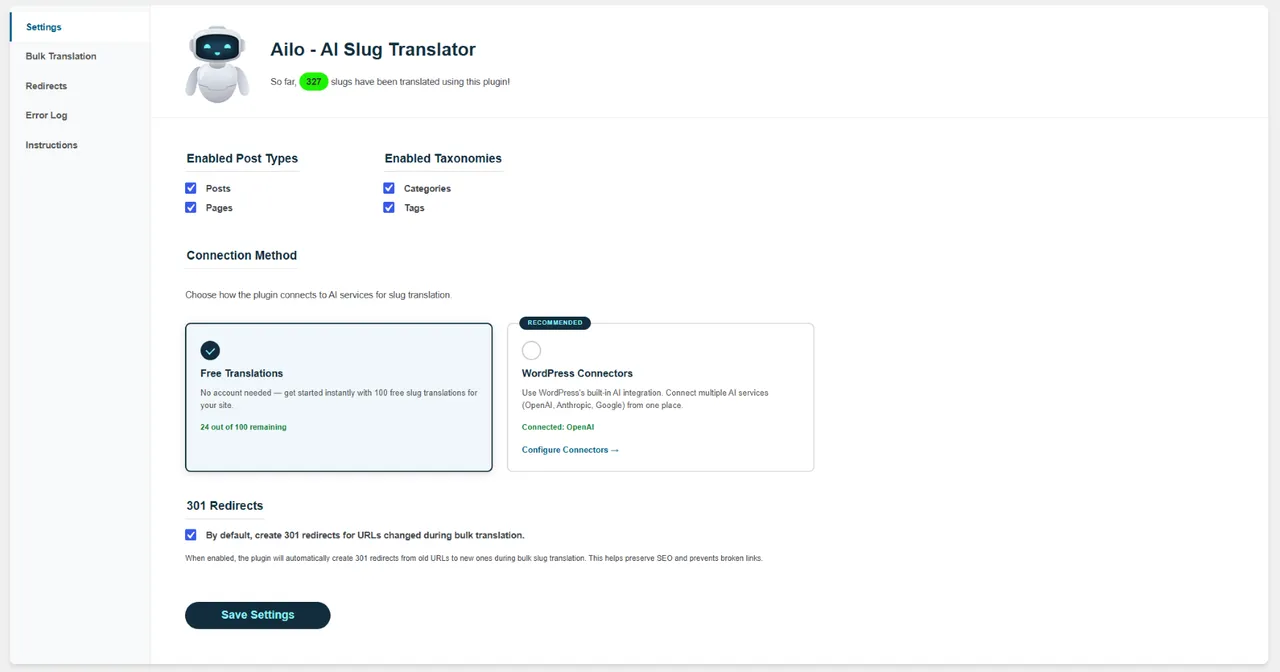
The plugin’s settings screen, where you can set your preferences and choose a translation method. -
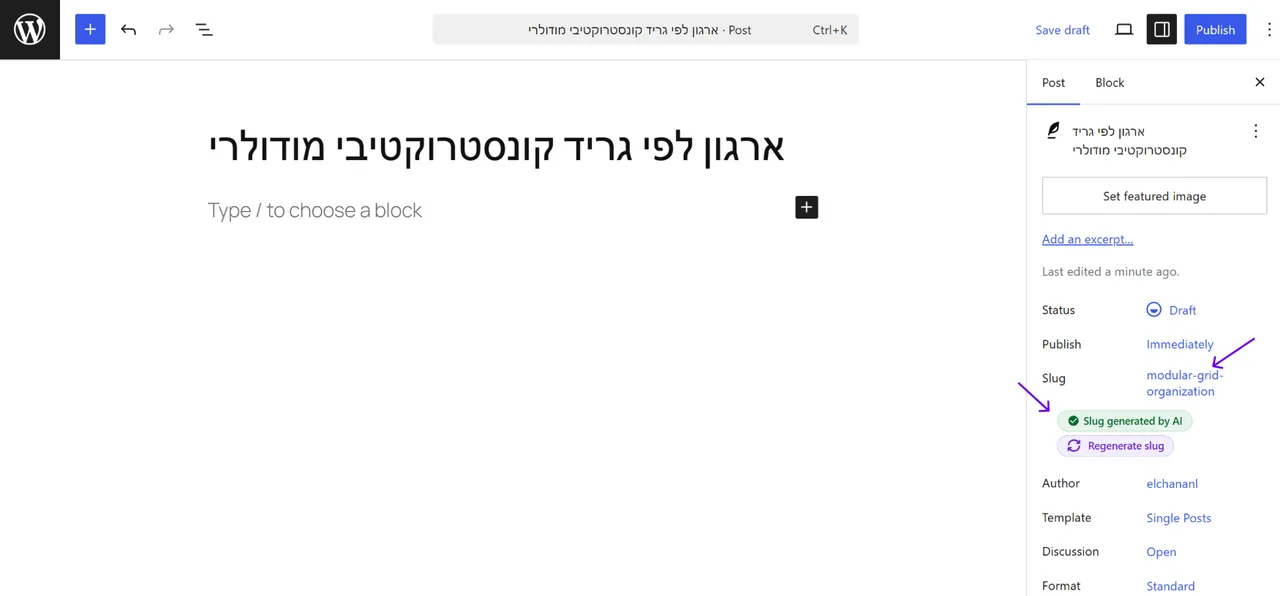
Automatic slug translation in the Gutenberg editor — just type your title and the slug is generated. -
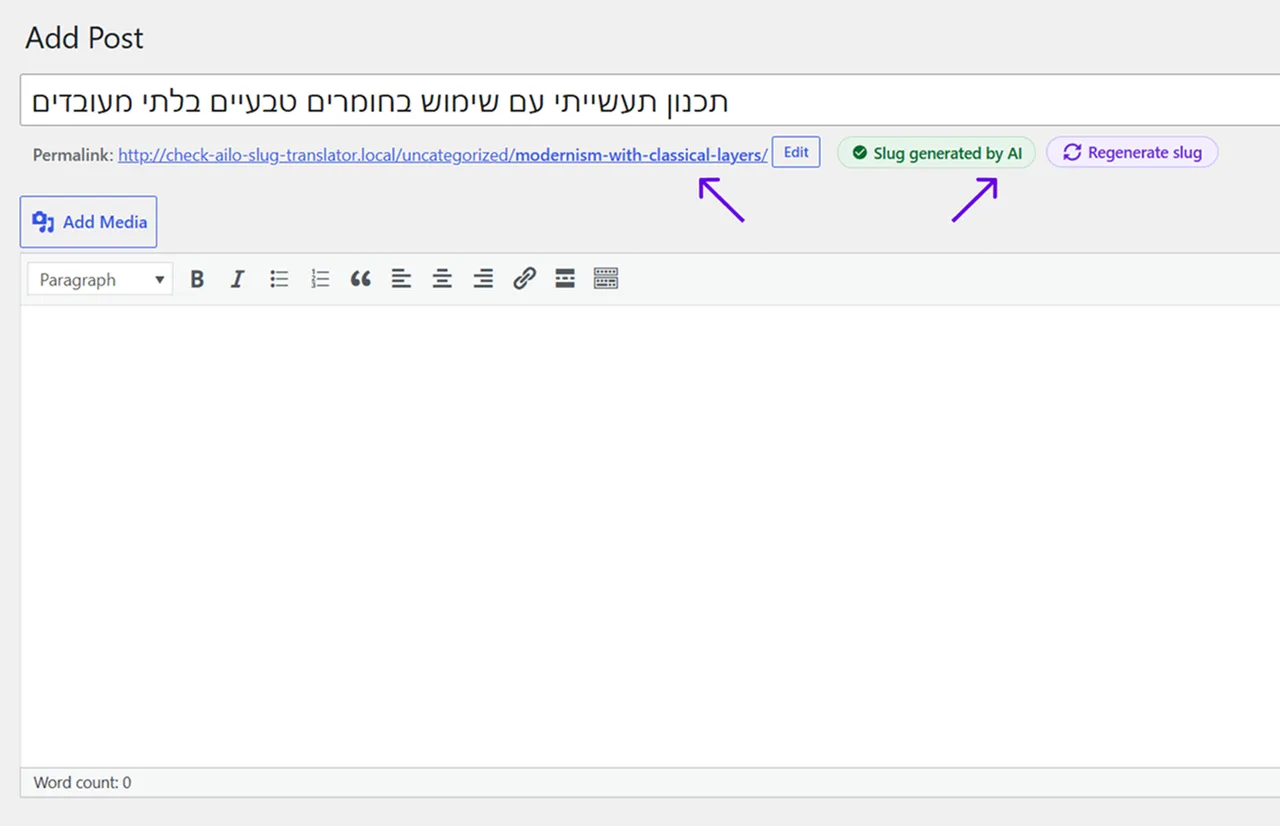
Automatic slug translation in the Classic Editor — the translated slug appears below the title. -
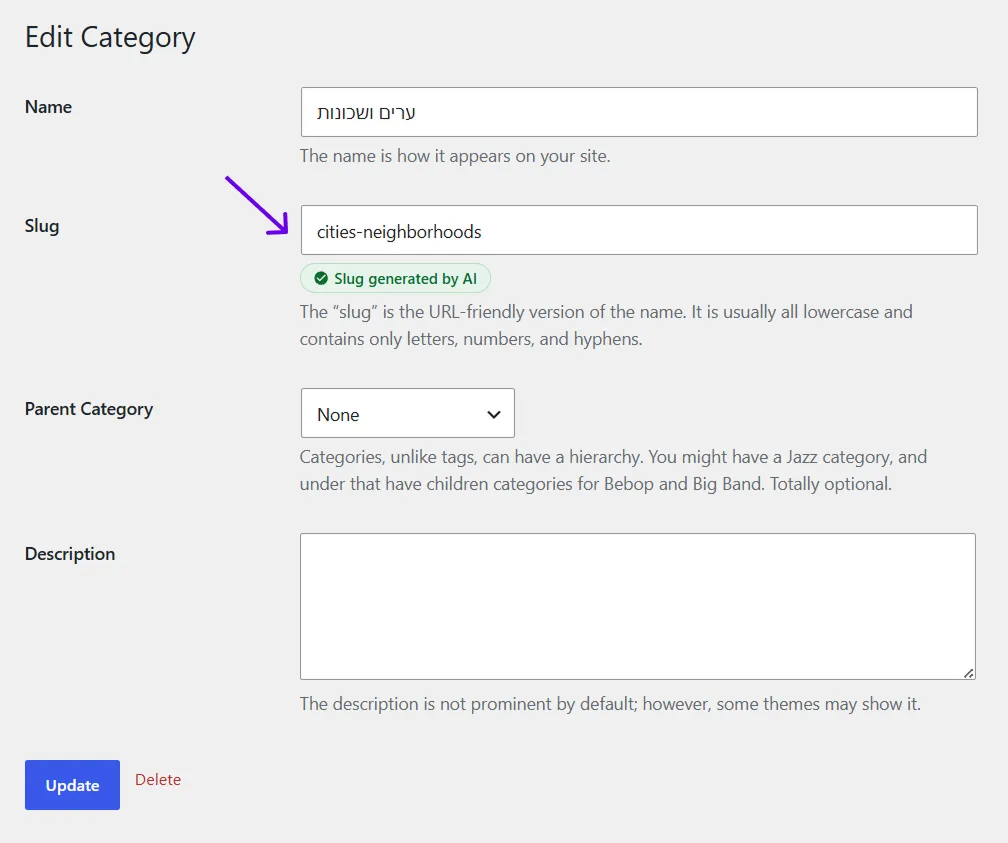
Automatic slug translation for a category term. -
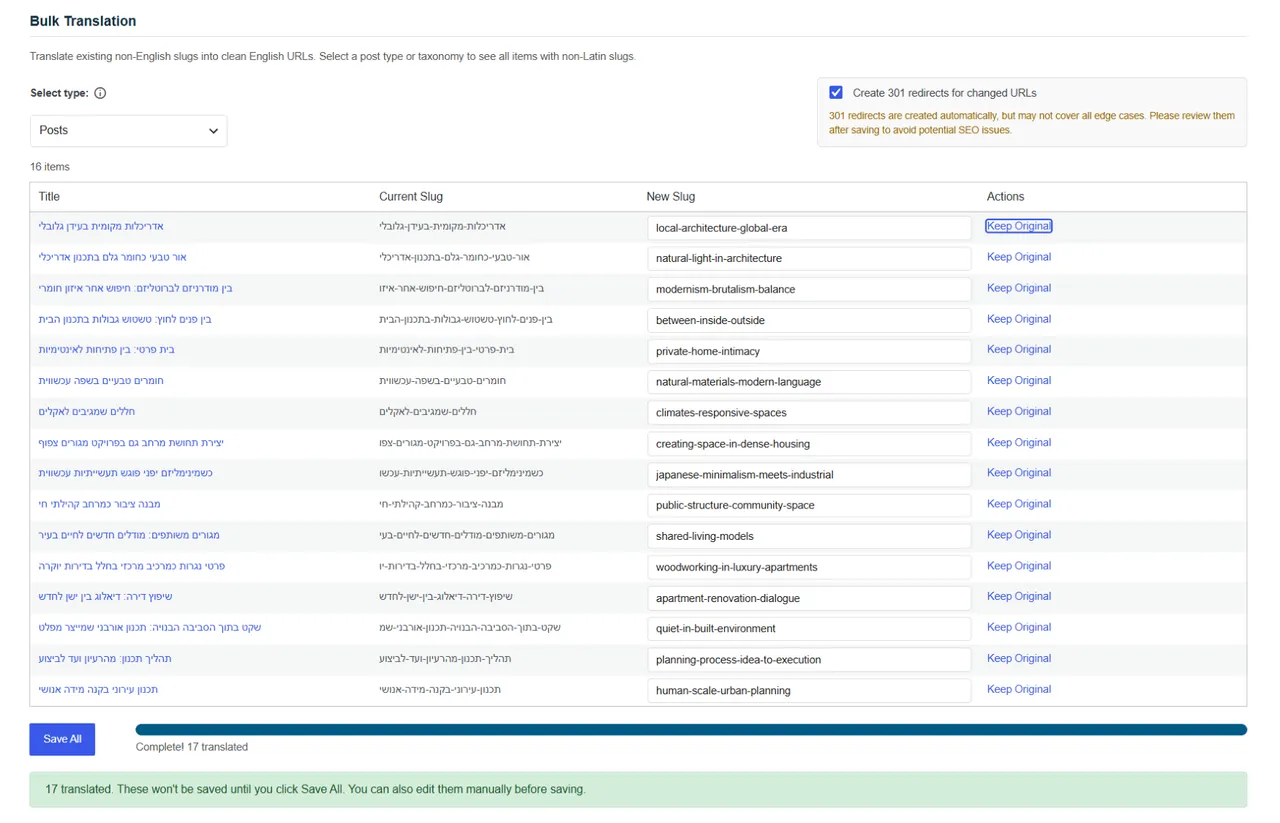
Bulk translation of existing slugs. -
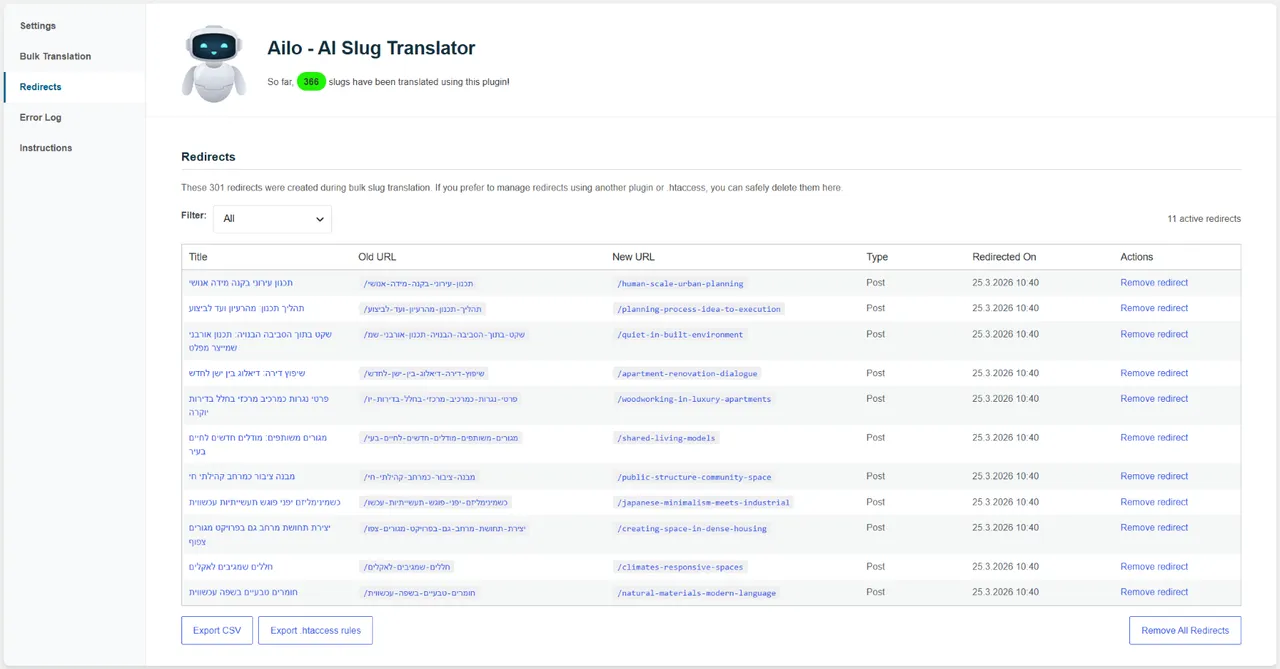
Managing 301 redirects for updated URLs.
Important information
- After 100 free translations, translation stops until you connect your own AI provider.
- You are responsible for monitoring provider usage and costs. Make sure your account is funded.
- Review generated slugs. Short slugs can lose meaning for ambiguous titles.
- Requires WordPress 5.0 or newer and PHP 7.4 or newer. Tested up to WordPress 7.1.4.
- Slugs already translated stay as they are if you deactivate the plugin. New ones will not be translated.
From the Ailo readme
Straight from the developer's WordPress.org listing.
Full description
Why Use This Plugin?
When sharing links with titles in non-English languages (e.g., Hebrew, Arabic, Hindi, Chinese, or Russian) on platforms like Facebook or WhatsApp, the URLs often turn into a confusing string of codes. This makes your links look unprofessional, reduces click-through rates, and can harm your SEO.
The Automatic Slug Translator fixes this issue by seamlessly translating slugs into concise English. Not only does this make your links visually appealing and user-friendly, but it also enhances your website’s search engine performance with clear, descriptive URLs.
Key Benefits:
– Improves Sharing: Makes links cleaner and more attractive on social platforms.
– Boosts SEO: Search engines favor clear, readable URLs.
– Simplifies Titles: Long, complex titles are automatically shortened into elegant slugs.
Example:
– Original Title (Hebrew): איך להשתמש בממיר אוטומטי לסלאג באנגלית
– Default Slug: /איך-להשתמש-בממיר-אוטומטי-לסלאג-באנגלית
– Broken URL: /%D7%90%D7%99%D7%9A-%D7%9C%D7%94%D7%A9%D7%AA%D7%9E%D7%A9…
– Clean English Slug: /how-to-use-automatic-slug-converter
This small adjustment can have a big impact on how your content is shared and discovered.
Clean English Slugs — Instantly, with AI
No setup required. This plugin uses AI to automatically translate your post titles and terms into elegant, SEO-friendly English slugs.
You get 100 translations for free, and then you can connect your own AI account (GPT, Claude or Gemini) to keep going.
Bulk Translation
Already have existing content with non-English slugs? Use the Bulk Translation feature to translate them all at once – with optional 301 redirects to keep your SEO intact. Review and manage redirects anytime in the dedicated Redirects tab.
WordPress 7.0+ Connectors Support
On WordPress 7.0 and above, the plugin integrates with the built-in Connectors API – connect any supported AI provider directly from WordPress settings, no API key needed in the plugin.
Usage
Try It Instantly — No OpenAI Account Needed
• Install and activate the plugin — that’s it!
• You can start using the plugin immediately with 100 free translations included.
Want More? Connect Your Own API Key
After using your 100 free translations, you can continue seamlessly by connecting your own AI provider:
Option 1 – Connect OpenAI directly:
• Sign up for OpenAI and add billing details
• Generate an API key from the API Keys page
• Paste the API key into the plugin settings
Option 2 – Use WordPress Connectors (if supported on your site):
If your WordPress installation supports AI Connectors, you can connect other AI providers as well. Simply configure your preferred provider via the Connectors interface and the plugin will use it automatically.
This gives you flexibility to work with different AI services beyond OpenAI.
Configuration
• In the plugin settings screen, choose which post types and taxonomies you want to enable translation for.
How It Works
• Automatic Translation
• New posts and taxonomy terms automatically get a clean English slug
• Slugs are generated only if you don’t define one manually
• Review Translations
• Generated slugs are designed to be short and clear
• Double-check that the meaning is preserved, especially for ambiguous titles
Costs
The plugin is completely free to use, and includes 100 slug translations at no cost. After you’ve used the free quota you’ll need a paid AI subscription to continue.
• Affordable Rates: For just $1, you can translate between 10,000–20,000 titles, depending on their length.
• Check OpenAI Pricing: Ensure your account is funded before use.
Disclaimer: While the plugin has been tested to be efficient and cost-effective, users are responsible for monitoring their OpenAI usage and costs. The plugin creator is not liable for unexpected charges due to misuse or errors.
Third-Party Services
This plugin integrates with OpenAI’s API to generate text-based responses and suggestions based on user input.
The plugin transmits post/CPT titles, term names, and the requesting server’s IP address to OpenAI’s servers when a request is made.
When using the free built-in translation quota, your post titles, term names, and domain are sent to the developer’s server to process the translation and track usage. No personal data is collected or stored.
OpenAI Terms of Service
OpenAI Privacy Policy
Installation
• Install the plugin through the WordPress admin plugins screen or upload the plugin files to /wp-content/plugins/ directory.
• Activate the plugin through the “Plugins” screen in WordPress.
• Configure the plugin in the settings screen under “Settings > Slug Translator”.
Developer FAQ (6)
- What should I do if slugs are not being translated?
- • Check if you’ve used up your free translation quota. • Ensure you have enabled the relevant post types and taxonomies in the plugin settings. • Verify that your API key is valid and correctly configured. • Make sure your connected AI provider account has an active payment method and sufficient usage credits or balance. • Check for potential service disruptions on OpenAI’s status page, as temporary downtime may cause translation issues.
- Can I use the plugin without an OpenAI account?
- Yes! Each site gets 100 free translations. You can start using the plugin right away – no API key or registration required. Once your free quota is used up, you’ll see a notice inviting you to enter your own API key to continue.
- How do I know how many free translations I have left?
- Your remaining quota is displayed in the plugin’s settings screen. Once you reach the limit, the plugin will prompt you to connect your own OpenAI account.
- What happens when I run out of free translations?
- Slug translation will stop unless you connect your AI provider API key. You’ll see a message in the settings area with instructions on how to continue using the plugin.
- Can I Translate Slugs in Bulk?
- Yes! The Bulk Translation tab lets you translate existing post and term slugs in batches. The plugin can also create 301 redirects automatically to preserve SEO. You can review and manage all redirects in the dedicated Redirects tab. For bulk translations, you’ll need to connect your own AI provider.
- What happens if I deactivate or delete the plugin?
- No worries – slugs that were already translated will stay exactly as they are. Your links won’t break, and your content will remain accessible. However, new slugs won’t be translated automatically until you reinstall or reactivate the plugin. If you created 301 redirects during bulk slug updates, those redirects may stop working once the plugin is deactivated or removed, so you should recreate them using another method.
Downloads, last 30 days
Trend vs previous period: -4%
Average daily downloads: 32 over the last 7 days , 79 over 30 days.
Security history
No known CVEs · 0 published vulnerabilities (Wordfence)
Recent releases
- v1.0.5
- Enhancement: Moved from GPT-4 models to GPT-6 Luna. - Update: Proxy and author site moved to the new domain. - Fix: Duplicate Error Log entries for untranslatable titles.
- v1.0.4
- Tested and confirmed compatibility with WordPress 7.1. - Minor bug fixes - Improved compatibility with PHP 8.1 and above. Thanks vincentczb. - Improved the Error Log message shown when a valid...
- v1.0.3
- Fix: When a post title contains gibberish or random characters, the plugin no longer saves a garbled AI response as the slug - it skips translation and leaves the slug as-is.
- v1.0.2
- Enhancement: Added preferred model recommendations for WordPress Connectors.
- v1.0.1
- Minor bug fixes.
Show 10 older releases
- v1.0
- New: Bulk Translation - translate existing post and term slugs in batches with progress tracking. - New: Automatic 301 redirects during bulk translation to preserve SEO. - New: Redirects...
- v0.7.4
- Bug fix: Resolved fatal error that could occur when saving a post without a title. - Bug fix: Prevented duplicate slug generation caused by both autosave and manual save triggering the...
- v0.7.3
- Minor bug fixes.
- v0.7.2
- New name: Ailo - AI Slug Translator. - Updated class prefix to `Haayal` for consistency and clarity - Simplified settings page UI for improved usability - Improved log message when translation...
- v0.7.1
- Refined usage guide for clarity and accuracy.
- v0.7
Introduced free translation (no OpenAI account required): - Each domain receives 100 free translations to test the plugin - Remaining free quota is displayed in the settings screen - Admin notice...
- v0.6.3
Added automatic API key validation upon saving settings Displays admin notices for API status: valid, invalid, or insufficient quota Improved error handling for API communication Minor UI...
- v0.6.2
- Minor bug fixes.
- v0.6.1
- Minor bug fixes and new name: HaAyal AI Slug Translator (HaAyal prefix).
- v0.6
- Initial release with support for automatic slug translation using OpenAI.
Ailo FAQ
Why are slugs not being translated?
Check that your free quota is not used up, that the post types and taxonomies are enabled, that your API key is valid and that your provider account has funds.
Do I need an OpenAI account?
Not at first. Each site gets 100 free translations with no key or registration.
How do I see my remaining free translations?
The settings screen shows the remaining quota.
What happens when the free quota ends?
Translation stops until you connect an AI provider. A notice in settings explains how.
Can I translate existing slugs in bulk?
Yes. The Bulk Translation tab does this, and it can create 301 redirects to protect your SEO.
What happens if I remove the plugin?
Translated slugs stay and links keep working. New slugs just stop being translated automatically.
Which AI providers can I use?
OpenAI directly with an API key. With WordPress Connectors, other supported providers, including Claude and Gemini, are possible.
Ailo alternatives

Experience a better way to translate your WordPress site and go multilingual, directly from the front-end using a visual translation interface. The built-in AI translation lets you translate automatically, then…

Weglot 2.0 is a website translation plugin that translates your WordPress site into 110+ languages, with AI translations built around your brand. Trusted by 110,000+ websites, Weglot detects and translates all of…

The Best AI Translation Plugin for Multilingual WordPress Sites Universally is the fastest way to translate your WordPress website into 110+ languages and run a fully multilingual site. The plugin connects WordPress…

Linguator AI - Auto Translate & Create Multilingual Sites is an AI-powered translation plugin that works seamlessly with Elementor , Gutenberg , the Classic Editor , WooCommerce , ACF , Rank Math , Yoast SEO ,…

An all-in-one solution that makes your websites multilingual and translate them automatically, without word limits. ✓ One free first language for non-commercial websites ✓ Automatic translation API connector ✓…
AI Translation For TranslatePress is a powerful TranslatePress extension that enhances the functionality of the TranslatePress plugin. This addon uses advanced translation services, like Yandex, Edge Built-in AI,…
Listing data from WordPress.org and the Wordfence vulnerability feed, refreshed Nov 9, 2026; listing details fetched Nov 14, 2026. Screenshots are from the plugin's WordPress.org listing. Not affiliated with Elchanan Levavi.