EazyDocs
EazyDocs - AI Powered Knowledge Base, Wiki, Documentation & FAQ Builder · by Spider Themes
- active installs
- 2K+
- 100 ratings
- 4.7
- since last update
- 7d
- releases in 12 months
- —
- support threads resolved
- 0%
- avg daily downloads
- 123
- on WordPress.org
- 4.6 years
EazyDocs at a glance
EazyDocs is a free WordPress AI website builder plugin by Spider Themes with 2K+ active installs and a 4.7/5 rating from 100 reviews. It was last updated on Nov 2, 2026, is tested up to WordPress 7.1.4 and needs PHP 7.4+. All 11 of its published vulnerabilities have patched versions. Our quality score is 78/100.
What is EazyDocs?
EazyDocs is a WordPress plugin for building a knowledge base, help center, wiki or documentation site. You organize articles in a drag and drop tree, and visitors browse them with a sidebar, table of contents and live search.
The listing says you can create unlimited knowledge bases, docs and categories. It supports nested docs, revision history, bulk actions, and Markdown or CSV import and export. Reader tools include reading time, a views counter, font size controls, printing and helpful or unhelpful voting. There are blocks and widgets for Gutenberg and Elementor.
AI features are not built in. They come from a separate plugin called Antimanual, which adds a chatbot, doc generation and semantic search. It is optional. EazyDocs suits software companies, agencies and teams that need a structured help center.
Best for
- SaaS companies building a help center
- Agencies producing docs for clients
- Teams moving off BetterDocs
- Sites that need nested, searchable guides
EazyDocs features
Unlimited knowledge bases
Create as many knowledge bases, docs and categories as you need, with no stated cap.
Drag and drop doc tree
Reorder and nest documents visually. Nesting goes four levels deep, or five with Pro.
Live search
AJAX search returns results as visitors type, with suggestions. Search blocks and widgets can go on any page.
Reader tools
Sticky sidebar, automatic table of contents, reading time, views counter, font size controls and print.
Feedback voting
Readers can vote on whether an article helped, so you can see what needs work.
Revision history and bulk actions
Restore earlier versions, and duplicate or change visibility of many docs at once.
Markdown and CSV import
Export docs as Markdown or CSV for backup, then re-import them.
Elementor and Gutenberg support
Prebuilt widgets and blocks help you design documentation pages.
BetterDocs migration
A one-click tool moves existing BetterDocs content over.
Multilingual and multisite
It works with WPML, including right-to-left languages, and supports Multisite.
EazyDocs free vs pro
Free WordPress.org version
- Unlimited knowledge bases, docs and categories
- Drag and drop organization
- Live search, table of contents and reader tools
- Elementor widgets and Gutenberg blocks
- Markdown and CSV import and export
Pro Paid version
- Private documentation with login requirements
- Password protection and role-based access
- A fifth level of doc depth
EazyDocs is free on WordPress.org, and the listing mentions a Premium upgrade without giving prices. The AI features come from the separate Antimanual plugin, and the listing mentions GPT and Gemini support, so an AI provider account is likely needed there. Check that plugin's terms.
How to use EazyDocs
- Install and activate
In wp-admin go to Plugins, then Add New. Search for EazyDocs, install it and activate it.
- Open Getting Started
Go to EazyDocs, then Getting Started. A setup wizard helps you create your first knowledge base.
- Add and organize docs
Write your articles and arrange them in the drag and drop tree.
- Place search and layouts
Add a search bar with the provided Gutenberg block or Elementor widget, and adjust the look in settings.
- Publish and review feedback
Publish the docs, then check reader votes and views to find articles that need updating.
EazyDocs screenshots (10)
-
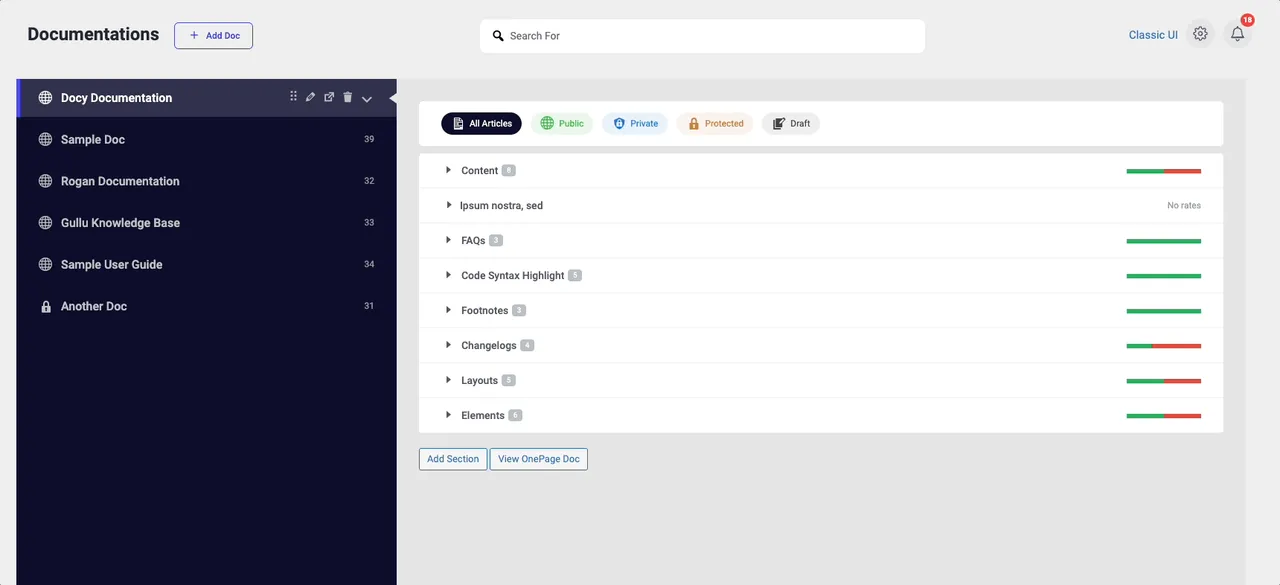
Intuitive drag-and-drop interface for organizing and nesting documentation. -
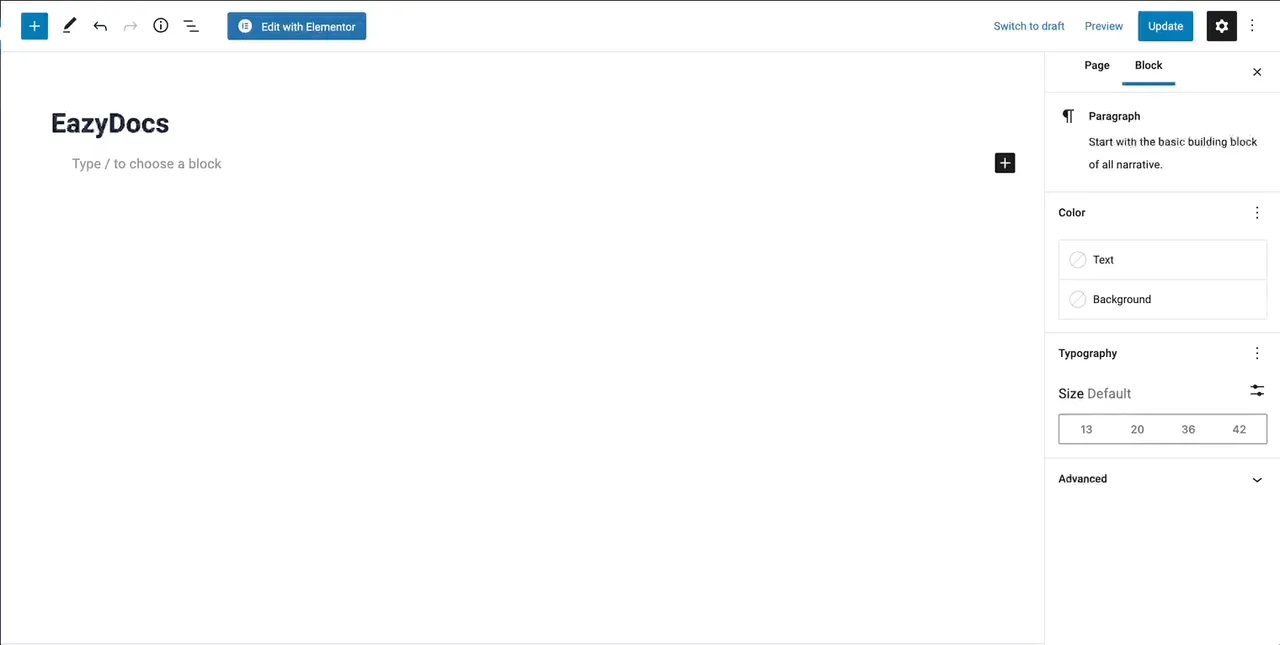
Beautiful, responsive knowledge base with live search functionality. -
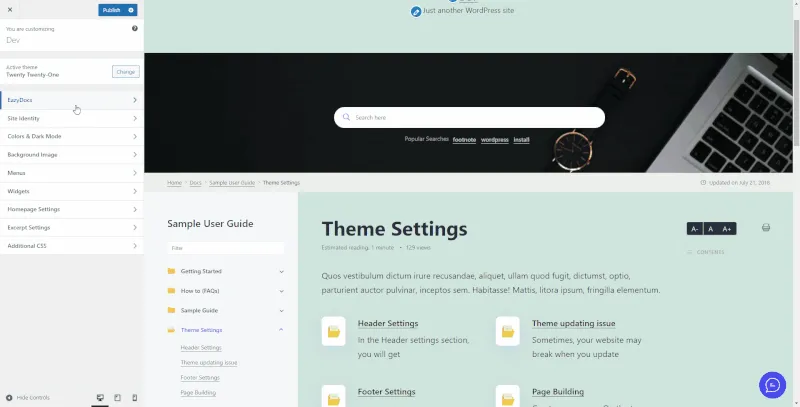
Live customizer with real-time color and font adjustments. -
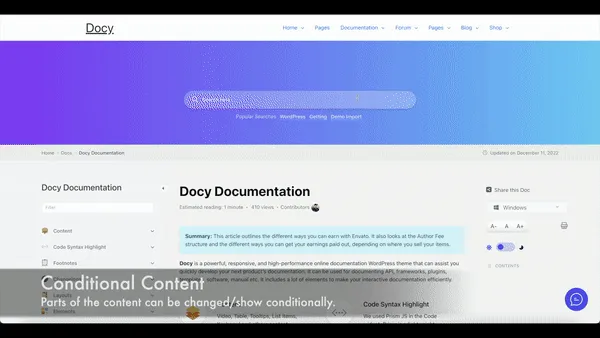
Fast AJAX live search with intelligent result suggestions. -
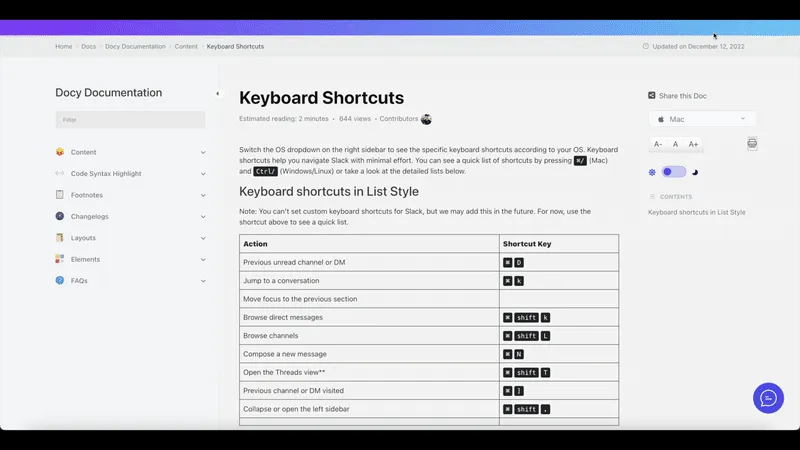
Reader feedback and article voting system to improve content. -
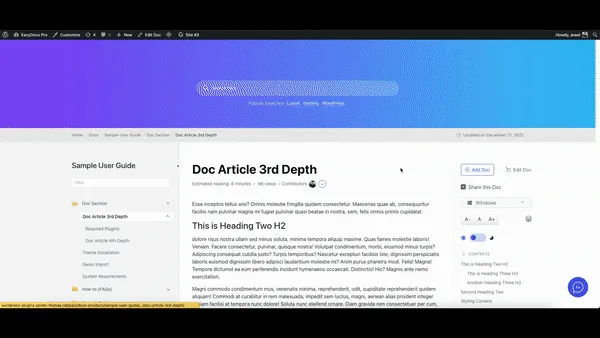
Social sharing buttons for easy documentation distribution. -
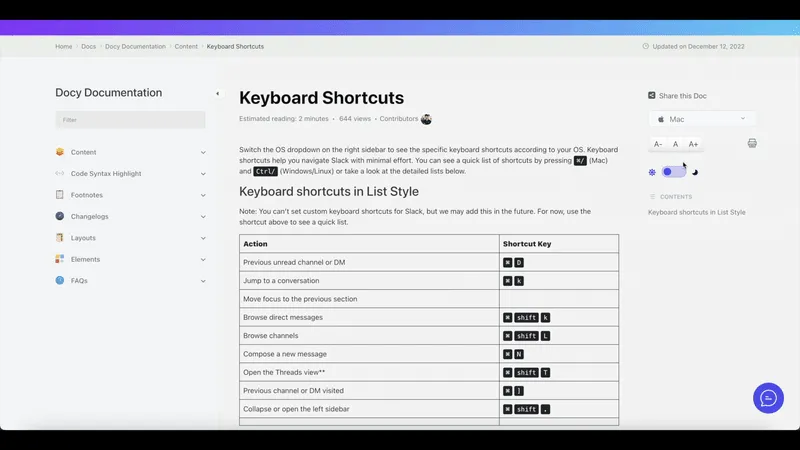
Adjustable font controls to customize the document's text size. -
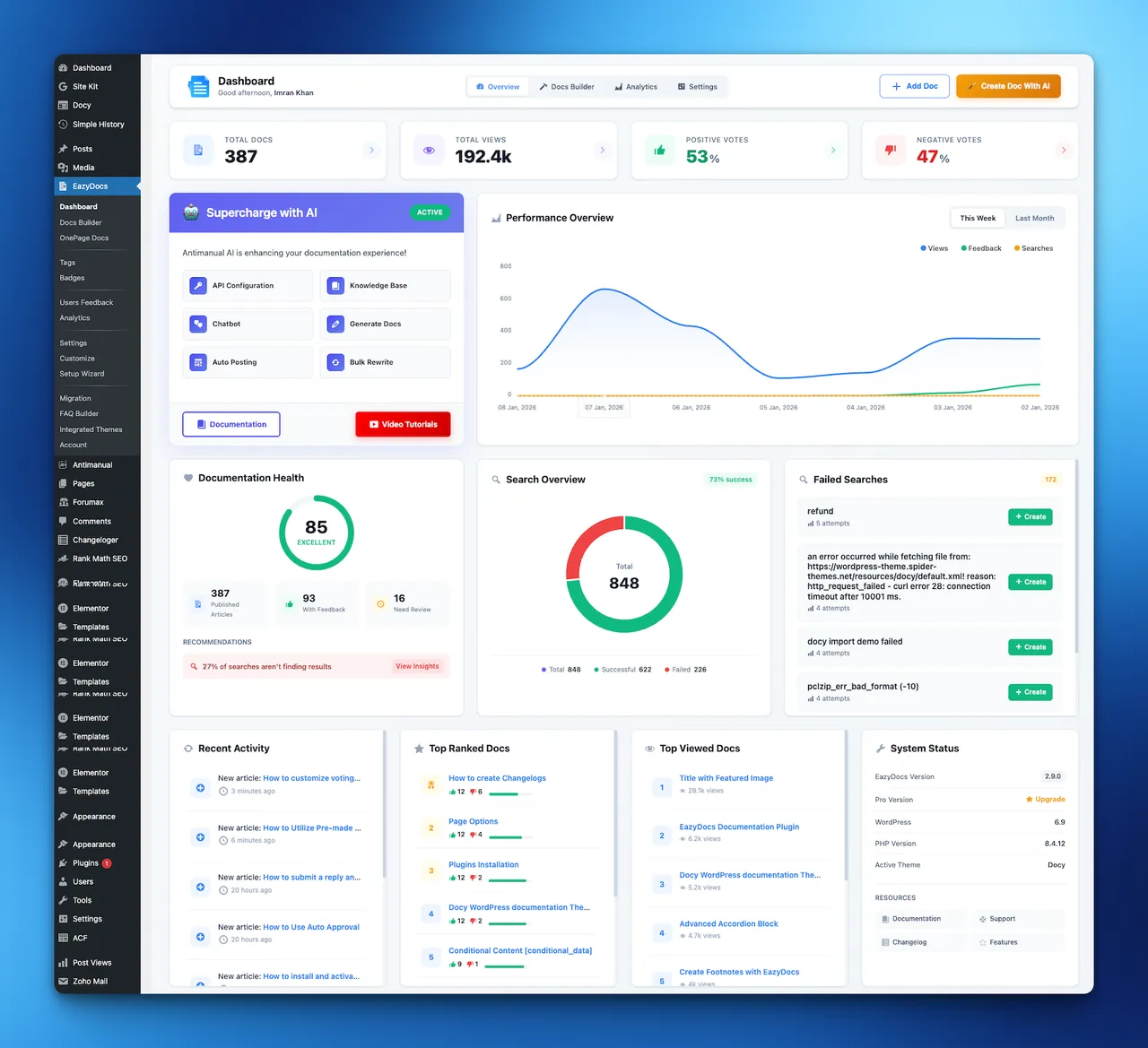
Dashboard – Centralized dashboard to manage documents, users, and settings efficiently. -
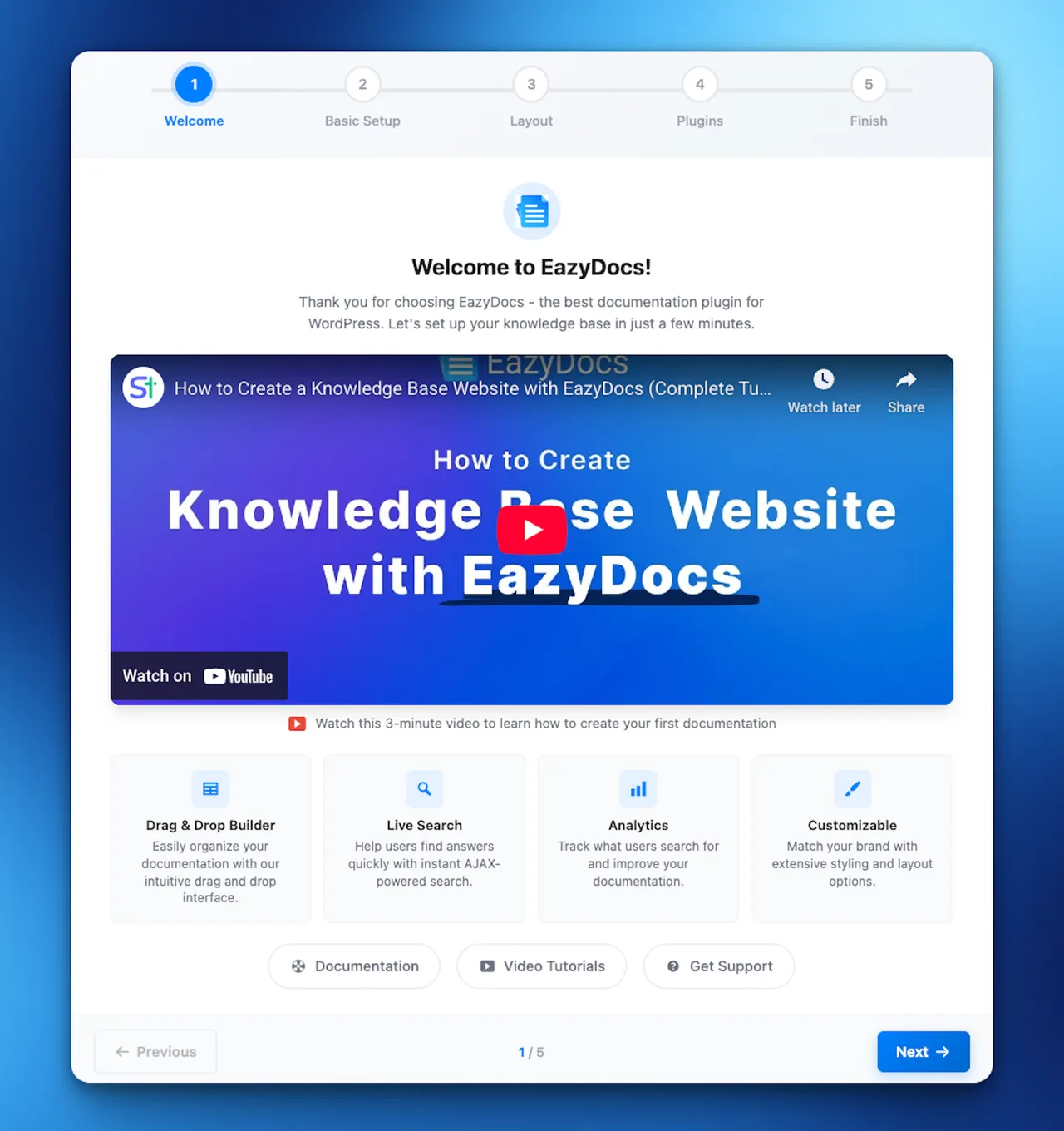
Setup Wizard – Quick guided setup for easy plugin configuration and faster onboarding. -
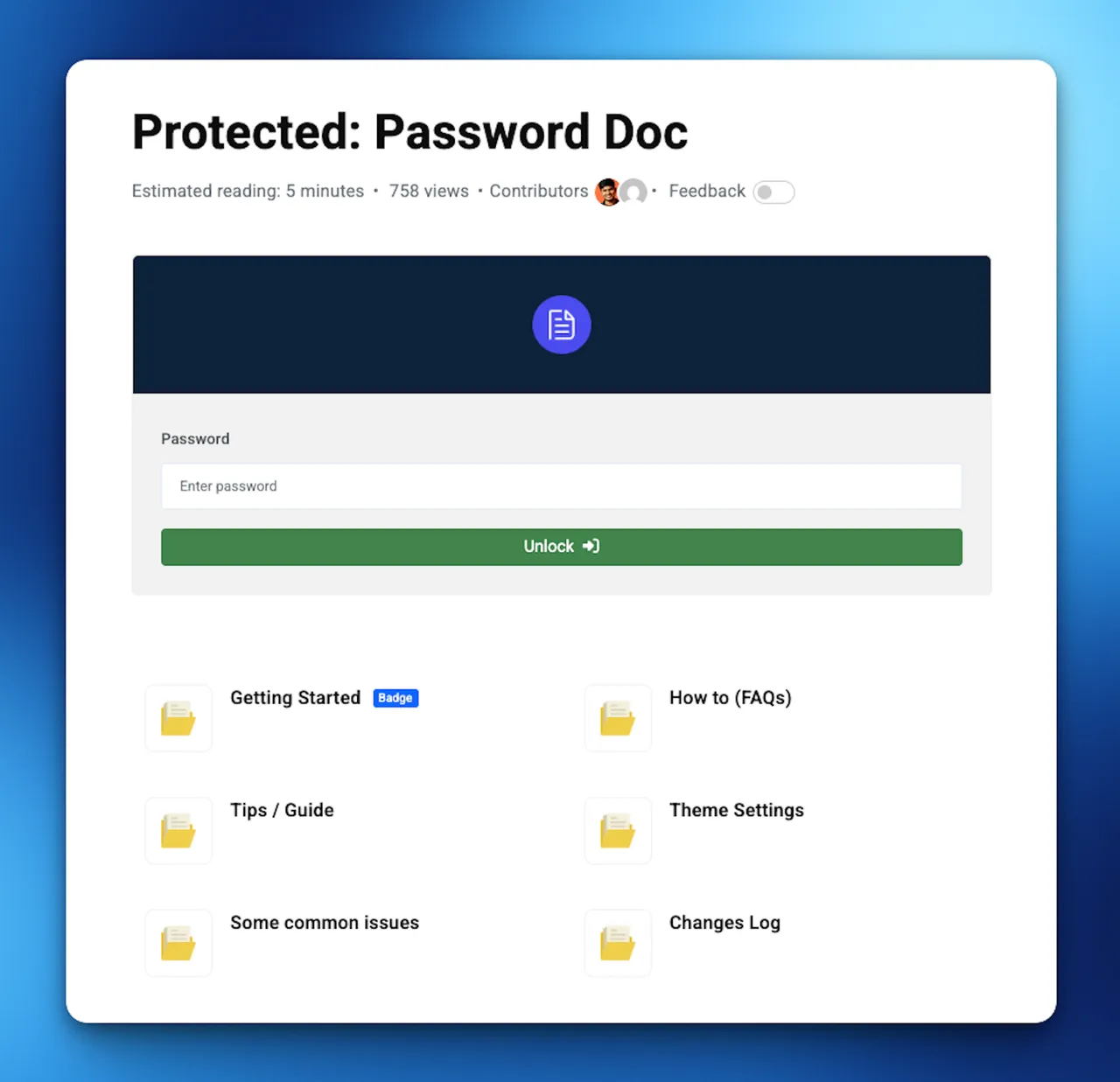
Password Protected Doc – Secure sensitive documents with password protection and controlled access.
Important information
- Private docs and role-based access are Pro features, not in the free plugin.
- AI chat, doc generation and semantic search need the separate Antimanual plugin. They are not part of EazyDocs itself.
- Requires WordPress 5.0 or newer, PHP 7.4 or newer and MySQL 5.6 or newer. Tested up to WordPress 7.1.4.
- The plugin has a history of published vulnerabilities, marked patched in the data. Keep it updated.
- The listing's claim of cutting support tickets by 70 percent is vendor marketing and is not backed by a source in the listing.
From the EazyDocs readme
Straight from the developer's WordPress.org listing.
Full description
The #1 WordPress Plugin for Building Professional Knowledge Bases, Help Centers & Documentation Sites
EazyDocs is the most comprehensive knowledge base and documentation plugin for WordPress. Create unlimited knowledge bases, help centers, wikis, and FAQs with zero limitations. Perfect for SaaS companies, software developers, agencies, e-learning platforms, and any business needing professional documentation.
Supercharge Your Docs with AI
Integrate EazyDocs with Antimanual to add an intelligent AI chatbot, automated documentation generation, and advanced AI search. Reduce support tickets by 70% and provide instant answers to your users.
Why Choose EazyDocs?
• Unlimited Everything – Create unlimited knowledge bases, docs, and categories with no restrictions.
• Drag-and-Drop Editor – Organize and nest documents intuitively. No coding required.
• AI-Powered Documentation – Seamlessly integrates with Antimanual for next-generation AI assistance.
• SEO-Optimized – Built-in Schema.org integration, SEO-friendly architecture, and structured data.
• Live Search – AJAX-powered search with instant results and smart suggestions.
• Beautiful by Default – Professional, modern design that works out-of-the-box.
• Mobile-Responsive – 100% responsive and retina-ready on all devices.
• Reader-Focused Design – Optimized for readability with sticky sidebars and automatic TOC.
Video Overview – See EazyDocs in Action
Trusted by 2000+ Businesses
From small teams to enterprise organizations, EazyDocs is the go-to solution for professional documentation.
Real Success Stories
• Bit Apps – Complete SaaS documentation
• Glamsy Designs – Product knowledge base
• Quomodosoft – Product knowledge base
Getting Started
• Install EazyDocs from the WordPress plugin directory.
• Activate the plugin.
• Go to EazyDocs > Getting Started.
• Create your first knowledge base and organize with drag-and-drop.
Need Help?
• Full Documentation
• Video Tutorials
• Support Forum
• Live Demo
• Upgrade to Premium
Core Features👇
AI-Powered Capabilities (via Antimanual)
• Intelligent AI Chatbot – Instant, accurate answers trained on your documentation (GPT-4, GPT-5, Gemini support).
• AI Documentation Generator – Create comprehensive docs automatically with custom tone and language.
• AI-Powered Search – Semantic search that understands user intent, not just keywords.
• Auto-Posting & Content Automation – Schedule and publish AI-generated documentation.
• Forum Integration – Convert forum discussions into permanent knowledge base articles.
Documentation Management
• Unlimited Knowledge Bases – Create as many as you need without limitations.
• Hierarchical Organization – Support for 4-level doc depth (5 levels with Pro).
• Smart Doc Ordering – Intuitive drag-and-drop interface for restructuring docs.
• Bulk Operations – Duplicate, manage visibility, and organize docs in bulk.
• Revision History – Track all changes and restore previous versions anytime.
• Markdown & CSV Import/Export – Export documentation as Markdown or CSV and re-import them to migrate content or create backups with ease.
User Experience & Navigation
• Live Search with AJAX – Fast, intelligent search with instant results.
• Sticky Navigation Sidebar – Effortless navigation while scrolling.
• Automatic Table of Contents – Built-in TOC for easy content scanning.
• Collapsible Sidebar – Focus on content without distractions.
• Recently Viewed Articles – Quick access to browsing history.
Reader Experience Tools
• Reading Time Estimates – Show how long each article takes to read.
• Views Counter – Display article popularity.
• Font Size Adjustment – Customizable reading comfort.
• Print Functionality – One-click optimized printing.
• Reader Feedback & Voting – Collect valuable insights on article helpfulness.
Customization & Design
• Live Customizer – Change colors, fonts, and settings without coding.
• Advanced Settings Page – Extensive customization with real-time search.
• Dark Mode Support – Professional dark mode for better readability (Pro feature).
• Page Builder Compatible – Works seamlessly with Gutenberg and Elementor.
Technical & SEO Features
• SEO Optimized – Built with search engine ranking in mind.
• Schema.org Integration – Rich snippets for better search visibility.
• Multilingual Ready – Native WPML and Polylang support so docs, categories, and tags can be translated and managed across multiple languages, with full RTL compatibility. Pre-translated languages included: Arabic (ar), Bengali (bn_BD), German (de_DE), Spanish – Spain (es_ES), Spanish – Mexico (es_MX), French (fr_FR), Portuguese – Brazil (pt_BR), Portuguese – Portugal (pt_PT), Russian (ru_RU), and Chinese Simplified (zh_CN).
• On-Demand Asset Loading – Lightweight footprint for fast performance.
Page Builder Integration
• Gutenberg Blocks – Comprehensive pre-built blocks for dynamic doc page creation. No third-party page builder required!
• Elementor Widgets (Optional) – Optional drag-and-drop widgets if you prefer Elementor.
• Shortcodes – Flexible shortcode system for advanced customization. Use [ezd_search] to place the live search bar on any page, post, or widget.
Note: EazyDocs works perfectly with WordPress’s native Gutenberg editor. You do NOT need Elementor or any other third-party page builder to create beautiful documentation and helpdesk landing pages.
Documentation Performance Tools
• Email Reporting – Receive analytics reports directly to your inbox.
• Engagement Analytics – Track user behavior and content performance (Pro feature).
• Doc Excerpt/Summary – Add summaries to display in listings and previews.
• Content Insights – Understand which articles are most helpful to visitors.
Premium Migration & Integration
• BetterDocs Migration Tool – One-click migration to preserve all your existing documentation.
• Google Login – Allow readers to sign in with Google accounts.
• User Role Management – Control who can create and edit documentation (Pro feature).
• Private Docs – Restrict access with login requirements or passwords (Pro feature).
How to Create a Knowledge Base Website with EazyDocs
AI Integration – Supercharge Your Docs with Antimanual
Add Enterprise-Grade AI to Your Documentation – Reduce Support Tickets by 70%+
Integrate EazyDocs with Antimanual to transform your knowledge base into an intelligent support hub. Get AI-powered chatbot, auto-generated documentation, semantic search, and more.
Why a separate plugin? We believe AI integration shouldn’t be locked to EazyDocs — or to any single plugin. It should give you the freedom to put these capabilities to work across your entire website. That’s why the chatbot knowledge base, excerpt and taxonomy generation, SEO, and article/post generation aren’t limited to Docs; they work with any post type you choose. The result is one focused toolkit instead of a stack of overlapping plugins for different AI tasks. Best of all, Antimanual is completely free — simply bring your own AI provider API key. It supports OpenAI, Anthropic, Grok, Gemini, Minimax, Deepseek, Qwen, OpenCode API, and many more.
Watch the AI Integration in Action
Key AI Features
🤖 24/7 AI Chatbot – Automatically trained on your EazyDocs. Provides instant, contextual answers powered by GPT-4, GPT-5, and Gemini. Reduce support tickets by 70%+.
📚 Auto Doc Generator – Create professional documentation in seconds with custom tone and language. SEO-optimized with automatic formatting.
🔍 Semantic AI Search – Understands user intent, not just keywords. Finds relevant content even without exact matches.
✍️ Auto-Posting – Schedule AI-generated content automatically. Keep your documentation fresh and SEO-friendly.
💬 Forum Integration – Convert solved forum discussions into permanent knowledge base articles. Automate responses and capture community insights.
Why Choose Antimanual Over Other AI Documentation Solutions?
• Advanced AI Models: GPT-4, GPT-5, and Gemini support (not just GPT-3.5)
• Multi-Source Training: Train on Docs, PDFs, URLs, and custom text
• Conversation History: Full context for smarter, personalized answers
• Content Automation: Bulk rewrite, auto-posting, and scheduling
• Forum Automation: Transform discussions into permanent documentation
• Global Support: Multi-language and RTL language support
• Easy Deployment: Simple shortcodes and cross-domain embedding
Proven Results You’ll Experience
• 70%+ Reduction in Support Tickets – Instant AI answers eliminate most routine questions
• Scale Your Support – Handle unlimited queries without hiring more staff
• Better SEO Rankings – Fresh AI-generated content improves search visibility
• Happier Visitors – Instant answers reduce bounce rates and improve satisfaction
• Save Time & Money – Automate documentation creation, updates, and responses
Quick Start with Antimanual + EazyDocs
• Install Antimanual from the WordPress plugin directory
• Add your own AI provider API key in Antimanual settings (OpenAI, Anthropic, Grok, Gemini, Minimax, Deepseek, Qwen, OpenCode API, and more)
• Antimanual automatically indexes your entire EazyDocs knowledge base
• Customize chatbot appearance and response style
• Add to your docs with a simple shortcode – Done!
Learn More About Antimanual • View Full Integration Guide
Premium Plans & Features
EazyDocs comes with flexible pricing to suit businesses of all sizes:
EazyDocs Pro – Advanced Features
Unlock professional features perfect for growing businesses:
• Doc Root URL customization.
• Book Chapter Elementor widgets.
• Voting & Comments notifications.
• Doc Helper Assistant with Contact Form.
• Conditional Content dropdowns.
• Ajax Doc Loading for faster performance.
• Dark Mode for professional documentation.
• OnePage Documentation layouts.
• User Role Management (control who can edit).
• Docs Archive Masonry layouts.
• Private Docs with login pages.
• Glossary documentation.
• Extended Doc layouts.
• Doc Badges for content organization.
• Suggested Search Keywords.
• Bulk Duplicate Documentation.
• Bulk Doc Visibility controls.
• User Restrictions & IP limitations.
• External Site Integration support.
• Editable Single Doc Sidebars.
• Full RTL Compatibility.
• Users Feedback Database.
• Attach documents to any page.
• Docs Assistant Dark Mode.
• Docs Assistant Full Article View.
• Documentation Subscription Button.
• Collaborative Docs Status Icons.
• DocBox Status Badges.
EazyDocs Promax – Complete Solution
Everything in Pro, plus advanced analytics and management:
• Subscribe to Docs feature.
• Feedback on Selected Text.
• Complete Analytics Dashboard.
• Frontend Contributor access.
• Add/Edit docs from frontend.
• Footnotes support.
• Elementor pre-made templates.
• Author/Contributor profile pages.
• Daily/Weekly/Monthly Statistics Email Reporting.
View All Premium Features & Pricing
How to Migrate from BetterDocs to EazyDocs
About the Developer
EazyDocs is developed by Spider Themes, a team of experienced WordPress developers dedicated to creating powerful, user-friendly plugins. Our mission is to help businesses and creators build professional documentation without complexity.
Why You Can Trust EazyDocs:
• Over 2,000+ active installations.
• Trusted by businesses worldwide.
• Continuously updated and improved.
• Active community support.
• Regular security updates and performance improvements.
• Built by dedicated WordPress professionals.
WHAT’S NEXT?
If you like EazyDocs, then consider checking out our other WordPress Plugins:
Antimanual – AI-powered assistant that automates content creation, documentation, and support, transforming static sites into dynamic experiences.
Advanced Accordion Block – Lightweight Gutenberg block for creating visually appealing, organized accordion sections with extensive styling options.
Changeloger – Transform plain text changelogs into visually stunning, organized representations with pagination and version links.
Forumax – Standalone, feature-rich community forum plugin with voting, private replies, and Elementor integration.
Jobus – Comprehensive job board solution transforming your site into a recruitment platform with dashboards and ATS.
Spider Elements – Versatile library of 20+ creative widgets to enhance Elementor and build professional websites.
External services
Spider Themes Helpdesk (support assistant)
EazyDocs admin pages show a chat button that opens the EazyDocs documentation assistant hosted on the Spider Themes helpdesk (helpdesk.spiderthemes.net), so you can search the docs and ask questions without leaving WordPress.
Nothing is loaded from the helpdesk until you press the chat button. Hovering over the button only opens a network connection to the helpdesk so the chat loads faster; no data is sent. When you open it, the assistant is loaded in an iframe from https://helpdesk.spiderthemes.net/iframe-assistant/, and your browser sends the product name and the documentation section to show. If you opted in through the Freemius opt-in screen and you are the administrator who opted in, your name and email address are also sent so the support chat is pre-filled. Messages you type in the chat are sent to the helpdesk to be answered.
You can turn the assistant off under EazyDocs → Settings → General Settings → Hide Support Chat (or with add_filter( 'ezd_support_assistant_enabled', '__return_false' );).
• Spider Themes — Terms — Privacy
Installation
Minimum Requirements
* WordPress 5.0 or higher.
* PHP 7.4 or higher.
* MySQL 5.6 or higher.
Installation Method 1: From WordPress Dashboard (Recommended)
1. Go to Plugins > Add New.
2. Search for “EazyDocs”.
3. Click Install Now.
4. Click Activate.
5. Go to EazyDocs > Getting Started to begin creating your knowledge base.
Installation Method 2: Manual Upload via FTP/cPanel
1. Download the eazydocs.zip file.
2. Extract the file.
3. Upload the eazydocs folder to /wp-content/plugins/ via FTP or cPanel File Manager.
4. Go to Plugins menu in WordPress and click Activate.
5. Go to EazyDocs > Getting Started.
After activation, you’ll see a setup wizard to help you create your first knowledge base in minutes.
Developer FAQ (17)
- Is EazyDocs compatible with my WordPress theme?
- Yes! EazyDocs works seamlessly with all standard WordPress themes, including popular ones like Astra, OceanWP, GeneratePress, and others. It’s designed to integrate beautifully with any theme without conflicts.
- What makes EazyDocs different from other knowledge base plugins?
- EazyDocs stands out with unlimited knowledge bases, intuitive drag-and-drop organization, beautiful default design, built-in SEO optimization, live AJAX search, and reader-focused features like sticky sidebars and automatic TOC. It’s created specifically for creating professional documentation without coding.
- Can I use EazyDocs for a SaaS product help center?
- Absolutely! EazyDocs is perfect for SaaS products. It includes user authentication, private documentation, role-based access control, multi-level doc organization, and all the features needed for a professional help center.
- Does EazyDocs work with WordPress Multisite?
- Yes, EazyDocs fully supports WordPress Multisite networks. You can create separate knowledge bases for each site or share documentation across your network.
- Can I restrict access to specific documentation?
- Yes! EazyDocs Pro includes private documentation with login requirements, password protection, and user role-based access controls so you can restrict documentation to specific users.
- Does EazyDocs have a built-in search feature?
- Yes! EazyDocs includes powerful AJAX live search that returns instant results as users type. Search is intelligent and provides results at every documentation level with smart suggestions.
- Can I add a search bar to my documentation pages?
- Absolutely. EazyDocs includes pre-built Gutenberg blocks and Elementor widgets for search functionality. You can add search bars anywhere on your documentation pages.
- Do I need to know how to code to use EazyDocs?
- No coding skills required! EazyDocs is completely beginner-friendly with a visual interface, drag-and-drop editor, and straightforward settings. Everything can be customized through the WordPress admin.
- Is EazyDocs SEO-friendly?
- Yes, EazyDocs is built with SEO in mind. It includes Schema.org integration, clean HTML markup, sitemap support, proper heading hierarchy, and all the technical SEO features needed to rank well in search engines.
- Does EazyDocs support multiple languages?
- Yes! EazyDocs is translation-ready and fully compatible with WPML. You can build multilingual documentation in any language, including RTL languages like Arabic and Hebrew.
- Can I migrate from BetterDocs to EazyDocs?
- Yes! EazyDocs includes a built-in one-click migration tool that transfers all your BetterDocs documentation. Go to EazyDocs > Migration to get started.
- Does EazyDocs work with page builders like Elementor?
- Yes! EazyDocs includes pre-built widgets and blocks for both Elementor and Gutenberg page builders, making it easy to create custom documentation pages.
- Does EazyDocs have AI capabilities?
- Yes! EazyDocs seamlessly integrates with Antimanual, our advanced AI plugin. This integration provides intelligent chatbot support, AI-powered documentation generation, semantic search, and automated content creation. Unlike basic AI features in other documentation plugins, Antimanual offers enterprise-grade capabilities including GPT-5 support, multi-source training, conversation history, and forum automation. See the “AI Integration” section above for complete details.
- Why is the AI functionality a separate plugin (Antimanual)?
- If you want the AI features, you can install the Antimanual plugin alongside EazyDocs at any time. It works hand in hand with EazyDocs, but it is never mandatory. We built Antimanual as a standalone plugin because we believe AI integration shouldn’t be locked to EazyDocs — or to any single plugin. It should give you the freedom to use these capabilities across your whole site. The chatbot knowledge base, excerpt and taxonomy generation, SEO, and article/post generation are genuinely useful well beyond Docs articles, so you can apply them to any post type you like. That way you don’t have to juggle multiple plugins for different AI tasks — we’ve kept everything you need together in one place. Best of all, it’s completely free. You simply bring your own AI provider API key to get started, with support for OpenAI, Anthropic, Grok, Gemini, Minimax, Deepseek, Qwen, OpenCode API, and many more.
- How do I get support if I have issues?
- EazyDocs has multiple support channels: * Support Forum * Documentation & Guides * Video Tutorials
- Can I use EazyDocs on multiple websites?
- Yes! You can use EazyDocs on as many websites as you need. Each installation can have unlimited knowledge bases.
- Where can I report bugs or contribute?
- You can report bugs and contribute to the project on GitHub
Downloads, last 30 days
Trend vs previous period: +35.6%
Average daily downloads: 188 over the last 7 days , 123 over 30 days.
Security history
Past CVEs, patched · 11 published vulnerabilities (Wordfence) · most recent May 1, 2026
- Patched 6.5 Medium EazyDocs <= 2.3.5 - Missing Authorization via doc_one_page and edit_doc_one_page CVE-2023-47648 · Nov 7, 2023 · affects *-2.3.5 · fixed in 2.3.6
- Patched 8.8 High EazyDocs <= 2.3.3 - Authenticated (Subscriber+) SQL Injection CVE-2023-6035 · Nov 20, 2023 · affects [*, 2.3.4) · fixed in 2.3.4
- Patched 6.1 Medium EazyDocs <= 2.3.5 - Unauthenticated Stored Cross-Site Scripting via edit_doc_one_page CVE-2023-47549 · Nov 7, 2023 · affects *-2.3.5 · fixed in 2.3.6
- Patched 6.1 Medium Freemius SDK <= 2.5.9 - Reflected Cross-Site Scripting via fs_request_get CVE-2023-33999 · Jul 18, 2023 · affects *-2.2.0 · fixed in 2.2.1
- Patched 4.4 Medium EazyDocs - Most Powerful Knowledge base, wiki, Documentation Builder Plugin <= 2.4.1 - Authenticated (Admin+) Stored Cross-Site Scripting CVE-2024-3999 · Jun 11, 2024 · affects *-2.4.1 · fixed in 2.5.0
- Patched 8.8 High EazyDocs <= 2.8.0 - Authenticated (Contributor+) Local File Inclusion CVE-2024-54376 · Dec 11, 2024 · affects *-2.8.0 · fixed in 2.8.1
- Patched 6.4 Medium EazyDocs <= 2.5.0 - Authenticated (Contributor+) Stored Cross-Site Scripting CVE-2024-38720 · Jul 11, 2024 · affects *-2.5.0 · fixed in 2.5.1
- Patched 4.3 Medium EazyDocs <= 2.7.1 - Missing Authorization CVE-2025-32221 · Apr 7, 2025 · affects *-2.7.1 · fixed in 2.7.2
Show all 11 vulnerabilities
- Patched 6.1 Medium Freemius <= 2.10.1 - Reflected DOM-Based Cross-Site Scripting via url Parameter CVE-2024-13362 · May 1, 2026 · affects *-2.5.7 · fixed in 2.5.9
- Patched 4.3 Medium EazyDocs 2.3.8 - 2.3.9 - Missing Authorization CVE-2024-0248 · Dec 21, 2023 · affects 2.3.8-2.3.9 · fixed in 2.4.0
- Patched 4.3 Medium EazyDocs <= 2.5.0 - Missing Authorization CVE-2024-38721 · Jul 11, 2024 · affects *-2.5.0 · fixed in 2.5.1
EazyDocs FAQ
Does it work with my theme?
The listing says it works with standard themes, naming Astra, OceanWP and GeneratePress.
Can I use it for a SaaS help center?
Yes. Nested docs, search and feedback suit it. Private docs with logins and role controls need Pro.
Does it support Multisite?
Yes. You can run separate knowledge bases per site or share docs across the network.
Can I restrict access to some docs?
Yes, with Pro. It includes login requirements, password protection and role-based access.
Is there built-in search?
Yes. Live search shows results as people type, and prebuilt blocks and widgets place it on any page.
Does it support other languages?
Yes. It is translation-ready and works with WPML, including right-to-left languages.
Can I migrate from BetterDocs?
Yes. Go to EazyDocs, then Migration, for a one-click transfer.
Does it have AI?
Through the separate Antimanual plugin, which adds a chatbot, doc generation and semantic search. It is optional.
EazyDocs alternatives
Website Templates, Page Templates and Block Patterns for WordPress Starter Templates is a growing library of 300+ ready-to-use website templates for WordPress. Import a complete website design, a single page…
🚀 Explore Powerful 15+ FAQ & Accordion Blocks 📚 Start with 200+ Ready FAQ & Accordion Patterns 🌐 Visit the Official Website Easy Accordion ❤️ 176+ ⭐⭐⭐⭐⭐ Reviews & 4.9/5 Happiness Rating on Trustpilot Create…

Spectra Blocks is a complete rebuild of Spectra on WordPress’s modern core-block APIs - an AI website builder built directly into the Block Editor. Describe the page you want. Zip AI, our AI companion plugin,…

Build Anywhere. Own It In WordPress. Start from a prompt, a client brief, a Figma design, or an AI build. UiChemy turns it into native, editable WordPress you own, in the builder you already use. Building For…

Listdom is a directory system builder for WordPress, built for real directory projects rather than just listing cards. Create business directories, real estate portals, service directories, local guides, and…

CREATE A COMPELLING DARK MODE VERSION OF YOUR WEBSITE ✨ Create a dark mode version of your website without any complicated setup. Activate the plugin and your site visitors will experience a dark mode or light mode…
Listing data from WordPress.org and the Wordfence vulnerability feed, refreshed Nov 9, 2026; listing details fetched Nov 14, 2026. Screenshots are from the plugin's WordPress.org listing. Not affiliated with Spider Themes.