
- active installs
- 1K+
- 1 ratings
- 5.0
- since last update
- 534d
- releases in 12 months
- 0
- support threads resolved
- —
- avg daily downloads
- 21
- on WordPress.org
- 3 years
Greenshift Smart Code AI at a glance
Greenshift Smart Code AI is a free WordPress AI website builder plugin by wpsoul with 1K+ active installs and a 5.0/5 rating from 1 reviews. It was last updated on May 24, 2025, is tested up to WordPress 6.9.11 and needs PHP 7.0+. It has no published security vulnerabilities in the Wordfence database. Our quality score is 55/100.
What is Greenshift Smart Code AI?
Smart Code AI is a WordPress plugin for writing custom code snippets with the help of an AI chat. You ask the AI to build a snippet, copy the result into the right code area, and keep refining it through the chat.
It also gives you a code editor that checks for errors and offers snippet suggestions and autocompletion, in place of the plain text box of the HTML block. A snippet library lets you save code and reuse it elsewhere on the site through shortcodes. HTML, JS, CSS and PHP can be previewed inside the editor.
It suits site owners and developers who write small bits of custom code and want help doing it. The listing is short, so details such as the AI provider, pricing and limits are not stated.
Best for
- Site owners adding small custom code snippets
- Developers wanting quick AI drafts
- Anyone reusing code across pages
- Users of the Greenshift page builder tools
Greenshift Smart Code AI features
AI chat for snippets
Ask the AI for a snippet, copy code areas with one click and keep adjusting through the chat.
Code checker and autocomplete
The editor checks code for errors and suggests snippets and completions as you type.
Snippet library
Save snippets and reuse them anywhere on the site using shortcodes.
Preview in the editor
HTML, JS, CSS and PHP can be previewed without switching to the front end.
Collapsed mode
Hide large code areas in one click to keep the page tidy, or switch to preview mode.
Greenshift Companion
A companion plugin can style code snippets without writing code.
Greenshift Smart Code AI free vs pro
Free WordPress.org version
- AI chat for building snippets
- Code editor with error checking
- Snippet library with shortcodes
- In-editor preview
The plugin is free on WordPress.org and the listing describes no paid tier. The listing does not say which AI service it uses or whether you need your own API key, so check the settings after installing.
How to use Greenshift Smart Code AI
- Install and activate
In wp-admin go to Plugins, then Add New. Search for Greenshift Smart Code AI, install it and activate it.
- Open the code editor
Add the code element where you want custom code to appear.
- Ask the AI
Describe the snippet you need in the chat and review what it produces.
- Copy and refine
Copy the code into the right area, then keep adjusting through the chat.
- Save and reuse
Store the snippet in the library and place it elsewhere with a shortcode.
Greenshift Smart Code AI screenshots (3)
-
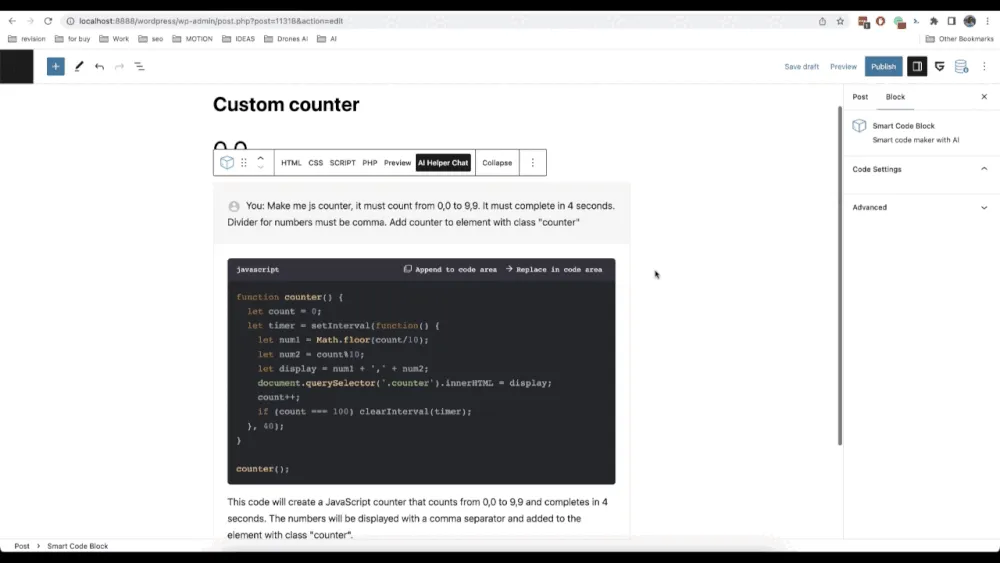
Smart insertion. Easily copy AI code snippets to proper code section -
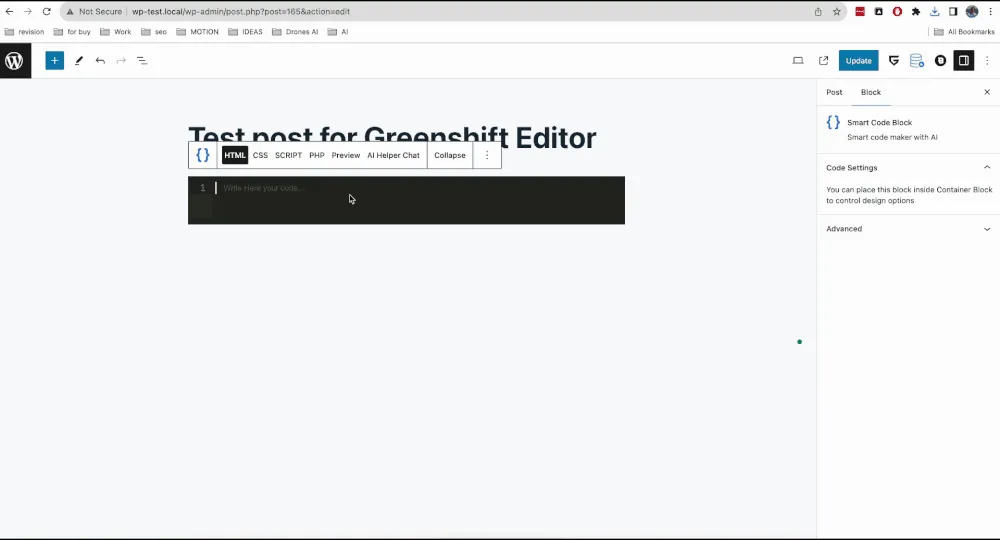
Code editor. Use advanced code editor with autocomplete snippets -
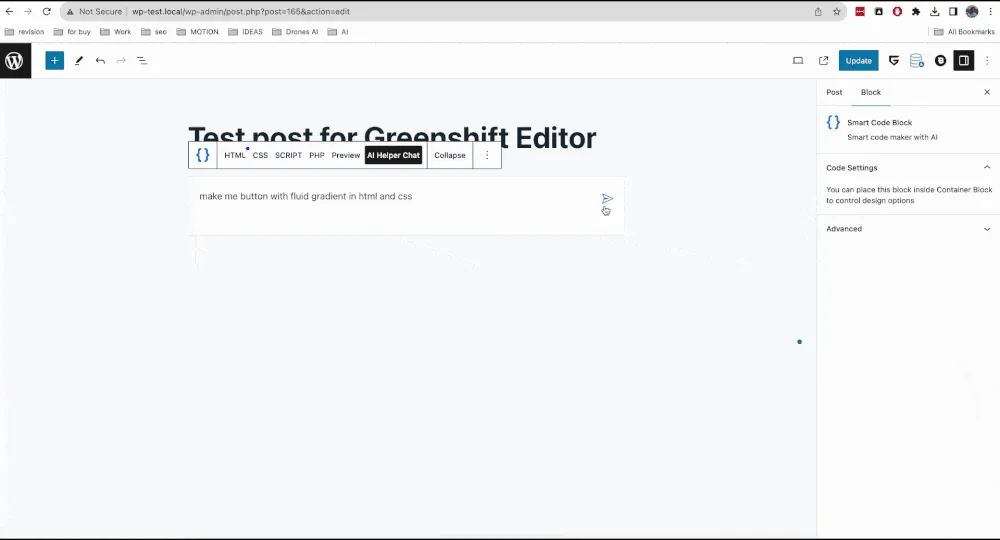
AI helper. Use popular AI models for code generation and code helper.
Important information
- The listing is brief. It does not name the AI provider, the pricing model or any usage limits.
- Review any generated code before using it. PHP snippets run on your server and can break a site if they are wrong.
- Requires WordPress 6.5 or newer and PHP 7.0 or newer. It is tested up to WordPress 6.9.11.
- Test snippets on a staging site first, and keep a backup.
- No known vulnerabilities are recorded.
From the Greenshift Smart Code AI readme
Straight from the developer's WordPress.org listing.
Full description
Are you tired to find proper info in internet to extend your site? Look no further! Smart Code AI is here to save the day. This groundbreaking plugin harnesses the capabilities of AI to assist you in building custom code snippets effortlessly.
Features and Benefits:
✅ AI-Powered Suggestions: Our cutting-edge AI technology assists you in real-time, offering relevant code suggestions while you build your custom snippets. Ask AI to build you the snippet, copy code areas with one click to proper section, continue to use chat for fine tuning.
✅ Code checker and snippets. No more simple text editor like in HTML block. Type your code and special editor will check on errors, suggest snippets and autocompetions.
✅ Code snippets library. Save your code snippets and reuse them in any place of your site via shortcodes.
✅ Preview code directly in editor. No need to switch to frontend and backend. Html, JS, CSS and even php code can be previewed in editor.
✅ Collapsed mode. This will help you to keep page clean. You can hide/unhide big code areas in one click. Or use preview mode to see final result directly in editor.
✅ Greenshift Companion plugin can allow you to style code snippets with no code.
Download Smart Code AI today and witness the future of coding with AI assistance. It’s time to revolutionize your development process!
For Developers
View the source files for this project on github.
Downloads, last 30 days
Trend vs previous period: -16.3%
Average daily downloads: 20 over the last 7 days , 21 over 30 days.
Security history
No known CVEs · 0 published vulnerabilities (Wordfence)
Recent releases
- v0.5
Added: support for Gemini models * Added: support for new updated OpenAI, Claude and Gemini models
- v0.4
Added: support for New Claude models * Added: support for New Gemini models
- v0.3
Added: support for Anthropic models * Added: support for DeepSeek Chat * Added: all currentavailable OpenAI models
- v0.2
Added: support for Greenshift Code field in Element block * Added: support for Greenshift field for Custom css
Greenshift Smart Code AI FAQ
What does Smart Code AI do?
It helps you write custom code snippets with an AI chat, and gives you an editor that checks code and previews it.
Which languages can it preview?
The listing names HTML, JavaScript, CSS and PHP.
Can I reuse snippets?
Yes. Save them in the snippet library and place them elsewhere on the site with shortcodes.
Does it check my code for errors?
Yes. The editor checks code and suggests snippets and autocompletions as you type.
Is it free?
It is free on WordPress.org. The listing does not describe a paid version or give details on AI costs.
Greenshift Smart Code AI alternatives

Website Templates, Page Templates and Block Patterns for WordPress Starter Templates is a growing library of 300+ ready-to-use website templates for WordPress. Import a complete website design, a single page…

🚀 Explore Powerful 15+ FAQ & Accordion Blocks 📚 Start with 200+ Ready FAQ & Accordion Patterns 🌐 Visit the Official Website Easy Accordion ❤️ 176+ ⭐⭐⭐⭐⭐ Reviews & 4.9/5 Happiness Rating on Trustpilot Create…

Spectra Blocks is a complete rebuild of Spectra on WordPress’s modern core-block APIs - an AI website builder built directly into the Block Editor. Describe the page you want. Zip AI, our AI companion plugin,…

Build Anywhere. Own It In WordPress. Start from a prompt, a client brief, a Figma design, or an AI build. UiChemy turns it into native, editable WordPress you own, in the builder you already use. Building For…

Listdom is a directory system builder for WordPress, built for real directory projects rather than just listing cards. Create business directories, real estate portals, service directories, local guides, and…

CREATE A COMPELLING DARK MODE VERSION OF YOUR WEBSITE ✨ Create a dark mode version of your website without any complicated setup. Activate the plugin and your site visitors will experience a dark mode or light mode…
Listing data from WordPress.org and the Wordfence vulnerability feed, refreshed Nov 9, 2026; listing details fetched Nov 14, 2026. Screenshots are from the plugin's WordPress.org listing. Not affiliated with wpsoul.