

Linguise
Linguise - AI Automatic Multilingual Translation · by Linguise
- active installs
- 1K+
- 31 ratings
- 4.9
- since last update
- 4d
- releases in 12 months
- —
- support threads resolved
- 0%
- avg daily downloads
- 231
- on WordPress.org
- 5.6 years
Linguise at a glance
Linguise is a free WordPress AI translation plugin by Linguise with 1K+ active installs and a 4.9/5 rating from 31 reviews. It was last updated on Nov 5, 2026, is tested up to WordPress 7.0.8 and needs PHP 7.0+. It works with Google Gemini. It has no published security vulnerabilities in the Wordfence database. Our quality score is 82/100.
What is Linguise?
Linguise is a WordPress plugin that connects your site to a cloud translation service and shows translated versions of your pages in many languages. It needs an API key from a Linguise account. The listing is clear that it is not a free-forever plugin: there is a one-month free trial, after which a paid plan applies. The plugin itself is only the connection, so the quality, speed and cost of translation all depend on the vendor service.
Translations are produced by AI models in the service, and you can revise them from a front-end editor or the vendor dashboard. Each language gets its own URLs, with alternate links, an x-default tag, canonical tags and translated XML sitemaps. Translated content is stored on the vendor's servers, with an option to keep a local copy. You can also add replace and exclude rules, and invite translators for each language to correct what the AI produces.
It suits owners who want automatic translation with SEO handled and who accept a subscription. It works with WooCommerce, page builders and dynamic Ajax content. The listing quotes two different trial word allowances, so confirm the current terms with the vendor before you start. Before you start, test a few pages and review the translation quality, since a full site translation is a paid commitment.
Best for
- Owners who want hands-off AI translation with SEO URLs
- WooCommerce stores that need translated checkout and emails
- Sites with translators who revise AI output
- Teams that accept a subscription instead of manual translation
Linguise features
Automatic AI translation
Translates your whole site into 85+ languages using cloud AI models, with an optional higher-quality Linguise AI add-on.
Translated URLs and SEO tags
Creates a dedicated URL per language, with alternate links, x-default, canonical tags and translated sitemaps.
Front-end live editor
Admins and translators can correct translations on the page, including SEO meta information.
Translator accounts
Register translators by language and website, with roles for translators, managers and admins.
Replace and exclude rules
Replace or exclude content site-wide by language, URL or CSS class.
WooCommerce support
Translates the shop and checkout, supports searches in any language and translates order emails by customer language.
Language switcher options
Show flags in a menu, popup, dropdown, floating position or by PHP snippet, with names in English or the original language.
Ajax and page builder support
Handles dynamic content loaded after the page and works with builders such as Elementor and Divi.
Local cache option
Store translations and translated URLs in a local folder instead of relying only on the vendor's servers.
Browser language redirect
Send visitors to the language their browser prefers.
Linguise free vs pro
Free WordPress.org version
- The WordPress connector plugin
- A one-month free trial of the translation service
- All features during the trial, with no language or page view limit
Pro Paid version
- Paid yearly plans by translation volume
- Optional pay-as-you-go Linguise AI translation model
- Unlimited plan for large websites
The listing gives $165 per year, or $15 per month, for 200,000 words, and describes a free first month. It states two different trial allowances (600,000 and 400,000 words), so check the vendor's current offer. Translation runs through the vendor's service with an API key from your Linguise account.
How to use Linguise
- Register a Linguise account
Create an account on the vendor's dashboard, add your domain and choose your original and translated languages.
- Copy the API key
The dashboard generates an API key for the site.
- Install the plugin
In wp-admin, go to Plugins, then Add New, search for Linguise, then install and activate it.
- Paste the key
Open the Linguise menu in wp-admin and paste your API key. Your language configuration loads automatically.
- Add a language switcher
Place the flag switcher in a menu, with a shortcode or with a PHP snippet, then review translations in the live editor.
Linguise screenshots (7)
-
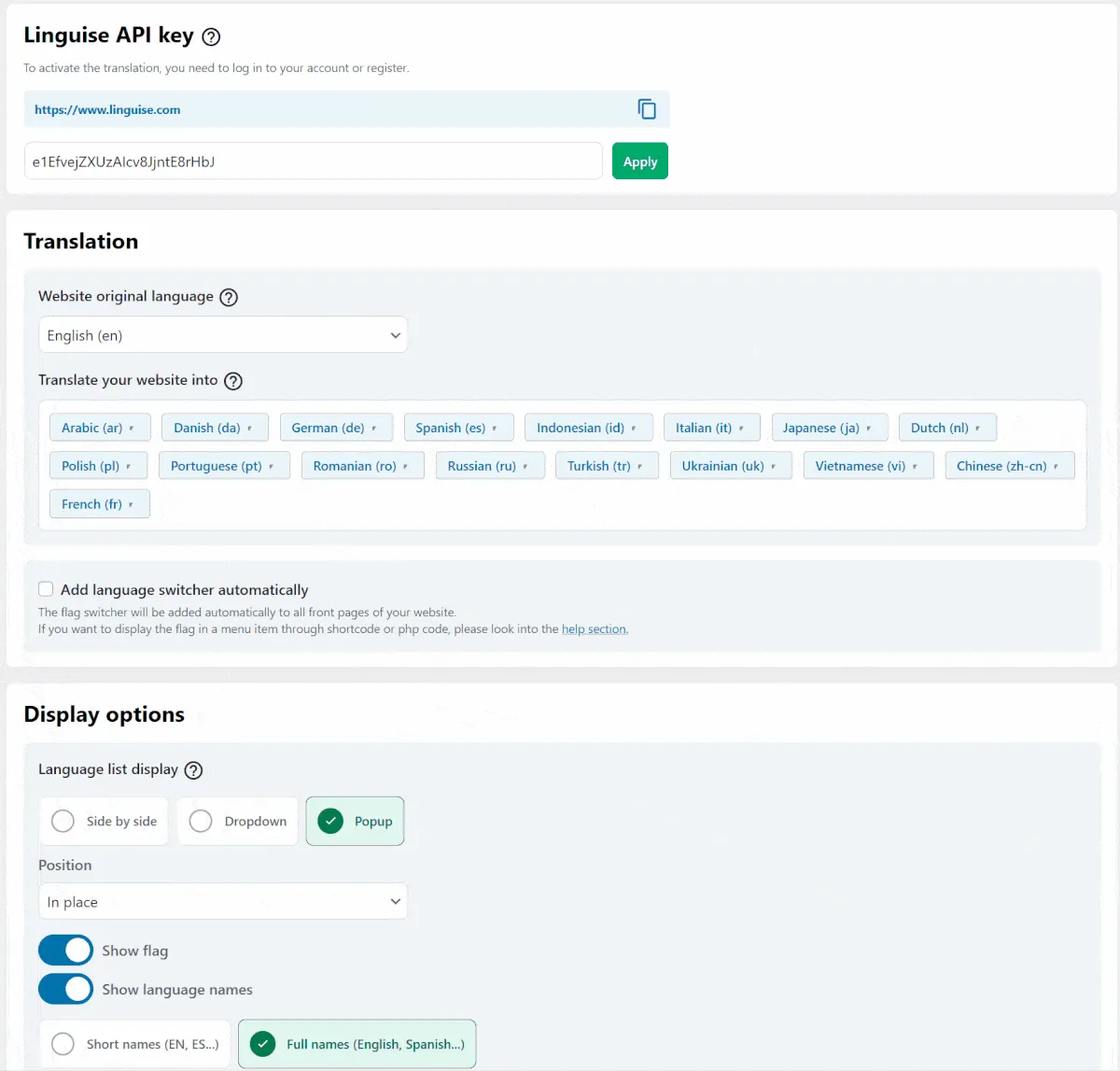
Instant high-quality translation for your website in 85+ languages -
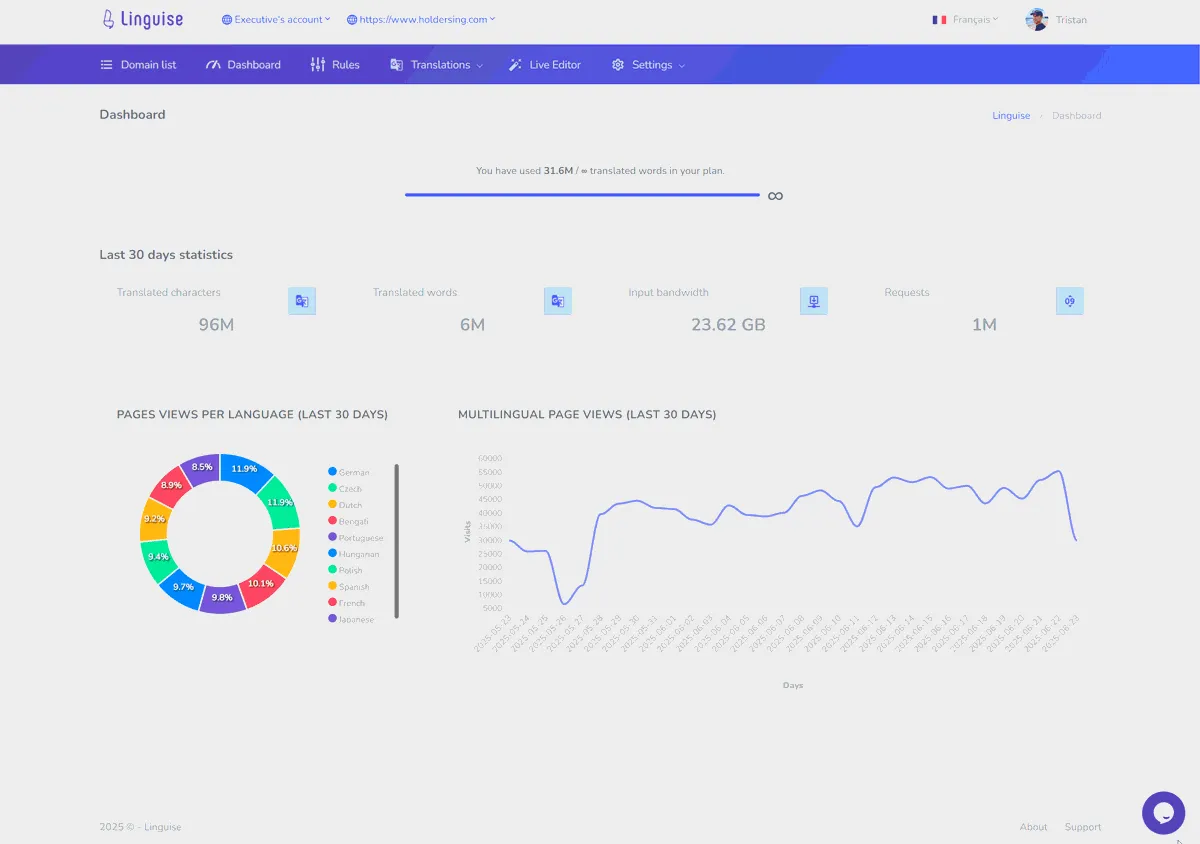
Manage all translations from the plugin settings or the Linguise dashboard -
Edit your translation from frontend with the Live editor -
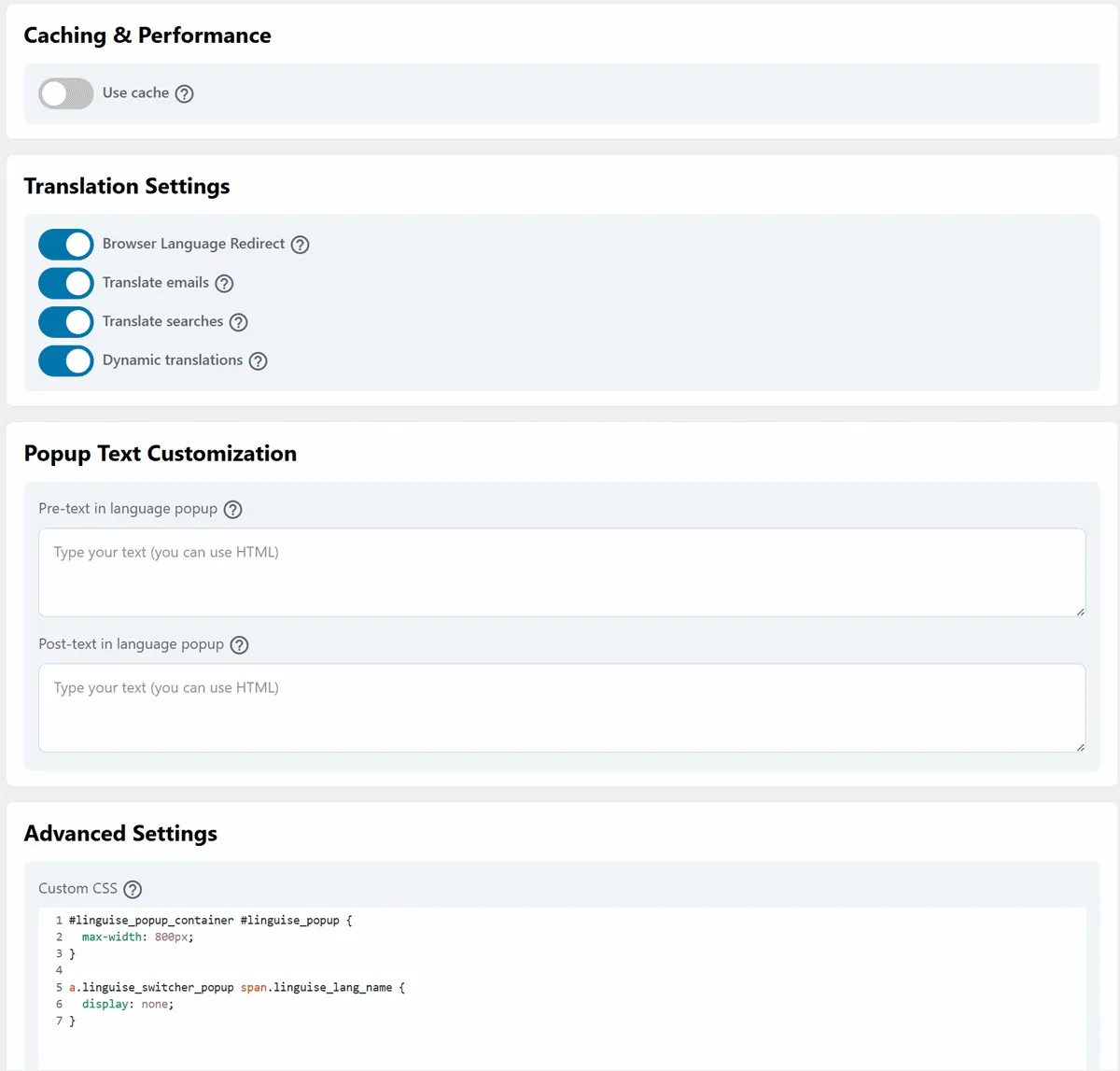
Advanced WordPress plugin settings: language redirect, email translation... -
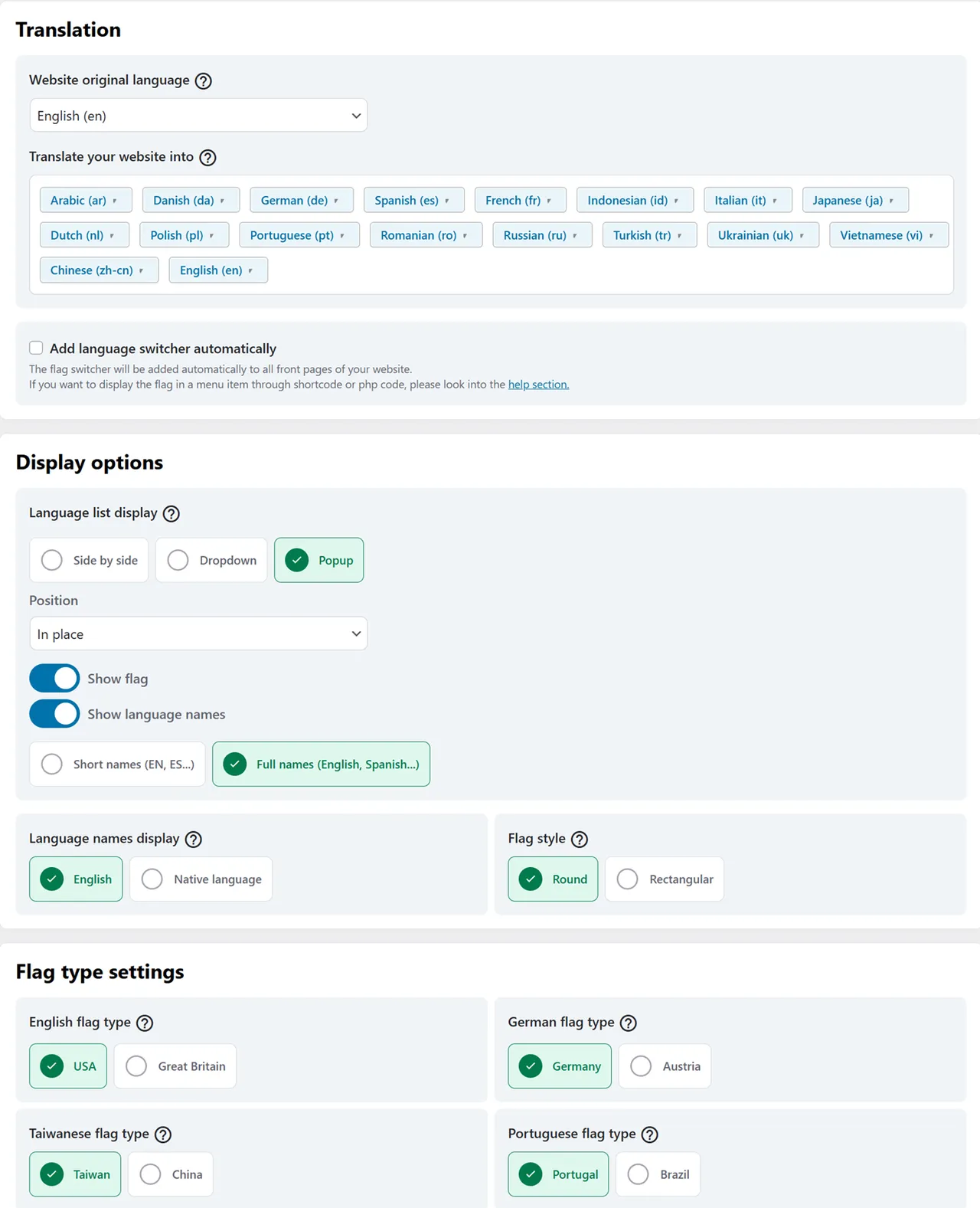
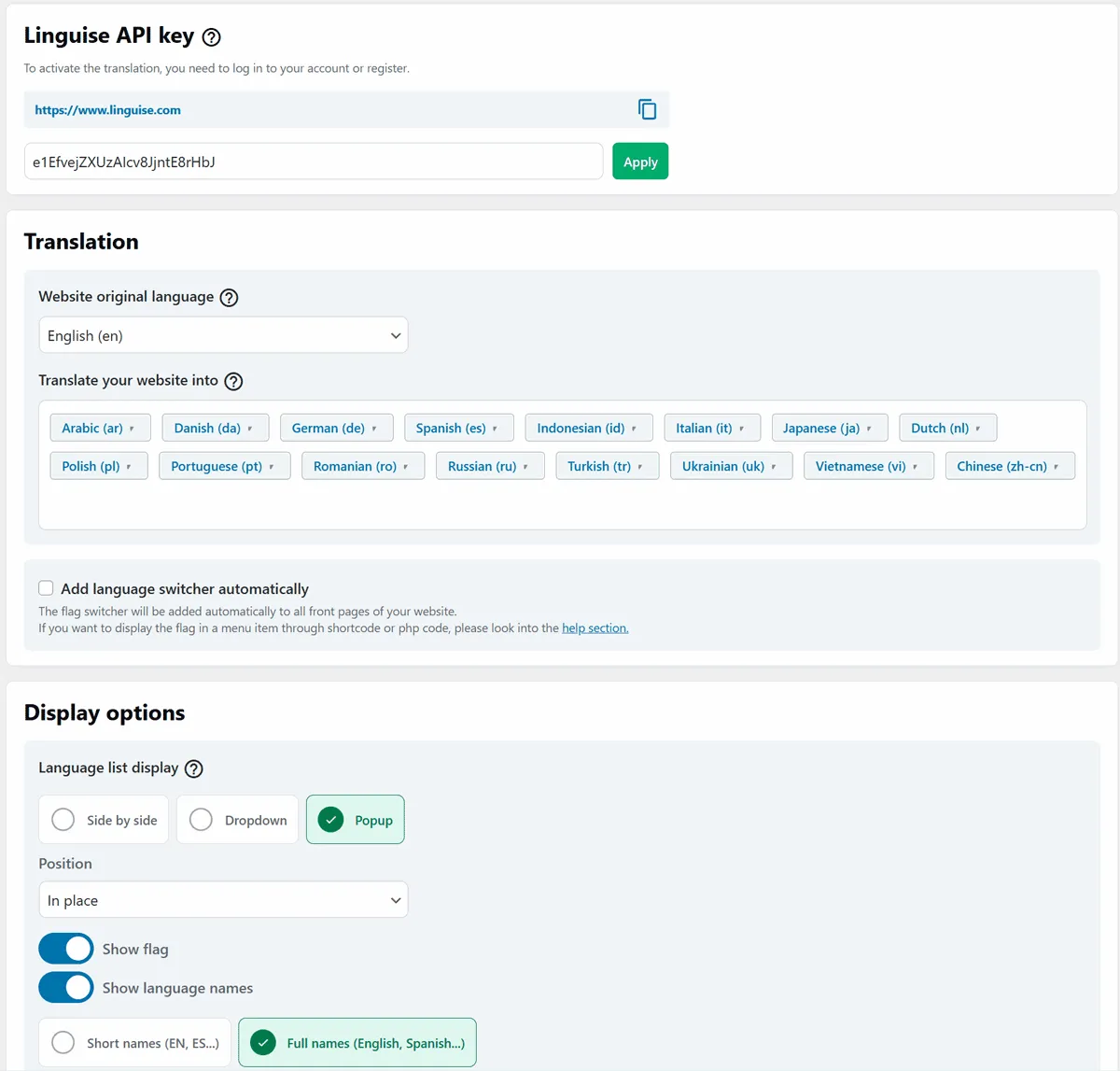
Design your language switcher with tons of options -
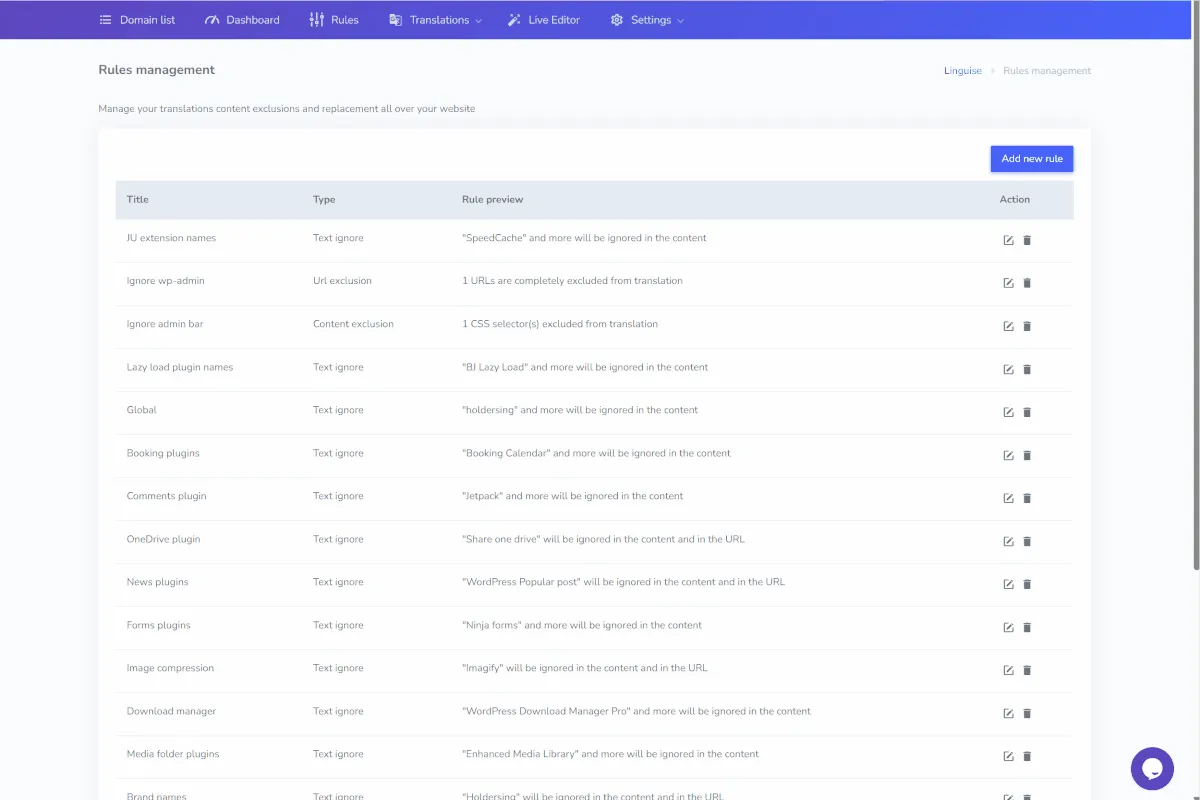
Advanced rule to exclude or replace content in translation by URL, language… -
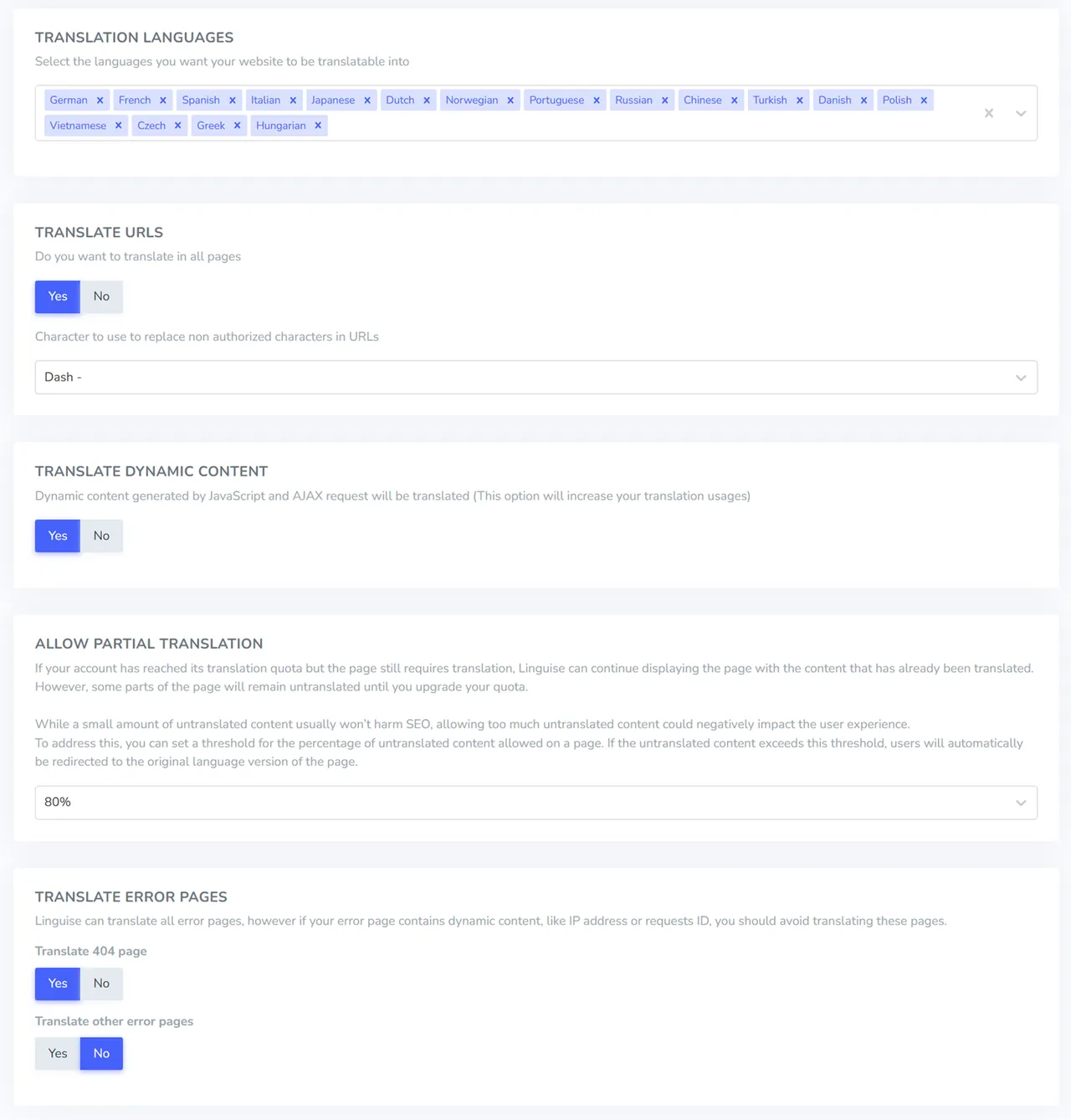
Add/remove languages and translate dynamic content
Important information
- This is a paid service after the trial. The plugin does nothing useful without a Linguise account and API key.
- Page content is sent to the vendor's service for translation and stored on their servers. The listing says form submissions and similar sensitive data are not stored.
- The plugin needs WordPress 4.0 and PHP 7.0, and is tested up to WordPress 7.0.8.
- If you also run WPML, TranslatePress or Polylang, avoid using the same language URLs in both plugins.
- Check the stated prices and trial limits on the vendor's current pricing before committing, because the listing quotes more than one figure.
From the Linguise readme
Straight from the developer's WordPress.org listing.
Full description
Linguise plugin offers a direct connection to our automatic, high-quality AI translation service, with possible access to translators for content revision. The automatic multilingual translation is free during the first month and up to 600 000 translated words (medium-sized website with at least 4 languages), with no language count or page view limitation. Increase your website traffic with instant multilingual translations in more than 85+ languages and get 40% more traffic from Google, Baidu, or Yandex search engines.
Linguise now offers advanced AI translation as an optional add-on package, powered by a dedicated and professionally trained translation model. This new AI translation solution delivers near-human quality, providing exceptional accuracy and natural-sounding results for your website’s multilingual content.
Important note: To avoid any confusion, Linguise is not a free-forever automatic translation plugin. High-quality, SEO optimized, and translation revision features come with a price that we are trying to maintain as affordable as possible. Check the YEARLY PRICES here. As mentioned, we offer a one-month free trial with 600k words included, and the translation involves an API key to start.
Multilingual translation plugin main features
High-quality automatic multilingual translation
• Best-in-class cloud AI translation models
• Optional Linguise AI perfect quality model
• 95% of a human translator’s quality
• Automatic translation of all your WordPress websites
• Full content, SEO-ranked translations including URLs
• 85+ languages available
• Uses the latest and updated cloud AI translation models
• Translate all your website content in 5 minutes
• Make search queries in any language, including in WooCommerce content
• Translate WordPress dynamic Ajax content
• Translation models automatically updated (translation quality improvement)
Multilingual AI translation revisions
• From the Linguise translation dashboard, edit AI translations and manage translators
• Register translators by language and by website for translation revision
• Front-end automatic translations edition by admins or translators
• Multilingual global rules to replace any content all over the website
• Multilingual global rules to exclude any content from translation all over the website
• Exclude and replace content by language, URL, or CSS class
• Multi-account management with user role access (translators by language, managers, admins)
• Edit all meta information (SEO) from the frontend language editor
SEO-optimized automatic AI translations
• URL and full-page content translation
• Multilingual alternate URLs and default-x language tag
• HTML tag generation
• Canonical URL generation
• XML sitemap automatic AI translations
• Super-fast translated page display
• No impact on original, non-translated page loading time
• Increase SEO rank of WooCommerce, especially large Eshop
• Google feed AI translation (Google Merchant)
• Tested on the major “Search Console” tools: Google, Bing, Yandex, Baidu
• Compatible with all SEO plugins, including Yoast, Rank Math, AIO SEO
WordPress integration and language switcher
• Language switcher flags integration using the WordPress menu
• Language switcher flags displayed as popup, side by side, dropdown, or in floating position
• Language switcher flag integration using PHP snippet
• Display translated languages in English, original language, or just the language’s first letters.
• Super light multilingual plugin with less CSS and .svg flags
• Automatically get Linguise language configuration with the API Key
• Local cache option for AI translations and translated URLs
• Automatic redirect based on browser language
• WooCommerce email translation based on client language
• Possibility to display language names in English or in the original language
• Load several language switchers on the same page
• Multiplatform: works on Apache, LiteSpeed, Nginx, and IIS servers
• 100% tested with Elementor Pro, DIVI, Avada and all main page builders
• Option to translate dynamic AJAX content
Translation prices details
• $165 per YEAR (or $15/month) for a translation volume of 200 000 words (400 translated pages of 500 words)
• More than 10 times cheaper than a human translation
• No multilingual content revision required, or at most only 10%
• No language count limit
• Unlimited human translations
• Unlimited plan available for big websites
• Pay as you go for Linguise AI translation (optional)
Linguise translation main links
Home Link: https://www.linguise.com
WordPress page: https://www.linguise.com/integrations/wordpress-automatic-translation-plugin/
Register an account and get an API key: https://dashboard.linguise.com/account/register
Yearly prices: https://www.linguise.com/yearly-prices/
Translation quality demo: https://demo.linguise.com
Legal mentions: [https://www.linguise.com/legal-mentions/ “Legal mentions”)
Also available for any PHP CMS like Magento, Prestashop, Joomla, OpenCart… and cloud CMS like Shopify, Squarespace, Wix…
Linguise plugin uses an API connection to execute and store the translation and also for the live chat support (you can use email as an alternative). Please check the legal mention link above for more information.
Support
• We offer the full installation for free on your WordPress website here: https://www.linguise.com/request-linguise-install/
• We do provide support for any type of usage, a direct message link is accessible in the Linguise dashboard: https://dashboard.linguise.com
• We also do reply to any question on this forum and provide support with the limit of not having access to your website admin
Installation
Register a Linguise account:
• Register an account at: https://dashboard.linguise.com/account/register
• Add your domain and select the original and translated languages
• Copy the API Key generated and instantly make your website multilingual
Install the WordPress plugin automatically:
• Install the plugin through WordPress admin, use the menu: Plugin > Add new
• Search for Linguise
• Click on install then click activate link
• Click on the left menu “Linguise” and copy your API key
• Use one of the method mentioned to include the language flag switcher (menu, shortcode…)
Developer FAQ (12)
- Is Linguise automatic translation free?
- Linguise multilingual is free during the first month with up to 400 000 words, no language limitations, no page view limitation, no feature limited. For the rest, you can check our pricing for more information.
- Is Linguise compatible with international SEO?
- Linguise automatic translation creates a dedicated URL for each content in each language to ensure the proper indexation of your translated content. Furthermore, Linguise respect all the international SEO standard with alternate links, x-default and language tag. Finally the quality of the multilingual translations make the SEO index automatic.
- Can I manage the SEO of the translated content?
- Linguise is compatible with all WordPress SEO plugins like Yoast, Rank Math, AIO SEO. So, from the website frontend using our live editor you’ll be able to edit all SEO information.
- Where are my multilingual translation stored?
- Linguise handles all the translation storage in a dedicated high-speed database and cache server. We do not store, send or collect any sensible data such as form messages submissions. You also have an option in the plugin to store the translations in a local folder (translation data and URLs)
- Is Linguise Translate compatible with WooCommerce?
- Yes, you can use Linguise to translate WooCommerce Eshop without any compatibility issues. Even your full checkout process is translated, and the translations are editable from your Linguise dashboard or from our live editor (front-end).
- Is Linguise Translate compatible with WordPress page builder such as Elementor or DIVI?
- Yes, it has absolutely no influence on the translations and all the page builder content (widget, blocks, modules) are handled.
- Can I translate dynamic content that is loaded asynchronously?
- Yes, Linguise detects the dynamic content on translated page apply the tranlation also asynchronously.
- Can I use WPML, TranslatePress or Polylang with Linguise translation?
- As the translations are dynamic, yes you can, just make sure you don’t use both plugin with the same language URLs.
- Can I edit all the automatic translations?
- With Linguise automatic translation, you can edit multilingual translation from the font-end live editor or from the Linguise translation dashboard. It’s compatible with any 3rd party plugins.
- Can I make translation exclusions and replacement?
- Sure, this is the most advanced multilingual global translation rules you can find on WordPress. It’s possible to apply a global rule to replace any content all over the website, apply a global rule to exclude any content from translation all over the website. Translation Exclusion and replace can be conditioned by language, URL or CSS class.
- Can I use Linguise Translate for more than one website translation?
- Yes, you can register several domains on each account. Note that the translation quota is not shared among accounts.
- Can I get more traffic with the new translations?
- Yes, as Linguise is fully SEO optimized with all the requirements asked by international search engines. Based on the data we have for a website with 4 new languages, the traffic increases by 30%.
Downloads, last 30 days
Trend vs previous period: -17.9%
Average daily downloads: 370 over the last 7 days , 231 over 30 days.
Security history
No known CVEs · 0 published vulnerabilities (Wordfence)
Recent releases
- v2.2.77
- Fix: Dashboard iframe save wiping expert mode settings
- v2.2.76
- Fix: Padding should be the same on left and right
- v2.2.75
- Fix: Synchronization validation verification
- v2.2.74
- Feature: New dropdown layout
- v2.2.73
- Feature: Add expert option to lower request timeout
Show 10 older releases
- v2.2.72
- Feature: Add expert option to lower request timeout
- v2.2.71
- Chore: Bump nodejs version to 24
- v2.2.70
- Fix: Wrong variable used when switching locale
- v2.2.69
- Fix: add API_USE_HTTPS remove API_DOMAIN_PORT
- v2.2.68
- Feature: Add Cantonese/Hong Kong flag
- v2.2.67
- Fix: Repair public key persistence
- v2.2.66
- Fix: Unguarded access in translateable language check
- v2.2.65
- Chore: Improve accessibility and HTML structure
- v2.2.64
- Feature: Translation support fo Searchanise
- v2.2.63
- Feature: Support somali language
Linguise FAQ
Is the translation free?
Only for a trial. The first month is free with a set word allowance and no feature limits. After that you pay according to the vendor's yearly plans.
Does it handle international SEO?
Yes. Each language gets its own URL, with alternate links, an x-default tag and language tags, so search engines can index translated pages.
Can I edit SEO fields of translated pages?
Yes. It works with Yoast, Rank Math and All in One SEO, and you can edit SEO information from the front-end editor.
Where are translations stored?
On the vendor's servers and cache. The listing also describes an option to store translations and URLs in a local folder.
Does it work with WooCommerce?
Yes. The shop and the full checkout can be translated, and the text can be edited in the dashboard or front-end editor.
Does it work with page builders?
Yes. Widgets, blocks and modules from builders such as Elementor and Divi are handled.
Can I translate content loaded asynchronously?
Yes. Linguise detects dynamic content on translated pages and translates it as it loads.
Can I use it with WPML or Polylang?
Yes, as long as the two plugins do not use the same language URLs.
Linguise alternatives

Experience a better way to translate your WordPress site and go multilingual, directly from the front-end using a visual translation interface. The built-in AI translation lets you translate automatically, then…

Weglot 2.0 is a website translation plugin that translates your WordPress site into 110+ languages, with AI translations built around your brand. Trusted by 110,000+ websites, Weglot detects and translates all of…

The Best AI Translation Plugin for Multilingual WordPress Sites Universally is the fastest way to translate your WordPress website into 110+ languages and run a fully multilingual site. The plugin connects WordPress…

Linguator AI - Auto Translate & Create Multilingual Sites is an AI-powered translation plugin that works seamlessly with Elementor , Gutenberg , the Classic Editor , WooCommerce , ACF , Rank Math , Yoast SEO ,…

An all-in-one solution that makes your websites multilingual and translate them automatically, without word limits. ✓ One free first language for non-commercial websites ✓ Automatic translation API connector ✓…

Why Use This Plugin? When sharing links with titles in non-English languages (e.g., Hebrew, Arabic, Hindi, Chinese, or Russian) on platforms like Facebook or WhatsApp, the URLs often turn into a confusing string of…
Listing data from WordPress.org and the Wordfence vulnerability feed, refreshed Nov 9, 2026; listing details fetched Nov 14, 2026. Screenshots are from the plugin's WordPress.org listing. Not affiliated with Linguise.