
WP Wand
WP Wand - AI Content Writer for OpenAI, Claude, Gemini, OpenRouter and Deepseek · by WP Grids
- active installs
- 1K+
- 10 ratings
- 3.8
- since last update
- 36d
- releases in 12 months
- —
- support threads resolved
- —
- avg daily downloads
- 45
- on WordPress.org
- 3.5 years
WP Wand at a glance
WP Wand is a freemium WordPress AI content writing plugin by WP Grids with 1K+ active installs and a 3.8/5 rating from 10 reviews. It was last updated on Oct 4, 2026, is tested up to WordPress 7.1.4 and needs PHP 7.4+. It works with OpenAI, Claude, Google Gemini, DeepSeek, OpenRouter. It has an unpatched published vulnerability, so check the security section before installing. Our quality score is 73/100.
What is WP Wand?
WP Wand writes content inside WordPress using your own AI API key. You connect OpenAI, Anthropic (Claude), Google Gemini, OpenRouter or DeepSeek, pick a prompt template and the draft appears in the editor you already use, whether that is Gutenberg, the Classic Editor or Elementor. An AI Assistant is also available on every admin screen.
There is no WP Wand subscription. You pay your AI provider directly for the tokens you use and can switch models at any time. It suits site owners, agencies and marketers who want a first draft instead of a blank page. The One Click Blog Post template writes a draft of roughly 2,000 words in two to three minutes, and the listing calls it a first draft that needs editing.
The free plugin ships 44 prompt templates, none locked. Bulk post generation and scheduled automation are capped per 30 days. A Pro version adds custom templates, SEO plugin panels, WooCommerce editor tools and higher limits, and an Agency plan adds white labelling.
Best for
- Site owners who want AI drafts without a subscription
- Elementor users wanting an AI writing assistant in the editor
- Agencies that may want white labelling
- Marketers writing posts, meta tags and product copy
Our take
WP Wand is a straightforward in-editor AI writing co-pilot. Small install base; best as a lightweight assist rather than a content factory.
WP Wand features
44 prompt templates
Covers blog posts, product descriptions, meta tags, emails, social posts, FAQs, press releases and more. All are free.
AI Assistant everywhere
Available on every admin screen and inside Gutenberg, the Classic Editor and Elementor.
Bring your own key
Use OpenAI, Anthropic, Gemini, OpenRouter or DeepSeek. The model list is read from your account, and OpenRouter can be connected in one click.
One Click Blog Post
Give it a topic and it writes a first draft of about 2,000 words.
Bulk post generation
Free plugin allows 5 runs per 30 days of up to 10 posts each, so up to 50 posts a month.
Scheduled automation
Free plugin allows 5 scheduled runs per 30 days of up to 5 posts each.
AI image generation
Make images with an OpenAI key at 256 by 256 pixels. Larger sizes need Pro.
43 output languages
Write in many languages with any model your key can reach.
WP Wand free vs pro
Free WordPress.org version
- 44 prompt templates, none locked
- Unlimited single generations, limited only by your provider key
- AI Assistant in admin, Gutenberg, Classic Editor and Elementor
- Bulk Posts: 5 runs per 30 days, up to 10 posts each
- Automation: 5 scheduled runs per 30 days, up to 5 posts each
- OpenAI image generation at 256 by 256
Pro Paid version
- Custom prompt templates and a custom AI Character
- Business details and target-customer profile fed into templates
- Rank Math and Yoast SEO panels (beta)
- WooCommerce product-editor integration
- Generation history and larger images (512 and 1024 pixels)
- Auto fallback to a second provider and higher bulk and automation limits
- White labelling on the Agency plan
The plugin is free with no monthly WP Wand fee, and a Pro version and an Agency plan exist. AI usage requires your own API key from a supported provider, which bills you directly. The listing gives no Pro prices.
How to use WP Wand
- Install the plugin
In wp-admin go to Plugins, then Add New, search for WP Wand, install it and click Activate.
- Open WP Wand settings
Go to the WP Wand menu in the dashboard.
- Add an API key
Enter a key from OpenAI, Anthropic, Google Gemini, DeepSeek or OpenRouter, or connect OpenRouter with one click.
- Pick a template
Choose one of the templates, fill in the fields and generate, either from the AI Assistant or in your editor.
- Review and publish
Read the draft, fix errors and publish. Use Bulk Posts or Automation for larger runs.
WP Wand screenshots (5)
-
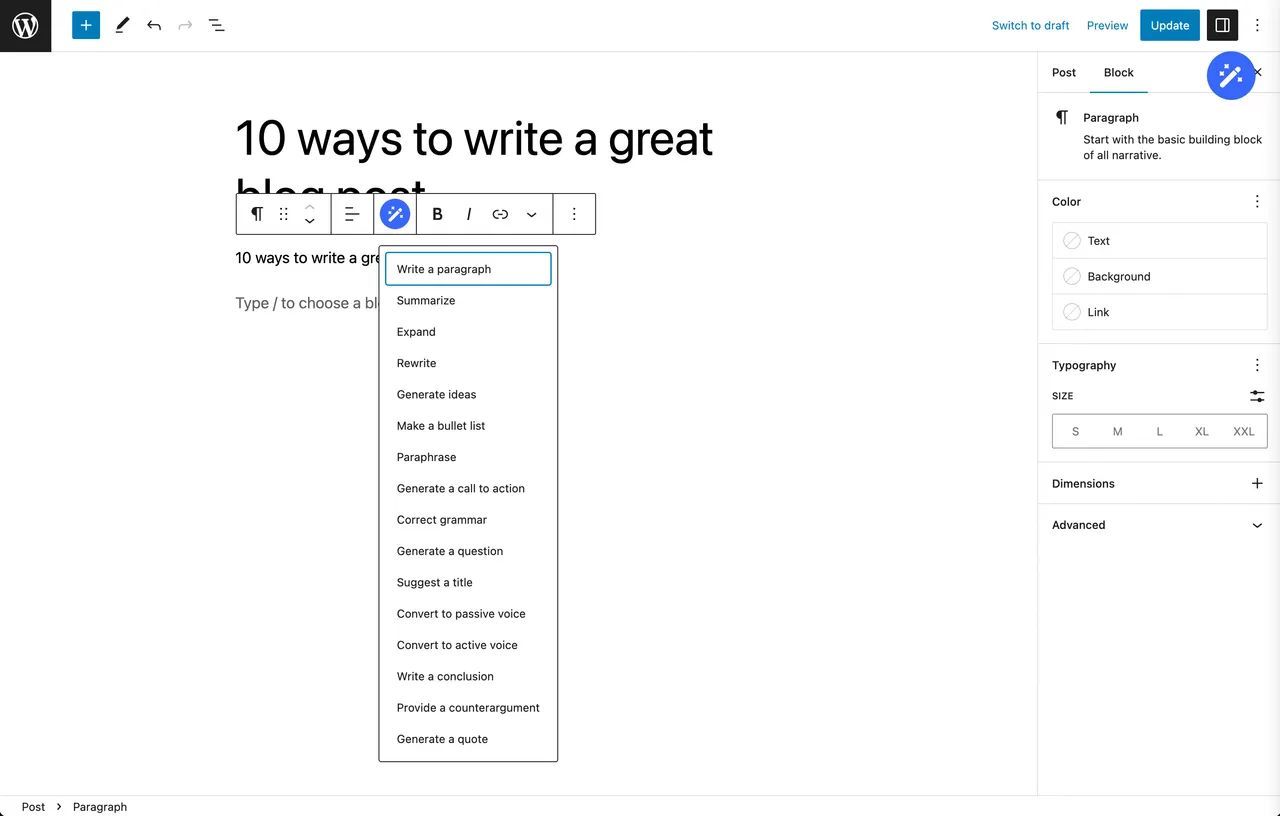
The AI Assistant inside the Gutenberg editor. -
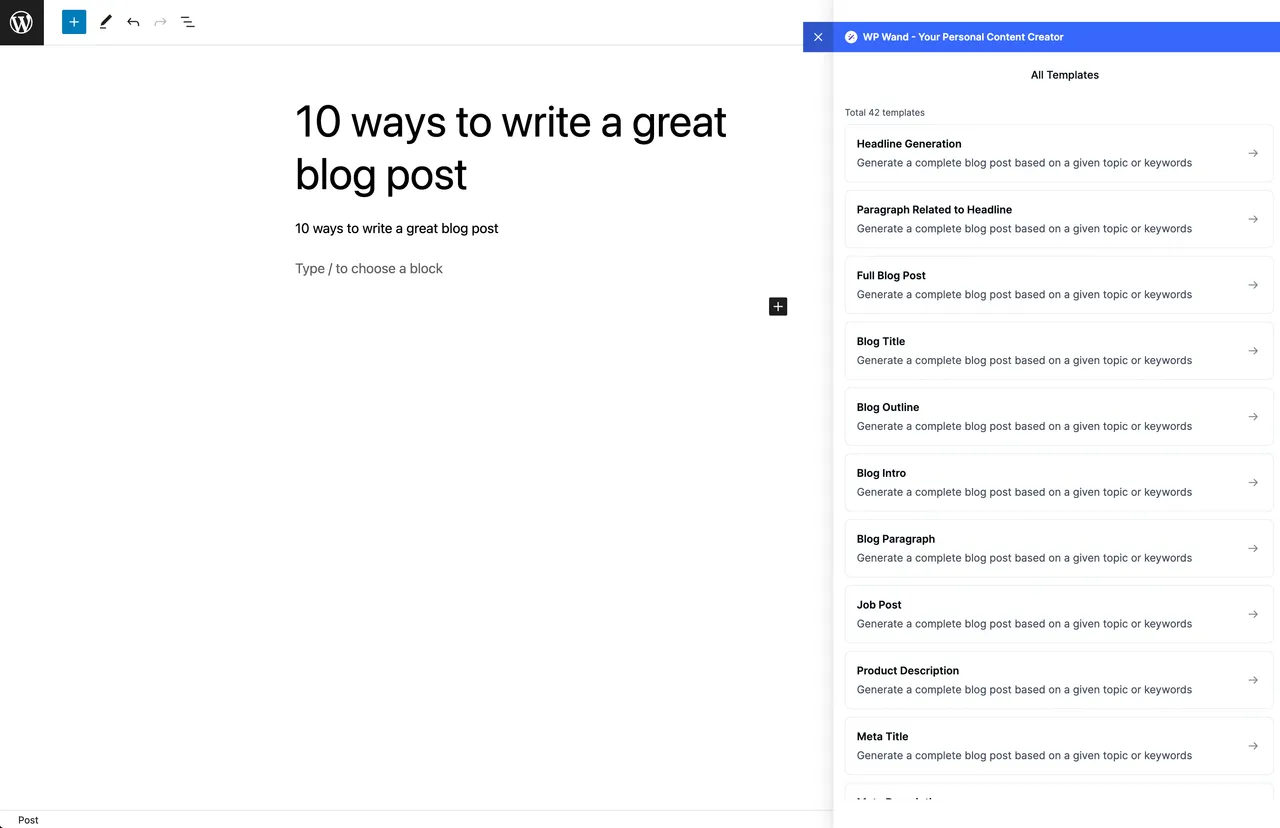
44 prompt templates, one click each. -
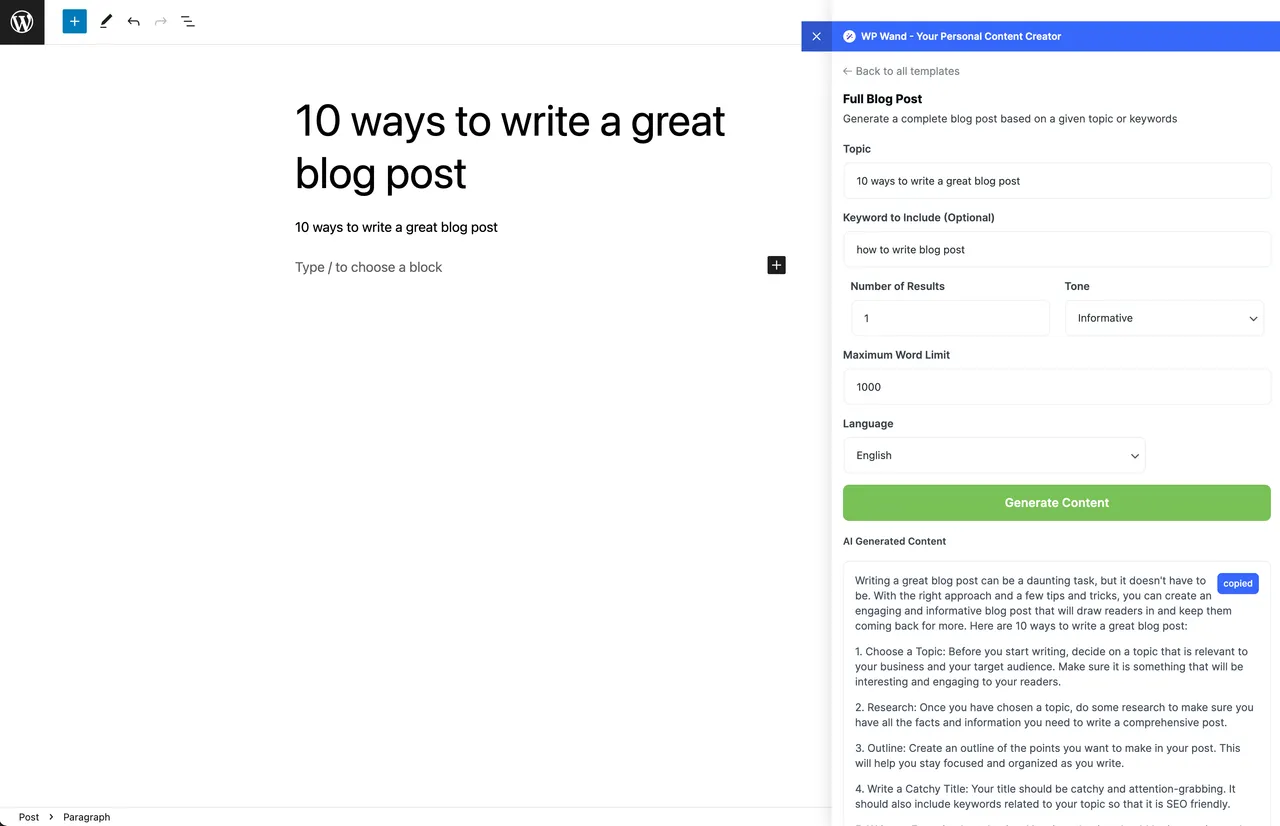
One Click Blog Post writing a full draft. -
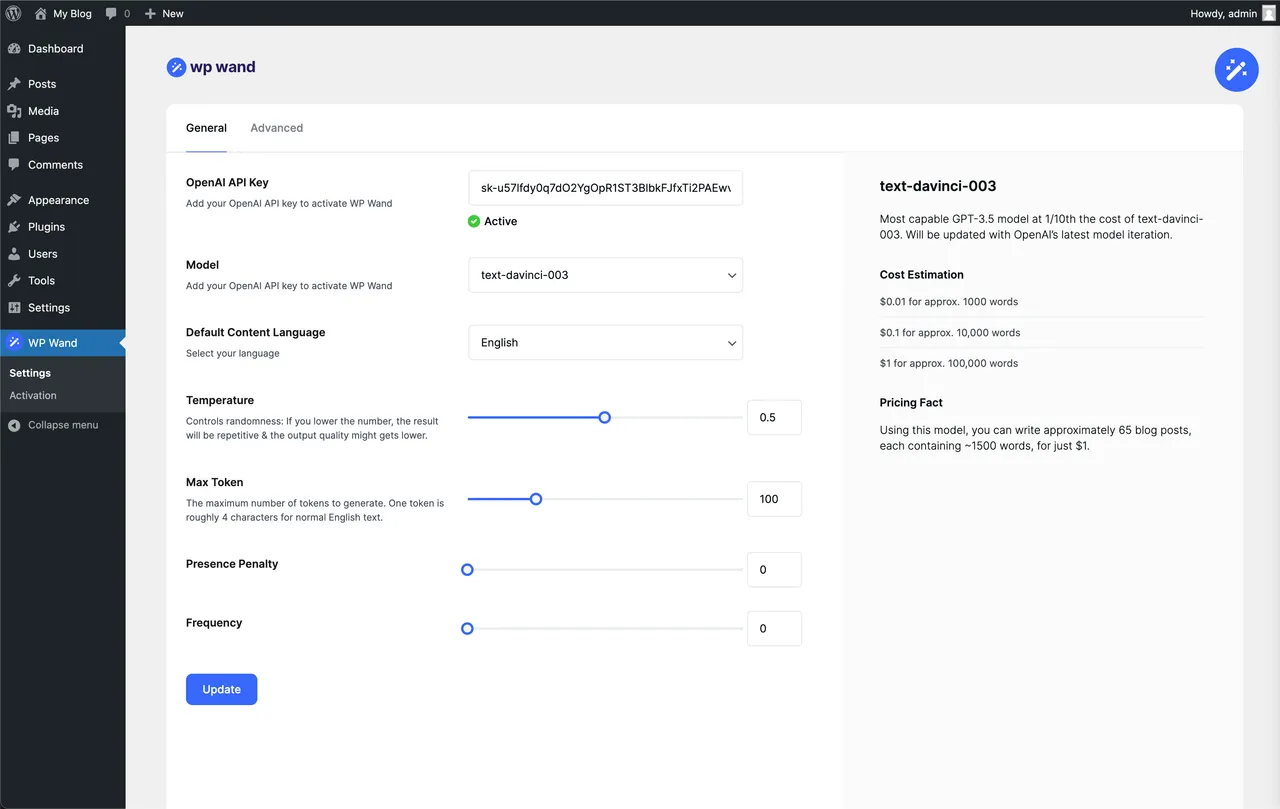
Settings, where your API keys go. -
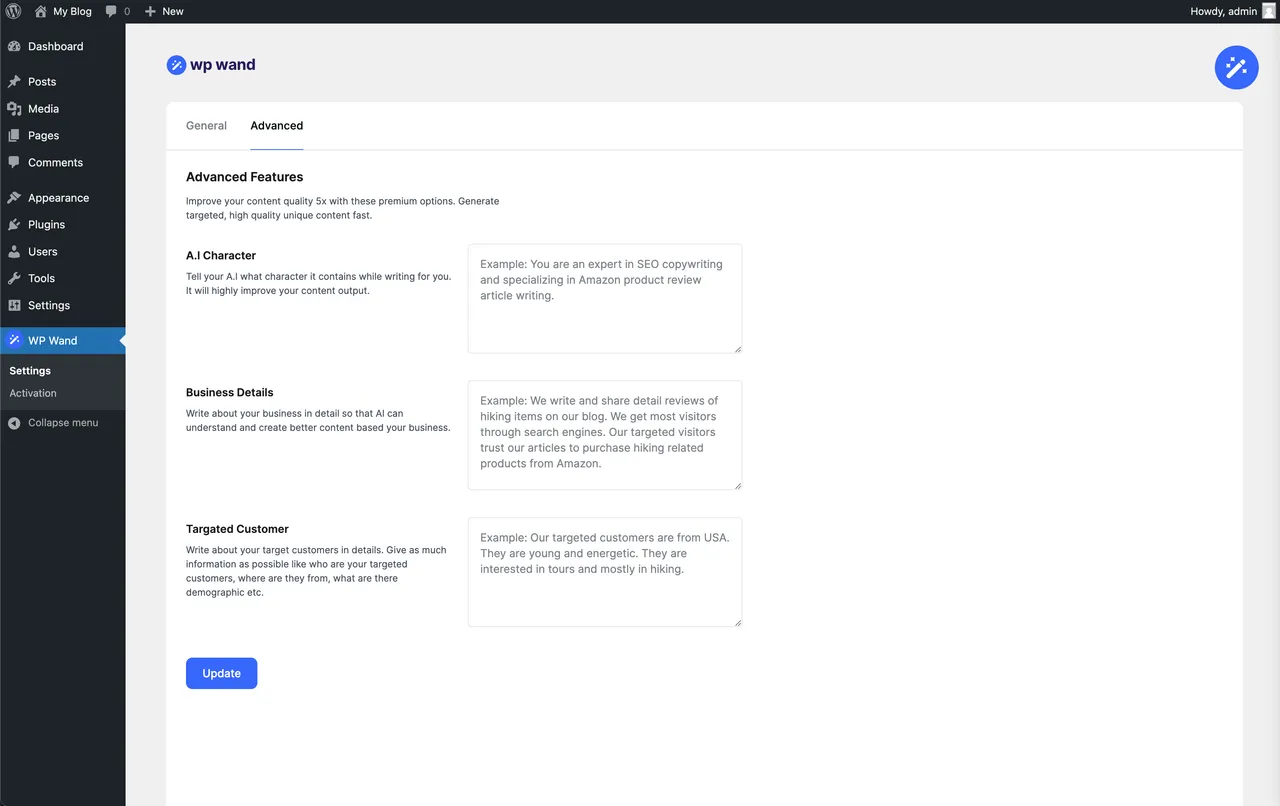
Advanced settings: creativity, reply length and variety.
Important information
- An API key from a supported AI provider is required, and you pay that provider for usage. Your prompts go to the provider you select.
- The security data for this plugin shows an unpatched published vulnerability. Check the vulnerability details and the current version before installing.
- Requires WordPress 6.2 or newer and PHP 7.4 or newer. Tested up to WordPress 7.1.4.
- Generated posts are first drafts. Check facts and wording before publishing.
- Bulk and automation limits on the free plugin reset every 30 days.
- Custom templates, SEO panels and the WooCommerce editor panel are Pro features.
From the WP Wand readme
Straight from the developer's WordPress.org listing.
Full description
WP Wand writes content inside WordPress using your own API key. Connect OpenAI, Anthropic (Claude), Google Gemini, OpenRouter or Deepseek, pick a template, and the draft lands in the editor you’re already working in — Gutenberg, Classic or Elementor.
There’s no WP Wand subscription. You pay your AI provider directly for what you use, at their rates, and you can switch models whenever you like.
What the free plugin gives you
• 44 prompt templates. All of them free, no template is locked.
• The AI Assistant on every WordPress admin screen, plus Gutenberg, Classic Editor and Elementor.
• Single generations with no cap — run as many as your provider key will allow.
• Bulk Posts: 5 runs per 30 days, up to 10 posts a run. So up to 50 posts a month.
• Automation: 5 scheduled runs per 30 days, up to 5 posts a run.
• AI image generation with an OpenAI key, at 256×256.
• 43 output languages, and any model your key can reach.
What needs WP Wand Pro
Custom prompt templates, AI Character, business-details and target-customer training, the Rank Math and Yoast SEO panels, the WooCommerce product-editor integration, generation history, larger AI images, auto fallback to a second provider, and higher Bulk and Automation limits. White labelling comes with the Agency plan.
About One Click Blog Post
Give it a topic and it writes a complete first draft — roughly 2,000 words, in about two to three minutes, depending on the model you chose. It’s a first draft, not a finished post. Read it, fix what’s wrong, then publish.
Official Site
Get WP Wand Pro
Pro Support
Watch: writing a full blog post
Watch: generating posts in bulk
Watch: adding to or rewriting existing content with the AI Assistant
Watch: writing a WooCommerce product description
Watch: generating content inside Elementor
Watch: setting up white label
Watch: what WP Wand does
Supported AI Models
When you save a key, WP Wand reads the model list from that provider account, so you get exactly the models your key can reach. If the list can’t be fetched, it falls back to a built-in set.
OpenAI
• GPT-5
• GPT-4.1 Mini
• ChatGPT 4o Latest
• GPT-4o Mini
• GPT-4o
• Plus any other text model on your account
Anthropic (Claude)
• Claude 4 Opus
• Claude 4 Sonnet
• Claude 3.5 Haiku
• Plus any other model on your account
Google Gemini
• Gemini 3.7 Flash
• Gemini 3.5 Flash Lite
• Gemini 2.5 Pro
• Gemini 2.5 Flash
• Plus any other Gemini model on your key
Deepseek
• DeepSeek Chat
• DeepSeek Reasoner (R1)
OpenRouter
• All text models are supported.
CORE FEATURES
Free
• No monthly WP Wand subscription — you bring your own API key
• Unlimited single generations
• 44 prompt templates, none of them locked
• AI Assistant on every admin screen
• AI for Gutenberg, Classic Editor and Elementor
• Bulk Post Generation — 5 runs of up to 10 posts, per 30 days
• Scheduled post Automation — 5 runs per 30 days, up to 5 posts a run
• Connect OpenRouter in one click — no API key to copy and paste
• AI image generation with an OpenAI key, at 256×256
• OpenAI, Claude, Gemini, OpenRouter and Deepseek support
• Pick whichever model your key can reach
• 43 output languages
• Works with your existing theme and plugins
WP Wand Pro
• Create your own prompt templates
• Custom AI Character
• Business details and target-customer profile, fed into every template
• One click WooCommerce description writer inside the product editor
• Integrated with Rank Math — beta
• Integrated with Yoast SEO — beta
• Generation history
• Larger AI images: 512×512 and 1024×1024
• Higher Bulk and Automation limits
• Auto fallback: when one provider account runs dry, carry on with the next one you listed (off until you turn it on)
Agency plan
• White label WP Wand with your own name, logo and colours
ALL 44 TEMPLATES
• Headline Generation
• Paragraph Related to Headline
• One Click Blog Post
• Blog Title
• Blog Outline
• Blog Intro
• Blog Paragraph
• Blog Post Writer
• Job Post
• Product Description
• Linkedin Post
• Facebook Post
• Meta Title
• Meta Description
• Meta Keywords
• Sales Page Headlines
• Sentence Expander
• Button Call to Action Text
• Review Blog Post
• Comparison Blog Post Between 2 Products
• WooCommerce Product Description
• Amazon Product Review
• Email Subject Line
• Email Content
• FAQs Writer
• Grammar Correction
• Features to Benefits
• HSO Copywriting Formula
• AIDA Copywriting Formula
• PAS Copywriting Formula
• Offer Ideas
• Press Release
• Social Media Post Ideas
• Website Tagline
• Website About Us
• Quora Answers
• Comment Reply
• Feature List
• Course Name
• Course Description
• Feature Details
• Keyword Generator
• Content Rewriter
• Magic Headlines
HOW WP WAND IS DIFFERENT?
Your key, your bill
There’s no WP Wand subscription and no word quota you have to buy back. You connect your own OpenAI, Claude, Gemini, OpenRouter or Deepseek key and pay that provider directly for what you use.
No cap on single generations
Templates and the AI Assistant aren’t rate-limited by WP Wand. Bulk Posts and Automation are capped on the free plugin — 5 runs each per 30 days — and Pro raises both.
Bulk blog post generation
Add your topics and WP Wand queues the posts in the background. Free covers 5 runs a month of up to 10 posts each.
Everything inside WordPress
No second tab, no separate dashboard. You write from the editor you’re already in.
44 prompt templates
Every template ships free. They’re written for a specific job — meta description, product copy, FAQ block, press release — so you’re not starting from a blank prompt box.
Works with your themes and plugins
WP Wand puts content into the editor. It doesn’t touch how your theme renders it.
WHAT YOU CAN WRITE
Long-form blog posts
One Click Blog Post turns a topic into a full draft of roughly 2,000 words in a couple of minutes. Edit it, add what only you know, then publish.
Website content
Taglines, About Us pages, feature lists and course descriptions for a new site or a rewrite of an old one.
Marketing copy
Landing page headlines, ad copy, calls to action, and the AIDA, PAS and HSO formulas if you want a proven structure.
Social media content
Post ideas, LinkedIn posts and Facebook posts, in the tone you pick.
Email content
Subject lines and email copy, written to a brief instead of from scratch.
eCommerce content
Product descriptions, Amazon-style reviews and comparison posts. The free plugin has a WooCommerce Product Description template; the panel inside the WooCommerce product editor is a Pro feature.
Supported Languages
• Afrikaans
• Arabic
• Armenian
• Bosnian
• Bulgarian
• Chinese
• Croatian
• Czech
• Danish
• Dutch
• English
• Estonian
• Filipino
• Finnish
• French
• German
• Greek
• Hebrew
• Hindi
• Hungarian
• Indonesian
• Italian
• Japanese
• Korean
• Latvian
• Lithuanian
• Malay
• Norwegian
• Persian
• Polish
• Portuguese
• Romanian
• Russian
• Serbian
• Slovak
• Slovenian
• Spanish
• Swedish
• Thai
• Turkish
• Ukrainian
• Urdu
• Vietnamese
Fine-Tune Your Content
If you want more control, the Advanced tab has:
• Creativity (temperature): how far the model strays from the safe answer. Higher is more varied, less predictable.
• Max reply length: the longest reply one request may return.
• Topic variety: nudge the model towards new topics instead of circling the same ones.
• Word variety: nudge it away from repeating the same phrases.
• Live preview (streaming): watch the text arrive as it’s written.
Install WP Wand, add a key, and write your first draft in a couple of minutes.
Installation
• Upload the ai-content-generation folder to the /wp-content/plugins/ directory.
• Activate the plugin through the ‘Plugins’ menu in WordPress.
• After activation, navigate to the “WP Wand” menu in your WordPress dashboard to access the settings.
• Enter your API key(s) from OpenAI, Anthropic (Claude), Google Gemini, Deepseek or OpenRouter to get started — or connect OpenRouter with one click.
Developer FAQ (11)
- How does WP Wand work?
- You add an API key from OpenAI, Anthropic (Claude), Google Gemini, OpenRouter or Deepseek on the WP Wand settings page — or connect OpenRouter with one click and skip the key entirely. After that you can write from the AI Assistant on any admin screen, from inside Gutenberg, Classic Editor or Elementor, or by picking one of the 44 templates and filling in the fields.
- What does it cost to run?
- WP Wand has no monthly fee. You pay your AI provider directly for the tokens you use, at their published rate for whichever model you picked. A small model costs a fraction of a premium one for the same post, so if the bill matters, start with a mini or turbo model and move up only where the quality needs it.
- Are there any limits on content generation?
- Single generations aren’t capped. Templates and the AI Assistant run as often as your provider key allows. Two features are capped on the free plugin, and both reset every 30 days: • Bulk Posts: 5 runs, up to 10 posts per run — so up to 50 posts a month. • Automation: 5 scheduled runs, up to 5 posts per run. WP Wand Pro raises both caps.
- Can I use WP Wand as an Elementor AI alternative?
- Yes. The AI Assistant mounts inside Elementor, and you get the full template list there rather than a fixed set of prompts.
- Can I use WP Wand inside Gutenberg?
- Yes. Generate in the sidebar and insert the result into the post with one click.
- Can WP Wand be used with any WordPress theme or plugin?
- Yes. WP Wand writes into the editor and leaves rendering to your theme.
- Do you offer a White Label feature?
- Yes, on the Agency plan (annual or lifetime). You can replace the plugin name, logo and brand colour with your own.
- Who is WP Wand for?
- Site owners, agencies, marketers and developers who publish on WordPress and want a first draft in front of them instead of an empty screen.
- Does WP Wand work with WooCommerce?
- The free plugin ships a “WooCommerce Product Description” template you can run from the AI Assistant. The WP Wand panel inside the WooCommerce product editor — for titles, descriptions and short descriptions — is part of WP Wand Pro.
- Can I train the AI with my own business information?
- That’s a Pro feature. WP Wand Pro lets you save an AI Character, your business details and a target-customer profile, and feeds them into every template.
- Do I have to buy a subscription?
- No. The free plugin works with your own API key, and Pro is a one-off or annual licence, not a monthly content plan.
Downloads, last 30 days
Trend vs previous period: -1.1%
Average daily downloads: 52 over the last 7 days , 45 over 30 days.
Security history
Open vulnerability · 2 published vulnerabilities (Wordfence) · most recent Jan 30, 2026
- Patched 5.3 Medium WP Wand <= 1.2.5 - Missing Authorization CVE-2025-22302 · Jan 6, 2025 · affects *-1.2.5 · fixed in 1.2.6
- Unpatched 4.3 Medium WP Wand - Unlimited Content Generation using AI - for OpenAI, Claude, Openrouter and Deepseek <= 1.3.07 - Missing Authorization CVE-2026-25391 · Jan 30, 2026 · affects *-1.3.07
Recent releases
- v2.1.1
Fixed: "Update now" in the notice that asks you to update WP Wand Pro did nothing on some sites. It finds the Pro update straight away now.
- v2.1.0
New: Google Gemini support, and OpenRouter connects with one click. * New: Settings, Bulk Posts, Automated Posts and History rebuilt to one design. Bulk Posts works on a phone. * New: Bulk Posts...
- v2.0.0
New: Complete rebuild on a modern React + REST architecture for a faster, smoother UI. * New: Redesigned Settings, AI Assistant panel, Bulk Posts, History and Automation screens. * New: Live...
- v1.3.07
Optimized: Bulk Post Generation Performance. * Fixed: White Label Icon Issue. * Fixed: Minor Issues.
- v1.3.06
New Model: GPT 5 Nano. * Fixed: Content/Bulk Generation Error. * Fixed: White Label Icon Issue.
Show 10 older releases
- v1.3.04
New: WP Wand now available for Editor role.
- v1.3.03
Fixed: Dall E Image Generation Issue.
- v1.3.02
Fixed: Minor Issues.
- v1.3.0
New: OpenRouter Added. * New: All OpenRouter text models are supported. * Improved: Setting page UI.
- v1.2.98
New: GPT-5 Model Added. * New: GPT 4.1 Mini Model Added. * New: Claude 4 Opus Model Added. * New: Claude 4 Sonnet Model Added. * Improved: Error Handling. * Fixed: Minor Issues.
- v1.2.97
Fixed: Elementor Compability Issue. * Fixed: Bulk Generation Error. * Improved: Elementor AI Template Panel. * Improved: Performance.
- v1.2.96
Fixed: Template misscount issues. * Improved: Performance.
- v1.2.95
Fixed: Minor issues. * Improved: Performance.
- v1.2.93
Fixed: Minor issues.
- v1.2.91
Fixed: Translation issues. * Fixed: Minor issues.
WP Wand FAQ
How does it work?
You add an API key from a supported provider, or connect OpenRouter in one click. Then you write from the AI Assistant, from your editor, or by choosing one of the 44 templates.
What does it cost to run?
There is no WP Wand monthly fee. You pay your AI provider for tokens at their rates. A small model costs a fraction of a premium one for the same post.
Are there generation limits?
Single generations are not capped. Bulk Posts and Automation are capped per 30 days on the free plugin, and Pro raises both.
Does it work in Elementor and Gutenberg?
Yes. The assistant works inside Elementor, and in Gutenberg you generate in the sidebar and insert the result.
Does it work with WooCommerce?
The free plugin has a WooCommerce Product Description template run from the assistant. The panel inside the product editor is Pro.
Can it learn my business details?
That is a Pro feature. Pro saves an AI Character, business details and a target-customer profile and feeds them into every template.
Is white labelling available?
Yes, on the Agency plan, where you can replace the plugin name, logo and brand color.
WP Wand alternatives

GetGenie is the #1 AI SEO assistant for WordPress - the only AI plugin that combines AI keyword research, competitor analysis, content writing, AEO, GEO, and SEO performance tracking in a single dashboard inside…

WP RSS Aggregator is the perfect plugin to quickly import RSS feeds, build a news aggregator, and for easy autoblogging. This is why it is used on 40,000+ websites to aggregate and curate content from all over the…

AI Puffer (formerly AI Power) lets ChatGPT and Claude work on your WordPress site through MCP, using your chosen safety level. It also brings an AI chatbot, content writer, automations, AI forms and image generation…
BotWriter is the most complete AI writer plugin for WordPress . It works as an AI auto blogging tool that automatically generates and publishes SEO-optimized articles, and as a WooCommerce AI content optimizer that…

AI Powered Free WordPress Link Directory Plugin to curate links for web directory Free WordPress Link Directory Plugin for your External Link Directory Listings! Simple Link Directory is a simple WordPress Directory…
AI WP Writer is a powerful AI content generator for WordPress. It works seamlessly in both the Classic Editor and the Gutenberg editor, giving you flexibility in how you create content. For text generation, it…
Listing data from WordPress.org and the Wordfence vulnerability feed, refreshed Nov 9, 2026; listing details fetched Nov 14, 2026. Screenshots are from the plugin's WordPress.org listing. Not affiliated with WP Grids.