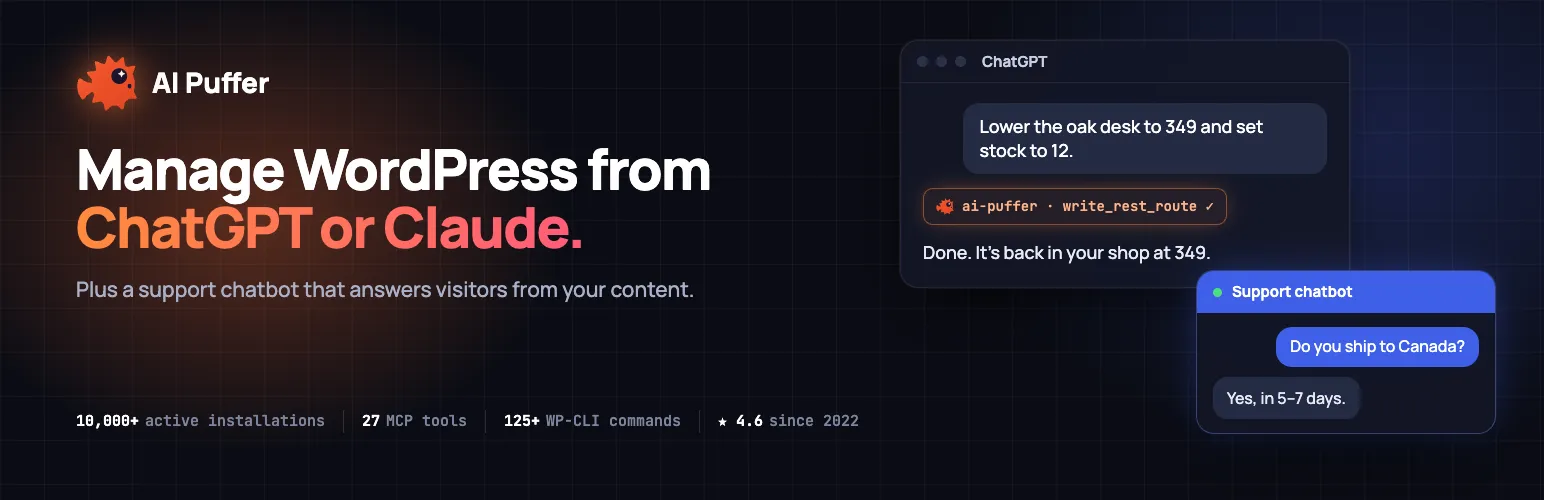

AI Puffer
AI Puffer - AI Chatbot & MCP Server for Claude and ChatGPT · by senols
- active installs
- 10K+
- 166 ratings
- 4.6
- since last update
- 2d
- releases in 12 months
- —
- support threads resolved
- 100%
- avg daily downloads
- 2,548
- on WordPress.org
- 3.9 years
AI Puffer at a glance
AI Puffer is a freemium WordPress AI content writing plugin by senols with 10K+ active installs and a 4.6/5 rating from 166 reviews. It was last updated on Nov 7, 2026, is tested up to WordPress 7.1.4 and needs PHP 7.4+. It works with OpenAI, Claude, Google Gemini, xAI Grok, DeepSeek, OpenRouter, Azure OpenAI. All 14 of its published vulnerabilities have patched versions. Our quality score is 93/100.
What is AI Puffer?
AI Puffer, formerly called AI Power, is a WordPress plugin that works as an MCP server and an AI toolkit. You connect Claude or ChatGPT to your site and ask for things in plain language, such as drafting posts, updating WooCommerce products, fixing SEO titles or checking search traffic. The same plugin also includes a chatbot, a content writer, automations, AI forms and image generation.
It is for site owners and agencies who want AI help inside WordPress without wiring up several plugins. Website management runs through a hosted MCP service, so nothing needs configuring on your server. AI features can run on AI Puffer Cloud credits or on your own key from OpenAI, Anthropic, Google, xAI, DeepSeek, OpenRouter or Azure OpenAI.
The scope is wide. Chatbots can answer from your posts, pages and products. The writer can batch posts from topics or a CSV. A knowledge base indexes your content for retrieval. Access follows the connecting WordPress user's permissions, and each connection has a safety level you choose.
Best for
- Owners who want Claude or ChatGPT to manage their site
- Sites that need a chatbot trained on their own content
- Bloggers batching drafts from topics or CSV
- WooCommerce stores improving product copy in bulk
Our take
Rebranded to 'AI Puffer', this is a deep toolbox - chat, content, automations across many providers. Powerful but sprawling; the learning curve is real.
AI Puffer features
MCP server for WordPress
Claude, ChatGPT, Cursor and other MCP clients can read content, create drafts, publish and manage media, within the user's permissions.
Plugin integrations
Tested with Elementor, ACF, Yoast SEO, Rank Math, All in One SEO, WooCommerce, Contact Form 7, WPForms and others. Support varies by plugin version.
WP-CLI-style commands
A supported subset of WP-CLI-compatible commands lets assistants manage posts, users, settings and cache without SSH.
AI chatbots
Create unlimited bots with their own models and instructions, trained on your posts, pages, products and FAQs. Show them as a popup, with a block or by shortcode.
Content writer and assistant
Draft posts from topics, batches or CSV, with images and SEO meta fields. The assistant improves titles, excerpts and tags in the editor.
Automations
Schedule recurring or one-time tasks for auto blogging and comment replies. Replies are held for approval by default.
AI forms
Build forms in a drag and drop editor, where prompts use the visitor's field values.
Image generation
Generate images with several providers, search stock photos from Pexels and Pixabay, and embed a visitor image generator.
Knowledge base and search
Index content into local storage or external stores such as Pinecone, Qdrant and Chroma, and add semantic search.
Usage limits and roles
Set guest, user and role limits, review logs and credit balances, and use word and IP blocklists.
AI Puffer free vs pro
Free WordPress.org version
- 2,000 website actions per month through the MCP connection
- 25 free AI credits monthly for eligible accounts with a verified email
- Chatbots, content writer, automations, AI forms, images and knowledge base
- Use of your own provider key at no extra plugin cost
Pro Paid version
- Paid subscriptions give higher monthly website action allowances
The plugin is free to start, with paid subscriptions for larger allowances and purchasable AI credits. You can skip Cloud credits and use your own API key from a provider, who bills you directly. Your ChatGPT or Claude subscription is separate.
How to use AI Puffer
- Install the plugin
In wp-admin go to Plugins, then Add New, search for AI Puffer, install it and click Activate.
- Run the setup wizard
Choose what to do first, such as a chatbot, posts or automations. Then pick AI Puffer Cloud or paste your own API key.
- Connect an assistant
Open Settings, then Connections, then Manage my website. Pick ChatGPT or Claude and approve the connection in WordPress.
- Choose a safety level
Standard asks for WordPress approval before publishing or plugin changes. Trusted runs supported changes directly.
- Open a module
Use the top bar to open Chatbots, Content Writer, Automations, AI Forms, Knowledge Base or Usage. Turn on Images in Settings, then Modules.
AI Puffer screenshots (9)
-
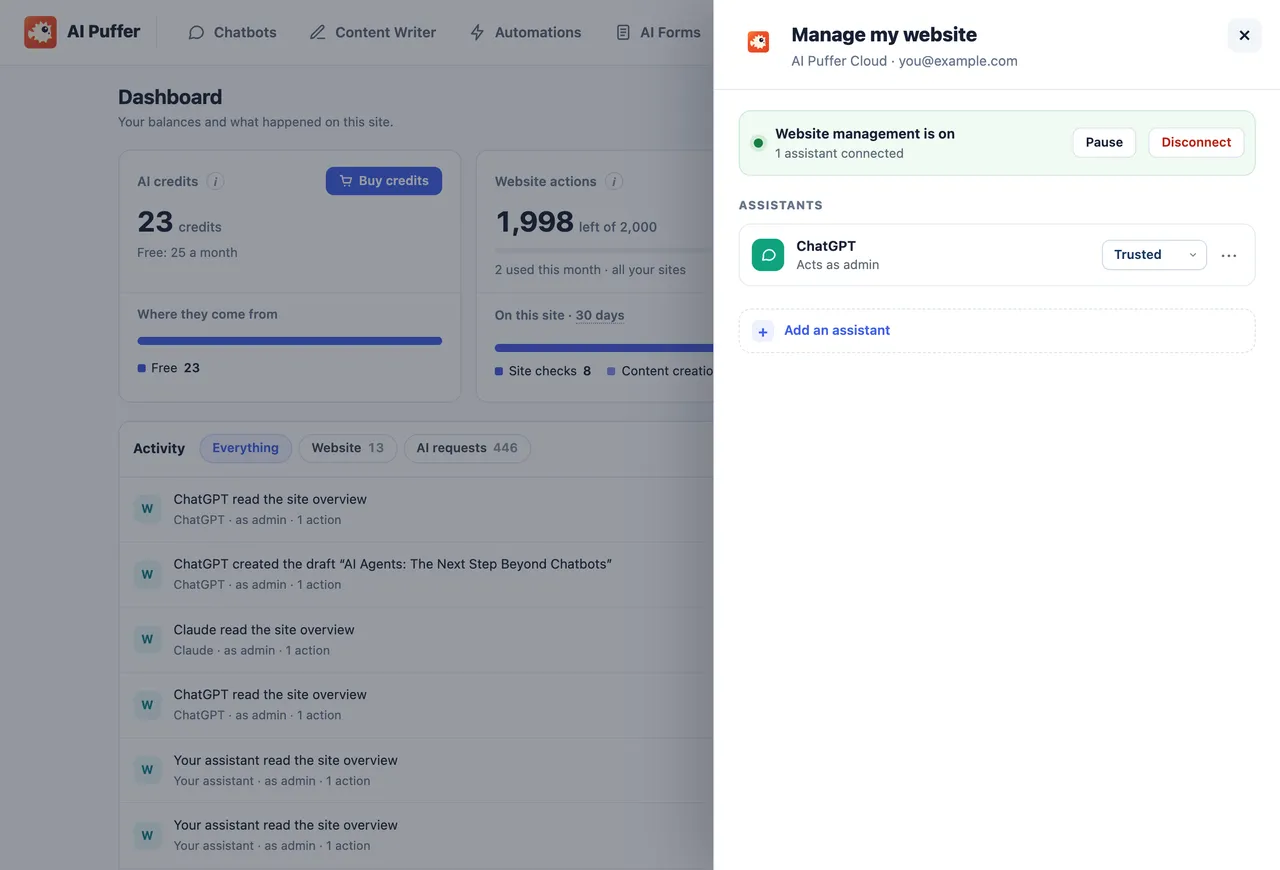
Website management: connect assistants such as ChatGPT or Claude, manage their access, and pause or disconnect website management. -
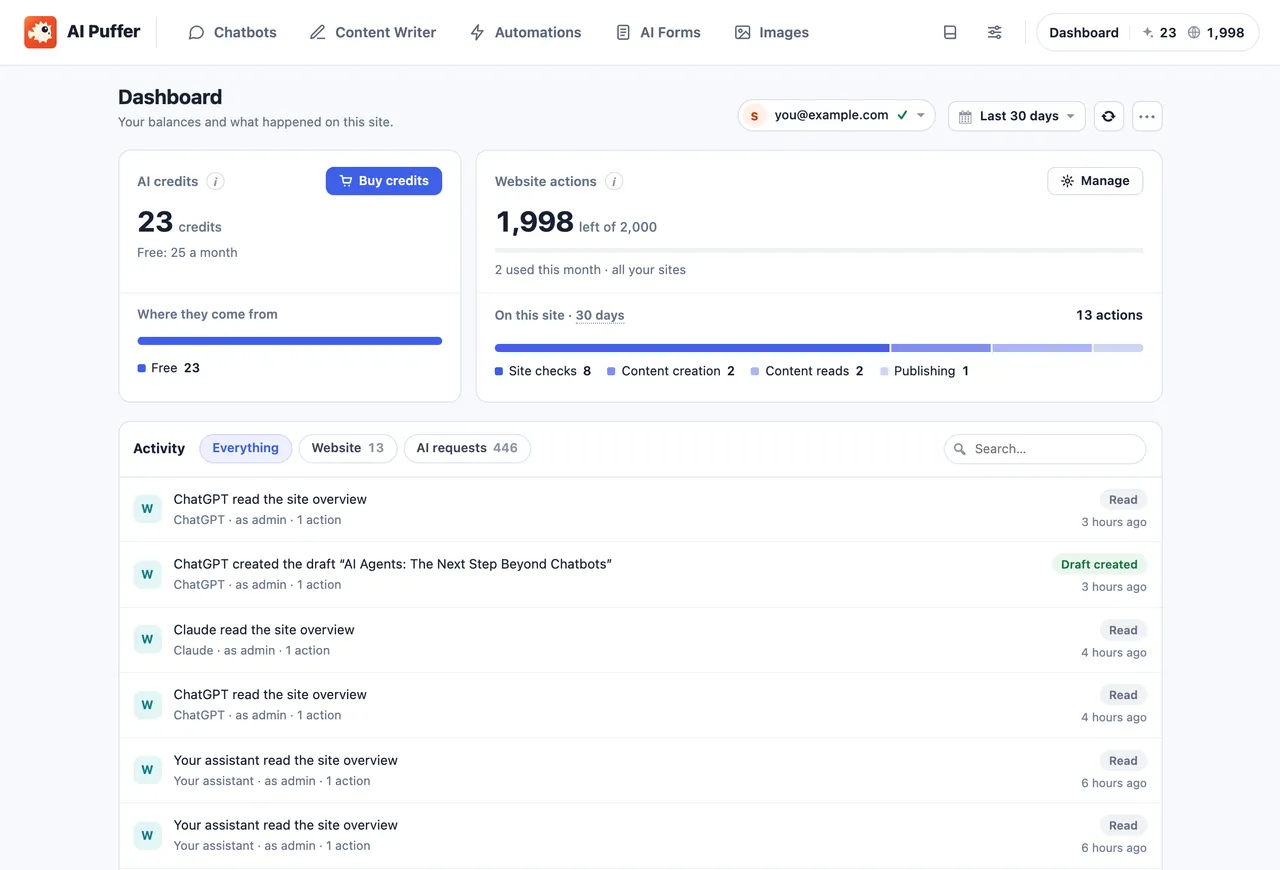
Dashboard: view AI credits, website-action allowances, usage breakdowns and recent activity separately. -
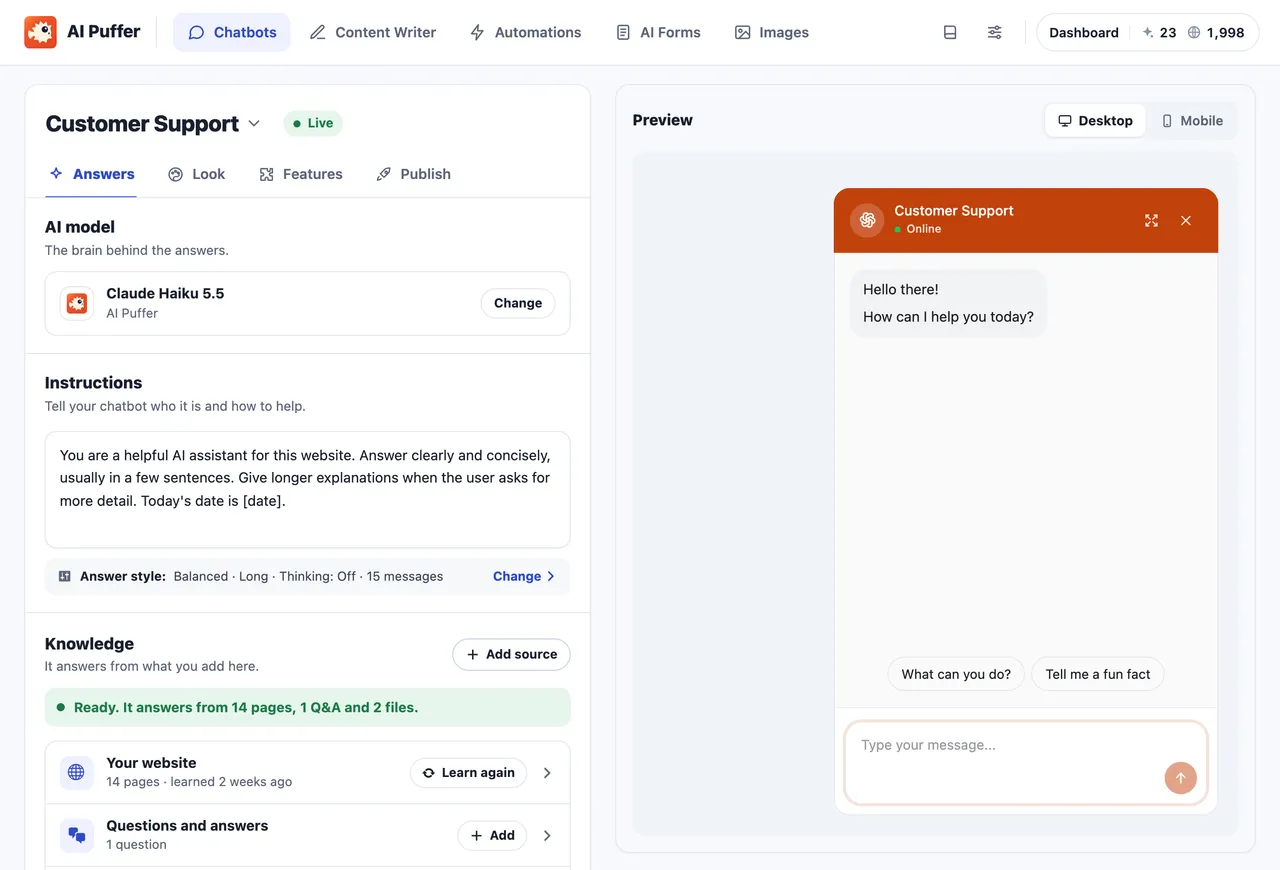
Chatbots: choose the AI model, instructions and knowledge sources, with a live chatbot preview. -
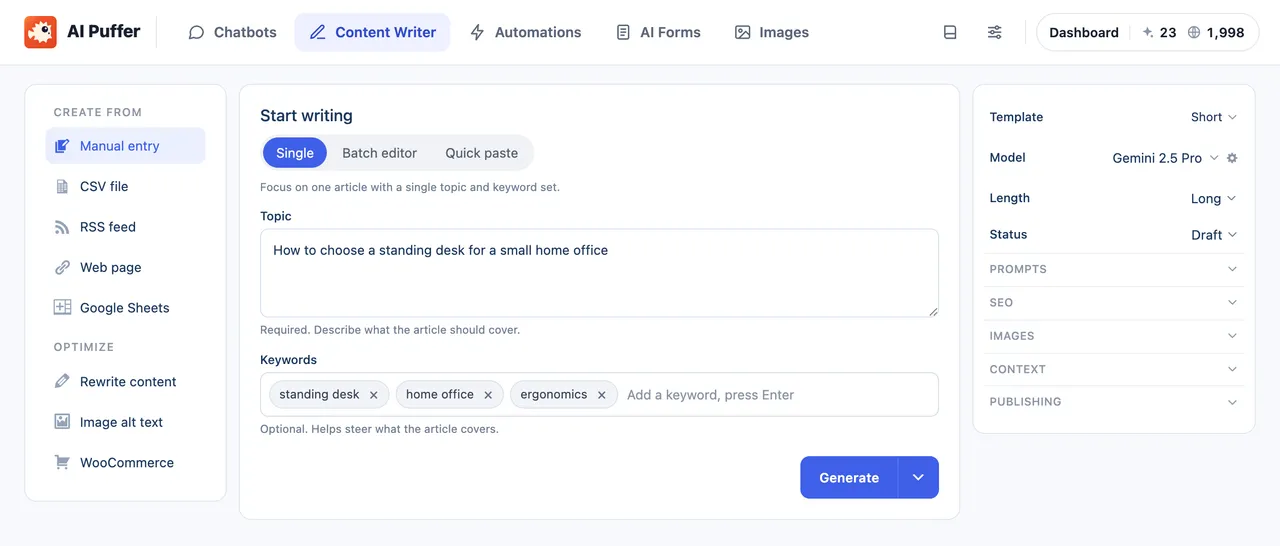
Content Writer: draft a post from a topic and keywords, and choose the model, length and post status. -
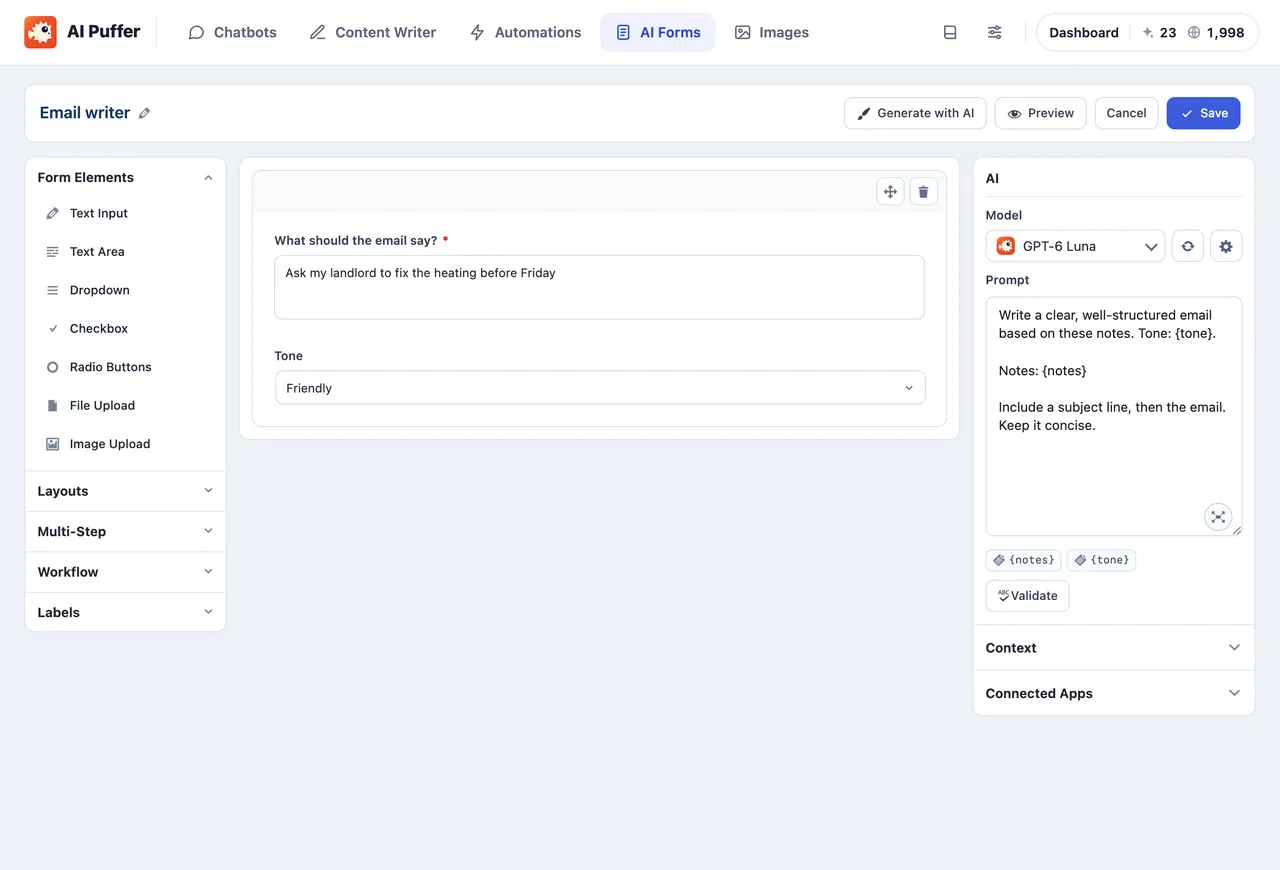
AI Forms: build forms from fields and write prompts using visitor input. -
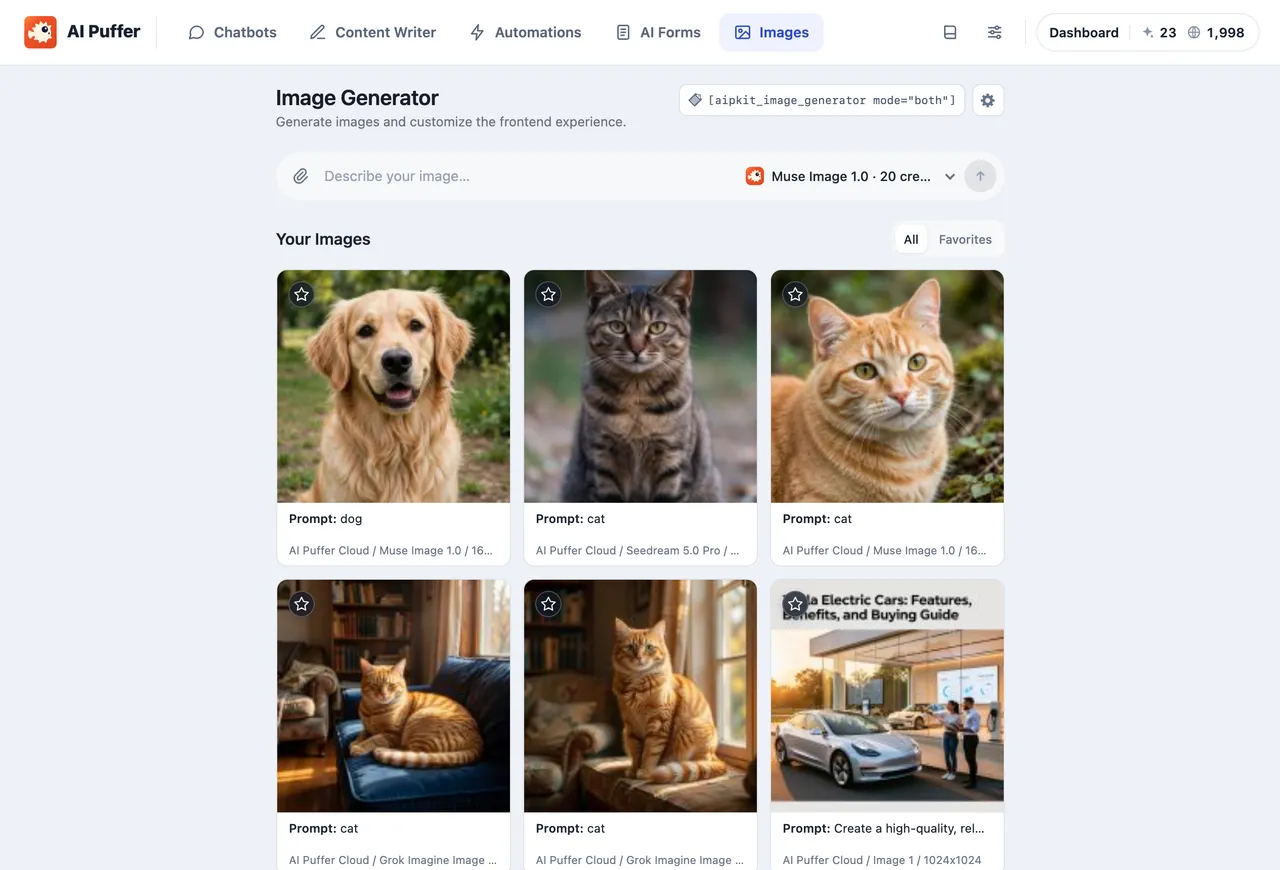
Images: generate images with your connected provider and browse your image history. -
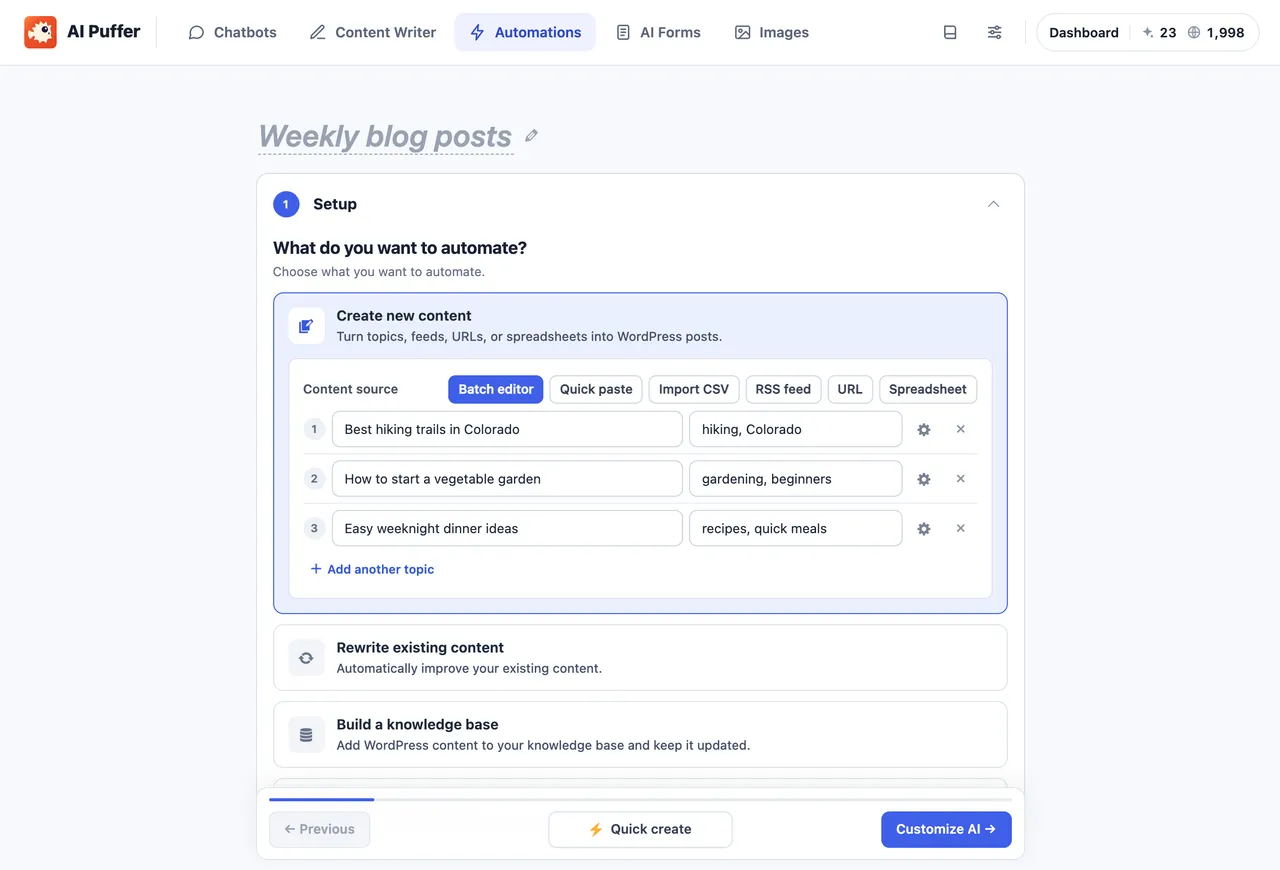
Automations: schedule content creation from topics, feeds, URLs or spreadsheets. -
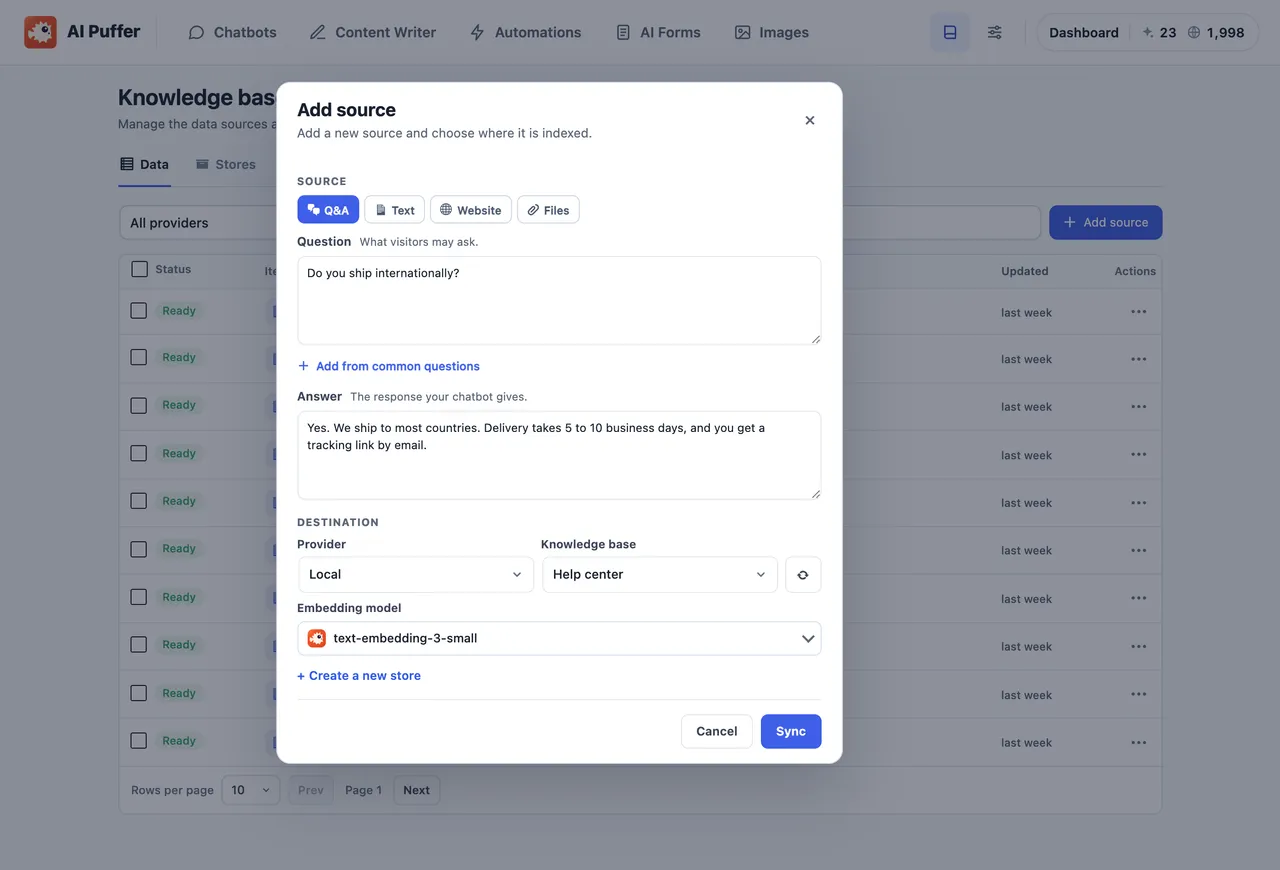
Knowledge Base: add questions and answers, text, websites or files, and choose where they are indexed. -
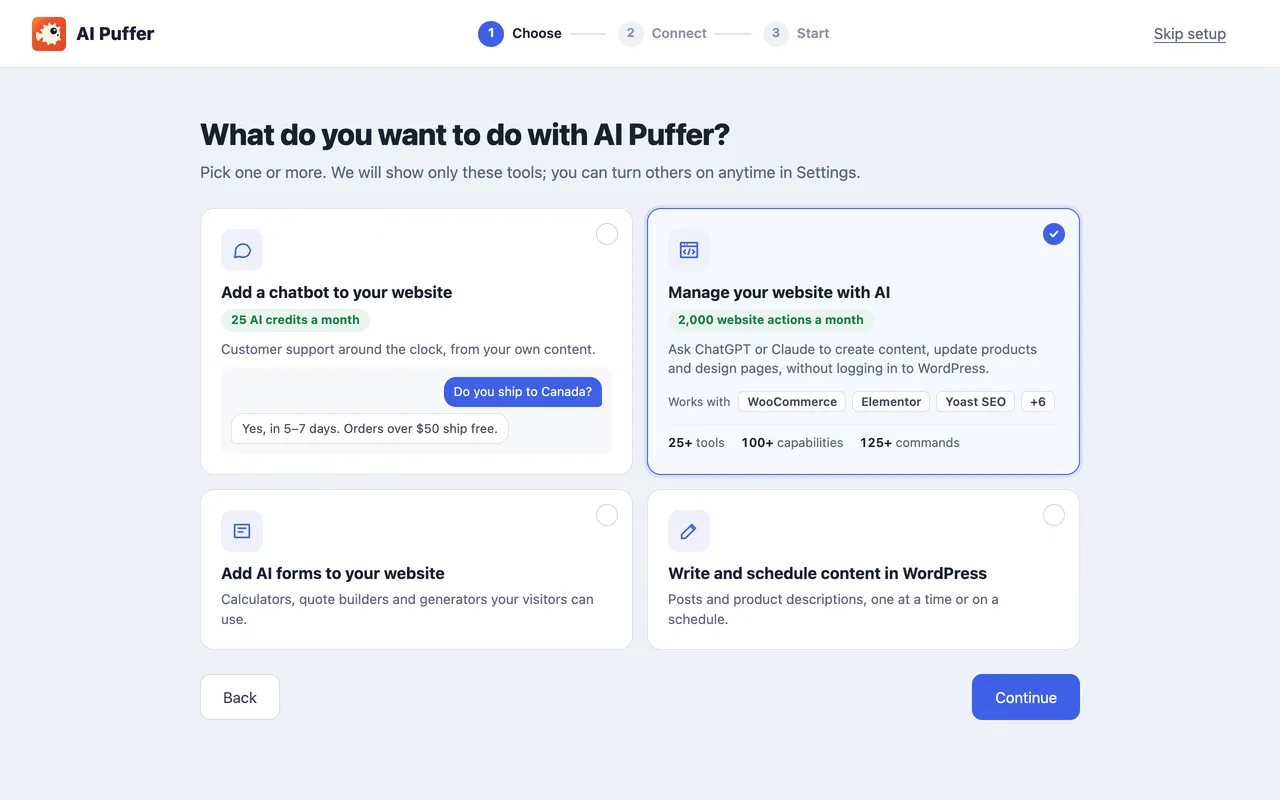
Guided setup: choose chatbots, website management, AI forms, or writing and scheduling content.
Important information
- The MCP feature is off until you connect an assistant. New connections default to Trusted, which can publish, change plugins and delete content directly. Switch to Standard if you want approval prompts.
- Your site must be reachable from the internet to connect an assistant. A site on your own computer cannot connect.
- Cloud credits depend on model and request size, and one credit is not one message or article. Free credits reset monthly and do not roll over.
- Using your own key sends requests to the provider you choose. Cloud connection registers your site through Freemius.
- Requires WordPress 6.0 or newer and PHP 7.4 or newer. Tested up to WordPress 7.1.4.
- Fourteen vulnerabilities have been published for this plugin over time. All are marked patched. Keep it updated.
From the AI Puffer readme
Straight from the developer's WordPress.org listing.
Full description
AI Puffer (formerly AI Power) is an MCP server for WordPress. Connect Claude or ChatGPT to your site, then ask for what you need in plain language: write and publish posts, update WooCommerce products, fix SEO titles, edit Elementor pages or review your search traffic. The same plugin adds an AI chatbot, content writer, automations, AI forms and image generation to your dashboard.
Free to start. The free plugin includes 2,000 website actions every month for Claude and ChatGPT, with no API key, SSH or WP-CLI installation. Eligible accounts with a verified email also get 25 free AI credits monthly for the chatbot, writer and other AI tools, or you can use your own OpenAI, Anthropic Claude, Google Gemini, xAI Grok, DeepSeek, OpenRouter or Azure OpenAI key.
Documentation · How Cloud works · Pricing · User reviews
Connect Claude or ChatGPT to WordPress through MCP
• Install AI Puffer and choose Manage my website in the setup wizard, or open Settings → Connections → Manage my website.
• Pick ChatGPT or Claude and approve the connection in WordPress. You can also start from Claude’s directory. Cursor, Claude Code and other MCP clients connect the same way.
• Ask your assistant to do something on your site. The hosted MCP server handles sign-in and routing, so there is nothing to configure on your server.
What you can ask
• “Draft a post about our spring sale and schedule it for Monday morning.”
• “Find images that are missing alt text and fill it in.”
• “Which of my recent posts have a poor SEO or readability score?”
• “Which pages have high impressions but a low click-through rate?”
• “Mark order 1042 completed and add the tracking number for the customer.”
• “Check my Wordfence security status. What needs attention?”
Assistants can read and search content, create drafts, edit and publish posts and pages, and manage images in your media library. The available actions depend on the site’s installed plugins and the permissions you grant.
Works with the plugins you already use
These MCP integrations are tested by us in both ChatGPT and Claude:
• Page builders and design: Elementor, Blocksy, Greenshift and Advanced Custom Fields (ACF).
• SEO: Yoast SEO, Rank Math, All in One SEO, SureRank SEO, Redirection, and read-only Search Console and GA4 reports through Google Site Kit.
• Stores: WooCommerce products, stock, coupons and orders, and Easy Digital Downloads.
• Forms: Contact Form 7, WPForms and Fluent Forms.
• Courses and fundraising: LifterLMS and Charitable.
• Maintenance: cache plugins such as WP Rocket, UpdraftPlus, Duplicator, WP Mail SMTP and read-only Wordfence status.
Other plugins that share WordPress abilities or a REST API can be reached too. What each integration supports depends on the plugin and its version.
WP-CLI-compatible commands without SSH
Supported WP-CLI-compatible commands let assistants inspect the site and manage posts, images, categories, tags, comments, classic navigation menus, settings, users, roles, cache and scheduled events without SSH or a WP-CLI installation. Official plugin/theme/core administration and bounded database inspection/search-replace commands are included. Ask your assistant for wp help to see the supported subset and flags. Commands use the same permissions, approval settings and website-action allowance as other website tools; shell scripts and full WP-CLI compatibility are not included.
You stay in control of the MCP connection
• Off until you connect it. Nothing is shared with an assistant until you explicitly connect one.
• Your WordPress permissions are the limit. Access follows the connecting WordPress user’s permissions.
• Choose a safety level for each connection. Standard asks for WordPress approval before publishing or supported plugin changes. Trusted is the default for new connections and runs supported changes directly, including publication, plugin changes and deletion. Existing Trusted connections keep their previous approvals until you select Trusted again in Settings.
• Pause or disconnect anytime from Settings → Connections.
• Separate allowances. Website actions are counted separately from AI credits; your assistant’s own subscription or model charges are separate.
Cloud or your own API keys
AI Puffer Cloud: connect in the setup wizard or Settings → AI. Supported models cover text, image generation and analysis, speech, transcription and embeddings. Credit use varies by model and request size, with a minimum per text request. One credit is not always one message, article or image. Image editing, video, realtime voice and web search currently require your own supported provider key.
Your own API keys: your site sends requests to the provider you choose, which bills your provider account. OpenAI-compatible endpoints are supported too. Use Cloud and your own keys side by side, with a model picker for each chatbot, form, task or tool.
Included in the free plugin
This edition includes the following core modules without a paid license. AI requests use your own provider account or AI Puffer Cloud credits. Website management is optional and includes 2,000 monthly website actions on the Free allowance, shared across your connected sites and assistants.
AI chatbot that answers from your content
Create unlimited chatbots with their own models, instructions, colors, welcome messages and conversation starters. Use posts, pages, products and FAQs as knowledge. Show a bot as a popup, site-wide, or with a block or shortcode. Voice input, read-aloud replies and image input work with supported models. Web search and Google Search grounding require your own supported provider key.
AI content writer and Content Assistant
Draft posts from topics and keywords, one at a time or from a batch or CSV list. Use reusable prompt templates, choose draft or publish status, and add featured or inline images from AI providers or stock photos. Start from Posts → Generate New Post.
Write Gutenberg-ready content, with meta descriptions and focus keywords where supported by Yoast SEO, Rank Math, All in One SEO or The SEO Framework. The Content Assistant improves titles, excerpts, content and tags in the block editor, classic editor and post lists.
Automations: scheduled content and auto blogging
Create recurring or one-time automation tasks from topics or CSV, with draft, schedule or publish options. Reply to comments with replies held for approval by default, or add new posts to your knowledge base using category filters. Review item status in the queue. Server cron is supported when WP-Cron is disabled.
AI forms
Build forms with a drag-and-drop editor, templates and prompts that use visitors’ field values. Choose a model and knowledge base for each form, and enable web search with your own supported key. Embed with a block or shortcode, and import or export forms.
AI image generator
Enable Images in Settings → Modules. Generate images with OpenAI GPT Image, Gemini image models, Grok Imagine, Replicate, OpenRouter, Azure or Cloud. Image editing works with supported providers and models. Google Veo video needs your own Google key. Search stock photos from Pexels and Pixabay, or embed a visitor image generator with a block or shortcode. These tools are included in the free plugin; provider accounts or Cloud credits cover AI usage.
Knowledge base and semantic search
AI Puffer splits content into passages and retrieves relevant passages for a question. It does not train a new AI model.
Index posts, pages, products, custom post types, Q&A pairs and pasted text, including page-builder content. Use “Add to knowledge base” from post lists or embed semantic search on your site. Choose Local storage in your WordPress database, OpenAI vector stores, Google File Search, Pinecone, Qdrant or Chroma. External stores and embeddings require compatible provider connections.
WooCommerce product tools and visitor credits
Improve product titles, descriptions, short descriptions and tags with the Content Assistant; answer questions from product pages; and sell visitor credit packages for your chatbots, forms and image generator. Visitor credits are balances managed on your site, separate from AI Puffer Cloud credits. WooCommerce is optional.
Usage, permissions and integrations
Set guest, user and role limits with daily, weekly, monthly or no reset. Review conversation and usage logs, credit balances and access through the Role Manager. Word and IP blocklists, IP anonymization and optional moderation help manage requests.
Use the REST API, signed event webhooks, three blocks and five shortcodes. WordPress AI Connectors are opt-in and let compatible built-in AI features use your configured providers.
Optional upgrades
The free plugin works on its own. Paid subscriptions add:
• File sources and uploads for knowledge bases, chatbots and forms.
• RSS, URL and Google Sheets content sources, scheduled post improvements and Smart SEO tools.
• Realtime voice, advanced chatbot triggers, external chatbot embeds, multi-step forms and PDF exports.
• Additional app integrations, Ollama, automatic log retention and higher monthly Cloud allowances.
See the feature comparison and current plans for the full list. All subscription tiers unlock the same additional plugin features; their monthly allowances differ.
Supported providers
• AI Puffer Cloud: available models from OpenAI, Anthropic, Google and others, using AI credits.
• OpenAI: GPT text models, GPT Image, speech, transcription and embeddings.
• Anthropic: Claude Sonnet, Opus and Haiku.
• Google: Gemini text and image models, Veo, speech and embeddings.
• xAI: Grok text and image models.
• DeepSeek, OpenRouter (including Mistral models), Azure OpenAI and OpenAI-compatible endpoints.
• Media services: ElevenLabs voices, Replicate images, and Pexels and Pixabay stock photos.
Models and capabilities depend on the selected provider and its current catalog.
Privacy and data flow
AI requests are sent when you use a connected provider. Visitor messages go to the provider selected for that chatbot. Chat logs, usage records and Local knowledge are stored in your WordPress database. Text you index is processed by the chosen embedding provider and, with an external store, stored there. The External services section below explains connection, licensing and diagnostic requests and links each service’s terms and privacy policy.
External services
The plugin contacts external services when you connect or use them, manage licensing or checkout, or submit optional deactivation feedback. Cloud setup and connection diagnostics are sent after you accept the Cloud connection terms and click Connect. An AI request contains what the feature needs: the prompt and instructions, chat or form input with recent conversation history, the content being written or improved, text you add to a knowledge base, images or audio you submit, and model settings. Each API key goes only to its own provider.
AI Puffer Cloud (puffercloud.dev, about Cloud), the optional hosted AI service run by the AI Puffer team.
• Connecting happens only after an administrator accepts the connection terms and clicks Connect. It sends the site’s Freemius install ID, the site address, a signed proof of the installation and the attempt’s support reference.
• Using its models sends the request content and model settings. Cloud passes each request to the AI service behind the chosen model (such as OpenAI, Anthropic or Google), through service providers such as OpenRouter where applicable, and returns the result and the credits used. Balance, model, checkout and disconnect requests send the site address and its Cloud credential; deleting the plugin also disconnects the site. While connected, the setup wizard sends your setup choices and completed steps.
• Connection diagnostics: each Connect attempt, including one that fails before account registration, sends its outcome, the step reached, error codes, safe network failure details, HTTP status, timing, software versions and a random support reference. Once an installation identity is available, the report also includes its site address and installation ID as unverified troubleshooting context. Your browser sends the report, so Cloud also sees the browser’s IP address and the site’s domain. Cloud keeps diagnostic reports for 30 days. The plugin keeps at most 10 local reports, removes those older than 30 days on the next attempt, and never reports on ordinary page loads.
• Terms · Privacy
Freemius (freemius.com): account registration, email verification, licensing, and checkout for subscriptions and credits. Registration happens only when you choose it, for example by connecting Cloud or signing up for product updates in the setup wizard. It sends your name, email address and site address, plus basic plugin details such as the version. General usage tracking is turned off in the setup flow, and marketing emails are optional. The in-plugin pricing page, checkout and license activation also contact Freemius. An answer to the optional deactivation feedback form is sent to Freemius when the plugin is deleted and, unless you tick “Anonymous feedback”, registers the site. Terms · Privacy
The AI providers and stores below are used only when you select one for a feature, or turn on a feature that uses it.
OpenAI (api.openai.com): text, images, embeddings, vector stores, speech, transcription, web search, and moderation if you turn it on. A custom OpenAI-compatible base URL receives these requests instead. Terms · Privacy
Google Gemini API (generativelanguage.googleapis.com): text, images, Veo video, speech, transcription, embeddings, File Search stores and Search grounding. Terms · Privacy
Anthropic (api.anthropic.com): Claude text, image input and web search. Terms · Privacy
xAI (api.x.ai): text, image input, web search and images. Terms · Privacy
DeepSeek (api.deepseek.com): text. Terms · Privacy
OpenRouter (openrouter.ai): text, images and web search, through the model vendor you pick. Terms · Privacy
Microsoft Azure OpenAI (your Azure endpoint): text, images, embeddings and transcription. Terms · Privacy
ElevenLabs (api.elevenlabs.io): reply text, when a bot reads replies aloud with ElevenLabs. Terms · Privacy
Replicate (api.replicate.com): image prompts and settings. Terms · Privacy
Pexels (api.pexels.com) and Pixabay (pixabay.com): your stock photo search terms. Pexels Terms · Privacy; Pixabay Terms · Privacy
Openverse (api.openverse.org): when you ask a connected assistant to search stock images, your search terms and image filters go from your website to Openverse. No API key is needed. Results include creator, source and licence links; check the original source and retain required attribution. Searches are cached locally for one hour. Downloading a chosen image uses the existing media upload tool and contacts its image host. Terms · Privacy
Pinecone (api.pinecone.io and your index host), Qdrant and Chroma (the address you enter), if chosen as your knowledge store: passages and embeddings of content you index, and search vectors for lookups. Pinecone Terms · Privacy; Qdrant Terms · Privacy; Chroma Terms · Privacy
Hosted website management (mcp.aipuffer.org): starting from Claude’s directory sends the website address you enter to the bridge so you can continue in WordPress. Only after you enable Manage my website and accept its disclosure, the bridge receives your site address, WordPress/plugin versions, Cloud account/site identifiers and public signing key to register the site. Assistant connections include the WordPress user identifier and permitted actions. Assistant requests and website results, including requested post text, pass through the bridge to your chosen assistant; draft content is sent to your WordPress site. Operational records contain identifiers, action names, status and usage, without post bodies or credentials. Recent operational history is searchable for 30 days; archives and completed admin command records are retained for 24 months, and unresolved cases are held until resolved. WordPress keeps its local operation records for recovery. Standard access requires WordPress approval for post publication; Trusted access can publish posts directly. At …
Installation
• In WordPress, go to Plugins → Add New Plugin, search for “AI Puffer”, then click Install Now and Activate. You can also upload the plugin folder to /wp-content/plugins/gpt3-ai-content-generator.
• On a new install, a setup wizard starts the first time you open AI Puffer. Choose what you want to do first (a chatbot, posts, product descriptions, automations or forms) and how to power AI: AI Puffer Cloud (accept the connection terms and confirm your email) or your own API key.
• To connect Cloud or change API keys later, go to AI Puffer → Settings → AI. Models load after you save a key.
• Open a module from the top bar of the AI Puffer screen: Chatbots, Content Writer, Automations, AI Forms, Knowledge Base or Usage. Turn on Images in Settings → Modules.
Developer FAQ (11)
- How do ChatGPT and Claude manage my site?
- Connect them in Settings → Connections → Manage my website. Through MCP they can read and search content, create drafts and publish posts. Standard asks for WordPress approval before publishing or supported plugin changes. New connections default to Trusted, which runs supported changes directly, including deletion. Existing Trusted connections keep their previous approvals until you select Trusted again in Settings. You can pause or disconnect access anytime. The chatbot, content writer, automations, forms and images work as before, with or without this connection.
- Is the MCP server free?
- Yes. Website management is included in the free plugin with 2,000 website actions every month, shared across your connected sites and assistants. One request to your assistant can use several actions. Paid subscriptions add higher monthly allowances. Your ChatGPT or Claude subscription is separate and billed by its provider.
- Which AI assistants and MCP clients can I connect?
- ChatGPT and Claude, plus Cursor, Claude Code and other MCP clients. You do not need SSH, a WP-CLI installation or an AI provider API key to connect an assistant. Your website must be reachable from the internet, so a site on your own computer cannot be connected.
- Do I need an API key?
- Not if you use AI Puffer Cloud. Connect it in the setup wizard or in AI Puffer → Settings → AI, accept the connection terms and confirm your email. Eligible accounts get 25 free AI credits monthly. If you already pay for an AI provider such as OpenAI, Anthropic, Google or xAI, paste that key instead. You can use both side by side.
- What do the free Cloud credits include?
- Eligible accounts with a verified email get 25 free AI credits monthly. Connecting registers your site through Freemius, which handles the account and the confirmation email. Credits pay for requests: text, image generation and analysis, speech, transcription and embeddings. The cost depends on the model and the size of the request, with a minimum per text request, so one credit is not one message, article or image. Free credits reset each month and do not roll over. Purchased top-ups do not expire and are shared by the sites on your account. The allowance depends on eligibility and on the program being available, and Usage shows your balance and status. When credits run out, those requests stop until the allowance renews or you add credits. Providers you connect with your own key keep working.
- What is included without a paid license?
- Chatbots, content writing, topic/CSV automations, AI Forms, images, knowledge storage, website management, usage controls and developer integrations are included in the free plugin. AI provider charges are separate; use your own keys or Cloud credits. Some capabilities, such as web search or image editing, require a compatible provider and model. Optional upgrades are summarized above. Visit the pricing page for the full comparison and subscription allowances. Cloud allowances are shared across an account’s sites, not multiplied by the number of licensed sites. Monthly allowances do not roll over; purchased AI credits do not expire. Existing lifetime licenses keep their plugin access but do not include paid subscription allowances.
- Can I use OpenAI, Claude, Gemini or Grok models?
- Yes. Add your own key for OpenAI, Anthropic (Claude), Google (Gemini) or xAI (Grok), or pick OpenAI, Anthropic and Google models on Cloud. DeepSeek, OpenRouter, Azure OpenAI and OpenAI-compatible endpoints work too. Pick the model for each chatbot, form, task or tool.
- Does the chatbot answer only from my content?
- It answers from your content when it finds a good match, but it is not limited to it. With a knowledge base connected, the plugin looks up the passages that best match each question (a confidence threshold sets how close a match must be) and sends them to the AI model with the question and your instructions. The model can still use its general knowledge or make mistakes. Tell it in the instructions what to do when your content has no answer, for example “Say you don’t know and suggest contacting us”, and test it with real questions before you go live.
- How is my data handled in Cloud mode vs own-key mode?
- With your own key, requests go straight from your server to the provider you chose, under your account with that provider. They do not pass through AI Puffer Cloud. In Cloud mode, requests (prompts, messages, the content, images or audio you submit, and model settings) go to Cloud, which passes them to the AI service behind the selected model (through service providers such as OpenRouter where applicable) and records the credits used. Cloud’s billing records hold usage and credit data, not full conversations. In both modes, chat logs, usage records and Local knowledge stay in your WordPress database. The External services section lists what each service receives and links its terms and privacy policy.
- Does it work with WooCommerce?
- Yes, and WooCommerce is optional. You can write product titles, descriptions, short descriptions and tags with the Content Assistant, let the chatbot answer from your products, and sell AI credit packages to visitors through your WooCommerce checkout.
- Is this the same plugin as AI Power?
- Yes. AI Power was renamed AI Puffer. It is the same plugin, with the same plugin folder, settings and data, so updating keeps your bots, content, keys and history. The new listing name says what it does: an MCP server for Claude and ChatGPT, with an AI chatbot and content writer.
Downloads, last 30 days
Trend vs previous period: +370.4%
Average daily downloads: 2,348 over the last 7 days , 2,548 over 30 days.
Security history
Past CVEs, patched · 14 published vulnerabilities (Wordfence) · most recent Oct 10, 2026
- Patched 6.3 Medium AI Power: Complete AI Pack <= 1.8.96 - Missing Authorization to Authenticated (Subscriber+) Arbitrary Shortcode Execution CVE-2024-13361 · Jan 21, 2025 · affects *-1.8.96 · fixed in 1.8.97
- Patched 3.1 Low AI Puffer <= 2.4.89 - Missing Authorization to Authenticated (Subscriber+) Global Plugin Settings Modification via ajax_save_cpt_indexing_options AJAX Endpoint CVE-2026-104741 · Oct 10, 2026 · affects *-2.4.89 · fixed in 2.4.90
- Patched 4.3 Medium GPT3 AI Content Writer <= 1.9.14 - Cross-Site Request Forgery CVE-2025-47470 · May 7, 2025 · affects *-1.9.14 · fixed in 1.9.15
- Patched 5.3 Medium AI Power: Complete AI Pack - Powered by GPT-4 <= 1.8.1 - Missing Authorization to Sensitive Data Exposure CVE-2023-51527 · Dec 27, 2023 · affects *-1.8.2 · fixed in 1.8.3
- Patched 6.4 Medium GPT3 AI Content Writer <= 1.8.66 - Authenticated (Contributor+) Stored Cross-Site Scripting CVE-2024-37465 · Jul 1, 2024 · affects *-1.8.66 · fixed in 1.8.67
- Patched 6.1 Medium Freemius SDK <= 2.5.9 - Reflected Cross-Site Scripting via fs_request_get CVE-2023-33999 · Jul 18, 2023 · affects 1.4.10-1.7.37 · fixed in 1.7.38
- Patched 4.3 Medium GPT3 AI Content Writer <= 1.8.12 - Cross-Site Request Forgery CVE-2023-51528 · Dec 27, 2023 · affects *-1.8.12 · fixed in 1.8.13
- Patched 3.1 Low AI Puffer <= 2.4.89 - Missing Authorization to Authenticated (Subscriber+) Semantic Search Settings Modification via ajax_save_semantic_search_settings AJAX action CVE-2026-104742 · Oct 10, 2026 · affects *-2.4.89 · fixed in 2.4.90
Show all 14 vulnerabilities
- Patched 5.4 Medium AI Power: Complete AI Pack <= 1.8.96 - Authenticated (Subscriber+) Server-Side Request Forgery CVE-2024-13360 · Jan 21, 2025 · affects *-1.8.96 · fixed in 1.8.97
- Patched 8.1 High GPT AI Power <= 1.4.37 - Missing Authorization CVE-2023-0405 · Jan 19, 2023 · affects *-1.4.37 · fixed in 1.4.38
- Patched 7.2 High AI Power: Complete AI Pack <= 1.8.96 - Authenticated (Admin+) PHP Object Injection via wpaicg_export_prompts CVE-2025-0428 · Jan 21, 2025 · affects *-1.8.96 · fixed in 1.8.97
- Patched 7.2 High AI Power: Complete AI Pack <= 1.8.96 - Authenticated (Admin+) PHP Object Injection via wpaicg_export_ai_forms CVE-2025-0429 · Jan 21, 2025 · affects *-1.8.96 · fixed in 1.8.97
- Patched 9.8 Critical AI Power: Complete AI Pack <= 1.8.89 - Unauthenticated Arbitrary File Upload CVE-2024-10392 · Oct 30, 2024 · affects *-1.8.89 · fixed in 1.8.90
- Patched 6.1 Medium Freemius <= 2.10.1 - Reflected DOM-Based Cross-Site Scripting via url Parameter CVE-2024-13362 · May 1, 2026 · affects *-1.8.99 · fixed in 2.3.17
Recent releases
- v2.5.25
Added read-only Google Search Console and GA4 page reports through Site Kit. * Added read-only Wordfence scan, findings and firewall status for connected assistants. * Fixed Hostinger Tools...
- v2.5.24
Improved field-level REST validation guidance so connected assistants can correct required values and field types. * Improved GeoDirectory route discovery and Yoast SEO lookup guidance for...
- v2.5.23
Fixed misleading Gutenberg permission errors for unsupported custom content types and clarified native route discovery. * Improved website-management error reporting and diagnostics for slow or...
- v2.5.22
Added website-management integrations for UpdraftPlus, Contact Form 7, Blocksy and Greenshift. * Improved protection of credentials in website-management discovery and responses.
- v2.5.21
Fixed pending ChatGPT and Claude connections not updating automatically after approval in the Dashboard and Settings. * Improved the Cloud connection button styling and simplified the Dashboard...
Show 10 older releases
- v2.5.20
Added Claude directory connections from WordPress setup, Settings and Claude, using your WordPress login and existing account verification.
- v2.5.19
Added new website-management integrations for Beaver Builder Lite, GenerateBlocks, GeneratePress, SiteOrigin Page Builder, Pagelayer, SeedProd, GeoDirectory and WP Rocket.
- v2.5.18
Fixed: website tools discover custom content's registered REST routes and explain unsupported custom types accurately, while preserving permissions and existing blocks. * Fixed: invalid SQL...
- v2.5.17
- Improved onboarding. - Added Gutenberg and Classic output choices to manual and automated content rewrites. - Preserved quoted links, image attributes and formatting in rewritten content, with...
- v2.5.16
- Added permission-checked cache settings inspection and updates for WP-Optimize, Breeze, SpeedyCache, WP Fastest Cache and LiteSpeed Cache, with conflict checks and native configuration...
- v2.5.15
- Updated the Markdown renderer to prevent slow parsing of malformed link references and inline HTML. - Added simple-product sale scheduling, inspection and cancellation with site-timezone...
- v2.5.14
- Fixed legitimate REST query parameters, ordinary bracketed text and JavaScript prose being rejected as unsupported content, while retaining protections for scripts, executable URLs, registered...
- v2.5.13
MCP improvements: - Added one-shot verification for images uploaded through the WordPress handoff, with user/site-bound upload windows and no automatic selection of ambiguous matches. - Added...
- v2.5.12
- Added guided onboarding for chatbots, website management, AI forms and content, with email verification, connection checks and a first assistant request. - Made Dashboard the default landing...
- v2.5.11
- Expanded MCP website management with richer site information, post/page editing and scheduling, media uploads and image details. - Added image understanding and missing-only bulk alt text,...
AI Puffer FAQ
How do ChatGPT and Claude manage my site?
You connect them under Settings, Connections, Manage my website. Through MCP they can read and search content, draft and publish posts, and manage media. You can pause or disconnect access at any time.
Is the MCP server free?
Yes. The free plugin includes 2,000 website actions each month, shared across your sites and assistants. One request can use several actions. Paid subscriptions raise the allowance.
Which assistants can I connect?
ChatGPT and Claude, plus Cursor, Claude Code and other MCP clients. No SSH, WP-CLI install or provider API key is needed.
Do I need an API key?
Not if you use AI Puffer Cloud. Eligible accounts get 25 free credits monthly. If you prefer, paste a key from OpenAI, Anthropic, Google, xAI or another supported provider. Both can be used side by side.
Does it work with WooCommerce?
Yes, and WooCommerce is optional. It can write product titles and descriptions, let the chatbot answer from products and sell credit packages to visitors.
Is this the same plugin as AI Power?
Yes. AI Power was renamed AI Puffer. The folder, settings and data are unchanged, so updating keeps your bots, content and keys.
Where is my data stored?
Chat logs, usage records and local knowledge stay in your WordPress database. Cloud billing records hold usage and credit data, not full conversations.
AI Puffer alternatives

GetGenie is the #1 AI SEO assistant for WordPress - the only AI plugin that combines AI keyword research, competitor analysis, content writing, AEO, GEO, and SEO performance tracking in a single dashboard inside…

WP RSS Aggregator is the perfect plugin to quickly import RSS feeds, build a news aggregator, and for easy autoblogging. This is why it is used on 40,000+ websites to aggregate and curate content from all over the…
BotWriter is the most complete AI writer plugin for WordPress . It works as an AI auto blogging tool that automatically generates and publishes SEO-optimized articles, and as a WooCommerce AI content optimizer that…

AI Powered Free WordPress Link Directory Plugin to curate links for web directory Free WordPress Link Directory Plugin for your External Link Directory Listings! Simple Link Directory is a simple WordPress Directory…
AI WP Writer is a powerful AI content generator for WordPress. It works seamlessly in both the Classic Editor and the Gutenberg editor, giving you flexibility in how you create content. For text generation, it…

Best AI Plugin for WordPress AI Bud is the best ai content generator and chatbot plugin for WordPress . AI Bud is a perfect WordPress AI plugin for all kind of AI generated content, comment generation, chatbot and AI…
Listing data from WordPress.org and the Wordfence vulnerability feed, refreshed Nov 9, 2026; listing details fetched Nov 14, 2026. Screenshots are from the plugin's WordPress.org listing. Not affiliated with senols.