BotWriter
BotWriter - AI Writer & SEO Content Generator · by Esteban
- active installs
- 1K+
- 16 ratings
- 4.4
- since last update
- 30d
- releases in 12 months
- —
- support threads resolved
- 100%
- avg daily downloads
- 342
- on WordPress.org
- 21 months
BotWriter at a glance
BotWriter is a freemium WordPress AI content writing plugin by Esteban with 1K+ active installs and a 4.4/5 rating from 16 reviews. It was last updated on Oct 10, 2026, is tested up to WordPress 7.1.4 and needs PHP 7.0+. It works with OpenAI, Claude, Google Gemini, Mistral AI. It has no published security vulnerabilities in the Wordfence database. Our quality score is 95/100.
What is BotWriter?
BotWriter is an AI writing plugin that generates and publishes blog posts on a schedule, and also bulk-edits WooCommerce product content. You set up tasks that choose the days, number of posts, content source, AI provider and prompts, and the plugin publishes the results automatically.
It suits bloggers, niche site owners and store owners who want to use several AI providers instead of one. Text can come from OpenAI, Anthropic, Google, Mistral, Groq, OpenRouter or DeepSeek, and images from free stock libraries or AI image models. Content sources include prompts, RSS feeds and news.
One point matters for privacy. AI requests are routed through the BotWriter cloud service, not sent straight from your site. Your provider API keys are passed to that service to run generation. You pay the AI providers directly. The listing does not describe any BotWriter paid plan, though the data labels it freemium.
Best for
- Bloggers who want scheduled posts on several AI models
- Niche sites rewriting RSS or news content
- Store owners updating many product descriptions at once
- Users who want a free stock image option
Our take
An AI writer aimed at auto-blogging and WooCommerce descriptions. Functional, but auto-blogging at scale is exactly the kind of output Google's 2026 updates punished - use deliberately.
BotWriter features
Multi-provider text generation
Pick from OpenAI, Anthropic, Google, Mistral, Groq, OpenRouter and DeepSeek, and use a different one per task.
Scheduled tasks
Choose publishing days, posts per day, content source and provider. A cron engine runs the tasks.
RSS and news sources
Rewrite items from RSS feeds or trending news into new articles.
Super Tasks
Generate a whole series of related articles in bulk from one setup.
Image providers and styles
Free stock photo libraries or AI image models, with 12 style presets and optional custom styles.
Image optimization
Converts images to WebP, resizes them and compresses to a target size.
Article templates and personas
Save prompt and structure settings as templates, and pick writer personas for tone.
WooCommerce content optimizer
Bulk-edit product titles, descriptions, tags, alt text, SEO fields and category descriptions, with preview and backup before applying.
Demo review generator
Creates simulated reviews for staging and layout testing. They must not be shown as real reviews on a live store.
Draft mode and retries
Save posts as drafts for review, and failed generations retry with backoff and are logged.
BotWriter free vs pro
Free WordPress.org version
- Scheduled blog automation, templates and Super Tasks
- Multiple text and image providers using your own keys
- WooCommerce content optimizer and image tools
The data classes the plugin as freemium, but the listing does not state what a paid version adds or its price. You bring your own API key for each AI provider and pay those providers directly.
How to use BotWriter
- Install the plugin
In wp-admin go to Plugins, then Add New, search for BotWriter, then install and activate.
- Add provider keys
Go to BotWriter, then Settings, and enter the API keys for the text and image providers you want.
- Create a task
Pick publishing days, posts per day, content source, provider, prompts and a post status. Use Draft if you want to review first.
- Apply a template
Save or choose an article template and writer persona so posts come out consistent.
- Run and monitor
Let the schedule run, or use Write Now for an instant post. Check the Logs section for errors.
BotWriter screenshots (4)
-
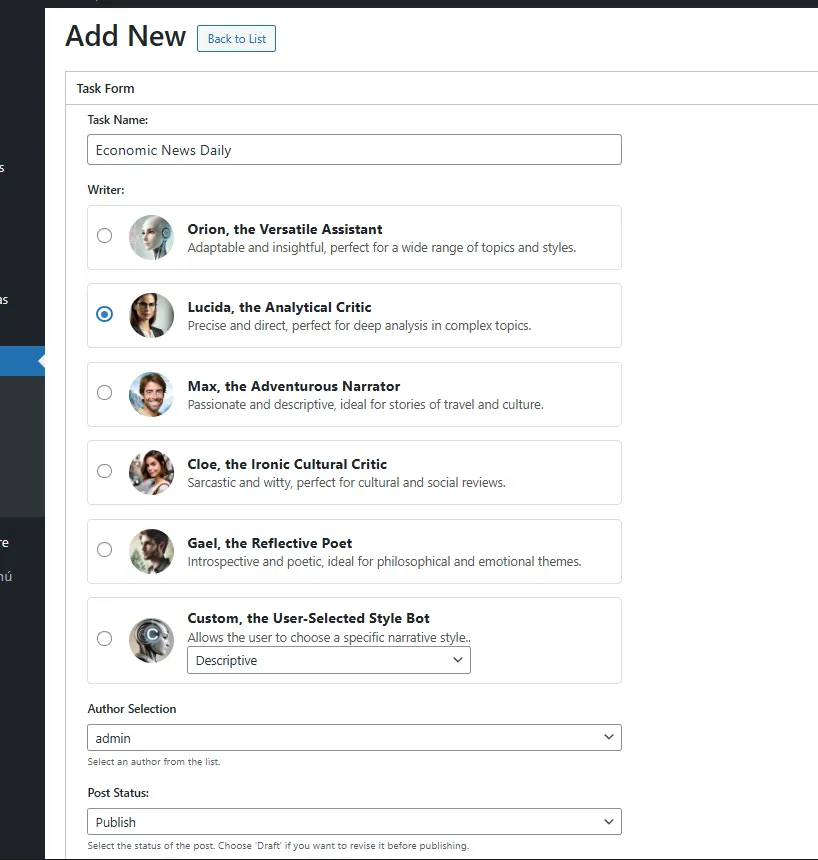
Add New AI Task 1/3. -
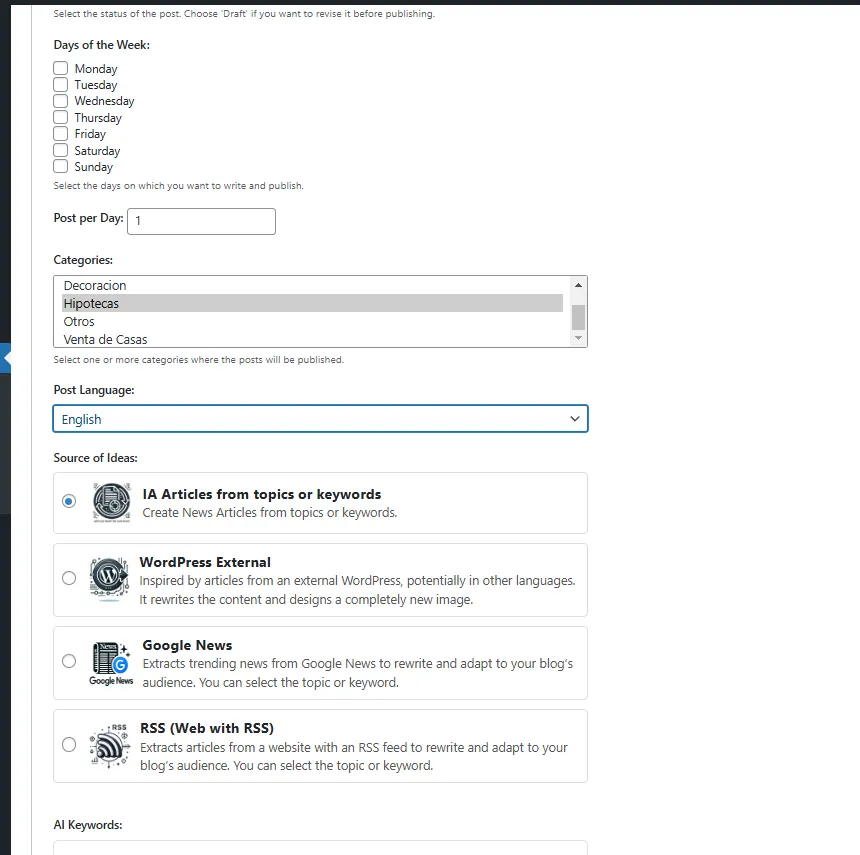
Add New AI Task 2/3. -
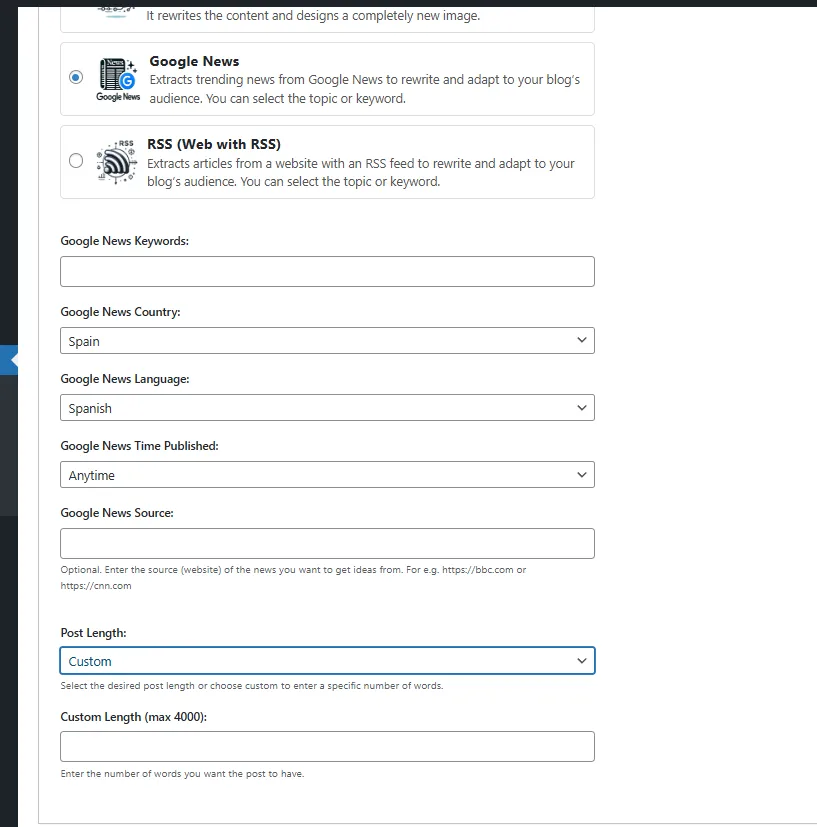
Add New AI Task 3/3. -
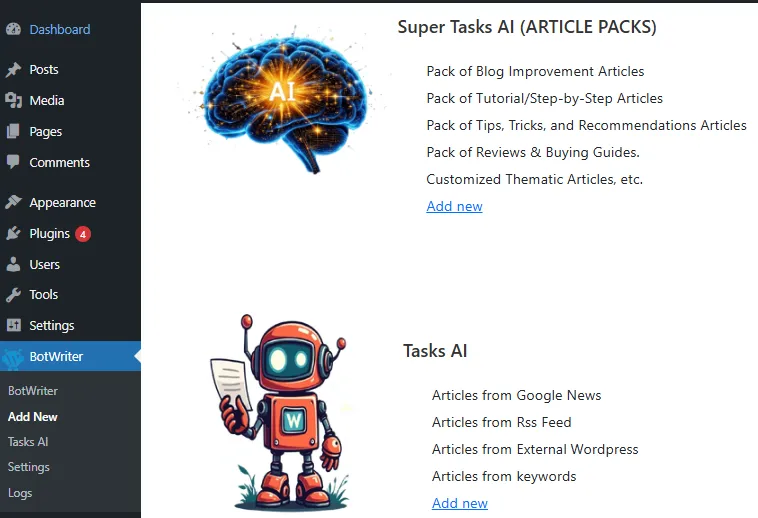
Add Tasks
Important information
- Requires WordPress 5.5 and PHP 7.0. Tested up to WordPress 7.1.4.
- All AI requests go through the BotWriter cloud service. It receives your site URL, a site token, task settings, prompts and your provider API keys to process requests.
- Provider API keys are stored encrypted in your WordPress database.
- You pay AI providers directly. Image generation adds cost unless you use the free stock option or disable images.
- Demo reviews are for testing only and should not be passed off as customer reviews.
- No published vulnerabilities are recorded in the data.
From the BotWriter readme
Straight from the developer's WordPress.org listing.
Full description
BotWriter is the most complete AI writer plugin for WordPress. It works as an AI auto blogging tool that automatically generates and publishes SEO-optimized articles, and as a WooCommerce AI content optimizer that bulk-improves your entire product catalog.
Whether you need an AI writer to keep your blog updated on autopilot, or an AI-powered SEO content creator for your online store, BotWriter handles it all with support for 7+ AI text providers and 9 image generators (including free stock photo banks).
🔹 Automatically publish content every day / every week
🔹 Generate 100% original articles with AI images
🔹 Choose from 7+ AI text providers (OpenAI, Claude, Gemini, Mistral, Groq…)
🔹 Image providers including free stock photo banks, Flux, Nano Banana, Gemini & GPT Image
🔹 Article templates for consistent, professional content
🔹 Image style presets (realistic, cartoon, anime, 3D, watercolor…)
🔹 Smart image optimization for Google Discover (WebP, resize, compress)
🔹 WooCommerce AI Content Optimizer — bulk-optimize product titles, descriptions, tags, SEO & more
🔹 Demo Review Generator for WooCommerce layout and staging tests
🔹 NEW: Regenerate featured images on existing posts for better SEO and ai writer workflows
🔹 Optimize your blog to rank higher on Google
🔹 Set it up in minutes and let AI do the rest
In this video, we’ll show you how to set up BotWriter in just a few steps so your blog stays active effortlessly. Take advantage of AI-powered automation and streamline your content strategy! 🚀
BotWriter has been designed to simplify content creation for blogs, websites, and online stores. As a WordPress AI writer with multi-provider architecture, you can choose the best AI for each job. Use GPT-5 for creative writing, Claude for technical content, or Gemini for multilingual articles. Pair them with cutting-edge image models like Flux 2 Pro, Google’s Nano Banana, or Stable Diffusion.
For WooCommerce store owners, BotWriter includes a dedicated AI Content Optimizer that bulk-optimizes product titles, descriptions, tags, image ALT text, SEO metadata and more—all from a single dashboard. It can also generate simulated demo/test reviews for staging and layout checks, plus SEO-optimized category descriptions to help your store rank higher.
BotWriter is also an AI writer for blogs that can automatically generate and publish posts based on keywords, RSS feeds, or news sources—making it the ideal tool for AI-powered SEO content creation.
BotWriter is capable of creating entire blog content in minutes! Check out the example:
How to Auto-Generate Articles from an RSS Feed | BotWriter + NASA RSS
For full documentation and more information, visit the official BotWriter AI Writer page.
Key Features
Multi-Provider AI Text Generation
Choose from 7 different AI providers for text generation:
* OpenAI: GPT-6 Luna (default), GPT-6.1 Sol, GPT-6 Astra
* Anthropic: Claude Haiku 5.5 (default), Claude Sonnet 5.5, Claude Opus 5.5
* Google: Gemini 3.5 Flash-Lite (default), Gemini 3.8 Flash, Gemini 3.1 Pro Preview
* Mistral: Ministral 3 3B (default), Mistral Small 4, Mistral Large 4
* Groq: GPT-OSS 20B (default), GPT-OSS 120B, Qwen3.8 27B
* OpenRouter: Access to 200+ models through one API
* DeepSeek: Cost-effective alternatives
⛽ Multi-Provider AI Image Generation
7 image providers with 50+ models:
* 📷 [FREE] Stock Images: Search Pixabay, Pexels, Unsplash & Openverse — $0.00 per image, no API generation cost
* OpenAI GPT Image: GPT Image 2.5 Flare (default), GPT Image 2.5 Sunburst, GPT Image 2
* Google Gemini: Nano Banana 2 Lite (default), Nano Banana 2.1, Gemini 3.1 Flash Image, Gemini 3 Pro Image
* Fal.ai: Flux Schnell (default), Flux 2, Nano Banana 2.1, Seedream 4.5
* Replicate: Flux Schnell (default), Nano Banana 2.1, Flux 2, Ideogram V3
* Stability AI: SD 3.5 Flash (default), SD 3.5 Large/Turbo/Medium, Stable Image Core/Ultra
* Cloudflare Workers AI: Flux Schnell (fast & affordable)
🎨 Image Style Presets
Choose from 12 artistic styles for your AI images
⚡ Smart Image Optimization
Automatic post-processing for web-ready images
🛒 WooCommerce AI Content Optimizer
Bulk-optimize your entire product catalog with AI:
* 9 content fields: titles, descriptions, short descriptions, tags, image ALT text, review summaries, SEO meta descriptions, SEO titles and category descriptions
* Bulk Optimizer: select products, choose fields and AI provider, preview all changes before applying
* Category Optimizer: generate SEO-friendly category descriptions using product data as context
* Demo Review Generator: create simulated WooCommerce review data for staging, layout checks, star rating display tests, schema markup tests, and store design previews
* Full Backup & Revert: automatic backup before every change, per-field or full revert, visual before/after diff
* Optimization History: browse all past optimizations with filters, search and pagination
* Advanced product filters: filter by status, category, stock, type, word count, price, tag count, review count and more
* SEO plugin integration: auto-writes to Yoast SEO, Rank Math, SEOPress, All in One SEO and The SEO Framework
* Customizable prompt templates with {{placeholder}} variables for full control over AI output
* Works with all supported AI text providers
⛽ Article Templates
Create professional, consistent content with reusable templates:
* Pre-configured prompts for different content types
* SEO-optimized structures
* Custom style guidelines
Scheduled Content Automation
BotWriter works as an AI writer that automates your content creation workflow. Schedule tasks to publish AI-generated articles on specific days and times—daily, weekly, or custom schedules. Perfect for maintaining a consistent publishing calendar without manual intervention.
Multiple Content Sources
* AI-Generated Content: Create 100% original articles from scratch using custom prompts and AI keywords
* RSS Feed Integration: Transform RSS feeds into unique, rewritten articles automatically
* Super Tasks: Generate entire content series—create multiple related articles in bulk with a single configuration
Smart Content Generation
Each scheduled task runs automatically via WordPress cron, generating:
* SEO-optimized titles and content
* Relevant tags and categories
* AI-generated featured images (configurable per task)
* Custom post lengths (from short to comprehensive articles)
Instant Publishing with “Write Now”
Need content immediately? The “Write Now” feature creates and publishes a single post instantly with real-time progress tracking—no waiting for scheduled cron jobs.
Full Customization
* Choose from multiple AI text and image models per task
* Configure image size and quality
* Customize writing style, tone, and narrative voice
* Set post status (publish, draft, pending, private)
* Control publishing frequency and timing
Your API Keys, Your Control
BotWriter lets you bring your own API keys and pay the AI providers directly.
All AI generation requests are routed through the BotWriter cloud service at api.wpbotwriter.com, which handles request queuing, long-running AI sessions, error recovery, retries, and delivery coordination. This architecture ensures reliable content generation even on shared hosting environments with strict timeout limits.
Sent to BotWriter Platform: site URL/domain, site_token, plugin version, task configuration, prompts, selected provider/model settings, and the provider API keys needed to process generation requests.
Sent to selected AI provider: prompts, generation settings, and the selected provider API key are used by the BotWriter cloud service to call the provider you configured.
API keys may be transmitted to the BotWriter Worker service only for generation routing. Provider API keys are stored encrypted in your WordPress database. For queued generation jobs, key material may be encrypted temporarily while the job is pending and removed after processing; synchronous generation requests are used for the request and are not stored permanently by BotWriter.
Why BotWriter?
Unlike other AI WordPress plugins, BotWriter supports multiple AI providers instead of locking you into a single API. You can choose between GPT, Claude, Gemini, Mistral, Groq and more—depending on cost, speed, or quality.
Looking for the best AI writer for WordPress? Here’s what sets BotWriter apart:
• Multi-provider freedom: switch between 7+ AI text providers and 9 image generators (including free stock photo banks)—no vendor lock-in
• WooCommerce native: includes a dedicated WooCommerce product optimizer, demo review generator, and category description tool
• True automation: schedule posts daily or weekly, generate bulk content series, or publish instantly with Write Now
• Full SEO stack: AI-generated meta descriptions, SEO titles, slug translation, image optimization for Core Web Vitals
Use Cases
BotWriter can be used for:
• AI auto blogging — Automatically publish fresh articles on a schedule you define
• AI-powered SEO content creation — Generate keyword-rich, well-structured articles optimized for search engines
• WooCommerce content automation — Bulk-optimize product titles, descriptions, tags, SEO metadata, and generate demo review data for staging/layout testing
• News aggregation blogs — Pull and rewrite trending news stories for your niche
• Affiliate niche websites — Create product reviews, comparisons, and buying guides at scale
• RSS feed rewriting — Transform any RSS feed into unique, original blog posts
• Multilingual content — Generate articles in any language using Gemini, GPT, or Claude
• Bulk content libraries — Build entire topic clusters with Super Tasks (5, 10, 20+ articles at once)
• WooCommerce SEO — Generate SEO meta descriptions, SEO titles, and category descriptions for your store
Installation
• Upload the botwriter.zip file to your plugins folder (/wp-content/plugins/).
• Activate the plugin through the “Plugins” menu in WordPress.
• Go to BotWriter → Settings and configure your preferred AI providers.
• Create your first task and let the automation begin!
Developer FAQ (33)
- What is BotWriter?
- BotWriter is a multi-provider AI-powered WordPress plugin—an AI writer for WordPress that automatically generates and publishes blog posts on a schedule you define. It also works as a WooCommerce AI content optimizer to bulk-improve your product catalog. Choose from 7 text AI providers and 8 image generators. Set it up once, and it will keep your blog updated with fresh, SEO-optimized content automatically.
- How does BotWriter work?
- BotWriter works as a client/cloud architecture. The WordPress plugin handles scheduling, configuration, and publishing, while all AI processing happens through the BotWriter cloud service at api.wpbotwriter.com. When a task runs, the plugin sends the request to the cloud service, which manages the entire generation pipeline: • Text generation — The cloud service calls your selected AI text provider (OpenAI, Claude, Gemini, etc.) with the configured prompt, waits as long as needed for the response, and handles retries if the provider fails. • Automatic image prompt creation — From the generated article, the cloud service uses AI to craft an optimized image prompt that captures the essence of the content — so the featured image is always relevant and visually coherent with the text. • Image generation — Using that AI-crafted prompt, the cloud service calls your selected image provider to generate the featured image. Text and image providers can be completely different — for example, you can write articles with Claude and generate images with DALL-E or Flux 2. • Result delivery — The plugin polls for the completed result and publishes the post with its title, content, tags, and AI-generated featured image. This architecture means your WordPress site only makes short HTTP requests (a few seconds each), while the cloud service handles the heavy lifting — long-running AI calls, multi-step orchestration, error recovery, and cross-provider coordination. It works reliably even on basic shared hosting with strict timeout limits. You bring your own API keys for each AI provider and pay them directly. BotWriter does not mark up API costs.
- Which AI providers does BotWriter support?
- Text Generation: OpenAI (GPT), Anthropic (Claude), Google (Gemini), Mistral, Groq, OpenRouter (including DeepSeek) Image Generation: Stock Photo Banks (Pixabay, Pexels, Unsplash, Openverse — free), OpenAI GPT Image, Google Gemini, Fal.ai, Replicate, Stability AI, Cloudflare Workers AI
- What are the newest image models supported?
- BotWriter 2.0 supports the latest 2025 image models: * Nano Banana Pro (Google) – High-quality generation via Fal.ai/Replicate * Flux 2 Pro/Dev – Next-gen Black Forest Labs models * Seedream 4.5 (ByteDance) – Fast, high-quality images * Imagen 4 (Google) – Via Replicate
- What types of content can BotWriter create?
- BotWriter can: * Generate 100% original articles from custom prompts and AI keywords * Rewrite content from RSS feeds into unique posts * Pull and rewrite trending news articles * Create bulk article series with Super Tasks * Generate instant posts with the “Write Now” feature * Apply article templates for consistent formatting * Optimize WooCommerce product titles, descriptions, tags, SEO metadata and image ALT text * Generate simulated demo/test review data for WooCommerce staging and layout checks * Create SEO-optimized WooCommerce category descriptions
- How do article templates work?
- Templates let you save and reuse content configurations: 1. Create a template with your preferred prompts, style, and structure 2. Apply the template to any task with one click 3. Templates ensure consistent tone, formatting, and SEO optimization across all your content
- How does scheduled content automation work?
- Create a “task” in BotWriter and specify: * Days of the week to publish (e.g., Monday, Wednesday, Friday) * Number of posts per day * Content source (AI, RSS, News, or Super Task) * AI provider for text and images * Custom prompts, keywords, and settings BotWriter’s cron engine automatically executes these tasks on schedule.
- What is a Super Task?
- Super Tasks let you generate entire content series in bulk. Configure it once with your topic and preferences, then BotWriter creates multiple related articles (5, 10, 20+) automatically—perfect for building comprehensive content libraries quickly.
- Can I use different AI providers for different tasks?
- Yes! Each task can use a different text provider and image provider. Use GPT-5 for one task, Claude for another, and Gemini for a third. Same flexibility applies to image generation.
- Does BotWriter generate images automatically?
- Yes, BotWriter creates featured images using your chosen provider. Options include AI generation (GPT Image 2.5, Flux, Nano Banana, Stable Diffusion, and more) or free stock photo banks (Pixabay, Pexels, Unsplash, Openverse) at $0.00 per image. Configure size (landscape, square, portrait) and quality per task.
- What are image style presets?
- Image style presets let you define the artistic style of generated images. Choose from 12 built-in styles (Realistic, Cartoon, Anime, 3D Render, Watercolor, etc.) or create your own custom style. The style is automatically applied to all image prompts for consistent visual branding.
- How does smart image optimization work?
- BotWriter 2.0.7 introduces automatic image post-processing. After an image is generated, it’s automatically: * Converted to WebP format (90%+ smaller files) * Resized to your configured max width (default: 1200px) * Compressed to meet your target file size (default: 120KB) This is ideal for Google Discover optimization and fast page loading. A 2MB image can be reduced to under 120KB automatically!
- Can I disable image generation to save costs?
- Absolutely! Each task has a “Disable AI Images” option. When enabled, BotWriter generates text-only posts. Alternatively, select the free Stock Images provider to get real photos from Pixabay, Pexels, Unsplash or Openverse at zero cost — no API image generation fees.
- Is the generated content SEO-friendly?
- Yes! As an AI content plugin for WordPress built with SEO in mind, BotWriter creates optimized content with relevant titles, meta descriptions, tags, and well-structured articles designed to rank in search engines. It integrates with Yoast SEO, Rank Math, SEOPress, All in One SEO, and The SEO Framework for both blog posts and WooCommerce products.
- Can I review posts before publishing?
- Absolutely. Set the “Post Status” to “Draft” in your task configuration, and BotWriter will save posts as drafts for you to review and edit before publishing.
- How long does it take to generate an article?
- Typically 30-90 seconds per article, depending on content length, AI model selected, and whether image generation is enabled. Some providers like Groq offer ultra-fast inference.
- Can I customize the writing style?
- Yes! BotWriter offers multiple writer personas with different narrative styles (Descriptive, Informative, Persuasive, etc.), plus you can provide custom style instructions and use templates.
- Does BotWriter prevent duplicate content?
- Yes. When using RSS or News sources, BotWriter’s AI completely rewrites the content, creating unique articles that pass plagiarism checks. For AI-generated content, each article is original.
- Is BotWriter compatible with Google AdSense?
- Yes, BotWriter generates unique, high-quality content that is compatible with Google AdSense and other monetization platforms.
- Do I need technical knowledge to use BotWriter?
- No! BotWriter is designed to be user-friendly. Simply configure your tasks using the intuitive interface, add your API keys, and let the automation handle the rest.
- Can BotWriter work with my existing WordPress theme and plugins?
- Yes, BotWriter integrates seamlessly with any WordPress theme and is compatible with popular SEO plugins, page builders, and other tools.
- What happens if content generation fails?
- BotWriter includes automatic retry mechanisms with intelligent backoff. If a task fails, it will retry at increasing intervals. You can view detailed logs and error messages in the Logs section.
- Can I run multiple tasks simultaneously?
- Yes! Create as many tasks as you need. BotWriter’s cron engine processes them intelligently, respecting the cooldown period you configure between posts.
- What is the best AI content plugin for WordPress?
- BotWriter is one of the most advanced AI content generators for WordPress. Unlike single-provider plugins, BotWriter lets you choose from 7+ text AI providers (GPT-5, Claude, Gemini, Mistral, Groq, OpenRouter, DeepSeek) and 8 image generators — so you can pick the best model for each task based on cost, speed, or quality. It also includes a dedicated WooCommerce AI optimizer, article templates, image style presets, smart image optimization, and full SEO plugin integration — features most AI writing plugins don’t offer.
- Can AI writer blog posts in WordPress automatically?
- Yes. BotWriter is an AI auto blogging plugin that can generate and publish posts automatically on a schedule you define. Set the days, frequency, AI provider, and content preferences — then BotWriter’s cron engine creates and publishes SEO-optimized articles with AI-generated images, tags, and meta descriptions, all without manual intervention. You can also generate instant posts with the “Write Now” feature.
- Can AI generate WooCommerce product descriptions?
- Yes! BotWriter’s WooCommerce AI Content Optimizer can bulk-generate and optimize product titles, full descriptions, short descriptions, tags, image ALT text, SEO meta descriptions, SEO titles, review summaries, and category descriptions. Every change is previewed before applying, backed up automatically, and can be reverted at any time. It works with all supported AI providers and integrates with Yoast SEO, Rank Math, SEOPress, All in One SEO, and The SEO Framework.
- Is BotWriter the best AI writer for WordPress?
- BotWriter stands out as a top AI writing plugin for WordPress thanks to its multi-provider architecture, WooCommerce support, and comprehensive feature set. You’re not locked into a single AI — switch freely between GPT, Claude, Gemini, and others. Combined with features like Super Tasks for bulk content, RSS rewriting, article templates, 12 image style presets, and automatic image optimization, BotWriter is designed for serious content creators who need flexibility and scale.
- Can I use AI to create SEO content for WordPress?
- Absolutely. BotWriter is built for AI-powered SEO content creation. Every article is generated with optimized titles, proper heading hierarchy, keyword placement, meta descriptions, and relevant tags. It integrates with all major SEO plugins and supports AI-generated SEO titles and meta descriptions for both blog posts and WooCommerce products. Features like slug translation and image optimization further boost your search rankings.
- Does BotWriter work with WooCommerce?
- Yes! BotWriter includes a dedicated WooCommerce AI Content Optimizer that can bulk-optimize your entire product catalog. It generates AI-written product titles, descriptions, short descriptions, tags, image ALT text, SEO meta descriptions, SEO titles, review summaries and category descriptions. Everything is previewed before applying, and you can revert any change at any time.
- Can BotWriter generate product reviews?
- BotWriter can generate simulated WooCommerce review data for demo, staging, design, layout, star rating display, and schema markup testing. These generated reviews must not be presented as real customer reviews on a live production store. BotWriter stores an internal demo/test marker in comment metadata so generated reviews can be deleted later from the WooCommerce AI screen.
- How does BotWriter route AI requests?
- All AI requests—both for blog content and WooCommerce product optimization—are routed through the BotWriter cloud service at api.wpbotwriter.com. It manages the full generation pipeline: text generation, automatic image prompt creation from the article content, image generation (which can use a completely different AI provider than the text), error recovery, automatic retries, and result delivery—so your WordPress site doesn’t need to keep long-running HTTP connections open or deal with provider-specific error handling.
- How does BotWriter identify my site?
- Each site is identified by a site_token — a unique UUID that is automatically provisioned on first contact with the BotWriter cloud service. The plugin stores this token locally (in a WordPress option) and includes it in every API request to authenticate the site.
- Does BotWriter use third-party services?
- Yes. All content generation requests are routed through the BotWriter cloud service at api.wpbotwriter.com, which provides centralized job processing, request queuing, error recovery, automatic retries, and delivery coordination. The plugin may also contact provider endpoints directly for optional settings actions such as API key verification and model connectivity tests initiated by the site administrator. The cloud architecture ensures reliable content generation even on hosting environments with strict execution time limits, simplifies API key management, and provides consistent error handling across all providers. Every request to the cloud service includes: * site_token — a unique UUID auto-provisioned on first contact, used to identify and authenticate the site * domain — the site URL * Provider settings — selected AI provider, model, and the provider API keys needed for generation routing BotWriter connects to: * api.wpbotwriter.com — cloud processing service (API endpoint) for AI request queuing, execution, and delivery * Your configured AI providers (OpenAI, Anthropic, Google, Fal.ai, Replicate, etc.) — called by the cloud service on your behalf using your API keys * Optional: News APIs and RSS feeds for content sources API keys may be transmitted securely to the BotWriter Worker service only to process AI generation requests. Provider keys are stored encrypted in your WordPress database. For queued jobs, key material may be encrypted temporarily while the job is pending and removed after processing; synchronous generation requests are used for the request and are not stored permanently by BotWriter. All external service usage is detailed in the “External Services” section below.
Downloads, last 30 days
Trend vs previous period: -4.2%
Average daily downloads: 280 over the last 7 days , 342 over 30 days.
Security history
No known CVEs · 0 published vulnerabilities (Wordfence)
Recent releases
- v3.6.0
Refreshed text and image model catalogs against provider documentation, with fast, economical defaults and automatic migration of obsolete selections. Existing active selections are preserved. *...
BotWriter FAQ
What does BotWriter do?
It generates and publishes posts on a schedule you set, and it bulk-optimizes WooCommerce product content.
How does it work technically?
The plugin handles scheduling and publishing, while AI processing runs through the BotWriter cloud service, which calls the provider you chose.
Which providers are supported?
Text: OpenAI, Anthropic, Google, Mistral, Groq and OpenRouter, which includes DeepSeek. Images: Pixabay, Pexels, Unsplash and Openverse stock, OpenAI, Google Gemini, Fal.ai, Replicate, Stability AI and Cloudflare Workers AI.
Can I review posts before they go live?
Yes. Set the task's post status to Draft and edit before publishing.
Can I avoid image costs?
Yes. Disable AI images per task, or pick the free stock photo provider.
Which SEO plugins does it work with?
Yoast SEO, Rank Math, SEOPress, All in One SEO and The SEO Framework.
What can the WooCommerce optimizer change?
Titles, descriptions, tags, alt text, SEO titles and descriptions, review summaries and category descriptions. Changes are previewed and backed up.
How long does an article take?
The listing says typically 30 to 90 seconds, depending on length, model and images.
BotWriter alternatives

GetGenie is the #1 AI SEO assistant for WordPress - the only AI plugin that combines AI keyword research, competitor analysis, content writing, AEO, GEO, and SEO performance tracking in a single dashboard inside…

WP RSS Aggregator is the perfect plugin to quickly import RSS feeds, build a news aggregator, and for easy autoblogging. This is why it is used on 40,000+ websites to aggregate and curate content from all over the…

AI Puffer (formerly AI Power) lets ChatGPT and Claude work on your WordPress site through MCP, using your chosen safety level. It also brings an AI chatbot, content writer, automations, AI forms and image generation…

AI Powered Free WordPress Link Directory Plugin to curate links for web directory Free WordPress Link Directory Plugin for your External Link Directory Listings! Simple Link Directory is a simple WordPress Directory…
AI WP Writer is a powerful AI content generator for WordPress. It works seamlessly in both the Classic Editor and the Gutenberg editor, giving you flexibility in how you create content. For text generation, it…

Best AI Plugin for WordPress AI Bud is the best ai content generator and chatbot plugin for WordPress . AI Bud is a perfect WordPress AI plugin for all kind of AI generated content, comment generation, chatbot and AI…
Listing data from WordPress.org and the Wordfence vulnerability feed, refreshed Nov 9, 2026; listing details fetched Nov 14, 2026. Screenshots are from the plugin's WordPress.org listing. Not affiliated with Esteban.