
Better Messages
Better Messages - Chat Rooms, Group Chat, Private Messages & AI Chat Bots · by wordplus
- active installs
- 10K+
- 142 ratings
- 4.8
- since last update
- 3d
- releases in 12 months
- —
- support threads resolved
- 100%
- avg daily downloads
- 1,433
- on WordPress.org
- 9.9 years
Better Messages at a glance
Better Messages is a free WordPress AI-powered plugin by wordplus with 10K+ active installs and a 4.8/5 rating from 142 reviews. It was last updated on Nov 6, 2026, is tested up to WordPress 7.2 and needs PHP 7.4+. All 26 of its published vulnerabilities have patched versions. Our quality score is 94/100.
What is Better Messages?
Better Messages is a private messaging system for WordPress. It adds one-to-one conversations, group chats and chat rooms to your site, with integrations for BuddyPress, BuddyBoss, Ultimate Member, PeepSo and plain WordPress sites. It was formerly called BP Better Messages.
It fits communities, membership sites, marketplaces, online stores, course sites and intranets that want members or customers to talk to each other. Guests can chat in rooms or message vendors without an account. The free version covers the standard messenger features, and a paid WebSocket version adds real-time delivery, calls and apps.
The AI side is chat bots. Bots run on OpenAI, Anthropic Claude or Google Gemini and act as normal participants in a conversation. They work in the free version if you add your own API key. Extra AI features, such as moderation and translation, need the paid version.
Best for
- BuddyPress and BuddyBoss communities
- Marketplaces and stores that want buyer-seller chat
- Membership and course sites
- Sites wanting AI chat bots with their own key
Better Messages features
Private and group conversations
One-to-one chats and group chats with unlimited people. Messages can be replied to, edited, deleted, forwarded, pinned and searched.
Chat rooms with guest access
Public and private rooms, where visitors without an account can take part under a display name.
AI chat bots
Bots powered by OpenAI, Claude or Gemini join threads with custom system prompts. Mention-based replies work in groups.
AI extras for bots
Web search, file search, image generation and PDF support for bots, plus summaries and token cost tracking.
File and media sharing
Share images, video and documents, with upload limits and protection from direct access. Cloud storage on S3-compatible services is supported.
Moderation tools
Report messages, hold messages for review, filter bad words, block users and assign moderators. AI moderation is available too.
Many integrations
35 or more native integrations with community, LMS, ecommerce and directory plugins, including WooCommerce and LearnDash.
Notifications
Email alerts for unread messages, per-member notification levels, sound alerts and on-site toasts.
Voice and video calls
One-to-one and group calls inside the messenger, with recording. This needs the paid WebSocket version.
Translatable interface
Works with Loco Translate, WPML and Polylang, with over 30 community translations.
Better Messages free vs pro
Free WordPress.org version
- Private and group conversations, and chat rooms
- Guest chat and role-based access
- File sharing, oEmbed previews and email notifications
- AI chat bots with your own provider API key
- Moderation using the free OpenAI Moderation API
Pro Paid version
- WebSocket delivery for instant messages
- One-to-one and group voice and video calls with recording
- Better Messages Cloud AI: content moderation, message translation and voice message transcription, with no key of your own
- Web push notifications
- End-to-end encryption
- Native iOS and Android apps for your site
The free version is on WordPress.org and a paid WebSocket version exists. The listing gives no prices. AI chat bots in the free version need your own API key from OpenAI, Anthropic or Google, and that provider bills you.
How to use Better Messages
- Install the plugin
In wp-admin go to Plugins, then Add New, search for Better Messages, then install and activate it.
- Open the settings
Go to Settings, then Better Messages, and choose how the messenger should appear and who can use it.
- Pick integrations
Turn on the integration for your community, shop or course plugin, so message buttons appear where they are useful.
- Set up chat rooms
Create rooms if you want public or topic chats, and decide whether guests may join.
- Add an AI bot if wanted
Add an API key from OpenAI, Anthropic or Google, create a bot, and write its system prompt.
Better Messages screenshots (12)
-
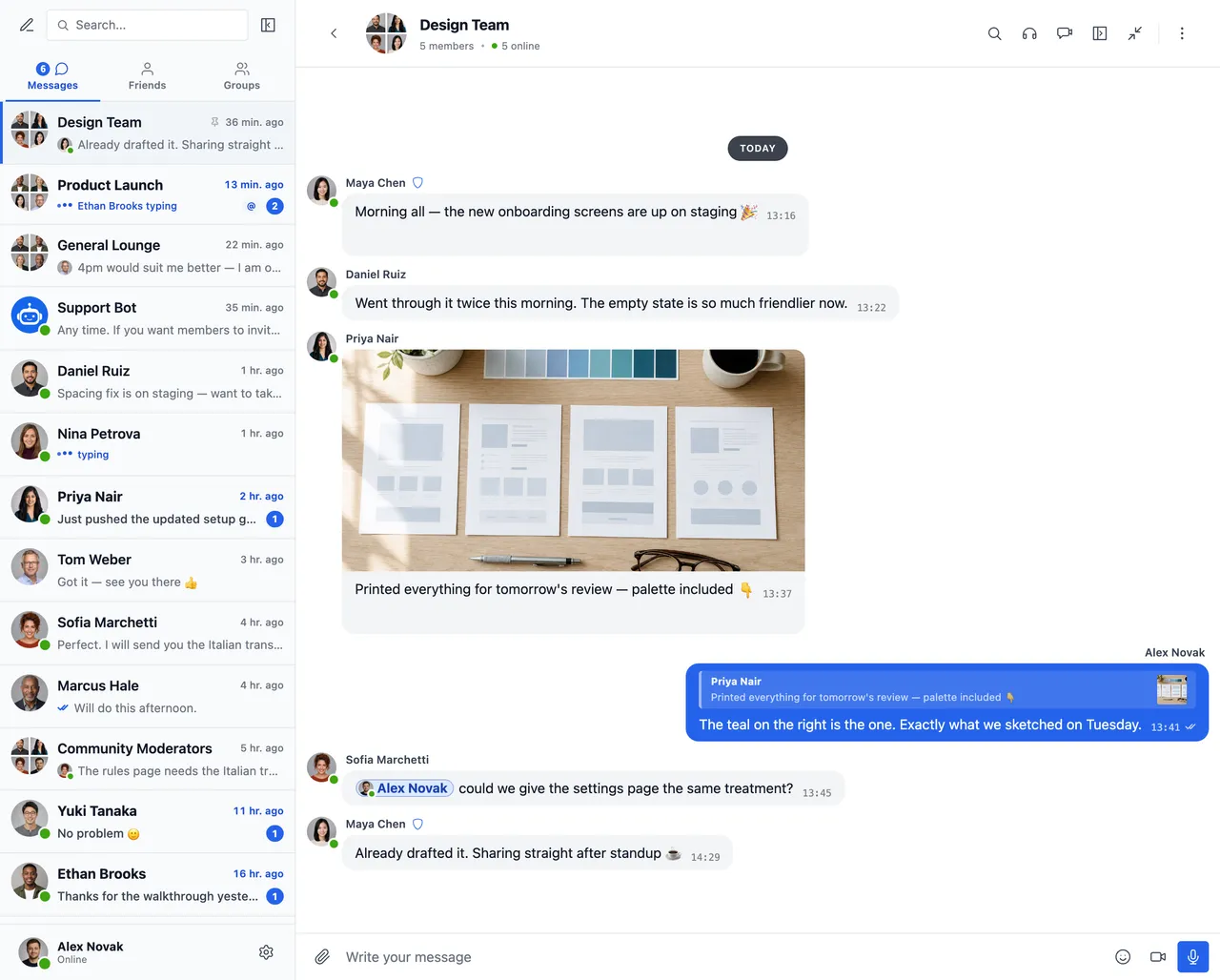
Group conversation with photo sharing, emoji reactions, replies and @mentions — alongside a conversations list with unread badges, pinned chats, online presence and live typing indicators -
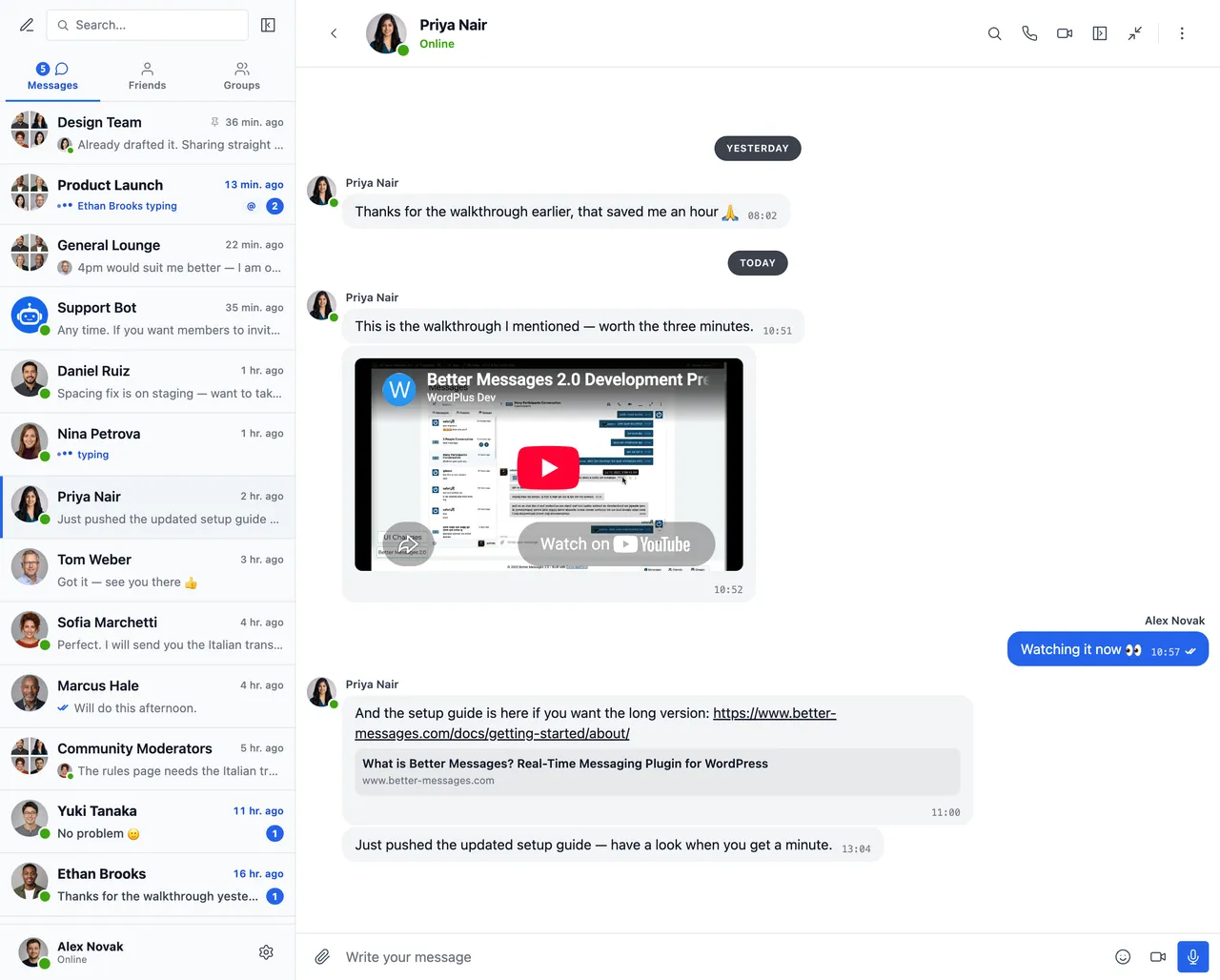
Embedded video and link previews — YouTube, Vimeo, Spotify, and 20+ oEmbed providers -
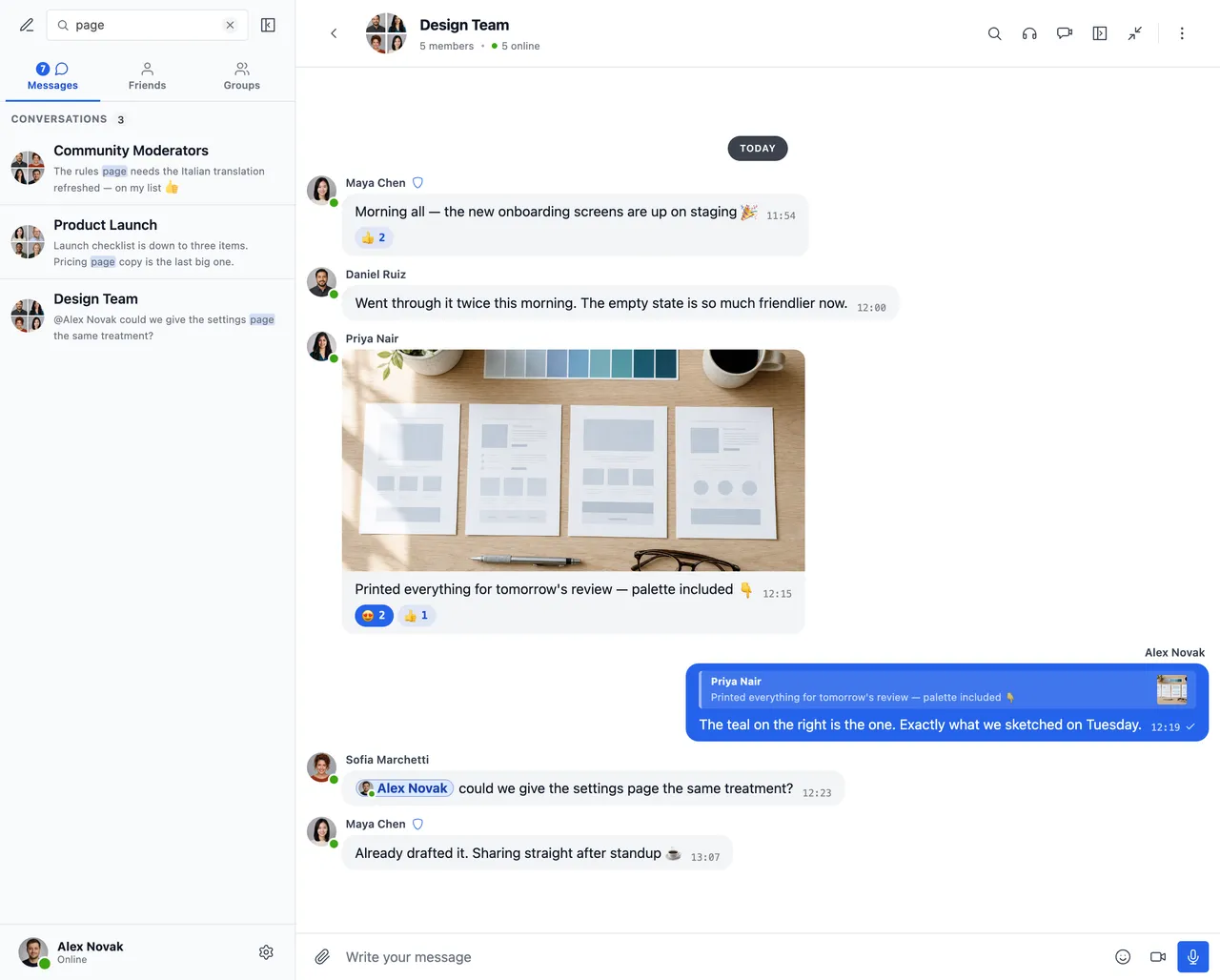
Full-text search across every message, with matches highlighted in the conversations list -
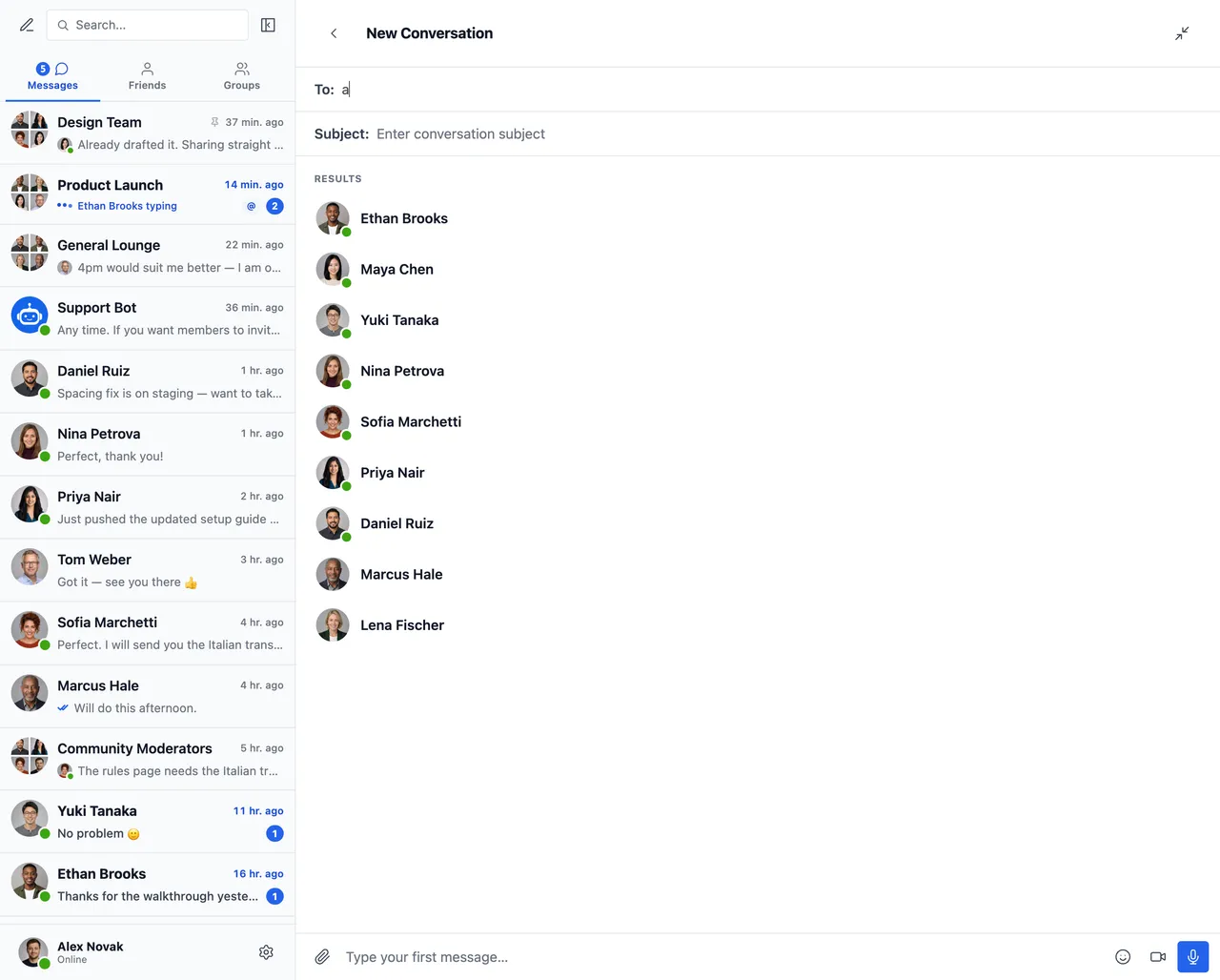
Start a new conversation — recipient search with live results and online status -
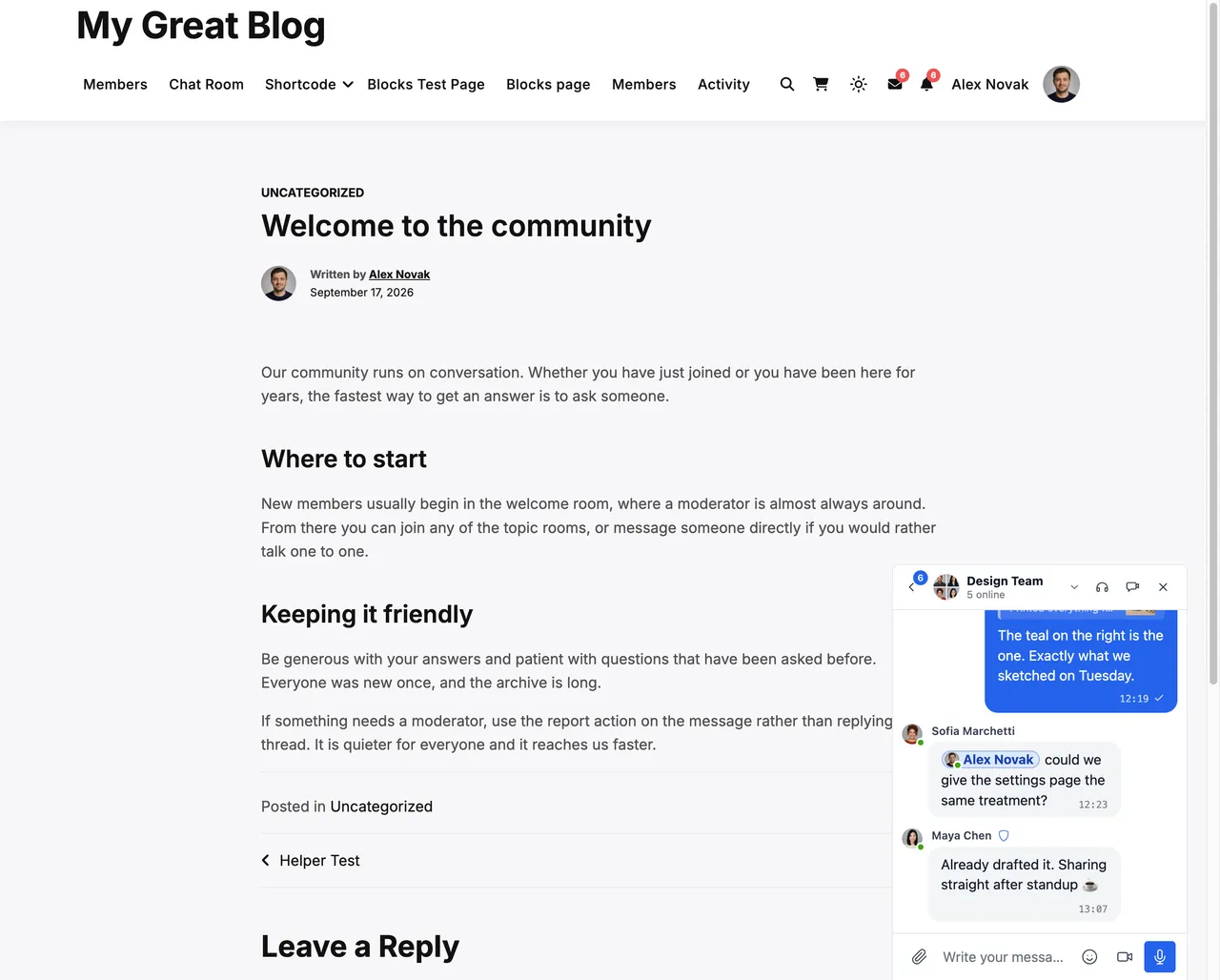
Mini chat window that follows members across your whole WordPress site -
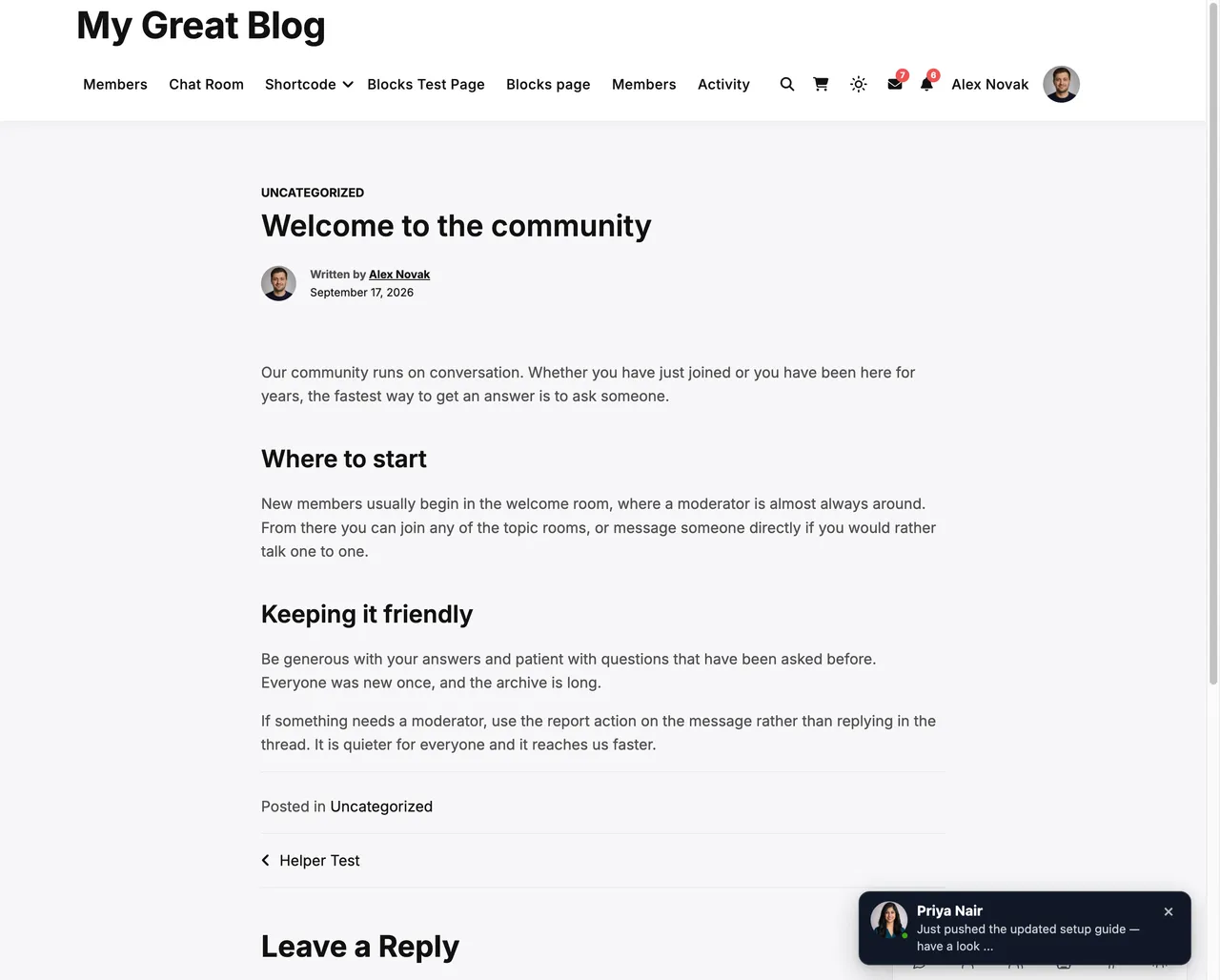
On-site toast notifications for new messages — visible anywhere on your WordPress site -
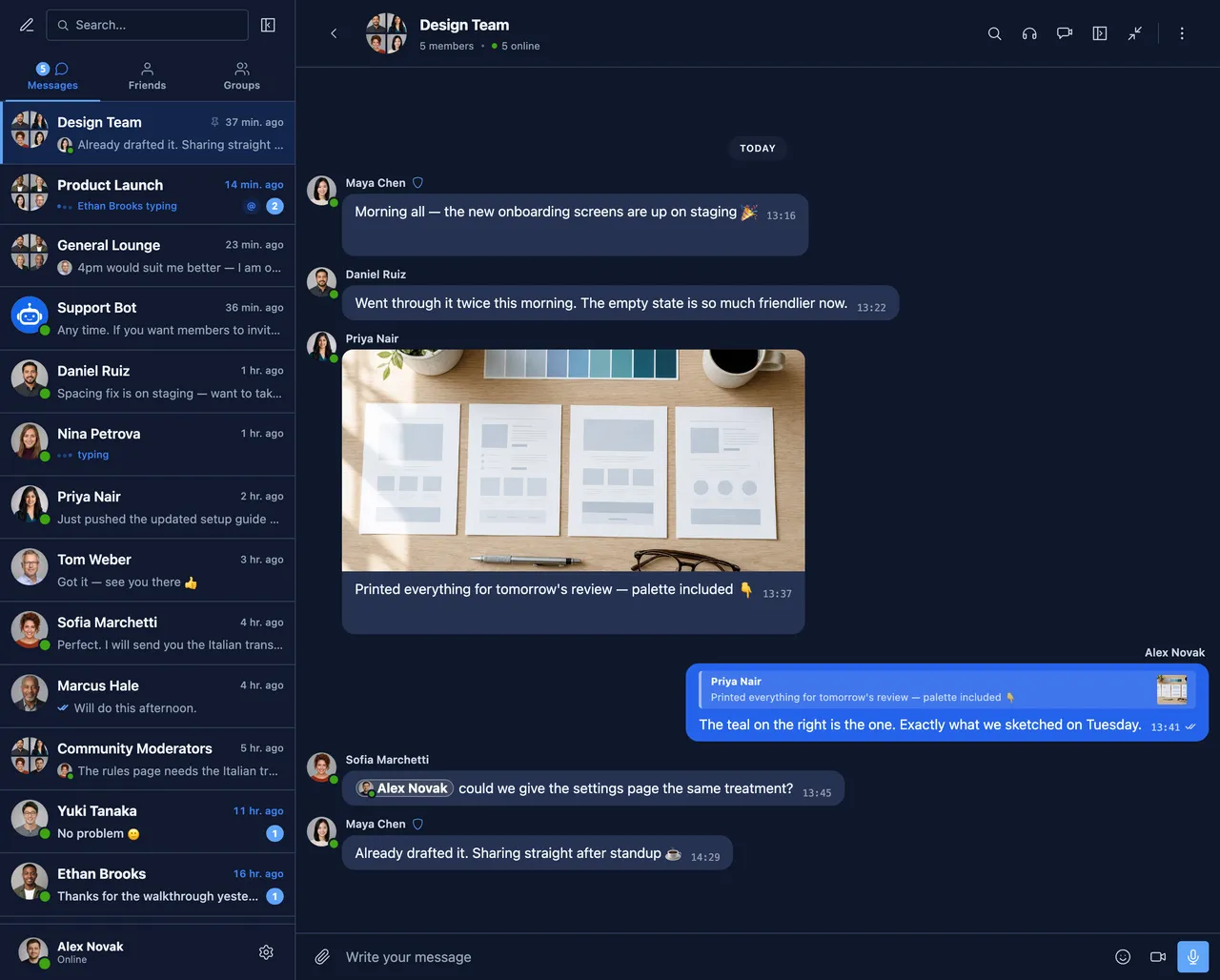
Dark mode across every surface of the messenger -
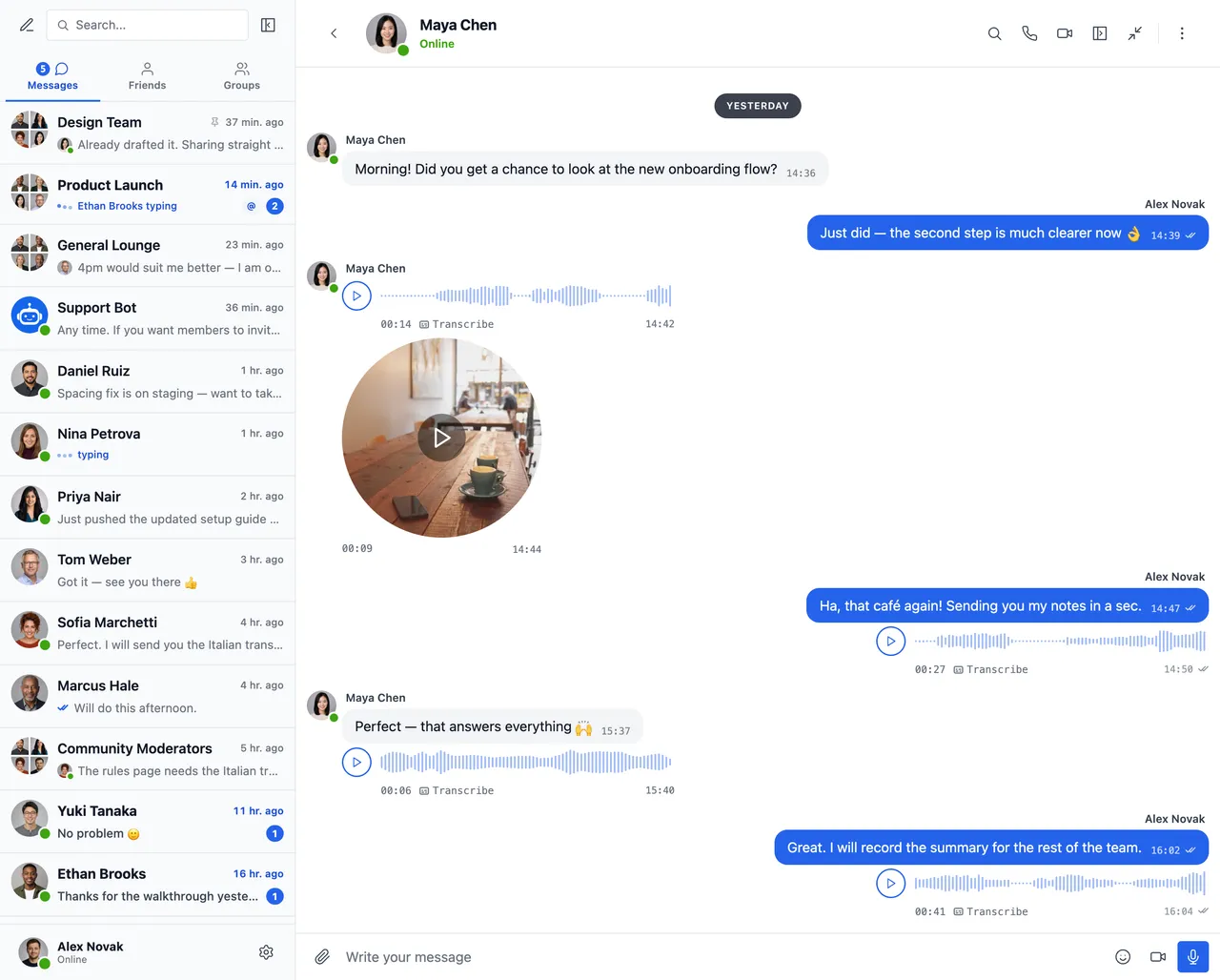
Voice and video messages, with one-tap transcription -
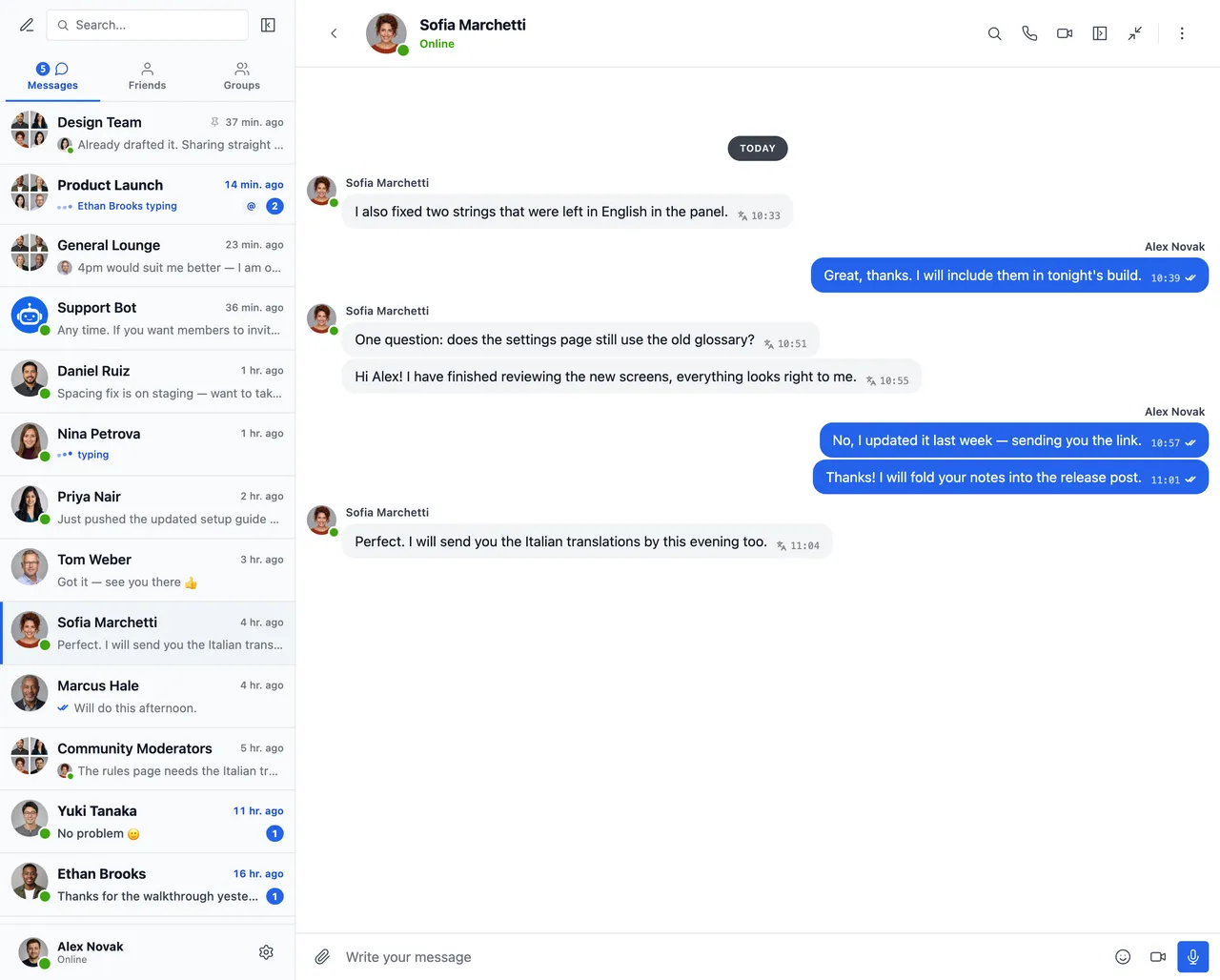
Read a conversation in your own language — messages arrive translated, with the original one tap away -
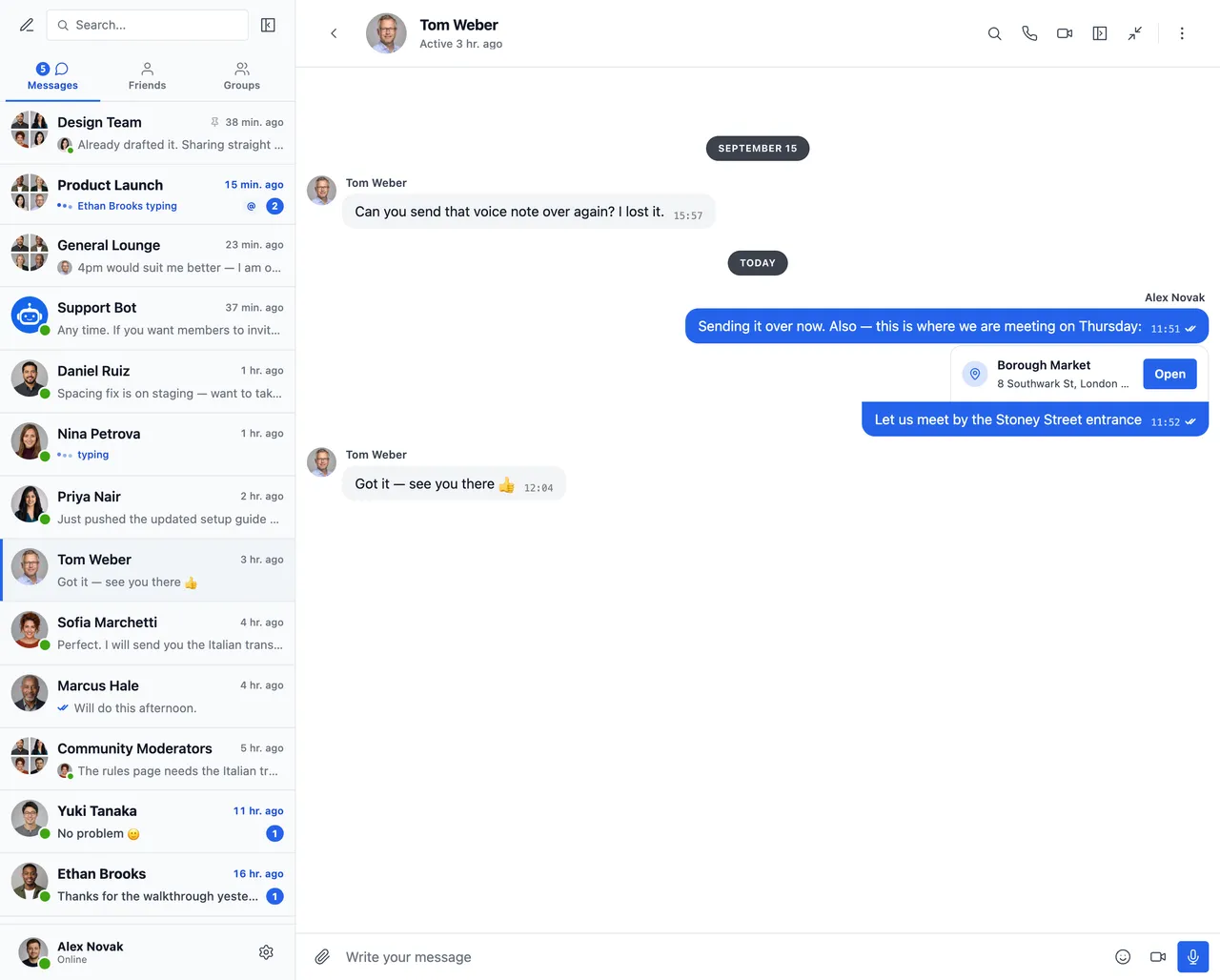
Share a location with a map picker and nearby place suggestions -
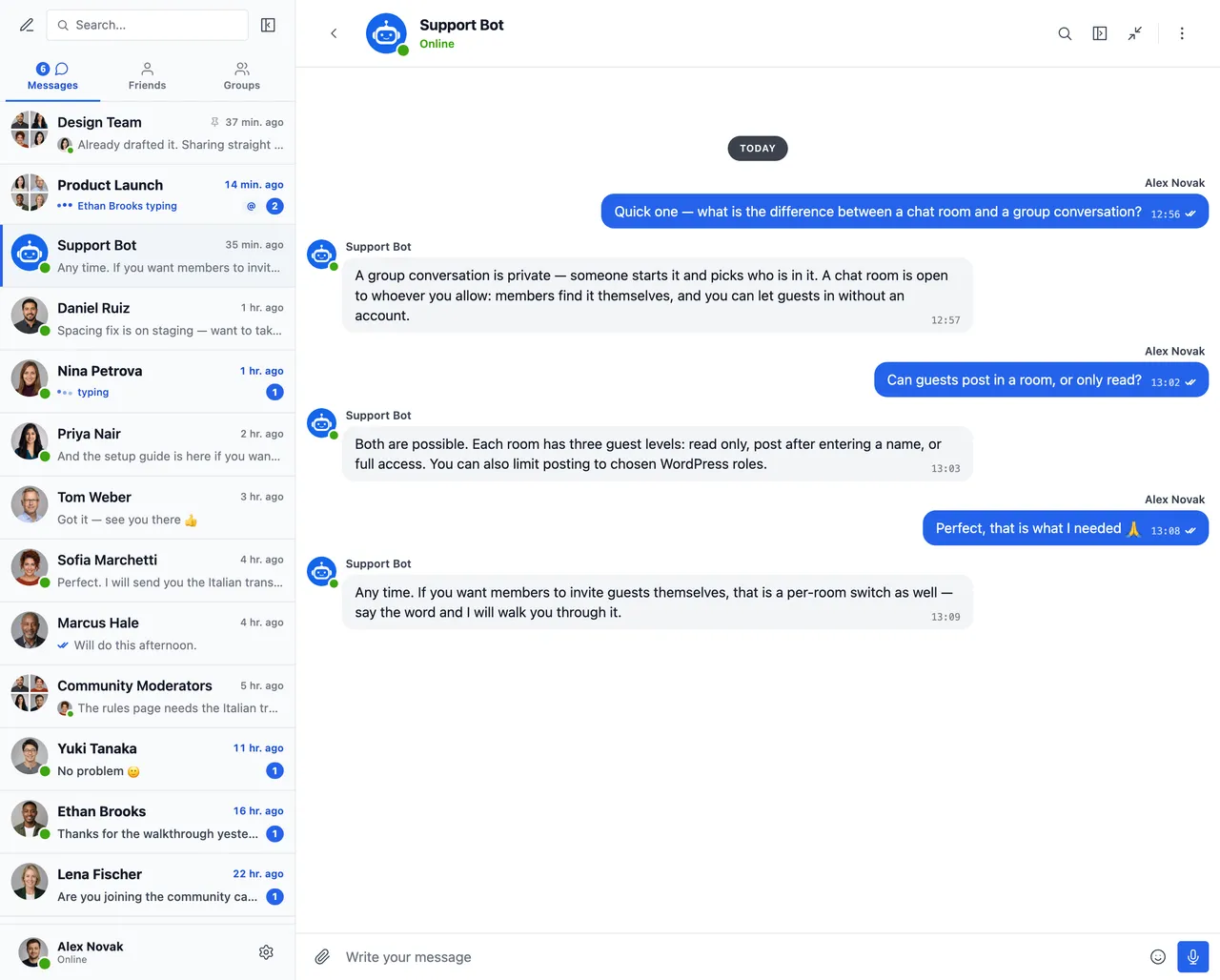
AI chat bots powered by OpenAI, Anthropic (Claude) and Google Gemini -
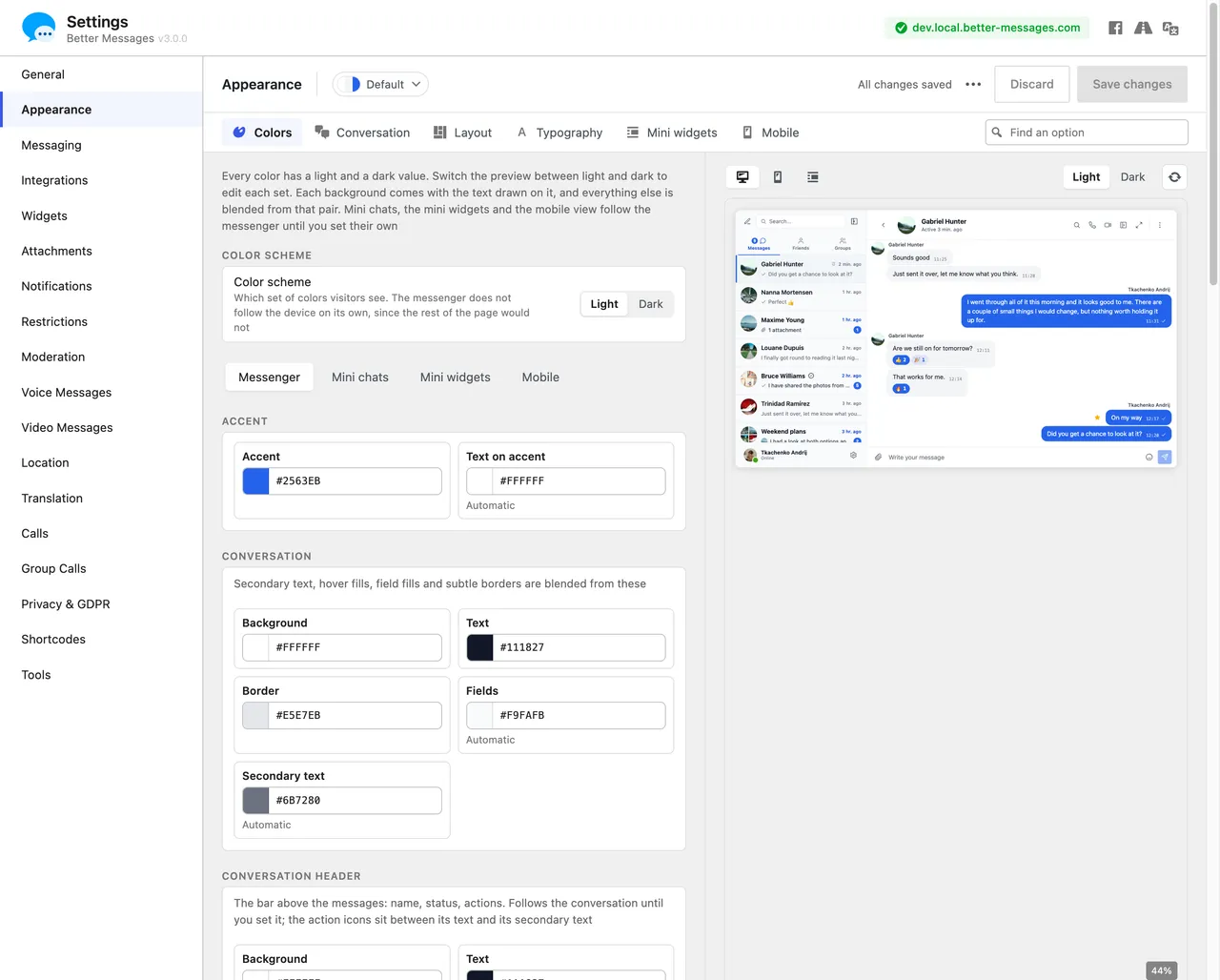
Appearance tab — repaint any part of the messenger and watch every change in the live preview
Important information
- Requires WordPress 5.9 or higher and PHP 7.4 or higher.
- AI bots send conversation content to the provider you choose, and the provider bills you for usage. The plugin tracks token usage and cost.
- Calls, push notifications, end-to-end encryption, Cloud AI and mobile apps need the paid WebSocket version.
- Messages are stored in your own WordPress database. The paid cloud relay routes encrypted events and does not read message content, according to the listing.
- Some features contact the vendor's cloud service, only when an administrator uses them. Emoji images may load from a public CDN, which sees the visitor's IP address.
- The plugin has had published vulnerabilities in the past. The data shows them as patched, so keep it updated.
From the Better Messages readme
Straight from the developer's WordPress.org listing.
Full description
Better Messages is the most feature-rich realtime private messaging system for WordPress, with native integrations for BuddyPress, BuddyBoss Platform, Ultimate Member, PeepSo and any other WordPress powered websites.
Transform your WordPress site into a powerful communication platform with private messaging, chat rooms, video and audio calls, group video calls with recording, AI chat bots, and native mobile apps.
Whether you’re building a private or public community, social network, intranet, chat-rooms site, marketplace, membership site, dating platform, or creator economy site – Better Messages provides enterprise-level messaging features with an easy-to-use interface.
Try Better Messages:
• Live Demo — fully functional demo site
• Documentation & Knowledge Base — setup guides, features, FAQ
• All Integrations — every supported plugin and theme
• Pricing — free vs WebSocket version comparison
• Blog & Tutorials — guides, walkthroughs, integration deep-dives
For developers:
• REST API Reference — every endpoint and parameter
• PHP Hooks — actions, filters, helper functions
• JavaScript Hooks — frontend events and customization API
• Changelog — every release and bug fix
• Roadmap — upcoming features and votes
Popular use cases:
• Private communities — members-only platforms, cohorts and coaching circles, role-restricted messaging, AI Chat Bots, end-to-end encryption
• Public communities and social networks — BuddyPress, BuddyBoss, PeepSo and FluentCommunity sites, group conversations, chat rooms, mini chat widgets
• Intranet and corporate websites — team channels, access by WordPress role, file sharing, calls for remote teams
• Chat rooms websites — public and private topic rooms, guest access for unregistered visitors
• Dating and matchmaking sites — private 1-on-1 chat, photos and videos, calls, chat buttons on member directories
• Creator economy and paid DMs — paid messaging per message or call via GamiPress or MyCRED, mass messaging to fans
• Coaching and mentorship platforms — client-to-coach DMs, video calls, voice messages, file sharing
• Online stores (WooCommerce) — pre-sales chat on product pages, order support, inbox in My Account
• Marketplaces, classifieds and real estate — buyer-to-seller and agent chat on every listing, guest chat for visitors
• Online courses (LMS) — course chat rooms, instructor-to-student DMs
• Forums and Q&A communities — Private Message link on every reply
• Live events and webinars — event lobby chat rooms, guest access, group calls for AMAs
• Booking and appointment platforms — guest-to-host messaging on listings and bookings
• Crypto and Web3 communities — token-gated chat rooms, AMA group calls, AI knowledge bots
“Better Messages” plugin is formerly called “BP Better Messages“.
Translate Better Messages to your language
Core Messaging Features:
• AJAX or WebSocket powered realtime conversations
• Private one-to-one conversations
• Group conversations with unlimited participants
• Chat Rooms with guest access support
• Messages for BuddyPress Groups, PeepSo Groups, Ultimate Member Groups, FluentCommunity Groups
• Subjects for conversations
• Search across all messages
• Mark messages as favorite
• Pin important messages to conversation top
• Pin favorite conversations to list top
• Filter conversations list to show only unread conversations
• Reply to specific messages
• Edit sent messages (with edit indicator)
• Delete messages
• Forward messages to other conversations
• Mark conversations as unread
• Mute conversation notifications, for good or for a set time
• Message draft autosave with recovery
AI & Automation:
• AI Chat Bots powered by OpenAI, Anthropic (Claude) and Google Gemini
• AI Chat Bots in group conversations with mention-based responses
• Conversation summarization and scheduled digests with AI
• Token usage and cost tracking, with a price list of the models kept up to date from WordPlus Cloud
• Voice message transcription powered by Better Messages Cloud AI or OpenAI
• Web Search capability for AI bots
• File Search tool for AI bots
• Image generation with AI
• PDF file support for AI conversations
Media & Content:
• File sharing with resumable uploads and ability to protect files from direct access (images, videos, documents)
• Cloud Storage for attachments in Cloudflare R2, Bunny.net Storage, Amazon S3 or any S3-compatible service, with files uploaded straight from the browser
• Upload limits for each type of file
• Image and video optimization in the browser: format conversion, quality control, metadata stripping
• Photo cropping and editing before sending
• Location messages with a map picker and nearby place suggestions
• Voice messages and video messages (available as addon)
• Embedded links with thumbnails and descriptions
• oEmbed support for YouTube, Vimeo, Spotify, SoundCloud, Flickr and 20+ services
• Emoji selector
• Built-in sticker packs with role-based access and per-locale support
• GIF integration with GIPHY and Klipy providers
• Inline sticker suggestions while typing
• Markdown text formatting support
Notifications:
• Email notifications for unread messages (customizable templates)
• Notification levels for group conversations and chat rooms: All messages, Mentions and replies, or Nothing, chosen by each member
• Unsubscribe link support in emails
• Sound notifications for new messages
• On-site toast notifications anywhere on your website
Moderation & Security:
• AI Content Moderation by Better Messages Moderation AI (included with the WebSocket license, no API keys) or the free OpenAI Moderation API
• Custom moderation rules in plain text, and conversation context awareness that catches patterns split across messages
• “Flag Only” (recommended) or “Hold for Review” moderation actions
• Pre-Moderated Messages – review messages before delivery
• Report messages feature
• Bad words filter with customizable blacklist
• Block user feature
• Role-based access control
• User whitelist/blacklist for moderation
• Site moderators: roles that open the Administration page, with a flag in the messenger while reports or held messages wait
• Chat room moderators who mute, ban and remove members, with bans that say until when and system messages that can name the moderator
Engagement Features:
• Reactions to messages
• Mentions (@username), and @all to mention everyone in a group conversation or chat room
• Mass messaging from WP Admin with scheduling, file attachments, and background processing
• Suggested conversations for new users
Mini Widgets:
• Embed conversation entry points anywhere on your site without using shortcodes
• Five widgets: Friends, Groups, Users, AI Bots, Chat Rooms
• Two display styles: Classic Bar or Floating Bubble (with chat heads)
• Three placement surfaces: bottom bar, side panel, mobile tab bar
• Per-widget icon picker, search box, role restrictions, and “Hide Tab When Empty” toggle
• Users widget with three display modes (all / by role / hand-picked) and sorting by last activity or registration date
• Customizable order of tabs in mini widgets, side panel and mobile view
Customization:
• Modern, fully customizable design
• Appearance tab — repaint every part of the messenger, reshape its corners and spacing and tune dark mode, with a live preview
• Custom tabs on the widget bar, the side panel and the mobile tab bar: a link, a page or shortcode content, and new names for the built-in tabs
• Custom notification sounds
• RTL layout support
• White label solution
• Fully translatable
• Auto-delete old messages option
Setup and help:
• Get started page that sets up the Messages page, chat with visitors, a chat room on its own page and the plugins on your site, one click each
• Better Messages Assistant on the Support page, an AI assistant that answers from the documentation and your settings and prepares setting changes for you to review, free version included
Privacy & GDPR:
• Dedicated Privacy & GDPR settings page
• All message data stored on your own server
• AI moderation, when enabled, sends message content for analysis — Better Messages Cloud stores none of it
• WordPress personal data export and erasure support
• Suggested privacy policy text that follows the enabled features
• Self-hosted emoji images option — no external CDN requests
• Privacy-friendly video embeds — YouTube, Vimeo load only after user clicks
• No cookies set, no analytics or tracking scripts
• Privacy & GDPR documentation
This is not a complete list of features — many smaller features and options are not listed, and new ones come with every release.
Compatible plugins & themes — 35+ native integrations:
Better Messages works on any WordPress site out of the box, and plugs straight into the community, LMS, marketplace and directory plugins below, with their members, groups, courses and listings.
Community & Membership Platforms — replaces the built-in messenger and inherits members, profiles, friends, and groups:
• BuddyPress
• BuddyBoss Platform — including BuddyBoss Theme and ReadyLaunch
• PeepSo
• Ultimate Member
• FluentCommunity — including Spaces and Courses
• SureDash
• ProfileGrid
• UsersWP
• WP User Manager
• Block, Suspend, Report for BuddyPress — its blocks apply to conversations too
Learning Management Systems (LMS) — course chat rooms, instructor messaging, and student-to-student conversations:
• LearnDash — including Instructor Role add-on
• LearnPress
• Tutor LMS
• MasterStudy LMS
• FluentCommunity Courses
E-commerce — WooCommerce — pre-sales and order support chat for online stores:
• WooCommerce — Contact buttons on product, cart, checkout and order pages that post the cart or the order into the conversation as a card, product links shown as product cards, and the inbox inside My Account. HPOS-compatible, works with guest checkout, in both the free and WebSocket versions.
Marketplaces & Multi-Vendor — buyer-to-vendor chat on top of WooCommerce, with per-vendor opt-in and contact buttons on vendor stores, product pages, and order details:
• Dokan Marketplace
• MultiVendorX
• WCFM
• WC Vendors
Listings, Directories & Classifieds — contact buttons on every listing, with per-listing threads:
• HivePress
• Directorist
• GeoDirectory
• Classified Listing
• Motors – Car Dealer, Classifieds & Listing
• WP Job Manager
Real Estate Themes — agent and inquiry messaging on property listings:
• Houzez
• RealHomes
Forums — Private Message link on every reply:
• wpForo
• bbPress
Gamification, Points & Paid Access — charge per message or call with per-role pricing and balance display:
• GamiPress
• MyCRED
Automation & Page Builders:
• Uncanny Automator — triggers and actions for chat events
• AutomatorWP — triggers and actions for chat events
• Crocoblock JetEngine Profile Builder — profile and chat shortcodes for JetEngine listings
Push & PWA:
• FluentNotify — web push through your own Firebase project
• OneSignal — web push notifications
• Progressify PWA — install-to-home-screen prompts on the messenger
Multilingual sites — the messenger follows the language of the page:
• GTranslate
• Weglot
Live streaming (WebSocket version):
• Live Stream — a host streams from the browser or OBS into a chat room, which is the chat of the stream
Universal Shortcode Builder — add chat to anything else:
Don’t see your plugin or theme in the list? The Shortcode Builder at WP Admin → Better Messages → Shortcodes adds a Live Chat Button to any custom post type, listing, profile or page builder block without writing PHP: point it at a sample post, choose who receives the messages (the post author, a user ID from post meta or a fixed inbox) and paste the shortcode into Gutenberg, Elementor, Bricks, Divi or a theme template. Every post gets a conversation of its own.
Full list of integrations
Report any incompatibility or request an integration — it helps improve Better Messages!
WebSocket version:
The WebSocket version is a paid subscription from WordPlus Cloud, with a free trial.
It connects your site and its members through dedicated realtime servers. Messages stay in your database: the servers pass them on encrypted and keep only the last few minutes of each conversation, also encrypted, so pages reload and reconnect at once.
Performance & Reliability:
• Significantly reduces the load on your server
• Instant message delivery in realtime, up to 200x faster than AJAX
• Works with any hosting including shared hosting
• No limits on concurrent connections or monthly active users
Video & Audio Calls:
• HD one-to-one video and audio calls
• Group video and group audio calls with no limit on people in a call: each site includes 32 people on video or 50 on audio at once, plus 5,000 WordPlus Cloud credits every month for more
• Screen sharing in one-to-one and group calls
• Call recording of group calls, with a transcript and captions
• Background blur, virtual backgrounds and AI Noise Removal
• Device settings with a camera preview and microphone and speaker tests
• Host Controls: Mute Everyone, Lock Room, Broadcast Mode, End for Everyone, Spotlight for Everyone, and Remove and Ban from Calls
• Raised hands, Participants, Auto, Speaker and Tiled layouts, picture in picture and keyboard shortcuts
• Optional end-to-end encryption of group calls
• Group call alerts by push, email and pop-up when a call starts
Mobile Apps:
• iOS and Android apps under your own name and developer accounts, built from WP Admin
• Push notifications for messages and calls, and VoIP notifications for incoming calls
• Native call screens for one-to-one and group calls
• Website sign-in through your site’s login page, with its two-factor authentication and login plugins
• App lock with Face ID, Touch ID or the fingerprint
• Links that open the app, signed-in devices with sign-out, and Delete Account
• A login screen in your brand, with a logo for dark mode
Realtime Features:
• Messages Delivery Status (sent, delivered, seen)
• Typing, voice recording and file uploading activity indicators
• Online/Offline presence indicator
• User statuses (Online, Away, Do Not Disturb)
• Mini Chats – chat windows anywhere on your site
• Mini Conversations widget – list and continue recent threads from any page
• Online-only filter and online-first ordering for the Users mini widget
Better Messages Cloud AI:
• Automatic message translation in private and group conversations — 53 languages, auto-detection
• AI Content Moderation — 23 categories, custom rules, conversation context awareness
• Voice message transcription — 99+ languages with auto-detection
• No third-party API keys required — included with WebSocket license at no additional cost
Security & Encryption:
• Optional End-to-End Encryption (E2EE) — can be enabled at the website level and per conversation, messages and files encrypted in users’ browsers with AES-256-GCM, server never sees plaintext
• Local browser encryption (AES256) for offline message storage
• Web Push Notifications (works even when the browser is closed)
• All data encrypted in transit, so we can’t read it on our servers
Support:
• Priority email support
• Regular updates and new features
WebSocket version pricing | Terms of Use
Translate the plugin to your language with Loco Translate or participate in plugin translation.
Installation
• Upload the plugin files to the /wp-content/plugins/bp-better-messages directory, or install the plugin through the WordPress plugins screen directly.
• Activate the plugin through the ‘Plugins’ screen in WordPress
• Use the Settings -> Better Messages to configure the plugin
Developer FAQ (13)
- Is Better Messages free?
- Yes — install the free version from WordPress.org. It supports private and group conversations, chat rooms, file sharing, oEmbed previews, smart-batched email notifications, role-based access, guest chat, and the standard messenger feature set. The WebSocket version is paid and unlocks instant delivery, one-on-one and group voice / video calls with backgrounds, noise removal and recording, Better Messages Cloud AI (content moderation, message translation and voice message transcription with no API key of your own), web push, end-to-end encryption, and your own iOS and Android apps.
- Which WordPress plugins does Better Messages integrate with?
- 35+ native integrations across community platforms (BuddyPress, BuddyBoss Platform, PeepSo, Ultimate Member, FluentCommunity, SureDash, ProfileGrid, UsersWP, WP User Manager), LMS (LearnDash, LearnPress, Tutor LMS, MasterStudy LMS), e-commerce (WooCommerce — pre-sales and order support chat with contact buttons on product, cart, checkout, and order pages), multi-vendor marketplaces (Dokan, WCFM, WC Vendors, MultiVendorX), listings and directories (HivePress, Directorist, GeoDirectory, Classified Listing, Motors, WP Job Manager), real estate themes (Houzez, RealHomes), forums (wpForo, bbPress), gamification (GamiPress, MyCRED), automation (Uncanny Automator, AutomatorWP), page builders (Crocoblock JetEngine), push / PWA (FluentNotify, OneSignal, Progressify), and multilingual sites (GTranslate, Weglot). If your plugin isn’t listed, the built-in visual Shortcode Builder lets you add a Live Chat Button to any custom post type without writing PHP. See the full list of integrations.
- Does it support group conversations?
- Yes — first-class group chats with shared history, mentions, reactions, file uploads, replies, edit / delete / forward, and group voice / video calls (WebSocket version). Group chats can be auto-paired with BuddyPress / BuddyBoss / PeepSo / Ultimate Member / FluentCommunity groups, with members joining and leaving the chat in sync with the source community group.
- Can unregistered visitors (guests) chat?
- Yes — Guest Chat lets unregistered visitors join chat rooms, message vendors on marketplaces, ask questions on directory listings, or chat with site support. Guests enter a display name (and optionally an email), then participate as a guest user. Their thread history is preserved if they later register.
- Does it support voice and video calls on WordPress?
- Yes (WebSocket version) — one-on-one and group voice / video calls live inside the messenger thread, not as a separate Zoom / Whereby integration. Hosted media relay is included with the WebSocket license, no separate Twilio account, no Daily / Whereby subscription, no Zoom developer plan. There is no limit on people in a group call: each site includes 32 people on video or 50 on audio at once across its group calls, plus 5,000 WordPlus Cloud credits every month for more. Calls have device settings, background blur and virtual backgrounds, AI noise removal, screen sharing, host controls and picture in picture, and group calls can be recorded with a transcript.
- Is Better Messages GDPR-compatible?
- Yes. All message data is stored only in your WordPress database. The WebSocket cloud relay is blind to message content — it routes encrypted events and keeps only the last few minutes of each conversation, still encrypted, but cannot read or inspect what passes through. Better Messages also integrates with WordPress’s built-in Personal Data Export and Erasure tools. Call recordings, when an administrator turns them on, are kept on your site or in your own cloud storage. For sites with stricter data-sovereignty requirements (GDPR Article 9, HIPAA-adjacent, regulated-data workloads), a self-hosted plan is available — contact support.
- Does it have AI features?
- Yes. AI Chat Bots (OpenAI, Anthropic Claude, Google Gemini) work in the free version with your own provider API key. They act as full participants in any thread, with custom system prompts and per-bot points charging via GamiPress / MyCRED. Better Messages Cloud AI (WebSocket version) provides AI Content Moderation (23+ categories including spam, scam, doxxing, contact sharing), AI Message Translation (53 languages with auto-detection), and Voice Message Transcription (99+ languages) — all included with the WebSocket license, no third-party API key required.
- Does it have native iOS and Android apps?
- Yes (WebSocket version) — Better Messages makes native iOS and Android apps for your site, on Capacitor, with push notifications, real-time delivery, native voice / video call screens, website sign-in with your two-factor authentication, an app lock with Face ID or the fingerprint, and the messenger’s features. You build your branded app from WP Admin and publish it on the App Store / Play Store under your own developer accounts.
- Can I translate the messenger interface to my language?
- Yes — Better Messages is fully translatable through standard WordPress translation tools (Loco Translate, WPML, Polylang) using the bp-better-messages text domain. Ships with 30+ community translations. Contribute or improve a translation at translate.wordpress.org.
- Does it support end-to-end encryption?
- Yes (WebSocket version). End-to-end encryption is enabled per thread — messages and file attachments are encrypted in the sender’s browser with AES-256-GCM before transmission, stay encrypted at rest in the database, and decrypt only in the recipient’s browser. The server stores ciphertext only, no admin, host engineer, or attacker with database access can read the message content of an E2E thread.
- Where can I find detailed documentation?
- The complete documentation, integration guides, REST API reference, hooks reference, video tutorials, and 80+ blog posts are at www.better-messages.com.
- Which external services does Better Messages connect to?
- The plugin connects to WordPlus Cloud, the plugin author’s service that sells and licenses the WebSocket version, only when an administrator uses one of these features: • Plans, prices and reviews. When an administrator opens Better Messages → Upgrade, the site asks WordPlus Cloud (api.wordplus.cloud) for the current plans, prices and customer reviews, and keeps the answer for an hour. No personal data is sent, only the request itself, which WordPress makes with the site’s address. The administrator’s browser then loads the reviews’ photos from WordPlus Cloud. • Contact form. When an administrator sends a message from Better Messages → Support, the plugin sends what they wrote, their name and email address, any files they attach, any access details they choose to share, and the site’s address and technical details (the WordPress, PHP, database and web server versions, the theme and the active plugins), which the form shows before sending. • Better Messages Assistant, only after you press Start. The AI assistant on Better Messages → Support sends nothing until an administrator presses Start under the list of what it sends. Start registers the site with WordPlus Cloud (its address, the plugin version and whether it is the free or the WebSocket version). Then each question goes to WordPlus Cloud’s assistant service (rest.wordplus.cloud) with the site’s address, the plugin’s settings (without keys or passwords), the plugin, WordPress, PHP and theme versions, the active plugins and the administrator’s language, and the answer comes back to the page. Questions and answers are stored and read by the plugin’s team to improve the assistant. Visitors’ data is never sent. “Turn off the assistant” under the chat stops it, and the wordplus_sdk_assistant_enabled filter hides it. • Buying. Buying happens on the WordPlus Cloud website (www.wordplus.cloud), never inside WordPress. The Upgrade buttons open it with the site’s address. After paying, the plugin sends WordPlus Cloud the one-time code it came back with, the site’s address, the plugin version and a random identifier of the site, and gets the licence key. • Installing the WebSocket version, only when asked for. If the buyer asks for it on the WordPlus Cloud checkout page, WordPlus Cloud contacts the site, and the site downloads the WebSocket version from WordPlus Cloud and installs it. Nothing is installed unless the buyer asks on that page. • Licence check. Once a licence key is saved, the site sends the key, its address and the plugin version to WordPlus Cloud once a day to confirm the licence. • Emoji and sticker downloads, only when an administrator asks. “Download emoji images to your server”, the emoji names in other languages and the sticker packs come from WordPlus Cloud’s CDN (cdn.wordplus.cloud), or from WordPlus Cloud (api.wordplus.cloud) when the CDN fails, and the sticker settings ask it for the list of packs when they open. The administrator’s browser loads the packs’ cover pictures from the same addresses. These requests send the plugin’s name and version, and WordPress adds the site’s address to every request it makes. • Usage data, only if you opt in. After the plugin is first activated, it asks once whether to share usage data, and nothing is sent unless an administrator chooses Allow & Continue. Then the site sends the administrator’s name and email address (to tell them about security and feature updates), the site’s address, title, language and time zone, the WordPress, PHP and plugin versions and whether the plugin is active, and, unless switched off, which of the plugin’s features and settings are in use (on/off values, numbers and short setting values, never your content, addresses or keys, and the size of the site’s messaging only as a range) and the names and versions of its plugins and themes. With them goes how far the setup in Get started has come (which of its cards are done or dismissed), and when the free trial notice was shown and which of its buttons was clicked. It sends them once a day when something changed, and when the plugin is activated, deactivated or deleted. The newsletter is a separate choice, off unless switched on. Each choice can be changed, or the sharing stopped, from the Opt out link under the plugin on the Plugins screen. Opting out has WordPlus Cloud erase what was shared. A site that opted in through Freemius in an earlier version stays opted in, and its administrators are told once that its data goes to WordPlus Cloud now. Only the WebSocket version adds the features and settings in use to what such a site shares, unless switched off. The free version shares them only once an administrator switches them on. A site that skipped Freemius’s opt-in is not asked again. • AI model prices, only when an administrator asks, or with a licence. The AI chat bots count what their answers cost by a price list of the AI models that comes with the plugin. Check for new prices in Settings → Integrations → AI Services asks WordPlus Cloud for a newer list, from its CDN (cdn.wordplus.cloud) or from WordPlus Cloud (api.wordplus.cloud) when the CDN fails, and a site with an active WebSocket licence asks once a week, after its licence check. The request sends the version of the WordPlus code in the plugin, and WordPress adds the address of the site to every request it makes. Only the list comes back, which the site reads as prices and nothing else. • Deactivation feedback, only when you send it. When the plugin is deactivated, it may ask why. The answer is sent to WordPlus Cloud only if the administrator submits it, without their email or the site’s address unless they opted in to usage data and left “Anonymous feedback” unticked. The WebSocket version, which WordPlus Cloud sells and which is not on WordPress.org, also connects to WordPlus Cloud for these: • Realtime delivery and calls. Messages, typing, online statuses and call signals go through WordPlus Cloud’s realtime servers (ws.wordplus.cloud, rest.wordplus.cloud), encrypted with keys only the site gives out, and calls through its call servers (*.rtc.wordplus.cloud). Better Messages Cloud AI, where an administrator switches it on, sends the message or voice message it moderates, translates or transcribes, and keeps nothing. The licence status at the top of the settings shows the WordPlus Cloud credits of the site’s account, which group calls above the 32 people a site includes and call recordings use. • Video effects, only when an administrator downloads them. Settings → Calls → Video Effects downloads the background effects and AI Noise Removal from WordPlus Cloud’s CDN (cdn.wordplus.cloud), or from WordPlus Cloud (api.wordplus.cloud) when the CDN fails, and reads its catalog of built-in backgrounds there, downloading the pictures an administrator picks. The administrator’s browser loads the catalog’s thumbnails from the same addresses. After an update of the plugin, a site that downloaded them gets the newer files the same way. Calls then load the effects and backgrounds from the site itself. WordPress adds the address of the site to every request it makes. • Call recording, only when an administrator turns it on. With Record Group Calls on, a moderator’s Record has WordPlus Cloud’s recorder join that group call: it receives the call’s sound, video and shared screens, with the names and profile pictures of the people in it, makes the recording and, unless switched off, its transcript, and puts the files into the site’s cloud storage, or keeps them until the site downloads them, for seven days at most. Each minute recorded takes a WordPlus Cloud credit. WordPlus Cloud: terms of service, privacy policy.
- Which other services can Better Messages use?
- Besides WordPlus Cloud, the plugin uses these services, each as described: • Emoji images (jsDelivr). Emoji show as Apple’s images by default, and until the site downloads them, browsers load the image sheet from jsDelivr (cdn.jsdelivr.net), which receives the visitor’s IP address. “Download emoji images to your server” in the emoji settings, or the native emoji set, stops it. jsDelivr: terms of service, privacy policy. • Video and media links (YouTube, Vimeo and other oEmbed providers). With oEmbeds on, which is the default, a link to a provider WordPress’s oEmbed support knows makes the site ask that provider for its player, and the player loads from the provider in the conversation. With “Privacy-friendly oEmbeds” on, a video loads only after a click. YouTube: terms of service, Google privacy policy. Vimeo: terms of service, privacy policy. • GIFs (GIPHY, KLIPY), only with your own API key. Searches typed in the GIF picker go from the site to the chosen provider, with a random identifier for each member and never their name, and GIFs load in browsers from the provider’s servers. GIPHY: terms of service, privacy policy. KLIPY: API terms, privacy policy. • Stipop stickers, only with your own API key. The sticker store and sticker searches go to Stipop (messenger.stipop.io) with the member’s numeric ID on the site and the chosen language, and the stickers load in browsers from img.stipop.io. Stipop: terms of service, privacy policy. • AI chat bots and AI features, only with your own API key. With an OpenAI, Anthropic or Google Gemini key, the messages of conversations with an AI bot, with the bot’s instructions, and the content an AI feature works on (messages it checks, voice messages it transcribes) go to that provider. OpenAI: terms of use, privacy policy. Anthropic: commercial terms, privacy policy. Google Gemini: API terms, privacy policy. • Location sharing, only when switched on. Browsers showing a shared place load the map from tile.openstreetmap.org, and the place search and nearby places send the search text or the map’s position to nominatim.openstreetmap.org and overpass-api.de. These addresses can be changed in the location settings. OpenStreetMap: tile usage policy, Nominatim usage policy, privacy policy. Overpass API: terms. • OneSignal, only with the OneSignal plugin. When the OneSignal integration is used, the site links each member’s push subscription to their numeric ID on the site at OneSignal (api.onesignal.com), so message notifications reach them. OneSignal: terms of service, privacy policy. • Cloud storage, only when connected. With a storage provider connected (Amazon S3, Cloudflare R2 or another S3-compatible service), files sent in messages are kept with that provider in the administrator’s own account, and browsers upload and download them there. The provider’s own terms and privacy policy apply. • Mobile App, only when an administrator sets one up. On Better Messages → Mobile App, the Android signing key and its passwords are sent to the plugin author’s app builder (builder.better-messages.com) to check or create them, and the Apple and Google keys the administrator enters are checked with Apple (api.appstoreconnect.apple.com) and Google. Apple: privacy policy. Google Firebase: terms, privacy policy. • FFmpeg, only when downloaded. “FFmpeg WASM (~30 MB)” in the media settings downloads the video converter once from better-messages.com to the site, which then serves it to the browsers that convert videos before sending them.
Downloads, last 30 days
Trend vs previous period: -12.6%
Average daily downloads: 1,414 over the last 7 days , 1,433 over 30 days.
Security history
Past CVEs, patched · 26 published vulnerabilities (Wordfence) · most recent Oct 22, 2026
- Patched 6.4 Medium Better Messages - Live Chat for WordPress, BuddyPress, PeepSo, Ultimate Member, BuddyBoss <= 2.6.9 - Authenticated (Contributor+) Stored Cross-Site Scripting via Shortcode CVE-2024-13612 · Jan 31, 2025 · affects *-2.6.9 · fixed in 2.7.0
- Patched 5.3 Medium BP Better Messages <= 2.4.32 - Missing Authorization CVE-2024-32802 · Apr 22, 2024 · affects *-2.4.32 · fixed in 2.4.33
- Patched 7.2 High Better Messages - Chat Rooms, Group Chat, Private Messages & AI Chat Bots <= 2.15.27 - Unauthenticated Stored Cross-Site Scripting CVE-2026-84812 · Sep 2, 2026 · affects *-2.15.27 · fixed in 2.15.28
- Patched 6.3 Medium Freemius SDK <= 2.4.2 - Missing Authorization Checks CVE-2022-4974 · Mar 4, 2022 · affects [*, 1.9.9.170) · fixed in 1.9.9.170
- Patched 5.4 Medium Better Messages <= 1.9.10.68 - Authorization Bypass to Blocking Control Bypass CVE-2022-40216 · Nov 9, 2022 · affects *-1.9.10.68 · fixed in 1.9.10.69
- Patched 6.1 Medium Freemius SDK <= 2.5.9 - Reflected Cross-Site Scripting via fs_request_get CVE-2023-33999 · Jul 18, 2023 · affects 1.9.10.72-2.1.17 · fixed in 2.1.18
- Patched 6.5 Medium Better Messages <= 3.0.4 - Authenticated (Subscriber+) SQL Injection via 'group_id' Message Meta Parameter CVE-2026-93899 · Sep 25, 2026 · affects *-3.0.4 · fixed in 3.0.5
- Patched 7.2 High Better Messages - Chat Rooms, Group Chat, Private Messages & AI Chat Bots <= 3.1.3 - Unauthenticated Stored Cross-Site Scripting CVE-2026-114179 · Oct 22, 2026 · affects *-3.1.3 · fixed in 3.1.4
Show all 26 vulnerabilities
- Patched 7.7 High Better Messages <= 1.9.10.57 - Resource Exhaustion CVE-2022-33142 · Aug 22, 2022 · affects *-1.9.10.57 · fixed in 1.9.10.58
- Patched 7.4 High Better Messages <= 1.9.10.68 - Server-Side Request Forgery CVE-2022-41609 · Oct 21, 2022 · affects *-1.9.10.68 · fixed in 1.9.10.69
- Patched 7.5 High Better Messages - Live Chat for WordPress, BuddyPress, PeepSo, Ultimate Member, BuddyBoss <= 2.6.9 - Unauthenticated Sensitive Information Exposure Through Unprotected Directory CVE-2024-13611 · Mar 1, 2025 · affects *-2.6.9 · fixed in 2.7.0
- Patched 8.8 High Better Messages <= 1.9.9.148 - Cross-Site Request Forgery CVE-2022-36389 · Jan 18, 2022 · affects *-1.9.9.148 · fixed in 1.9.9.149
- Patched 6.4 Medium BP Better Messages <= 2.4.0 - Authenticated (Contributor+) Stored Cross-Site Scripting via shortcode CVE-2023-49168 · Nov 29, 2023 · affects *-2.4.0 · fixed in 2.4.1
- Patched 6.5 Medium Better Messages <= 2.15.33 - Missing Authorization to Authenticated (Custom+) Chat-Room Transcript Disclosure via '/thread/<id>' REST Endpoint CVE-2026-89334 · Sep 18, 2026 · affects *-2.15.33 · fixed in 3.0.0
- Patched 4.8 Medium Better Messages - Live Chat for WordPress, BuddyPress, PeepSo, Ultimate Member, BuddyBoss <= 2.7.4 - Unauthenticated Limited Server-Side Request Forgery in nice_links CVE-2024-13697 · Feb 28, 2025 · affects *-2.7.4 · fixed in 2.7.5
- Patched 7.2 High Better Messages - Chat Rooms, Group Chat, Private Messages & AI Chat Bots <= 2.15.22 - Unauthenticated Stored Cross-Site Scripting CVE-2026-32547 · Aug 18, 2026 · affects *-2.15.22 · fixed in 2.15.23
- Patched 5.3 Medium Better Messages - Chat Rooms, Group Chat, Private Messages & AI Chat Bots <= 2.14.16 - Unauthenticated Insecure Direct Object Reference CVE-2026-42736 · May 27, 2026 · affects *-2.14.16 · fixed in 2.15.0
- Patched 6.1 Medium BP Better Messages <= 1.9.9.37 - Reflected Cross-Site Scripting CVE-2021-24808 · Oct 4, 2021 · affects [*, 1.9.9.41) · fixed in 1.9.9.41
- Patched 6.1 Medium Better Messages - Live Chat for WordPress, BuddyPress, PeepSo, Ultimate Member, BuddyBoss <= 2.10.2 - Unauthenticated Stored Cross-Site Scripting CVE-2025-14154 · Dec 17, 2025 · affects *-2.10.2 · fixed in 2.10.3
- Patched 6.1 Medium Freemius <= 2.10.1 - Reflected DOM-Based Cross-Site Scripting via url Parameter CVE-2024-13362 · May 1, 2026 · affects *-2.6.7 · fixed in 2.7.0
- Patched 5.3 Medium Better Messages <= 2.15.33 - Unauthenticated Information Exposure Spoofing via 'X-Real-IP' Header via /guests/register CVE-2026-89093 · Sep 18, 2026 · affects *-2.15.33 · fixed in 3.0.0
- Patched 6.1 Medium Better Messages - Chat Rooms, Group Chat, Private Messages & AI Chat Bots plugin for WordPress <= 2.15.22 - Reflected Cross-Site Scripting via 'icn' Parameter CVE-2026-18555 · Sep 15, 2026 · affects *-2.15.22 · fixed in 2.15.23
- Patched 7.2 High Better Messages <= 2.15.19 - Authenticated (Administrator+) Arbitrary File Deletion via Path Traversal via 'file' Parameter CVE-2026-16585 · Jul 27, 2026 · affects *-2.15.19 · fixed in 2.15.20
- Patched 8.8 High BP Better Messages <= 1.9.9.37 - Cross-Site Request Forgery CVE-2021-24809 · Oct 4, 2021 · affects [*, 1.9.9.41) · fixed in 1.9.9.41
- Patched 6.4 Medium Better Messages <= 3.0.4 - Authenticated (Subscriber+) Stored DOM-Based Cross-Site Scripting via User Display Name CVE-2026-94376 · Sep 25, 2026 · affects *-3.0.4 · fixed in 3.0.5
- Patched 8.8 High Better Messages <= 1.9.9.148 - Cross-Site Request Forgery CVE-2022-29454 · Jan 18, 2022 · affects *-1.9.9.148 · fixed in 1.9.9.149
Recent releases
- v3.2.2
Added the [`better_messages_can_add_participant`](https://www.better-messages.com/hooks/php-filters/#better_messages_can_add_participant) filter: it can refuse someone before they join an existing...
Better Messages FAQ
Is it free?
Yes. The free version has private and group chats, rooms, file sharing, guest chat and role-based access. A paid WebSocket version adds instant delivery, calls, encryption and apps.
Which plugins does it work with?
It has 35 or more native integrations. They include BuddyPress, BuddyBoss, PeepSo, Ultimate Member, WooCommerce and LearnDash.
Does it support group chats?
Yes. Groups have shared history, mentions, reactions, file uploads and replies. They can be linked to community groups. Group calls need the paid version.
Can visitors without accounts chat?
Yes. Guests enter a display name, and optionally an email, to join rooms or message vendors. Their history is kept if they register later.
Does it support voice and video calls?
Yes, in the paid WebSocket version. Calls happen inside the messenger, and the license includes the media relay, so no separate calling account is needed.
Is it GDPR-friendly?
The listing says messages are stored only in your own database. The cloud relay cannot read message content.
What AI features are included?
AI chat bots using OpenAI, Claude or Gemini work free with your own key. Cloud AI for moderation, translation and voice transcription is part of the paid version.
Does it have mobile apps?
Yes, in the paid version. You build a branded iOS and Android app from wp-admin and publish it under your own developer accounts.
Better Messages alternatives

Live Demo | Add-ons | Assets | Documentation | Code Snippets GamiPress is the easiest way to gamify your WordPress website in just a few minutes, letting you award your users with digital rewards for interacting with…

Visualizer: Tables and Charts Manager for WordPress is a powerful and easy to use plugin used to create, manage and embed interactive, responsive charts & tables into your WordPress posts and pages. The plugin…

Smart Search, Replace & Media Tool (with AI) for WordPress Better Find and Replace lets you easily search and replace text, HTML, links and media across your entire WordPress site - no coding needed. Perfect for…

👉 See what users are saying about Directorist ⭐⭐⭐⭐⭐ I’ve been using Directorist for my directory website for over a year now, and I can honestly say it’s one of the most reliable and feature-rich directory plugins…

Any map. One prompt. Describe the map you want. MapSVG AI helps you build and configure it directly in WordPress: connect your data, place it on the map, arrange the layout and set the styling. See the actual result…

Do you want to reduce support tickets immediately? How about you creating a resourceful knowledge base for your customers with AI-powered documentation and FAQs? 🤔 👨💻 82% of customers prefer to support through an…
Listing data from WordPress.org and the Wordfence vulnerability feed, refreshed Nov 9, 2026; listing details fetched Nov 14, 2026. Screenshots are from the plugin's WordPress.org listing. Not affiliated with wordplus.