

Better Find and Replace
Better Find and Replace - AI-Powered Suggestions · by CodeSolz
- active installs
- 40K+
- 171 ratings
- 4.6
- since last update
- 14d
- releases in 12 months
- —
- support threads resolved
- —
- avg daily downloads
- 311
- on WordPress.org
- 11 years
Better Find and Replace at a glance
Better Find and Replace is a free WordPress AI-powered plugin by CodeSolz with 40K+ active installs and a 4.6/5 rating from 171 reviews. It was last updated on Oct 26, 2026, is tested up to WordPress 7.1.4 and needs PHP 7.2+. All 8 of its published vulnerabilities have patched versions. Our quality score is 89/100.
What is Better Find and Replace?
Better Find and Replace is a WordPress plugin for changing text, links, HTML and media across a whole site without editing each page. It can rewrite the database in bulk, or change what visitors see at page load while leaving stored content alone. It handles serialized data, custom tables and regular expressions, and it offers a dry run preview before anything is written.
The plugin has grown into a general site maintenance tool. It includes a broken link checker, a redirect manager, a 404 monitor, a missing media detector, post duplication and a place to add header and footer code snippets. A health dashboard gives one score and an issue count, plus a log of changes the plugin has made. Most of these tools are in the free version, while external link checks and scheduled scans are paid. Check the plugin screens to see what each part does.
It suits site owners cleaning up after a migration, agencies updating URLs on client sites, and developers who want pattern-based replacements. AI suggestions are available for replacement text and for image alt text and captions. The listing does not name an AI provider or say how that part is billed. Because replacements change real data, test your search terms with the dry run first and keep a database backup on hand.
Best for
- Site owners fixing URLs after a migration or domain change
- Agencies bulk-editing content on client sites
- Developers who need regex and serialized data handling
- Anyone who wants to hide or swap words without editing posts
Our take
A find-and-replace utility that added AI-powered suggestions. Useful for bulk content fixes; the AI layer is a minor convenience on an already-solid tool.
Better Find and Replace features
Database search and replace
Replace text, HTML or URLs in posts, post meta, options and other tables. You can pick the tables and limit changes to titles, content or excerpts.
Dry run preview
Run a report first to see which rows would change, then apply the replacement once the preview looks right.
Serialized data support
Replacements keep serialized data intact, and you can remove single items from serialized arrays.
Real-time masking
Change words, links, images or HTML as the page renders, without touching the database. This also covers temporary rules and footer credit text.
Regular expression rules
Use regex and whole word matching for pattern-based edits, in both database and real-time modes.
Media replacement
Swap images by drag and drop, regenerate thumbnails, and edit alt text, captions and metadata. A safe mode keeps the original file until the new one is saved.
Broken link and 404 tools
Find broken internal links and missing media, log page-not-found hits with referrers, and turn them into 301 redirects.
Replace and redirect together
Change a URL across your content and create the matching redirect in one previewed step, so old shared links still work.
Clone content and code inserts
Duplicate posts, pages and public custom post types as drafts, and add header, body or footer snippets. PHP is never run.
AI suggestions
Get suggested replacement wording and suggested alt text and metadata for images.
Better Find and Replace free vs pro
Free WordPress.org version
- Database search and replace with dry run, table selection and serialized data support
- Real-time masking, regex and whole word matching
- Broken internal link checker, redirect manager and 404 monitor
- Media replacement, duplicate and clone, code inserts
- Site health dashboard and background scanning
- AI-powered suggestions
Pro Paid version
- Undo for database replacements, with automatic backup of replaced data
- External link, image and embed checking, plus scheduled scans
- Bulk fixes across all occurrences, with AI replacement suggestions
- 302 and 307 redirects, regex and prefix matching, chain and loop detection
- Safe Revision, AI Content Refresher and Maintenance Agent
- Bulk clone, conditional and ordered code inserts, and filters for new posts and comments
A paid version exists and adds the items above. The listing does not give prices. It does not say whether the AI suggestions need your own API key or use the vendor's service, so check the settings before relying on them.
How to use Better Find and Replace
- Install the plugin
In wp-admin, go to Plugins, then Add New, search for Better Find and Replace, then install and activate it.
- Take a backup
Database replacements cannot be undone in the free version. Back up the database before you start.
- Enter find and replace terms
Open the plugin screen, type what to find and what to put in its place, and choose tables or fields if you want to narrow the scope.
- Run a dry run
Leave Dry Run ticked and run the replacement. Read the report that opens and adjust the terms until it shows only the rows you want.
- Apply the change
Close the report, untick Dry Run and click Find and Replace. For temporary changes, use the real-time rules instead, which leave the database alone.
Better Find and Replace screenshots (12)
-
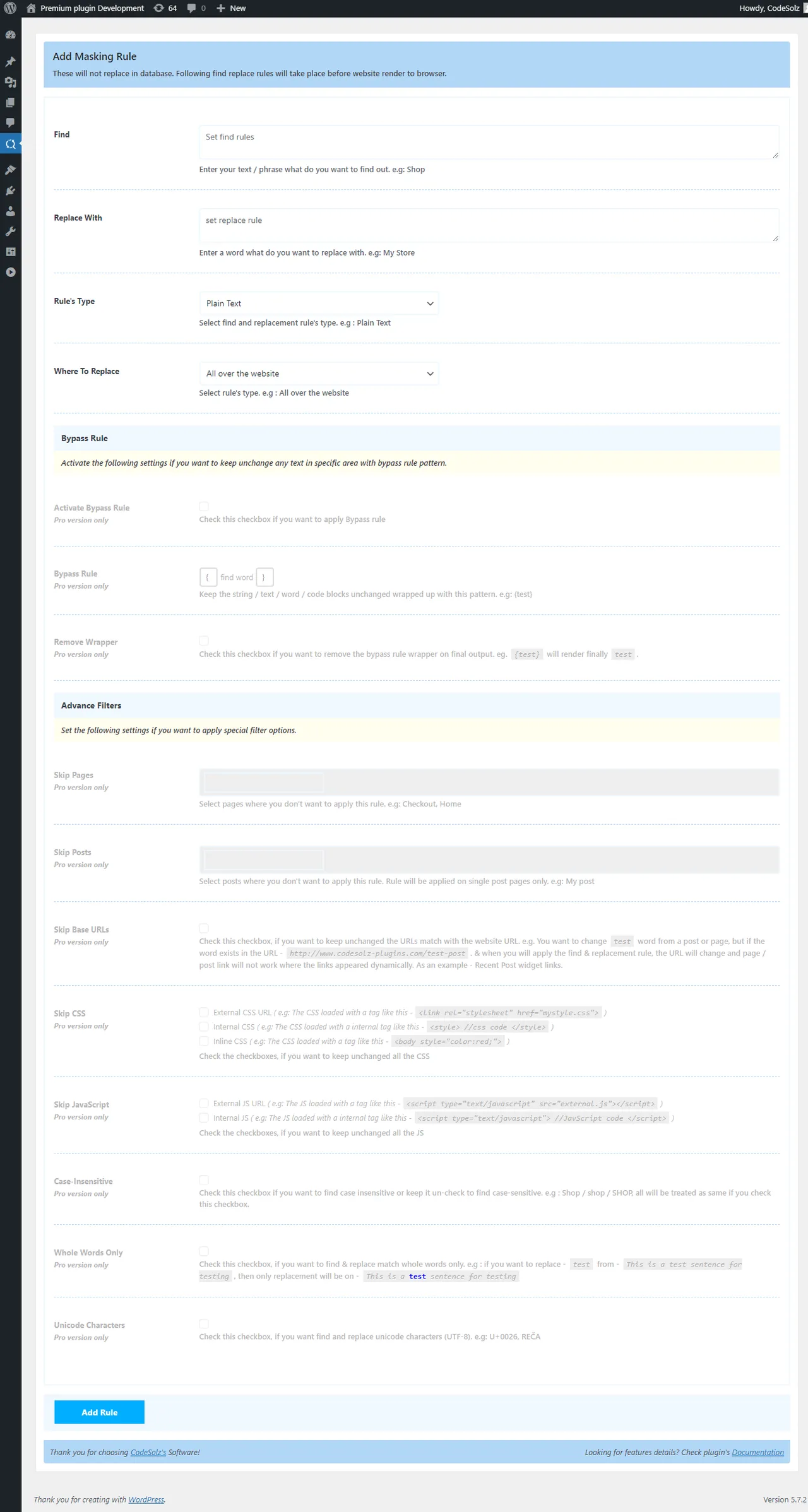
Add Find Rule - Plain Text -
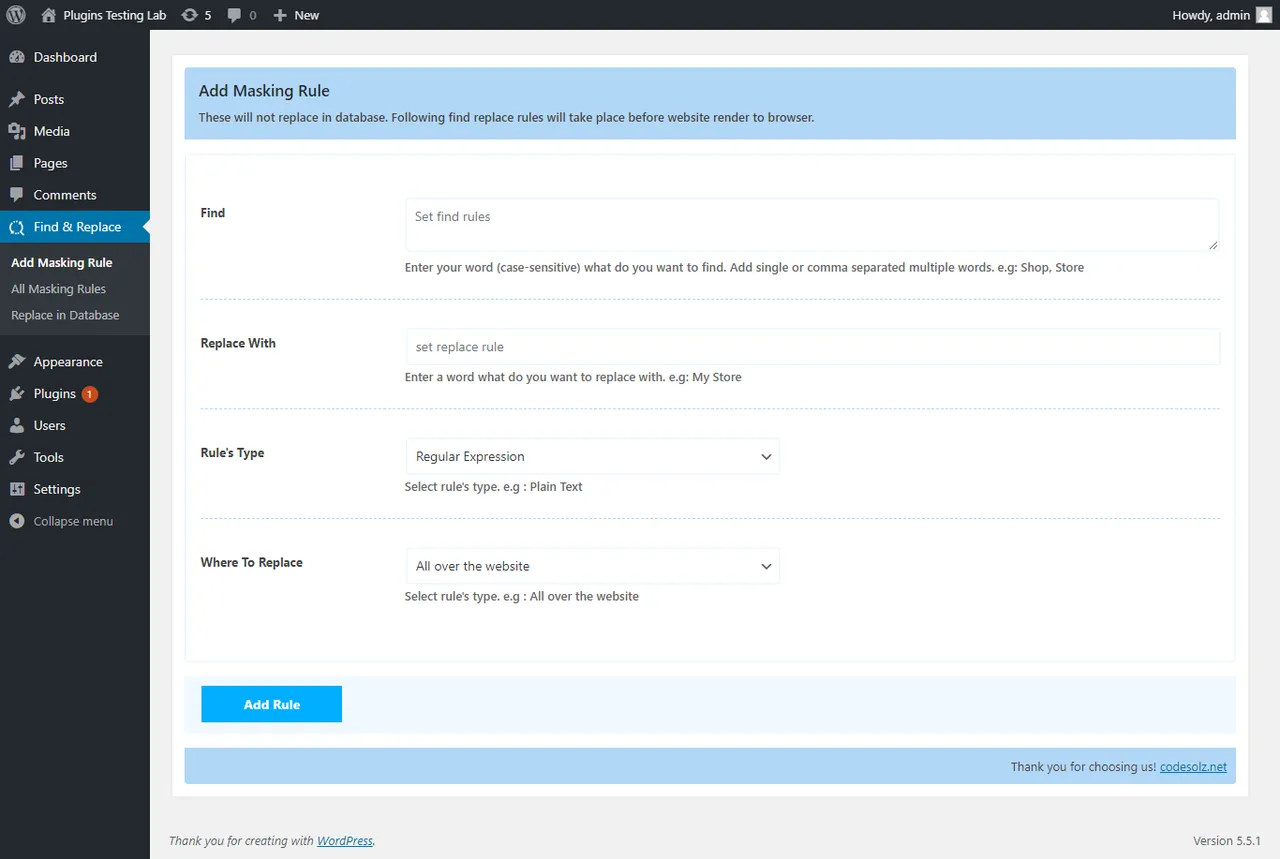
Add Find Rule - RegEx -
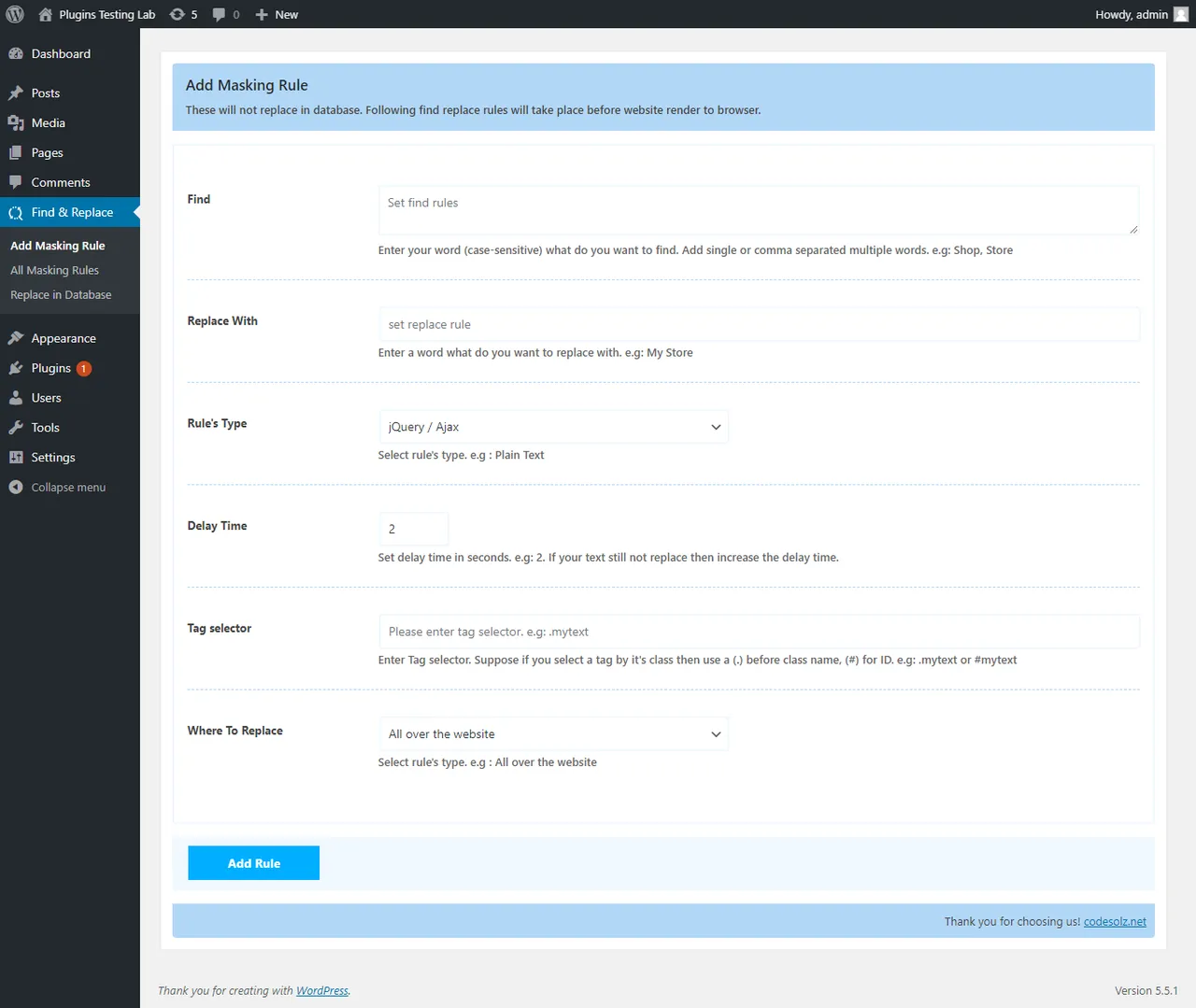
Add Find Rule - jQuery / Ajax Text -
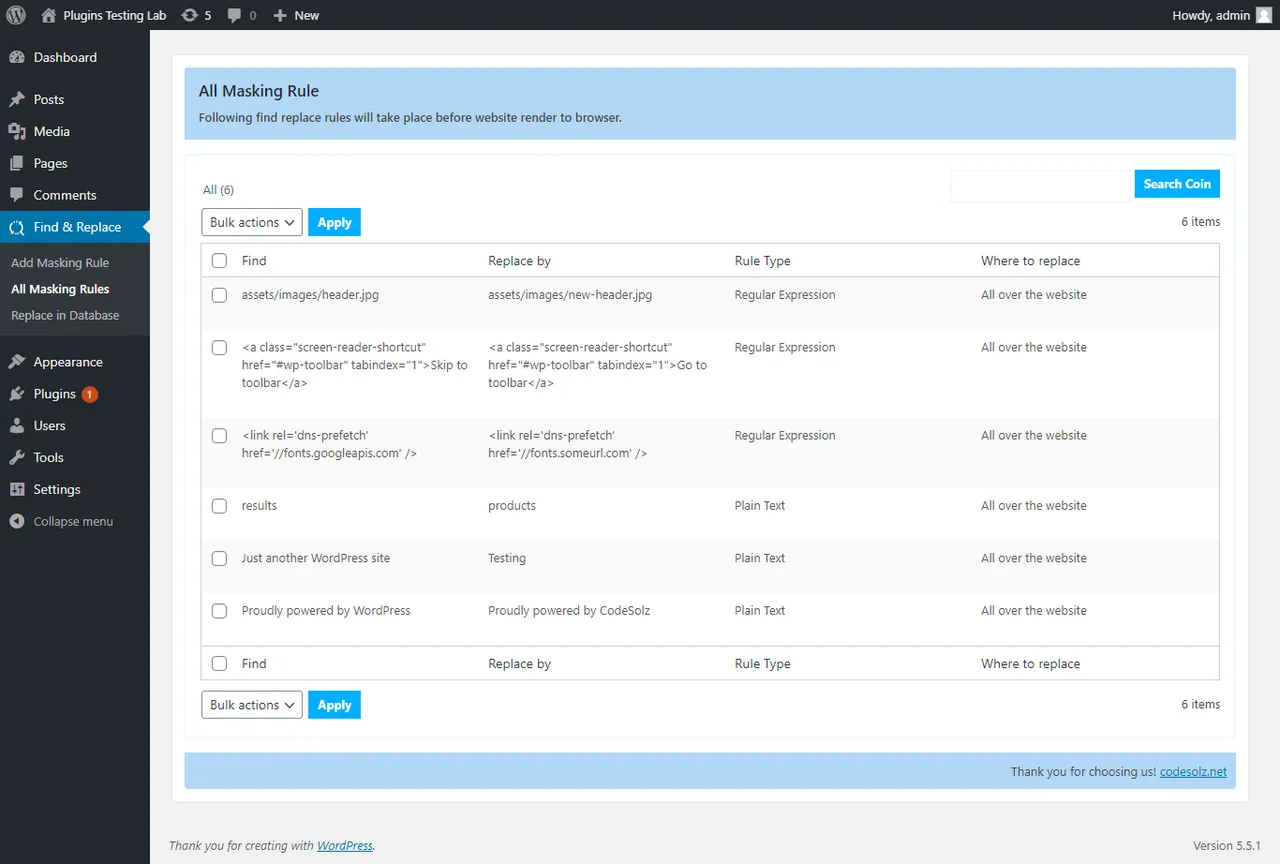
List of All Masking Rules -
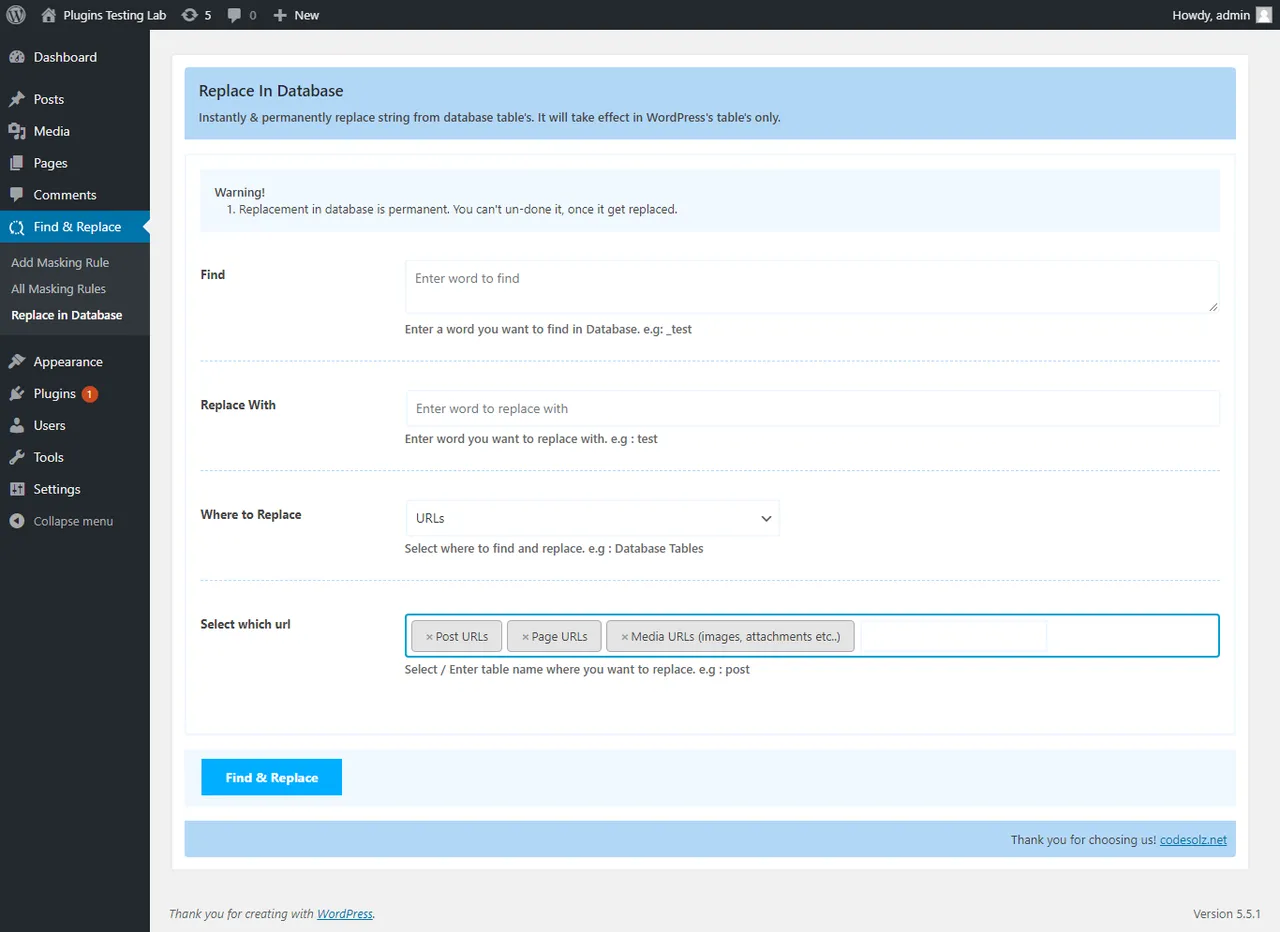
URLs replacement in Database -
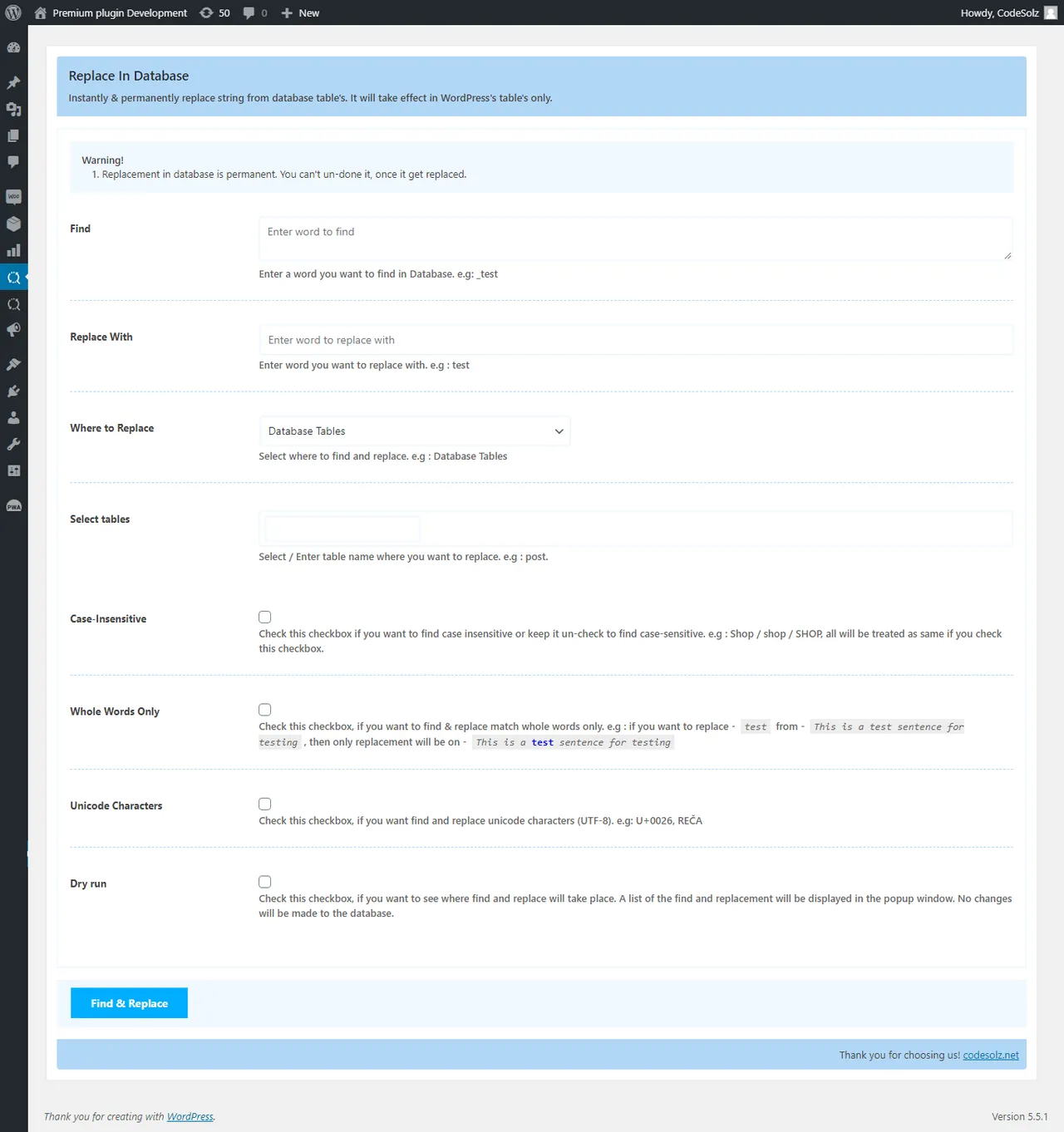
Media replacement in Database -
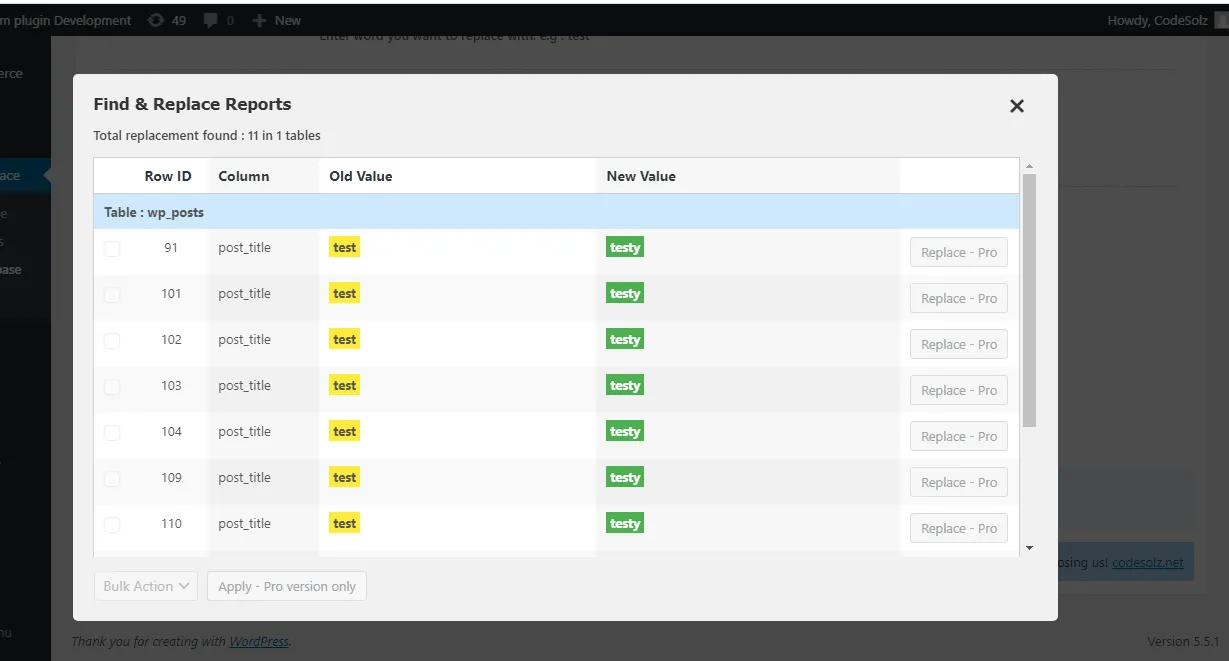
Dry run report -
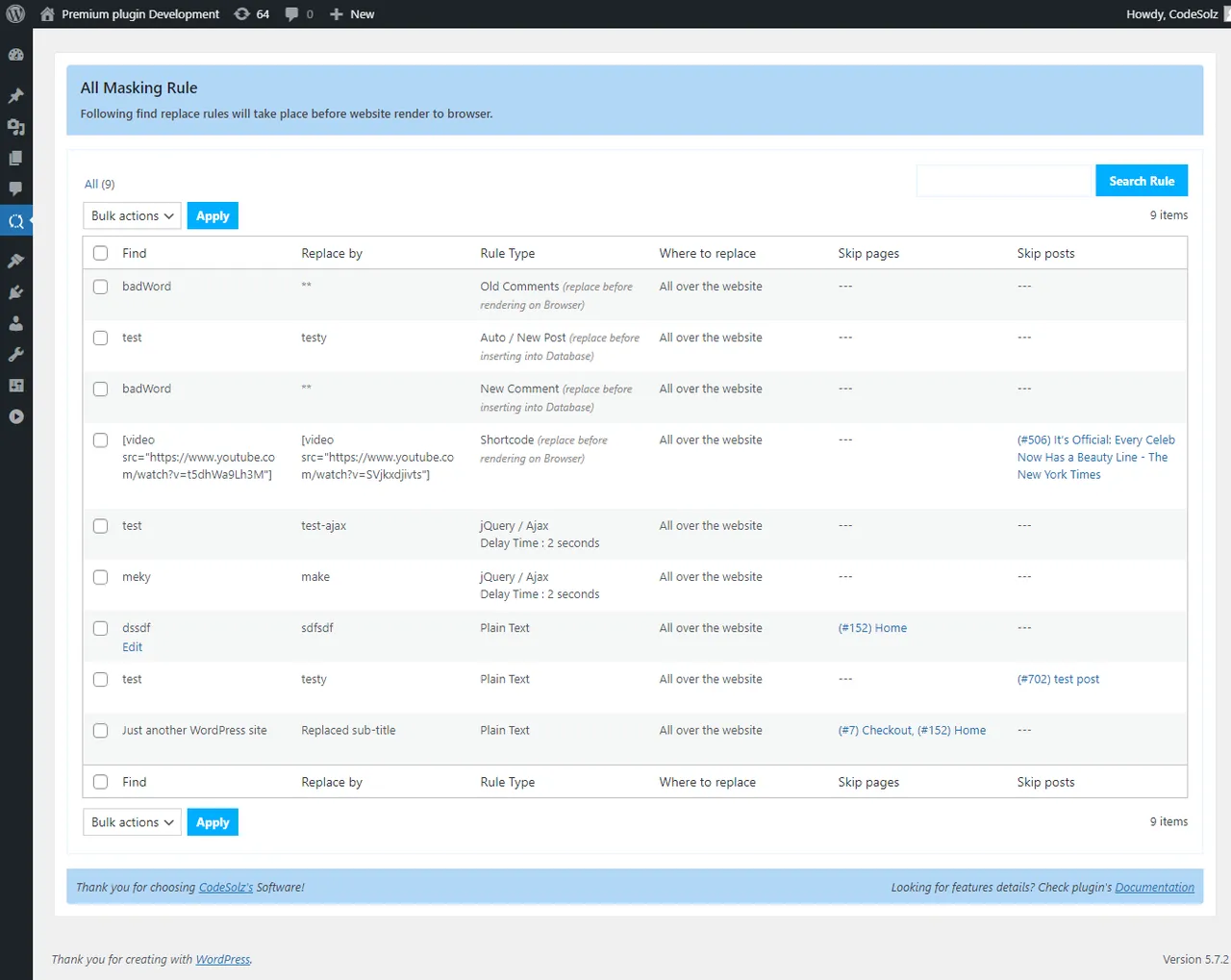
List of All Masking Rules with pro features -
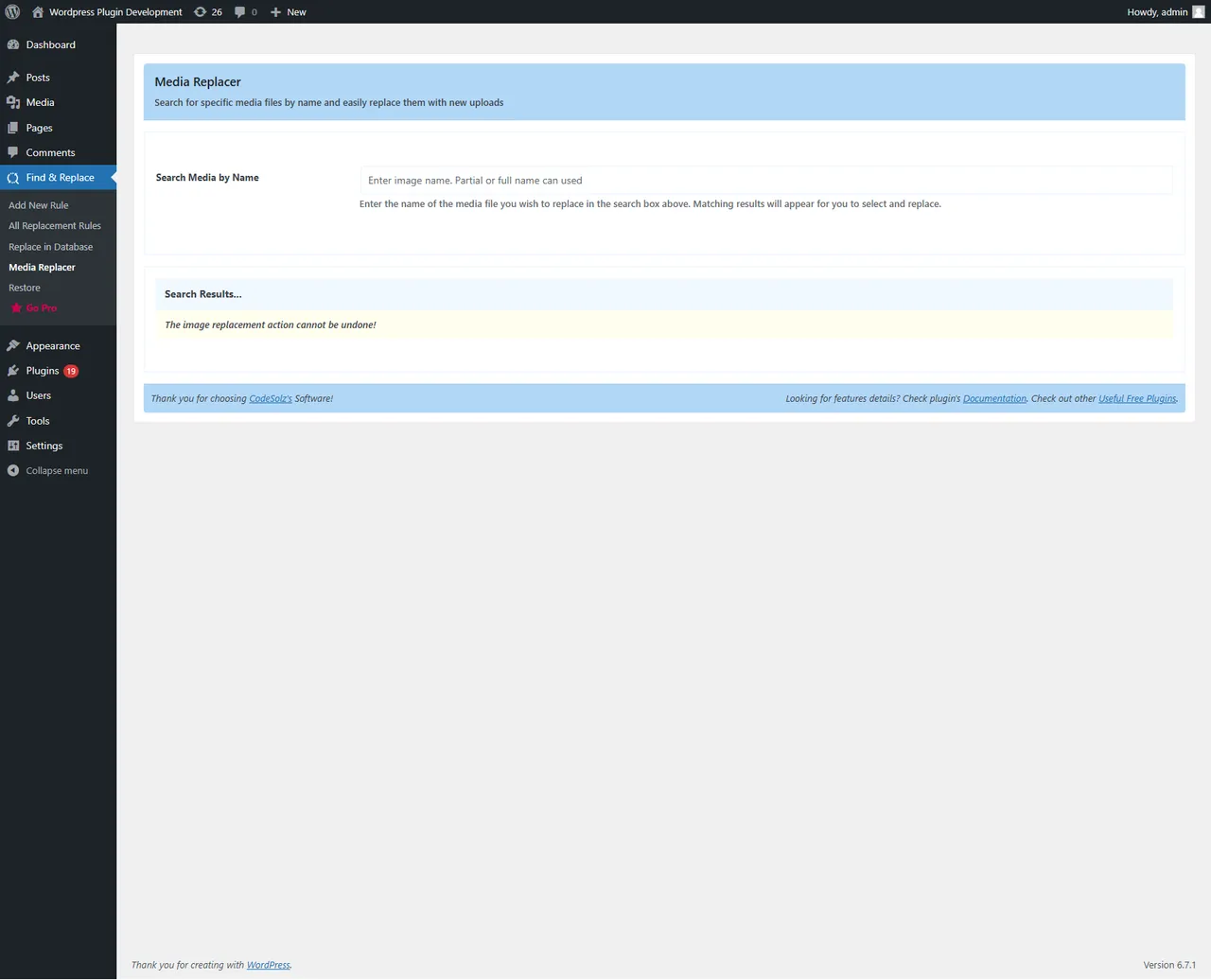
Media replacer -
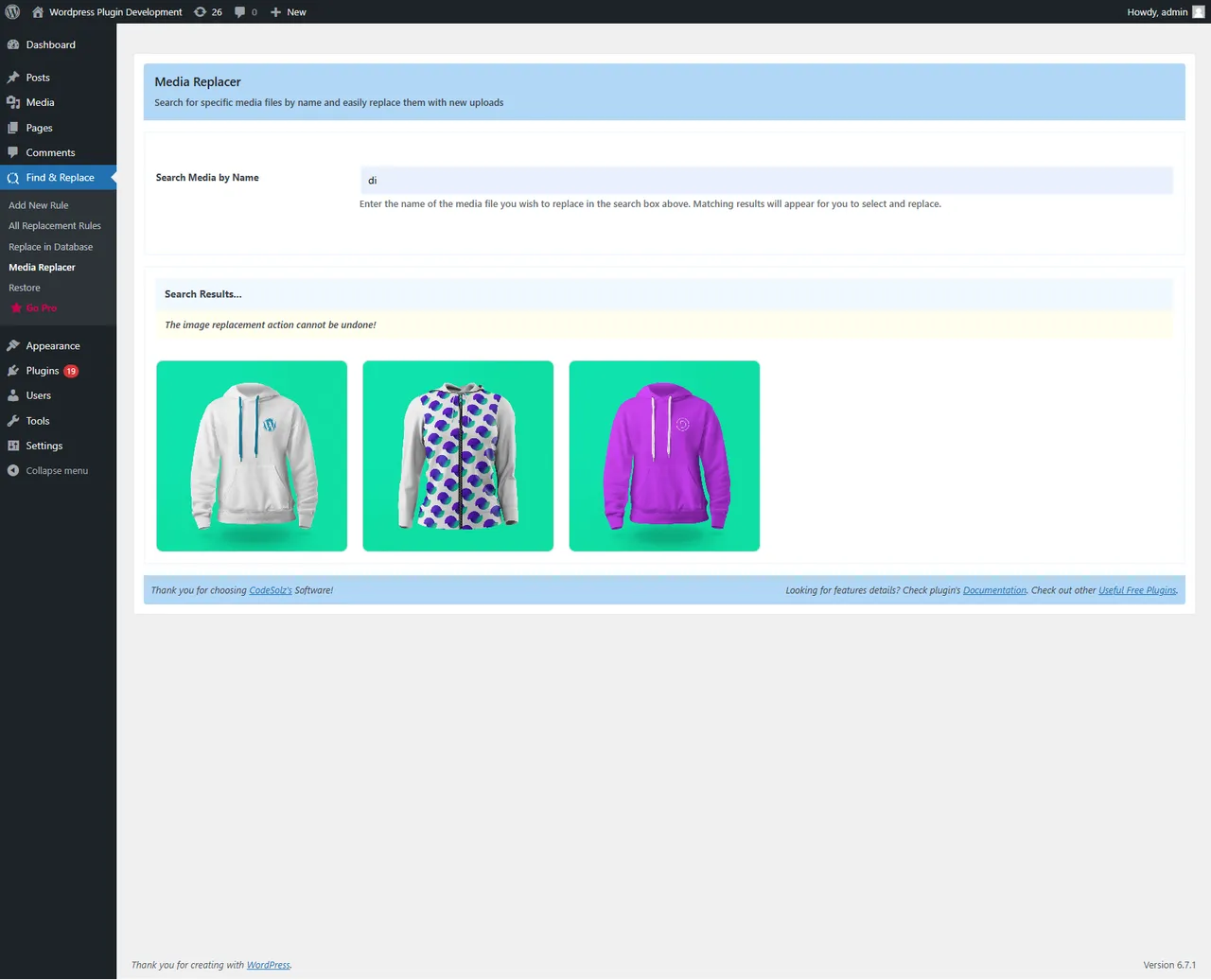
Media replacer -
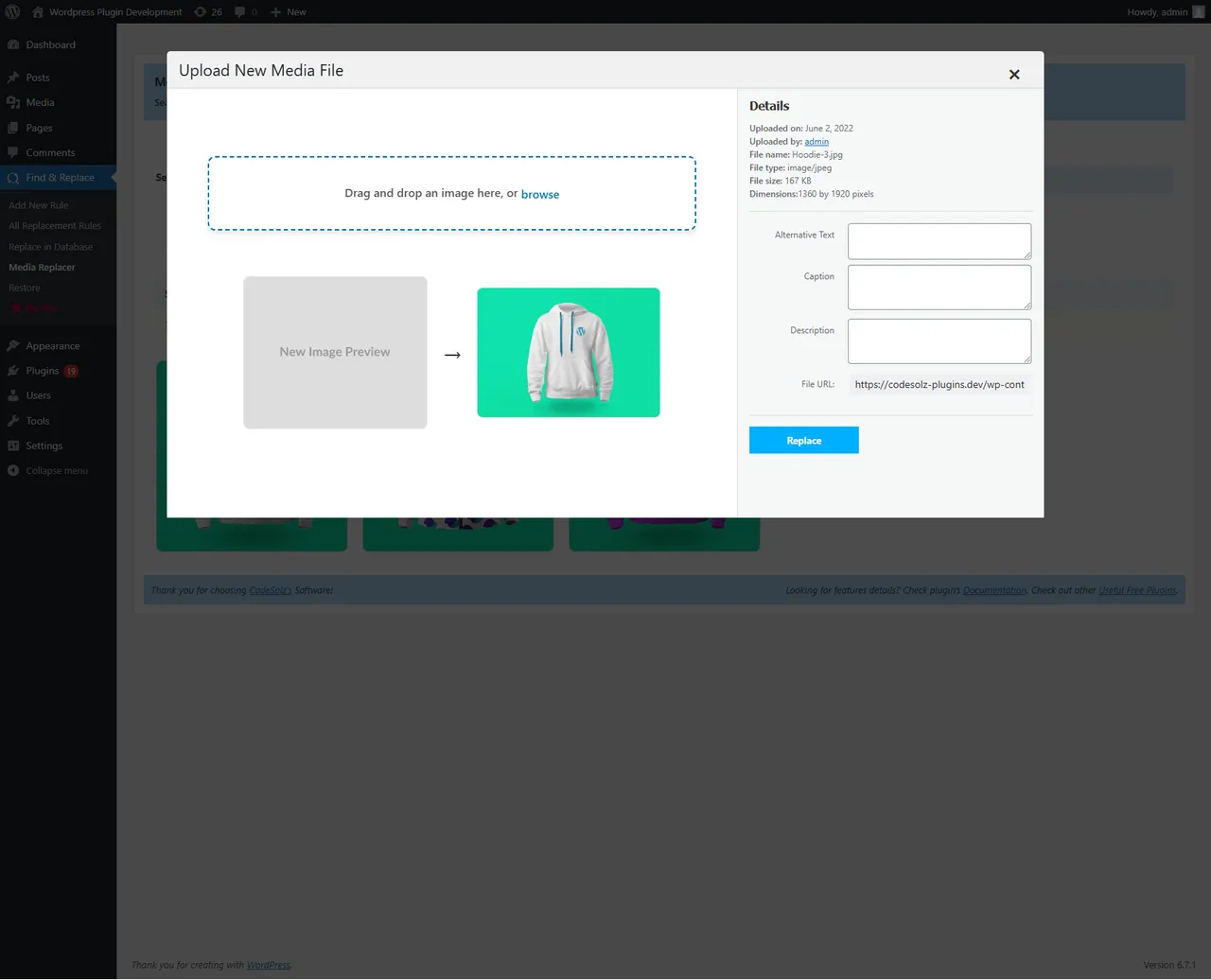
Media replacer -
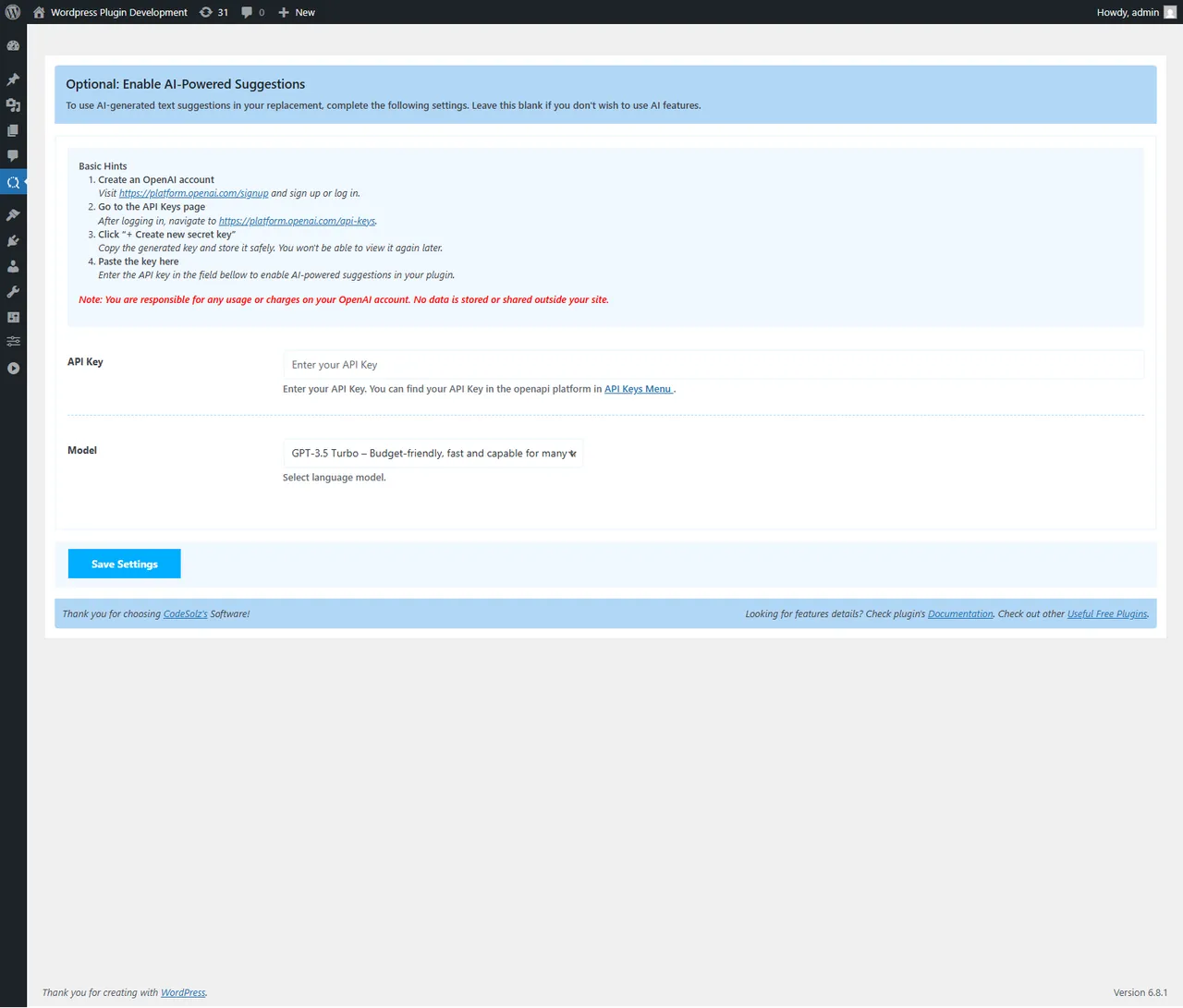
Important information
- Database replacements are permanent in the free version. The undo feature is part of the paid version and must be installed before you run the replacement.
- Always run the dry run first, and keep a separate database backup. A wrong search term can alter many rows at once.
- The listing gives WordPress 5.2 and PHP 7.2 as minimums and says it is tested up to WordPress 7.1.4.
- Eight vulnerabilities have been published in the past. The current status is patched, but keep the plugin updated.
- Real-time rules change output on every page load, so many rules on a busy site may add some work for the server. The listing gives no figures.
From the Better Find and Replace readme
Straight from the developer's WordPress.org listing.
Full description
Smart Search, Replace & Media Tool (with AI) for WordPress
Better Find and Replace lets you easily search and replace text, HTML, links and media across your entire WordPress site — no coding needed. Perfect for database cleanup, content updates or post-migration edits.
Replace text or media in bulk with full support for serialized data, custom tables and dry-run previews. AI-powered suggestions help you rewrite or improve content instantly, making your edits smarter and faster.
Easily find and replace images using drag-and-drop and auto-regenerate thumbnails. You can also update or add alt text, captions and metadata with the suggestion of AI for better SEO.
Want to change content without editing your database? Use real-time masking to update text, links or HTML before the page loads — instantly and safely.
Built for developers, agencies and site owners, individual ( everyone ) who want fast, accurate control over their content management system — all in one clean, intuitive interface.
Key Features
• Site Health Dashboard – One score and one issue count for your whole site — broken links, missing media, 404s and more — with an activity log of every change the plugin has made.
• Broken Link Checker – Finds broken internal links in posts, pages and public custom post types, showing where each appears, its link text and how often it is used. Links are checked against your database, never by hammering your own site with requests.
• Redirect Manager – Create and manage 301 redirects with on/off switches, hit counts, and automatic loop and self-redirect prevention.
• 404 Monitor – Optional logging of every “page not found” hit with referrer and hit count, bot traffic filtered out, and one click to turn a 404 into a redirect or find where the missing URL is still linked.
• Replace + Redirect – Change a URL everywhere in your content and create the matching redirect in a single previewed step, so links people already shared keep working.
• Missing Media Detection – Spots content pointing at images and files that no longer exist on the server, and lets you replace them.
• Duplicate & Clone Content – “Duplicate” and “Clone & Edit” actions on posts, pages and public custom post types, always created as a draft.
• Code Inserts – Add header, body-start and footer snippets (HTML, CSS, JavaScript) without editing your theme. PHP is never executed.
• Safe Media Replacement – Replacing a file keeps the original until the new upload has fully committed, and restores it automatically if anything goes wrong.
• Background Scanning – Long scans run in the background via Action Scheduler or WP-Cron, so your admin screens never wait on them.
• AI-Powered Suggestions – Use artificial intelligence (AI) to get smart replacement suggestions, enhancing accuracy and efficiency.
• Easy to Use – Clean, user-friendly interface designed for effortless navigation and configuration.
• Search and Replace Text – Find and replace any text across your site, whether in static or dynamic content.
• Search and Replace Ajax/jQuery Content – Works seamlessly with content loaded via Ajax or jQuery on the frontend.
• Find and Replace URLs – Quickly search and replace outdated or incorrect URLs throughout your website.
• Replace Images and Attachment URLs – Replace image links and attachment URLs site-wide with precision.
• Word Masking – Mask specific words site-wide using flexible find and replace rules.
• Temporary Find-Replace Rules – Create live, non-permanent replacements without altering your database.
• Edit Footer Credit – Remove or update footer text without modifying HTML or database content.
• HTML Code Replacement – Replace anything within HTML code blocks, tags, or content.
• Real-Time Image Replacement – Replace images instantly during page rendering for dynamic updates.
• Comment Word Filtering – Automatically find and replace inappropriate words in user-submitted comments.
• Language Replacement – Change words or phrases from one language to another across your site.
• RegEx Supported – Use regular expressions for complex and pattern-based search and replace operations.
• HTML Tag & Attribute Replacement – Locate and replace specific HTML tags or attributes throughout your content.
• Lightning Fast Database Replace – High-speed search and replace operations in posts, postmeta, options, and more.
• Table Selection – Choose specific database tables for targeted replacements.
• Dry Run Preview – See a preview of all replacements before applying them to the database.
• Whole Word Match – Replace only exact word matches in the database to avoid partial replacements.
• Serialized Data Support – Safely search and replace serialized data without breaking structure or integrity.
• Remove Serialized Items – Delete specific items from serialized arrays in the database.
• Role-Based Access – Assign plugin management to specific user roles for better control.
• Gutenberg and Page Builder Compatible – Fully supports real-time replacements inside block editors and builders.
• Targeted DB Replacement – Refine search by limiting database replacements to post titles, content, or excerpts.
How to replace in DB?
• Start by generating a report: Select the Dry Run option located at the bottom of the settings section.
• Review the report: A modal window will appear, showing the specific rows and data that will be affected by the replacement.
• Proceed if satisfied: If the preview looks accurate and matches what you intend to replace, simply close the report window, uncheck Dry Run, and click the Find & Replace button.
• ⚠️ Attention: Please carefully review the dry run report before making any changes. Once replacements are applied to the database, they cannot be undone. The PRO version includes an undo feature, but it must be installed before performing the replacement.
• ✅ Important Tip: Always run a dry report first to ensure your search term and replacement are correct. If anything looks off, adjust the keyword and repeat the process until the preview shows the desired results.
Pro Features
• Site Maintenance Features:
• External link, image and embed checking — everything the free scanner cannot reach without leaving your site
• Scheduled and background scans, so problems are found before your visitors find them
• Bulk fixes across every occurrence at once, with AI replacement suggestions
• Broken links grouped by cause — timeout, DNS, SSL, rate limited — instead of one long list
• 302 and 307 redirects, regex and prefix matching, and automatic redirects when a slug changes
• Redirect chain and loop detection across your whole redirect set, plus import / export and analytics
• 404 analytics, grouping, referrer analysis and bulk redirect creation
• Safe Revision — an AI suggestion shown as a full diff, with selective approval, merge, publish and rollback
• AI Content Refresher — scans posts for outdated years, software versions, prices and dead references, and applies approved rewrites as a reversible revision
• Maintenance Agent — groups related problems, ranks them, prepares a plan for your approval, runs the approved batch and reports what actually changed
• Bulk clone with metadata selection, WooCommerce-aware and page-builder-aware
• Conditional, ordered and environment-specific code inserts, with import / export
• Database Replacement Features:
• Powerful search and replace in database
• Ultimate solution for search & replace in serialized data & remove item
• Automatic backup of the search and replacement data
• Ultimate easy solution for restore data what you have replaced by mistake
• Ability to check & replace each item separately which going to be replaced in the database
• Bulk Replacement on report’s page, generate by dry run option
• All tables in database
• Search and replace Unicode Characters UTF-8 ( e.g: U+0026, REČA ) in Database
• Additional filtering options in default / custom URLs
• Filter new comments before inserting into Database
• Filter new post before inserting into Database (Good for auto post generation website)
• Special feature to search and replace in large table
• Real-Time Rendering Features:
• RegEx supported
• Advance Regex – Powerful code blocks / multi-lines find and replace in real-time (masking) rendering
• Advance Regex – Any (CSS / JS / HTML) code Block find and replacement in real-time (masking) rendering
• Masking on Shortcodes
• Advance filtering options :-
• Case insensitive – search and replace case sensitive or insensitive
• Whole Word – search and replace whole word
• Unicode – search and replace Unicode Characters
• Skip posts / page / custom taxonomies etc.. urls
• Skip CSS – External, Internal, Inline
• Skip JavaScript – External, Internal
• Skip pages – if you don’t want to apply rules on any specific page
• Skip posts – if you don’t want to apply rules on any specific posts
• Bypass rule – keep texts unchanged on specific area with special pattern
• Bypass rule – keep base links / urls ( post, pages, custom taxonomies etc..) unchanged where find word exists in that URL.
Advance Regex – Code blocks / multi lines find and replacement example – (Real-time Rendering)
Find code block and replace with your own or keep blank *replacement field to remove code block. Let consider the following CSS code block for replace. Put following
code block in find field*
<style media="screen"> html { margin-top: 32px !important; } * html body { margin-top: 32px !important; } @media screen and ( max-width: 782px ) { html { margin-top: 46px !important; } * html body { margin-top: 46px !important; } } </style>
Then put following code block in *Replace field to replace the above code block*
<style> .site-title a{color: red;} </style>
Join the elite web professionals who enjoy Better Find And Replace Pro!
➡️ Basic Documentation To Get Started
• Setup Video Guide – How to install and setup search and replace rules
👉 Real-time search and replace
• General options for filtering
• Live Demo & Documentation
• Advance options for filtering
• Live Demo & Documentation
👉 Search and replace in Database
• Live Demo & Documentation
• Find and replace in Database tables
• Live Demo & Documentation
• Find and replace in Database URLs
• Live Demo & Documentation
Forum and Feature Request
For Quick Support, feature request and bug reporting
• Visit our website To Get Instant Support
• For more dedicated support or feature request write to us at support@codesolz.net or create a ticket Support Center
Visit our forum to share your experience or request features
• Visit our forum
As it’s open source, check our github development Status
• Check development status or issues in github.com/CodeSolz/real-time-auto-find-and-replace
Installation
• Upload the real-time-auto-find-and-replace folder to the ‘/wp-content/plugins/’ directory
• Activate Better find and replace through the ‘Plugins’ menu in WordPress
Downloads, last 30 days
Trend vs previous period: -54%
Average daily downloads: 253 over the last 7 days , 311 over 30 days.
Security history
Past CVEs, patched · 8 published vulnerabilities (Wordfence) · most recent Apr 16, 2026
- Patched 8.8 High Better Find and Replace <= 1.6.7 - Missing Authorization to Authenticated (Subscriber+) Privilege Escalation CVE-2025-24734 · Jan 27, 2025 · affects *-1.6.7 · fixed in 1.6.8
- Patched 8.8 High Better Find and Replace <= 1.7.7 - Authenticated (Subscriber+) Limited Code Injection CVE-2025-9334 · Nov 7, 2025 · affects *-1.7.7 · fixed in 1.7.8
- Patched 5.4 Medium Better Find and Replace - AI-Powered Suggestions <= 1.7.9 - Authenticated (Author+) Stored Cross-Site Scripting via Uploaded Image Title CVE-2026-3369 · Apr 16, 2026 · affects *-1.7.9 · fixed in 1.8.0
- Patched 8.3 High Better Find and Replace <= 1.6.1 - Unauthenticated PHP Object Injection CVE-2024-39636 · Jul 29, 2024 · affects *-1.6.1 · fixed in 1.6.2
- Patched 4.3 Medium Better Find and Replace <= 1.7.7 - Missing Authorization CVE-2025-12360 · Nov 6, 2025 · affects *-1.7.7 · fixed in 1.7.8
- Patched 6.1 Medium Better Find and Replace <= 1.2.8 - Reflected Cross-Site Scripting CVE-2021-24676 · Sep 6, 2021 · affects *-1.2.8 · fixed in 1.2.9
- Patched 4.4 Medium Better Find and Replace <= 1.7.6 - Authenticated (Administrator+) Stored Cross-Site Scripting CVE-2025-53466 · Sep 22, 2025 · affects *-1.7.6 · fixed in 1.7.7
- Patched 7.2 High Better Find and Replace <= 1.3.5 - Admin+ SQL Injection CVE-2022-1472 · May 30, 2022 · affects [*, 1.3.6) · fixed in 1.3.6
Recent releases
- v2.0.1
Updated compatibility with the latest WordPress version. * Improved site health and broken link detection. * Enhanced AI-powered URL replacement suggestions. * Improved redirects and content...
Better Find and Replace FAQ
Is the plugin free?
Yes, the core plugin is free on WordPress.org and includes database replacement, real-time masking, link checks and redirects. A paid version adds undo, external link checks, scheduled scans and more AI tools.
Can I undo a replacement?
Not in the free version. Changes written to the database are permanent, so take a backup first. The paid version includes undo but it must be installed before you make the replacement.
Does it work with serialized data?
Yes. It replaces values inside serialized data without breaking the structure, and it can also remove single items from serialized arrays.
What is the difference between database and real-time replacement?
Database replacement edits stored content permanently. Real-time replacement changes the page as it loads, so stored posts stay as they are and you can turn the rule off later.
Does it work with page builders?
The listing says real-time replacements work with the block editor and page builders. It also says Ajax and jQuery content loaded on the front end can be changed.
Can it help with broken links?
The free version finds broken internal links and missing media, and logs 404 hits. The paid version also checks external links, images and embeds and can run scans on a schedule.
Better Find and Replace alternatives

Live Demo | Add-ons | Assets | Documentation | Code Snippets GamiPress is the easiest way to gamify your WordPress website in just a few minutes, letting you award your users with digital rewards for interacting with…

Better Messages is the most feature-rich realtime private messaging system for WordPress , with native integrations for BuddyPress, BuddyBoss Platform, Ultimate Member, PeepSo and any other WordPress powered…

Visualizer: Tables and Charts Manager for WordPress is a powerful and easy to use plugin used to create, manage and embed interactive, responsive charts & tables into your WordPress posts and pages. The plugin…

👉 See what users are saying about Directorist ⭐⭐⭐⭐⭐ I’ve been using Directorist for my directory website for over a year now, and I can honestly say it’s one of the most reliable and feature-rich directory plugins…

Any map. One prompt. Describe the map you want. MapSVG AI helps you build and configure it directly in WordPress: connect your data, place it on the map, arrange the layout and set the styling. See the actual result…

Do you want to reduce support tickets immediately? How about you creating a resourceful knowledge base for your customers with AI-powered documentation and FAQs? 🤔 👨💻 82% of customers prefer to support through an…
Listing data from WordPress.org and the Wordfence vulnerability feed, refreshed Nov 9, 2026; listing details fetched Nov 14, 2026. Screenshots are from the plugin's WordPress.org listing. Not affiliated with CodeSolz.