
MapSVG
MapSVG - Vector maps, Google Maps, Image maps - with AI assistant · by RomanCode
- active installs
- 2K+
- 32 ratings
- 4.5
- since last update
- 1d
- releases in 12 months
- —
- support threads resolved
- 100%
- avg daily downloads
- 271
- on WordPress.org
- 10.7 years
MapSVG at a glance
MapSVG is a free WordPress AI-powered plugin by RomanCode with 2K+ active installs and a 4.5/5 rating from 32 reviews. It was last updated on Nov 8, 2026, is tested up to WordPress 7.1.4 and needs PHP 7.4+. It works with Google Gemini. All 19 of its published vulnerabilities have patched versions. Our quality score is 92/100.
What is MapSVG?
MapSVG Lite builds interactive maps in WordPress. You can describe the map you want to an AI assistant, or use the visual editor by hand. It supports SVG maps, image maps and Google Maps, so you can make store locators, country maps, real estate maps, campus guides, event maps and interactive floor plans.
It is for site owners who need a clickable map without writing code. You can start from one of more than 100 included country and region maps, upload your own SVG or image, or use Google Maps. Regions and markers can link to data stored in built-in collections, and clicking them can open tooltips, popovers or detail views.
The AI assistant runs on MapSVG's hosted service and needs a MapSVG account and AI credits. Lite includes a free allowance. Larger features such as directories, filters, CSV import, Google Sheets sync and marker clustering sit in paid add-ons.
Best for
- Businesses building store or office locators
- Real estate and venue sites needing interactive floor plans
- Sites that need country or region maps with clickable areas
- People who want to build a map from a plain-language prompt
MapSVG features
AI map assistant
Describe the map in a prompt, review the preview, then ask for changes or adjust it in the visual editor.
Three map formats
SVG maps, image maps for floor plans and illustrations, and Google Maps.
Included map library
More than 100 country and region maps are included. You can also upload your own vector artwork.
Data collections
Built-in collections with custom fields and reusable records connect data to regions and markers.
Markers and regions
Clickable regions, custom marker images and links, with tooltips, popovers and detail views.
Address search
Address search with country restrictions and postal-code search. Google-based search needs your own Maps key.
Drafts and version history
Keep drafts separate from the published map and review version history.
Responsive layout settings
Adjust layouts and preview them on different device sizes.
Unlimited maps and locations
Lite has no cap on how many maps or locations you create.
MapSVG free vs pro
Free WordPress.org version
- AI assistant with a free credit allowance
- SVG, image and Google Maps formats
- Unlimited maps and locations
- Collections with custom fields
- Tooltips, popovers, detail views and address search
- Drafts and version history
Pro Paid version
- Personal, Professional and Business add-ons expand Lite
- Directories, advanced filters and CSV import
- Google Sheets sync and WordPress content and custom fields
- Marker clustering, image galleries, linked maps and code editors
Lite is free. Paid Personal, Professional and Business add-ons exist, and the included AI usage depends on the plan, with extra credits purchasable in the plugin. The listing gives no prices. Google Maps features need your own Google Maps API key, billed under Google's terms.
How to use MapSVG
- Install the plugin
In wp-admin go to Plugins, then Add New, search for MapSVG Lite, install it and click Activate.
- Open MapSVG
Open MapSVG in the admin menu and connect your MapSVG account to turn on AI access and see your credits.
- Describe or build the map
Type what you want, or choose Create new map manually to use the visual editor.
- Add data and settings
Connect your data, adjust markers and tooltips, and add a Google Maps key only if you use Google Maps.
- Publish and embed
Review the draft, publish it and place the map on a page with its shortcode.
MapSVG screenshots (3)
-
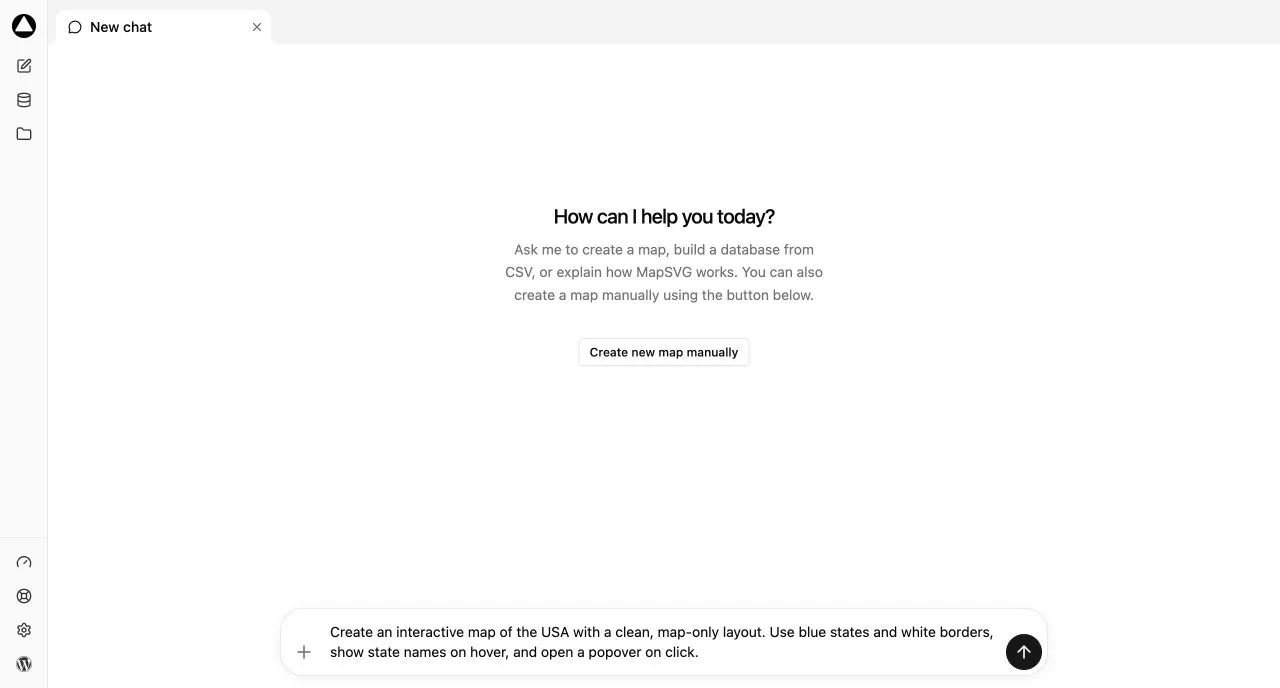
Start with a prompt in the AI chat -
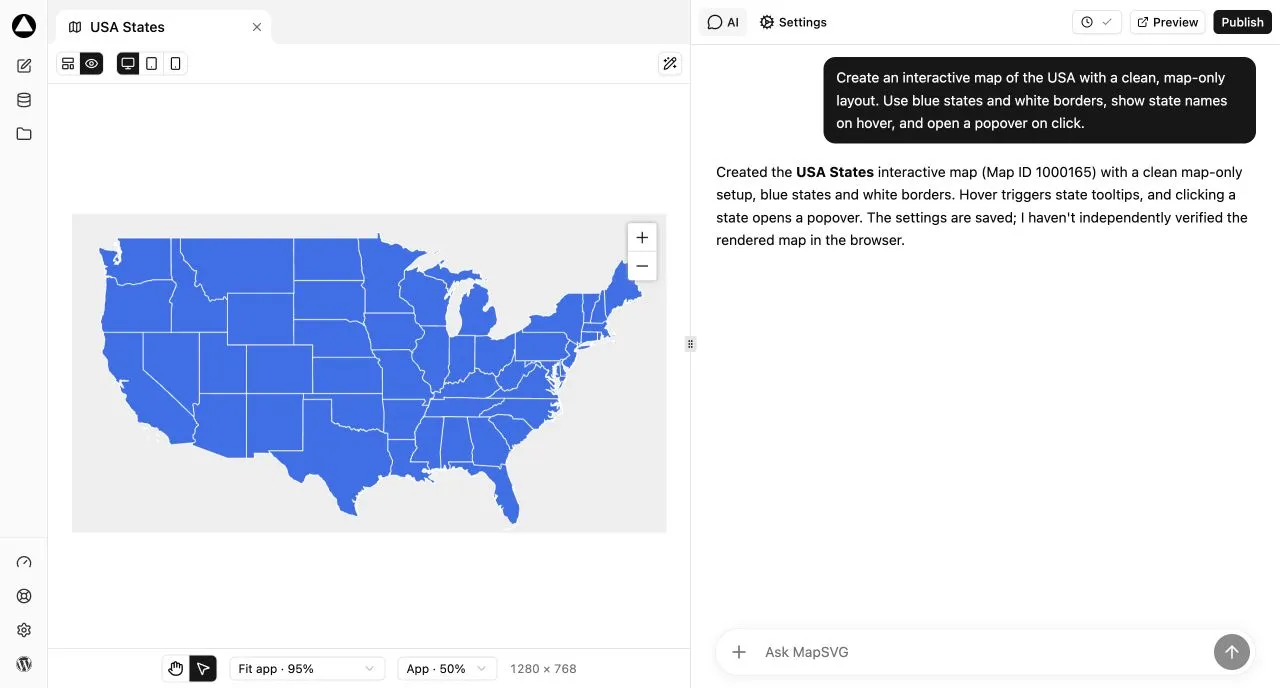
Build and refine your map with AI and a live preview -
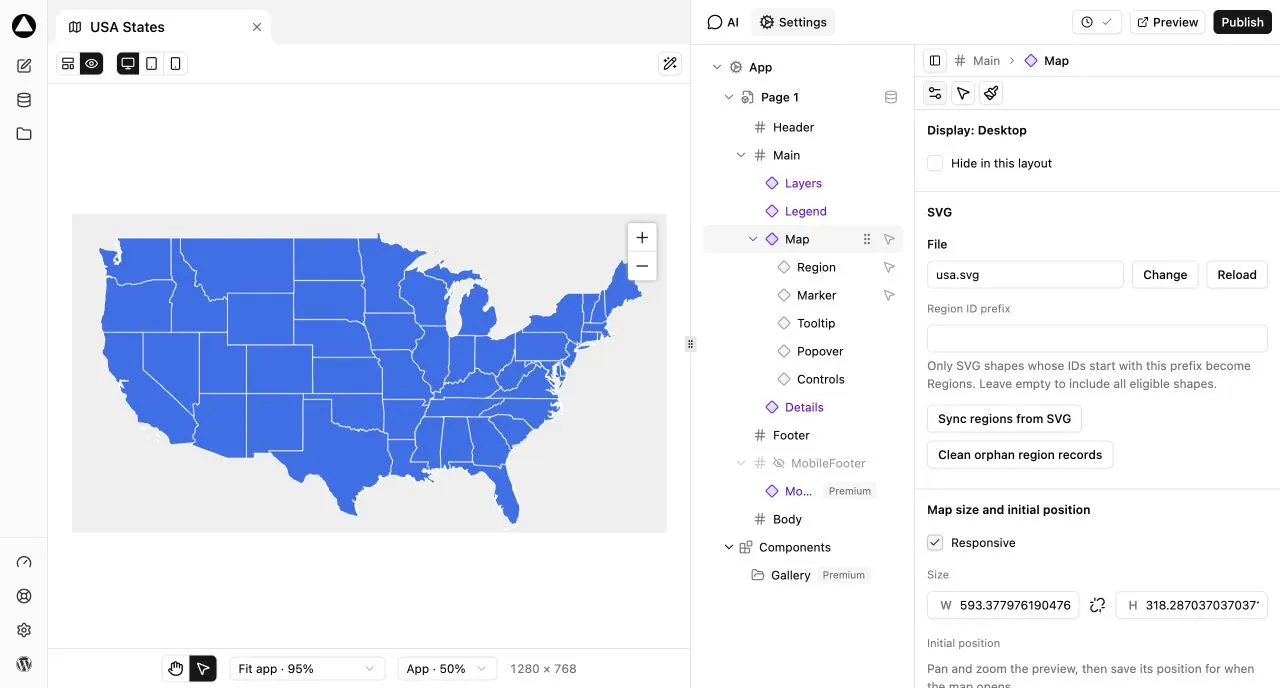
Customize your map with visual settings and components
Important information
- The AI assistant sends your prompt, map context and any attached files to MapSVG's hosted service. It needs a MapSVG account and available credits.
- Google Maps and Google address search need your own Google Maps API key. SVG and image maps do not.
- Requires WordPress 5.0 or newer and PHP 7.4 or newer. Tested up to WordPress 7.1.4.
- Nineteen vulnerabilities have been published for this plugin over time. All are marked patched. Keep it updated.
- Editing shared collection records can change every map that uses them. Version history is not a backup of shared data.
- Many data features, such as CSV import and Google Sheets sync, require a paid add-on.
From the MapSVG readme
Straight from the developer's WordPress.org listing.
Full description
Any map. One prompt.
Describe the map you want. MapSVG AI helps you build and configure it directly in WordPress: connect your data, place it on the map, arrange the layout and set the styling. See the actual result in the preview, continue with another prompt or fine-tune it yourself in the visual editor.
Create store locators, country maps, real estate maps, campus guides, event maps, interactive floor plans and more. Start with an included SVG map, upload your own SVG or image, or use Google Maps. Available tools and integrations depend on your plan.
Start with an idea
Tell the assistant what you need, for example:
• “Create a map of Poland with clickable regions and a tooltip for each region.”
• “Turn this floor plan into an interactive map with room names and details on click.”
• “Create a map of our locations with address search and custom markers.”
AI works through the editor’s tools to create and update your map. Review the result, ask for changes and publish the draft when you are ready.
Three map formats
• SVG maps: Use 100+ included country and region maps, or upload your own vector artwork. Make areas clickable, connect them to your data and edit SVG geometry inside WordPress.
• Image maps: Add interactive regions to floor plans, illustrations, venue plans and other images.
• Google Maps: Show locations, markers and geographic overlays on a Google map. Google-powered maps and address search require your own configured Google Maps API key.
Start free with MapSVG Lite
• AI assistant with a free AI credit allowance.
• SVG maps, image maps and Google Maps.
• Unlimited maps and locations.
• Built-in data Collections with custom fields and reusable records.
• Interactive regions and markers, custom marker images and clickable links.
• Tooltips, popovers and detail views for your map content.
• Address search, country restrictions and postal-code search.
• Visual map settings, responsive layouts and device previews.
• Separate drafts and published configurations, with version history.
More tools as your project grows
MapSVG Personal, Professional and Business add-ons expand Lite with features such as directories, advanced filters, CSV import, Google Sheets sync, WordPress content and custom fields, marker clustering, image galleries, linked maps and code editors. Feature availability and included AI usage depend on the plan.
Explore MapSVG | Documentation
Installation
• Install and activate MapSVG Lite from the WordPress Plugins screen, or upload its ZIP.
• Open MapSVG in your WordPress admin.
• Connect your MapSVG account to activate AI access and view your credit allowance.
• Describe the map you want, or choose “Create new map manually” to use the visual editor.
• Add a Google Maps API key only if your map uses Google Maps or Google-powered address services.
• Review your draft, publish it and embed the map on a page using its shortcode.
Developer FAQ (10)
- Can I create a map with one prompt?
- Yes. Describe the result you want and let the AI assistant set up the map using the available editor tools. You can request further changes through chat or adjust the result manually. Use an included map, your own SVG or image, or Google Maps as the starting point. Some capabilities require a paid add-on.
- Can I use MapSVG without AI?
- Yes. The visual editor remains available for manual map creation and editing.
- How does the AI service work?
- The assistant uses MapSVG’s hosted AI service. When you send a request, your prompt, relevant map context and any files you attach are sent to that service for processing. AI access requires a MapSVG account, an internet connection and available AI credits. The Usage panel shows your allowance and purchased credits.
- How much AI usage is included?
- Lite includes a free AI allowance. Paid plans include additional usage, and extra credits can be purchased inside the plugin. Usage depends on the complexity of your requests. See the Usage panel and current plans for your allowance.
- Do I need a Google Maps API key?
- Only for Google Maps and Google-powered services such as address search. An SVG or image map without those services does not need a Google Maps key. Google’s own usage and billing terms apply.
- Can I use my own SVG or image?
- Yes. Upload a geographic map, floor plan, site plan or illustration, add interactive regions and connect them to your data. You can edit SVG geometry inside WordPress.
- Can I connect my own data?
- Yes. Lite includes MapSVG Collections and custom fields. Paid add-ons offer further data tools and integrations, including CSV, Google Sheets and WordPress content. Available integrations depend on your plan.
- Will editing a draft change my live map?
- Changes to a draft’s map configuration stay in the draft until you publish it. Shared Collection records are different: editing those records can affect every map that uses them. Map version history is not a backup of shared data.
- Where can I get support?
- Use the Support button in MapSVG to open your Dashboard, then use the chat button in the bottom-right corner.
- How can I report a security bug?
- You can report security bugs through the Patchstack Vulnerability Disclosure Program. The Patchstack team helps validate, triage and handle any security vulnerabilities. Report a security vulnerability.
Downloads, last 30 days
Trend vs previous period: -21.9%
Average daily downloads: 392 over the last 7 days , 271 over 30 days.
Security history
Past CVEs, patched · 19 published vulnerabilities (Wordfence) · most recent Oct 17, 2026
- Patched 8.8 High MapSVG <= 8.7.3 - Authenticated (Contributor+) Arbitrary File Upload CVE-2025-68562 · Dec 24, 2025 · affects *-8.7.3 · fixed in 8.7.4
- Patched 6.5 Medium MapSVG Lite <= 8.6.9 - Unauthenticated Arbitrary Shortcode Execution CVE-2025-48120 · May 16, 2025 · affects *-8.6.9 · fixed in 8.6.10
- Patched 6.4 Medium MapSVG <= 8.7.23 - Authenticated (Contributor+) Stored Cross-Site Scripting CVE-2025-62930 · Oct 6, 2025 · affects *-8.7.22 · fixed in 8.7.23
- Patched 6.4 Medium MapSVG Lite <= 8.6.6 - Authenticated (Contributor+) Stored Cross-Site Scripting CVE-2025-32683 · Apr 9, 2025 · affects *-8.6.6 · fixed in 8.6.7
- Patched 5.3 Medium MapSVG - Vector maps, Image maps, Google Maps <= 8.16.1 - Unauthenticated Information Exposure CVE-2026-111397 · Oct 16, 2026 · affects *-8.16.1 · fixed in 8.16.2
- Patched 6.5 Medium MapSVG - Vector maps, Image maps, Google Maps <= 8.14.0 - Authenticated (Contributor+) SQL Injection CVE-2026-65450 · Jul 22, 2026 · affects *-8.14.0 · fixed in 8.14.1
- Patched 8.8 High MapSVG Lite <= 8.6.4 - Authenticated (Contributor+) Arbitrary File Upload CVE-2025-32682 · Apr 15, 2025 · affects *-8.6.4 · fixed in 8.6.5
- Patched 6.4 Medium MapSVG - Vector maps, Image maps, Google Maps <= 8.16.1 - Authenticated (Contributor+) Stored Cross-Site Scripting CVE-2026-111405 · Oct 16, 2026 · affects *-8.16.1 · fixed in 8.16.2
Show all 19 vulnerabilities
- Patched 8.1 High MapSVG - Vector maps, Image maps, Google Maps <= 8.16.1 - Authenticated (Contributor+) Arbitrary File Deletion CVE-2026-111398 · Oct 17, 2026 · affects *-8.16.1 · fixed in 8.16.2
- Patched 7.5 High MapSVG - Vector maps, Image maps, Google Maps <= 8.14.0 - Unauthenticated SQL Injection CVE-2026-59527 · Jul 23, 2026 · affects *-8.14.0 · fixed in 8.14.1
- Patched 7.2 High MapSVG - Vector maps, Image maps, Google Maps <= 8.14.0 - Authenticated (Admin+) Arbitrary File Upload CVE-2026-65455 · Jul 22, 2026 · affects *-8.14.0 · fixed in 8.14.1
- Patched 6.4 Medium MapSVG - Vector maps, Image maps, Google Maps <= 8.14.0 - Authenticated (Contributor+) Stored Cross-Site Scripting CVE-2026-65449 · Jul 22, 2026 · affects *-8.14.0 · fixed in 8.14.1
- Patched 6.1 Medium MapSVG Lite < 3.3.0 - Cross-Site Request Forgery CVE-2019-1000003 · Jan 8, 2019 · affects [*, 3.3.0) · fixed in 3.3.0
- Patched 8.8 High MapSVG - Vector maps, Image maps, Google Maps <= 8.16.1 - Authenticated (Contributor+) Arbitrary File Upload CVE-2026-111406 · Oct 17, 2026 · affects *-8.16.1 · fixed in 8.16.2
- Patched 6.4 Medium MapSVG Lite <= 8.14.0 - Authenticated (Contributor+) Stored Cross-Site Scripting CVE-2025-9205 · Jul 23, 2026 · affects *-8.14.0 · fixed in 8.14.1
- Patched 4.3 Medium MapSVG Lite <= 8.6.4 - Missing Authorization CVE-2025-32684 · Apr 9, 2025 · affects *-8.6.4 · fixed in 8.6.5
- Patched 7.2 High MapSVG <= 8.14.0 - Authenticated (Administrator+) Arbitrary File Upload via '/mapsvg/v1/svgfile' Endpoint CVE-2026-1771 · Jul 21, 2026 · affects *-8.14.0 · fixed in 8.14.1
- Patched 6.5 Medium MapSVG - Vector maps, Image maps, Google Maps <= 8.16.1 - Authenticated (Contributor+) SQL Injection CVE-2026-111399 · Oct 16, 2026 · affects *-8.16.1 · fixed in 8.16.2
- Patched 7.2 High MapSVG - Vector maps, Image maps, Google Maps <= 8.15.0 - Unauthenticated Server-Side Request Forgery CVE-2026-82852 · Aug 31, 2026 · affects *-8.15.0 · fixed in 8.16.0
MapSVG FAQ
Can I build a map from one prompt?
Yes. Describe the result and the assistant sets it up with the editor's tools. You can ask for changes or fine-tune manually. Some capabilities need a paid add-on.
Can I use it without AI?
Yes. The visual editor stays available for building and editing maps by hand.
How is AI usage handled?
The assistant runs on MapSVG's hosted service and uses credits. Lite includes a free allowance, paid plans include more, and the Usage panel shows your balance.
Do I need a Google Maps key?
Only for Google Maps and Google-powered services such as address search. SVG and image maps without those services do not.
Can I use my own SVG or image?
Yes. Upload a map, floor plan, site plan or illustration, add interactive regions and link them to your data.
Will editing a draft change my live map?
No, draft configuration changes stay in the draft until you publish. Shared collection records are different, since edits there affect every map that uses them.
Can I connect my own data?
Yes. Lite has collections and custom fields. Paid add-ons add CSV, Google Sheets and WordPress content sources.
MapSVG alternatives

Live Demo | Add-ons | Assets | Documentation | Code Snippets GamiPress is the easiest way to gamify your WordPress website in just a few minutes, letting you award your users with digital rewards for interacting with…

Better Messages is the most feature-rich realtime private messaging system for WordPress , with native integrations for BuddyPress, BuddyBoss Platform, Ultimate Member, PeepSo and any other WordPress powered…

Visualizer: Tables and Charts Manager for WordPress is a powerful and easy to use plugin used to create, manage and embed interactive, responsive charts & tables into your WordPress posts and pages. The plugin…

Smart Search, Replace & Media Tool (with AI) for WordPress Better Find and Replace lets you easily search and replace text, HTML, links and media across your entire WordPress site - no coding needed. Perfect for…

👉 See what users are saying about Directorist ⭐⭐⭐⭐⭐ I’ve been using Directorist for my directory website for over a year now, and I can honestly say it’s one of the most reliable and feature-rich directory plugins…

Do you want to reduce support tickets immediately? How about you creating a resourceful knowledge base for your customers with AI-powered documentation and FAQs? 🤔 👨💻 82% of customers prefer to support through an…
Listing data from WordPress.org and the Wordfence vulnerability feed, refreshed Nov 9, 2026; listing details fetched Nov 14, 2026. Screenshots are from the plugin's WordPress.org listing. Not affiliated with RomanCode.