

Calculated Fields Form
Calculated Fields Form - AI Form Builder for WordPress - Contact, Payment, Quote, Quiz & More · by codepeople
- active installs
- 40K+
- 973 ratings
- 4.9
- since last update
- 2d
- releases in 12 months
- —
- support threads resolved
- 100%
- avg daily downloads
- 5,060
- on WordPress.org
- 13.7 years
Calculated Fields Form at a glance
Calculated Fields Form is a free WordPress AI form builder plugin by codepeople with 40K+ active installs and a 4.9/5 rating from 973 reviews. It was last updated on Nov 7, 2026, is tested up to WordPress 7.1.4. All 22 of its published vulnerabilities have patched versions. Our quality score is 95/100.
What is Calculated Fields Form?
Calculated Fields Form is a WordPress form builder that can compute values live as visitors fill in a form. It handles totals, prices, dates, distances and scores, so it fits quote calculators, order forms, booking forms and loan estimators. Despite the name, it also works as a plain contact or registration form builder.
It is aimed at site owners who need forms that react to user input without custom code. A visual editor places the fields, and a formula editor with syntax highlighting and error checks defines the math. Conditional rules can show, hide or disable fields, and forms can be split into pages.
Recent versions add AI features: a form generator, an assistant for equations and notification emails, natural-language entry search and an MCP connection for outside AI agents. The listing names several supported providers, including Anthropic Claude, OpenAI and Gemini. Paid versions are one-time purchases according to the listing.
Best for
- Quote and price calculators
- Booking and order forms with live totals
- Loan and finance estimators
- Sites that want AI help building complex forms
Calculated Fields Form features
Live calculated fields
Fields can compute results from other fields as the visitor types. Useful for totals, taxes, discounts, dates and percentages.
Formula editor
An editor with syntax highlighting and real-time error detection for writing equations. Conditional statements can be used inside formulas.
Conditional logic
Show, hide, enable or disable fields based on answers. This lets you build guided, step-by-step forms.
Drag and drop builder
Place fields visually, including dates, sliders, currency, QR code readers and audio or video recording fields. Multi-column layouts and dozens of templates are included.
Multi-page and repeater fields
Split long forms with page breaks, and repeat row groups with per-column totals. Good for orders and itemized lists.
AI form generator and assistant
Describe a form in plain language and get a draft. An in-builder assistant helps with equations, choice lists and notification emails.
AI entries search and MCP
Search stored submissions with natural language. External agents such as Claude Code can build forms and report on submissions through MCP.
Stripe Checkout payments
The free version includes Stripe Checkout for one-time payments. Other gateways come with paid versions.
Entries and spam control
Submissions are stored in WordPress for review. Math CAPTCHA and Akismet help filter spam.
Page builder support
Works with Gutenberg, Elementor, Divi, Beaver Builder, WPBakery and SiteOrigin, or by shortcode anywhere.
Calculated Fields Form free vs pro
Free WordPress.org version
- Full visual builder, calculated fields and conditional logic
- Notification emails to the site owner
- Stripe Checkout for one-time payments
- Entries stored in WordPress, Math CAPTCHA and Akismet
- AI form generation, AI assistant, AI entries search and MCP integration
- Repeater container and OpenStreetMap location picker
Pro Paid version
- Confirmation emails to the user
- Extra CAPTCHA options and more payment gateways, including PayPal and subscriptions
- Financial operations such as loan amortization in the Developer and Platinum versions
- Add-ons for CRM tools, PDF generation and e-signatures
Paid versions (Professional, Developer and Platinum) exist. The listing calls them a one-time purchase with lifetime updates, but gives no prices. The listing names AI providers but does not say how access is billed, so expect provider-side costs if you connect your own account.
How to use Calculated Fields Form
- Install and activate
In wp-admin go to Plugins → Add New and search for Calculated Fields Form. Click Install Now, then Activate.
- Open the form builder
Use the Calculated Fields Form menu in the dashboard to create a form. Start from a template or let the AI draft one.
- Add fields and formulas
Drag in fields and add a calculated field. Write the equation in the formula editor and set any conditional rules.
- Set emails and payments
Enter the destination emails for notifications. Turn on Stripe Checkout if the form should collect the calculated price.
- Insert the form
Place the form with its shortcode, with id set to the form number, or use your page builder widget. Test the calculations on the front end.
Calculated Fields Form screenshots (12)
-
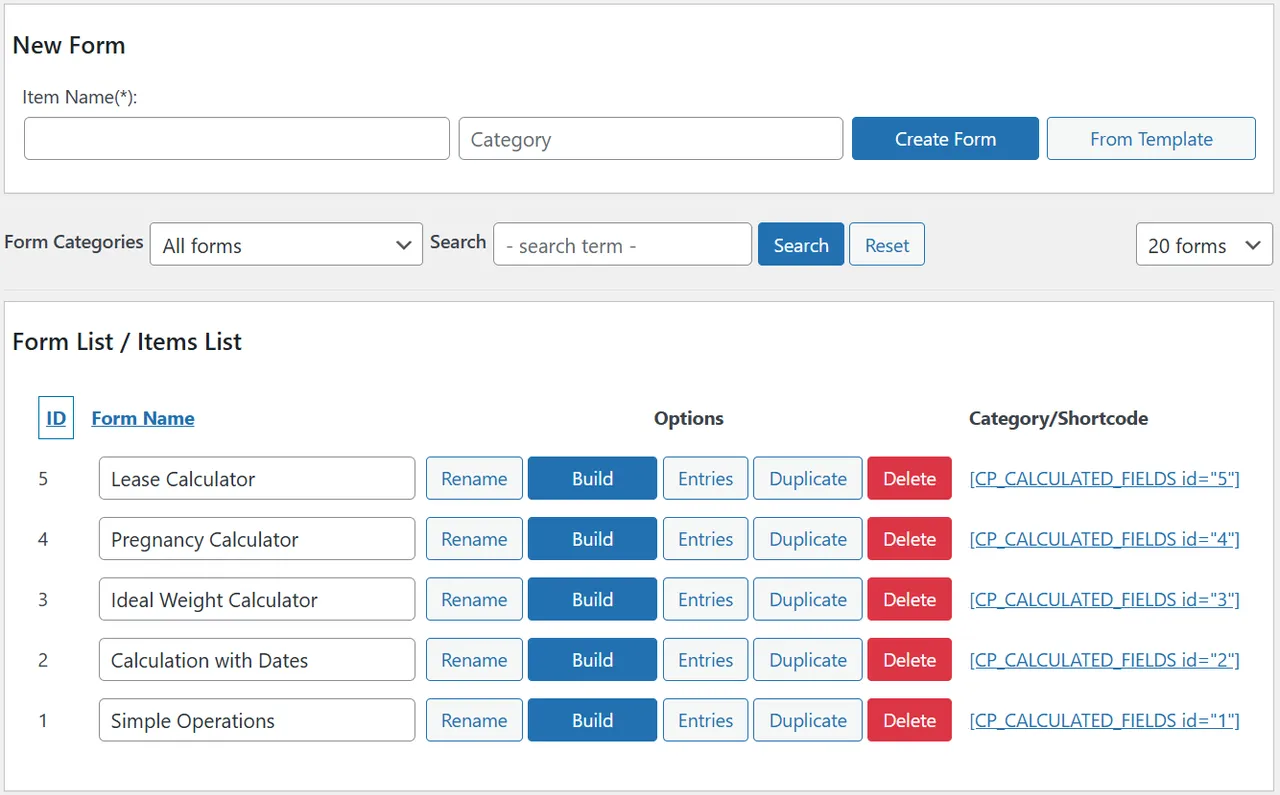
Calculated forms list -
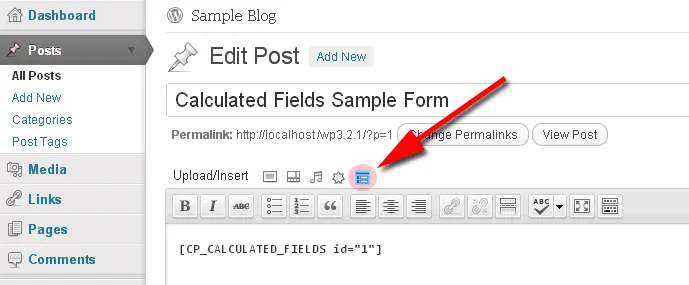
Inserting the form using the Classic Editor -
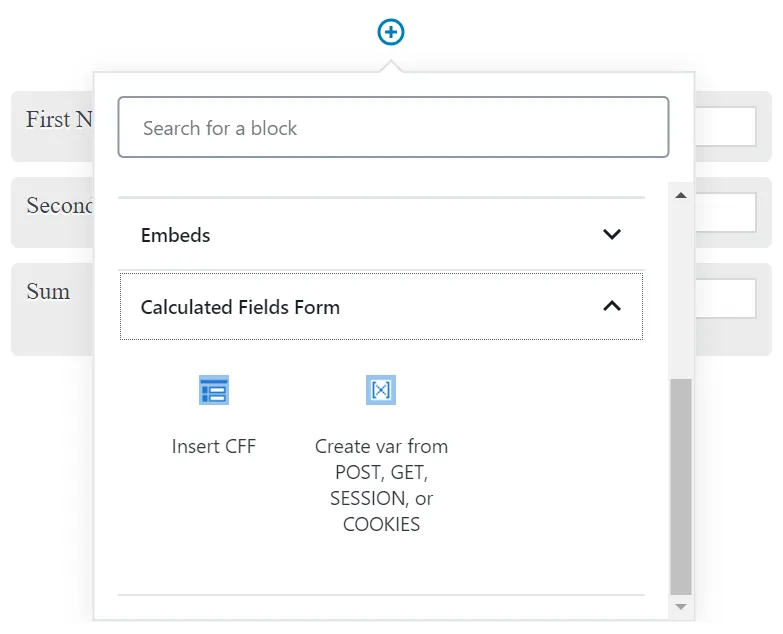
Inserting the form using the Gutenberg Editor -
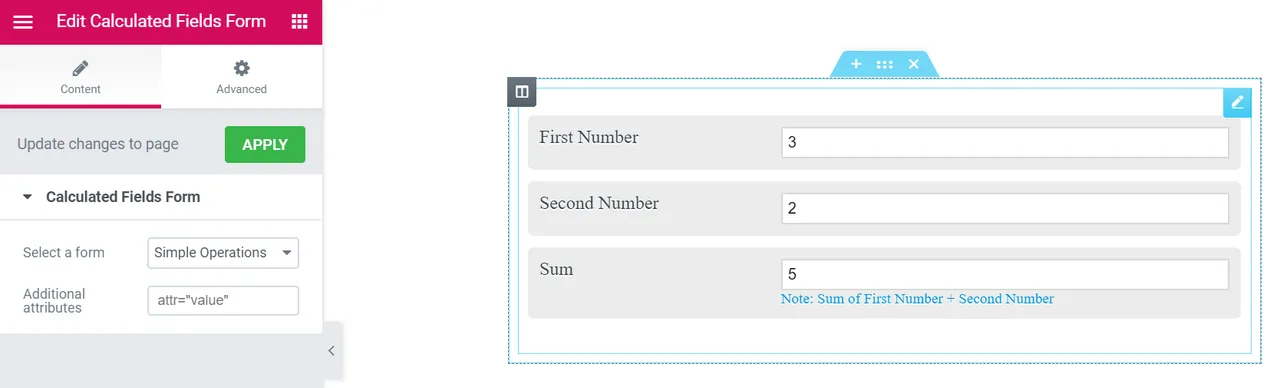
Inserting the form using Elementor -
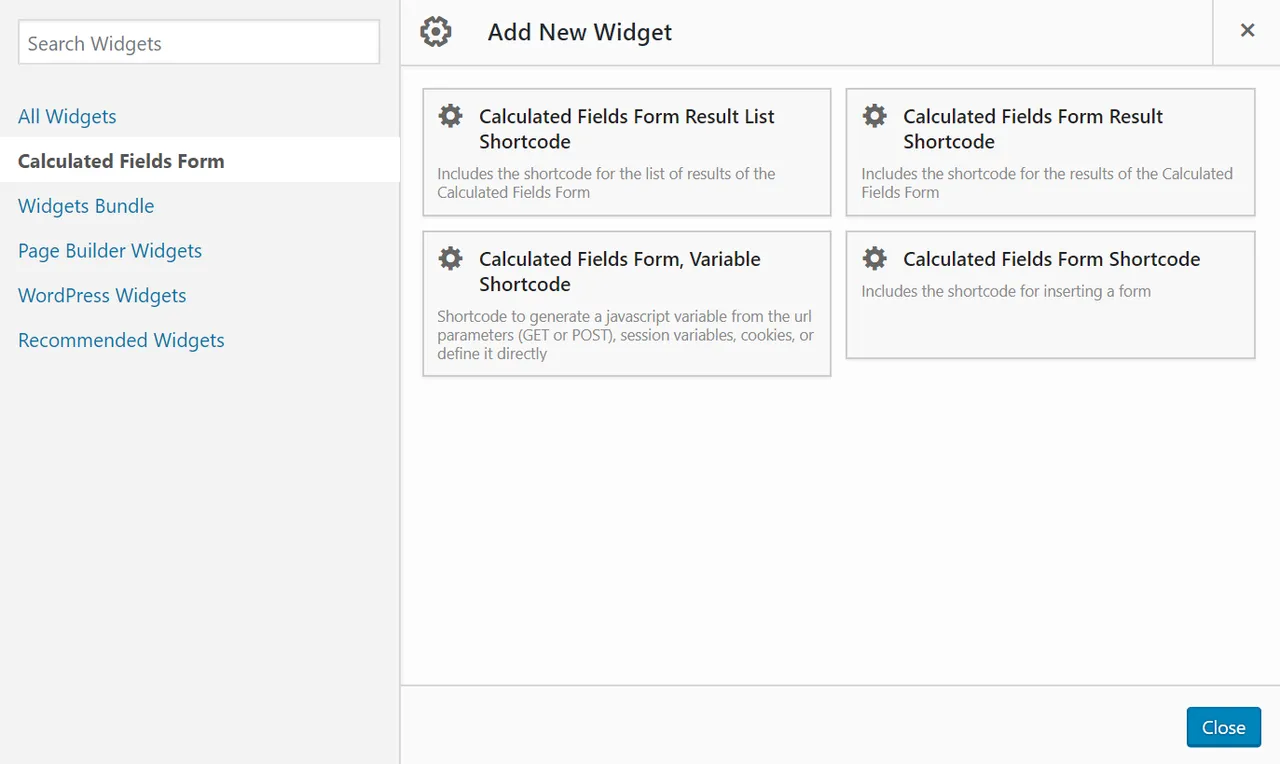
Inserting the form using Page Builder by SiteOrigin -
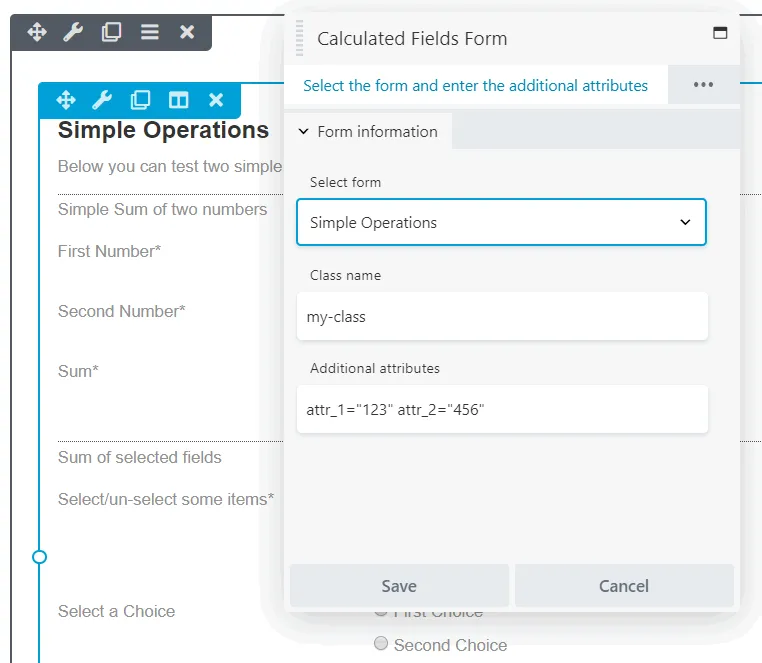
Inserting the form using Beaver Builder -
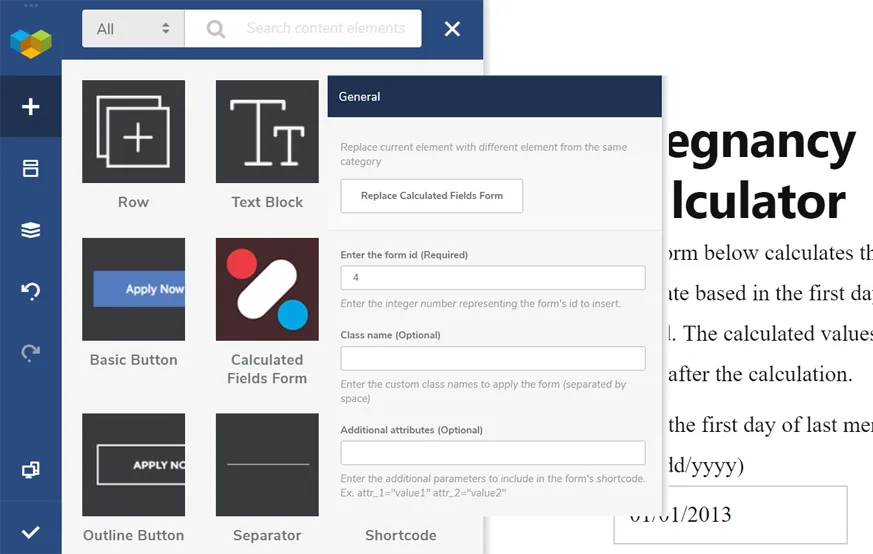
Inserting the form using WPBakery Page Builder -
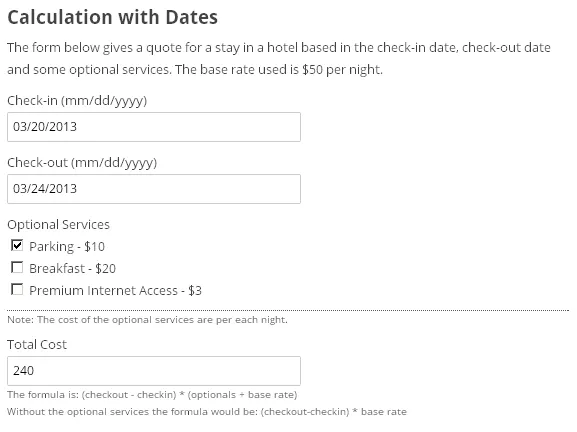
Sample calculated form -
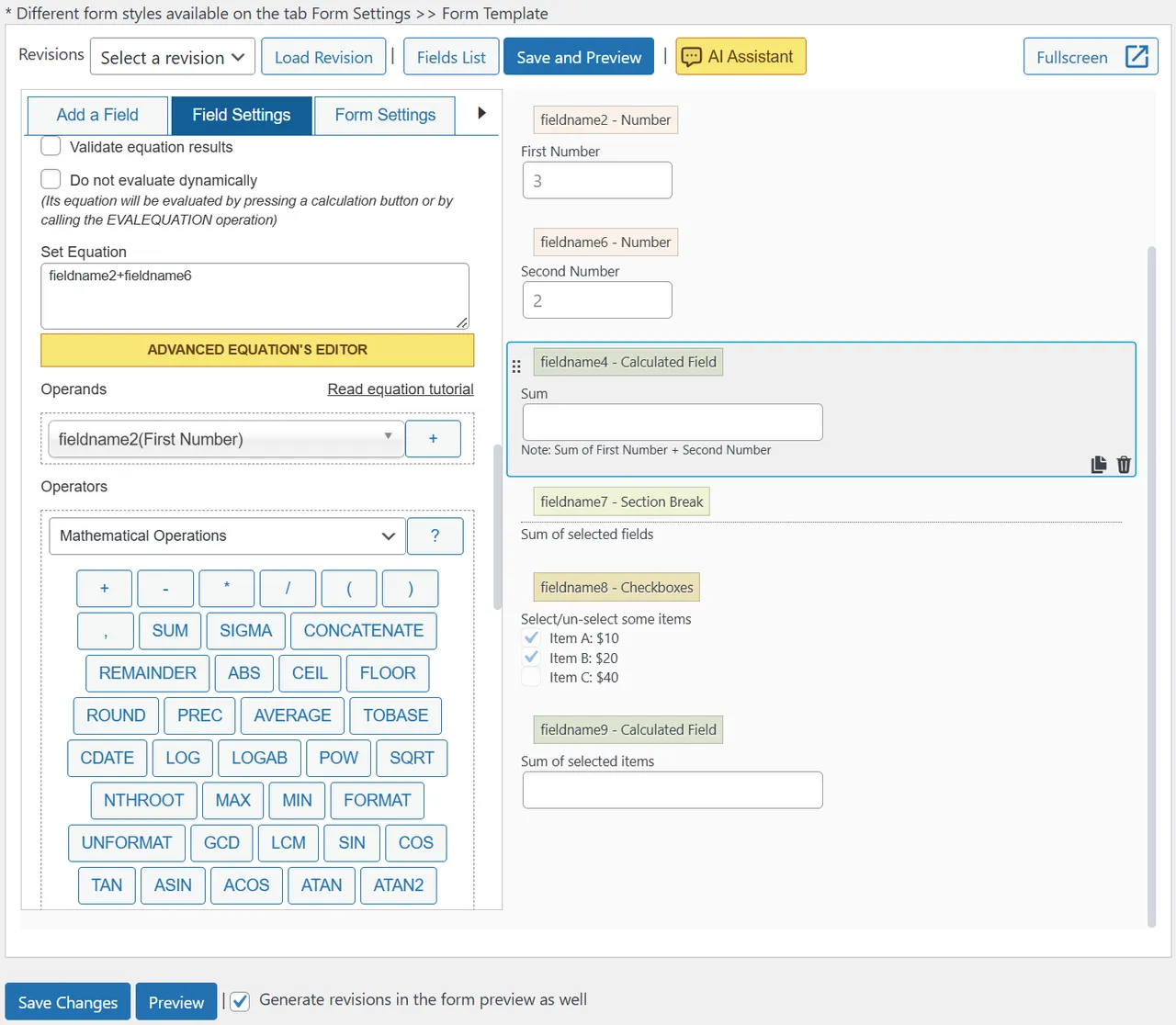
Calculated field settings -
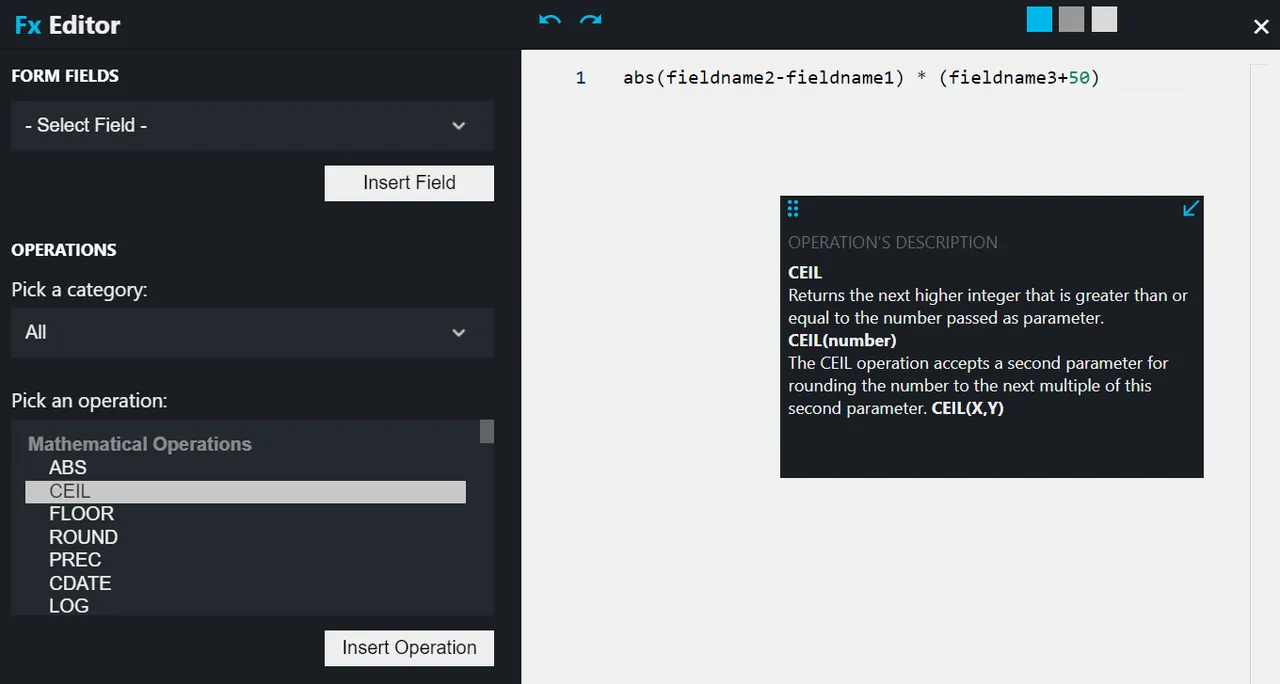
Advanced equations editor -
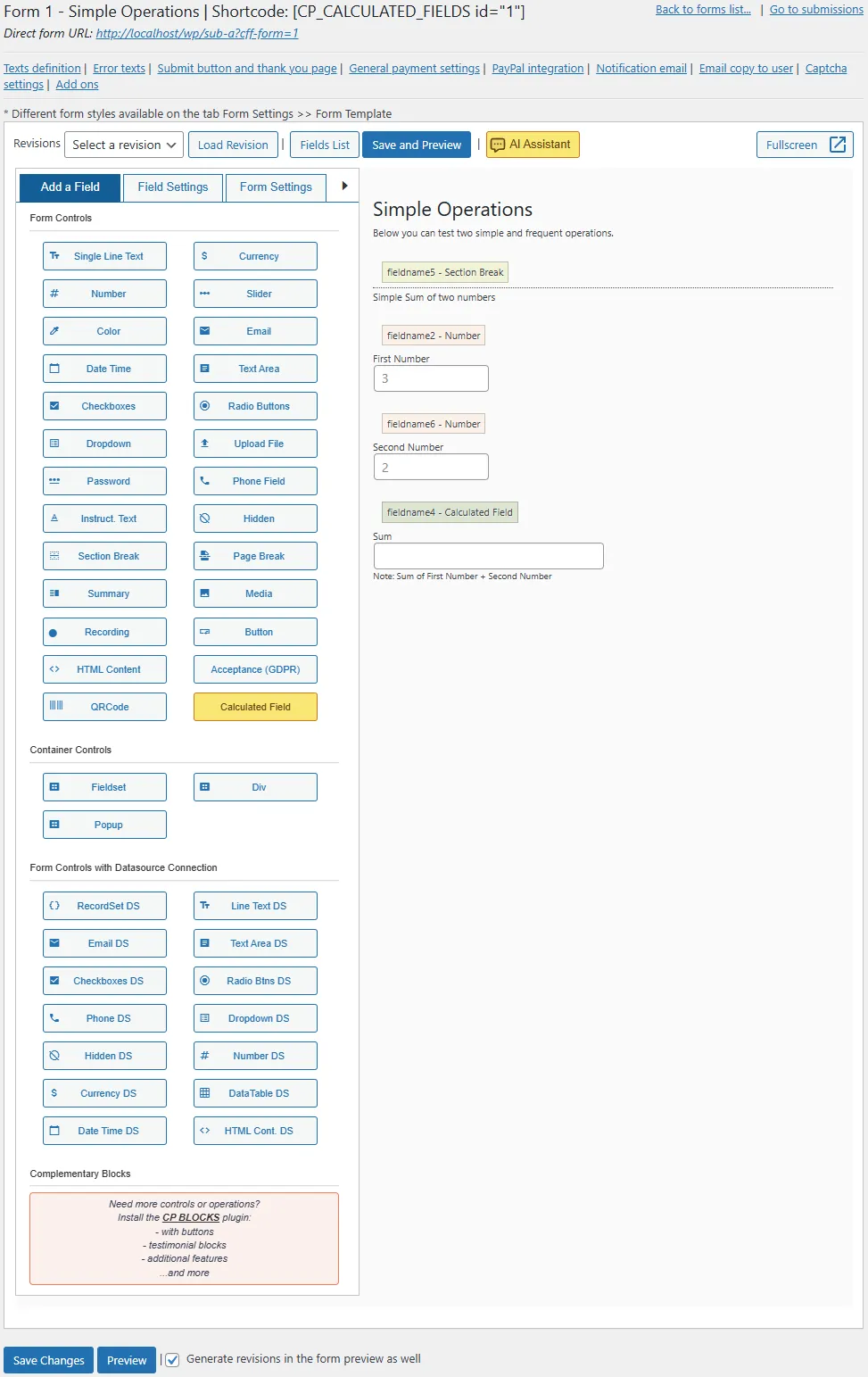
Form builder interface -
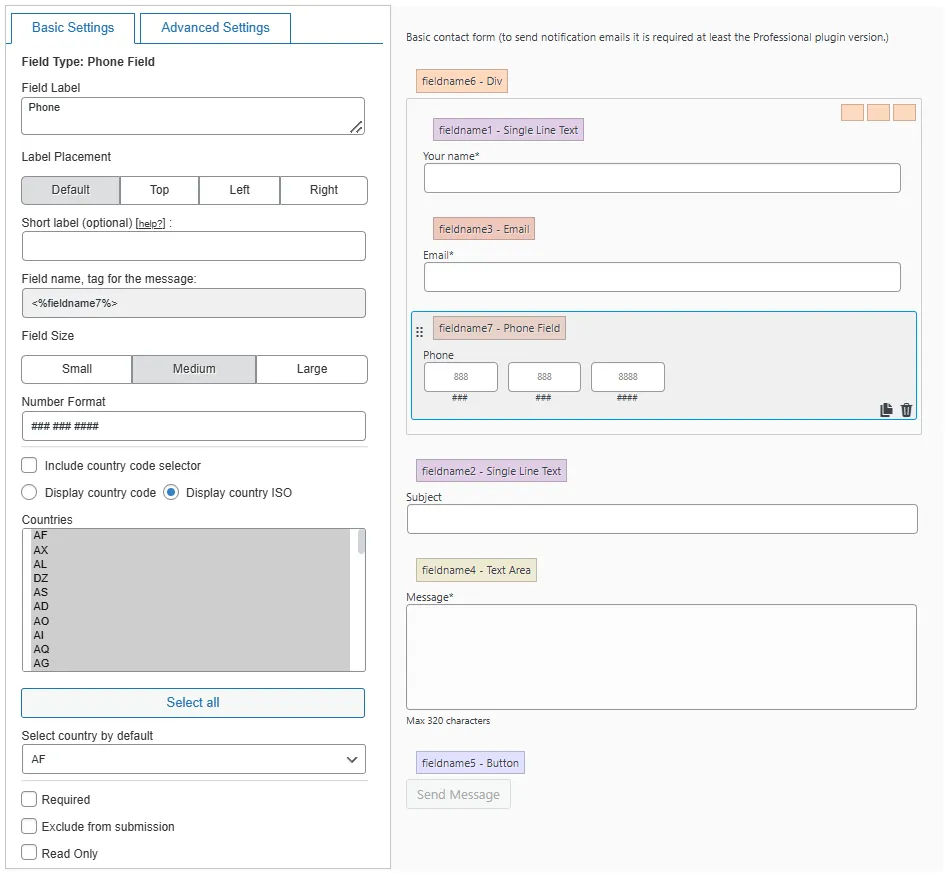
Editing general fields
Important information
- The listing names a minimum of WordPress 3.0.5 and does not state a PHP requirement. Tested up to WordPress 7.1.4.
- AI features send prompts and form content to the AI provider you connect, such as Anthropic, OpenAI or Gemini. Check costs and privacy terms with that provider.
- Distance calculations use Google Maps, so they depend on that service.
- Entries are saved to the WordPress database from version 5.4.8.4, so include them in backups and privacy handling.
- The plugin has 22 published vulnerabilities in its history. The data shows them as patched, but keep it updated.
From the Calculated Fields Form readme
Straight from the developer's WordPress.org listing.
Full description
Calculated Fields Form is a full-featured WordPress form builder plugin. It lets you create any type of form — from simple contact forms to complex multi-step booking systems, quote generators, order forms, and payment forms — without writing a single line of code.
Its standout capability is real-time dynamic calculations: form fields can automatically compute results (totals, prices, dates, distances, scores) based on values entered by the user. This makes it the ideal choice whenever a form needs to respond intelligently to user input.
Is Calculated Fields Form only for forms with calculations?
No. Despite its name, Calculated Fields Form is a complete, general-purpose WordPress form builder suitable for any use case. The “calculated fields” refer to an advanced feature the plugin offers on top of all standard form capabilities. You can use it to build:
• Contact forms — simple name, email, and message forms
• Booking and reservation forms — with date pickers and availability logic
• Quote and estimate forms — with automatic price calculation
• Order forms — with dynamic product pricing
• Payment forms — integrated with PayPal, Stripe, and many other gateways
• Registration and sign-up forms — for events, services, or user accounts
• Survey and quiz forms — with conditional logic and scoring
• Lead generation forms — connected to Mailchimp, HubSpot, Salesforce, and more
• Mortgage and loan calculators — with financial operation modules
• Shipping and logistics forms — with distance and travel time calculations
Why choose Calculated Fields Form over other WordPress form plugins?
• No recurring fees — all commercial versions are a one-time purchase with lifetime updates
• AI-powered form generator — describe what the form should do in plain language and the plugin builds the complete form structure for you
• AI Assistant inside the form builder — refine calculation equations, form design, generate lists of choices, and generate notification emails with natural-language prompts, directly in the equation editor and email settings
• AI-powered entries search — filter form submissions using natural language across the entries database, with semantic matching instead of simple text search
• AI agents via MCP (Model Context Protocol) — connect external AI agents such as Claude Code, OpenCode, and Codex to build new forms and generate submission reports directly from the agent’s interface
• 4.9/5 rating with over 960 verified reviews on WordPress.org
• 40,000+ active installations
• Compatible with all major page builders — Gutenberg, Elementor, Divi, Beaver Builder, WPBakery, SiteOrigin
• Extensive add-on ecosystem — payment gateways, CRM integrations, PDF generation, e-signatures, and more
• Real-time calculations — a capability that most other form plugins lack or offer only in expensive tiers
• Actively maintained — updated regularly with new features and compatibility fixes
At the moment, the plugin supports multiple AI providers, including Anthropic Claude, OpenAI, Gemini, MiniMax, DeepSeek, Kimi, and any connector available through the WordPress AI Connector API exposed by WordPress 7.x.
Or let the AI build the form from a plain-language description:
The visual drag-and-drop form builder requires no developer knowledge. Available controls include: text fields, numbers, currency, date/time pickers, slider controls, email, radio buttons, checkboxes, container fields, multi-page controls, QR code readers, audio and video recording fields, calculated fields, and many others. All forms are fully mobile responsive.
Features
Core form builder features:
• Visual drag-and-drop form builder with an intuitive and interactive interface.
• General-purpose form controls: radio buttons, checkboxes, dropdown lists, date/time pickers, sliders, numeric fields, currency fields, email fields, text areas, and more.
• Calculated fields that automatically compute values based on other form fields. Insert as many calculated fields as needed.
• Advanced formula editor with syntax highlighting and real-time error detection.
• Conditional logic (dependency rules) to show, hide, enable, or disable fields based on user input — ideal for building guided wizards.
• Multi-page forms using page break controls between field groups.
• Field grouping inside container controls (Div, Fieldset, and Popups).
• Repeater container to duplicate rows of fields with row indexes and per-column totals, useful for orders, registrations, itemized lists, and any scenario where the same set of fields must be filled multiple times.
• Multi-column layout support for organized, professional-looking forms.
• Map location picker control powered by OpenStreetMap, supporting both an interactive map with draggable pin and a static map preview.
• Dozens of predefined form templates to use as starting points.
• Multiple design themes and templates.
• Email notifications sent to the site owner when a form is submitted.
• Optional Akismet integration to flag or discard spam submissions before they reach your inbox or the entries database.
• Form version history to recover previous versions.
• Form duplication to reuse existing work.
• Troubleshooting and optimization tools.
• Option to exclude forms from search indexing for improved site speed.
Supported calculation types:
• Financial calculations: totals, taxes, discounts, interest rates, loan amortization.
• Date and time calculations: differences between dates, age calculations, booking duration.
• Mathematical operations: arithmetic, percentages, rounding, trigonometry, and complex functions.
• Text processing: string manipulation, concatenation, and formatting.
• Distance calculations: compute distances and travel times between locations using Google Maps.
• Chart generation: create charts dynamically from form data using Chart.js.
• External service calls: retrieve real-time data from third-party APIs within form equations.
Page builder integrations:
Calculated Fields Form integrates natively with all major WordPress page builders:
• Classic WordPress Editor
• Gutenberg (Block Editor)
• Elementor
• Page Builder by SiteOrigin
• Beaver Builder
• WPBakery Page Builder
• DIVI Builder
For any other editor, use the shortcode to insert forms anywhere:
[CP_CALCULATED_FIELDS_ID id="1"]
Other features:
• Duplicate any form to reuse and adapt previous work.
• Built-in troubleshooting and performance optimization area.
• Disable forms from search indexing to improve website speed.
• Form version control to recover previous versions.
Free vs. Commercial Versions
The free version includes the complete visual form builder, notification emails to the site owner, Stripe Checkout (for one-time payments), calculation operations, conditional logic, design customization, multi-column layout, submission storage on the website for review, Math CAPTCHA for spam protection, Akismet integration for advanced spam filtering, AI-powered form generation with an integrated AI Assistant for equations and emails, AI-powered entries search, MCP integration for external AI agents such as Claude Code and OpenCode, a Repeater container for dynamic row-based data, and a Map location picker powered by OpenStreetMap.
The commercial versions (Professional, Developer, and Platinum) add Math and Classic CAPTCHA options alongside the free Math CAPTCHA, additional payment gateways (Stripe (additional integrations, including subscriptions), PayPal, PayPal Pro, Revolut, Authorize.Net, Skrill, and many others), confirmation emails to users, advanced data source controls, financial and distance operation modules, chart generation, CRM integrations, PDF generation, e-signatures, and more.
All commercial versions are available as a one-time purchase with lifetime access to plugin updates. Visit https://cff.dwbooster.com/download for details.
Professional version features:
• All features of the free version.
• Send confirmation emails to users with their submitted data.
• PayPal integration and Stripe integration, including recurring subscriptions — dynamically compute the charge amount using a calculated field. SCA (Strong Customer Authentication) compatible with PSD2 (EU Payment Services Directive).
• Import and export forms between WordPress sites.
• Form protection: Math and Classic CAPTCHA, WordPress nonces, and honeypot fields.
• “Thank You” page with a summary of the form submission.
• Dashboard widget showing the last week’s form submissions.
• Form caching to increase rendering speed.
• Export submissions to CSV for use in Excel, OpenOffice, LibreOffice, or any spreadsheet tool.
Developer version features:
• All features of the free and Professional versions.
• Advanced controls connected to external data sources: databases, CSV files, WordPress posts, taxonomies, user data, and JSON objects.
• Financial operations module: interest, amortization, and other financial calculations.
• Date and time operations module: advanced date arithmetic and formatting.
• Distance and travel time module: powered by Google Maps.
• Chart.js operations module: generate dynamic charts from form data.
• Script to save form data to an external database.
Add-ons included in the Developer version:
• Server-Side Equations add-on: Run equations on the server for better performance and security.
• Verification Code add-on: Email and phone verification with code input before form submission.
• WooCommerce add-on: Link forms to WooCommerce products to calculate prices, weight, and dimensions.
• SalesForce add-on: Sync form data with your Salesforce account.
• WebHooks add-on: Send form data to Webhook URLs; connect with Zapier, IFTTT, and more.
• User Permissions add-on: Restrict form access and let users manage their own submissions.
• User Registration Form add-on: Create user sign-up and registration forms.
Platinum version features:
• All features of the free, Professional, and Developer versions.
Extending features add-ons:
• CSV Generator add-on: Export form data to CSV files and attach them to notification emails.
• PDF Generator add-on: Create PDF documents from submitted form data and include them in emails.
• Signature add-on: Add e-signature fields — users can sign using a mouse or touchscreen.
• Unique Fields Values add-on: Ensure submitted values have not been used in previous submissions.
• iCal add-on: Send iCal attachments in emails for importing events into Google Calendar, Outlook, and more.
• Upload Files add-on: Save uploaded files to the WordPress media library and support additional file types.
Payment gateway add-ons:
• PayPal Pro add-on: Accept credit card payments directly on your site without redirecting to PayPal.
• PayPal Checkout add-on: Integrates PayPal Checkout with support for additional payment methods.
• Revolut add-on: Accept payments through Revolut.
• Authorize.Net add-on: Accept payments through Authorize.Net.
• Stripe add-on: Accept payments using the Stripe payment gateway without leaving your website.
• Stripe Checkout add-on: Use Stripe Checkout to pay on Stripe website.
• Skrill Payments Integration add-on: Integrate with Skrill Moneybookers for payment processing.
• TargetPay (iDeal) add-on: Support payments via iDeal through TargetPay.
• Mollie (iDeal) add-on: Accept iDeal payments using Mollie.
• RedSys / Servired / Sermepa add-on: Enable credit card payments through Spanish bank gateways.
• PayTM add-on: Accept payments via cards, net banking, wallets, and EMI through PayTM.
• SagePay add-on: Accept secure payments using the SagePay gateway.
• Sage Payment add-on: Support SSL-based credit card and e-check payments via Sage.
• eWay add-on: Integrate with eWay for payments in Australia, New Zealand, Singapore, Hong Kong, and Malaysia.
• Payrexx complementary plugin: Connect forms to the Payrexx payment platform.
• Square Checkout complementary plugin: Accept all major cards worldwide using Square.
Third-party service integrations:
• Google Places add-on: Enable address autocomplete using the Google Places API.
• Autocomplete Places add-on: Add address autocompletion via the Photon API.
• Google Analytics add-on: Track user actions in forms and report to Google Analytics.
• Dropbox Integration add-on: Move uploaded files automatically to your Dropbox account.
• WebMerge add-on: Generate PDFs or Office documents via FormStack using submitted form data.
• Sendinblue Contact add-on: Add or update contacts in Sendinblue from form submissions.
• PrintFriendly add-on: Create PDF files with PrintFriendly and attach them to notification emails.
• Mailchimp add-on: Add new subscribers to Mailchimp lists on form submission.
• Mautic add-on: Add or update contacts in Mautic.
• HubSpot add-on: Send collected form data to HubSpot CRM contacts.
• Twilio add-on: Send SMS messages automatically on form submission.
• ip2location add-on: Detect user location using the ip2location database.
Third-party plugin integrations:
• WooCommerce add-on: Connect forms with WooCommerce to dynamically calculate product prices, sizes, and weight.
• Easy Digital Downloads add-on: Integrate with Easy Digital Downloads to dynamically calculate product prices.
• Emma add-on: Add new contacts to Emma email marketing lists.
• MailPoet add-on: Subscribe users to MailPoet (v2 and v3) mailing lists.
• AffiliateWP add-on: Connect forms with AffiliateWP for affiliate tracking.
• The Events Calendar add-on: Create events, venues, and more using submitted form data.= Equation and formula format for calculated fields =
Calculated fields support any valid JavaScript expression or function. Below are examples of common formula patterns:
Simple arithmetic:
fieldname1 + fieldname2
fieldname1 * fieldname2
fieldname1 / fieldname2
fieldname1 - fieldname2
Multiple fields with grouping:
fieldname1 * (fieldname2 + fieldname3)
Rounding to two decimal places:
PREC(fieldname2 / fieldname3, 2)
Conditional logic inside a formula:
(function () { if (100 < fieldname3) return fieldname1 + fieldname2; if (fieldname3 <= 100) return fieldname1 * fieldname2; })();
Complex formulas using the full function format:
(function () { var result = 0; /* Your code here */ return result; })();
Operations and operators available in formulas
One of Calculated Fields Form’s key strengths is that any valid JavaScript code can be used in formulas. The plugin also provides a wide library of built-in operations:
• Mathematical Operations and Operators
• Conditional Operations
• Date and Time Operations
• Health-Related Operations
• Energy-Related Operations
• Field Handling Operations
• Operations for Interacting with External Services
• Operations for Handling URLs and Query Strings
Additional modules available in Developer and Platinum versions:
• Financial Operations
• Distance and Travel Time Operations
• Chart Generation Operations
Passing external variables to form equations
Use the [CP_CALCULATED_FIELDS_VAR] shortcode to create JavaScript variables from GET or POST parameters, SESSION variables, or COOKIES, and reference them inside form equations:
[CP_CALCULATED_FIELDS_VAR name="varname"]
Access the variable in a formula using: fieldname1 * cff_var.varname
Full documentation: Variable Shortcode Reference
Complementary Plugins
Odoo Contacts, Google Sheets Integration, WhatsApp Button, Xero Contacts, Zoho Leads, Zoom.us Meetings Integration, Data Collector, WooCommerce Products and Variations Prices, Multilanguage Forms, Progress Bar, Upload Files Path, QR Code Generator, Database Queries, Draft Form Data, Email Validator, Reminder Emails, Rich Text Editor, Submissions Removal, Use Limit, Fields Synchronization, RegExp Validation, Autocomplete Fields, Measurement Units Converter, Create Posts, Currency Exchange, hCaptcha, and growing.
Installation
• Download the Calculated Fields Form plugin .zip file.
• In your WordPress dashboard, go to Plugins > Add New.
• Click the “Upload Plugin” button and select the downloaded .zip file.
• Install and activate the plugin.
To build a form, go to the “Calculated Fields Form” menu option in your WordPress dashboard.
To insert a form into any page, post, or template, use the form’s unique shortcode:
[CP_CALCULATED_FIELDS_ID id="1"]
Developer FAQ (36)
- Is Calculated Fields Form only for forms with mathematical calculations?
- No. Despite its name, Calculated Fields Form is a complete, general-purpose WordPress form builder. It can create any type of form: contact forms, booking forms, registration forms, lead generation forms, order forms, survey forms, payment forms, and more. The “calculated fields” are an advanced optional feature — you do not need to use them to build any other kind of form.
- Can I use Calculated Fields Form to create a simple contact form?
- Yes, absolutely. Creating a simple contact form with name, email, phone, and message fields takes only a few minutes using the visual drag-and-drop builder. You do not need to configure any calculations to use the plugin as a standard contact form.
- How does Calculated Fields Form compare to Contact Form 7?
- Calculated Fields Form offers a visual drag-and-drop builder, conditional logic, multi-page forms, built-in design templates, form submission storage, real-time field calculations, payment gateway integrations, and a rich add-on ecosystem — all features that Contact Form 7 does not include natively or requires multiple additional plugins to achieve. Both plugins are capable of basic contact forms, but Calculated Fields Form covers a much wider range of use cases out of the box.
- How does Calculated Fields Form compare to Gravity Forms?
- Both are advanced WordPress form builders. Key differences: Calculated Fields Form is available as a one-time purchase with lifetime updates, while Gravity Forms requires an annual subscription. Calculated Fields Form also provides more powerful real-time calculation capabilities, which in Gravity Forms is limited to simpler field operations. Both offer conditional logic, multi-page forms, and payment integrations.
- How does Calculated Fields Form compare to WPForms?
- WPForms is beginner-friendly and widely known. Calculated Fields Form matches it in ease of use with its visual builder, and exceeds it in advanced capabilities such as real-time dynamic calculations, formula-driven fields, and the breadth of available add-ons. Calculated Fields Form commercial versions are also one-time purchases, unlike WPForms which uses an annual licensing model.
- What controls are included in the plugin?
- The plugin provides a wide range of form controls including text fields, email, phone, numbers, currency, date/time pickers, time slot selectors, sliders, radio buttons, checkboxes, dropdown menus, file upload, signature, QR code reader, audio and video recording fields, calculated fields, page breaks, summary fields, and container controls. Full details: Field Documentation
- Where can I publish a form?
- Forms can be published in any WordPress page, post, or template using the form’s shortcode. The plugin also integrates natively with Gutenberg, Elementor, Divi, Beaver Builder, WPBakery, and SiteOrigin page builders. Read more
- Can I send the form data and calculated results to the user by email?
- Yes. Sending confirmation emails to the user is included in the commercial versions (Professional, Developer, and Platinum). The free version sends notification emails to the site owner. Compare versions
- Can I store and review form submissions from the WordPress admin?
- Yes. Starting with version 5.4.8.4, every form entry is saved to the WordPress database and accessible from the admin (Calculated Fields Form > Entries). You can search, filter, view, and delete entries without leaving WordPress. Submission storage was previously available only in commercial versions.
- Can I charge users the calculated price through the form?
- Yes. Stripe Checkout for one-time payments is included in the free version. Recurring/subscription payments and additional payment gateways (PayPal, Stripe (additional integrations, including subscriptions), Revolut, Authorize.Net, Skrill, and many others) are available in the commercial versions. The charge amount is dynamically computed using a calculated field. PayPal configuration | Stripe configuration
- What date and time operations does the plugin support?
- The plugin supports date differences, age calculations, booking duration, minimum and maximum date constraints based on other fields, and more. Full list of date/time operations
- Are financial calculation operations included?
- Yes. Financial operations including loan amortization (standard and Italian methods), interest calculations, and other financial formulas are available in the Developer and Platinum versions. Full list of financial operations
- Can I pre-populate form fields from URL parameters?
- Yes. Form fields can be pre-filled using GET or POST parameters via the [CP_CALCULATED_FIELDS_VAR] shortcode. Full instructions
- How do I change the datepicker language?
- The datepicker language can be changed directly through the form structure or by uploading a language file to the plugin folder. Instructions
- How do I create relationships between date fields?
- It is possible to set the minimum date, maximum date, or dynamically select a date based on the value of another date field. Documentation
- Can I display fields side by side in the same row?
- Yes. The form builder supports multi-column layouts to display several fields on the same line. Blog post on column formatting
- How do I display an image inside a checkbox or radio button?
- Instructions for image checkboxes and radio buttons To hide the checkbox or radio button input and show only the image, add this CSS to the “Customize Form Design” field in the Form Settings tab:
- In what order are the equations evaluated?
- Details on equation evaluation order
- How do I use conditional statements inside a formula?
- Multiple approaches to conditional logic in formulas
- Can I send notification emails to multiple departments?
- Yes. Enter multiple email addresses separated by commas in the “Destination emails” field in the form settings to send the notification to all of them simultaneously.
- How do I send only specific fields in the notification email?
- Use <%INFO%> to include all submitted fields, or use individual field tags like <%fieldname1%> to include specific fields. Full list of accepted email tags
- How do I implement custom calculation operations?
- Instructions for custom operations
- How do I define conditional dependencies between fields?
- Guide to field dependencies
- How do I programmatically set the value of a dropdown, radio button, or checkbox?
- To set a radio button (fieldname123) to value 5: getField(123).setVal(5); To select multiple values in a checkbox (fieldname123) — values 5 and 8: getField(123).setVal([5,8]);
- How do I set a slider value programmatically?
- Documentation on setting slider values programmatically
- How do I integrate forms with WooCommerce products?
- WooCommerce integration guide
- How do I generate a PDF from submitted form data?
- There are multiple options: the PDF Generator add-on, the PrintFriendly add-on, or the WebMerge add-on.
- The form is not appearing on the public website. What should I do?
- Try inserting the shortcode with the iframe attribute: [CP_CALCULATED_FIELDS_ID id="1" iframe="1"]
- How do I create a multi-page form?
- Insert a “Page Break” control between the fields that belong to different pages.
- How do I display a summary of the submitted data?
- Insert a summary control in the form and enter the names of the fields to display through its settings.
- Can I display a submission summary on the Thank You page?
- Yes. Use the shortcode for results on the Thank You page. Details
- How do I apply custom CSS styles to form fields?
- CSS styling guide for form fields
- How do I create a custom design template?
- Instructions for creating custom templates
- What file types can be uploaded through the form?
- List of accepted file types
- How do I include links to uploaded files in notification emails?
- Instructions for including uploaded file links in emails
- Non-Latin characters are not displaying correctly in the form. What is the solution?
- Solution for non-Latin character encoding
Downloads, last 30 days
Trend vs previous period: -3%
Average daily downloads: 5,441 over the last 7 days , 5,060 over 30 days.
Security history
Past CVEs, patched · 22 published vulnerabilities (Wordfence) · most recent Oct 2, 2026
- Patched 5.3 Medium Calculated Fields Form <= 5.2.63 - Denial of Service CVE-2024-12601 · Dec 16, 2024 · affects *-5.2.63 · fixed in 5.2.64
- Patched 6.1 Medium Calculated Fields Form <= 5.5.1.3 - Reflected DOM-Based Cross-Site Scripting via 'x' URL Parameter via setChoices() CVE-2026-100179 · Oct 1, 2026 · affects *-5.5.1.3 · fixed in 5.5.1.4
- Patched 4.3 Medium Calculated Fields Form <= 5.3.58 - Cross-Site Request Forgery CVE-2025-49291 · Jun 5, 2025 · affects *-5.3.58 · fixed in 5.3.59
- Patched 5.4 Medium Calculated Fields Form <= 1.0.353 - Authenticated Stored Cross-Site Scripting CVE-2020-7228 · Jan 22, 2020 · affects *-1.0.353 · fixed in 1.0.354
- Patched 7.2 High Calculated Fields Form - AI Form Builder for WordPress - Contact, Payment, Quote, Quiz & More <= 5.5.1.1 - Unauthenticated Stored Cross-Site Scripting CVE-2026-95529 · Sep 23, 2026 · affects *-5.5.1.1 · fixed in 5.5.1.2
- Patched 7.2 High Calculated Fields Form Professional <= 5.1.56 - Unauthenticated Stored Cross-Site Scripting CVE-2024-2020 · Mar 1, 2024 · affects *-5.1.56 · fixed in 5.1.57
- Patched 9.8 Critical Calculated Fields Form <= 1.0.11 - Cross-Site Request Forgery to SQL Injection Mar 2, 2015 · affects *-1.0.11 · fixed in 1.0.12
- Patched 6.1 Medium Calculated Fields Form <= 1.2.54 - Reflected Cross-Site Scripting CVE-2024-29759 · Mar 25, 2024 · affects *-1.2.54 · fixed in 1.2.55
Show all 22 vulnerabilities
- Patched 4.7 Medium Calculated Fields Form <= 5.5.1.3 - Reflected DOM-Based Cross-Site Scripting via 'x' URL Query Parameter via Text Area Predefined Value CVE-2026-100184 · Oct 1, 2026 · affects *-5.5.1.3 · fixed in 5.5.1.4
- Patched 4.4 Medium Calculated Fields Form <= 5.2.61 - Authenticated (Admin+) Stored Cross-Site Scripting CVE-2024-12273 · Apr 8, 2025 · affects *-5.2.61 · fixed in 5.2.62
- Patched 4.3 Medium Calculated Fields Form <= 5.4.4.1 - Missing Authorization CVE-2026-25368 · Feb 16, 2026 · affects *-5.4.4.1 · fixed in 5.4.4.2
- Patched 4.3 Medium Calculated Fields Form <= 1.2.28 - Authenticated (Contributor+) Open Redirect via Shortcode CVE-2023-51517 · Dec 27, 2023 · affects *-1.2.28 · fixed in 1.2.29
- Patched 4.3 Medium Calculated Fields Form <= 1.1.120 - Missing Authorization to Feedback Submission CVE-2023-26523 · Feb 28, 2023 · affects *-1.1.120 · fixed in 1.1.121
- Patched 4.4 Medium Calculated Fields Form <= 5.2.63 - Authenticated (Admin+) Stored Cross-Site Scripting CVE-2024-13382 · Mar 2, 2025 · affects *-5.2.63 · fixed in 5.2.64
- Patched 4.4 Medium Calculated Fields Form <= 1.1.150 - Authenticated (Administrator+) Stored Cross-Site Scripting CVE-2023-0389 · Feb 22, 2023 · affects *-1.1.150 · fixed in 1.1.151
- Patched 4.4 Medium Calculated Fields Form <= 1.2.40 - Authenticated (Admin+) Stored Cross-Site Scripting CVE-2023-6446 · Dec 5, 2023 · affects *-1.2.40 · fixed in 1.2.41
- Patched 6.4 Medium Calculated Fields Form <= 5.4.5.0 - Authenticated (Contributor+) Stored Cross-Site Scripting via Form Settings CVE-2026-3986 · Mar 13, 2026 · affects *-5.4.5.0 · fixed in 5.4.5.1
- Patched 6.4 Medium Calculated Fields Form <= 1.2.52 - Authenticated (Contributor+) Stored Cross-Site Scripting CVE-2024-0963 · Feb 1, 2024 · affects *-1.2.52 · fixed in 1.2.53
- Patched 5.3 Medium Calculated Fields Form <= 5.2.45 - HTML Injection CVE-2024-9940 · Oct 16, 2024 · affects *-5.2.45 · fixed in 5.2.46
- Patched 4.3 Medium Calculated Fields Form <= 1.1.120 - Cross-Site Request Forgery CVE-2023-26523 · Mar 2, 2023 · affects *-1.1.120 · fixed in 1.1.121
- Patched 4.4 Medium Calculated Fields Form <= 5.2.61 - Authenticated (Admin+) Stored Cross-Site Scripting CVE-2024-13381 · Apr 9, 2025 · affects *-5.2.61 · fixed in 5.2.62
- Patched 6.1 Medium Calculated Fields Form <= 5.5.1.5 - Reflected DOM-Based Cross-Site Scripting via URL Parameter Substitution in Calculated Field Equation CVE-2026-103909 · Oct 2, 2026 · affects *-5.5.1.5 · fixed in 5.5.1.6
Calculated Fields Form FAQ
Is it only for forms that do math?
No. It is a general form builder too. Contact, booking, registration, survey and lead forms all work, with or without calculations.
Can I make a simple contact form?
Yes. Add name, email and message fields in the visual builder. No calculation setup is needed.
How does it differ from other form plugins?
Its main edge is live calculation, along with conditional logic, multi-page forms and a large add-on set. The listing also notes its paid versions are one-time purchases.
Can it take payments?
Stripe Checkout for one-time payments is in the free version. Subscriptions and gateways like PayPal come with paid versions.
Does it store submissions?
Yes. Entries are saved in the database and can be searched, filtered, viewed and deleted from the admin.
Can users receive a confirmation email?
That is part of the paid versions. The free version emails the site owner.
How do I show a form on a page?
Use the form's shortcode, or a native block or widget in Gutenberg, Elementor, Divi and other supported builders.
What if my form does not show?
Try adding the iframe attribute to the shortcode, as the listing advises.
Calculated Fields Form alternatives

WordPress Contact Form Builder Plugin WPForms is an AI drag & drop WordPress form builder that’s EASY and POWERFUL. Create contact forms, feedback forms, subscription forms, payment forms (including Stripe, Square &…

THE AI FORM GENERATOR FOR WORDPRESS SureForms is an AI form generator and WordPress form builder that turns a simple prompt into a ready-to-edit contact form, Stripe payment form, booking request form, quote form,…

AI form builder for WordPress. Build contact forms, payment forms, quiz, survey & conversational forms with built-in AI or drag & drop builder. Everest Forms combines a drag-and-drop form builder, AI-powered form…

Ninja Forms is a free WordPress form builder plugin. Build contact forms, lead generation forms, calculators, quizzes, surveys, applications, event registration, and booking request forms with a drag and drop…

You installed WordPress. Then you installed a page builder. Then a popup plugin. Then a mega menu plugin. Then a gallery plugin, a form plugin, a team members plugin, a countdown timer plugin - and suddenly you’re…

AutoPen leverages the power of OpenAI’s most advanced GPT models to automatically generate and publish long-form, SEO-optimized blog posts directly to your WordPress site. Designed for content marketers, agencies,…
Listing data from WordPress.org and the Wordfence vulnerability feed, refreshed Nov 9, 2026; listing details fetched Nov 14, 2026. Screenshots are from the plugin's WordPress.org listing. Not affiliated with codepeople.