
Everest Forms
Everest Forms - Contact Form, Payment Form, Quiz, Survey & Custom Form Builder with AI · by wpeverest
- active installs
- 90K+
- 375 ratings
- 4.9
- since last update
- 4d
- releases in 12 months
- —
- support threads resolved
- 100%
- avg daily downloads
- 2,996
- on WordPress.org
- 8.8 years
Everest Forms at a glance
Everest Forms is a freemium WordPress AI form builder plugin by wpeverest with 90K+ active installs and a 4.9/5 rating from 375 reviews. It was last updated on Nov 5, 2026, is tested up to WordPress 7.1.4 and needs PHP 7.2+. All 27 of its published vulnerabilities have patched versions. Our quality score is 95/100.
What is Everest Forms?
Everest Forms is a form builder plugin for WordPress. It lets you build contact, payment, quiz, survey and multi-step forms with drag and drop, or describe a form in plain words and have the built-in AI create it. Submissions are saved in your WordPress database.
It is meant for site owners who want a lot of form features without paying for each one. The listing says file uploads, image uploads, admin approval for entries, survey fields and unlimited entries are in the free version. Stripe and PayPal payment forms and PDF output are also described as available without upgrading.
A Pro upgrade exists and the combined feature list covers more advanced items such as coupons, recurring payments, CRM and email marketing connections. The listing does not mark exactly which of those are free and which are Pro, so check the comparison on the vendor site before planning around a specific integration.
Best for
- Site owners who need uploads and entries without paying
- Small businesses taking payments through forms
- Teams that want quizzes or surveys in WordPress
- Anyone who wants AI to draft forms quickly
Everest Forms features
AI form builder
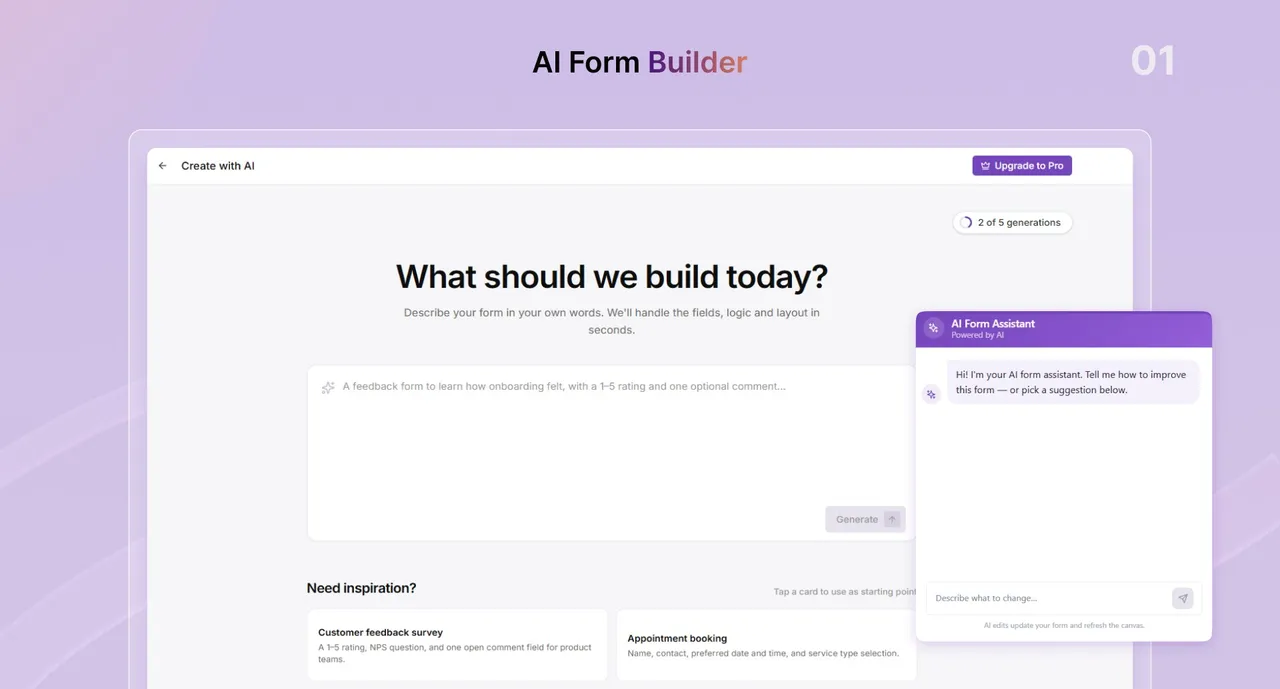
Describe the form you need and the AI sets up fields, logic and layout. You can then refine the result with a follow-up prompt before publishing.
AI Abilities for assistants
Exposes forms and entries to AI assistants through WordPress Abilities. It can connect through Easy MCP AI or the official MCP Adapter.
Drag and drop builder
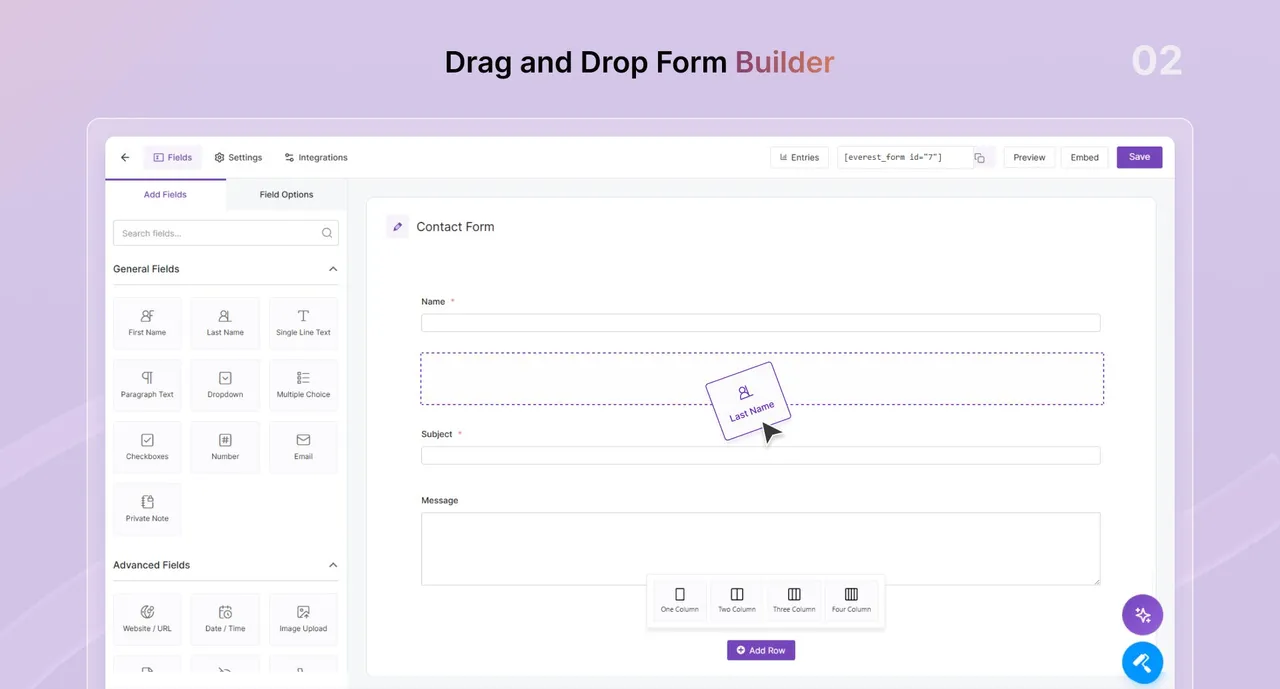
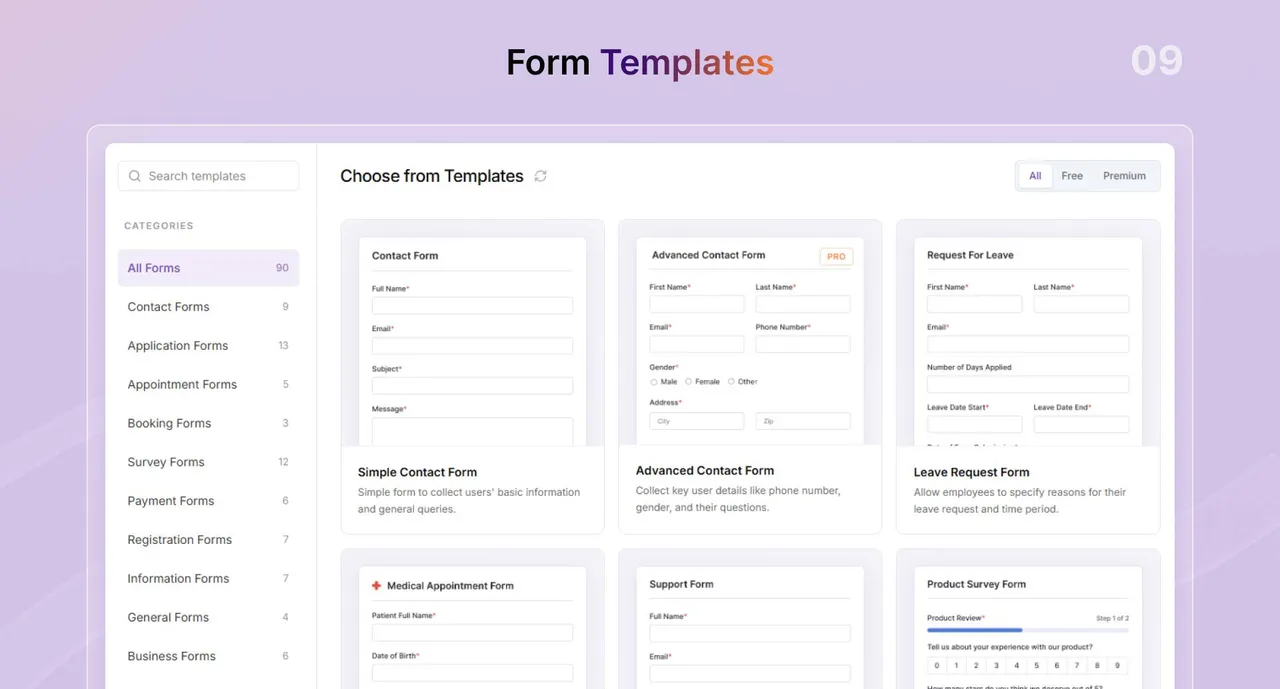
Add and rearrange more than 35 field types, use one of 40+ templates, or start blank. Forms can be embedded with a block, shortcode or Embed button.
Entry management
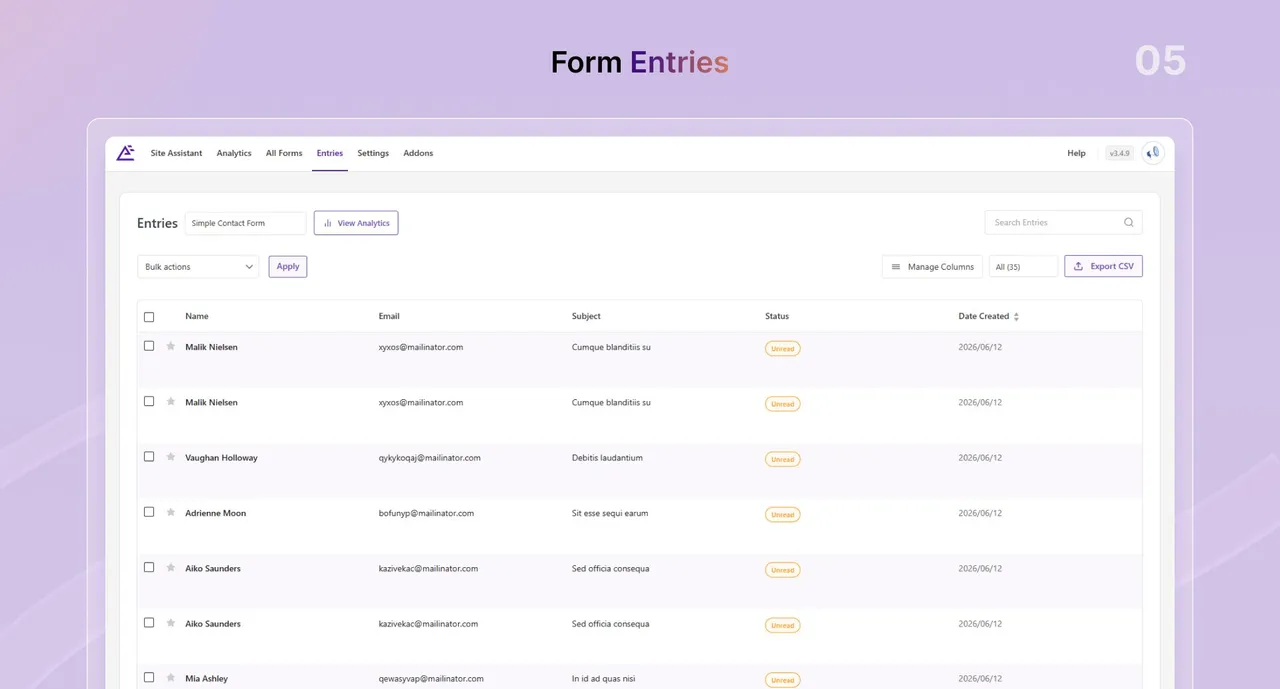
Search, sort, filter, edit and export entries to CSV, with unlimited storage. Deleted entries can be restored.
File and image uploads
Accept files and images through forms from the free version. Useful for applications and support requests.
Payment forms
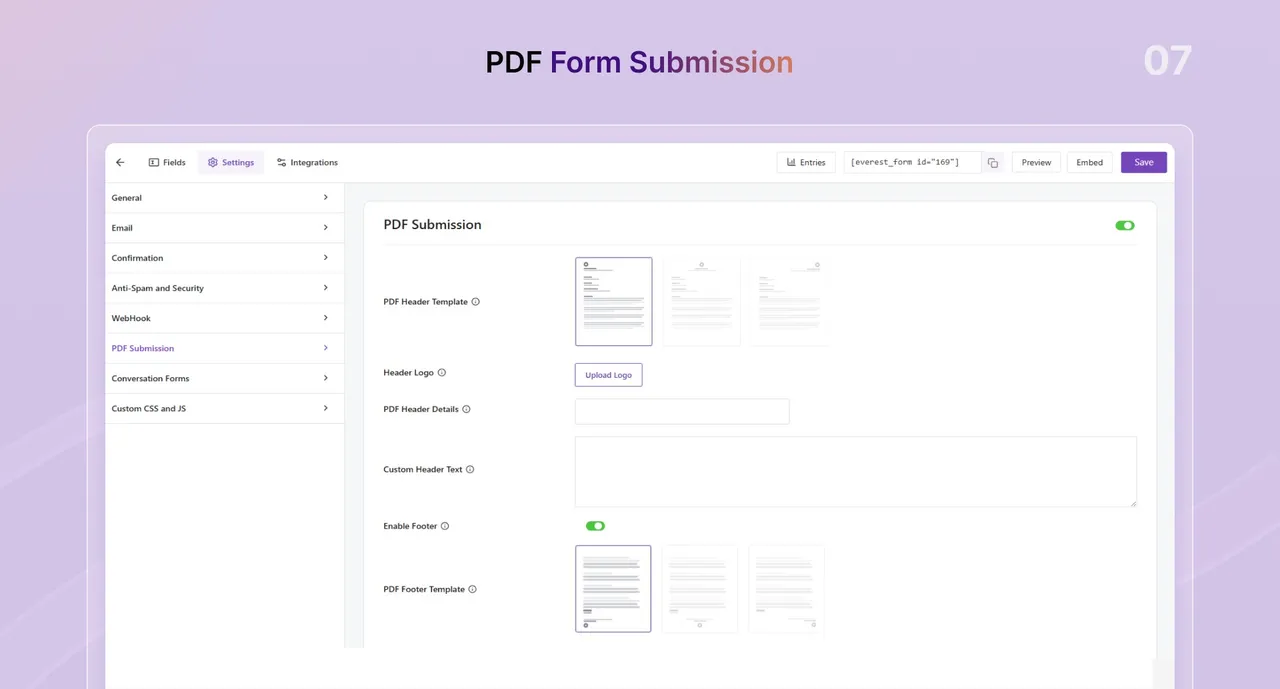
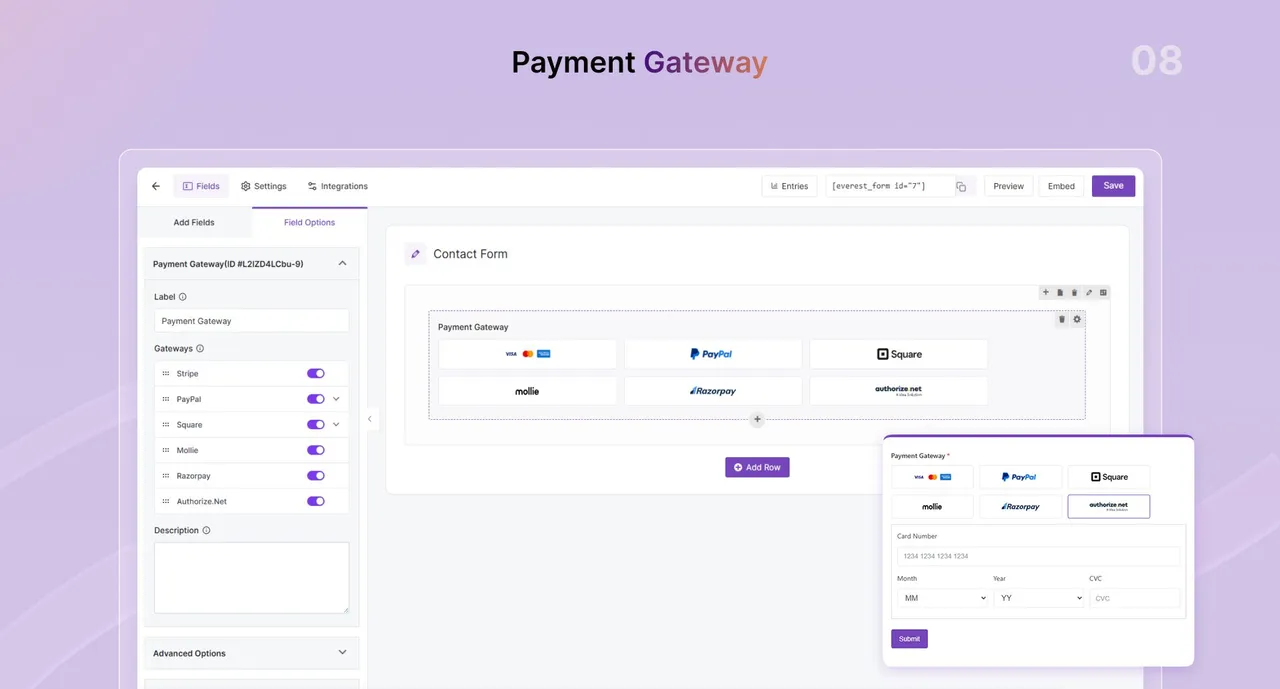
Take payments with Stripe and PayPal, and generate PDFs from submissions. The FAQ also lists Razorpay as an option.
Layered spam protection
Supports Google reCAPTCHA, hCaptcha, Cloudflare Turnstile, custom question CAPTCHA, honeypot, Akismet and CleanTalk. GDPR consent fields are included.
Style customizer and popups
Adjust colors, fonts, spacing and borders visually, and show forms in popups. Forms resize for phones and tablets.
Quizzes, surveys and multi-step
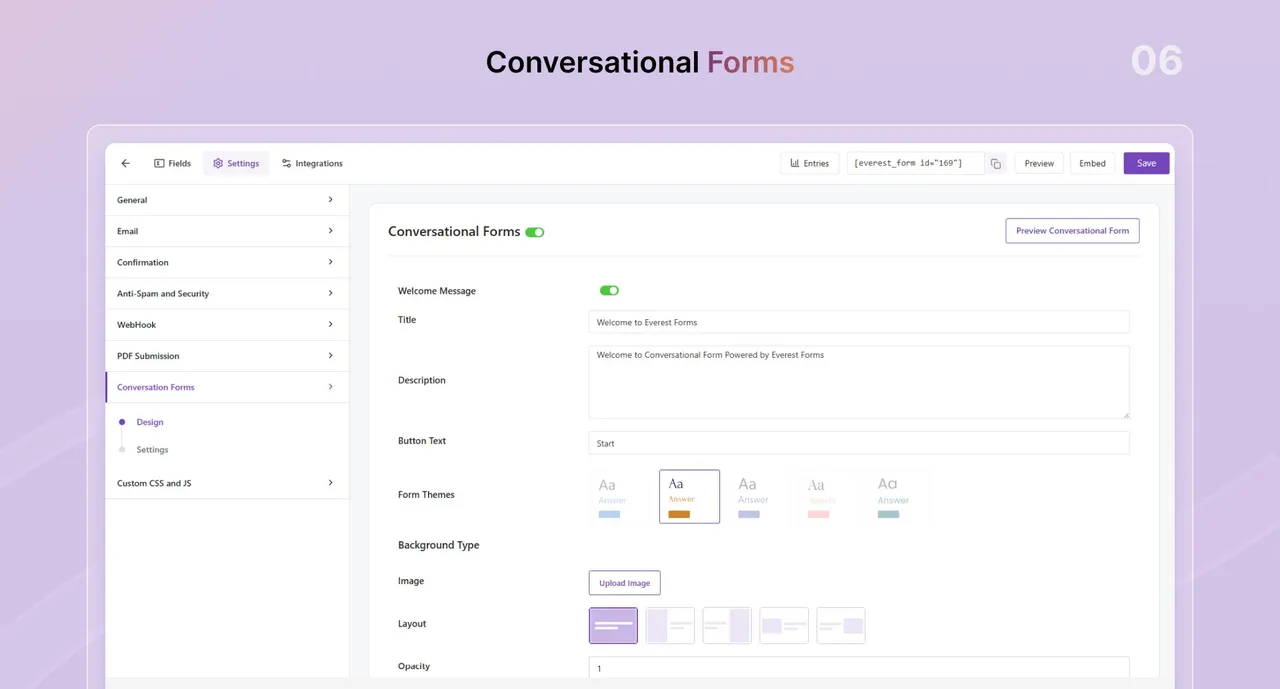
Build quizzes, polls, surveys, conversational forms and multi-step forms. Conditional logic is also listed.
Integrations
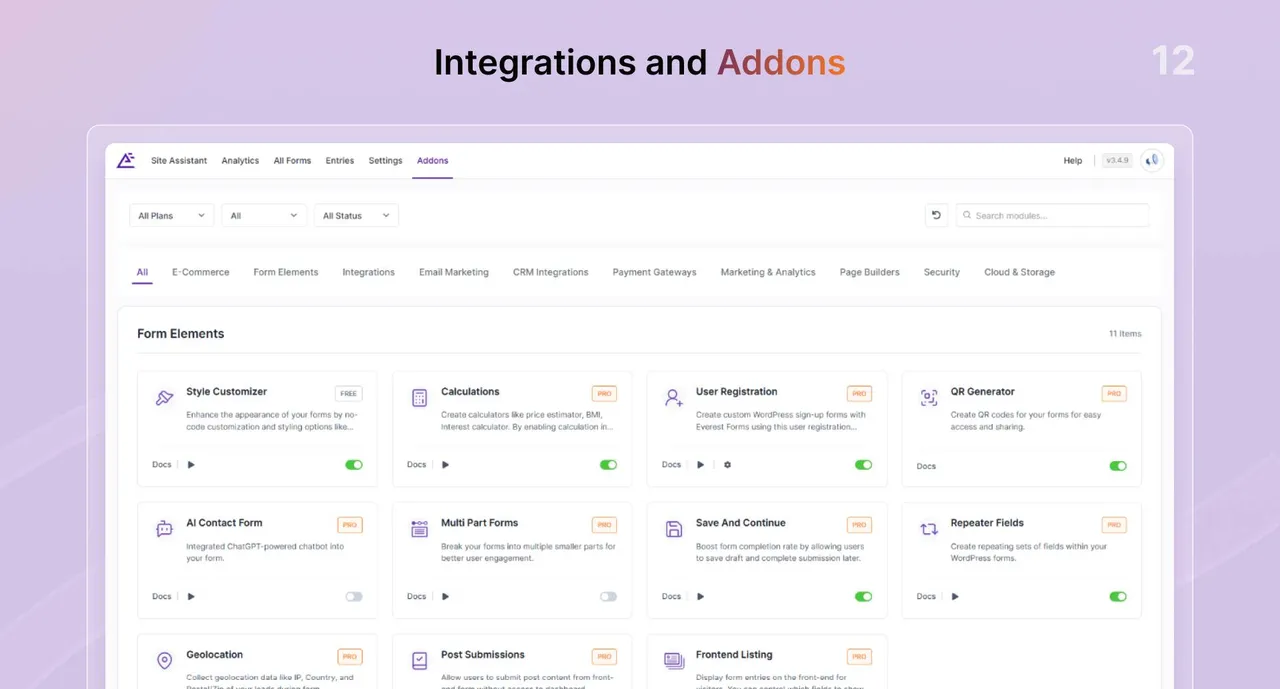
Connects to email marketing tools, CRMs, Zapier, Google Sheets and more through add-ons. Page builders such as Elementor, Divi and Bricks are supported.
Everest Forms free vs pro
Free WordPress.org version
- Unlimited forms and entries with a drag and drop builder
- AI Form Builder and AI Abilities support
- 35+ form fields, file uploads and image uploads
- Admin approval for entries and survey fields
- Stripe and PayPal payment forms and PDF from submission, per the listing
- Spam protection options and GDPR tools
Pro Paid version
- The listing mentions a Pro upgrade but does not itemize what it adds
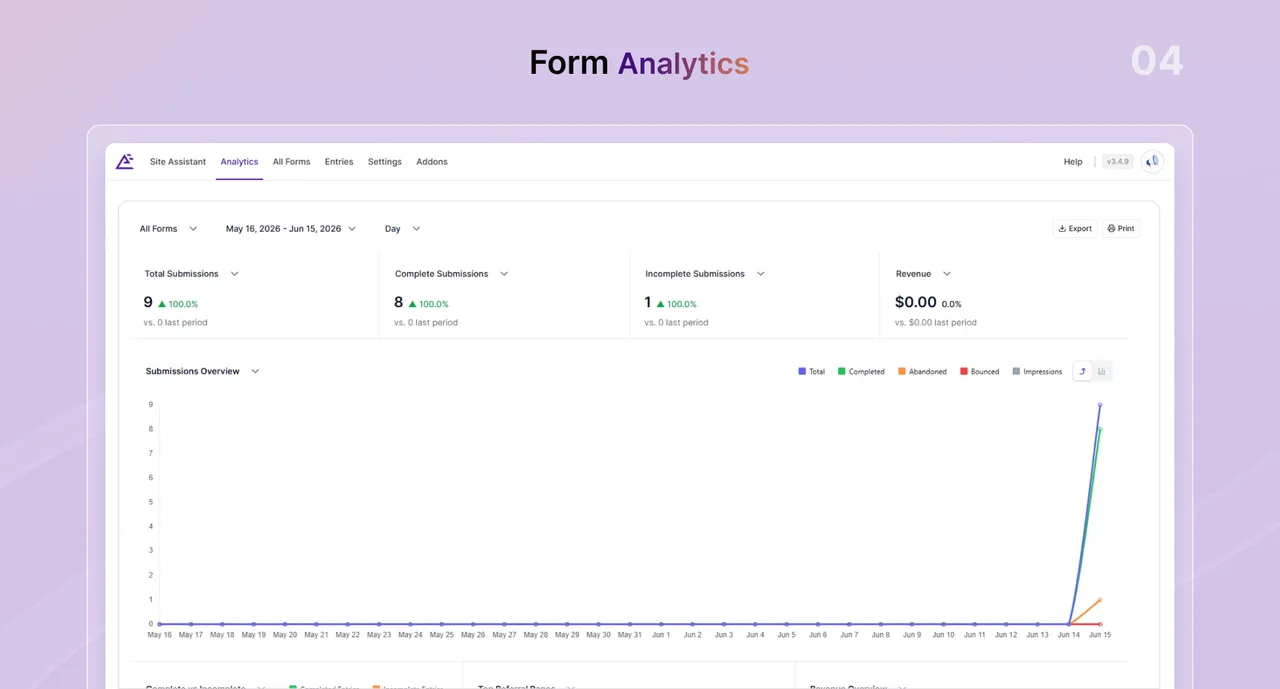
- The combined list names items such as coupons, recurring payments, e-signature and form analytics, without marking which tier has them
A paid Pro version exists but the listing gives no prices. AI form building is described as built in, and the listing does not say whether you need your own AI provider key.
How to use Everest Forms
- Install and activate
In wp-admin go to Plugins → Add New, search for Everest Forms, then click Install Now and Activate.
- Create a form
Start from a template, describe the form to the AI builder, or begin with a blank form.
- Add and arrange fields
Drag fields into place, set labels and rules, and add conditional logic or file uploads where needed.
- Configure notifications and spam checks
Set who receives submission emails and the behavior after sending. Turn on a CAPTCHA, honeypot or Akismet.
- Embed the form
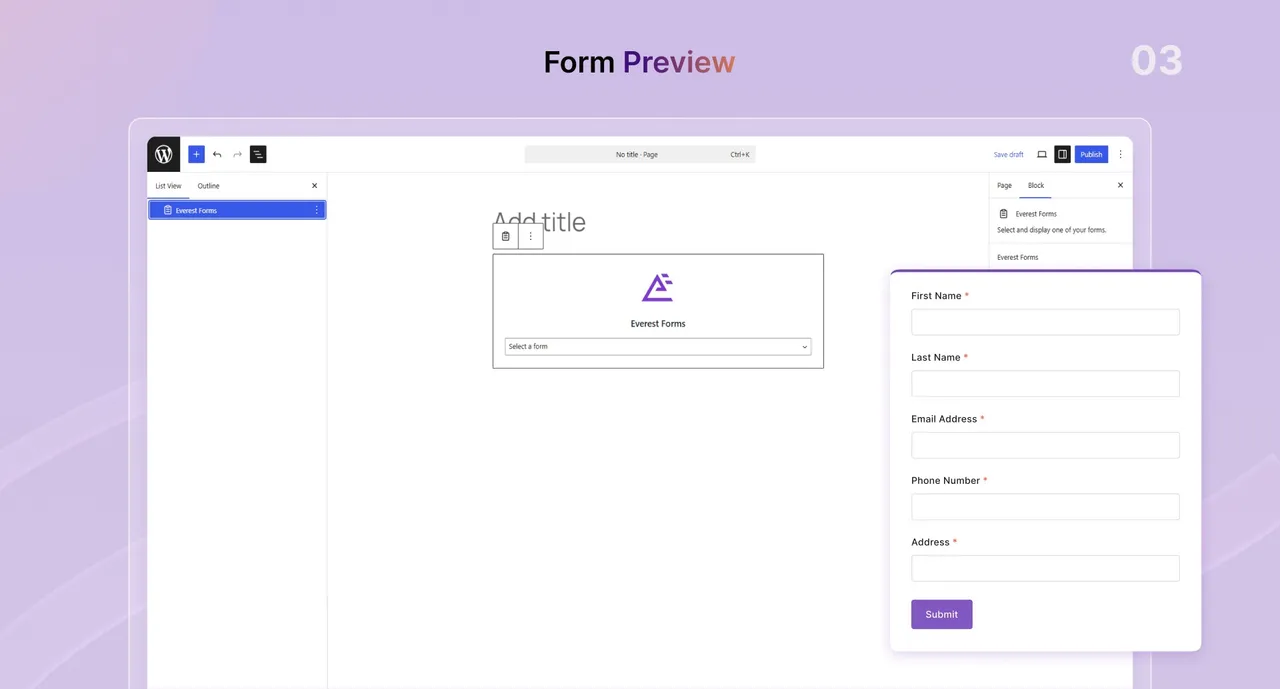
Place it with the block, a shortcode or the Embed button. Then watch incoming submissions in the entries screen.
Everest Forms screenshots (12)
Important information
- Requires WordPress 5.5 or newer and PHP 7.2 or newer. The listing shows testing up to WordPress 7.1.4.
- Many integrations, such as email marketing, Zapier and extra payment gateways, come as separate add-ons. Check which are free before relying on them.
- Entries sit in your WordPress database, so include them in backups and privacy policies.
- CAPTCHA and anti-spam services such as reCAPTCHA, hCaptcha, Cloudflare and CleanTalk involve third parties if enabled.
- The plugin has 27 published vulnerabilities in its history. The data shows them as patched, but keep it updated.
From the Everest Forms readme
Straight from the developer's WordPress.org listing.
Full description
AI form builder for WordPress. Build contact forms, payment forms, quiz, survey & conversational forms with built-in AI or drag & drop builder.
Everest Forms combines a drag-and-drop form builder, AI-powered form creator, payment processing, quiz builder, and survey tool, along with 40+ form fields and unlimited submissions, all in a single plugin.
Over 100,000+ WordPress websites trust it for everything from simple contact forms to complex applications.
Everest Forms includes pro-level features like Form Entries, File Uploads, Admin Approval, and Survey Fields in the free version, so you can build professional forms from day one.
👉 Try Everest Forms (Clicking this link creates a demo where you can test Everest Forms.)
From contact forms to complex applications with Conditional Logic, Payment Processing, and Webhooks, Everest Forms grows alongside your business needs. Now with AI Form Builder, you can describe any form in plain words and have it built for you in seconds — fields, logic, and layout included.
Explore All Features | Upgrade to Everest Forms Pro
Get the Best Form Building Experience with Everest Forms
Create any type of forms with Everest Forms:
• Contact & Communication Forms Contact forms, support request forms, feedback forms, callback request forms, inquiry forms, customer service forms.
• Lead Generation Forms Newsletter signup forms, quote request forms, demo request forms, consultation booking forms, product inquiry forms.
• E-Commerce & Payment Forms Order forms, donation forms, payment forms, booking forms, registration forms, subscription forms.
• Survey & Research Forms Customer satisfaction surveys, market research surveys, event feedback forms, poll forms, voting forms.
• Application & Submission Forms Job application forms, volunteer application forms, membership application forms, proposal submission forms.
• Interactive & Engagement Forms Quiz forms, poll forms, calculator forms, conversational forms, multi-step forms, personality test forms.
Not sure where to start? Use the AI Form Builder — just describe what you need and get a ready-to-use form instantly.
View Form Templates
Why Everest Forms is the Best Choice for WordPress Forms
Building WordPress forms should be simple, powerful, and affordable; Everest Forms delivers on all three.
AI Form Builder
Describe your form in plain words — Everest Forms AI will handle the fields, logic, and layout in seconds. Whether it’s a freelance contract with a digital signature, a health check-in with range sliders, or a multi-step application — just type it and it’s built. Choose from inspiration prompts or write your own, then refine the result with a follow-up prompt before publishing.
AI Abilities (MCP Ready)
Built-in WordPress Abilities support lets AI assistants easily access and work with your forms and entries. Connect in a click with Easy MCP AI or the official MCP Adapter.
More Features in Free Version
While other plugins charge premium prices for file uploads and advanced fields, Everest Forms includes file uploads, image uploads, and 35+ essential form fields absolutely free. No artificial limitations.
Built for Real Businesses
Create payment forms with Stripe and PayPal, generate PDF submissions for invoices and contracts, and collect entries with unlimited storage—all without upgrading.
Designed for Speed and Simplicity
Our intuitive drag-and-drop builder lets you create professional forms in under 5 minutes. Or skip the builder entirely — use the AI Form Builder to describe your form and have it ready in seconds. Choose from 40+ pre-built templates or start from scratch.
Enterprise Features at Startup Prices
Get advanced capabilities like multi-step forms, conversational forms, AI-powered contact forms, and landing pages—features that cost thousands on other platforms.
Drag and Drop Form Builder
• Intuitive Form Builder Create forms in minutes with drag-and-drop simplicity. Add fields, rearrange layouts, and customize settings without touching code.
• Style Customizer Match forms to your brand with our visual style editor. Customize colors, fonts, spacing, borders, and backgrounds in real time.
• Popup Forms Display forms in elegant popups to capture attention without interrupting the user experience.
• Mobile Responsive Forms automatically adapt to any screen size, ensuring perfect display on desktop, tablet, and mobile devices.
• Multiple Embed Options Add forms using Gutenberg blocks, shortcodes, or the quick “Embed” button. Works with any page builder.
Entry Management
• Unlimited Entry Storage Store every form submission securely in your WordPress database with no limits on volume.
• Powerful Entry Dashboard View, search, sort, and filter all submissions from an organized admin interface.
• Entry Management Tools Edit entries, delete spam submissions, restore deleted entries, and bulk manage data effortlessly.
• Export Submissions Download entries as CSV files for analysis in Excel, Google Sheets, or other data tools.
Antispam and Security
• Multi-Layer Spam Defense Protect forms with Google reCAPTCHA, hCAPTCHA, Cloudflare Turnstile, custom CAPTCHA, Honeypot, and Akismet integration.
• CleanTalk Anti-Spam Stop spam in real time with cloud-based filtering that blocks bots without frustrating real users.
• GDPR Compliance Tools Add privacy policy checkboxes, consent fields, and data handling disclosures to meet privacy regulations.
Everest Forms Complete Feature List (Free and Pro)
Intuitive From Builder
• Unlimited Forms
• Powerful Form Builder
• AI Form Builder
• AI Abilities (MCP Ready)
• 35+ Form Fields
• Style Customizer
• Entry Management
• File Uploads
• Image Uploads
• After Submission Behavior
• User Redirection
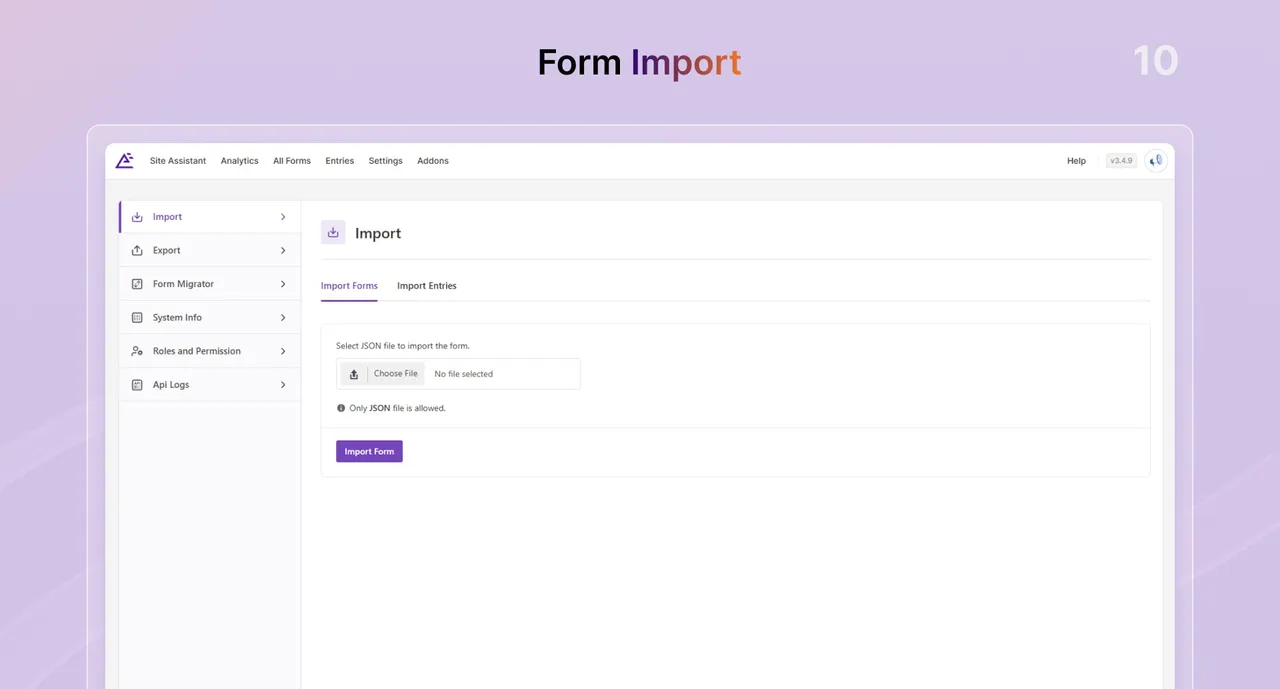
• Form Import and Export
• Popup Forms
• Form Templates
Entry Management
• Unlimited Entries
• Admin Approval for Entries
• PDF from Submission
• Cloud Storage
• Search Entries
• Entry Report
• Sort Entries
• Export Entries
• Manage and Delete Entries
• CSV Export
• Notifications
Antispam and Security
• Custom CAPTCHA
• Google reCAPTCHA
• hCaptcha
• Honeypot
• Akismet
• CleanTalk
• Domain Whitelist/Blacklist
• Cloudflare Turnstile
• IP Blocking
• GDPR Compliance
Page Builder Compatibility
• Elementor
• Divi
• Bricks Builder
• Oxygen Builder
• Beaver Builder
• WPBakery Builder
Payment & Ecommerce
• Payment & eCommerce
• Stripe
• PayPal Standard
• Mollie Payment
• Square Payment
• Razorpay
• Authorize.Net
• Coupons
• Recurring
Advanced Form Features
• Survey, Polls, and Quiz
• Multi Step Forms
• Conversational Forms
• Frontend Listing
• Save and Continue
• Repeater Fields
• User Registration
• Calculations
• Post Submissions
• Form Landing Page
• QR Generator
• E-signature
• Conditional Logic
• Webhook
• Advanced Form Analytics
• Geolocation
• Form Restriction
• Smart Tags Support
• AJAX Submission
Notification and Communication
• Email Notifications
• Multiple Email Recipients
• Email Templates
• Twilio
• ClickSend
• Telegram
• Slack
CRM Integration
• HubSpot
• OnePageCRM
• Pipedrive
• Zoho CRM
• Salesforce
• Salesflare
• amoCRM
Email Marketing Integrations
• MailPoet
• Moosend
• Mailchimp
• MailerLite
• ActiveCampaign
• ConvertKit
• Campaign Monitor
• Drip
• GetResponse
• Brevo
• iContact
• Constant Contact
• AWeber
• CleverReach
• GetGist
Advanced Integrations
• Zapier
• Google Sheets
• Google Calendar
• Google Drive
• Dropbox
• Trello
What Do People Say About Everest Forms?
⭐⭐⭐⭐⭐
The Best Contact Form for WordPress
“I tried so many contact forms for WordPress, but all of them lack one (or more) important features. Finally, I came across Everest Forms, and it solved all my problems.”
-Baxtrip
⭐⭐⭐⭐⭐
Easy to Use Contact Form
“Easy to use, looks good on the website, and the support was great when I needed help.”
-Winwickmum
⭐⭐⭐⭐⭐
Exceptional Plugin for Effortless Website Visitor Information Management
“The user-friendly interface ensures that visitors can submit their information with ease, contributing to a positive user experience. The PDF attachment delivered to my email is well-organized, making it a breeze to review and manage the collected data.”
-Somaweera
⭐⭐⭐⭐⭐
Must-Have Tool for Any Website Owner
“I’m extremely satisfied with this form builder plugin, and I highly recommend it to anyone looking for an easy and efficient way to create beautiful and functional forms for their WordPress site.”
-Dev Kabir
Getting Started:
• Watch our video tutorials
• Follow our getting started documentation
Step-by-Step Everest Forms Tutorials for a Headstart
• How to Create Contact Form in WordPress?
• How to Make a Quiz in WordPress?
• How to Stop Spam on WordPress Contact Form?
• How to Create a WordPress Online Booking Form for Hotels?
• How to Create a Donation Form in WordPress?
• How to Create a WordPress Multi-step Form: A Beginner’s Guide
• How to Create a WordPress PayPal Payment Form?
Get in Touch with us
👉 Facebook Group
👉 Youtube
Explore More Products from Our Team
Love Everest Forms? Why not check out more WordPress themes and plugins from us?
• Masteriyo – A Powerful and Easy WordPress LMS Plugin.
• User Registration & Membership – #1 Best WordPress User Registration & Membership Plugin.
• BlockArt Blocks – Free Gutenberg Custom Blocks Plugin.
• Magazine Blocks – Gutenberg Blocks Plugin to Build Magazine-style Sites.
• Zakra – Best WordPress Multipurpose Theme Powering 60K+ Websites.
• ThemeGrill – Beautiful Free WordPress Themes.
Installation
Minimum Requirements
• PHP version 5.4 or greater (PHP 7.2 or greater is recommended)
• MySQL version 5.0 or greater (MySQL 5.6 or greater is recommended)
Automatic installation
Automatic installation is the easiest option as WordPress handles the file transfers itself and you don’t need to leave your web browser. To do an automatic install of Everest Forms, log in to your WordPress dashboard, navigate to the Plugins menu and click Add New.
In the search field type “Everest Forms” and click Search Plugins. Once you’ve found our form builder plugin you can view details about it such as the point release, rating and description. Most importantly of course, you can install it by simply clicking “Install Now”.
Manual installation
The manual installation method involves downloading our form builder plugin and uploading it to your webserver via your favourite FTP application. The WordPress codex contains instructions on how to do this here.
Developer FAQ (9)
- Do I need to have coding skills to use the Everest Forms Plugin?
- No, you don’t need any coding skills. One can simply drag and drop fields, arrange them and use built-in shortcodes to display the form.
- Does the plugin work with any WordPress themes?
- Yes, Everest Forms is designed to work with any themes that have been coded following WordPress guidelines.
- Do you have a quick get started video for Everest Form?
- Yes, we do. Check out this Getting Started Videos
- What types of forms can I build with Everest Forms?
- You can build absolutely any type of form you imagine with Everest Forms. For example, you can create contact forms, online application forms, email newsletter forms, surveys, polls, quiz forms, user registration forms, feedback forms, booking forms, and more. Our plugin has advanced functionalities and tons of powerful integrations, that make it the ultimate form builder for WordPress.
- Can I integrate my WordPress forms with email marketing services?
- Yes, absolutely. You can easily integrate your WordPress forms with popular email marketing services like Mailchimp, Sendinblue, Constant Contact, Drip and more. We provide a dedicated integration addon for these. Plus, you can also integrate hundreds of more powerful services like CRMs, online tools, etc. with our Zapier addon.
- Can I integrate payment services with my Everest Forms?
- Yes. You can easily integrate your WordPress forms with PayPal, Stripe, and Razorpay. Using them, you can create payment forms in WordPress and accept payments.
- How do I protect my WordPress forms from spam?
- Everest Forms comes with a set of robust spam protection features. You can easily integrate Google reCAPTCHA as well as custom CAPTCHA like math equations, custom question-answer-based CAPTCHA to protect your site from spam and bots.
- Everest Forms is awesome! Can I contribute?
- Yes you can! Join in on our GitHub repository 🙂
- How can I report security bugs?
- You can report security bugs through the Patchstack Vulnerability Disclosure Program. The Patchstack team help validate, triage and handle any security vulnerabilities. Report a security vulnerability.
Downloads, last 30 days
Trend vs previous period: +6.6%
Average daily downloads: 4,876 over the last 7 days , 2,996 over 30 days.
Security history
Past CVEs, patched · 27 published vulnerabilities (Wordfence) · most recent Nov 6, 2026
- Patched 9.8 Critical Everest Forms - Contact Form, Quiz, Survey, Newsletter & Payment Form Builder for WordPress <= 3.1.1 - Unauthenticated PHP Object Injection CVE-2025-3439 · Apr 10, 2025 · affects *-3.1.1 · fixed in 3.1.2
- Patched 4.4 Medium Everest Forms <= 3.0.3 - Authenticated (Administrator+) Stored Cross-Site Scripting CVE-2024-8542 · Aug 1, 2024 · affects *-3.0.3 · fixed in 3.0.3.1
- Patched 6.5 Medium Everest Forms <= 3.6.2 - Insecure Direct Object Reference to Authenticated (Custom+) Arbitrary Entry/Form Disclosure and Deletion via MCP /tools/call JSON-RPC Endpoint CVE-2026-89101 · Nov 6, 2026 · affects *-3.6.2 · fixed in 3.6.3
- Patched 9.8 Critical Everest Forms <= 3.4.3 - Unauthenticated PHP Object Injection via Form Entry Metadata CVE-2026-3296 · Apr 7, 2026 · affects *-3.4.3 · fixed in 3.4.4
- Patched 4.4 Medium Everest Forms <= 2.0.4.1 - Authenticated (Administrator+) Stored Cross-Site Scripting CVE-2023-51695 · Dec 27, 2023 · affects *-2.0.4.1 · fixed in 2.0.5
- Patched 5.3 Medium Everest Forms <= 3.4.0 - Unauthenticated Information Exposure CVE-2026-11571 · Jun 18, 2026 · affects *-3.4.0 · fixed in 3.5.0
- Patched 9.8 Critical Contact Form, Drag and Drop Form Builder for WordPress - Everest Forms <= 1.4.9 - SQL Injection CVE-2019-13575 · Jul 18, 2019 · affects [*, 1.5.0) · fixed in 1.5.0
- Patched 5.4 Medium Everest Forms <= 3.1.1 - Authenticated (Subscriber+) Arbitrary Shortcode Execution CVE-2025-3422 · Apr 10, 2025 · affects *-3.1.1 · fixed in 3.1.2
Show all 27 vulnerabilities
- Patched 4.3 Medium Everest Forms - Contact Form, Payment Form, Quiz, Survey & Custom Form Builder with AI <= 3.5.2 - Missing Authorization to Authenticated (Delegated+) Arbitrary Plugin Activation via REST API and AJAX Endpoints CVE-2026-13167 · Aug 15, 2026 · affects *-3.5.2 · fixed in 3.5.3
- Patched 4.4 Medium Everest Forms <= 3.0.4.1 - Authenticated (Admin+) Stored Cross-Site Scripting CVE-2024-10471 · Nov 5, 2024 · affects *-3.0.4.1 · fixed in 3.0.4.2
- Patched 8.1 High Everest Forms <= 3.4.4 - Unauthenticated Arbitrary File Read and Deletion via Upload Field 'old_files' Parameter CVE-2026-5478 · Apr 20, 2026 · affects *-3.4.4 · fixed in 3.4.5
- Patched 6.1 Medium Everest Forms <= 3.6.2 - Reflected Cross-Site Scripting via 'evf_toast_type' Parameter CVE-2026-91152 · Oct 29, 2026 · affects *-3.6.2 · fixed in 3.6.3
- Patched 6.5 Medium Everest Forms <= 3.4.1 - Unauthenticated Arbitrary Shortcode Execution CVE-2026-22422 · Sep 26, 2025 · affects *-3.4.1 · fixed in 3.4.2
- Patched 4.3 Medium Everest Forms - Contact Form, Payment Form, Quiz, Survey & Custom Form Builder <= 3.4.7 - Missing Authorization to Authenticated (Subscriber+) Email Sending CVE-2026-4888 · May 27, 2026 · affects *-3.4.7 · fixed in 3.4.8
- Patched 9.8 Critical Everest Forms <= 3.0.9.4 - Unauthenticated Arbitrary File Upload, Read, and Deletion CVE-2025-1128 · Feb 17, 2025 · affects *-3.0.9.4 · fixed in 3.0.9.5
- Patched 7.2 High Everest Forms - Contact Form, Payment Form, Quiz, Survey & Custom Form Builder with AI <= 3.6.1 - Unauthenticated Stored Cross-Site Scripting CVE-2026-108491 · Oct 13, 2026 · affects *-3.6.1 · fixed in 3.6.2
- Patched 8.1 High Everest Forms - Contact Form, Payment Form, Quiz, Survey & Custom Form Builder with AI <= 3.6.0 - Unauthenticated PHP Object Injection CVE-2026-62103 · Sep 11, 2026 · affects *-3.6.0 · fixed in 3.6.1
- Patched 5.3 Medium Everest Forms <= 3.6.2 - Unauthenticated Sensitive Information Exposure via Smart-Tag Injection in Smart-Tag Injection in Form Field Values ({post_meta key=...}) CVE-2026-91153 · Oct 29, 2026 · affects *-3.6.2 · fixed in 3.6.3
- Patched 5.3 Medium Everest Forms <= 3.4.4 - Unauthenticated Server-Side Request Forgery via Upload Field 'Previous Value' CVE-2026-5096 · Aug 27, 2026 · affects *-3.4.4 · fixed in 3.4.5
- Patched 6.1 Medium Everest Forms - Contact Form, Payment Form, Quiz, Survey & Custom Form Builder with AI <= 3.6.1 - Reflected Cross-Site Scripting CVE-2026-94670 · Oct 2, 2026 · affects *-3.6.1 · fixed in 3.6.2
- Patched 5.3 Medium Everest Forms <= 2.0.3 - Unauthorized Form Submission via Disabled Forms CVE-2023-51377 · Dec 26, 2023 · affects *-2.0.3 · fixed in 2.0.3.1
- Patched 7.2 High Everest Forms <= 2.0.7 - Unauthenticated Server-Side Request Forgery via font_url CVE-2024-1812 · Mar 15, 2024 · affects *-2.0.7 · fixed in 2.0.8
- Patched 6.1 Medium Everest Forms <= 3.1.1 - Reflected Cross-Site Scripting CVE-2025-3421 · Apr 10, 2025 · affects *-3.1.1 · fixed in 3.1.2
- Patched 5.3 Medium Everest Forms <= 3.4.0 - Unauthenticated Missing Authorization CVE-2026-12270 · Jun 18, 2026 · affects *-3.4.0 · fixed in 3.5.0
- Patched 4.4 Medium Everest Forms - Contact Forms, Quiz, Survey, Newsletter & Payment Form Builder for WordPress <= 3.0.8 - Authenticated (Admin+) Stored Cross-Site Scripting CVE-2024-13125 · Jan 17, 2025 · affects *-3.0.8 · fixed in 3.0.8.1
- Patched 6.1 Medium Everest Forms <= 1.7.9 - Reflected Cross-Site Scripting CVE-2021-24907 · Nov 22, 2021 · affects [*, 1.8.0) · fixed in 1.8.0
- Patched 6.1 Medium Everest Forms - Contact Form, Payment Form, Quiz, Survey & Custom Form Builder with AI <= 3.4.8 - Reflected Cross-Site Scripting CVE-2026-57312 · Jun 25, 2026 · affects *-3.4.8 · fixed in 3.5.0
Everest Forms FAQ
Do I need coding skills?
No. You drag fields into place and show the form with a block, shortcode or Embed button.
Does it work with any theme?
It is built to work with themes that follow WordPress coding guidelines. It also lists support for builders such as Elementor, Divi and Bricks.
What kinds of forms can I make?
Contact, application, newsletter, survey, poll, quiz, registration, feedback and booking forms are all named in the listing.
Can it connect to email marketing tools?
Yes, through a dedicated integration add-on for services such as Mailchimp, Sendinblue, Constant Contact and Drip. Zapier opens up many more.
Which payment services work?
The FAQ names PayPal, Stripe and Razorpay for payment forms.
How do I fight spam?
Use Google reCAPTCHA or a custom CAPTCHA such as a math or question-and-answer check. The feature list adds hCaptcha, honeypot, Akismet and CleanTalk.
Is there a quick-start video?
Yes, the vendor provides getting started videos and documentation.
How do I report a security bug?
Send it through the Patchstack Vulnerability Disclosure Program, which verifies and passes on reports.
Everest Forms alternatives

WordPress Contact Form Builder Plugin WPForms is an AI drag & drop WordPress form builder that’s EASY and POWERFUL. Create contact forms, feedback forms, subscription forms, payment forms (including Stripe, Square &…

THE AI FORM GENERATOR FOR WORDPRESS SureForms is an AI form generator and WordPress form builder that turns a simple prompt into a ready-to-edit contact form, Stripe payment form, booking request form, quote form,…

Calculated Fields Form is a full-featured WordPress form builder plugin. It lets you create any type of form - from simple contact forms to complex multi-step booking systems, quote generators, order forms, and…

Ninja Forms is a free WordPress form builder plugin. Build contact forms, lead generation forms, calculators, quizzes, surveys, applications, event registration, and booking request forms with a drag and drop…

You installed WordPress. Then you installed a page builder. Then a popup plugin. Then a mega menu plugin. Then a gallery plugin, a form plugin, a team members plugin, a countdown timer plugin - and suddenly you’re…

AutoPen leverages the power of OpenAI’s most advanced GPT models to automatically generate and publish long-form, SEO-optimized blog posts directly to your WordPress site. Designed for content marketers, agencies,…
Listing data from WordPress.org and the Wordfence vulnerability feed, refreshed Nov 9, 2026; listing details fetched Nov 14, 2026. Screenshots are from the plugin's WordPress.org listing. Not affiliated with wpeverest.