

Offload, AI & Optimize with Cloudflare Images
Offload, AI & Optimize with Cloudflare Images · by Anton Vanyukov
- active installs
- 1K+
- 33 ratings
- 4.9
- since last update
- 155d
- releases in 12 months
- —
- support threads resolved
- —
- avg daily downloads
- 36
- on WordPress.org
- 4.2 years
Offload, AI & Optimize with Cloudflare Images at a glance
Offload, AI & Optimize with Cloudflare Images is a free WordPress AI image & alt text plugin by Anton Vanyukov with 1K+ active installs and a 4.9/5 rating from 33 reviews. It was last updated on Jun 7, 2026, is tested up to WordPress 7.0.8 and needs PHP 7.0+. All 2 of its published vulnerabilities have patched versions. Our quality score is 78/100.
What is Offload, AI & Optimize with Cloudflare Images?
Offload moves your WordPress media library to Cloudflare Images. The images are stored there, resized, optimized and delivered from Cloudflare's network in a suitable format for each visitor. The plugin itself is free, but it needs a Cloudflare account with the Cloudflare Images option switched on.
It is aimed at site owners who want an image CDN without buying a separate plugin subscription. The author describes it as a personal project that is still a work in progress, built to meet real needs rather than for profit. A setup wizard in the Media menu walks you through the connection.
The listing also mentions an Image AI option that can tag, caption and generate images, along with compression for JPEG and PNG files. It gives few details about how these work, so check the settings screen before relying on them. Any cost for using Cloudflare Images is charged by Cloudflare.
Best for
- Sites already using Cloudflare
- Image-heavy blogs and portfolios
- Owners who want a free image CDN plugin
- Developers comfortable with a work-in-progress tool
Offload, AI & Optimize with Cloudflare Images features
Media library offload
Stores your images on Cloudflare Images instead of your own server.
Automatic resizing
Cloudflare creates the sizes needed, so you do not manage thumbnails by hand.
Format optimization
Serves each image in a format that suits the visitor's browser.
Image CDN
Delivers images from a global network of servers.
Compression
Reduces JPEG and PNG file sizes while aiming to keep visual quality.
Image AI
The listing says it can tag, caption and generate new images with AI, but it does not explain the details.
Page parsing module
Can scan page output for images that themes or plugins add outside WordPress core functions, so more URLs get replaced.
Setup wizard
Guides you through connecting Cloudflare from the Media, Offload Settings menu.
Offload, AI & Optimize with Cloudflare Images free vs pro
Free WordPress.org version
- The whole plugin, which the listing calls 100 percent free
- Offloading, resizing, optimization, delivery and compression features
The plugin is free on WordPress.org and no paid tier is described in the listing. You do need a Cloudflare account with Cloudflare Images enabled, and Cloudflare may charge for it depending on your plan.
How to use Offload, AI & Optimize with Cloudflare Images
- Prepare Cloudflare
Create or use a Cloudflare account and turn on the Cloudflare Images option.
- Install the plugin
In wp-admin go to Plugins, then Add New, search for Offload Cloudflare Images, then install and activate it.
- Run the setup wizard
Open Media, then Offload Settings, and follow the wizard to connect your Cloudflare account.
- Choose what to offload
Pick the options you want, such as the image CDN, compression or Image AI, and save.
- Check your pages
Browse the site and confirm images load from Cloudflare. If some are missed, try the page parsing module.
Offload, AI & Optimize with Cloudflare Images screenshots (3)
-
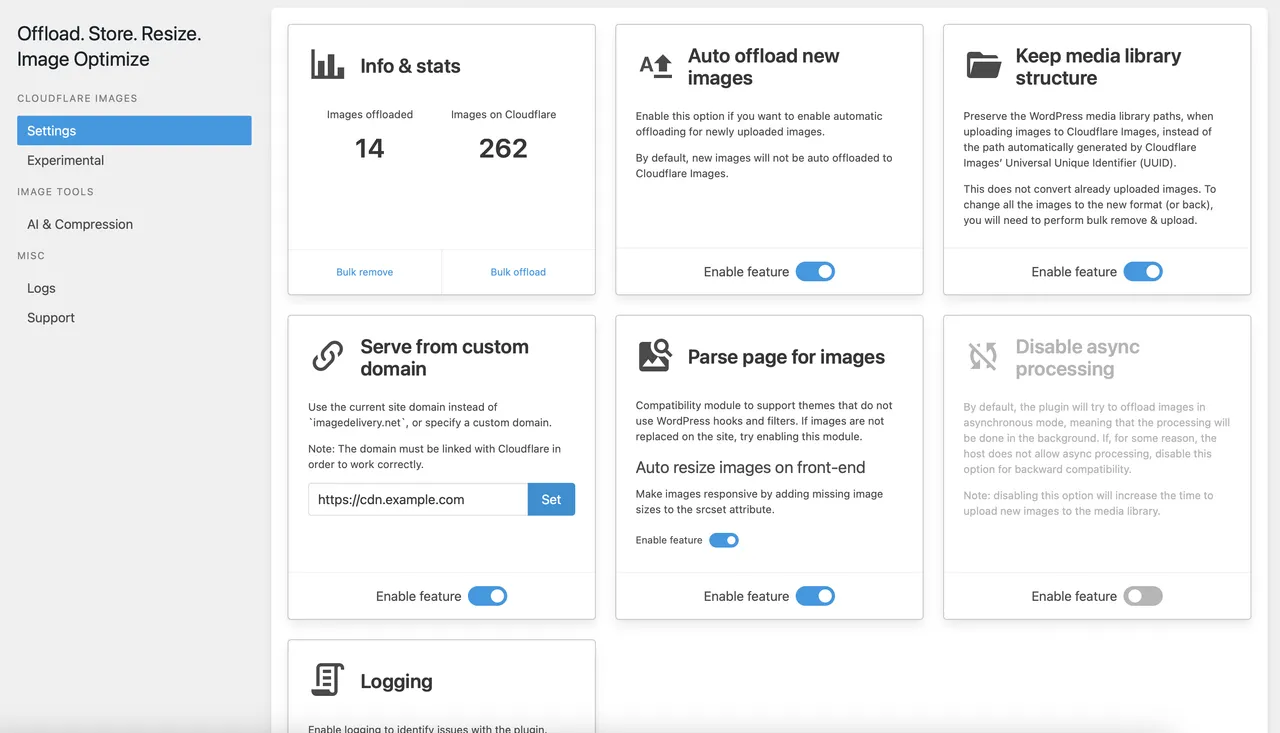
Plugin options and settings -
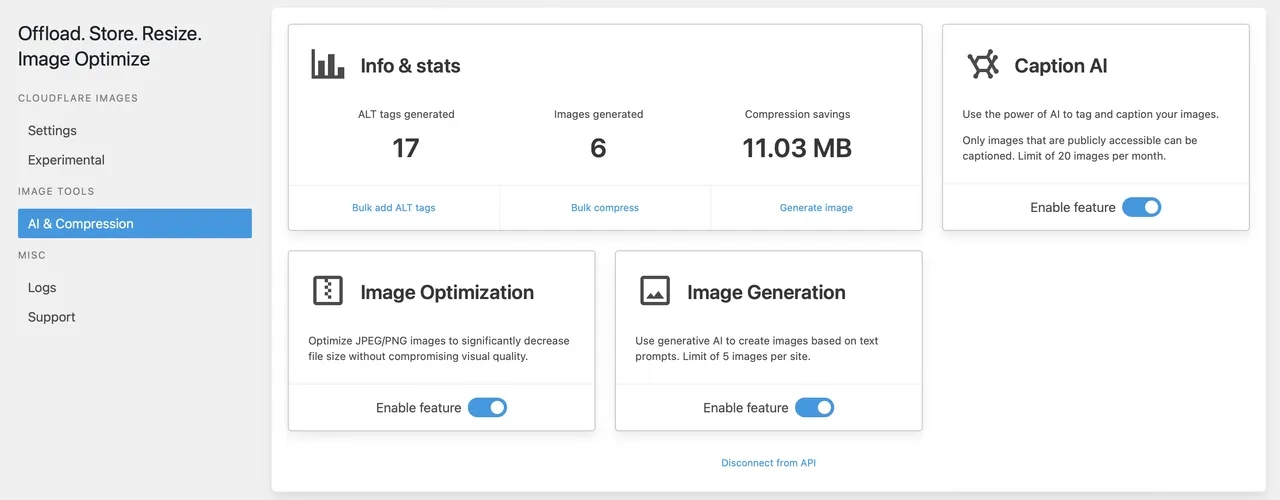
Plugin AI modules -
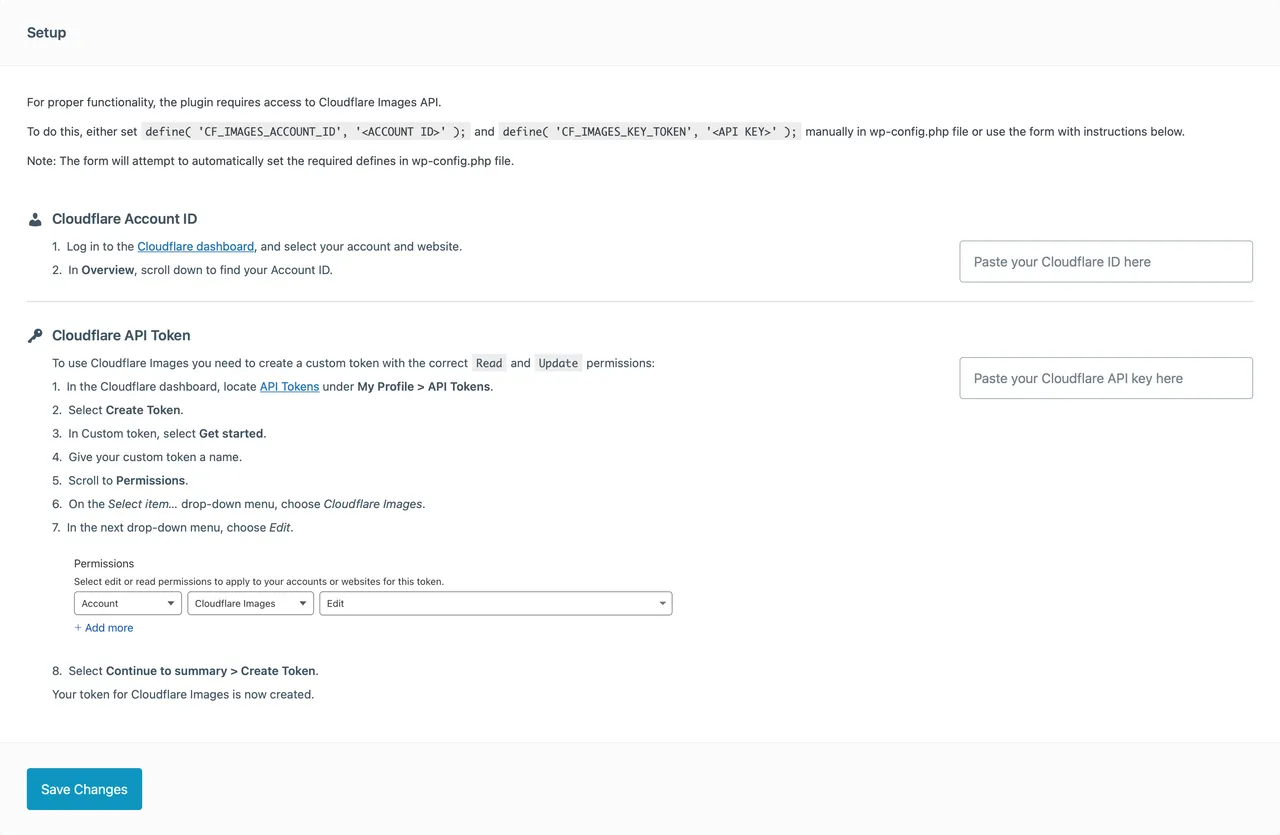
Quick and easy setup wizard
Important information
- A Cloudflare account with Cloudflare Images is required. Cloudflare may charge fees depending on your plan.
- Supported formats are PNG, GIF, JPEG and WebP.
- Cloudflare limits apply: images up to 10,000 pixels on each side, 10 MB per file and 1024 bytes of metadata. Animated GIFs are capped at 100 megapixels in total.
- Some themes and plugins use their own image handling, which can stop URLs from being replaced. The page parsing module is the suggested fix.
- Your images are stored with a third-party service, so consider how you would move them back if you stop using it.
- The plugin has had published vulnerabilities in the past. The data shows them as patched, so keep it updated.
From the Offload, AI & Optimize with Cloudflare Images readme
Straight from the developer's WordPress.org listing.
Full description
Offload your media library to Cloudflare Images and let it handle everything for you – store, resize, optimize and deliver images in the best possible format to your users.
Why Overpay for CDN Plugins?
With the avalanche of expensive plugins out there, it’s time to switch to a smarter choice. Why should you pay more for something that deserves to be free?
Simplify Your Image Management
Offload your media library to Cloudflare Images! Let our plugin take charge:
• Store your images securely;
• Resize images to perfection without any manual hassle;
• Optimize them to ensure they load blazingly fast;
• Deliver in the most user-friendly format, ensuring satisfaction at every user’s end.
But wait, there’s more!
Image CDN – deliver images from a global network of servers.
Image AI – tag, caption and generate new images using AI.
Compression – optimize JPEG/PNG images to decrease file size without compromising visual quality.
A Developer’s Promise
Born from personal need, this plugin represents a developer’s dedication to the community. While it’s still a work in progress, remember – it’s crafted with real user needs in mind, not profit.
Your Feedback Makes Us Better
Found a hiccup? Yearning for a feature? Just shoot us a support request. Our commitment is to continually evolve to serve you better. Your wish is our command!
Disclaimer
Cloudflare, the Cloudflare logo, and Cloudflare Workers are trademarks and/or registered trademarks of Cloudflare, Inc. in the United States and other jurisdictions.
Installation
• Upload the plugin to the /wp-content/plugins/ directory
• Activate the plugin through the ‘Plugins’ menu in WordPress
• Follow the instructions in the setup wizard through the ‘Media – Offload Settings’ menu in WordPress
• Enjoy
Developer FAQ (5)
- How does this work?
- The plugin will use the Cloudflare Images service to host all supported images and serve them with the best possible settings to the user.
- Is this free?
- Yes, the plugin is 100% free. A Cloudflare account with activated Cloudflare Images option is required. Cloudflare may charge a fee for the use of this feature, depending on the plan used.
- What are the supported image formats?
- You can upload the following image formats to Cloudflare Images: * PNG * GIF * JPEG * WebP
- Are there any other limitations?
- These are the maximum allowed sizes and dimensions Cloudflare Images supports: • Images’ height and width are limited to 10,000 pixels. • Image metadata is limited to 1024 bytes. • Images have a 10 megabyte (MB) size limit. • Animated GIFs, including all frames, are limited to 100 megapixels (MP).
- Why are not all images being replaced in content?
- By default, the plugin relies on WordPress core functions to process images. Some themes and plugins can implement their own image processing functions, which can prevent the plugin from replacing the image URLs in content. If you are experiencing this, try to enable the Parse page for images module in the plugin settings. If something is still not working for you, please let me know by creating a support ticket on the plugin support forums.
Downloads, last 30 days
Trend vs previous period: +4.1%
Average daily downloads: 31 over the last 7 days , 36 over 30 days.
Security history
Past CVEs, patched · 2 published vulnerabilities (Wordfence) · most recent Jun 17, 2026
- Patched 4.3 Medium Offload, AI & Optimize with Cloudflare Images <= 1.9.5 - Missing Authorization CVE-2025-66104 · Nov 20, 2025 · affects *-1.9.5 · fixed in 1.9.6
- Patched 8.8 High Offload, AI & Optimize with Cloudflare Images <= 1.10.2 - Authenticated (Author+) Remote Code Execution via 'api-key' / 'account-id' Parameters in cf_images_do_setup AJAX Action CVE-2026-9860 · Jun 17, 2026 · affects *-1.10.2 · fixed in 1.10.3
Offload, AI & Optimize with Cloudflare Images FAQ
How does the plugin work?
It uses the Cloudflare Images service to host your supported images and serve them with suitable settings for each visitor.
Is it free?
The plugin is free. You need a Cloudflare account with Cloudflare Images, and Cloudflare may charge for that depending on your plan.
Which image formats are supported?
PNG, GIF, JPEG and WebP.
Are there size limits?
Yes. Height and width are limited to 10,000 pixels, files to 10 MB and metadata to 1024 bytes. Animated GIFs are limited to 100 megapixels across all frames.
Why are some images not replaced in my content?
By default the plugin relies on WordPress core functions. Some themes and plugins process images themselves. Enable the page parsing module to catch those.
What does Image AI do?
The listing says it can tag, caption and generate images with AI. It does not describe the setup, so check the plugin settings.
Offload, AI & Optimize with Cloudflare Images alternatives

Media File Renamer is the smart, AI-powered solution for renaming your WordPress media files. It automatically gives your media files and their metadata (Title, ALT Text, Description) clean, SEO-friendly names.…

Optimized image search in WordPress for Unsplash, Adobe Stock, Getty Images, iStock, Pixabay, Pexels, Depositphotos and Freepik. You can switch between providers to compare the images, or generate one from a prompt…

AltText.ai automatically generates alt text for your images. Automatic: Every uploaded image is analyzed and alt text is automatically added to the image properties. Supports Multiple Formats: Handles JPG, PNG, WebP,…

Alt Magic is an AI alt text generator for WordPress that automatically creates SEO-friendly image alt text for newly uploaded images and existing media library images. Start with 50 free monthly credits, then scale…

Ease Project Management and Task Management using a powerful project manager with Kanban board, Gantt chart, milestone tracking & project reporting. AI-Powered Project Manager Project Manager is a feature-rich…

wp-admin forgets. OpenStation doesn’t. You know the moment. You’re deep in a post and you need one image from the Media Library. You click over, find it, click back, and everything you had going is gone. Your scroll…
Listing data from WordPress.org and the Wordfence vulnerability feed, refreshed Nov 9, 2026; listing details fetched Nov 14, 2026. Screenshots are from the plugin's WordPress.org listing. Not affiliated with Anton Vanyukov.