

Media File Renamer
Media File Renamer: Rename Images & Files for SEO (AI-Powered) · by Jordy Meow
- active installs
- 40K+
- 449 ratings
- 4.6
- since last update
- 6d
- releases in 12 months
- 22
- support threads resolved
- 100%
- avg daily downloads
- 2,059
- on WordPress.org
- 15.8 years
Media File Renamer at a glance
Media File Renamer is a free WordPress AI image & alt text plugin by Jordy Meow with 40K+ active installs and a 4.6/5 rating from 449 reviews. It was last updated on Nov 3, 2026, is tested up to WordPress 7.1.4 and needs PHP 8.1+. All 5 of its published vulnerabilities have patched versions. Our quality score is 93/100.
What is Media File Renamer?
Media File Renamer renames the files in your WordPress media library. It gives uploaded files cleaner names and can update their title, alt text, caption and description to match. The aim is tidier, search-friendly media.
You can work on one file at a time or run changes across the whole library. A status filter shows which files are pending, renamed or locked. A lock option stops a file from being renamed by accident, and an undo feature can revert a name if something breaks.
It suits site owners with messy upload names who care about image SEO. The listing describes AI Vision suggestions and some other tools as part of the Pro version. Renaming files is risky, so a backup before you start matters.
Best for
- Sites with messy upload filenames
- Owners improving image SEO
- Large media libraries needing bulk cleanup
- Teams that want locked, protected filenames
Our take
Renames media files and metadata for SEO, optionally using AI for descriptive names. A genuinely useful, unglamorous utility; the AI naming saves real time on large libraries.
Media File Renamer features
Automatic and manual renaming
Rename files as they are uploaded, or rename existing ones individually or in bulk.
Bulk library operations
Process the whole media library at once. Filter by pending, renamed or locked status to stay organized.
Metadata sync
Update title, alt text, caption and description after a rename so they stay consistent.
Lock system
Lock files so they cannot be renamed by accident, with automatic locking after a rename.
Undo
Revert a filename if the rename causes problems on the site.
AI Vision suggestions
Pro analyzes the image and proposes a meaningful filename. This is listed under the Pro version.
Wide file compatibility
Handles Retina and WebP images, scaled images from WordPress 5.3 on, PDF thumbnails, UTF-8 names and optimized images.
Media File Renamer free vs pro
Free WordPress.org version
- Renaming of media files and related metadata
- Bulk renaming with status filters
- Lock system
- Undo for renames
Pro Paid version
- AI Vision and suggestions for smart renaming
- Anonymizing file names for privacy
- Moving files across directories in bulk
- Metadata sync for alt text and titles
- Numbering files
The plugin is free on WordPress.org, and the listing describes a Pro version with extra features. It gives no prices. The listing does not say whether AI Vision needs your own API key.
How to use Media File Renamer
- Back up your site
Take a full backup first. Renaming or moving files can break references if something goes wrong.
- Install and activate
In wp-admin go to Plugins, then Add New. Search for Media File Renamer, install it and activate it.
- Try one file first
Rename a single file and check that pages using it still show the image correctly.
- Run bulk changes
Once it works, rename more files and use the status filter to track pending, renamed and locked items.
- Fix issues if needed
If an image looks broken, clear your cache. If that does not help, use Undo to restore the old name.
Media File Renamer screenshots (3)
-

Files with meaningless camera names get a clean name built from their title: hover Auto to preview it. -

Rename one file or all of them in one click, and undo any rename if you change your mind. -
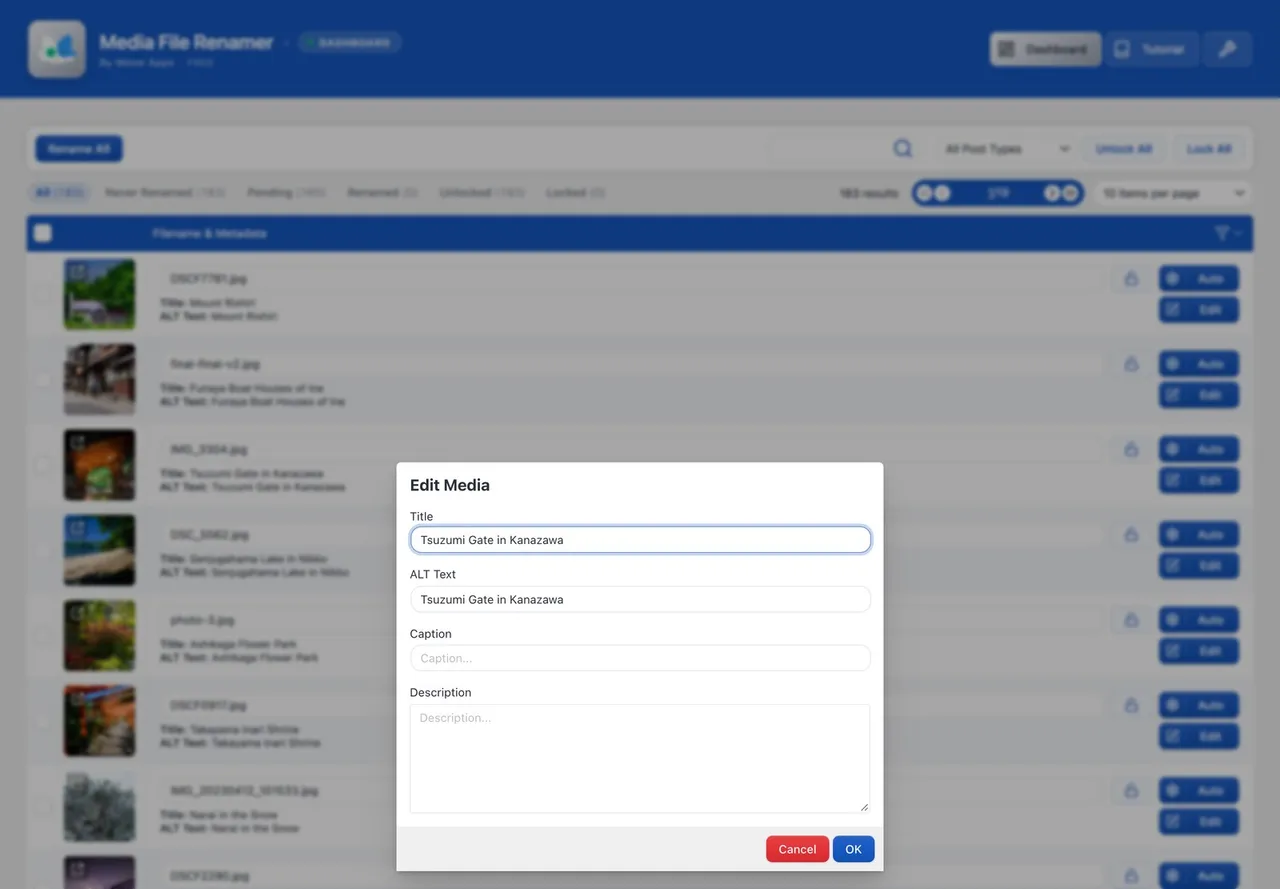
Edit the title, alt text, caption and description of any file without leaving the list.
Important information
- Make a backup before renaming. The vendor warns that renaming and moving files can be risky.
- Start with a single file so you can confirm that page references update properly. Other plugins can interfere.
- Some page builders, such as Avia Layout Builder, may limit renaming because of encrypted content.
- Requires WordPress 6.0 or newer and PHP 8.1 or newer. Tested up to WordPress 7.1.4.
- AI Vision, anonymizing, bulk moves and numbering are Pro features according to the listing.
From the Media File Renamer readme
Straight from the developer's WordPress.org listing.
Full description
Media File Renamer is the smart, AI-powered solution for renaming your WordPress media files. It automatically gives your media files and their metadata (Title, ALT Text, Description) clean, SEO-friendly names. Whether you’re uploading new files or updating your entire media library, this plugin makes it easy.
It’s the perfect companion to SEO Engine for a complete SEO workflow! Explore our official site to get started.
Key Features
🤖 AI-Powered Renaming
Use AI Vision to analyze your images and generate meaningful filenames automatically. Smart suggestions help you pick the best name every time.
📁 Bulk Operations
Rename your entire media library at once, or work through files one by one. Filter by status (Pending, Renamed, Locked) to stay organized.
🔄 Metadata Sync
Automatically update Title, ALT Text, Caption, and Description after renaming. Keep everything consistent without the manual work.
🔒 Lock System
Lock files to prevent accidental renaming. Auto-lock after manual or automatic renames for extra safety.
Compatibility
Media File Renamer is compatible with a wide range of WordPress features and plugins, including support for Retina and WebP images, re-scaled images from WP 5.3 onwards, PDF Thumbnails, UTF8 files, and optimized images. It handles various encoding types, ensuring your media library is always organized. Some page builders like Avia Layout Builder may limit renaming due to encryption.
Pro Version
In the Pro Version, you’ll find many exciting features, like AI Vision and Suggestions for smart renaming, and anonymize your files for extra privacy. Easily move files across directories in bulk, sync metadata such as ALT texts and titles, and even number your files for better organization.
Important
Renaming or moving files can be risky, so it’s vital to take precautions and make a backup before using Media File Renamer. Start by renaming files individually to ensure page references update correctly, as some plugins might interfere with the process. If issues arise post-renaming, try clearing your cache to fix outdated references. Still facing problems? Use the Undo feature to revert filenames. For further assistance, visit our support page.
A Simpler Plugin
If you only need a simple field to modify the filename, you can also try Phoenix Media Rename. It’s simpler, and just does that. Yes, we are friends!
Installation
• Upload the plugin to your WordPress.
• Activate the plugin through the ‘Plugins’ menu.
• Try it with one file first! 🙂
Downloads, last 30 days
Trend vs previous period: -41.9%
Average daily downloads: 2,962 over the last 7 days , 2,059 over 30 days.
Security history
Past CVEs, patched · 5 published vulnerabilities (Wordfence) · most recent Dec 26, 2023
- Patched 6.4 Medium Media File Renamer < 1.9.4 - Stored Cross-Site Scripting CVE-2014-2040 · Jan 31, 2014 · affects [*, 1.9.4) · fixed in 1.9.4
- Patched 6.6 Medium Media File Renamer <= 5.7.7 - Authenticated(Administrator+) Remote Code Execution CVE-2023-50897 · Dec 26, 2023 · affects *-5.7.7 · fixed in 5.7.8
- Patched 5.3 Medium Media File Renamer <= 5.6.9 - Sensitive Information Exposure via Log File CVE-2023-44991 · Nov 28, 2023 · affects *-5.6.9 · fixed in 5.7.0
- Patched 8.8 High Media File Renamer - Auto & Manual Rename <= 5.2.5 - Missing Authorization Checks Sep 3, 2012 · affects *-5.2.5 · fixed in 5.2.6
- Patched 8.8 High Media File Renamer - Auto & Manual Rename <= 5.2.5 - Cross-Site Request Forgery CVE-2021-36850 · Apr 9, 2021 · affects *-5.2.5 · fixed in 5.2.6
Recent releases
Release cadence: every ~19 days.
- v6.3.6 Nov 3, 2026
Fix: Keep the correct file path in the metadata when moving a file from or to the uploads root.
- v6.3.5 Oct 30, 2026
Fix: Translated images kept the old file names of their sizes after a rename with WPML.
- v6.3.4 Oct 26, 2026
Add: Tutorial buttons on the Dashboard and Settings that open the tutorial on meowapps.com. * Add: Meow Apps dashboard with Health, Errors and About tabs. * Update: Every Renamer page now shares...
- v6.3.3 Oct 3, 2026
Add: New "Sync With Auto Method" option in the Dashboard's Sync Fields, which updates the metadata using the automatic rename method without renaming the file. * Update: The On Post Save behavior...
- v6.3.2 Sep 26, 2026
Update: The license screen now shows the actual reason a license check failed instead of a generic error. * Fix: License checks no longer hang the admin for minutes when the license server cannot...
Show 10 older releases
- v6.3.1 Sep 14, 2026
Add: "Allow Empty Values" advanced option so metadata can be manually cleared from the Dashboard. * Add: "Empty Only" option in the manual Sync Fields modal to skip fields that already have...
- v6.3.0 Aug 17, 2026
Update: Meow Apps dashboard now uses the new board layout with a plugins overview and optional AI site analysis. * Fix: The renamer field now updates correctly in the media library modal. * Add:...
- v6.2.9 Jul 30, 2026
Fix: Trailing extensions are now correctly stripped when generating filenames.
- v6.2.8 Jun 30, 2026
Update: Moved the AI Suggest buttons inside the fields in the Edit Media modal. * Update: Changed the Auto and Edit buttons back to normal case and made the Auto label translatable. * Fix: Hotfix...
- v6.2.7 Jun 28, 2026
Add: "Run Later" option for delayed processing of upload renaming. * Add: "Ignore This Time" option on the media upload screen to skip the "On Upload" method for the current batch. * Add: Vision...
- v6.2.6 May 30, 2026
Update: Merged the Renamer and Metadata fields into a single component, making editing available outside the Dashboard. * Add: Post type filter for media attached to specific parent post types.
- v6.2.5 Apr 25, 2026
Add: SEO keyword support from SEO Engine for AI prompt generation. * Update: New UI/UX design for better user experience. * 🎵 Discuss with others about Media File Renamer on [the...
- v6.2.4 Apr 15, 2026
Add: New CLI command to list all pending renames. * Add: New CLI command to set the rename method directly. * Update: CLI rename_all command now supports a "dry-run" mode so you can preview changes.
- v6.2.3 Mar 9, 2026
Add: New filters to let you modify original and new image URLs during DB updates. * Fix: Corrected the PDF renaming/moving process and ensured size metadata is fully updated after changes. * Fix:...
- v6.2.2 Feb 25, 2026
Add: New WP-CLI commands (for metadata).
Media File Renamer FAQ
What does Media File Renamer do?
It renames media files and keeps their title, alt text, caption and description in step. This gives you cleaner, more descriptive file names.
Is it free?
A free version is on WordPress.org. The listing describes a Pro version with more features but does not state prices.
Which features need Pro?
AI Vision suggestions, file anonymizing, bulk moves between folders, metadata sync and file numbering are listed as Pro.
Can I undo a rename?
Yes. If something breaks after renaming, the Undo feature restores the earlier filename.
Is renaming files safe?
It carries some risk. Back up first, try one file, and clear your cache if images look broken afterward.
Does it work with WebP and scaled images?
Yes. The listing names support for Retina and WebP images, scaled images from WordPress 5.3 onward, PDF thumbnails and UTF-8 names.
Media File Renamer alternatives

Optimized image search in WordPress for Unsplash, Adobe Stock, Getty Images, iStock, Pixabay, Pexels, Depositphotos and Freepik. You can switch between providers to compare the images, or generate one from a prompt…

AltText.ai automatically generates alt text for your images. Automatic: Every uploaded image is analyzed and alt text is automatically added to the image properties. Supports Multiple Formats: Handles JPG, PNG, WebP,…

Alt Magic is an AI alt text generator for WordPress that automatically creates SEO-friendly image alt text for newly uploaded images and existing media library images. Start with 50 free monthly credits, then scale…

Ease Project Management and Task Management using a powerful project manager with Kanban board, Gantt chart, milestone tracking & project reporting. AI-Powered Project Manager Project Manager is a feature-rich…

wp-admin forgets. OpenStation doesn’t. You know the moment. You’re deep in a post and you need one image from the Media Library. You click over, find it, click back, and everything you had going is gone. Your scroll…

Black Friday: 30% off the Pro version until November 30, 2026. Use the code MPTBLACKFRIDAY26 on the pricing page . Magic Post Thumbnail generates images for your posts - as featured images or inside the content -…
Listing data from WordPress.org and the Wordfence vulnerability feed, refreshed Nov 9, 2026; listing details fetched Nov 14, 2026. Screenshots are from the plugin's WordPress.org listing. Not affiliated with Jordy Meow.