

EventPrime
EventPrime - Events Calendar, Bookings, Tickets & AI · by Metagauss
- active installs
- 7K+
- 86 ratings
- 4.4
- since last update
- 4d
- releases in 12 months
- —
- support threads resolved
- 69%
- avg daily downloads
- 721
- on WordPress.org
- 7.7 years
EventPrime at a glance
EventPrime is a free WordPress AI-powered plugin by Metagauss with 7K+ active installs and a 4.4/5 rating from 86 reviews. It was last updated on Nov 5, 2026, is tested up to WordPress 7.1.4 and needs PHP 7.2+. It works with OpenAI, Claude, Google Gemini. All 47 of its published vulnerabilities have patched versions. Our quality score is 87/100.
What is EventPrime?
EventPrime is a WordPress plugin for publishing events, showing them in a calendar and selling tickets. You create events from a dashboard calendar by picking a date, and visitors see the same calendar on the front end in month, week, agenda and day views. It handles free and paid bookings, multi-day and recurring events, venues, performers and online events. Events can have start and end times, types, venues and performers, and the front-end calendar matches what you set in the dashboard.
It supports the WordPress Abilities API, which lets MCP-compatible AI agents such as Claude, ChatGPT, Gemini and Cursor work with events, tickets, bookings and venues through a conversation. The agent is limited by the permissions of your WordPress user account, and a single setting turns the AI abilities off. The listing does not describe a built-in text generator. The listing gives example requests, such as listing upcoming events, checking tickets left, booking an attendee or cancelling a booking.
It fits organizers of workshops, classes, fairs and venues who want booking inside their own site. Payments can be taken through PayPal and Stripe. Extensions add things such as live seating, sponsors, coupons and invoices, and some of these are free while others are paid. Review extension prices and compatibility on the vendor site, because the listing names extensions without describing which are paid.
Best for
- Organizers who sell tickets for workshops and fairs
- Venues that need a calendar with bookings
- Sites that want an AI agent to check availability and bookings
- Communities that accept event submissions from visitors
EventPrime features
Dashboard events calendar
Click a date to open an Add Event form, drag events between dates and see events as colored bars based on their type.
Front-end calendar views
Month, week, agenda and day views, plus a compact month view with event dots on phones.
Bookings and ticket types
Offer free or paid bookings, create several ticket types and categories, and add entrance fees, per-ticket fees and conditional offers.
PayPal and Stripe payments
Take payments for bookings, and recheck a failed PayPal booking from the booking screen.
Multi-day and recurring events
Run events across several days or on a repeating schedule, including virtual events.
Bookings manager and export
Manage bookings from the dashboard and export bookings and attendees to CSV, including coupon, tax and WooCommerce totals.
Frontend event submission
Let logged-in roles or anonymous visitors submit events from the front end.
Venues, performers and types
Organize events by type or category, venue and presenter, each with attributes and photos.
User area for attendees
A front-end area where users manage bookings, keep a wishlist and download or print tickets.
AI agent access via Abilities API
Agents can list events, create them, check ticket availability, book tickets, pull attendee lists and cancel bookings, within your user permissions.
EventPrime free vs pro
Free WordPress.org version
- Events calendar, bookings, ticket types and offers
- PayPal and Stripe payments for bookings
- Recurring and multi-day events, venues, performers and types
- Frontend submissions, attendee area and CSV export
- Abilities API support for AI agents
Pro Paid version
- Free and premium extensions, such as Live Seating, Event Sponsors, Offline Payments, Event Coupon Codes and Invoices
The plugin is free on WordPress.org, and the listing describes both free and premium extensions without naming prices. The AI agent connection uses your own AI client, so any model costs are billed by whichever agent service you use, not by the plugin.
How to use EventPrime
- Install the plugin
In wp-admin, go to Plugins, then Add New, search for EventPrime, then install and activate it. You can also upload the zip file.
- Create an event
Open the events calendar in the dashboard and click a date. Fill in the start and end time, event type, site and performers.
- Enable bookings
Turn on bookings in the event settings, then set ticket types, prices and any offers.
- Set up payments
Add PayPal or Stripe details in the settings, and show the events page on your site.
- Connect an AI agent if wanted
Use an MCP-compatible agent with the Abilities API, and check the access policies under Settings, then API and Webhooks.
EventPrime screenshots (12)
-
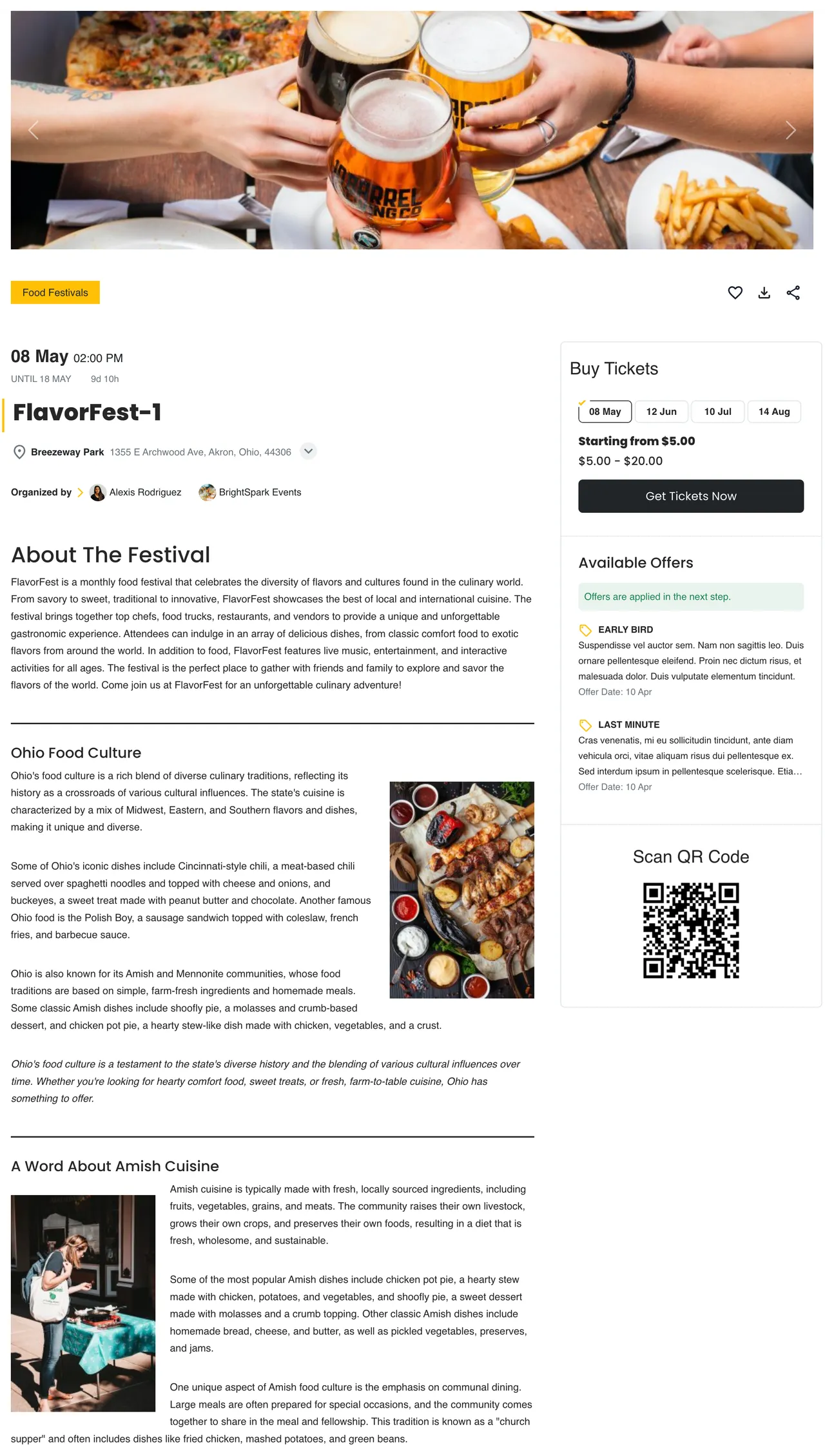
Sample Event - Frontend -
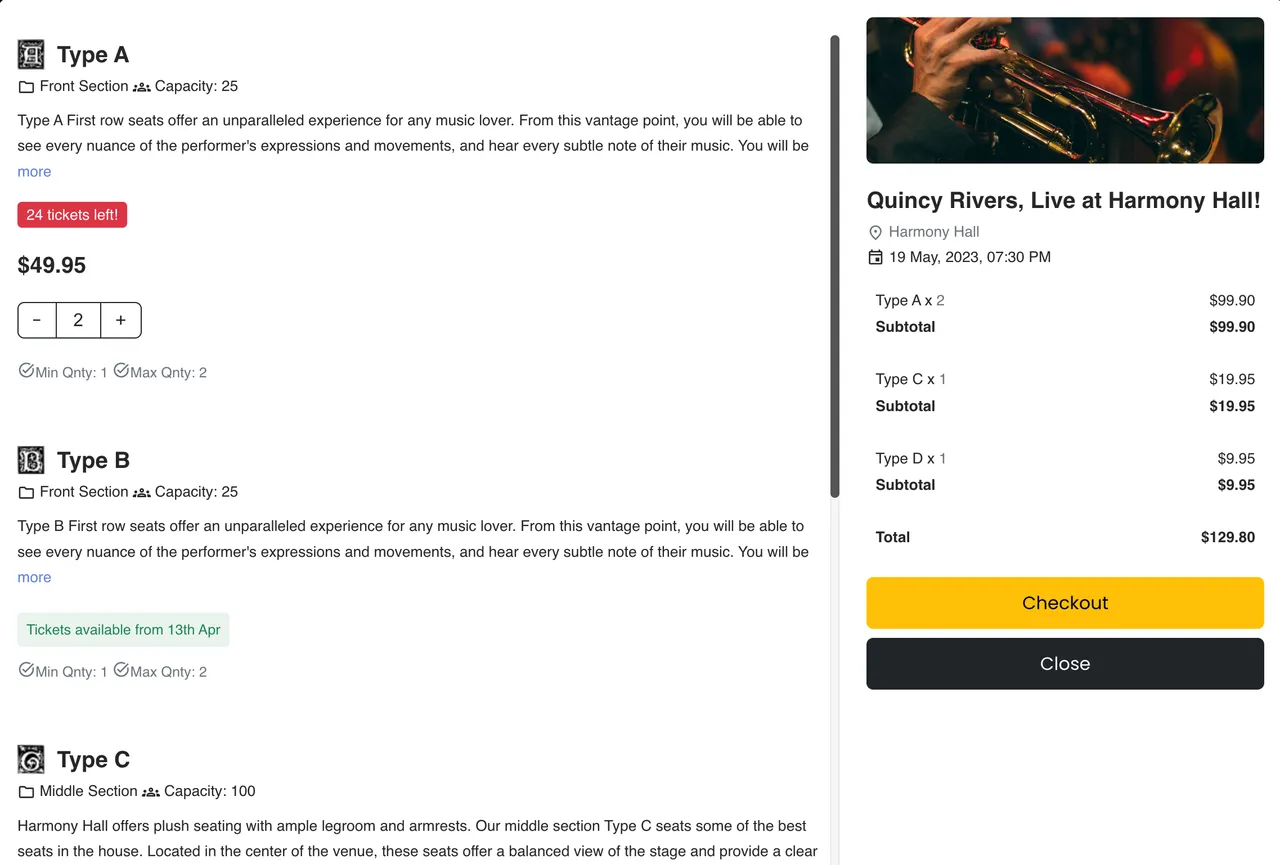
Ticket Selection Modal - Frontend -
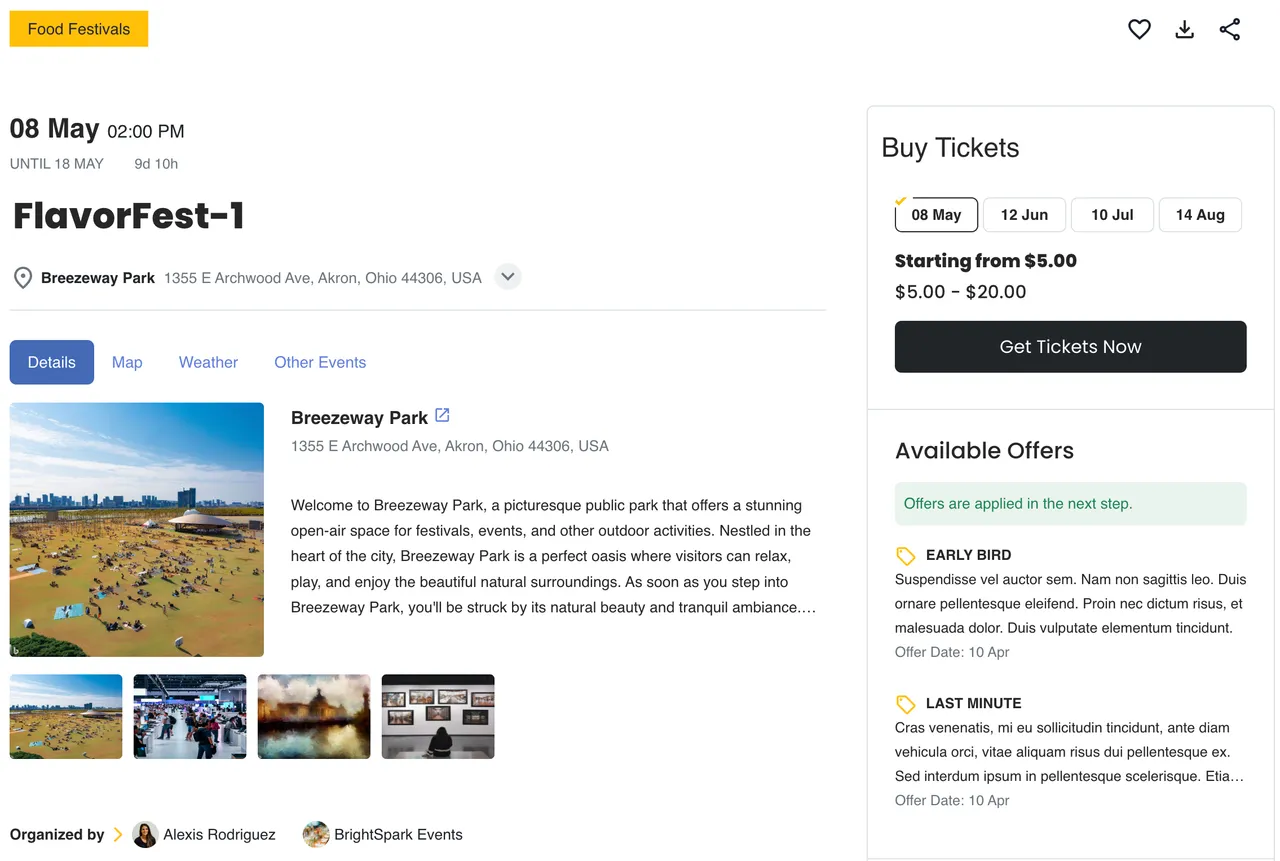
Venue Details on Event Page - Frontend -
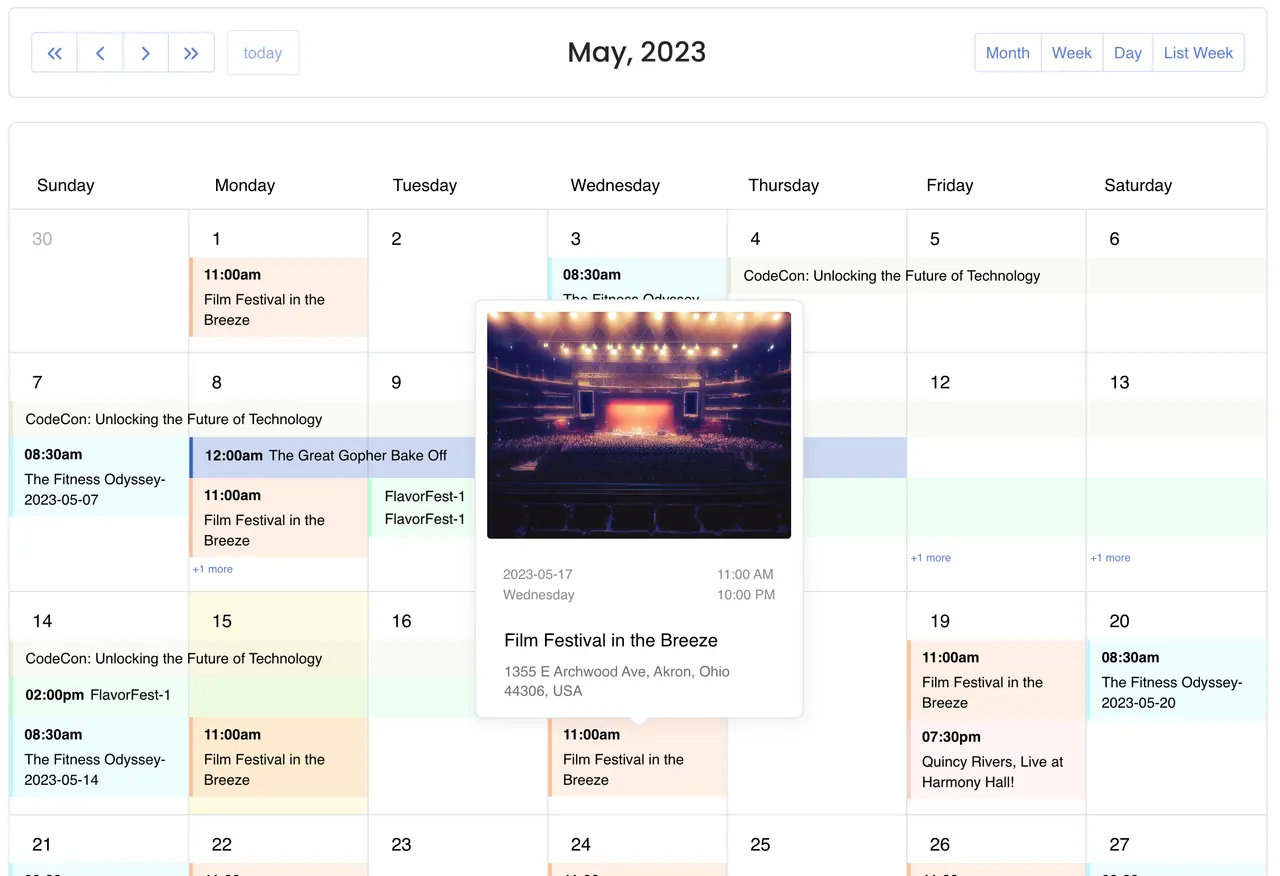
Events Calendar view with Popover - Frontend -
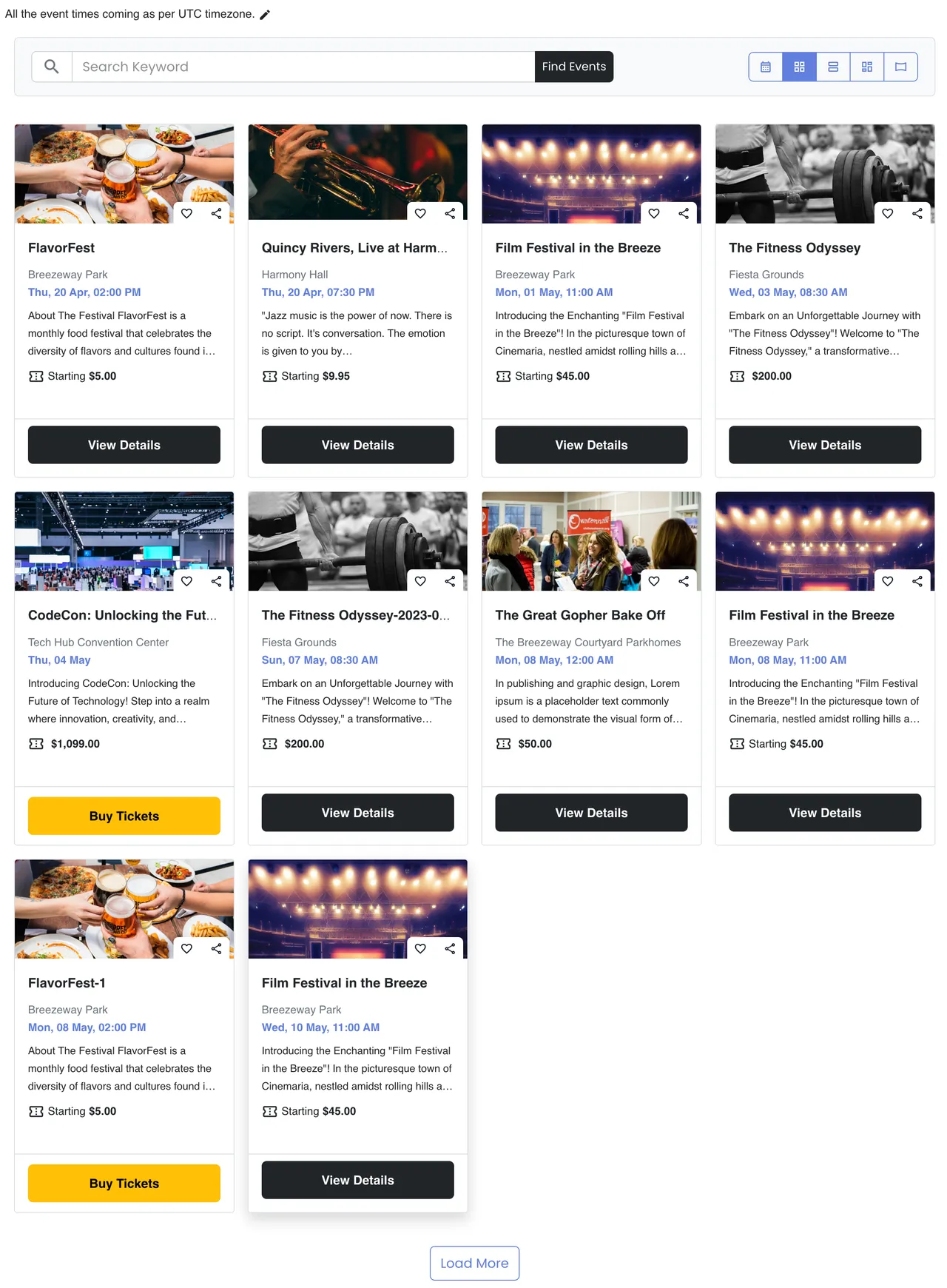
Events Listings (Grid View) - Frontend -
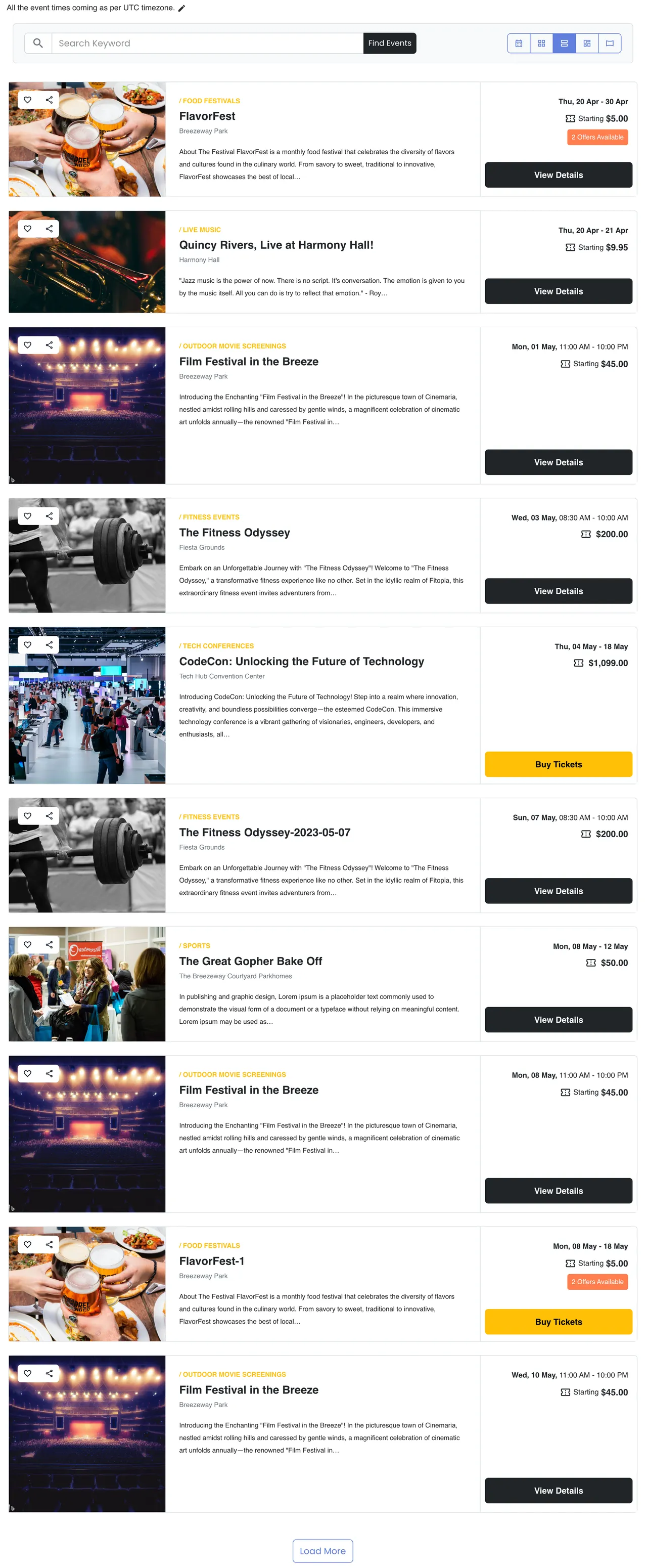
Events Listings (Stacked Rows) - Frontend -
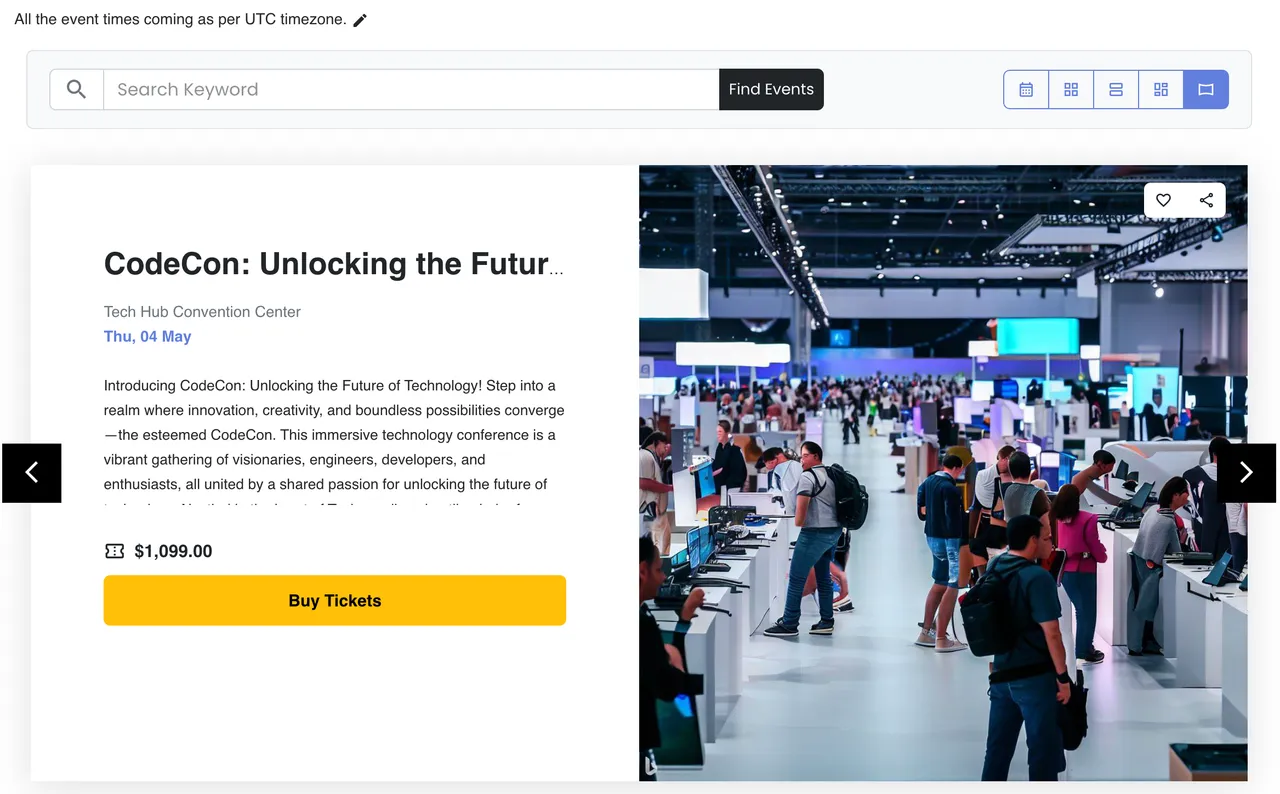
Events Listings (Slider View) - Frontend -
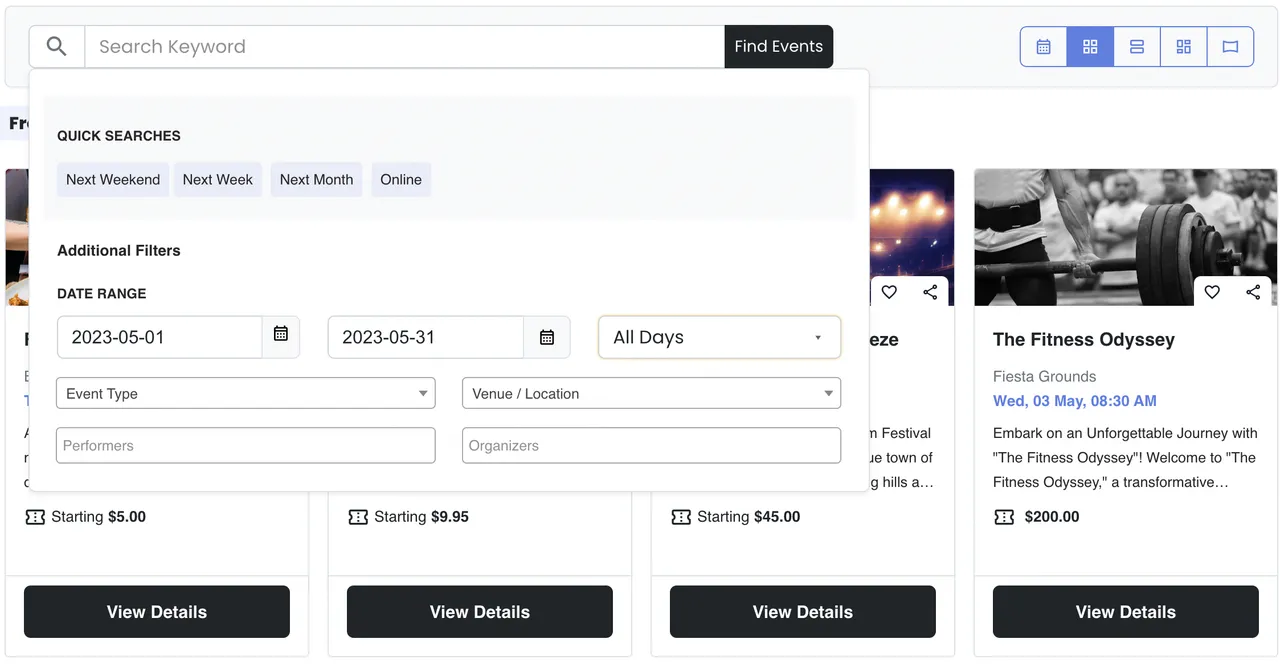
Events Listings Filter Popover - Frontend -
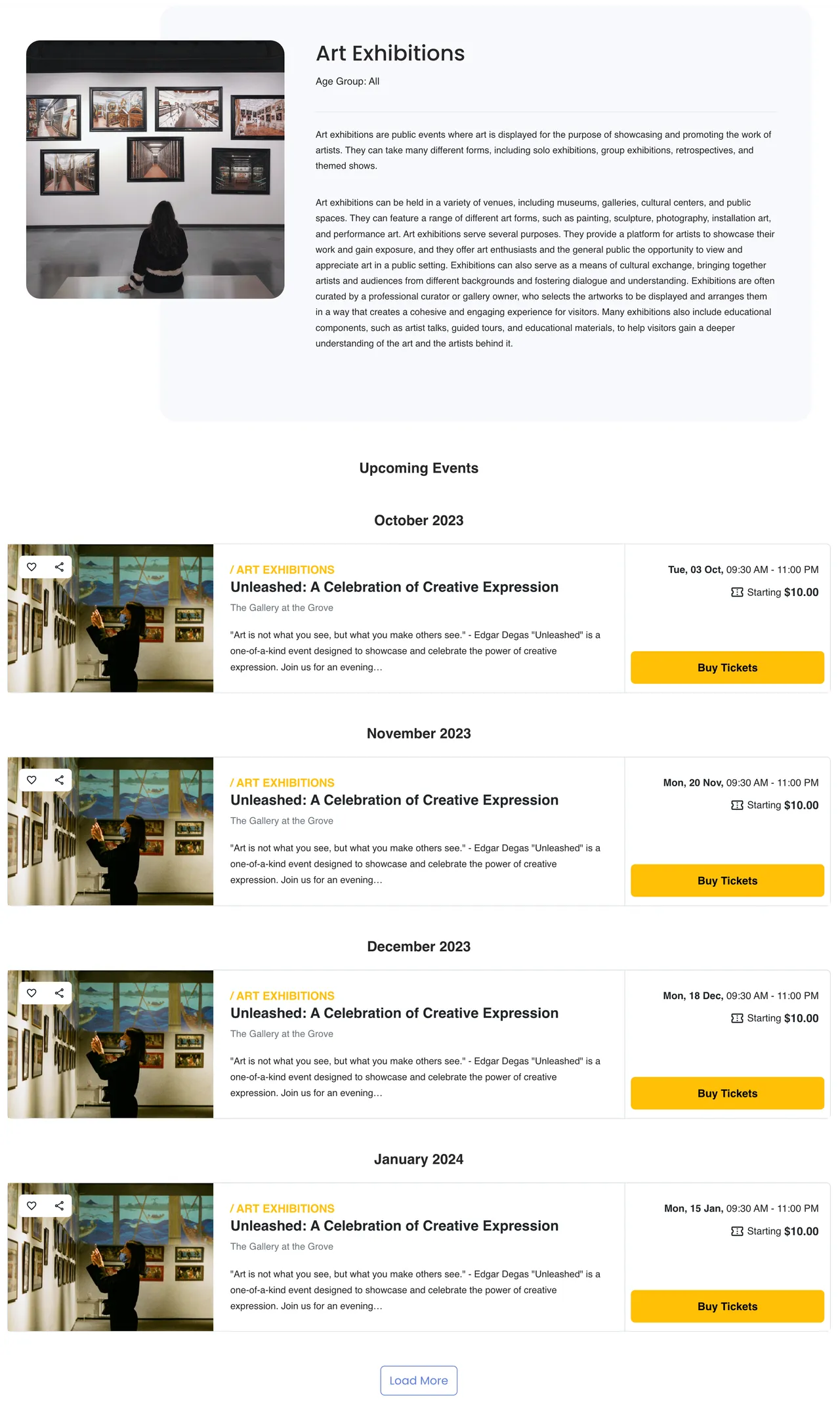
Event Type page with Upcoming Events - Frontend -
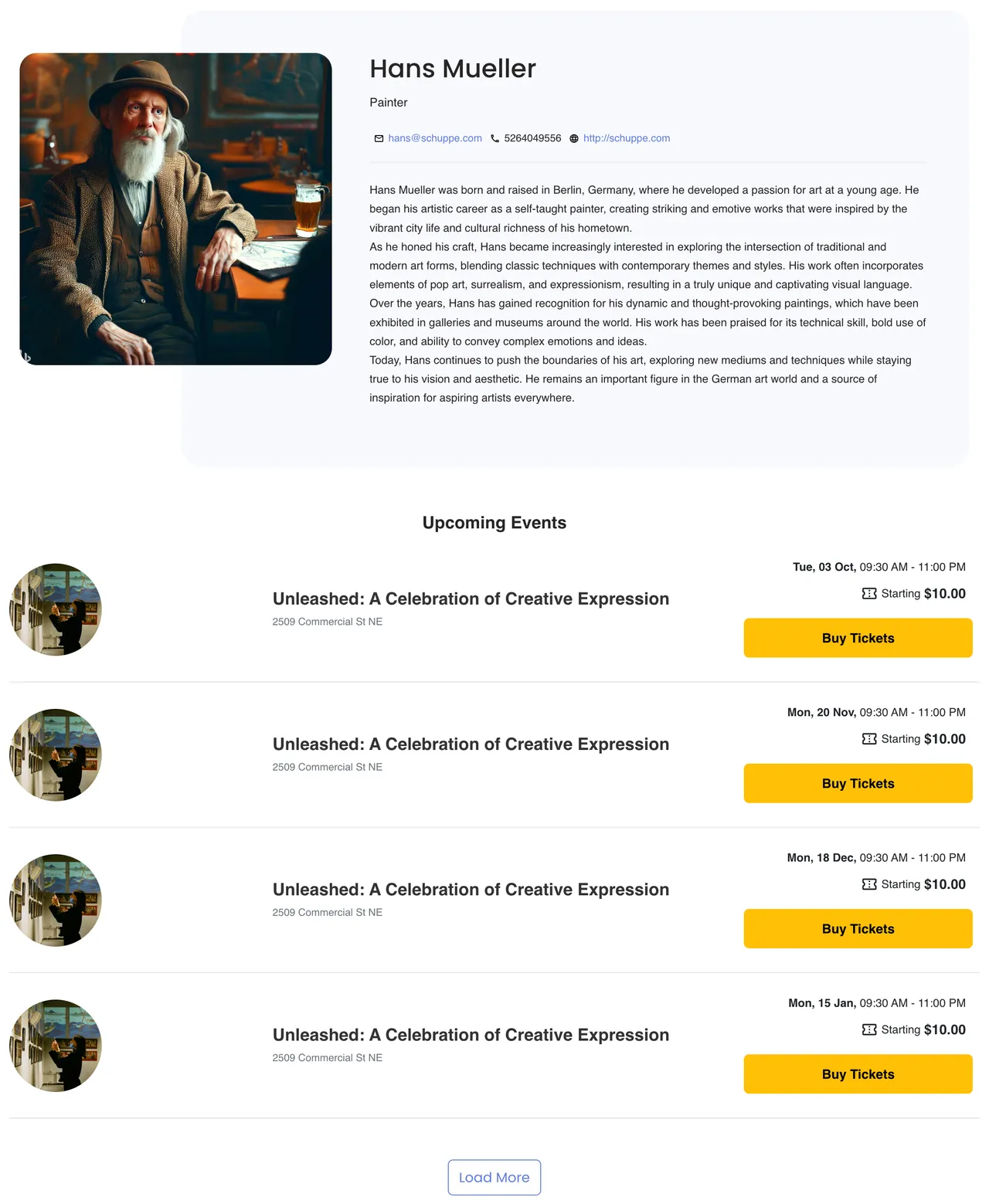
Performer page with Upcoming Events - Frontend -
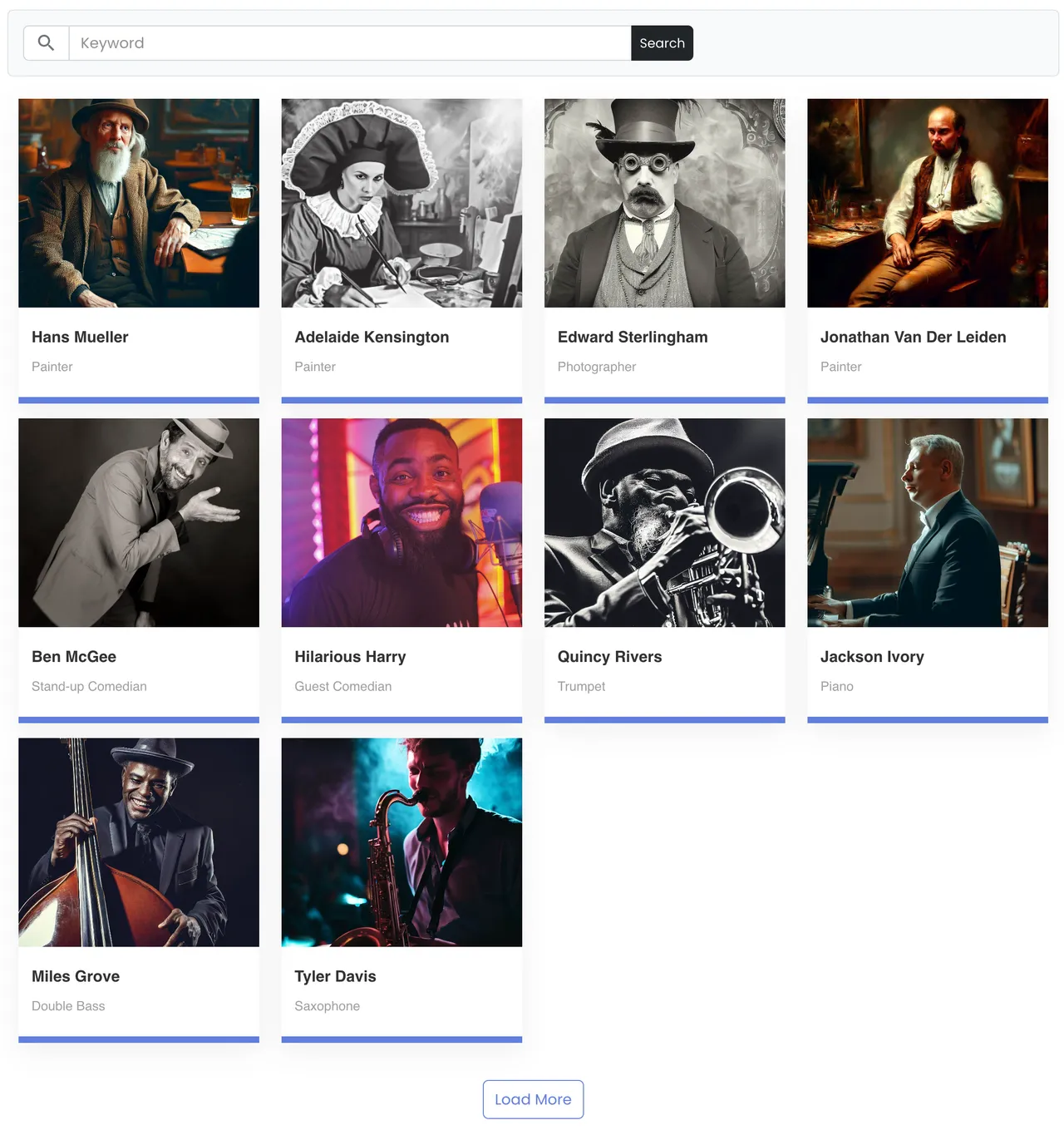
Performers Directory (Grid View) - Frontend -
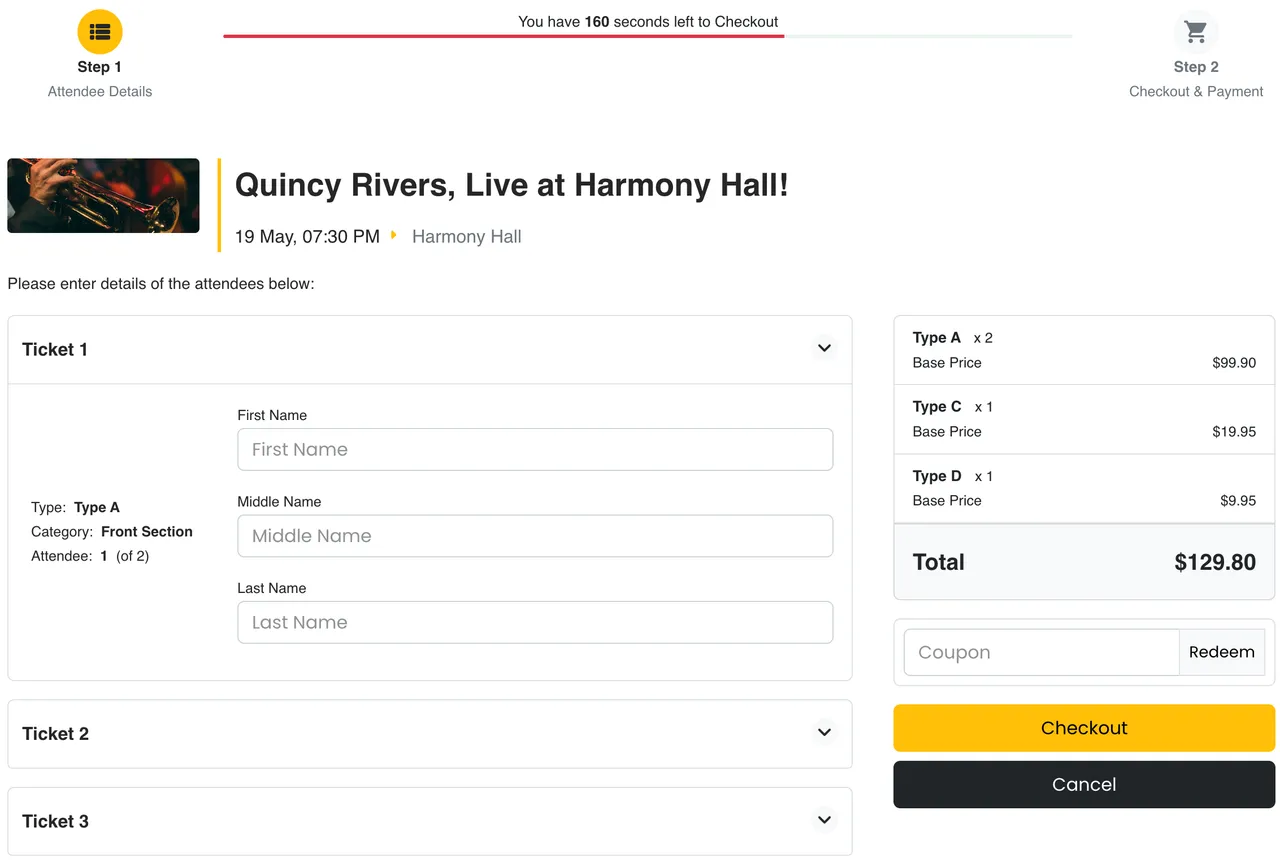
Checkout Step 1 (Attendee Fields) - Frontend
Important information
- Pretty URLs must be on in EventPrime settings, and permalinks must not be Plain, for single-event pages to use their own address. Without this, Elementor Pro single-event templates may not apply.
- AI agents can create events, book tickets and cancel bookings, so give them an account with only the permissions they need. Use the setting that turns the AI abilities off if you do not want them.
- The plugin lists WordPress 4.8 and PHP 7.2 as minimums, and is tested up to WordPress 7.1.4.
- EventPrime has 47 published vulnerabilities in total. The current status is patched, so keep it updated and review it before installing.
- Attendee lists and booking data contain personal information. Treat agent access with the same care as admin access.
From the EventPrime readme
Straight from the developer's WordPress.org listing.
Full description
EventPrime is an easy-to-use, modern, AI-ready WordPress Events Calendar plugin. With the EventPrime events plugin, you can publish new events on your website in a few simple clicks. Just pick a date on the Events Calendar in the WordPress Dashboard area, and start creating your event! Publish free, as well as paid events by enabling Bookings from EventPrime’s event settings.
EventPrime now supports the WordPress Abilities API, giving AI assistants and automation tools a structured way to view and manage your events, bookings, tickets, venues, and more, right from a conversation. EventPrime is an AI Agent compatible WordPress plugin: it connects to MCP-compatible AI agents like Claude, ChatGPT, Gemini, and Cursor for AI event management, creating events, checking ticket availability, or managing bookings, with the same permission rules that protect your site everywhere else. In short, it’s an AI events plugin for WordPress built to work the way your site already does.
Some of the top EventPrime features include:
• Supports multi-day and recurring events.
• Event Calendar features month, week, agenda and day views.
• Compact month calendar on phones, with event dots and a list for the selected day, and a setting to turn it on or off.
• Sticky Get Tickets shortcut on phones when using the default single-event ticket template, with a setting to turn it on or off.
• Accept payments for bookings via PayPal and Stripe.
• Re-check a Failed PayPal booking from the booking screen and complete it when PayPal confirms the payment.
• Export bookings and attendees to CSV, including attendee columns, coupon, tax and WooCommerce totals.
• Option to create multiple ticket types and categories for your events with in-built tickets creation module.
• Add entrance or cover charges along with per-ticket fees.
• Build offers based on different conditions.
• You can also create informative events without bookings.
• Events directories and listings with modern search tools for your visitors.
• Multi-user role-based or anonymous frontend event submissions.
• Event Types or Event Categories with attributes.
• Custom Presenters or Performers with photos and attributes.
• Bookings manager to manage bookings from dashboard.
• Custom user checkout fields.
• Multiple event views to fit your WordPress theme.
• Support for virtual and online events.
• Large number of fully customizable email templates.
• A variety of widgets suitable for all themes.
• Dedicated frontend user area for bookings management, wish-listing and downloading/ printing tickets.
• And much much more!
EventPrime also offers a wide selection of free and premium extensions for all your requirements.
For any issues, bugs, feature requests and general help, contact our awesome support!
Cheers, EventPrime Team
With our WordPress events plugin, you now have an advanced event management system to create and manage an event list the way you always wanted! No more difference between the dashboard WordPress event calendar and the calendar that is visible to your visitors on the front-end. The Event Calendar on the front-end will appear exactly the way you configure it from the dashboard area. Finally, a WordPress Events Calendar plugin which works effortlessly! Event management in WordPress was never this easy, thanks to the EventPrime events plugin.
EventPrime is a WordPress Events Calendar plugin that supports free event bookings, paid event bookings, single day events, multi-day events, event performers, event venues and locations, event gallery, event registration, event calendar widget and a lot more. Check out our Starter Guide to get up and running with this awesome event manager tool.
If you want more out of our new WordPress events plugin, do check out its Extensions. We have added Live Seating, Event Sponsors, Stripe Payments, Offline Payments, Event Coupon Codes, Invoices and a lot more planned for the future!
AI-Ready Event Management
Why click through the dashboard when you can just ask? EventPrime is built for AI-ready WordPress events: with EventPrime’s Abilities API support, your AI agent of choice becomes a real event manager for your site, one that can see what’s happening, take action, and get back to you, all inside your normal conversation. No new dashboard to learn, no separate app to open, and as WordPress’s own AI Builder tooling grows, EventPrime is designed to fit right alongside it, with WordPress AI Builder compatible events on the roadmap. Just tell your agent what you need:
• “What events do I have coming up in the next two weeks, and which ones are close to selling out?”
• “Create a new event called ‘Autumn Craft Fair’ running 10am to 4pm on the third Saturday of October.”
• “Someone emailed asking if there’s still room at Friday’s workshop. Check ticket availability and let me know.”
• “Book a ticket for jane@example.com to the Autumn Craft Fair and confirm it went through.”
• “Pull the attendee list for last week’s fundraiser so I can send a thank-you email.”
• “A few people can’t make the workshop anymore. Cancel bookings #482 and #491 for me.”
Every one of those happens through the same permission system that already protects your site: your agent can only do what your WordPress user account is allowed to do, nothing more. Actions that change data, or read bookings and attendee lists, also follow EventPrime’s REST Access Policies (Settings > API / Webhooks), and a single setting turns EventPrime’s AI abilities off if you don’t want them. It’s your event calendar, just one conversation away.
EventPrime Backend
Events Calendar View
• Fully editable modern events calendar view.
• Create or Edit Events directly from the Events Calendar plugin.
• Click on a date on the dashboard WordPress event calendar to open the Add Event popup form.
• Set Event Start and End Dates, All Day Event, Bookings Status, Booking Price, Event Type, Event Site, and Performer(s) from the Add Event Popup.
• View events on the WordPress calendar as colored bars spanning from the start date to the end date of the event.
• The color of the event is inherited from Event Type color, making it easy to quickly identify events of different types on your main calendar and WordPress calendar widget.
• Hover cursor above an existing event on the WordPress calendar to view its details in a quick popover.
• Drag and drop events from one date block to another in the WordPress event calendar to quickly change event dates.
• Click on an exiting event in the calendar to open the Edit Event popup, allowing you to edit event details on the fly.
• Click on the Dashboard link from the Event Details Pop-up to access Event Dashboard for complete event management toolkit. You’ll find all options associated with an event in the Event Dashboard for detailed event configuration.
• Change view of the Events Calendar to Month, Week, Day and Agenda.
• Additional events views include – Square Grid, Staggered Grid (Masonry), Stacked Rows and Event Sliders.
Event Settings
• From event settings, you can fine tune your event properties.
• Set event type for event categorization.
• Add a description to let your attendees know in detail what the event is about.
• Upload featured image for the event.
• Upload multiple images for the event gallery.
• Choose between option to host bookings on your own website or redirecting to an external bookings website or completely turning the bookings off.
• If bookings are enabled, you can set specific booking start and end dates with times.
• Enable or disable displaying the event booking status on the frontend.
• Allow or disallow booking cancellations.
• Hide or show the event on the event calendar widget.
• Hide or show the event on the frontend event calendar.
• Write a custom note on the event page to display to the event page visitors and attendees.
Advanced Events Settings
Apart from regular event settings, there are multiple advanced settings to make any type of event you can imagine! These include:
• Add additional event dates apart from start and end dates.
• Create ticket categories with each category capable of including multiple ticket types.
• Set capacity or inventory for your tickets.
• Create offers for each ticket type with pre-set conditions. Incentivize your sales with automated early-bird and last minute offers among other combinations.
• Set visibility of event tickets based on different conditions.
• Choose from a list of venues and locations for your event.
• Choose from a list of performers or key persons for your event like host, speakers etc.
• Choose from a list of organizers for your event.
• Set recurrence pattern for your event from the Repeat tab. Events can be repeated based on day, week, month, year or a custom pattern.
• Email – Setup booking confirmation email content and layout.
• Event Sponsors – Settings for adding event sponsorship. (Extension)
• Ticket Manager – Create custom tickets for your event. (Extension)
• Live Seating – Create seating plans for your event and charge for tickets based on seat location. (Extension)
• MailPoet – Settings to configure MailPoet newsletters with your event. (Extension)
Event Types Manager
• Create or Edit Event Types that you can then assign to Events.
• Set specific properties for your Event Types.
• Background and text color for child events as they appear on the WordPress event calendar and WordPress calendar widget.
• Define age group for the events of this type.
• Upload an image which represents the event type or category.
• Events in the Events Calendar will appear in the color of their assigned Event Type.
Event Type
Following properties can be currently set for each event type:
• Name of the Event Type.
• Description of the Event Type.
• Swatch or background color for titles of child events – also visible on the frontend calendar and WordPress calendar widget.
• Text Color for titles of child events – visible on the frontend calendar and WordPress calendar widget.
• Age group restrictions.
• Image or Logo.
Event Venues Manager
• Create or edit Event Venues or Locations which can be associated with various events.
• Event Venues have their own set of customizable properties.
• Sort Event Venues based on name, slug or number of child events.
Event Venues
Each Event Venue has following properties you can set:
• Name of the venue.
• Description of the venue.
• Address of the venue.
• Location latitude and longitude with Google Maps marker.
• Date established.
• Seating Type – Standing or Seating. Live Seating extension required for adding seat plans.
• Venue Operator or Coordinator.
• Facebook and Instagram pages of the venue.
• Images of the venue.
• Seating layout editor. Requires Live Seating Extension
Performers Manager
• Create or Edit Performers that you can then assign to Events.
• Performers have their own set of customizable properties.
• Sort Performers alphabetically.
Performers
Each Performer has following properties you can set:
• Type – Person or Group
• Name of the performer
• Role of the performer. For example, speaker, host, artist etc.
• Image of the performer.
• A separate Gallery of performer images.
• Description of the performer.
• Display in List – if you wish to hide or show Performer from EventPrime’s fronted Performers list view.
• Contact fields like Phone, Email and Website.
• Social media pages like Facebook, Instagram, LinkedIn, Twitter etc.
Organizers Manager
• Create or Edit Event Organizers which can be associated with events later.
• Event Organizers have their own set of customizable properties.
• Sort Organizers alphabetically or by number of events in which they appear.
Organizers
Each Event Organizer has following properties you can set:
• Name of the organizer.
• Phone number – multiple numbers supported.
• Email of the Organizer – multiple emails supported.
• Website – multiple website addresses supported.
• Description – details about the event organizer.
• Image of the organizer.
• Social Media pages of the organizers, like Facebook, Instagram, LinkedIn, Twitter etc.
Organizer details appear on the single event page on frontend.
Bookings Manager
• View a complete list of all bookings for all your events.
• Filter bookings by their events, booking time, and booking status.
• See a table of booking containing their booking ID, username, email, and number of attendees per booking ID, booking status and payment gateway used.
Bookings
• Edit individual booking details and also add notes for an attendee which the attendee can see on his/her event booking page.
• Download booking details of attendees in PDF format.
• Send notification emails to attendees.
• Access the transaction log for an attendee’s booking.
• Add multiple notes to any booking.
Email Attendees
A built-in emailing system to quickly send emails to specific attendees or all attendees from a specific event.
• Manually enter attendee email addresses or load from a specific event.
• Customize email subject.
• Customize email content.
Reports
• Filter bookings by custom time period. Pre-sets include, Today, Yesterday, Last 7 Days, Last 30 Days, This Month and Last Month.
• Bird’s eye view of the gross sales, average sales, Number of Bookings, Tickets Sold and Coupons Used.
Settings
Settings page allows granular EventPrime configuration. It has multiple tabs which organize related options together. These are:
General
This tab has all the basic settings for EventPrime.
• Hide or show past events from events directory or WordPress calendar.
• Default WordPress calendar view.
• Select available view option for site visitors.
• Define number of events on fronted card and masonry views.
• Hide frontend event filters on events directory and WordPress calendar.
• Hide past event bookings from admin area bookings page.
• Select time format.
• Select a date to display as default selected date on frontend calendar.
• Frontend calendar title format.
• Frontend calendar columns header format.
• Hide upcoming events from event, event types, event site and performer pages.
• Make attendee names mandatory on bookings page.
• Hide price for free events.
• Select format for date picker tool.
• Hide custom links from event pages for logged out users.
• Display QR code on event tickets.
• Hide event time from calendar view.
Email Notifications
Here you can modify layout and content of different emails sent out from EventPrime. You can also turn them on or off individually.
* User registration email
* Booking pending email
* Booking confirmation email
* Booking cancellation email
* Reset password email
* Booking refund email
* Frontend user event submission email
* Frontend user event submission approval email
* Disable all admin emails
* Disable all frontend emails
Payments
• Turn on and configure Stripe payment gateway.
• Turn on and configure PayPal payment gateway.
• Turn on and configure offline payment system.
• Select your default …
Installation
• Download the plugin zip.
• Open your WordPress Dashboard and access the ‘Plugins’ menu tab.
• Click on the ‘Upload Plugin’ button and enter path of the plugin zip that you downloaded. You can also drag & drop the file to the ‘Upload Plugin’ button.
• Click on the ‘Activate Plugin’ button.
Developer FAQ (4)
- How can I get started with EventPrime?
- Check out our Starter Guide to get up and running with EventPrime.
- I found a bug in EventPrime. How should I report it to you?
- That’s easy. Just write to us at our Contact page and our support team will get in touch with you in a matter of minutes.
- I like EventPrime, but it doesn’t have some of the features I really require. How can I get them?
- We are always happy to hear your particular needs and requirements. Similar to reporting a bug, just write to us at our Contact page. Our support team will contact you right away.
- Elementor Pro Theme Builder single-event templates do not apply to my events. What should I check?
- EventPrime shows an event on its own address (/event/event-name/) only when “Enable Pretty URLs” is turned on in EventPrime > Settings > General > SEO and WordPress Settings > Permalinks is not set to Plain. Otherwise event links use your Events page, and Elementor Pro Theme Builder display conditions for single events may not apply. Turn the setting on, save your permalinks, and test the event again.
Downloads, last 30 days
Trend vs previous period: +36.6%
Average daily downloads: 968 over the last 7 days , 721 over 30 days.
Security history
Past CVEs, patched · 47 published vulnerabilities (Wordfence) · most recent Nov 4, 2026
- Patched 6.4 Medium EventPrime - Events Calendar, Bookings and Tickets <= 4.3.2.1 - Authenticated (Subscriber+) Stored Cross-Site Scripting CVE-2026-42686 · May 24, 2026 · affects *-4.3.2.1 · fixed in 4.3.2.2
- Patched 5.3 Medium EventPrime - Events Calendar, Bookings and Tickets <= 4.2.6.0 - Missing Authorization CVE-2025-69358 · Mar 10, 2026 · affects *-4.2.6.0 · fixed in 4.2.7.0
- Patched 6.1 Medium EventPrime <= 3.0.5 - Reflected Cross-Site Scripting CVE-2023-35884 · May 22, 2023 · affects *-3.0.5 · fixed in 3.0.6
- Patched 4.3 Medium EventPrime <= 4.2.8.4 - Missing Authorization to Authenticated (Subscriber+) Arbitrary Event Modification via 'event_id' Parameter CVE-2026-1655 · Feb 18, 2026 · affects *-4.2.8.4 · fixed in 4.2.8.5
- Patched 5.3 Medium EventPrime <= 3.3.9 - Improper Input Validation via save_event_booking CVE-2024-24832 · Feb 2, 2024 · affects *-3.3.9 · fixed in 3.4.0
- Patched 6.1 Medium EventPrime - Modern Events Calendar, Bookings and Tickets <= 4.0.4.7 - Unauthenticated Stored Cross-Site Scripting via Transaction Log CVE-2024-9865 · Oct 23, 2024 · affects *-4.0.4.7 · fixed in 4.0.4.8
- Patched 5.3 Medium EventPrime <= 2.8.6 - Sensitive Information Exposure CVE-2023-33321 · May 22, 2023 · affects *-2.8.6 · fixed in 3.0.0
- Patched 6.1 Medium EventPrime <= 2.8.6 - Reflected Cross-Site Scripting CVE-2023-33326 · May 22, 2023 · affects *-2.8.6 · fixed in 3.0.0
Show all 47 vulnerabilities
- Patched 7.2 High EventPrime <= 4.3.4.2 - Unauthenticated Stored Cross-Site Scripting via 'new_event_type_background_color' Parameter CVE-2026-13441 · Jul 8, 2026 · affects *-4.3.4.2 · fixed in 4.3.4.3
- Patched 4.3 Medium EventPrime - Events Calendar, Bookings and Tickets <= 4.0.7.3 - Missing Authorization to Authenticated (Subscriber+) Event Attendees Export CVE-2024-13526 · Mar 6, 2025 · affects *-4.0.7.3 · fixed in 4.0.7.4
- Patched 4.3 Medium EventPrime - Events Calendar, Bookings and Tickets <= 3.4.1 - Missing Authorization to Authenticated (Subscriber+) Arbitrary Email Sending CVE-2024-1124 · Mar 8, 2024 · affects *-3.4.3 · fixed in 3.4.4
- Patched 6.5 Medium EventPrime - Events Calendar, Bookings and Tickets <= 3.4.2 - Missing Authorization to Arbitrary Post Overwrite CVE-2024-1123 · Mar 8, 2024 · affects *-3.4.2 · fixed in 3.4.3
- Patched 6.1 Medium EventPrime <= 4.0.4.5 - Open Redirect CVE-2024-47648 · Sep 30, 2024 · affects *-4.0.4.5 · fixed in 4.0.4.6
- Patched 6.1 Medium EventPrime <= 3.1.5 - Reflected Cross-Site Scripting via 'event_id' CVE-2023-45637 · Oct 11, 2023 · affects *-3.1.5 · fixed in 3.1.6
- Patched 4.3 Medium EventPrime - Events Calendar, Bookings and Tickets <= 3.4.1 - Missing Authorization to Authenticated (Subscriber+) Event Export CVE-2024-1127 · Feb 14, 2024 · affects *-3.4.1 · fixed in 3.4.2
- Patched 4.3 Medium EventPrime - Events Calendar, Bookings, Tickets & AI <= 4.3.6.0 - Missing Authorization CVE-2026-42691 · Oct 29, 2026 · affects *-4.3.6.0 · fixed in 4.3.6.1
- Patched 5.3 Medium EventPrime <= 4.2.8.4 - Missing Authorization to Unauthenticated Image Upload via 'ep_upload_file_media' AJAX Endpoint CVE-2026-1657 · Feb 17, 2026 · affects *-4.2.8.4 · fixed in 4.2.8.5
- Patched 5.3 Medium EventPrime - Events Calendar, Bookings and Tickets <= 4.2.7.0 - Unauthenticated Sensitive Information Exposure via REST API CVE-2025-14507 · Jan 12, 2026 · affects *-4.2.7.0 · fixed in 4.2.8.0
- Patched 6.4 Medium EventPrime - Modern Events Calendar, Bookings and Tickets <= 3.3.2 - Authenticated(Contributor+) Stored Cross-Site Scripting via Shortcode Nov 21, 2023 · affects *-3.3.2 · fixed in 3.3.3
- Patched 5.3 Medium EventPrime <= 3.3.5 - Missing Authorization to Private Event Disclosure CVE-2023-6447 · Dec 29, 2023 · affects *-3.3.5 · fixed in 3.3.6
- Patched 5.3 Medium EventPrime <= 4.0.3.2 - Missing Authorization via calendar_event_create() CVE-2024-43223 · Aug 9, 2024 · affects *-4.0.3.2 · fixed in 4.0.4.0
- Patched 5.3 Medium EventPrime - Events Calendar, Bookings and Tickets <= 3.4.2 - Unauthenticated Booking Payment Bypass CVE-2024-1321 · Mar 8, 2024 · affects *-3.4.2 · fixed in 3.4.3
- Patched 6.1 Medium EventPrime < 3.2.0 - Reflected Cross-Site Scripting via keyword and ep_filter_date CVE-2023-4250 · Oct 9, 2023 · affects [*, 3.2.0) · fixed in 3.2.0
- Patched 4.3 Medium EventPrime - Events Calendar, Bookings and Tickets <= 4.3.0.0 - Authenticated (Subscriber+) Insecure Direct Object Reference CVE-2026-39518 · Apr 20, 2026 · affects *-4.3.0.0 · fixed in 4.3.0.1
- Patched 4.3 Medium EventPrime <= 4.2.4.1 - Authenticated (Subscriber+) Information Exposure CVE-2025-63007 · Nov 6, 2025 · affects *-4.2.4.1 · fixed in 4.2.5.0
- Patched 5.3 Medium EventPrime <= 4.2.8.0 - Missing Authorization CVE-2026-24380 · Jan 28, 2026 · affects *-4.2.8.0 · fixed in 4.2.8.1
- Patched 5.3 Medium EventPrime <= 4.2.8.3 - Unauthenticated Information Exposure CVE-2026-25389 · Feb 20, 2026 · affects *-4.2.8.3 · fixed in 4.2.8.4
- Patched 6.5 Medium EventPrime - Events Calendar, Bookings and Tickets <= 3.4.3 - Unauthenticated Stored Cross-Site Scripting CVE-2024-1320 · Mar 8, 2024 · affects *-3.4.3 · fixed in 3.4.4
- Patched 5.3 Medium EventPrime <= 4.2.4.1 - Missing Authorization CVE-2025-63006 · Nov 6, 2025 · affects *-4.2.4.1 · fixed in 4.2.5.0
- Patched 4.3 Medium EventPrime - Events Calendar, Bookings and Tickets <= 3.5.0 - Insecure Direct Object Reference to (Subscriber+) Arbitrary Booking Update CVE-2024-4665 · Oct 29, 2024 · affects *-3.4.9 · fixed in 3.5.0
- Patched 5.3 Medium EventPrime <= 3.3.4 - Missing Authorization to Booking Price Maniputlation CVE-2024-31275 · Apr 5, 2024 · affects *-3.3.4 · fixed in 3.3.5
- Patched 5.3 Medium EventPrime <= 4.0.4.3 - Missing Authorization to Unauthenticated Private or Password-Protected Events Disclosure CVE-2024-8369 · Sep 9, 2024 · affects *-4.0.4.3 · fixed in 4.0.4.4
- Patched 5.3 Medium EventPrime <= 3.3.2 - Improper Server-Side Checks to Booking Payment Bypass CVE-2023-4252 · Oct 30, 2023 · affects *-3.3.2 · fixed in 3.3.3
- Patched 5.3 Medium EventPrime - Events Calendar, Bookings and Tickets <= 4.3.2.0 - Missing Authorization CVE-2026-42669 · May 12, 2026 · affects *-4.3.2.0 · fixed in 4.3.2.1
- Patched 7.2 High EventPrime - Events Calendar, Bookings and Tickets <= 4.0.7.3 - Unauthenticated Stored Cross-Site Scripting via Ticket Category and Ticket Type Name CVE-2024-12024 · Dec 17, 2024 · affects *-4.0.7.3 · fixed in 4.0.7.4
- Patched 7.5 High EventPrime - Events Calendar, Bookings and Tickets <= 4.3.4.1 - Authenticated (Subscriber+) PHP Object Injection CVE-2026-56053 · Jun 25, 2026 · affects *-4.3.4.1 · fixed in 4.3.4.2
- Patched 5.5 Medium EventPrime <= 3.3.9 - Authenticated (Administrator+) Stored Cross-Site Scripting CVE-2024-29776 · Mar 25, 2024 · affects *-3.3.9 · fixed in 3.4.0
- Patched 5.4 Medium EventPrime - Events Calendar, Bookings and Tickets <= 3.4.3 - Missing Authorization to Authenticated (Subscriber+) Arbitrary Post Deletion CVE-2024-1125 · Mar 8, 2024 · affects *-3.4.3 · fixed in 3.4.4
- Patched 5.3 Medium EventPrime - Events Calendar, Bookings, Tickets & AI < 4.3.6.1 - Missing Authorization CVE-2026-118523 · Nov 4, 2026 · affects [*, 4.3.6.1) · fixed in 4.3.6.1
- Patched 6.1 Medium EventPrime - Modern Events Calendar, Bookings and Tickets <= 4.0.4.7 - Unauthenticated Stored Cross-Site Scripting CVE-2024-9864 · Oct 23, 2024 · affects *-4.0.4.7 · fixed in 4.0.4.8
- Patched 5.3 Medium EventPrime - Events Calendar, Bookings and Tickets <= 4.2.8.3 - Missing Authorization CVE-2026-25312 · Mar 18, 2026 · affects *-4.2.8.3 · fixed in 4.2.8.4
- Patched 8.1 High EventPrime - Events Calendar, Bookings and Tickets <= 4.2.8.0 - Unauthenticated PHP Object Injection CVE-2026-24378 · Mar 17, 2026 · affects *-4.2.8.0 · fixed in 4.2.8.1
- Patched 4.3 Medium EventPrime - Events Calendar, Bookings and Tickets <= 3.4.2 - Missing Authorization to Authenticated (Subscriber+) Attendee List Retrieval CVE-2024-1126 · Feb 14, 2024 · affects *-3.4.2 · fixed in 3.4.3
- Patched 4.3 Medium EventPrime - Events Calendar, Bookings and Tickets <= 4.2.0.0 - Missing Authorization to Authenticated (Subscriber+) Booking Note Creation CVE-2025-12498 · Nov 7, 2025 · affects *-4.2.0.0 · fixed in 4.2.0.1
- Patched 8.1 High EventPrime - Events Calendar, Bookings and Tickets <= 4.3.2.1 - Unauthenticated PHP Object Injection CVE-2026-42687 · May 25, 2026 · affects *-4.3.2.1 · fixed in 4.3.2.2
- Patched 4.3 Medium EventPrime < 3.2.0 - Cross-Site Request Forgery CVE-2023-4251 · Oct 9, 2023 · affects [*, 3.2.0) · fixed in 3.2.0
- Patched 4.3 Medium EventPrime < 3.2.0 - Reflected HTML Content Injection CVE-2023-5238 · Oct 9, 2023 · affects [*, 3.2.0) · fixed in 3.2.0
Recent releases
- v3.3.5
Updated: Ratings and Reviews extension icon. * Added: Security update. * Fixed: Authorization issue for private or protected events. * Fixed: Authorization issue for private or protected...
- v3.3.4
New Extension: Ratings and Reviews. * Fixed: Helptext alignment issue. * Fixed: Issue with free events booking. * Updated: License changes.
- v3.3.3
Fixed: Vulnerability issues. * Fixed: Issue while utilizing RegistrationMagic forms. * Fixed: Translation issues. * Fixed: Issue with ticket type options. * Fixed: Minimum tickets per order...
- v3.3.2
Fixed: Display problem with Event-Types under the Event Calendar when utilizing shortcodes. * Fixed: The placeholders display issue in the search results. * Fixed: Problem with the default image...
- v3.3.1
Fixed: Issue with payment mismatch.
Show 10 older releases
- v3.3.0
Fixed: Compatibility with PHP versions 8.1 and 8.2 * Fixed: Checkout page issue with EventPrime WooCommerce Checkout extension. * Fixed: Wrong display on the frontend for Multi-day Events. *...
- v3.2.9
Fixed: Issue with Yoast SEO Plugin.
- v3.2.8
New Feature: Event listing block. * Fixed: Minor improvements to help-texts. * Fixed: Updated default image. * Updated: Attendees List Extension. * Updated: Events Tickets Extension. * Updated:...
- v3.2.7
New Feature: Login form block. * New Feature: Registration form block. * Fixed: Issue with ordering of the recurring events. * Fixed: Duplicate events not displaying on the frontend. * Fixed:...
- v3.2.6
Fixed: Upcoming events sorting issue on the frontend views. * Fixed: Offers visibility issue in the event rows view. * Fixed: Ticket booking date & time issue on the event views. * Fixed: An issue...
- v3.2.5
Fixed an issue with blocks where extra js and css files were enqueued on the frontend.
- v3.2.4
UI improvements.
- v3.2.3
Added: Option to use multiple event ids with the id argument in the [em_events] short code. * Added: Option show/hide the 'Add Event' button in the User Profile's My Event tab. * Added: Option to...
- v3.2.2
New Extension: RSVP! * New Extension: WooCommerce Checkout! * Added: Option to set custom Admin recipient email address. * Added: Option to change the sender's email address. * Added: Option to...
- v3.2.1
Added: Option to change the label of Offline Payments. * Updated: Offline Payments Extension. * Minor UI improvements.
EventPrime FAQ
How do I get started?
Install and activate the plugin, then open the events calendar in the dashboard and click a date to add an event. The vendor also provides a starter guide.
Why do Elementor single-event templates not apply?
Events get their own address only if Enable Pretty URLs is on in the EventPrime settings and WordPress permalinks are not set to Plain. Turn it on, save your permalinks and test the event again.
Can an AI agent manage events?
Yes, through the WordPress Abilities API. Compatible agents can list and create events, check availability, book tickets and manage bookings. They only do what your WordPress user account may do.
Can I turn off the AI abilities?
Yes. A single setting turns EventPrime's AI abilities off. Data-changing actions and booking reads also follow the REST access policies in the settings.
Can I sell tickets?
Yes. Enable bookings on an event, create ticket types and take payments through PayPal and Stripe. You can also run free events or events without bookings.
Where do I report a bug or request a feature?
Contact the EventPrime support team through the contact page on their website.
EventPrime alternatives

Live Demo | Add-ons | Assets | Documentation | Code Snippets GamiPress is the easiest way to gamify your WordPress website in just a few minutes, letting you award your users with digital rewards for interacting with…

Better Messages is the most feature-rich realtime private messaging system for WordPress , with native integrations for BuddyPress, BuddyBoss Platform, Ultimate Member, PeepSo and any other WordPress powered…

Visualizer: Tables and Charts Manager for WordPress is a powerful and easy to use plugin used to create, manage and embed interactive, responsive charts & tables into your WordPress posts and pages. The plugin…

Smart Search, Replace & Media Tool (with AI) for WordPress Better Find and Replace lets you easily search and replace text, HTML, links and media across your entire WordPress site - no coding needed. Perfect for…

👉 See what users are saying about Directorist ⭐⭐⭐⭐⭐ I’ve been using Directorist for my directory website for over a year now, and I can honestly say it’s one of the most reliable and feature-rich directory plugins…

Any map. One prompt. Describe the map you want. MapSVG AI helps you build and configure it directly in WordPress: connect your data, place it on the map, arrange the layout and set the styling. See the actual result…
Listing data from WordPress.org and the Wordfence vulnerability feed, refreshed Nov 9, 2026; listing details fetched Nov 14, 2026. Screenshots are from the plugin's WordPress.org listing. Not affiliated with Metagauss.