
Geeky Bot
Geeky Bot - AI Chatbot & Sales Assistant for WooCommerce · by GeekyBot
- active installs
- 6K+
- 4 ratings
- 5.0
- since last update
- 18d
- releases in 12 months
- —
- support threads resolved
- 0%
- avg daily downloads
- 352
- on WordPress.org
- 2.2 years
Geeky Bot at a glance
Geeky Bot is a freemium WordPress AI chatbot plugin by GeekyBot with 6K+ active installs and a 5.0/5 rating from 4 reviews. It was last updated on Oct 22, 2026, is tested up to WordPress 7.1.4 and needs PHP 7.4+. All 8 of its published vulnerabilities have patched versions. Our quality score is 76/100.
What is Geeky Bot?
Geeky Bot is a shopping assistant chatbot for WooCommerce stores. Shoppers type questions in everyday language, and it searches your visible products, remembers the conversation and answers from your product data and the policy pages you approve. It is built for selling, not as a general website chatbot.
It is aimed at store owners who want shoppers to find products and get answers without waiting for staff. A guided setup builds a product index, selects policy pages and tests the widget with questions made from your own catalog. When information is missing, the bot says so instead of guessing.
Core search and answers can run locally without sending questions to an AI service. Zywrap and OpenAI are optional, and they only receive shopper questions if you select and configure them. Cart and checkout actions, comparisons and order help belong to the paid Commerce Pro add-on.
Best for
- WooCommerce stores with large catalogs
- Owners who want product Q and A without an AI vendor
- Shops that need policy questions answered from approved pages
- Multilingual stores using WPML or Polylang
Our take
An all-in-one AI copilot/chatbot with WooCommerce lead tools. Very new with few reviews, so treat the 100% rating as early signal, not a verdict.
Geeky Bot features
Natural product search
Shoppers search by name, category, price, color, size, stock, sale status or use case. It handles follow-ups, synonyms and spelling mistakes.
Grounded product answers
Answers come from your descriptions, attributes, variations, prices and stock. If data is missing, it says so.
Recommendations
Suggests suitable products and explains why. If nothing matches exactly, it shows labeled close matches or a constraint to relax.
Approved policy answers
You choose which published pages it may use for shipping, returns, warranty and similar questions. It does not crawl other pages.
Storefront chat widget
A floating widget with product cards, suggested questions and a timed invitation. History persists in the browser.
Guided setup and demo
The wizard checks WooCommerce, builds the index and verifies readiness. Guided Demo creates test questions from your products.
Conversation review
Review chats, group unanswered questions, see products opened from chat and export to CSV.
Privacy tools
Set retention, delete stored conversations and use the WordPress personal-data export and erasure tools.
Optional AI services
Connect OpenAI or Zywrap for AI-written answers. API keys are not exposed to storefront scripts.
Multilingual and multisite
Takes the shopper language from WPML or Polylang when active, and runs per site on a multisite network.
Geeky Bot free vs pro
Free WordPress.org version
- Product discovery, grounded product and policy answers and recommendations
- Product cards and the storefront chat widget
- Conversation review and basic insights
- Local mode with no external AI needed
- Optional OpenAI or Zywrap connection
Pro Paid version
- Geeky Bot Commerce Pro adds variation selection
- Cart and checkout actions and order help
- Product comparison and advanced recommendations
- Sales-intent analytics
A paid add-on, Geeky Bot Commerce Pro, exists but the listing gives no prices. AI features are optional, and if you connect OpenAI or Zywrap you supply your own account, and that provider bills the usage.
How to use Geeky Bot
- Install with WooCommerce active
WooCommerce is needed for product discovery. In wp-admin go to Plugins → Add New, search for Geeky Bot, then install and activate.
- Open the Setup Wizard
Go to Geeky Bot → Setup Wizard. It checks WooCommerce and builds the product index.
- Pick policy pages
Select the public pages the bot may use for shipping, returns and other policy questions.
- Review settings
Check the widget, privacy, retention and optional AI provider settings.
- Test and go live
Run Guided Demo to try questions generated from your catalog. Clear caches before final storefront testing.
Geeky Bot screenshots (6)
-
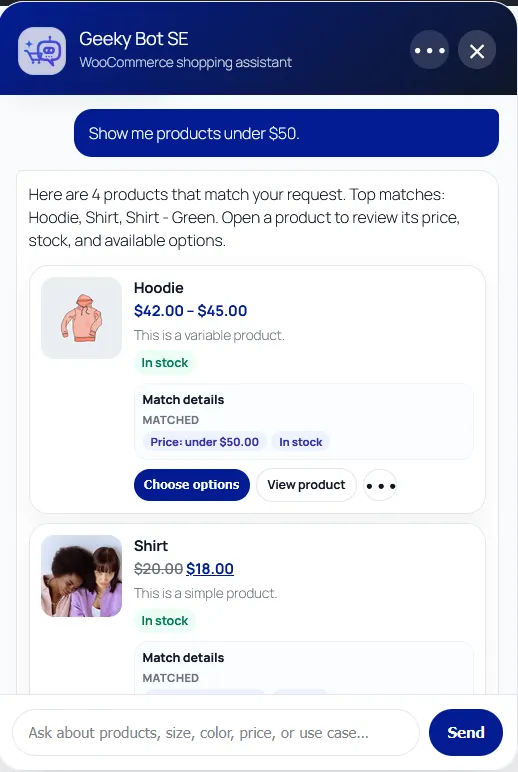
Natural product discovery by budget, with grounded prices, stock, match details, and product cards. Commerce Pro variation selection is shown. -
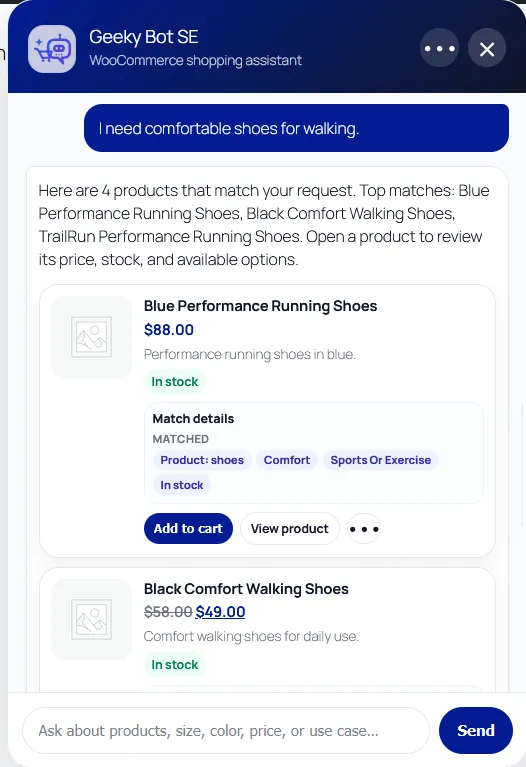
Need-based recommendations explain why products match the shopper's request. Commerce Pro add-to-cart actions are shown. -
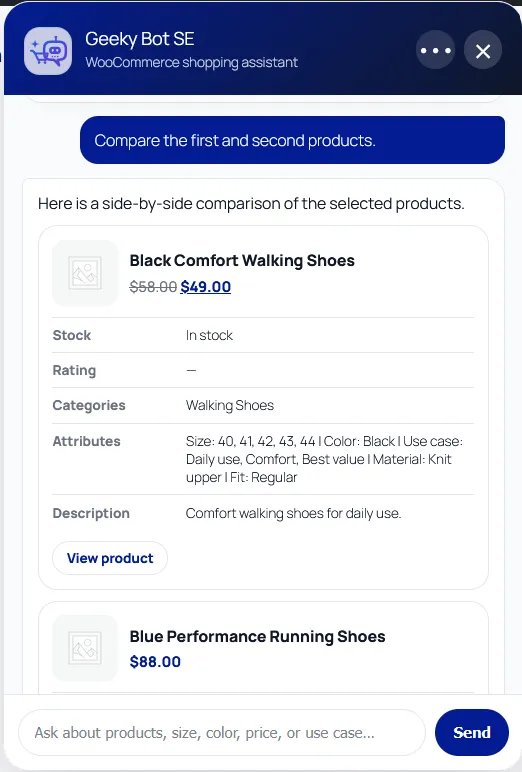
Commerce Pro compares selected products side by side using confirmed WooCommerce catalog data. -
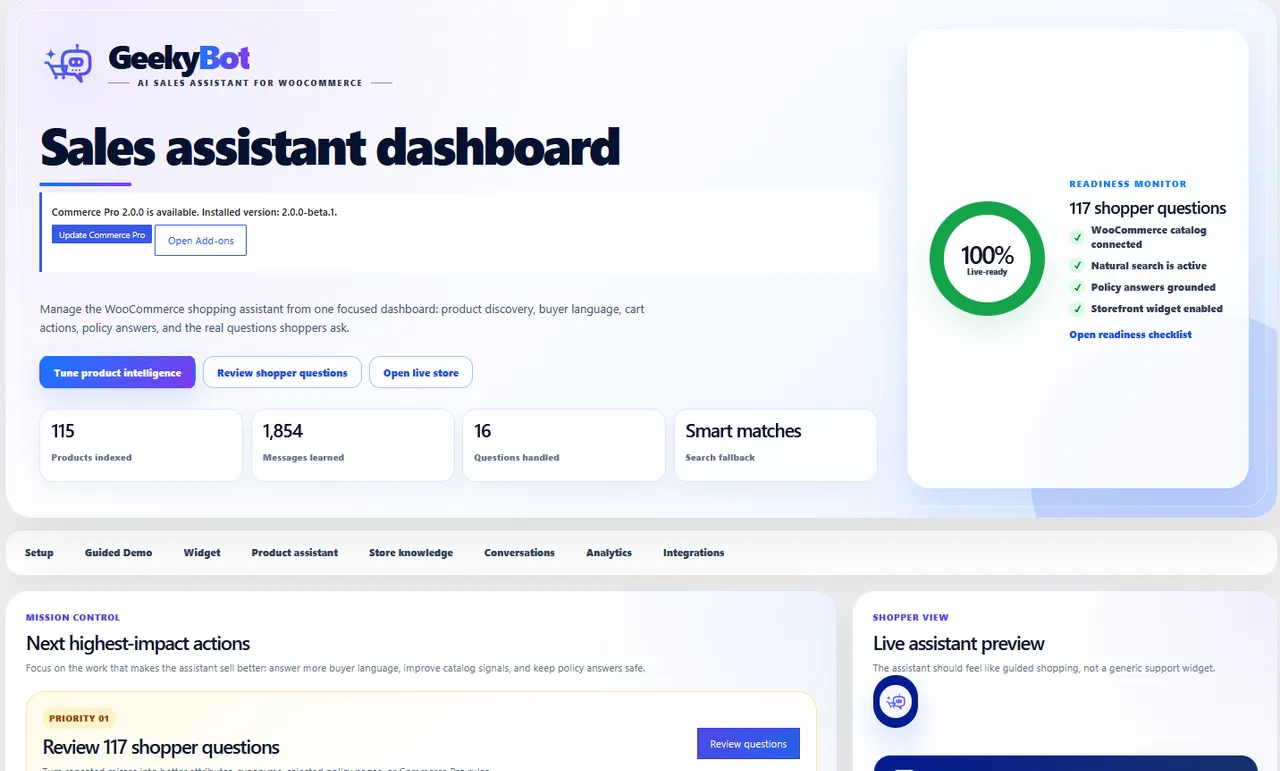
The dashboard highlights setup readiness, product-index health, shopper activity, and the next highest-impact actions. -
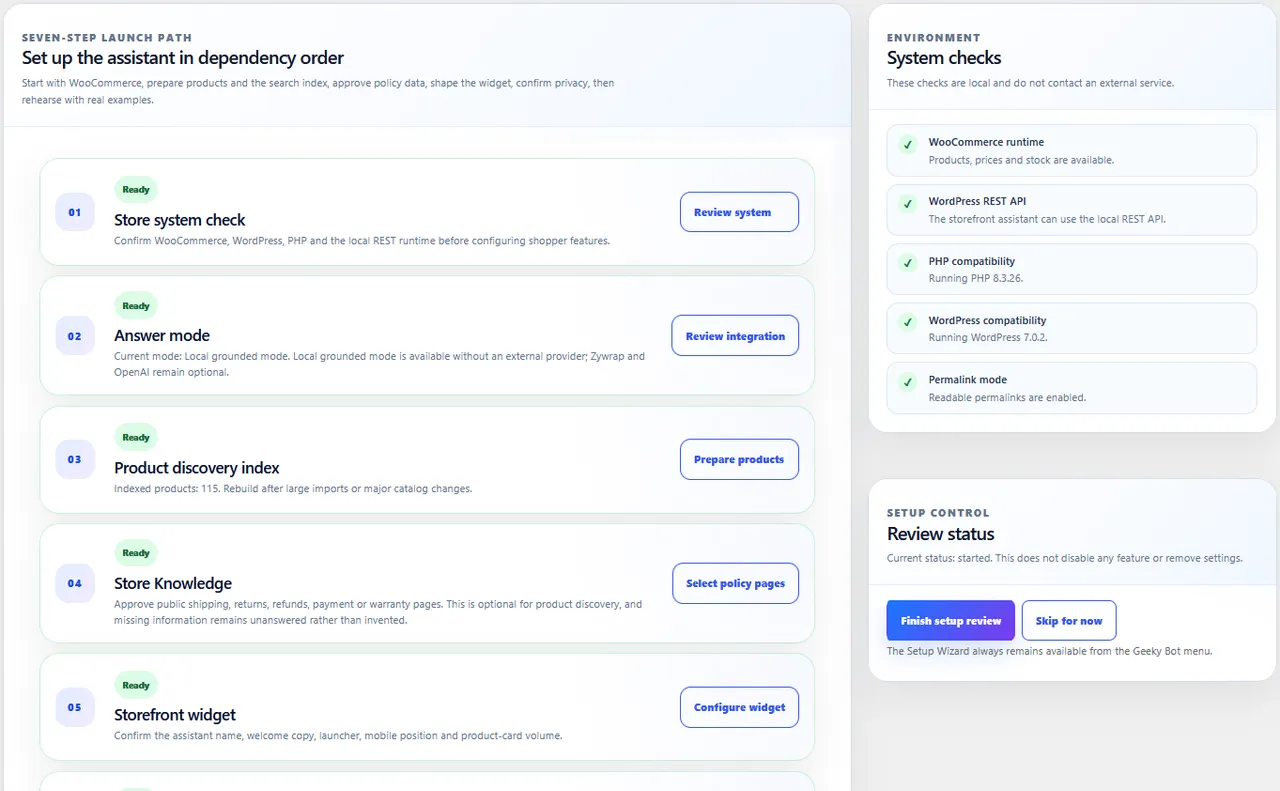
The Setup Wizard checks the store in dependency order, from WooCommerce and indexing to knowledge and storefront launch. -
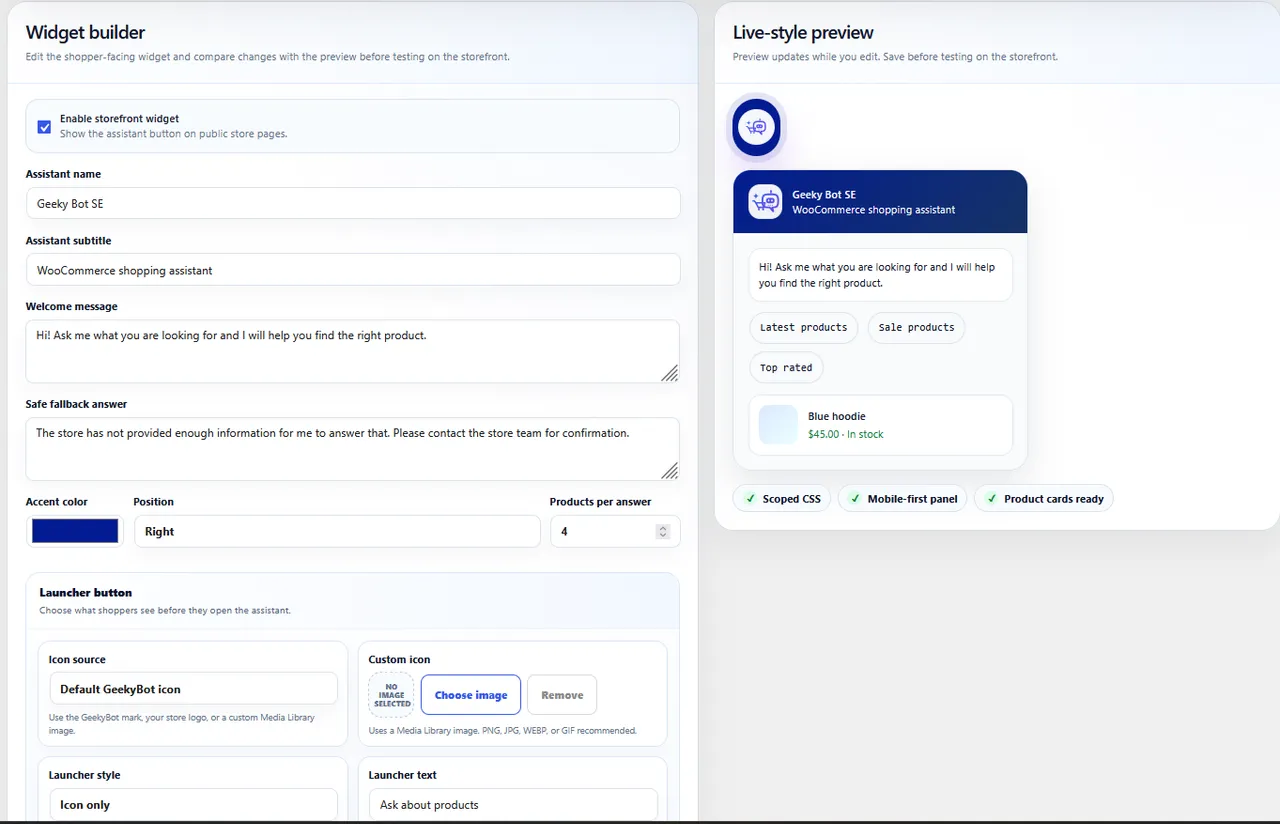
Widget Builder combines shopper-facing controls with a live preview for branding, wording, placement, and product cards.
Important information
- Requires WordPress 6.0 or newer and PHP 7.4 or newer, and WooCommerce for shopping features. Tested up to WordPress 7.1.4.
- Depending on settings, it stores messages, session identifiers, product references and click events in your WordPress database. Describe this in your privacy policy.
- Shopper questions go to an outside AI provider only if you select and configure one. Searches that found nothing can also be sent if Rescue search or learning from missed searches is on.
- The free plugin helps shoppers find and understand products. Adding to cart or checking out through chat needs Commerce Pro.
- The plugin has 8 published vulnerabilities in its history. The data shows them as patched, but keep it updated.
From the Geeky Bot readme
Straight from the developer's WordPress.org listing.
Full description
Geeky Bot turns a WooCommerce store into a guided shopping experience.
A shopper can ask “Show me wireless headphones under $100 that are in stock,” follow with “Which would you recommend for daily commuting?” and then ask “Does the recommended pair support noise cancellation?”
Geeky Bot searches visible products, remembers context, explains suitable matches, and answers from WooCommerce data and approved policy pages.
It is built as a focused sales assistant—not a generic website chatbot.
See Geeky Bot in action
Watch Geeky Bot turn natural shopper questions into product discovery, comparisons, grounded answers, and buying assistance inside WooCommerce.
Natural WooCommerce product discovery
Help shoppers discover products by:
• Product name, family, category, price, color, size, stock, and sale status.
• Use case, shopper preference, and natural long-form requests.
• Follow-up refinements, synonyms, spelling mistakes, and close matches.
Search results remain grounded in products that are visible in the WooCommerce catalog.
Product answers shoppers can trust
Geeky Bot answers from available WooCommerce descriptions, attributes, variations, prices, and stock.
When information is missing, the assistant says so instead of inventing details.
Helpful recommendations
Geeky Bot can recommend suitable products and explain why they match the shopper’s request. If no exact result exists, it can present clearly labeled close matches or suggest a sensible constraint to remove.
Store policy answers
Choose which published pages Geeky Bot may use for shipping, refunds, returns, exchanges, warranty, payment, privacy, and other store-policy questions.
Policy answers stay isolated to approved sources. Geeky Bot does not crawl arbitrary pages.
Storefront shopping assistant
The responsive floating widget provides product cards, suggested questions, a configurable timed shopper invitation, clear shopper and assistant message identity, persistent browser-side history, clear-chat control, accessible focus states, reduced-motion support, and scoped styling designed to avoid theme conflicts.
A practical setup experience
The guided setup checks WooCommerce, builds the product index, selects policy pages, configures the widget, and verifies readiness. Guided Demo creates realistic test questions from the store’s own products, including short conversations that show a follow-up question being answered in context.
Conversations, insights, and privacy
Store owners can review conversations, group unanswered questions, see products opened from chat, export data to CSV, delete stored conversations, configure guest storage and retention, and use WordPress personal-data export and erasure tools.
Local mode and optional AI services
Core discovery and grounded routing can run locally. Zywrap and OpenAI are optional.
API keys are not exposed to storefront JavaScript or displayed again after saving.
Geeky Bot Commerce Pro
The free plugin helps shoppers find and understand products.
Geeky Bot Commerce Pro adds variation selection, cart and checkout actions, order help, product comparison, advanced recommendations, and sales-intent analytics.
Learn more at geekybot.com.
Privacy
Depending on the settings chosen by the store owner, Geeky Bot may store conversation messages, session identifiers, response intent, product references, policy references, and product-click events in the WordPress database.
The plugin provides retention settings, conversation deletion tools, and integration with the WordPress personal-data export and erasure system. Store owners are responsible for describing their configuration and data practices in their own privacy policy.
Shopper questions are sent to an external AI provider only when the administrator has selected and configured that provider. With the Rescue search level or learning from missed searches switched on, the wording of searches that found nothing is also sent to that provider, as described under External services.
External services
Geeky Bot can operate in local grounded mode without sending shopper questions to an external AI provider. External requests occur only for optional services selected or used by an administrator.
OpenAI
When OpenAI mode is selected and an API key is saved, Geeky Bot sends the shopper’s question, a grounding instruction, relevant visible-product summaries, and relevant excerpts from approved policy pages to the OpenAI API to generate the requested answer.
The product search levels also use the OpenAI API with the saved key. Each is off until the administrator selects it under Geeky Bot → Product Search, and the Standard level makes no external requests.
• Smart Catalog: for each visible product, Geeky Bot sends the product title, categories, tags, attributes and a short summary of up to 240 characters taken from the product description, and asks for the words shoppers use for that product. It is sent when Smart Catalog is switched on, when a product is added or changed, and when the administrator asks for words to be rewritten. No shopper data is sent.
• Rescue (requires Commerce Pro): when a shopper’s search finds nothing, Geeky Bot sends the wording of that search and a list of the store’s category and product-type words, and asks which of those words fit. Each answer is stored for 30 days and reused, so the same search is not sent again during that time.
• Learning from missed searches (requires Commerce Pro, and the Smart Catalog or Rescue level): once a day, Geeky Bot sends the text of recent shopper messages that found no products, with the same list of store words, and asks for synonym suggestions. Suggestions are shown to the administrator and only used after they are accepted.
A site-wide daily and monthly limit on AI calls applies to all of these, and can be set under Geeky Bot → AI & Privacy.
Service: https://api.openai.com/
Terms: https://openai.com/policies/terms-of-use/
Privacy: https://openai.com/policies/privacy-policy/
Zywrap
When Zywrap mode is selected, Geeky Bot sends the shopper’s question, a grounding instruction, relevant visible-product context, and relevant approved policy-page context to the configured Zywrap HTTPS endpoint to generate the requested answer.
No shopper question is sent to Zywrap when local mode is selected.
Service: https://www.zywrap.com/
Terms: https://www.zywrap.com/terms
Privacy: https://www.zywrap.com/privacy
Geeky Bot website
When an administrator chooses to view information about Commerce Pro or follow support, documentation, purchase, account, or upgrade links, the browser connects to geekybot.com.
Translations. Geeky Bot does not ship its translations; it downloads the one for your site’s language from geekybot.com, the way WordPress installs its own language packs. This happens only on a site that is not in English (or whose users have chosen another language): when Geeky Bot is installed or updated, when the site language changes, and once a day to pick up improved translations. The request reads a public list (https://geekybot.com/translations/v2/index.json) and downloads a .zip holding a .po and a .mo file, checked against the SHA-256 the list gives. Nothing about the site is sent: no address, no key, no content, and the user-agent names only Geeky Bot and its version. Turn it off with define(‘GEEKYBOT_TRANSLATIONS_AUTO’, false); in wp-config.php; the files can then be downloaded from Geeky Bot > Languages and installed by hand.
Commerce Pro license. The free plugin sends nothing else to geekybot.com until an administrator enters a Commerce Pro license key under Geeky Bot > License. After that:
• To activate the license, and to re-check it about once a week, Geeky Bot sends the key to geekybot.com with the site address, the WordPress, PHP and Geeky Bot versions, the site language and whether the site is a multisite. geekybot.com answers with a signed statement of what the license covers.
• When the administrator installs or updates Commerce Pro, Geeky Bot asks geekybot.com for a one-time download link and downloads the add-on from geekybot.com.
• While Commerce Pro is installed, Geeky Bot asks geekybot.com twice a day whether a newer Commerce Pro exists, sending the key, the site address and the installed Geeky Bot and Commerce Pro versions.
Deactivating the license on the License page tells geekybot.com to free this site’s slot and deletes the key from the site.
Service: https://geekybot.com/
Terms: https://geekybot.com/terms-conditions/
Privacy: https://geekybot.com/privacy-policy/
Installation
• Install and activate Geeky Bot, with WooCommerce active.
• Open Geeky Bot > Setup Wizard.
• Build the product index and select approved public policy pages.
• Review widget, privacy, retention, and optional AI-provider settings.
• Use Guided Demo to test questions generated from your catalog.
• Clear site or page caches before final storefront testing.
Developer FAQ (9)
- Is Geeky Bot a general-purpose chatbot?
- No. Geeky Bot 2.0 is focused on WooCommerce shopping: finding products, answering product and policy questions, explaining choices, and guiding shoppers toward a purchase.
- Does Geeky Bot require WooCommerce?
- WooCommerce is required for product discovery and shopping assistance. Geeky Bot handles an inactive or not-yet-installed WooCommerce setup gracefully and shows the required next step.
- Does Geeky Bot require an external AI service?
- No. Local grounded product discovery and policy routing can work without an external AI provider. OpenAI is optional, for AI-written answers and for the Smart Catalog and Rescue search levels; each is off until you choose it.
- What information can Geeky Bot use?
- Geeky Bot uses visible WooCommerce catalog data and published policy pages explicitly selected by an administrator. It does not crawl arbitrary URLs.
- What happens when information is missing?
- Geeky Bot does not guess. It tells the shopper when the selected product data or approved policy pages do not contain the requested information.
- What is included in the free plugin?
- The free plugin includes product discovery, grounded product and policy answers, recommendations, product cards, conversation review, and basic insights. Variation selection, cart and checkout actions, and order assistance require Commerce Pro.
- Can shoppers continue a conversation after refreshing the page?
- Yes. Browser-side conversation history can persist across page loads and tabs on the same site. Server-side storage of guest conversations depends on the privacy settings chosen by the store owner.
- Does Geeky Bot work with WPML or Polylang?
- Yes. When either plugin is active Geeky Bot takes the shopper’s language from it rather than guessing from the characters they typed. Each translation of a product is its own post in WPML and Polylang, so translations are indexed and searched separately with no extra setup — a Spanish product is found by a Spanish query. Buyer intent, not just the words, is understood in English, Spanish and Arabic; other languages still search by term and fall back to English intent. Cart and checkout commands are English-only in this release.
- Can Geeky Bot run on a WordPress multisite network?
- Yes, activated per site or across the network. Each site keeps its own product index, settings, conversations and AI budget, and a site installs its own tables the first time it loads — including sites added to the network later. Build the product index once per site from that site’s Geeky Bot > Setup Wizard.
Downloads, last 30 days
Trend vs previous period: -7.4%
Average daily downloads: 57 over the last 7 days , 352 over 30 days.
Security history
Past CVEs, patched · 8 published vulnerabilities (Wordfence) · most recent Aug 6, 2026
- Patched 7.5 High GeekyBot - AI Copilot, Chatbot, WooCommerce Lead Gen & Zero-Prompt Content <= 1.2.0 - Unauthenticated SQL Injection CVE-2026-39519 · Apr 8, 2026 · affects *-1.2.0 · fixed in 1.2.1
- Patched 7.5 High GeekyBot - Generate AI Content Without Prompt, Chatbot and Lead Generation <= 1.2.0 - Unauthenticated SQL Injection via 'attributekey' CVE-2026-3456 · May 4, 2026 · affects *-1.2.0 · fixed in 1.2.1
- Patched 5.3 Medium GeekyBot <= 1.2.7 - Unauthenticated Information Exposure CVE-2026-15048 · Jul 13, 2026 · affects *-1.2.7 · fixed in 1.2.8
- Patched 8.8 High GeekyBot - AI Copilot, Chatbot, WooCommerce Lead Gen & Zero-Prompt Content <= 1.2.2 - Unauthenticated Arbitrary File Upload CVE-2026-40772 · Apr 21, 2026 · affects *-1.2.2 · fixed in 1.2.3
- Patched 9.8 Critical GeekyBot <= 1.2.2 - Missing Authorization to Unauthenticated Arbitrary Plugin Installation via 'geekybot_frontendajax' AJAX Action CVE-2026-5294 · May 4, 2026 · affects *-1.2.2 · fixed in 1.2.3
- Patched 7.2 High Geeky Bot - AI Sales Assistant for WooCommerce <= 1.2.6 - Unauthenticated Stored Cross-Site Scripting CVE-2026-61965 · Aug 6, 2026 · affects *-1.2.6 · fixed in 1.2.7
- Patched 7.2 High GeekyBot - Generate AI Content Without Prompt, Chatbot and Lead Generation <= 1.1.8 - Unauthenticated Stored Cross-Site Scripting CVE-2025-15266 · Jan 14, 2026 · affects *-1.1.8 · fixed in 1.1.9
- Patched 7.5 High GeekyBot - AI Copilot, Chatbot, WooCommerce Lead Gen & Zero-Prompt Content <= 1.2.5 - Unauthenticated SQL Injection CVE-2026-57679 · Jun 29, 2026 · affects *-1.2.5 · fixed in 1.2.6
Geeky Bot FAQ
Is it a general chatbot?
No. It focuses on WooCommerce shopping: finding products, answering product and policy questions and guiding shoppers.
Does it need WooCommerce?
Yes for product features. If WooCommerce is missing, it shows the next step to fix that.
Does it need an outside AI service?
No. Local search and policy routing work without one. OpenAI is optional for AI-written answers and for the Smart Catalog and Rescue search levels.
What data can it use?
Visible WooCommerce catalog data and the published policy pages you choose. It does not crawl other URLs.
What if it lacks the answer?
It tells the shopper the selected data does not contain it, rather than inventing details.
What does the free version include?
Discovery, grounded answers, recommendations, product cards, conversation review and basic insights.
Do chats survive a page refresh?
Yes, browser-side history persists across pages and tabs. Server-side storage depends on your privacy settings.
Does it work on multisite?
Yes. Each site keeps its own index, settings, conversations and AI budget.
Geeky Bot alternatives

The free MCP server and AI chatbot for WordPress. Claude and ChatGPT connect to your site with no account, no API key and no usage limits. AI Engine connects WordPress and AI, both ways. AI comes into your site:…

Chatway is a WordPress live chat, AI chatbot, and helpdesk plugin for customer support. Chat with website visitors in real time, automate replies with an AI chatbot, or connect your own AI agents including ChatGPT,…

🟦 Tidio - Live Chat for WordPress with AI Chatbots, Customer Support & Sales Tools Tidio Live Chat is an all-in-one customer support plugin for WordPress that lets you talk to your website visitors in real time.…

THE SIMPLE, SECURE AND FEATURE-RICH SUPPORT TICKETING SYSTEM PLUGIN FOR YOUR WORDPRESS SITE. Click here to visit our official website. SupportCandy is a self-hosted WordPress helpdesk and support ticket system.…
AI ChatBot for WordPress - WPBot. Support, Sale, Convert, Automate WPBot is a feature rich AI ChatBot for WordPress websites. Provide 24/7 Automated Live Chat Support , Generate Leads and Convert , Collect…

MxChat is the most powerful free AI chatbot and content generation plugin for WordPress - connecting your website to ChatGPT, Claude, Gemini, Grok, DeepSeek, and 100+ AI models through a single, easy-to-use…
Listing data from WordPress.org and the Wordfence vulnerability feed, refreshed Nov 9, 2026; listing details fetched Nov 14, 2026. Screenshots are from the plugin's WordPress.org listing. Not affiliated with GeekyBot.