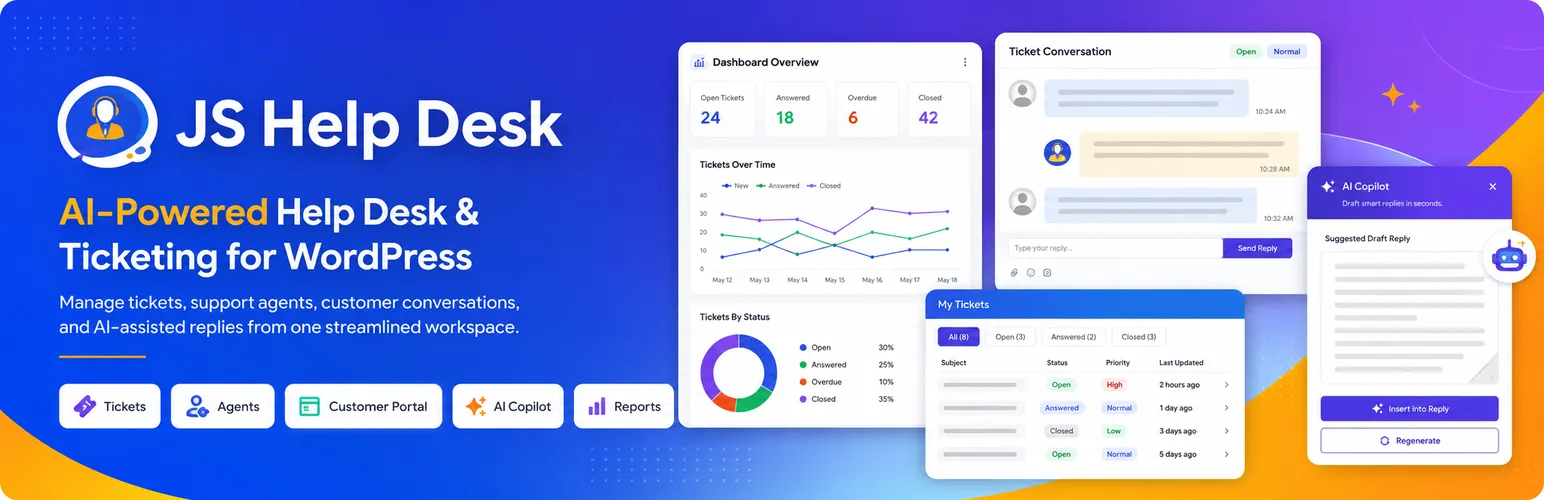

JS Help Desk
JS Help Desk - AI-Powered Support & Ticketing System · by JoomSky
- active installs
- 7K+
- 74 ratings
- 3.7
- since last update
- 5d
- releases in 12 months
- —
- support threads resolved
- —
- avg daily downloads
- 1,187
- on WordPress.org
- 12.1 years
JS Help Desk at a glance
JS Help Desk is a free WordPress AI chatbot plugin by JoomSky with 7K+ active installs and a 3.7/5 rating from 74 reviews. It was last updated on Nov 4, 2026, is tested up to WordPress 7.1.4 and needs PHP 7.4+. All 37 of its published vulnerabilities have patched versions. Our quality score is 84/100.
What is JS Help Desk?
JS Help Desk is a customer support ticket system that runs inside WordPress. Customers open tickets on your site, either signed in or as guests, and your team answers from a shared queue. Tickets, replies, attachments and customer details stay in your own database.
The free plugin has no cap on tickets, agents or departments. It suits shops with order questions, plugin and theme sellers, agencies, schools and internal IT or HR teams. Agents use ordinary WordPress roles, and the customer portal inherits your theme's look.
Version 5.0 moved a dozen features from paid to free, including internal notes, canned responses and a reply suggestion tool. Paid plans add nine packs, including an AI Agent and live chat. The AI Copilot in the free plugin uses your own Zywrap key, so AI use there is billed separately.
Best for
- Shops handling order questions and returns
- Plugin and theme sellers supporting buyers
- Agencies tracking client requests
- Schools and internal IT or HR teams
JS Help Desk features
Unlimited tickets and agents
No limits on tickets, agents or departments in the free plugin, with no time limit or trial.
Customer portal and guest tickets
Customers open, follow and reply to tickets on your site, without seeing the dashboard. Visitors can write in without an account.
Queues, search and notes
Waiting-on-agent and waiting-on-customer queues, saved views, tags, canned responses and internal notes.
AI reply help
AI Powered Reply suggests answers from past replies with no AI account. The AI Copilot drafts replies and summaries using your own Zywrap key.
Instant answers
Matching help appears while a customer types, so simple questions can be solved before a ticket is filed.
Roles and light agents
Full agents work the queue. Light agents read tickets and write internal notes but cannot reply to customers.
Privacy and spam tools
Works with WordPress export and erase tools, offers cleanup rules, and supports Turnstile, hCaptcha or reCAPTCHA.
Import from other desks
Bring tickets in from SupportCandy, Awesome Support and Fluent Support, with a preview first.
Blocks and translations
Every portal screen is a shortcode and a block, and the plugin is translated into 17 languages with right-to-left support.
JS Help Desk free vs pro
Free WordPress.org version
- Unlimited tickets, agents and departments
- Customer portal, guest tickets, canned responses and internal notes
- AI Powered Reply and AI Copilot with your own Zywrap key
- Reports, CSV export, auto cleanup, GDPR tools and imports
Pro Paid version
- Nine paid packs: Agents and Teams, Service Levels and Automation, Email, Knowledge and Self-Service, AI Agent, Customer Experience, Commerce, Integrations, and Reporting and Compliance
- Live chat and the AI Agent that answers from your own content
The listing gives paid plans as Pro for 1 site at $99 a year, Business for 5 sites at $149 and Agency for 25 sites at $249. Each plan includes all nine packs and a 14-day refund. The free AI Copilot needs your own Zywrap key.
How to use JS Help Desk
- Install the plugin
In wp-admin go to Plugins, then Add New, search for JS Help Desk, then install and activate.
- Follow the setup checklist
Open Help Desk in the admin menu. The checklist guides you through your support page, a sending address and your first agent.
- Add the support page
Place the portal on a page using its block or shortcode so customers can submit tickets.
- Send a test ticket
Submit one yourself. The checklist confirms that email actually leaves your site.
- Add agents and answer
Give team members the agent role, set departments and canned responses, then work the queue.
JS Help Desk screenshots (12)
-
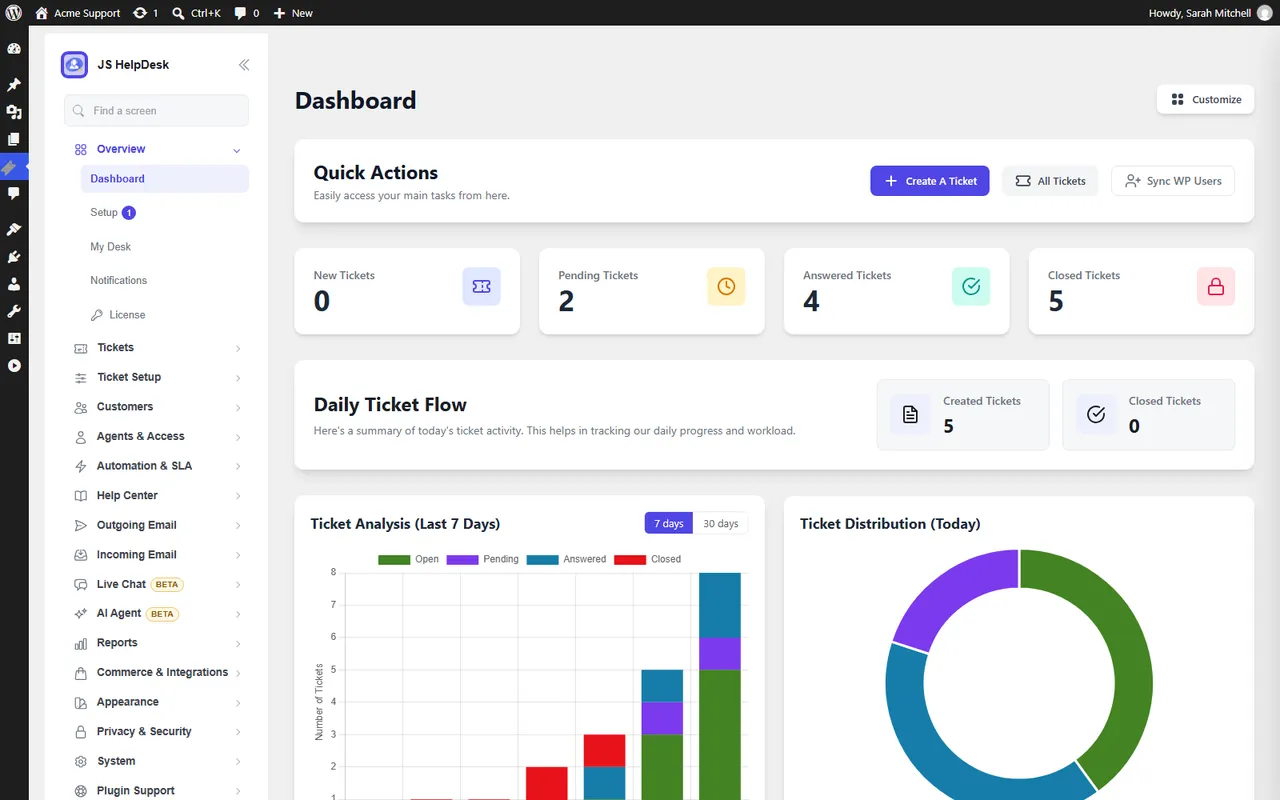
The Help Desk dashboard: today's tickets at a glance, with quick actions. -
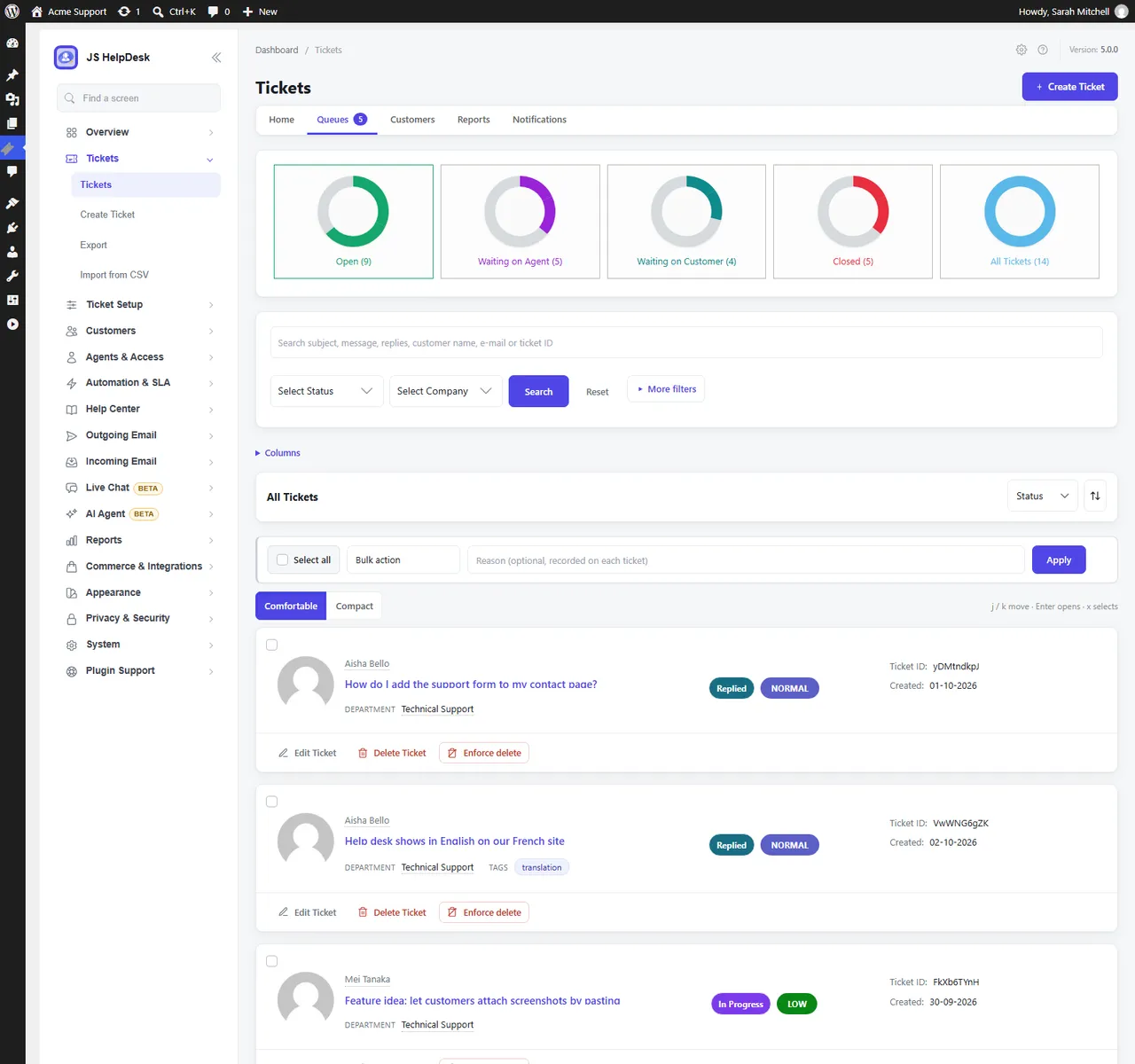
The ticket queue: Open, Waiting on Agent and Waiting on Customer, search, tags and bulk actions. -
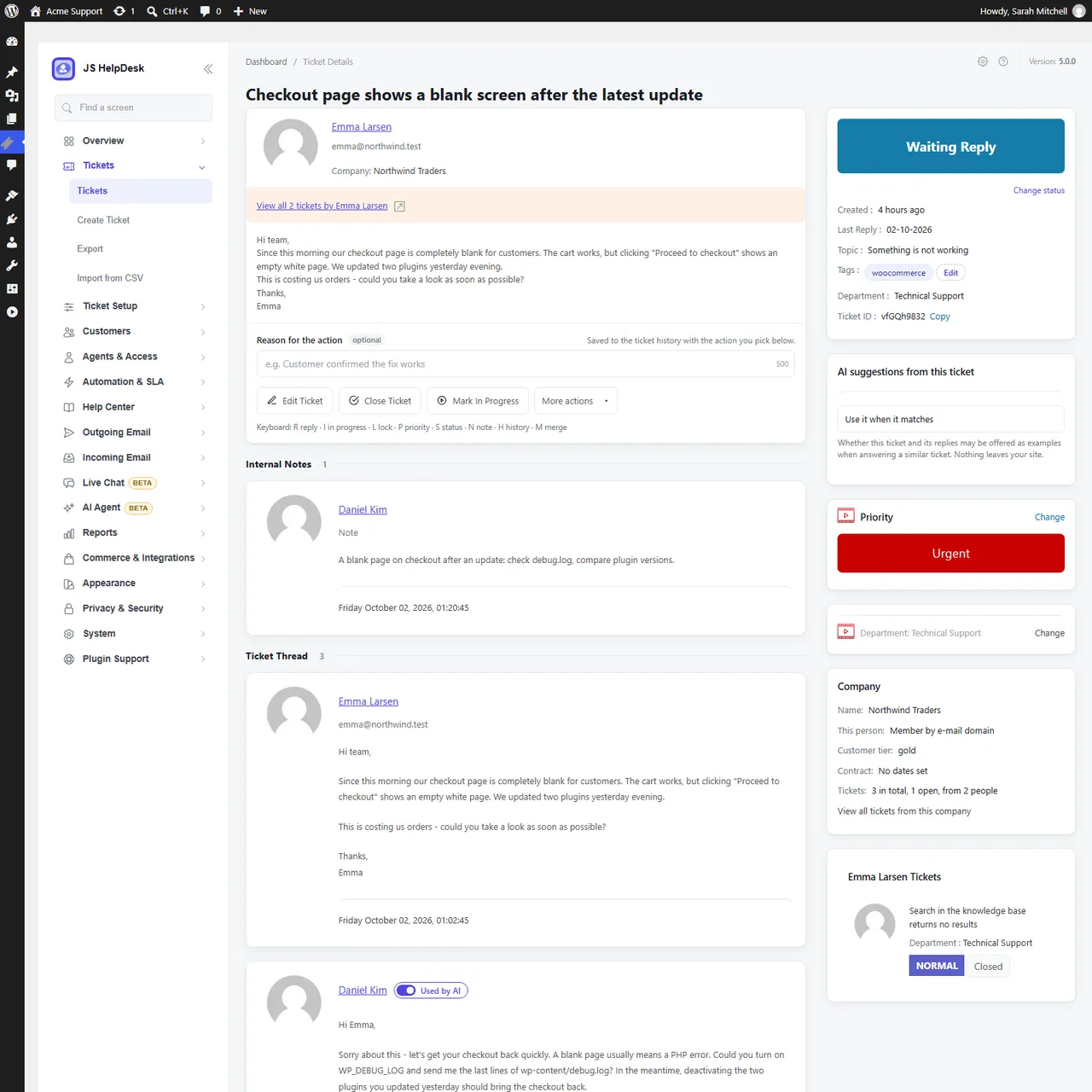
A ticket: the conversation, internal notes, the customer's company and their other tickets. -
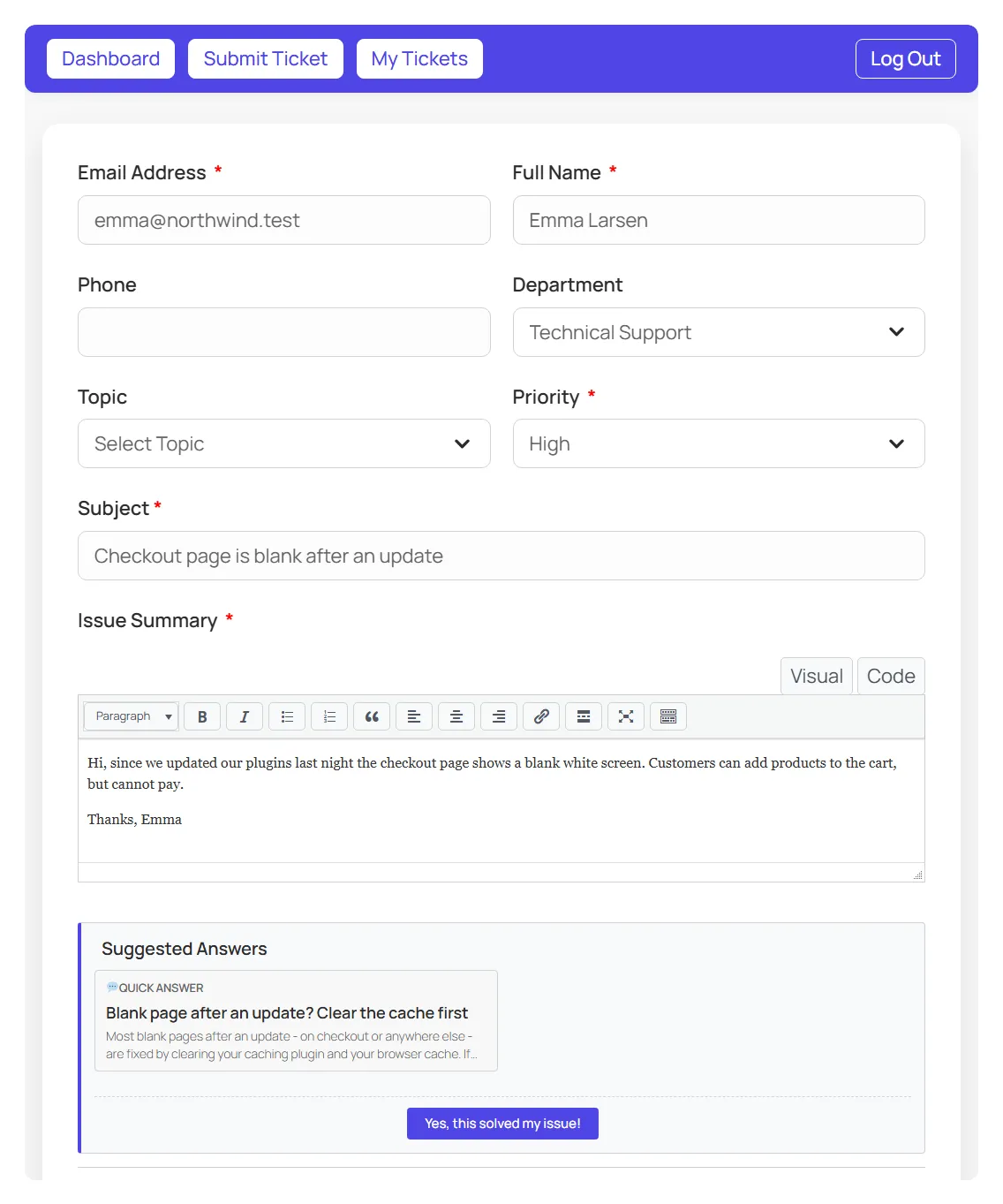
The ticket form on your site suggests an answer while the customer is still typing. -
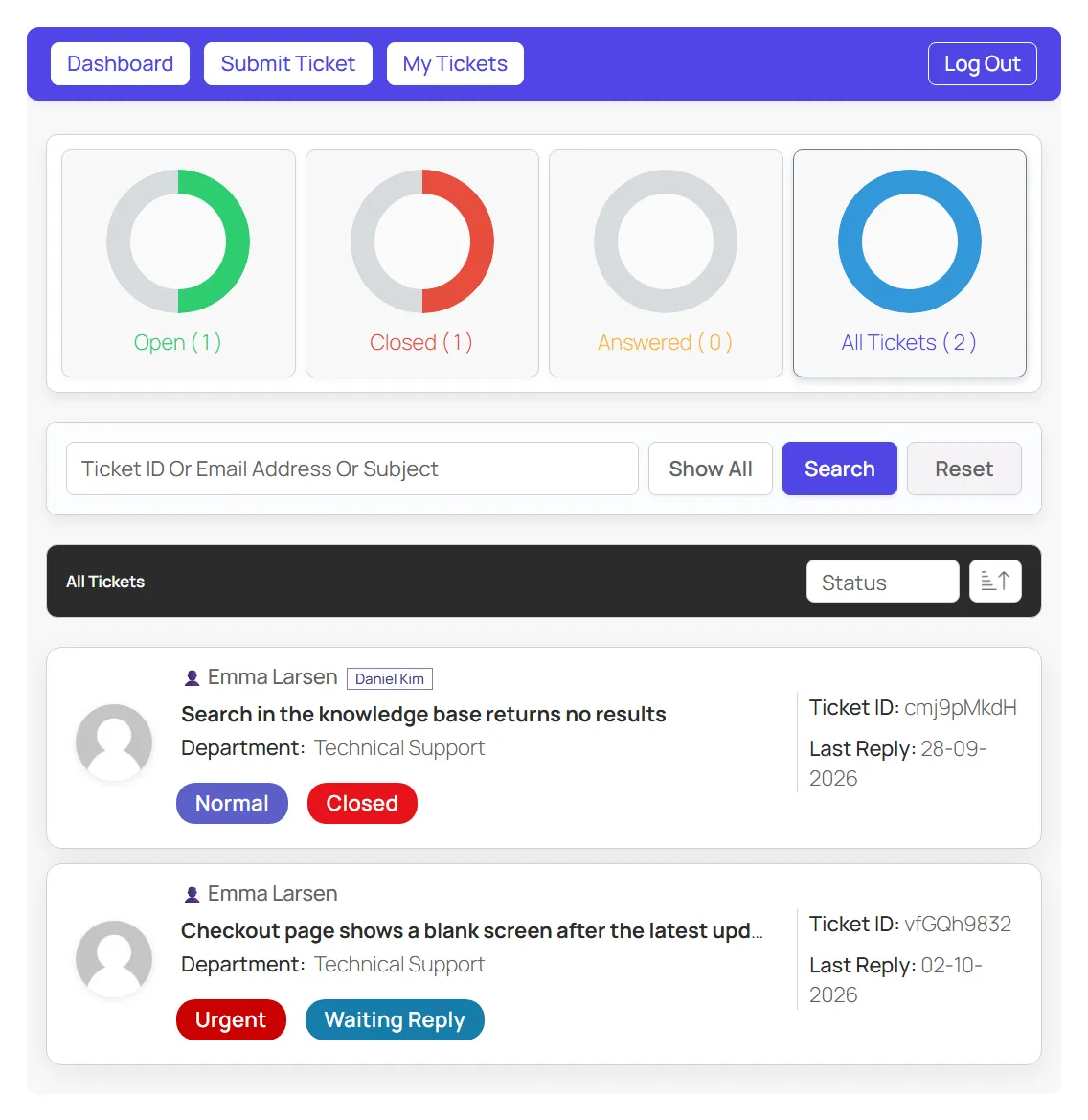
Customer portal: customers follow all their tickets on your site, without wp-admin. -
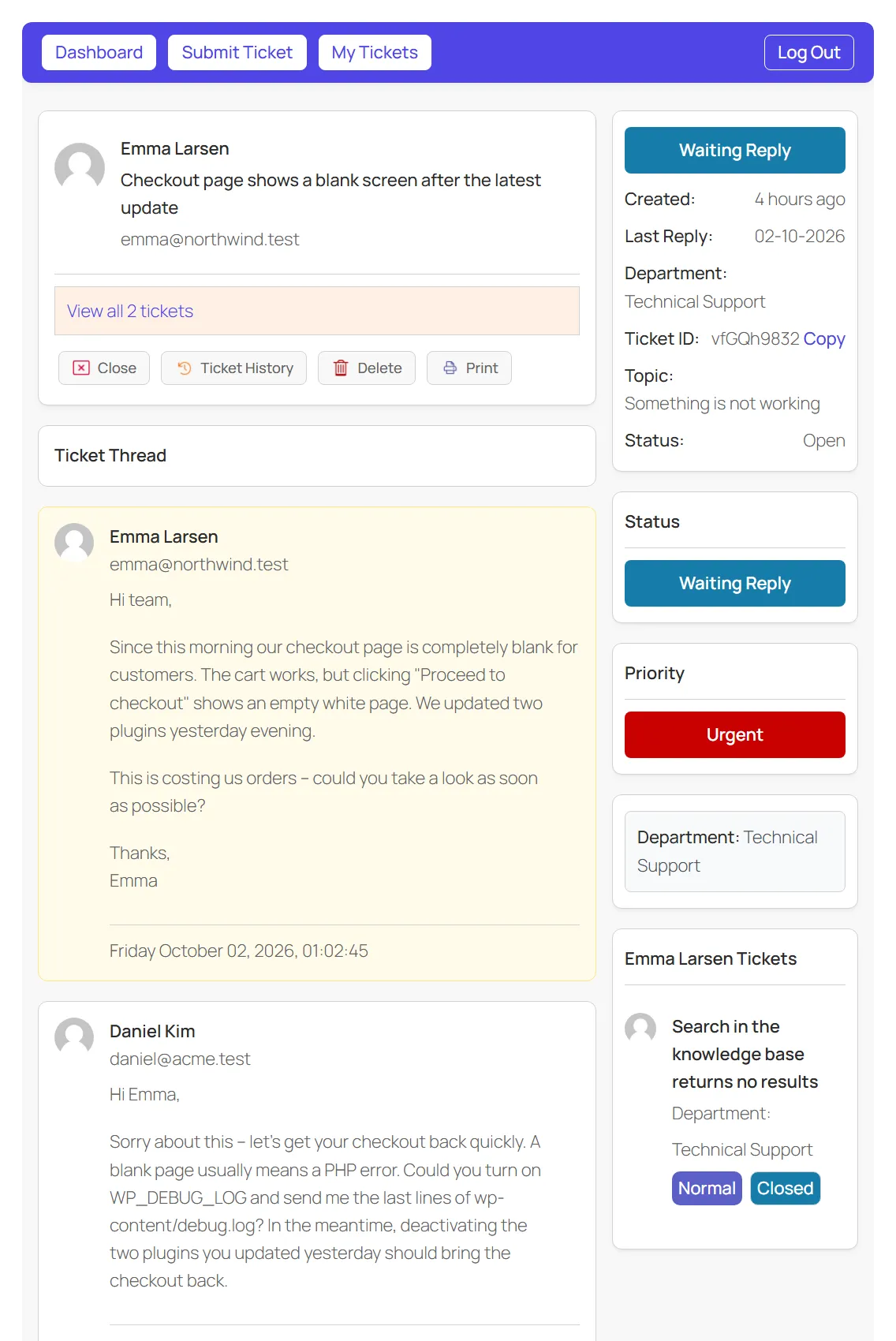
Customer portal: the conversation as the customer sees it. -
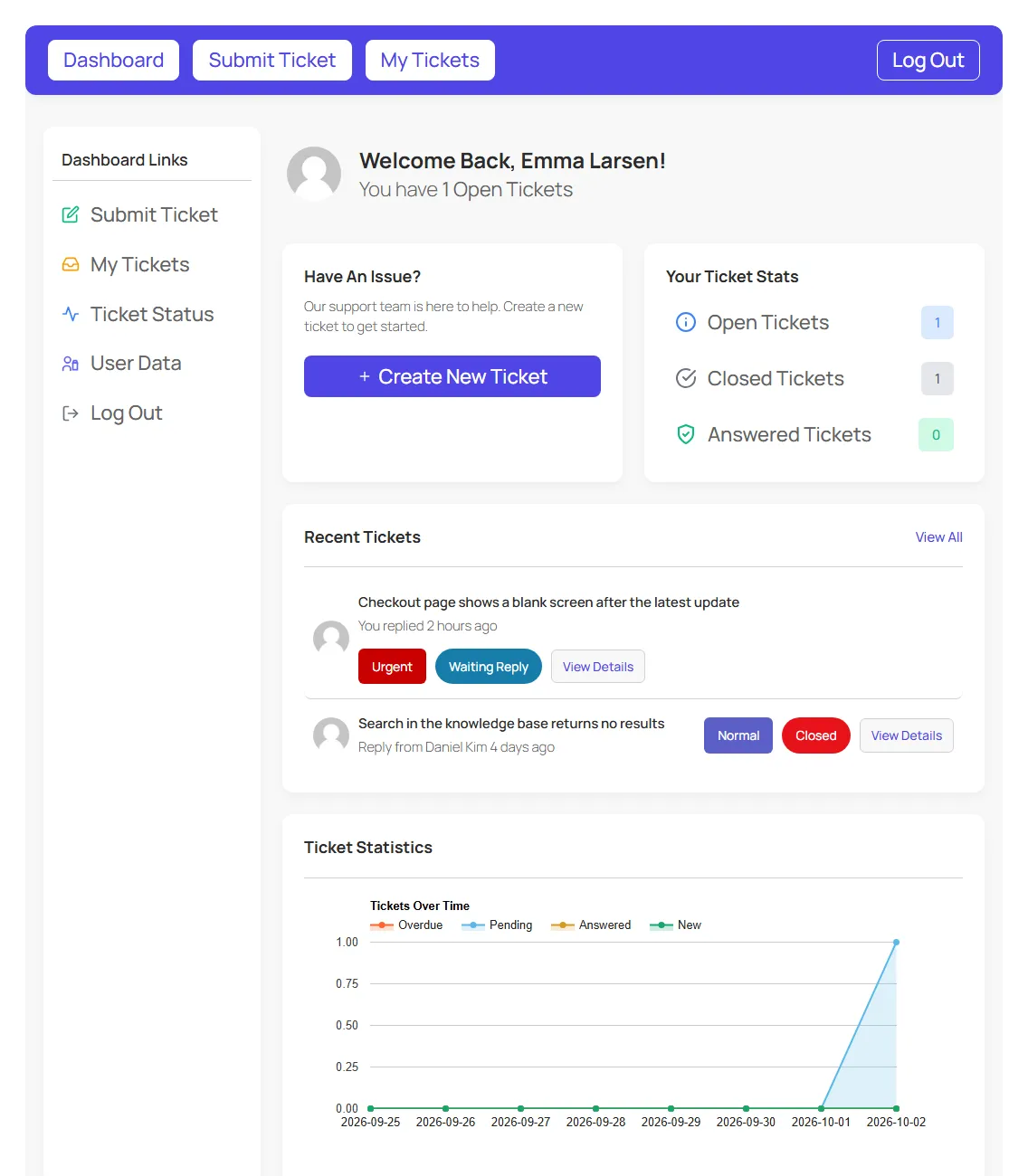
Customer portal home: open tickets, ticket stats and a quick way to ask for help. -
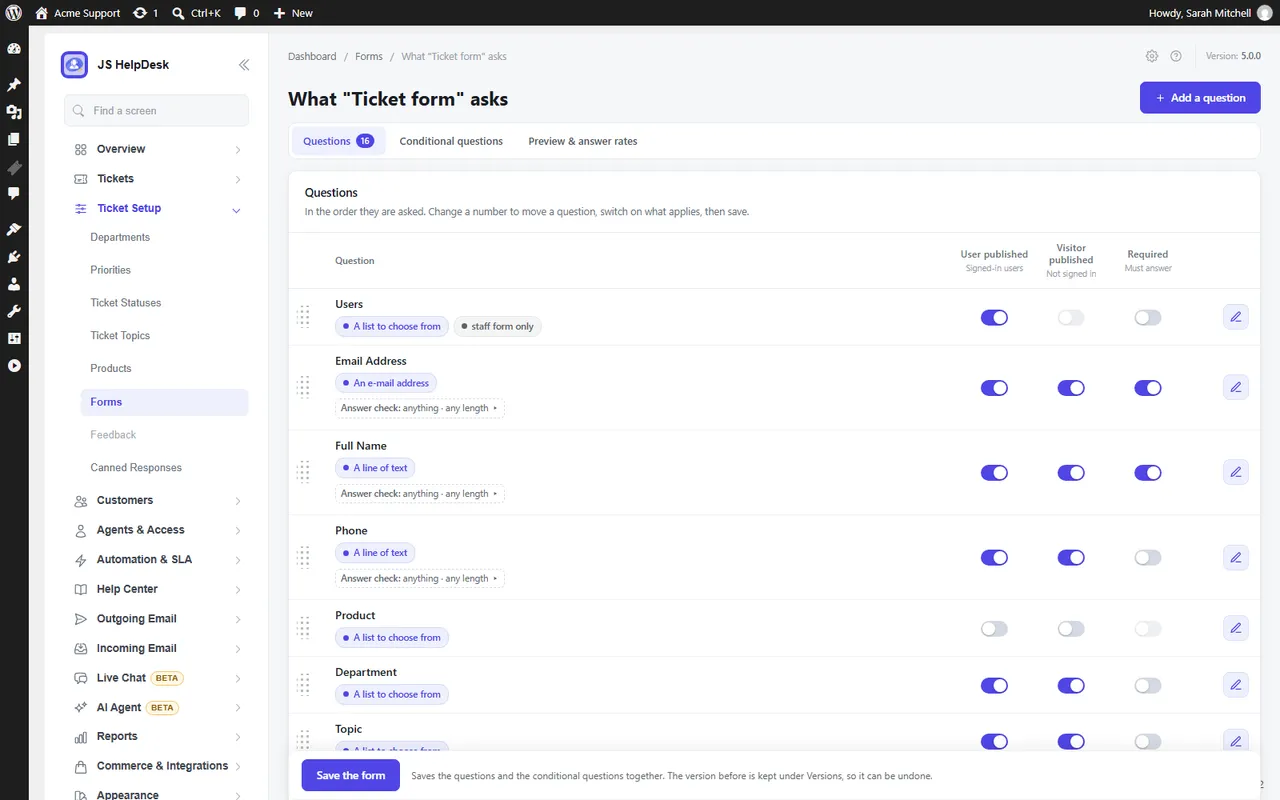
Choose what the ticket form asks, in what order, and what is required. -
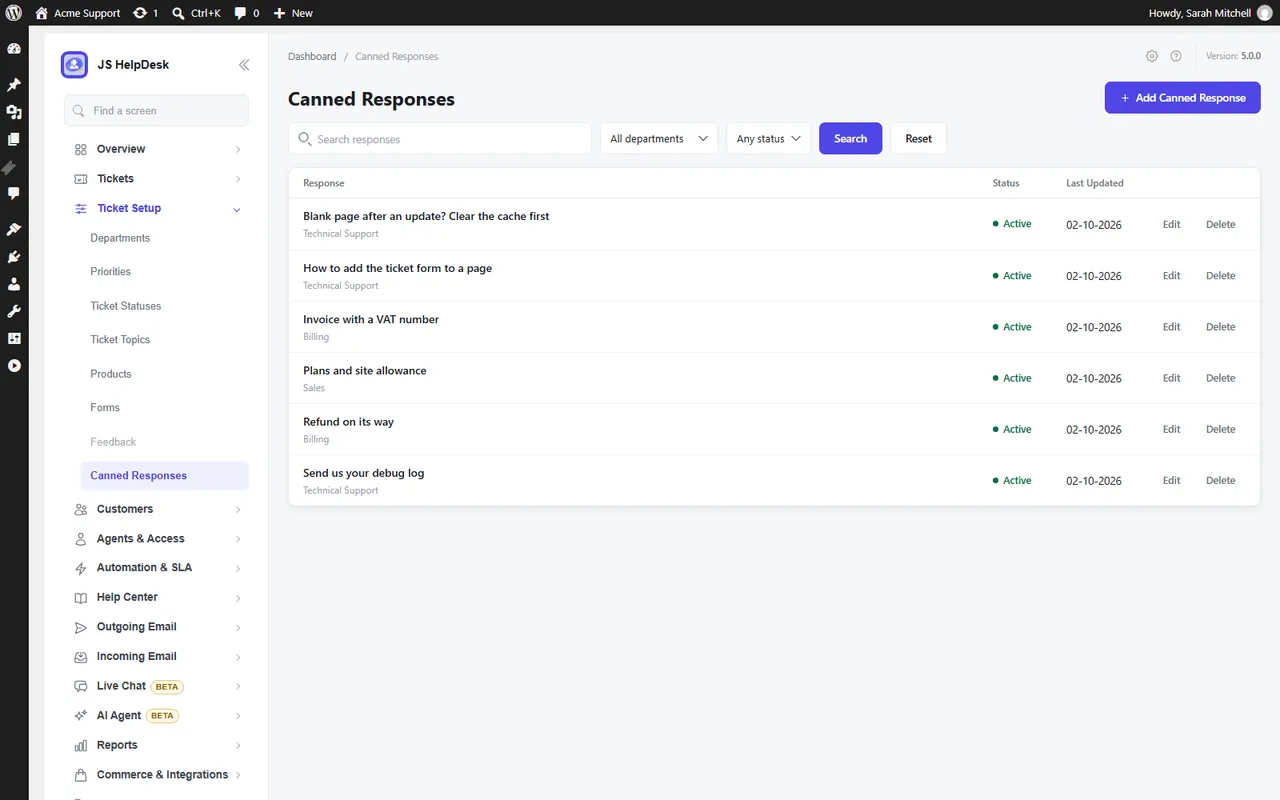
Canned responses, filed by department, for the answers you write every week. -
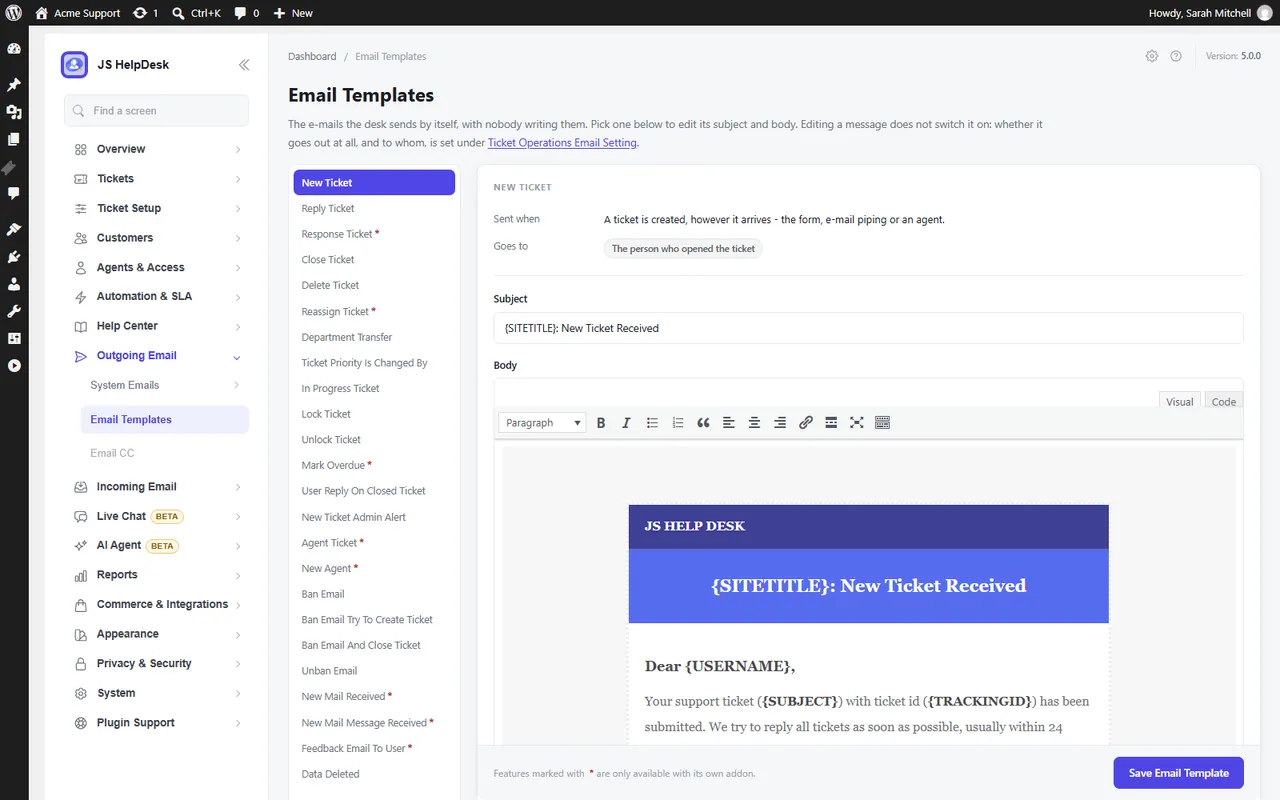
Editable HTML email templates for every notification. -
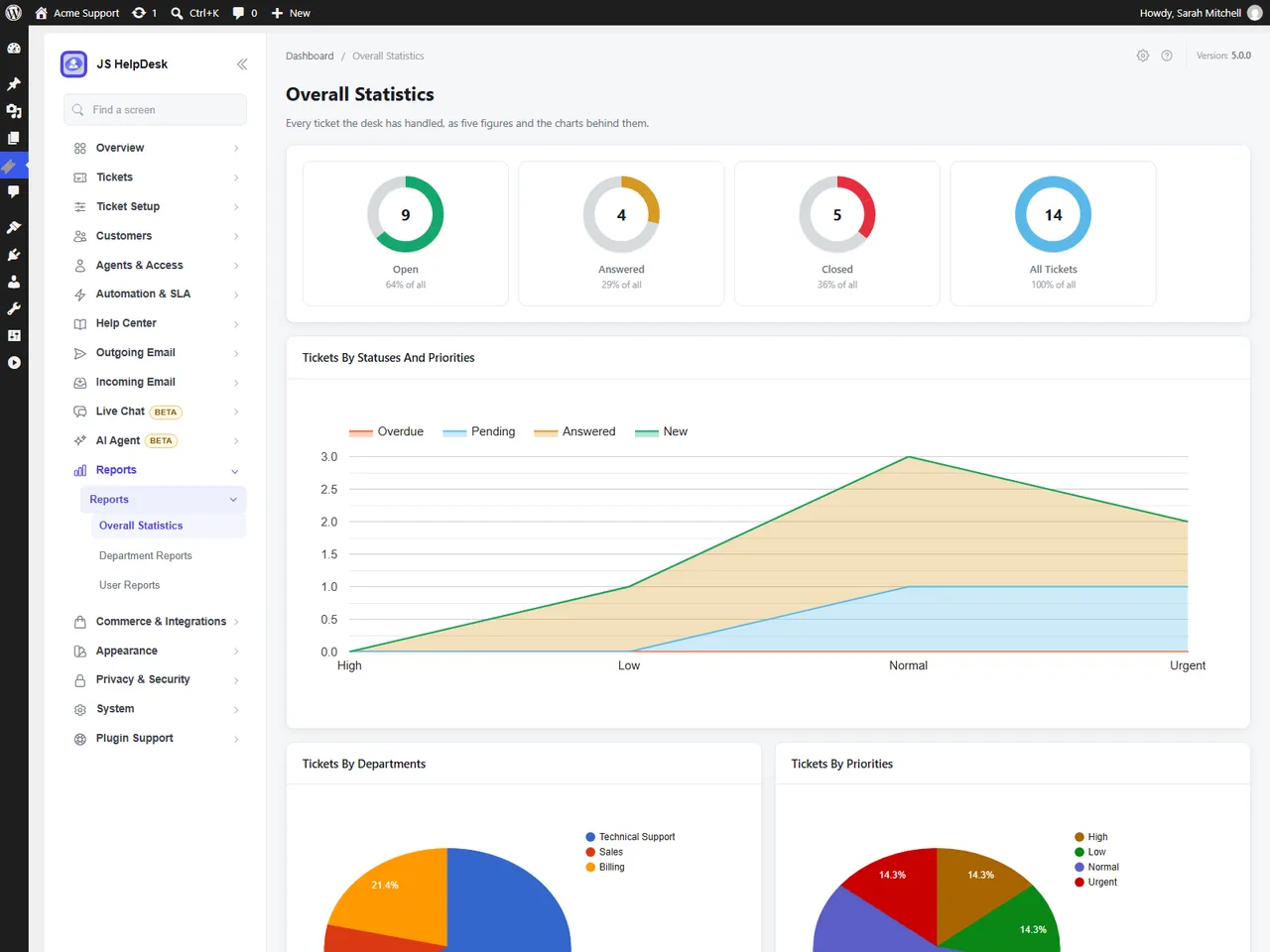
Reports by status, department and priority. -
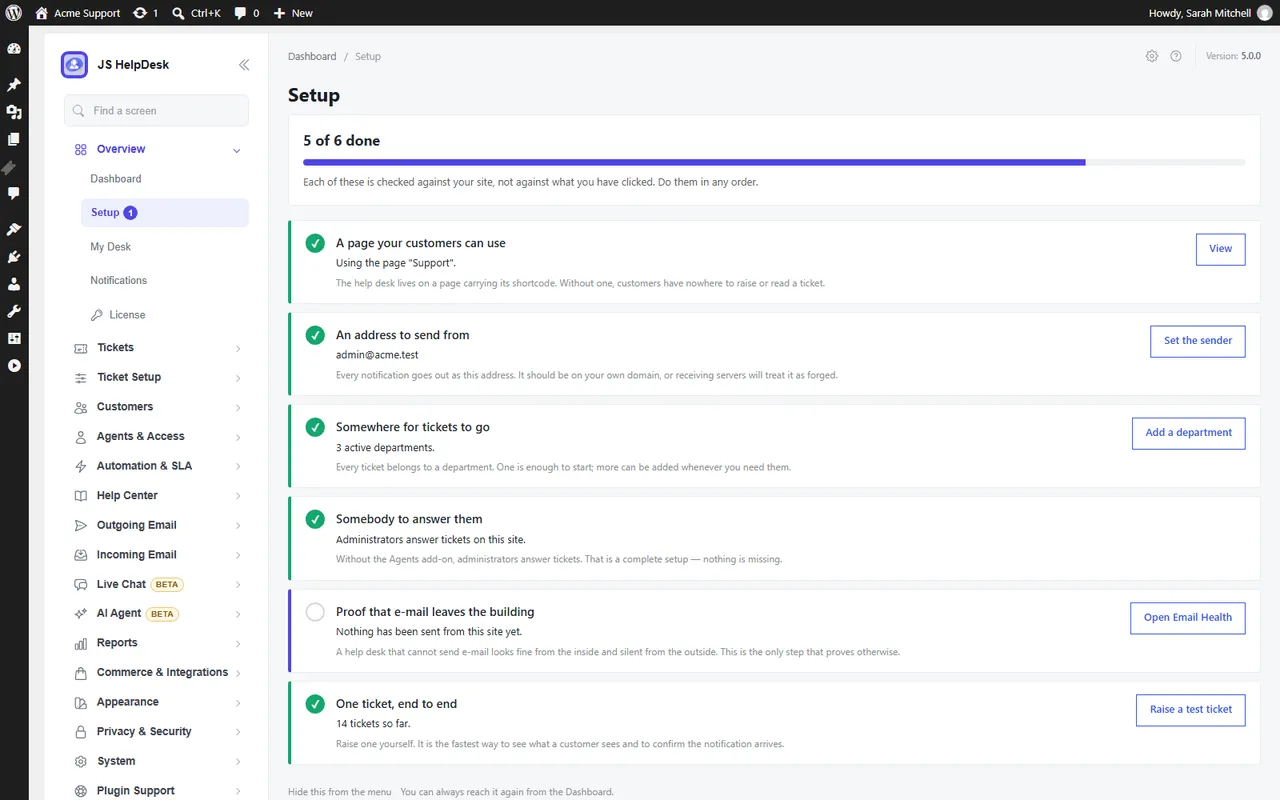
The setup checklist checks your site and tells you what is left to do.
Important information
- Requires WordPress 5.5 and PHP 7.4. Tested up to WordPress 7.1.4.
- The data shows 37 published vulnerabilities in the plugin's history, all marked patched. Keep it updated.
- Take a backup before updating from 4.x. The listing says old add-ons keep working and nothing new is switched on for visitors.
- Replying by email, front-end agent panels, a knowledge base and WooCommerce order views need paid packs.
- Some outside services are used only if you turn on those features, such as AI providers or spam checks. See the plugin's privacy section.
- The support forum covers the free plugin. Priority support comes with paid plans.
From the JS Help Desk readme
Straight from the developer's WordPress.org listing.
Full description
JS Help Desk turns your WordPress site into a complete customer support desk. Customers open tickets from your website – signed in or as guests – and your team answers them from one clear queue. Tickets, replies, attachments and customer details stay in your own WordPress database.
There are no limits on tickets, agents or departments, no per-agent monthly fee and no outside service to sign up for. Install it, add a support page, and start answering.
Trusted since 2014 – nearly 700,000 downloads and more than 7,000 sites answering their customers with JS Help Desk.
New: JS Help Desk 5.0
5.0 is the biggest release in the plugin’s history.
• 12 paid features are now free, for good. Ticket history, internal notes, canned responses, help topics, email ban, auto cleanup, ticket limits, export, dashboard widgets, user options, ticket actions and AI Powered Reply moved from paid add-ons into the free plugin.
• An AI Agent that answers from what you have already written (add-on). It reads your knowledge base, FAQs and past replies, shows its sources, says how sure it is, and hands over to a person whenever it should. You choose how far to trust it – suggestions only, drafts for an agent to approve, or answering on its own – and whether it runs on your server, on your own model or with a hosted provider.
• Live chat (add-on). A chat window on your site that answers from your approved content and brings in an agent the moment the customer asks.
• Nine add-ons instead of more than thirty. Grouped by the job you want done, and every paid plan includes all nine.
• Companies are free. Group customers by organisation and email domain.
• The help desk speaks your language. Translated into 17 languages, and the right translation installs itself.
• A cleaner admin. Menus grouped by subject, better keyboard and screen-reader support, and a block for every portal screen.
• Upgrading is safe. Tickets, settings and your old add-ons keep working, and nothing new is switched on for your visitors until you choose.
Who it is for
• Online shops that want order questions, returns and complaints in one place instead of an overflowing inbox.
• Software, plugin and theme sellers who support customers by product, license or purchase code.
• Agencies and freelancers looking after many clients, each with their own tickets.
• Schools, clubs and internal teams – IT, HR or facilities – who need requests tracked and answered, not lost in email.
Why JS Help Desk
• Your data stays yours. Everything lives in your own WordPress database, not on someone else’s servers.
• Free means free. Unlimited tickets, agents and departments in the free plugin. No trial, no time limit.
• Made for WordPress. Shortcodes and blocks, WordPress roles for your agents, the WordPress privacy tools, and it works with your theme.
• Grows with you. Start free. Add service levels, email piping, a knowledge base, an AI agent or WooCommerce support when you need them.
Useful links
• Try the live demo
• Documentation
• Plugin website
• Video tutorials
Everything in the free plugin
Tickets and the queue
• Unlimited tickets, agents and departments.
• Customer portal: customers open, follow and reply to their tickets on your site, without ever seeing the WordPress dashboard.
• Guest tickets: let visitors write in without creating an account.
• Priorities, statuses and custom fields on the ticket form, so you ask exactly what you need to know.
• Waiting on Agent / Waiting on Customer queues, worked out from who replied last.
• Find anything fast: search across subjects, messages, customers and ticket numbers; tags; saved views; keyboard shortcuts.
Answering faster
• Canned responses for the answers you write every week.
• Internal notes your customers never see.
• AI Powered Reply suggests answers from replies your team has already written – no AI account needed.
• AI Copilot drafts replies, summarises long threads, pulls out the details and translates, with your own Zywrap key.
• Instant answers: matching help appears while the customer is still typing, so simple questions are solved before a ticket is filed.
• No double replies: see who else is viewing or typing on a ticket, and drafts are saved as you write.
• Help topics that route each ticket to the right department and priority.
• Email notifications with editable HTML templates.
Your team
• Two agent levels on ordinary WordPress roles: Help Desk Agent for full queue work, and Help Desk Light Agent, who can read tickets and write internal notes but never reply to the customer.
• Agent Access: one screen showing who can reach the help desk, and why.
• Companies for customers who belong to an organisation.
Keeping it tidy
• Ticket history and an activity timeline for every ticket.
• Reports by agent, department, priority and status, plus dashboard widgets.
• CSV export, filtered the way you need.
• Auto cleanup of old tickets, with a preview before anything is deleted.
• Email ban for addresses or whole domains, and ticket limits per customer.
• Setup checklist, Email Health and System Status screens that tell you what to fix – including whether your email is actually being sent.
Trust and privacy
• GDPR tools: works with WordPress’s own Export and Erase Personal Data.
• Spam protection that needs no outside service, or Cloudflare Turnstile, hCaptcha or Google reCAPTCHA if you prefer, plus submission rate limits.
• Safe attachments: checked by their content, and never reachable by a public link.
• Terms and conditions checkboxes on the ticket form.
Fits your site
• Colour themes to match your brand.
• 17 languages, installed automatically, and full right-to-left support.
• Shortcodes and blocks for every portal screen.
• Moving from another help desk? Import from SupportCandy, Awesome Support and Fluent Support.
Add-ons: nine packs, all in every plan
When you need more, the paid plans add nine packs. Every plan includes all nine – plans differ only by the number of sites: Pro (1 site, $99 a year), Business (5 sites, $149) and Agency (25 sites, $249). Every plan comes with a 14-day refund. Compare plans.
• Agents & Teams – Roles and permissions, teams, automatic assignment, collaboration, time tracking and a credential vault.
• Service Levels & Automation – Response and resolution targets with business hours, escalation, automation rules, auto close and recurring tickets.
• Email – Turn incoming email into tickets, CC, Gmail and Microsoft sign-in, and templates in every language.
• Knowledge & Self-Service – Knowledge base, FAQs, downloads and announcements, so customers help themselves.
• AI Agent – Answers from your own content with sources and confidence, a review mode, a master switch, and usage and cost limits.
• Customer Experience – Multiple ticket forms, live chat, satisfaction surveys, your own branding and an installable portal.
• Commerce – WooCommerce and Easy Digital Downloads orders in the ticket, Envato purchase codes, paid support and support credits.
• Integrations – REST API, webhooks, Slack, Microsoft Teams, Google Chat, Telegram, Discord and browser notifications.
• Reporting & Compliance – Analytics, scheduled Excel and PDF exports, retention rules and legal holds.
Already running the older individual add-ons? They keep working after the update. When your license includes the pack that replaces them, License & Add-ons > Finish upgrade installs it and switches the old ones off. Nothing is deleted, and your settings are kept.
Shortcodes and blocks
Each of these is available as a shortcode and as a block in the “JS Help Desk” block category:
• [jssupportticket] – the whole customer portal
• [jssupportticket_addticket] – the ticket form on its own
• [jssupportticket_mytickets] – the customer’s own tickets
Knowledge base, FAQs and Announcements blocks appear when the Knowledge & Self-Service pack is installed.
Privacy & Third-Party Service Disclosure
JS Help Desk runs on your own site. The services below are the only ones it ever contacts, and each one only in the situation described.
Translations (jshelpdesk.com)
JS Help Desk does not ship its translations inside the plugin. When your site uses a language other than English, the plugin downloads that language’s translation from jshelpdesk.com and saves it in wp-content/languages/plugins/, the folder WordPress uses for plugin translations.
• When: when the plugin is installed or updated, when the site language changes or WordPress installs a new language, and once a day to check for an improved translation.
• What is requested: a list of available translations (https://jshelpdesk.com/translations/v5/index.json) and, when one is needed, a .zip file containing a .po and a .mo file. These are translation data, never code.
• What is sent: nothing about your site. The requests are plain downloads, and the user agent does not include your site address.
• Turning it off: add define('JSST_TRANSLATIONS_AUTO', false); to wp-config.php. You can then install a language yourself from Help Desk > Configurations > Translations, or download the files there and upload them to wp-content/languages/plugins/.
• jshelpdesk.com Privacy Policy, Terms
License and add-on updates (jshelpdesk.com)
Only when an administrator enters a license key for the paid add-ons, the plugin contacts jshelpdesk.com to activate the license, check it, and download and update the add-ons it includes.
• What is sent: the license key, your site’s address, and the WordPress, PHP and JS Help Desk versions and site language. No tickets, customers or other content.
• Without a key nothing is sent. The free plugin never needs a license.
• jshelpdesk.com Privacy Policy, Terms
AI services (Zywrap, Anthropic, OpenAI)
The AI features that write text can use an outside AI service. All of them are off until an administrator turns them on and enters their own API key or connects an account.
• AI Copilot (Zywrap): when an agent clicks an AI action such as “Generate Reply”, “Summarize”, “Extract Details” or “Translate”, the text of that ticket thread is sent to the Zywrap API (api.zywrap.com) to produce the result. Zywrap Privacy Policy
• Creating or connecting a Zywrap account: Zywrap is run by WiselyHub LLC. Nothing is sent until an administrator, under AI Agent > Settings > Engine & key, ticks the consent box and presses “Create my free account”, or chooses “Connect with zywrap.com instead”.
• Asking for a code sends the e-mail address and optional name typed into the form, your site’s address and a one-time security value (a PKCE challenge, which contains no personal data) to api.zywrap.com, and Zywrap e-mails a 6-digit code. Entering the code sends it, the matching security value and your site’s address.
• Connecting on zywrap.com puts your site’s address and name, the wp-admin address to come back to and two one-time security values in the link. The one-time code zywrap.com sends back is exchanged at api.zywrap.com the same way. Anything typed on zywrap.com goes to Zywrap under its own terms.
• Zywrap returns an API key for this site, the account’s e-mail address, the key’s name and the credit balance, stored in your WordPress database (options jsst_ai_key_zywrap, jsst_zywrap_api_key and jsst_zywrap_account). Disconnect deletes them; the key stays valid on Zywrap until you revoke it there. Zywrap Terms of Service, Zywrap Privacy Policy
• Hosted AI engine (Anthropic): if an administrator chooses Anthropic as the AI engine and enters their own key, the question and the passages needed to answer it are sent to api.anthropic.com. Credentials stored in the help desk are never sent, and outgoing text can be redacted further in the AI settings. Anthropic Privacy Policy
• Hosted AI engine (OpenAI): if an administrator chooses OpenAI as the AI engine and enters their own key, the question and the passages needed to answer it are sent to api.openai.com, with the same redaction. Requests ask OpenAI not to store them for later viewing (store: false); OpenAI says it may keep API data for up to 30 days to detect abuse and does not train on it unless you opt in. The key is stored in your WordPress database (option jsst_ai_key_openai). OpenAI Services Agreement, OpenAI enterprise privacy
• On your own server: the AI engine can instead run without any outside service, or on a model you host yourself (for example Ollama or LM Studio), in which case nothing leaves your infrastructure. A model address on the internet is treated as a hosted service.
• AI Powered Reply, in the free plugin, searches replies already written on your site and contacts no one.
Marketing consent (Mailchimp)
If an administrator connects a Mailchimp account and a customer ticks the newsletter consent box, that customer’s name and email address are sent to the administrator’s own Mailchimp list (api.mailchimp.com). Nothing is sent without the customer’s consent or without a Mailchimp key. Mailchimp Privacy Policy
Spam Protection (CAPTCHA)
JS Help Desk can verify that a ticket submission was made by a person. It ships with a self-hosted verification method, and optionally supports four third-party CAPTCHA services.
• The default makes no external requests. Out of the box the plugin uses its built-in check – a honeypot field, submission timing, and a small proof of work performed in the visitor’s browser. Nothing is loaded from a third party and no data leaves your site.
• Third-party services are opt-in. Cloudflare Turnstile, hCaptcha, Google reCAPTCHA v3 and Google reCAPTCHA v2 are offered as alternatives. One is used only after an administrator selects it and enters the site key and secret key of their own account with that provider. If either key is missing, the plugin falls back to the built-in check rather than blocking submissions.
• Why the provider’s own domain is used. A CAPTCHA is an anti-abuse service that issues a token at its own edge and validates that token against its own records. The challenge script therefore cannot be served from your site, and the response cannot be verified locally – both requests are required for the feature to function. When a provider is selected, its script is loaded on the ticket form and the visitor’s response is verified server-to-server:
• Cloudflare Turnstile – challenges.cloudflare.com (Terms, Privacy Policy)
• hCaptcha – js.hcaptcha.com, api.hcaptcha.com (Terms, Privacy Policy)
• Google reCAPTCHA v2 and v3 – www.google.com/recaptcha (Terms, Privacy Policy)
• What is transmitted. Only the challenge token generated in the visitor’s browser, your secret key, and the visitor’s IP address are sent to the selected provider’s verification endpoint. Ticket content, subjects, names and e-mail addresses are never sent to a CAPTCHA provider.
• Choosing none of them. Administrators who do not want any third-party request can leave the built-in provider selected, or turn verification off entirely.
Installation
• In your WordPress dashboard, go to Plugins > Add New, search for “JS Help Desk” and click Install Now, then Activate.
• Open Help Desk in the admin menu. The setup checklist walks you through the rest: your support page, a sending address and your first agent.
• Send yourself a test ticket – the checklist confirms that email really leaves your site.
To install by hand, upload the plugin folder to /wp-content/plugins/ and activate it on the Plugins screen.
Developer FAQ (17)
- Is JS Help Desk really free?
- Yes. The free plugin is a complete help desk with no limit on tickets, agents or departments, and no time limit. The paid plans add nine packs for bigger teams and more advanced needs – see “Add-ons” above.
- What is new in 5.0?
- Twelve features that used to be paid are now free, the add-ons are regrouped into nine packs that every plan includes, and there is a new AI Agent and live chat. The full list is in the changelog.
- Is it safe to update from 4.x?
- Yes. Your tickets, settings and old add-ons keep working, and nothing new is switched on for your visitors by the update. If your license includes the new packs, License & Add-ons > Finish upgrade moves you over in one step. As with any major update, take a backup first.
- I already run some of the older individual add-ons. Do I have to change anything?
- No. They keep working after the update. When your license includes the pack that replaces them, License & Add-ons > Finish upgrade installs it and switches the old ones off. Their settings are kept.
- Can customers open tickets without an account?
- Yes. Guest tickets are part of the free plugin, and customers can follow and reply to their tickets from your site.
- Can customers reply by email?
- Every ticket sends email notifications in the free plugin, and customers reply from your site. With the Email pack, customers can also open tickets and reply simply by answering the email – from Gmail, Microsoft 365 or any IMAP mailbox.
- Can agents work without access to wp-admin?
- Yes, with the Agents & Teams pack, which adds a staff panel on the front end of your site. In the free plugin, agents work from a simple tickets-only menu in wp-admin.
- Do I need an account with an outside service?
- No. The help desk runs entirely on your own site. Outside services are used only for features you switch on yourself – see the Privacy section below.
- What is the difference between the AI Copilot and the AI Agent?
- The Copilot writes: it drafts a reply, summarises a long thread, pulls out the details or translates, and the agent decides what to send. It is free and works with your own Zywrap key. The AI Agent (a paid pack) answers from what you have already written – your knowledge base, FAQs and past replies – and can suggest, draft or answer on its own, depending on how far you choose to trust it.
- Is it GDPR compliant?
- JS Help Desk works with WordPress’s own Export and Erase Personal Data tools, keeps every ticket in your own database, and adds a privacy policy section for you. Cleanup rules delete old tickets on a schedule you choose, with a preview first.
- Which languages does it support?
- The plugin is translated into 17 languages, and the translation for your site’s language installs itself. Right-to-left languages such as Arabic and Hebrew are fully supported. You can download or edit any translation from Help Desk > Configurations > Translations.
- Can I move my tickets from another help desk?
- Yes. You can import from SupportCandy, Awesome Support and Fluent Support, with a preview of what will be imported first.
- Does it work with WooCommerce?
- Yes. With the Commerce pack, an agent sees the customer’s WooCommerce or Easy Digital Downloads orders inside the ticket, and you can sell paid support or support credits.
- Will it work with my theme?
- Yes. The portal takes its fonts, colours and widths from your theme, and you can set the help desk’s own colours to match your brand.
- Can I put the ticket form in the block editor?
- Yes. The portal, the ticket form and the customer’s ticket list are blocks as well as shortcodes, in a “JS Help Desk” category of the inserter.
- Can I try the paid plans risk-free?
- Yes. Every plan comes with a 14-day refund, and the free plugin keeps working whatever you decide.
- Where do I get help?
- The documentation covers setup and every add-on, and there is a demo you can try first. Free-plugin questions are answered in the WordPress.org support forum; paid plans include priority support on jshelpdesk.com.
Downloads, last 30 days
Trend vs previous period: +6.7%
Average daily downloads: 1,746 over the last 7 days , 1,187 over 30 days.
Security history
Past CVEs, patched · 37 published vulnerabilities (Wordfence) · most recent Nov 6, 2026
- Patched 5.3 Medium JS Help Desk - AI-Powered Support & Ticketing System < 3.1.4 - Unauthenticated Arbitrary Media Upload CVE-2026-14930 · Jul 13, 2026 · affects [*, 3.1.4) · fixed in 3.1.4
- Patched 7.5 High JS Help Desk <= 2.9.2 - Unauthenticated SQL Injection CVE-2025-30886 · Mar 27, 2025 · affects *-2.9.2 · fixed in 2.9.3
- Patched 5.3 Medium JS Help Desk <= 2.9.2 - Missing Authorization CVE-2025-30880 · Mar 27, 2025 · affects *-2.9.2 · fixed in 2.9.3
- Patched 6.4 Medium JS Help Desk <= 5.0.2 - Authenticated (Subscriber+) Stored DOM-Based Cross-Site Scripting via 'jsticket_message' Ticket Field via VenoBox data-title CVE-2026-118046 · Nov 6, 2026 · affects *-5.0.2 · fixed in 5.0.3
- Patched 5.3 Medium JS Help Desk - AI-Powered Support & Ticketing System <= 3.0.9 - Missing Authorization CVE-2026-48887 · Jun 2, 2026 · affects *-3.0.9 · fixed in 3.1.0
- Patched 5.3 Medium JS Help Desk - AI-Powered Support & Ticketing System <= 3.1.0 - Unauthenticated Insecure Direct Object Reference CVE-2026-57652 · Jun 26, 2026 · affects *-3.1.0 · fixed in 3.1.1
- Patched 7.5 High JS Help Desk - AI-Powered Support & Ticketing System <= 3.0.4 - Unauthenticated SQL Injection via 'multiformid' Parameter CVE-2026-2511 · Mar 25, 2026 · affects *-3.0.4 · fixed in 3.0.5
- Patched 9.8 Critical JS Help Desk - The Ultimate Help Desk & Support Plugin <= 2.8.6 - Unauthenticated PHP Code Injection to Remote Code Execution CVE-2024-7094 · Aug 12, 2024 · affects *-2.8.6 · fixed in 2.8.7
Show all 37 vulnerabilities
- Patched 4.3 Medium JS Help Desk - AI-Powered Support & Ticketing System <= 4.0.0 - Authenticated (Subscriber+) Insecure Direct Object Reference CVE-2026-103078 · Oct 5, 2026 · affects *-4.0.0 · fixed in 5.0.0
- Patched 7.5 High JS Help Desk - AI-Powered Support & Ticketing System <= 3.0.9 - Unauthenticated SQL Injection CVE-2026-48886 · Jun 2, 2026 · affects *-3.0.9 · fixed in 3.1.0
- Patched 4.3 Medium JS Help Desk - The Ultimate Help Desk & Support Plugin <= 2.8.8 - Authenticated (Subscriber+) Insecure Direct Object Reference CVE-2024-13607 · Feb 3, 2025 · affects *-2.8.8 · fixed in 2.8.9
- Patched 4.3 Medium JS Help Desk - AI-Powered Support & Ticketing System <= 4.0.0 - Authenticated (Subscriber+) Insecure Direct Object Reference CVE-2026-103079 · Oct 5, 2026 · affects *-4.0.0 · fixed in 5.0.0
- Patched 9.8 Critical JS Help Desk <= 2.7.1 - Unauthenticated Arbitrary File Upload CVE-2022-46839 · Jan 27, 2023 · affects *-2.7.1 · fixed in 2.7.2
- Patched 6.3 Medium JS Help Desk <= 2.7.1 - Missing Authorization CVE-2022-46840 · Jan 27, 2023 · affects *-2.7.1 · fixed in 2.7.2
- Patched 9.8 Critical JS Help Desk <= 2.9.2 - Unauthenticated Local File Inclusion CVE-2025-30901 · Mar 27, 2025 · affects *-2.9.2 · fixed in 2.9.3
- Patched 8.8 High JS Help Desk - AI-Powered Support & Ticketing System <= 3.1.1 - Authenticated (Subscriber+) Arbitrary File Deletion CVE-2026-56054 · Jun 25, 2026 · affects *-3.1.1 · fixed in 3.1.2
- Patched 9.1 Critical JS Help Desk <= 2.7.1 - Missing Authorization to Plugin Settings Update CVE-2022-46838 · Jan 27, 2023 · affects 2.7.1 · fixed in 2.7.2
- Patched 4.3 Medium JS Help Desk - AI-Powered Support & Ticketing System <= 3.1.4 - Insecure Direct Object Reference to Authenticated (Subscriber+) Cross-User Support Ticket Disclosure CVE-2026-15209 · Jul 13, 2026 · affects *-3.1.4 · fixed in 3.1.5
- Patched 9.8 Critical JS Help Desk <= 2.8.1 - Unauthenticated SQL Injection via email and trackingid CVE-2023-50839 · Dec 21, 2023 · affects [*, 2.8.2) · fixed in 2.8.2
- Patched 4.3 Medium JS Help Desk - AI-Powered Support & Ticketing System <= 3.0.3 - Authenticated (Subscriber+) Insecure Direct Object Reference CVE-2026-32535 · Mar 23, 2026 · affects *-3.0.3 · fixed in 3.0.4
- Patched 8.6 High JS Help Desk <= 2.7.1 - Unauthenticated SQL Injection CVE-2022-47151 · Jan 27, 2023 · affects *-2.7.1 · fixed in 2.7.2
- Patched 5.3 Medium JS Help Desk - Best Help Desk & Support Plugin <= 2.8.3 - Missing Authorization CVE-2024-31273 · Apr 5, 2024 · affects *-2.8.3 · fixed in 2.8.4
- Patched 6.3 Medium JS Help Desk - Best Help Desk & Support Plugin <= 2.7.7 - Authenticated (Subscriber+) Insecure Direct Object Reference CVE-2023-23679 · Jun 20, 2023 · affects *-2.7.7 · fixed in 2.7.8
- Patched 4.9 Medium JS Help Desk <= 5.0.1 - Authenticated (Administrator+) Path Traversal to Arbitrary File Deletion via 'support_custom_img' Parameter CVE-2026-104739 · Oct 30, 2026 · affects *-5.0.1 · fixed in 5.0.2
- Patched 6.5 Medium JS Help Desk <= 3.0.1 - Authenticated (Subscriber+) SQL Injection CVE-2026-24959 · Feb 11, 2026 · affects *-3.0.1 · fixed in 3.0.2
- Patched 8.8 High JS Help Desk - Best Help Desk & Support Plugin <= 2.0.5 - Cross-Site Request Forgery CVE-2018-21002 · Jun 25, 2018 · affects *-2.0.5 · fixed in 2.0.6
- Patched 7.5 High JS Help Desk - AI-Powered Support & Ticketing System 2.8.2 - Unauthenticated SQL Injection via 'js-support-ticket-token-tkstatus' Cookie CVE-2023-7337 · Mar 4, 2026 · affects *-2.8.2 · fixed in 2.8.3
- Patched 5.4 Medium JS Help Desk <= 2.7.1 - Cross-Site Request Forgery CVE-2022-46842 · Jan 27, 2023 · affects *-2.7.1 · fixed in 2.7.2
- Patched 4.3 Medium JS Help Desk - AI-Powered Support & Ticketing System < 3.1.4 - Authenticated (Subscriber+) Information Exposure CVE-2026-14928 · Aug 4, 2026 · affects [*, 3.1.4) · fixed in 3.1.4
- Patched 4.3 Medium JS Help Desk <= 3.1.3 - Missing Authorization to Authenticated (Subscriber+) Ticket Reply Modification CVE-2026-14929 · Jul 13, 2026 · affects *-3.1.3 · fixed in 3.1.4
- Patched 4.3 Medium JS Help Desk <= 3.1.3 - Authenticated (Contributor+) User Email Disclosure CVE-2026-14931 · Jul 13, 2026 · affects *-3.1.3 · fixed in 3.1.4
- Patched 6.5 Medium JS Help Desk - AI-Powered Support & Ticketing System <= 3.0.3 - Authenticated (Subscriber+) SQL Injection CVE-2026-32534 · Mar 20, 2026 · affects *-3.0.3 · fixed in 3.0.4
- Patched 7.5 High JS Help Desk <= 2.9.1 - Unauthenticated Arbitrary File Download CVE-2025-30882 · Mar 27, 2025 · affects *-2.9.1 · fixed in 2.9.2
- Patched 4.4 Medium JS Help Desk - Best Help Desk & Support Plugin <= 2.8.7 - Authenticated (Administrator+) Stored Cross-Site Scripting CVE-2024-51670 · Nov 1, 2024 · affects *-2.8.7 · fixed in 2.8.8
- Patched 9.1 Critical JS Help Desk <= 2.9.2 - Unauthenticated Arbitrary File Deletion CVE-2025-30878 · Mar 27, 2025 · affects *-2.9.2 · fixed in 2.9.3
- Patched 7.5 High JS Help Desk - The Ultimate Help Desk & Support Plugin <= 2.8.8 - Unauthenticated Sensitive Information Exposure Through Unprotected Directory CVE-2024-13606 · Feb 12, 2025 · affects *-2.8.8 · fixed in 2.8.9
- Patched 7.2 High JS Help Desk - Best Help Desk & Support Plugin <= 2.7.7 - Authenticated (Administrator+) Arbitrary File Upload CVE-2023-25444 · Aug 17, 2023 · affects *-2.7.7 · fixed in 2.7.8
JS Help Desk FAQ
Is it really free?
Yes. The free plugin is a full help desk with no ticket, agent or department limit and no time limit. Paid plans add nine packs.
What changed in 5.0?
Twelve formerly paid features became free. The add-ons were regrouped into nine packs, and an AI Agent and live chat were added.
Is updating from 4.x safe?
The listing says yes. Tickets, settings and old add-ons keep working. Back up first as with any major update.
Can customers write without an account?
Yes. Guest tickets are included free, and customers can follow and reply from your site.
Can customers reply by email?
In the free plugin notifications go out by email but replies happen on your site. The paid Email pack lets people reply directly to the email.
What is the difference between the AI Copilot and AI Agent?
The Copilot drafts and summarizes, and a person decides what to send. The paid AI Agent answers from your knowledge base and past replies, and can suggest, draft or answer alone.
Does it work with WooCommerce?
Yes, through the paid Commerce pack. Agents see WooCommerce or Easy Digital Downloads orders in the ticket.
Does it handle privacy rules?
It works with WordPress export and erase tools, stores tickets in your database and lets you set cleanup rules.
JS Help Desk alternatives

The free MCP server and AI chatbot for WordPress. Claude and ChatGPT connect to your site with no account, no API key and no usage limits. AI Engine connects WordPress and AI, both ways. AI comes into your site:…

Chatway is a WordPress live chat, AI chatbot, and helpdesk plugin for customer support. Chat with website visitors in real time, automate replies with an AI chatbot, or connect your own AI agents including ChatGPT,…

🟦 Tidio - Live Chat for WordPress with AI Chatbots, Customer Support & Sales Tools Tidio Live Chat is an all-in-one customer support plugin for WordPress that lets you talk to your website visitors in real time.…

THE SIMPLE, SECURE AND FEATURE-RICH SUPPORT TICKETING SYSTEM PLUGIN FOR YOUR WORDPRESS SITE. Click here to visit our official website. SupportCandy is a self-hosted WordPress helpdesk and support ticket system.…

AI ChatBot for WordPress - WPBot. Support, Sale, Convert, Automate WPBot is a feature rich AI ChatBot for WordPress websites. Provide 24/7 Automated Live Chat Support , Generate Leads and Convert , Collect…

MxChat is the most powerful free AI chatbot and content generation plugin for WordPress - connecting your website to ChatGPT, Claude, Gemini, Grok, DeepSeek, and 100+ AI models through a single, easy-to-use…
Listing data from WordPress.org and the Wordfence vulnerability feed, refreshed Nov 9, 2026; listing details fetched Nov 14, 2026. Screenshots are from the plugin's WordPress.org listing. Not affiliated with JoomSky.