

Magic Post Thumbnail
Generate Images (AI) - Magic Post Thumbnail · by Alexandre Gaboriau
- active installs
- 5K+
- 25 ratings
- 4.3
- since last update
- 3d
- releases in 12 months
- —
- support threads resolved
- 0%
- avg daily downloads
- 181
- on WordPress.org
- 14.5 years
Magic Post Thumbnail at a glance
Magic Post Thumbnail is a free WordPress AI image & alt text plugin by Alexandre Gaboriau with 5K+ active installs and a 4.3/5 rating from 25 reviews. It was last updated on Nov 6, 2026, is tested up to WordPress 7.1.4 and needs PHP 7.3+. It works with OpenAI, Google Gemini, xAI Grok, Stability AI, Replicate. All 6 of its published vulnerabilities have patched versions. Our quality score is 76/100.
What is Magic Post Thumbnail?
Magic Post Thumbnail finds or generates images for your WordPress posts. It can set a featured image or place images inside the content, using stock photo sites, image search and AI image models. You choose which sources to try and in what order.
It suits bloggers, news sites and agencies who publish many posts and do not want to hunt for images by hand. You can generate from the post editor, from a column in the posts list, or in bulk for many posts or a taxonomy. Searches can be based on the post title or an analysis of the text.
Free sources include Bing Images, GPT Image, Google Image API, Pixabay, Openverse and Flickr. Pro adds more stock and AI sources, custom crons and extra search methods. Most AI and some photo sources use your own provider API keys and billing, so costs depend on the services you pick.
Best for
- Blogs that need a featured image on every post
- News and content sites publishing in volume
- Agencies who want AI images without manual work
- Sites that want to mix stock photos and AI art
Magic Post Thumbnail features
Fallback chain of sources
Rank image sources by priority. If the first fails, the next one is tried.
Photo sources
Free sources include Bing Images, Google Image API, Pixabay, Openverse and Flickr. Pro adds Unsplash and Pexels.
AI image models
GPT Image is in the free plugin. Pro adds Stable Diffusion, Replicate, Ideogram, Flux 2, Gemini and Grok.
Style presets
Choose presets such as photorealistic or cinematic, plus a no-text option. These apply only to AI sources.
Featured and in-content images
Set featured images for posts, pages and custom post types, or insert an image in the content up to the 10th position.
Several ways to generate
Use the editor button, the posts list column, bulk actions or the Gutenberg block.
Bulk generation
Generate for selected posts or a whole taxonomy at once.
Local fallbacks and overlay
Use the first image already in a post or a default fallback image. An optional title or logo bar can be drawn on the file.
Health check
The dashboard shows whether your chain and API keys are ready and offers a one-click test generation.
Magic Post Thumbnail free vs pro
Free WordPress.org version
- Featured images for posts, pages and custom post types
- Image in post content up to the 10th occurrence
- Search by title or text analysis
- Sources: Bing Images, GPT Image, Google Image API, Pixabay, Openverse, Flickr
- AI style presets and optional title or logo overlay
- Bulk generation and a dashboard health check
Pro Paid version
- Customizable crons and several image locations per generation
- Sources: Unsplash, Pexels, Stable Diffusion, Replicate, Ideogram, Flux 2, Gemini, Grok
- Search by tags, categories, paragraph analysis, custom fields, custom request and OpenAI keyword extraction
- Flip and crop image modifications
- Integrations such as REST, WP All Import, ACF and Meta Box
- Restricted domains, proxy and priority support
A paid Pro version exists, but the listing gives no standard price. AI and some photo sources need your own API keys, and the provider bills that usage.
How to use Magic Post Thumbnail
- Install and activate
In wp-admin go to Plugins → Add New, search for Magic Post Thumbnail, then click Install Now and Activate.
- Open the dashboard
Open Magic Post Thumbnail to see whether your sources and API keys are ready. You can generate a test draft there.
- Build the source chain
Under Source, drag sources into priority order and add API keys. Under Automatic, choose post types and image placement.
- Generate for a post
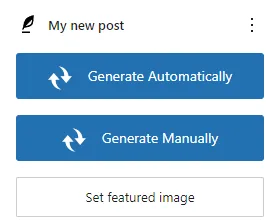
In the editor use Click to generate, or use the posts list column for a single post.
- Run bulk generation
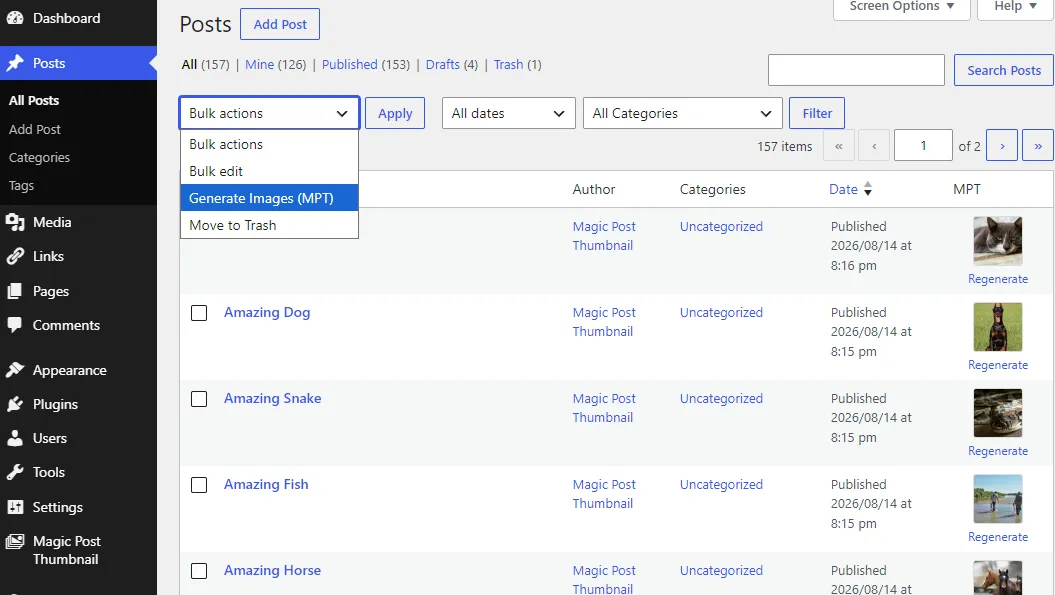
Select many posts in the list and choose Generate featured images under Bulk Actions.
Magic Post Thumbnail screenshots (9)
-
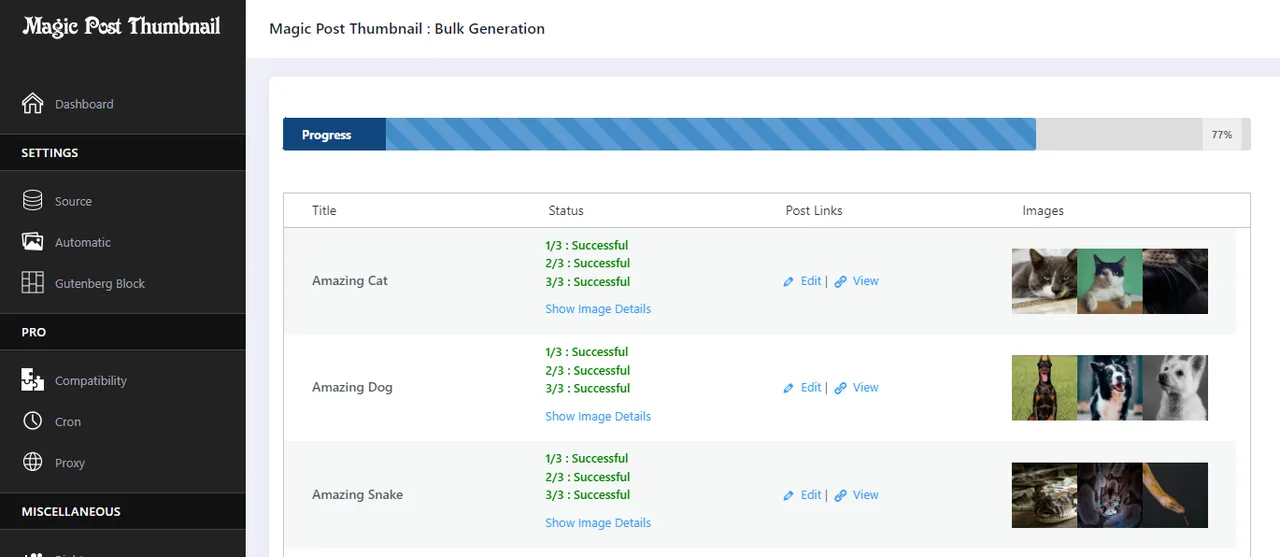
Bulk generation -
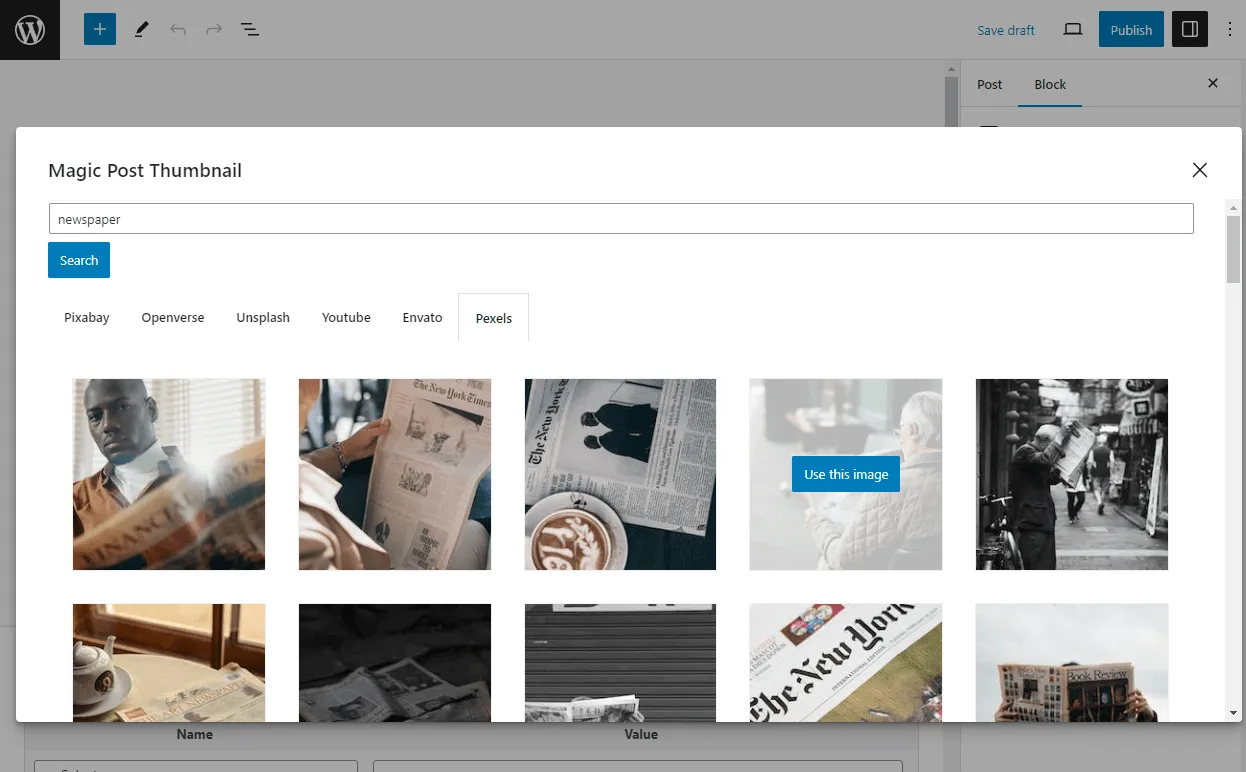
Gutenberg block -
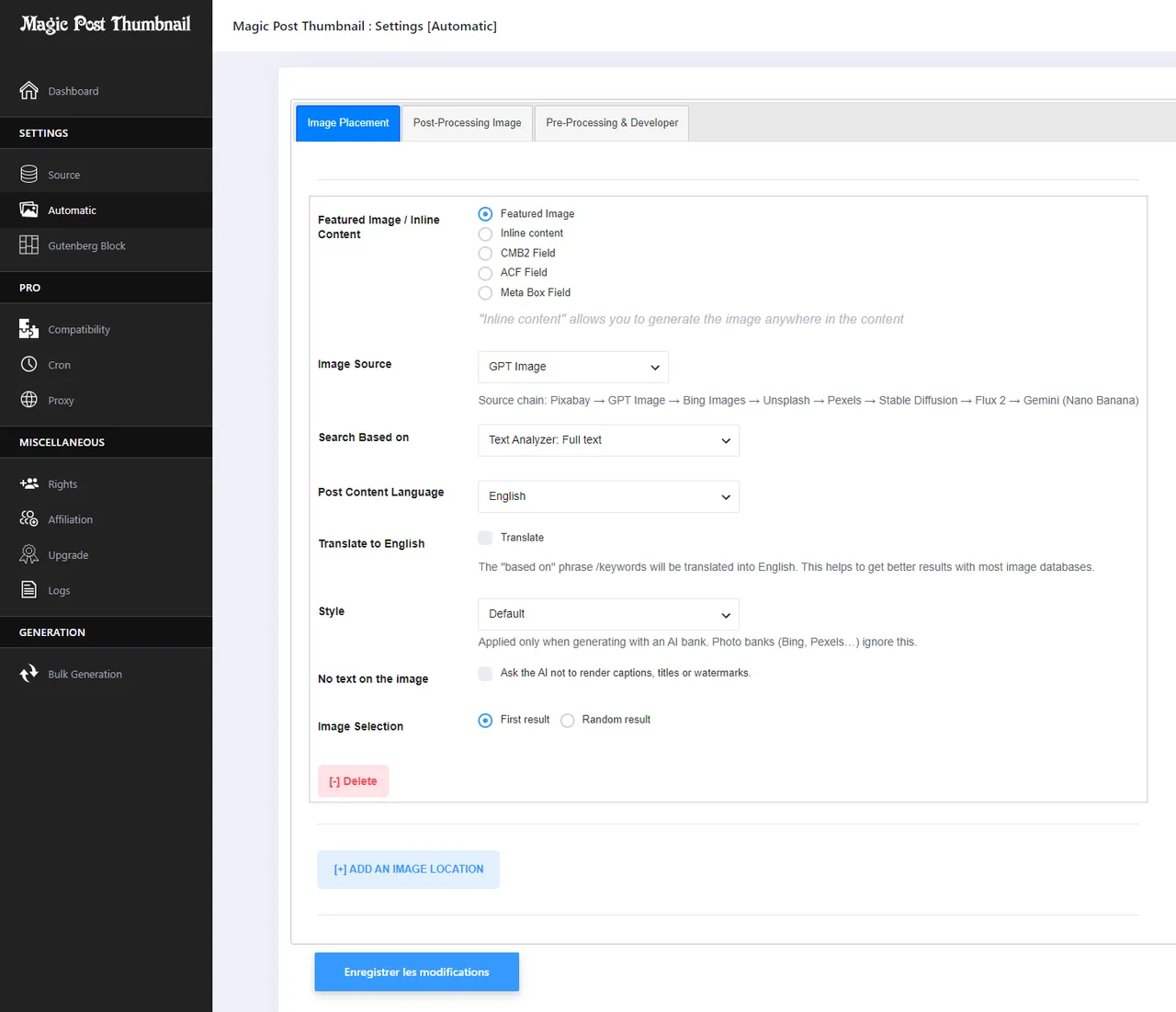
Automatic settings -
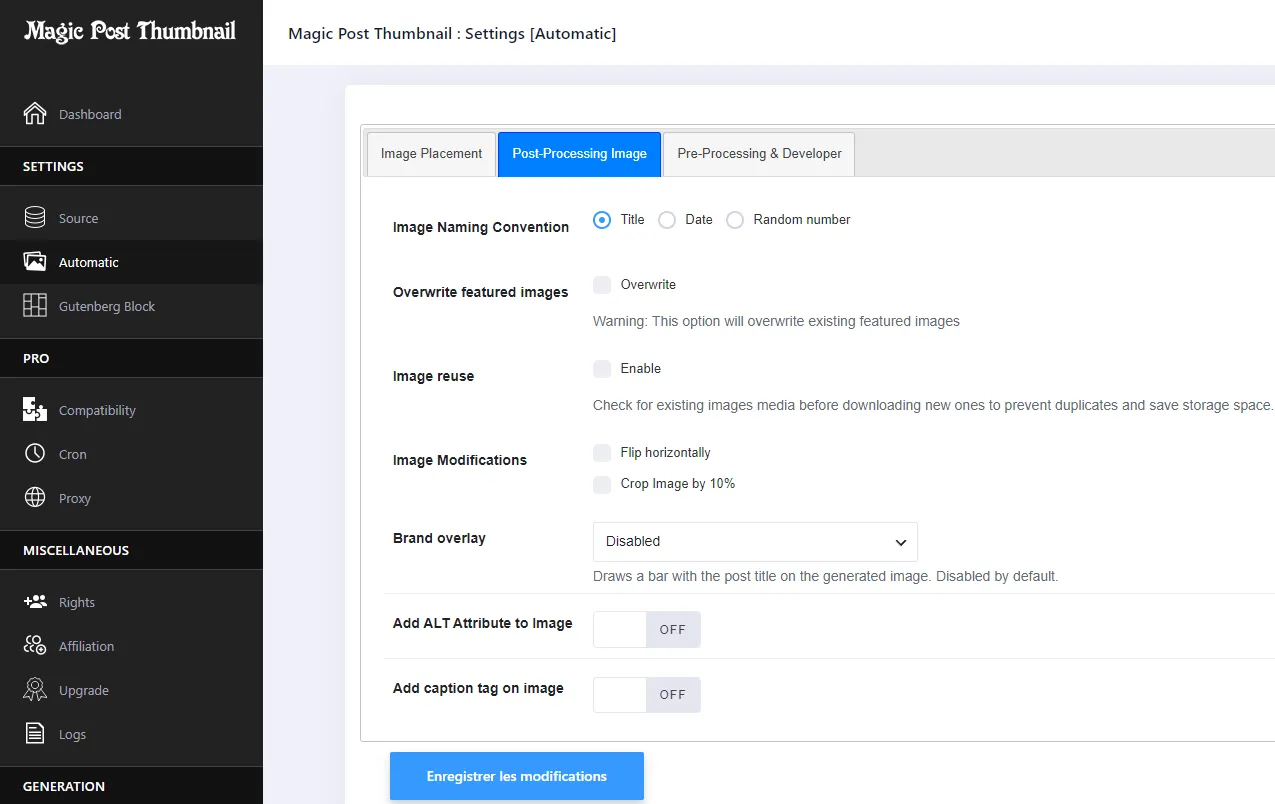
Post-processing (overlay, flip, crop) -
Enable generation per post type -
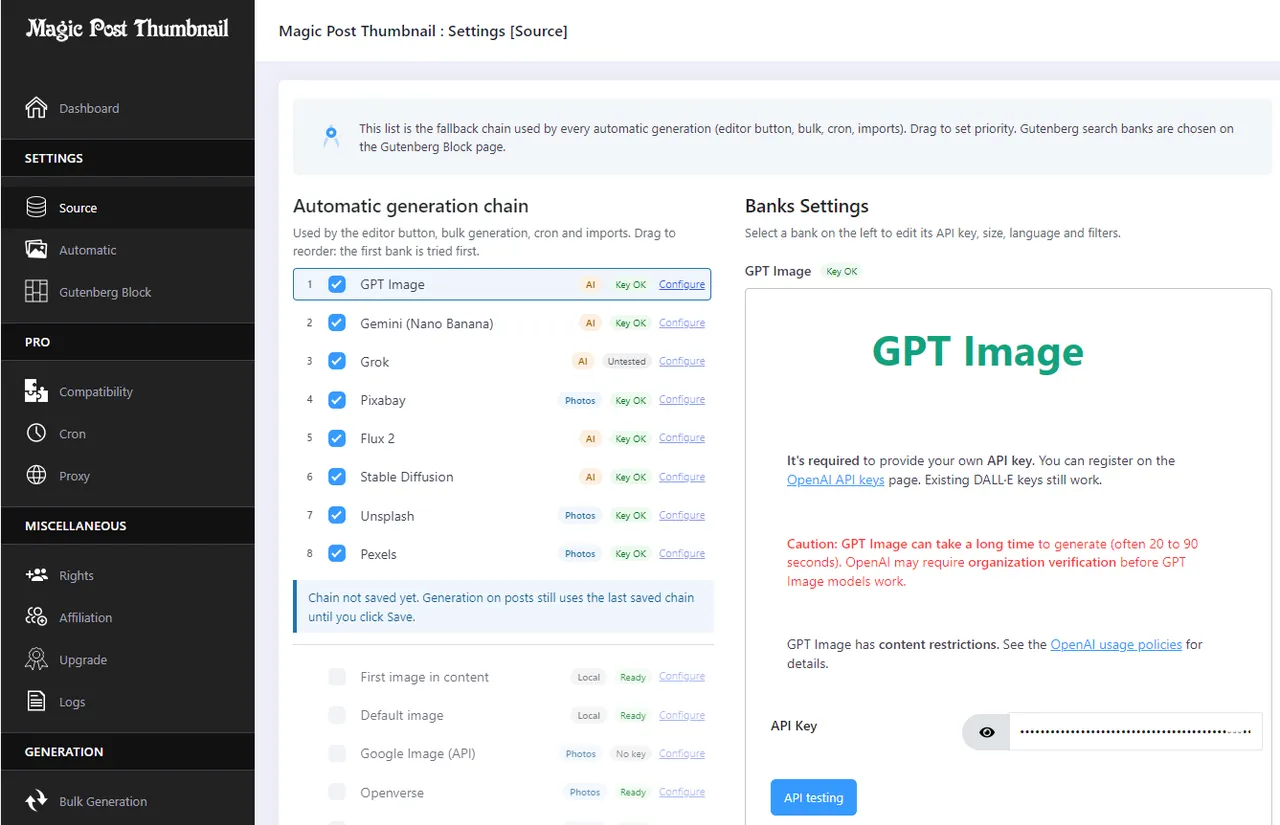
Source: fallback chain, API keys and preview -
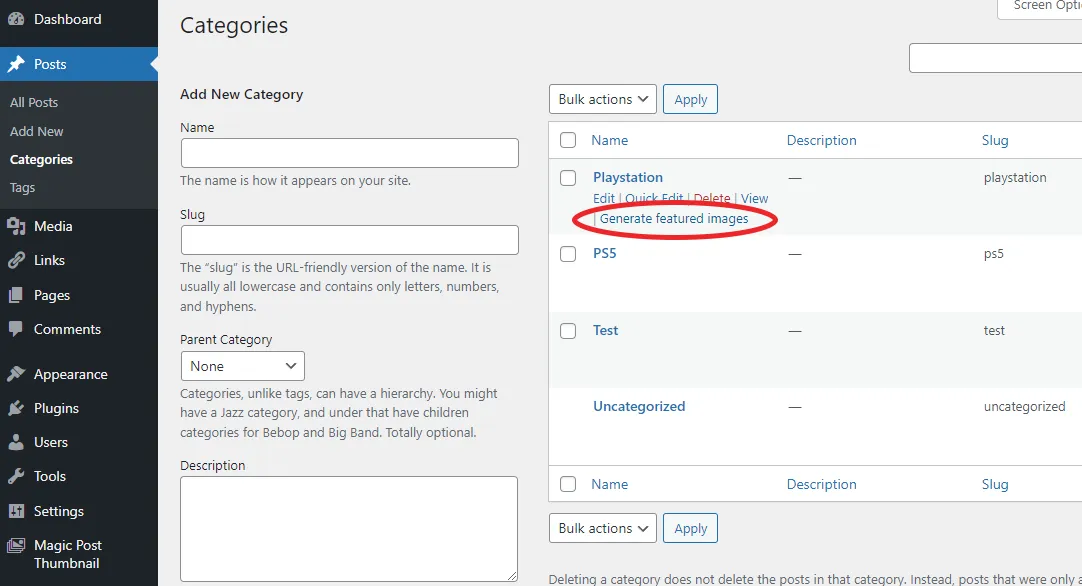
Generate featured images for a taxonomy -
Generate or regenerate from the posts list -
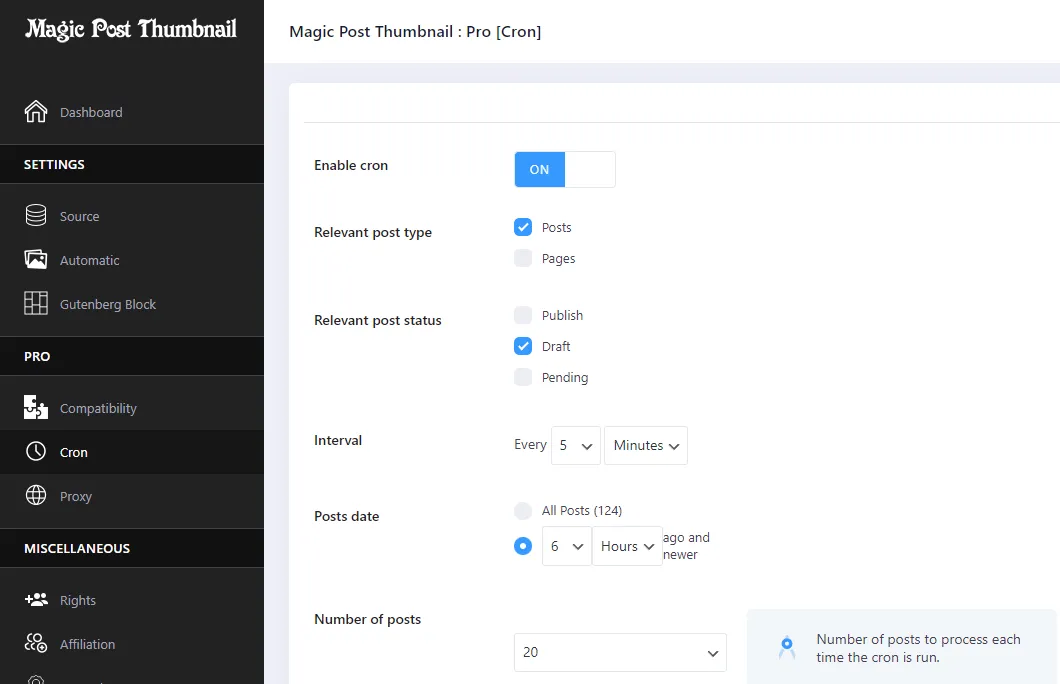
Cron settings (Pro)
Important information
- Requires WordPress 6.0 or newer and PHP 7.3 or newer. Tested up to WordPress 7.1.4.
- AI and API-based sources use your own provider keys and quotas. Costs and limits come from those providers.
- Heavy use of Bing Images in a short time can get your server temporarily blocked, so set an interval between generations.
- Check licensing and attribution rules of any photo source you use, and review AI images before publishing.
- The plugin has 6 published vulnerabilities in its history. The data shows them as patched, but keep it updated.
From the Magic Post Thumbnail readme
Straight from the developer's WordPress.org listing.
Full description
Black Friday: 30% off the Pro version until November 30, 2026. Use the code MPTBLACKFRIDAY26 on the pricing page.
Magic Post Thumbnail generates images for your posts — as featured images or inside the content — from image sources and AI models.
Free searches can use the post title or text analysis. Pro adds tags, categories, custom fields, custom requests and the OpenAI keyword extractor.
You pick a fallback chain of image sources: if the first source fails, the next one is tried.
Photo sources: Bing Images, Pixabay, Openverse, Flickr, Unsplash, Pexels, YouTube.
AI sources: GPT Image, Stable Diffusion, Replicate, Ideogram, Flux 2, Gemini (Nano Banana), Grok. Optional style presets (photorealistic, cinematic, “no text”…) apply to AI sources only.
You can also use the first image already in the post, or a default fallback image, and optionally draw a title / logo bar on the generated file (off by default).
Generate from the post editor, the posts list column, bulk actions, Gutenberg, or (Pro) cron and imports.
Official Website
Documentation
What is included ?
Magic Post Thumbnail for FREE
• Featured images for posts, pages and custom post types
• Insert an image anywhere in the post content (position up to the 10th occurrence)
• Search based on the title or text analysis
• Gutenberg block to search and insert images
• Image sources: Bing Images, GPT Image, Google Image API, Pixabay, Openverse, Flickr
• Local sources: first image in the post, default fallback image
• AI style presets and “no text” (when generating with an AI source)
• Optional title / logo overlay on generated images
• Generate or regenerate from the posts list
• Bulk generation for posts or taxonomies
• Dashboard health check and one-click test generation
Magic Post Thumbnail PRO
Upgrade to Pro for more image sources, automation and integrations.
• Customisable crons
• Several image locations per generation
• Image sources: Unsplash, Pexels, Stable Diffusion, Replicate, Ideogram, Flux 2, Gemini (Nano Banana), Grok
• More results in the Gutenberg block
• Search based on tags, categories, paragraph analyser, custom fields, custom request and OpenAI keyword extractor
• Image modifications: flip horizontally and/or crop by 10%
• Compatibility with REST, WPeMatico, FeedWordPress, WP All Import, Featured Image from URL, CMB2, ACF and Meta Box
• Restricted domains and proxy
• Priority support with replies within 24 hours
Youtube Tutorial
Translations
• English
• French
• Spanish
• Russian
• Portuguese (Brazil)
• Portuguese (Portugal)
• Italian
• Japanese
• German
• Dutch
• Polish
• Turkish
• Vietnamese
• Chinese (Simplified)
• Chinese (Traditional)
• Korean
• Arabic
• Indonesian
• Ukrainian
Support the plugin
If you’ve found the plugin useful, please consider making a donation. Thank you for your support !
Installation
• Activate the plugin.
• Open Magic Post Thumbnail. The dashboard shows whether your chain and API keys are ready; you can generate a test draft there.
• Under Source, build the fallback chain (drag to set priority) and enter API keys. Under Automatic, choose post types and image placement.
• In a post, use Click to generate (Gutenberg or Classic), or generate from the posts list column.
• For many posts at once: select them in the list and choose Generate featured images under Bulk Actions.
API setup guides: image databases.
Developer FAQ (5)
- How to generate images ?
- Several ways: • The **Click to generate** button on a post (Gutenberg and Classic Editor). • The **Generate / Regenerate** button in the posts list. • Bulk Actions → **Generate featured images**, for selected posts or a taxonomy. • The Gutenberg block, to search an image source and insert or set a featured image. • Pro: scheduled crons, or compatibility with REST, WPeMatico, FeedWordPress and WP Automatic.
- Is it unlimited ?
- Yes, as far as the plugin is concerned. Image sources and AI providers apply their own quotas and billing.
- Why images aren’t generated anymore ?
- Heavy use of Bing Images in a short time can get your server temporarily blocked. Enable an interval between generations. Bing Images is the default free photo source. Google HTML scraping was removed in 7.0.0; existing scraping settings are migrated automatically.
- Do AI sources use the style setting?
- Yes. Style presets and “no text” apply only to AI sources (GPT Image, Stability, Replicate, Ideogram, Flux 2, Gemini, Grok). Bing, Pexels and other photo sources ignore them.
- I have other pre-sale questions, can you help?
- Yes! You can ask us any question through our support page.
Downloads, last 30 days
Trend vs previous period: -2.2%
Average daily downloads: 294 over the last 7 days , 181 over 30 days.
Security history
Past CVEs, patched · 6 published vulnerabilities (Wordfence) · most recent Aug 26, 2024
- Patched 7.2 High Magic Post Thumbnail <= 4.1.10 - Unauthenticated Stored Cross-Site Scripting CVE-2023-29171 · Apr 3, 2023 · affects *-4.1.10 · fixed in 4.1.11
- Patched 4.4 Medium Generate Images - Magic Post Thumbnail <= 5.2.7 - Authenticated (Admin+) Stored Cross-Site Scripting CVE-2024-6724 · Jul 22, 2024 · affects *-5.2.7 · fixed in 5.2.8
- Patched 6.3 Medium Freemius SDK <= 2.4.2 - Missing Authorization Checks CVE-2022-4974 · Mar 4, 2022 · affects [*, 3.3.11) · fixed in 3.3.11
- Patched 6.1 Medium Magic Post Thumbnail <= 5.2.9 - Reflected Cross-Site Scripting CVE-2024-43921 · Aug 26, 2024 · affects *-5.2.9 · fixed in 5.2.10
- Patched 6.1 Medium Freemius SDK <= 2.5.9 - Reflected Cross-Site Scripting via fs_request_get CVE-2023-33999 · Jul 18, 2023 · affects 2.4.3-4.1.12 · fixed in 4.1.13
- Patched 6.1 Medium Magic Post Thumbnail <= 3.3.6 - Reflected Cross-Site Scripting Jul 5, 2021 · affects *-3.3.6 · fixed in 3.3.7
Magic Post Thumbnail FAQ
How can I generate images?
Use the Click to generate button in a post, the Generate or Regenerate button in the posts list, or bulk actions. Pro also supports cron and imports.
Is generation unlimited?
The plugin does not cap it. Image sources and AI providers apply their own quotas and billing.
Why did generation stop working?
Heavy Bing Images use can get your server blocked for a while. Turn on an interval between generations.
Do style settings affect every source?
No. Style presets and no-text apply only to AI sources. Photo sources ignore them.
Which photo sources are free?
Bing Images, Google Image API, Pixabay, Openverse and Flickr. Unsplash and Pexels need Pro.
Which AI models are supported?
GPT Image is in the free plugin. Stable Diffusion, Replicate, Ideogram, Flux 2, Gemini and Grok are in Pro.
Magic Post Thumbnail alternatives

Media File Renamer is the smart, AI-powered solution for renaming your WordPress media files. It automatically gives your media files and their metadata (Title, ALT Text, Description) clean, SEO-friendly names.…

Optimized image search in WordPress for Unsplash, Adobe Stock, Getty Images, iStock, Pixabay, Pexels, Depositphotos and Freepik. You can switch between providers to compare the images, or generate one from a prompt…

AltText.ai automatically generates alt text for your images. Automatic: Every uploaded image is analyzed and alt text is automatically added to the image properties. Supports Multiple Formats: Handles JPG, PNG, WebP,…

Alt Magic is an AI alt text generator for WordPress that automatically creates SEO-friendly image alt text for newly uploaded images and existing media library images. Start with 50 free monthly credits, then scale…

Ease Project Management and Task Management using a powerful project manager with Kanban board, Gantt chart, milestone tracking & project reporting. AI-Powered Project Manager Project Manager is a feature-rich…

wp-admin forgets. OpenStation doesn’t. You know the moment. You’re deep in a post and you need one image from the Media Library. You click over, find it, click back, and everything you had going is gone. Your scroll…
Listing data from WordPress.org and the Wordfence vulnerability feed, refreshed Nov 9, 2026; listing details fetched Nov 14, 2026. Screenshots are from the plugin's WordPress.org listing. Not affiliated with Alexandre Gaboriau.