
CrawlWP SEO
CrawlWP SEO - Complete WordPress SEO Plugin with AI, Indexing & Search Performance · by properfraction
- active installs
- 30K+
- 62 ratings
- 4.7
- since last update
- 28d
- releases in 12 months
- —
- support threads resolved
- 100%
- avg daily downloads
- 521
- on WordPress.org
- 5 years
CrawlWP SEO at a glance
CrawlWP SEO is a free WordPress AI SEO plugin by properfraction with 30K+ active installs and a 4.7/5 rating from 62 reviews. It was last updated on Oct 12, 2026, is tested up to WordPress 7.1.4 and needs PHP 8.0+. It works with Google Gemini. All 2 of its published vulnerabilities have patched versions. Our quality score is 93/100.
What is CrawlWP SEO?
CrawlWP SEO is a WordPress SEO plugin that also submits your pages to search engines the moment you publish, update or delete them. The free version covers on-page work such as titles, descriptions, schema, breadcrumbs, social cards, robots rules, redirects and sitemaps, so it can replace another SEO plugin. It installs like any other plugin from the Plugins screen and adds its own menu to the WordPress admin.
What sets it apart is the indexing side. It submits to Google, Bing, Yandex, Naver, Yep and Seznam.cz in the free version, where many SEO plugins limit this to paid plans. The paid Premium version then checks whether each page was indexed and shows search performance data from Google, Bing and Yandex. Read the free and paid split carefully before you build a workflow around any single feature.
It also covers AI search. It can write titles and descriptions through the AI connectors in WordPress, builds a structured data graph and publishes an llms.txt file. It fits site owners who want faster discovery of new posts and who are comfortable moving from Yoast, Rank Math, All in One SEO, SEOPress, The SEO Framework or Slim SEO. Try it on a staging copy of your site first, so you can check compatibility with your theme and other plugins.
Best for
- Sites that publish often and want fast indexing
- Owners switching from Yoast or Rank Math
- Sites that want llms.txt and schema in one plugin
- Users who want search data inside WordPress
CrawlWP SEO features
Instant indexing
Notifies Google, Bing, Yandex, Naver, Yep and Seznam.cz when content is created, updated or deleted.
On-page SEO
Titles, meta descriptions, schema, breadcrumbs, Open Graph and X cards for posts, pages and custom post types.
Technical SEO tools
Redirect manager with 301, 302 and 410 rules, a 404 monitor, a robots.txt editor, sitemaps and llms.txt.
AI titles and descriptions
Generates SEO titles and meta descriptions through the AI connectors in WordPress.
Structured data graph
Tells search engines and AI tools who runs the site and how pages relate.
One-click SEO import
Imports titles, descriptions, robots rules, canonical URLs, social images and redirects from six other SEO plugins.
Bulk editor
Edit SEO titles and descriptions across many posts from one table.
Internal link suggestions
A Links tab shows suggested internal links, outbound links and posts that already link to the current one.
CrawlWP SEO free vs pro
Free WordPress.org version
- On-page and technical SEO
- Instant indexing on six search engines
- Redirects, 404 monitor, robots.txt editor, sitemaps and llms.txt
- AI titles and descriptions
- Import from six other SEO plugins
Pro Paid version
- Google, Bing and Yandex search data
- Per-post insights, index status and history
- Google News, video, HTML and multilingual sitemaps
- Internal link automation
- Email reports
A Premium version exists and the listing says it starts from $59 a year with a 14-day money-back guarantee. AI title generation goes through the AI connectors in WordPress, so you need a provider connected there.
How to use CrawlWP SEO
- Install the plugin
Go to Plugins, Add New in wp-admin, search for CrawlWP, then install and activate it.
- Import old data
If you are leaving another SEO plugin, run Settings, Import SEO Data first, then deactivate the old plugin.
- Set site details
Fill in Site Information and add verification codes under Site Verification.
- Set templates
Open Title and Meta to define title and description templates for each content type.
- Connect search engines
Connect the Google, Bing and Yandex APIs in the settings so submissions and data work.
CrawlWP SEO screenshots (12)
-
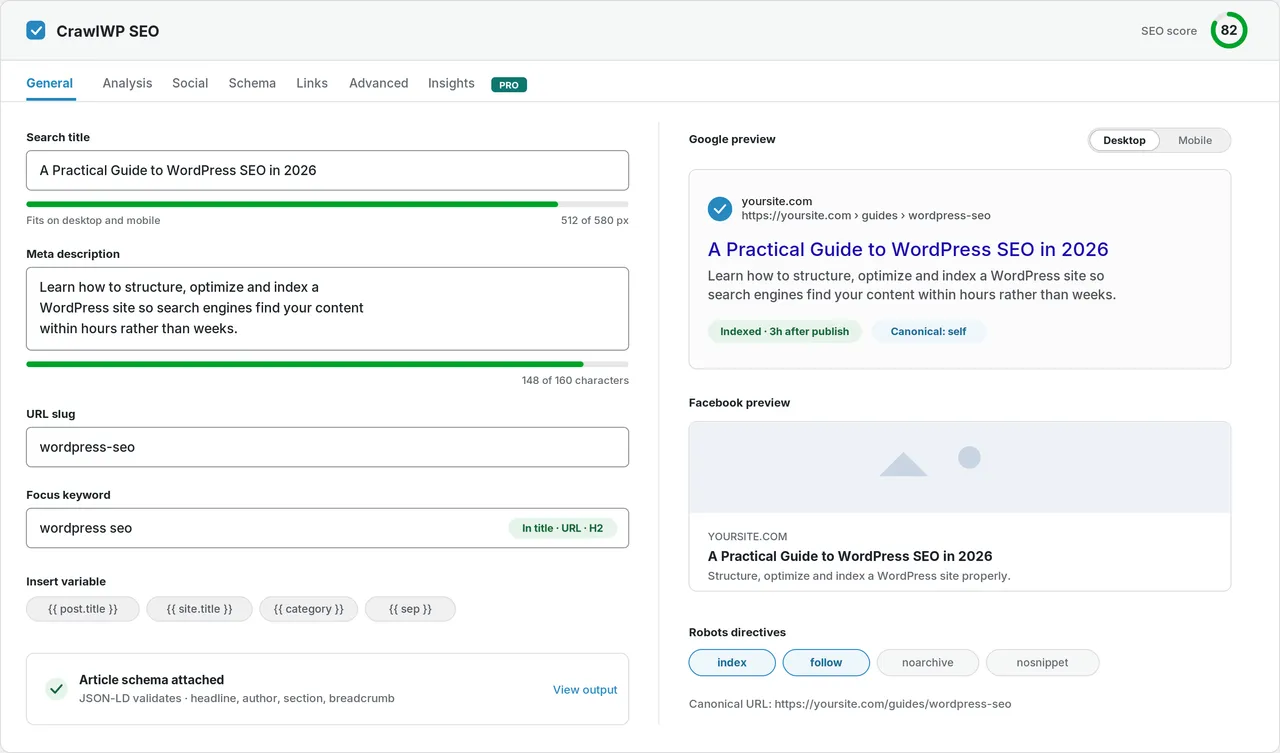
The SEO metabox: search title, meta description and a live Google preview measured in pixels. -
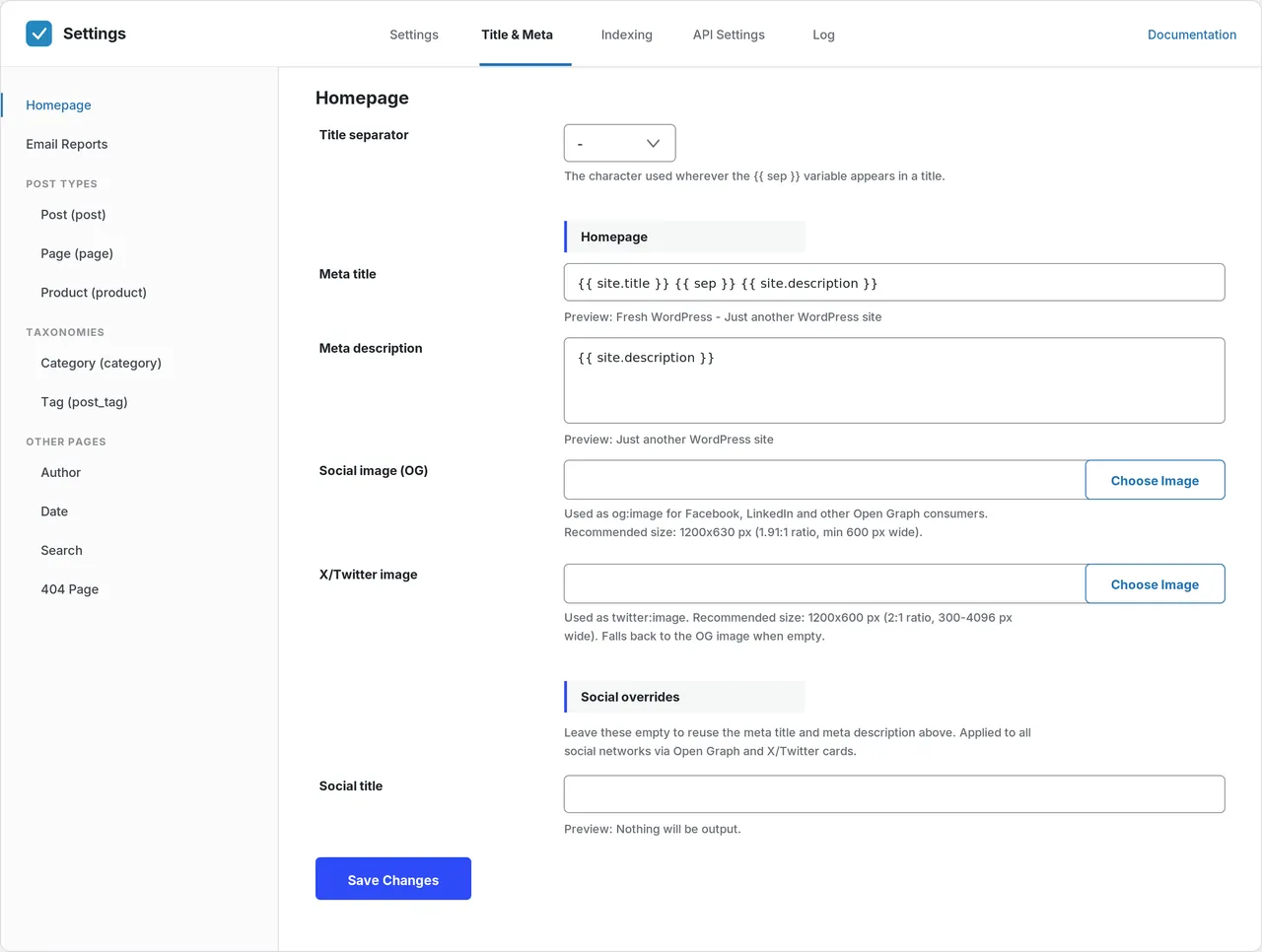
Title & Meta templates for the homepage, every post type, taxonomy and archive. -
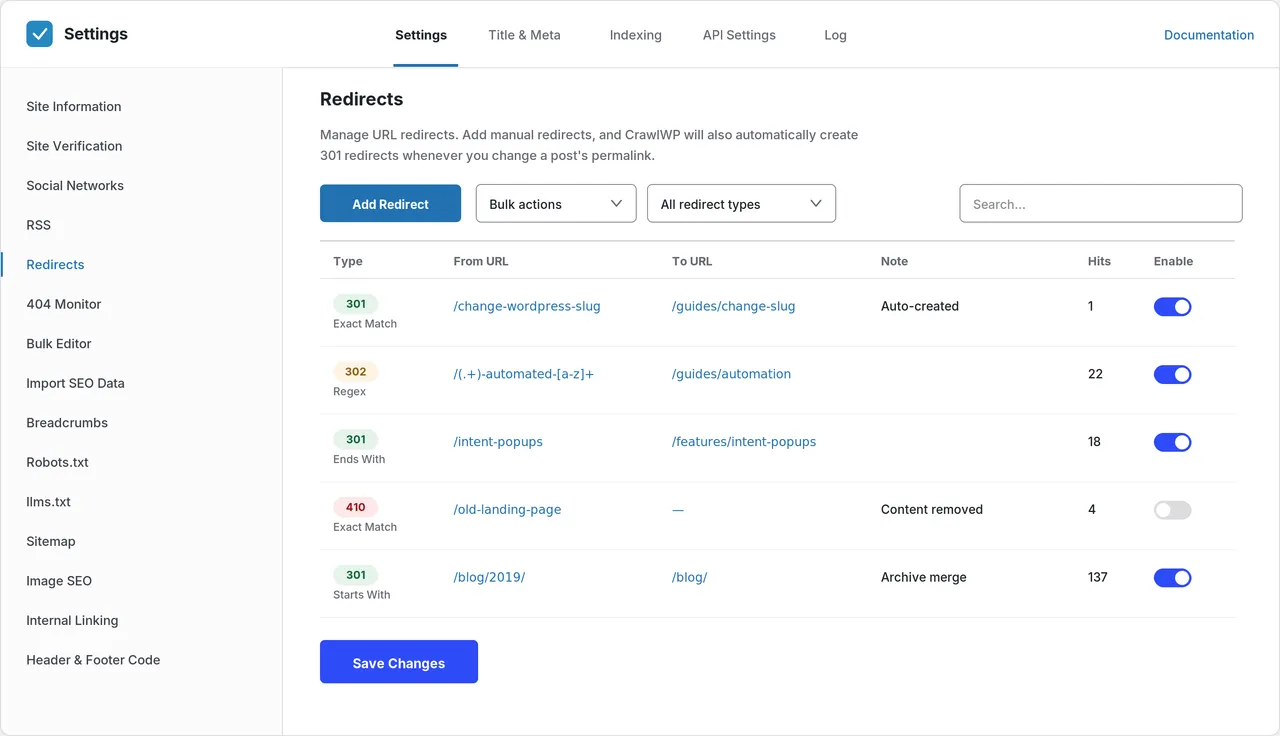
Redirect manager: 301, 302 and 410 rules with regex matching and hit counts. -
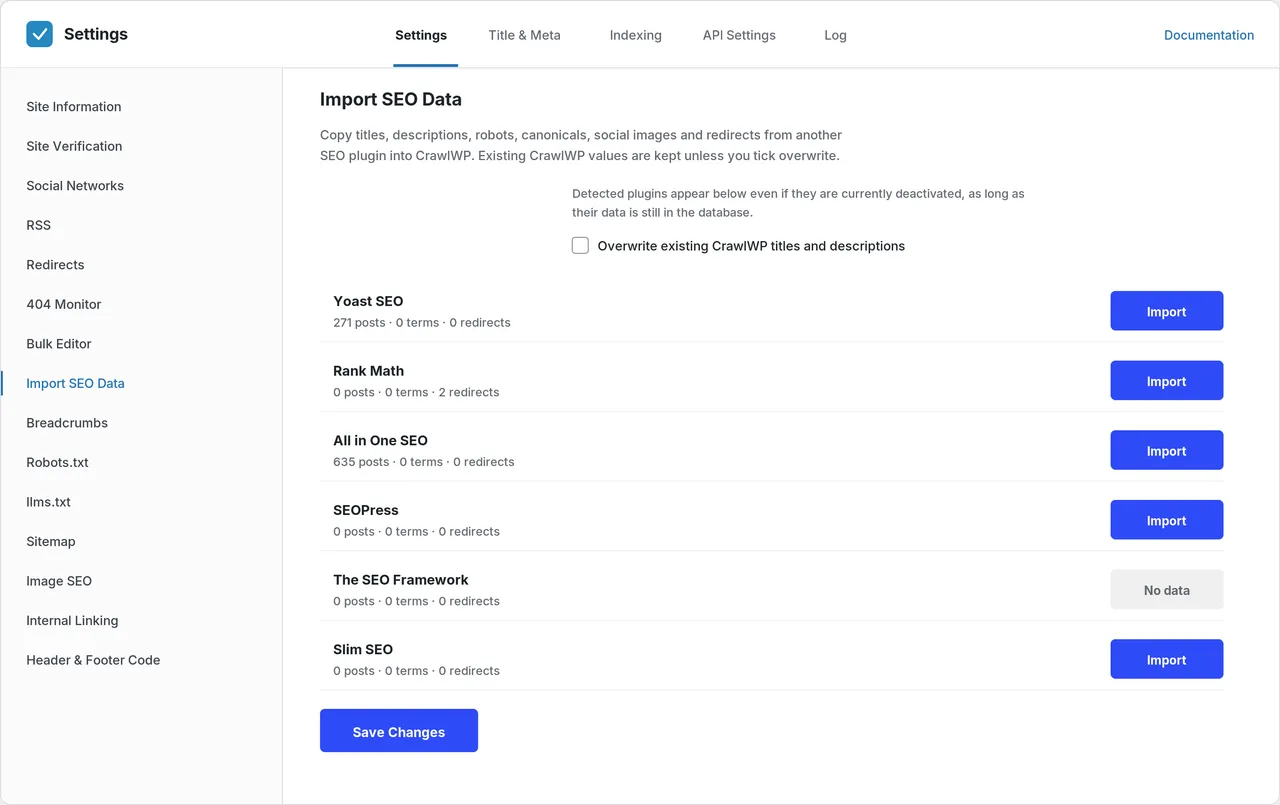
Import SEO data from Yoast SEO, Rank Math, All in One SEO, SEOPress, The SEO Framework and Slim SEO. -
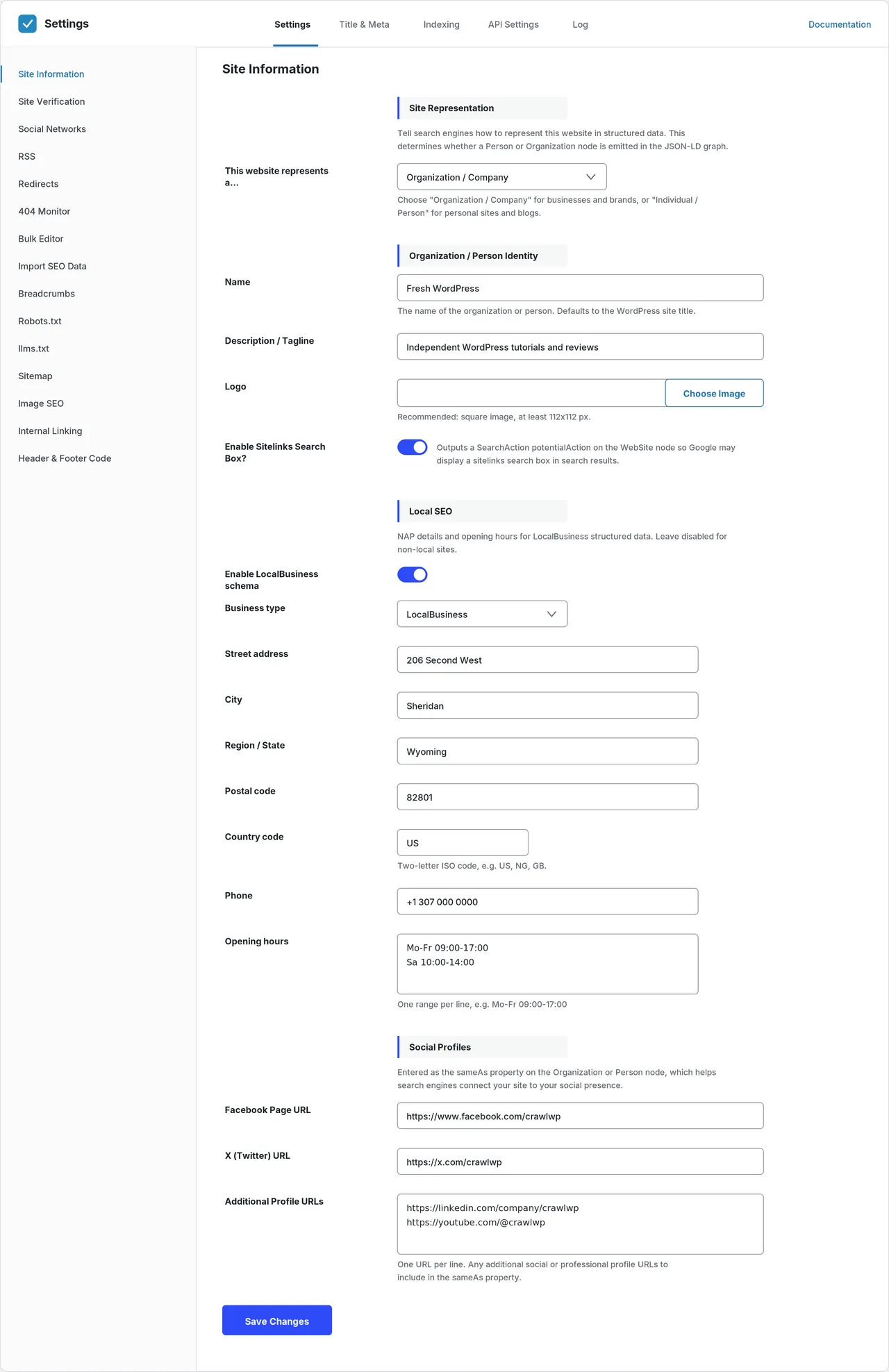
Site Information: organization or person schema, logo, Local SEO and social profiles. -
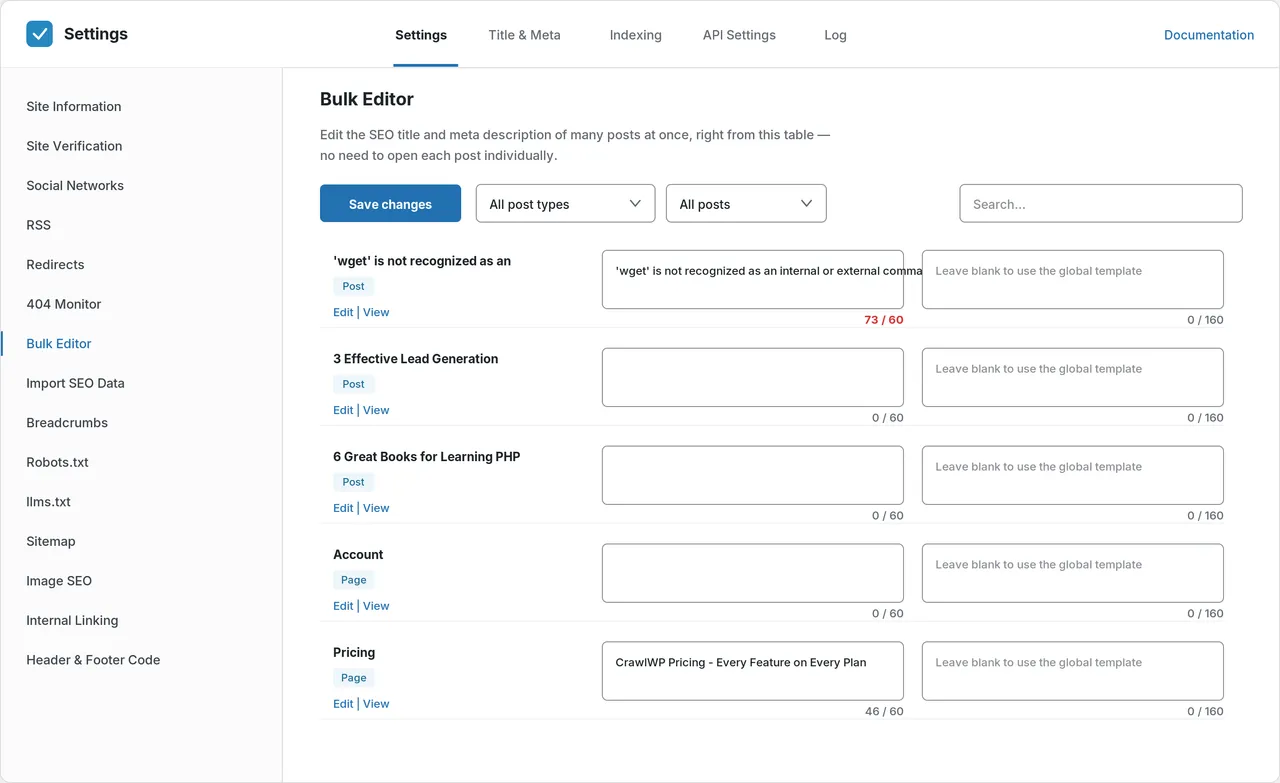
Bulk editor: fix SEO titles and meta descriptions across many posts from one table. -
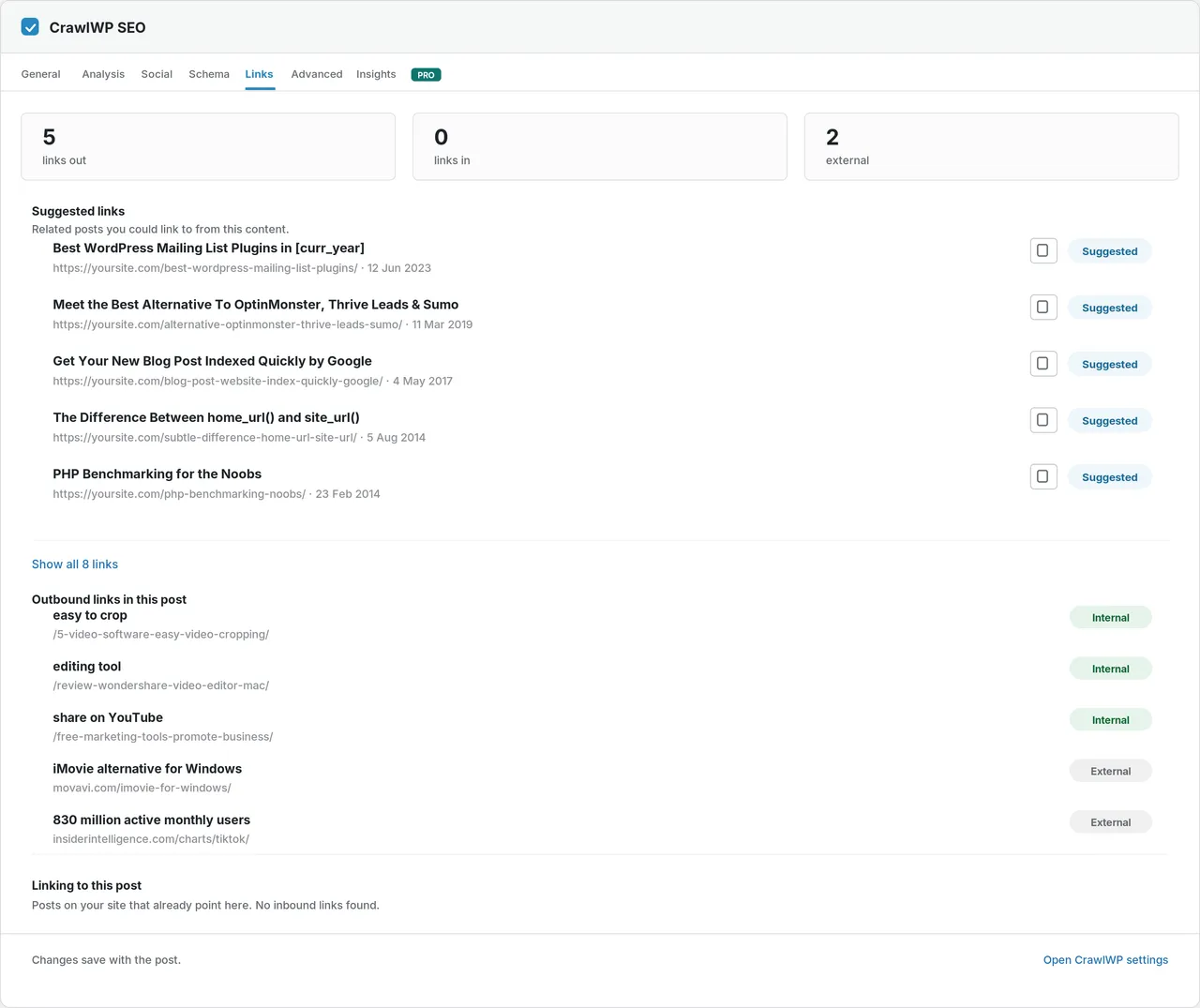
Links tab: suggested internal links, outbound links and posts already linking here. -
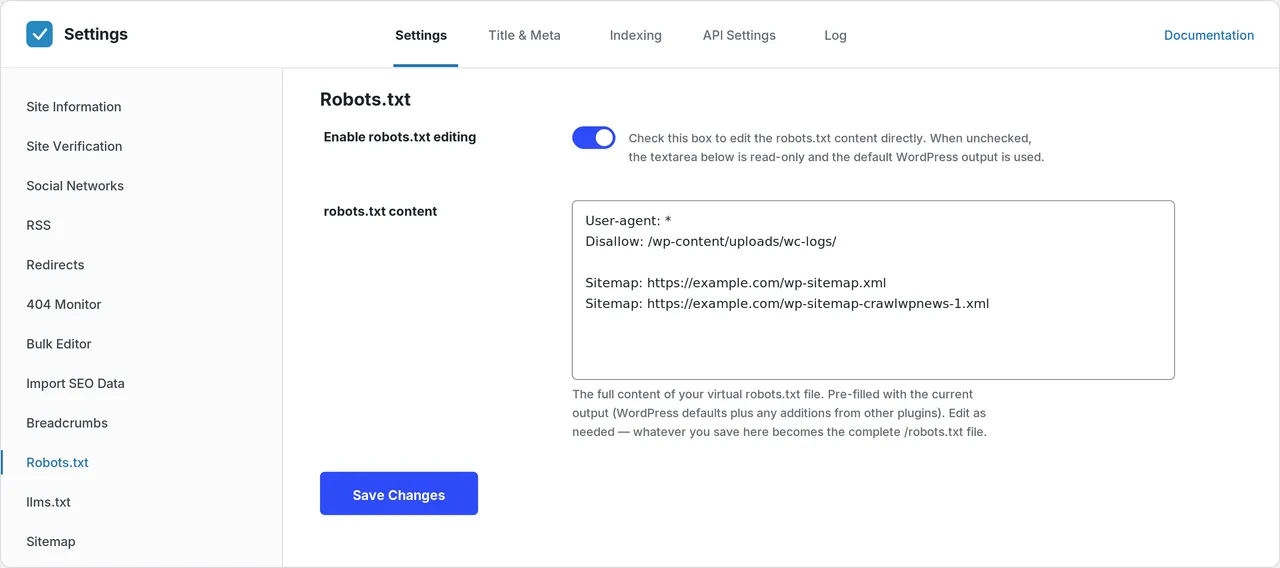
robots.txt editor, pre-filled with what your site actually serves. -
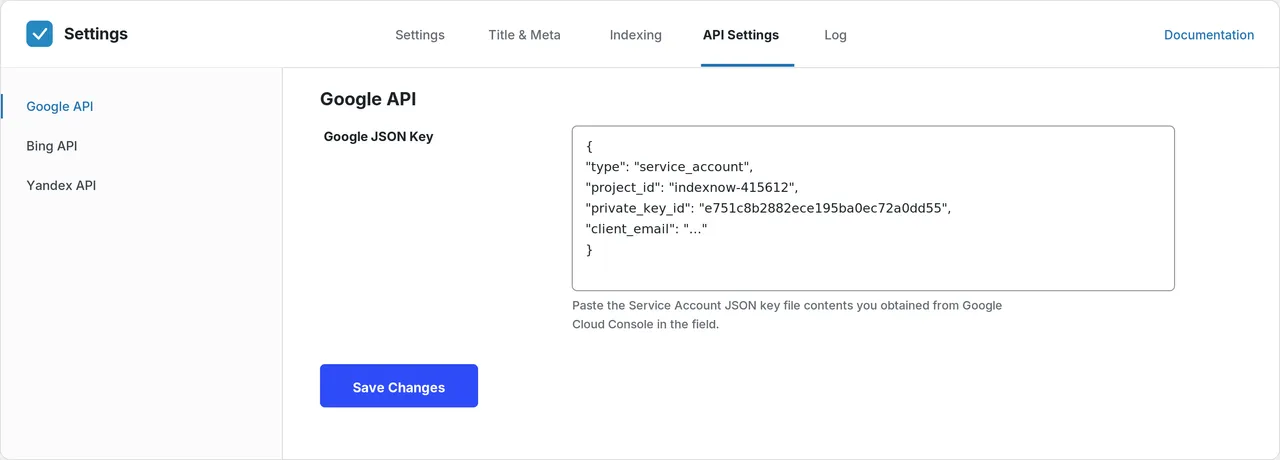
API Settings for the Google, Bing and Yandex indexing APIs. -
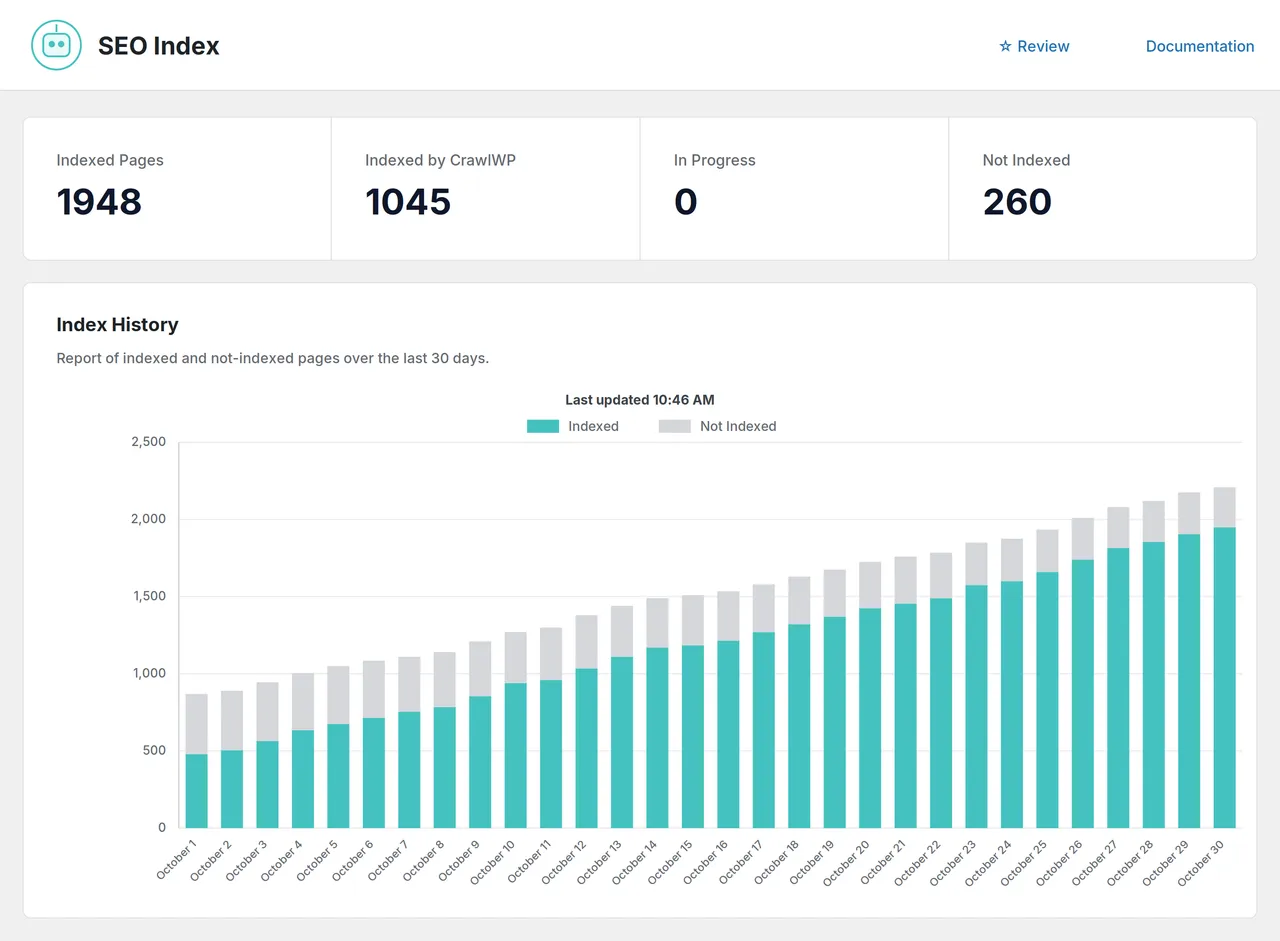
(Premium) SEO Index: indexed pages and a 30-day index history chart. -
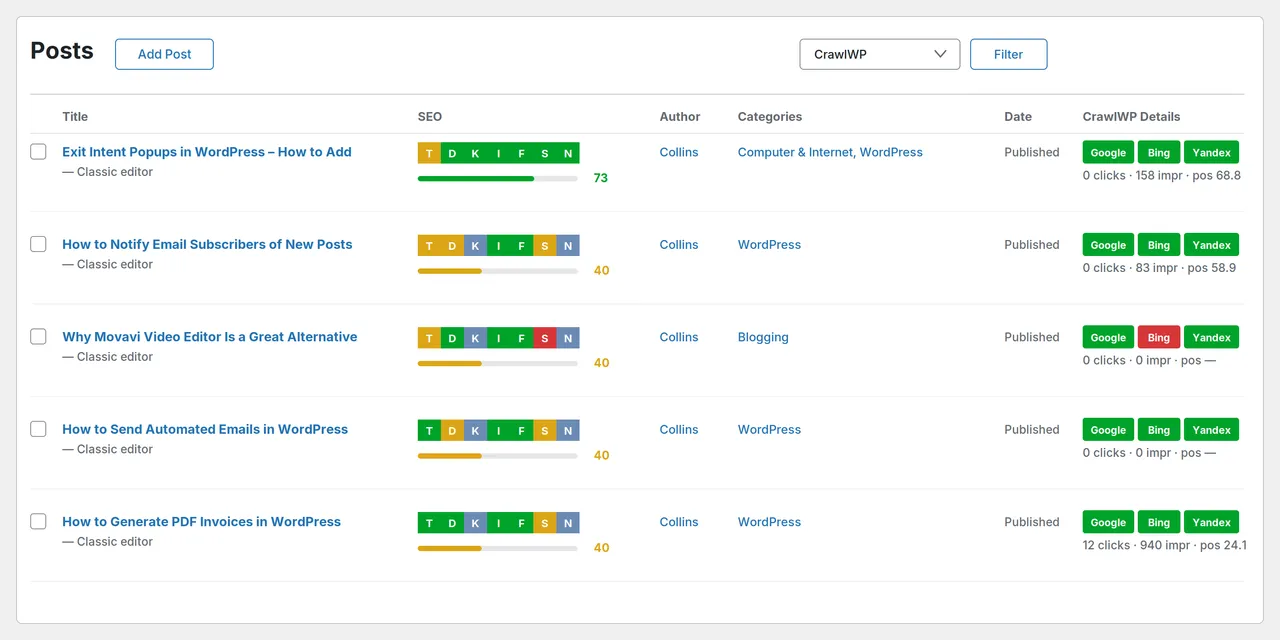
SEO score on the posts list, plus (Premium) index status for Google, Bing and Yandex. -
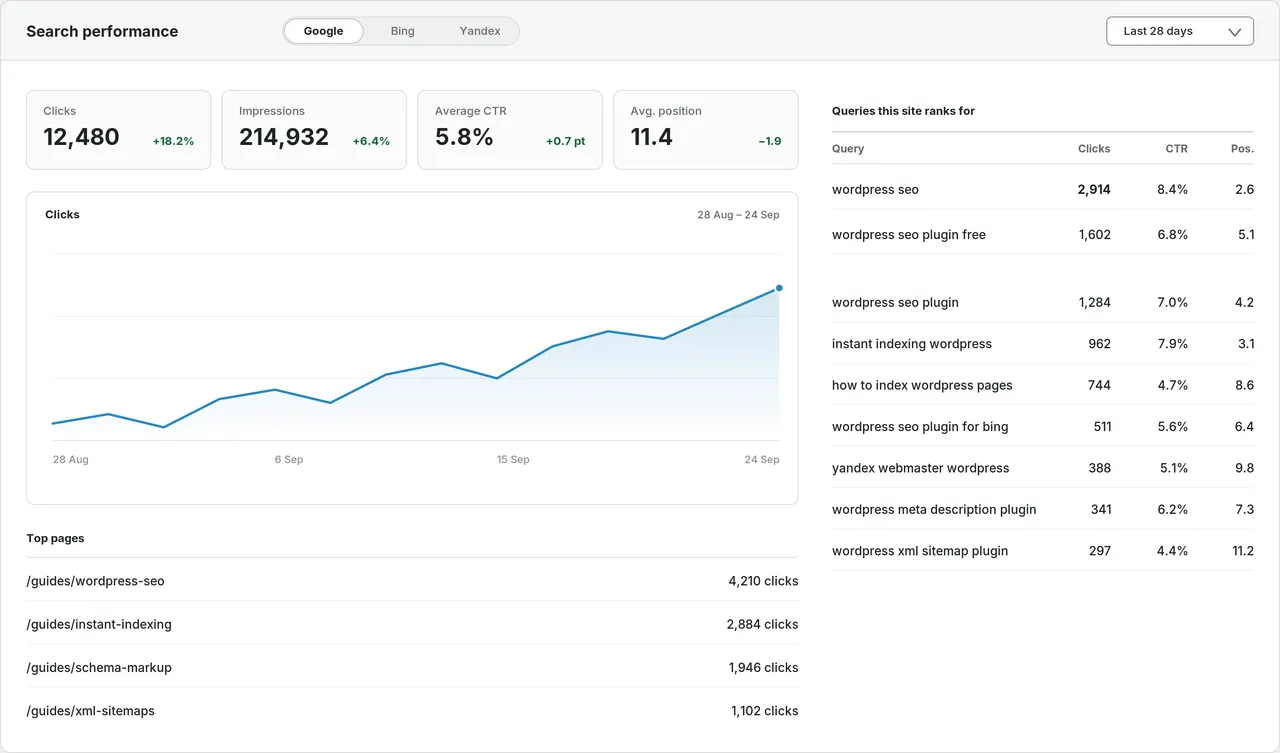
(Premium) Search performance from Google, Bing and Yandex inside WordPress.
Important information
- Requires WordPress 6.9 or later and PHP 8.0 or later, which is a higher PHP bar than many plugins.
- Do not run it beside another SEO plugin. Import your data, then deactivate the old one.
- Your site talks to search engines directly, and the listing says nothing passes through the vendor's servers.
- Index status checks and search performance data need the Premium version.
- The data records 2 published vulnerabilities in the plugin's history, both patched.
From the CrawlWP SEO readme
Straight from the developer's WordPress.org listing.
Full description
CrawlWP – The WordPress SEO Plugin That Also Gets You Indexed
Optimize every page, submit it to search engines (Google, Bing, Yandex, Yep etc) the moment you publish, and see which ones actually indexed it — all inside WordPress.
CrawlWP is a complete WordPress SEO plugin. It handles the on-page work you expect — meta titles and descriptions, schema, breadcrumbs, social cards, robots rules, redirects and sitemaps. Then it does the part most SEO plugins leave to chance: it submits your content to search engines for indexing and let you know when they actually get indexed.
• Complete on-page SEO: Titles, meta descriptions, schema, breadcrumbs, Open Graph and X cards for every post, page and custom post type.
• Technical SEO built in: Redirects, a 404 monitor, a robots.txt editor, sitemaps and llms.txt — no extra plugins.
• Instant indexing on search engines: Google, Bing, Yandex, Naver, Yep and Seznam.cz.
• Ready for AI search: AI-written titles and descriptions, a structured data graph, and llms.txt for AI crawlers.
• Switch in minutes: One-click import from Yoast SEO, Rank Math, All in One SEO, SEOPress, The SEO Framework and Slim SEO — redirects included.
• Your data stays yours: Your site talks to the search engines directly. Nothing passes through our servers.
CrawlWP Premium from $59/year · adds Google, Bing and Yandex search data, index status and more · 14-day money-back guarantee
Website | Features | Documentation | Pricing | Support
Why CrawlWP Is Different
Most WordPress SEO plugins write your meta tags and stop. Your page then waits for a crawler that may not come back for a week, and you have no way to know if it ever arrived.
CrawlWP closes that gap. It tells search engines the moment you create, update or delete content, then checks the result. “Is this page indexed?” becomes a question you can answer instead of guess.
It also goes further than other SEO plugins for WordPress. Many offer IndexNow for Bing and Yandex, often only on a paid plan. CrawlWP submits to Google, Bing, Yandex, Naver, Yep and Seznam.cz in the free version. CrawlWP Premium then checks whether each page was actually indexed, and shows your website search performance on Google, Bing and Yandex.
Ready for Search and AI Search
People now ask AI assistants as well as search engines. Both read your site, and both work better when your site is easy to understand.
• AI titles and meta descriptions: Generate SEO titles and meta descriptions with the AI connectors in WordPress.
• Structured data graph: Tell search engines and AI tools who runs your site, what it is and how its pages fit together.
• llms.txt: A plain-text file that describes your site to the AI crawlers that now read it. Generated for you, or written by hand.
On-Page SEO for WordPress
• Meta titles and descriptions: Templates for the homepage, every post type, every taxonomy and the author, date, search and 404 archives — with a live preview of the result.
• SEO metabox: Override any template on the posts that matter, with a real Google preview measured in pixels, not characters.
• Bulk editor: Fix the SEO title and meta description of a hundred posts from one table, with live character counters.
• Content analysis: Focus keyword checks across the title, URL, meta description, first paragraph, headings, images and links.
• SEO score on your posts list: A score and a badge for each check beside every post, so you can find the weakest ones at a glance.
• Schema markup: A JSON-LD graph you control — organization or person, logo, sitelinks search box, social profiles, article markup and breadcrumbs.
• Local SEO: LocalBusiness structured data with your full address, phone number and opening hours.
• Breadcrumbs: A [crawlwp_breadcrumbs] shortcode with your own labels, separator and main category.
• Open Graph and X cards: Control how every page looks when it is shared, with a preview in the editor and a fallback image.
• Image SEO: Missing image alt text filled in from the image title or file name. Alt text you wrote yourself is never changed.
• Internal link suggestions: See related posts you could link to, every link already in a post, and posts with no links pointing at them.
Technical SEO
• Redirect manager: 301, 302 and 410 redirects with exact, starts-with, ends-with and regex matching, hit counts and an on/off switch for each rule.
• Automatic redirects: Change a post’s URL and CrawlWP adds the 301 for you, so old links never break.
• 404 monitor: Every broken URL logged with its hit count and where visitors came from — one click from becoming a redirect.
• robots.txt editor: Edit the file your site really serves, including anything other plugins add. No FTP needed.
• Robots settings: noindex, nofollow and canonical URLs for any post or whole post type.
• XML sitemaps: Works with the WordPress sitemap instead of replacing it, with a one-click check that search engines can reach it.
• Site verification: Google, Bing, Yandex, Baidu and Pinterest, each showing the exact tag it adds.
• Header and footer code: Your GA4 ID, Google Tag Manager container and any other scripts, kept safe when you change themes.
• RSS attribution: A link back to the original post on every feed item, so sites that copy your content credit you.
Instant Indexing on Six Search Engines
A sitemap tells search engines a page exists, then waits for them to visit. CrawlWP sends each page to them directly.
• Automatic submission: New, updated and deleted posts, pages and custom post types are sent the moment they change.
• Google Indexing API: Google does not support IndexNow, so CrawlWP connects to Google’s own Indexing API.
• IndexNow: Submission to Microsoft Bing, Naver, Seznam.cz, Yandex and Yep.
• Bing and Yandex APIs: Direct connections for faster, confirmed submission.
• Submission log: Every request recorded with the search engine, the response it returned and the time.
Switch From Yoast, Rank Math, AIOSEO or SEOPress in Minutes
Moving from another WordPress SEO plugin takes about ten minutes. CrawlWP finds Yoast SEO, Rank Math, All in One SEO, SEOPress, The SEO Framework and Slim SEO and shows how many posts, terms and redirects each holds before you start.
Titles, meta descriptions, robots rules, canonical URLs, social images and redirects all come across. Nothing is deleted from your old plugin, so you can switch back at any time.
Who Is CrawlWP For?
• Bloggers and content sites who want every post found quickly, not in a week.
• News publishers who need stories indexed within hours, with a Google News sitemap.
• WooCommerce stores with product pages that need to be found in search.
• Agencies and freelancers who send clients SEO reports without giving them a login.
• Local businesses that want to show up for nearby searches.
• Multilingual sites using WPML, Polylang or TranslatePress.
CrawlWP Premium
Everything in the free version, plus the search data and tools that show what your SEO actually achieves. See pricing
Search performance
• Google, Bing and Yandex data in WordPress: Clicks, impressions, CTR and average position from Google Search Console, Bing Webmaster Tools and Yandex Webmaster, on one screen. Learn more
• Per-post insights: Clicks, impressions, CTR, average position and top keywords for each post, in the editor sidebar and the Insights tab of the SEO metabox.
• Keyword tracking: The searches you actually rank for, with real data instead of estimates.
• Dashboard widget and post list stats: Performance and indexing numbers on the WordPress dashboard and beside every post on your posts list.
• SEO email reports: Daily, weekly or monthly summaries of performance and indexing, sent to as many people as you like. Learn more
Indexing
• Index status: See which pages are indexed, pending or missing on Google, Bing and Yandex, right on your posts list. Learn more
• 30-day index history: A chart of indexed and not-indexed pages, so you can see the trend.
• Automatic and bulk indexing: Find older pages that were never indexed and send them, or select many pages and send them at once.
Sitemaps and automation
• Google News sitemap: A news sitemap with your publication name, listing the last two days of articles as Google News requires.
• Video sitemap: Help Google find the videos in your posts and show them in video results.
• HTML sitemap: A page listing your content, for visitors and search engines.
• Multilingual sitemaps: Every language version of your site, with WPML, Polylang and TranslatePress integrations.
• Internal link automation: Map a keyword to a URL and CrawlWP links it across your content automatically.
What’s New in CrawlWP 3.1
CrawlWP 3.1 turns CrawlWP from an indexing plugin into a complete WordPress SEO plugin.
• 🧩 Complete on-page SEO: Title and meta templates, the SEO metabox, schema, breadcrumbs and social cards.
• ↪️ Redirects and a 404 monitor, with automatic redirects when you change a URL.
• 🗺️ New sitemaps (Premium): Google News, video, HTML and multilingual.
• 🤖 llms.txt for AI crawlers.
• 📥 Import from six SEO plugins, redirects included.
• ✏️ Bulk editor, Image SEO and a robots.txt editor.
External Services
CrawlWP connects to the external services below to provide its features. Each connection is made directly from your site. No data is sent to CrawlWP or Proper Fraction LLC.
Google Indexing API and Google Search Console (googleapis.com)
Used to submit your URLs to Google for indexing and, in Premium, to read your search performance and index status. Only active once you add a Google service account key under API Settings. The URLs being submitted or checked are sent, along with your credentials.
Service provider: Google LLC — Terms of Service, Privacy Policy
Microsoft Bing Webmaster API and IndexNow
Used to submit your URLs to Bing and, in Premium, to read your Bing search performance. Only active once you connect Bing under API Settings. The URLs being submitted are sent, along with your API key.
Service provider: Microsoft Corporation — Privacy Statement
Yandex Webmaster API
Used to submit your URLs to Yandex and, in Premium, to read your Yandex search performance. Only active once you authorise Yandex under API Settings, which uses Yandex OAuth. The URLs being submitted are sent, along with your access token.
Service provider: Yandex LLC — Privacy Policy
IndexNow (Naver, Seznam.cz, Yep and the other participating search engines)
Used to notify search engines when your content is added, updated or deleted. The changed URLs, your site URL and your IndexNow key are sent.
Protocol information: indexnow.org
Love CrawlWP?
If CrawlWP helped your site, please leave a 5-star review. It takes a minute and helps other site owners find the plugin.
From the Same Team
• MailOptin – Popups and optin forms to grow your email list. Works with MailerLite, ActiveCampaign, Campaign Monitor, Brevo, AWeber and more.
• ProfilePress – Modern WordPress membership plugin with user registration, login forms, member directory and profiles features.
• FuseWP – Sync WordPress users and members to your email marketing software and CRM.
Installation
From your WordPress dashboard
• Visit ‘Plugins > Add New’.
• Search for ‘CrawlWP’.
• Install and activate CrawlWP from your Plugins page.
Getting started
• If you are moving from another SEO plugin, run Settings > Import SEO Data first, then deactivate the old plugin.
• Fill in Settings > Site Information, and add your verification codes under Settings > Site Verification.
• Open Title & Meta to set your title and description templates.
• Connect the Google, Bing and Yandex APIs under API Settings to start submitting content for indexing.
Developer FAQ (19)
- Is CrawlWP free?
- Yes. The free version is a complete on-page and technical SEO plugin, with instant indexing on six search engines. CrawlWP Premium adds Google, Bing and Yandex search data, per-post insights, index status and history, the Google News, video, HTML and multilingual sitemaps, internal link automation and email reports.
- Do I still need Yoast SEO or Rank Math if I use CrawlWP?
- No. CrawlWP covers on-page SEO — titles, meta descriptions, schema, breadcrumbs, Open Graph, robots settings, the robots.txt editor, redirects and a 404 monitor — so it replaces your existing SEO plugin rather than running alongside it. Two SEO plugins at once produce duplicate meta tags and competing sitemaps, so import your data and then deactivate the other one.
- Can I import my data from another SEO plugin?
- Yes. Yoast SEO, Rank Math, All in One SEO, SEOPress, The SEO Framework and Slim SEO are found automatically, including plugins you deactivated but never removed. Titles, descriptions, robots rules, canonical URLs, social images and redirects are copied across. Overwriting existing values is optional, and nothing is deleted from the old plugin.
- Will I lose my rankings if I switch to CrawlWP?
- No. The importer keeps your titles, descriptions, canonical URLs and redirects, and CrawlWP never changes your URLs. To search engines, your site looks the same after the switch.
- Is CrawlWP ready for AI search?
- Yes. CrawlWP can write SEO titles and meta descriptions with the AI connectors in WordPress, builds a structured data graph that helps AI tools understand your site, and publishes an llms.txt file for AI crawlers. No plugin can guarantee an AI assistant will mention your site, but you can make sure it understands your content correctly.
- Does CrawlWP replace the WordPress sitemap?
- No, and that is deliberate. WordPress creates its own sitemap, so CrawlWP works with it instead of adding a second one. The free version includes the core XML sitemap. Premium adds the sitemaps WordPress does not provide: Google News, video, HTML and multilingual.
- Does CrawlWP support multilingual sites?
- Yes. CrawlWP Premium includes multilingual sitemaps with WPML, Polylang and TranslatePress integrations, so every language version of your site can be found and indexed.
- Does CrawlWP handle redirects?
- Yes — 301, 302 and 410 redirects with exact, starts-with, ends-with and regex matching, hit counts and an on/off switch for each rule. CrawlWP also adds a 301 automatically when you change a post’s URL, and the 404 monitor turns any broken link into a redirect in one click.
- What is IndexNow?
- IndexNow is a protocol that lets websites tell search engines straight away when content is added, updated or deleted. It is supported by Microsoft Bing, Naver, Seznam.cz, Yandex and Yep, and a URL sent to one participating search engine is shared with the others. Google does not support IndexNow, which is why CrawlWP also connects to the Google Indexing API.
- How quickly will my content be indexed?
- CrawlWP submits your content instantly, but each search engine decides when to index it. In our experience, pages are usually indexed within 24 hours of submission and often within a few hours. Submission speeds up discovery; the search engines still decide the timing.
- Is using the Google Indexing API recommended?
- Google recommends the Indexing API for job posting and live streaming sites, but it can be used on any website. If you prefer to be cautious, CrawlWP gives you one-click access to Google’s URL Inspection tool so you can request indexing manually instead. Submitting content through IndexNow and the Bing and Yandex APIs is entirely safe and recommended.
- I submitted a URL but it is not indexed. Why?
- Search engines can decide not to index a URL if it does not meet their quality standards. Submission improves the odds but cannot guarantee the result. Thin archive pages and paginated URLs are the usual cause, and often the right answer is to mark them noindex on purpose.
- Can I submit the same URL many times a day?
- Please avoid it. Submit a URL again only when its content has actually changed.
- Can I submit new redirects?
- Yes. You can submit URLs that now redirect — for example with a 301, a 302 or a meta refresh tag — to tell search engines the content has moved.
- I received an HTTP 429 Too Many Requests response. What should I do?
- A 429 response means too many requests were sent in a short time. Slow down, or try again later.
- I have a sitemap. Do I need CrawlWP indexing?
- Sitemaps tell search engines which pages exist, but search engines do not check them often. CrawlWP tells them directly through IndexNow and each search engine’s API, so they do not have to wait until they next read your sitemap.
- What is llms.txt?
- A plain-text file at /llms.txt that describes your site to AI crawlers, much like robots.txt does for search engines. CrawlWP can create one from your site title, tagline and sitemap, or you can write your own.
- Will CrawlWP slow my site down?
- No. Indexing and data collection run in the background on a schedule, not when visitors load a page. Search performance data is saved in your own database instead of being fetched on every request. What CrawlWP adds to your pages is the meta tags, schema and sitemap they need anyway.
- Do you have access to my Google Search data?
- No. All your data is stored on your own WordPress server, and your site connects to Google Search Console directly, without going through us.
Downloads, last 30 days
Trend vs previous period: +16.2%
Average daily downloads: 203 over the last 7 days , 521 over 30 days.
Security history
Past CVEs, patched · 2 published vulnerabilities (Wordfence) · most recent Jul 5, 2026
- Patched 4.3 Medium CrawlWP SEO - Instant Search Engine Indexing & SEO Performance Monitor <= 3.0.16 - Cross-Site Request Forgery CVE-2026-59520 · Jul 5, 2026 · affects *-3.0.16 · fixed in 3.0.17
- Patched 7.1 High Index Now <= 2.6.3 - Cross-Site Request Forgery via reset_form CVE-2024-0428 · Jan 12, 2024 · affects *-2.6.3 · fixed in 2.6.4
Recent releases
- v3.1.2
Added setting to disable SEO features. * Fixed background process recursion hitting max_execution_time. * Fixed several bugs in SEO importers. * Moved focus keyword in seo metabox to General tab...
- v3.1.1
Re-arranged settings menus. * Added setting to enable complete uninstallation.
- v3.1.0
Added on-page SEO: meta title and description templates for the homepage, post types, taxonomies and archives, with live preview and pixel-width meters. * Added the SEO metabox with General,...
CrawlWP SEO FAQ
Is CrawlWP free?
Yes. The free version is a full on-page and technical SEO plugin with instant indexing on six search engines. Premium adds search data, index status and extra sitemaps.
Do I still need another SEO plugin?
No. It handles titles, descriptions, schema, breadcrumbs, social tags, robots settings, redirects and 404 monitoring. Running two SEO plugins causes duplicate tags and clashing sitemaps.
Can I import from another plugin?
Yes. It finds Yoast SEO, Rank Math, All in One SEO, SEOPress, The SEO Framework and Slim SEO automatically and copies metadata and redirects. Nothing is deleted from the old plugin.
Will I lose rankings if I switch?
The listing says no. The importer keeps titles, descriptions, canonical URLs and redirects, and URLs do not change.
Is it ready for AI search?
It writes titles and descriptions with WordPress AI connectors, builds a structured data graph and publishes llms.txt. The listing notes no plugin can guarantee that an AI assistant will mention your site.
Which search engines get submissions?
Google, Bing, Yandex, Naver, Yep and Seznam.cz in the free version.
CrawlWP SEO alternatives

Real-time SEO guidance, schema, and AI built in. Help search engines and AI systems understand your content. All AI tools included, no hidden fees. Yoast SEO: the #1 WordPress SEO plugin Since 2008, Yoast SEO has…

Rank Math SEO - WordPress AI SEO Plugin to Rank Higher 📈 ★★★★★ Rank Math SEO helps you stay ahead of competitors with AI-powered SEO tools built for today’s search engines and AI assistants. The plugin brings…

AIOSEO - The Original AI SEO Plugin for WordPress All in One SEO is the original WordPress SEO plugin, founded in 2007 and trusted by over 3 million website owners and SEO experts. AIOSEO is a complete AI SEO plugin…

SEOPress - The fast, privacy-first WordPress SEO plugin, ready for AI search Rank higher in Google AND in AI answer engines (ChatGPT, Claude, Perplexity, Gemini). SEOPress is the all-in-one WordPress SEO plugin…

ThinkRank is an AI SEO plugin for WordPress that helps you write SEO titles and meta descriptions, optimize content around a focus keyword, add schema markup, generate XML sitemaps, and review Google Search Console…

An AI SEO Plugin That’s Lightweight, Fast & Automated Currently there are many SEO plugins for WordPress in the market. But these plugins often have too many options and are very complicated for ordinary users.…
Listing data from WordPress.org and the Wordfence vulnerability feed, refreshed Nov 9, 2026; listing details fetched Nov 14, 2026. Screenshots are from the plugin's WordPress.org listing. Not affiliated with properfraction.