
Yoast SEO
Yoast SEO - Advanced SEO with real-time guidance and built-in AI · by Yoast
- active installs
- 10M+
- 27,820 ratings
- 4.8
- since last update
- 13d
- releases in 12 months
- —
- support threads resolved
- 98%
- avg daily downloads
- 372,246
- on WordPress.org
- 16.1 years
Yoast SEO at a glance
Yoast SEO is a freemium WordPress AI SEO plugin by Yoast with 10M+ active installs and a 4.8/5 rating from 27,820 reviews. It was last updated on Oct 27, 2026, is tested up to WordPress 7.1.4 and needs PHP 7.4+. It works with Google Gemini. All 20 of its published vulnerabilities have patched versions. Our quality score is 95/100.
What is Yoast SEO?
Yoast SEO is an on-site SEO plugin for WordPress. It handles meta tags, canonical URLs, XML sitemaps and structured data automatically, and it scores each post while you write. A traffic light system (red, orange, green) flags what to fix before you publish, covering both keyword use and readability.
It suits site owners, bloggers, small businesses and agencies who want search basics covered without learning technical SEO. A setup wizard walks through the essentials, and built-in import and export tools help when you are moving over from another SEO plugin. The free version covers the core tools, and a paid Premium version adds more.
The recent versions add features aimed at AI-driven search. These include LLMs.txt management, structured data that AI systems can read, and AI helpers inside the editor for titles, meta descriptions and summaries. The AI tools are part of Premium. The listing says there is no separate AI subscription or credit system to buy.
Best for
- Bloggers who want guidance while writing
- Small businesses that need SEO basics handled
- Agencies managing many WordPress sites
- Sites moving from another SEO plugin
Our take
The most-installed WordPress plugin of any kind, and it now layers AI into title and meta-description generation. The AI is an addition to a mature, dependable SEO suite, not the reason to install it, but a real time-saver if you already run Yoast.
Yoast SEO features
Real-time content analysis
Checks your keyphrase use and readability as you write. You see what to change before the post goes live.
Automatic technical SEO
Sets meta tags, canonical URLs and XML sitemaps for you. Sitemaps update as content is added or removed.
Schema.org structured data
Outputs structured data so search engines and AI systems can tell what a page is about. Premium covers more schema types.
LLMs.txt management
Lets you guide how large language models treat your content, including manual control over which pages are listed.
SERP previews
Shows how a page may look in desktop and mobile search results, so you can adjust titles and descriptions.
Bulk metadata editor
Review titles, meta descriptions and focus keyphrases across the whole site in one place. This editor is free.
AI title and description tools
Premium generates title and meta description options, suggests keyphrase placement fixes and writes post summaries. Nothing saves until you approve it.
AI crawler blocker
Premium lets you choose which AI crawlers may use your content for training, such as GPTBot, CCBot and Google-Extended.
Breadcrumbs, FAQ and HowTo blocks
Adds a breadcrumbs block and FAQ and HowTo blocks that come with schema support.
Tool integrations
Connects with Semrush, Wincher, Google Site Kit and Elementor, so you can do keyword research and tracking from the dashboard.
Yoast SEO free vs pro
Free WordPress.org version
- SEO and readability analysis, plus inclusive language checks
- Meta tags, canonical URLs and XML sitemaps
- Schema.org structured data and the breadcrumbs block
- LLMs.txt management
- SERP previews and the bulk editor for titles, descriptions and keyphrases
- Cornerstone content tools and SEO roles
- Import and export tools for moving from other SEO plugins
Pro Paid version
- AI Generate for titles and meta descriptions, AI Optimize and AI Summarize
- AI Content Planner for post ideas and a starter draft
- AI drafting of metadata inside the bulk editor
- Up to 5 keyphrases per post
- More schema types, including E-E-A-T signals
- Schema aggregation for NLWeb
- Bot blocker for AI crawlers
A paid Premium version exists, and the listing says the AI tools are included in it with no extra credits or separate AI account. The listing does not state prices, so check the vendor site. The free version needs no API key.
How to use Yoast SEO
- Install the plugin
In wp-admin go to Plugins, then Add New, search for Yoast SEO, then install and activate it.
- Run the first-time configuration
Follow the setup wizard after activation. It collects the details Yoast needs to produce accurate structured data for your site.
- Import old SEO data
If you used another SEO plugin before, use the import tools to bring over your existing settings and metadata.
- Optimize a post
Open a post or page, enter a focus keyphrase, and work through the red and orange items until they turn green. Check the SERP preview as well.
- Review site-wide settings
Check the sitemap, noindex and crawl settings, then use the bulk editor to fix missing titles and descriptions across the site.
Yoast SEO screenshots (9)
-
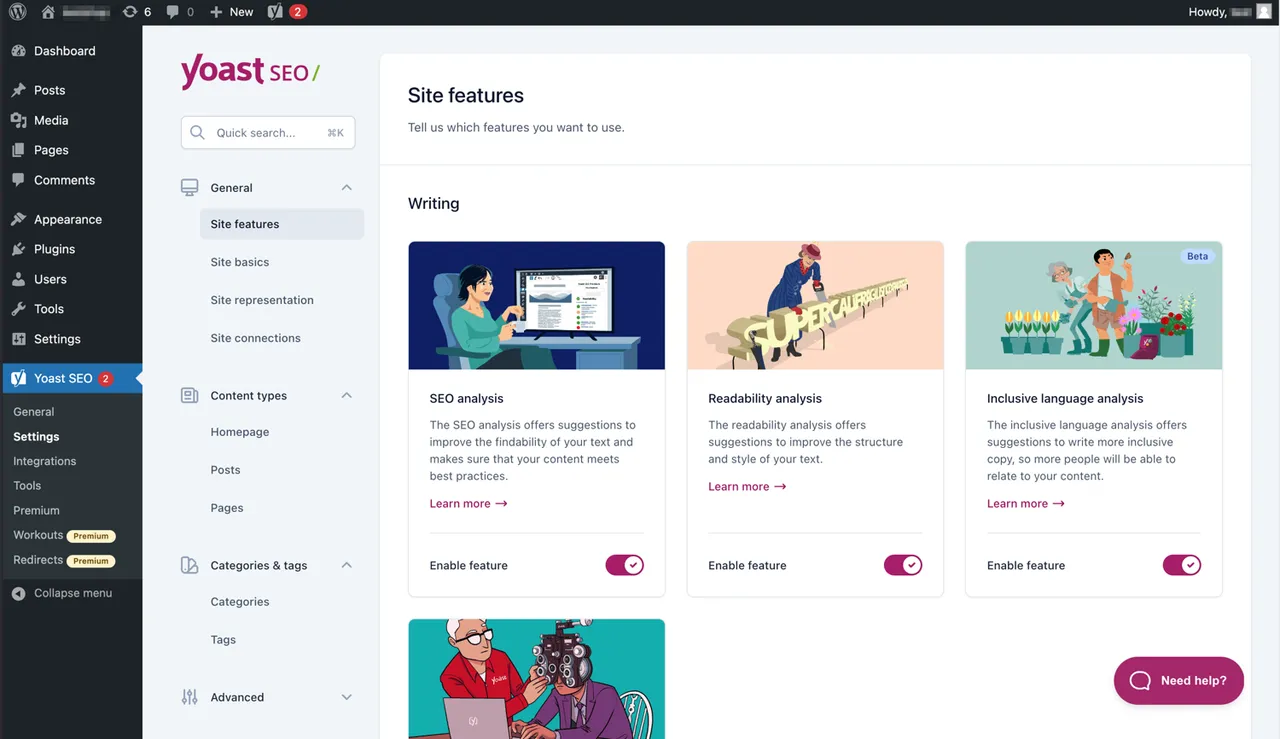
The modern interface makes Yoast SEO easy to work with. -
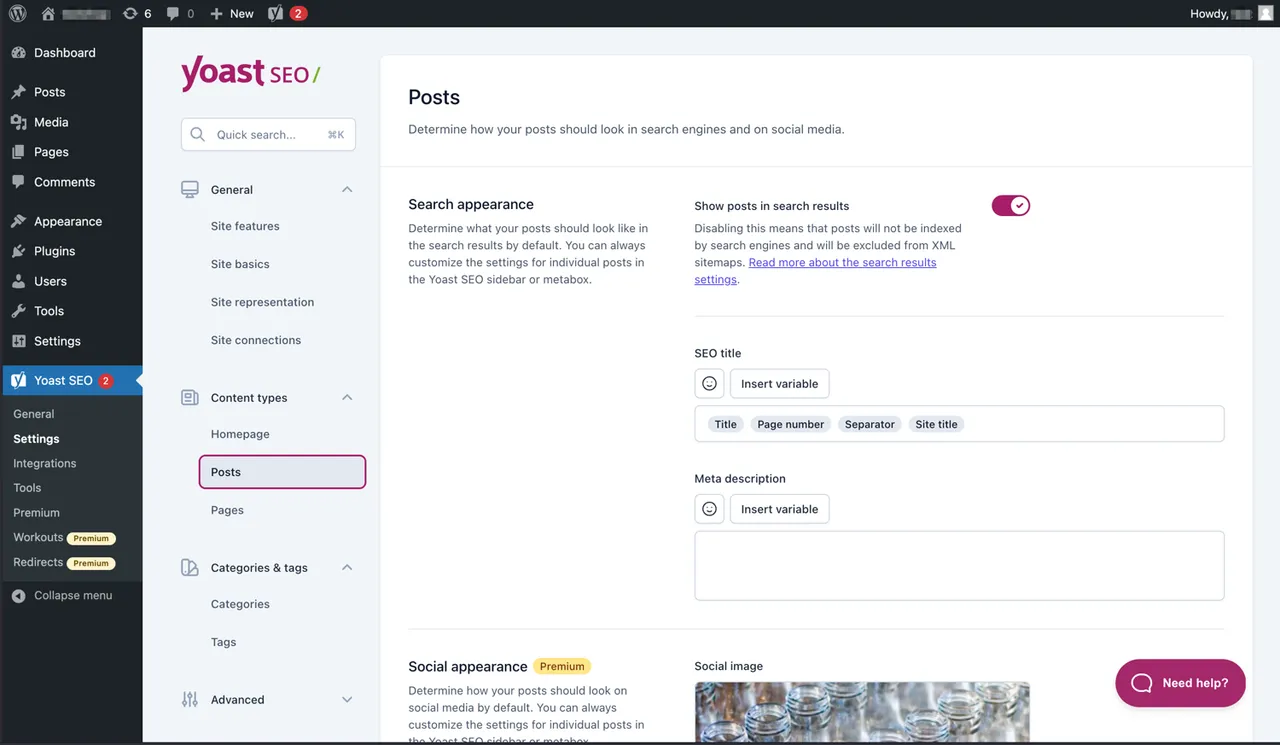
Easily manage how your posts and pages appear in SERPs. -
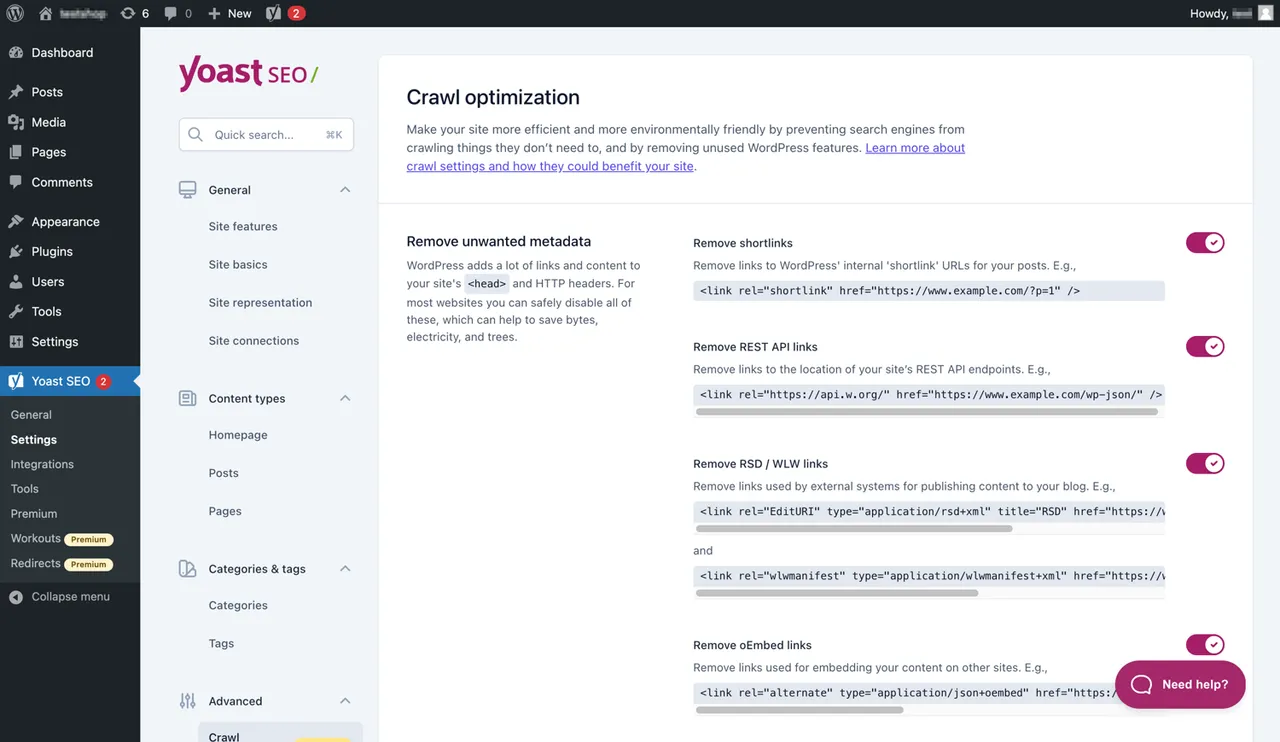
Yoast SEO Premium has extra crawl optimization options. -
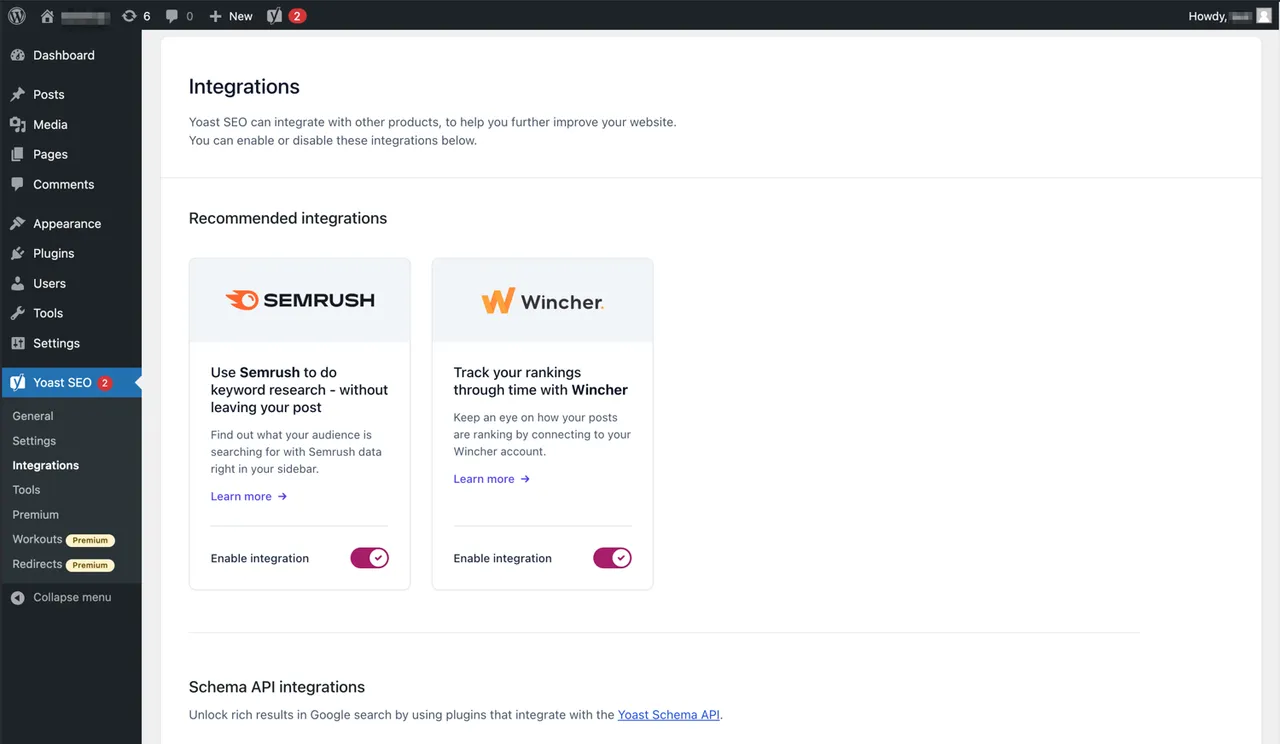
Yoast SEO integrates with tools like Semrush and Wincher. -
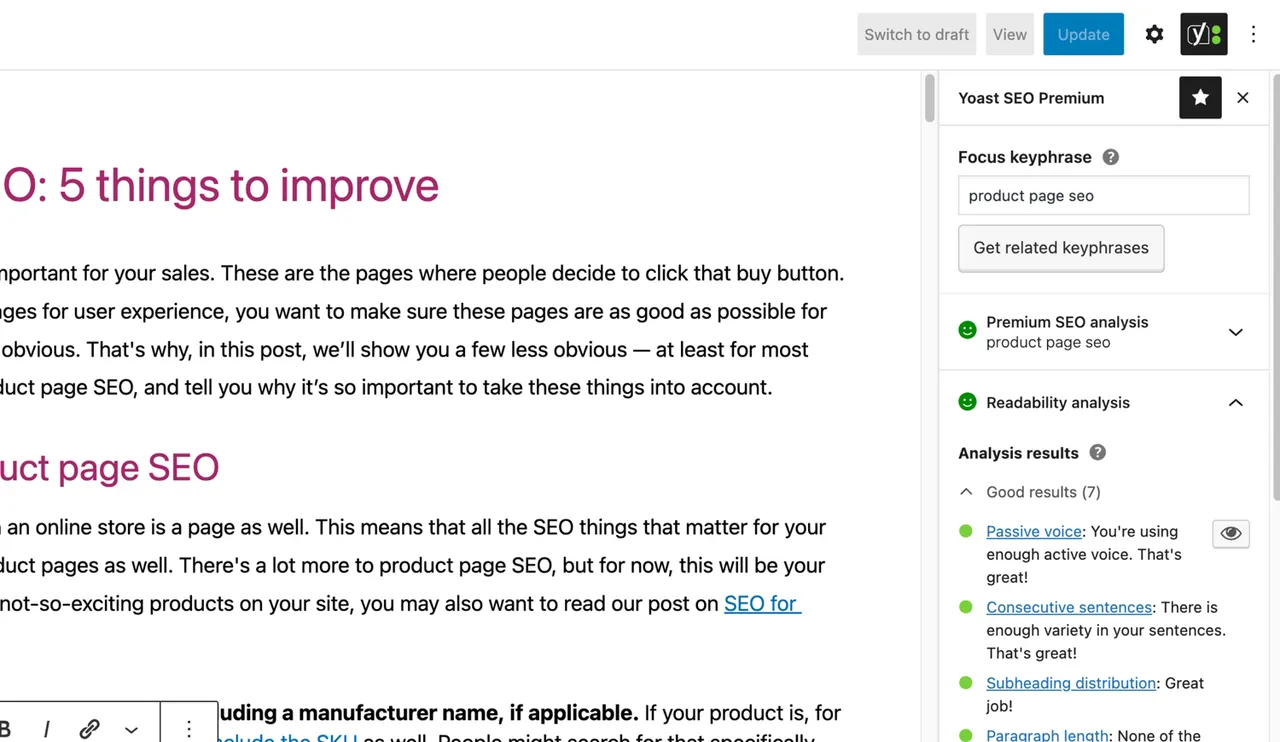
The famous SEO and readability analyses in Yoast SEO. -
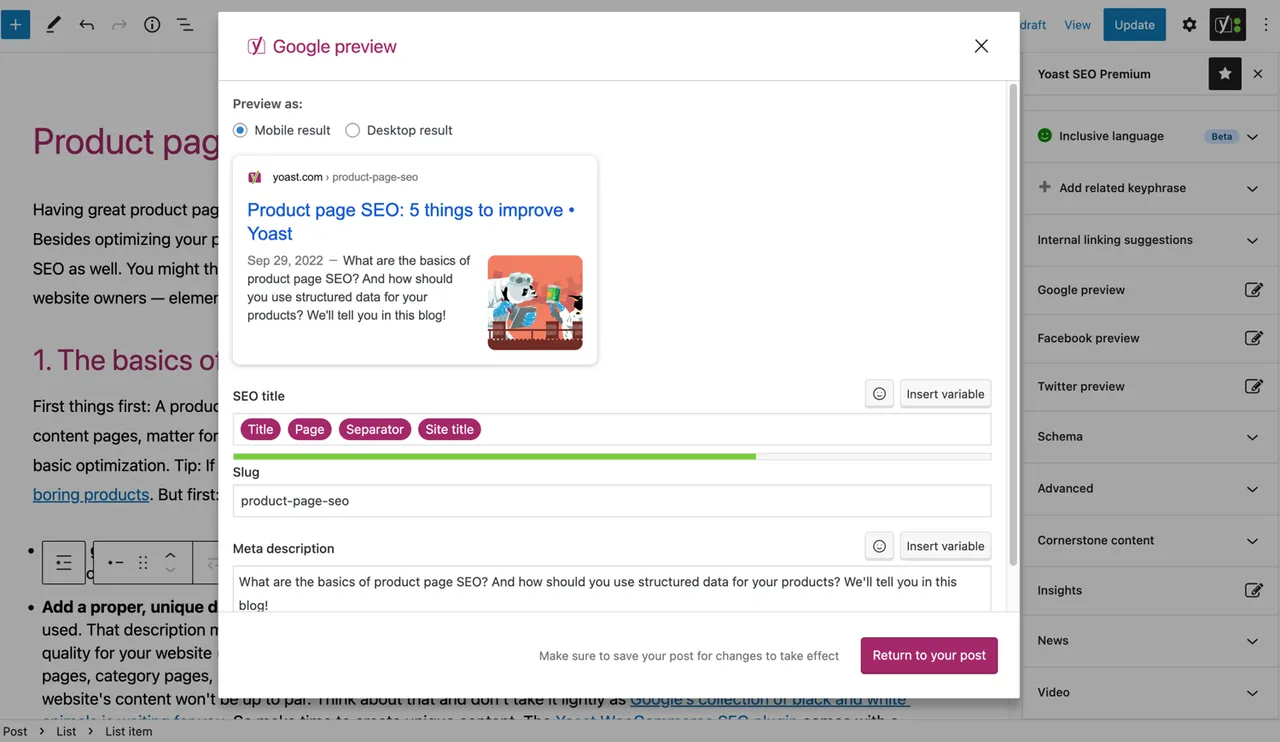
See what your post looks like in Google. -
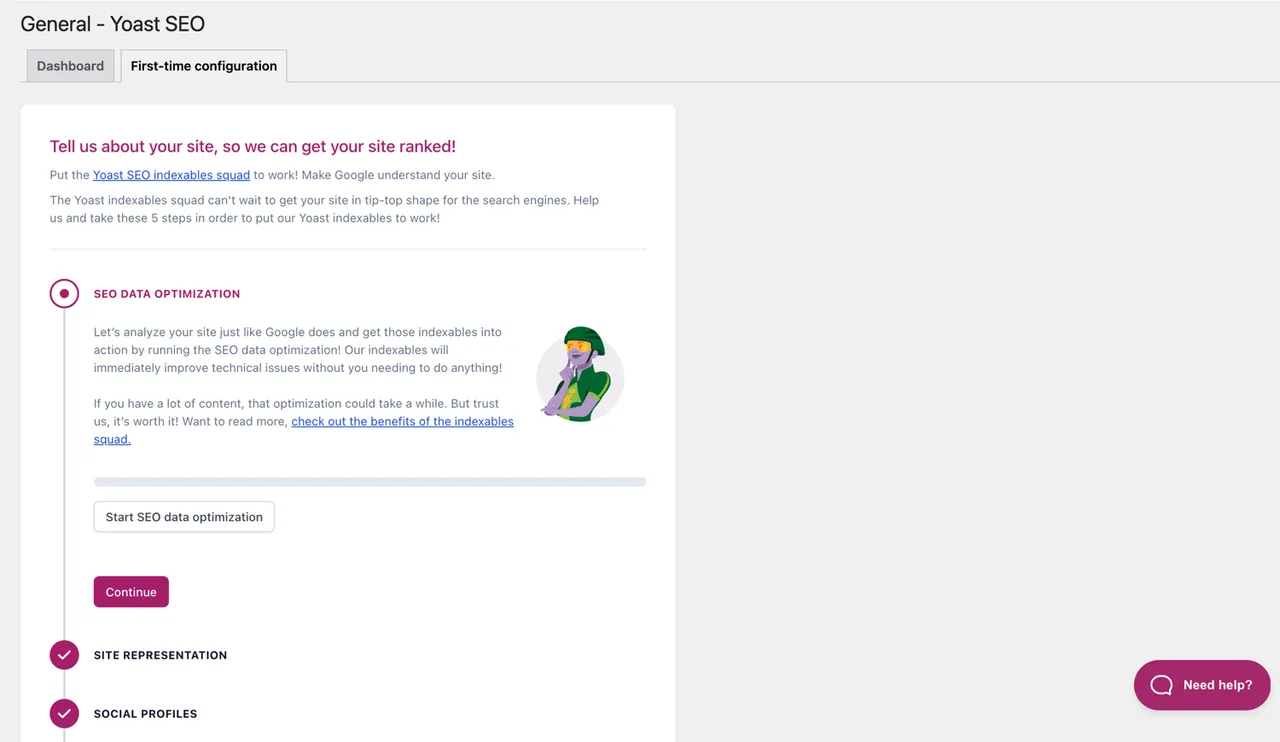
The First-time configuration helps you get started quickly. -
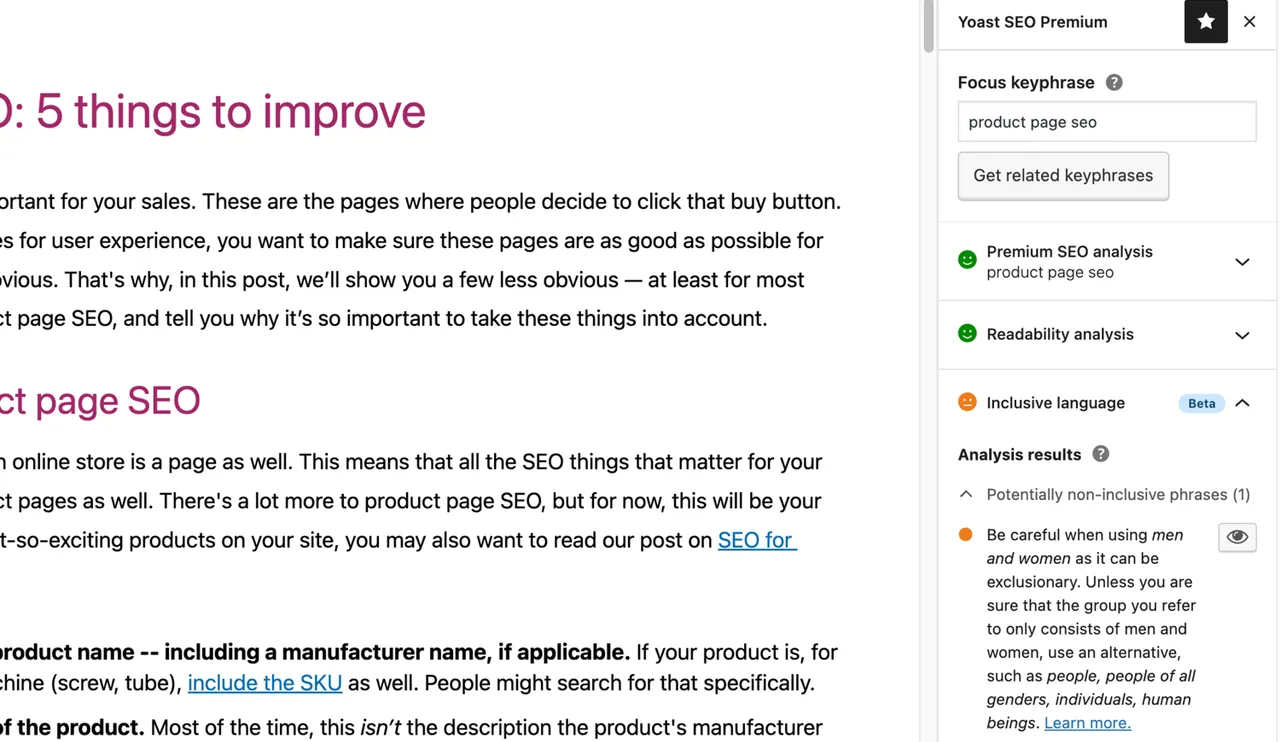
The inclusive language analysis in Yoast SEO. -
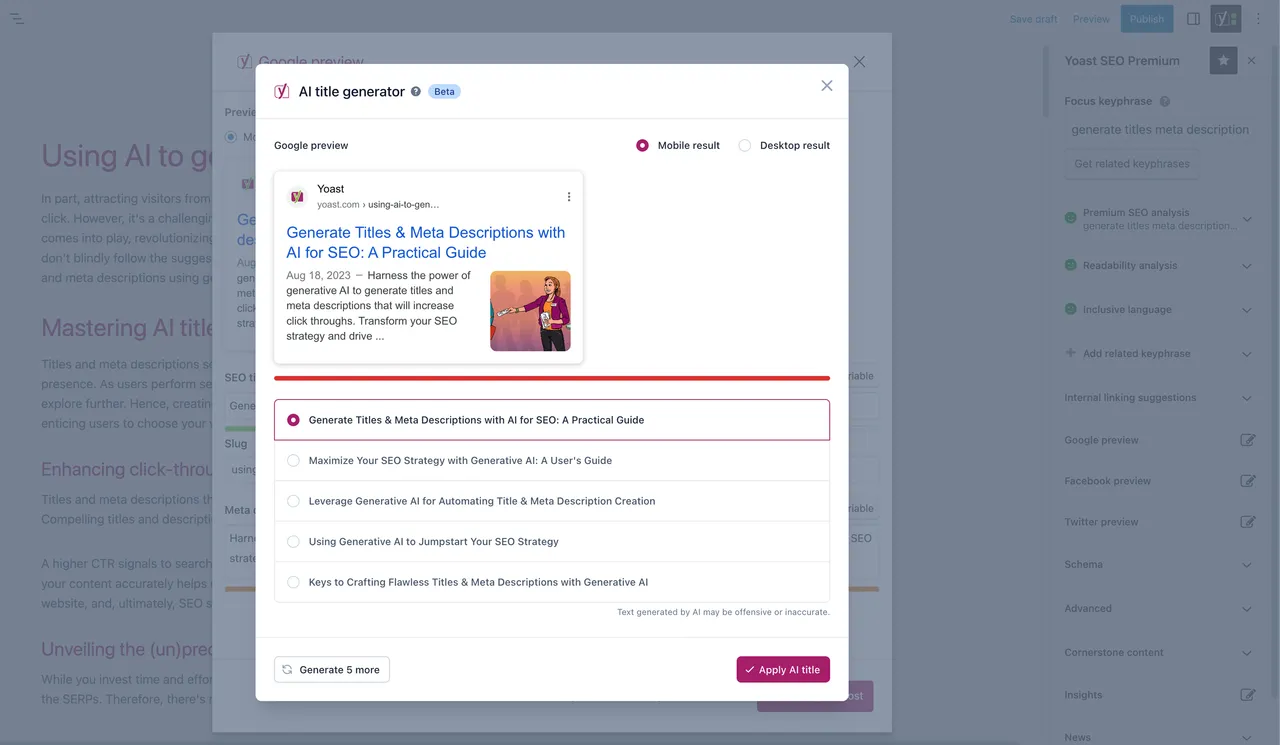
Important information
- The current version needs WordPress 7.0 or higher and PHP 7.4 or higher. It is tested up to WordPress 7.1.4.
- The AI tools are a Premium feature. Suggestions are not saved until you approve them.
- The plugin has had published vulnerabilities in the past. The current data shows them as patched, but keep it updated, since releases come roughly every two weeks.
- Usage tracking is opt-in only. Data is collected only if you turn it on.
- The free version has no one-to-one support. Help comes from the WordPress.org forums and the vendor help center.
- Adding breadcrumbs to a theme needs a small code edit. The listing recommends a backup first, and notes that theme updates can overwrite the change.
From the Yoast SEO readme
Straight from the developer's WordPress.org listing.
Full description
Real-time SEO guidance, schema, and AI built in. Help search engines and AI systems understand your content. All AI tools included, no hidden fees.
Yoast SEO: the #1 WordPress SEO plugin
Since 2008, Yoast SEO has helped site owners get their content found. More than 10 million websites now run it, from small local businesses to some of the most visited sites on the web.
Our mission is SEO for everyone. You should not need a specialist, a big budget, or a technical background to give your content a fair chance of being discovered.
Yoast SEO gives you everything you need to manage your on-site SEO. The Yoast SEO Premium plugin and its extensions unlock more advanced and AI-powered tools.
Ready for search, and ready for AI
People no longer only type queries into Google. They ask AI assistants, and those answers are built from content the AI has crawled, understood, and trusted. Yoast SEO helps you prepare for both.
• Schema.org structured data, so search engines and AI systems can understand what your content is actually about. Premium outputs significantly more schema types, including the E-E-A-T signals (experience, expertise, authoritativeness, and trustworthiness) that help AI systems understand who you are.
• Schema aggregation for NLWeb (Premium), which combines your site’s structured data into a single, deduplicated graph, so AI agents get a complete picture of your content in one request. Turn it on with a single toggle.
• LLMs.txt management, to guide how large language models interact with your content, including manual control over which pages are included.
• Bot blocker (Premium), to control which AI crawlers can use your content for training, including GPTBot, CCBot, and Google-Extended.
• Abilities API, so AI tools, dashboards, and automated workflows can read your SEO, readability, and inclusive language scores directly.
Algorithm changes have been arriving for over 15 years, and Yoast has tracked every one of them. Keeping the plugin updated means you benefit from ongoing technical improvements, schema updates, and AI advancements automatically, all guided by our signature traffic light approach.
Real-time guidance while you write
SEO is one of the most consistent and cost-effective sources of website traffic, though it can be complex. Whether you are just starting out or you have done this for years, Yoast SEO tells you what to fix before you publish, not after.
Red, orange, green. That is the whole idea. You get in-depth content and readability analysis that helps you create content designed to perform well in search, without needing to learn a new discipline first.
Quick and easy setup
Setting up Yoast SEO is quick and straightforward. No technical background required.
Our step-by-step configuration wizard walks you through the essentials, so Yoast SEO can generate accurate structured data that helps search engines understand your site.
Switching from another SEO plugin? Migration is seamless. You can import your existing SEO data and settings safely with our built-in import and export tools.
AI tools built into your workflow
Yoast’s AI tools come with Yoast SEO Premium, and they sit inside the editor you already use. There is no separate AI subscription, no extra login, and no credit top-up to buy. Every suggestion waits for your approval before anything saves.
• Yoast AI Generate: creates five SEO-friendly titles and meta descriptions instantly, with one-click regeneration for more options.
• Yoast AI Optimize: suggests improvements to keyphrase placement, including introduction, distribution, and density, with the option to apply or dismiss each edit.
• Yoast AI Summarize: generates a quick summary of your post to place anywhere in the block editor, so readers grasp the value fast.
• Yoast AI Content Planner (Premium): suggests five site-specific post ideas and builds a structured starter draft the moment you open a new post. Ideas are grounded in your own site, not generic topics, so your team never begins from a blank page.
• Bulk editor with AI drafts: review and fix titles, meta descriptions, and focus keyphrases across your whole site from one workspace, with search and status filters and a dedicated view per content type. The bulk editor is free. With Premium, select what needs work and AI drafts the metadata, including social sharing titles and descriptions, for you to approve.
• All AI tools included: no extra accounts, no separate credit purchase, no hidden costs.
Content analysis and optimization
• SEO analysis to guide your keyword targeting, with up to 5 keyphrases in Premium and support for 20+ languages.
• Readability analysis for clear, engaging, user-friendly writing.
• Inclusive language analysis, so your content is more considerate and accessible.
• SERP previews for both desktop and mobile results.
• HowTo and FAQ blocks with built-in schema support.
• Breadcrumbs block for improved navigation.
• Semrush integration for keyword research directly inside Yoast SEO.
• Wincher integration to track keyword performance from your dashboard.
• Elementor integration for optimization inside your favorite builder.
Technical SEO, handled for you
Yoast SEO takes care of much of your site’s technical SEO automatically, which frees you to focus on your content.
• Automated meta tag optimization right out of the box.
• Canonical URLs to prevent duplicate content issues.
• Advanced XML sitemaps for clear site indexing.
• Deep Schema.org integration to improve how search engines and AI systems understand your site.
• Complete breadcrumb control for visitors and crawlers.
• Performance improvements that help reduce load times.
• Crawl settings to manage how bots access your site and reduce unnecessary server load.
Every update delivers ongoing technical SEO enhancements automatically.
Keep your website in perfect shape
Whether you are a creator, a business owner, or a developer, Yoast SEO helps you maintain your site’s SEO health:
• Cornerstone content tools to organize and prioritize your key pages.
• Front-end SEO inspector to view and edit titles, descriptions, and schema live.
• SEO roles to delegate plugin access securely across your team.
• Regular 2-week update cycle, so you stay compatible with the latest SEO standards and search engine changes.
Powerful integrations
Yoast SEO works seamlessly with popular WordPress tools:
• Google Site Kit: access insights from Search Console, Analytics, and PageSpeed inside WordPress.
• Advanced Custom Fields (ACF): combine with ACF Content Analysis for Yoast SEO for advanced field optimization.
• Elementor: use full Yoast SEO functionality inside Elementor’s editor.
• Algolia: improve internal search accuracy and performance.
• Semrush: discover and optimize for high-value keywords.
• Wincher: track keyword positions and trends in Google Search.
• Jetpack: manage SEO and social previews in one place.
• Easy Digital Downloads (EDD): improve digital product visibility with integrated schema.
• Mastodon: verify your website on Mastodon with Yoast SEO Premium.
• WooCommerce: optimize ecommerce SEO with the dedicated WooCommerce extension.
Yoast SEO Premium: AI-powered SEO for WordPress
Yoast SEO Premium builds on everything above with advanced automation, AI tools, and professional support. It helps you optimize efficiently for both traditional search and AI-driven discovery.
What it helps you tackle:
• Keeping pace with algorithm changes and AI search.
• Reaching the right audience.
• Automating redirects, crawl controls, and internal linking.
• Finding orphaned content and improving your site structure.
• Getting expert help when you need it.
Premium highlights:
• AI-generated titles and meta descriptions, page by page or in bulk.
• AI Content Planner, so you never open a blank page.
• Smart internal linking suggestions to strengthen your site structure.
• Social previews for Facebook and X.
• Redirect manager with bulk tools, CSV import and export, and automatic prompts when you move or delete content.
• Bot blocker for AI crawlers, including GPTBot, CCBot, and Google-Extended.
• Schema aggregation for NLWeb, plus significantly more schema types than free.
• IndexNow integration, so search engines hear about your updates the moment you publish.
• Front-end SEO inspector for real-time editing.
• SEO workouts for orphaned and cornerstone content.
• Task list, unlocked in full, showing what to work on next with priority levels and time estimates.
• Google Docs add-on, so writers can run the full Yoast analysis before content ever reaches WordPress. One seat included.
• 24/7 premium support from SEO specialists.
Included at no extra cost:
• Yoast Local SEO: help nearby customers find you, with local schema, a store locator, and opening hours management.
• Yoast Video SEO: help Google understand your videos, with video sitemaps and schema.
• Yoast News SEO: help your news content get discovered in Google News and Top Stories.
Yoast WooCommerce SEO: advanced SEO for online stores
Yoast WooCommerce SEO builds on Yoast SEO Premium with ecommerce-specific tools for your store’s visibility.
Key ecommerce features:
• WooCommerce-specific XML sitemap that excludes non-shopping content.
• Product structured data for rich results, including price, reviews, and availability.
• Canonical URL management to prevent duplicates.
• Ecommerce-focused content analysis for GTINs, SKUs, and short descriptions.
• AI Generate for ecommerce: optimized titles and meta descriptions for product and category pages, at page level or drafted in bulk for products and categories.
What that gets you:
• Better product visibility through automated structured data.
• More efficient crawling for large catalogs.
• Time saved through metadata templates and automation.
• Metadata across your whole catalog without editing rows one at a time.
Built for WooCommerce, trusted by thousands of online stores worldwide.
For developers
Yoast SEO is built with developers in mind. With modern APIs, hooks, and a unified indexables system, you can extend or integrate SEO functionality across custom themes, plugins, or headless setups.
REST API
Retrieve SEO metadata for any post or URL, including meta tags, Open Graph, Twitter Cards, and Schema.org data. Learn more about the REST API.
Surfaces API
Access SEO data directly in code via YoastSEO()->meta->for_current_page(). Supports titles, descriptions, canonicals, and schema. Read the Surfaces API documentation.
Metadata API
Use the Metadata API to filter, override, or extend meta tags with WordPress hooks such as wpseo_title, wpseo_metadesc, and wpseo_canonical.
Schema API
The Schema API lets you modify or extend Schema.org graph pieces, including Article, Organization, Person, Breadcrumb, and WebPage entities.
Abilities API integration
Let AI tools, dashboards, and automated workflows read Yoast SEO data programmatically, including SEO, readability, and inclusive language scores for recent posts.
Block editor compatibility
Yoast SEO integrates directly with the WordPress block editor. It outputs schema for HowTo and FAQ blocks by default, and you can extend schema for custom blocks.
Indexables
At the core of Yoast SEO lies the indexables system, unifying all SEO data for faster queries and consistent metadata across outputs.
Ongoing support and education
Yoast is powered by expert developers, testers, and SEO specialists who keep improving the plugin. We are committed to helping you grow your SEO skills:
• Yoast SEO Academy: free and premium SEO courses, included in all paid plans.
• Yoast SEO blog, newsletter, and webinars.
• Yoast SEO Update podcast for the latest SEO insights.
• Bug reports on GitHub, for issue tracking rather than support.
Yoast SEO: built to make search optimization accessible, reliable, and ready for the future of AI search.
Installation
Starting with Yoast SEO consists of just two steps: installing and setting up the plugin. Yoast SEO is designed to work with your site’s specific needs, so do not forget to go through the Yoast SEO first-time configuration as explained in the ‘after activation’ step. For the most up-to-date guidance on how to install Yoast SEO products, please visit our help center.
Developer FAQ (9)
- Is Yoast SEO ready for AI search?
- Yes. Yoast SEO helps you prepare for discovery in AI-driven search as well as traditional search results. Schema.org structured data helps AI systems understand what your content is about, schema aggregation gives AI agents a complete picture of your site in one request, LLMs.txt management lets you guide how large language models interact with your content, and the bot blocker in Premium lets you control which AI crawlers can use your content for training. Nobody can guarantee that an AI assistant will mention your site, however you can make sure it understands your content correctly.
- How do the XML sitemaps in the Yoast SEO plugin work?
- Having an XML sitemap can be beneficial for SEO, as Google can retrieve essential pages of a website very fast, even if the internal linking of a site is not flawless. The sitemap index and individual sitemaps are updated automatically as you add or remove content, and will include the post types you want search engines to index. Post types marked as noindex will not appear in the sitemap. Learn more about XML sitemaps.
- How do I implement Yoast SEO breadcrumbs?
- The steps below are a temporary solution, as manual edits made to theme files may be overwritten with future theme updates. Please contact the theme developer for a permanent solution. We have written an article about the importance of breadcrumbs for SEO. To implement the breadcrumbs function in Yoast SEO, you will have to edit your theme. We recommend that a backup is taken prior to any editing of the theme files. Your host provider can help you take a backup. Copy the following code into your theme where you want the breadcrumbs to be. If you are not sure, you will need to experiment with placement: <?php if ( function_exists( 'yoast_breadcrumb' ) ) { yoast_breadcrumb( '<p id="breadcrumbs">','</p>' ); } ?> Common places to put your breadcrumbs are inside your single.php or page.php file, just above the page’s title. Another option that is easy in some themes is pasting the code at the very end of header.php. In most non-WooTheme themes, this code snippet should not be added to your functions.php file. Alternatively, you can manually add the breadcrumb shortcode to individual posts or pages: [wpseo_breadcrumb] If you need more details or a step-by-step guide, read our implementation guide for Yoast SEO breadcrumbs.
- How do I noindex URLs?
- Yoast SEO provides multiple options for setting a URL or group of URLs to noindex. Read more about how to do this in this guide.
- Google shows the wrong description, how do I fix this?
- If you have crafted nice meta descriptions for your blog posts, nothing is more annoying than Google showing a completely different description in the search result snippet. Possible causes include: 1. the wrong description in your code 2. an outdated Google cache 3. search term manipulation 4. Google ignoring the meta description You can read more here on how to solve the issue with the wrong description.
- How often is Yoast SEO updated?
- Yoast SEO is updated every two weeks. If you want to know why, please read this post on why we release every two weeks.
- How do I get support?
- Our free plugin is used by millions of people worldwide, so we cannot offer one-to-one support to everyone. If you have trouble with the Yoast SEO for WordPress plugin, you can get help on the support forums here at wordpress.org or by checking out our help center at yoast.com/help/. The plugins you buy at Yoast are called ‘premium plugins’ (even if Premium is not in the name) and include a complete year of free updates and premium support. This means you can contact our support team if you have any questions about that plugin. Read more on how to get support
- What happens to my data if I enable usage tracking?
- This page on yoast.com explains what data we collect to improve Yoast SEO. We only collect data when you explicitly opt in. Read more about how we handle your data in our privacy policy.
- I have a different question than listed here
- Your question has most likely been answered on our help center: yoast.com/help/.
Downloads, last 30 days
Trend vs previous period: -12.1%
Average daily downloads: 122,298 over the last 7 days , 372,246 over 30 days.
Security history
Past CVEs, patched · 20 published vulnerabilities (Wordfence) · most recent Jul 25, 2026
- Patched 4.3 Medium Yoast SEO <= 26.5 - Insecure Direct Object Reference to Authenticated (Contributor+) Sensitive Information Exposure via 'post_id' Parameter CVE-2025-14481 · May 26, 2026 · affects *-26.5 · fixed in 26.6
- Patched 5.4 Medium Yoast SEO <= 3.4.0 - Authenticated Stored Cross-Site Scripting CVE-2021-24153 · Aug 2, 2016 · affects [*, 3.4.1) · fixed in 3.4.1
- Patched 6.1 Medium Yoast SEO <= 2.0.1 - Reflected Cross-Site Scripting Apr 20, 2015 · affects [*, 2.1) · fixed in 2.1
- Patched 5.5 Medium Yoast SEO <= 21.0 - Authenticated (Seo Manager+) Stored Cross-Site Scripting CVE-2023-40680 · Nov 24, 2023 · affects *-21.0 · fixed in 21.1
- Patched 6.1 Medium Yoast SEO <= 2.1.1 - Cross Site Scripting via post_title parameter CVE-2012-6692 · Oct 31, 2012 · affects *-2.1.1 · fixed in 2.2
- Patched 4.7 Medium Yoast SEO <= 3.2.5 - Cross-Site Scripting Jun 14, 2016 · affects *-3.2.5 · fixed in 3.3.0
- Patched 6.4 Medium Yoast SEO <= 28.0 - Authenticated (Author+) Stored Cross-Site Scripting via Post Slug (post_name) CVE-2026-15425 · Jul 25, 2026 · affects *-28.0 · fixed in 28.1
- Patched 6.1 Medium Yoast SEO <= 22.5 - Reflected Cross-Site Scripting CVE-2024-4041 · May 6, 2024 · affects *-22.5 · fixed in 22.6
Show all 20 vulnerabilities
- Patched 6.4 Medium Yoast SEO <= 22.6 - Authenticated (Contributor+) Stored Cross-Site Scripting CVE-2024-4984 · May 14, 2024 · affects *-22.6 · fixed in 22.7
- Patched 6.4 Medium Yoast SEO <= 11.5 - Authenticated Stored Cross Site Scripting CVE-2019-13478 · Jul 9, 2019 · affects *-11.5 · fixed in 11.6-RC5
- Patched 6.5 Medium Yoast SEO <= 1.4.6 - Missing Authorization Aug 1, 2014 · affects *-1.4.6 · fixed in 1.4.7
- Patched 6.4 Medium Yoast SEO <= 26.8 - Authenticated (Contributor+) Stored Cross-Site Scripting via 'yoast-schema' Block Attribute CVE-2026-1293 · Feb 6, 2026 · affects *-26.8 · fixed in 26.9
- Patched 5.3 Medium Yoast SEO <= 3.2.4 - Sensitive Data Exposure May 6, 2016 · affects *-3.2.4 · fixed in 3.2.5
- Patched 6.4 Medium Yoast SEO <= 20.2 - Authenticated (Contributor+) Stored Cross-Site Scripting Mar 2, 2023 · affects *-20.2 · fixed in 20.2.1
- Patched 7.5 High Yoast SEO <= 1.7.3.3 - Cross-Site Request Forgery CVE-2015-2293 · Mar 10, 2015 · affects *-1.5.6, 1.6-1.6.3, 1.7-1.7.3.3 · fixed in 1.5.7, 1.6.4, 1.7.4
- Patched 8.8 High Yoast SEO <= 1.7.3.3 - Blind SQL Injection CVE-2015-2292 · Mar 11, 2015 · affects *-1.5.6, 1.6-1.6.3, 1.7-1.7.3 · fixed in 1.5.7, 1.6.4, 1.7.4
- Patched 6.6 Medium Yoast SEO <= 9.1.0 - Race Condition to Remote Code Execution CVE-2018-19370 · Nov 6, 2018 · affects *-9.1.0 · fixed in 9.2.0
- Patched 5.3 Medium Yoast SEO <= 17.2 - Full Path Disclosure CVE-2021-25118 · Oct 5, 2021 · affects [*, 17.3) · fixed in 17.3
- Patched 6.1 Medium Yoast SEO <= 5.7.1 - Reflected Cross-Site Scripting CVE-2017-16842 · Nov 22, 2017 · affects *-5.7.1 · fixed in 5.8.0
- Patched 6.4 Medium Yoast SEO <= 27.1.1 - Authenticated (Contributor+) Stored Cross-Site Scripting via 'jsonText' Block Attribute CVE-2026-3427 · Mar 21, 2026 · affects *-27.1.1 · fixed in 27.2
Recent releases
- v28.9
Release date: 2026-11-17 #### Enhancements * Adds a _Duplicate alt text_ assessment that flags when different images on the page share the same alt text. * Adds a _keyphrase stuffing in alt text_...
- v28.8
Release date: 2026-10-27 New Yoast Abilities for AI agents, Schema Feeds support, and the groundwork for Yoast AI Generate for image alt text in Yoast WooCommerce SEO 17.0. [Read the release post...
Yoast SEO FAQ
Can Yoast SEO help with AI search results?
It helps AI systems understand your content through structured data, LLMs.txt management and, in Premium, an AI crawler blocker. No plugin can guarantee that an AI assistant will mention your site. It can only make sure your content is read correctly.
What do the XML sitemaps include?
Sitemaps are built for you and refresh as you add or remove content. They list the post types you want indexed. Anything set to noindex is left out.
How do I add breadcrumbs to my theme?
You place a short snippet that calls the yoast_breadcrumb function in your theme file where you want the trail to appear. Take a backup first. Theme updates may overwrite the edit, so a child theme or the theme developer is the safer route.
How can I set pages to noindex?
The plugin has several ways to noindex a single URL or a whole group of them, including by post type. The vendor publishes a guide that covers each method.
Why does Google show a different description from mine?
Google sometimes rewrites snippets. Possible causes include a wrong description in your page code or an outdated cached copy. Check what your page actually outputs, and request a new crawl.
How often is the plugin updated?
The listing says there is an update about every two weeks. This keeps it in step with search engine changes.
Is Yoast SEO free?
Yes, there is a free version on WordPress.org with the core SEO tools. A paid Premium version adds the AI tools and further features. The listing does not give prices.
Where do I get support?
Free users get help through the WordPress.org support forums and the vendor help center. The listing says one-to-one support is not offered for the free plugin.
Yoast SEO alternatives

Rank Math SEO - WordPress AI SEO Plugin to Rank Higher 📈 ★★★★★ Rank Math SEO helps you stay ahead of competitors with AI-powered SEO tools built for today’s search engines and AI assistants. The plugin brings…

AIOSEO - The Original AI SEO Plugin for WordPress All in One SEO is the original WordPress SEO plugin, founded in 2007 and trusted by over 3 million website owners and SEO experts. AIOSEO is a complete AI SEO plugin…

SEOPress - The fast, privacy-first WordPress SEO plugin, ready for AI search Rank higher in Google AND in AI answer engines (ChatGPT, Claude, Perplexity, Gemini). SEOPress is the all-in-one WordPress SEO plugin…

CrawlWP - The WordPress SEO Plugin That Also Gets You Indexed Optimize every page, submit it to search engines (Google, Bing, Yandex, Yep etc) the moment you publish, and see which ones actually indexed it - all…

ThinkRank is an AI SEO plugin for WordPress that helps you write SEO titles and meta descriptions, optimize content around a focus keyword, add schema markup, generate XML sitemaps, and review Google Search Console…

An AI SEO Plugin That’s Lightweight, Fast & Automated Currently there are many SEO plugins for WordPress in the market. But these plugins often have too many options and are very complicated for ordinary users.…
Listing data from WordPress.org and the Wordfence vulnerability feed, refreshed Nov 9, 2026; listing details fetched Nov 14, 2026. Screenshots are from the plugin's WordPress.org listing. Not affiliated with Yoast.