
SiteLeads
Lead Generation Contact Widget & AI Chatbot: Chat Button, Phone Call, Telegram, Email - SiteLeads · by Extend Themes
- active installs
- 10K+
- 2 ratings
- 5.0
- since last update
- 80d
- releases in 12 months
- —
- support threads resolved
- —
- avg daily downloads
- 191
- on WordPress.org
- 12 months
SiteLeads at a glance
SiteLeads is a free WordPress AI chatbot plugin by Extend Themes with 10K+ active installs and a 5.0/5 rating from 2 reviews. It was last updated on Aug 21, 2026, is tested up to WordPress 7.1.4 and needs PHP 7.2+. All 1 of its published vulnerabilities have patched versions. Our quality score is 82/100.
What is SiteLeads?
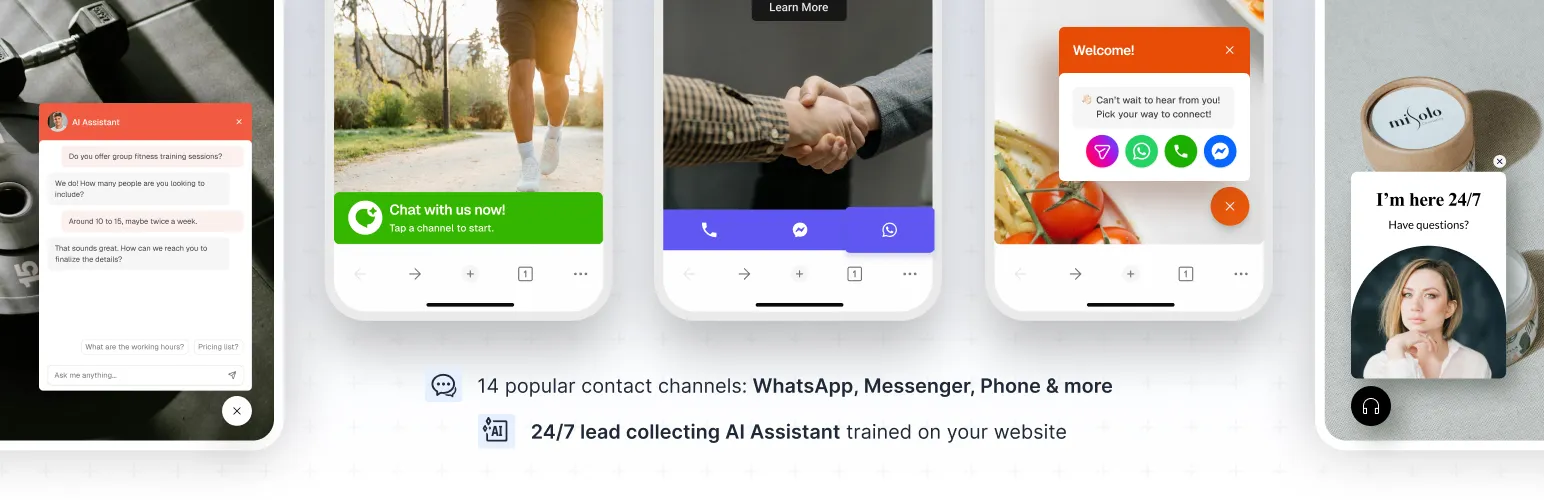
SiteLeads adds a floating contact widget to your WordPress site that links visitors to the channels you already use, such as WhatsApp, phone, email, Messenger, Telegram and Instagram. It is aimed at small businesses that close deals through chat apps and calls rather than a live chat desk. The widget works without an account. Each channel opens the matching app or action, such as a chat, a call or a map, so visitors choose how to reach you.
An optional AI chatbot can be added to the widget. It reads pages from your site, answers visitor questions, and asks for a name and email address. Captured leads show up in a leads section in the WordPress dashboard. Using the chatbot and the leads dashboard requires a free SiteLeads account. The listing says leads are stored in your SiteLeads account and shown in the WordPress dashboard, which means an outside service is involved.
The free plan caps the chatbot at one bot, a knowledge base from up to 30 pages, two uploaded files and five captured leads per month. Paid plans lift these limits and add targeting, scheduling, analytics and more widgets. The listing does not say which AI model powers the chatbot. Weigh these limits against how many enquiries you expect, since five leads a month fills up quickly on a busy site.
Best for
- Small businesses that sell through WhatsApp or phone calls
- Local services that want a click-to-call and map button
- Sites that want a simple lead-capture chatbot
- Owners who do not want to run a live chat desk
SiteLeads features
Floating contact widget
A button on every page that opens a list of your contact channels, on mobile and desktop.
Many contact channels
WhatsApp, phone, email, Messenger, Telegram, Instagram, SMS, TikTok, WeChat, Snapchat, Discord, Google Maps and X are all available free.
Widget styling
Change icon color, size, position, shadow and border, and set a simple text greeting.
Free AI chatbot
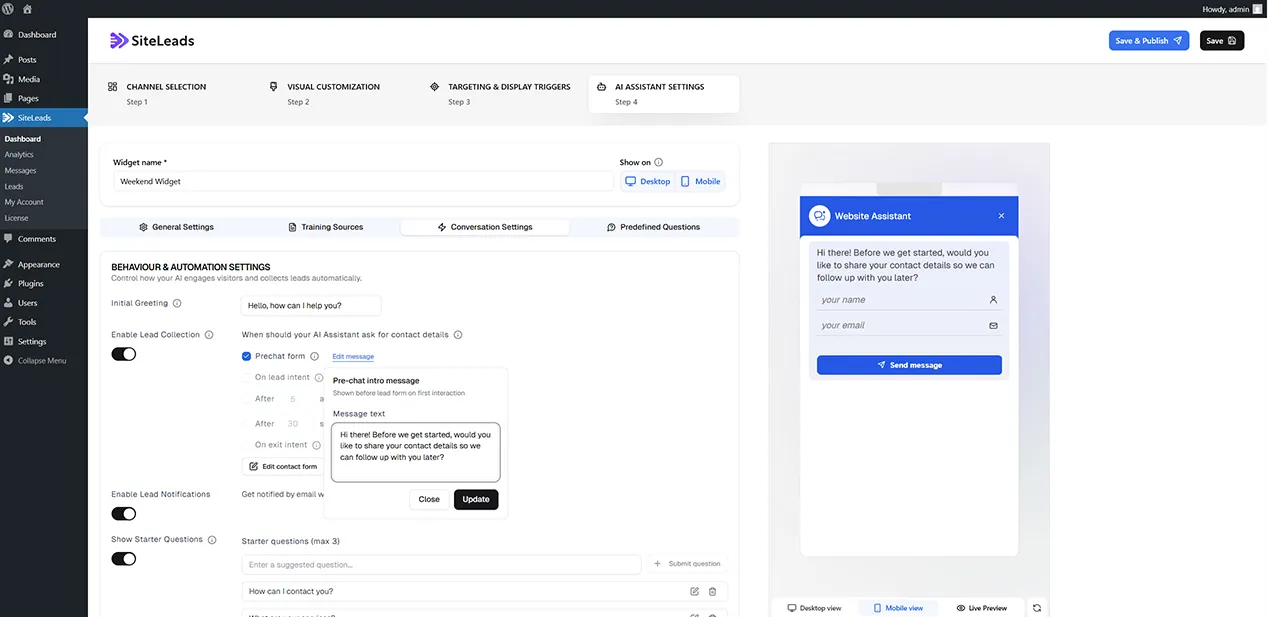
Give it a name and your website address. It learns from your pages, starts conversations and collects visitor details.
Training files
Add up to two PDF or DOCX files in the free plan to extend what the chatbot knows.
Leads and messages
Review captured contacts and conversations from a leads section and a messages section in the dashboard.
Basic display triggers
Show the widget after a set number of seconds on the page.
Pro targeting and scheduling
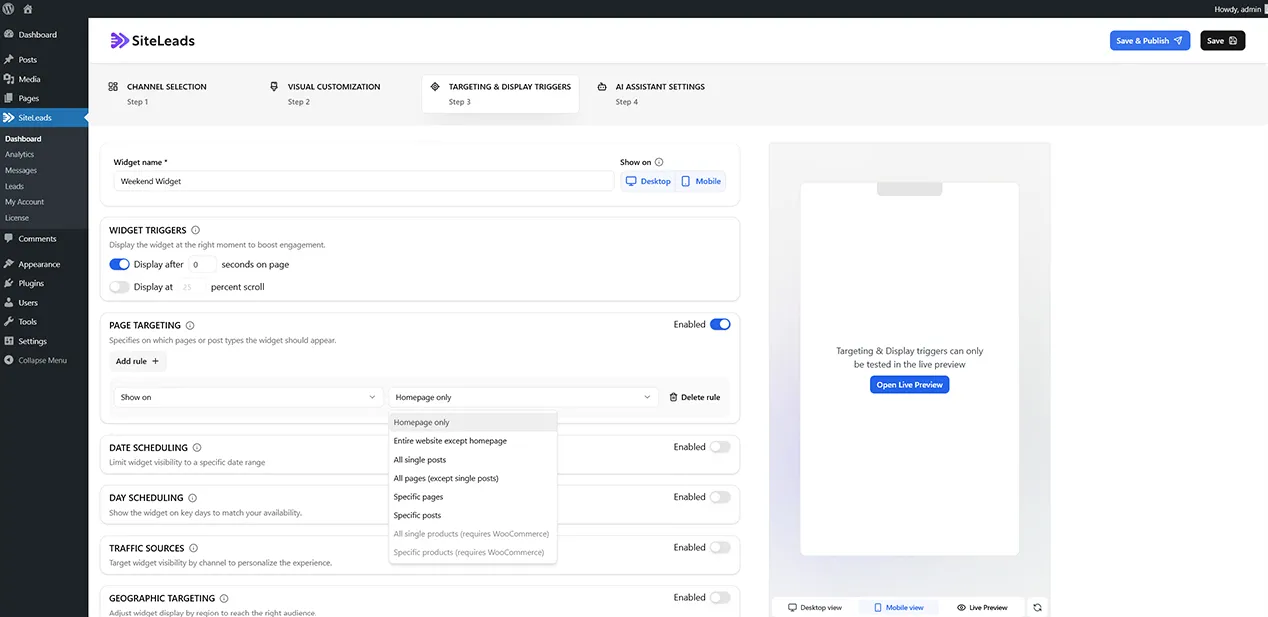
Paid plans add page, location and traffic source targeting, day and date scheduling, exit intent and scroll triggers.
Pro analytics
A full analytics dashboard with channel performance and chatbot conversion numbers.
Strict FAQ mode
A paid option that restricts chatbot answers to your approved training material.
SiteLeads free vs pro
Free WordPress.org version
- Floating contact widget with all standard channels
- Icon customization and a simple greeting
- Time delay trigger
- 1 AI chatbot with a knowledge base from up to 30 pages
- Up to 2 training files and up to 5 captured leads per month
Pro Paid version
- Unlimited widgets and multiple contacts per channel with schedules
- Unlimited chatbots, full site crawl and unlimited file uploads
- Strict FAQ mode and a larger knowledge base limit
- Page, location and traffic source targeting, plus scheduling
- Exit intent and scroll triggers, analytics, full branding and unlimited leads
A paid Premium plan exists and adds the items above. The listing does not give prices. The chatbot runs through the SiteLeads cloud with a free account, and the listing does not mention a user-supplied AI API key.
How to use SiteLeads
- Install the plugin
In wp-admin, go to Plugins, then Add New, search for SiteLeads, then install and activate it. A SiteLeads menu appears in the sidebar.
- Add your channels
Enter your WhatsApp number, phone, email or other contact details for the channels you want to show.
- Style the widget
Set the position, colors and greeting text. The widget goes live once saved.
- Create a free account for AI
To use the chatbot and the leads dashboard, sign up for a free SiteLeads account when prompted.
- Set up the chatbot
Name the bot, enter your website address and let it crawl your pages. Then check the leads section for captured contacts.
SiteLeads screenshots (5)
-
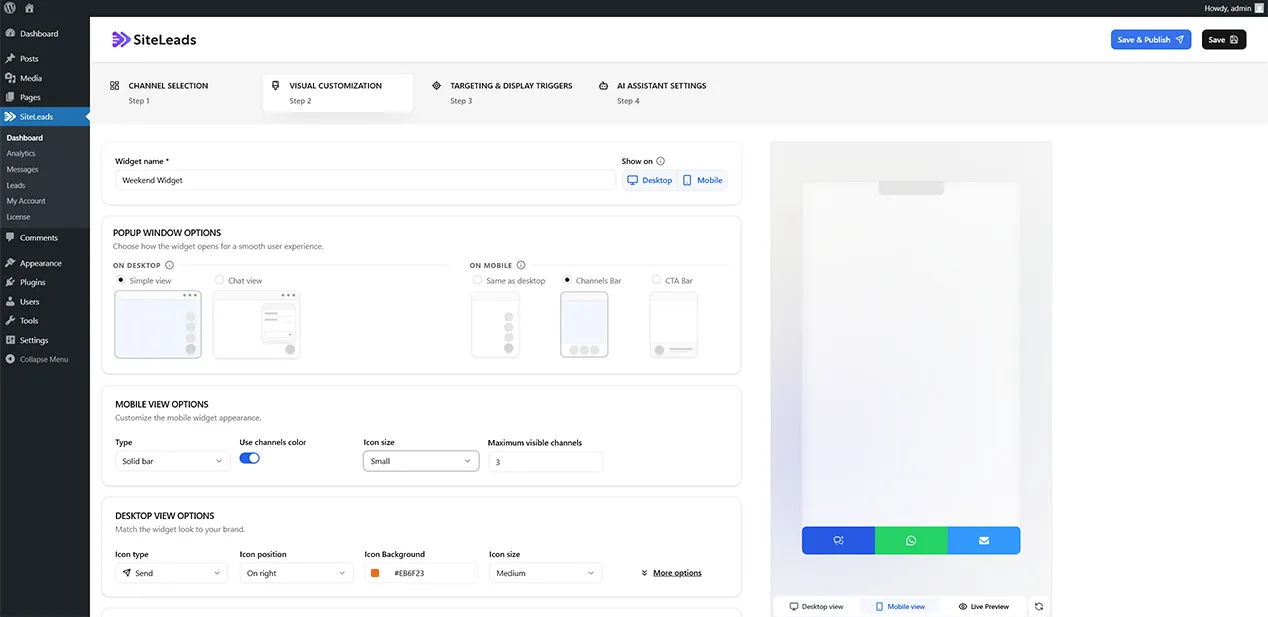
Contact Widget — channel selection and customization -
AI chatbot — setup and training sources -
Targeting & Display Settings — page targeting, triggers, scheduling -
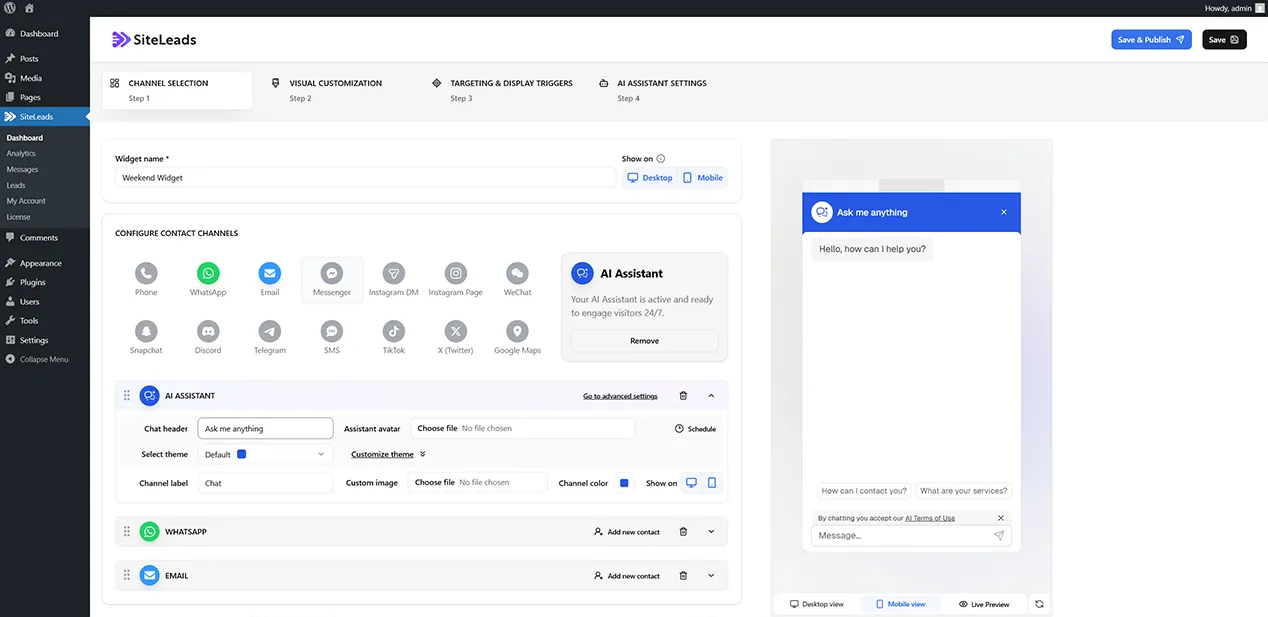
Channels Tab — Chat View on Mobile -
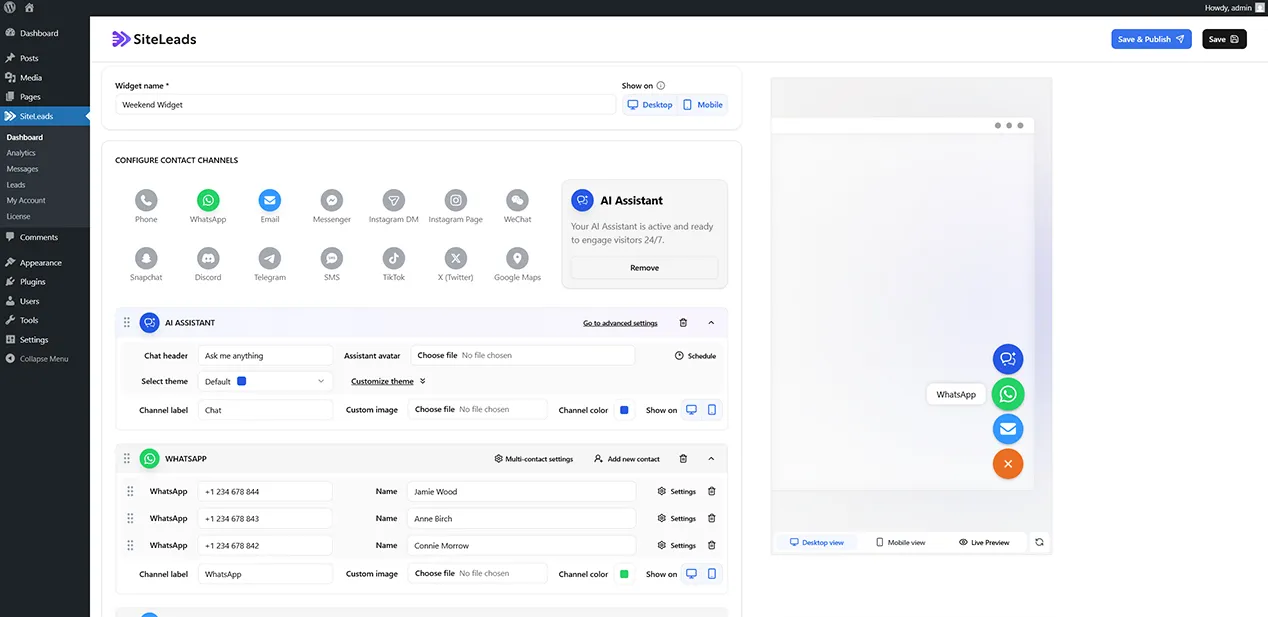
Channels Tab — Simple View
Important information
- The AI chatbot and leads dashboard need a free SiteLeads account. The plugin connects to the SiteLeads cloud, and captured leads are stored in that account.
- Visitor messages and contact details go through an outside service, so mention it in your privacy policy.
- The free plan is limited to five leads a month, 30 crawled pages and two training files.
- It is not a live chat tool. The widget hands visitors to your own channels, and the bot works on its own.
- The plugin needs WordPress 6.8 and PHP 7.2, and is tested up to WordPress 7.1.4. One past vulnerability has been patched.
From the SiteLeads readme
Straight from the developer's WordPress.org listing.
Full description
Turn your WordPress website into a 24/7 lead generation machine — without missing a single visitor.
SiteLeads is a lead generation contact widget built for small businesses. Most plugins just add buttons to your site. SiteLeads goes further: it combines every channel your customers already use — WhatsApp, phone, email, Messenger, Telegram, Instagram — with a free AI chatbot that starts conversations, qualifies visitors, and collects their contact information automatically. Even while you sleep.
SiteLeads Premium → | See all features
💬 Contact Widget — All Your Channels in One Place
Add a floating contact widget to your site with every channel your visitors already use. One click takes them straight to WhatsApp, your phone, email, Messenger, Telegram, Instagram DM, SMS, TikTok, X/Twitter, WeChat, Snapchat, Discord, Google Maps, and more.
Visitors choose how they want to reach you. You never miss a contact.
Free plan includes:
* Floating contact widget
* All standard communication channels
* WhatsApp, phone, email, Messenger, Telegram, Instagram, SMS, TikTok, WeChat, Snapchat, Discord, Google Maps, X/Twitter
* Widget icon customization — color, size, position, shadow, border
* Basic display triggers
* Simple text greeting
* Mobile and desktop display
🤖 Free AI Chatbot for Lead Generation — On Autopilot, 24/7
Add a free AI chatbot to your contact widget. It reads your website, learns your content, and engages visitors automatically — answering questions, qualifying interest, and collecting names and email addresses while you focus on running your business.
The AI chatbot is free and optional. Add it in minutes. No coding required.
Free plan includes:
* 1 AI chatbot
* Knowledge base built from up to 30 pages of your website
* Up to 2 uploaded training files (PDF, DOCX)
* Basic conversation settings: name, greeting, tone
* Leads section and Messages section
How it works:
1. Give your AI chatbot a name and your website URL
2. It crawls your pages and builds its knowledge base
3. Visitors start a conversation — the AI chatbot engages them, answers questions, and collects their contact info
4. Leads appear in your WordPress dashboard automatically
🔥 Pro: Multi-Channel Widget & WhatsApp Management
Widgets & Channels
* Unlimited active widgets
* Multiple contacts per channel — with avatar, role, and availability schedule
* Rich greeting cards: narrow, vertical, horizontal, circle card formats
* Attention effects: pulse, shake, glow animations & more
* Mobile-specific layouts: CTA bar, Channels bar
* Custom channel icons
🎯 Pro: AI Lead Generation & Visitor Qualification
AI chatbot (Pro)
* Unlimited AI chatbots — specialized per page, product, or service
* Full website crawl beyond 30 pages
* Unlimited file uploads — PDFs, manuals, internal docs, price lists
* Strict FAQ Mode — respond only from your approved training sources
* Larger knowledge base character limit
📈 Pro: Targeting, Analytics & Full Brand Control
Targeting & Display
* Page targeting — show specific widgets on specific URLs, categories, or post types
* Date scheduling — run campaigns, promotions, or seasonal widgets
* Day & time scheduling — show only during business hours
* Traffic source targeting — Google Ads, social, organic, direct
* Geographic targeting — country, state, city
* Smart triggers: exit intent, scroll percentage
Analytics (Pro only)
* Full analytics dashboard
* Channel performance tracking
* AI chatbot conversion metrics
Brand & Limits
* Full brand customization
* Unlimited monthly leads and messages
📊 How Each Channel Works
• WhatsApp — Add your number. Visitors click and open a WhatsApp chat directly — mobile app on mobile, WhatsApp Web on desktop. WhatsApp Business is supported.
• Phone — Click to call. One tap on mobile dials your number directly.
• Email — Opens the visitor’s email client with your address pre-filled.
• Messenger — Links to your Facebook business page chat.
• Telegram — Opens a direct Telegram conversation with your account.
• Instagram — Links to your Instagram DM.
• SMS — Opens an SMS message on mobile devices.
• Google Maps — Links to your business location — ideal for local businesses.
• WhatsApp, Messenger, Telegram, phone, email, SMS, TikTok, WeChat, Snapchat, Discord, X/Twitter, Google Maps — all available in the free plan.
🎯 Display Triggers & Targeting
Control exactly when and where your widget appears:
• Time delay — show after X seconds on page
• Scroll percentage — show after the visitor scrolls a set distance (Pro)
• Exit intent — show when the visitor moves to leave (Pro)
• Page targeting — show on specific pages, categories, or post types (Pro)
• Geographic targeting — show only to visitors in selected countries, states, or cities (Pro)
• Traffic source targeting — show only to visitors from Google Ads, social, organic, or direct (Pro)
• Day & time scheduling — restrict to business hours (Pro)
• Date scheduling — activate for campaigns or promotions (Pro)
🏢 Built by Extend Studio
SiteLeads is built by Extend Studio — a WordPress development company building products since 2015. Also behind Kubio, Colibri, and Mesmerize, with 270,000+ active installations across our plugin portfolio.
That track record means SiteLeads is built to last: actively maintained, regularly updated, and backed by a team that has been shipping WordPress plugins for over a decade.
✅ Getting Started — Under 5 Minutes
• Install and activate SiteLeads from the WordPress Plugins dashboard
• Choose your channels — add your WhatsApp number, phone, email, or other contact details
• Customize the widget position, colors, and greeting
• Optionally: add the free AI chatbot, point it at your website URL, and let it learn your content
• Your widget goes live immediately — no code required
Source Files
📂 GitHub Repository
External Services
This plugin connects to the SiteLeads Cloud Platform to enable the AI chatbot and lead management features.
SiteLeads Cloud (cloud.siteleads.ai)
The plugin connects to cloud.siteleads.ai to enable AI chatbot functionality, manage knowledge bases (website crawling and document processing), and store captured leads.
• Privacy Policy
• Terms of Service
These connections are only active if the AI chatbot is enabled and a SiteLeads account has been created. The basic contact widget operates independently.
Installation
• Go to Plugins > Add New in your WordPress dashboard.
• Search for SiteLeads.
• Click Install Now, then Activate.
• The SiteLeads menu will appear in your WordPress sidebar.
• Add your contact channels, customize the widget, and optionally set up your free AI chatbot.
A free SiteLeads account is required to use the AI chatbot and access the leads dashboard. The contact widget works without an account.
Developer FAQ (12)
- What does SiteLeads do?
- SiteLeads adds a floating contact widget to your WordPress site with all the channels your visitors already use — WhatsApp, phone, email, Messenger, Telegram, and more. It also includes a free AI chatbot that automatically engages visitors, answers their questions, and captures their contact information — 24/7, without your involvement.
- Is SiteLeads a live chat plugin?
- No. SiteLeads connects visitors to the channels you already use to close deals — WhatsApp, phone, email. The AI chatbot qualifies and captures leads automatically, without requiring you to be online.
- Is the AI chatbot really free?
- Yes. The AI chatbot is free and optional. The free plan includes 1 AI chatbot, a knowledge base built from up to 30 pages of your website, 2 uploaded training files, and up to 5 captured leads per month.
- Do I need to know how to code?
- No. SiteLeads is set up entirely from the WordPress dashboard. No code required at any step.
- Which channels are supported?
- WhatsApp, WhatsApp Business, phone (click to call), email, Facebook Messenger, Telegram, Instagram DM, SMS, TikTok, WeChat, Snapchat, Discord, Google Maps, X/Twitter, and more.
- Does the AI chatbot work with any website content?
- The AI chatbot learns from the pages you select on your website, plus any documents you upload (PDF, DOCX). In the free plan, it can read up to 30 pages. In Pro, it can crawl the full site.
- Where are my leads stored?
- Captured leads are stored in your SiteLeads account and accessible directly from your WordPress dashboard.
- Do I need a SiteLeads account?
- A free SiteLeads account is required to use the AI chatbot, manage your knowledge base, and access the leads dashboard. The basic contact widget works without an account.
- Will SiteLeads slow down my website?
- No. The widget loads asynchronously and is optimized for performance.
- Does it work with my theme and page builder?
- Yes. SiteLeads works with all standard WordPress themes and page builders including Elementor, Divi, Gutenberg, WPBakery, and more.
- What’s the difference between the contact widget and the AI chatbot?
- The contact widget gives visitors instant access to your channels — WhatsApp, phone, email, Telegram, and more. The AI chatbot is configured like a channel, but has features like: starts conversations, answers questions, and captures contact details. Both work together. The AI chatbot is free and optional.
- How does the AI chatbot qualify visitors?
- The AI chatbot is trained on your website content. When a visitor starts a conversation, it answers their questions and naturally asks for their name and contact details — which are saved as leads in your WordPress dashboard. No scripts to write. No human needed.
Downloads, last 30 days
Trend vs previous period: -15.8%
Average daily downloads: 168 over the last 7 days , 191 over 30 days.
Security history
Past CVEs, patched · 1 published vulnerability (Wordfence) · most recent Aug 24, 2026
- Patched 5.3 Medium Lead Generation Contact Widget & AI Chatbot: Chat Button, Phone Call, Telegram, Email - SiteLeads <= 1.2.0 - Unauthenticated Information Exposure CVE-2026-78268 · Aug 24, 2026 · affects *-1.2.0 · fixed in 1.2.1
Recent releases
- v1.2.1
- Fixed various issues
- v1.2.0
- Added support for WordPress 7.1
- v1.1.7
Minor bug fixes
- v1.1.5
Improved Colibri theme integration * Fixed minor issue with device visibility
- v1.1.3
Added integration for Colibri theme
Show 4 older releases
- v1.1.2
Minor bug fixes
- v1.1.1
Added integration for Mesmerize theme
- v1.1.0
Added AI Assistant
- v1.0.0
Initial release of SiteLeads plugin.
SiteLeads FAQ
What does it do?
It puts a floating widget on your site that links to your contact channels. An optional AI chatbot also talks to visitors, answers questions and collects names and emails.
Is it a live chat tool?
No. It sends visitors to channels like WhatsApp, phone or email. The chatbot captures leads on its own, so you do not need to be online.
Is the chatbot really free?
Yes, in a limited form. The free plan has one chatbot, a knowledge base from up to 30 pages, two training files and up to five captured leads per month.
Do I need a SiteLeads account?
Only for the chatbot, the knowledge base and the leads dashboard. The basic contact widget works without one.
Where are my leads stored?
In your SiteLeads account, and you can view them from the WordPress dashboard.
Does it work with my theme and builder?
The listing says it works with standard WordPress themes and builders including Elementor, Divi, Gutenberg and WPBakery.
Will it slow the site down?
The listing says the widget loads asynchronously and is optimized for speed, but it gives no measurements.
SiteLeads alternatives

The free MCP server and AI chatbot for WordPress. Claude and ChatGPT connect to your site with no account, no API key and no usage limits. AI Engine connects WordPress and AI, both ways. AI comes into your site:…

Chatway is a WordPress live chat, AI chatbot, and helpdesk plugin for customer support. Chat with website visitors in real time, automate replies with an AI chatbot, or connect your own AI agents including ChatGPT,…

🟦 Tidio - Live Chat for WordPress with AI Chatbots, Customer Support & Sales Tools Tidio Live Chat is an all-in-one customer support plugin for WordPress that lets you talk to your website visitors in real time.…

THE SIMPLE, SECURE AND FEATURE-RICH SUPPORT TICKETING SYSTEM PLUGIN FOR YOUR WORDPRESS SITE. Click here to visit our official website. SupportCandy is a self-hosted WordPress helpdesk and support ticket system.…

AI ChatBot for WordPress - WPBot. Support, Sale, Convert, Automate WPBot is a feature rich AI ChatBot for WordPress websites. Provide 24/7 Automated Live Chat Support , Generate Leads and Convert , Collect…

MxChat is the most powerful free AI chatbot and content generation plugin for WordPress - connecting your website to ChatGPT, Claude, Gemini, Grok, DeepSeek, and 100+ AI models through a single, easy-to-use…
Listing data from WordPress.org and the Wordfence vulnerability feed, refreshed Nov 9, 2026; listing details fetched Nov 14, 2026. Screenshots are from the plugin's WordPress.org listing. Not affiliated with Extend Themes.