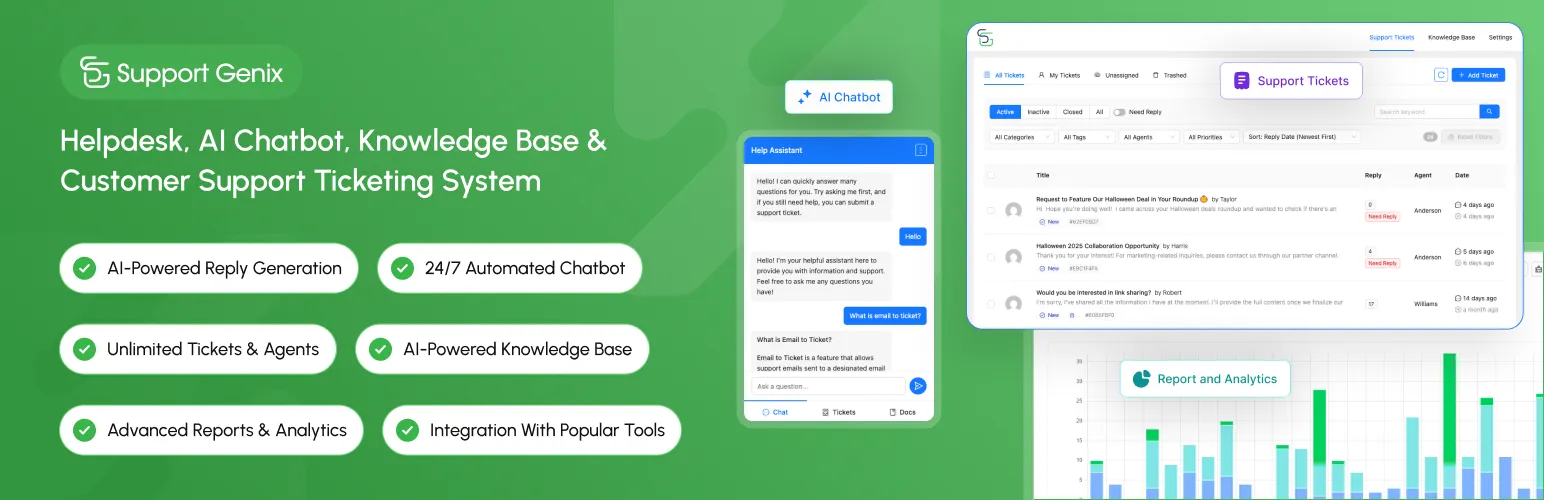

Support Genix
Support Genix - Helpdesk, AI Chatbot, Knowledge Base & Customer Support Ticketing System · by DevItems
- active installs
- 2K+
- 11 ratings
- 4.5
- since last update
- 6d
- releases in 12 months
- —
- support threads resolved
- 100%
- avg daily downloads
- 245
- on WordPress.org
- 4.4 years
Support Genix at a glance
Support Genix is a freemium WordPress AI chatbot plugin by DevItems with 2K+ active installs and a 4.5/5 rating from 11 reviews. It was last updated on Nov 3, 2026, is tested up to WordPress 7.1.4 and needs PHP 7.4+. All 7 of its published vulnerabilities have patched versions. Our quality score is 91/100.
What is Support Genix?
Support Genix is a helpdesk plugin for WordPress that handles support tickets, a knowledge base and an AI chatbot. Customers submit and track tickets through a portal on your site, and agents answer from a dashboard. The free version has no limit on tickets, agents or customers.
It suits online stores, digital product sellers, agencies, SaaS companies and membership or course sites. The AI parts include a reply writer for agents, a chatbot that answers from your knowledge base, and a writing assistant for help articles. Migration tools can import tickets and documentation from other helpdesk plugins.
The AI features need your own API key from OpenAI or Anthropic, so those costs are billed by the provider. The paid version adds email-to-ticket, WhatsApp and Slack links, auto-close rules and more. The dashboard and portal are built with React, so they do not depend on your theme's styling.
Best for
- WooCommerce stores handling order questions
- Digital product sellers needing a ticket system
- Teams moving from Fluent Support or BetterDocs
- Sites wanting an AI chatbot on their own docs
Support Genix features
Ticket management
Unlimited tickets with categories, priorities, statuses, custom fields, transfers and automatic agent assignment.
Customer portal
A React-based portal added with a shortcode, where customers submit and follow tickets. Guest submission is supported.
Help Me Write replies
AI drafts a ticket reply for the agent to review and send.
Knowledge base chatbot
A floating chatbot answers visitor questions from your knowledge base content.
AI docs writer
Generates help articles using OpenAI or Claude.
Knowledge base system
Categories, tags, authors, style options and Full Site Editing support, plus a BetterDocs migration tool.
Reports and analytics
Reports on ticket activity and response, plus analytics for the knowledge base and the chatbot.
WooCommerce and Envato
Agents see customer order history inside a ticket, and Envato marketplace support is included.
Migration from other desks
Import tickets and customers, for example from Fluent Support, and move documentation from BetterDocs.
Roles and saved replies
Agent roles and permissions, multiple role assignment, saved replies and email notifications.
Support Genix free vs pro
Free WordPress.org version
- Unlimited tickets, agents and customers
- Knowledge base, Help Me Write, AI chatbot and AI docs writer (with your own API key)
- Custom fields, categories, saved replies and reports
- WooCommerce and Envato integration, WPML compatibility and multisite support
Pro Paid version
- Email to ticket conversion and mailbox management
- Ticket creation via chatbot and smart documentation suggestions
- Auto close, auto-trash and conditional logic for custom fields
- WhatsApp, Slack, FluentCRM, Tutor LMS, EDD and webhook integrations
- Login with Google and Envato, ticket tagging and performance insights
A free version is on WordPress.org and a paid Pro version adds the items above. The listing says Pro has plans for 5 sites or up to 100 sites, and lifetime plans, but gives no prices. AI features need your own OpenAI or Claude key, billed by that provider.
How to use Support Genix
- Install the plugin
In wp-admin go to Plugins, then Add New, search for Support Genix, then install and activate.
- Run the setup wizard
Open the Support Genix menu and follow the wizard to configure the basics.
- Add the portal
Place the supportgenix shortcode on a page so customers can submit and track tickets.
- Enable AI if wanted
Add your OpenAI or Claude key under Settings, then API Keys to turn on Help Me Write, the chatbot and the docs writer.
- Build the knowledge base
Write or generate articles, then let the chatbot use them to answer visitors.
Support Genix screenshots (12)
-
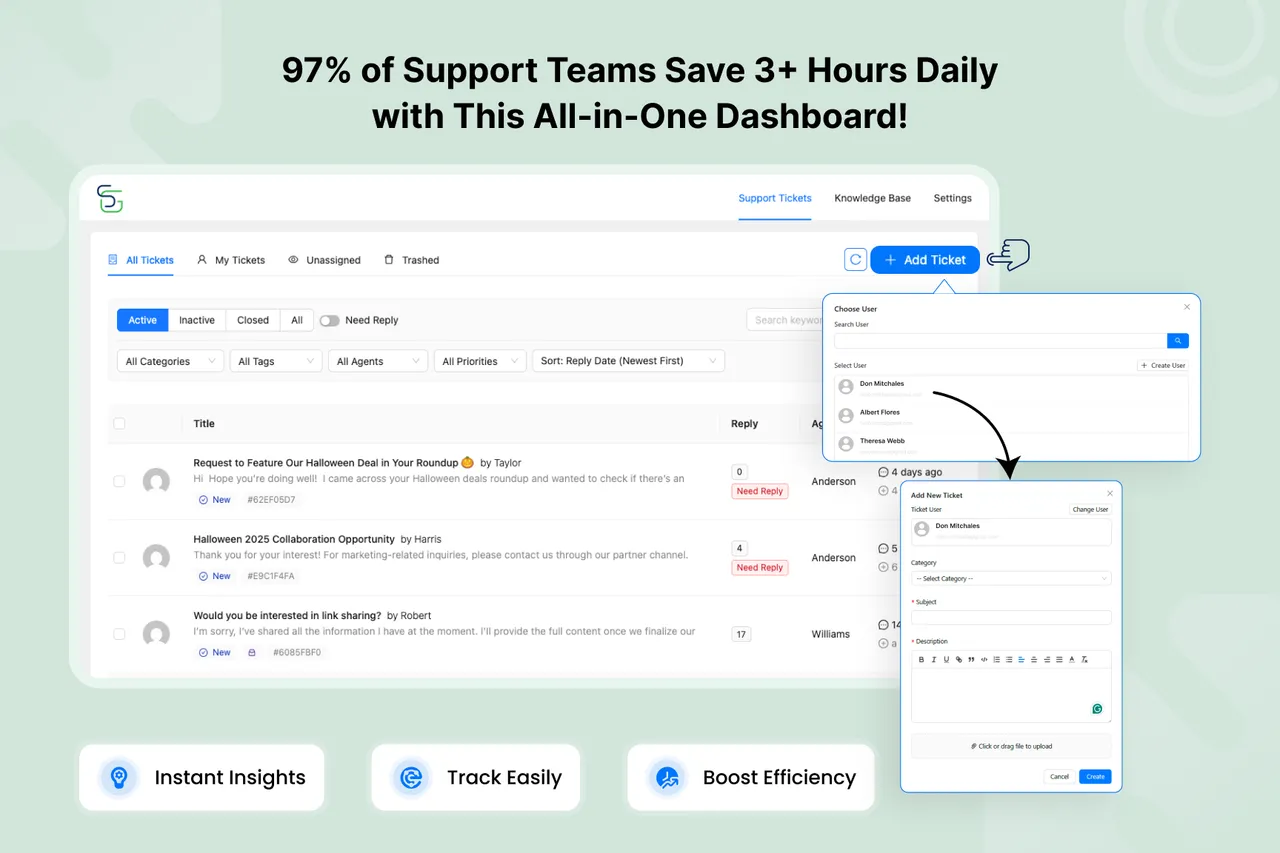
All-in-One Dashboard – Manage Every Support Ticket from a Single Screen! -
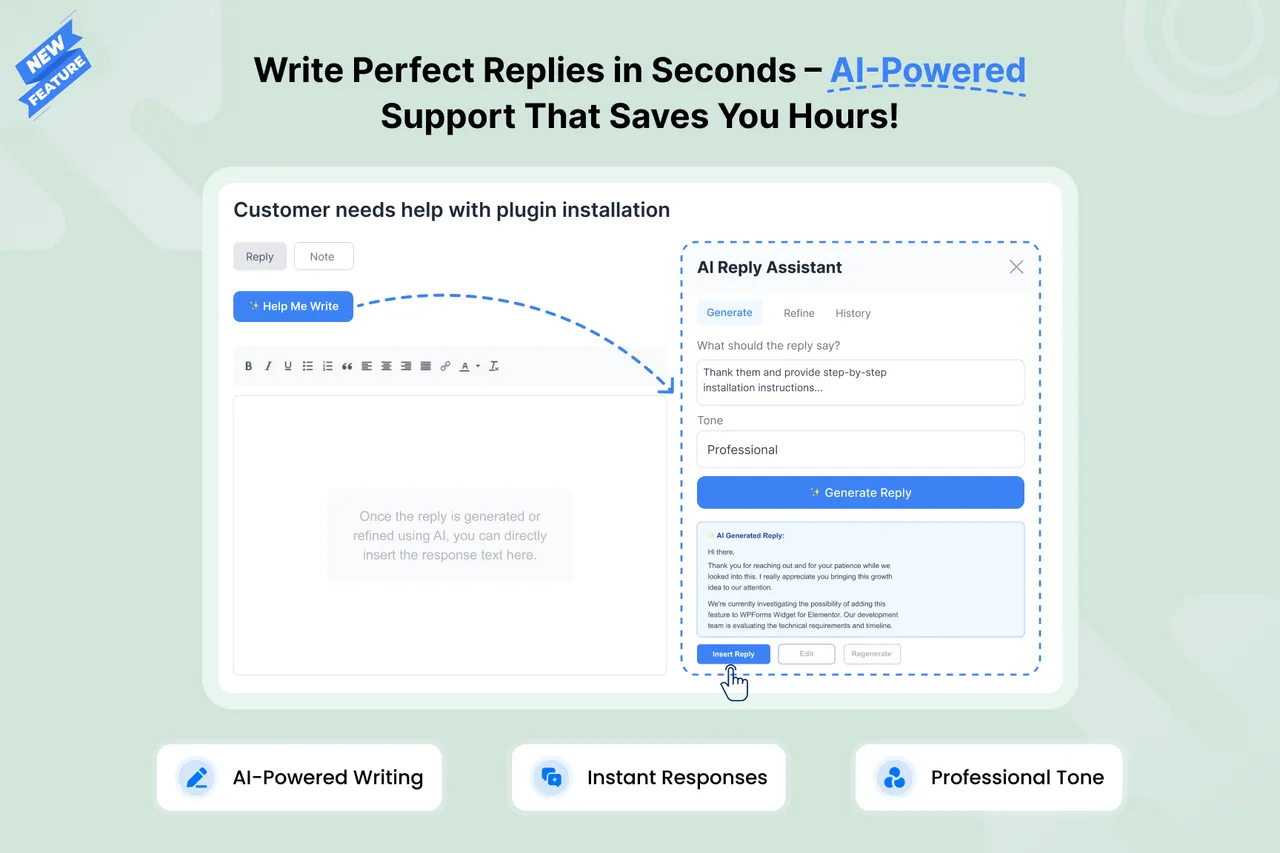
Help Me Write (AI Reply Assistant) Professional Replies in Seconds – Save 60% Response Time! -
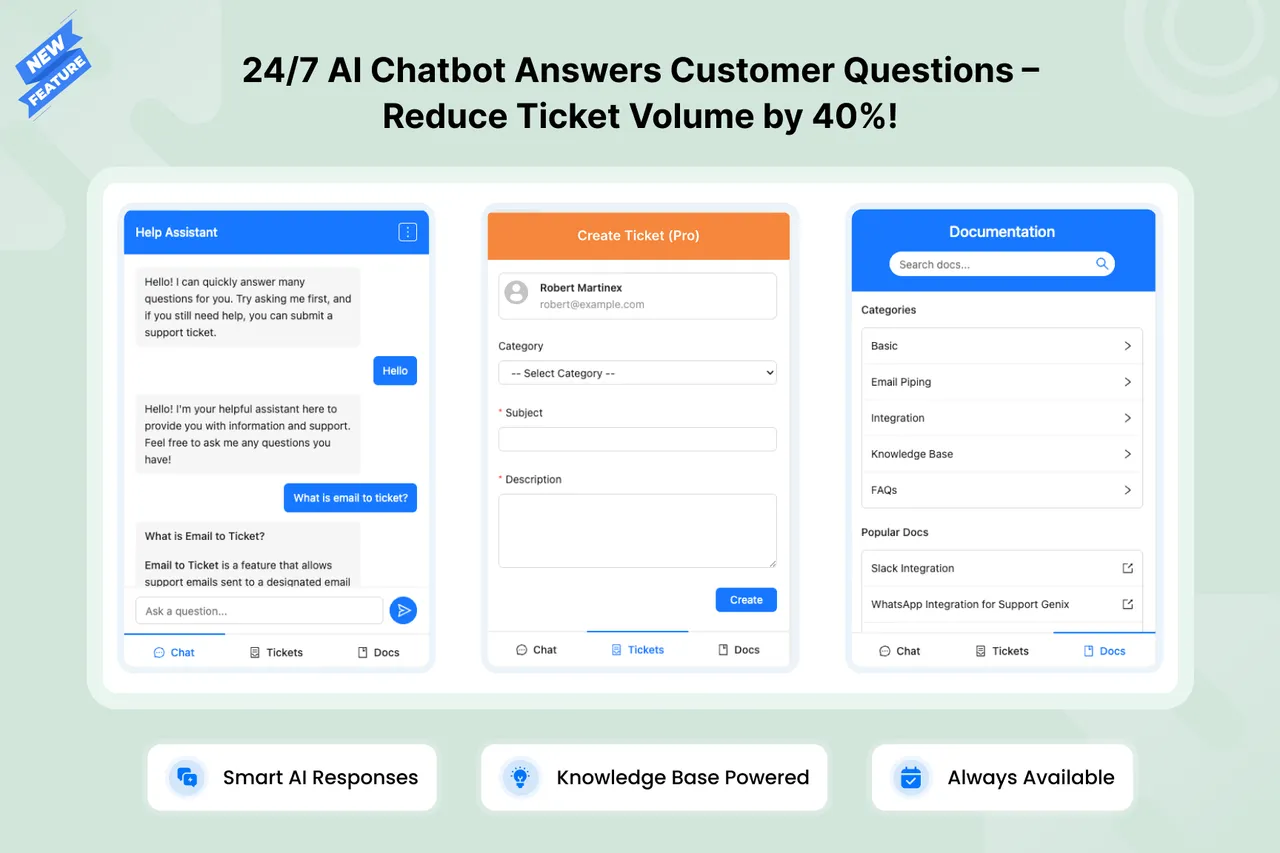
24/7 AI Chatbot Answers Questions Instantly – Reduce Tickets by 40%! -
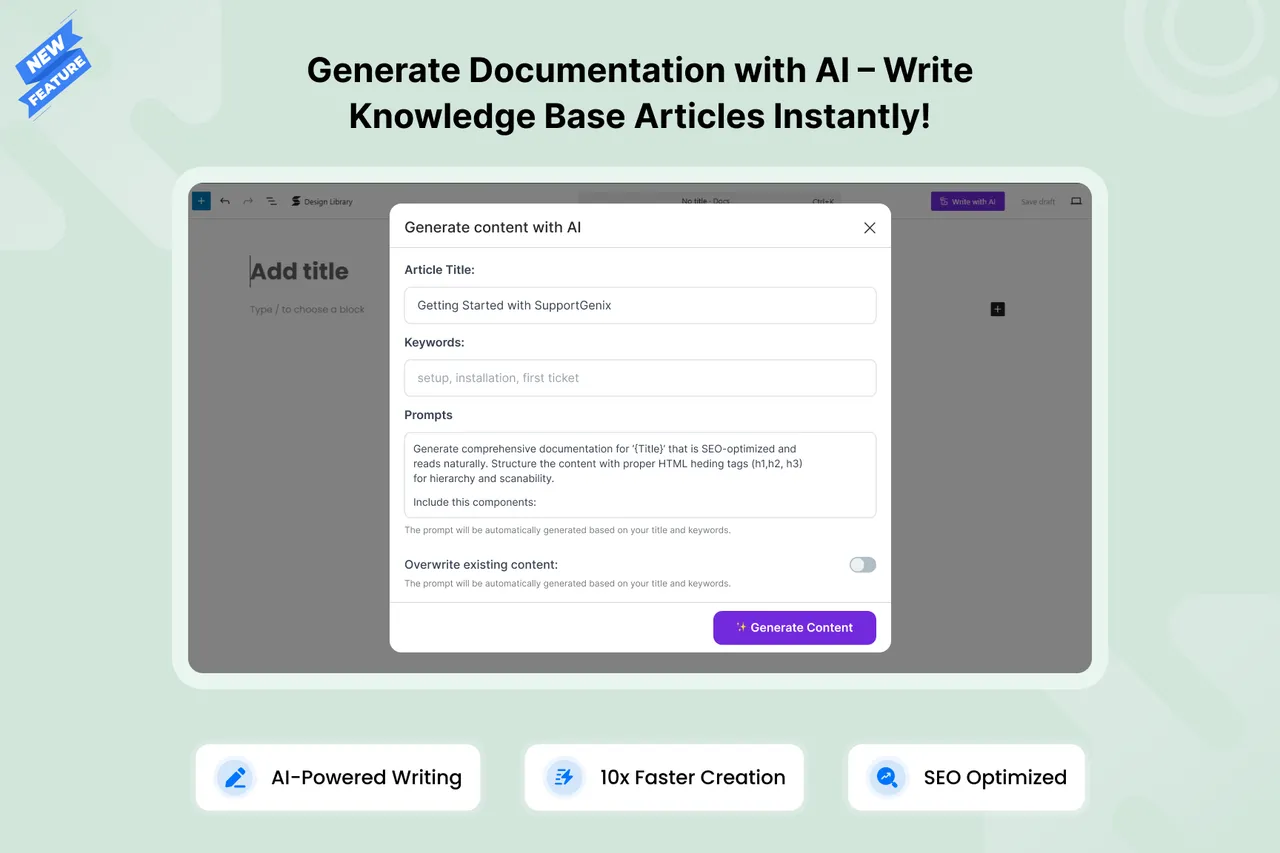
AI Writing Assistant – Create Help Articles 10x Faster! -
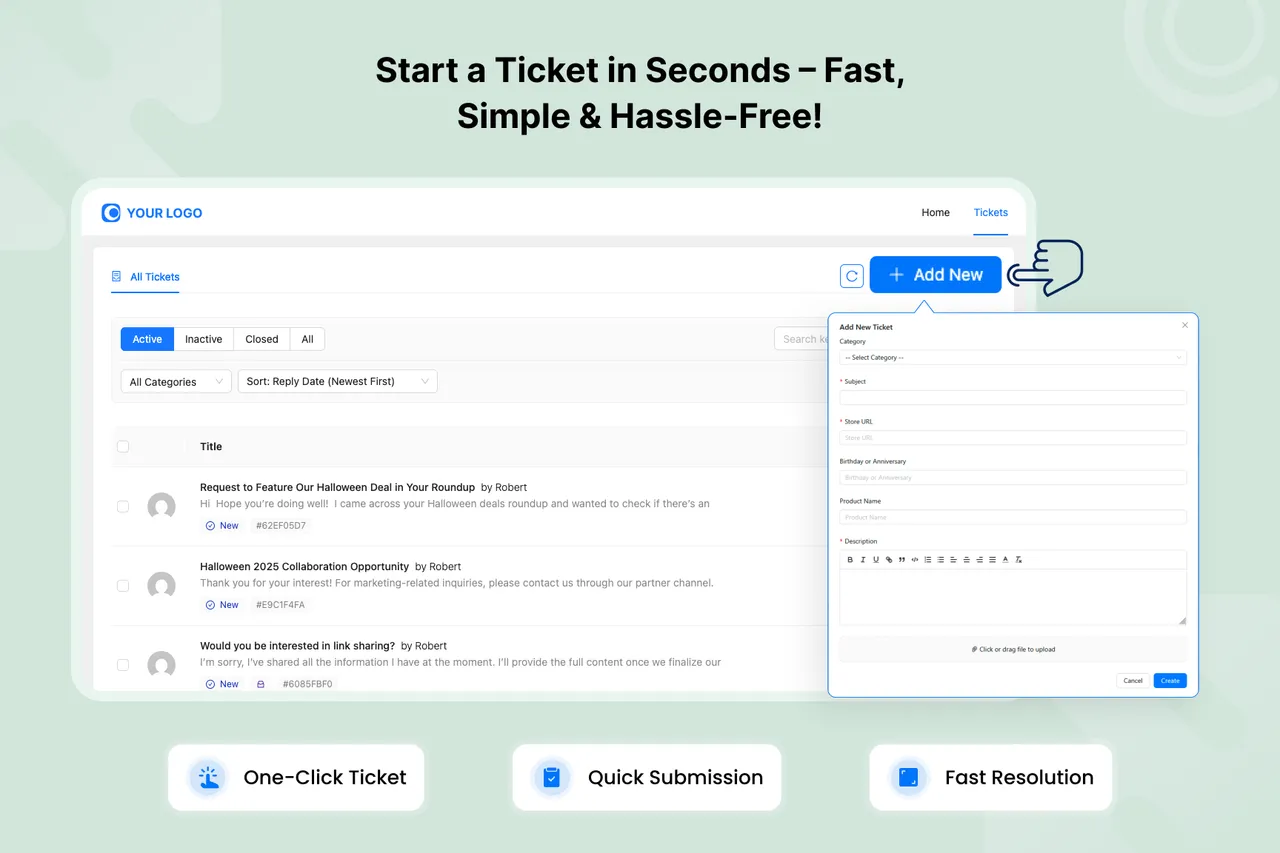
Create Tickets in Seconds – Simple Form with Powerful Features! -
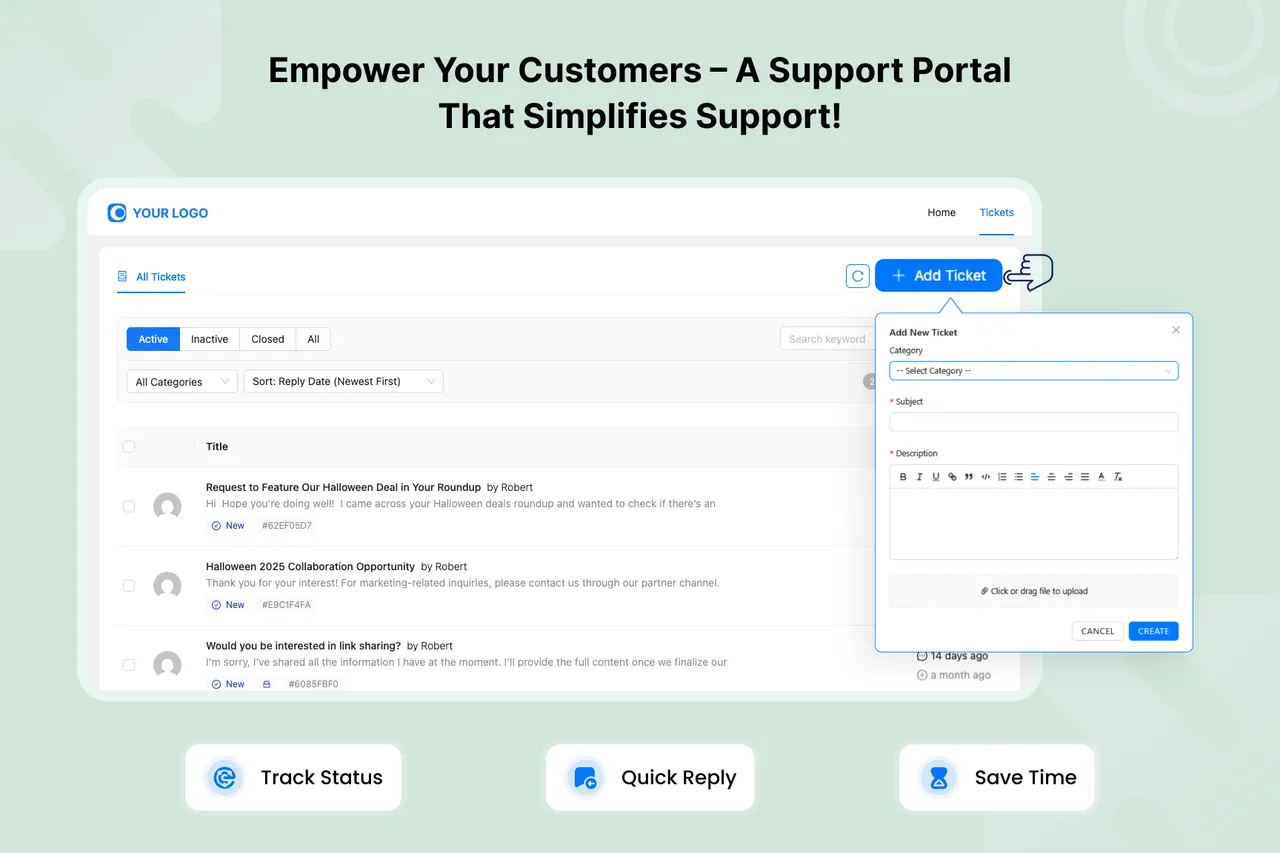
Customer Self-Service Portal – Let Users Submit & Track Tickets 24/7! -
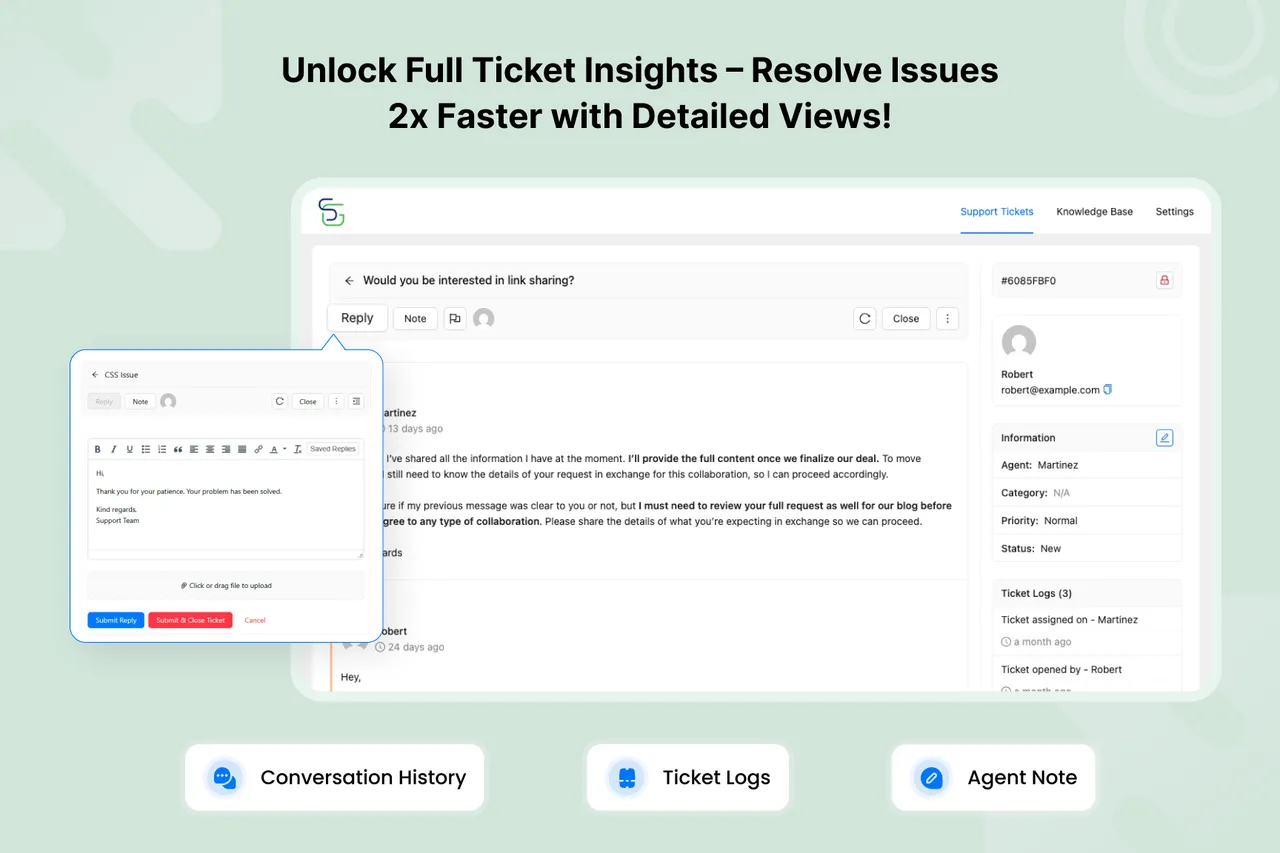
Complete Ticket History – See Every Reply, Note & Action in One View! -
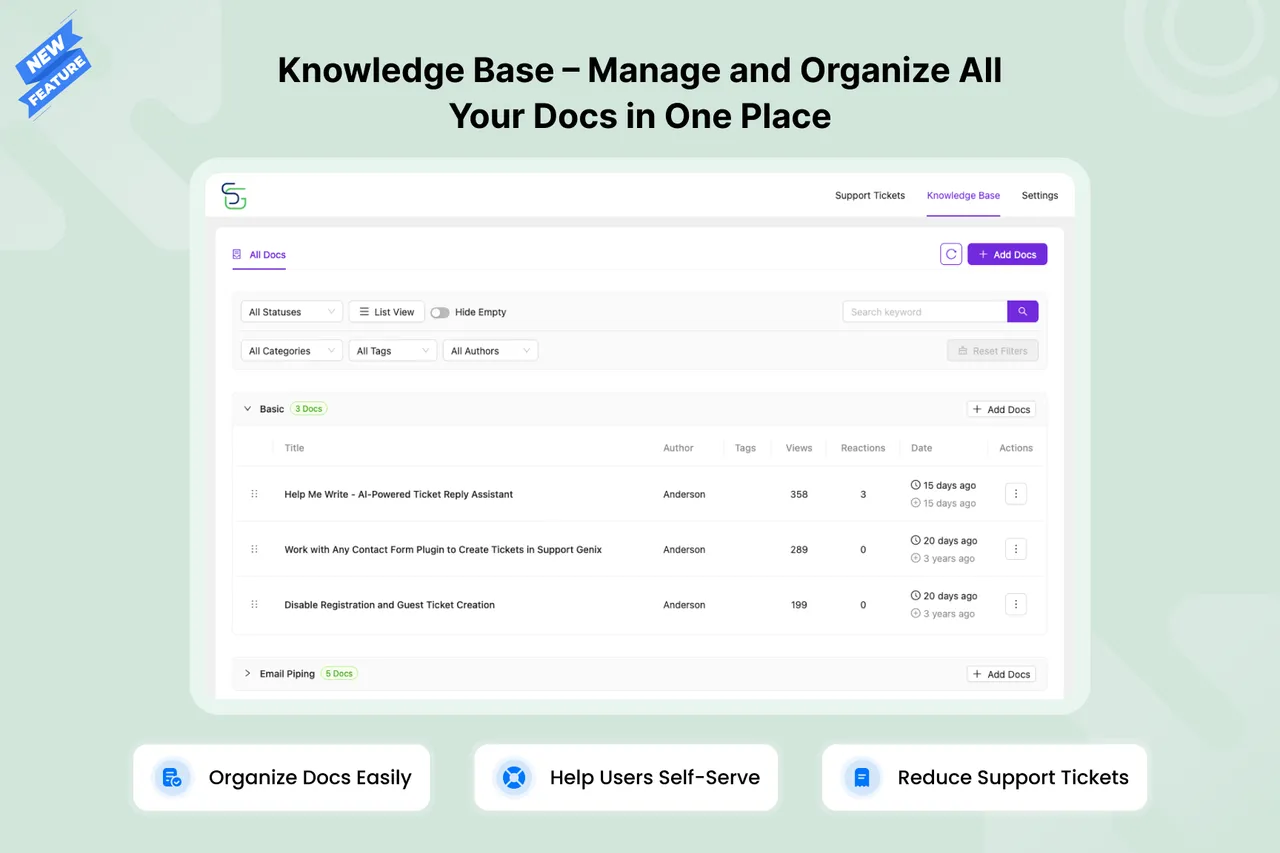
Manage and organize all Knowledge Base articles for faster self-service support. -
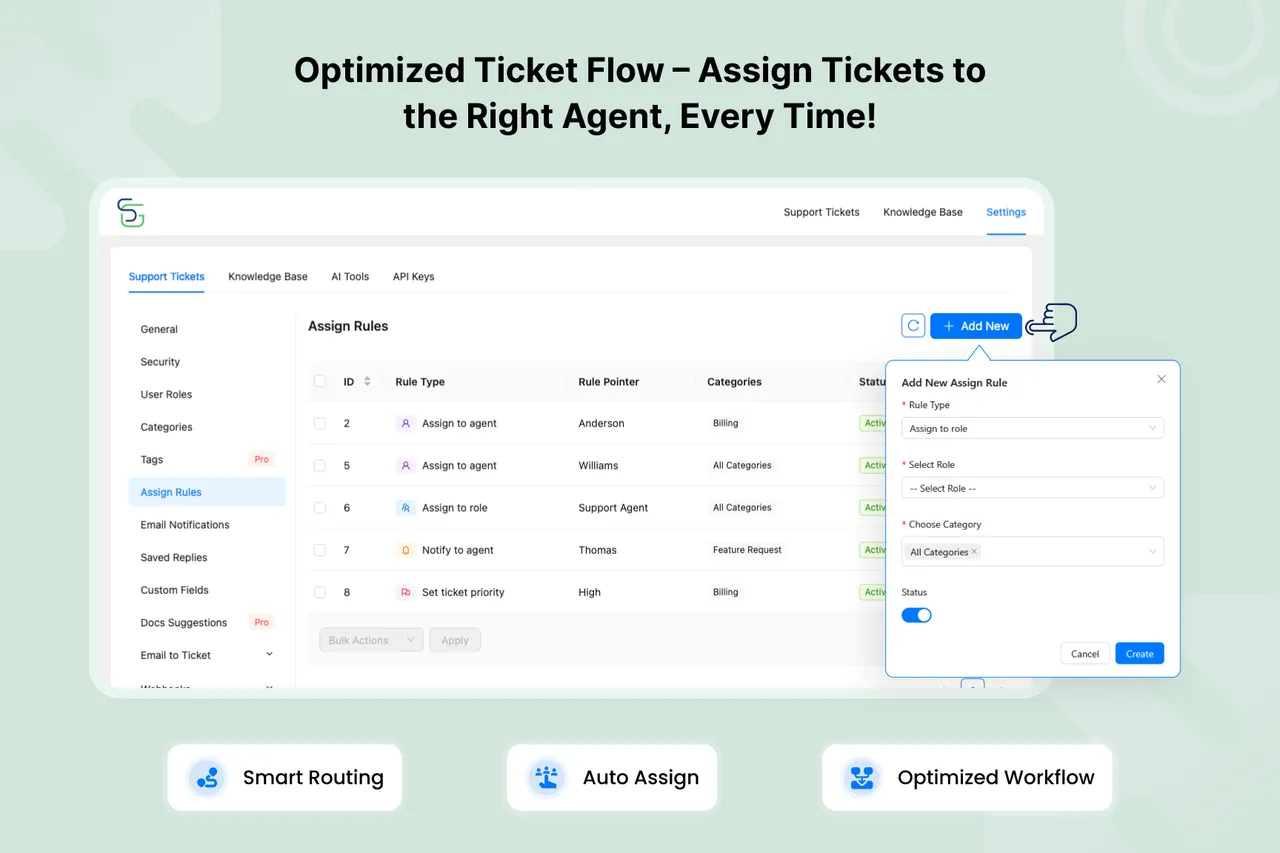
Smart Auto-Assignment – Route Tickets to the Right Agent Automatically! -
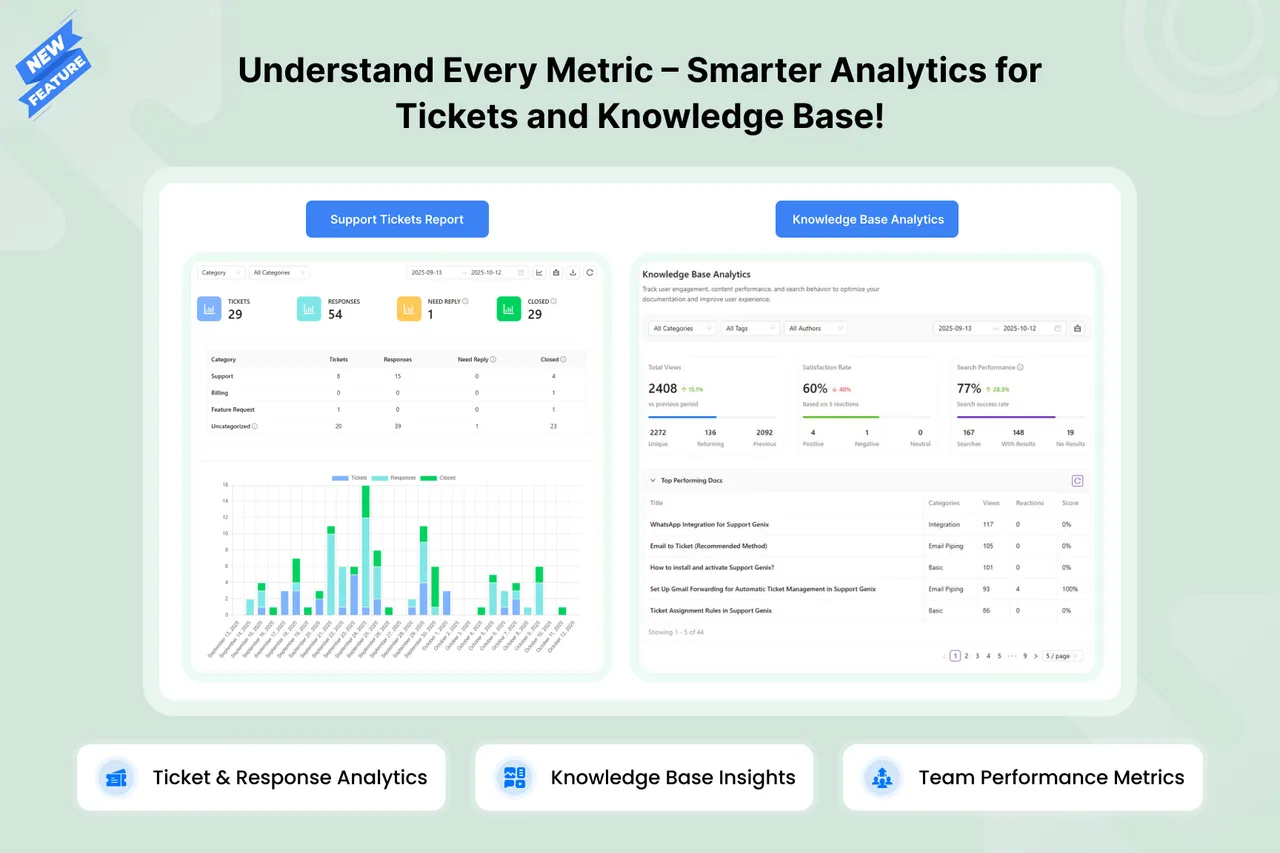
Track Team Performance – Powerful Analytics & Real-Time Insights! -
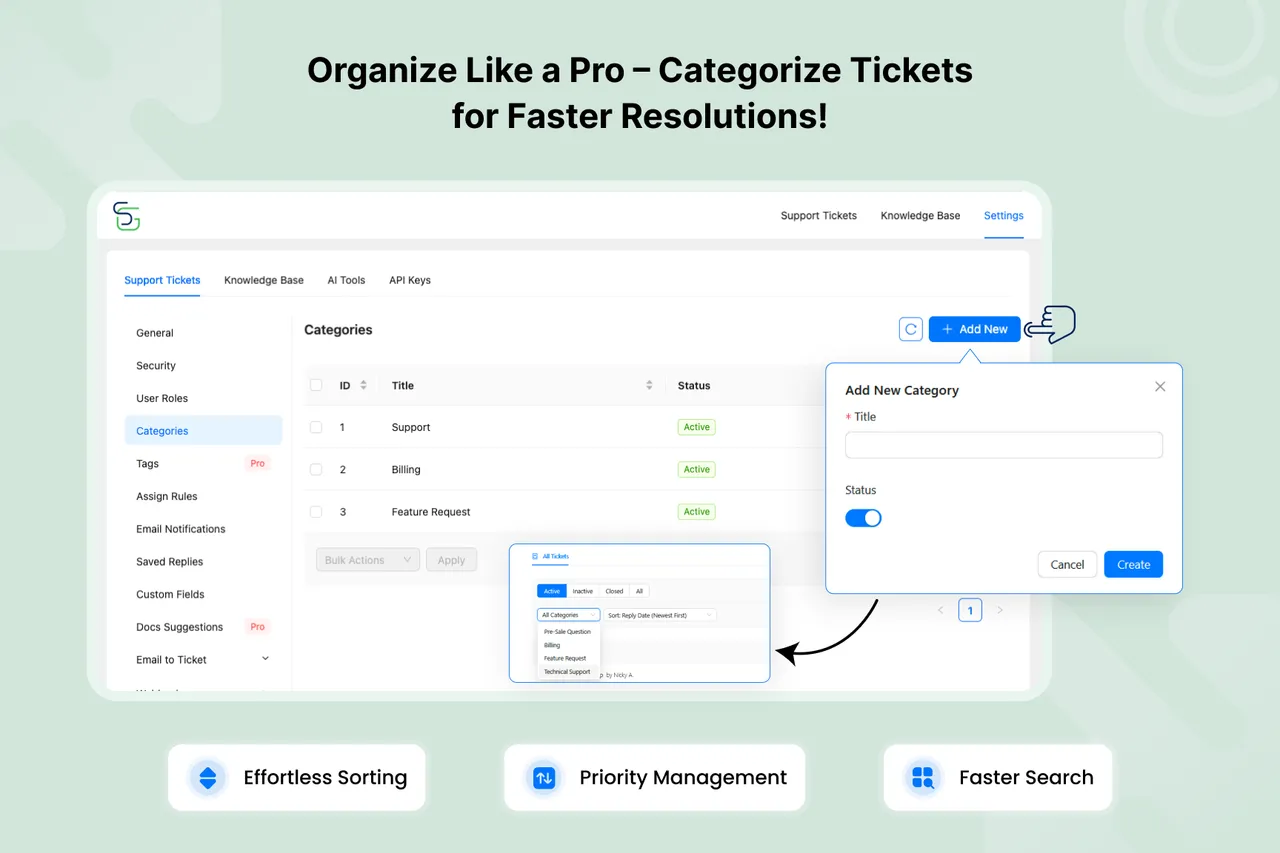
Organize Tickets by Category – Route Support Requests to the Right Team! -
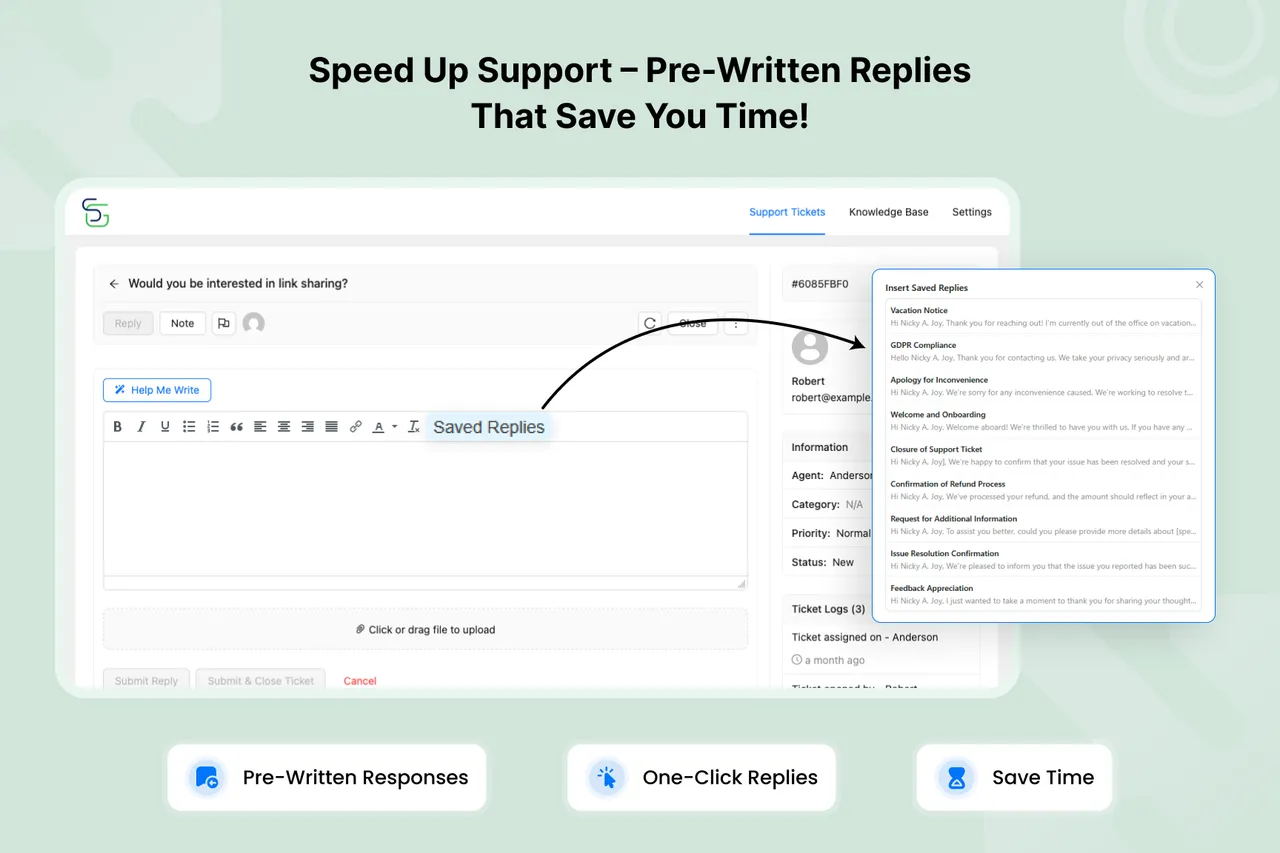
Pre-Written Replies – Answer Common Questions in One Click!
Important information
- Requires WordPress 6.0 and PHP 7.4. Tested up to WordPress 7.1.4.
- AI features need your own OpenAI or Claude API key, and the provider bills usage.
- When AI or third-party integrations are on, ticket or question content may be sent to those services.
- The data shows 7 published vulnerabilities in the plugin's history, all marked patched. Keep it updated.
- Email to ticket and several integrations require the Pro version.
- The listing quotes time and ticket-volume savings without supporting data, so treat them as vendor claims.
From the Support Genix readme
Straight from the developer's WordPress.org listing.
Full description
Advanced AI-Powered WordPress Helpdesk with Support Tickets, Knowledge Base, 24/7 Chatbot, Smart Automation, and Reports
Support Genix is a powerful, AI-powered helpdesk plugin for WordPress, designed to simplify customer support management with intelligent automation. Manage support tickets in one place, boost productivity with AI-powered reply generation, create knowledge base docs with AI and enhance customer satisfaction with 24/7 automated chatbot support.
Whether you’re running a small business or managing a large WooCommerce store, Support Genix helps you track and resolve customer support tickets with ease. With unlimited tickets, agents, and customers, plus advanced AI features, custom fields, and automated notifications, you’ll never miss an important issue again.
👇 Helpful Links to Get Started
🔎 Learn More | 📄 Documentation | 📍 Roadmaps | 🚀 Explore Pro
🚀 Everything You Need for Smarter Customer Support
Support Genix is a great alternative to Freshdesk, Zendesk, Helpscout, Clickdesk, Awesome Support, and Fluent Support—offering enterprise-level features at a fraction of the cost, with no per-agent pricing and lifetime plans available.
Perfect for e-commerce stores, digital product sellers, agencies, SaaS companies, educational platforms, membership sites etc.
🤖 AI-Powered Features (New!)
Transform your support workflow with cutting-edge artificial intelligence:
• Help Me Write – Generate professional ticket replies in seconds with AI assistance, reducing response time by 60%.
• AI-Powered Chatbot – Provide instant answers 24/7 from your knowledge base, reducing ticket volume by 40%.
• AI Writing Assistant – Create comprehensive help documentation 10x faster using OpenAI and Claude.
See AI Features in Action:
👉 Watch how Help Me Write generates professional ticket replies in seconds, reducing response time by 60%.
👉 Watch how the AI Chatbot answers customer questions 24/7 using your knowledge base.
👉 Learn how to create professional help articles in minutes with AI Writing Assistant.
⚡ Core Features That Scale With You
• Unlimited Everything – No restrictions on tickets, agents, or customers. Scale without limits or extra costs.
• Knowledge Base Management – Build a self-service help center that empowers customers to find answers instantly.
• Advanced Integrations – Connect with WooCommerce and Envato to enhance your support workflow.
• Email to Ticket Conversion (Pro) – Automatically convert incoming emails into organized support tickets.
• Advanced Integrations (Pro) – Connect with WhatsApp, Slack, Tutor LMS, Easy Digital Downloads, and more.
• Smart Documentation Suggestions (Pro) – Automatically suggest relevant help articles while customers create tickets.
• Support Tickets Report – Track ticket activity, response performance, and user interactions.
• Knowledge Base Analytics – Track user engagement, content performance, and search behavior.
• AI-Powered Chatbot Analytics – Track chatbot performance and optimize your automated support strategy.
• Complete Customization – Custom fields, ticket categories, role-based permissions, and branding options.
📊 Powerful Analytics & Reporting
Track every metric that matters with comprehensive analytics dashboards:
• Support Tickets Report – Track ticket activity, response performance, and user interactions.
• Knowledge Base Analytics – Monitor user engagement, content performance, and search behavior.
• AI Chatbot Analytics – Track chatbot performance and optimize your automated support strategy.
See exactly what’s working, identify bottlenecks, and make data-driven decisions to improve your support quality.
▶️ Video Tutorial
Watch this video tutorial and learn how to set up a professional support ticket management system in WordPress that keeps your customers happy and your customer support team efficient.
❤️ Free Features
AI-Powered Tools
• Help Me Write (AI Reply Assistant) (New)
• AI-Powered Chatbot (New)
• AI Chatbot Analytics & Tracking (New)
• AI Writing Assistant for Knowledge Base (New)
• Chatbot-Only Documentation Mode (New)
• Smarter Knowledge Base Analytics (New)
Ticket Management
• Unlimited Tickets
• Ticket Categories
• Ticket Custom Fields
• Ticket Priority System
• Ticket Status
• Ticket Transfer
• Support Tickets Report
• Undo Feature for Agents
• Category Order Management
• Automatic Agent Assignment
Knowledge Base & Documentation
• Knowledge Base Management (New)
• Knowledge Base Layout & Style Customization (New)
• Full Site Editing (FSE) Support
• BetterDocs Migration Tool
Team & User Roles
• Unlimited Agents
• Unlimited Customers
• Agent Roles & Permissions
• Multiple Role Assignment
Communication & Workflow
• Email Notifications
• Saved Replies
• Filters & Sorting
Integrations & Compatibility
• WooCommerce Integration
• Envato Marketplace Integration
• Fluent Support Migration Tool
• Multisite Support
• WPML Compatibility
• Multilingual Support
Setup & Design
• Setup Wizard
• Fully Responsive Design
🔥 Pro Features
AI & Automation
• Ticket Creation via Chatbot (New)
• Smart Documentation Suggestions (New)
• Auto Close Inactive Tickets
• Auto-Trash & Auto-Delete Tickets
• Conditional Logic for Custom Fields (New)
Ticket Management
• Email to Ticket Conversion
• Mailbox Binding & Management (New)
• Ticket Transfer Between Mailboxes
• Ticket Tagging System
• Ticket Hotlink Sharing
• Customizable Text Editor Height
Integrations
• WooCommerce Integration (Advanced)
• Easy Digital Downloads (EDD) Integration
• WhatsApp Integration
• Slack Integration
• FluentCRM Integration
• Tutor LMS Integration
• BetterDocs Integration
• Webhook Integration (Incoming & Outgoing)
Analytics & Performance
• Performance Insights
• Weekend & Holiday Settings
User Access & Login
• Login with Google & Envato
👉 Explore the full power! Upgrade to Support Genix Pro.
🤝 Why Businesses Choose Support Genix
🚀 Effortless Ticket Management
Stay organized and on top of your customer service with an intuitive, easy-to-use ticket management system. Track, prioritize, and manage support tickets in real-time, ensuring no customer query goes unanswered.
🛠️ Customizable Support System
Tailor your support process to your exact needs. Add custom ticket fields, define ticket categories, and set up personalized email notifications to streamline communication with your customers and team.
👥 Multi-Agent Support
Collaborate with your team efficiently. Multiple agents can work on tickets simultaneously, improving response time and ensuring customer issues are resolved quickly.
📱 Email Notifications & Auto-Updates
Keep everyone informed with automatic email updates. Agents receive notifications when new support tickets are created or when there’s an update, ensuring prompt attention to every customer support request.
❤️ Support Genix Lite Features
AI-Powered Tools:
✅ Help Me Write (New) – AI-powered assistant that generates professional ticket replies in seconds, helping agents respond 60% faster while maintaining consistent tone and quality across all customer interactions.
✅ AI-Powered Chatbot (New) – Handle repetitive questions with a smart AI Chatbot that delivers instant answers from your knowledge base, reducing ticket volume by 40% while providing 24/7 automated support.
✅ AI Chatbot Analytics (New) – Track chatbot performance with detailed metrics on queries, successful answers, and user interactions to optimize your automated support strategy and identify knowledge gaps.
✅ AI Writing Assistant for Knowledge Base (New) – Use built-in AI from OpenAI & Claude to craft or improve help articles in just a few clicks, generating professional documentation 10x faster than manual writing.
✅ Chatbot-Only Documentation Mode (New) – Make selected documentation accessible only via the chatbot, creating guided support experiences while keeping certain articles private from public search.
✅ Smarter Knowledge Base Analytics (New) – See which docs perform, what users search, and where they get stuck — all from one smart, centralized dashboard with actionable insights.
Ticket Management:
✅ Unlimited Tickets – Handle an unlimited number of tickets effortlessly—no limits on the amount of support you can provide.
✅ Ticket Categories – Organize tickets by category, helping your team prioritize and manage support requests more efficiently.
✅ Ticket Custom Fields – Customize your ticket forms to collect the exact information needed for faster resolution of customer queries.
✅ Ticket Priority System – Set and filter tickets by priority levels to ensure critical issues receive immediate attention.
✅ Ticket Status – Track ticket progress with customizable status labels like “New”, “In Progress”, “Re-open”, “Active”, “Inactive”, “Closed”, and “Trashed”.
✅ Ticket Transfer – Quickly reassign tickets to the most suitable agent or department for faster issue resolution.
✅ Support Tickets Report – Gain deeper insights into your support management performance with comprehensive reports to measure efficiency and team productivity.
✅ Undo Feature for Agents – Allow agents to undo replies and notes before finalizing, preventing mistakes and improving accuracy.
✅ Category Order Management – Easily reorder support ticket categories with drag-and-drop functionality for better organization.
✅ Automatic Agent Assignment – Automatically assign tickets to agents based on predefined rules. If no agent is assigned, the system assigns the ticket to the first replying agent.
Knowledge Base & Documentation:
✅ Knowledge Base Management (New) – Quickly create and organize help docs with categories, tags, and authors so users can find answers fast, reducing support workload significantly.
✅ Knowledge Base Layout & Style Customization (New) – Style your knowledge base with quick customization options for layouts, colors, and width effortlessly without touching code, matching your brand perfectly.
✅ Customizable Layouts + FSE Support – Display docs in grid, masonry, or list view. Fully compatible with both classic and Full Site Editing themes for maximum flexibility.
✅ BetterDocs Migration Tool – Seamlessly transfer all your documentation from BetterDocs to Support Genix Knowledge Base with one-click migration, preserving categories, tags, and article structure.
Team & User Roles:
✅ Unlimited Agents – Add as many agents as needed to support your team’s growth, with no restrictions on user access.
✅ Unlimited Customers – Serve an unlimited number of customers, allowing your business to grow without support system limitations.
✅ Agent Roles & Permissions – Assign specific roles and permissions to agents, ensuring smooth management and team collaboration.
✅ Multiple Role Assignment – Assign multiple roles to users simultaneously for flexible permission management across teams.
Communication & Workflow:
✅ Email Notifications – Get instant email notifications for every new ticket and update, ensuring you never miss an important request.
✅ Saved Replies – Save time with pre-written replies for common questions, speeding up responses and maintaining customer satisfaction.
✅ Filters & Sorting – Easily filter and sort tickets to quickly find what you need, keeping your support organized and streamlined.
Integrations & Compatibility:
✅ WooCommerce Integration – View customer order history directly within support tickets for instant purchase context and faster resolution.
✅ Fluent Support Migration Tool – Import all tickets, customers, and conversation history from Fluent Support with our automated migration tool for easy platform switching.
✅ Multisite Support – Full compatibility with WordPress Multisite networks for managing support across multiple sites.
✅ WPML Compatibility – Support Genix integrates with WPML, making it easy to run multilingual support systems for global customers.
✅ Multilingual Support – Easily translate the plugin into any language. Fully compatible with popular translation plugins for seamless localization.
Setup & Design:
✅ Setup Wizard – Quick and easy setup process with guided wizard for faster onboarding and configuration.
✅ Fully Responsive Design – Access and manage tickets from any device, thanks to Support Genix’s fully responsive design.
🔥 Premium Features (Support Genix Pro)
AI & Automation:
✅ Ticket Creation via Chatbot (New) – Allow customers to create support tickets directly from the chatbot when questions require human assistance, with full conversation context.
✅ Smart Documentation Suggestions (New) – Display relevant help articles from your knowledge base while customers create tickets, reducing incoming support volume by up to 40%.
✅ Auto Close Inactive Ticket – Automatically close resolved tickets after a set period, keeping your helpdesk clean and workflow organized.
✅ Auto-Trash & Auto-Delete Tickets – Automatically clean up old or resolved tickets after a set period, keeping your helpdesk organized and database optimized.
✅ Conditional Logic for Custom Fields (New) – Create dynamic ticket forms with fields that appear or disappear based on user selections, collecting exactly the information you need.
Ticket Management:
✅ Email to Ticket Conversion – Convert incoming emails into tickets automatically via email piping, streamlining your workflow for faster response times.
✅ Mailbox Binding & Management (New) – Associate email addresses with support tickets for organized multi-mailbox management, automatic routing, and department-based handling.
✅ Ticket Transfer Between Mailboxes – Move tickets across mailbox categories for better organization, departmental routing, and workload distribution.
✅ Ticket Tags – Organize and prioritize tickets with customizable tags for quick sorting and easy identification of customer issues.
✅ Ticket Hotlink – Provide customers with secure, one-click access to their tickets. Each hotlink automatically logs the customer into the support portal without manual sign-in.
✅ Customizable Text Editor Height – Adjust the text editor height to match your team’s preferences for comfortable ticket creation and replies.
Integrations:
✅ WooCommerce Integration (Advanced) – Connect external WooCommerce stores and auto-create tickets from WooCommerce events like new orders.
✅ Webhook Integration – Integrate with external services like Zapier, HubSpot, and more to automate ticket updates across your tech stack.
Analytics & Performance:
✅ Performance Insights – Schedule automated performance reports at your preferred frequency—hourly, daily, weekly, or monthly. Key support metrics delivered directly to your inbox.
✅ Weekend & Holiday Settings – Set special hours for weekends and holidays, ensuring smooth support management during off hours with automated away messages and schedule control.
User Access & Login:
✅ Login with Google & Envato – Easily log in to Support Genix using your Google or Envato account, saving time and simplifying access for both agents and customers.
More:
✅ Priority Support – Get priority support from our team of experts with faster response times and dedicated assistance for Pro customers.
More features and enhancements coming with regular updates! 🚀 Upgrade today to unlock all these powerful tools and take your customer support to the next level!
👉 Explore the full power! Upgrade to Support Genix Pro.
⚡ Powerful Integrations Available in Support Genix
Connect with the tools you already use! Manage queries faster with powerful integrations. 🚀
🛒 Connect Your Digital Marketplace
• Envato Marketplace Integration – Verify purchase codes from Envato, ThemeForest, and CodeCanyon instantly.
💬 Reach Customers Wherever They Are
• WhatsApp Integration (Pro) – Support customers on WhatsApp with automatic ticket creation.
• Slack Integration (Pro) – Get real-time ticket updates via Slack for better team collaboration.
💡 Seamless eCommerce Support
• WooCommerce Integration – Manage WooCommerce customer queries and orders directly in Support Genix.
• EDD Integration (Pro) – Simplified support for Easy Digital Downloads with seamless ticket management.
🎯 Amplify Your Marketing & Learning Tools
• FluentCRM Integration (Pro) – Efficient CRM management of customer relations and communications.
• Tutor LMS Integration (Pro) – Manage support tickets for students, courses, and instructors.
📉 Reduce Ticket Volume Automatically
• BetterDocs Integration (Pro) – Auto-suggest relevant articles before tickets are created to reduce volume.
All integrations work out of the box with no technical expertise needed.
👉 Explore the full power! Upgrade to Support Genix Pro.
🎬 Community Tutorials
Learn from our amazing community members who’ve created helpful tutorials:
Installation
• Install that plugin via your WordPress dashboard
• Then activate the plugin
• Access your new support center from the Support Genix menu item in your dashboard
Developer FAQ (14)
- Is there a limit to how many support tickets I can manage?
- Absolutely not! Both the free and Pro versions support unlimited tickets, unlimited customers, and unlimited agents. Your support capacity will never be restricted by our plugin.
- How does the AI Chatbot work?
- The AI Chatbot uses your Knowledge Base content to provide instant answers to customer questions 24/7. When a visitor asks a question, the chatbot intelligently searches your documentation and delivers relevant answers automatically. It can be displayed as a floating widget across your entire site. You can also track chatbot performance with built-in analytics including conversation history, daily trends, and helpfulness rates.
- What AI providers does Support Genix support?
- Support Genix supports OpenAI (GPT) and Claude (Anthropic) for AI-powered features like AI Ticket Reply, AI Docs Writer, and AI Chatbot. Add your API key in Settings > API Keys to enable them.
- Does Support Genix include a Knowledge Base?
- Yes! Support Genix includes a full-featured Knowledge Base system in the free version. You can create and organize help documentation with categories, tags, and authors. It includes an AI Docs Writer to generate professional help articles quickly, Full Site Editing (FSE) compatibility, style customization, and built-in analytics to track content performance and user search behavior. The Knowledge Base also powers the AI Chatbot for automated support.
- Can I migrate from other helpdesk or documentation plugins?
- Yes! Support Genix includes built-in migration tools for both tickets and documentation. You can import tickets, customers, and conversation history from other helpdesk plugins, and migrate your existing documentation into the Support Genix Knowledge Base — with one-click migration that preserves your existing data structure.
- Is there a customer-facing support portal?
- Yes! Support Genix includes a modern, React-based customer portal that you can embed on any page using the [supportgenix] shortcode. Customers can submit new tickets, track existing ones, and manage their support requests — all from a responsive, easy-to-use interface. Guest ticket submission is also supported.
- Does it work with WooCommerce?
- Yes! Support Genix integrates with WooCommerce, allowing agents to view customer order history directly within support tickets for instant purchase context and faster resolution.
- Does Support Genix support multiple languages?
- Yes! Support Genix is fully compatible with WPML and Polylang for multilingual support. The plugin already includes translations for 10 languages — German, Spanish, French, Italian, Polish, Portuguese, Turkish, and Ukrainian — and is fully translation-ready for any additional language.
- Is Support Genix GDPR compliant?
- Yes, 100%. Core ticket functionality stores all data securely within your WordPress database. Users maintain complete control over their personal information and can remove personal data from their account at any time. Optional AI and third-party integrations (OpenAI, Claude, Google, etc.) may transmit data to external services when enabled.
- Can I use Support Genix on multiple websites?
- Yes! The free version can be used on unlimited websites with no restrictions. The Pro version has pricing plans for multiple websites — depending on the chosen plan (developer or agency plan), it can be used on 5 websites or up to 100 websites, respectively.
- Does Support Genix work with my theme?
- Yes! Support Genix is designed to work with any WordPress theme. The admin dashboard and customer portal are built as self-contained React applications, so they are not affected by your theme’s styling. The Knowledge Base supports both classic themes and modern Full Site Editing (FSE) themes with dedicated Gutenberg blocks.
- Can I customize the ticket submission form?
- Absolutely! Both the free and Pro versions allow you to create custom ticket fields to collect exactly the information you need from customers.
- Will Support Genix slow down my WordPress site?
- Not at all! Performance was our top priority during development. Support Genix is built with React JS for both the dashboard and portal interface, ensuring the plugin remains lightweight and responsive even with thousands of tickets.
- How secure is Support Genix?
- Extremely secure. We follow WordPress security best practices, use proper data sanitization, and regularly audit our code for vulnerabilities. All sensitive data is properly encrypted, and access controls ensure only authorized agents can view ticket information.
Downloads, last 30 days
Trend vs previous period: +54.7%
Average daily downloads: 342 over the last 7 days , 245 over 30 days.
Security history
Past CVEs, patched · 7 published vulnerabilities (Wordfence) · most recent Oct 16, 2026
- Patched 8.8 High Support Genix <= 1.4.52 - Authenticated (Subscriber+) Authentication Bypass to Administrator Account Takeover via 'p' Parameter Forged Guest Token CVE-2026-19806 · Aug 31, 2026 · affects *-1.4.52 · fixed in 1.4.53
- Patched 5.3 Medium Support Genix <= 1.4.23 - Missing Authorization CVE-2025-58635 · Sep 3, 2025 · affects *-1.4.23 · fixed in 1.4.24
- Patched 5.3 Medium Support Genix <= 1.2.3 - Missing Authorization CVE-2023-49742 · Apr 16, 2024 · affects *-1.2.3 · fixed in 1.2.4
- Patched 5.4 Medium Support Genix <= 1.4.11 - Authenticated (Subscriber+) Insecure Direct Object Reference CVE-2025-30777 · Mar 27, 2025 · affects *-1.4.11 · fixed in 1.4.12
- Patched 5.3 Medium Support Genix Lite <= 1.4.47 - Missing Authorization CVE-2026-14862 · Jul 16, 2026 · affects *-1.4.47 · fixed in 1.4.48
- Patched 9.1 Critical Support Genix - Helpdesk, AI Chatbot, Knowledge Base & Customer Support Ticketing System < 1.4.48 - Unauthenticated Arbitrary File Download CVE-2026-15932 · Jul 16, 2026 · affects [*, 1.4.48) · fixed in 1.4.48
- Patched 6.5 Medium Support Genix - Helpdesk, AI Chatbot, Knowledge Base & Customer Support Ticketing System <= 1.4.54 - Authenticated (Subscriber+) SQL Injection CVE-2026-110895 · Oct 16, 2026 · affects *-1.4.54 · fixed in 1.4.55
Support Genix FAQ
Is there a ticket limit?
No. Both the free and Pro versions allow unlimited tickets, customers and agents.
How does the chatbot work?
It searches your knowledge base content and returns relevant answers. It can appear as a floating widget across the site.
Which AI providers can I use?
OpenAI and Claude. Add your key under Settings, then API Keys.
Is a knowledge base included?
Yes, in the free version, with categories, tags, authors, style options and an AI docs writer.
Can I migrate from another helpdesk?
Yes. Built-in tools import tickets, customers and history, and move documentation into the knowledge base.
Does it work with WooCommerce and multiple languages?
Yes to both. Agents see WooCommerce orders in tickets, and it is compatible with WPML and Polylang, with several translations included.
Can I use it on several sites?
The free version has no site limit. Pro plans cover 5 sites up to 100 sites depending on the plan.
Will it work with my theme?
Yes. The dashboard and portal are self-contained React apps, and the knowledge base supports classic and block themes.
Support Genix alternatives

The free MCP server and AI chatbot for WordPress. Claude and ChatGPT connect to your site with no account, no API key and no usage limits. AI Engine connects WordPress and AI, both ways. AI comes into your site:…

Chatway is a WordPress live chat, AI chatbot, and helpdesk plugin for customer support. Chat with website visitors in real time, automate replies with an AI chatbot, or connect your own AI agents including ChatGPT,…

🟦 Tidio - Live Chat for WordPress with AI Chatbots, Customer Support & Sales Tools Tidio Live Chat is an all-in-one customer support plugin for WordPress that lets you talk to your website visitors in real time.…

THE SIMPLE, SECURE AND FEATURE-RICH SUPPORT TICKETING SYSTEM PLUGIN FOR YOUR WORDPRESS SITE. Click here to visit our official website. SupportCandy is a self-hosted WordPress helpdesk and support ticket system.…

AI ChatBot for WordPress - WPBot. Support, Sale, Convert, Automate WPBot is a feature rich AI ChatBot for WordPress websites. Provide 24/7 Automated Live Chat Support , Generate Leads and Convert , Collect…

MxChat is the most powerful free AI chatbot and content generation plugin for WordPress - connecting your website to ChatGPT, Claude, Gemini, Grok, DeepSeek, and 100+ AI models through a single, easy-to-use…
Listing data from WordPress.org and the Wordfence vulnerability feed, refreshed Nov 9, 2026; listing details fetched Nov 14, 2026. Screenshots are from the plugin's WordPress.org listing. Not affiliated with DevItems.