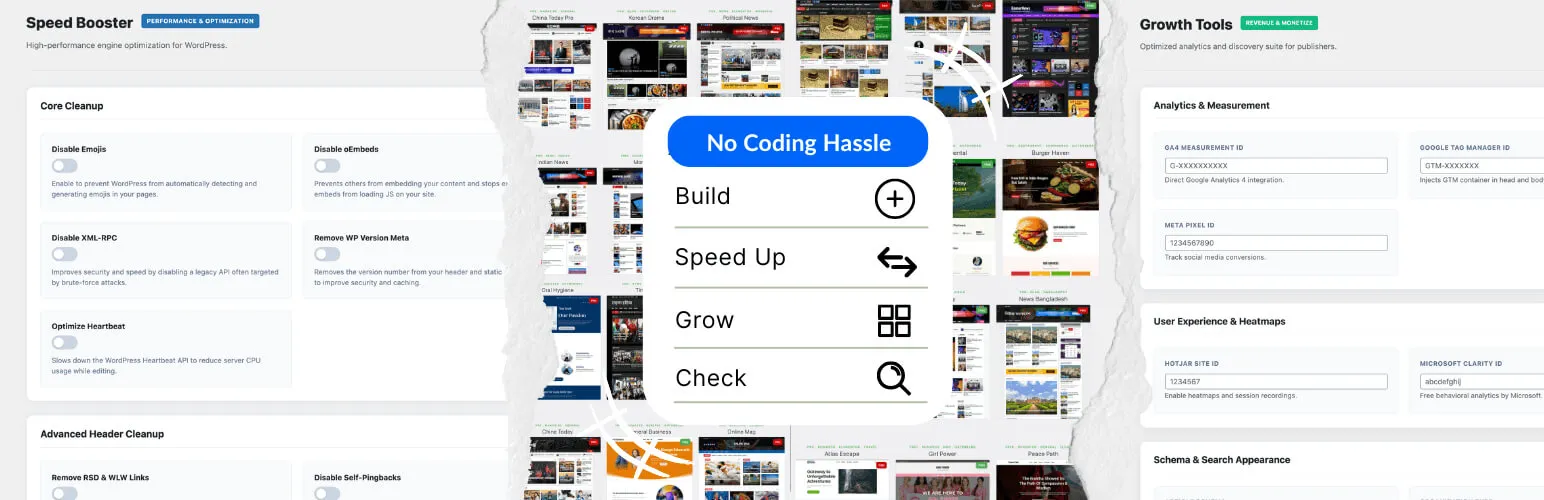

AF Companion
AF Companion - AI SEO, GEO, Alt Text, Performance & Site Health · by AF themes
- active installs
- 10K+
- 34 ratings
- 4.9
- since last update
- 1d
- releases in 12 months
- —
- support threads resolved
- —
- avg daily downloads
- 1,146
- on WordPress.org
- 5.7 years
AF Companion at a glance
AF Companion is a free WordPress AI SEO plugin by AF themes with 10K+ active installs and a 4.9/5 rating from 34 reviews. It was last updated on Nov 8, 2026, is tested up to WordPress 7.1.4. It works with OpenAI, Google Gemini, Perplexity. All 2 of its published vulnerabilities have patched versions. Our quality score is 89/100.
What is AF Companion?
AF Companion is a WordPress toolkit that bundles SEO helpers, AI features and site maintenance tools in one plugin. It generates SEO titles and meta descriptions, writes image alt text, adds schema markup, controls social sharing previews, trims some performance overhead and watches for broken links.
Its AI features run through WordPress AI Connectors, so you set up a provider there rather than inside the plugin. Suggestions are produced on demand and you review them before they are applied. It also has settings aimed at AI search, which it calls GEO and AIO, such as article takeaways and content summaries.
It suits bloggers, publishers and business sites that want several small tools in one place instead of several plugins. It does not need an AF Themes theme for most features. Some tools overlap with caching and SEO plugins, so check your settings.
Best for
- Bloggers who want SEO and alt text help in one plugin
- News and magazine sites
- Owners tidying a slow or cluttered site
- Sites preparing content for AI search
AF Companion features
AI SEO title and description
Generate title and meta description suggestions for posts, pages and supported custom post types. You can review and edit them before publishing.
GEO and AIO tools
Add article takeaways, key insights and summaries, and get content structure tips aimed at AI answer engines.
Schema JSON-LD
Output structured data for Article, TechArticle, NewsArticle and FAQPage content, with per-post controls.
Social sharing previews
Set Open Graph titles, descriptions and images for Facebook, X, LinkedIn and WhatsApp, separate from SEO data.
AI alt text manager
Find images missing alt text and generate descriptions on demand from the Media Library or editor. Context AI uses site and post details.
Performance controls
Switch off selected core features and tune frontend resources, Google Fonts, Heartbeat, autosave and revisions.
Database cleanup
Scan for and clear old revisions, expired transients, spam comments and orphaned metadata, with a dry run first.
Link and content monitor
Check internal and external links for problems and flag older posts that may need updating.
Site health diagnostics
Review REST API, loopback, WP-Cron, PHP and image library status.
Analytics integrations
Add Google Analytics 4, Tag Manager, Meta Pixel, Clarity, Search Console, Bing, Yandex and Pinterest verification.
AF Companion free vs pro
Free WordPress.org version
- AI SEO, GEO and AIO tools
- Schema, social sharing and alt text tools
- Performance, database cleanup and link monitoring
- Site health diagnostics and analytics integrations
The plugin is free on WordPress.org, and the listing describes no paid tier. AI features use compatible WordPress AI Connectors, so you configure a provider and any API credentials there, and that provider bills you.
How to use AF Companion
- Install and activate
In wp-admin go to Plugins, then Add New. Search for AF Companion, install it and activate it.
- Open the plugin menu
Open AF Companion from the admin menu and enable the modules you want.
- Set up an AI provider
Configure a compatible provider through WordPress AI Connectors. Image analysis needs a model that accepts images.
- Generate SEO data
Open a post or page, find the AF Companion meta box, and generate SEO metadata and insights.
- Review and apply
Check each suggestion, including alt text, before applying it or publishing.
AF Companion screenshots (12)
-
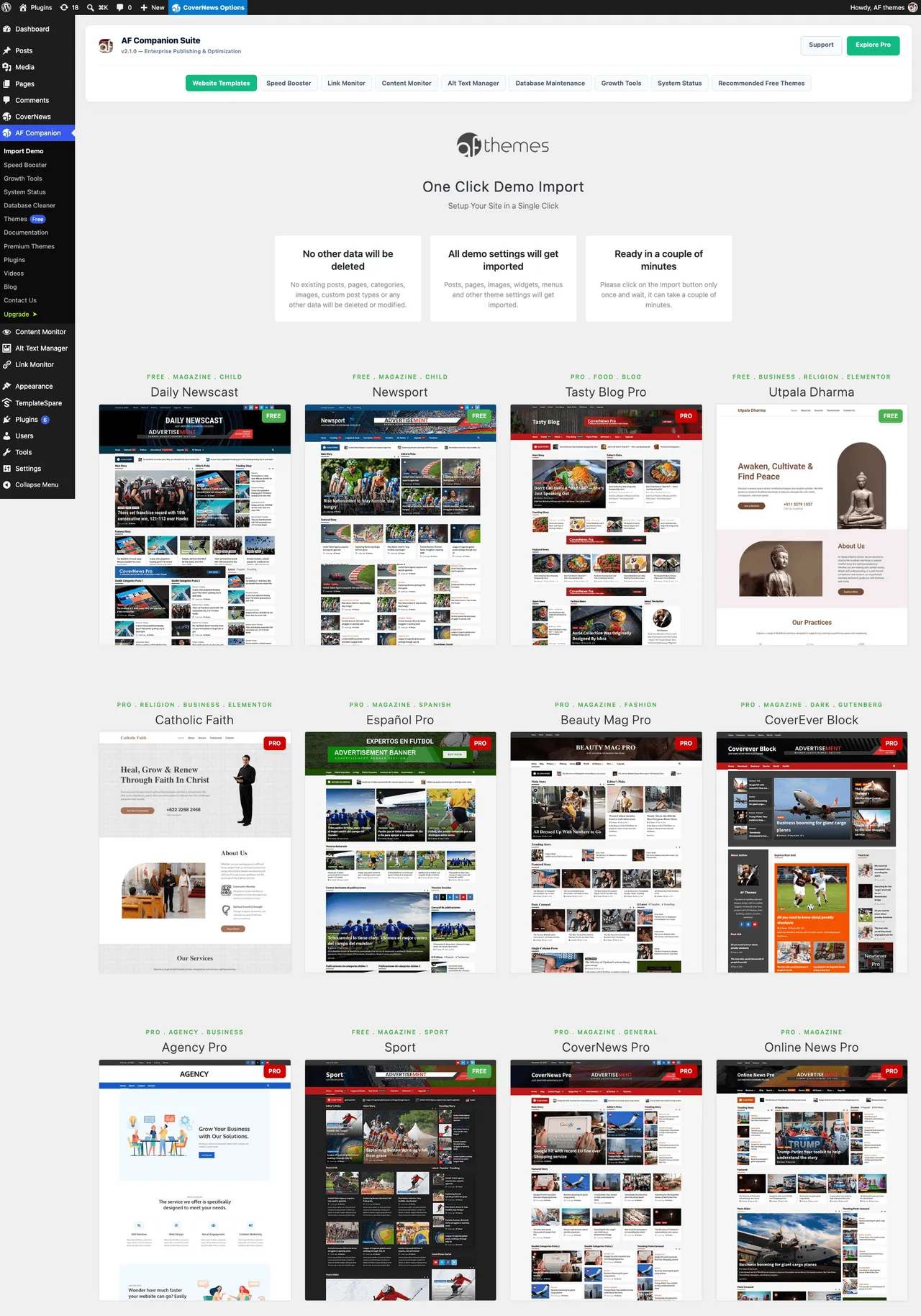
AF Companion Dashboard: Access website optimization, SEO, performance, monitoring, and maintenance tools from one place. -
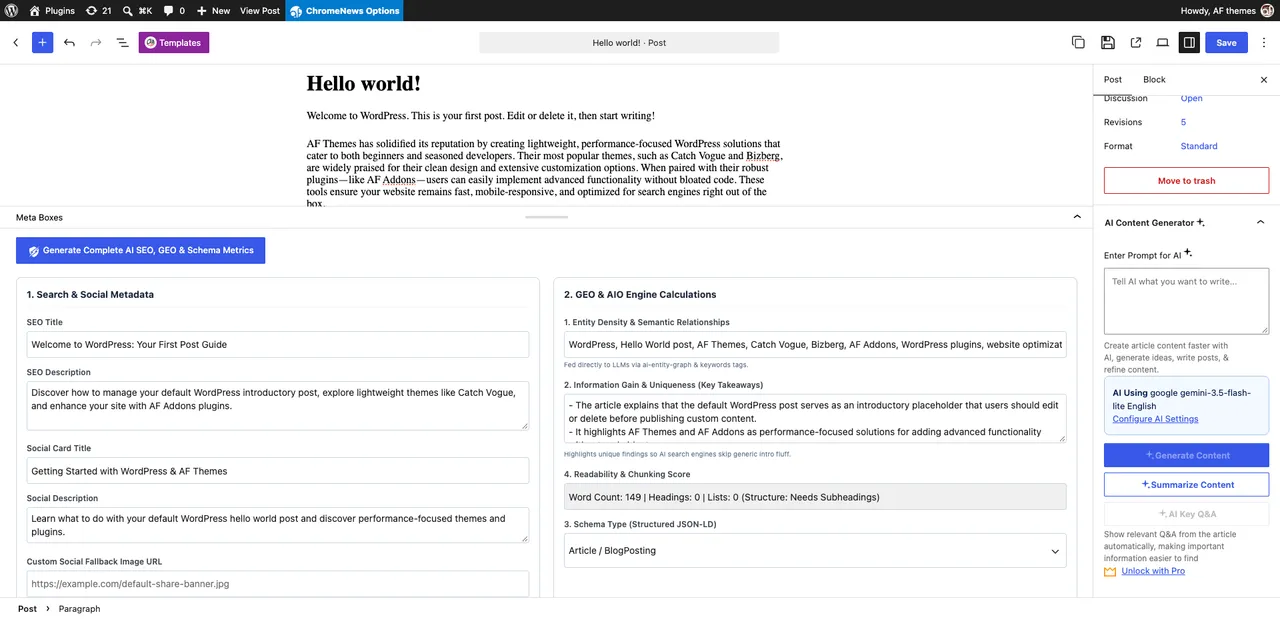
AI SEO, GEO, Social & Schema Controls: Generate SEO titles, meta descriptions, social sharing, fallback images, semantic entities, and article takeaways. -
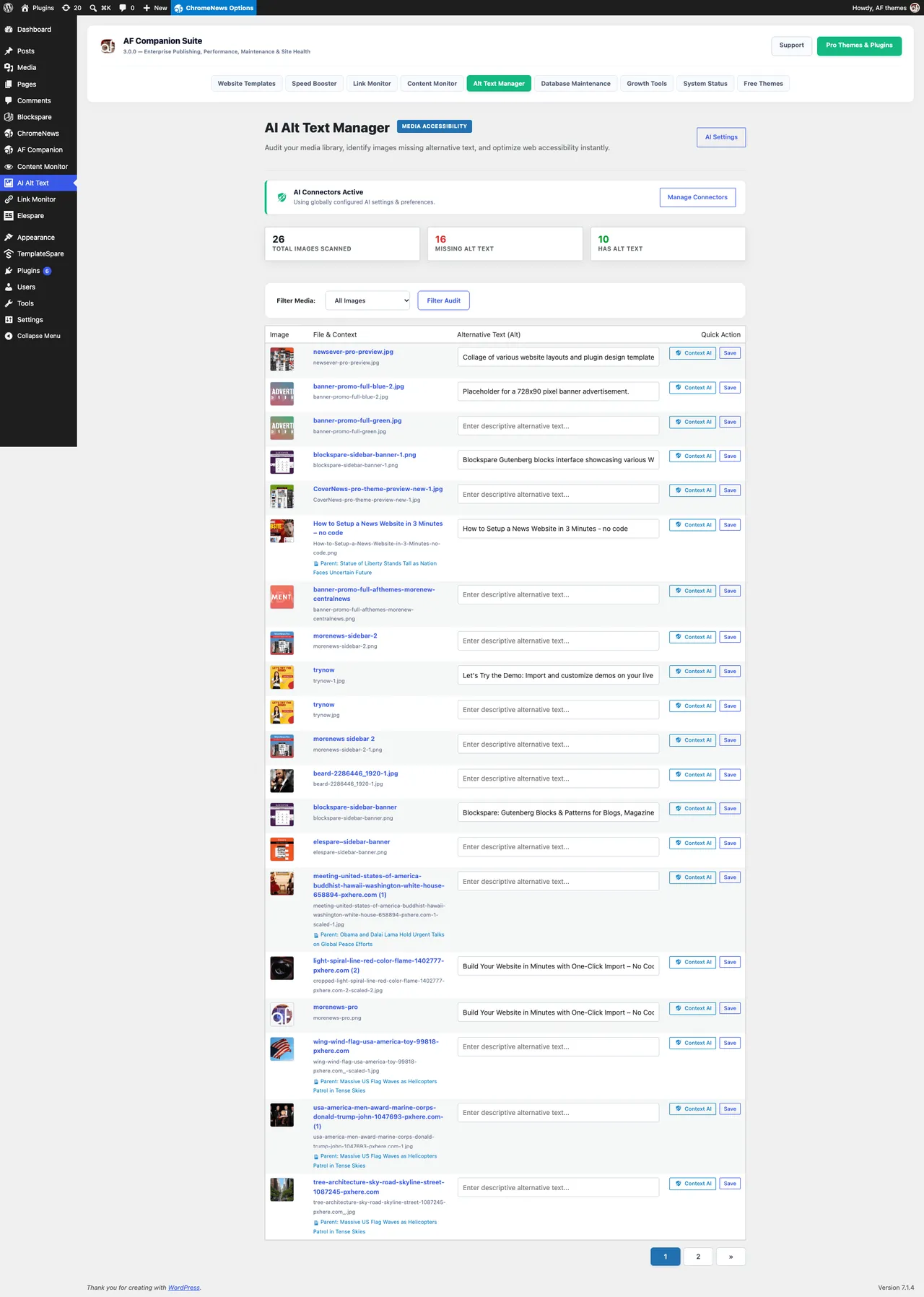
AI Alt Text Manager: Find images with missing alternative text and improve image accessibility. -
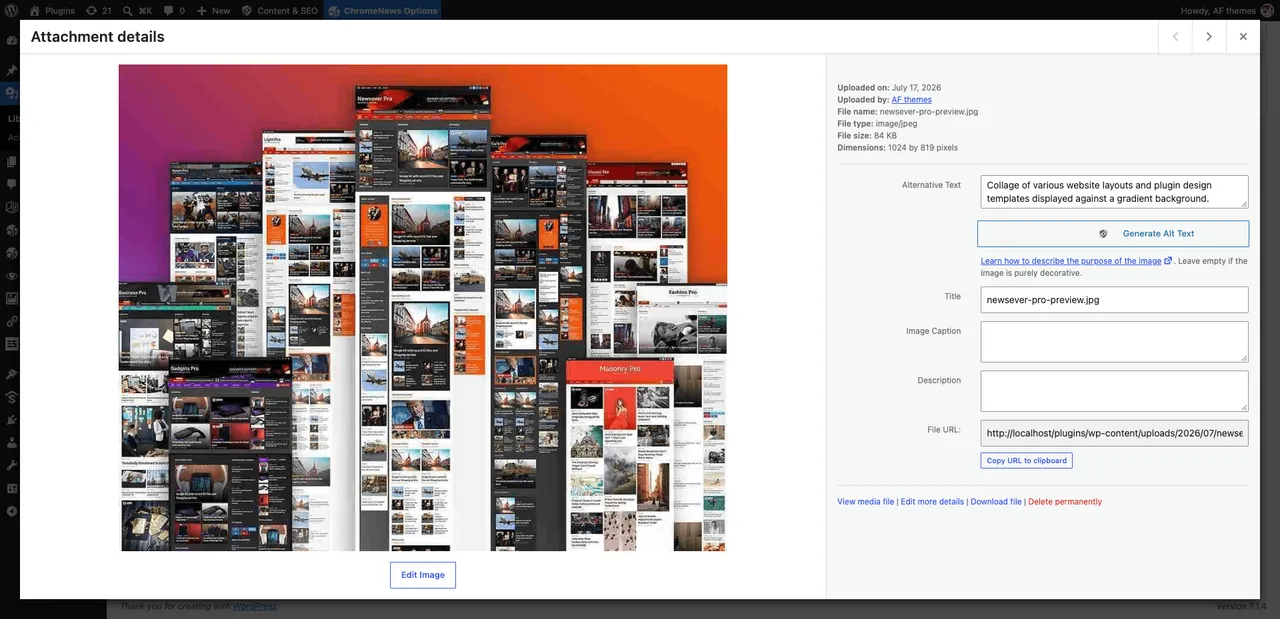
Context AI: Generate context-aware image descriptions directly from WordPress image interfaces. -
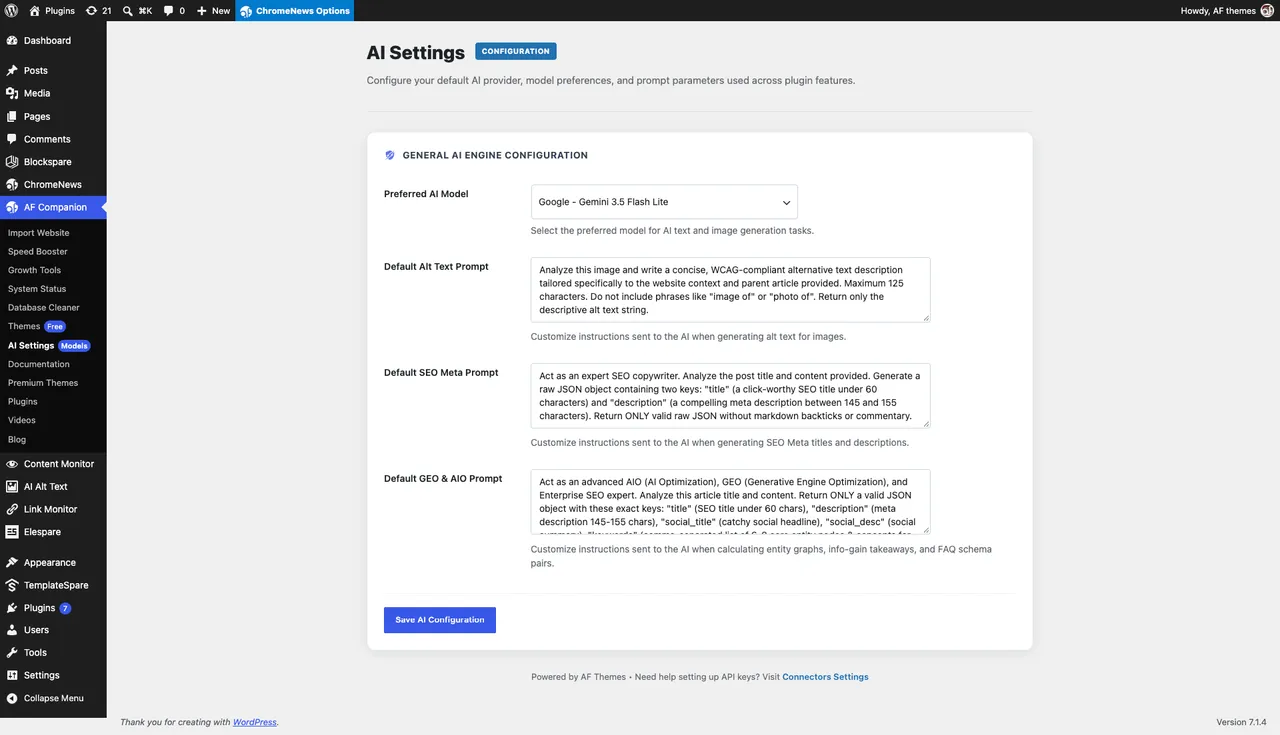
AI Settings: Select compatible AI models and customize generation prompts. -
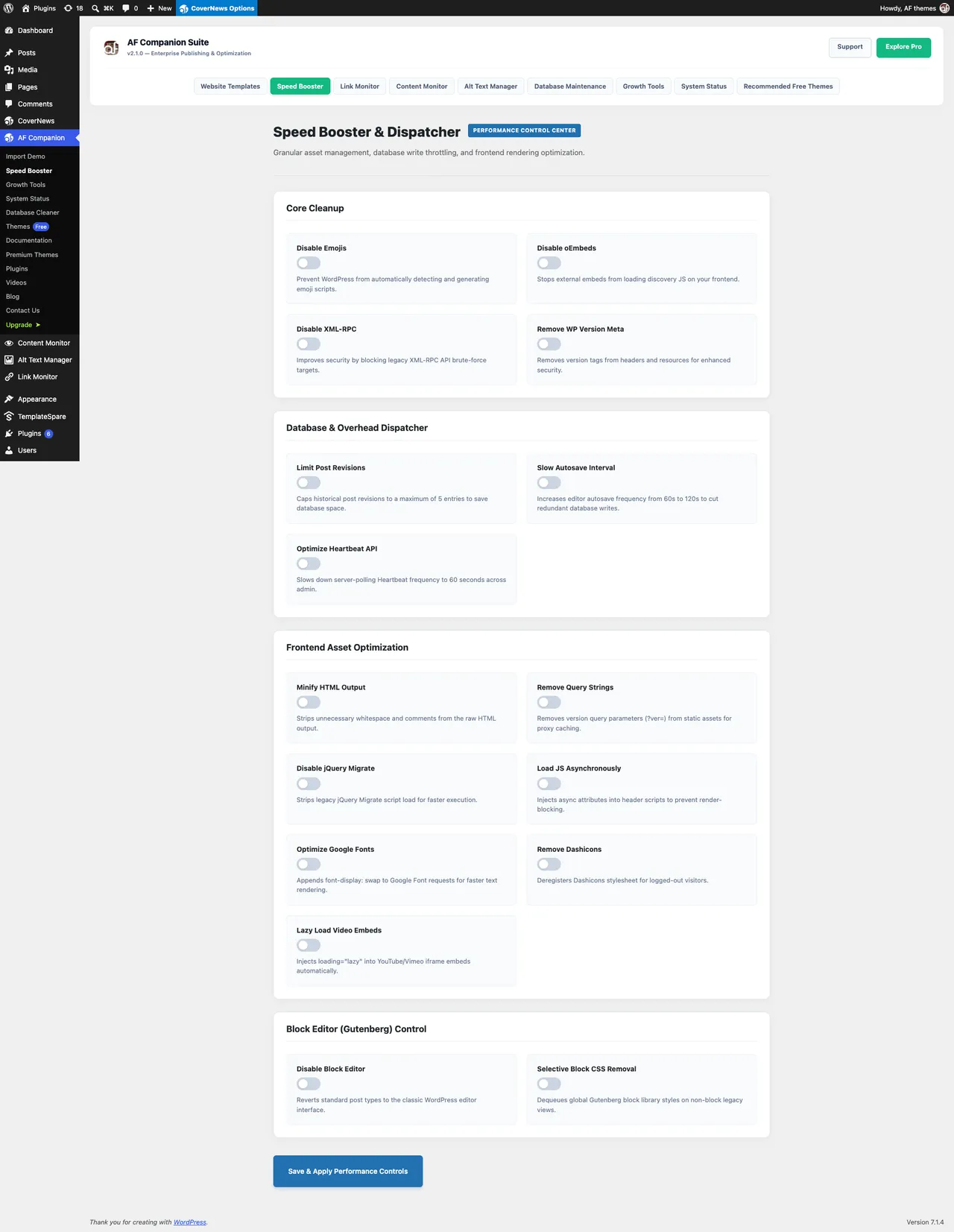
Performance Optimization: Improve selected WordPress settings and frontend resource delivery. -
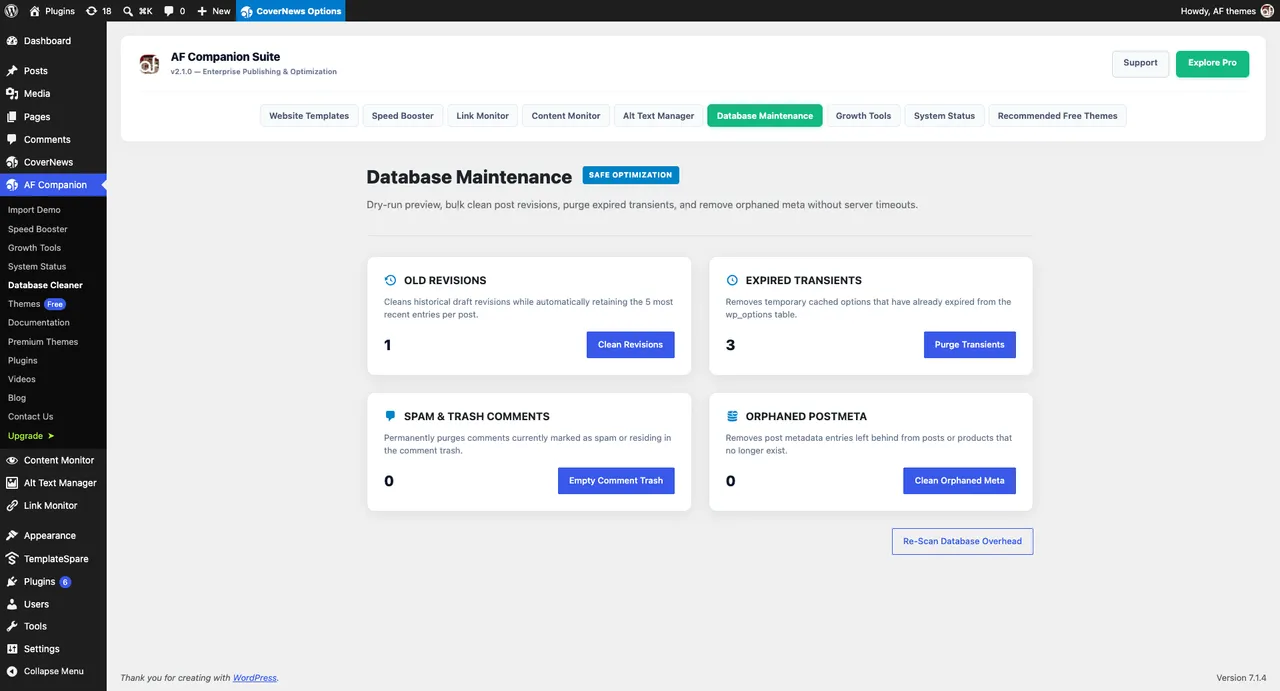
Database Maintenance: Review database overhead and perform selected cleanup operations. -
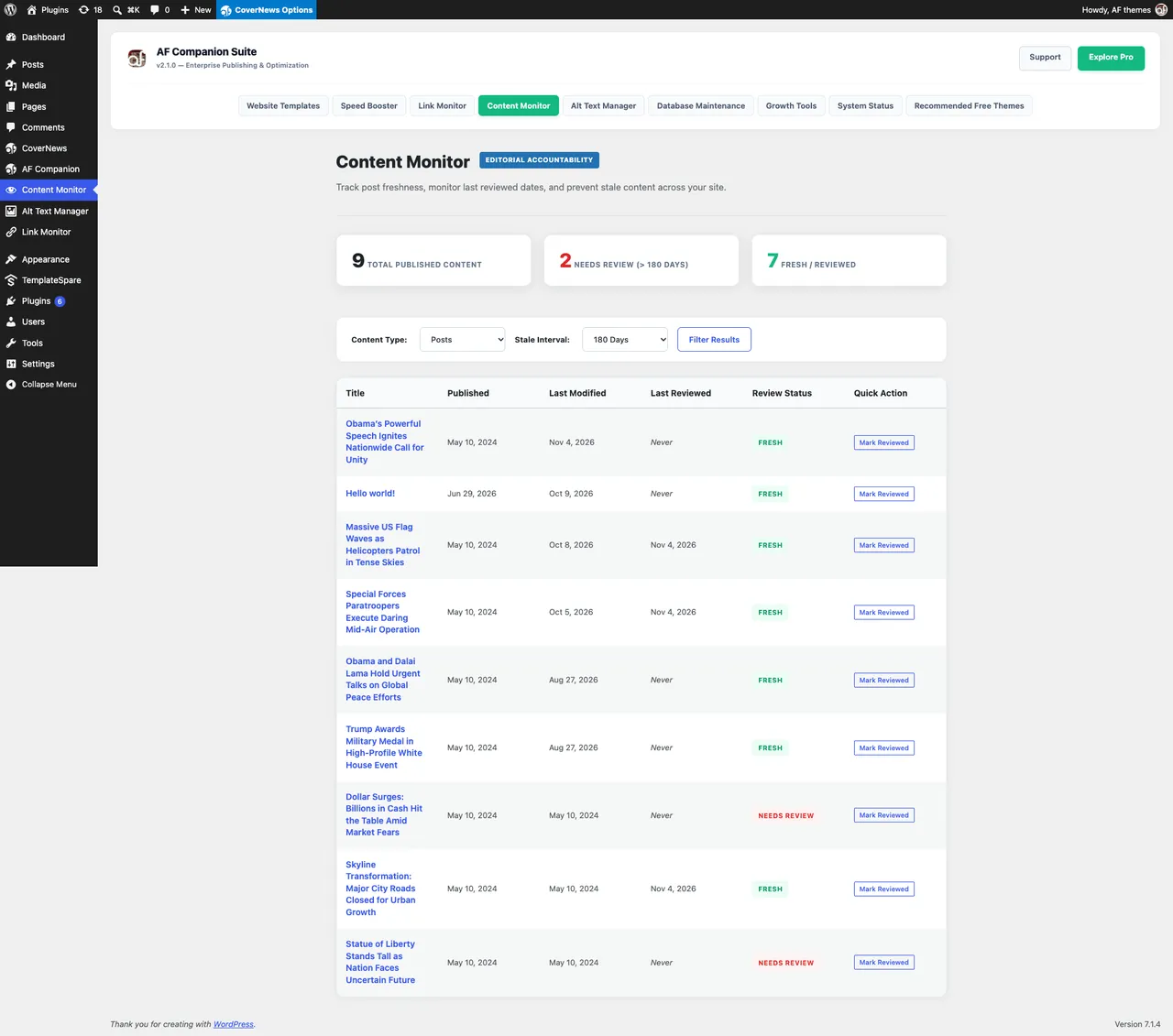
Content Monitor: Review published content that needs attention. -
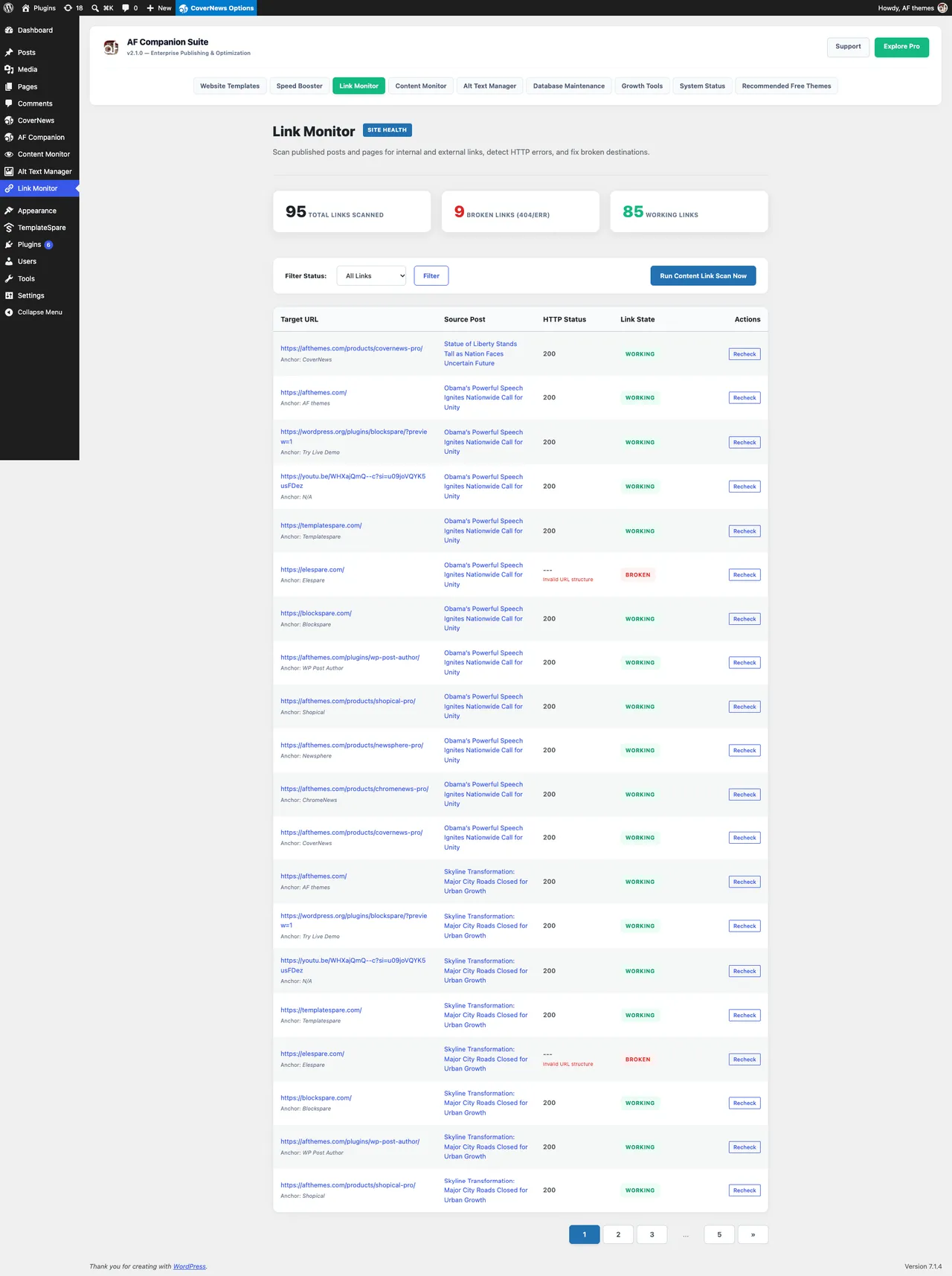
Link Monitor: Identify broken links and review website link health. -
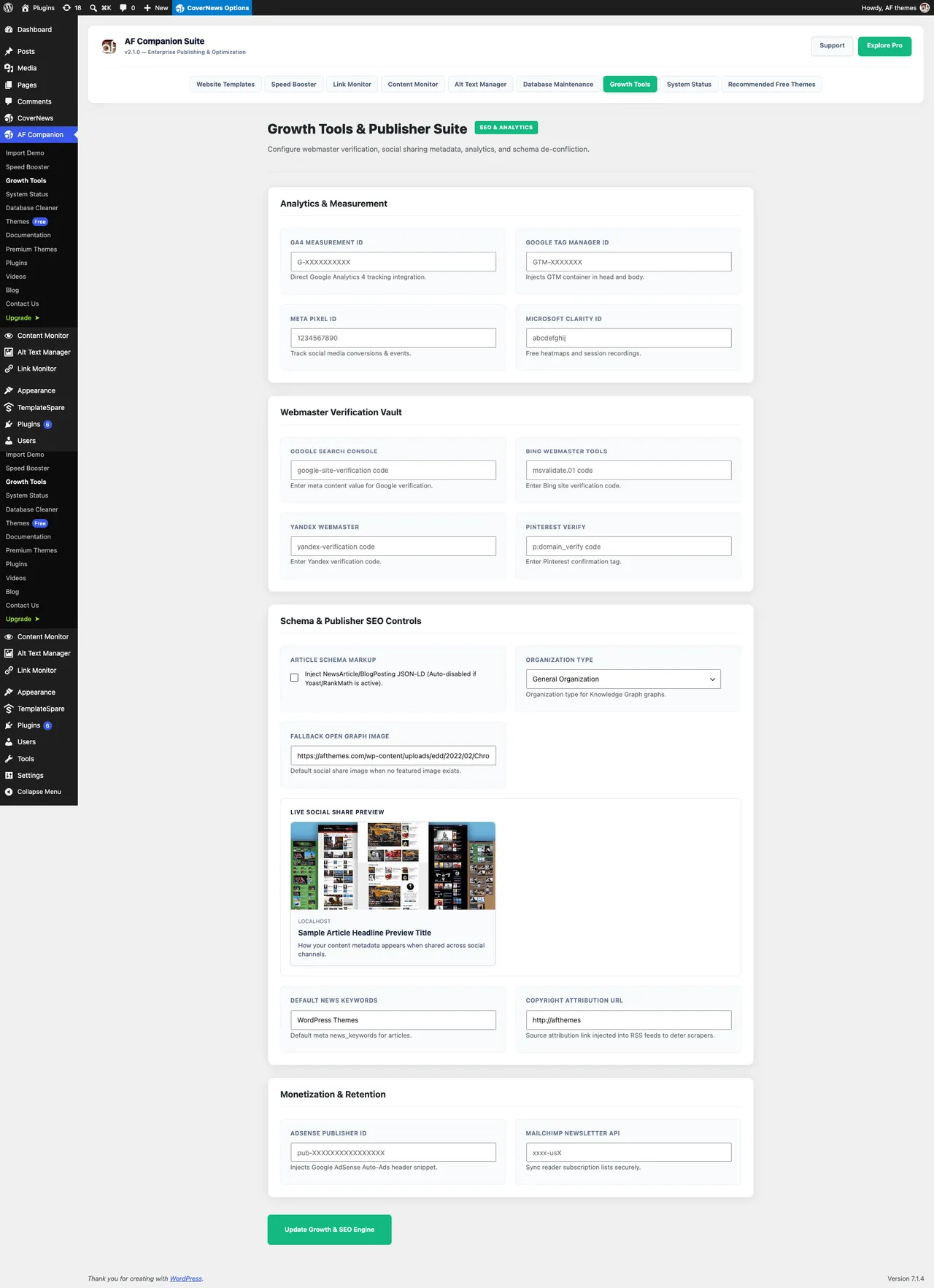
Analytics & Integrations: Configure analytics, tracking, and webmaster verification. -
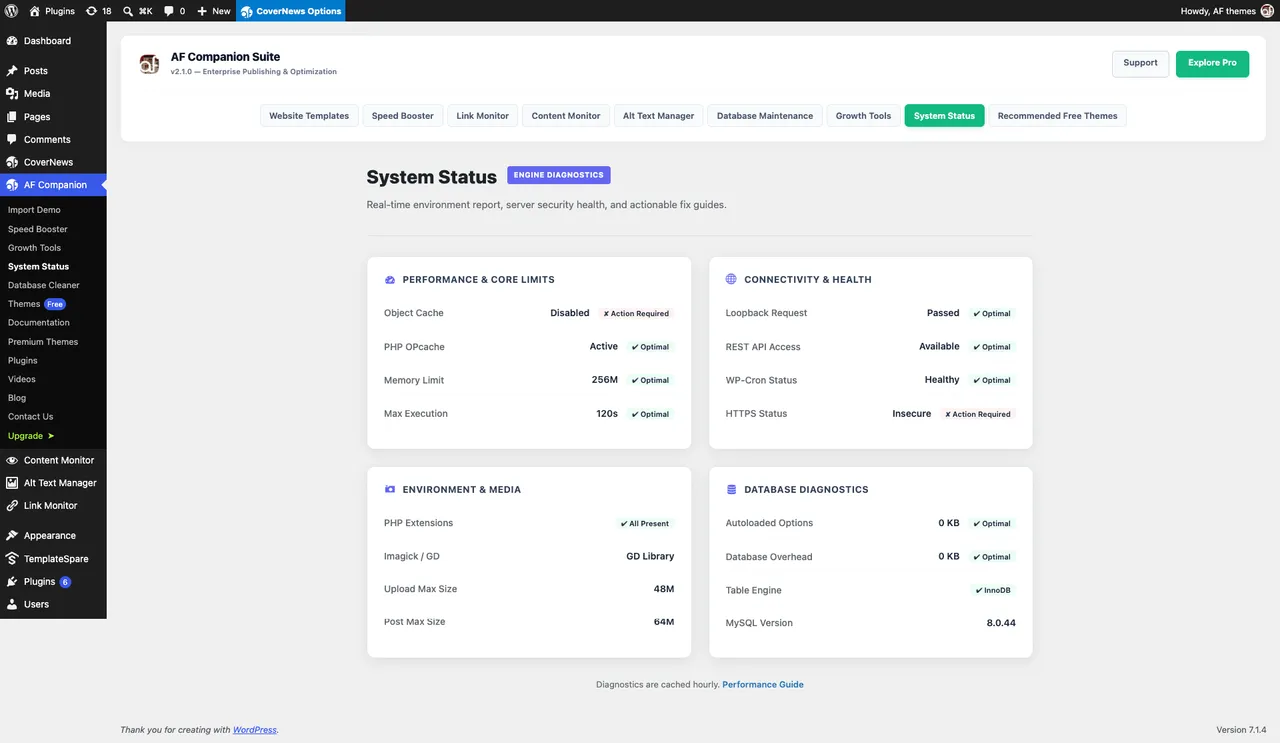
Website Health & Diagnostics: Review WordPress and server configuration. -
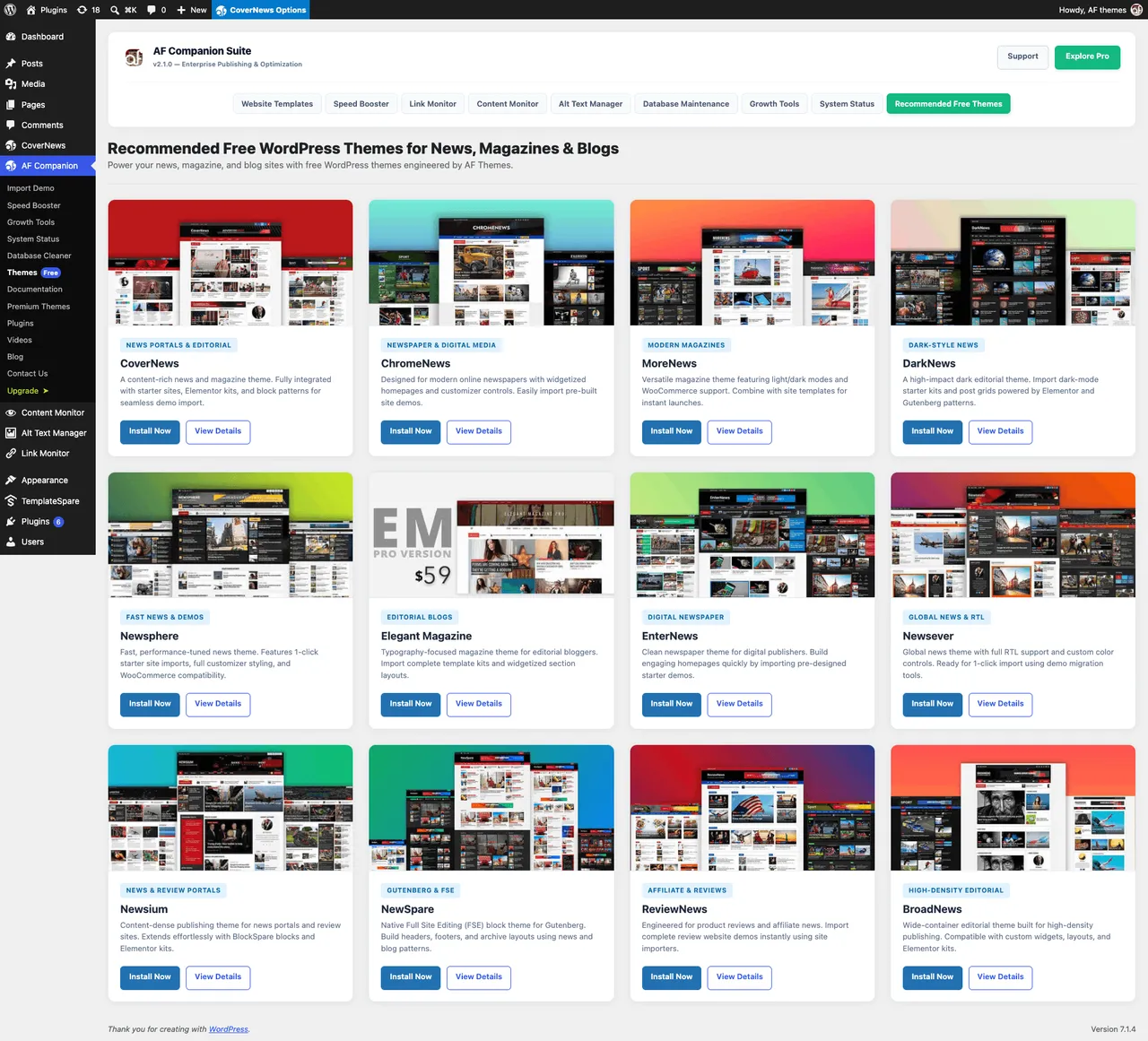
Demo Import Tools: Import demo content and settings for supported AF Themes.
Important information
- AI features depend on a provider set up through WordPress AI Connectors. Prompts and images go to that provider, and costs depend on it.
- Alt text generation is on demand, not automatic. Review results before applying them.
- Back up your database before running cleanup tasks.
- Requires WordPress 6.0 or newer. The data shows no minimum PHP version. Tested up to WordPress 7.1.4.
- Performance features can overlap with caching and SEO plugins. Test one change at a time to avoid conflicts.
From the AF Companion readme
Straight from the developer's WordPress.org listing.
Full description
Improve Your WordPress Publishing, Search Visibility & Website Health
AF Companion is an all-in-one WordPress publishing and website optimization toolkit for bloggers, publishers, news websites, online magazines, content creators, and business website owners.
Improve how people and search engines discover your content. Prepare your website for AI-powered search experiences. Make images more accessible, optimize social sharing, monitor broken links, improve website performance, and keep your WordPress installation healthy.
Instead of managing everyday publishing and website maintenance tasks across multiple tools, AF Companion brings practical solutions together in one place.
Whether you run a personal blog, a growing business website, an online magazine, or a high-traffic news portal, AF Companion helps you spend less time on repetitive website management and more time creating valuable content.
Improve SEO, GEO & AI Search Visibility
Help search engines and AI-powered discovery platforms better understand your website content.
• AI SEO Title & Meta Description Generator: Generate relevant SEO titles and meta descriptions for posts, pages, and supported custom post types. Create and refine search snippets without writing every description from scratch.
• Generative Engine Optimization (GEO): Improve content structure and semantic relationships to make information easier for generative search engines and AI answer platforms to interpret.
• AI Search Optimization (AIO): Organize important information with AI-generated article takeaways, key insights, and meaningful content summaries.
• Content Structure Insights: Identify opportunities to improve headings, readability, topic coverage, and information organization.
• Individual Content Optimization: Manage SEO metadata, social sharing, Schema JSON-LD, and AIO/GEO settings independently for supported posts and pages.
Make Your Content Easier to Understand with Schema Markup
Provide search engines with additional context about your website and published content through structured data.
• WordPress Schema Markup: Generate JSON-LD structured data for Article, TechArticle, NewsArticle, and FAQPage content.
• AI FAQ Schema Generator: Identify relevant questions and generate FAQ structured data from AI-assisted content generation.
• Content-Specific Schema Controls: Manage structured data settings for individual posts and pages.
• SEO Plugin Compatibility: Work alongside popular SEO solutions, including Yoast SEO, Rank Math, All in One SEO, and SEOPress compatibility checks.
Improve Social Sharing & Open Graph Previews
Control how your content appears when visitors share your website links across social networks and messaging platforms.
• Open Graph Metadata: Configure social sharing metadata for Facebook, X (Twitter), LinkedIn, and WhatsApp.
• Custom Social Titles & Descriptions: Set appropriate titles and descriptions for individual content.
• Social Sharing Images: Use featured images, a custom fallback image, or your website icon to create consistent link previews.
• Independent Social Controls: Manage social and Open Graph settings separately from your SEO metadata.
Generate Better Image Alt Text with AI
Improve image accessibility, reduce repetitive editorial work, and make your media library easier to maintain.
• AI Alt Text Generator: Generate descriptive alternative text suggestions for images using compatible WordPress AI Connectors.
• Context AI: Analyze individual images using available website information, including your website name and linked post or page context, to produce more relevant image descriptions.
• Alt Text Manager: Find images with missing alternative text and review image accessibility across your WordPress website.
• Media Library Integration: Generate alternative text directly from the WordPress Media Library and Featured Image panel.
• Editorial Workflow Integration: Access image optimization tools from supported post editors and media management screens.
• Alt Text Progress Indicators: Identify image accessibility and optimization status through supported WordPress post list tables.
• Customizable AI Prompts: Adjust image description instructions and select available AI models from AF Companion AI Settings.
Improve WordPress Performance & Website Speed
Keep your WordPress website efficient by managing unnecessary features, frontend resources, and database overhead.
• WordPress Performance Optimization: Enable or disable selected WordPress core features and frontend resources.
• HTML & JavaScript Optimization: Configure HTML minification, asynchronous JavaScript loading, and selected asset optimization.
• Google Fonts Optimization: Adjust font loading behavior to improve frontend resource delivery.
• WordPress Cleanup: Manage Heartbeat API, autosave, and post revision settings.
• Database Optimization: Identify database overhead and clean selected post revisions, expired transients, spam comments, and orphaned metadata.
• Controlled Database Maintenance: Review database cleanup opportunities using dry-run scanning and batched cleanup operations.
Monitor Website Health, Content & Broken Links
Identify common website problems and keep your content and WordPress installation in better condition.
• Broken Link Monitor: Find problematic internal and external links across your website.
• Post-Level Link Audits: Review links from individual posts and pages, inspect their status, and perform instant link rechecks.
• Content Monitor: Track published content and identify posts that may need editorial attention or regular maintenance.
• WordPress Site Health: Review important WordPress, PHP, database, and server configuration information.
• Website Diagnostics: Check important website components, including REST API availability, loopback requests, WP-Cron, PHP configuration, and image processing libraries.
• Admin Bar Shortcuts: Access supported publishing, SEO, image accessibility, and website maintenance tools from your WordPress dashboard and frontend.
Manage Analytics, Webmaster & Publishing Integrations
Connect your website with commonly used analytics, verification, and publishing services.
• Google Analytics 4: Configure Google Analytics tracking for your website.
• Google Tag Manager: Add and manage your Google Tag Manager integration.
• Meta Pixel: Configure Meta Pixel for supported website tracking.
• Microsoft Clarity: Integrate Microsoft Clarity for website behavior analytics.
• Webmaster Verification: Manage verification codes for Google Search Console, Bing Webmaster Tools, Yandex, and Pinterest.
• Google News & Publisher Tools: Configure supported Google News metadata, AdSense Auto Ads, RSS attribution, and other publishing integrations.
Designed for WordPress Publishers & Website Owners
AF Companion is designed for people who want practical publishing, optimization, and website maintenance tools without unnecessarily complicating their WordPress workflow.
It is useful for:
• News & Magazine Publishers: Manage content optimization, structured data, social previews, and editorial maintenance.
• Bloggers & Content Creators: Improve search snippets, image accessibility, and content organization.
• Business Website Owners: Maintain website health, optimize performance, and monitor important website links.
• Digital Publishers & Editorial Teams: Reduce repetitive publishing tasks and improve content management workflows.
• WordPress Developers & Agencies: Access practical website optimization and maintenance controls across supported WordPress installations.
Works Alongside Your Existing WordPress SEO Workflow
AF Companion complements dedicated SEO plugins rather than requiring you to replace your existing SEO solution.
It includes compatibility checks for Yoast SEO, Rank Math, All in One SEO, and SEOPress. You can use its additional publishing, image accessibility, performance, and website health tools alongside your existing workflow.
Review overlapping metadata and schema settings to avoid duplicate output.
AI Providers & Privacy
AI-powered SEO metadata and image alt text generation use compatible WordPress AI Connectors.
• Select an available AI provider and model through your WordPress AI Connector configuration.
• Customize supported AI prompts from AF Companion AI Settings.
• Use image-capable models for image analysis and Context AI functionality.
• Review AI-generated suggestions before publishing.
AI provider availability, usage limits, pricing, data processing, and privacy policies are determined by the connected service and its configuration.
AF Companion does not guarantee Google rankings, AI search citations, website traffic growth, or automated accessibility compliance. SEO, GEO, schema, and AI-generated content suggestions should be reviewed before publication.
AF Themes Starter Sites
AF Companion also retains demo import functionality for compatible AF Themes workflows.
Import demo content, widget settings, and Customizer settings using supported XML, WIE, JSON, and DAT files.
Learn more about AF Themes Starter Sites.
Support & Documentation
Need help getting started or configuring AF Companion?
• AF Themes Support Center
• AF Themes Documentation
• AF Themes Website
Installation
• Go to Plugins > Add New in your WordPress dashboard.
• Search for AF Companion.
• Install and activate the plugin.
• Open AF Companion from your WordPress administration menu.
• Explore the available modules and enable the tools you need.
Getting Started with AI SEO & GEO
• Configure a compatible AI provider through WordPress AI Connectors.
• Open a post, page, or supported custom post type.
• Find the AF Companion meta box in the editor.
• Enable the SEO Meta, Social & OpenGraph, Schema JSON-LD, or AIO/GEO options you want to use.
• Generate SEO metadata and content insights.
• Review the generated suggestions before publishing.
Getting Started with AI Alt Text
• Configure a compatible AI provider through WordPress AI Connectors.
• Open the AF Companion AI Settings page.
• Select an available image-capable AI model.
• Customize your AI prompt if needed.
• Open an image from the Media Library, Featured Image panel, or Alt Text Manager.
• Select Context AI to generate a context-aware alternative text suggestion.
• Review the generated description before applying it.
Important: Create a website backup before performing database maintenance or changing performance settings. Test optimization settings individually to avoid conflicts with your theme, caching plugins, and other performance tools.
Developer FAQ (31)
- What is AF Companion?
- AF Companion is an all-in-one WordPress publishing and website optimization toolkit. It helps with SEO, GEO, AI search readiness, image accessibility, social sharing, performance optimization, broken link monitoring, and WordPress website health.
- Who should use AF Companion?
- AF Companion is designed for WordPress bloggers, news and magazine publishers, content creators, business website owners, digital publishing teams, and WordPress developers who want practical publishing and website maintenance tools.
- Can I use AF Companion without an AF Themes theme?
- Yes. Most AF Companion features, including SEO, AI alt text, schema markup, social sharing, performance optimization, database cleanup, link monitoring, and website health tools, are designed for general WordPress websites. Demo import functionality is intended for compatible AF Themes workflows.
- Can AF Companion improve my Google search visibility?
- AF Companion helps improve your SEO workflow with optimized titles, meta descriptions, structured data, and better image descriptions. These improvements can support your broader search optimization strategy, but rankings depend on many factors beyond a single plugin.
- What is Generative Engine Optimization (GEO)?
- GEO stands for Generative Engine Optimization. It focuses on making website information easier for AI-powered search engines and answer platforms to understand, interpret, and potentially reference. AF Companion provides content structure, semantic entity, and article takeaway optimization tools to support this process.
- Does AF Companion support ChatGPT, Perplexity, and Google AI Overviews?
- AF Companion provides AIO and GEO content optimization tools intended to improve how AI-powered search experiences interpret your website content. It does not submit content directly to these platforms or guarantee crawling, citations, rankings, or recommendations.
- What is the difference between SEO, AIO, and GEO?
- SEO focuses on improving visibility in traditional search engines. AIO refers to optimizing content for AI-powered discovery, while GEO focuses on making information easier for generative search and answer engines to understand and potentially reference.
- Can AF Companion generate SEO titles and meta descriptions using AI?
- Yes. The AI SEO Generator creates SEO title and meta description suggestions for posts, pages, and supported custom post types. You can review and edit the generated metadata before publishing.
- Does AF Companion work with Yoast SEO and Rank Math?
- Yes. AF Companion includes compatibility checks for Yoast SEO, Rank Math, All in One SEO, and SEOPress. It can complement your existing SEO workflow with additional publishing, image accessibility, performance, and maintenance tools. Review overlapping metadata and schema settings to prevent duplicate output.
- Can I control SEO, social sharing, schema, and GEO individually?
- Yes. AF Companion provides separate content-level controls for SEO Meta, Social & OpenGraph, Schema JSON-LD, and AIO/GEO Optimization on supported content.
- Does AF Companion generate WordPress schema markup?
- Yes. AF Companion supports Article, TechArticle, NewsArticle, and FAQPage JSON-LD structured data to provide search engines with additional information about your content.
- Can AF Companion generate FAQ schema using AI?
- Yes. AF Companion can identify relevant questions during AI-assisted content generation and create FAQPage structured data. Review the questions and answers and ensure they are supported by visible page content.
- How can I control social media link previews?
- AF Companion lets you configure social titles, descriptions, and images for Facebook, X (Twitter), LinkedIn, and WhatsApp. You can manage social metadata independently from your SEO metadata.
- What happens if a post does not have a featured image?
- AF Companion uses the featured image first, followed by your configured fallback social image and then your WordPress site icon.
- Does AF Companion include an AI image alt text generator?
- Yes. The AI Alt Text Manager generates descriptive alternative text suggestions using compatible WordPress AI Connectors. You can analyze images individually and review the results before applying them.
- What is Context AI in AF Companion?
- Context AI analyzes an individual image and uses available website information, such as your website name and linked post or page context, to generate a more relevant alternative text suggestion.
- Where can I access Context AI?
- Context AI is available through supported AF Companion image workflows, including the Alt Text Manager, WordPress Media Library popup, and Featured Image panel in the post editor.
- Can I customize AI alt text generation prompts?
- Yes. Open the AF Companion AI Settings page to customize supported AI prompts and select an available model through your connected WordPress AI provider.
- Which AI providers and models are supported?
- AF Companion uses compatible WordPress AI Connectors. Available providers and models depend on the connectors installed and configured on your website. Image analysis requires a model that supports image input.
- Do I need a separate AI API key for AF Companion?
- AF Companion uses compatible WordPress AI Connectors for AI provider access. Configure your provider and any required API credentials through the available connector settings.
- Does AF Companion automatically generate alt text for every image?
- No. AI alt text generation is an on-demand workflow. You can choose which images to analyze, generate suggestions, and review their descriptions before applying them.
- How do I find images with missing alt text?
- Open the AF Companion Alt Text Manager to review images that need alternative text. Supported post list tables also display image accessibility and optimization status indicators.
- Can AF Companion improve WordPress website speed?
- AF Companion includes performance controls for selected WordPress core features, frontend resources, HTML output, JavaScript loading, Google Fonts, Heartbeat API, autosave, and post revisions. Results depend on your hosting, theme, plugins, and website configuration.
- Does AF Companion include WordPress database optimization?
- Yes. AF Companion helps identify database overhead and clean selected post revisions, expired transients, spam comments, and orphaned metadata. It also provides dry-run scanning and batched cleanup operations. Create a backup before performing database maintenance.
- How can I find broken links on my WordPress website?
- Use Link Monitor to identify problematic internal and external links. You can review links from individual posts and pages, recheck their status, and monitor overall website link health from the dashboard.
- Can I monitor old or outdated WordPress content?
- Yes. Content Monitor helps you review published content and identify posts that may need editorial attention or regular maintenance.
- Does AF Companion include WordPress Site Health tools?
- Yes. AF Companion provides website diagnostics for important WordPress and server components, including REST API availability, loopback requests, WP-Cron, PHP configuration, database information, and image processing libraries.
- Which analytics and webmaster services are supported?
- AF Companion supports integrations for Google Analytics 4, Google Tag Manager, Meta Pixel, Microsoft Clarity, Google Search Console, Bing Webmaster Tools, Yandex, and Pinterest. It also provides supported Google News metadata, AdSense Auto Ads, and RSS attribution settings.
- Can I use AF Companion with caching and performance plugins?
- Yes. However, some performance features may overlap with caching, minification, or JavaScript optimization plugins. Review settings and test individual changes to avoid conflicts or unexpected frontend behavior.
- Does AF Companion still include demo import functionality?
- Yes. Demo and manual import functionality remains available for compatible AF Themes workflows. You can import XML content, WIE or JSON widget settings, and DAT Customizer settings.
- Where can I get AF Companion support?
- Visit the AF Themes Support Center at https://afthemes.com/supports/ or explore the documentation at https://docs.afthemes.com/.
Downloads, last 30 days
Trend vs previous period: +3.6%
Average daily downloads: 1,867 over the last 7 days , 1,146 over 30 days.
Security history
Past CVEs, patched · 2 published vulnerabilities (Wordfence) · most recent Sep 16, 2026
- Patched 5.4 Medium AF Companion <= 1.1.2 - Cross-Site Request Forgery Dec 27, 2021 · affects [1.1.0, 1.1.2) · fixed in 1.2.0
- Patched 7.2 High AF Companion <= 2.1.0 - Authenticated (Shop Manager+) Remote Code Execution CVE-2026-84738 · Sep 16, 2026 · affects *-2.1.0 · fixed in 2.2.0
AF Companion FAQ
What is AF Companion?
It is a toolkit for publishing and site upkeep. It covers SEO, AI search readiness, image alt text, social previews, speed, broken links and site health.
Do I need an AF Themes theme?
No. Most features work on any WordPress site. Demo import is meant for compatible AF Themes workflows.
What are GEO and AIO?
GEO means making content easier for generative search engines to interpret. AIO means preparing content for AI-powered discovery. Neither guarantees citations or rankings.
Does it work with Yoast SEO or Rank Math?
It includes compatibility checks for Yoast SEO, Rank Math, All in One SEO and SEOPress. Review overlapping metadata so the two do not conflict.
Which AI providers can it use?
Whatever your WordPress AI Connectors support. Available providers and models depend on what you have installed and configured.
Do I need a separate API key?
Access goes through the connectors, so set up the provider and any credentials in the connector settings.
Can it clean my database?
Yes. It can scan for old revisions, expired transients, spam comments and orphaned metadata, with a dry run and batched cleanup. Take a backup first.
Which analytics services are supported?
Google Analytics 4, Tag Manager, Meta Pixel, Microsoft Clarity, Search Console, Bing Webmaster Tools, Yandex and Pinterest are listed.
AF Companion alternatives

Real-time SEO guidance, schema, and AI built in. Help search engines and AI systems understand your content. All AI tools included, no hidden fees. Yoast SEO: the #1 WordPress SEO plugin Since 2008, Yoast SEO has…

Rank Math SEO - WordPress AI SEO Plugin to Rank Higher 📈 ★★★★★ Rank Math SEO helps you stay ahead of competitors with AI-powered SEO tools built for today’s search engines and AI assistants. The plugin brings…

AIOSEO - The Original AI SEO Plugin for WordPress All in One SEO is the original WordPress SEO plugin, founded in 2007 and trusted by over 3 million website owners and SEO experts. AIOSEO is a complete AI SEO plugin…

SEOPress - The fast, privacy-first WordPress SEO plugin, ready for AI search Rank higher in Google AND in AI answer engines (ChatGPT, Claude, Perplexity, Gemini). SEOPress is the all-in-one WordPress SEO plugin…
CrawlWP - The WordPress SEO Plugin That Also Gets You Indexed Optimize every page, submit it to search engines (Google, Bing, Yandex, Yep etc) the moment you publish, and see which ones actually indexed it - all…

ThinkRank is an AI SEO plugin for WordPress that helps you write SEO titles and meta descriptions, optimize content around a focus keyword, add schema markup, generate XML sitemaps, and review Google Search Console…
Listing data from WordPress.org and the Wordfence vulnerability feed, refreshed Nov 9, 2026; listing details fetched Nov 14, 2026. Screenshots are from the plugin's WordPress.org listing. Not affiliated with AF themes.