

AI Alt Text Generator
AI Alt Text Generator · by migkapa
- active installs
- 2K+
- 7 ratings
- 4.9
- since last update
- 14d
- releases in 12 months
- —
- support threads resolved
- 100%
- avg daily downloads
- 96
- on WordPress.org
- 2.7 years
AI Alt Text Generator at a glance
AI Alt Text Generator is a free WordPress AI SEO plugin by migkapa with 2K+ active installs and a 4.9/5 rating from 7 reviews. It was last updated on Oct 26, 2026, is tested up to WordPress 7.1.4 and needs PHP 7.0+. All 1 of its published vulnerabilities have patched versions. Our quality score is 91/100.
What is AI Alt Text Generator?
AI Alt Text Generator writes alt text for images on a WordPress site, either in bulk across the media library or automatically on upload. It aims for short, descriptive text that supports accessibility rules such as WCAG 2.2, ADA, Section 508 and the European Accessibility Act, and it helps search engines read your images.
It works without an API key or signup. Each site gets 50 free images a month through a managed credits service. If you want more, paid credit plans are available. Advanced users can instead add their own OpenAI or Anthropic key and run generation on their own account at provider cost.
The plugin suits small organizations such as nonprofits, schools, clinics and small businesses that need accessible sites without managing AI accounts. It can use the page context and your SEO focus keyphrase to make the text more relevant, and developers can drive it from WP-CLI.
Best for
- Nonprofits, schools and clinics working toward accessibility compliance
- Sites with a large library of images missing alt text
- Owners who want results without an API key
- Developers scripting media updates with WP-CLI
AI Alt Text Generator features
Works without an API key
Managed credits are the default. Activate the plugin and generate, with 50 free images per month per site.
Own key option
Add an OpenAI or Anthropic key under Advanced settings and use any vision-capable model, with no per-image fee from the plugin.
Bulk and on-upload generation
Fill the whole library at once or have alt text created when an image is uploaded.
Page context awareness
Uses the post or page an image belongs to, so descriptions fit how the image is used.
SEO keyphrase integration
Works in focus keyphrases from Yoast SEO, Rank Math and SEOPress without stuffing them.
Custom prompts and testing
Edit the prompt to match your brand, and preview results before applying them to images.
Multi-language output
Generate alt text in many languages.
Title, caption and description
Optionally set the image title, caption and description from the generated alt text.
WP-CLI commands
Run wp ai-alt-text generate, status and related commands, including dry runs and forced regeneration.
AI Alt Text Generator free vs pro
Free WordPress.org version
- 50 free images per month through managed credits
- Bulk and automatic generation
- Custom prompts, multi-language output and WP-CLI
- Optional use of your own OpenAI or Anthropic key
Pro Paid version
- WooCommerce product context for alt text
- Scheduled background scans for new and existing images
- Coverage analytics dashboard
- Automatic updates and priority support
The plugin is free and fully functional alone. Managed credits give 50 free images a month, with paid credit plans for more, and a separate optional Pro add-on exists. You can skip managed credits by supplying your own OpenAI or Anthropic key, billed by that provider.
How to use AI Alt Text Generator
- Install the plugin
In wp-admin go to Plugins, then Add New, search for AI Alt Text Generator, install it and click Activate.
- Open the plugin page
Go to the Alt Text Generator admin page. The plugin connects to the managed credits service on its own.
- Generate for one image or many
Use Generate on a single image, or run bulk generation across the library.
- Tune the settings
Adjust the prompt and language, and choose whether existing alt text may be overwritten.
- Optionally add your own key
Under Advanced settings, add an OpenAI or Anthropic key if you prefer to run on your own account.
AI Alt Text Generator screenshots (3)
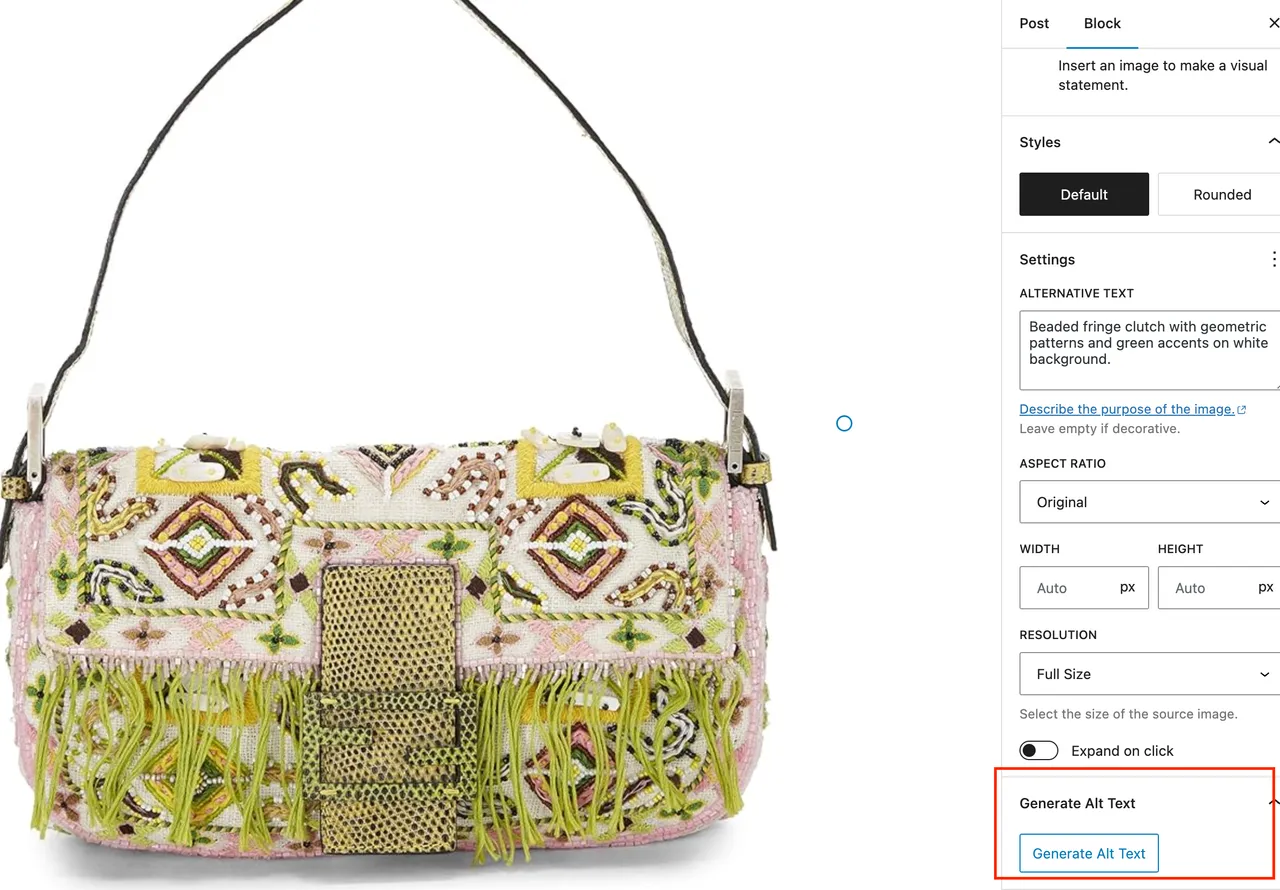
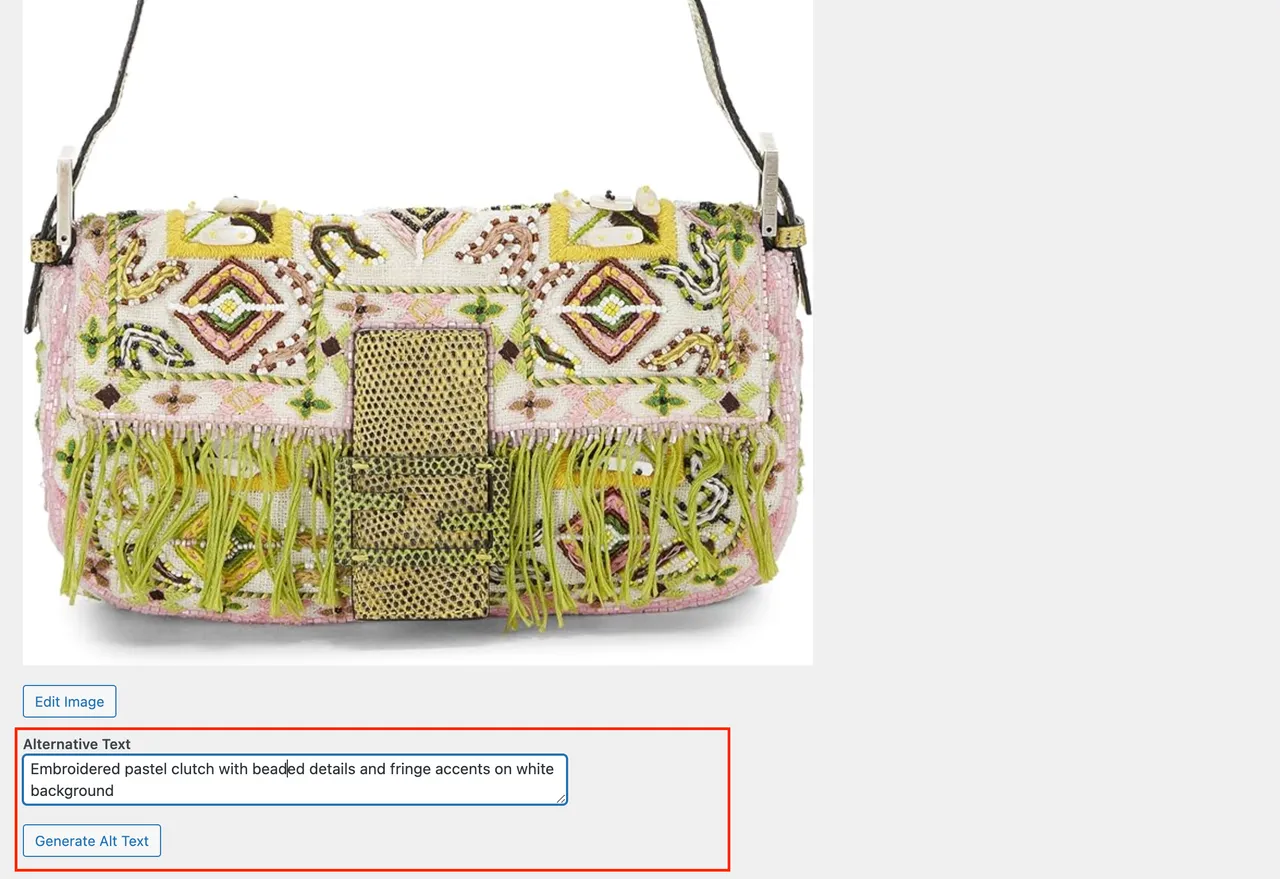
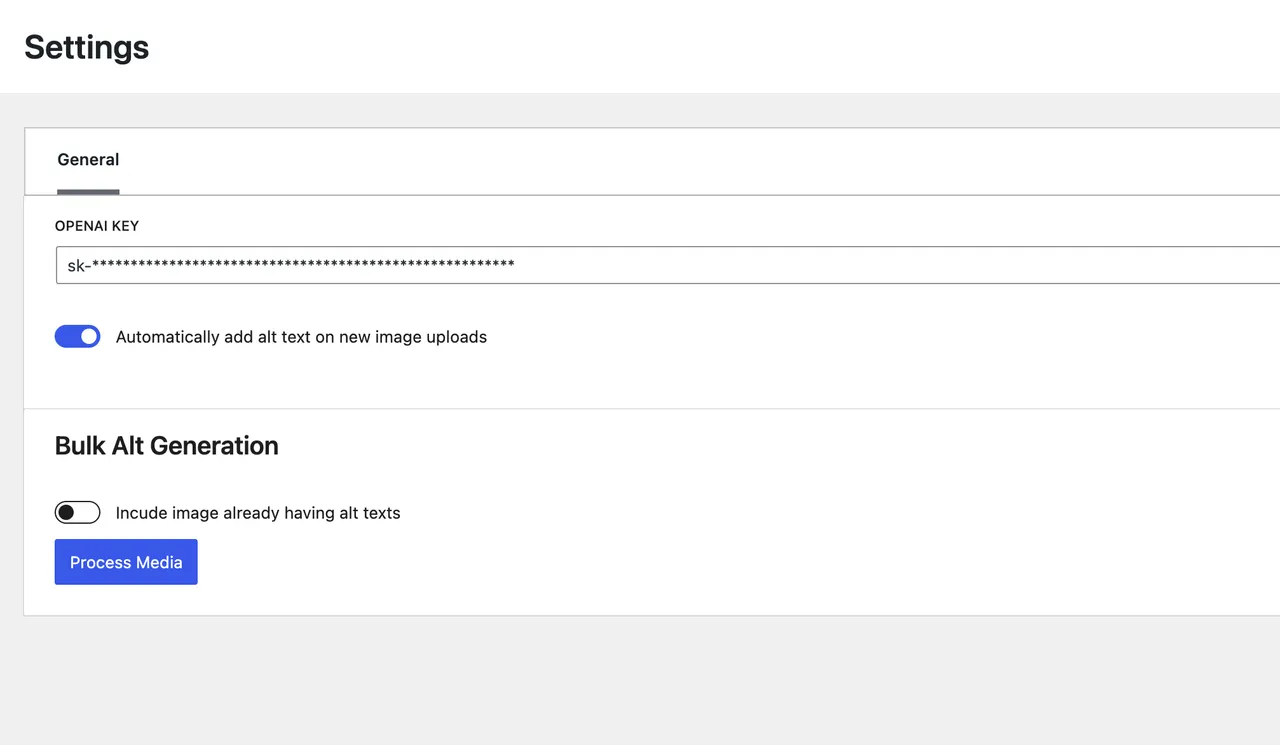
Important information
- Images are sent to an external AI service each time alt text is generated, either the managed credits service or your chosen provider.
- The free tier is 50 images per month per site. Beyond that you need paid credits or your own API key.
- Requires WordPress 4.6 or newer and PHP 7.0 or newer. Tested up to WordPress 7.1.4.
- One vulnerability has been published for this plugin and is marked patched. Keep it updated.
- Alt text is AI generated. Review it, especially where an image carries key information, before relying on it for compliance.
From the AI Alt Text Generator readme
Straight from the developer's WordPress.org listing.
Full description
AI Alt Text Generator writes clear, descriptive alt text for every image on your WordPress site — improving accessibility compliance (WCAG 2.2, ADA, Section 508, and the European Accessibility Act) and image SEO at the same time. It works out of the box: activate the plugin and start generating, no API key and no signup required. Every site gets 50 free images per month through the built-in managed credits service.
That makes it a fit for small organizations that need accessible, legally compliant websites but don’t want to wrangle developer accounts or AI billing — nonprofits, churches, schools, clinics, and small businesses working toward WCAG / EU Accessibility Act compliance.
Alt text is required for accessible, legally compliant websites, and it helps search engines understand your images. But writing it by hand across an entire media library rarely happens — so this plugin does it for you, in bulk or automatically on upload. It produces concise, WCAG-aligned descriptions (no “image of…” filler, sensible length) and can fold in the page context and your SEO focus keyphrase for sharper, more relevant alt text. It pairs perfectly with accessibility audit tools that flag missing alt text — this is the plugin that fills the gaps.
How it works — two ways to generate:
• Managed credits (default, recommended) — No API key, no signup. The plugin connects to the AI Alt Text Generator managed service automatically and gives every site 50 free images per month. Need more? Affordable paid credit plans are available. This uses an external, account-based service (see the disclosure below) and is optional beyond the free tier.
• Bring your own API key (advanced) — Prefer to run on your own OpenAI or Anthropic account? Add your own API key in the Advanced settings and generation runs at-cost, directly with your provider, with no per-image fees or vendor lock-in. You choose the provider and model.
Key Features:
– Works out of the box: no API key needed — 50 free images per month on every site
– Accessibility & compliance: WCAG-aligned output to support ADA, EAA, and Section 508 requirements
– SEO keyphrase integration: automatically weaves in focus keyphrases from Yoast SEO, Rank Math, and SEOPress (without keyword stuffing)
– Page-context aware: uses the page/post the image belongs to for more relevant descriptions
– Bring your own key (optional): advanced users can plug in their own OpenAI or Anthropic key — any vision-capable model, no lock-in
– Bulk Processing: generate alt text for your whole library at once, or automatically on upload
– Custom Prompts: tailor the AI prompt to your brand and needs
– Multi-Language Support: generate alt text in many languages
– Testing Feature: preview prompts before applying them to images
– WP-CLI Support: bulk-generate from the command line
– Developer-friendly: extensible via action/filter hooks for custom integrations and add-ons
WP-CLI:
The plugin registers a wp ai-alt-text command suite, making it easy to automate alt text generation across one or many sites.
# Bulk-generate alt text for all images missing it (uses managed credits by default) wp ai-alt-text generate
# Optional: configure your own provider and API key (advanced) wp ai-alt-text activate --provider=openai --key=sk-xxxxxxxx
# Regenerate alt text for specific attachments wp ai-alt-text generate --ids=12,34,56 --force
# Preview what would be processed without calling the API wp ai-alt-text generate --limit=20 --dry-run
# Show current configuration and coverage wp ai-alt-text status
A typical install-and-generate workflow needs no key at all:
wp plugin install ai-alt-text-generator --activate wp ai-alt-text generate --yes
New in Latest Version:
– Managed credits are now the default: generate alt text with no API key and no signup — 50 free images per month on every site
– Bring-your-own OpenAI/Anthropic key moved to an “Advanced” option for users who prefer to run on their own account
– WCAG-aligned output, SEO focus-keyphrase integration (Yoast / Rank Math / SEOPress), and page-context awareness
– Optionally set the image Title, Caption, and Description from the generated alt text
– Future-proof model handling (no hard-coded model versions; configurable defaults)
Important: This plugin uses an external AI service to generate alt text — either the optional managed-credit service (account-based, free tier plus paid plans) or your own OpenAI/Anthropic key. See the External Service Usage Disclosure below.
AI Alt Text Generator Pro (optional upgrade)
Need automation at scale? The optional Pro add-on builds on this free plugin with:
– WooCommerce product context for commerce-aware, SEO-rich alt text
– Scheduled background scans that describe new and existing images automatically
– A coverage analytics dashboard to track your progress toward 100%
– Automatic updates and priority support
Learn more about Pro — the free plugin remains fully functional on its own.
External Service Usage Disclosure
This plugin relies on external AI services to generate alt text. In all cases, data (images and their metadata) is sent to an external service for processing. The plugin does not store your images or generated alt text on our servers beyond what is needed to return your result.
Managed credits service (default)
By default the plugin uses the AI Alt Text Generator managed credits service so it works with no API key. On activation, the plugin automatically connects your site to obtain a free account (50 images per month) — this registers your site with the external service and requires an account. Images to be described are sent to this service for processing. Use beyond the free monthly tier requires a paid credit plan. The service is operated via https://store.lessbutmore.ai?utm_source=plugin&utm_medium=readme&utm_campaign=disclosure — please review the site for its terms and privacy policy. You can disable managed credits in the plugin settings and use your own API key instead.
Bring-your-own-key providers (optional, advanced)
If you add your own API key, images are sent to the provider you select:
– OpenAI: For more information, please review the OpenAI Terms of Use and Privacy Policy
– Anthropic: For more information, please review the Anthropic Terms of Service and Privacy Policy
You choose which path to use and are only required to agree to the terms of the service you actually use.
Support
For support, feature requests, or bug reports, please contact us through the WordPress plugin support forum.
Installation
• Upload the plugin files to the /wp-content/plugins/ai-alt-text-generator directory, or install the plugin through the WordPress plugins screen directly.
• Activate the plugin through the ‘Plugins’ screen in WordPress.
• That’s it — the plugin connects to the managed credits service automatically and you can start generating right away, with no API key and no signup. Every site gets 50 free images per month.
• Navigate to the ‘Alt Text Generator’ admin page, then use “Generate” on a single image or bulk-generate across your library.
• (Optional, advanced) Prefer your own AI account? Open the Advanced settings and add an API key:
• OpenAI: Visit https://openai.com and sign up to get your API key
• Anthropic: Visit https://console.anthropic.com and sign up to get your API key
• Customize your prompt and language settings as needed.
Developer FAQ (11)
- Do I need an API key to use this plugin?
- No. The plugin works out of the box with the built-in managed credits service — no API key and no signup. Every site gets 50 free images per month. If you’d rather run on your own AI account, you can optionally add your own OpenAI or Anthropic API key in the Advanced settings.
- What are managed credits and are they free?
- Managed credits let the plugin generate alt text through the AI Alt Text Generator managed service without you configuring anything. Every site gets 50 free images per month. If you need more, affordable paid credit plans are available. This uses an external, account-based service and is optional beyond the free tier. Learn more about managed credits.
- Can I use my own OpenAI or Anthropic API key instead?
- Yes. In the Advanced settings you can add your own OpenAI or Anthropic API key and generate directly on your own account — at cost, with no per-image fees and no vendor lock-in. You can use any vision-capable model your provider offers; the plugin ships with a sensible, low-cost default and lets you change the model anytime.
- Is this good for accessibility and legal compliance?
- Yes — that’s the point. It produces WCAG-aligned alt text to help you meet WCAG 2.2, ADA, Section 508, and European Accessibility Act (EAA) requirements. It’s a practical fit for nonprofits, churches, schools, and small businesses that need accessible websites without a developer on staff.
- Is there a Pro version?
- Yes. AI Alt Text Generator Pro is an optional add-on that adds WooCommerce product context, scheduled background scans that describe images automatically, a coverage analytics dashboard, automatic updates, and priority support. The free plugin is fully functional on its own. Learn more about Pro.
- How does this plugin use the AI service?
- The plugin sends images to the AI service — the managed credits service by default, or your selected provider’s API if you’ve added your own key — which returns the generated alt text. This process requires an active internet connection and the transmission of image data to the service’s servers.
- Can I generate alt text for multiple images at once?
- Yes, the AI Alt Text Generator supports bulk processing of images for efficient workflow, and can also generate automatically on upload.
- How do I stop it overwriting alt text I wrote myself?
- Under Bulk Generation, “Never overwrite alt text containing” takes a comma-separated list of words — “logo, sponsor, headshot”, for example. Any image whose current alt text contains one of them is left exactly as it is, even with “Process All Images” turned on, and costs nothing to keep. Press Save (or Start, which saves first), then use the Testing tab to select an image and confirm it says “Protected” before you run.
- Can I use a custom prompt?
- Yes, you can customize the prompt used to generate alt text in the plugin settings. You can also test your prompts before applying them to images.
- Can I use the plugin from the command line (WP-CLI)?
- Yes. The plugin registers a wp ai-alt-text command suite: – wp ai-alt-text generate bulk-generates alt text (using managed credits by default). Useful flags: --limit=<n>, --provider=<provider>, --force (regenerate existing), --ids=12,34 (specific attachments), --dry-run (preview only), and --yes (skip confirmation). – wp ai-alt-text activate --provider=<openai|anthropic> --key=<api-key> optionally configures your own provider and API key. Add --skip-validation to save without a live API check. – wp ai-alt-text status shows the active mode/provider, which keys are configured, the prompt/language, and alt text coverage counts.
- Is my data secure?
- The plugin only sends image data and prompts to the AI service for processing to produce alt text. Images and generated alt text are not stored on our servers beyond what is needed to return your result. If you use your own API key, please review the privacy policies of OpenAI and/or Anthropic. For the managed service, see the External Service Usage Disclosure below.
Downloads, last 30 days
Trend vs previous period: -6.9%
Average daily downloads: 85 over the last 7 days , 96 over 30 days.
Security history
Past CVEs, patched · 1 published vulnerability (Wordfence) · most recent Oct 27, 2026
- Patched 5.3 Medium AI Alt Text Generator <= 2.7.0 - Missing Authorization to Unauthenticated Arbitrary Attachment Modification via 'post_id' Parameter CVE-2026-120578 · Oct 27, 2026 · affects *-2.7.0 · fixed in 2.7.1
AI Alt Text Generator FAQ
Do I need an API key?
No. It works out of the box with managed credits. If you prefer, you can add your own OpenAI or Anthropic key in the Advanced settings.
What are managed credits?
They let the plugin generate alt text through a managed service with no setup. Each site gets 50 free images per month, and paid plans cover more. The service is external and account based.
Can I use my own AI account?
Yes. Add an OpenAI or Anthropic key and pick any vision-capable model. Cost goes directly to your provider.
Does it help with accessibility rules?
It writes WCAG-aligned text meant to support WCAG 2.2, ADA, Section 508 and European Accessibility Act requirements. It does not make a site compliant by itself.
Is there a Pro version?
Yes, an optional add-on with WooCommerce context, scheduled scans, a coverage dashboard, automatic updates and priority support.
Can I process many images at once?
Yes. Bulk generation covers the whole library, and it can also run on upload.
How does it handle alt text I wrote myself?
The bulk settings include an option to never overwrite existing alt text.
AI Alt Text Generator alternatives
Real-time SEO guidance, schema, and AI built in. Help search engines and AI systems understand your content. All AI tools included, no hidden fees. Yoast SEO: the #1 WordPress SEO plugin Since 2008, Yoast SEO has…
Rank Math SEO - WordPress AI SEO Plugin to Rank Higher 📈 ★★★★★ Rank Math SEO helps you stay ahead of competitors with AI-powered SEO tools built for today’s search engines and AI assistants. The plugin brings…

AIOSEO - The Original AI SEO Plugin for WordPress All in One SEO is the original WordPress SEO plugin, founded in 2007 and trusted by over 3 million website owners and SEO experts. AIOSEO is a complete AI SEO plugin…
SEOPress - The fast, privacy-first WordPress SEO plugin, ready for AI search Rank higher in Google AND in AI answer engines (ChatGPT, Claude, Perplexity, Gemini). SEOPress is the all-in-one WordPress SEO plugin…
CrawlWP - The WordPress SEO Plugin That Also Gets You Indexed Optimize every page, submit it to search engines (Google, Bing, Yandex, Yep etc) the moment you publish, and see which ones actually indexed it - all…

ThinkRank is an AI SEO plugin for WordPress that helps you write SEO titles and meta descriptions, optimize content around a focus keyword, add schema markup, generate XML sitemaps, and review Google Search Console…
Listing data from WordPress.org and the Wordfence vulnerability feed, refreshed Nov 9, 2026; listing details fetched Nov 14, 2026. Screenshots are from the plugin's WordPress.org listing. Not affiliated with migkapa.