
SOOZ
SOOZ - AI for SEO - Bulk Generate Focus Keyphrases, Metadata, Alt Text (SEO Autopilot) · by Space Codes
- active installs
- 2K+
- 15 ratings
- 4.7
- since last update
- 4d
- releases in 12 months
- —
- support threads resolved
- 100%
- avg daily downloads
- 229
- on WordPress.org
- 3 years
SOOZ at a glance
SOOZ is a freemium WordPress AI SEO plugin by Space Codes with 2K+ active installs and a 4.7/5 rating from 15 reviews. It was last updated on Nov 5, 2026, is tested up to WordPress 7.1.4 and needs PHP 7.4+. It works with OpenAI, Google Gemini. All 2 of its published vulnerabilities have patched versions. Our quality score is 92/100.
What is SOOZ?
SOOZ is an AI plugin that writes SEO metadata and image alt text in bulk. It generates focus keyphrases, meta titles, meta descriptions and social tags for pages, posts, products and category archives. It also creates alt text, titles, captions and descriptions for images in your media library.
It is built for WooCommerce stores and high-volume sites where writing metadata by hand does not scale. An SEO Autopilot mode generates and refreshes metadata for new and existing content. You can sync the results to Yoast SEO, Rank Math, All in One SEO and several other SEO plugins, and generate from buttons in the block editor, Elementor and the media library.
The plugin runs on a credit system. The listing says a free plan gives 100 credits, and 5 free credits are added daily when your balance falls below 100. Paid subscriptions, credit packs and pay-as-you-go are the ways to buy more. The listing gives no prices.
Best for
- WooCommerce stores with many products
- Sites with large media libraries lacking alt text
- Agencies managing metadata across client sites
- Owners who already use Yoast or Rank Math
Our take
SOOZ is a lightweight 'SEO autopilot' that bulk-generates focus keywords and meta and rides alongside Yoast/Rank Math/SEOPress. A useful add-on, not a standalone SEO solution.
SOOZ features
SEO Autopilot
Bulk generates and refreshes metadata for chosen content types such as pages, posts, products and media.
Alt text and image attributes
Creates alt text, titles, captions and descriptions across the library, for formats including jpg, png, webp, avif and svg.
Category and taxonomy SEO
Generates and edits metadata for category, tag and other public archive pages.
WooCommerce product SEO
Optimizes product metadata, with an option to include the product price in titles and descriptions.
Sync with SEO plugins
Pushes generated metadata to Yoast SEO, Rank Math, All in One SEO, SEOPress, Slim SEO and others.
Generate buttons in editors
Adds Generate with SOOZ buttons to the block editor, media library, Elementor, BeBuilder and Yoast SEO.
Custom instructions
Set rules globally, for metadata only, for media only, per post type or per entry.
Overwrite protection
Autopilot keeps existing titles, descriptions and attributes unless you enable the overwrite options.
Multisite and agency setup
One license can cover several sites, which share a credit pool. White label and incognito modes are available.
SOOZ free vs pro
Free WordPress.org version
- Free plan with 100 credits to test AI-generated SEO content
- 5 free credits added daily when the balance is under 100
- Metadata and image attribute generation within the credit balance
Pro Paid version
- Subscriptions (Basic, Pro, Premium) that add advanced generation options and a steady flow of credits
- Credit packs for one-time top-ups
- Pay-as-you-go credits
The plugin is freemium and runs on credits. Paid subscriptions, credit packs and pay-as-you-go exist, but the listing gives no prices. AI generation is handled by the vendor's service through credits, and the listing does not ask for your own AI provider key. A 14-day money-back guarantee applies to a first purchase.
How to use SOOZ
- Install the plugin
In wp-admin go to Plugins, then Add New, search for SOOZ AI for SEO, then install and activate it.
- Open the dashboard
Open SOOZ in the admin menu to see statistics on your current SEO coverage.
- Sync your SEO plugin
Optionally go to Settings and choose Yoast SEO, Rank Math, All in One SEO or another plugin to keep its metadata updated.
- Try one entry
Edit a single page, post, product or image, generate the fields you want, check the preview and save.
- Set up SEO Autopilot
Click Set up SEO Autopilot, choose content types such as pages, posts, products or media, and start bulk generation.
SOOZ screenshots (6)
-
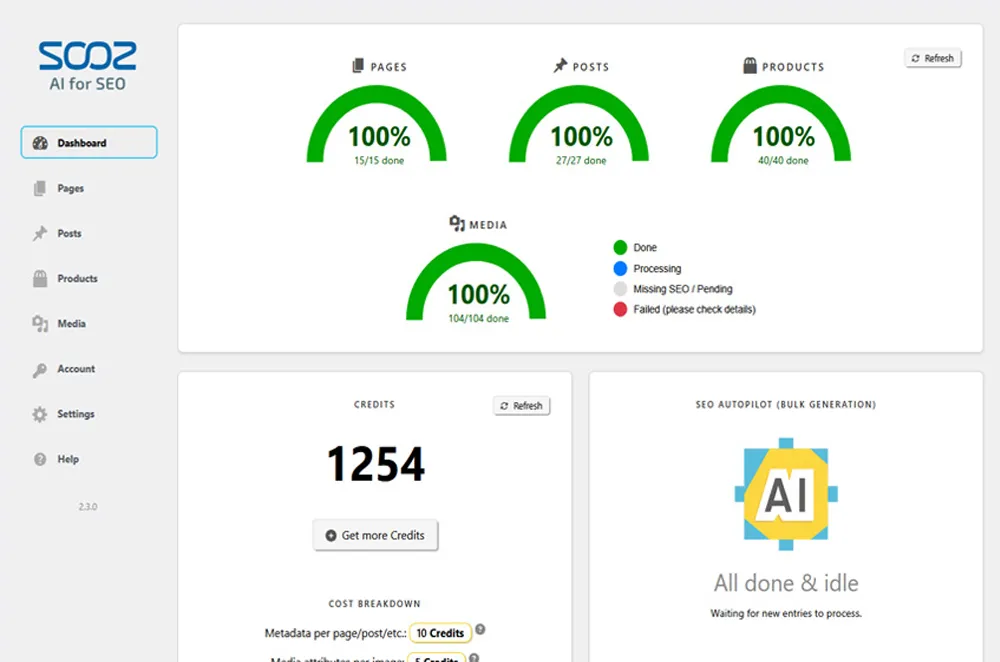
Dashboard (screenshot-1.jpg) -
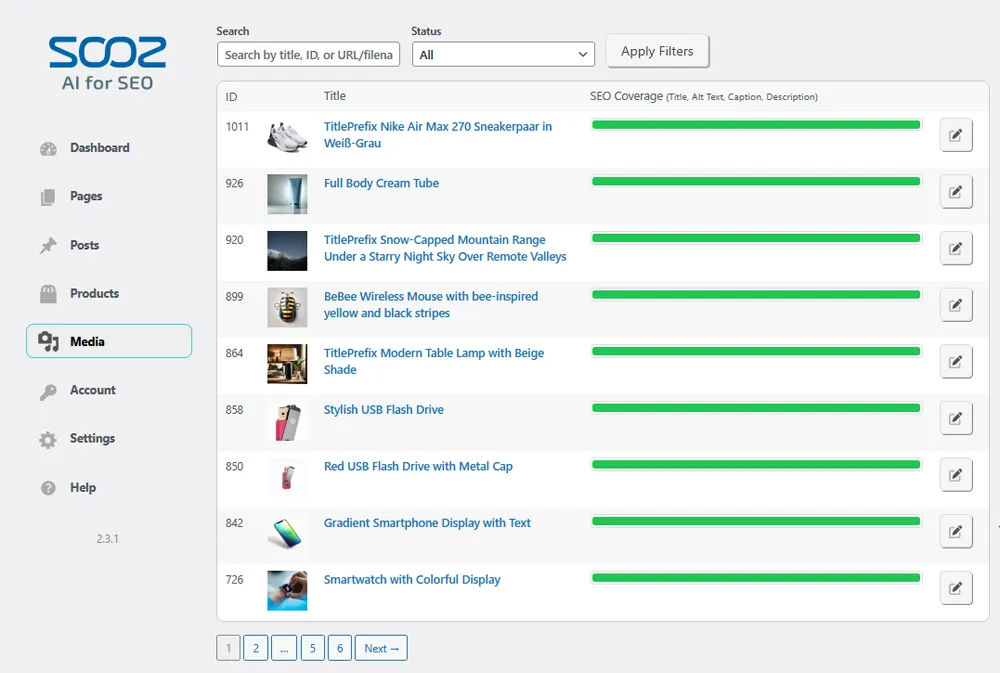
Media page (screenshot-2.jpg) -
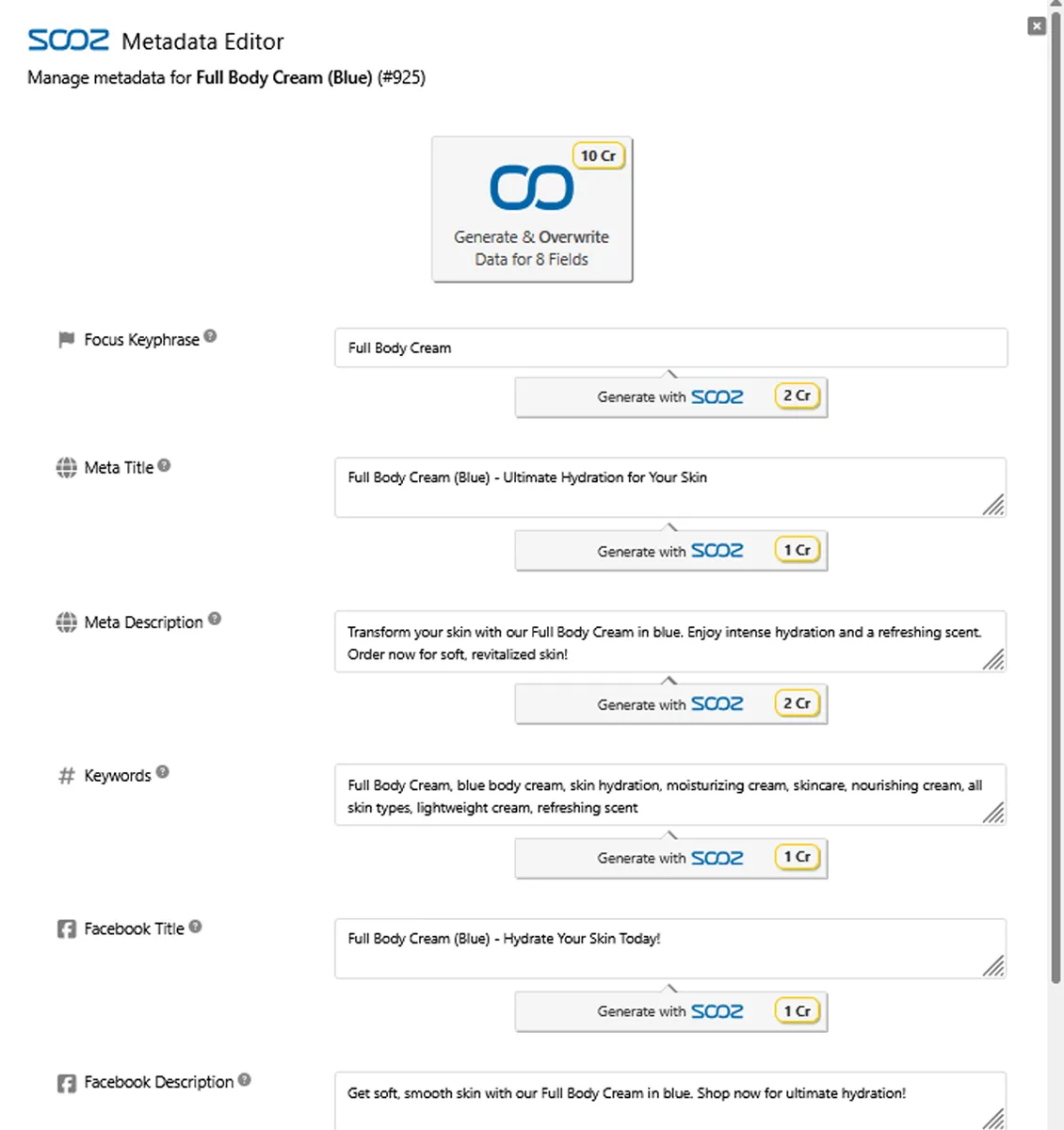
Metadata Editor (screenshot-3.jpg) -
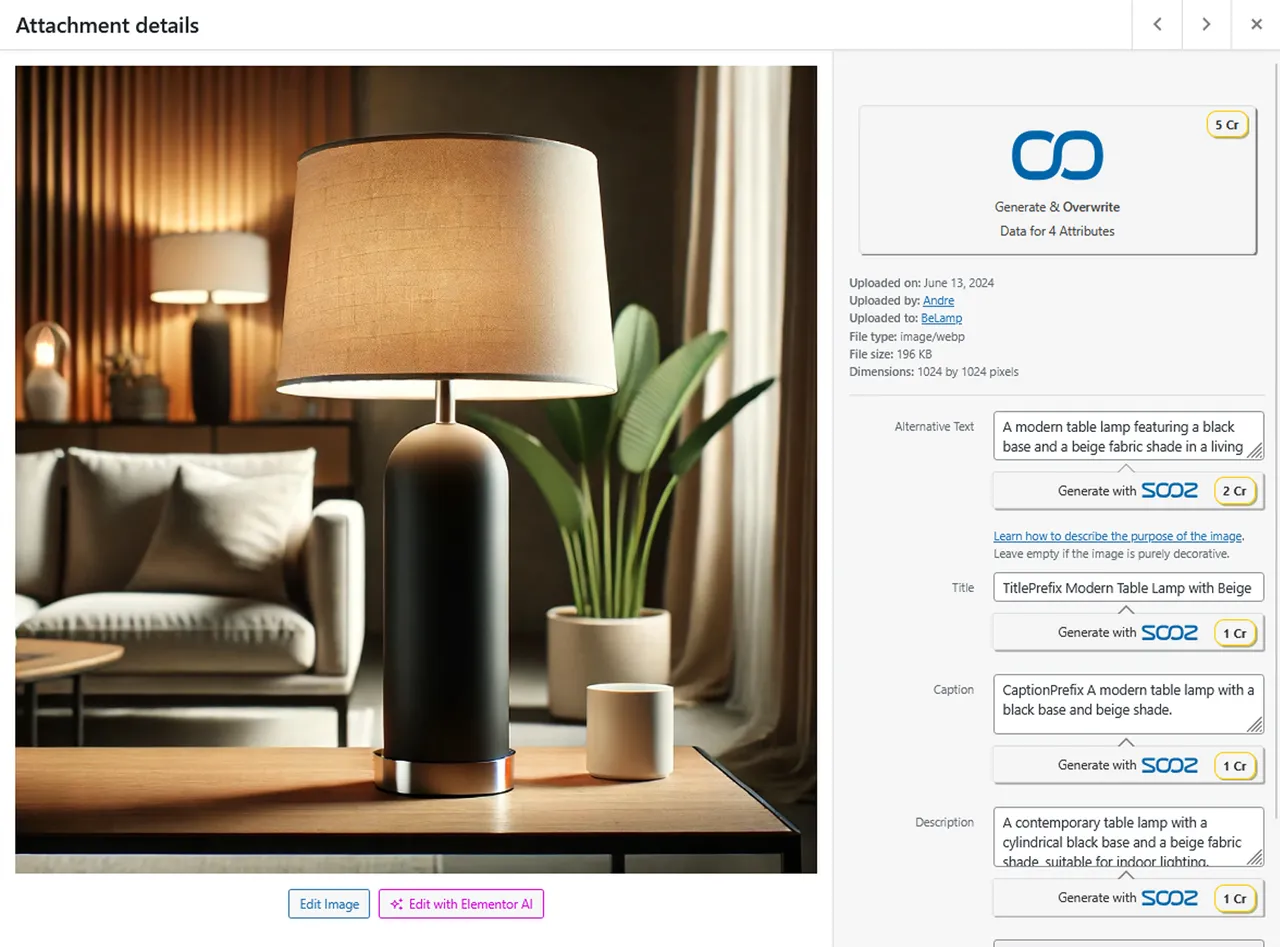
Media Library (screenshot-4.jpg) -
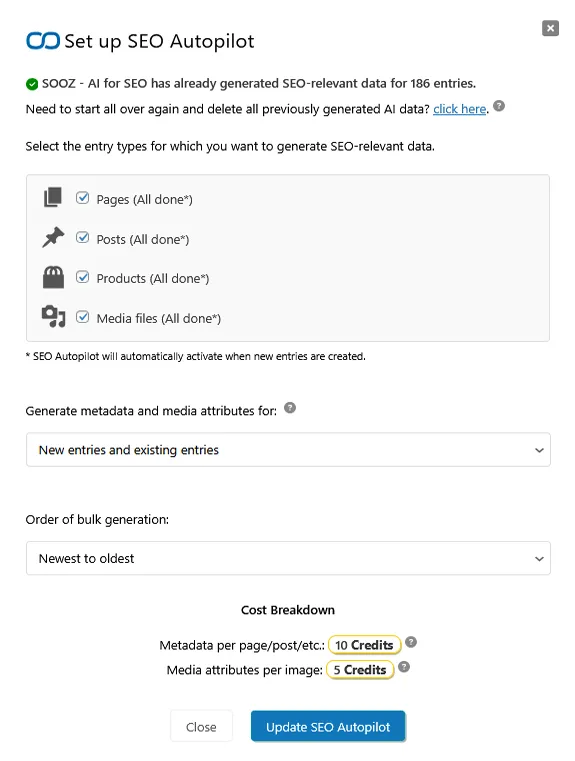
SEO Autopilot Setup (screenshot-5.jpg) -
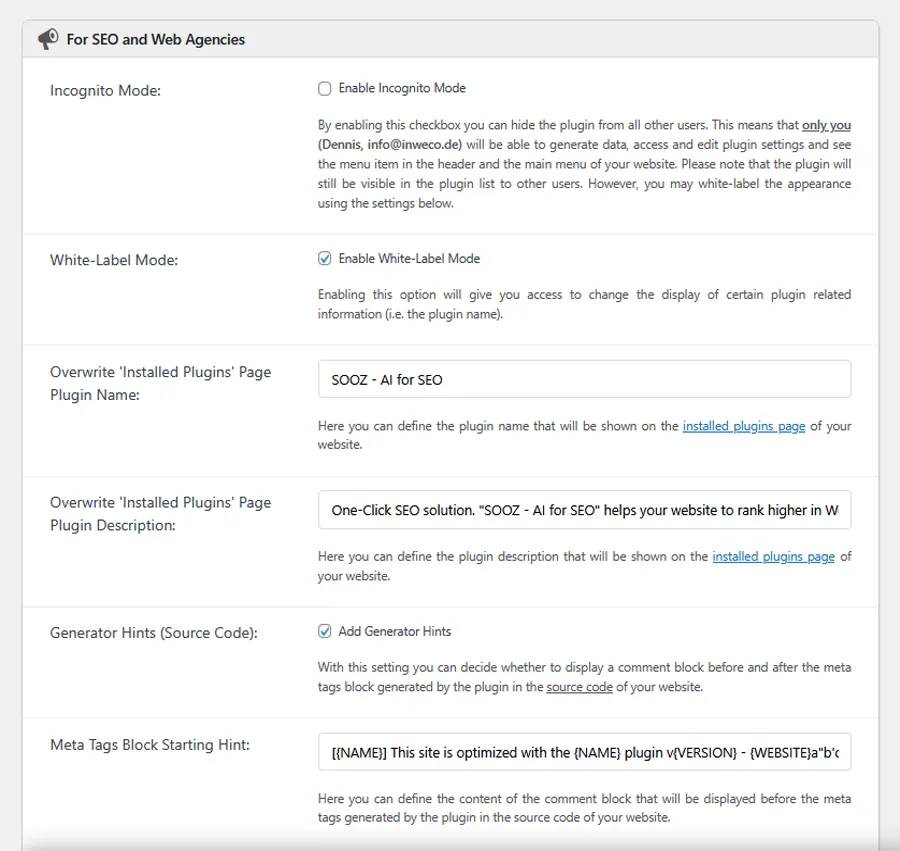
Settings for SEO and Web Agencies (screenshot-6.jpg)
Important information
- Requires WordPress 6.6 or higher and PHP 7.4 or higher.
- Content from the selected page, post, product or image is sent to the vendor's AI service to generate results. The listing says it sends only what is needed and adds no tracking scripts.
- Generation uses credits, and the amount depends on which fields and image attributes you turn on. Unused credits roll over to the next month.
- Autopilot does not overwrite existing values by default. Check the overwrite settings before a bulk run.
- Extra editor buttons for Gutenberg, Elementor and others must be activated in settings first.
- The plugin has had published vulnerabilities in the past. The data shows them as patched, so keep it updated.
From the SOOZ readme
Straight from the developer's WordPress.org listing.
Full description
SOOZ – AI for SEO is an alt text & metadata bulk generator with SEO Autopilot to optimize pages, posts, products, category and taxonomy archives, and images automatically. Built for WooCommerce SEO and high-volume sites.
Sync generated focus keyphrases, meta titles, meta descriptions and social-media tags to your existing stack (Yoast SEO, Rank Math, All in One SEO, and others). Use ‘Generate with SOOZ’ buttons where you work: Block Editor (Gutenberg), Media Library, Elementor, BeTheme’s BeBuilder, or the top admin bar. Think of SOOZ – AI for SEO as your SEO Copilot wherever you edit.
Achieve better metadata and alt text results than with ChatGPT. SOOZ – AI for SEO understands your entire website and uses expertly crafted SEO prompts designed to drive real search traffic.
Image SEO at scale: Create alt text, image titles, captions, and descriptions across your library (jpg, png, gif, webp, avif, svg).
Category and taxonomy archive SEO: Generate and edit metadata for category, tag, and other public taxonomy archives.
Accessibility-ready: Helps meet European Accessibility Act (EAA) requirements by automatically generating missing alt text for a more inclusive experience.
Free for most small/medium sites: If your balance falls below 100 Credits, we add 5 free Credits daily, so you can keep generating at no cost.
🚀 How to Get Started
• Open the Dashboard: Go to SOOZ – AI for SEO to view statistics about your current SEO coverage.
• Sync with your SEO plugin (optional): Go to Settings -> Sync “SOOZ – AI for SEO” Changes and select Yoast SEO, Rank Math, All in One SEO, or another supported SEO plugin to keep your metadata updated.
• Review your content: Open Pages, Posts, Products, Media, or a populated Taxonomies entry and check its SEO status.
• Get a first win (optional): Click the edit button for a specific entry, generate the desired fields, review the preview, and save the result.
• Set up Autopilot: On your SOOZ – AI for SEO dashboard, click Set up SEO Autopilot, choose your content types such as Pages, Posts, Products, or Media, and start bulk generation.
For a step-by-step guide, see “Help” -> “Getting Started” -> “First Steps”.
Need help? Email support@sooz.ai.
💸 100% Risk-Free Money-Back Guarantee!
Within 14 days of your first purchase (subscription: Basic/Pro/Premium, or Credits Pack), if SOOZ – AI for SEO isn’t a fit, email support@sooz.ai. We’ll refund 100%, no questions asked.
🔌 Editor integrations
Create and edit metadata right where you work, no context switching.
• Block Editor (Gutenberg)
• Media Library (image attributes)
• Elementor
• BeTheme BeBuilder
• Yoast SEO Settings
We add ‘Generate with SOOZ’ buttons in these editors so you can create SEO titles, descriptions, and image attributes in one click. These additional editor buttons have to be activated in the plugin settings first. It’s like having an SEO Copilot inside each editor.
You can also click the SOOZ – AI for SEO button in the top admin bar to open the Metadata Editor from any page or post.
🎯 Key Features
✅ SEO Autopilot (bulk): Automatically generate and refresh metadata for new and existing content.
✅ Alt text & image attributes: Create alt text, titles, captions, and descriptions site-wide (jpg/png/gif/webp/avif and svg).
✅ Category & taxonomy pages: Generate, edit and publish archive metadata.
✅ WooCommerce SEO: Optimize product metadata to attract higher-intent buyers from search.
✅ Sync with your SEO plugin: Keep metadata updated in Yoast SEO, Rank Math, All in One SEO, and others.
✅ Edit where you work: “Generate with SOOZ” in the Block Editor (Gutenberg), Media Library, Elementor, BeBuilder, and Yoast SEO. An SEO Copilot embedded in your workflow.
✅ Accessibility-ready: Helps meet European Accessibility Act (EAA) requirements by automatically generating missing alt text for a more inclusive experience.
✅ Progress tracking: Monitor coverage and recent activity from the Dashboard.
✅ For agencies & teams: White-label, incognito mode, export/import settings, Multisite support.
✅ One account, many websites: Share subscriptions or Credits Packs across any number of sites.
✅ Flexible credits: Free daily Credits for low balances, plus rollover and Pay-As-You-Go options.
🔗 Integrations & Compatibility
SOOZ – AI for SEO works with leading SEO plugins, page builders, e-commerce, multilingual tools, galleries, and popular themes, so you can generate and sync metadata where you already work. SOOZ – AI for SEO is designed to work alongside these plugins and themes, not replace them, so your existing setup continues to function normally while SOOZ – AI for SEO generates and syncs the SEO data.
See the list below for confirmed compatibility.
✅ Yoast SEO
✅ Rank Math
✅ All in One SEO
✅ SEO Simple Pack
✅ SEOPress
✅ Slim SEO
✅ Squirrly SEO
✅ The SEO Framework
✅ SEOKEY
✅ WPML
✅ BeTheme
✅ Elementor
✅ WooCommerce
✅ NextGen Gallery
✅ MemberPress
✅ Divi
If your favorite plugin or theme isn’t listed, please email us the name, URL, and the fields you’d like to sync, we prioritize new compatibility based on demand: support@sooz.ai
Focus keyphrases and meta tags are automatically imported from Yoast SEO, Rank Math, and other supported plugins. You can review, modify, and regenerate this data at any time, then sync it back to your preferred SEO plugin.
Installation
Install like any other WordPress plugin.
Dashboard (search)
1. Log in to WordPress and go to “Plugins -> Add New”.
2. Search for SOOZ – AI for SEO and select the plugin.
3. Click “Install”, then “Activate”.
Dashboard (upload a ZIP)
1. Download the plugin ZIP.
2. In WordPress go to “Plugins -> Add New -> Upload Plugin”.
3. “Choose File” -> select the ZIP -> “Install Now” -> “Activate”.
Manual upload (FTP/SFTP)
1. Unzip the archive and upload the “ai-for-seo” folder to “wp-content/plugins/”.
2. In WordPress, go to “Plugins” and click “Activate” for SOOZ – AI for SEO.
WP-CLI (advanced)
wp plugin install ai-for-seo –activate
After activation
Open “SOOZ – AI for SEO” in the admin menu to view your SEO coverage and click “Set up SEO Autopilot” to start bulk generation.
Developer FAQ (28)
- Why should I add SEO titles, meta descriptions, and metadata to my website?
- SEO metadata, including SEO titles and meta descriptions, helps search engines understand your pages and shape search snippets. Better snippets can improve visibility, clicks, visitors, leads, and sales.
- How do I switch between Preview and Editor mode in the Metadata or Media Attributes editor?
- Use the Preview and Editor buttons at the top of either editor. Preview shows estimated appearances and field-specific guidance, while Editor shows the existing inputs and generation controls. Choose the normal opening mode under Settings > General > Default editor mode. Existing installations upgraded from 2.4.3 or earlier begin in Editor mode unless a mode was already stored.
- Can I use *SOOZ – AI for SEO* with Yoast SEO, Rank Math, or another SEO plugin?
- Yes. SOOZ – AI for SEO is compatible with major SEO plugins. Metadata generated by SOOZ – AI for SEO can be synchronized with Yoast SEO, Rank Math, All in One SEO, SEOPress, Slim SEO, SEO Simple Pack, Squirrly SEO, and The SEO Framework, so your SEO title, meta description, and other fields can stay aligned with your preferred SEO tool.
- How do I control which meta tags *SOOZ – AI for SEO* outputs on the frontend?
- Open Settings > Metadata and use “Active Meta Tags” to choose which SEO fields SOOZ – AI for SEO may output in the frontend header. Then use “Meta Tag Output Mode” to decide how SOOZ – AI for SEO handles existing tags from themes or SEO plugins. This lets you control SEO title, meta description, Open Graph, Twitter Card, and other tags, and helps avoid duplicate frontend meta tags when another SEO plugin is active.
- Does *SOOZ – AI for SEO* analyze my page, post, product, or media content before generating SEO data?
- Yes. SOOZ – AI for SEO analyzes the selected page, post, product, or media file and uses that content as context when generating SEO titles, meta descriptions, focus keyphrases, alt text, and other SEO data.
- Will SEO Autopilot overwrite existing SEO titles, descriptions, or media attributes?
- Not by default. SEO Autopilot keeps existing SEO titles, meta descriptions, focus keyphrases, meta tags, and media attributes unless you enable the related overwrite options in the settings.
- Which placeholders can I use in metadata, media prefixes, or suffixes?
- Add placeholders directly to the prefix or suffix fields under Settings > Metadata or Settings > Media Attributes. Supported placeholders are case-insensitive. • {WEBSITE_URL} – Website URL: Inserts the website URL without a trailing slash. • {WEBSITE_NAME} – Website name: Inserts the WordPress site name. • {POST_ID} – Entry ID: Inserts the current post, page, product, or attachment ID. • {PRODUCT_NAME} – Product name: Inserts the WooCommerce product title for product metadata. • {PRODUCT_PRICE} – Product price: Inserts the WooCommerce product price for product metadata when a price is available. • {FILE_NAME} – File name: Inserts the attachment file name without the extension. • {FILE_TYPE} – File type: Inserts the attachment file extension, such as jpg, png, webp, or avif. • {FILE_SIZE} – File size: Inserts the attachment file size in kilobytes. • {IMAGE_DIMENSIONS} – Image dimensions: Inserts the image width and height in pixels, formatted like 1200×800. The plugin replaces placeholders automatically when meta tags are injected or when media attributes are saved.
- How do I include WooCommerce product prices in SEO titles and descriptions?
- Go to Settings > Metadata > Include product price in metadata (available when WooCommerce is active) and choose between ‘Never’, ‘Fixed’, or ‘Dynamic’. ‘Never’ omits pricing, ‘Fixed’ stores the current product price directly in generated SEO titles and descriptions, and ‘Dynamic’ inserts a placeholder that is replaced with the live price during frontend rendering.
- Where should I add Custom Instructions: global, metadata, media, post type, or entry?
- Use broad instructions only for rules that should apply everywhere, and use specific instructions for exceptions. Global Custom Instructions affect future generations in general. Metadata Custom Instructions affect metadata only. Media Attribute Custom Instructions affect image attributes only. Post-type or entry-specific custom instructions are best for rules that apply only to selected posts, pages, products, or media files. Custom instructions can guide wording, tone, terminology, emphasis, calls to action, and additional owner-supplied details. They cannot change generated fields, JSON or technical formats, a fixed generation language, configured prefix/suffix behavior, official character, word, sentence, or item limits, storage caps, or safety rules. Requests for extra, repeated, padded, or unlimited output are ignored while compatible parts still apply. Instruction text is limited to 200 characters on Free or 1,000 characters with an active subscription.
- Can I choose which image attributes *SOOZ – AI for SEO* generates, such as alt text, title, caption, or description?
- Yes. SOOZ – AI for SEO lets you decide which media attributes, such as alt text, image title, caption, and description, should be generated. Configure them in the Active Media Attributes section of the settings to match your image SEO and accessibility needs.
- Why is alt text or image attribute generation more accurate for some images?
- Open the Media Attributes Editor and check Context detection. Automatic discovery uses verified image usage and nearby text. If several posts use the image, select a verified source and choose Set context post. The saved choice also applies to SEO Autopilot. Use Switch to automatic discovery to reset it. If the selected post is deleted or no longer provides usable context, generation continues without post context and the editor explains why.
- How are Credits used for metadata, meta tags, alt text, and media attributes in *SOOZ – AI for SEO*?
- Credits are used when SOOZ – AI for SEO generates SEO data for posts, pages, products, media files, or other supported content. The amount of Credits required depends on the selected active meta tags, SEO fields, and media attributes, such as alt text, title, caption, or description.
- Do unused Credits expire or roll over at the end of the month?
- No. Unused Credits roll over to the next month, so you can keep using Credits that were not consumed during the current billing cycle.
- Can I try *SOOZ – AI for SEO* without buying a subscription?
- Yes. The free plan provides 100 Credits so you can test AI-generated SEO content without cost. In addition, SOOZ – AI for SEO adds 5 free Credits every day if your balance falls below 100 Credits.
- When should I choose Subscription, Credit Packs, or Pay-As-You-Go?
- • Choose Subscription if you want ongoing features and steady Credits. Subscriptions unlock advanced generation options and provide a continuous flow of Credits for new content over time. • Choose Credit Packs for one-time top-ups when you need a larger burst of generations. Credit Packs are useful as an add-on to an active subscription when you temporarily need more Credits. • Choose Pay-As-You-Go if you prefer automatic top-ups. When your balance falls below 100 Credits, new Credits are added automatically by purchasing a package you selected in advance.
- Where can I manage my *SOOZ – AI for SEO* account, customer portal, subscription, or billing?
- SOOZ – AI for SEO currently does not offer a separate customer portal. Account-related actions, including subscription and payment management, are available in your WordPress admin area under SOOZ – AI for SEO > Account.
- Where can I download invoices or receipts?
- A download link for your invoice is included in the confirmation email sent after each purchase. If you have an active subscription, you can also download invoices in WordPress under SOOZ – AI for SEO > Account > Manage Subscription / Invoices.
- Does *SOOZ – AI for SEO* support WPML and multilingual websites?
- Yes. The plugin supports multilingual websites and WPML. For media attributes, the Automatic language setting analyzes image usage context first. If the context is unavailable or unclear, it falls back to the WPML language when available, then to the system language.
- Does *SOOZ – AI for SEO* support Multisite installations?
- Yes. SOOZ – AI for SEO supports WordPress Multisite installations. Purchase a subscription on your primary website and use the same license owner and license key across your sub-sites.
- Can I use *SOOZ – AI for SEO* on a staging, local, or development site?
- Yes. You can use SOOZ – AI for SEO on staging, local, and development websites.
- Where are “Generate with SOOZ” buttons integrated?
- “Generate with SOOZ” buttons are available in the Block Editor (Gutenberg), Media Library, Elementor, BeTheme’s BeBuilder, and supported SEO plugin panels such as Yoast SEO and Rank Math. Enable the relevant external editor buttons in the plugin settings first. On singular frontend pages, posts, products, and other supported content, you can also open the Metadata Editor from the “Metadata Editor” item in the WordPress admin bar.
- Can I use my subscription, Credits Packs, or license key on another website?
- Yes. Enter the same license owner and license key under SOOZ – AI for SEO > Account on each website. Linked websites share the same Credits pool, and you can export/import settings between them. This works for Multisite, staging, and client websites.
- I am an agency with multiple client websites. How do I set things up?
- • Set up your agency SOOZ – AI for SEO account via a primary site, such as your agency website, and purchase a subscription there. Alternatively, purchase directly on https://sooz.ai/pricing. • After purchase, you receive your license owner and license key by email, and they are also visible in the SOOZ – AI for SEO Account area. • Install SOOZ – AI for SEO on each client website and open SOOZ – AI for SEO > Account on each site. • Enter the same license owner and license key to link them to the same account. Linked websites share the same subscription and Credits pool.
- Does *SOOZ – AI for SEO* collect or store my content?
- SOOZ – AI for SEO sends only the content needed to generate metadata and media attributes to the AI service. It does not add tracking scripts to your website and does not publish your content. You can review privacy options such as generator hints, white label, and incognito mode under SOOZ – AI for SEO > Account > Privacy & Agreements.
- Can I control who can use *SOOZ – AI for SEO* in my WordPress backend?
- Yes. In Settings, you can restrict plugin access by WordPress user role. Agencies can also use Incognito Mode and White Label options in SOOZ – AI for SEO > Account.
- Is AI-generated SEO content safe for Google rankings?
- Currently, Google’s stance on the use of AI or automation in content creation is generally permissive, as indicated in a Google Developers blog post from February 2023. Google states that appropriate use of AI or automation is not against their guidelines. More information can be found at https://developers.google.com/search/blog/2023/02/google-search-and-ai-content.
- Will generated metadata or image attributes disappear if I uninstall *SOOZ – AI for SEO*?
- It depends on how the generated data is stored and used. If SOOZ – AI for SEO synchronized generated metadata with a third-party SEO plugin such as Yoast SEO, Rank Math, or All in One SEO, then that metadata remains after uninstalling SOOZ – AI for SEO. Saved image attributes, such as alt text, image titles, captions, and descriptions, are WordPress media fields and may also remain in the Media Library. If synchronization was not enabled and SOOZ – AI for SEO was solely responsible for frontend meta tag output, those tags will no longer be integrated after the plugin is deactivated or uninstalled.
- Can you add support for another editor, page builder, or SEO feature?
- We welcome feature requests, editor integration ideas, page builder compatibility requests, and SEO workflow feedback. Please email support@sooz.ai with your suggestions.
Downloads, last 30 days
Trend vs previous period: -30.9%
Average daily downloads: 241 over the last 7 days , 229 over 30 days.
Security history
Past CVEs, patched · 2 published vulnerabilities (Wordfence) · most recent Aug 7, 2026
- Patched 5.3 Medium AI for SEO <= 1.2.9 - Missing Authorization CVE-2025-22299 · Jan 6, 2025 · affects *-1.2.9 · fixed in 1.2.10
- Patched 5.3 Medium SOOZ - AI for SEO - Bulk Generate Focus Keyphrases, Metadata, Alt Text (SEO Autopilot) <= 2.4.2 - Missing Authorization CVE-2026-66459 · Aug 7, 2026 · affects *-2.4.2 · fixed in 2.4.3
Recent releases
- v2.6.2
Added a choice of verified source posts for image generation, with automatic context checks and clear feedback when a source is unavailable. * Added detailed lists of entries affected by SEO...
- v2.6.1
Improved handling of large content libraries in filtered lists, title sorting, and SEO Autopilot. * Kept completed SEO statistics visible during background updates, with changes to content...
- v2.6.0
Added metadata editing and generation for category, tag, and public taxonomy archives, with separate SEO coverage and SEO Autopilot selection. * Added support for generating image attributes from...
- v2.5.9
Improved SEO coverage analysis so unreadable or duplicate generation history no longer stops scans, with clear warnings and affected entries excluded from SEO Autopilot until resolved. * Improved...
- v2.5.8
Reduced memory use when analyzing SEO coverage on larger websites. * Improved recognition of older generation history so supported saved values can be included in SEO analysis without changing...
Show 10 older releases
- v2.5.7
Improved image generation reliability by using available local image files when preparing image data, with clearer guidance when an image cannot be processed. * Improved account connection...
- v2.5.6
Added recovery options for duplicate or conflicting saved metadata, with explicit choices for conflicting values and protection for unsaved edits. * Improved generation context with cleaner...
- v2.5.5
Improved SEO coverage displays with details for filled, missing, and excluded fields, clearer completion guidance, and highlighted edit buttons for incomplete entries. * Added direct SOOZ editor...
- v2.5.4
Improved metadata saving with clearer recovery guidance and retained edits when saving or refreshing a connected SEO editor fails. * Improved SEO coverage analysis with progress reporting,...
- v2.5.3
Added Settings search to find options by name or description, including advanced settings, without changing saved preferences. * Added Next item and Save & edit next controls to move through...
- v2.5.2
Improved account recovery and purchase setup so license credentials are refreshed safely and subscription or credit checkout starts more reliably. * Added clearer Latest Activity details that show...
- v2.5.1
Added direct SOOZ metadata-editor controls for Elementor and the WordPress Block Editor, with more reliable initialization for dynamically loaded editor fields. * Added AVIF support for media...
- v2.5.0
Added preview-first Metadata and Media Attributes editors with responsive Google, social, keyword, accessibility, and media appearance previews, field-specific edit shortcuts, and live quality...
- v2.4.3
Improved third-party SEO workflows with embedded generation controls, two-way metadata synchronization where supported, template-aware values, and live editor refreshes across Yoast SEO, Rank...
- v2.4.2
Improved media attribute generation reliability by automatically recovering with direct image data when a remote image URL cannot be accessed. * Improved dashboard and SEO Autopilot status...
SOOZ FAQ
Does it work with my SEO plugin?
Yes. Metadata can be synced to Yoast SEO, Rank Math, All in One SEO, SEOPress, Slim SEO, SEO Simple Pack, Squirrly SEO and The SEO Framework.
Does it read my content before writing?
Yes. It analyzes the selected page, post, product or media file and uses it as context for titles, descriptions, keyphrases and alt text.
Will Autopilot overwrite what I already have?
Not by default. Existing titles, descriptions, keyphrases, tags and image attributes stay unless you turn on the overwrite options.
How are credits used?
Generating SEO data for content or media uses credits. The cost depends on the fields and image attributes you have enabled.
Can I try it without paying?
Yes. The free plan has 100 credits, and 5 more are added daily whenever your balance is below 100.
Does it support multisite and staging?
Yes. Buy once on a primary site and reuse the same license on subnets, staging, local and client sites. They share one credit pool.
Does it support WPML?
Yes. For image attributes it looks at how the image is used first, then the WPML language, then the system language.
What happens to the data if I uninstall it?
Metadata synced to a third-party SEO plugin stays. Whether other saved data remains depends on how it was stored.
SOOZ alternatives

Real-time SEO guidance, schema, and AI built in. Help search engines and AI systems understand your content. All AI tools included, no hidden fees. Yoast SEO: the #1 WordPress SEO plugin Since 2008, Yoast SEO has…

Rank Math SEO - WordPress AI SEO Plugin to Rank Higher 📈 ★★★★★ Rank Math SEO helps you stay ahead of competitors with AI-powered SEO tools built for today’s search engines and AI assistants. The plugin brings…

AIOSEO - The Original AI SEO Plugin for WordPress All in One SEO is the original WordPress SEO plugin, founded in 2007 and trusted by over 3 million website owners and SEO experts. AIOSEO is a complete AI SEO plugin…

SEOPress - The fast, privacy-first WordPress SEO plugin, ready for AI search Rank higher in Google AND in AI answer engines (ChatGPT, Claude, Perplexity, Gemini). SEOPress is the all-in-one WordPress SEO plugin…

CrawlWP - The WordPress SEO Plugin That Also Gets You Indexed Optimize every page, submit it to search engines (Google, Bing, Yandex, Yep etc) the moment you publish, and see which ones actually indexed it - all…

ThinkRank is an AI SEO plugin for WordPress that helps you write SEO titles and meta descriptions, optimize content around a focus keyword, add schema markup, generate XML sitemaps, and review Google Search Console…
Listing data from WordPress.org and the Wordfence vulnerability feed, refreshed Nov 9, 2026; listing details fetched Nov 14, 2026. Screenshots are from the plugin's WordPress.org listing. Not affiliated with Space Codes.