
Atarim
Atarim - AI Agency for WordPress: Edit Pages, Fix Code, Update Plugins, SEO & Client Feedback · by Vito Peleg
- active installs
- 1K+
- 126 ratings
- 4.9
- since last update
- 13d
- releases in 12 months
- —
- support threads resolved
- —
- avg daily downloads
- 218
- on WordPress.org
- 4.1 years
Atarim at a glance
Atarim is a free WordPress AI SEO plugin by Vito Peleg with 1K+ active installs and a 4.9/5 rating from 126 reviews. It was last updated on Oct 27, 2026, is tested up to WordPress 7.1.4 and needs PHP 7.4+. All 21 of its published vulnerabilities have patched versions. Our quality score is 90/100.
What is Atarim?
Atarim is a WordPress plugin for visual feedback and collaboration that also adds an AI action layer. Clients and teammates can leave comments directly on a live page, and the AI can make real changes to the site: edit pages, rewrite copy, update plugins, change WooCommerce products and publish after you approve.
The AI layer is built on the WordPress Abilities API and exposes more than 200 operations on a site with Elementor, forms, WooCommerce and backups. It is also an MCP server, so you can connect Claude, Codex or another MCP client. Alternatively you can use the specialist AI helpers that come with Atarim, or click on a page element and describe the change.
It is aimed at agencies and freelancers who look after client sites. It works on existing sites with no rebuild. Content and design changes are drafted for approval by default, and theme file changes are backed up first. The AI layer needs WordPress 6.9 or later.
Best for
- Agencies maintaining many client sites
- Freelancers collecting client feedback on live pages
- Teams who want an MCP-ready WordPress site
- Owners of older sites who do not want to rebuild
Atarim features
Visual feedback on live pages
Point at anything on the site and leave comments, with screenshots, so clients can give feedback without a WordPress login.
AI edits to pages and posts
Create, edit, duplicate and delete any post type, and read or restore revisions.
Page builder control
Read page structure and edit single elements in builders such as Elementor and in Gutenberg block by block.
WooCommerce and forms
Manage products, orders, coupons and settings, read form entries and find forms that stopped receiving submissions.
Plugins, themes and media
Install, update or remove plugins and themes, swap images site-wide and write alt text in bulk.
MCP server
Connect your own AI client such as Claude or Codex, with the same access and guardrails.
Specialist AI helpers
Six specialists come with Atarim, and you assign work to them by name.
Backups and checks
Dated backups are made before theme file changes, broken PHP is refused, deletions show a preview and every action is logged.
Approval by default
Content and design changes are drafted and wait for you. Checkout and payment work always goes to a person.
Atarim free vs pro
Free WordPress.org version
- Visual feedback, comments, screenshots and collaboration work on activation
- Free account to connect the site
- Free to try the AI features on your own site
The plugin is free on WordPress.org and no paid plan details are given in the listing. The AI features are turned on from your Atarim account. The listing does not say how AI usage is billed.
How to use Atarim
- Install the plugin
In wp-admin go to Plugins, then Add New, search for Atarim, then install and activate it.
- Connect the site
Log in or create a free account to connect the site. Using a real client site shows more than a blank test one.
- Collect feedback
Feedback tools work as soon as the plugin is active. Add comments directly on the live page.
- Turn on the AI
Enable the AI features from your account, or connect your own MCP client using the setup commands from Atarim.
- Review and approve
Give an instruction, check the drafted change or preview, and approve it. Check the activity log afterward.
Atarim screenshots (10)
-
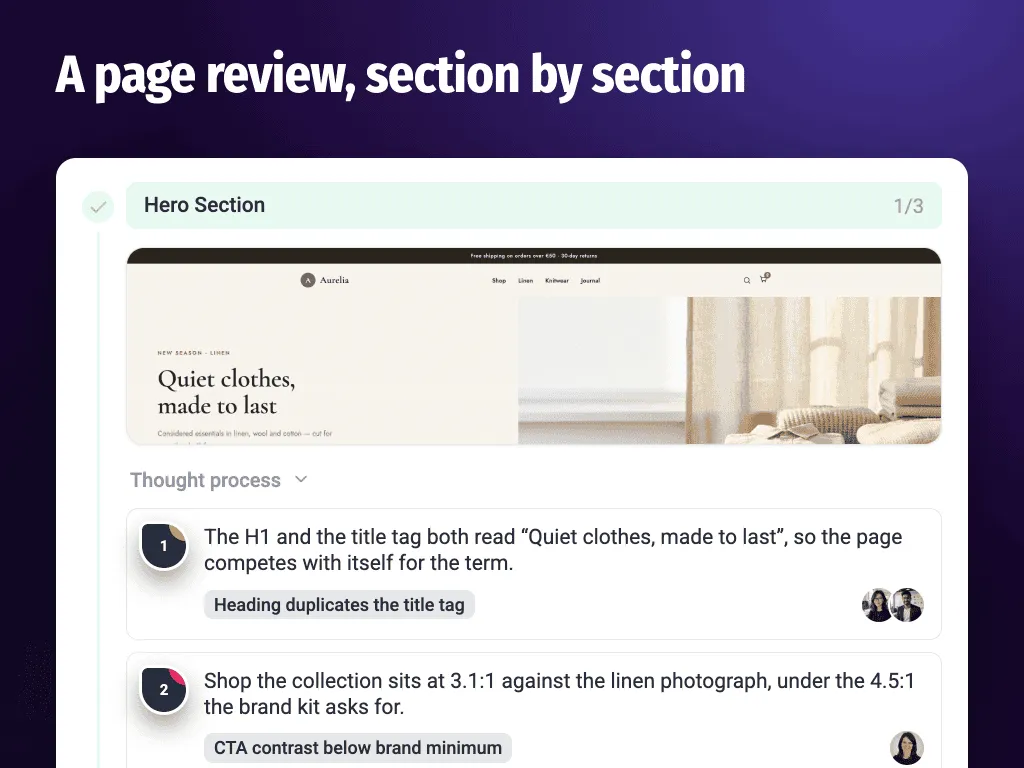
An AI page review of a client site, section by section. Design, SEO, copy and accessibility issues, each with the reasoning shown - a heading that duplicates the title tag, a button below the brand's contrast minimum. -
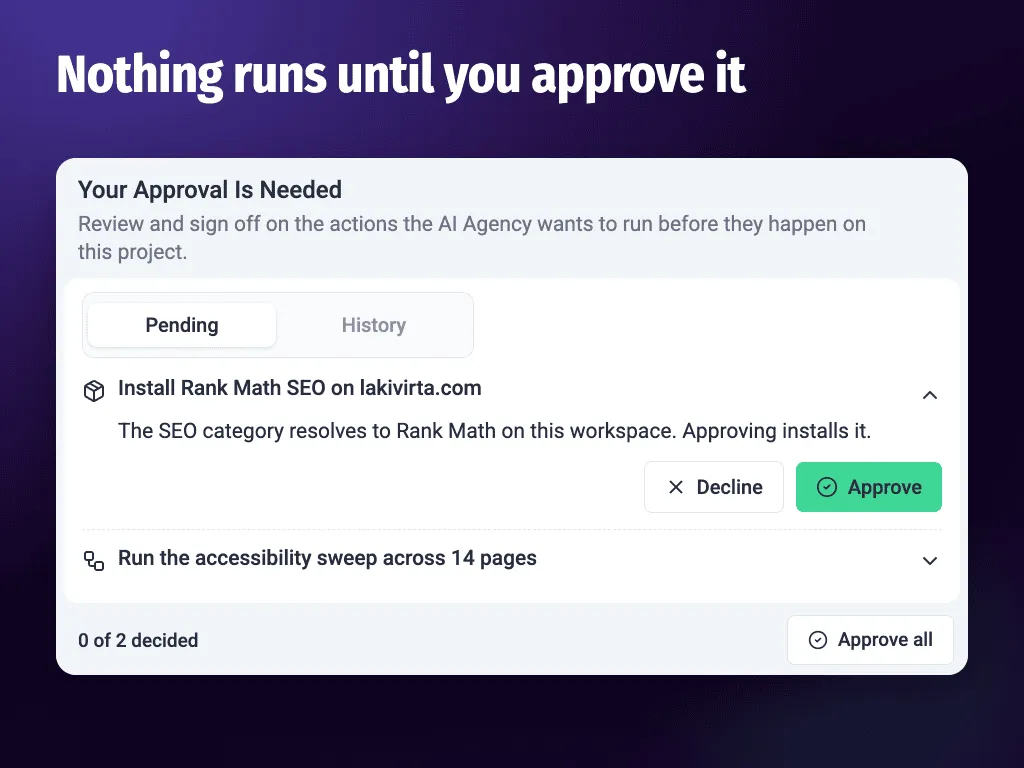
The approval queue. Every action the AI wants to run waits here first: installing an SEO plugin, sweeping 14 pages for accessibility. Approve it, decline it, or read the history of what already ran. -
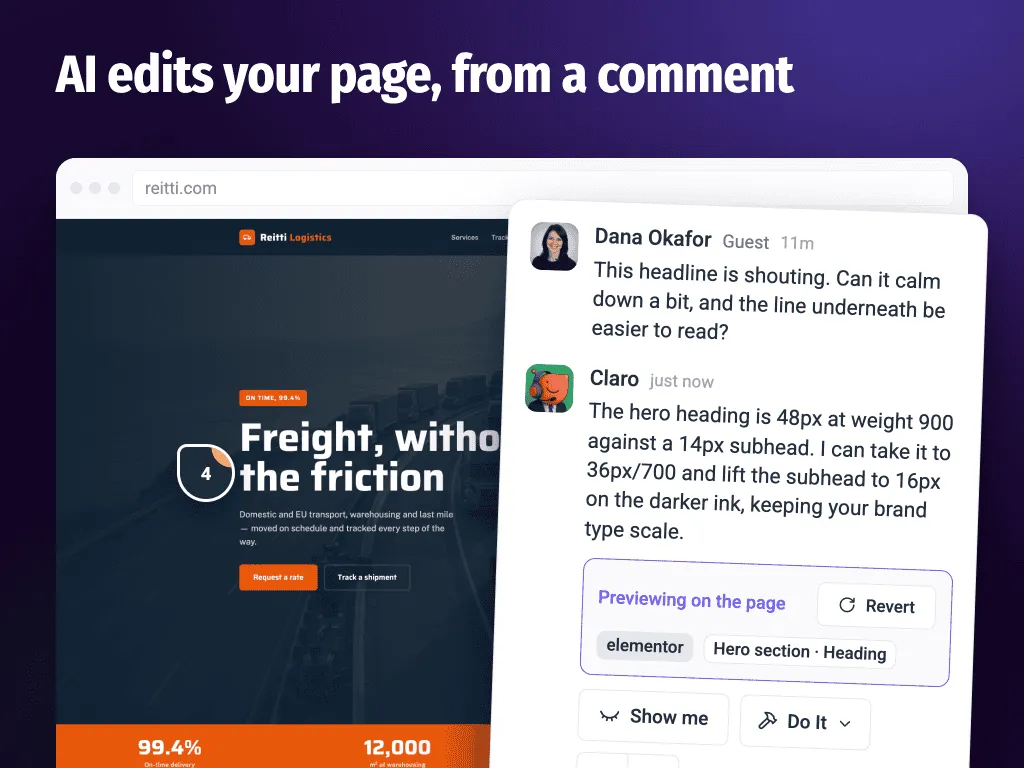
A client comment turned into an Elementor edit. The AI reads the comment, proposes the type change in your brand's scale, previews it on the live page, and reverts in one click if you say no. -
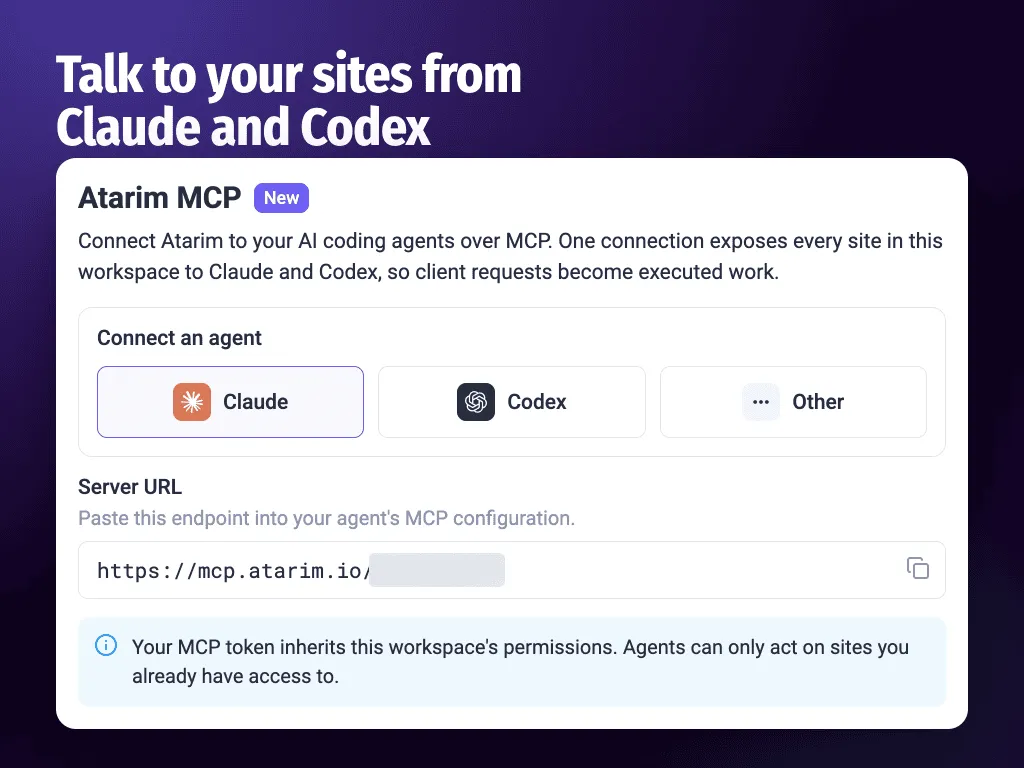
Connect Claude, Codex or any MCP client to your workspace. One connection and your AI can work on every site you already have access to, with your own permissions. -
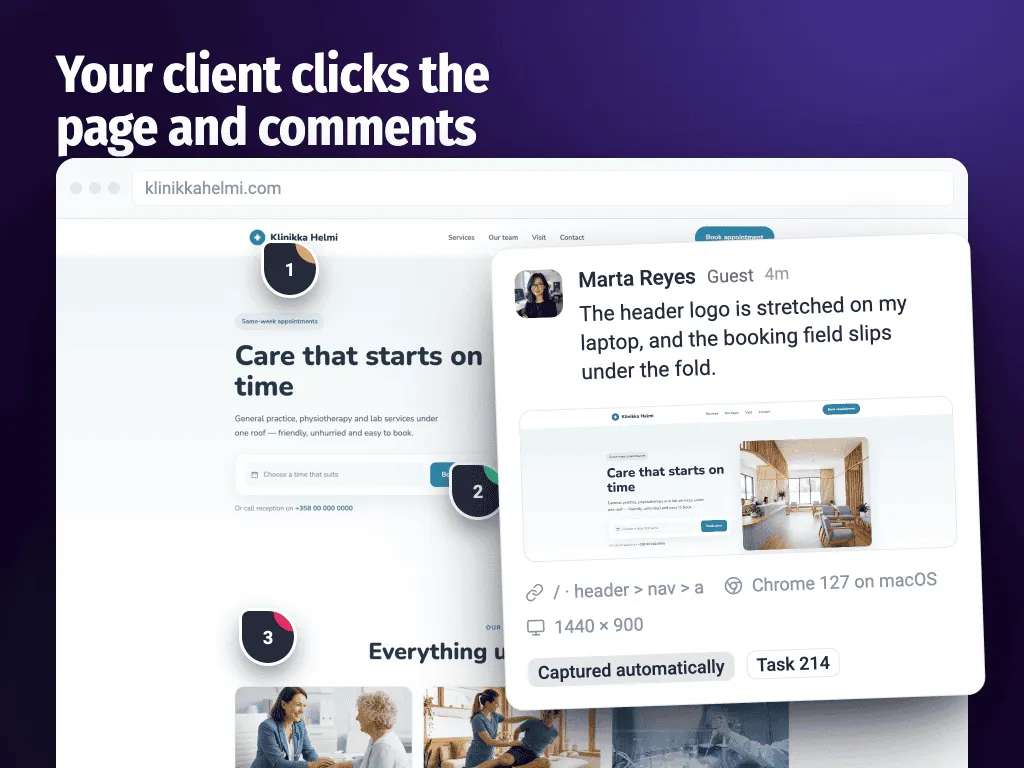
Point-and-click website feedback on a live page. Your client pins a comment where they mean it, and the screenshot, URL, CSS selector, browser and screen size are captured for them automatically. -
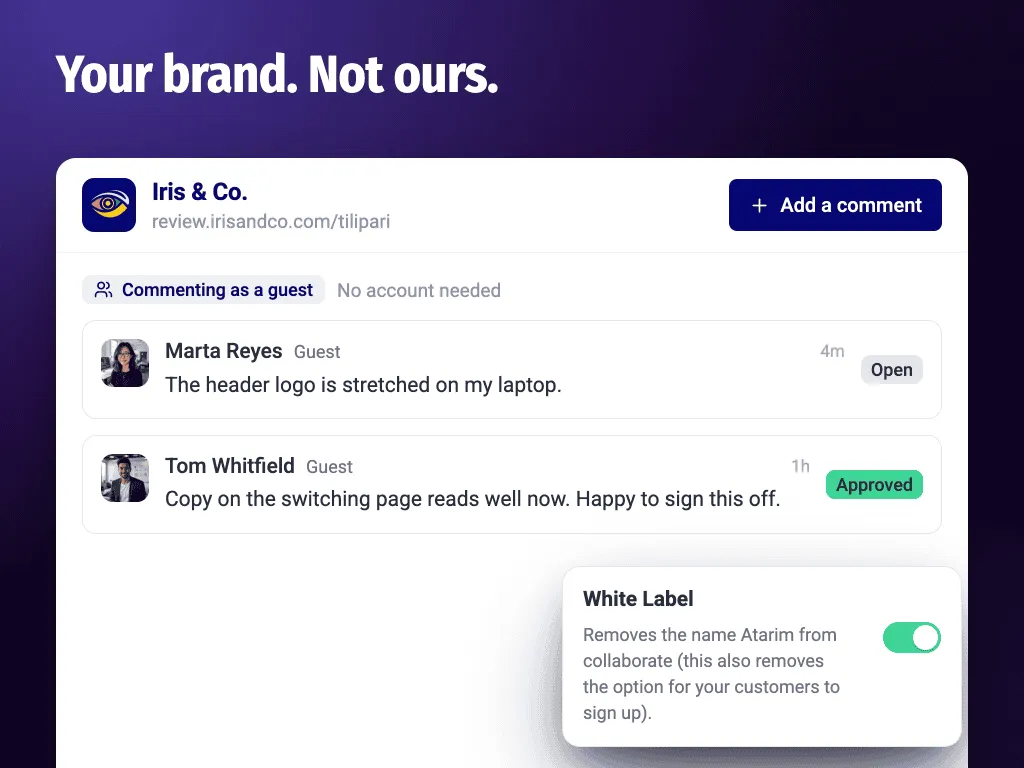
A white label client portal on your own domain. Clients and reviewers comment as guests with no account and no WordPress login, and the Atarim name is switched off. -
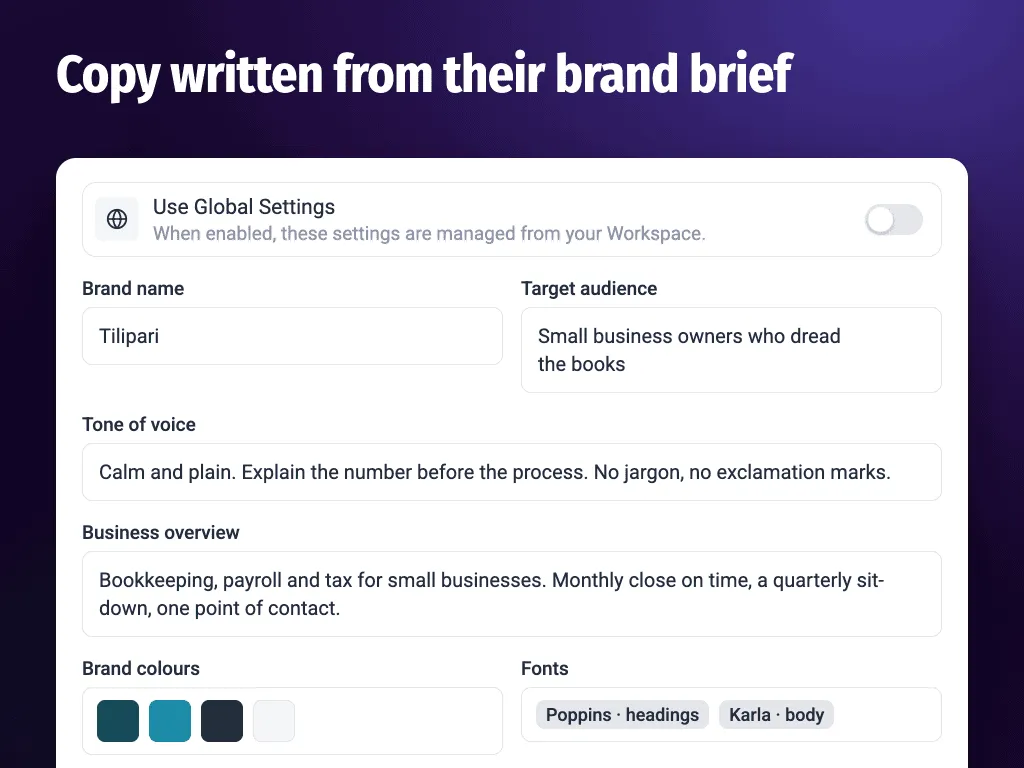
The brand brief the AI writes from: tone of voice, target audience, business overview, colours and fonts. Set it per client site or across the whole workspace, and copy comes back in their voice. -
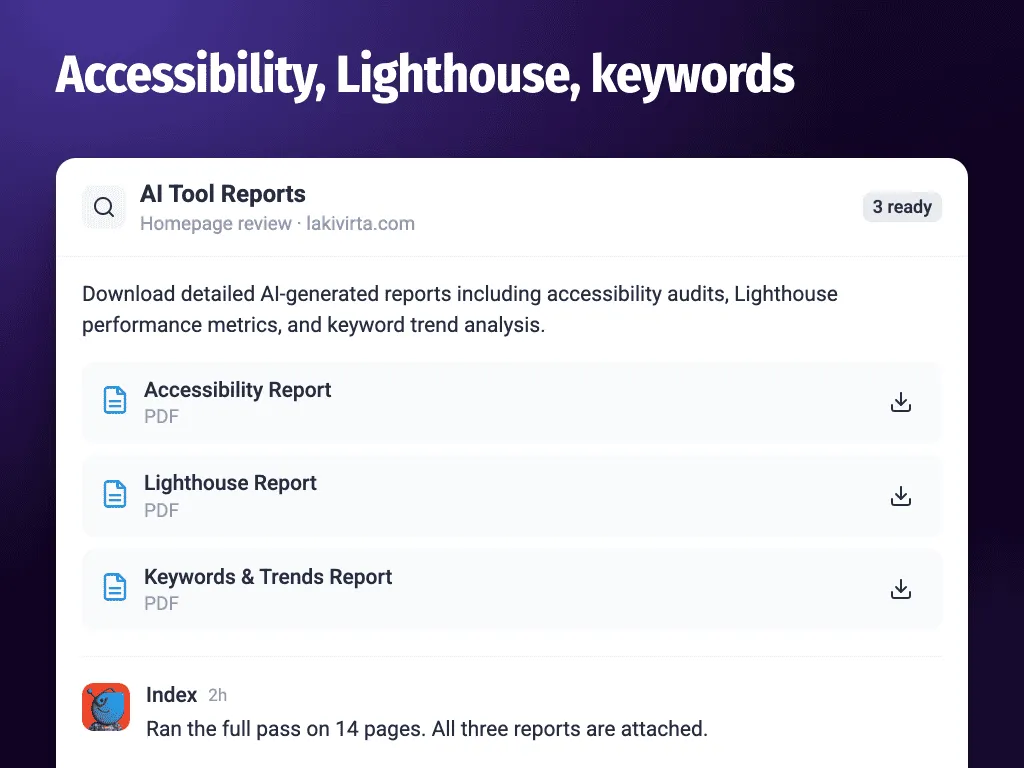
Downloadable reports for any site: an accessibility audit, Lighthouse performance scores, and keyword and trend analysis, as PDFs you can send straight to the client. -
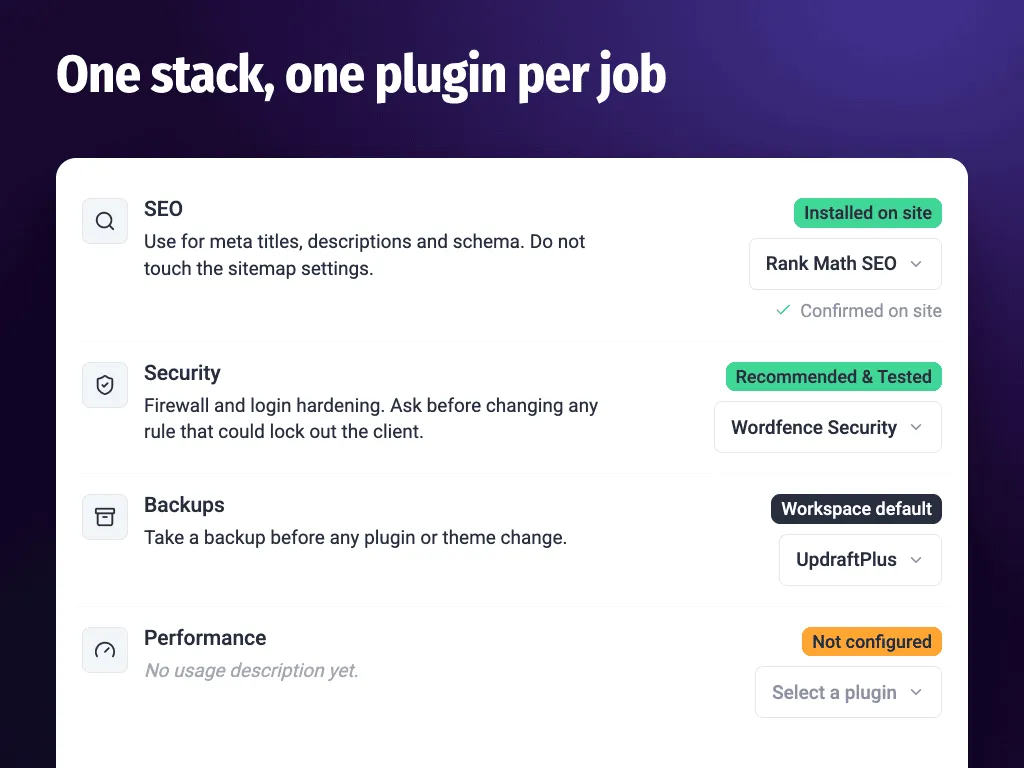
Your stack, one plugin per job. SEO, security, backups, performance and caching, each mapped to the plugin you already trust, with notes the AI has to follow. -
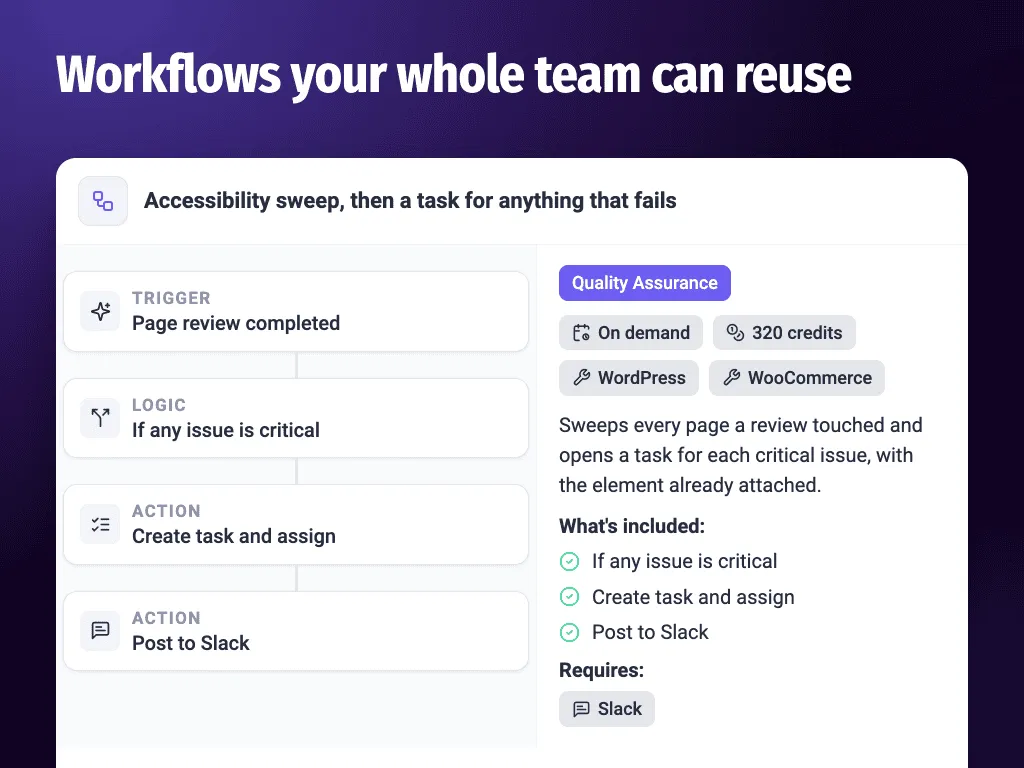
A workflow template. When a page review finishes, open a task for every critical issue and post it to Slack. You see the trigger, the actions and the credit cost before it runs.
Important information
- The AI action layer needs WordPress 6.9 or later. On older versions, feedback and collaboration still work and only the AI layer stays inactive.
- The AI can write to the site: edit pages, change theme files, update plugins and publish. Keep your own server-side backup as well, because built-in backups live on the same site.
- Requires PHP 7.4 or later. Twenty-one vulnerabilities have been published for this plugin and are marked patched. Keep it updated.
- Your site connects to an Atarim account, and instructions go through Atarim or the MCP client you choose.
- Custom systems the plugin does not know may not work well, so test on a difficult site first.
From the Atarim readme
Straight from the developer's WordPress.org listing.
Full description
You should not have to log in to WordPress to get work done.
This plugin means you don’t. It gives an AI real access to the site. Not read-only. It can edit a page, rewrite copy, fix a bug, update a plugin, change a Woo product and publish the change. You say yes first. Then it ships.
That is why we think this is the first plugin to install on any site you start or look after. It is the layer everything else runs on top of.
It also works on the site as it is. There is no rebuild and no migration. You do not move to a new platform, a new host or a new builder. Point it at a site built years ago, on a theme nobody remembers, and it works there too. Every site you already look after becomes an AI site the day you install this.
🔓 What “full access” means
Most AI tools reach WordPress through the REST API. That gets you posts and pages. Real client sites are more than posts and pages.
This plugin gives the AI a proper toolset for what your site actually runs. On a site with Elementor, a form plugin, WooCommerce and a backup plugin, that is over 200 separate operations. About half of them write.
📄 Pages and posts – Create, edit, delete and duplicate any post type. Read the revision history and restore an old version.
🧱 Page builders – Read the page structure. Add, move, edit and delete single elements. In Elementor it also reads the widget and style schema, and creates and applies global classes.
🧩 Gutenberg – Read a page block by block. Apply changes block by block.
📝 Theme files – List, read, copy and replace PHP, CSS and JS files.
🖼️ Media – Upload files, swap one image for another everywhere it appears, and write alt text in bulk.
🛒 WooCommerce – Products, variations, orders, coupons, tax and checkout settings. Sales and stock reports.
📥 Forms – Read every form and entry. Check how many submissions came in. Find forms that have stopped getting any.
🔌 Plugins and themes – Install, update, activate, turn off and delete.
⚙️ Users, menus, taxonomies and site settings – Roles, permalinks, reading and media settings.
The toolset grows with the site. More plugins installed means more the AI can reach.
ℹ️ The AI action layer requires WordPress 6.9 or later. It is built on the WordPress Abilities API, which is part of WordPress core from version 6.9 onwards. On earlier versions the rest of Atarim – visual feedback, comments, screenshots and collaboration – works exactly as normal. Only the AI action layer stays inactive.
✅ Try this: “The client has rebranded. Swap the old logo for the new one everywhere it appears, and fix the alt text while you are in there.”
🤖 Bring your own AI, or use ours
The plugin is an MCP server. That means you can point your own AI at it.
🧠 Use any MCP client – Claude, Codex or anything else that speaks MCP. Your AI gets the same access described above.
👥 Or use the six specialists – They come with Atarim and you assign work to them by name.
🖱️ Or click on the page – Point at anything on a live site, say what you want changed, and the work starts from that click.
Same site, same guardrails, whichever way you drive it. Setup commands for Claude, Codex and any other MCP client are on the Atarim MCP page.
✅ Try this: “Claude, read the homepage on the client site, work out what is making it slow, and fix it. Aim for 100% on lighthouse across the board.”
🛡️ Agency grade means it can be undone
Access is the easy part. Doing this safely on a site a client pays for is the hard part.
So every write goes through the same checks:
🗂️ Dated backups before every file change – Theme files are copied before they are touched. You can list every backup and restore any one of them.
🚫 Broken PHP is refused – Syntax is checked before a file is saved. Broken PHP is rejected, not written.
↩️ A restore is itself backed up first – So you can undo an undo.
👀 Nothing is deleted without a preview – Anything that deletes shows you what it would delete and does nothing until you confirm.
🔒 Your wp-config rules are respected – If the site has file editing turned off in wp-config.php, the plugin stops.
📋 Every action is logged – With a name against it.
Nothing publishes on its own unless you allow it. Copy and design changes are drafted and wait for you. Anything near checkout or payment goes to a person every time.
ℹ️ Keep your own backup as well. The checks above cover files and pages, and they live on the same site. They are not a server-side or “3rd location” full site backup. Keep one of those too, on your server or with a backup service you trust. An AI can get something wrong. So can a plugin update, a host, or a person. No site you are paid to look after should have only one way back. More on how this works on the Trust page.
✅ Try this: “That last change broke the layout. Put the file back how it was this morning.”
🔧 An example: updating a plugin
A plugin update is one click. Doing it well is not one click. Here is what happens instead.
First it reads the site and lists what has updates waiting. It checks the change log for each one and flags the risky ones. A backup is taken. Then it updates. Then it checks the site still loads and that your forms are still getting submissions. If something broke, you get told what and when. If nothing broke, you get a short report you can send to the client.
✅ Try this: “Run a full update round – plugins, themes and core. But use your own workflow, to do it properly, with the backup and testing.”
Same idea for the rest of it. Broken link sweeps. Page speed checks. Content and SEO reviews. Backups. Security checks.
⏰ It runs on a schedule, without you
You can set work to run on a cadence. Daily, weekly, monthly, or any cron schedule you like.
That is the part that changes the job. Nobody has to remember the monthly update round. Nobody has to notice that a contact form went quiet three weeks ago. The site is checked whether you are at your desk or not, and you hear about it when there is something to decide.
Work can also start from other things: a client email arriving, a comment being left, a task changing status, or another workflow finishing.
There are around 200 workflows ready to use, built on how good agencies already work. You pick which ones run and how much waits for your approval. If the one you need isn’t there, describe it in plain words or draw it on a canvas. See workflows.
✅ Try this: “Every Monday, check the site for broken links and fix the ones you can. Tell me about the rest.”
👥 The six specialists
You assign work to them by name.
🎨 Pixel – design – Drafts concepts and visuals from your brand kit.
🧭 Navi – UX and accessibility – Fixes the gaps instead of listing them.
📈 Index – SEO and speed – Metadata, headings, links, image weight, mobile.
✍️ Lexi – copy – Writes in your client’s voice.
🐛 Glitch – bugs and code – Finds the break, then writes the fix.
🧩 Claro – coordination – Turns vague feedback into clear work and directs the rest.
They tell you what they found and why. You are approving a decision, not guessing. Meet the AI Inner Circle.
💬 Visual feedback and client collaboration
This half of Atarim has been running since 2019, and it works on every WordPress version we support – not just 6.9 and up.
Your client opens the page and clicks on what they mean. They type a note. The comment arrives with a screenshot, the URL, the browser, the screen size and the exact element attached. No more “the button looks weird on my phone.”
🖱️ Visual feedback on any page – Leave clear, contextual notes that appear exactly where you click, just like putting a post-it on a page.
📸 Automatic screenshots – Every request includes a visual snapshot, so you always see what your client sees.
⚙️ Technical context included – Browser details, screen size, URL and the exact element are captured automatically, so nothing has to be chased.
💬 In-context discussions – Threads, replies and review rounds stay in one place, with no external apps and no project management back-and-forth.
🔐 Guest access – Anyone can leave feedback with no WordPress login. Perfect for client reviews and staging sites.
🎯 Smart task management – Assign, prioritise and track tasks, tags and statuses without switching tools.
📨 Grouped notifications – Daily or weekly summaries instead of endless email threads.
More on visual collaboration. Then you decide what the AI picks up. You ask for it in plain words:
✅ Try this: “Go through every task the client left in the last review round and do them all.”
🔗 Works with the stack you already have
You should not have to change how you build.
🧱 Page builders – Elementor, Gutenberg, Bricks, Divi, Beaver Builder, WPBakery, Breakdance, Etch, Mosaic and custom themes.
📥 Forms – WPForms, Gravity Forms, Fluent Forms, Formidable, Forminator, Ninja Forms, Contact Form 7 and Flamingo.
🗃️ Custom fields – ACF, Meta Box, JetEngine, Pods, ACPT and ASE.
📈 SEO – Yoast, Rank Math and All in One SEO.
🖥️ Hosting, backups and fleets – MainWP, JetBackup, WP Activity Log.
🔌 Your other tools – ClickUp, Asana, Jira, Trello, Basecamp, Slack, Figma, Zapier, Pabbly, Make and webhooks.
The full list is on the integrations page.
🏷️ Your clients see your agency
Your logo and your colours go on the screens your client works in. They comment, ask questions and suggest ideas under your brand. What ships is still your call.
💳 Price
A free account gets you one site and 200 AI credits. That is enough to put a real client site in and watch the AI do real work before you pay anything.
There is one paid plan. It costs $67 a month. You get everything: 5,000 credits, 1,000 sites and 100 seats. 5,000 credits covers three to five clients. Think care plan clients, on around $100 a month each. Credits go up as your client list does, not as your hours do.
Full details on the pricing page.
Over 50,000 teams and 1.6 million sites since 2019. SOC 2 and GDPR compliant.
External Services
This plugin integrates with the Atarim collaboration platform to enable real-time visual feedback, commenting, and AI collaboration directly on your website.
The collaboration interface is powered by a remote JavaScript file hosted on Atarim’s infrastructure.
What the service does
When enabled, the plugin loads a remote JavaScript file from Atarim’s servers to inject the collaboration interface into the front end of the website. This script enables:
• Visual feedback overlays
• Real-time commenting
• AI-powered collaboration tools
• Task synchronization with the Atarim dashboard
Service domains
The plugin communicates with the following external domains:
• https://ij-script.pages.dev/atarim.js
Data transmitted
Depending on configuration and usage, the following data may be transmitted to Atarim:
• Site ID (generated during connection process)
• Current page URL (to associate feedback with the correct page)
• Authentication tokens (for connected users)
• Minimal metadata required to initialize the collaboration interface
No personal data is transmitted unless a user explicitly authenticates with Atarim.
When data is transmitted
Data is transmitted only under the following conditions:
• The site administrator has connected the website to an Atarim account.
• Collaboration is enabled in the plugin settings.
• An authorized user accesses the site.
• A user has provided consent (see “User Consent” below).
The remote collaboration script is not loaded unless collaboration is active.
Account requirement
An Atarim account is required to use collaboration features.
Terms and Privacy
Terms of Service
Privacy Policy
User Consent
Before loading the Atarim collaboration interface, the plugin displays a consent modal to eligible WordPress users.
Users are informed that enabling collaboration will load the Atarim collaboration interface from Atarim’s servers.
By clicking the consent button (e.g., “Connect Your WordPress Account”), users explicitly agree to:
• Loading the Atarim collaboration script
• Transmitting required site and session data to Atarim’s services
• Processing data in accordance with Atarim’s Terms of Service and Privacy Policy
The collaboration interface is injected only after consent is granted.
Site administrators can disable collaboration at any time in the plugin settings.
Installation
• Install from the plugin directory, or upload the files to /wp-content/plugins/.
• Activate it on the Plugins screen.
• Log in, or make a free account, to connect the site.
• Use a real client site, not a blank test one. A blank site has nothing to find.
Feedback works as soon as you activate. To let the AI do work, turn it on from your account.
Developer FAQ (13)
- I already use ChatGPT. What does this add?
- ChatGPT can tell you what to change. It cannot open your site and change it. This can. It also looks at the site on a schedule, so it finds things nobody asked about yet.
- Can I use my own AI instead of yours?
- Yes. The plugin is an MCP server. Point Claude, Codex or any MCP client at it and your AI gets full access to the site, with the same backups, checks and approvals. Setup takes a couple of minutes: see the Atarim MCP page.
- Do I still need to log in to WordPress?
- For most work, no. You can run the site from Atarim or from your own AI. Everything reports back with a preview and a log.
- Does it change things without asking?
- Only if you let it. By default, content and design changes are drafted and wait for you. Updates and backups can run on their own if you allow it. Payment and checkout always go to a person.
- What if it breaks something?
- Theme files are backed up before every change, and broken PHP is refused before it is saved. Pages have revisions you can restore. Deletions show you what they would remove and wait. And every change is logged, so you can see what happened and when. Even with all that, keep a third party backup in place. It is good practice on any client site, with or without this plugin, in case of a fatal error.
- Do I have to rebuild the site first?
- No. That is the point. It works on the site as it is, whatever it was built with and whenever it was built. There is nothing to migrate and nothing to move. Install it and the site you already have can be run by AI.
- My sites are custom. Will it cope?
- It depends on the site, and we would rather say so. It loads real tooling for Elementor, Gutenberg, WooCommerce, form plugins and custom fields when it finds them. It cannot guess at a system it has never seen. Install it on your most awkward client site and see. That part is free.
- Does it work with my page builder?
- Yes. Elementor, Gutenberg, Bricks, Divi, Beaver Builder, WPBakery, Breakdance, Etch, Mosaic and custom themes. It edits the real structure, so your layout and analytics stay intact.
- How do I get paid for work the client did not ask for?
- That is the usual reason people stop doing it. When the AI spots work outside a client’s plan, it writes up the scope and a price at your rate first. You send it as a quote.
- Can clients comment without an account?
- Yes. Guests can mark up a live or staging page with no WordPress login.
- Will my clients know an AI did the work?
- We do not hide it and we do not announce it. The work arrives under your brand. If a client asks, what they find is true.
- Does it work on sites that are not WordPress?
- Feedback, review and analysis work on any URL. The full access described here needs the plugin, so that part is WordPress only.
- What does it cost?
- A free account includes one site and 200 AI credits. The paid plan is $67 a month. It turns on the AI team, the workflows and the schedules, across up to 1,000 sites. See the pricing page.
Downloads, last 30 days
Trend vs previous period: +23.7%
Average daily downloads: 114 over the last 7 days , 218 over 30 days.
Security history
Past CVEs, patched · 21 published vulnerabilities (Wordfence) · most recent Aug 18, 2026
- Patched 9.1 Critical Atarim - Client Interface <= 3.9.1 - Missing Authorization via AJAX actions Jul 7, 2023 · affects [*, 3.9.2) · fixed in 3.9.2
- Patched 7.5 High Visual Website Collaboration, Feedback & Project Management - Atarim <= 3.22.6 - Hardcoded Credentials CVE-2024-2038 · May 22, 2024 · affects *-3.22.6 · fixed in 3.30
- Patched 4.3 Medium Atarim <= 4.3.2 - Missing Authorization CVE-2026-32447 · Mar 8, 2026 · affects *-4.3.2 · fixed in 4.3.3
- Patched 9.8 Critical Atarim <= 4.2.1 - Unauthenticated Arbitrary File Upload CVE-2025-60187 · Jul 29, 2025 · affects *-4.2.1 · fixed in 4.2.2
- Patched 5.3 Medium Atarim <= 4.2.1 - Unauthenticated Information Exposure CVE-2025-62895 · Sep 15, 2025 · affects *-4.2.1 · fixed in 4.2.2
- Patched 5.3 Medium Atarim <= 4.3.1 - Missing Authorization CVE-2026-25019 · Jan 30, 2026 · affects *-4.3.1 · fixed in 4.3.2
- Patched 6.1 Medium Atarim <= 3.12 - Unauthenticated Cross-Site Scripting CVE-2023-47544 · Nov 7, 2023 · affects *-3.12 · fixed in 3.13
- Patched 4.4 Medium Atarim <= 3.31 - Authenticated (Administrator+) Stored Cross-Site Scripting CVE-2024-37434 · Jun 28, 2024 · affects *-3.31 · fixed in 3.32
Show all 21 vulnerabilities
- Patched 6.1 Medium Atarim <= 4.1.0 - Reflected Cross-Site Scripting CVE-2025-26993 · Feb 23, 2025 · affects *-4.1.0 · fixed in 4.1.1
- Patched 5.3 Medium Atarim <= 4.0.9 - Missing Authorization to Unauthenticated Arbitrary Post Deletion CVE-2025-22657 · Feb 3, 2026 · affects *-4.0.9 · fixed in 4.1.0
- Patched 5.3 Medium Atarim <= 4.2.1 - Missing Authorization CVE-2025-67993 · Feb 9, 2026 · affects *-4.2.1 · fixed in 4.2.2
- Patched 5.3 Medium Visual Website Collaboration, Feedback & Project Management - Atarim <= 4.0.9 - Missing Authorization to Authenticated (Subscriber+) Project Page/File Deletion CVE-2024-12104 · Jan 20, 2025 · affects *-4.0.9 · fixed in 4.1.0
- Patched 5.4 Medium Visual Website Collaboration, Feedback & Project Management - Atarim <= 4.0.2 - Missing Authorization to Authenticated (Subscriber+) Settings Update CVE-2024-7621 · Aug 9, 2024 · affects *-4.0.2 · fixed in 4.0.3
- Patched 5.3 Medium Atarim <= 4.0 - Missing Authorization CVE-2024-38771 · Jul 19, 2024 · affects *-4.0 · fixed in 4.0.1
- Patched 5.3 Medium Atarim <= 4.2.1 - Unauthenticated Information Exposure CVE-2025-60188 · Jul 29, 2025 · affects *-4.2.1 · fixed in 4.2.2
- Patched 7.2 High Visual Website Collaboration, Feedback & Project Management - Atarim <= 3.30 - Unauthenticated Stored Cross-Site Scripting CVE-2024-2793 · May 30, 2024 · affects *-3.30 · fixed in 3.31
- Patched 7.2 High Atarim <= 4.0.8 - Unauthenticated Stored Cross-Site Scripting CVE-2025-24570 · Jan 24, 2025 · affects *-4.0.8 · fixed in 4.0.9
- Patched 6.1 Medium Atarim <= 3.9.3 - Reflected Cross-Site Scripting CVE-2023-37393 · Aug 10, 2023 · affects *-3.9.3 · fixed in 3.9.4
- Patched 5.3 Medium Atarim <= 4.0.1 - Missing Authorization via remove_feedbacktool_notice() CVE-2024-43290 · Aug 16, 2024 · affects *-4.0.1 · fixed in 4.0.2
- Patched 8.1 High Atarim <= 5.1.1 - Authenticated (Author+) Arbitrary File Deletion via '_wp_attached_file' Meta CVE-2026-19942 · Aug 18, 2026 · affects *-5.1.1 · fixed in 5.1.2
- Patched 9.8 Critical Atarim <= 4.2.1 - Unauthenticated Privilege Escalation CVE-2025-60195 · Jul 27, 2025 · affects *-4.2.1 · fixed in 4.2.2
Recent releases
- v5.1.9
**Safer media deletion** - before deleting an image, the assistant now checks whether it is used anywhere on the site (page content, page builders, galleries or settings), not just as a featured...
- v5.1.8
**Use plugins' own AI tools** - when a site has a plugin that provides its own AI tools (such as Elementor or WS Form), the assistant can now use those native tools directly, falling back to...
- v5.1.7
**Additional CSS kept exactly as written** - CSS saved through the AI tools is no longer altered on save, so inline SVG backgrounds, HTML entities and other valid CSS are preserved instead of...
- v5.1.6
**Clearer Do It status** - when Do It can't run on a page, the plugin now tells Atarim why (Do It is turned off, the page is a blog index or archive, or your account can't edit it), so you no...
- v5.1.5
**Update checks report** - list-plugins / list-themes now indicate whether WordPress's update check actually completed, so a failed or rate-limited check can no longer look like "everything is up...
Show 10 older releases
- v5.1.4
**Faster, leaner AI actions** - The AI can now batch many operations into a single request - for example updating alt text on every image, or applying the same change across a page - instead of...
- v5.1.3
**Do It: more page builders, and undo** - The AI action layer can now target and edit Beaver Builder and SiteOrigin layouts alongside Gutenberg and Elementor, with more reliable block handling,...
- v5.1.2
**Security fix (arbitrary file deletion)** - Hardened the media-replace ability so it only ever operates on files inside the uploads directory, and blocked traversal/absolute values and other...
- v5.1.1
**Back up and restore through JetBackup** - Using JetBackup, a connected AI can take a fresh backup before it starts editing, watch it finish, and restore a snapshot if a change needs undoing. *...
- v5.1
**Full site editing over MCP** - Filled the remaining gaps in the editing flow, so a connected AI can take a page or template change from start to finish without running into a missing ability. *...
- v5.0
**Requires WordPress 6.9+** - The AI abilities run on the WordPress Abilities API, available in core from version 6.9. On older versions the rest of the plugin keeps working and the AI layer...
- v4.4
**DoIt** - Magical Editing on the Live Page (Beta) * DoIt lets you update content directly on the live page - no need to open the page builder. Click on a 'do it' button inside task. The change is...
- v4.3.5
Added quick access to Project Settings directly within the plugin settings. * Integrated Share Modal into the Settings page for easier project sharing and collaboration.
- v4.3.4
**Optimization** - Sanitized and improved project connectivity.
- v4.3.3
**Security** - Sanitized and improved input validation. * **Compatibility** - Standardized plugin prefixes to prevent naming conflicts. * **Compliance** - Updated plugin headers and readme to...
Atarim FAQ
What does it add beyond ChatGPT?
ChatGPT can suggest changes but cannot open your site and edit it. This plugin lets an AI act on the site, and it also checks the site on a schedule.
Can I use my own AI?
Yes. The plugin is an MCP server, so Claude, Codex or any MCP client can connect with the same backups, checks and approvals.
Does it change things without asking?
Only if you allow it. By default content and design changes are drafted and wait for you. Payment and checkout always go to a person.
What if it breaks something?
Theme files are backed up before each change, broken PHP is refused, pages have revisions and deletions wait for confirmation. Keep a separate server backup too.
Do I need to rebuild my site?
No. It works on the site as it is, with no migration or new platform.
Which page builders work?
Elementor, Gutenberg, Bricks, Divi, Beaver Builder, WPBakery, Breakdance, Etch and Mosaic are listed, as well as custom themes.
Do I still need to log in to WordPress?
For most work, no. You can run tasks from Atarim or your own AI, and each change reports back with a preview and a log.
Atarim alternatives

Real-time SEO guidance, schema, and AI built in. Help search engines and AI systems understand your content. All AI tools included, no hidden fees. Yoast SEO: the #1 WordPress SEO plugin Since 2008, Yoast SEO has…

Rank Math SEO - WordPress AI SEO Plugin to Rank Higher 📈 ★★★★★ Rank Math SEO helps you stay ahead of competitors with AI-powered SEO tools built for today’s search engines and AI assistants. The plugin brings…

AIOSEO - The Original AI SEO Plugin for WordPress All in One SEO is the original WordPress SEO plugin, founded in 2007 and trusted by over 3 million website owners and SEO experts. AIOSEO is a complete AI SEO plugin…

SEOPress - The fast, privacy-first WordPress SEO plugin, ready for AI search Rank higher in Google AND in AI answer engines (ChatGPT, Claude, Perplexity, Gemini). SEOPress is the all-in-one WordPress SEO plugin…

CrawlWP - The WordPress SEO Plugin That Also Gets You Indexed Optimize every page, submit it to search engines (Google, Bing, Yandex, Yep etc) the moment you publish, and see which ones actually indexed it - all…

ThinkRank is an AI SEO plugin for WordPress that helps you write SEO titles and meta descriptions, optimize content around a focus keyword, add schema markup, generate XML sitemaps, and review Google Search Console…
Listing data from WordPress.org and the Wordfence vulnerability feed, refreshed Nov 9, 2026; listing details fetched Nov 14, 2026. Screenshots are from the plugin's WordPress.org listing. Not affiliated with Vito Peleg.