
BEW
BEW - Elementor Addons, Templates & AI Builder · by Bosa Themes
- active installs
- 20K+
- 28 ratings
- 4.5
- since last update
- 28d
- releases in 12 months
- —
- support threads resolved
- —
- avg daily downloads
- 421
- on WordPress.org
- 4.5 years
BEW at a glance
BEW is a free WordPress AI WooCommerce plugin by Bosa Themes with 20K+ active installs and a 4.5/5 rating from 28 reviews. It was last updated on Oct 12, 2026, is tested up to WordPress 7.1.4 and needs PHP 7.4+. All 1 of its published vulnerabilities have patched versions. Our quality score is 87/100.
What is BEW?
BEW is an add-on for Elementor that supplies store widgets, general site widgets, a template library and AI content tools. It is built around WooCommerce, with 16 widgets for product grids, carousels, categories, search, cart, account pages, wishlist and compare. It also works on sites without WooCommerce, where only the store widgets stay unavailable. The widgets appear in their own section in the Elementor panel, so they are easy to find next to the built-in ones.
The template library holds more than 3,000 kits, pages and sections, split between free and paid. You insert them from inside the Elementor editor. Besides shop layouts, the listing mentions templates for business, portfolio and blog sites. Elementor Pro is not required. Free and paid templates sit in the same library, so check which ones need Pro before you import a full kit onto a live site.
The AI Builder works inside the editor field you are editing. The free version has a text generator. Product, image, bulk, repeater and blog generators are paid. AI runs on your own API key from a provider you choose, and the provider bills you directly, with no markup from the plugin. Generation history and saved presets are included, which helps if you want consistent wording across many fields and pages.
Best for
- Elementor users building a WooCommerce store
- Builders who want ready-made shop layouts
- Site owners who want AI text inside the editor with their own API key
- Anyone using Hello Elementor or Bosa themes
BEW features
WooCommerce widgets
Product grids, archives, carousels, lists, categories, search with category filter, cart with live totals and a styled My Account page.
Wishlist and compare
Widgets for the YITH wishlist and compare plugins let shoppers save products and compare them side by side.
General site widgets
Site logo, dropdown navigation, blog grid and a Contact Form 7 widget are included for any site.
Template library
More than 3,000 Elementor kits, pages and sections, inserted from a modal in the editor. Some are free and some need Pro.
AI text generator
Describe what you need, preview the result and apply it to the text field you are editing. The free version includes this generator.
Generation history
Each AI result is saved per field, so you can browse older versions and restore one without generating again.
Saved presets
Keep favorite instructions as named presets and reuse them across fields for a consistent tone.
Choice of AI providers
Connect your own key for Google, OpenAI, Anthropic, Replicate, OpenRouter, Mistral, xAI, Perplexity or Groq.
Pro generators
Paid generators cover product copy and images, standalone images, bulk fields, repeater items and blog posts.
Pro widgets
Paid widgets include hot deals, product slider, product tabs, grid carousel, product accordion, image carousel and testimonial slider.
BEW free vs pro
Free WordPress.org version
- 16 widgets: WooCommerce store widgets and general site widgets
- Free templates from the library
- AI text generator, generation history and saved presets
- AI provider connection with your own API key
Pro Paid version
- Extra widgets such as Woo Hot Deals, Product Slider, Product Tabs and Testimonial Slider
- Pro templates in the library
- AI Products, Image, Bulk, Repeater and Blog generators
A paid version exists and adds the widgets, templates and AI generators above. The listing does not give prices. AI features need your own API key from a provider such as OpenAI, Google or Anthropic, and that provider bills you directly.
How to use BEW
- Install the plugin
In wp-admin, go to Plugins, then Add New, search for BEW, then install and activate it. Install Elementor if you are prompted to.
- Open a page in Elementor
Edit a page with Elementor and look for the BEW Elements section in the widget panel.
- Add widgets or a template
Drag in widgets, or click the BEW Templates Library icon, then browse and import a kit, page or section.
- Connect an AI provider
Go to BEW, then Settings, then AI Builder. Choose a provider and paste in your API key.
- Generate content
Click the AI option in a text field, describe what you need, preview the result and apply it to the field.
BEW screenshots (3)
-
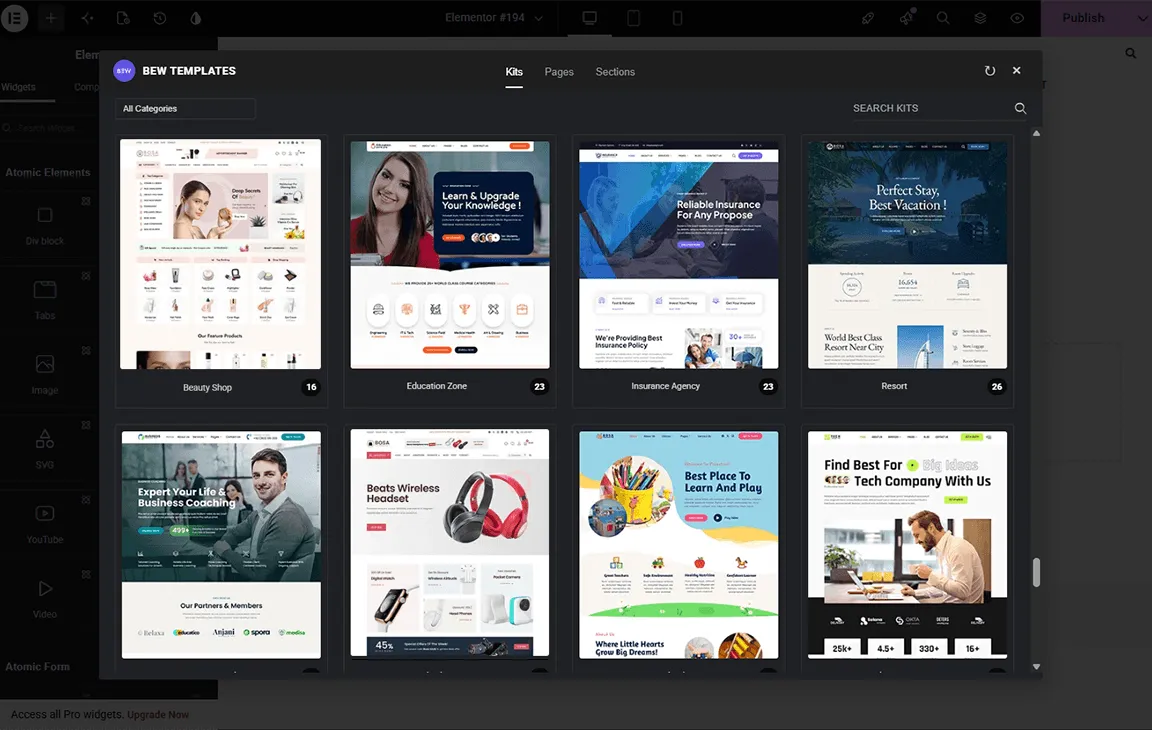
BEW Templates Library -
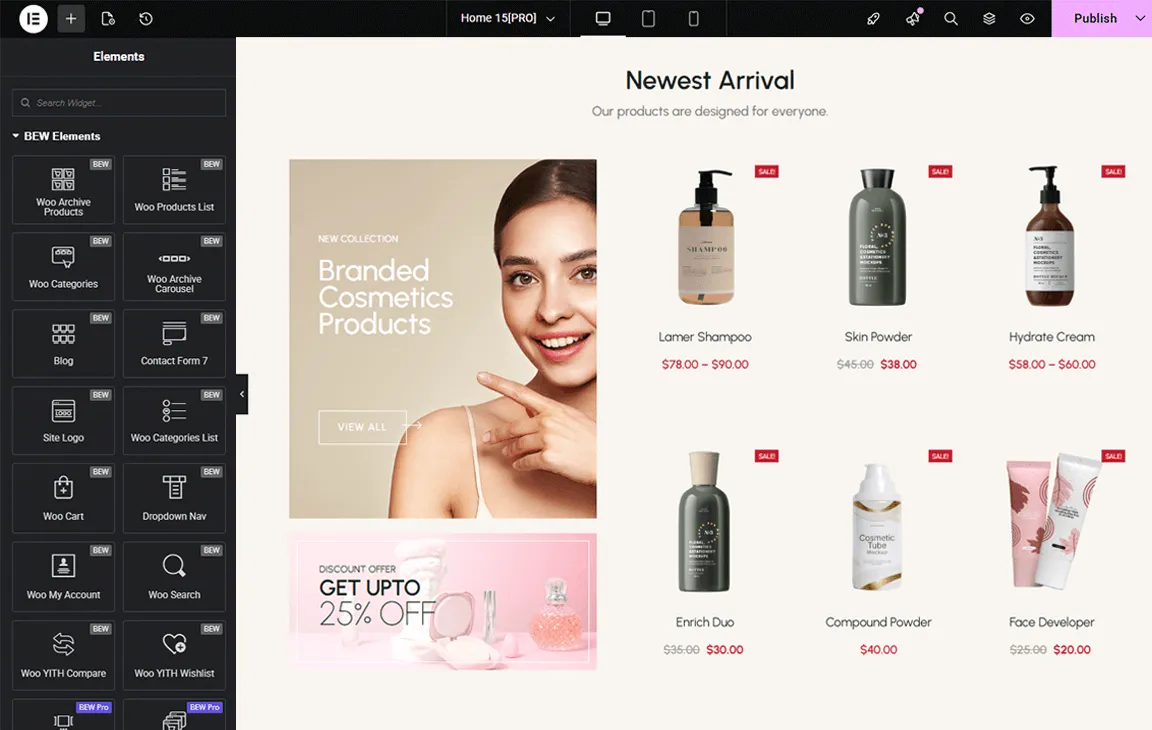
BEW Widgets -
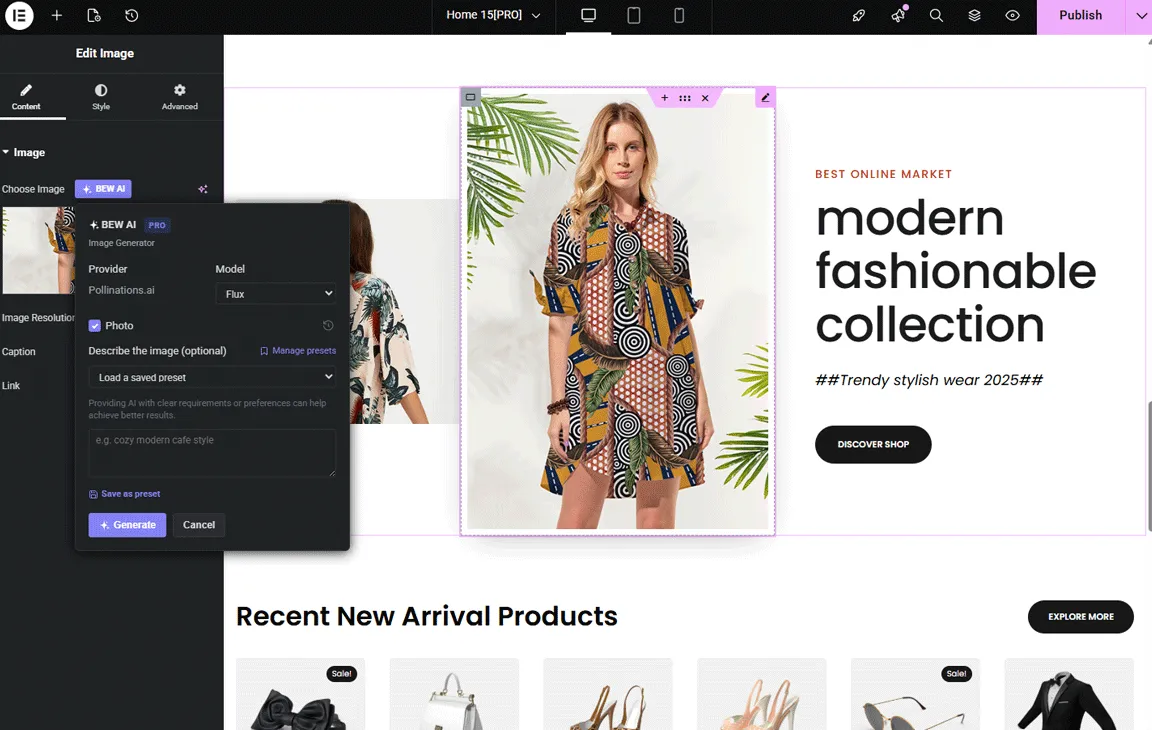
AI-powered Content Generator
Important information
- Elementor must be installed and active. Elementor Pro is not required.
- WooCommerce widgets only appear when WooCommerce is installed. The wishlist and compare widgets rely on the YITH plugins.
- Template import contacts the vendor's template service, and AI requests go to the provider you choose with your own key, which bills you.
- Styling may differ from the demos, because your theme can override Elementor or WooCommerce styles.
- The plugin needs WordPress 6.9 and PHP 7.4, and is tested up to WordPress 7.1.4. One vulnerability has been published, and it is patched.
From the BEW readme
Straight from the developer's WordPress.org listing.
Full description
Built for Shop, Ready for Every Website. BEW gives Elementor the widgets, templates, and AI tools to launch and grow your online store — or any website — faster.
WooCommerce is at its core, with 16 widgets built for stores, from product grids and carousels to cart, search, wishlist, and compare. Alongside them, you get essential site widgets, site modules, a 3,000+ template library, and AI-powered content generation right inside the Elementor editor.
For more information, visit the official BEW website.
🚀 3,000+ Ready-to-use Elementor Kits, Pages & Sections (Free & Pro)
Pre-built Template Library: Access a collection of Elementor kits, pages, and sections templates to build your site quickly and effortlessly.
Store-Ready Templates: Launch a WooCommerce store quickly with dedicated shop layouts, product pages, and sections.
Every Niche Covered: Beyond eCommerce, find templates for business, portfolio, blog, and many other industries.
Quick Template Insertion: Choose and insert templates right inside the Elementor editor for fast and hassle-free customization.
Browse the full collection of available Kits, Pages & Sections in the Template Library.
🌟 Widget Collection
Elementor widgets built for WooCommerce stores, plus essentials for every site.
🛒 WooCommerce Widgets
Woo Grid Product: Display products in a grid layout. [VIEW DEMO]
Woo Archive Products: Display product archives in a structured layout. [VIEW DEMO]
Woo Archive Carousel: Showcase products in a carousel format. [VIEW DEMO]
Woo Products List: Present products in a clean, navigable list format. [VIEW DEMO]
Woo Categories: Display product categories for easier navigation. [VIEW DEMO]
Woo Categories List: Display product categories in a structured list layout. [VIEW DEMO]
Woo Search: Add a product-focused search box with category filtering. [VIEW DEMO]
Woo Cart: Display a fully functional WooCommerce cart with live totals. [VIEW DEMO]
Woo My Account: Display the WooCommerce My Account page with custom styling. [VIEW DEMO]
Woo YITH Wishlist: Let customers save favorite products to a wishlist. [VIEW DEMO]
Woo YITH Compare: Let customers compare products side by side. [VIEW DEMO]
🧩 General Widgets
Site Logo: Customize and display your site branding. [VIEW DEMO]
Dropdown Nav: Build multi-level dropdown navigation menus. [VIEW DEMO]
Blog Grid: Display blog posts in a clean grid layout. [VIEW DEMO]
Contact Form 7: Integrate contact forms with flexible field options. [VIEW DEMO]
✅ Pro Widgets
Woo Hot Deals: Highlight promotional offers and discounts. [VIEW DEMO]
Woo Product Slider: Showcase products in a sliding format. [VIEW DEMO]
Woo Product Tabs: Organize products in a clean tab layout for improved navigation. [VIEW DEMO]
Woo Grid Carousel: Combine grid and carousel layouts for dynamic display. [VIEW DEMO]
Woo Product Accordion: Organize product information in collapsible accordion panels. [VIEW DEMO]
Image Carousel: Display images in an interactive carousel format for better visual engagement. [VIEW DEMO]
Testimonial Slider: Showcase customer reviews in a rotating slider format to build trust. [VIEW DEMO]
✨ BEW AI Builder
AI-Powered Content Generators
The BEW AI Generators are BEW AI’s core content-generation tools, built directly into the Elementor editor. Instead of switching to a separate AI tool and copy-pasting content back into your page, you can generate content directly within the widget field you’re editing and apply the results with one click.
Text Generator: Generate on-brand headlines, descriptions, and any text field right inside the Elementor editor. Describe what you need, preview the result, and apply it with one click.
Products Generator [PRO]: Generate titles, descriptions, and images for your WooCommerce products and categories directly from the page you’re designing — no switching to the products admin screen.
Image Generator [PRO]: Create original images for any image field in your widgets without leaving the editor. Describe the image, generate, and apply it directly to your design.
Bulk Text & Image Generator [PRO]: Generate every text and image field inside a widget in one pass. Pick which fields to include, generate once, and apply them all together instead of field by field.
Repeater Generator [PRO]: Generate content across every item in a repeater-based widget — like the slides in an Image Carousel — in one pass instead of editing each one by hand.
Blog Generator [PRO]: Generate blog post titles, content, excerpts, and featured images from inside the editor — write and design in the same place.
✅ BEW AI – Core Features
Generation History: Every AI generation is automatically saved per field, so you can browse past results and restore an earlier version instantly — no need to regenerate something you already liked.
Saved Presets: Save your go-to instructions as a named preset and reuse them across fields and projects, so you get consistent tone and style without retyping the same prompt every time.
AI Provider Integration: Connect AI providers using your own API keys. Bring the account you already use with your AI provider — no separate subscription, no markup. Pay the provider directly and choose the model that best fits your needs and budget. Supported Providers: Google, OpenAI, Anthropic (Claude), Replicate, OpenRouter, Mistral, xAI (Grok), Perplexity, Groq
Learn more about the BEW AI Builder workflow in the documentation.
🤝 Compatibility
BEW works with any theme that supports Elementor. These are the ones we recommend.
Themes BEW works great with:
• Bosa
• Bosa Family Themes
• Bosa Pro (premium)
• Hello Elementor
• Hello Commerce
• Hello Biz
Plugins BEW integrates with:
• Elementor
• WooCommerce
• Contact Form 7
• YITH WooCommerce Compare
• YITH WooCommerce Wishlist
Import Templates
• After activation, you may be prompted to install required plugins such as Elementor (if not already installed).
• Open the page and click Edit with Elementor.
• Click the BEW Templates Library icon to open the template modal, then browse and import the available templates.
Elementor Widgets
All widgets are available in Elementor under the “BEW Elements” section.
API Key Setup
Connect your preferred AI provider under BEW → Settings → AI Builder and enter the required API Key to enable AI-powered features.
External Services
This plugin connects to the Bosa Themes template service at https://demo.bosathemes.com/bosa/ to retrieve template listings, preview data, and template content for the Template Library functionality. This connection is required to display and import templates into your website.
These requests include your site’s URL (sent as part of the request headers) so the service can identify which site is connecting. No personal data, user information, or site content is transmitted — only read-only requests for template metadata and content are made.
If a template requires a third-party plugin that isn’t already installed, and you choose to install it directly from the template import screen, that installation request is sent to the WordPress.org plugin repository, not to our servers.
Service URL: https://demo.bosathemes.com/bosa/
Privacy Policy: https://bosathemes.com/privacy-policy/
This plugin’s AI Content Generator feature is entirely optional and only activates once you enter your own API key for one of the following third-party AI providers. When you use the feature, the field’s current text (and, if provided, your own instruction/prompt) is sent directly from your server to whichever provider you have connected, using your own API key and account, in order to generate replacement text. No content is sent unless you have connected a provider and actively trigger a generation.
• Google (Gemini) — https://ai.google.dev/gemini-api/terms — Privacy: https://policies.google.com/privacy
• OpenAI — https://openai.com/policies/row-terms-of-use/ — Privacy: https://openai.com/policies/row-privacy-policy/
• Anthropic (Claude) — https://www.anthropic.com/legal/consumer-terms — Privacy: https://www.anthropic.com/legal/privacy
• Replicate — https://replicate.com/terms — Privacy: https://replicate.com/privacy
• OpenRouter — https://openrouter.ai/terms — Privacy: https://openrouter.ai/privacy
• Mistral — https://mistral.ai/terms/ — Privacy: https://mistral.ai/terms/#privacy-policy
• xAI (Grok) — https://x.ai/legal/terms-of-service — Privacy: https://x.ai/legal/privacy-policy
• Perplexity — https://www.perplexity.ai/hub/legal/terms-of-service — Privacy: https://www.perplexity.ai/hub/legal/privacy-policy
• Groq — https://groq.com/terms-of-use/ — Privacy: https://groq.com/privacy-policy/
Installation
BEW – Elementor Addons, Templates & AI Builder plugin can be installed in two ways.
Direct Install
• Go to WordPress Dashboard → Plugins → Add New.
• Search for “BEW – Elementor Addons, Templates & AI Builder”.
• Install and activate the plugin.
Zip Install
• Upload the bosa-elementor-for-woocommerce folder to /wp-content/plugins/.
• Activate the plugin via the Plugins menu.
Developer FAQ (4)
- Do I need WooCommerce?
- No. BEW works on any Elementor site. The WooCommerce widgets become available once WooCommerce is installed and active, while the general widgets, modules, templates, and AI tools work without it.
- Does it work with any WordPress theme?
- Yes. The plugin works with any WordPress theme that supports Elementor. However, some styling may vary depending on theme-level WooCommerce or layout overrides.
- Why do my layouts look different from the demo?
- Layout appearance depends on the active theme’s styling and structure. Some themes override default Elementor or WooCommerce styles.
- Is Elementor Pro required?
- No. Elementor Pro is not required.
Downloads, last 30 days
Trend vs previous period: -34%
Average daily downloads: 175 over the last 7 days , 421 over 30 days.
Security history
Past CVEs, patched · 1 published vulnerability (Wordfence) · most recent Jun 6, 2024
- Patched 5.4 Medium Bosa Elementor Addons and Templates for WooCommerce <= 1.0.12 - Missing Authorization CVE-2024-35724 · Jun 6, 2024 · affects *-1.0.12 · fixed in 1.0.13
Recent releases
- v2.1.3
= Added = * System Status tab in BEW > Settings: server and plugin checks plus a copyable report for support requests. * Changelog in BEW > Settings > Version Control, listing every release. *...
- v2.1.2
= Added = * Woo Grid Product widget is now available in the free version. = Updated = * Template Library now includes 3,000+ templates. * WooCommerce widgets now require WooCommerce to be active,...
- v2.1.1
= Fixed = * Rollback to Previous Version could offer a version newer than the one installed * Security and code-quality hardening (escaping, sanitization, and i18n fixes) ahead of a Plugin Check pass
- v2.1.0
= Added = * Template Library with expanded template collection (templates for various industries and niches) * New Widgets: Dropdown Nav, Woo - Cart, Woo - My Account, Woo - Search, Woo - YITH...
- v1.0.28
= Updated = * WordPress 7.0 compatibility. * WooCommerce plugin requirement. = Fixed = * Notice Style.
Show 10 older releases
- v1.0.27
= Updated = * PHP 8.5 compatibility.
- v1.0.26
= Updated = * WordPress Compatibility up to 6.9. = Fixed = * Style issues.
- v1.0.25
= Added = * Pro widget list.
- v1.0.24
= Fixed = * Image url in Site Logo widget.
- v1.0.23
= Fixed = * Style issues.
- v1.0.22
= Fixed = * Style issues.
- v1.0.21
= Fixed = * Style issues.
- v1.0.20
= Fixed = * Style issues.
- v1.0.19
= Fixed = * Style issues.
- v1.0.18
= Added = * Templates.
BEW FAQ
Do I need WooCommerce to use it?
No. It works on any Elementor site. The store widgets appear once WooCommerce is active, while the general widgets, templates and AI tools work without it.
Is Elementor Pro required?
No. The free Elementor plugin is enough.
Will it work with my theme?
It works with any theme that supports Elementor. The listing recommends themes such as Hello Elementor, Hello Commerce, Hello Biz and the Bosa themes.
Why does my layout differ from the demo?
Appearance depends on your active theme. Some themes override default Elementor or WooCommerce styles, so spacing and colors may differ.
Which AI providers can I connect?
Google, OpenAI, Anthropic, Replicate, OpenRouter, Mistral, xAI, Perplexity and Groq. You use your own key and pay the provider directly.
Which AI tools are free?
The text generator, generation history and saved presets are in the free version. Product, image, bulk, repeater and blog generators are marked as paid.
BEW alternatives

Element Pack Lite is a powerful Elementor addon that extends the Elementor page builder with advanced Elementor widgets, ready-made Elementor templates and design extensions. Build professional WordPress websites…

WP Carousel builds carousels, 3D carousels, sliders, slideshows, grids and photo galleries right in the WordPress block editor, from your images, posts, WooCommerce products and YouTube or Vimeo videos. Start from a…

🏆 The #1 WooCommerce Product Feed Manager Plugin trusted by 90,000+ online stores worldwide. Stop losing sales to rejected product feeds. CTXFeed is the most powerful product feed plugin for WooCommerce , designed…

BEAR - WooCommerce Bulk Editor and Products Manager Professional (former name is WOOBE) is WordPress plugin for woocommerce bulk edit woocommerce products in the robust and flexible way! With a built-in MCP server,…

Want to build a multivendor marketplace where multiple vendors sell, and you earn on every transaction? Dokan is the easiest and fastest way to launch a multivendor marketplace on WordPress. Dokan is a well…

If you are looking to increase sales and repeat purchases using email marketing automation, then we introduce you to Mail Mint! The self hosted, AI email marketing plugin for WordPress and WooCommerce stores. ✅…
Listing data from WordPress.org and the Wordfence vulnerability feed, refreshed Nov 9, 2026; listing details fetched Nov 14, 2026. Screenshots are from the plugin's WordPress.org listing. Not affiliated with Bosa Themes.