
Mail Mint
Mail Mint - Email Marketing, Automation & WooCommerce Emails with AI Assistance · by WPFunnels
- active installs
- 4K+
- 125 ratings
- 4.7
- since last update
- 5d
- releases in 12 months
- —
- support threads resolved
- 75%
- avg daily downloads
- 413
- on WordPress.org
- 3.8 years
Mail Mint at a glance
Mail Mint is a free WordPress AI WooCommerce plugin by WPFunnels with 4K+ active installs and a 4.7/5 rating from 125 reviews. It was last updated on Nov 4, 2026, is tested up to WordPress 7.1.4 and needs PHP 7.4+. All 16 of its published vulnerabilities have patched versions. Our quality score is 90/100.
What is Mail Mint?
Mail Mint is a self-hosted email marketing plugin for WordPress and WooCommerce. Contacts, lists and campaigns live in your own WordPress database, and emails go out through the SMTP setup your site already uses. The listing says there are no contact or send limits imposed by the plugin, and it does not deliver mail itself. It installs like any other plugin from the Plugins screen and adds its own menu to the WordPress admin.
It covers the usual email marketing tasks: lead capture forms, tags and lists, a drag-and-drop email builder, campaigns, sequences and a visual automation builder. It can customize default WooCommerce emails and includes abandoned cart recovery. An AI assistant can draft campaigns, subject lines and copy once you connect ChatGPT, Claude or Gemini, or use a WordPress AI connector. Read the free and paid split carefully before you build a workflow around any single feature.
It suits stores and funnel builders who want to avoid per-contact fees from hosted tools. Some features are Pro only, including WooCommerce and Easy Digital Downloads triggers, behavior-based workflows, dynamic segmentation and several form integrations. Try it on a staging copy of your site first, so you can check compatibility with your theme and other plugins. That also lets you judge whether the features fit how you actually work before going live.
Best for
- WooCommerce stores that want to avoid SaaS fees
- Funnel builders
- Small teams sending newsletters
- Owners who want contact data on their own server
Mail Mint features
Lead forms
Build opt-in forms with custom fields and types such as basic, pop-up or fly-in, without another form plugin.
Contact management
Unlimited contacts with tags and lists. Import by CSV, pasted data, WordPress users, WooCommerce customers or Mailchimp.
Visual email builder
Drag-and-drop blocks for campaigns and newsletters, including a block for WooCommerce products.
Automation workflows
Canvas-based flows with triggers, delays and if or else conditions. Order and behavior triggers are Pro.
AI email assistant
Describe a campaign and the AI drafts subject line, preview text, design and copy for you to review.
Abandoned cart recovery
Tracks abandoned WooCommerce carts and sends follow-up emails.
WooCommerce email customization
Redesign the default order emails with the visual builder.
Analytics
Tracks contact growth, deliverability, engagement and WooCommerce revenue.
Mail Mint free vs pro
Free WordPress.org version
- Unlimited contacts and campaigns
- Lead capture forms and email builder
- Basic automation flows from lead collection
- AI assistant when a provider is connected
- WooCommerce email customization and abandoned cart recovery
Pro Paid version
- WooCommerce and Easy Digital Downloads triggers
- Behavior-based automation
- Lead segmentation by attributes
- Gravity Forms, JetForms, Elementor Forms and WPFunnels integrations
A Pro version exists and adds the items above. Prices are not in the listing. The AI assistant needs a connected ChatGPT, Claude or Gemini account, or a WordPress AI connector, billed by that provider.
How to use Mail Mint
- Install the plugin
Go to Plugins, Add New in wp-admin, search for Mail Mint, then install and activate it. You can also upload the plugin folder to the plugins directory.
- Run the setup wizard
Follow the wizard to configure basics.
- Set up sending
Make sure your site has working SMTP, since Mail Mint uses it to send mail.
- Import or collect contacts
Upload a CSV, import WordPress or WooCommerce users, or build a lead form.
- Send a campaign
Design an email, choose a list or tag, and send, or build an automation workflow.
Mail Mint screenshots (9)
-
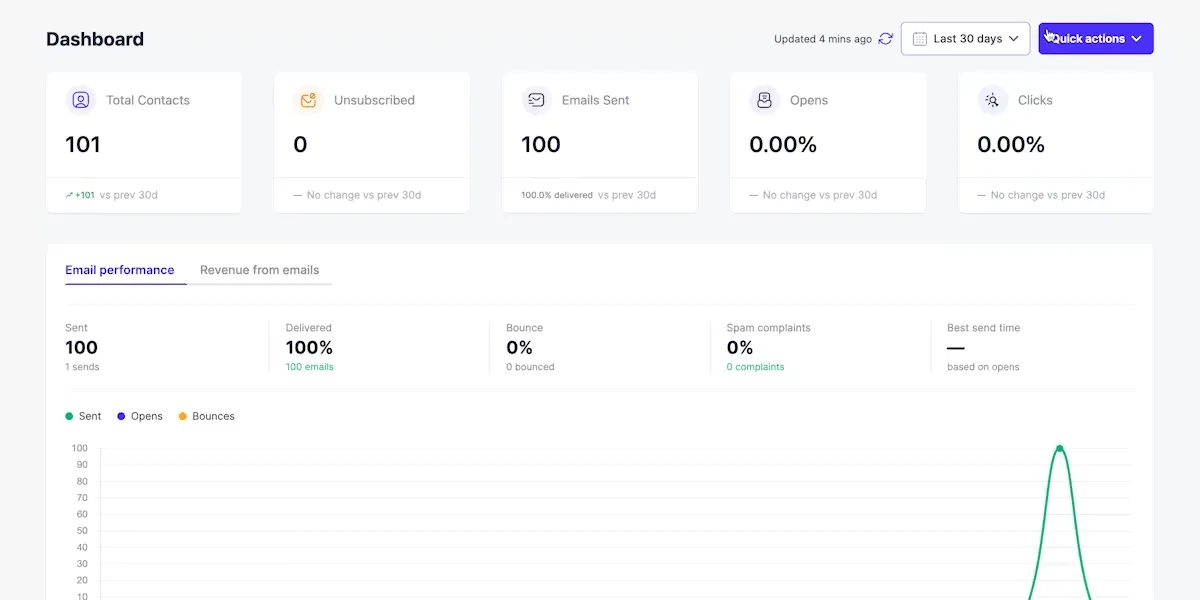
AI-powered dashboard — ask anything to create campaigns, build automations, and surface insights from a single prompt. -
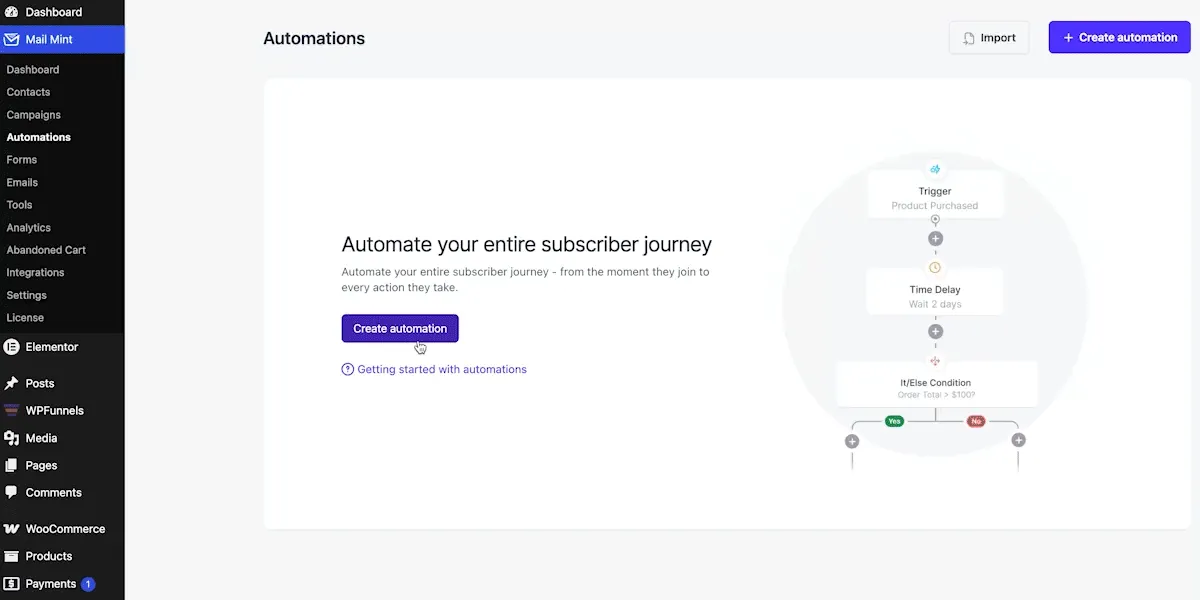
Visual automation builder — automate your entire subscriber journey with triggers, delays, and if/else conditions. -
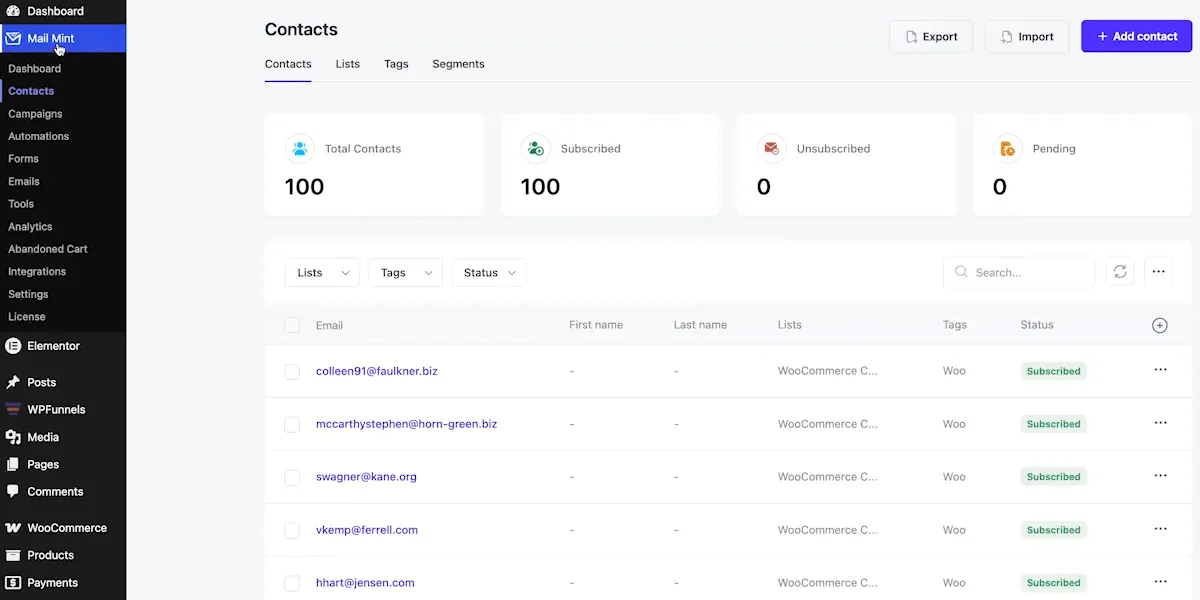
Contacts management — view, filter, and organize all your subscribers by lists, tags, and status. -
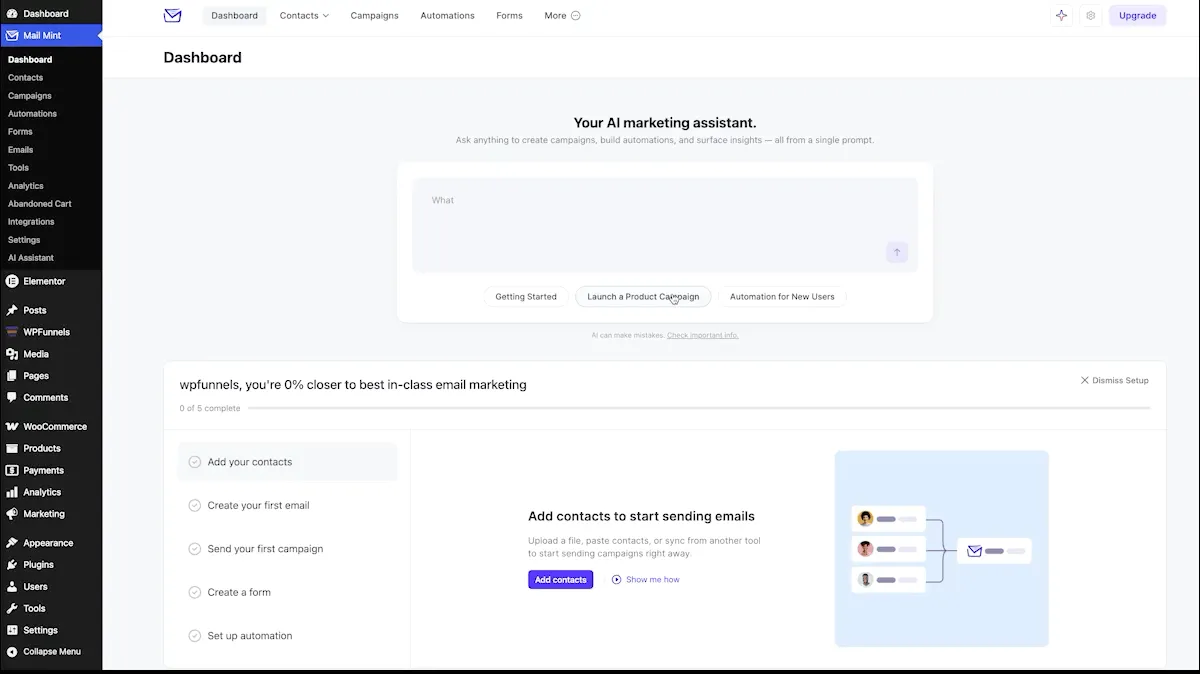
AI email engine — generate and optimize email content with built-in AI assistance. -
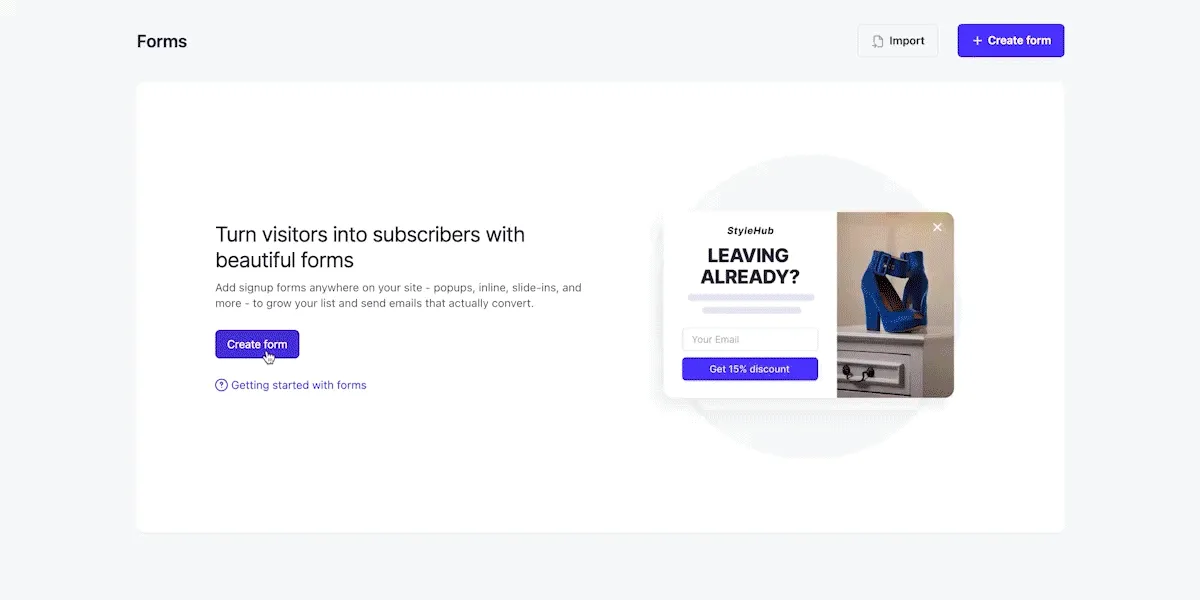
Lead collection forms — turn visitors into subscribers with popups, inline forms, and slide-ins. -
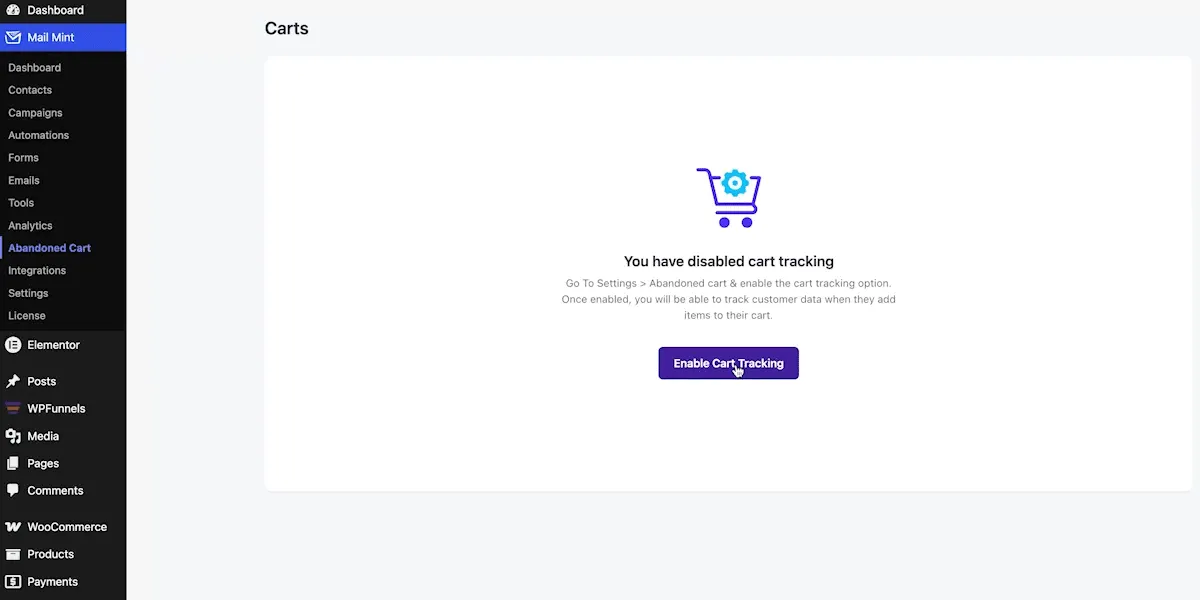
Abandoned cart recovery — track and recover abandoned carts with automated follow-up emails. -
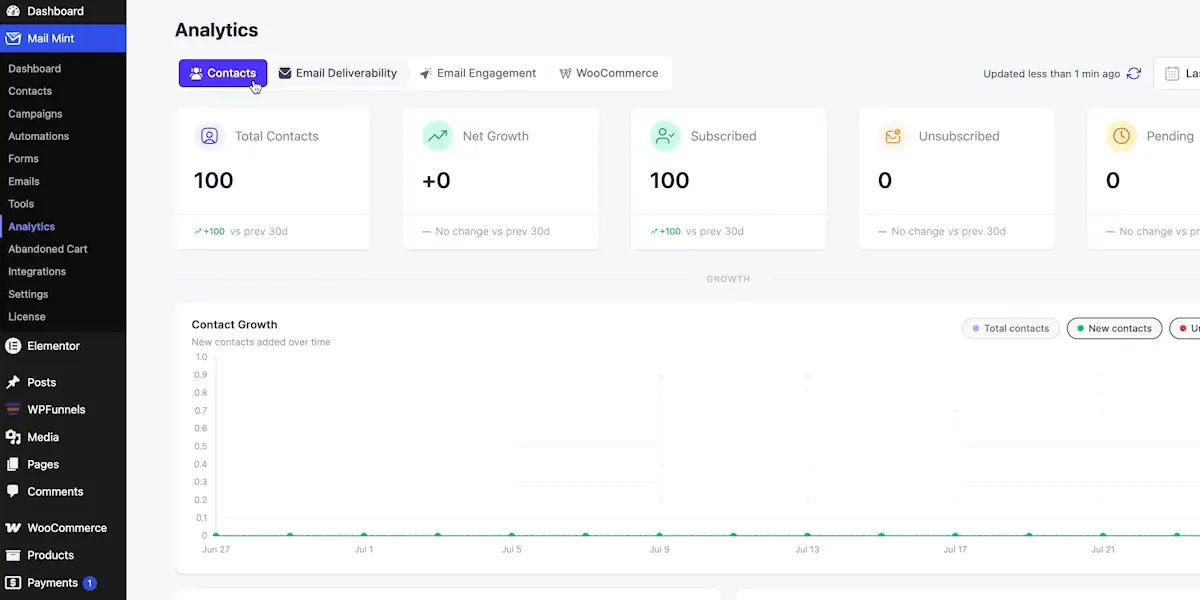
Advanced analytics — monitor contact growth, email deliverability, engagement, and WooCommerce revenue. -
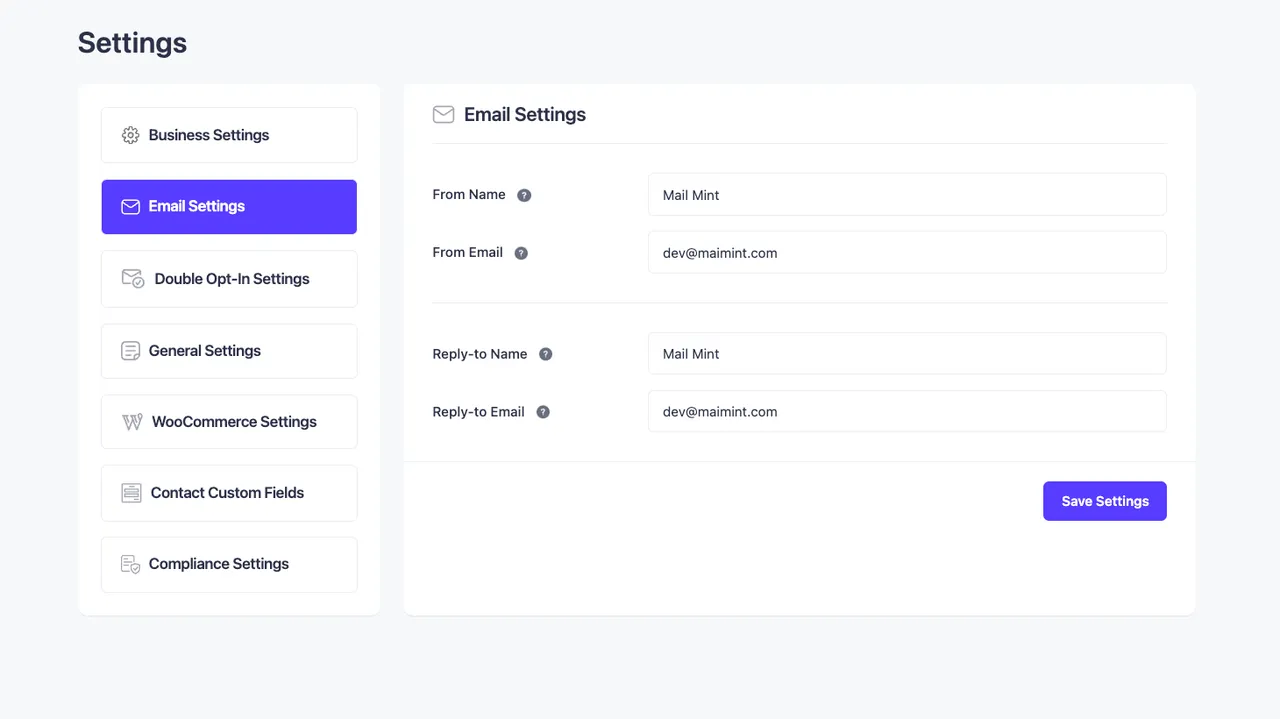
Email Settings for Automation -
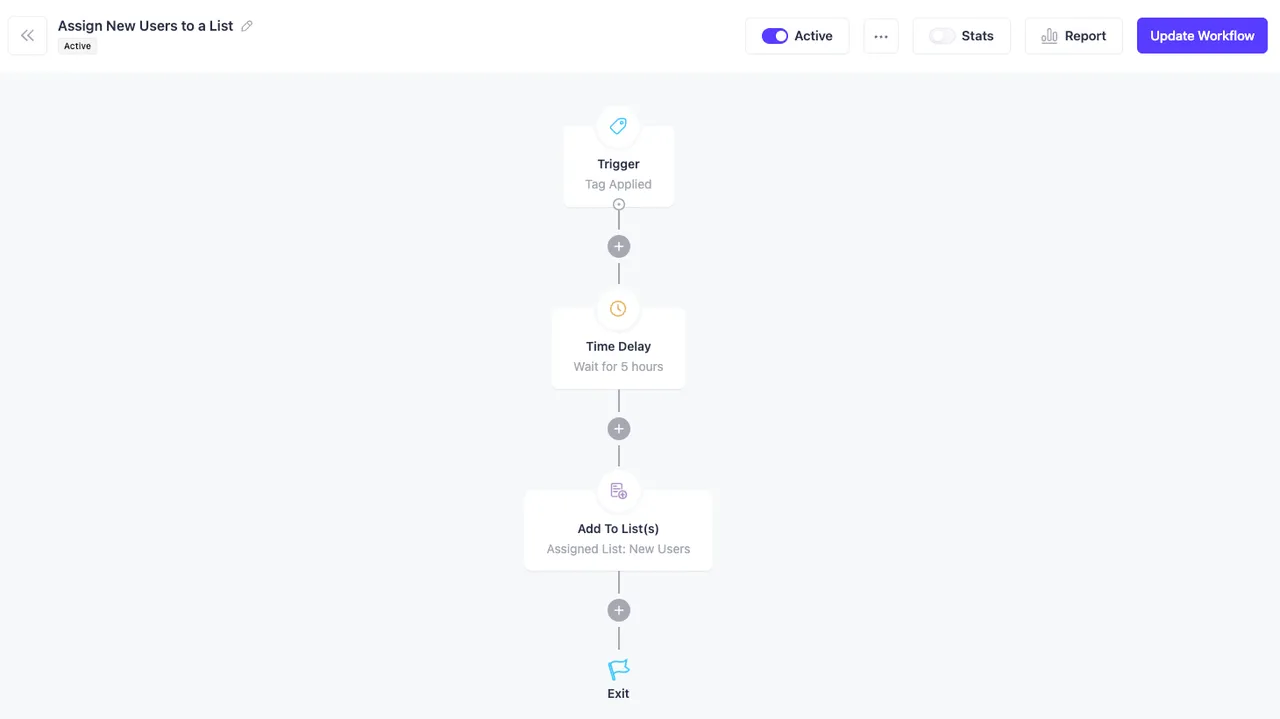
Visual Automation Workflow
Important information
- Mail Mint uses your site's default SMTP and offers no delivery service of its own. Deliverability depends on your mail setup.
- Requires WordPress 5.8 or later and PHP 7.4 or later.
- AI features need a connected provider or WordPress AI connector. Your email content is sent to it.
- The listing describes GDPR features such as double opt-in, unsubscribe links and data removal requests.
- The data records 16 published vulnerabilities in the plugin's history, all patched.
From the Mail Mint readme
Straight from the developer's WordPress.org listing.
Full description
If you are looking to increase sales and repeat purchases using email marketing automation, then we introduce you to Mail Mint!
The self hosted, AI email marketing plugin for WordPress and WooCommerce stores.
✅ Capture unlimited leads & subscribers
✅ Run targeted email campaigns
✅ Automate lead nurturing
✅ Design and send newsletter emails
✅ Promote WooCommerce products via emails
✅ Set up Behavior-based automation workflows (Pro)
✅ Get everything done for you with AI assistance
Mail Mint is built to work seamlessly with WooCommerce and traditional WordPress sites without having to leave your dashboard.
Unlike SaaS email marketing tools, with Mail Mint, you get full ownership of data and scale up without growing fees or any tech-overwhelm.
No need to pay those hefty monthly fees or get tied to contact limits of SaaS tools.
In short, you get to increase customer interactions, run conversion-focused campaigns, and automate email follow-ups (Pro) easily without the unfair high costs.
Key Solutions You Get To Scale Your Growth
Self-Hosted, No Limits
All data and leads stay on your server and uses your default SMTP. So, you can collect unlimited leads and send unlimited emails with no cost on Mail Mint.
Easy Email Campaign Builder
Use a visual drag-and-drop email builder to design conversion-optimized emails easily.
Product Promotion On Emails
Get dedicated products block to display WooCommerce products on your email campaigns and get more sales.
Visual Email Automation Workflows
Set up email automation flows on based leads collection, order status (Pro) or customer behavior (Pro) to trigger more conversions.
Customize Default WooCommerce Emails
Update the boring default emails by WooCommerce upon order placement, completion, etc., using our visual email builder.
Learn more in the next section.
👉 Documentation | Video Tutorials
👉 Join our Facebook Community
👉 Check Out Our Public Roadmap
👥 Generate Leads 👤 Segment leads 📧 Send Email Campaigns ⚙️ Email Automation Workflows
🛒 Recover Abandoned Carts 🗞️ Weekly Newsletters 🎨 Customize WooCommerce Emails
Why Use Mail Mint?
Email marketing is one of the most effective ways to drive sales and retain customers.
So you need a reliable email marketing solution: quality lead generation, good email campaigns, email automation.
But most solutions are incomplete. You need multiple tools pull it off.
Mail Mint let’s you do all of that.. No extra plugins needed!
• For starters, the plugin has its lead form builder, which allow you to collect leads from anywhere on your website.
• You can segment your leads and organize them to run targeted email marketing campaigns.
Moreover, it has direct integration with
– WordPress ✅
– WooCommerce (Pro) ✅, and
– Easy Digital Downloads (Pro) ✅
– and several other WordPress plugins.
So, you get lead management, email campaigns, and automation workflows, all in a single tool.
Plus, you may combine Mail Mint with WPFunnels, the easiest funnel builder in WordPress, to plan and craft funnel journeys for WooCommerce, including custom checkout, order bump and upsell offers, and email automation flows, on a single visual canvas.
No more juggling multiple tools!
A complete solution for your customer journey – lead gen, conversion & sales funnels, email marketing and automation, customer retention.
Achieve 3x more results with less time and effort.
Everything You Need To Make Email Marketing Automation Effortless
Mail Mint is your go-to WordPress email marketing plugin, packed with features to help you collect leads, promote products, run email campaigns, send newsletters, and set up email automation, without losing focus.
👉 Easy Contact Management In WordPress
Mail Mint comes with an easy UI to manage leads for effective email campaigns, newsletters, and email automation.
• Unlimited contacts/leads
• Add contacts manually
• Bulk upload leads using CSV
• Paste contact data
• Create tags, lists.
Import as contacts
* WordPress users
* WooCommerce customers
* Easy Digital Downloads customers
* Existing Mailchimp Contacts
You may also segment your leads (Pro) for targeted email marketing based on their attributes or data such as gender, location, etc.
Additionally, you get a full 360-degree contact view (Pro) to manage contact details and track interaction history, helping you build customer relationships via lightweight CRM functionality inside WordPress.
Learn More about Mail Mint’s Contact Management
👉 Email Marketing Campaigns
Once you have leads, you can run email marketing campaigns to interact with your contacts.
• Regular Email Campaigns
• Scheduled Email Campaigns
• Email Sequences (with automated time delays) (Pro)
• Weekly Newsletters
• Recurring Campaigns (Daily, Weekly, Monthly)
• Post Notification Emails
• Product Launch Emails
• Follow-up Emails
• Event Invitation Emails
• Lead Nurturing Emails
• Upsell and Cross-sell email campaigns
• Post-Purchase Email Campaigns
… and many more.
Whether you are a WooCommerce store owner, blogger, or funnel agency, Mail Mint help you run effective email marketing campaigns for lead nurturing or promotional offers.
You will get niche-specific email templates, or use AI-powered assistance to create email campaigns, newsletters, email automation workflows, abandoned cart recovery campaigns, etc., in just a few minutes.
Learn More about Mail Mint’s Email Campaigns
👉 Visual Drag And Drop Email Builder
You will love the drag and drop email builder to design your emails in Mail Mint.
• Drag and drop blocks
• Full control over design and layout
• Pre-made email templates
• Custom social icons block
• WooCommerce Product Details block
• Posts block (Recent/specific articles) (Pro)
• Merge tags for dynamic data and personalization.
Watch the visual email builder in action:
You may also use a classic editor or plain text editor instead.
👉 Self-Hosted and GDPR-Ready
Mail Mint runs entirely inside your WordPress installation. So all contacts and campaign data stay on your own server’s database, not on a third-party platform.
And it comes with GDPR compliance features:
* Double opt-in email confirmation
* Unsubscribe and email preference links
* IP anonymization
* Privacy checkbox on forms
👉 Simplified Email Automation Workflows
Mail Mint comes with a powerful visual automation workflow builder.
Automate email marketing and lead management for several triggers to reduce effort while getting more results from your campaigns.
• Visual automation workflow builder
• Pre-built automation recipes
• Automation triggers for WordPress
• Behavior and action-based triggers for WooCommerce (Pro)
• Automation workflows based on user activity
• 15+ Actions to create the workflow (Free + Pro)
• Conditional flows (Pro) based on open rate, link clicks, contact details, segmentation, etc.
… and many more.
Watch Mail Mint’s Automation Workflows in action:
👉Core Mail Mint Automation Triggers
– Form submitted – triggered when a Mail Mint form is submitted.
– Added To/Removed From List (Pro) – triggered when a contact is added/removed from specific lists.
– Tag Assigned/Removed (Pro) – triggered when a contact is added/removed from specific tags.
👉WordPress Email Automation Triggers
– New User Registration
– User Login
– Post Notification (Pro)
👉WooCommerce Email Automation Triggers (Pro)
– First Order In Store
– 5 Triggers Based on Orders – new orders, orders completed, changes in order status, and failed orders.
– Product Review Received
– Customer Win Back – automation to reach out to customers with no orders for a while.
– Price Dropped – triggered when you reduce prices of selected products.
👉Other Integrated Automation Triggers
You can use email marketing automation for several other plugins that Mail Mint integrates with, including:
– Easy Digital Downloads
– Gravity Form
– Jet Form Builder
– Fluent Forms
– Contact Form 7
– Elementor Form
– LearnDash
– MemberPress
– Tutor LMS
– Pabbly Connect
For any trigger, you can create automation workflows using the necessary actions below:
• Send An Email
• Set Time Delay
• Create Contact
• Assign Tag(s)
• Add To List(s)
• Remove Tag(s) (Pro)
• Remove From List(s) (Pro)
• Send Email Sequence (Pro)
• Stop Automation (Pro)
• Outgoing Webhook (Pro)
• Create Automated Coupon (Pro)
• Delete Coupon (Pro)
• If/Else for conditions (Pro)
Whether it’s creating the welcome email, onboarding process, running drip campaigns, or organizing email automation flows to manage leads, Mail Mint simplifies it all.
Learn More about Mail Mint’s Email Automation Workflows
👉 Custom Lead Forms To Capture Emails
Mail Mint has its own lead form builder to collect leads from anywhere on your website. You can use segmentation and send targeted email campaigns to get more results.
• Visual Form Builder (using Gutenberg)
• 10+ Lead Form Templates
• Form Types: Embedded, Pop-up, Fly In, Notification Bar
• Design Control & Animations
• Appearance Time Delay
Very convenient to collect leads and promote more products or to build customer rapport for repeat purchases.
Watch how the Lead Form Builder Works:
👉 Mail Mint + WPFunnels For Free Lead Generation
You may use WPFunnnels with Mail Mint to create lead generation funnels easily!
See how Darrel Wilson created a free lead generation funnel using WPFunnels and Mail Mint:
Plus, you can directly use Mail Mint forms on your funnel landing page through WPFunnels opt-in widget.
Learn how to create a free lead generation funnel in WordPress.
**👉 WPFunnels Integration For Marketing Funnel Automation [Pro] **
If you use WPFunnels and Mail Mint together, you can set up email automation workflows based on user actions in different stages of your funnel journey!
• Create a funnel in WPFunnels
• Define conditions
• Set up email automation workflows within the funnel building platform
It will help you use personalized email marketing for your buyers within your funnels and increase conversions.
You may create email marketing automation for
* Lead generation funnels
* Launch funnels
* Sales funnels
* Affiliate funnels
* Funnel cart abandonment recovery
or any other funnel of your choice.
Get the complete solution today!
👉 WooCommerce Abandoned Cart Recovery [Pro]
Mail Mint is a powerful plugin for WooCommerce cart abandonment recovery to win back lost sales on autopilot.
• Automatic abandoned cart tracking
• Cart details for abandoned customers
• Automation workflow for when cart is abandoned, lost, or recovered
• Cart block for abandoned products in email
• Auto-coupons for easier recovery
Learn more about Abandoned Cart Recovery Automation
👉 Recurring Email Campaign [Pro]
You can set up recurring email campaigns or newsletter automation.
When you collect leads, it is important to keep them nurtured and engaged via emails.
With Mail Mint, you can set up automatic recurring email campaigns to be sent every week, month, or specific days of the week.
You may send the latest posts, offer courses, send newsletters, or send monthly digests to subscribers automatically.
So, besides being a email marketing tool, Mail Mint is also a reliable WordPress newsletter plugin.
👉 Detailed Email Analytics
For every activity within Mail Mint, you get real-time analytics to make data-driven decisions and optimize email campaigns.
– Leads Growth Rate
– Email Open Rate
– Click Rate
– Bounce Rate
– Unsubscribe Rate
– Form Entries
– Performance over time
– Lead engagement
More insight to fine-tune your strategy.
👉 AI Email Assistant To Create Complete Email Campaigns & Automation Workflows
When you use Mail Mint’s AI Email Assistant (or as we call it, AI Email Engine), you no longer need to manually create an email campaign or automation workflow.
You can command what you want, and the plugin will build everything for you. All you need to do is review. Here’s what AI will do for you:
• Complete email campaign with subject line, preview text, design, and copy.
• Set up full email automation workflows with necessary triggers, emails, delays, etc.
• Analyze campaign performance and get suggestions to improve results.
You can BYOK with ChatGPT, Claude, Gemini, or any AI model connected via WordPress AI Connector, or connect Mail Mint to your AI platform through an MCP server to execute instructions directly in Mail Mint.
Learn more about Mail Mint’s AI Email Engine
👉 Customize WooCommerce Transactional Emails
Edit and customize the default WooCommerce Transactional Emails (order confirmation, receipts, etc.) via Mail Mint to make them more engaging and brand-optimized.
• Text Editor to customize WooCommerce emails
• Visual drag and drop builder to customize WooCommerce emails (Pro)
All Mail Mint Features For Email Marketers
Email Campaigns
• Regular Email Campaigns
• Email Sequences (Pro)
• Pre-made Email Templates
• AI Email Writing (via ChatGPT, Gemini, Claude)
• Drag and drop Email Builder
• Layout, Typography, & Color Customization
• Classic Text Editor
• Plain Text Editor
• Recurring Email Campaigns / Newsletter Automation (Pro)
• Post Block In Emails (Pro)
• Campaign & Engagement Analytics (Free + Pro)
WooCommerce-Specific Features
• Customize Default WooCommerce Emails
• Import WooCommerce Customers as contacts
• Subscription checkbox during WooCommerce checkout
• Product Details Block In Emails
• 4 Automation Recipes for WooCommerce
• Order Specific Automation Triggers (First Order, New Order, Product Order, Order Completed, Order Status, Order Failed) (Pro)
• More Automation Triggers (Review Received, Win Back Campaign, Price Drop / On Sale Notification) (Pro)
• Abandoned Cart Recovery (Cart Tracking, Automated Email Follow Ups, Reports & Analytics) (Pro)
Contact Management
• Unlimited leads or contacts/subscribers
• Unlimited Lists and Tags
• Dynamic Segmentation (Pro)
• Import contacts
• Double Opt-in Email Confirmation
• AI Analysis For Contact Details
… and more.
Automation Workflows
• Visual Automation Workflow Builder
• AI Email Automation Generation
• Automation Triggers (Form Submission, WordPress, etc.)
• Post Notification Triggers (Pro)
• Automation Triggers Pabbly Connect, 4+ Form Builders & 3+ LMS Tools (Pro)
• 8+ Actions After Trigger
• GDPR Compliance Features
… and more.
Lead Capture
• Lead Capture Form
• Pre-built Form Templates
• Admin Notification
• Lead Capture from WPFunnels Opt-in Form
… and more.
Other Features
• Lead Magnets Management (Pro)
• Link Triggers (Pro)
• Email Automation on WPFunnels Visual Canvas (Pro)
Here’s a list of All Mail Mint Features
Join Our Facebook Community
Connect with thousands of WooCommerce store owners growing their business with email marketing automation.
🤝 Join Now
Privacy Policy
If you opt in to usage tracking, we collect telemetry via PostHog to improve performance and troubleshoot issues.
What Data is Collected?
Only with your consent:
• System Info: WordPress version, PHP version, and active theme/plugin names.
• Plugin Details: Mail Mint version and non-sensitive configuration settings.
• Usage Patterns: Feature usage and in-plugin page views.
• Contact: Site admin email address.
Request Data Removal
Revoke consent anytime. To delete past data, email support@getwpfunnels.com
Installation
• Upload Mail Mint to the /wp-content/plugins/ directory
• Activate it through the ‘Plugins’ menu in WordPress
• Follow the setup wizard.
Developer FAQ (21)
- 1. Why use Mail Mint?
- The main reason to use Mail Mint is to be able to combine email marketing automation to your marketing funnels in a clutter-free UI and increase your conversions. Each feature of Mail Mint is carefully designed so that you do not lose focus when carrying out your email marketing campaigns. i. It’s super easy to add and manage your contacts list and manage them with proper segments. ii. You may create a custom form within Mail Mint to collect data from prospects without relying on other form builders. The best part, it is not just a simple opt-in form. You may add custom fields, decide on the form type (basic, pop-up, fly-in, etc), and control the design of your form. iii. The plugin comes with an advanced email builder where you may design your email body using drag-and-drop blocks and full control over the design. iv. You may run regular email marketing campaigns or email sequences with strategic intervals in a simplified UI. v. Creating automation workflows is no longer a complicated task. You may set up triggers and define the automation journey on a user-friendly canvas without spending hours going through the plugin documentation.
- 2. What are the core features of Mail Mint?
- Mail Mint comes with everything you need to optimize your next marketing funnel with email automation. – Easy Contact Management – Advanced Email Builder – Strategic Email Sequences – Simplified Automation Flows – Real-time Analytics – Dynamic Segmentation – Stunning Email Templates – WooCommerce Integration (Pro) – Easy Digital Downloads Integration (Pro) – Custom Lead Form – Gravity Forms Integration (Pro) – JetForms Integration (Pro) – Elementor Forms Integration (Pro) – WPFunnels Integration (Pro) – TutorLMS Integration – Webhooks
- 3. How is Mail Mint unique?
- Mail Mint follows the goal of making it easy for funnel creators to use email marketing automation without any complications. The whole plugin UI is built to ensure you do not lose focus when carrying out any activity, such as managing leads, preparing email marketing campaigns, or setting up automation workflows. Plus, it has a special integration with WPFunnels where you can plan the funnel pages and automation flows in a single visual canvas.
- 4. How does Mail Mint compare to other similar solutions?
- Mail Mint has every feature you need to collect and manage leads, run email campaigns, and set up automation flows. When comparing it to other tools, we respect all the great tools out there. However, when using Mail Mint, you will notice that it eliminates the cluttered nature, which most email marketing and automation tools have, and doesn’t require much documentation to be able to use the tool right from the start. The main focus here is the ease of use. Of course, you will find similar features in most email marketing automation tools. But what Mail Mint does is, make the whole process clearer and more concise. Its visual integration with WPFunnels is a feature that never existed till now. The ability to plan and launch a functional funnel journey, along with email automation flows, on the same visual canvas is something you won’t find in any other tool (whether in or out of the WordPress ecosystem). So besides making it super easy for funnel creators, Mail Mint is creating a new era for crafting funnels in general.
- 5. Can I Use AI to Create Email Campaigns?
- Yes. You will find an AI Assistant within Mail Mint where you can instruct what campaign you want to build, and AI will create the whole email campaign, including subject line, preview text, design, and copy. You simply have to review and send. Building a campaign will take less than 3-5 minutes. For this to work, you have to connect ChatGPT, Claude, or Gemini to Mail Mint, or allow the use of AI that you connected via WordPress AI Connector.
- 6. Can I Use AI to Prepare My Email Copies?
- Of Course! We have ChatGPT – OpenAI integration that lets you create unique email copies for your business.
- 7. How many contacts can I store?
- There is no limit. You may store as many contacts as you want.
- 8. How can I import my existing contacts list?
- You may import your contacts manually (one by one), or you may use a CSV file to bulk upload your contacts. You may also paste raw data in the right format to import contacts. To import WordPress users and WooCommerce customers, you will find a 3-click option to import the users and customers into the Mail Mint contacts list. You can also migrate your MailChimp Contacts to Mail Mint within just a few clicks.
- 9. How many email marketing campaigns can I run?
- You may run as many email marketing campaigns as you want. There’s no limitation to this.
- 10. How are the emails sent?
- Mail Mint will use the default SMTP that you have set up for your WordPress site to send emails. We do not provide delivery service of our own.
- 11. Is Mail Mint GDPR compliant?
- Yes, you will get all the necessary features to meet GDPR compliances, such as double opt-in email, email preference, unsubscribe link, anonymizing IP, and the option to request the removal of data.
- 12. Where are the contacts stored? Is it self-hosted?
- All contacts are stored in your WordPress database, i.e., yes, it is 100% self-hosted. We do not have access to your contacts and contact details.
- 13. How can I use Mail Mint with WooCommerce?
- You may import WooCommerce customers as contacts in just a few clicks. Then you may set up email automation workflows based on triggers in your WooCommerce store such as order placed, the order failed, target status changed, first order placed, etc.
- 14. Does Mail Mint Have an Abandoned Cart Recovery Feature?
- Yes! Mail Mint has its own WooCommerce Abandoned Cart Recovery feature that will let you bring back customers who left their cart and didn’t complete their purchase. Then you may set up email automation workflows based on triggers such as Cart Abandoned, Cart Lost, or Cart Recovered. You’ll also get advanced analytics for this.
- 15. How do I collect leads?
- Mail Mint has its own form builder, which you may use to design custom forms and use anywhere on your website to collect leads. There are also pre-built email templates that will let you use forms easily without any extra effort.
- 16. How can I customize my emails?
- You may import our beautiful email templates or create one from scratch. You will have access to our advanced email builder which will help you design your email body easily using drag-and-drop blocks. Plus, you will have full control over the design and typography of your emails.
- 17. Can I use dynamic, personalized contact details in my email?
- Yes, you may use any customer’s data as placeholders or merge tags in your email body (such as name, company name, custom fields, etc.) to make it more personalized.
- 18. Do you have integration with any form builder?
- Right now, we have integration with Gravity Forms, Fluent Forms, Elementor Form, and JetFormBuilder. And we are planning to integrate with many more form builders soon.
- 19. How can I report security bugs?
- You can report security bugs through the Patchstack Vulnerability Disclosure Program. The Patchstack team helps validate, triage, and handle any security vulnerabilities. Report a security vulnerability.
- 20. What Do I Need To Do Manually When Using The AI Email Engine?
- With Mail Mint’s AI Email Engine, the only manual tasks you will have are to provide instructions on what campaign or automation workflow you want to create and review the output that was generated. You don’t have to manually build campaigns or set up the workflow from scratch.
- 21. Will AI Make Changes Without My Approval?
- No! The AI Assistant at Mail Mint will not push anything live or change anything existing without final approval from you. It will first generate and show it to you for review. If you approve, only then will they be applied.
Downloads, last 30 days
Trend vs previous period: -0.3%
Average daily downloads: 432 over the last 7 days , 413 over 30 days.
Security history
Past CVEs, patched · 16 published vulnerabilities (Wordfence) · most recent Oct 15, 2026
- Patched 4.9 Medium Mail Mint <= 1.18.5 - Authenticated (Administrator+) SQL Injection CVE-2025-58604 · Sep 3, 2025 · affects *-1.18.5 · fixed in 1.18.6
- Patched 8.1 High Mail Mint - Email Marketing, Newsletter, Email Automation & WooCommerce Emails <= 1.31.0 - Unauthenticated PHP Object Injection CVE-2026-84753 · Sep 3, 2026 · affects *-1.31.0 · fixed in 1.31.1
- Patched 5.3 Medium Mail Mint <= 1.17.7 - Unauthenticated Sensitive Information Exposure CVE-2025-47541 · May 7, 2025 · affects *-1.17.7 · fixed in 1.17.8
- Patched 4.9 Medium Mail Mint <= 1.18.6 - Authenticated (Administrator+) SQL Injection CVE-2025-59570 · Sep 22, 2025 · affects *-1.18.6 · fixed in 1.18.7
- Patched 5.3 Medium Mail Mint <= 1.19.4 - Missing Authorization CVE-2026-23541 · Feb 18, 2026 · affects *-1.19.4 · fixed in 1.19.5
- Patched 9.8 Critical Mail Mint <= 1.31.0 - Unauthenticated PHP Object Injection in Arbitrary Form Fields CVE-2026-10196 · Sep 4, 2026 · affects *-1.31.0 · fixed in 1.31.1
- Patched 6.5 Medium Mail Mint <= 1.31.4 - Authenticated (Custom+) SQL Injection via 'filters' Parameter CVE-2026-111106 · Oct 15, 2026 · affects *-1.31.4 · fixed in 1.31.5
- Patched 4.3 Medium Mail Mint - Email Marketing, Newsletter, Email Automation & WooCommerce Emails <= 1.19.5 - Authenticated (Subscriber+) Information Exposure CVE-2026-27349 · May 21, 2026 · affects *-1.19.5 · fixed in 1.20.0
Show all 16 vulnerabilities
- Patched 5.3 Medium Mail Mint - Newsletters, Email Marketing, Automation, WooCommerce Emails, Post Notification, and more < 1.19.5 - Unauthenticated Information Disclosure CVE-2026-2025 · Mar 5, 2026 · affects [*, 1.19.5) · fixed in 1.19.5
- Patched 4.9 Medium Mail Mint <= 1.31.0 - Authenticated (Custom+) SQL Injection via 'status' Parameter CVE-2026-19800 · Sep 8, 2026 · affects *-1.31.0 · fixed in 1.31.1
- Patched 4.9 Medium Mail Mint <= 1.24.1 - Authenticated (Administrator+) SQL Injection via 'recipients' Parameter CVE-2026-12918 · Jul 10, 2026 · affects *-1.24.1 · fixed in 1.24.2
- Patched 7.2 High Mail Mint <= 1.18.10 - Authenticated (Admin+) Arbitrary File Upload CVE-2025-11967 · Nov 8, 2025 · affects *-1.18.10 · fixed in 1.18.11
- Patched 4.9 Medium Mail Mint <= 1.19.2 - Authenticated (Administrator+) SQL Injection via Multiple API Endpoints CVE-2026-1258 · Feb 14, 2026 · affects *-1.19.2 · fixed in 1.19.3
- Patched 5.3 Medium Mail Mint - Email Marketing, Newsletter, Email Automation & WooCommerce Emails <= 1.31.0 - Missing Authorization CVE-2026-84755 · Sep 3, 2026 · affects *-1.31.0 · fixed in 1.31.1
- Patched 5.4 Medium Mail Mint <= 1.19.2 - Cross-Site Request Forgery to Stored Cross-Site Scripting CVE-2026-1447 · Feb 3, 2026 · affects *-1.19.2 · fixed in 1.19.3
- Patched 4.9 Medium Mail Mint <= 1.24.2 - Authenticated (Administrator+) SQL Injection via 'contact_ids' Parameter CVE-2026-14342 · Jul 9, 2026 · affects *-1.24.2 · fixed in 1.24.3
Mail Mint FAQ
Why use Mail Mint?
It puts email campaigns, forms, contact lists and automations inside WordPress with a simple interface and no separate hosted service.
Can AI create campaigns?
Yes. An AI assistant can build a campaign with subject line, preview text, design and copy. You must connect ChatGPT, Claude or Gemini, or a WordPress AI connector.
How many contacts can I store?
There is no limit.
How do I import contacts?
Add them manually, upload a CSV, paste data, import WordPress users or WooCommerce customers, or migrate from Mailchimp.
How are emails sent?
Through the SMTP set up on your WordPress site. Mail Mint has no delivery service.
Is it GDPR friendly?
It includes double opt-in, email preferences, unsubscribe links, IP anonymizing and a data removal request option.
Where are contacts stored?
In your WordPress database. The vendor says it has no access to them.
Mail Mint alternatives

Element Pack Lite is a powerful Elementor addon that extends the Elementor page builder with advanced Elementor widgets, ready-made Elementor templates and design extensions. Build professional WordPress websites…

WP Carousel builds carousels, 3D carousels, sliders, slideshows, grids and photo galleries right in the WordPress block editor, from your images, posts, WooCommerce products and YouTube or Vimeo videos. Start from a…

🏆 The #1 WooCommerce Product Feed Manager Plugin trusted by 90,000+ online stores worldwide. Stop losing sales to rejected product feeds. CTXFeed is the most powerful product feed plugin for WooCommerce , designed…

BEAR - WooCommerce Bulk Editor and Products Manager Professional (former name is WOOBE) is WordPress plugin for woocommerce bulk edit woocommerce products in the robust and flexible way! With a built-in MCP server,…

Want to build a multivendor marketplace where multiple vendors sell, and you earn on every transaction? Dokan is the easiest and fastest way to launch a multivendor marketplace on WordPress. Dokan is a well…

Built for Shop, Ready for Every Website. BEW gives Elementor the widgets, templates, and AI tools to launch and grow your online store - or any website - faster. WooCommerce is at its core, with 16 widgets built for…
Listing data from WordPress.org and the Wordfence vulnerability feed, refreshed Nov 9, 2026; listing details fetched Nov 14, 2026. Screenshots are from the plugin's WordPress.org listing. Not affiliated with WPFunnels.