

WP Carousel
AI-Powered Carousel, Slider, Video & Photo Gallery Blocks by WP Carousel · by ShapedPlugin LLC
- active installs
- 60K+
- 435 ratings
- 4.7
- since last update
- 12d
- releases in 12 months
- —
- support threads resolved
- 100%
- avg daily downloads
- 3,242
- on WordPress.org
- 12.3 years
WP Carousel at a glance
WP Carousel is a freemium WordPress AI WooCommerce plugin by ShapedPlugin LLC with 60K+ active installs and a 4.7/5 rating from 435 reviews. It was last updated on Oct 28, 2026, is tested up to WordPress 7.1.4 and needs PHP 7.4+. All 7 of its published vulnerabilities have patched versions. Our quality score is 94/100.
What is WP Carousel?
WP Carousel builds carousels, sliders, grids and photo galleries in the WordPress block editor. Content can come from your own images, posts, pages, custom post types, WooCommerce products, or YouTube and Vimeo videos, and every layout is set up with clicks rather than code. It installs like any other plugin from the Plugins screen and adds its own menu to the WordPress admin.
You can start from a ready-made pattern, describe the result to an AI builder, or design from scratch. The AI builder either picks a matching pattern or configures the block for you, using your own OpenAI, Anthropic, Gemini or Groq key, or WordPress Connectors. A classic shortcode builder with live preview is still included for people who prefer it. Read the free and paid split carefully before you build a workflow around any single feature.
It targets site owners who want sliders and galleries without a heavy script on every page. The listing says images lazy-load and that no plugin script or style loads on a page without a carousel. Some layouts, including Masonry, Justified, Marquee and Panorama, are only available in the paid Pro version. Try it on a staging copy of your site first, so you can check compatibility with your theme and other plugins.
Best for
- Portfolio and gallery sites
- WooCommerce stores showing product sliders
- Sites that want light front-end assets
- Editors who prefer the block editor over shortcodes
WP Carousel features
Six free Gutenberg blocks
Carousel, 3D Carousel, Slider, Thumbnails Slider, Tiles and Grid are available in the free plugin.
Build with AI
Describe the carousel you want and the AI picks a pattern or sets up the block. It works with your own provider key or WordPress Connectors.
Patterns and saved templates
Insert a ready-made carousel or gallery in one click. Save your own designs and reuse them with a shortcode.
Multiple content sources
Use media library images, posts, WooCommerce products with price and Add to Cart, or YouTube and Vimeo videos.
Gallery block conversion
Turn a core Image or Gallery block into a WP Carousel block without losing content or settings.
Navigation and motion controls
Autoplay, pause on hover, infinite loop, arrows in 12 styles, dots or stepper pagination, touch swipe, mouse wheel and keyboard use.
Lightbox
Opens images and videos in a popup gallery with theme options, animations, a counter and a thumbnail strip.
Performance controls
Lazy-loads images, loads assets only on pages with a carousel, and lets you switch off Swiper or Font Awesome if your theme already loads them.
WP Carousel free vs pro
Free WordPress.org version
- Carousel, 3D Carousel, Slider, Thumbnails Slider, Tiles and Grid blocks
- Posts, pages, custom post types, WooCommerce products, YouTube and Vimeo
- Build with AI and the pattern library
- Classic shortcode builder
Pro Paid version
- Masonry, Justified, Marquee and Panorama Carousel layouts
- More 3D styles
- Audio and feed sources and more video platforms including self-hosted video
- Filters, Load More, watermark and scheduling
A Pro version exists and adds the layouts and features above. The AI builder needs your own OpenAI, Anthropic, Gemini or Groq key, or WordPress Connectors, and usage is billed by that provider. The listing does not state Pro prices.
How to use WP Carousel
- Install the plugin
Go to Plugins, Add New, search for WP Carousel, then click Install Now and Activate.
- Add a block
Open a page in the block editor and insert a WP Carousel block, or use a ready pattern.
- Choose a content source
Select images, posts, products or videos to fill the carousel.
- Try the AI builder
Optionally describe your carousel in the AI builder and add your provider key or connect a provider.
- Style and publish
Set columns per device, autoplay and navigation, then publish. Reuse the design later as a saved template.
WP Carousel screenshots (12)
-

Carousel block with responsive columns, autoplay, and navigation controls -
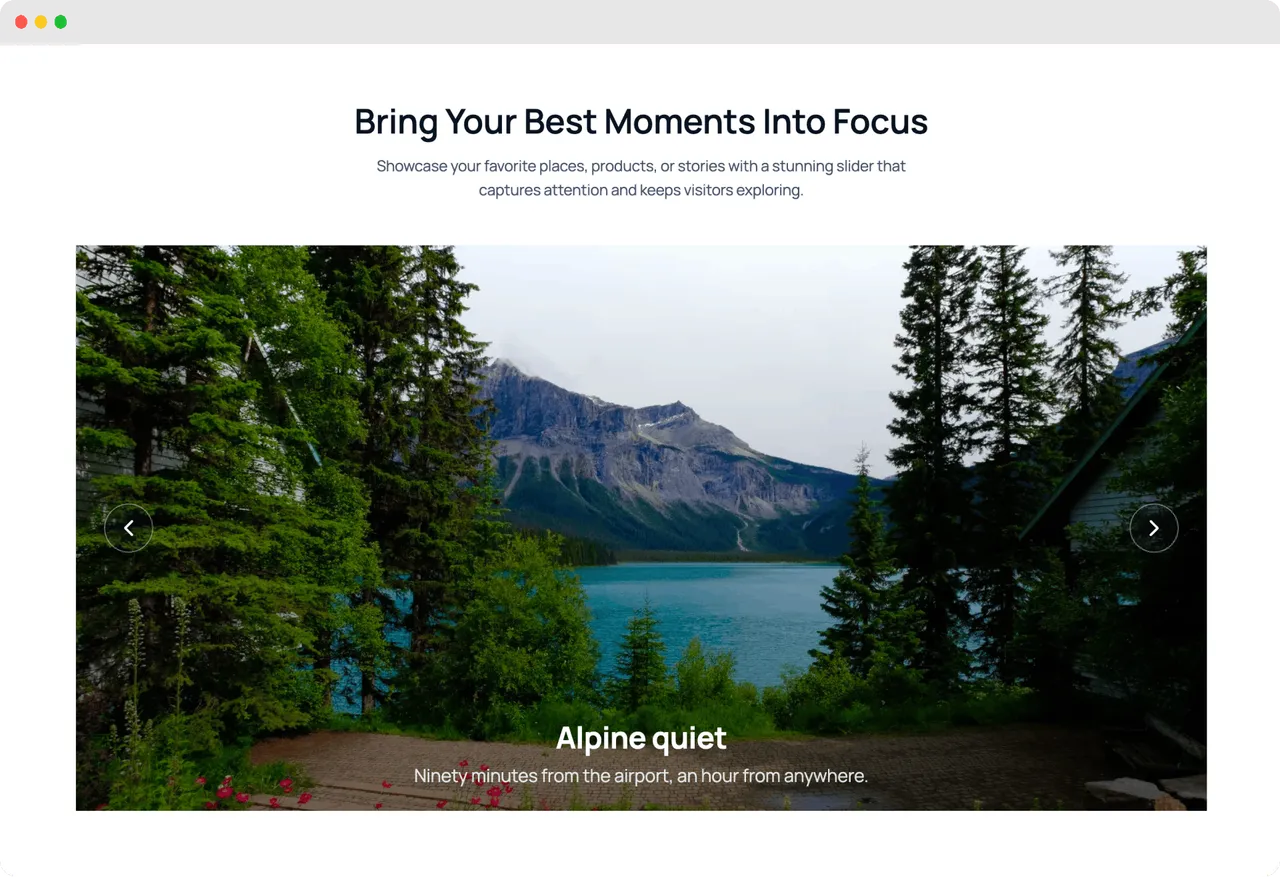
Slider block for full-width image and content slides -
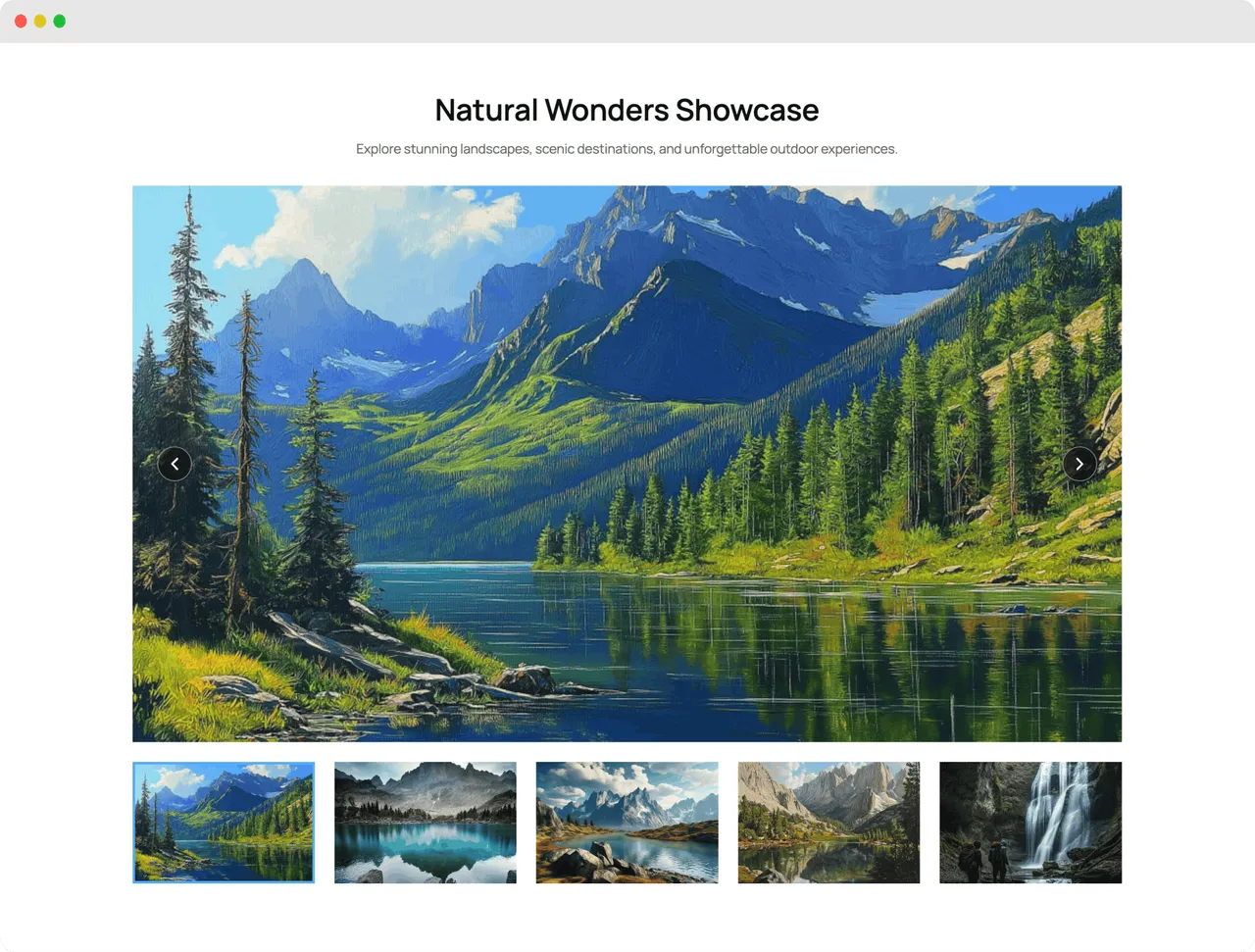
Thumbnails slider with synced navigation for easy browsing -
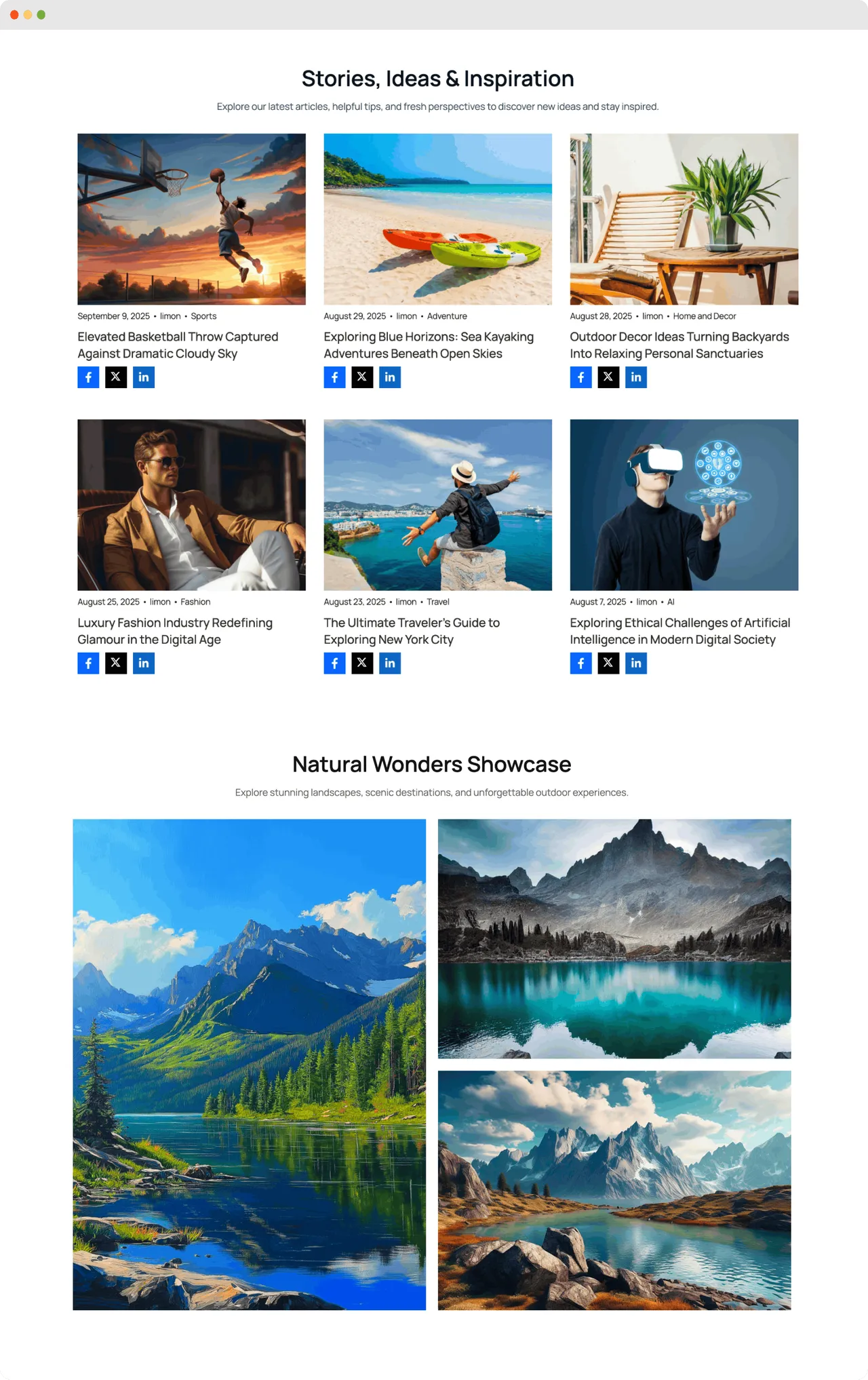
Tiles block with a flexible, magazine-style grid layout -
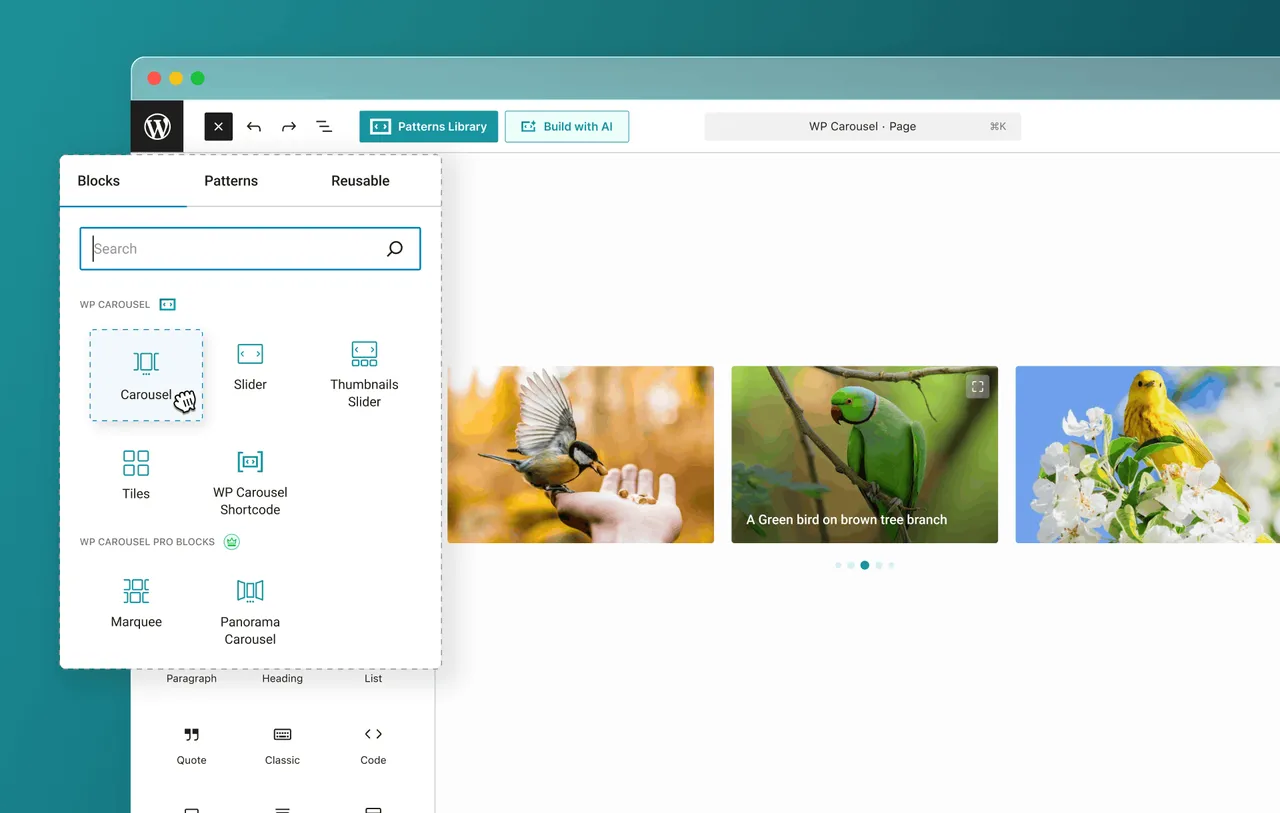
All available blocks in the Gutenberg inserter -
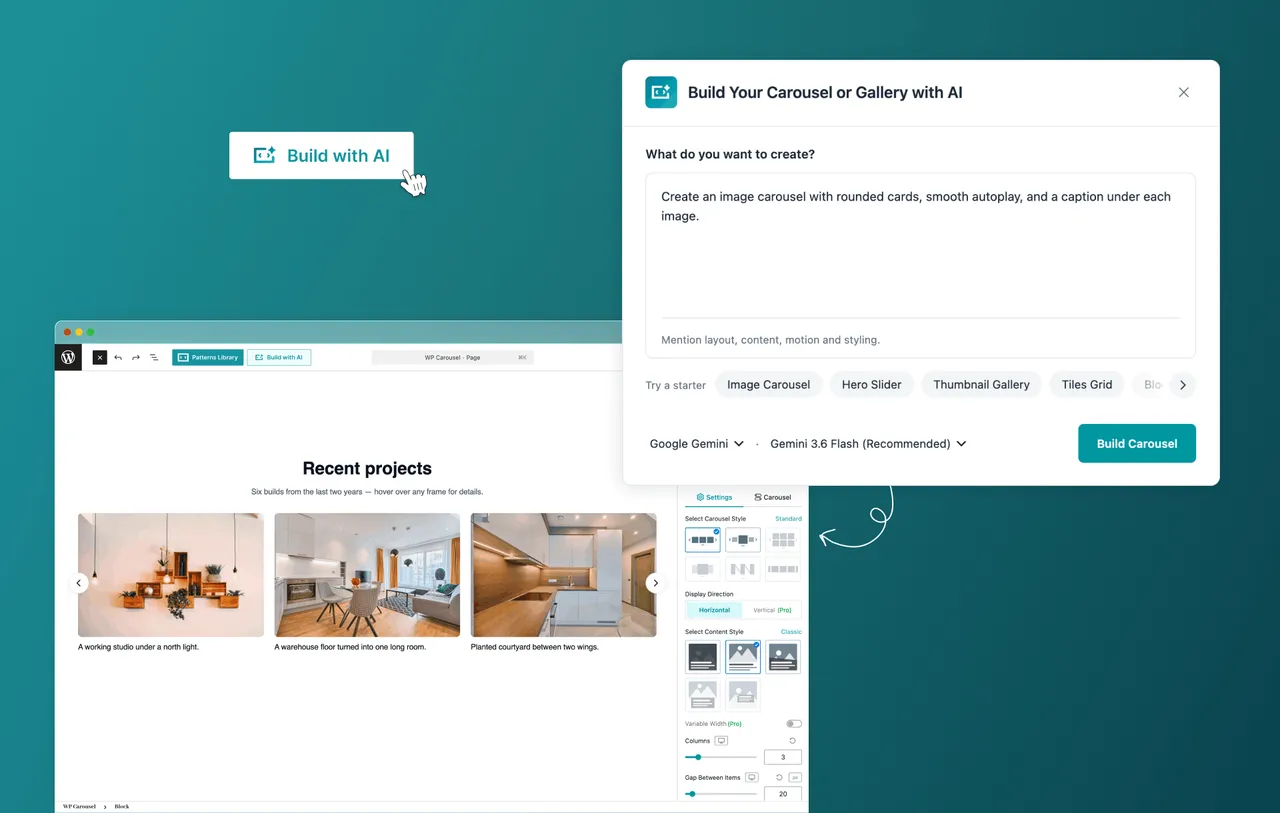
Build with AI: generate carousels and sliders from a simple prompt -
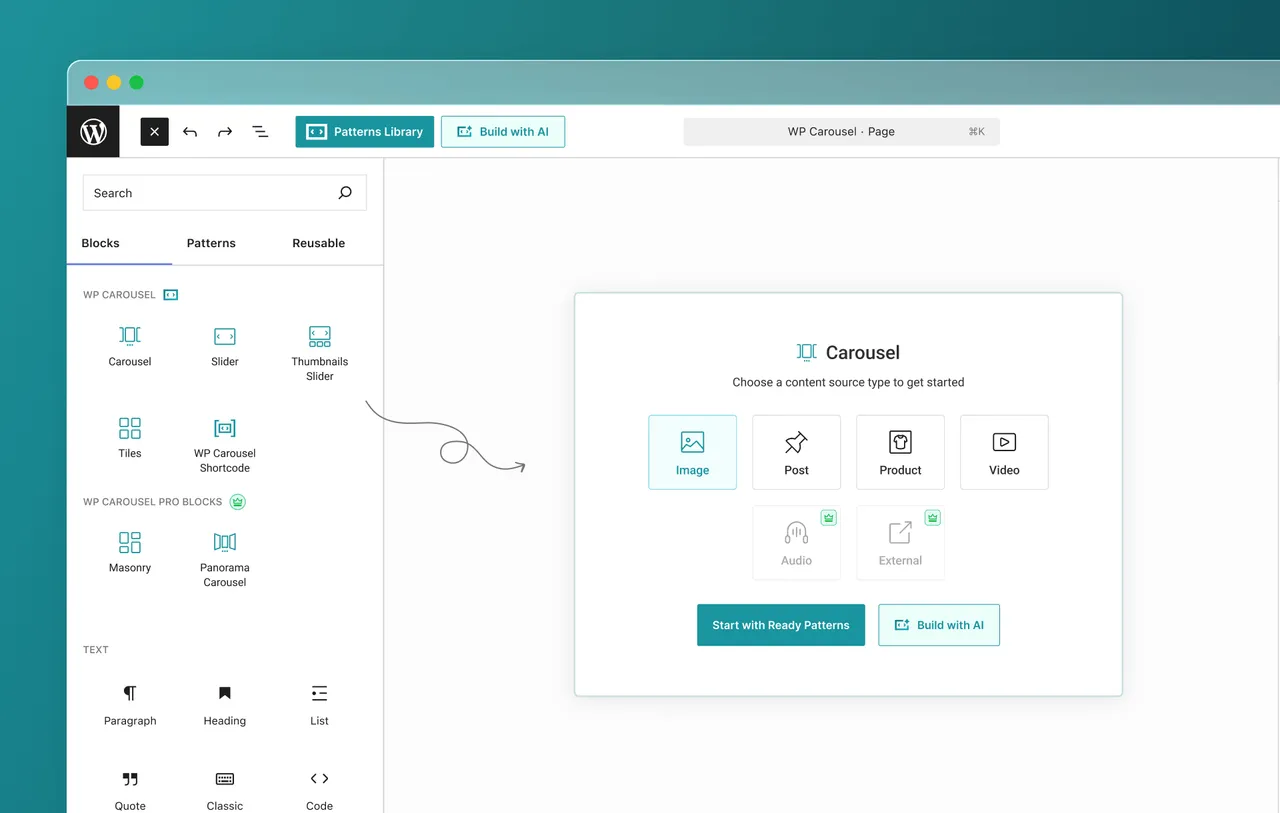
Four content sources: images, posts, products, and video -
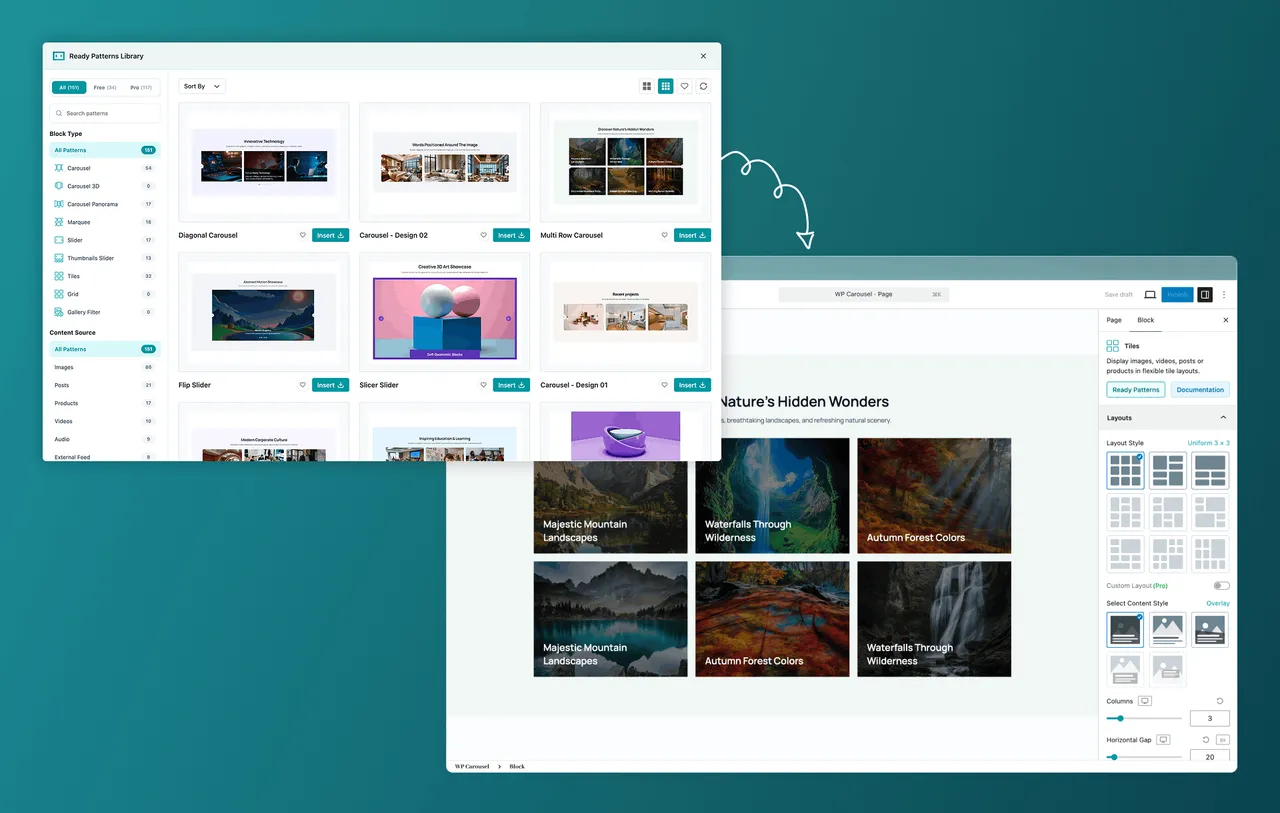
Ready-made patterns library, insert in one click -
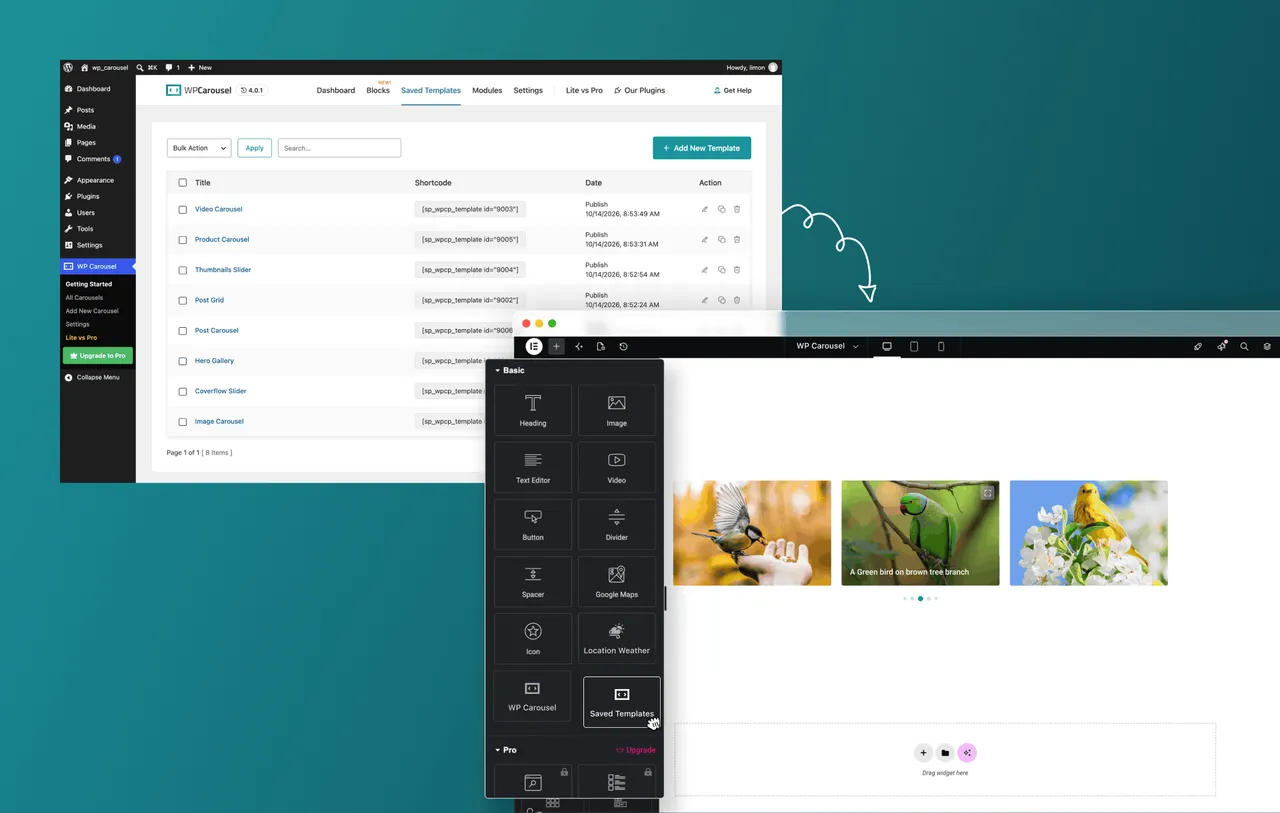
Saved templates to reuse your favorite designs on any page -
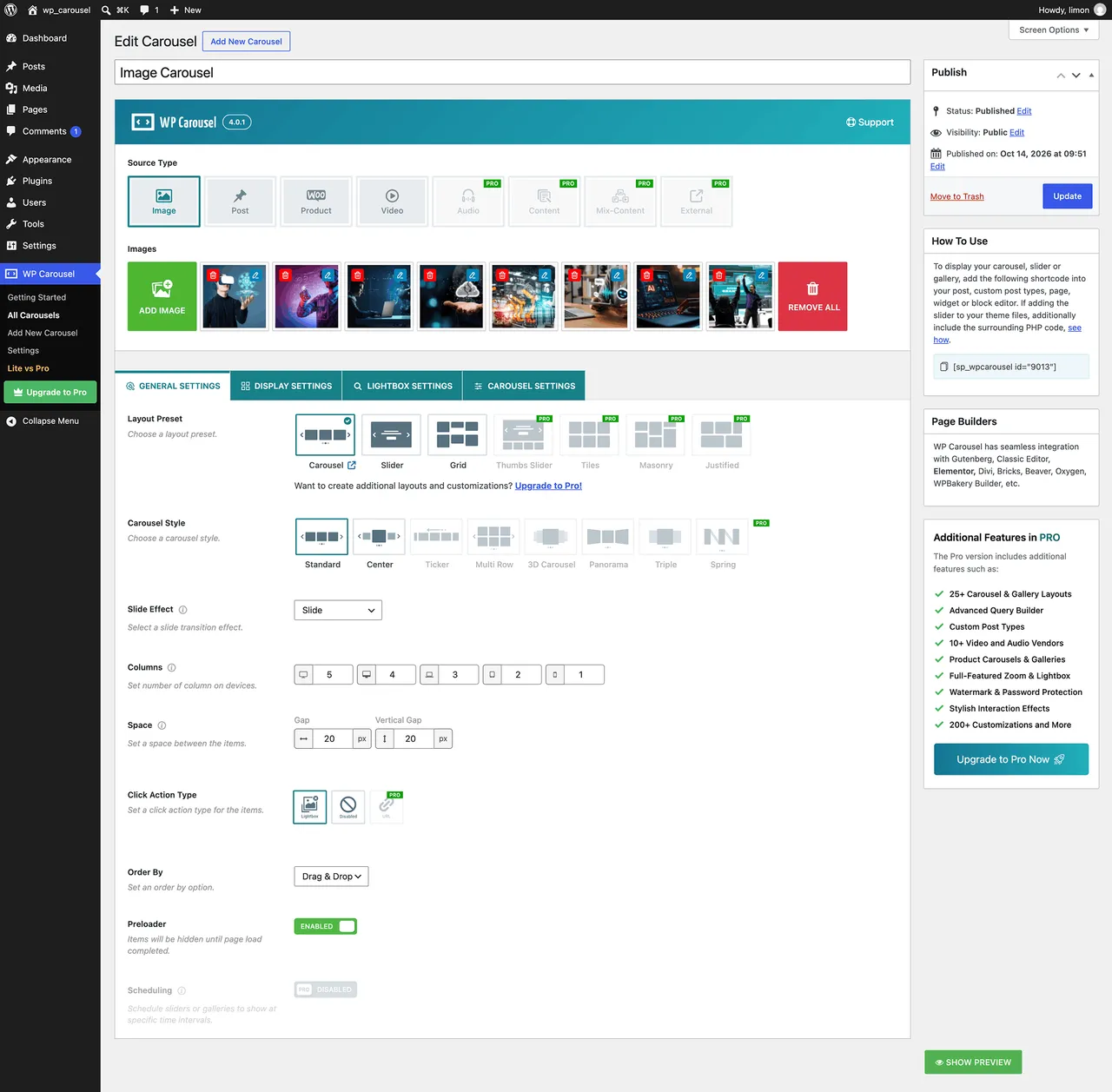
Classic Shortcode General settings -
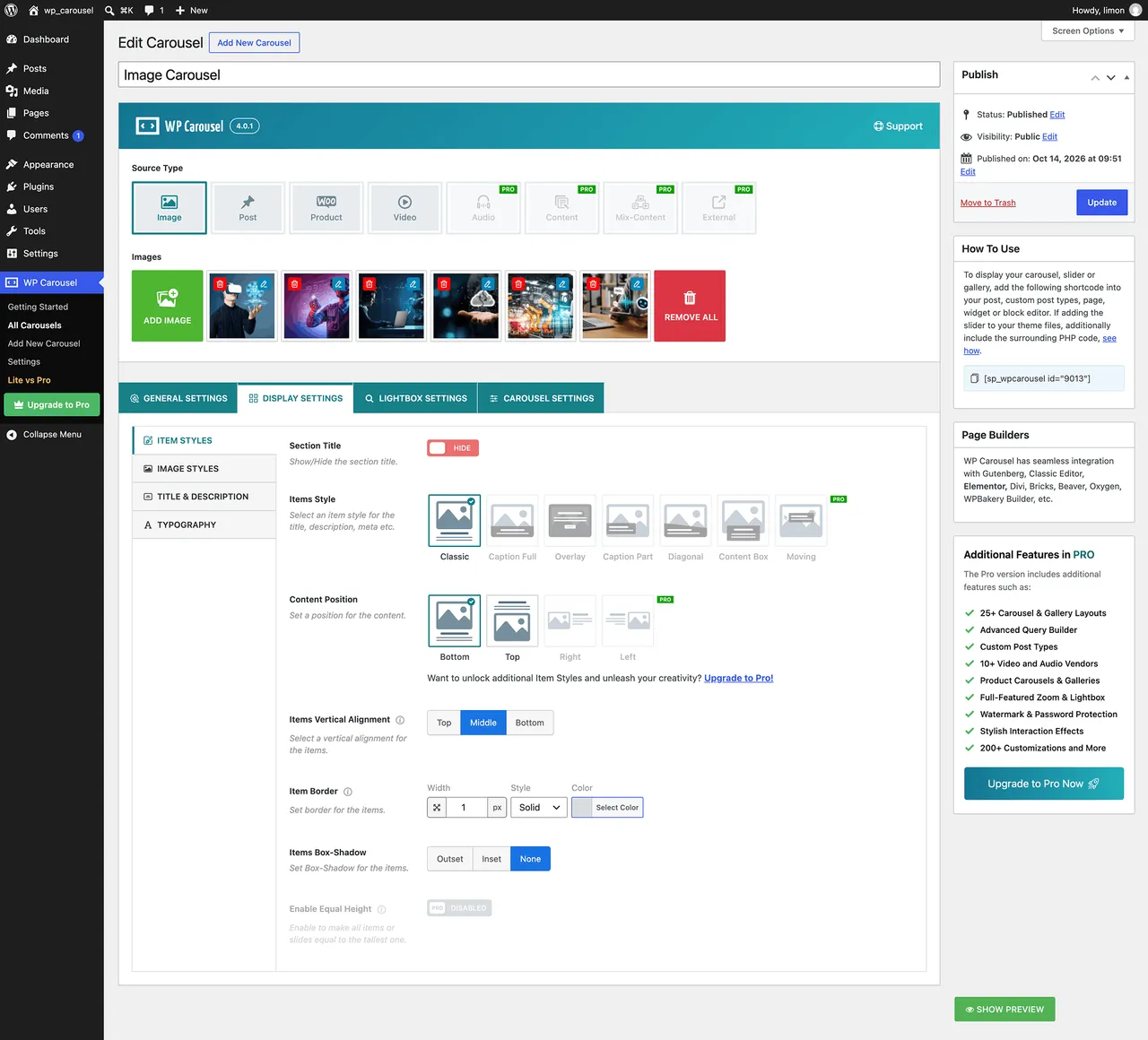
Display settings: item styles, image styles, title and description, typography -
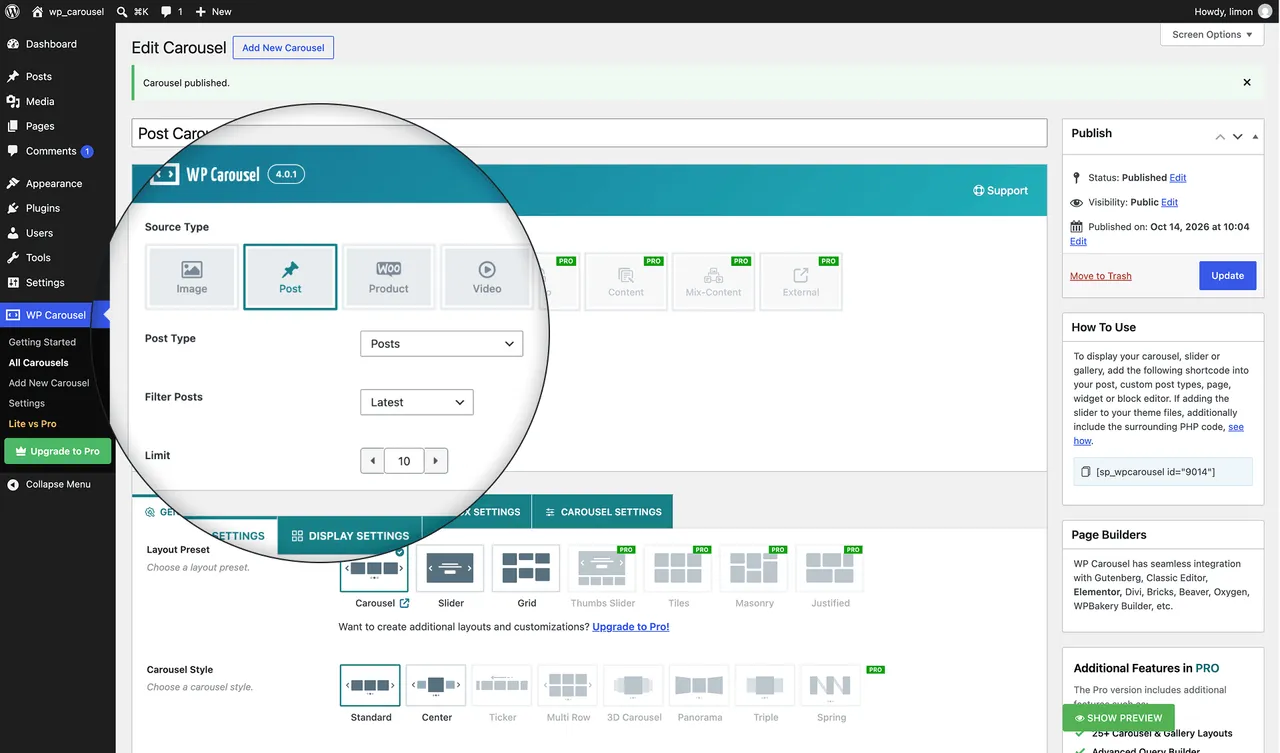
Classic shortcode generator with support for multi post types
Important information
- Requires WordPress 5.0 or later, PHP 7.4 or later and MySQL 5.6 or later.
- The AI builder sends your request and the block settings to your chosen provider, not your images, posts or products.
- Usage data sharing is opt-in. If enabled it sends site URL, admin email and environment details weekly, and you can switch it off in Settings.
- Some options that are free in the blocks are Pro in the classic builder.
- The data records 7 published vulnerabilities in the plugin's history, all patched.
From the WP Carousel readme
Straight from the developer's WordPress.org listing.
Full description
WP Carousel builds carousels, 3D carousels, sliders, slideshows, grids and photo galleries right in the WordPress block editor, from your images, posts, WooCommerce products and YouTube or Vimeo videos. Start from a ready-made pattern, describe what you want to the AI builder, or design your own, and style it without code. It’s fast by default: images lazy-load, and no WP Carousel script or style loads on a page without a carousel.
200+ Gutenberg Patterns | Video Tutorials | Documentation | Support
10 Gutenberg Blocks
• Carousel: several items in a row, with center mode and Slide, Flip, or Cube effects.
• 3D Carousel: a Coverflow carousel in 3D, with the center slide in front, and the side slides turned away. Set how many side slides show on each device.
• Slider: one full-width slide at a time, in Slide, Flip, Cube, or Coverflow style, for hero slideshows and featured content.
• Thumbnails Slider: a main slider with a synced strip of thumbnails to browse.
• Tiles: a bento-style grid of mixed-size tiles, in three free layouts, with numbered pages for big galleries.
• Grid: an even grid of columns, set per device, with numbered pages for big galleries.
• Marquee (Pro): a continuously scrolling, ticker-style row of items.
• Panorama Carousel (Pro): a curved, panoramic carousel with a wide, immersive view.
• Masonry (Pro): a Pinterest-style grid of varying item heights.
• Justified (Pro): an image gallery with even row heights, filled edge to edge.
Start in seconds
• Ready Patterns: insert a pre-designed carousel or gallery in one click, then make it yours.
• Build with AI: describe the carousel you want, and the AI builder picks a matching pattern or sets the block up for you. Use your own OpenAI, Anthropic, Gemini or Groq key, or WordPress Connectors.
• Saved Templates: save a design once and reuse it on any page, in widgets or in page builders, with its own shortcode.
• Convert a Gallery block: turn a core Image or Gallery block into a WP Carousel block, and switch between WP Carousel blocks without losing your content or settings.
• Classic builder: prefer shortcodes? The classic carousel builder with live preview is still here, with its Grid layout. A few options that are free in the blocks are Pro in the classic builder.
Show any content
• Images from the Media Library, in any order. Edit titles, captions, descriptions and alt text without leaving the carousel, one by one or in bulk, and set a focal point so cropped images keep what matters.
• Posts, pages and custom post types, including several post types in one carousel. Order them by date, title, menu order, comment count or at random, skip the first few, and set how many to show.
• WooCommerce products with image, name, price, star rating and Add to Cart. In the classic builder, add a Quick View button with the free Quick View for WooCommerce plugin.
• YouTube and Vimeo videos, each with your own thumbnail if you like, playing in a popup.
Navigation and motion
• Autoplay with its speed, pause on hover, infinite loop, and left-to-right or right-to-left direction.
• Navigation arrows in 12 styles, and pagination in Dots, Dynamic, or Stepper style.
• Touch swipe, mouse drag, mouse wheel, free scroll, and keyboard navigation.
• How many slides move per click, set per device.
Lightbox
Open images and videos in a popup gallery, with a light, dark or custom theme, open and slide animations, an item counter, and a thumbnails strip. One set of settings covers every lightbox on your site.
Design without code
• 6 Skins: Classic, Overlay and Diagonal, or show the text only on hover.
• Choose what each card shows: title, description, meta (date, author, comments, category, tags), category badges, a read-more button, price, rating, and share buttons for 14 networks.
• Hover animations, image overlays, typography with Google Fonts, and colors, borders, radius, and shadows for every part.
• Custom CSS for one block, or site-wide custom CSS and JavaScript.
Fast, accessible and search-friendly
• Lazy-loaded images, a choice of image size for each carousel, and aspect-ratio presets (1:1, 4:3, 16:9, 21:9 and more).
• Query caching for post and product carousels, cleared automatically when your content changes.
• No WP Carousel script or style on pages without a carousel, and switches to turn off Swiper or Font Awesome when your theme already loads them.
• Alt text on every image, a heading tag (H1 to H6) for card titles, and keyboard navigation.
Responsive
Set columns and spacing for desktop, tablet, and mobile, hide a carousel on any device size, and set your own breakpoints for classic carousels.
Works with your site
• Page builders: native widgets and modules for Elementor, Divi 4 and Divi 5, WPBakery, Oxygen, Beaver Builder and Bricks. The shortcode works in any other builder.
• Multilingual: ready for WPML and Polylang, with translated image titles and alt text.
• Multisite: works across a WordPress multisite network.
• Manage it all: a placements table shows every page, widget, and template where each carousel is used; import and export classic carousels; turn any block or module off.
WP Carousel Pro
Everything above stays free. WP Carousel Pro adds more features including:
• More layouts: Masonry and Justified blocks, three more 3D Carousel styles (Cylinder, Card Stack and Orbit) with full 3D settings, Panorama, and a continuous Ticker or Marquee for logo bars; multi-row, vertical, variable-width and partial-view carousels; six more Tiles layouts and a custom layout editor.
• More content: audio from SoundCloud, Spotify, Apple Podcasts, Mixcloud, Bandcamp or your own files; automatic feeds from RSS, a YouTube channel or a Facebook page; custom HTML and shortcode slides, and mixed-content carousels in the classic builder; post and product filters by category, tag, author, date, sale, best-selling or top-rated, and excluding the posts you choose.
• More video: TikTok, Twitch, TED, Dailymotion, Rumble, Wistia, SproutVideo, any embed code, and self-hosted or MP4 videos, playing inline with muted autoplay, play on hover, and loop.
• Engage visitors: category filter buttons, live Ajax search, Load More and infinite scroll, a link on any image, and a lightbox with slideshow, zoom, full screen, download, sharing and captions.
• Protect and schedule: watermark your images, block right-click saving, password-protect a carousel, or show it only between two dates.
• More motion and style: fade and Ken Burns, premium slider styles with WebGL shader effects, content animations, entrance and scroll effects, image filters, flip image on hover, more content styles, and drag-and-drop ordering of what each card shows.
Author
Designed and developed by ShapedPlugin. For fast support, feature requests and bug reports, ask us at Support.
External services
WP Carousel connects to the outside services below. Each one is used only by the feature named, and only after you use that feature.
AI builder (OpenAI, Anthropic, Google Gemini, Groq), only with your own key
The AI builder does nothing until you add an API key for one of these providers in Settings → AI Configuration, or connect one through WordPress Connectors. When you save a key, the plugin checks it with that provider. When you use Build with AI or Refine with AI, it sends the provider you picked your request text, the block type and the block’s current values for the options the AI can change, with the plugin’s own instructions. Your carousel’s images, posts and products are not sent.
• OpenAI (api.openai.com): Terms, Privacy Policy
• Anthropic (api.anthropic.com): Terms, Privacy Policy
• Google Gemini (generativelanguage.googleapis.com): Terms, Privacy Policy
• Groq (api.groq.com): Terms, Privacy Policy
When the AI builder fills an empty carousel with placeholder photos, they load from Unsplash (images.unsplash.com) until you replace them with your own: Terms, Privacy Policy.
Ready Patterns (WP Carousel pattern server)
The pattern library loads its list, previews and each pattern you insert from demo.wpcarousel.io, and caches the list for a day. No personal data is sent; like every WordPress request, it carries your WordPress version and site address. An inserted pattern’s sample images load from the same server until you replace them with your own.
Privacy Policy, Terms.
Google Fonts
If you pick a Google font in a block’s or template’s typography settings, that page loads the font from fonts.googleapis.com, which receives the visitor’s IP address. Pages without a Google font load nothing from Google.
Terms, Privacy Policy.
Installation
MINIMUM REQUIREMENTS
• PHP 7.4 or later
• MySQL 5.6 or later
• WordPress 5.0 or later
This section describes how to install the plugin and get it working
AUTOMATIC INSTALLATION (EASIEST WAY)
To do an automatic install of WP Carousel, log in to your WordPress dashboard, navigate to the Plugins menu and
click Add New.
In the search field type “WP Carousel”. Once you have found it you can install it by simply
clicking “Install Now” and then “Activate”.
MANUAL INSTALLATION
Uploading in WordPress Dashboard
• Download wp-carousel-free.zip
• Navigate to the ‘Add New’ in the plugins dashboard
• Navigate to the ‘Upload’ area
• Select wp-carousel-free.zip from your computer
• Click ‘Install Now’
• Activate the plugin in the Plugin dashboard
Using FTP
• Download wp-carousel-free.zip
• Extract the wp-carousel-free directory to your computer
• Upload the wp-carousel-free directory to the /wp-content/plugins/ directory
• Activate the plugin in the Plugin dashboard
The WordPress codex contains instructions on how to install a WordPress plugin.
Developer FAQ (16)
- Does WP Carousel work with the block editor?
- Yes. It adds six blocks to the editor (Carousel, 3D Carousel, Slider, Thumbnails Slider, Tiles and Grid), a library of ready patterns and an AI builder. If you prefer shortcodes, the classic carousel builder is still included.
- Can I turn my existing Gallery block into a carousel?
- Yes. Select the core Image or Gallery block, open Transform in its toolbar, and pick a WP Carousel block. Your images come across.
- Will WP Carousel slow down my site?
- It’s built not to. Images lazy-load, no WP Carousel script or style loads on a page without a carousel, post and product queries are cached, and you can switch off Swiper or Font Awesome if your theme already loads them.
- Is WP Carousel accessible?
- Every image takes alt text, card titles take the heading level that fits your page (H1 to H6), and visitors can move through slides with the keyboard.
- What’s the difference between the free version and Pro?
- The free version includes posts, pages, custom post types, WooCommerce products, YouTube and Vimeo, six blocks, the AI builder and the patterns. Pro adds more layouts (Masonry, Justified, more 3D styles, Panorama, Ticker), audio and feed sources, more video platforms including self-hosted video, filters, Load More, watermark and scheduling. See the full comparison.
- Does the AI builder send my content anywhere?
- Only if you add an API key or connect a provider, and only when you use Build with AI or Refine with AI. It sends your request and the block’s settings, not your images, posts or products. See External services above.
- Does WP Carousel collect any data?
- Not unless you opt in. If you choose to share usage data, it sends your site URL, admin email and environment details once a week, and you can turn it off at any time in Settings → Advanced Controls. See External services above.
- Do I need coding skills to use WP Carousel?
- No. Build and style every carousel, slider and gallery with clicks, from a pattern, the AI builder or a blank block.
- Is WP Carousel responsive?
- Yes. Every carousel is responsive and touch-friendly, with columns and spacing set for desktop, tablet and mobile.
- Can I add WP Carousel anywhere on my website?
- Yes. Add a block in the editor, or use the shortcode or PHP function in posts, pages, widgets, templates and page builders.
- Can I have several carousels with different settings on one page?
- Yes. Each carousel keeps its own settings, and you can add as many as you like to a page, post, template or widget area.
- Will WP Carousel work with my theme?
- WP Carousel works with any WordPress theme built to WordPress standards.
- How can I get support if the plugin is not working?
- First, try these steps: • Switch to a default WordPress theme, to check that your theme isn’t causing the problem. • Deactivate your other plugins and check whether the problem remains. If it still happens, open a ticket on our support site and describe the problem, with your WordPress and plugin versions and anything else that might help us solve it quickly. Pro users can reach us at Pro support.
- Where can I report bugs?
- Report it on our support site. We’ll reply when the issue is resolved.
- Is WP Carousel multilingual ready?
- Yes. WP Carousel is translation ready and works with WPML and Polylang, including translated image titles and alt text.
- Is WP Carousel compatible with WordPress multisite?
- Yes, WP Carousel works across a WordPress multisite network.
Downloads, last 30 days
Trend vs previous period: +64.9%
Average daily downloads: 728 over the last 7 days , 3,242 over 30 days.
Security history
Past CVEs, patched · 7 published vulnerabilities (Wordfence) · most recent May 4, 2026
- Patched 4.4 Medium Carousel, Slider, Gallery by WP Carousel <= 2.7.3 - Authenticated (Admin+) Stored Cross-Site Scripting CVE-2024-13314 · Jan 31, 2025 · affects *-2.7.3 · fixed in 2.7.4
- Patched 6.4 Medium Carousel, Slider, Gallery by WP Carousel - Image Carousel & Photo Gallery, Post Carousel & Post Grid, Product Carousel & Product Grid for WooCommerce <= 2.6.3 - Authenticated (Contributor+) Stored Cross-Site Scripting via 'sp_wp_carousel_shortcode' CVE-2024-2949 · Apr 5, 2024 · affects *-2.6.3 · fixed in 2.6.4
- Patched 7.2 High Carousel, Slider, Gallery by WP Carousel - Image Carousel & Photo Gallery, Post Carousel & Post Grid, Product Carousel & Product Grid for WooCommerce <= 2.6.3 - Authenticated (Admin+) PHP Object Injection CVE-2024-3020 · Apr 9, 2024 · affects *-2.6.3 · fixed in 2.6.4
- Patched 4.4 Medium Carousel, Slider, Gallery by WP Carousel <= 2.6.8 - Authenticated (Editor+) Stored Cross-Site Scripting CVE-2024-4002 · Oct 30, 2024 · affects *-2.6.8 · fixed in 2.6.9
- Patched 6.4 Medium Multiple Plugins <= (Various Versions) - Authenticated (Contributor+) Stored DOM-Based Cross-Site Scripting via FancyBox JavaScript Library CVE-2024-5020 · Dec 3, 2024 · affects *-2.6.8 · fixed in 2.6.9
- Patched 6.4 Medium WP Carousel Free <= 2.7.10 - Authenticated (Contributor+) Stored Cross-Site Scripting via 'data-caption' Attribute CVE-2026-4665 · May 4, 2026 · affects *-2.7.10 · fixed in 2.7.11
- Patched 6.4 Medium Carousel, Slider, Gallery by WP Carousel <= 2.5.2 - Authenticated (Contributor+) Stored Cross-Site Scripting via Shortcode CVE-2022-4482 · Dec 22, 2022 · affects *-2.5.2 · fixed in 2.5.3
Recent releases
- v2.0.2
Fix: Elementor conflict issue.
- v2.0.1
Fix: WordPress 5.1 compatible issue.
- v2.0.0
New: Admin Dashboard Panel. * New: Shortcode Generator. * New: Drag and drop image slides Re-ordering. * New: Post Carousel. * New: WooCommerce Product Carousel. * New: Multilingual Ready.
- v1.4.9
Fix: Image size issue.
- v1.4.8
Fix: Carousel position issue.
Show 10 older releases
- v1.4.7
Fix: Image max-width issue.
- v1.4.6
Help page updated.
- v1.4.5
Loading broken issue fixed.
- v1.4.4
Multiple carousel on same page issue fixed
- v1.4.3
Add infinite loop * Display items limit option * Bullets on/off * Navigation on/off * AutoPlay on/off * Small desktop, Tablet, Mobile items limit option
- v1.4.2
Fixed conflict issue for some themes
- v1.4.1
PHP code cleaning
- v1.4
Fixed navigation css issue
- v1.3
Fixed navigation issue
- v1.2
Fixed error
WP Carousel FAQ
Does it work with the block editor?
Yes. It adds six blocks, a pattern library and an AI builder. The classic shortcode builder is also included.
Can I convert an existing Gallery block?
Yes. Select the core Image or Gallery block, open Transform in the toolbar and pick a WP Carousel block. Your images carry over.
Will it slow my site?
It is built to avoid that. Images lazy-load, assets load only on pages with a carousel and queries are cached.
Is it accessible?
Every image takes alt text, card titles can use heading levels H1 to H6, and visitors can move through slides with the keyboard.
What is the difference between free and Pro?
Free covers posts, products, YouTube and Vimeo, six blocks, the AI builder and patterns. Pro adds more layouts, more sources, filters, Load More, watermark and scheduling.
Does the AI builder send my content anywhere?
Only if you add a key or connect a provider, and only when you use the AI features. It sends your request and block settings, not your images or posts.
WP Carousel alternatives

Element Pack Lite is a powerful Elementor addon that extends the Elementor page builder with advanced Elementor widgets, ready-made Elementor templates and design extensions. Build professional WordPress websites…

🏆 The #1 WooCommerce Product Feed Manager Plugin trusted by 90,000+ online stores worldwide. Stop losing sales to rejected product feeds. CTXFeed is the most powerful product feed plugin for WooCommerce , designed…

BEAR - WooCommerce Bulk Editor and Products Manager Professional (former name is WOOBE) is WordPress plugin for woocommerce bulk edit woocommerce products in the robust and flexible way! With a built-in MCP server,…

Want to build a multivendor marketplace where multiple vendors sell, and you earn on every transaction? Dokan is the easiest and fastest way to launch a multivendor marketplace on WordPress. Dokan is a well…

Built for Shop, Ready for Every Website. BEW gives Elementor the widgets, templates, and AI tools to launch and grow your online store - or any website - faster. WooCommerce is at its core, with 16 widgets built for…

If you are looking to increase sales and repeat purchases using email marketing automation, then we introduce you to Mail Mint! The self hosted, AI email marketing plugin for WordPress and WooCommerce stores. ✅…
Listing data from WordPress.org and the Wordfence vulnerability feed, refreshed Nov 9, 2026; listing details fetched Nov 14, 2026. Screenshots are from the plugin's WordPress.org listing. Not affiliated with ShapedPlugin LLC.