
Product Enquiry for WooCommerce
Product Enquiry for WooCommerce (Now with AI Assistant) · by WisdmLabs
- active installs
- 10K+
- 68 ratings
- 4.1
- since last update
- 140d
- releases in 12 months
- —
- support threads resolved
- 0%
- avg daily downloads
- 74
- on WordPress.org
- 13.7 years
Product Enquiry for WooCommerce at a glance
Product Enquiry for WooCommerce is a free WordPress AI WooCommerce plugin by WisdmLabs with 10K+ active installs and a 4.1/5 rating from 68 reviews. It was last updated on Jun 22, 2026, is tested up to WordPress 7.0.8 and needs PHP 5.6+. All 1 of its published vulnerabilities have patched versions. Our quality score is 65/100.
What is Product Enquiry for WooCommerce?
Product Enquiry for WooCommerce adds an Enquiry or Request a Quote button to your product pages. Visitors use it to ask questions or ask for a price before buying, and the message goes to your inbox with the product details attached. It works for simple and variable products.
It is for store owners who lose sales because shoppers have unanswered questions. You can rename the button, choose where it sits and style it, and send enquiries to several team members. Customers can also get a copy of their message by email.
A newer addition is a link to AI BotKit, a separate free chatbot plugin from the same company that answers customer questions from your site content and passes complex ones to the enquiry form. It is optional. Many extras, such as multi-product enquiries and a custom form builder, belong to a paid Pro version.
Best for
- Stores that get pre-sale questions by email
- Shops that sell items needing a quote
- Owners who want enquiries routed to a team
- Sites that want an optional AI chatbot alongside
Product Enquiry for WooCommerce features
Enquiry or quote button
Places a button on each product page. Visitors can ask a question or request a quote without leaving the product.
Custom button label
Rename the button to match your shop, for example Make an Inquiry or Request a Quote. You can also style it.
Variable product support
Enquiries can be sent for simple products and for variations.
Email delivery to a team
Add several recipient addresses for incoming enquiries. The email includes site name, product name and link, customer name and message.
Copy to the customer
Customers can choose to send a copy of the email to themselves. This helps them keep track of their quote.
Button placement settings
Choose where the button shows on the product page and adjust other display options.
AI BotKit link
One-click access to a separate free AI chatbot plugin. It answers from your site content and works alongside the enquiry form.
Translation ready
Translate the interface by creating .mo and .po files for your language.
Product Enquiry for WooCommerce free vs pro
Free WordPress.org version
- Enquiry or Request a Quote button on product pages
- Support for simple and variable products
- Email notifications to several recipients, with an optional copy to the customer
- Button text and style settings
- Optional access to the free AI BotKit chatbot as a separate plugin
Pro Paid version
- Quote requests and multi-product enquiries
- WhatsApp integration
- Enquiry button on the Shop page
- A custom form builder for extra fields
- A dashboard to view and reply to enquiries
A paid plugin, WISDM Product Enquiry Pro, exists but the listing gives no prices. The free AI BotKit chatbot is a separate optional plugin with its own free plan, and the listing does not describe AI usage costs.
How to use Product Enquiry for WooCommerce
- Install WooCommerce first
This plugin extends WooCommerce, so WooCommerce must already be active.
- Install and activate
In wp-admin go to Plugins → Add New, search for Product Enquiry for WooCommerce and click Install Now, then Activate.
- Open the settings
Visit the Product Enquiry menu page. Set the button label, placement and style.
- Set recipients
Add the email addresses that should receive enquiries. Decide whether customers can send themselves a copy.
- Test on a product
Open a product page, send a test enquiry and check that the email arrives with the product details.
Product Enquiry for WooCommerce screenshots (12)
-
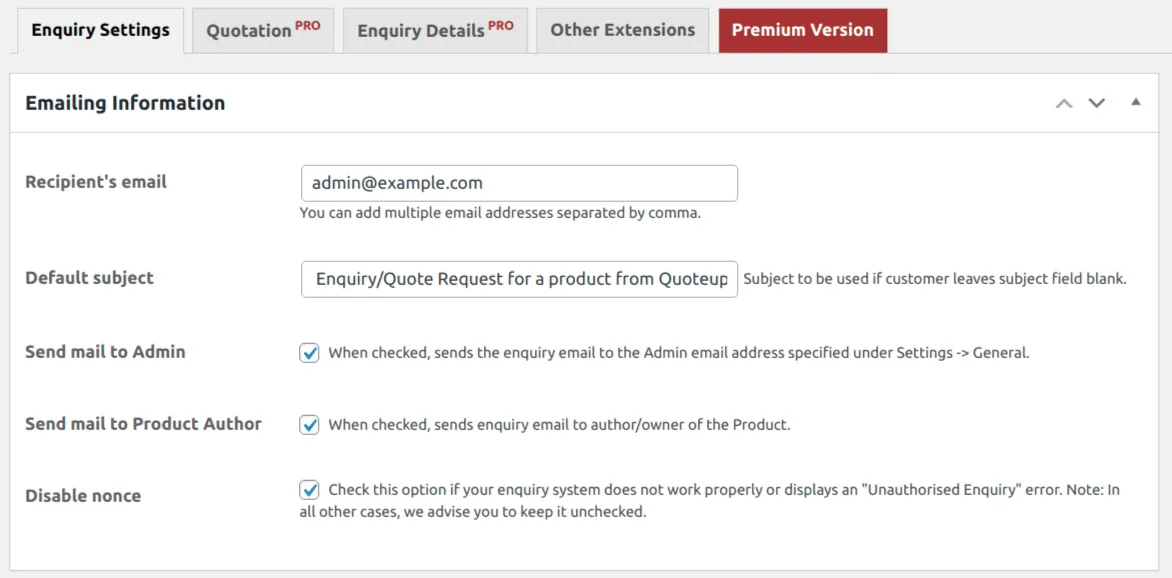
Email settings -
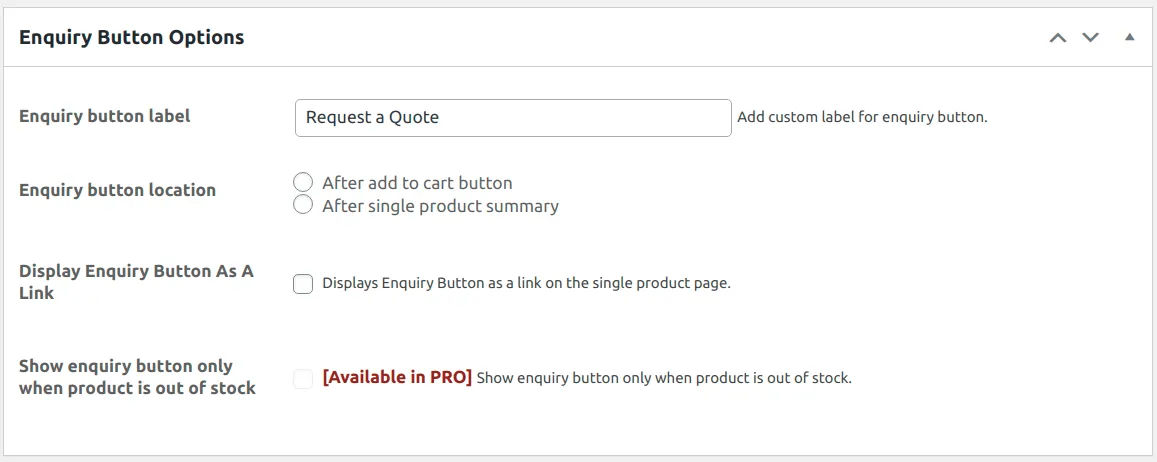
Enquiry button styling and other options -
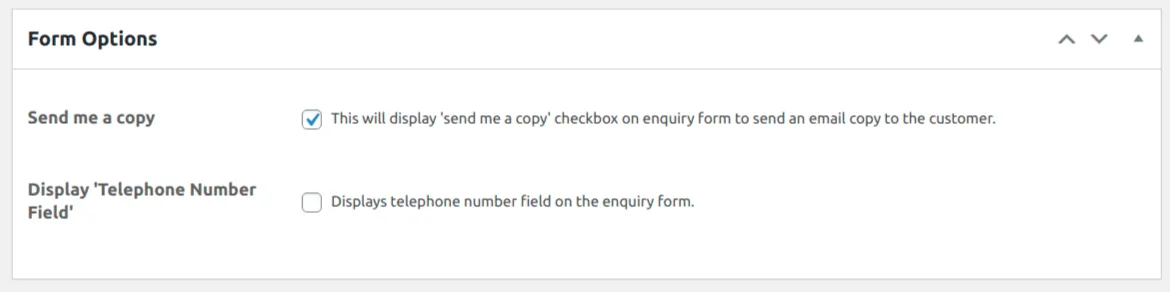
Form options -
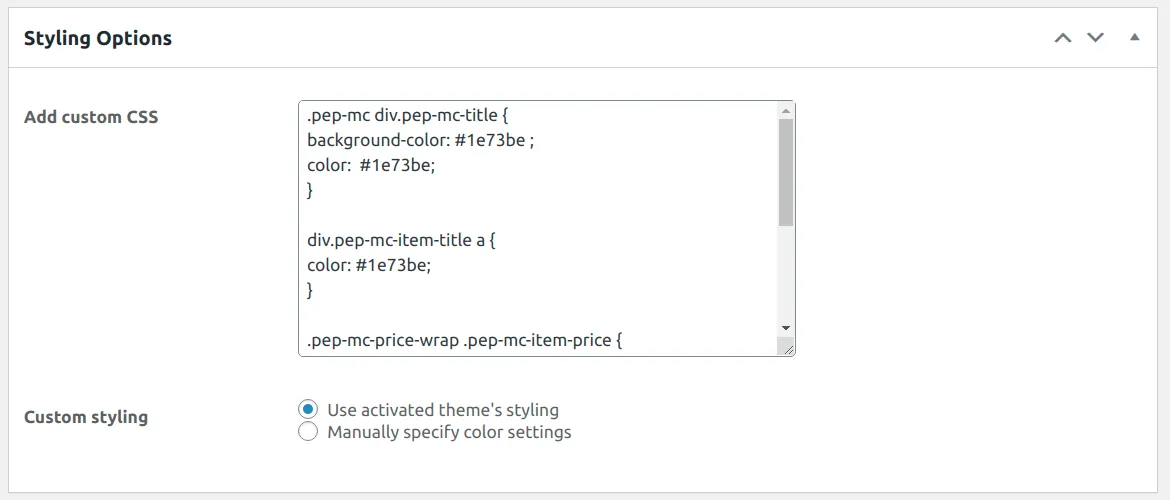
Custom styling options -
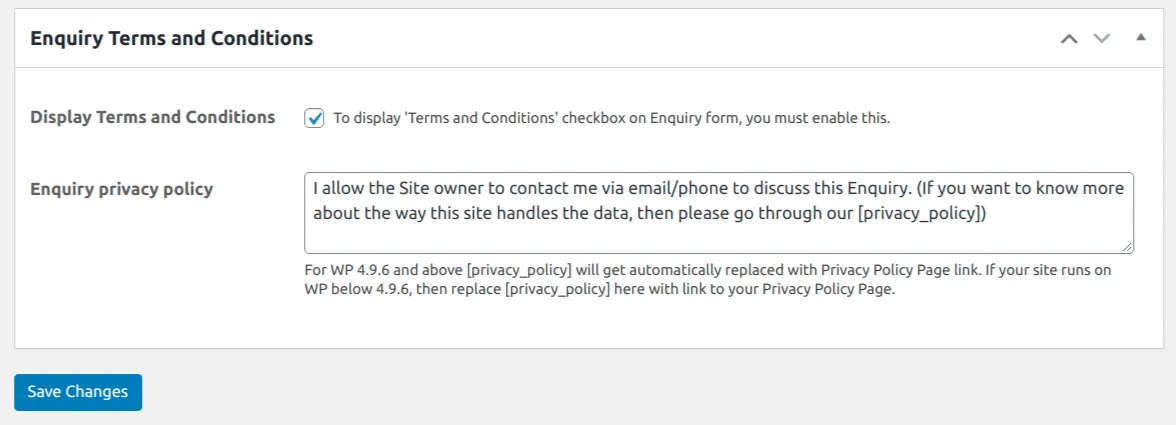
Data and privacy settings -
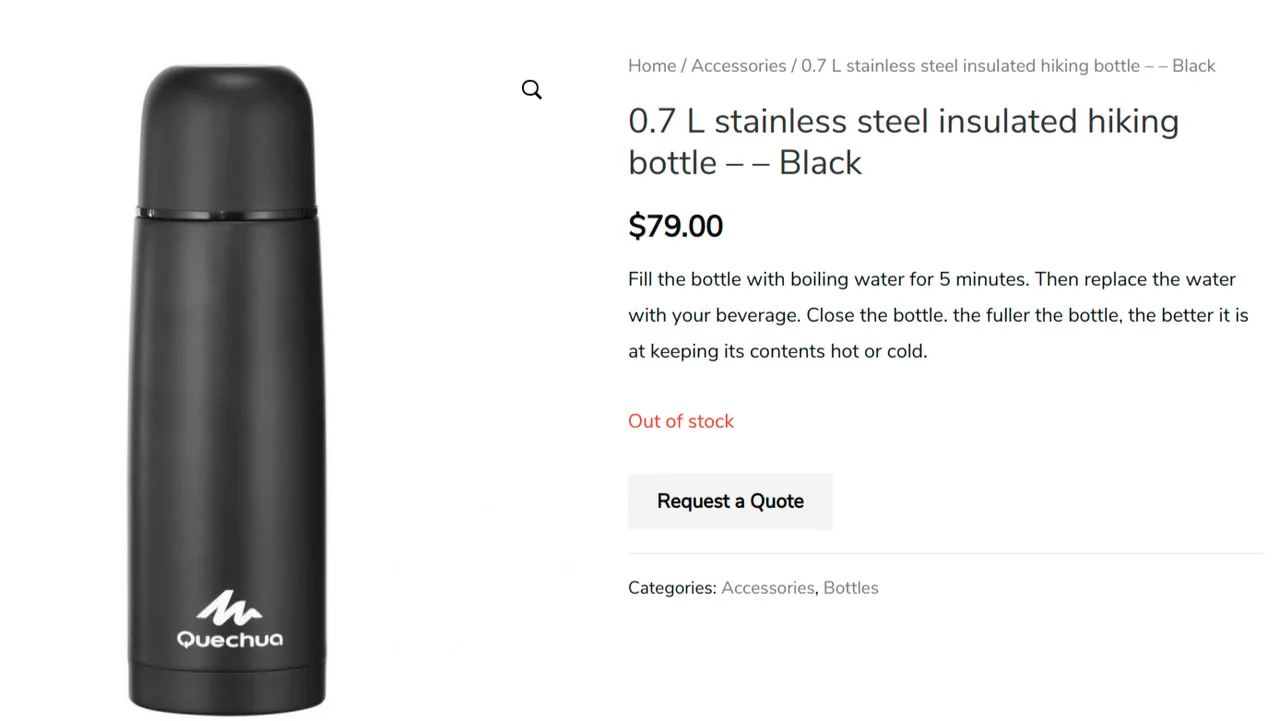
Request a quote for specific products -
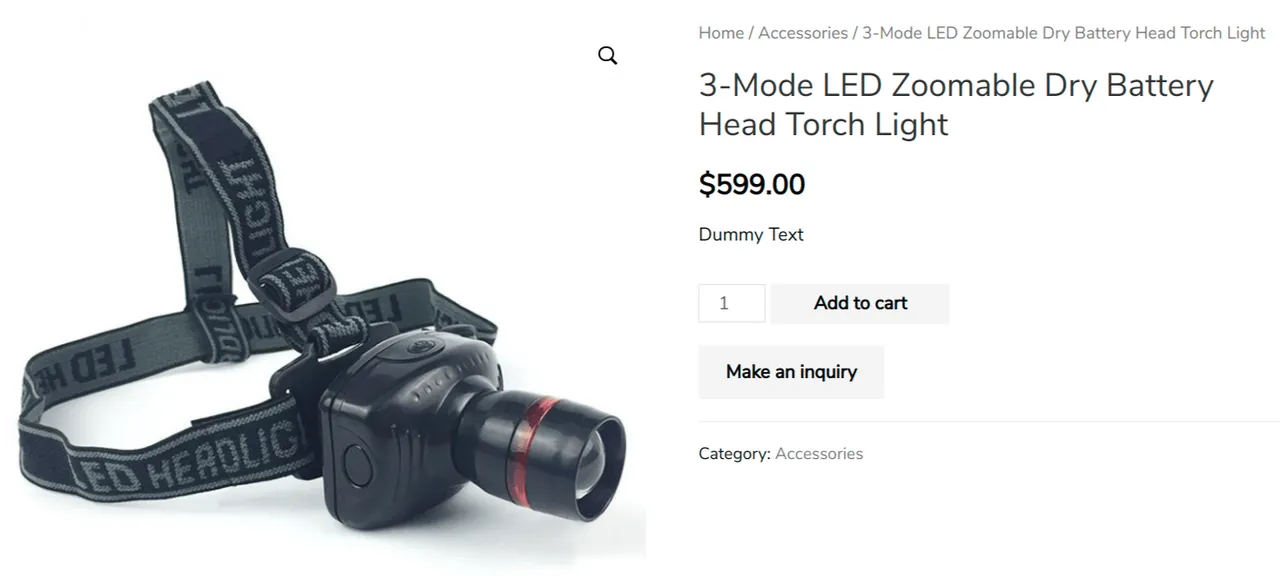
Make an inquiry before the purchase -
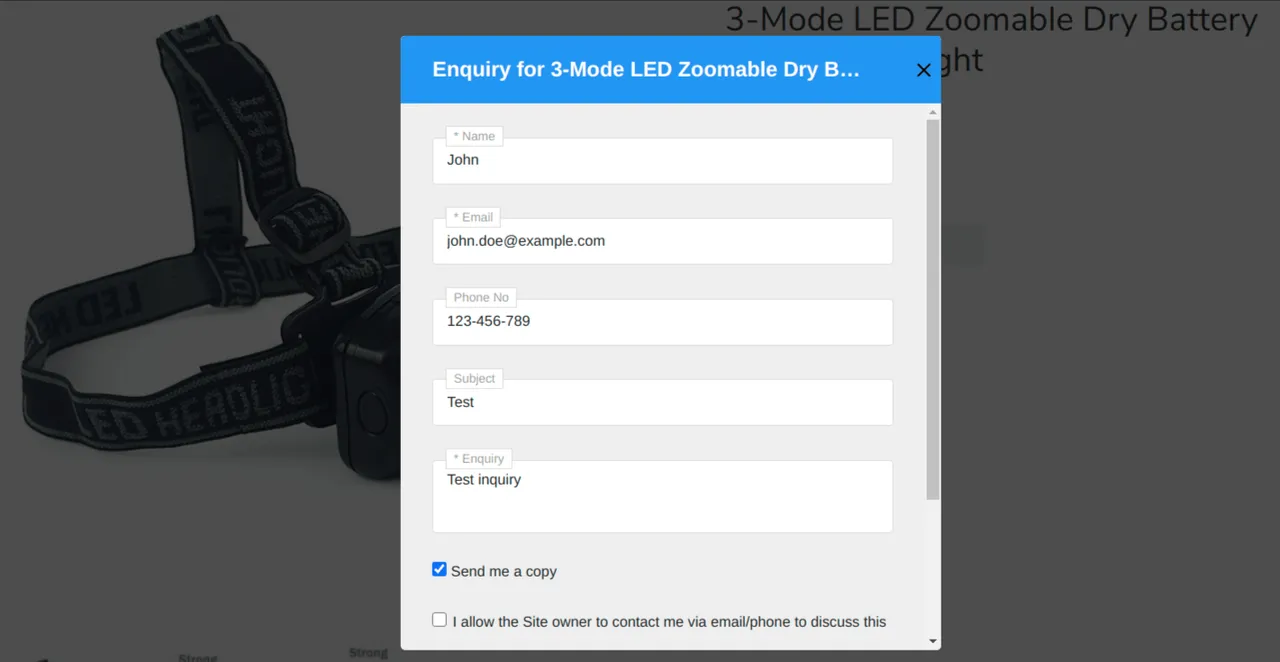
Form to submit the inquiry -
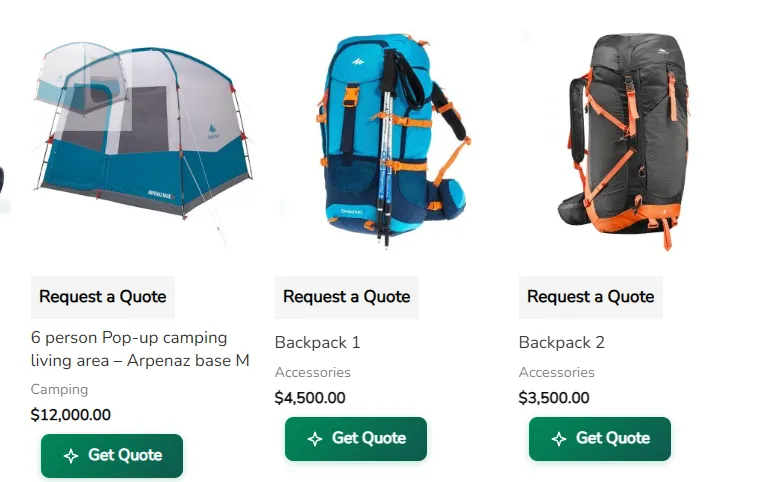
AI ChatBot button in Archive Page -
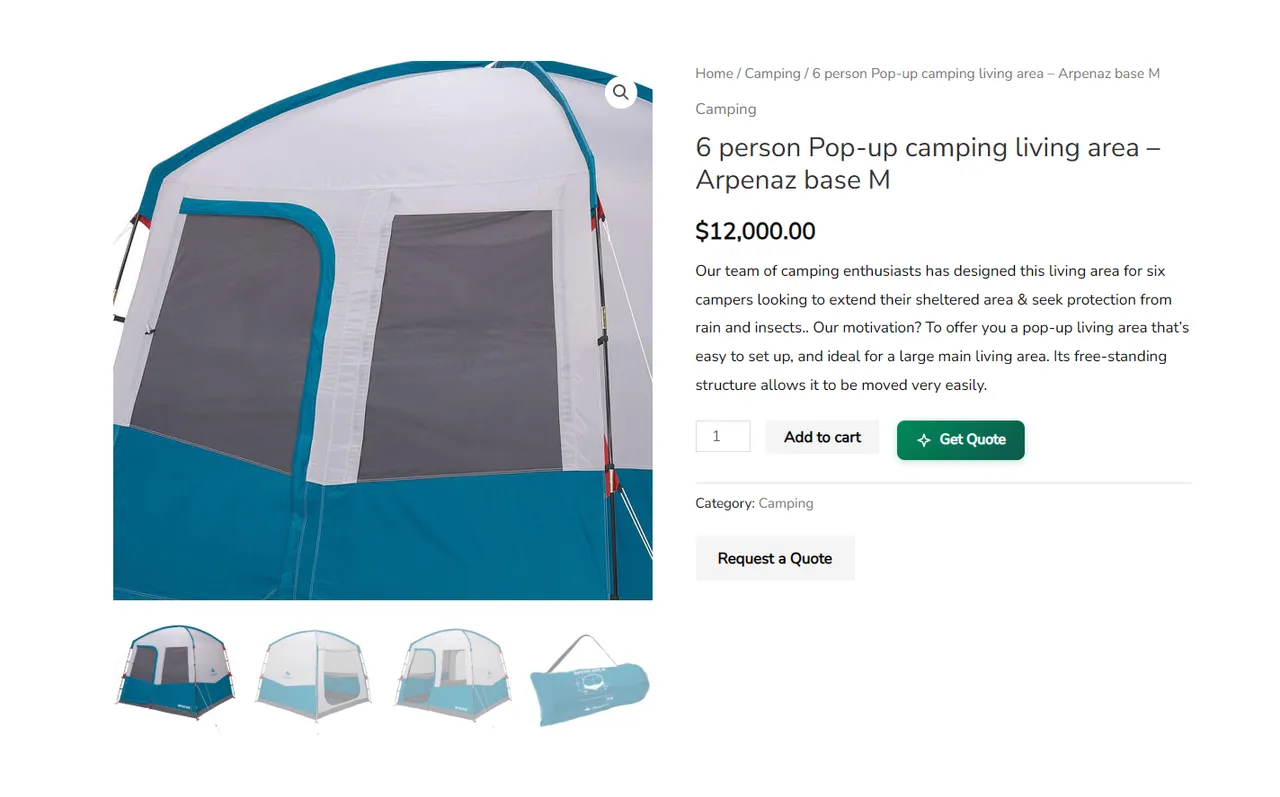
AI ChatBot button in Single Product Page. -
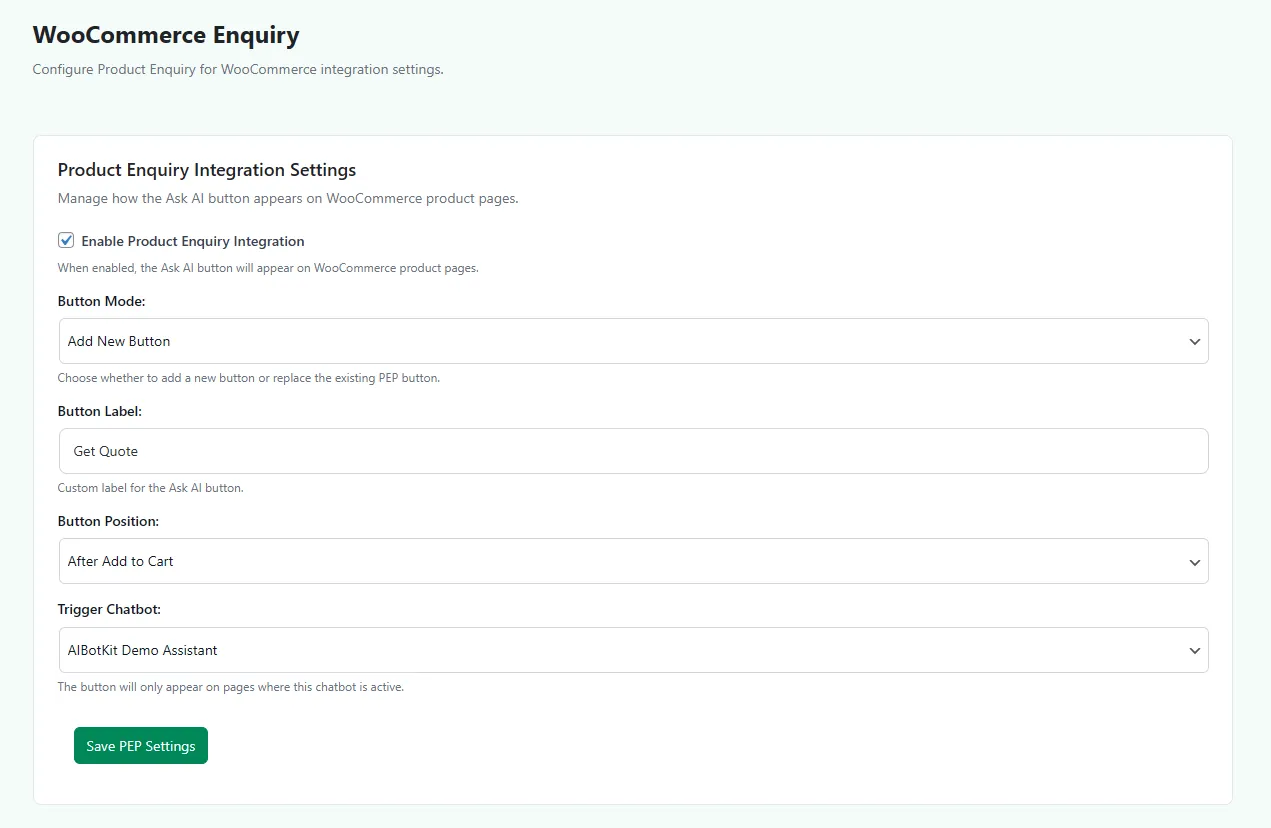
Settings of AI ChatBot. -
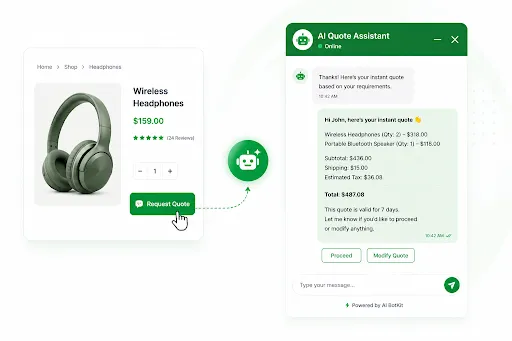
AI ChatBot Quote Assistant popup.
Important information
- Requires WooCommerce, WordPress 5.3 or newer and PHP 5.6 or newer. The listing shows testing up to WordPress 7.0.8.
- The free version uses a fixed enquiry form. Custom fields need the Pro version.
- The free button shows on product pages only. Shop page placement and multi-product enquiries are Pro features.
- The AI chatbot installs as a separate plugin with its own account and plan, so review its data practices before enabling it.
- The plugin has 1 published vulnerability in its history. The data shows it as patched, but keep the plugin updated.
From the Product Enquiry for WooCommerce readme
Straight from the developer's WordPress.org listing.
Full description
Missing out on pre-sale inquiries? WISDM Product Enquiry for WooCommerce is the perfect plugin for you. And now, it comes with a free AI assistant that answers customer questions even when you are offline.
Potential customers have questions about products they want to purchase. WISDM Product Enquiry for WooCommerce lets you add an ‘Inquiry‘ or ‘Request a Quote‘ button on every product page. With the bundled AI BotKit assistant, common questions get answered instantly, and serious buyers reach your inbox as qualified leads.
Interested buyers can use this option to send across doubts or quote requests. You can:
– Connect with genuine leads
– Address customer’s exact concerns and queries
– Answer routine questions automatically with AI, 24×7
– Get good insights into your customers’ demands
– Negotiate purchase quotations
– And quickly convert unsure customers into buyers!
NEW: Free AI Assistant Powered by AI BotKit
Every enquiry starts as a question. Now you don’t have to answer all of them yourself.
Product Enquiry for WooCommerce comes with AI BotKit, a free AI chatbot that connects to your WordPress site and:
– Instantly answers customer questions using your site’s own content
– Captures and qualifies leads 24×7, even outside business hours
– Works seamlessly with WooCommerce products, pages, and posts
– Hands off complex questions to your enquiry form, so no lead is lost
The result: fewer repetitive emails in your inbox, faster answers for your customers, and more pre-sale inquiries converted into orders.
👉 Get the Free AI Chatbot
Capture Pre-sale Inquiries
You can place the ‘Inquiry’ or ‘Request a Quote’ button on your products page and allow visitors to make pre-sale Inquiries or negotiate for a list of products they’re interested in. In doing so, you’ll be able to capture genuine leads and convert them into buyers sooner than expected.
Easily Customize Link or Button
You have full freedom to customize or label the button or link text as “Make an Inquiry”, “Request a Quote”, or “Quote to Order”, etc. to suit your convenience. This will make it easier for your customers to immediately understand and perform an action.
Collect Inquiries on Product Variations
You can use this option to allow interested customers to Inquire or Request Quotation for simple products or variations of a product. The quicker you address their problems, the quicker the sale happens!
Effortlessly Configure Settings
As a plugin user/administrator, you have the freedom to configure where to show the Enquiry or Request a Quote button on the product page, an option to style the buttons, and many other details too. (check out the screenshot ‘Plugin configuration’ for more details).
Receive Inquiries/Quotations via Email
Delegate responsibilities to the team by adding multiple recipient email ids for incoming product inquiries or quotations. An email with details such as site name, product name, product URL, customer name, and inquiry message is sent in a well-formatted manner.
Moreover, you can also configure the setting to help customers keep a tab on their Quotations by allowing them the option to send a “copy of email” to themselves.
Get Quick Support
It also gives you access to request a support query, make an inquiry for custom development, know additional services provided by us, etc. through a support sidebar right from the plugin settings page.
Support Local Languages
The latest version is ready for translation. All you need to do is create the .mo and .po files for your language.
Enhanced functions with Pro
To enhance and add more value to the existing functions, check out WISDM Product Enquiry Pro. Unlock Quote Requests, Multi-Product Enquiry & WhatsApp Integration.
Using this, you can empower your customers to send a single quotation request for multiple products or inquire about bulk or large ticket size orders. You can also view and reply to all inquiries and quote requests right from your dashboard.
Pro Review:
“I was looking for a plugin for WooCommerce to request a quote. I tried several plugins with no or a bad result. At the very end I bought the plugin Product Enquiry Pro of WisdmLabs, that was working out of the box. I highly recommend WisdmLabs!” -Leo Verzijl
By opting for the premium version, you can:
• Allow customers to send a single inquiry or quote request for multiple products at once
• Create a custom inquiry form using a Built-in form Builder
• Display a mini-cart inquiry widgets
• Easily filter & export inquiries or quote records and analyze buyer demands
• Add an Inquiry or Quote button on the Shop or Archive page
• Easily reply to inquiries or create PDF quotations in the backend
• Show/hide the Inquiry button, Add to Cart, Pricing, etc.
• Place the button anywhere on the page when using page builders like Elementor
WISDM Product Enquiry Pro is rated 4.8/5 by our customers and has been featured on bobwp.com, wpmayor.com, sellwithwp, frip.in and several other expert platforms.
<<Check all Features & Pricing>> | <<View Demo>>
Recommended Plugins: WISDM Customer Specific Pricing, WISDM Product Catalog Manager(Free)
Please Note:
The Product Enquiry Free plugin sends the data consisting of customer info and message directly to your inbox when a customer makes an enquiry on your website.
This plugin neither stores any data in the database nor does it send the data to any third party services. The AI BotKit assistant is an optional, separate plugin. Installing or using it is entirely your choice, and it operates under its own privacy terms.
It is your sole responsibility and we urge you to update the privacy policy of your websites accordingly.
Installation
As this is an extension for the WooCommerce plugin, you must have WooCommerce plugin installed already.
• Upload ‘product-enquiry-for-woocommerce’ folder to the ‘/wp-content/plugins/’ directory or upload ‘product-enquiry-for-woocommerce.zip’ through WordPress admin panel
• Activate the plugin through the ‘Plugins’ menu in WordPress
• Visit the ‘Product Enquiry’ menu page to configure settings.
Developer FAQ (7)
- Does the Enquiry plugin work with all the Product types?
- Yes. The WISDM Product Enquiry for WooCommerce works for Simple and Variable Products.
- What is the AI assistant included with this plugin?
- The plugin gives you one-click access to AI BotKit, a free AI chatbot for WordPress built by WisdmLabs. It learns from your site content and answers customer questions automatically, around the clock. It works alongside the enquiry form, so customers get instant answers for common questions and can still send a product inquiry or quote request for anything specific.
- Is the AI assistant free? Do I need a separate account?
- Yes, AI BotKit has a free plan. It installs as a separate plugin from your dashboard, and you can set it up in a few minutes. It is optional, and the enquiry plugin works fully without it.
- Can I assign the incoming Inquiry or Quotation request emails to other team members?
- Yes. With the Product Enquiry for WooCommerce, you can delegate the responsibility of the incoming Inquiry or Quotation requests to other team members as well.
- Can I display the Inquiry button on the Shop Page?
- The Free version allows you to display the Inquiry button on the Products page only. However, the Pro version (WISDM Product Enquiry Pro) enables you to place the Inquiry button on the Shop page as well. Plus, it lets you convert your store into catalog mode too.
- Can I allow customers to place multi-product inquiries?
- With the Free version, the customer will have to place the inquiry or request for quotation individually for each product. However, the Pro version enables the customers to save time by placing the Inquiry or Request Quotations for multiple products at once.
- Can I modify/customize the Inquiry Form to fit my needs?
- No. You have to use the default inquiry form. Having said that, the Pro version comes with an in-built custom form builder that allows you to add custom fields in the Inquiry form as per your needs. If you require advanced customisation, please contact our WooCommerce Developers from here.
Downloads, last 30 days
Trend vs previous period: -11.6%
Average daily downloads: 66 over the last 7 days , 74 over 30 days.
Security history
Past CVEs, patched · 1 published vulnerability (Wordfence) · most recent Jun 22, 2024
- Patched 4.4 Medium Product Enquiry for WooCommerce <= 3.1.7 - Authenticated (Admin+) Stored Cross-Site Scripting CVE-2024-3964 · Jun 22, 2024 · affects *-3.1.7 · fixed in 3.1.8
Recent releases
- v3.2.5.3
Feature: Added new 'AI Product Enquiry Assistant' tab in admin settings. * Feature: Integrated PhotoSwipe v5.4.4 with local assets for product gallery. * Fix: Fixed dismissal logic for activation...
- v3.2.5.2
Fix: Added the URL of AIBotKit for the free assistant. * Tweak: Compatibility with WooCommerce 10.4.3 ensured.
- v3.2.5.1
Fix: Added support for the Beacon code to handle customer queries, available only in the backend settings of PE Free. * Tweak: Compatibility with WooCommerce 10.3.5 ensured.
- v3.2.5
Feature: Added support beacon code for customer queries. * Tweak: Compatibility with WordPress 6.8.3 ensured. * Tweak: Compatibility with WooCommerce 10.3.4 ensured.
- v3.2.4
Feature: Added activation popup with advanced UI to promote Pro features. * Feature: Added filter 'pefree_show_activation_popup' to allow developers to disable the activation popup. * Tweak:...
Show 10 older releases
- v3.2.3
Feature: Added instant, real-time validation for enquiry form fields (on keyup/focusout/input) with all the fields. * Feature: Introduced a Pro upsell modal on settings pages when interacting with...
- v3.2.2
Tweak: Compatibility with WordPress 6.8.1 ensured. * Tweak: Compatibility with WooCommerce 9.9.3 ensured. * Tweak: Added compatibility with Astra theme.
- v3.2.1
Fix: Fixed header visibility issue.
- v3.2.0
Fix: PE Free form now compatible for mobile view. * Tweak: Compatibility with WooCommerce 9.7.1 ensured. * Tweak: Compatibility with WordPress 6.7.2 ensured.
- v3.1.9
Fix: Integrated with PhotoSwip.
- v3.1.8.1
Fix: Compatibility with latest version of WooCommerce(8.9.1).
- v3.1.8
Fix: Resolved Security related Issues.
- v3.1.7.1
Tweak: Removed branding URLs.
- v3.1.7
Feature: Compatibility with HPOS.
- v3.1.6
Feature: Compatibility with WP 6.0.
Product Enquiry for WooCommerce FAQ
Which product types does it support?
Simple products and variable products.
What is the AI assistant?
It is AI BotKit, a free chatbot from the same company. It learns from your site content, answers customer questions and hands harder ones to the enquiry form.
Is the AI assistant free and does it need an account?
AI BotKit has a free plan and installs as a separate plugin. It is optional, and the enquiry plugin works fully without it.
Can I send enquiries to other team members?
Yes. You can add several recipient email addresses.
Can the button appear on the Shop page?
Not in the free version, which shows it on product pages only. The Pro version adds Shop page placement.
Can customers enquire about several products at once?
Not in the free version. The Pro version allows one request covering multiple products.
Can I change the enquiry form?
No, the free version uses the default form. The Pro version has a form builder for custom fields.
Product Enquiry for WooCommerce alternatives

Element Pack Lite is a powerful Elementor addon that extends the Elementor page builder with advanced Elementor widgets, ready-made Elementor templates and design extensions. Build professional WordPress websites…

WP Carousel builds carousels, 3D carousels, sliders, slideshows, grids and photo galleries right in the WordPress block editor, from your images, posts, WooCommerce products and YouTube or Vimeo videos. Start from a…

🏆 The #1 WooCommerce Product Feed Manager Plugin trusted by 90,000+ online stores worldwide. Stop losing sales to rejected product feeds. CTXFeed is the most powerful product feed plugin for WooCommerce , designed…
BEAR - WooCommerce Bulk Editor and Products Manager Professional (former name is WOOBE) is WordPress plugin for woocommerce bulk edit woocommerce products in the robust and flexible way! With a built-in MCP server,…

Want to build a multivendor marketplace where multiple vendors sell, and you earn on every transaction? Dokan is the easiest and fastest way to launch a multivendor marketplace on WordPress. Dokan is a well…

Built for Shop, Ready for Every Website. BEW gives Elementor the widgets, templates, and AI tools to launch and grow your online store - or any website - faster. WooCommerce is at its core, with 16 widgets built for…
Listing data from WordPress.org and the Wordfence vulnerability feed, refreshed Nov 9, 2026; listing details fetched Nov 14, 2026. Screenshots are from the plugin's WordPress.org listing. Not affiliated with WisdmLabs.