

SEO Engine
SEO Engine - Smart SEO with AI, Schema & Redirection for WordPress · by Jordy Meow
- active installs
- 1K+
- 48 ratings
- 4.9
- since last update
- 4d
- releases in 12 months
- 25
- support threads resolved
- 100%
- avg daily downloads
- 266
- on WordPress.org
- 8.9 years
SEO Engine at a glance
SEO Engine is a freemium WordPress AI SEO plugin by Jordy Meow with 1K+ active installs and a 4.9/5 rating from 48 reviews. It was last updated on Nov 6, 2026, is tested up to WordPress 7.1.4 and needs PHP 8.1+. All 1 of its published vulnerabilities have patched versions. Our quality score is 94/100.
What is SEO Engine?
SEO Engine is a WordPress SEO plugin that covers content analysis, technical SEO, redirects, analytics and AI-assisted fixes. It was written from scratch and aims to stay light, with fewer settings than older SEO plugins. Its AI tools run through the separate AI Engine plugin, using the provider you choose.
Content SEO scores posts for readability, topic completeness, structure and originality. Magic Fix then offers a concrete suggestion for each issue, such as internal links, ALT text, grammar, titles, excerpts or featured images. You see every change as a diff and apply it yourself. There is no bulk rewrite button.
It suits site owners and agencies who want SEO checks plus optional AI help. It also offers MCP support, so ChatGPT or Claude can query your site's SEO data. Some extras, such as WooCommerce product features, are in a Pro version.
Best for
- Site owners wanting a lighter SEO plugin
- Teams that want AI suggestions reviewed before applying
- Sites moving from Yoast or Rank Math
- Owners tracking how AI assistants mention their brand
Our take
A quietly capable AI SEO plugin (metadata, schema, content) with a refreshingly low-key pitch. Worth testing if you're tired of bloated SEO suites.
SEO Engine features
AI content scoring
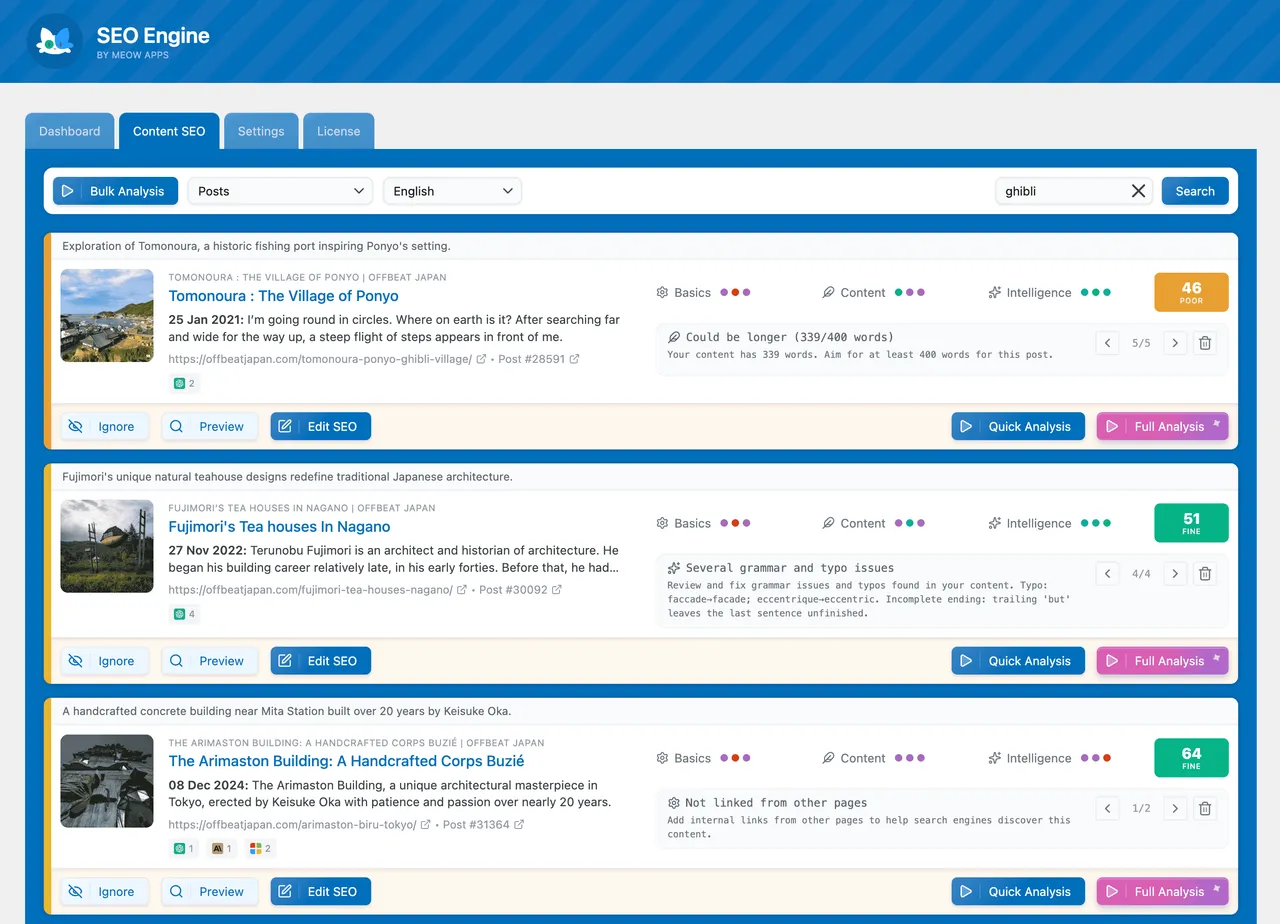
Scores posts for readability, topic completeness, structure and originality, with bulk analysis across many posts.
Magic Fix suggestions
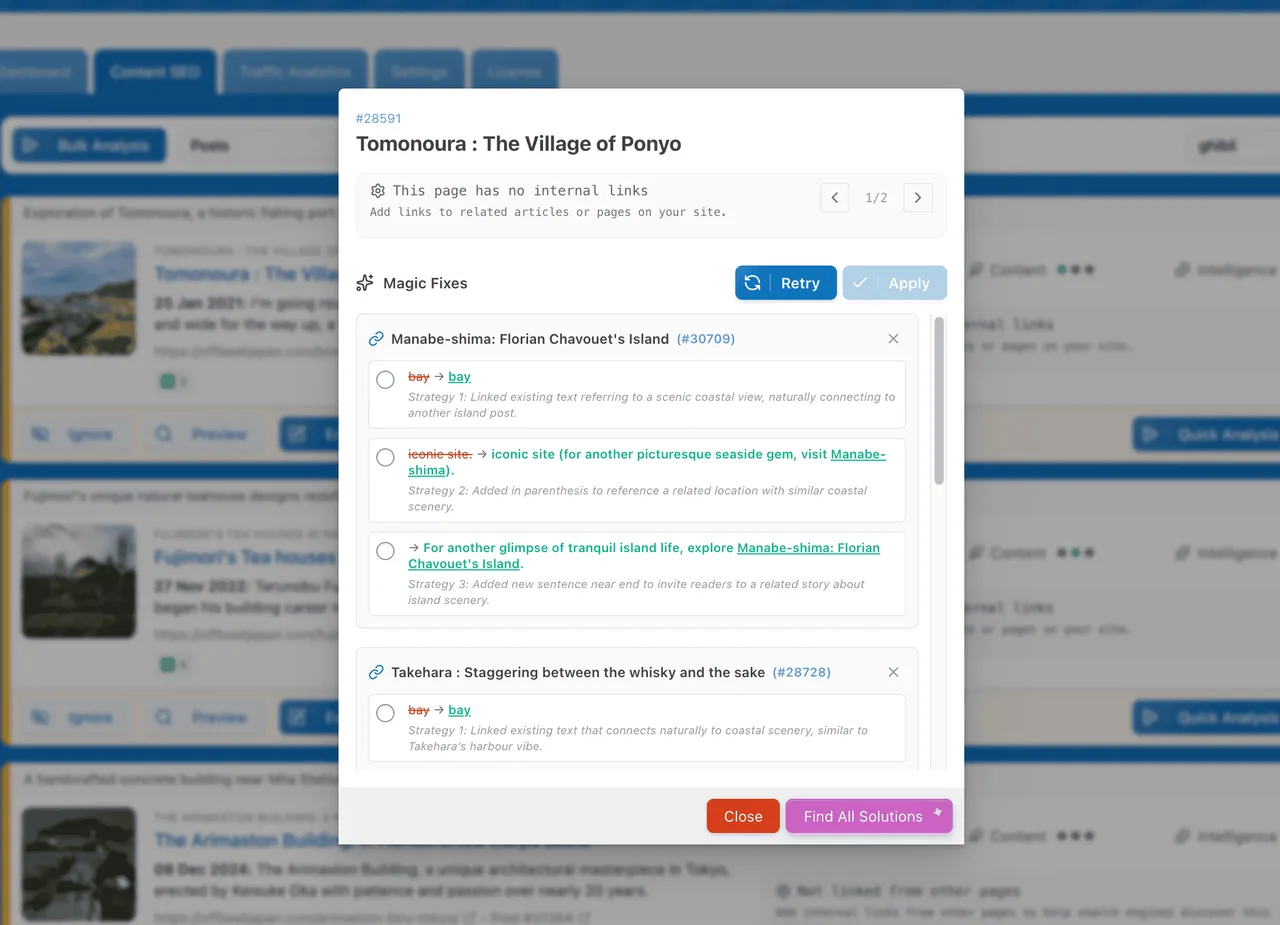
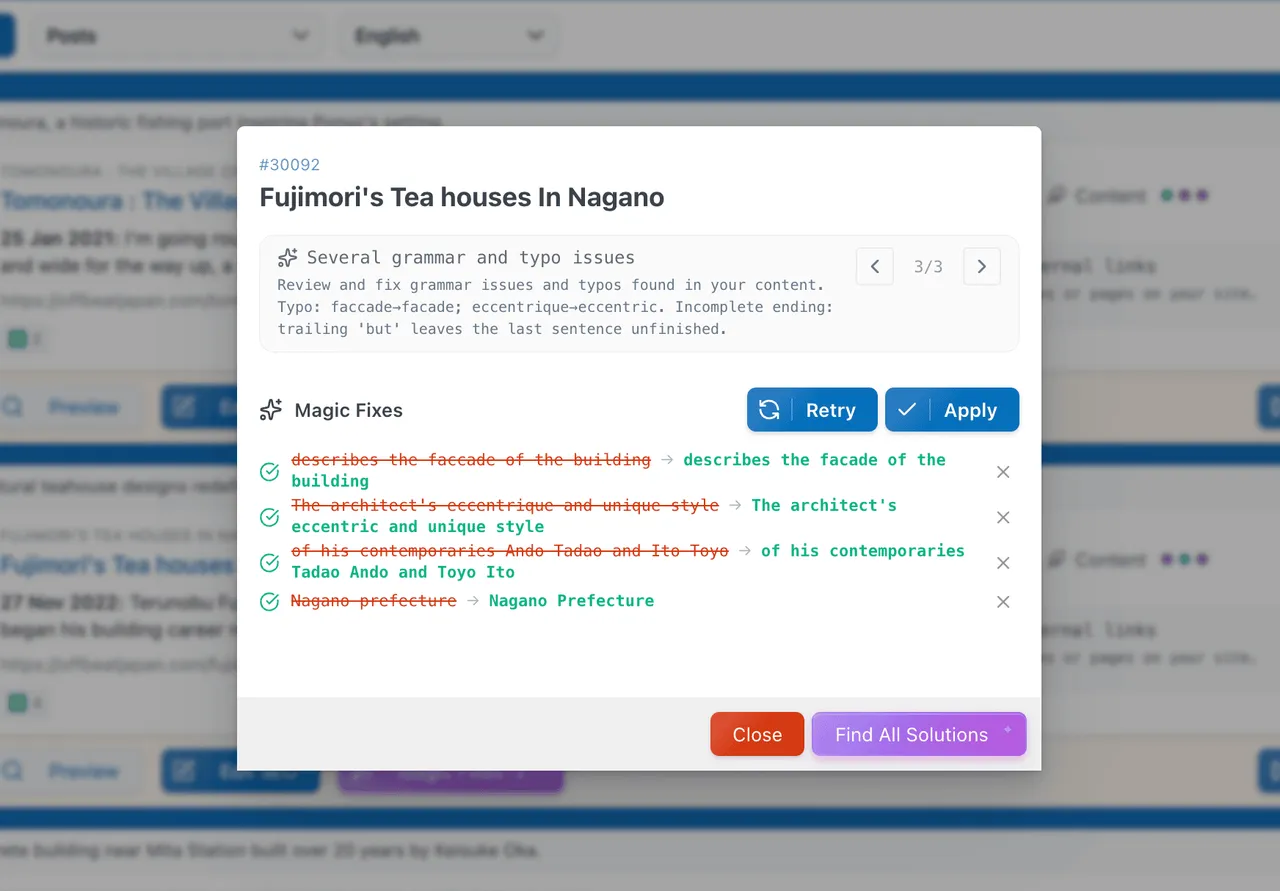
AI proposes fixes for links, ALT text, grammar, titles and excerpts. Changes are shown as a diff before anything is saved.
Section-aware internal links
Suggests related posts and placements split into introduction, body and conclusion, and respects the post language.
Technical SEO basics
Sitemaps, IndexNow, a robots.txt editor, canonical URLs, meta tags and structured data.
Redirections and 404 monitor
Create redirects, turn 404s into redirects in one click and auto-create 301s when slugs change.
AI visibility tracking
Shows how your brand appears in answers from ChatGPT, Gemini and Claude, running on your own AI Engine providers.
Analytics options
Connect Google Analytics, Plausible or Matomo, or use built-in private tracking. AI bot visits and Core Web Vitals can be monitored.
MCP support
Query your site's SEO data from ChatGPT or Claude through MCP.
Import and multilingual support
Import from Yoast or Rank Math, and work with Polylang, WPML and Bogo.
SEO Engine free vs pro
Free WordPress.org version
- AI content scoring and Magic Fix
- Technical SEO, redirections and 404 monitor
- All four analytics options and MCP support
- Import from Yoast or Rank Math
Pro Paid version
- Special WooCommerce product features
A free version includes the AI features, and a Pro version exists, with WooCommerce product features named in the listing. AI features need the AI Engine plugin and your own provider, billed by that provider.
How to use SEO Engine
- Install the plugin
In wp-admin go to Plugins, then Add New, search for SEO Engine, then install and activate it.
- Open the SEO Engine menu
Visit SEO Engine in the admin menu to review settings and, if needed, import data from Yoast or Rank Math.
- Install AI Engine for AI features
Add the AI Engine plugin and connect a provider to enable Magic Fix and other AI tools.
- Analyze your content
Run the content analysis on a post or in bulk, and filter by score, status or post type.
- Review and apply fixes
Open a detected issue, check the suggested change as a diff, then apply it if you agree.
SEO Engine screenshots (7)
Important information
- AI features need the AI Engine plugin and a provider such as OpenAI, Anthropic or Google. Post content is sent to that provider and billed by them.
- Requires WordPress 6.0 or later and PHP 8.1 or later.
- One vulnerability has been published for this plugin and is marked patched. Keep it updated.
- Core SEO features work without AI Engine, but Magic Fix and content generation do not.
- WooCommerce product features are in the Pro version.
From the SEO Engine readme
Straight from the developer's WordPress.org listing.
Full description
SEO Engine is the lightweight, intelligent SEO solution for WordPress. Built from scratch for modern websites, it combines powerful AI with clean code to help you rank better without slowing down your site.
Stop fighting bloated SEO plugins that promise everything while turning your WordPress into a slower experience! 😘
SEO Engine focuses on what actually matters: Content Quality and Technical Excellence. It implements AI in its free version and provides full MCP support. Explore our official site and check out the docs to get started.
Core Modules
🏝️ Content SEO
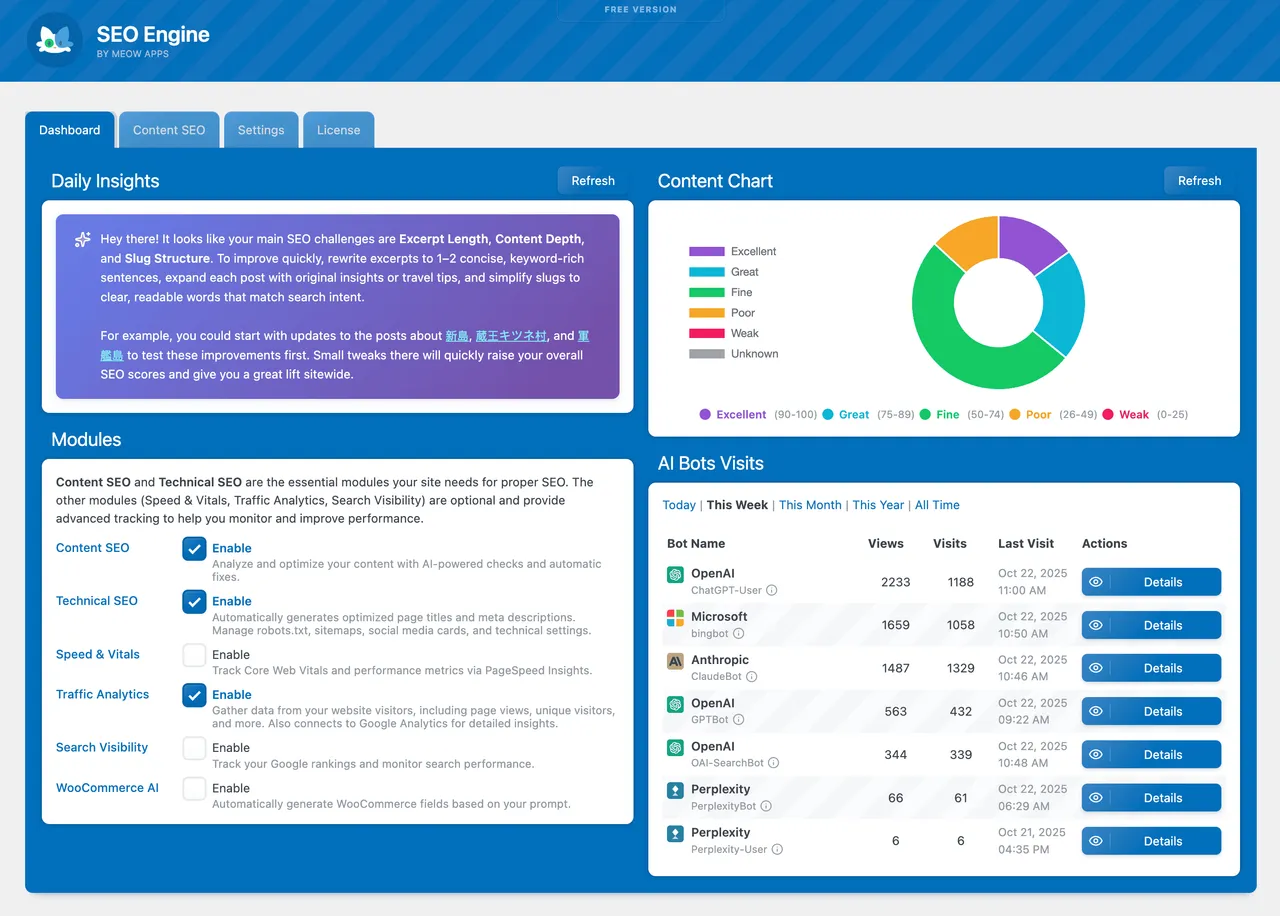
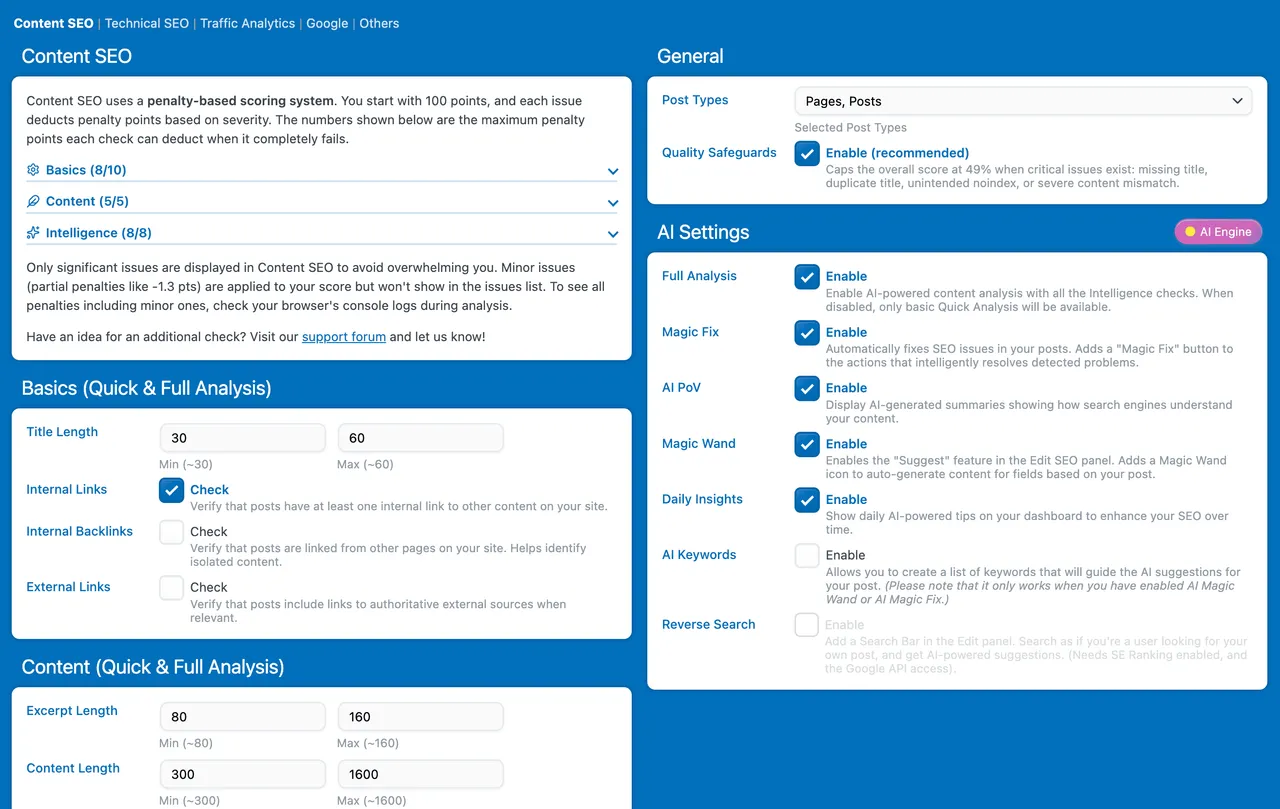
Analyze and optimize your content with AI-powered insights. Get real-time scores, actionable suggestions, and automated fixes—all from one clean dashboard.
🛠️ Technical SEO
All the SEO basics, straight to the point. No endless settings for features you don’t need—just what actually matters.
🪄 Magic Fix
Detected issues come with a quiet “fix” affordance — AI generates a concrete suggestion, you review it, you apply it. Internal links, ALT text, grammar, titles, excerpts, featured images. No bulk “fix everything” that rewrites your site behind your back.
📡 AI Visibility
See how your brand or product shows up when people ask ChatGPT, Gemini and Claude. Track your rank on each assistant, who gets recommended alongside you, and how it all trends over time — running on your own AI Engine providers, no extra subscription.
🚦 Redirections & 404
A clean redirect manager paired with a 404 monitor. Spot broken links, convert any 404 into a redirect with one click, and let SEO Engine create 301s automatically when slugs change.
🧠 Intelligence Features
Full MCP support means your entire site’s SEO data is queryable via ChatGPT or Claude. Ask anything, get insights, automate workflows. That’s all in the free version.
🎯 Analytics & Tracking
Connect to Google Analytics, Plausible, Matomo, or use the built-in privacy-friendly tracking. All four are free. Monitor AI bot visits, Core Web Vitals, and performance, all in one place.
🏝️ Content SEO
Your content is your SEO foundation. SEO Engine helps you write better, rank higher, and engage readers.
Smart Analysis:
• AI-Powered Scoring
• Readability Checks
• Topic Completeness
• Structure Quality
• Originality & Personality
Bulk Operations:
• Analyze hundreds of posts at once
• Filter by score, status, or post type
• Export reports for team collaboration
• Import from Yoast or RankMath seamlessly
Multi-Language:
• Works with Polylang, WPML and Bogo
• Automatic language detection for AI suggestions
• Per-language SEO optimization
🛠️ Technical SEO
All the basics you need, without the bloat. Most SEO plugins bury essential features under endless settings. SEO Engine gets straight to the point—giving you settings only for what actually matters.
• Smart Sitemaps
• IndexNow (Bing, Yandex and Naver are pinged the moment you publish)
• Robots.txt Editor
• Canonical URLs
• Meta Tags
• Structured Data
🪄 Magic Fix
Most plugins flag SEO issues; very few actually fix them. Magic Fix is SEO Engine’s AI-powered fixer — it sits next to each detected issue as a quiet, in-context affordance. Click it, and AI generates a concrete suggestion you can review before anything is written to your post. No bulk “fix everything” button that rewrites your site behind your back; every change is shown to you as a search/replace diff first.
Powered by AI Engine — bring your own provider (OpenAI, Anthropic, Google, etc.). All suggestions are generated in the post’s language (Polylang, WPML and Bogo supported).
Internal Links — section-aware suggestions:
• Extracts keywords from the current post, then builds a candidate pool from the same category, same tags, and keyword search
• AI ranks the most relevant related posts and proposes link placements split by section: Introduction, Body, Conclusion
• Multiple placement strategies per target — link existing text (preferred), add a short parenthetical, or insert a new sentence
• You pick which option (or none) to apply per suggested target post
• Polylang, WPML and Bogo aware: only candidates in the same language; translations of the current post are excluded
ALT Text — contextual generation:
• Scans post content for <img> tags missing or with empty alt attributes
• Generates ALT using post title, content excerpt, image filename, and attachment title/caption as context
• Constrained to short, plain functional descriptions (no “stunning”, “tranquil”, or “Image of…”)
• Updates the existing <img> tag in place — preserves all other attributes
• Up to 5 images per pass to keep the review surface manageable
Grammar & Typos — HTML-aware:
• AI returns precise search/replace pairs with 3-5 words of surrounding context
• Inline HTML inside the corrected phrase (<strong>, <em>, links) is preserved exactly
• Each correction is shown before it’s applied; no blind rewrite of your prose
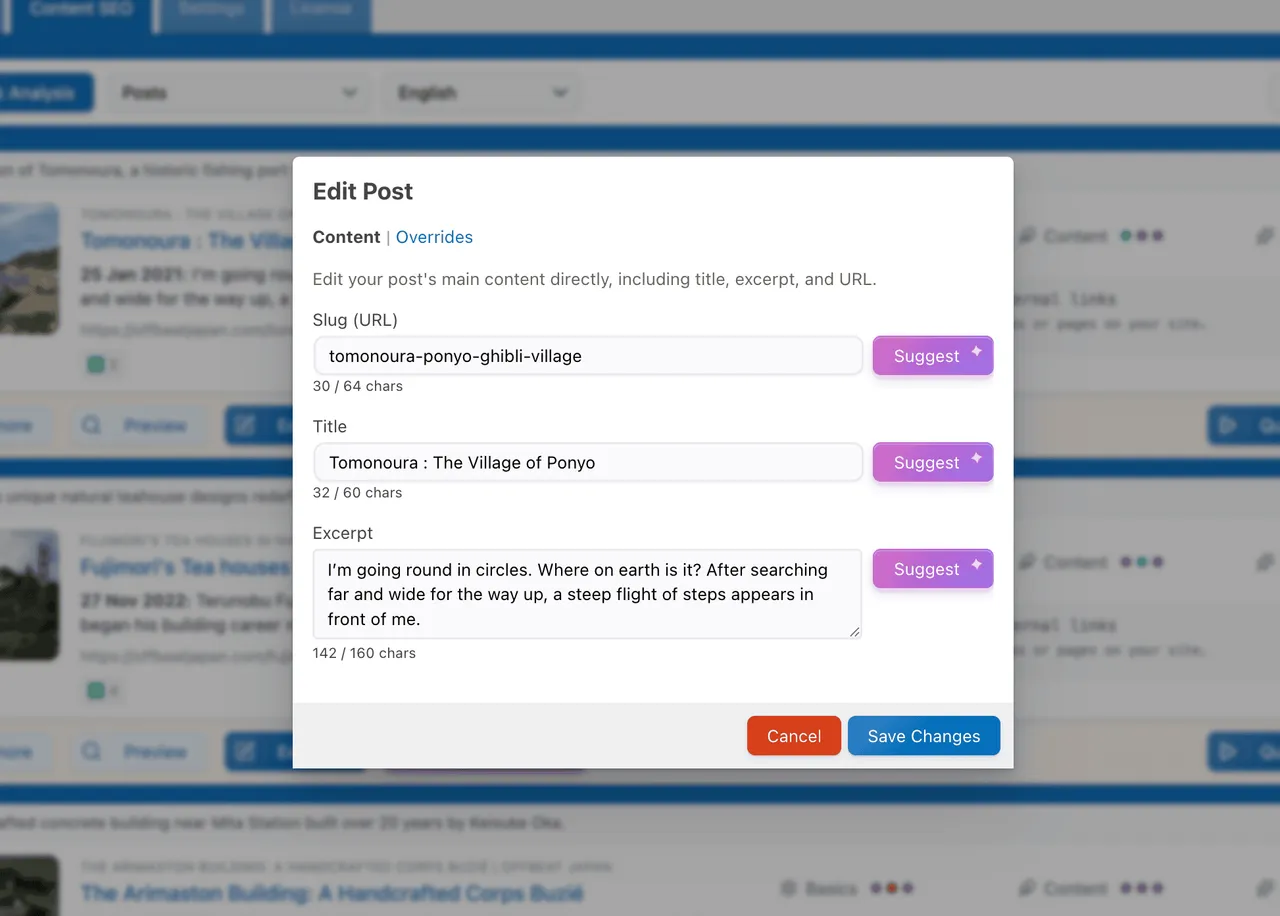
Title & Excerpt:
• Rewrite titles to your configured length range (default 30-75 chars) without losing the meaning
• Generate missing excerpts from content, or rewrite existing ones to a healthy 80-160 chars
External Links:
• Suggests authoritative external references (Wikipedia and similar) for relevant in-content terms
• Wraps existing phrases as links — never invents text
Featured Image:
• Generates a featured image with AI when a post is missing one
• Uploaded to your media library with proper title, description, and ALT text, then set as the post thumbnail
📡 AI Visibility
Search is moving into AI assistants. AI Visibility shows how your brand, product or site is recommended when people ask ChatGPT, Gemini and Claude the questions your buyers actually ask — and it runs entirely on your own AI Engine providers, with no extra subscription or credits.
Add a brand, describe it, and let AI draft the buyer-intent questions to track (or write your own, in any language). SEO Engine then asks each AI assistant and reads the answers back for you.
What you see:
• Your rank on each AI service, side by side (OpenAI, Anthropic, Google…)
• An overall AI Visibility score, trended over time
• The competitors recommended alongside you, so you know who you’re up against
• Sentiment — how positively each assistant talks about you
• The full transcripts behind every result, so nothing is a black box
How it works:
• Bring your own providers through AI Engine — your keys, your models, no metered add-on
• Pick one model per provider (for example GPT, Claude and Gemini) and scan across all of them
• Scans run from your browser, one question per provider at a time, so nothing times out
• Every result records the exact model used, and the whole history is queryable over MCP
Scans ask each provider directly, so they measure what the models already know about you from training rather than a live web search — which is what an assistant answers from memory.
🚦 Redirections & 404
A focused redirect manager and 404 monitor that pair naturally: most 404s should become redirects, and the workflow is built around that.
Redirect Manager:
• Exact-path redirects with 301, 302, 307, 308, and 410 Gone
• Hit counter and last-hit timestamp on every rule, so you know which ones are useful
• Sub-millisecond lookup on the front-end (object-cached, hashed, deferred writes)
• Static assets (images, CSS, JS, fonts) skipped automatically — no log bloat
• Optional auto 301 when a published post or page slug changes (off by default)
• Regex match type with capture groups for advanced rewrites
404 Monitor:
• Aggregated log — one row per unique URL, with hit count, first/last seen, and last referer
• One-click “Convert to Redirect” from any 404 entry
• Crawler filter so the log stays focused on real visitors
• Path exclusions with wildcards (e.g. /feed*, /wp-admin/*)
• Daily auto-prune with configurable retention
🧠 Intelligence Features
The entire SEO Engine has full MCP (Model Context Protocol) support, so everything can be queried via ChatGPT or Claude. Intelligence features are included in the Free version.
What You Can Do:
• Get automated daily summaries
• Generate meta descriptions automatically
• Suggest relevant keywords
• Rewrite content for better readability
• Bulk-optimize your entire site
• Multi-language content generation
• Query your SEO data via ChatGPT or Claude using MCP
🎯 Analytics & Tracking
Understand your traffic, monitor performance, all from your WordPress dashboard.
Multiple Data Sources:
• Google Analytics: Connect directly via Google Cloud
• Plausible Analytics: Privacy-friendly, cloud or self-hosted
• Matomo Analytics: Privacy-friendly, cloud or self-hosted
• Private Analytics: Built-in tracking with full data ownership
• All four are in the free version. Switch between sources or… combine them!
SEO Engine can inject the tracking code for you, or simply read the data if you already track visitors another way.
What You Can Track:
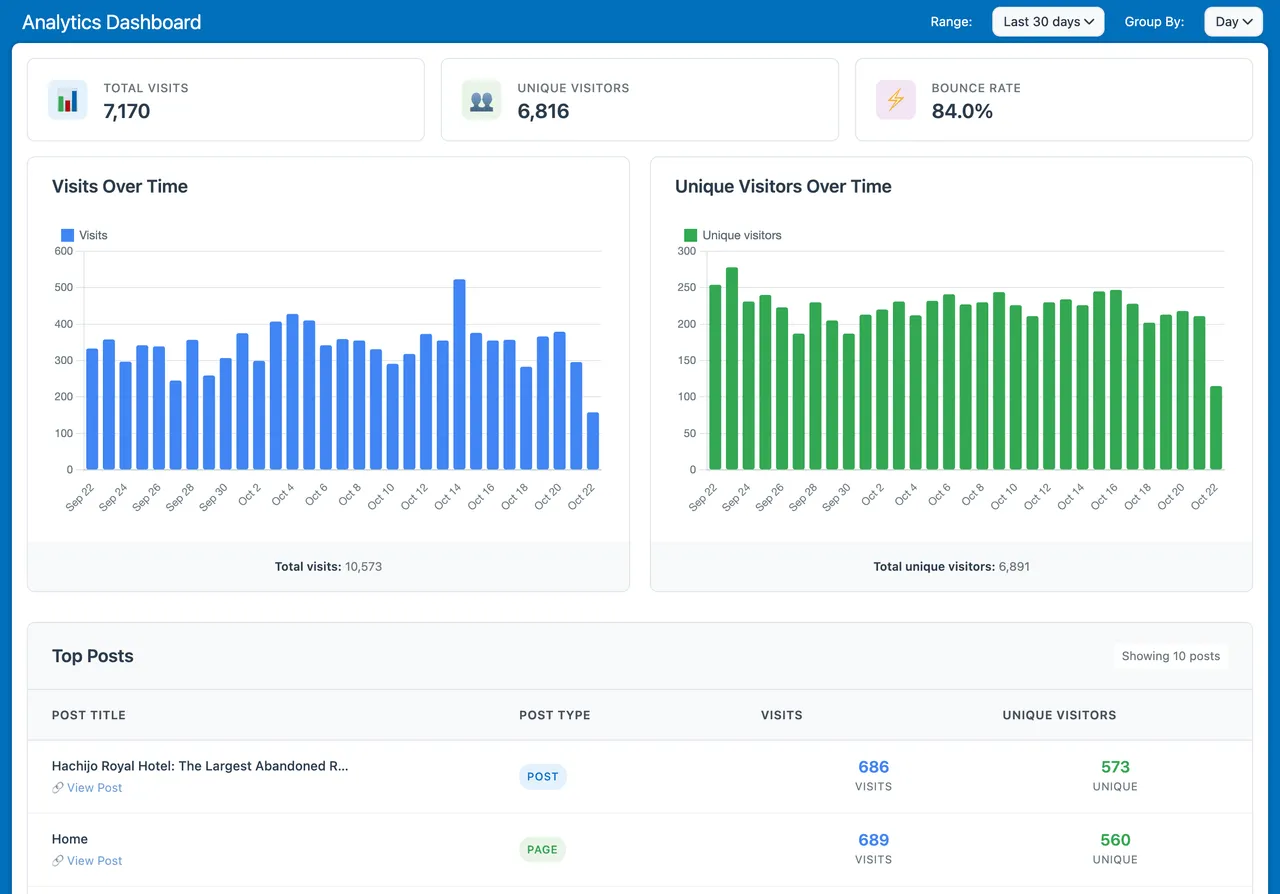
• Visits, unique visitors, bounce rates
• Top performing posts and pages
• Traffic by country and source
• Google Search Console: clicks, impressions and positions per post
• Core Web Vitals from PageSpeed Insights
• Real-time performance monitoring
Referral spam and junk analytics rows are filtered out automatically, so the numbers you see are real humans.
AI Bot Tracking:
• OpenAI (GPTBot, ChatGPT)
• Anthropic (Claude)
• Google (Gemini)
• Perplexity, Meta, Microsoft, and more!
Pro Features
• Magic Fix
• Search Console Insights (per-post search data, quick wins, opportunity views)
• Content Intelligence (AI checks for originality, completeness, readability)
• WooCommerce AI
• Priority Support
Why SEO Engine?
Performance First
Built from the ground up with modern code. No legacy bloat, no unnecessary features. Just clean, fast SEO, with a modern UI.
AI-Powered
Smart suggestions that actually help. Not “AI” slapped on as marketing, genuinely useful automation.
Privacy-Friendly
Choose between Google Analytics, Plausible, Matomo, or fully private tracking. You control your data.
Developer Friendly
Clean APIs, WordPress hooks. Extend it your way.
Constantly Evolving
Weekly updates based on real user feedback. We listen, we improve.
Installation
• Upload seo-engine to /wp-content/plugins/
• Activate through the ‘Plugins’ menu
• Visit SEO Engine in your admin menu
• Start optimizing! 🚀
For AI features, install AI Engine.
Developer FAQ (11)
- Is SEO Engine really faster than other SEO plugins?
- Yes. We’ve built SEO Engine from scratch with performance as a priority. No legacy code, no feature bloat. Just modern, efficient code.
- Can I import my data from Yoast or RankMath?
- Absolutely! SEO Engine imports your SEO titles, descriptions, and keywords seamlessly.
- Do I need AI Engine for all features?
- No. SEO Engine works great standalone. AI Engine unlocks Magic Fix, content generation, and advanced AI features, but core SEO functionality works without it.
- Which analytics should I use?
- • Google Analytics: If you’re already using it and want detailed insights • Plausible: If you want privacy-friendly analytics with a clean interface • Matomo: If you want privacy-friendly analytics you host and own yourself • Private Analytics: If you want full data ownership and simplicity All four are free. You can switch between them or compare data from multiple sources.
- Does this work with WooCommerce?
- Yes! SEO Engine has special features for WooCommerce products (Pro version).
- Is this suitable for large websites?
- Absolutely. Our bulk operations and efficient code make it perfect for sites of any size.
- Can I track AI bots visiting my site?
- Yes! SEO Engine can track visits from GPTBot, Claude, Gemini, Perplexity, and many other AI crawlers.
- Do I need to do anything special to rank in AI Overviews or AI Mode?
- No. Google’s official AI Optimization Guide (May 2026) confirms that AI Overviews and AI Mode run on the same index and ranking as normal Search — there is no separate AI ranking, no AI-specific markup, and no llms.txt that helps. What works is the same thing that has always worked: original first-hand content with a clear point of view, crawlable pages, no JavaScript-only main content, and writing for humans (not for AI parsers). SEO Engine focuses on exactly those signals, and we surface AI Overview CTR cannibalization in the Search Console tab so you can see when summaries are eating your clicks.
- What about multilingual sites?
- SEO Engine works with Polylang, WPML and Bogo, including post filtering and automatic AI language detection.
- Do I still need a separate Redirection plugin?
- No. The Redirections & 404 module handles URL redirects (301, 302, 307, 308, 410) and tracks 404s in one place. You can convert any 404 into a redirect with one click, and slug changes can be auto-redirected for you. Regex redirects are available in the Pro version.
- Does SEO Engine support IndexNow?
- Yes, and it is fully automatic. When you publish or update a post, SEO Engine instantly notifies Bing, Yandex, Naver and every IndexNow-compatible engine, so your content gets crawled right away instead of waiting. The verification key is generated and served for you; there is nothing to configure. Note that Google does not use IndexNow and keeps reading your sitemap instead.
Downloads, last 30 days
Trend vs previous period: +2.6%
Average daily downloads: 409 over the last 7 days , 266 over 30 days.
Security history
Past CVEs, patched · 1 published vulnerability (Wordfence) · most recent Oct 30, 2026
- Patched 6.4 Medium SEO Engine <= 0.9.9 - Authenticated (Contributor+) Stored Cross-Site Scripting via Entity-Encoded Post Title via Strip-then-Decode in build_title() CVE-2026-120552 · Oct 30, 2026 · affects *-0.9.9 · fixed in 1.0.0
Recent releases
Release cadence: every ~6 days.
- v1.0.2 Nov 6, 2026
Add: Keep Data setting for AI agent visits and private analytics visits, which are now deleted after 365 days by default. * Fix: Escaped quotes in themes and page builders are now handled, and...
- v1.0.1 Nov 3, 2026
Add: Breadcrumb Schema setting, on by default, to turn off the BreadcrumbList markup when your theme already outputs one. * Update: The Posts page now uses its own SEO title and description...
- v1.0.0 Oct 30, 2026
Fix: Security: Stored XSS where titles and descriptions were rendered as raw HTML in the admin preview, insights and JSON-LD. * Add: SEO Engine card on the Meow Apps dashboard showing the average...
- v0.9.9 Oct 25, 2026
Add: Daily Insights now refresh automatically once a day. * Add: The header shows the installed version with update or renewal details, a Tutorial button and the Settings wrench. * Update: Renamed...
- v0.9.8 Oct 19, 2026
Add: SEO Engine panel in the block editor to edit the SEO title and description. * Add: Tags, custom taxonomies and post type archives can now have their own SEO title and description. * Add:...
Show 10 older releases
- v0.9.7 Oct 8, 2026
Add: Title separator setting to control the character between the title and the site name. * Add: Primary category selection for posts with multiple categories. * Add: BreadcrumbList schema output...
- v0.9.6 Oct 3, 2026
Add: Support for the Divi button and blog blocks when parsing content for internal linking. * Update: Sitemap translations now work with both WPML and Polylang. * Fix: Polylang sitemaps now...
- v0.9.5 Sep 26, 2026
Add: Hide or keep a post in search from the Content tab, which sets no index and removes it from the sitemap, with a bulk undo after hiding. * Update: The Bulk SEO tab now refreshes its list right...
- v0.9.4 Sep 13, 2026
Add: MCP tools to create, scan and delete AI Visibility brands. * Fix: Settings export produced an empty file, and empty imports no longer wipe all settings. * Update: Title scoring and prompt now...
- v0.9.3 Sep 3, 2026
Add: Live active users, page views, visit duration and pages per visit to the Analytics dashboard. * Add: Date ranges up to 10 years in Analytics.
- v0.9.2 Sep 1, 2026
Add: Matomo Analytics support for both cloud and self-hosted setups. * Update: All analytics sources now use the same endpoints. * Fix: Plausible Analytics not working in the free version.
- v0.9.1 Aug 29, 2026
Add: AI cache reset in Maintenance settings. * Update: Private Analytics and Plausible options are no longer Pro-only. * Update: Refined the topic completeness prompt for better scoring accuracy.
- v0.9.0 Aug 21, 2026
Add: WooCommerce custom instructions setting. * Fix: Posts endpoint rebuilt in three passes to stop out-of-memory crashes on 128M hosts. * Fix: GA4 reports are now scoped and fail-safe, and the...
- v0.8.9 Aug 14, 2026
Add: AI Engine integration that feeds its SEO block with AI bot visits, AI visibility and top AI bots. * Update: Shared dashboard now syncs with the new Board and AI site analysis. * Update:...
- v0.8.8 Jul 30, 2026
Update: Mentioned Bogo alongside Polylang and WPML in the readme. * Update: Reworked post type detection to use WordPress core functions instead of direct database queries.
SEO Engine FAQ
Is it faster than other SEO plugins?
The vendor says it was built from scratch with performance in mind and avoids legacy code and extra features. The listing does not give benchmark numbers.
Can I import from Yoast or Rank Math?
Yes. It imports SEO titles, descriptions and keywords.
Do I need AI Engine?
Not for core SEO features. AI Engine is needed for Magic Fix, content generation and other AI tools.
Which analytics can I use?
Google Analytics, Plausible, Matomo or built-in private analytics. All four are free and you can switch between them.
Does it work with WooCommerce?
Yes. Special WooCommerce product features are in the Pro version.
Can it track AI bots?
Yes. It can track visits from crawlers such as GPTBot, Claude, Gemini and Perplexity.
Does it work on multilingual sites?
Yes. It works with Polylang, WPML and Bogo, including post filtering and automatic language detection for AI suggestions.
Do I still need a redirect plugin?
No. The Redirections and 404 module handles 301, 302, 307, 308 and 410 redirects and tracks 404s in one place.
SEO Engine alternatives

Real-time SEO guidance, schema, and AI built in. Help search engines and AI systems understand your content. All AI tools included, no hidden fees. Yoast SEO: the #1 WordPress SEO plugin Since 2008, Yoast SEO has…

Rank Math SEO - WordPress AI SEO Plugin to Rank Higher 📈 ★★★★★ Rank Math SEO helps you stay ahead of competitors with AI-powered SEO tools built for today’s search engines and AI assistants. The plugin brings…

AIOSEO - The Original AI SEO Plugin for WordPress All in One SEO is the original WordPress SEO plugin, founded in 2007 and trusted by over 3 million website owners and SEO experts. AIOSEO is a complete AI SEO plugin…

SEOPress - The fast, privacy-first WordPress SEO plugin, ready for AI search Rank higher in Google AND in AI answer engines (ChatGPT, Claude, Perplexity, Gemini). SEOPress is the all-in-one WordPress SEO plugin…

CrawlWP - The WordPress SEO Plugin That Also Gets You Indexed Optimize every page, submit it to search engines (Google, Bing, Yandex, Yep etc) the moment you publish, and see which ones actually indexed it - all…

ThinkRank is an AI SEO plugin for WordPress that helps you write SEO titles and meta descriptions, optimize content around a focus keyword, add schema markup, generate XML sitemaps, and review Google Search Console…
Listing data from WordPress.org and the Wordfence vulnerability feed, refreshed Nov 9, 2026; listing details fetched Nov 14, 2026. Screenshots are from the plugin's WordPress.org listing. Not affiliated with Jordy Meow.