AI Product Gallery Slider
AI Product Gallery Slider, Additional Variation Images, Product Video, Product Image Zoom and Lightbox for WooCommerce - WPBean · by WPBean
- active installs
- 1K+
- 27 ratings
- 4.3
- since last update
- 11d
- releases in 12 months
- —
- support threads resolved
- —
- avg daily downloads
- 62
- on WordPress.org
- 11.7 years
AI Product Gallery Slider at a glance
AI Product Gallery Slider is a free WordPress AI WooCommerce plugin by WPBean with 1K+ active installs and a 4.3/5 rating from 27 reviews. It was last updated on Oct 29, 2026, is tested up to WordPress 7.1.4 and needs PHP 8.3+. It has no published security vulnerabilities in the Wordfence database. Our quality score is 90/100.
What is AI Product Gallery Slider?
AI Product Gallery Slider replaces the default WooCommerce product gallery with one that has a slider, image zoom, product videos, a lightbox and variation images. It is meant to stand in for several single-purpose plugins. It also includes an AI helper that proposes gallery layouts and rules from a text prompt or from your images. It works on single product pages, so you can see the result by hovering over a product image after activation.
The free version offers thumbnail layouts at the top, bottom, left or right, slider and grid structures, hover and inner zoom, a fullscreen lightbox, and videos from YouTube, Vimeo, self-hosted files or the Media Library. When a shopper picks a variation, the main image changes to match. A rules system assigns a layout to all products, chosen products or categories.
It suits stores that sell on appearance, such as fashion, jewelry or furniture. The free version is limited to one gallery rule. Extra layouts, lens and window zoom, multi-image variation galleries and a sticky product summary need the paid version. The AI builder works with your own provider account. It needs a recent PHP version, so confirm your host supports it before you install, and test on a staging copy of the store.
Best for
- Stores where product detail photos matter
- Shops with many color or style variations
- Owners who want video in the product gallery
- Anyone replacing separate zoom, slider and lightbox plugins
AI Product Gallery Slider features
AI gallery builder
Generate gallery layouts from a text prompt, get layout suggestions from images and create gallery rules with AI. It works with OpenAI, Claude, Gemini and MiMo.
Flexible thumbnail layouts
Horizontal and vertical galleries, thumbnails at any side, slider or grid strips, and controls for size, spacing and corner radius.
Gallery slider
Arrows, drag, swipe and scroll navigation, looping, and fade, slide or zoom transitions.
Inner and hover zoom
Adjustable magnification, easing and cursor styles. Lens and window zoom are paid.
Fullscreen lightbox
Arrows, counter, captions, thumbnails, autoplay, zoom controls and keyboard navigation.
Product video gallery
Add YouTube, Vimeo, self-hosted or Media Library videos with autoplay, mute, loop and controls.
Variation image switching
The main image updates when a shopper selects a variation. Full galleries per variation are paid.
Mobile touch support
Swipe navigation, pinch-to-zoom, mobile thumbnails and responsive breakpoints.
Gallery rules
Build a layout preset and apply it globally, to selected products or to categories. The free version allows one rule.
Paid layouts
Hierarchy grid, anchor navigation, sticky split and tiles layouts, plus a sticky title, price and add to cart.
AI Product Gallery Slider free vs pro
Free WordPress.org version
- AI gallery builder
- Thumbnail, slider and grid layouts
- Inner and hover zoom
- Lightbox and product video gallery
- Variation image switching
- One gallery rule
Pro Paid version
- Hierarchy grid, anchor navigation, sticky split and tiles layouts
- Lens zoom and window zoom
- Multiple images per variation
- Sticky product summary and extra pagination styles
- Lightbox rotate, flip, 1:1 zoom, sharing and downloads
- More gallery rules
A paid version exists and adds the items above, but the listing gives no prices. The AI builder lists OpenAI, Claude, Gemini and MiMo as options, and the listing does not say how keys are supplied, so expect to use your own provider account and be billed by the provider.
How to use AI Product Gallery Slider
- Install WooCommerce first
The plugin extends WooCommerce product pages, so make sure the store is set up.
- Install the plugin
In wp-admin, go to Plugins, then Add New, search for AI Product Gallery Slider, then install and activate it.
- Open a product page
Visit any single product and hover over the image to see zoom working.
- Adjust layout and zoom
Use the plugin's settings to choose thumbnail position, slider behavior, zoom style, lightbox and video options.
- Set a rule
Apply your layout globally, to selected products or to categories. Optionally use the AI builder to draft a layout.
AI Product Gallery Slider screenshots (12)
-
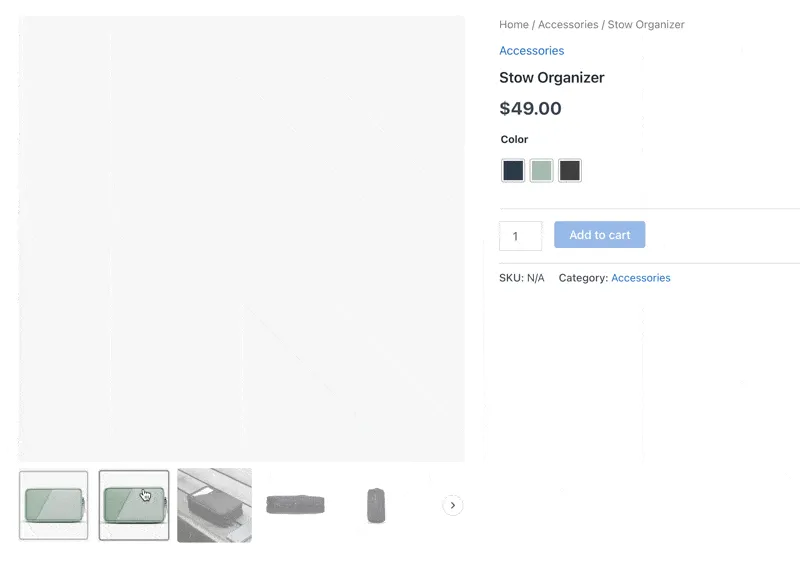
WooCommerce product gallery slider -
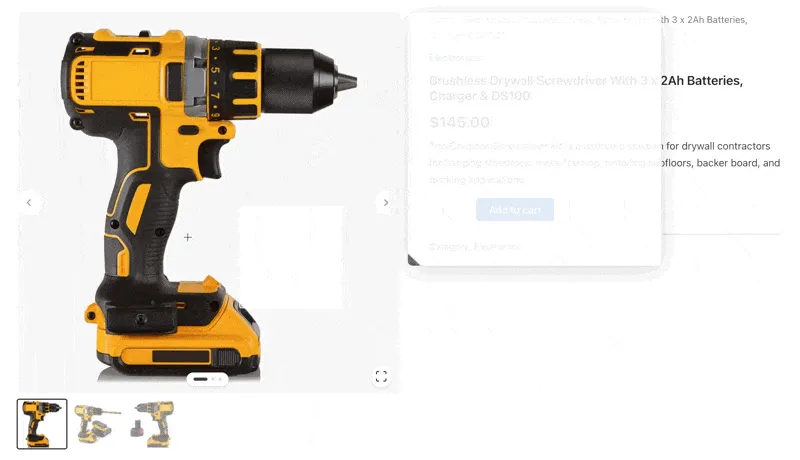
WooCommerce product image zoom -
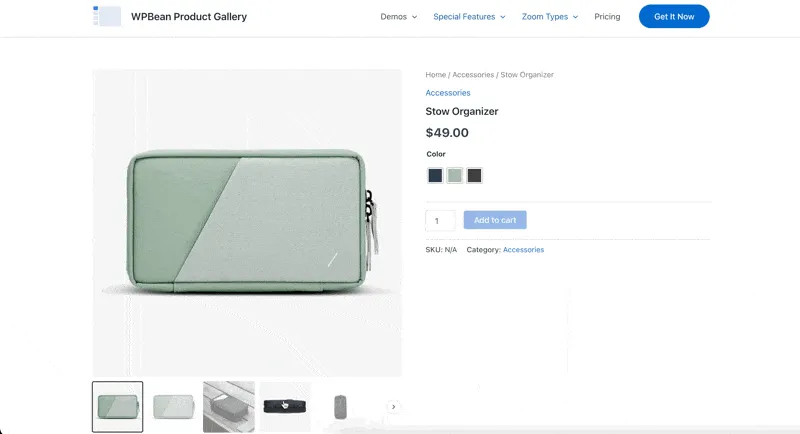
WooCommerce lightbox gallery -
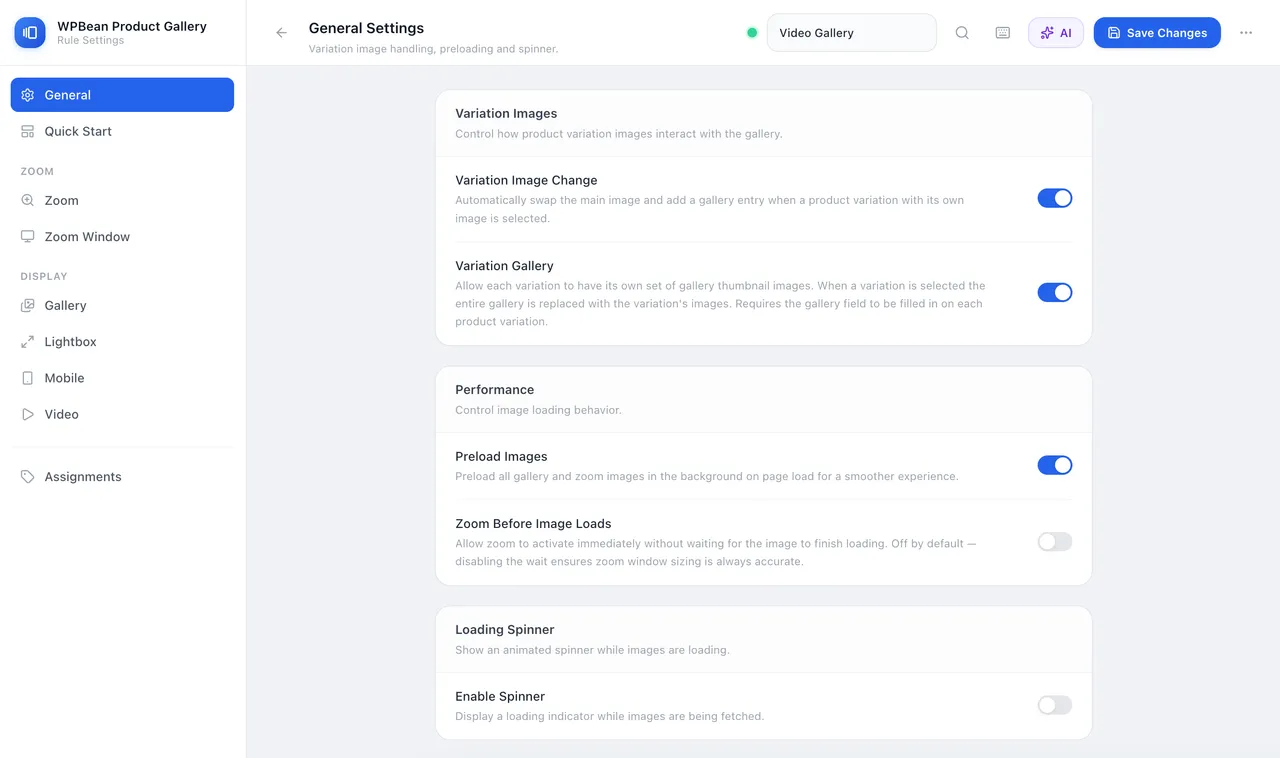
WPBean Product Gallery - General Settings -
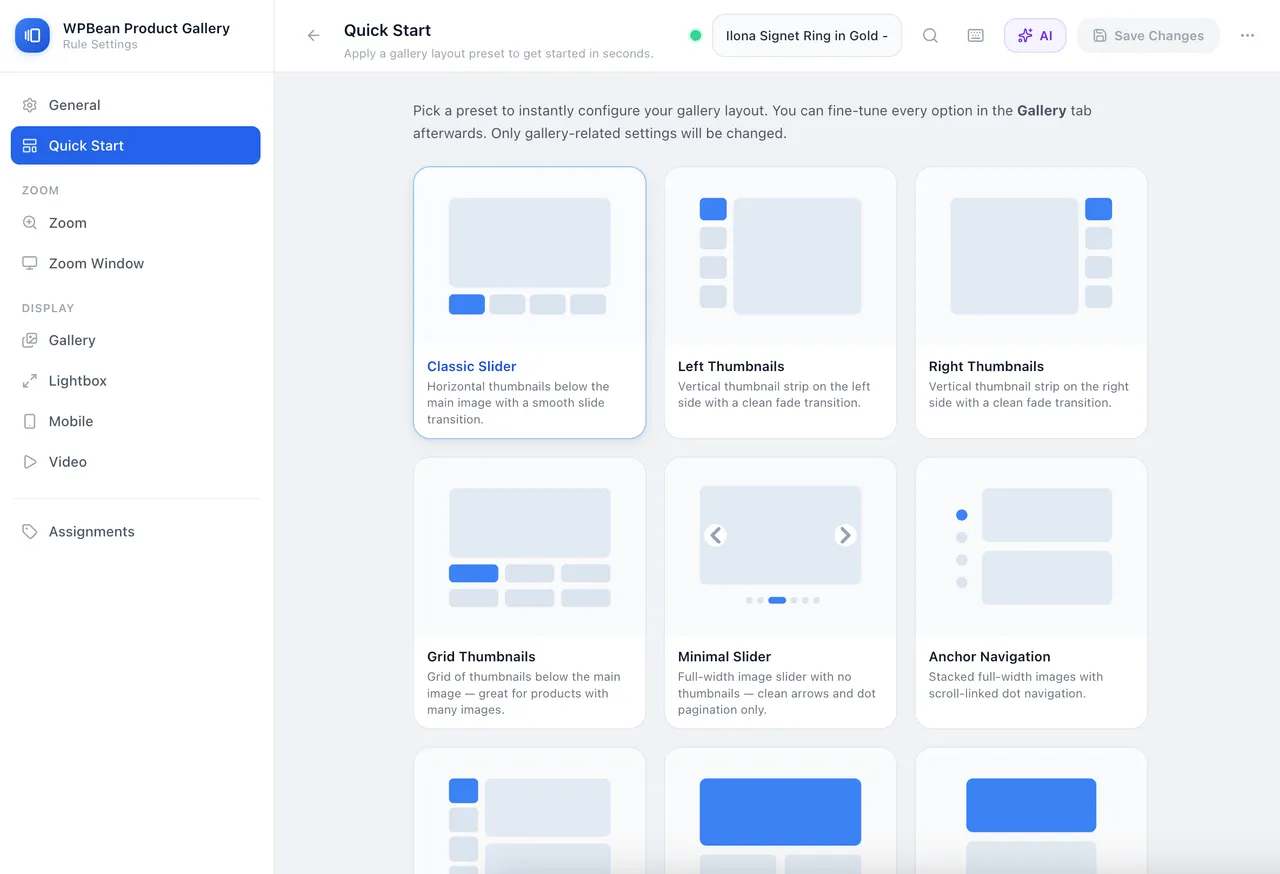
WPBean Product Gallery - Quick Start -
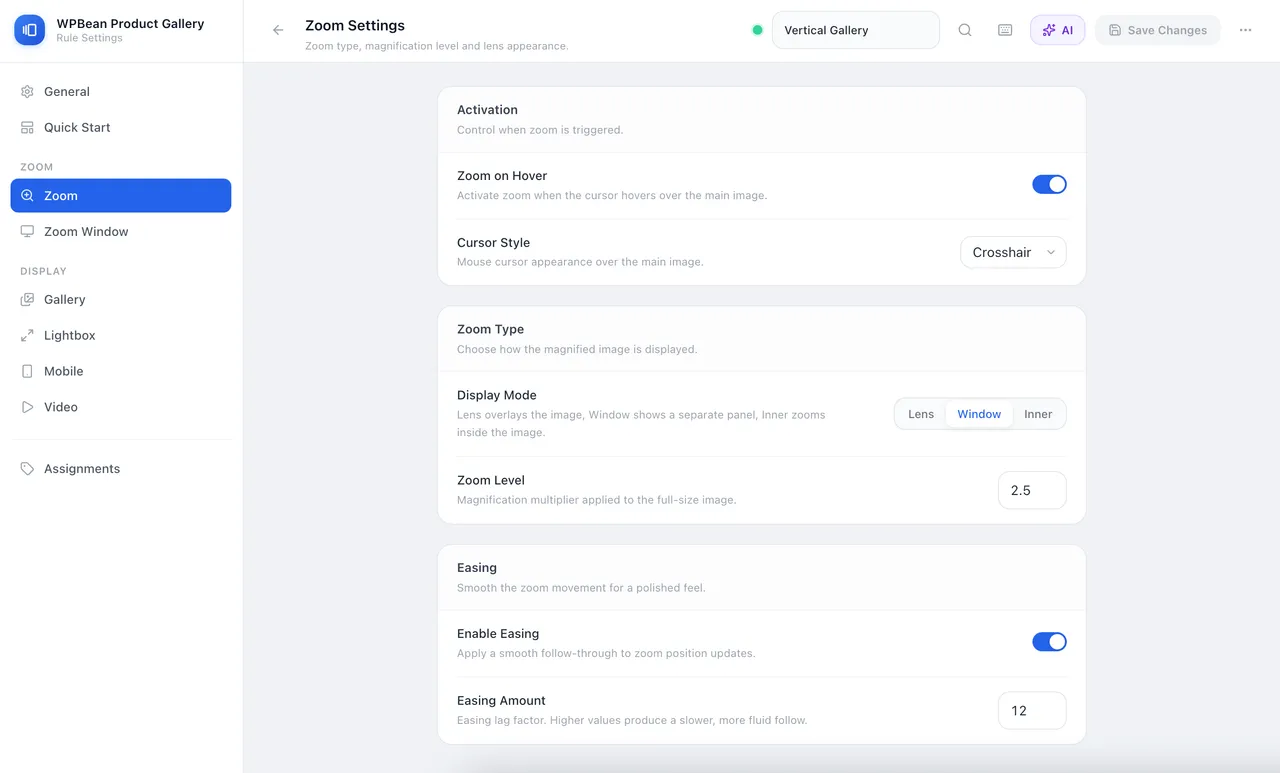
WPBean Product Gallery - Zoom Settings -
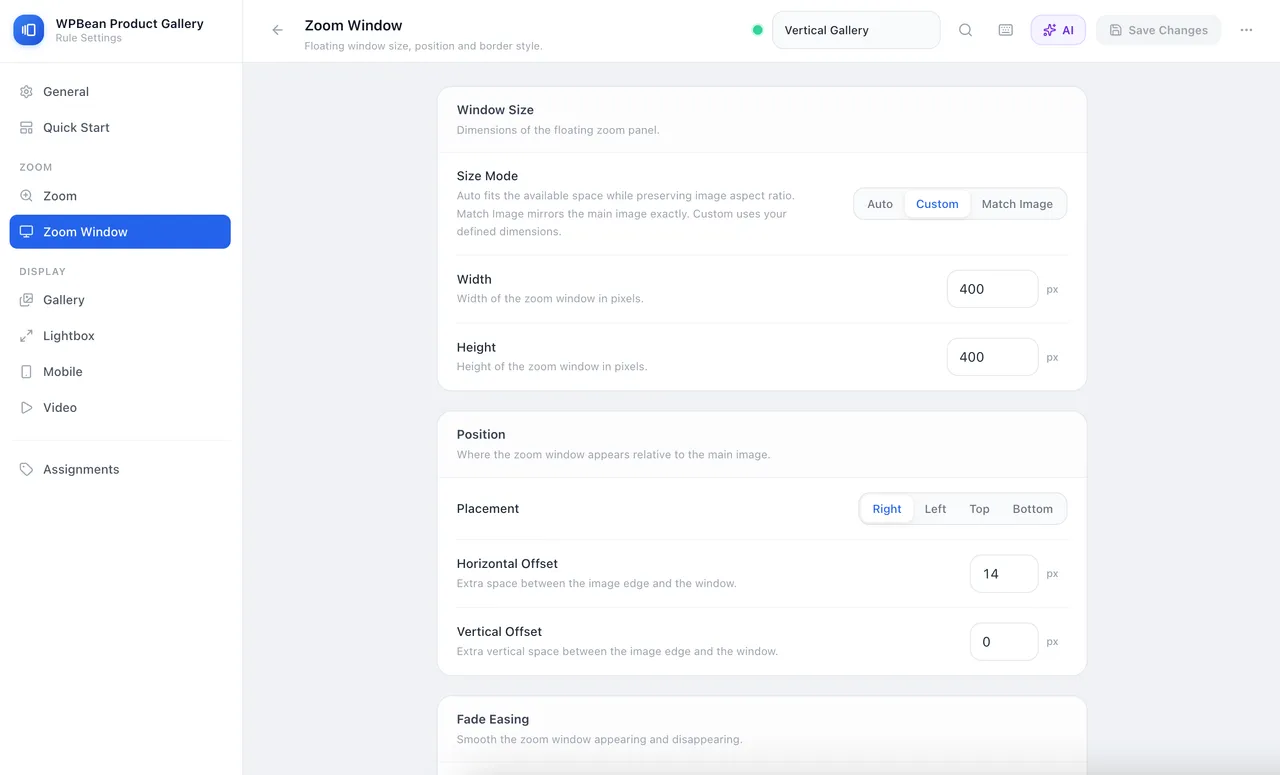
WPBean Product Gallery - Zoom Window Settings -
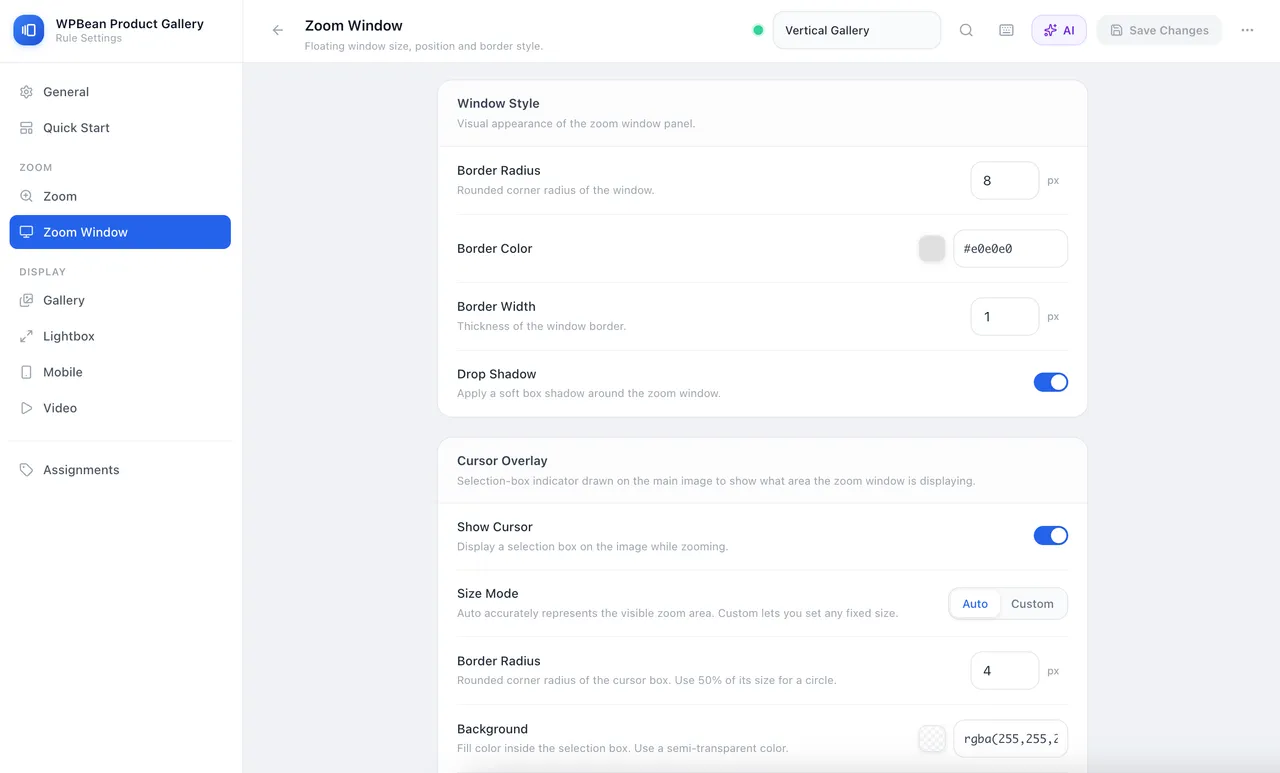
WPBean Product Gallery - Zoom Window Settings 2 -
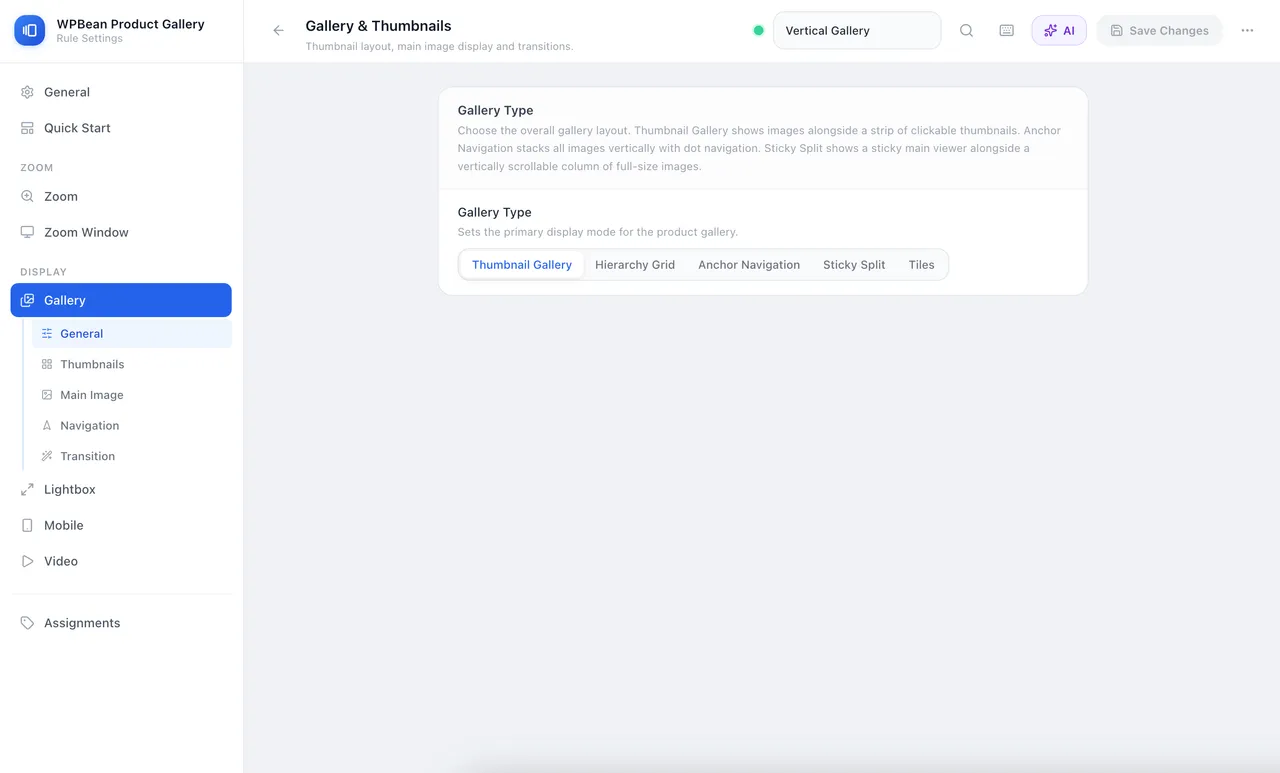
WPBean Product Gallery - Gallery Settings -
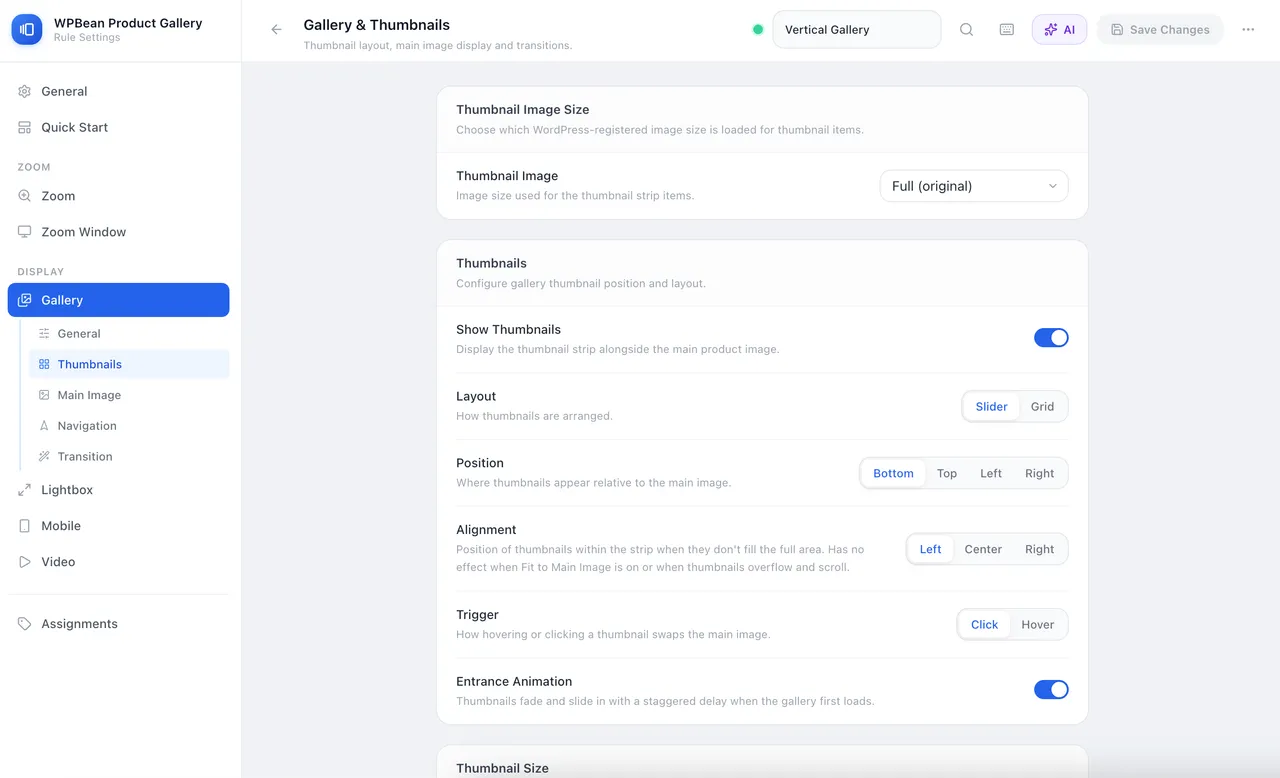
WPBean Product Gallery - Thumbnails Settings -
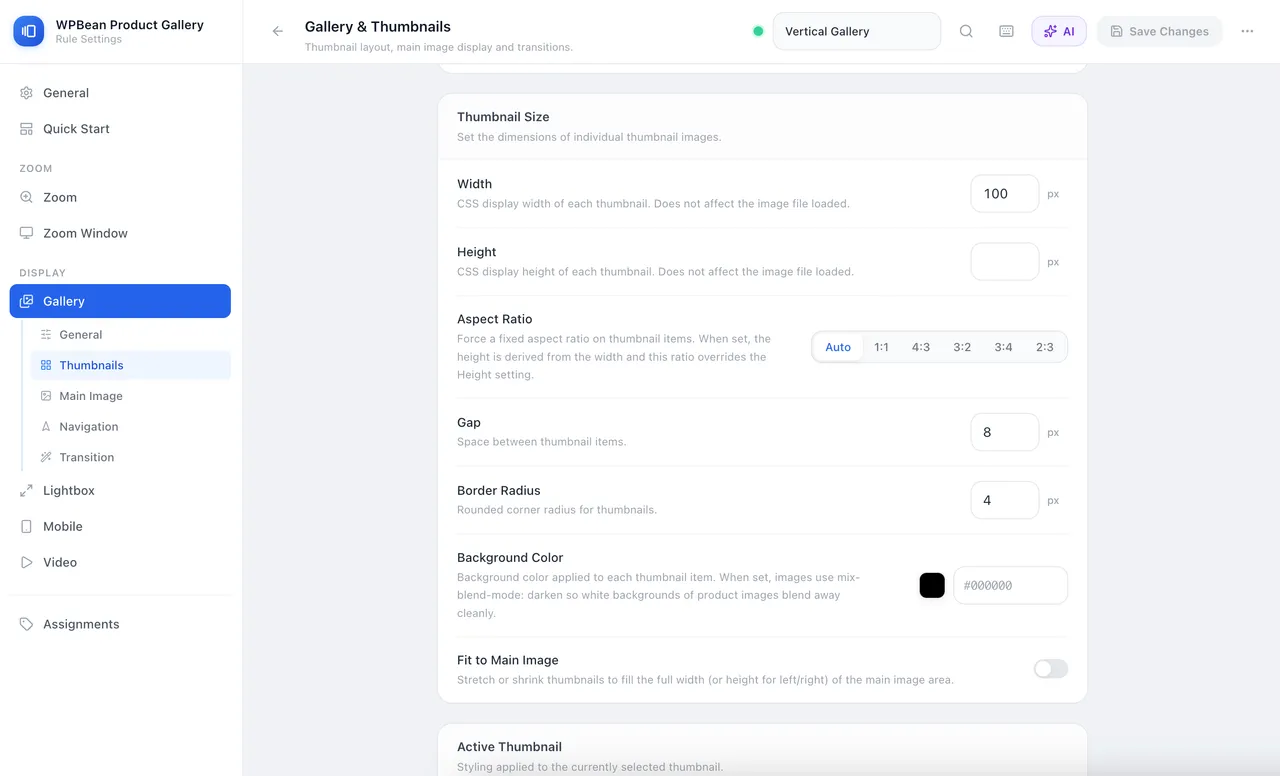
WPBean Product Gallery - Thumbnails Settings 2 -
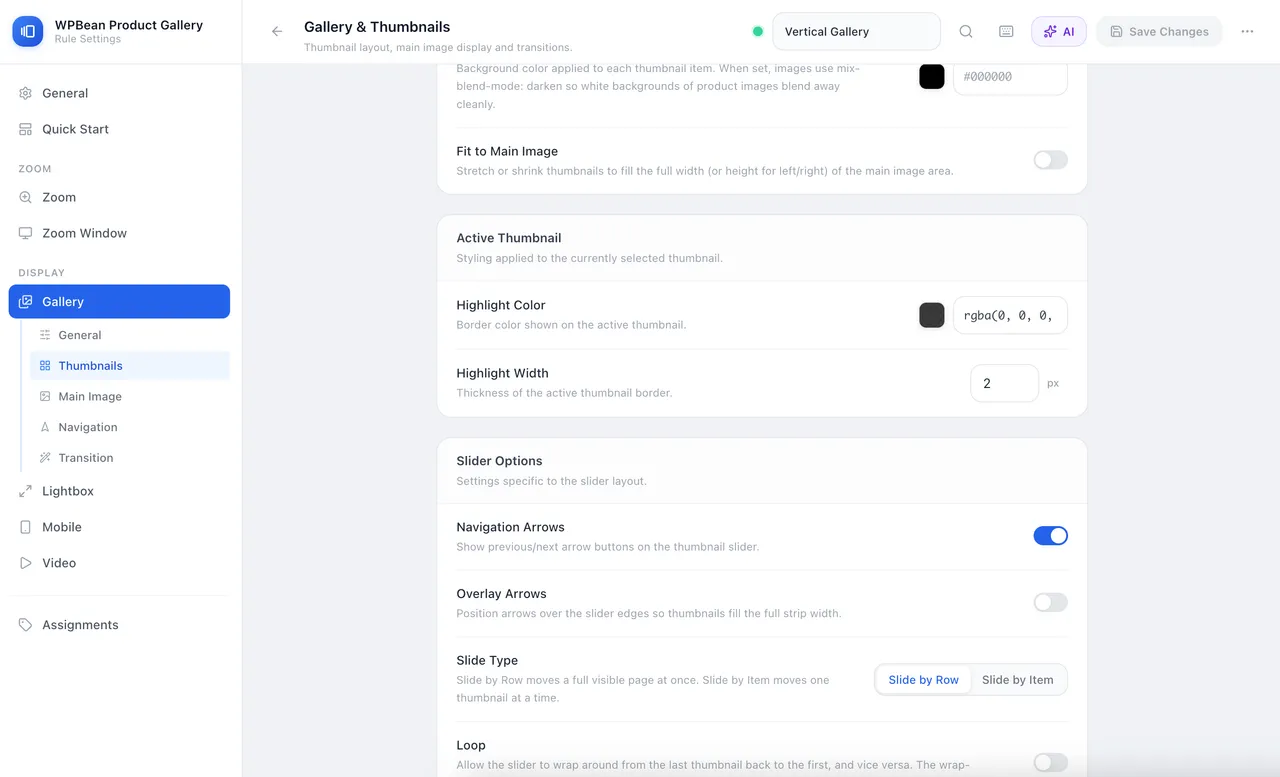
WPBean Product Gallery - Thumbnails Settings 3
Important information
- WooCommerce is required. The plugin needs WordPress 5.8 and PHP 8.3, and is tested up to WordPress 7.1.4.
- PHP 8.3 is a high minimum. Check your host before installing.
- The AI builder sends your prompt or images to the provider you choose, which bills you for usage.
- Some themes override gallery markup. Test on a product page after activation, including a variable product and mobile view.
- The free version has only one gallery rule, and several layouts and zoom types are paid.
From the AI Product Gallery Slider readme
Straight from the developer's WordPress.org listing.
Full description
Upgrade your WooCommerce store with a feature-rich product gallery that combines image sliders, image zoom, product videos, lightbox viewing, and additional variation images in one easy-to-use plugin.
Live Demo | Full Features List | Documentation | Upgrade to Pro!
AI Product Gallery for WooCommerce is a complete WooCommerce product gallery plugin that replaces multiple plugins by combining:
• Product gallery slider
• Product image zoom (hover + lens + window zoom)
• Product video gallery (YouTube, Vimeo, self-hosted)
• Additional variation images
• WooCommerce lightbox gallery
• Mobile-optimized product gallery layouts
• AI-powered gallery assistant
Compatible with WooCommerce’s new Additional Variation Images Gallery feature.
👉 Ideal for anyone searching for:
• WooCommerce product gallery plugin
• WooCommerce product image zoom plugin
• WooCommerce product video gallery
• WooCommerce variation image gallery
• WooCommerce gallery slider plugin
Create beautiful product image galleries with sliders, grids, zoom effects, product videos, variation image galleries, fullscreen lightboxes, mobile touch gestures, vertical product galleries, and advanced gallery layouts.
Whether you run a small online store or a large WooCommerce shop, this plugin helps customers explore products in greater detail, improving engagement and increasing purchase confidence.
Perfect For
• Fashion stores
• Electronics shops
• Furniture stores
• Jewelry stores
• Beauty and cosmetics stores
• Digital product showcases
• Handmade product stores
• Any WooCommerce website that wants better product image presentation
Why Use This Plugin?
Customers cannot physically touch products in an online store.
High-quality product galleries, zoom functionality, videos, and variation-specific images help shoppers inspect products more closely and make purchasing decisions faster.
This plugin allows you to:
• Show products from multiple angles
• Add product demonstration videos
• Display different galleries for different variations
• Create mobile-friendly product galleries
• Improve product image navigation
• Increase customer engagement
• Reduce uncertainty before purchase
• Build a professional WooCommerce shopping experience
Free Features
🚀 AI-Powered Product Gallery Builder
Generate complete WooCommerce product gallery layouts using AI.
Features include:
• AI product gallery generator from text prompt
• AI gallery layout suggestions from images
• AI-assisted gallery rule creation
• Works with OpenAI, Claude, Gemini, MiMo
👉 Perfect for fast WooCommerce gallery setup without manual configuration.
Product Gallery Layouts
Build attractive WooCommerce product galleries with flexible layout controls.
Features include:
• Thumbnail gallery layout
• Main image with thumbnail strip
• Horizontal product gallery
• Vertical product gallery
• Thumbnail position:
** Top
** Bottom
** Left
** Right
• Thumbnail slider layout
• Thumbnail grid layout
• Thumbnail sizing controls
• Thumbnail spacing controls
• Border radius customization
• Active thumbnail highlighting
• Responsive gallery behavior
Product Gallery Slider
Create smooth image sliders for WooCommerce products.
Features include:
• Navigation arrows
• Overlay arrows
• Drag navigation
• Swipe navigation
• Scroll navigation
• Loop functionality
• Slider controls
• Smooth image transitions
Supported transition effects:
• Fade
• Slide
• Zoom
• None
Product Image Zoom for WooCommerce
Allow customers to inspect products in greater detail.
Included zoom features:
• Inner zoom
• Hover zoom
• Adjustable magnification levels
• Smooth zoom easing
• Custom cursor styles
• Crosshair cursor
• Zoom-in cursor
• Default cursor mode
Perfect for:
• Clothing stores
• Jewelry stores
• Electronics stores
• Furniture stores
• High-detail product photography
WooCommerce Lightbox Gallery
Show images in a beautiful fullscreen gallery.
Features include:
• Fullscreen lightbox
• Click-to-open gallery
• Expand button
• Keyboard navigation
• Previous/next arrows
• Image counter
• Image captions
• Thumbnail pagination
• Dot pagination
• Zoom controls
• Autoplay slideshow
• Fullscreen toggle
• Smooth open and close animations
Product Video Gallery for WooCommerce
Easily add videos to your WooCommerce product gallery.
Supported video sources:
• YouTube videos
• Vimeo videos
• Self-hosted videos
• WordPress Media Library videos
Video options:
• Autoplay
• Mute
• Loop
• Controls
• Responsive video display
• Fit-to-container settings
If you are searching for:
• How To Add Videos In WooCommerce Product Gallery
• WooCommerce Product Video Gallery
• Product Video Slider for WooCommerce
this plugin provides a complete solution.
Additional Variation Images for WooCommerce
Improve product variation presentation.
Features include:
• Automatic image switching
• Variation image replacement
• Instant gallery updates
• Better color and style selection experience
When a customer selects a product variation, the main image updates automatically to match the chosen variation.
Mobile Optimized Product Gallery
Designed for modern mobile shopping.
Features include:
• Mobile gallery layouts
• Mobile navigation arrows
• Mobile thumbnails
• Touch gestures
• Pinch-to-zoom
• Swipe navigation
• Responsive breakpoints
• Optimized mobile experience
Gallery Navigation Features
• Navigation arrows
• Auto-hide arrows
• Dot pagination
• Scroll navigation
• Swipe navigation
• Drag navigation
• Transition effects
• Direction controls
• Animation duration controls
Performance Features
Built with performance in mind.
Features include:
• Image preloading
• Loading spinner
• Optimized gallery rendering
• Fast image switching
• Smooth animations
• Responsive loading
Gallery Rules System
Create gallery presets and assign them to products.
Free version includes:
• One gallery rule
• Apply globally
• Apply to selected products
• Apply to selected categories
Premium Features
Upgrade to unlock advanced WooCommerce gallery functionality.
Advanced Gallery Layouts
Hierarchy Grid Gallery
Display a large featured image followed by a multi-column image grid.
Features include:
• Hero image
• Grid layouts
• Custom columns
• Aspect ratio controls
• Image fit options
• Border radius controls
• Zoom support
Anchor Navigation Gallery
Create a modern scroll-linked gallery experience.
Features include:
• Scroll navigation
• Dot navigation
• Thumbnail navigation
• Overlay navigation
• Custom navigation styling
• Smooth scrolling
Ideal for users searching for:
• Anchor Navigation Gallery for WooCommerce
• Long Product Image Gallery
• Scroll-Based Product Gallery
Sticky Split Gallery
Create immersive product galleries with a sticky image viewer.
Features include:
• Sticky image column
• Scrollable image column
• Sticky offsets
• Click synchronization
• Zoom support
• Lightbox integration
Tiles Gallery
Display images in attractive tile layouts.
Features include:
• Equal-sized image tiles
• Show More button
• Show Less button
• Responsive grids
• Aspect ratio controls
Advanced Zoom Types
Lens Zoom
Create a magnifying lens effect directly on product images.
Features include:
• Circular lens
• Square lens
• Custom lens size
• Border styling
• Lens customization
Window Zoom
Display zoomed content in a separate panel.
Features include:
• Dedicated zoom window
• Custom positioning
• Window sizing controls
• Shadow controls
• Border controls
• Fade animations
Variation Gallery for WooCommerce
Create unique galleries for every variation.
Features include:
• Multiple images per variation
• Complete gallery replacement
• Variation-specific galleries
• Improved product presentation
Perfect for:
• Clothing stores
• Shoe stores
• Furniture stores
• Products with many color options
Sticky Product Summary
Keep important purchase elements visible.
Features include:
• Sticky product title
• Sticky product price
• Sticky Add to Cart button
• Responsive controls
• Offset customization
Advanced Gallery Pagination
Additional navigation styles:
• Progress bar pagination
• Numeric count pagination
• Gallery counters
Advanced Lightbox Features
Unlock professional image viewing tools.
Features include:
• Swipe navigation
• Mouse drag navigation
• Loop images
• Mouse wheel zoom
• Single image mode
• Rotate image
• Flip image
• 1:1 zoom
• Social sharing
• Image downloads
Advanced Gallery Rules System
Create unlimited gallery presets.
Features include:
• Unlimited gallery rules
• Category-specific galleries
• Product-specific galleries
• Rule duplication
• Advanced gallery management
Frequently Used Search Terms
Users often find this plugin when searching for:
• AI Gallery Assistant for WooCommerce
• AI Product Gallery Generator
• Product Image Zoom for WooCommerce
• WooCommerce Product Gallery Slider
• Product Video Gallery for WooCommerce
• Additional Variation Images for WooCommerce
• Variation Images Gallery for WooCommerce
• Vertical Product Gallery WooCommerce
• WooCommerce Product Image Carousel
• WooCommerce Lightbox Gallery
• WooCommerce Zoom Plugin
• WooCommerce Product Gallery Plugin
• WooCommerce Product Video Plugin
• WooCommerce Gallery Layouts
• WooCommerce Product Image Viewer
• WooCommerce Image Magnifier
• WooCommerce Gallery Slider Plugin
• WooCommerce Gallery With Video
• WooCommerce Variation Gallery Plugin
• WooCommerce Gallery Grid
• WooCommerce Product Gallery Customization
• Best Gallery for Single Product Shop
• Product Gallery Plugin for WooCommerce
Replace Multiple Plugins With One
Instead of installing separate plugins for:
• Product image zoom
• Product gallery slider
• Product videos
• Variation galleries
• Additional variation images
• Product lightbox
• Mobile gallery optimization
you can manage everything from one plugin.
This reduces plugin conflicts, simplifies management, and helps maintain a consistent user experience throughout your WooCommerce store.
Built for WooCommerce
The plugin is designed specifically for WooCommerce and integrates seamlessly with your existing products, variations, themes, and store layouts.
Whether you need a simple product image zoom or a complete advanced WooCommerce gallery system with videos, variation galleries, anchor navigation, sticky layouts, and fullscreen lightboxes, this plugin provides the tools you need to create a professional product viewing experience.
Installation
• Install it as a regular WordPress plugin
• Active the plugin.
• Go to any single product page of Woocommerce product.
• Hover product image.
Developer FAQ (19)
- What does this plugin replace in my WooCommerce store?
- This plugin is an all-in-one gallery engine that replaces standalone plugins for image zoom, gallery sliders, product videos, additional variation images, and full-screen lightboxes.
- Do I need coding skills to configure the layouts?
- No coding knowledge is required. You can manage layouts, zoom styles, video integrations, and global rules entirely through an intuitive admin settings interface.
- Is this gallery plugin fully mobile responsive?
- Yes. The plugin features a mobile-first design that supports touch gestures, swipe navigation, and pinch-to-zoom for an optimized mobile shopping experience.
- How do the Gallery Presets and Rules systems work?
- You can build specific layout presets and use the rules system to assign them globally, to selected products, or to specific product categories.
- Can I change the position of the product gallery thumbnails?
- Yes. You can position the thumbnail strip at the top, bottom, left, or right of the main image, or switch between slider and grid structures.
- What are the premium advanced layout modes?
- Upgrading unlocks high-end layouts like the Hierarchy Grid, Scroll-Linked Anchor Navigation, Sticky Split columns, and interactive Tile layouts with show more/less options.
- What types of image zoom effects are included?
- The free version includes high-detail Inner and Hover zoom options, while the premium version introduces advanced Lens Zoom and dedicated Window Zoom panels.
- What interactive tools are available inside the full-screen Lightbox?
- The lightbox includes navigation arrows, image counters, captions, and autoplay slideshows. The premium version adds image rotation, mirror flipping, 1:1 scaling, social sharing, and downloads.
- Which video streaming platforms are supported for product galleries?
- You can embed videos directly into the gallery timeline using YouTube, Vimeo, self-hosted files, or videos from your WordPress Media Library.
- How does the plugin handle variable products?
- When a customer selects a variation, the main gallery instantly replaces or updates the images to match that specific choice. The Pro version supports full multi-image galleries per variation.
- Does this plugin work with any WordPress theme?
- Yes. It integrates seamlessly with popular modern themes, page builders, and core WooCommerce hooks while utilizing a standalone architecture to prevent theme styling conflicts.
- Will adding multiple gallery features slow down my product pages?
- No. The plugin was completely rewritten from the ground up to minimize frontend assets, reduce HTTP requests, eliminate dependency on heavy third-party libraries, and preload images for fast switching.
- How does the AI-powered Product Gallery Assistant work?
- The AI Gallery Assistant helps you create product gallery designs using simple text instructions or reference images. Describe the gallery style you want, upload an example design, and AI will suggest suitable gallery layouts and settings.
- Can I use my own AI API key with this feature?
- Yes. You can connect your own AI provider API key and use AI features directly inside the plugin. This gives you full control over your AI usage and API settings.
- Can AI create a gallery layout from an example image?
- Yes. Upload a reference image of a gallery design you like, and the AI can analyze the style, layout, and structure to suggest a similar product gallery setup.
- What can I ask AI to create for my product gallery?
- You can request different gallery styles, thumbnail positions, slider layouts, zoom experiences, product showcase ideas, and more based on your store’s design requirements.
- Can I customize the AI-generated gallery settings?
- Yes. AI provides a starting point, and you can fine-tune every gallery option afterward to match your brand style and shopping experience.
- What are Gallery Quick Start presets?
- Gallery Quick Start provides 12+ ready-made gallery presets that allow you to instantly create different product gallery layouts with a single click. You can customize any preset from the gallery settings afterward.
- Can I use AI and presets together?
- Yes. You can start with a ready-made preset and use AI suggestions to customize or create a gallery style that matches your product presentation needs.
Downloads, last 30 days
Trend vs previous period: -1.7%
Average daily downloads: 45 over the last 7 days , 62 over 30 days.
Security history
No known CVEs · 0 published vulnerabilities (Wordfence)
AI Product Gallery Slider FAQ
What does it replace?
It combines image zoom, gallery sliders, product videos, variation images and a fullscreen lightbox, so you do not need a plugin for each.
Do I need to code?
No. Layouts, zoom styles, video settings and rules are handled in the admin settings.
Is it mobile friendly?
Yes. It supports touch gestures, swipe navigation and pinch-to-zoom, with responsive breakpoints.
How do presets and rules work?
You build a layout preset, then use a rule to apply it to all products, selected products or categories. The free version allows a single rule.
Can I move the thumbnails?
Yes. Put them at the top, bottom, left or right, and choose a slider or grid strip.
Which zoom types are free?
Inner and hover zoom are free. Lens zoom and a separate zoom window are in the paid version.
Which video sources work?
YouTube, Vimeo, self-hosted files and videos from your Media Library.
How are variable products handled?
The gallery switches to the image for the selected variation. Full multi-image galleries per variation need the paid version.
AI Product Gallery Slider alternatives

Element Pack Lite is a powerful Elementor addon that extends the Elementor page builder with advanced Elementor widgets, ready-made Elementor templates and design extensions. Build professional WordPress websites…

WP Carousel builds carousels, 3D carousels, sliders, slideshows, grids and photo galleries right in the WordPress block editor, from your images, posts, WooCommerce products and YouTube or Vimeo videos. Start from a…

🏆 The #1 WooCommerce Product Feed Manager Plugin trusted by 90,000+ online stores worldwide. Stop losing sales to rejected product feeds. CTXFeed is the most powerful product feed plugin for WooCommerce , designed…

BEAR - WooCommerce Bulk Editor and Products Manager Professional (former name is WOOBE) is WordPress plugin for woocommerce bulk edit woocommerce products in the robust and flexible way! With a built-in MCP server,…

Want to build a multivendor marketplace where multiple vendors sell, and you earn on every transaction? Dokan is the easiest and fastest way to launch a multivendor marketplace on WordPress. Dokan is a well…

Built for Shop, Ready for Every Website. BEW gives Elementor the widgets, templates, and AI tools to launch and grow your online store - or any website - faster. WooCommerce is at its core, with 16 widgets built for…
Listing data from WordPress.org and the Wordfence vulnerability feed, refreshed Nov 9, 2026; listing details fetched Nov 14, 2026. Screenshots are from the plugin's WordPress.org listing. Not affiliated with WPBean.