

YLabs AI Site Manager
YLabs AI Site Manager with ChatGPT and Claude · by YLabs
- active installs
- 5K+
- 1 ratings
- 5.0
- since last update
- 20d
- releases in 12 months
- —
- support threads resolved
- —
- avg daily downloads
- 193
- on WordPress.org
- 9 months
YLabs AI Site Manager at a glance
YLabs AI Site Manager is a free WordPress AI SEO plugin by YLabs with 5K+ active installs and a 5.0/5 rating from 1 reviews. It was last updated on Oct 20, 2026, is tested up to WordPress 7.1.4 and needs PHP 7.4+. It works with OpenAI, Claude, Google Gemini. It has no published security vulnerabilities in the Wordfence database. Our quality score is 90/100.
What is YLabs AI Site Manager?
YLabs AI Site Manager is the WordPress connector for WPWriter, a content service from YLabs. The plugin pairs your site with a WPWriter account so you can ask ChatGPT or Claude to draft, edit and schedule posts, update SEO fields and add media. The AI work runs on WPWriter's servers, not on your WordPress host.
It is for site owners who want an AI assistant to handle routine content jobs. WPWriter includes article generation, auto-blogging from a topic queue, image generation, SEO title and description writing, content improvement and a content health view. You can manage several WordPress sites from one WPWriter dashboard.
The service uses a bring-your-own-key model. You connect your own OpenAI, Anthropic or Google key and pay those providers directly. The plugin is limited to content work even if you pair as an Administrator, and it cannot install plugins, manage users or change permalinks.
Best for
- Owners who want ChatGPT or Claude to draft and schedule posts
- Bloggers running a topic queue with draft-first review
- Agencies handling several WordPress sites in one dashboard
- People who prefer paying AI providers directly
YLabs AI Site Manager features
Pairing-code connection
Generate a code in the plugin and paste it into your WPWriter dashboard. Codes expire after 10 minutes and each connection can be revoked.
AI article generation
A guided wizard creates full articles and pages using templates, with plain HTML output that your theme styles.
Auto-blogging
Build a topic queue, pick templates and models and schedule runs. Posts stay as drafts or publish only after quality checks pass.
SEO field writing
Generate SEO titles, descriptions and supported focus keywords for Yoast SEO, Rank Math and All in One SEO.
Image generation and editing
Create images with models such as DALL-E, Imagen and Stability AI, and upscale or enhance existing images.
Content improvement
Rewrite, expand and improve existing posts, and get topic ideas for your niche.
Site content health
Spot weak pages and get improvement suggestions based on SEO performance.
Multi-site management
Run several WordPress sites from one dashboard, and connect several WPWriter accounts if needed.
Taxonomy and post type tools
Manage categories and tags, and convert posts to pages or the reverse.
YLabs AI Site Manager free vs pro
Free WordPress.org version
- Free WPWriter account with 15 AI-generated posts and 20 AI-generated images for one site
- The connector plugin itself
- No credit card required
Pro Paid version
- Paid plans add more sites, higher word counts and additional features
The plugin is free. WPWriter has a free plan with limited posts and images, plus paid plans whose prices the listing does not give. AI usage needs your own OpenAI, Anthropic or Google API key, and those providers bill you directly.
How to use YLabs AI Site Manager
- Create a WPWriter account
Sign up for a free account on the WPWriter website.
- Install the plugin
In wp-admin go to Plugins, then Add New, search for YLabs AI Site Manager, install it and click Activate.
- Generate a pairing code
Open the WPWriter menu in wp-admin, click Generate Pairing Code and give the connection a name.
- Paste the code into WPWriter
Copy the code into your WPWriter dashboard to link the site.
- Add your AI key and request content
Enter your OpenAI, Anthropic or Google key in WPWriter, then ask for posts, edits or scheduled runs.
YLabs AI Site Manager screenshots (7)
-
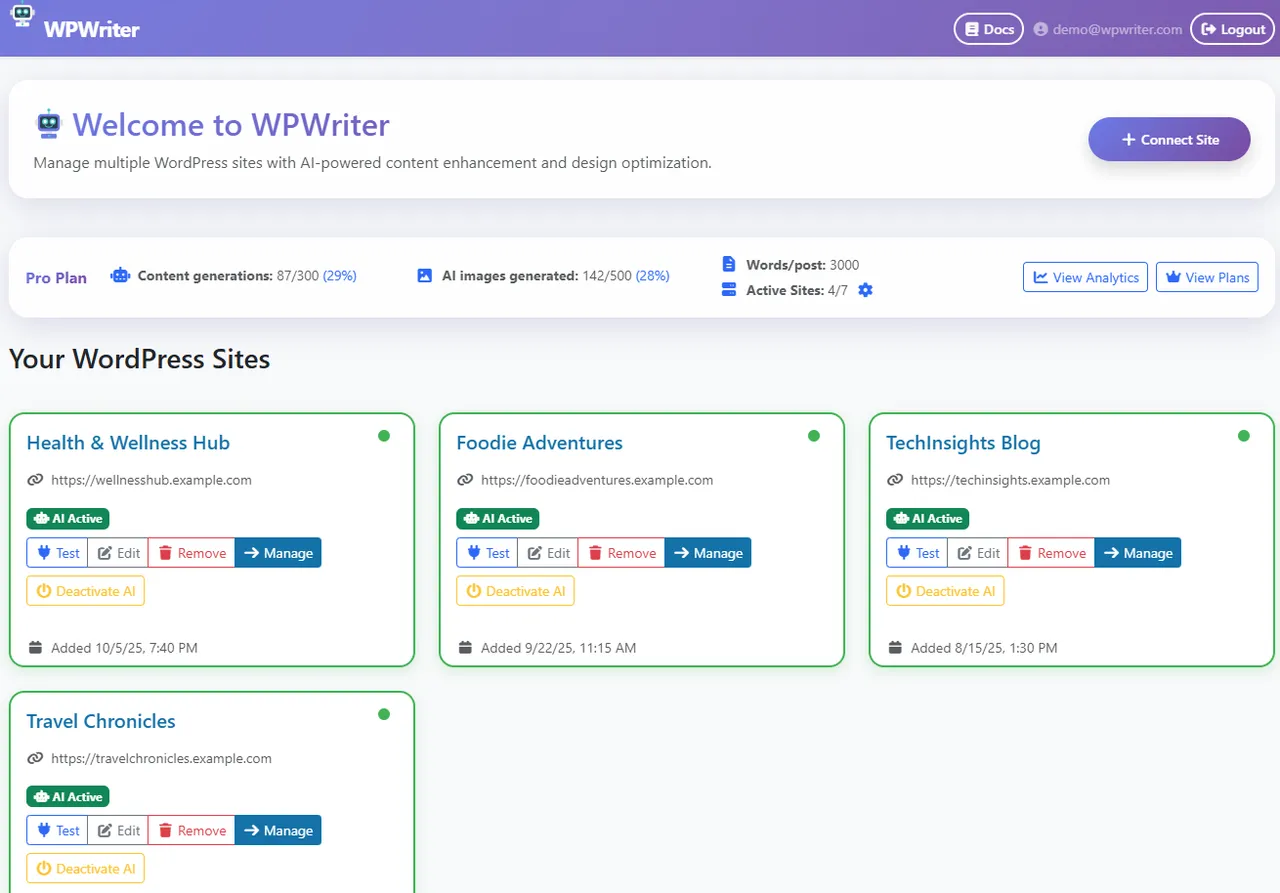
Multi-site dashboard — manage all your WordPress sites from one place -
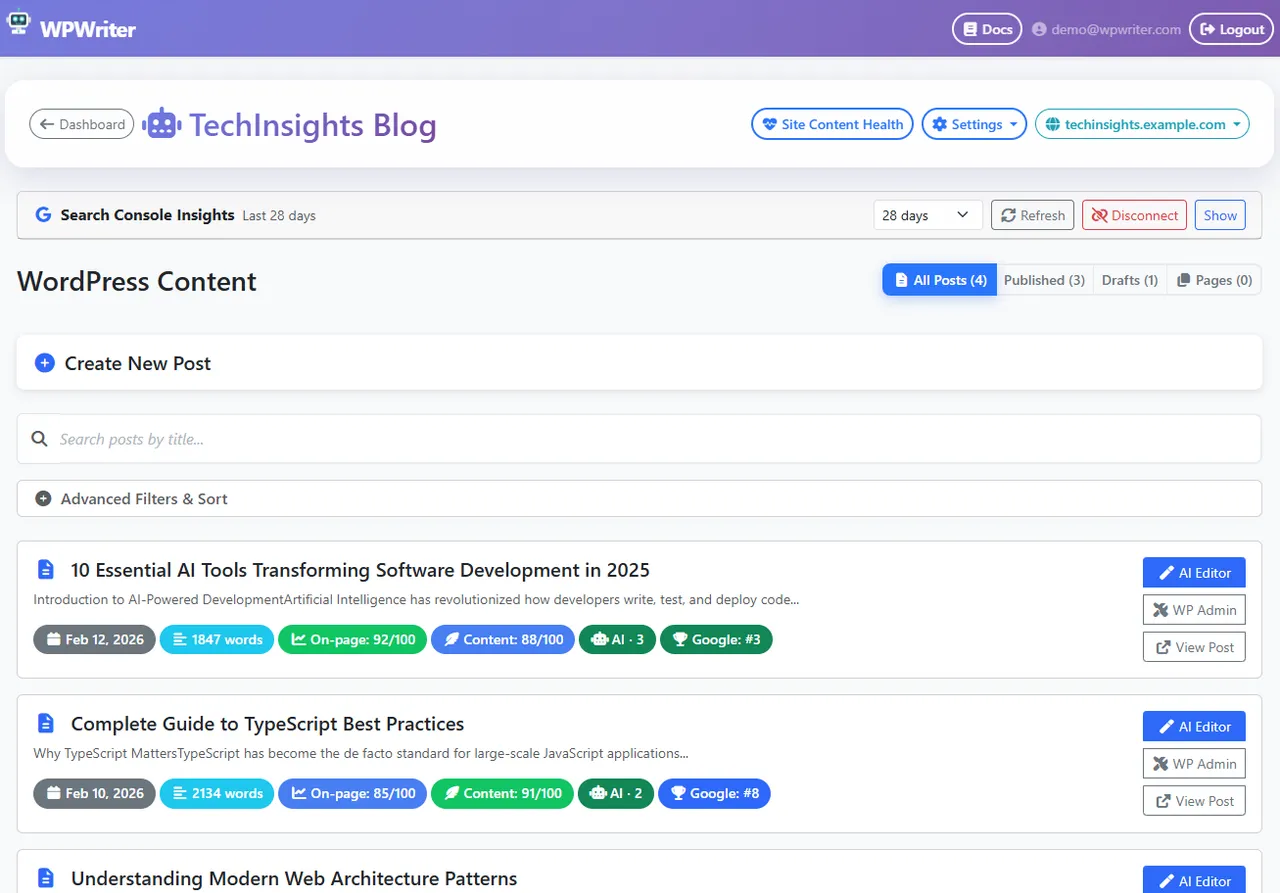
Post list with SEO scores — see content quality and SEO grades at a glance -
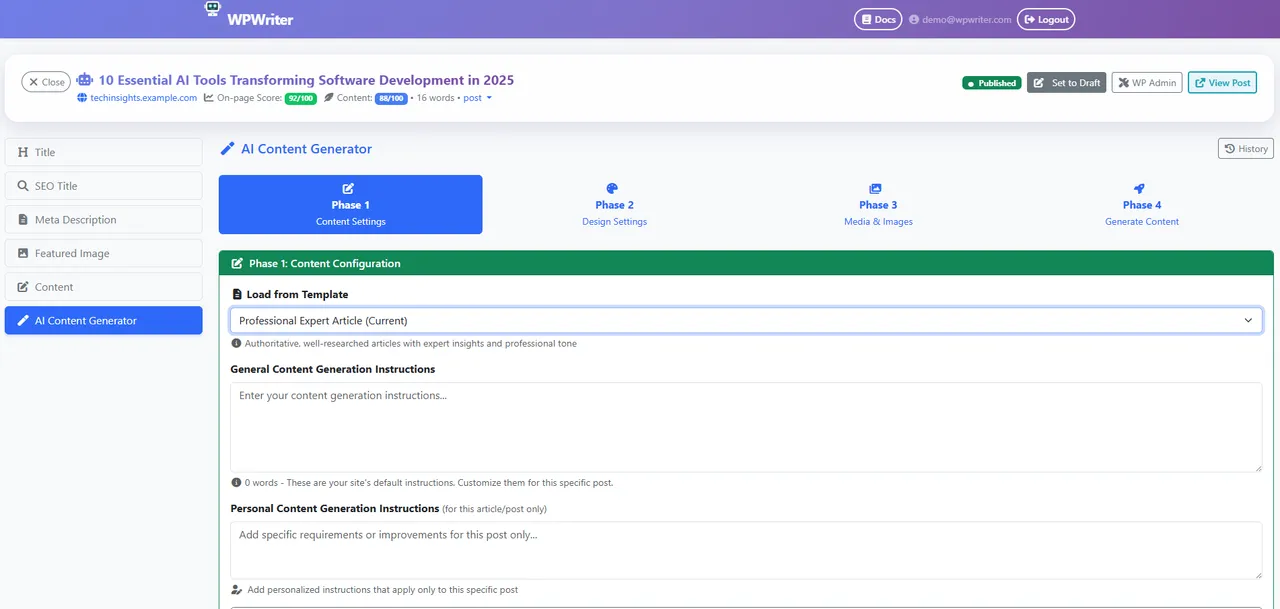
AI Editor: Content Settings — configure topic, guidelines, and content templates -
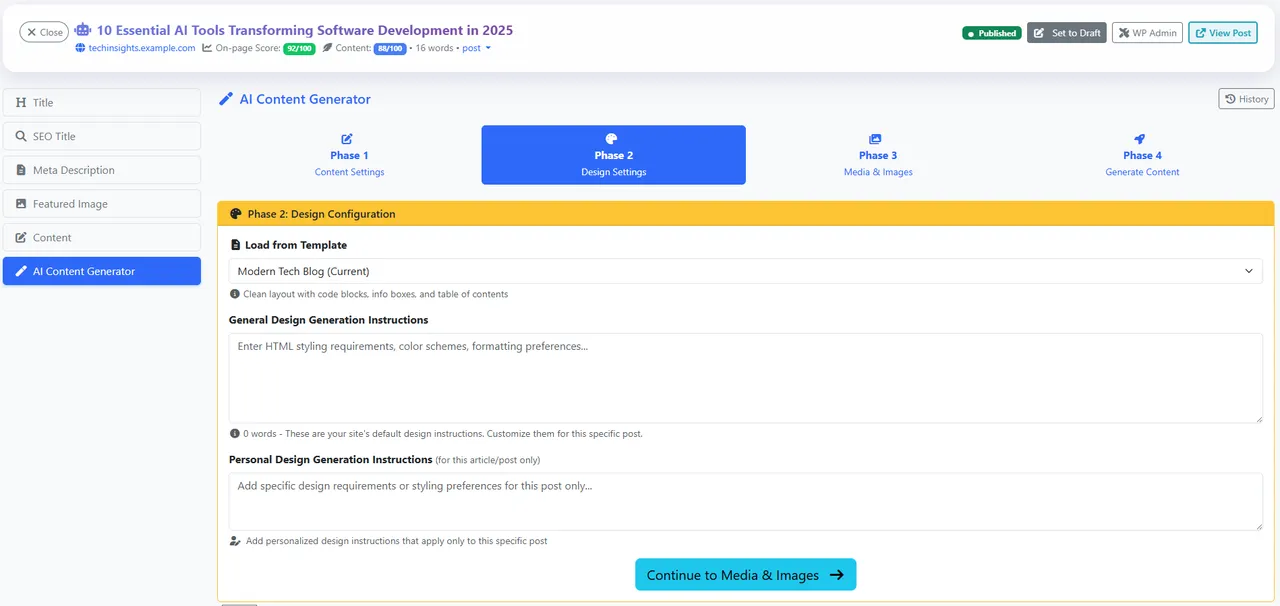
AI Editor: Design Settings — control visual layout with design templates -
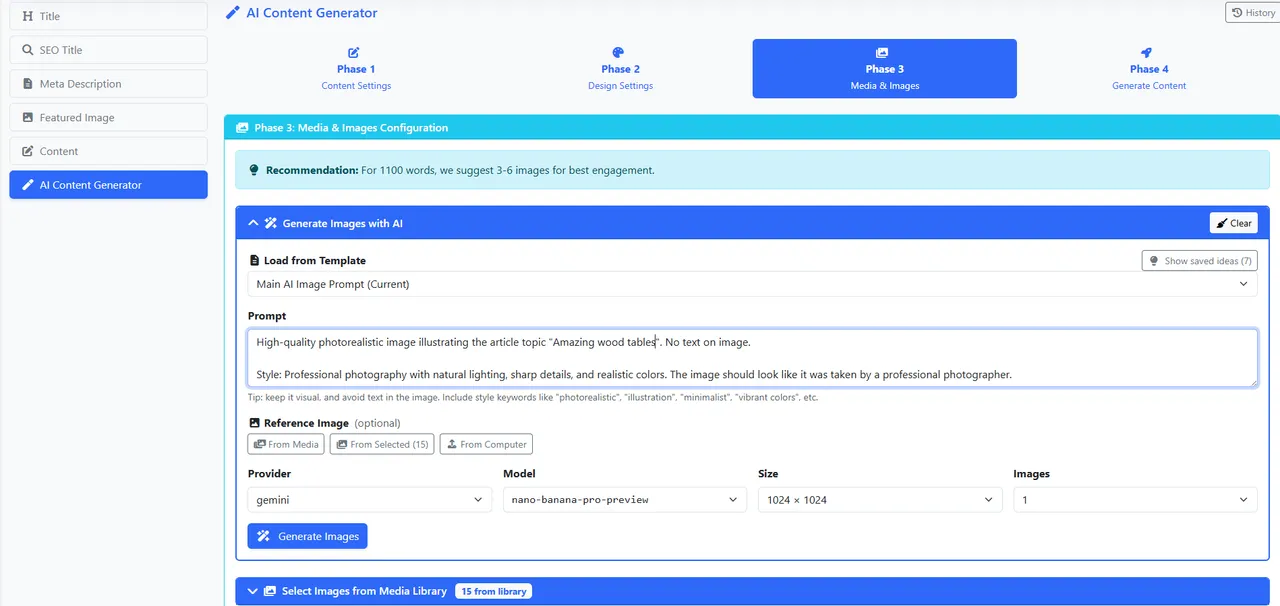
AI Editor: Media & Images — select and manage images for your content -
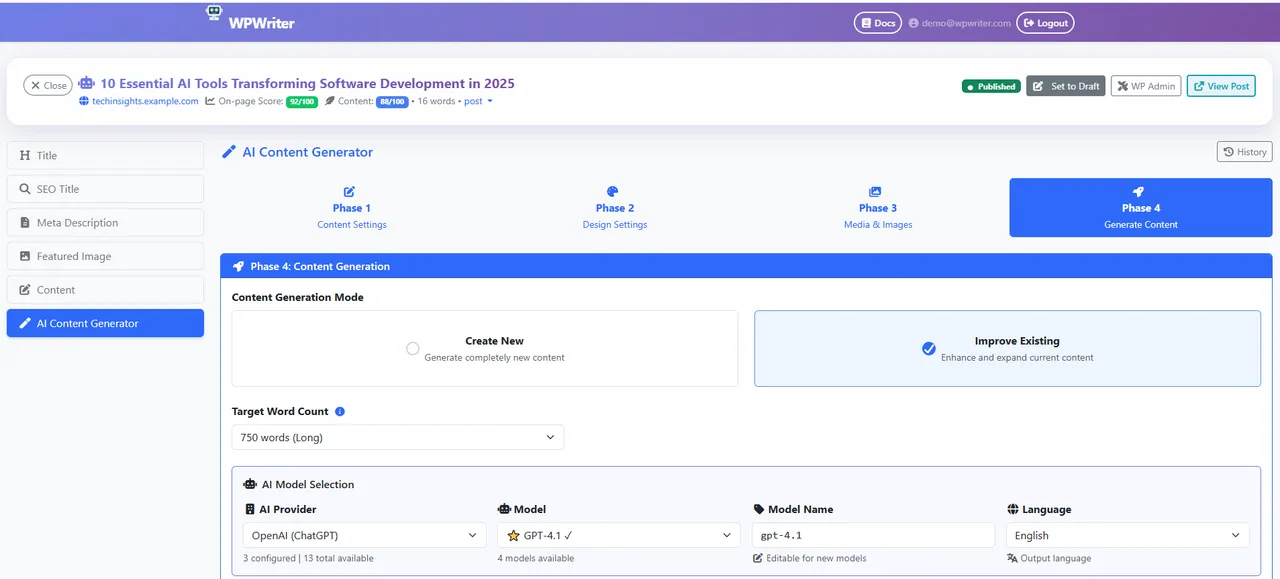
AI Editor: Generate — choose your AI model and generate complete content -
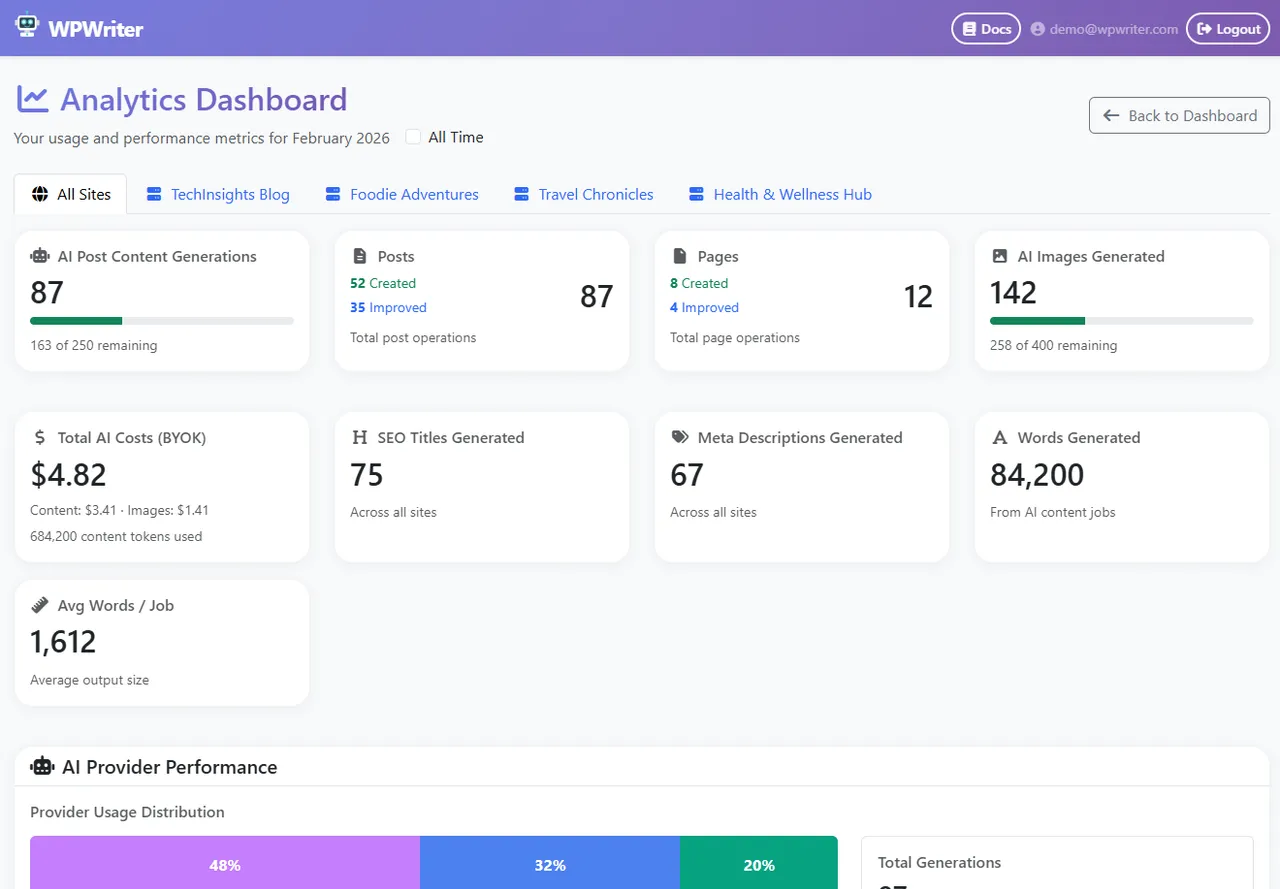
Analytics dashboard — track AI usage, costs, and content performance
Important information
- Requires a WPWriter account. Your site URL, connector details and content you create or publish are exchanged with WPWriter.
- You need your own API key from OpenAI, Anthropic or Google, and you pay those providers at their standard rates.
- WPWriter can create, edit, publish and delete posts and pages, manage media and comments, and edit menus, widgets and WooCommerce products.
- It cannot install, update or edit plugins and themes, manage users, or change permalinks and other general settings. Display settings change only if you pair as an Administrator.
- Requires WordPress 5.6 or newer and PHP 7.4 or newer. Tested up to WordPress 7.1.4.
- The plugin never sends stored API keys or passwords to WPWriter. A key saved in WordPress Connectors cannot be imported.
From the YLabs AI Site Manager readme
Straight from the developer's WordPress.org listing.
Full description
Manage your self-hosted WordPress site from ChatGPT or Claude with WPWriter. Ask WPWriter to draft, edit or schedule posts, update SEO fields and add media to your site.
YLabs AI Site Manager is the WordPress connector for WPWriter, a service made by YLabs. The plugin pairs your site with your WPWriter account so that WPWriter can carry out the content requests you make.
WPWriter is made by YLabs and is not affiliated with OpenAI, Anthropic or the WordPress Foundation. ChatGPT, Claude and WordPress are trademarks of their owners.
WPWriter uses a BYOK (Bring Your Own Key) model: connect your OpenAI, Anthropic (Claude), or Google (Gemini) API key and pay the AI providers directly at their standard rates. You keep full control over your AI costs.
With auto-blogging, build a topic queue, choose your templates and AI models, schedule content runs, and control whether completed posts stay as drafts or publish only after configured quality checks pass.
A free WPWriter account includes 15 AI-generated posts and 20 AI-generated images. No credit card required.
What Can You Do With WPWriter?
• AI Content Creation — Generate complete, publish-ready articles and pages with a guided wizard: content settings, design settings, media selection, and generation
• Auto-Blogging — Schedule content from a topic queue with draft-first review or quality-gated auto-publishing controls
• AI Image Generation — Create images with DALL-E, Imagen, Nanobanana (Gemini), Stability AI and other models, with optimization and batch upload
• AI SEO Optimization — Automatically generate SEO titles, descriptions, and supported focus keywords with AI, supporting Yoast SEO, Rank Math, and All in One SEO
• AI Content Improvement — Improve, expand, and rewrite existing posts with AI assistance
• AI Image Enhancement — Upscale, enhance, or reimagine existing images
• Site Content Health — Monitor SEO performance, identify weak pages, and get actionable improvement recommendations
• Content Ideas — Get AI-powered topic suggestions tailored to your niche
• Content & Design Templates — Use built-in templates or create your own for consistent content style and HTML design across posts
• Shortcode Embedding — Embed contact forms, videos, product grids, or any WordPress shortcode into AI-generated content
• Featured Image Management — Upload, optimize, and set featured images with automatic resizing and quality control
• Multi-Site Management — Manage multiple WordPress sites from one WPWriter dashboard
• Post Type Conversion — Convert posts to pages or pages to posts with a single click
• Category & Tag Management — Create and organize taxonomies directly from WPWriter
Content for Any Scenario
WPWriter uses customizable prompt templates to create content for virtually any type of page:
• Articles & Blog Posts — Expert pieces, friendly advice, technical guides, creative storytelling, SEO-balanced articles
• Product Pages — Feature showcases, comparisons, quick overviews with specs
• Pages with Forms & Media — Contact pages, service pages with quote forms, video tutorial pages
• Home Pages — Landing pages with compelling copy and structured layouts
• Custom Content — Write your own prompt or customize existing templates
Every template is open-source and free to use. Modify them or build your own from scratch.
Supported AI Models
Choose a model for each task:
Text & Content:
* Claude (Anthropic) — Opus 4.6, Sonnet 4.5, Haiku 4.5, and more
* Gemini (Google) — 2.5 Pro, 2.5 Flash, 2.0 Flash, and more
* GPT (OpenAI) — GPT-4o, GPT-4.1, o3, o4-mini, and more
Image Generation:
* Nanobanana (Gemini) — Realistic images
* Imagen 4 Ultra / Imagen 4 (Google)
* DALL-E 3 / DALL-E 2 (OpenAI)
Plain HTML Output
WPWriter writes plain, semantic HTML that your theme styles. It does not need a page builder.
What WPWriter Can and Cannot Do on Your Site
WPWriter acts as the WordPress user you pair with, but always with the limits below, even if that user is an Administrator.
WPWriter can:
• create, edit, schedule, publish and delete posts and pages
• upload and edit media, and manage categories, tags and comments
• save full HTML in posts and pages (styles, embeds and structured data), as a WordPress Editor can
• edit menus, menu locations and widgets
• read the active theme and which SEO plugin is installed, and save SEO fields on posts
• edit WooCommerce products, if WooCommerce is installed
• read the site display settings, and change them only when you pair as an Administrator (site title, tagline, homepage settings, posts per page, date and time format, timezone, week start, site icon, site logo, default comment and ping status)
WPWriter cannot:
• install, activate, update, edit or delete plugins or themes, or update WordPress
• create, edit, delete or list users, or change anyone’s role
• change any other setting, such as the admin email, membership, permalinks or search engine visibility
• read passwords, API keys or other stored secrets from your site
• edit theme or plugin files, upload unfiltered file types, or import or export site data
Security
• Token-based authentication — no WordPress passwords stored or transmitted
• Pairing codes expire after 10 minutes
• Each connection can be individually revoked
• All API requests are authenticated and validated
• Supports multiple simultaneous WPWriter account connections
• Every WPWriter request is limited to content work, even for an Administrator: the plugin removes plugin, theme, update, user, file, import/export, unfiltered upload and general-settings capabilities for the duration of each request
• No stored secret ever leaves the site: there is no endpoint that reads API keys or passwords
• The plugin respects a host or security plugin that turns off WordPress Application Passwords
External Service Disclosure
This plugin connects to WPWriter (wpwriter.com) to enable content management features. When connected:
• Your site URL and connector authentication details are associated with your WPWriter account so authenticated site-management requests can be made
• Content you create, sync, publish, or schedule through auto-blogging is transmitted between WPWriter and your WordPress site as required to perform those actions
• The plugin never sends passwords, API keys or other stored secrets from your site to WPWriter
WPWriter Terms of Service
WPWriter Privacy Policy
Installation
Setup takes about 2 minutes:
• Create a free account at wpwriter.com.
• Install the plugin: upload the ylabs-connector-for-wpwriter folder to /wp-content/plugins/, or install directly through Plugins > Add New in WordPress.
• Activate the plugin through the Plugins screen.
• Go to WPWriter in your WordPress admin menu.
• Click Generate Pairing Code and enter a name for this connection (e.g., “My Laptop”).
• Copy the pairing code and paste it into your WPWriter dashboard to connect.
Developer FAQ (13)
- Is WPWriter free?
- Yes. The free plan includes 15 AI-generated posts and 20 AI-generated images for one WordPress site. No credit card required. Paid plans unlock more sites, higher word counts, and additional features.
- Do I need my own AI API key?
- Yes. WPWriter uses a BYOK (Bring Your Own Key) model — you connect your own API keys for OpenAI, Anthropic (Claude), or Google (Gemini). This means zero markup on AI costs. You pay the AI providers directly at their standard rates.
- Can WPWriter publish blog posts automatically?
- Yes. Auto-blogging lets you build a topic queue and schedule AI-generated posts. You control publication behavior: keep posts as drafts for review or allow publishing after your configured quality checks pass.
- Can I import an AI key saved in WordPress Settings → Connectors?
- No. Since version 1.15.0 the plugin never sends a stored key or other secret to WPWriter. Enter your AI key in WPWriter directly.
- Can WPWriter install plugins or themes, or change my permalinks?
- No. The plugin has no endpoints for plugins, themes or permalinks, and since version 1.15.0 every WPWriter request runs without those capabilities even when you pair as an Administrator. Make those changes in your WordPress admin. Of the general settings, WPWriter can change only 14 display settings, such as the site title, tagline and homepage, and only when you pair as an Administrator.
- Is my WordPress password shared with WPWriter?
- No. This plugin uses secure token-based authentication. Your WordPress password is never transmitted or stored by WPWriter.
- Will this slow down my WordPress site?
- AI processing runs on WPWriter’s servers, not on your WordPress server.
- Which SEO plugins are supported?
- WPWriter can automatically generate and set SEO titles, descriptions, and supported focus keywords for: * Yoast SEO * Rank Math * All in One SEO
- Are there any recommended companion plugins?
- These plugins work well with WPWriter content. Install them yourself from the plugin directory if you want them: • Classic Editor — WPWriter generates HTML optimized for the classic editor • A Lightbox plugin (e.g., Simple Lightbox or Easy FancyBox) — For full-screen image viewing in galleries • An SEO plugin (Yoast SEO, Rank Math, or All in One SEO) — For AI-generated SEO metadata
- Can I connect multiple WPWriter accounts?
- Yes. Generate multiple pairing codes to connect different WPWriter accounts or devices to the same WordPress site.
- How do I disconnect?
- Go to WPWriter in your WordPress admin menu. You’ll see connected accounts with a Disconnect button next to each one.
- What happens if I deactivate the plugin?
- Your connections are preserved. Reactivate anytime and existing connections still work.
- What happens if I delete the plugin?
- All connection data and settings are removed from your WordPress database.
Downloads, last 30 days
Trend vs previous period: -20.6%
Average daily downloads: 110 over the last 7 days , 193 over 30 days.
Security history
No known CVEs · 0 published vulnerabilities (Wordfence)
Recent releases
- v1.15.0
Every WPWriter request now runs with content-level capabilities only, even when the site is paired as an Administrator: no plugin, theme, WordPress update, user, file editing, import/export,...
- v1.14.0
Renamed to "YLabs AI Site Manager with ChatGPT and Claude" in the readme and the plugin header. The plugin folder and slug are unchanged. * Removed the endpoints that installed, activated or...
- v1.13.1
Security hardening: every request from WPWriter to the plugin needs the site's connection token, and the connected WordPress user must have the matching capability. * Removes the background...
- v1.12.5
Listing update: new title, short description, and animated directory icon (GIF in the plugin directory assets). No code change.
- v1.12.4
Readme and listing text only; no code change.
Show 6 older releases
- v1.12.3
Fixed: on sites with an object cache, every pairing code was rejected as "expired or not found", even seconds after it was generated. The code was held in a transient, which such a cache can drop...
- v1.12.2
The plugin now re-enables WordPress Application Passwords if a security plugin or host turned them off - only where WordPress core itself supports them (HTTPS or local environments). This unblocks...
- v1.12.1
Fixed: "Add widget" failed with a critical error on every site. The next widget slot was calculated from all stored widget keys, including the non-numeric "_multiwidget" key WordPress keeps there,...
- v1.12.0
Added: token-authenticated GET /wp-json/wp-manager/v1/status health-check endpoint. Fixes false "disconnected" status on sites whose security plugins block or redirect URLs containing wp/v2/users...
- v1.11.1
Fixed: download package used incorrect ZIP path separators, causing "the plugin file does not exist" on activation and an undeletable plugin on hosts without the PHP ZipArchive extension. No code...
- v1.10.0
Added WordPress 7.0 Connectors support - import AI provider API keys you already saved in Settings → Connectors instead of entering them twice * Database-stored connector keys only (keys supplied...
YLabs AI Site Manager FAQ
Is it free?
Yes to start. The free plan includes 15 AI-generated posts and 20 images for one site, with no credit card. Paid plans add more sites, higher word counts and more features.
Do I need my own AI key?
Yes. You connect keys for OpenAI, Anthropic or Google and pay them directly, with no markup from WPWriter.
Can it publish posts on its own?
Yes. Auto-blogging schedules posts from a topic queue. You can keep them as drafts or let them publish once your quality checks pass.
Can it install plugins or change permalinks?
No. It has no way to manage plugins, themes or permalinks, even when paired as an Administrator.
Is my WordPress password shared?
No. Authentication uses tokens, so your password is not sent to or stored by WPWriter.
Will it slow my site?
AI processing runs on WPWriter's servers, not on your WordPress server.
Which SEO plugins work with it?
Yoast SEO, Rank Math and All in One SEO, for titles, descriptions and supported focus keywords.
YLabs AI Site Manager alternatives

Real-time SEO guidance, schema, and AI built in. Help search engines and AI systems understand your content. All AI tools included, no hidden fees. Yoast SEO: the #1 WordPress SEO plugin Since 2008, Yoast SEO has…
Rank Math SEO - WordPress AI SEO Plugin to Rank Higher 📈 ★★★★★ Rank Math SEO helps you stay ahead of competitors with AI-powered SEO tools built for today’s search engines and AI assistants. The plugin brings…

AIOSEO - The Original AI SEO Plugin for WordPress All in One SEO is the original WordPress SEO plugin, founded in 2007 and trusted by over 3 million website owners and SEO experts. AIOSEO is a complete AI SEO plugin…

SEOPress - The fast, privacy-first WordPress SEO plugin, ready for AI search Rank higher in Google AND in AI answer engines (ChatGPT, Claude, Perplexity, Gemini). SEOPress is the all-in-one WordPress SEO plugin…
CrawlWP - The WordPress SEO Plugin That Also Gets You Indexed Optimize every page, submit it to search engines (Google, Bing, Yandex, Yep etc) the moment you publish, and see which ones actually indexed it - all…

ThinkRank is an AI SEO plugin for WordPress that helps you write SEO titles and meta descriptions, optimize content around a focus keyword, add schema markup, generate XML sitemaps, and review Google Search Console…
Listing data from WordPress.org and the Wordfence vulnerability feed, refreshed Nov 9, 2026; listing details fetched Nov 14, 2026. Screenshots are from the plugin's WordPress.org listing. Not affiliated with YLabs.